
by Contributed | Mar 5, 2021 | Technology
This article is contributed. See the original author and article here.
We continue to expand the Azure Marketplace ecosystem. For this volume, 87 new offers successfully met the onboarding criteria and went live. See details of the new offers below:
|
Applications
|
|
BuildingMinds Platform: The BuildingMinds platform is a SaaS analytics solution providing actionable insights across all real estate business areas. Make more-informed decisions and facilitate data-driven building and portfolio management.
|
 |
Business Intelligence Dashboards for Railroads: CloudMoyo Rail Contract Management is a Microsoft Azure-based SaaS platform that empowers modern railroads to simplify processes, accelerate commerce, mitigate risk, improve compliance, and more
|
 |
Buymedia Advertising Platform: The Buymedia platform monitors and manages all of your advertising operations, from campaign scheduling, upload, and distribution to reporting and analytics. Grow your business through more effective advertising.
|
 |
Cargo Parts App: Available only in Spanish, GREGAL INFORMATIC SOLUTIONS’ Cargo Parts app is designed to optimize your order processing and dispatching while helping you avoid costly errors when loading shipments.
|
 |
CentOS 8.0 (Free): This pre-configured image from Cognosys provides CentOS 8.0, a popular Linux distribution derived from Red Hat Enterprise Linux and used by organizations for development and production servers.
|
 |
CentOS 8.1 (Free): This pre-configured image from Cognosys provides CentOS 8.1, a popular Linux distribution derived from Red Hat Enterprise Linux and used by organizations for development and production servers.
|
 |
CentOS 8.2 (Free): This pre-configured image from Cognosys provides CentOS 8.2, a popular Linux distribution derived from Red Hat Enterprise Linux and used by organizations for development and production servers.
|
 |
Cloud Identity Management – Azure Active Directory B2C: Supporting B2C and B2B scenarios, PlanB.’s identity solution protects enterprise applications and resources from unauthorized access and covers all relevant aspects of modern user and application lifecycle management.
|
 |
CloudBlue Commerce: CloudBlue Commerce is a multi-tier commerce platform for launching marketplaces to partners, resellers, and customers. The solution includes a turnkey e-commerce marketplace and covers identity and access management, billing and invoicing, and more.
|
 |
Cristie CloneManager Lite: This pre-configured image from Cristie Software provides Cristie CloneManager Lite. CloneManager Lite enables you to quickly and easily move data between your on-premises datacenters and your Microsoft Azure tenant.
|
 |
Cyber One Managed Security (SOC): Cyber One on Microsoft Azure helps streamline security service delivery and incident management by automating the response to threats and incidents across the enterprise.
|
 |
Data & Cloud Modernization for AI Enablement: Is your team trying to build intelligent business solutions on Microsoft Azure while addressing legacy data? Pactera Edge builds bespoke cloud-native platforms that help reduce data pipelines and ingestion time to make accurate data available in minutes.
|
 |
Denodo Platform 8.0 (BYOL): Denodo 8.0 for Microsoft Azure accelerates your insights and data services, leveraging over 150 cloud and on-premises data sources without having to copy data or run ETL processes. Accelerate your analytics and data services with Denodo.
|
 |
Digital Product Factory: PlanB.’s Digital Product Factory (DPF) is a Microsoft Azure-based framework for the design, development, and operation of innovative business applications. DPF is based on best practices, Agile Methodology, and reusable modules running on Azure.
|
 |
Disaster Recovery as a Service: Aleson ITC’s Disaster Recovery Plan service automatically replicates your VMs to provide your organization with compute storage and network capacity on Microsoft Azure. Keep your applications running during planned and unplanned outages.
|
 |
Edookit – All-in-One School Information System: Edookit on Microsoft Azure is a comprehensive school information system providing all necessary functions to address the needs of schools, teachers, faculty, students, and parents in one platform.
|
 |
EducationHUB Syncservice: Broad Horizon’s EducationHUB Syncservice is a SaaS solution that automatically syncs Microsoft Teams with your school’s educational systems. Synchronize students, employees, and other groups quickly and securely. This application is available in Dutch and English.
|
 |
ehCOS EHR: This patient-centered electronic health record (EHR) solution includes all the functionalities needed for clinical processes. ehCOS CLINIC on Microsoft Azure helps healthcare teams improve processes and outcomes, boost patient satisfaction, and save money.
|
 |
ehCOS SmartICU: ehCOS SmartICU is an easy-to-use solution for helping ICU professionals improve the care given to critical patients. Powered by Microsoft Azure, ehCOS SmartICU simplifies the visualization of data on one screen, improves efficiency, and reduces hospital costs.
|
 |
Employee & HR Communications for Microsoft 365: Powered by AI and workflow automation and deployed directly in Microsoft 365, the Velaku employee and HR communications solution enables targeted, multi-channel distribution of content, improves content relevancy, and simplifies content publishing.
|
 |
eTMF Connect: Designed using the TMF Reference Model, eTMF Connect centralizes and standardizes your life sciences organization’s essential documents, enabling sponsors and contract research organizations to contribute and access clinical records and information in real time.
|
 |
FieldAssist: FieldAssist is a sales automation platform that tracks and manages your sales by delivering clear visibility on the productivity of your sales fleet, enabling you to stay on top of your market trends, focus on new revenue streams, and create innovative products.
|
 |
Florian: Florian is a software-based command platform for fire service workers that integrates the power of real-time tracking across multiple devices with downloadable 3D satellite imagery. Get the tools you need to oversee and organize your personnel for every incident.
|
 |
GigaVUE Cloud Suite for Azure 5.11.00: GigaVUE Cloud Suite for Azure delivers intelligent network traffic visibility for workloads running on Microsoft Azure and enables increased security, operational efficiency, and scaling across virtual networks.
|
 |
Grafana Operator Container Image: Bitnami offers this secure, ready-to-run container image of Grafana Operator, a Kubernetes operator that enables the installation and management of Grafana instances, dashboards, and plugins.
|
 |
Grafana Operator Helm Chart: Bitnami offers this secure, ready-to-run Helm chart of Grafana Operator, a Kubernetes operator that enables the installation and management of Grafana instances, dashboards, and plugins.
|
 |
Health Village: The Health Village platform enables healthcare organizations to serve patients in a more personal, cost-effective way. It includes themed virtual clinics targeted to patient groups and offers personalized care from medical professionals as well as through self-care paths.
|
 |
Intelligent Decisioning Platform: IWConnect’s Intelligent Decisioning Platform (IDP) is an automation solution that simplifies the decision-making process and significantly reduces the time needed to reach an informed decision. Make smart decisions that improve your business with IDP on Microsoft Azure.
|
 |
IOTA Node Pollen Testnet: Designed for use in the IOTA Pollen Testnet (IOTA 2.0), this node marks the beginning of a truly decentralized, scalable, and fee-less distributed ledger. Pollen is a research testbed where the community, researchers, and engineers can test and validate concepts of IOTA 2.0.
|
 |
JellyBot: Available only in French, JellyBot is a customizable no-code chatbot that can be used in many different scenarios across your organization to facilitate internal communication and improve customer relationships.
|
 |
Loome: Loome on Microsoft Azure provides a governance workbench that seamlessly integrates with your current data sources, data lakes, data warehouse platform, and analytics tools.
|
 |
Luminate – Learning Management Solution: Luminate is a learning management solution that helps facilitate effective online teaching and learning for teachers and students across all levels. It offers learning content for students, creation tools for teachers, and assessment and classroom management features.
|
 |
MachEye Premium: MachEye on Microsoft Azure is an AI-powered business intelligence (BI) solution featuring natural search and audio-visual capabilities. Unleash the power of personalized BI across your organization with MachEye.
|
 |
Migration Manager for Active Directory: Quest’s Migration Manager for Active Directory helps mitigate the risk of consolidating and restructuring your Active Directory and file server infrastructures. Simplify your migration and ensure users maintain secure access to workstations, resources, and email throughout the project.
|
 |
MyCSP – The All-in-One Platform for Microsoft CSP: MyCSP is a SaaS platform that helps businesses and cloud service providers (CSP) simplify and automate the procurement and reselling of Microsoft Azure, Microsoft 365, Microsoft Dynamics 365, and Azure Stack.
|
 |
Nerve Blue SaaS: Looking for a simple way to remotely connect to machines and manage software? Nerve Blue on Microsoft Azure makes edge computing simple by providing an open-software platform for remote connection, software management, and data access.
|
 |
OKD (OpenShift) 3.11: OKD is a distribution of Kubernetes optimized for continuous development and multi-tenant deployment. It adds developer and operations-centric tools to Kubernetes to enable rapid application development, easy deployment and scaling, and long-term lifecycle management.
|
 |
Orchestry: The Orchestry platform includes adoption tools, engaging templates, controlled provisioning, and self-service functionality to drive usage and adoption of Microsoft 365, Microsoft Teams, and SharePoint Online.
|
 |
Plan2Ops: INVID’s Plan2Ops automates emergency and business continuity plans. It sends a push notification to each registered person in its database to notify recipients of the situation and suggest actions according to your organization’s emergency plan.
|
 |
PoliceBox: PoliceBox is a flexible mobility platform built for frontline policing. Empower frontline officers with the tools to capture and access information and evidence from a single app on their mobile device.
|
 |
QantEv: QantEv is an AI-driven solution that delivers business-critical insights to insurers’ operation teams, helping them deliver on their tasks faster, save money, and provide an outstanding experience for their members.
|
 |
R on Secure Windows Server 2019: BISSaN Technology offers this pre-configured, hardened image of R on Windows Server 2019. R is an integrated suite of software facilities for data manipulation, calculation, and graphical display.
|
 |
Real-time E-commerce Personalization: Argoid Analytics’ AI-driven personalization platform empowers e-commerce companies with 1:1 personalized recommendations at every touchpoint. Predict consumer behavior in real time and significantly increase conversion rates.
|
 |
REMTYS: Available only in Spanish, the REMTYS platform facilitates municipal regulatory improvement by generating and publishing a digital catalog of municipal procedures and services. Help citizens understand the requirements for completing a procedure or requesting a service.
|
 |
ReslinkEye: ReslinkEye on Microsoft Azure is a visual incident-reporting solution from Reslink Solutions. Simply take a picture of the problem with your mobile device, mark and describe the problem in the image, assign a priority, and then submit the report for resolution.
|
 |
Return to Work – Occupancy Management Solution: The Occuspace occupancy monitoring solution on Microsoft Azure determines real-time building density and helps keep your business compliant with COVID-19 guidelines by scanning for Wi-Fi and Bluetooth activity from laptops, mobile devices, wearables, and other connected devices.
|
 |
Safer Campus – Occupancy Management Solution: The Occuspace occupancy monitoring solution on Microsoft Azure determines real-time building density and helps keep your school campus compliant with COVID-19 guidelines by scanning for Wi-Fi and Bluetooth activity from laptops, mobile devices, wearables, and other connected devices.
|
 |
SEAtS Student Attendance Management Solution: SEAtS Software’s student attendance management solution includes everything you need to manage blended-learning attendance for up to 10,000 students. It integrates with Microsoft Teams, Zoom, and more to help fast-track your student attendance, early alert, and case management projects.
|
 |
SEAtS Student Learning Analytics Solution: SEAtS Software’s student learning analytics solution includes everything you need to create and maintain student analytics dashboards for up to 10,000 students. Share critical insights into student progression with students, colleagues, and leadership.
|
 |
ServiceNow HR Service Delivery on Azure: ServiceNow HR Service Delivery on Microsoft Azure helps boost productivity and deliver exceptional employee experiences from anywhere. The solution covers case and knowledge management, employee self-service, and enterprise onboarding and transitions.
|
 |
SIOS bilink: Developed by SIOS Technology, SIOS bilink is a service that automates billing calculations through APIs to help your organization increase productivity, save money, and reduce the risk of billing errors. This offer is available only in Japanese.
|
 |
Social27 Virtual Event Platform: The Social27 Virtual Event Platform on Microsoft Azure offers a modern solution for networking and connecting with peers during virtual events. Empower sponsors and exhibitors to create their own exhibitor booth microsite to create excitement and generate leads.
|
 |
TAAP Vaccination Management Service: The TAAP Vaccination Management Service provides a flexible and easy-to-use web app for vaccination hubs to manage COVID-19 vaccine distribution. The five included modules are designed to ensure a smooth process from self-registration to symptom tracking following the vaccination.
|
 |
Telus: Available only in Spanish, Telus from Geo IT helps public and private organizations conduct field surveys to determine participants’ needs. Telus includes georeferencing functionality enabling users to see maps displaying areas with the greatest needs.
|
 |
trustkey: The trustkey workflow cloud digitizes your operations and connects your processes and systems. Simplify your processes and eliminate time wasters with an all-in-one solution that makes collaboration easier by intelligently linking processes, documentation, and communication.
|
 |
User Identity Security Service: Ensure authorized access to your corporate sites with ITG Solutions’ User Identity Security Service. Available only in Spanish, this solution protects against unauthorized access to business resources, ensures compliance via strong identity verification, and more.
|
 |
Vaccine Management Solution: Built on Microsoft Azure, WinWire Technologies’ mobile-ready Vaccine Management Solution enables health officials to manage vaccine distribution; expedite vaccine administration, citizen registrations, and inventory management; and simplify monitoring.
|
 |
WordPress Managed Hosting with High Availability: Host WordPress on your Microsoft Azure infrastructure with Nestify Internet’s managed hosting service. Gain access to staging environments, automatic plugin and core updates, automatic backups, managed security, and server-side caching for WordPress, WooCommerce, and custom PHP websites.
|
 |
WordPress with Ubuntu 18.04 LTS: This pre-configured image from Cognosys provides WordPress with Ubuntu 18.04 LTS. WordPress is popular open-source content management system based on PHP and MySQL.
|
Consulting services
|
 |
5-Day Azure Jump-Start Workshop: Get the support you need to build a best-practices landing zone environment for your Microsoft Azure deployments with GDS Business Intelligence’s five-day Azure Jump-Start Workshop.
|
 |
7-Day Power BI Proof of Concept: CloudMoyo’s rapid Power BI pilot deployment is a low-risk, high-impact way to see your data at work and align production to demand as you improve efficiency and profitability with real-time visual analytics.
|
 |
App Modernization: 5-Day Assessment: Applaudo Studios’ App Modernization assessment will help you understand how to get the most from your current applications, determine how efficiently they are running, and plan for easier maintenance and more scalability.
|
 |
Azure Migration Services: 4-Week Implementation: Bitscape will conduct a thorough review of your organization’s IT processes, systems, and security, then determine your cloud maturity and provide recommendations for application migration candidates.
|
 |
Azure Synapse Analytics: 8-Week Implementation: VNB Consulting offers this eight-week Azure Synapse Analytics implementation for any two data sources. Deliverables include data discovery and technical design documents, Azure Synapse Analytics workspace with data connections, Power BI reports, and more.
|
 |
BDO Digital GmbH – Azure Managed Service OnBoarding: BDO Digital will work with your stakeholders to understand your organization’s Microsoft Azure environment, then deliver Azure managed services to ensure your business remains secure and compliant. This service is available only in German.
|
 |
Bitscape’s Azure Managed Services: Whether you have critical workloads that demand a full suite of services or are looking for a light-touch service to control costs, Bitscape’s managed services for Microsoft Azure provide design, delivery, and daily operational support aligned with the Microsoft Cloud Adoption Framework for Azure.
|
 |
BluePrint Big Data: 4-Week Implementation: Available only in Portuguese, Blueshift Brasil’s BluePrint Big Data offering uses best practices to implement a secure and scalable big data environment on Microsoft Azure for your organization.
|
 |
Cisco SD-WAN Test Drive (Netnology): Cisco and Netnology present the Cisco SD-WAN Test Drive, a half-day engagement designed to showcase how Cisco SD-WAN on Microsoft Azure can help you achieve your target business outcomes and address your organization’s use cases.
|
 |
Data Strategy and Assessment: 3-Week Assessment: CloudMoyo enables enterprises to manage huge volumes and varieties of data and transform it into powerful insights. Experience a seamless migration of your apps, computing, and storage operations to Microsoft Azure and leverage data visualizations to make informed business decisions.
|
 |
Dynamics 365 Configuration: Grow My Office will analyze your business’s key objectives to determine your needs, then create a custom plan depicting how your organization can benefit from Microsoft Dynamics 365. This offer includes custom configuration as well as training and support for role-based users.
|
 |
eSentire MDR + Microsoft Defender for Endpoint: eSentire’s managed detection and response (MDR) service for Microsoft Defender for Endpoint is designed to stop breaches, simplify security, and minimize business risks. Leverage cost-effective prevention, detection, and response to stop cyberattackers in their tracks.
|
 |
Goto Azure DevOps/GitHub: Solidify’s experts will analyze your existing development platform and deliver an offer for a GitHub or Microsoft Azure DevOps migration. This offer includes staff training, migration and adoption, and continuous integration/continuous delivery.
|
 |
HCL Cloud Network Transformation – 1-Day Assessment: Accelerate Microsoft Azure adoption, migration, and integration across hybrid and multi-cloud environments with HCL Technologies’ free Cloud Network Transformation assessment.
|
 |
Infrastructure Modernization Assessment – 4 Days: Available in German and English, ACP IT Solutions’ offer includes an analysis of your IT infrastructure that enables ACP to derive recommendations for action and ensure a successful outsourcing of your workloads to Microsoft Azure.
|
 |
Innovation Lab: 4-Week Proof of Concept: This free proof of concept from Agic Technology will help you understand the business benefits of using artificial intelligence as well as how much a supporting infrastructure on Microsoft Azure will cost.
|
 |
KPI Cloud Analytics 2-Hour Free Workshop: KPI Partners’ free workshop explains how to combine the benefits of Microsoft Azure, SQL Server, and Microsoft Power BI to deliver modern business intelligence capabilities across your organization, including data discovery, data visualization, and user self-service.
|
 |
Lightweight Applications 365: 5-Week Implementation: Learn how to use the Microsoft Power Platform to customize and extend your applications, automate workflows across applications, and measure productivity in this implementation from Gonzáles, Cortina, Glender y Cia. This offer is available only in Spanish.
|
 |
Linux & Open-Source DB to Azure – 3-Week Implementation: Make moving your Linux and open-source databases to Microsoft Azure easy and seamless with Adfolks’ three-week implementation. Deliverables include a technology analysis, implementation recommendations and roadmap, and staff training.
|
 |
Modern Data Warehouse Azure Synapse: 4-Week Proof of Concept: Wondering if Azure Synapse Analytics is right for your organization’s advanced analytics initiative? VNB Consulting offers this proof of concept to set up production-ready scenarios with Azure Synapse Analytics, Azure Data Factory, Microsoft Analysis Services, and Microsoft Power BI.
|
 |
Secure Architecture Review: 2-Week Assessment: Kontex Security will work with your stakeholders in this engagement to assess your organization’s cloud environments and applications, and then identify key security risks along with opportunities for improvement.
|
 |
Synapse Analytics Quickstart: 3-Day Workshop: Ceteris will set up a pilot for your organization using Azure Synapse Analytics in this three-day workshop. Available only in German, this offer includes loading your source data to Azure Synapse Analytics, cleaning the data, and delivering initial analytics.
|
 |
The Value of Microsoft Analytics – 4-Week Proof of Concept: Looking to add value to your organization by using Azure Analytics Services? PW Consulting’s proof of concept includes an assessment of your current environment, a joint plan of action, and a prototype built using the Azure services that best fit your business needs.
|
 |
Windows & SQL Server Workloads: 2-Day Briefing: Adfolks’ two-day briefing will help Windows Server and SQL Server users understand the importance of cloud computing along with the benefits of lifting and shifting their on-premises applications and workloads to Microsoft Azure.
|
 |
Windows and SQL Server Migration 5-Day Assessment: Gain a thorough understanding of your business’s resources and Microsoft Azure migration readiness with Sela Group’s five-day assessment. Deliverables include a planning timeline, roadmap, and action items to help ensure a seamless migration to Azure.
|
 |
Windows Virtual Desktop Consulting – 3-Day Briefing: Learn how your business can benefit from Windows Virtual Desktop in this briefing from Adfolks. Windows Virtual Desktop is a desktop and app virtualization service delivering multi-session Windows 10, Office 365 optimizations, and support for Remote Desktop Services.
|
 |
Windows Virtual Desktop: 1-Week Proof of Concept: Alpha Data will deploy a Windows Virtual Desktop environment for your organization in this one-week proof of concept. Windows Virtual Desktop is a desktop and app virtualization service delivering multi-session Windows 10, Office 365 optimizations, and more.
|
 |
Windows Virtual Desktop: 2-Week Proof of Concept: Bridgeall Limited will provide your organization with a pilot implementation of Windows Virtual Desktop, Microsoft’s desktop and app virtualization service delivering multi-session Windows 10, Office 365 optimizations, and support for Remote Desktop Services.
|
|
by Contributed | Mar 5, 2021 | Technology
This article is contributed. See the original author and article here.
To provide a unified and streamlined customer experience, the Azure Information Protection labeling and policy management in the Azure Portal, and the AIP classic client, will be deprecated on March 31st, 2021as announced in our previous blog.
We highly recommend customers on classic AIP labeling to migrate to unified labeling before this sunset timeline for a seamless transition to unified labeling.
Note: This deprecation does not apply in the following scenarios:
- For customers who have already been approved for extended support. Customers with extended support will continue using the AIP area in the Azure Portal with no impact until the end date of their extended support.
- For GCC/GCC-H/DoD customers. Support is extended for GCC/GCC-H/DoD customers until the end of September 2021.
The deprecation does not affect the Azure Information Protection areas in the Azure portal related to the on-premises scanner and analytics. AIP analytics is still available in the Azure Portal, but we encourage customers to start using the Microsoft 365 Compliance center Activity Explorer.
After deprecation, editing labels and policies in the Azure portal will no longer be available. The only admin action that will still be available after deprecation is to activate unified labeling. Classic client will continue to function as configured; however, no further support is provided, and maintenance versions will no longer be released for the classic client.
This blog lists key admin components that will be deprecated and describes how this impacts the admin. For details on migration, see the previous communications on UL migration steps.
1) Admin tries to add new labels in AIP portal
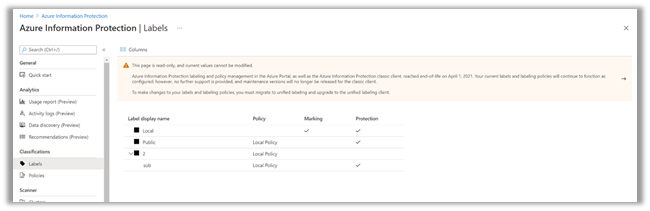
- Admins will not be able to add new labels in the AIP portal.
- The Add a new label link and the ellipses link (…) next to each label will be disabled or removed.
- Admins will not be able to do any of the following:
- Add new labels
- Add new sub-labels
- Delete a label
- Move labels up or down
Fig 1: Home > Azure Information Protection > Labels
2) Admin tries to edit labels in AIP portal
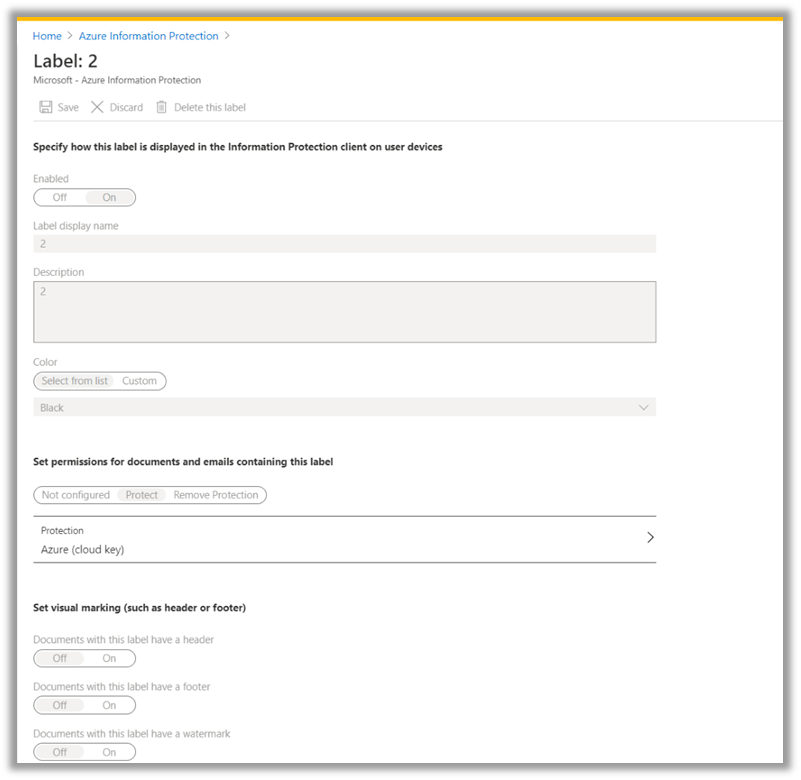
- Labels will be set to read-only mode.
Fig 2: Home > Azure Information Protection > Labels > Label Name
3) Admin tries to edit label conditions in the AIP portal
- The Add new condition link will be removed.
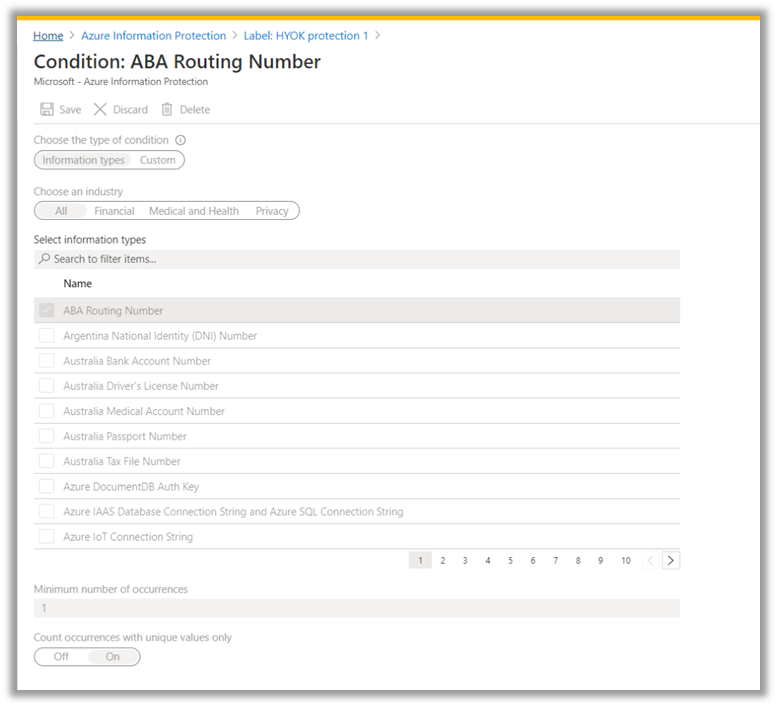
Fig 3a: Home > Azure Information Protection > Labels > Label Name > Configure Condition
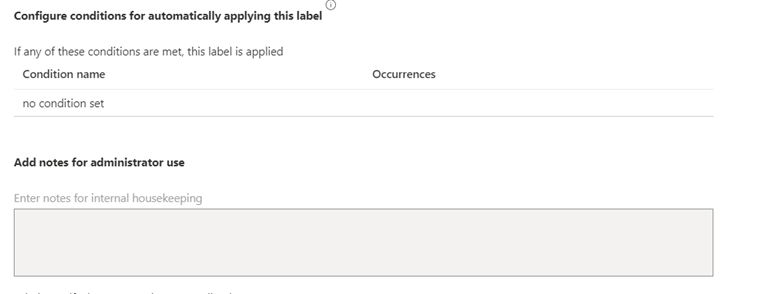
Fig 3b: Home > Azure Information Protection > Labels > Label Name > Configure Condition
- Admins will be able to view conditions in read-only mode.
- Admins will not be able to edit condition settings.
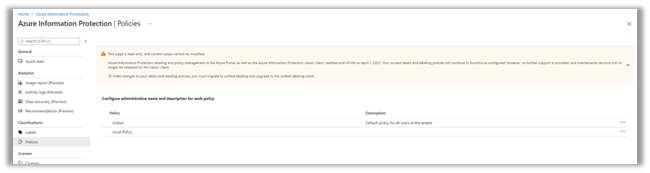
4) Admin tries to edit policies in the AIP portal
- Admins will not be able to add new policies.
- Admins will only be able to view the policy.
- Admins will not be able to save or delete policies.
Fig 4: Home > Azure Information Protection > Policies > Policy
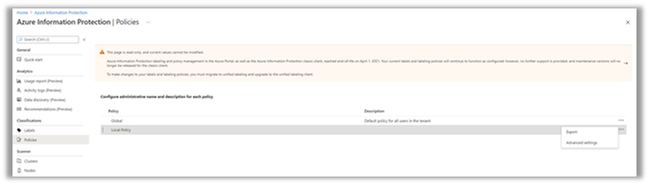
5) Admin tries to edit policies (export, advance settings)
- Admins will not be able to add new policies.
- Admins will be able to select the ellipsis (…) and right-click each to manage a policy. Admins will be able to select the Export and Advanced settings options.
- In the ellipses link (…), the Move up/down and Delete options will not be available.
Fig 5: Home > Azure Information Protection > Policies > Policy
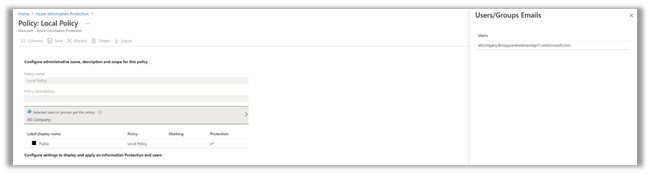
6) Admin tries to add users to policies
- Admins will be able to view users.
- Admins will not be able to add or remove users.
Fig 6a: Home > Azure Information Protection > Policies > Policy >
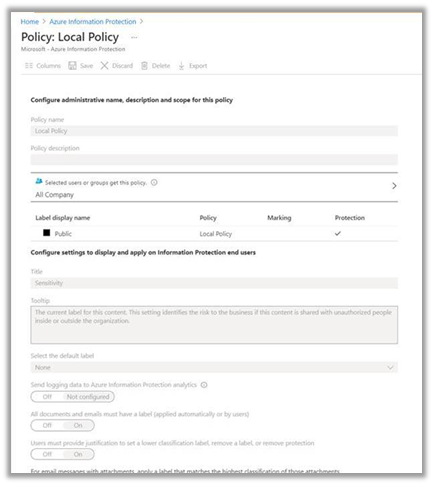
Fig 6b: Home > Azure Information Protection > Policies > Policy > Select which users or groups get this policy.
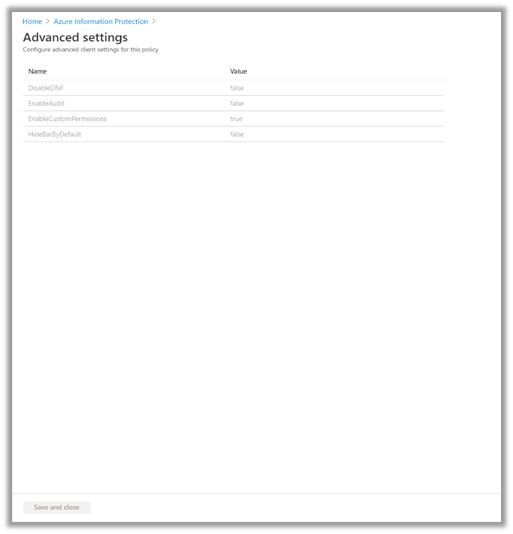
7) Admin tries to edit the advanced setting configuration in the AIP portal
- Admins will be able to view settings in read-only mode.
- Admins will not be able to add new settings or remove settings.
Fig 7: Home > Azure Information Protection > Policies > Policy > Advanced Settings
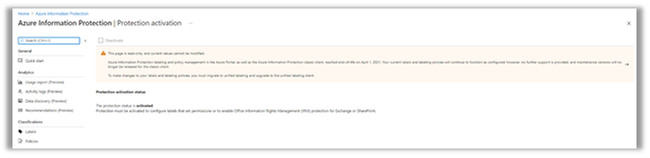
8).Admin tries to activate protection in the AIP portal
- Admins will only be able to see the status (activated/deactivated).
- Admins will not be able to activate/deactivate.
Fig 8: Home > Azure Information Protection > Protection Activation
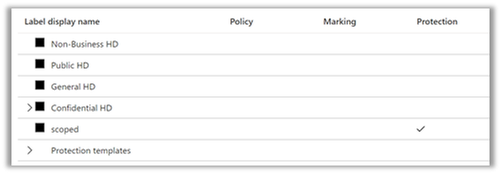
9) Admin tries to edit protection templates in the AIP portal
For customers that are working with protection templates instead of labels, Admins could manage the protection templates from the portal. Moving forward:
- Admins will be able to view protection templates in read-only mode.
- Admins will not be able to edit/change protection settings in the AIP Portal.
- Admins can use AIP PowerShell cmdlets to edit protection.
- Admin will not be able to convert templates to labels using the portal but can still use PowerShell command
Fig 9: Home > Azure Information Protection > Labels
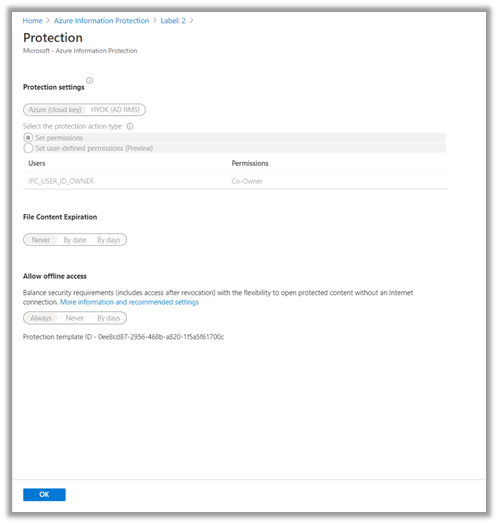
10) Admin tries to edit protection in the AIP portal
- Admins will be able to view protection in read-only mode.
- Admins will not be able to edit/change protection settings in the AIP Portal.
- Admins can use AIP PowerShell cmdlets to edit protection.
Fig 10: Home > Azure Information Protection > Labels > Label Name > Protection Settings
11) Admin tries to add, import, delete languages in the AIP portal
- Admins will only be able to export language settings.
- Admins will not be able to add, import, or delete languages.
Fig 11: Home > Azure Information Protection > Languages
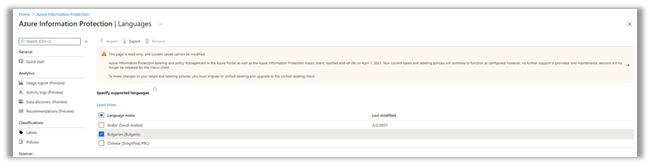
12) Admin tries to activate/deactivate unified labeling in AIP portal
- Admins will be able to activate unified labeling from the AIP portal.
- Admins will be able to copy policies to the Microsoft 365 Compliance center.
- Admins will not be able to publish policies in the AIP portal.
Fig 12a: Home > Azure Information Protection > Unified Labeling > Activate
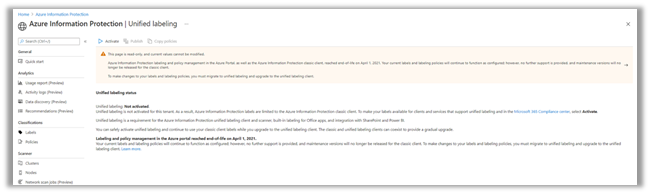
Fig 12b: Home > Azure Information Protection > Unified Labeling >
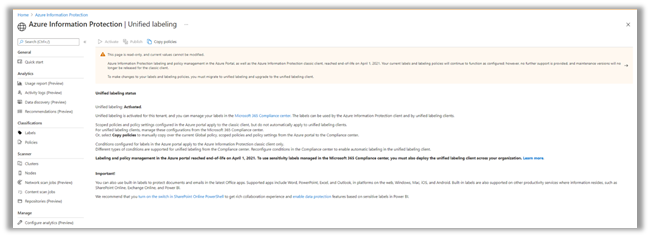
13) Using the AIP classic client
- Users will be able to apply label and protection and to consume protected files.
- The AIP classic client is out of support.
- Maintenance versions for the AIP classic client will not be released.
14) AIP labels in Microsoft Cloud App Security
- Microsoft Cloud App Security will not support AIP labels after March 31st, 2021. Only unified labels will be supported.
- Existing policies in Microsoft Cloud App Security will not apply or discover AIP labels in files. An alert will be sent to the admin in case the policy had AIP labels.
- Microsoft Cloud App Security will support only unified label for policies and for labels discovery.
Managing labels and policies in the Microsoft 365 Compliance center
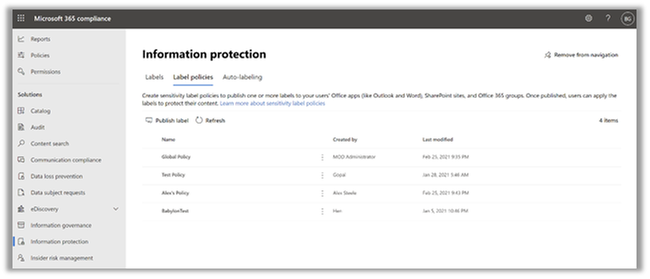
Fig 14a: Microsoft 365 compliance > Solutions > Information Protection > Labels >
After you activate and migrate to unified labeling, your labels will be available in the Microsoft 365 Compliance center.
- Moving forward, you can manage your labels and policies in the Microsoft 365 Compliance center.
- For more information about creating, managing labels and policies in the Compliance center, see the Microsoft 365 compliance documentation.
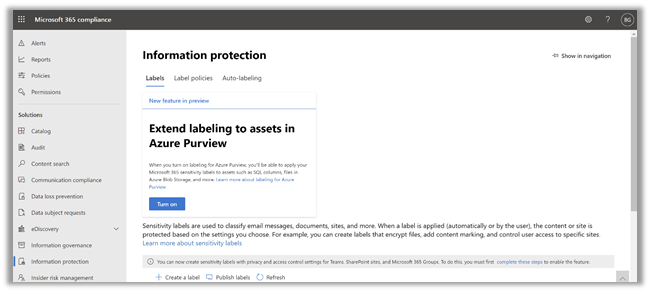
Fig 14b: Microsoft 365 compliance > Solutions > Information Protection > Label policies >
AIP portal and classic client admin experience summary
#
|
Admin
|
Not Impacted
|
Impacted
|
1
|
Admin tries to add a new label.
|
—
|
Admin will not be able to add a new label.
Admin will not have the shortcuts or any right-click options.
|
2
|
Admin tries to edit a label
|
Admin will be able to view a label in read-only mode.
|
Admin will not be able to edit or delete label content and settings
|
3
|
Admin tries to edit label conditions
|
Admin will be able to view conditions in read-only mode.
|
Admin will not be able to edit conditions
|
4
|
Admin tries to edit policy
|
Admin will be able to only view policy
|
Admin will not be able to save or delete a policy.
|
5
|
Admin tries to edit policies (export, advance settings)
|
Admin will be able to select the ellipsis and right-click options to manage each policy.
Admins will be able to select Export and Advanced settings buttons.
|
Admin will not be able to add new policy.
In the shortcut, the link will not have move up/down or delete options.
|
6
|
Admin tries to add user
|
Admin will be able to view users
|
Admin will not be able to add a user or remove a user
|
7
|
Admin tries to edit advanced settings
|
Admin will be able to view settings in read-only mode.
|
Admin will not be able to add new settings or remove settings
|
8
|
Admin tries to activate protection
|
Admin will be able to see the status (activated / deactivated)
|
Admin will not be able to activate / or deactivate
|
9
|
Admin tries to edit protection templates in the AIP portal
|
Admins will be able to view protection templates in read-only mode.
Admins can use AIP PowerShell cmdlets to edit protection.
|
Admins will not be able to edit / change protection settings in the AIP Portal.
Admin will not be able to convert templates to labels using the portal but can still use PowerShell command
|
10
|
Admin tries to edit protection
|
Admin will be able to view protection in read-only mode.
|
Admin will not be able to edit protection
|
11
|
Admin tries to add, import, delete language
|
Admin will be able to only export
|
Admin will not be able to add, import, delete
|
12
|
Admin tries to activate unified labeling
|
Admin will be able to activate and copy the policy
|
Admin will not be able to publish labels in the AIP portal
|
13
|
End users using classic client
|
Users will be able to apply labels and protection and to consume protected files
|
AIP classic is out of support. Maintenance versions will not be released.
|
14
|
AIP labels in Microsoft Cloud App Security
|
—
|
AIP labels will not be supported. Only unified labels will be supported.
|
Some important links about unified labeling
Top 5 frequently asked questions
- How can I find my status on extended support?
- CSS will be able to assist you to find status on extended support.
- How to request extended support?
- You can request extended support using the form posted here.
- What are the requirements for requesting extended support?
- Provide details of the feature/functionality that is blocking your migration.
- Who should I contact regarding migration questions?
- There are various channels. Yammer, CSS, or your CXE representative.
- What is the SLA for reviewing the extended support request?
- The SLA for reviewing extended support requests is 2-3 weeks. We will provide approval or reject response or will request additional information to assess the situation.
by Contributed | Mar 5, 2021 | Technology
This article is contributed. See the original author and article here.
Running complex aggregations and analytical functions on real-time operational databases is a powerful capability in Azure SQL. In the last part of this three-part series with Silvano Coriani, we will see how Window Functions can be a great tool to express analytical calculations on real-time data sets.
Watch on Data Exposed
More episodes in this Operational Analytics Series:
How Azure SQL Enables Real-time Operational Analytics (HTAP) – Part 1
How to Optimize Existing Databases & Applications with Operational Analytics in Azure SQL – Part 2
Resources:
Get started with Columnstore for real-time operational analytics
Sample performance with Operational Analytics in WideWorldImporters
T-SQL Window Functions: For data analysis and beyond, 2nd Edition
Real-Time Operational Analytics:
Memory-Optimized Tables and Columnstore Index
DML operations and nonclustered columnstore index (NCCI) in SQL Server 2016
Filtered nonclustered columnstore index (NCCI)

by Contributed | Mar 5, 2021 | Technology
This article is contributed. See the original author and article here.
In this blog post we learn how we can display a table in an Adaptive Card, pull data from a SharePoint list and use Power Automate to do that in one flow.
When I read in the documentation, that tables and headers are not supported, it was somehow a BUMMER :face_with_rolling_eyes:, but then I asked the worlds laziest developer Hugo Bernier, if there was really now way to do it.
Our first idea was, to templatize an Adaptive Card, and then pass data into that template; but very unfortunately, this isn’t supported in Power Automate. Our second idea resolved the whole problem: We would build the JSON for our Adaptive Card like different LEGO bricks and then out them together.
We would need
- 1 brick (we will use variables in Power Automate) for the upper part of the Card, where we create a column set,
- 3 bricks for the headers of our faux table
- 3 bricks for the rows over which we will loop
- 1 brick that contains our ‘Open Link’ button
- 1 brick at the end of the card to close all open
{ and [ with } and ]
To make things a bit more approachable, here is our little
use case
We want to display items of a SharePoint list in an Adaptive Card as a table. The result should look like this:
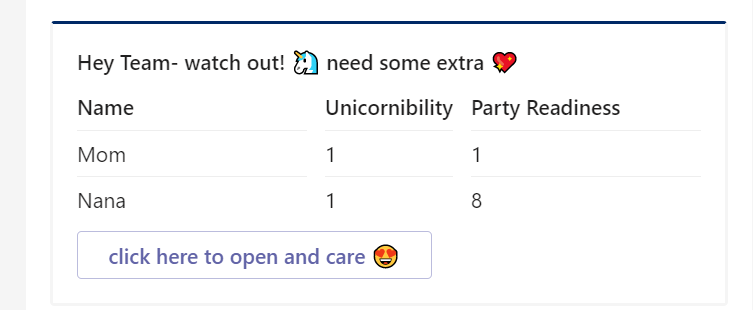
Purpose is to notify the Team each Monday about all Unicorns with a unicornibility index of less than 85 so that the team can take care of them. We do not only want to display 1 single item of our list with a factsheet but display as many items as match our query (unicornibility lt 85). We don’t want to hard-code any value in here to keep things flexible.
Let’s start building our Power Automate flow
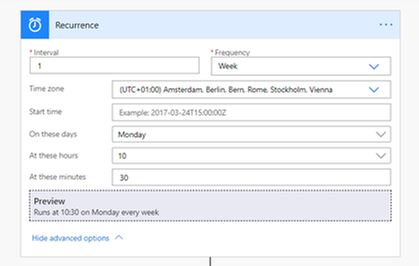
recurrence Trigger
We start with a Recurrence trigger, set the interval to 1 and the Frequency to Week.
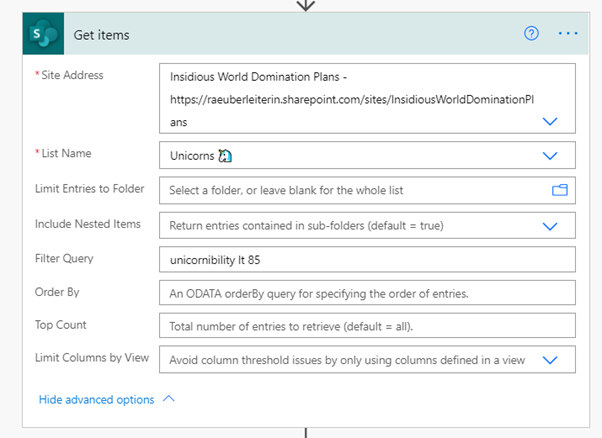
get Items (SharePoint)
Next action is getting the items from our SharePoint list. Set Filter Query to unicornibility lt 85 to only get those items, that match our query – this will ensure a better performance than first pulling all list items and then working with conditions later. You can also limit how many items you want to retrieve.
Preparations to bind data and JSON schema of the Adaptive Card
We want to get a table into an Adaptive Card, which is not supported natively, so we need to do a little trick. We will use variables to build the different pieces of the Adaptive Card JSON, that we will later need. The Code in total would look like this:
{

    “$schema”: “http://adaptivecards.io/schemas/adaptive-card.json”,

    “type”: “AdaptiveCard”,

    “version”: “1.2”,

    “body”: [

        {

            “type”: “TextBlock”,

            “text”: “Hey Team- watch out! ? need some extra ?”,

            “wrap”: true,

            “weight”: “Bolder”

        },

        {

            “type”: “ColumnSet”,

            “columns”: [

                {

                    “type”: “Column”,

                    “items”: [

                        {

                            “type”: “TextBlock”,

                            “weight”: “bolder”,

                            “text”: “Name”

                        },

                        {

                            “type”: “TextBlock”,

                            “separator”: true,

                            “text”: “UNICORN1”

                        },

                        {

                            “type”: “TextBlock”,

                            “separator”: true,

                            “text”: “UNICORN2”

                        }

                    ],

                    “width”: “stretch”

                },

                {

                    “type”: “Column”,

                    “items”: [

                        {

                            “type”: “TextBlock”,

                            “weight”: “bolder”,

                            “text”: “Unicornibility”

                        },

                        {

                            “type”: “TextBlock”,

                            “separator”: true,

                            “text”: “VALUE1”

                        },

                        {

                            “type”: “TextBlock”,

                            “separator”: true,

                            “text”: “VALUE2”

                        }

                    ],

                    “width”: “auto”

                },

                {

                    “type”: “Column”,

                    “items”: [

                        {

                            “type”: “TextBlock”,

                            “weight”: “Bolder”,

                            “text”: “Party Readiness”

                        },

                        {

                            “type”: “TextBlock”,

                            “separator”: true,

                            “text”: “PValue1”

                        },

                        {

                            “type”: “TextBlock”,

                            “separator”: true,

                            “text”: “PValue2”

                        }

                    ],

                    “width”: “stretch”

                }

            ]

        },

        {

            “type”: “ActionSet”,

            “actions”: [

                {

                    “type”: “Action.OpenUrl”,

                    “title”: “open here and care ?”

                }

            ]

        }

    ]

}
Let’s break this into pieces:
- First variable will be the upper part of the Adaptive Card in which we define the schema, a title and create a column set.
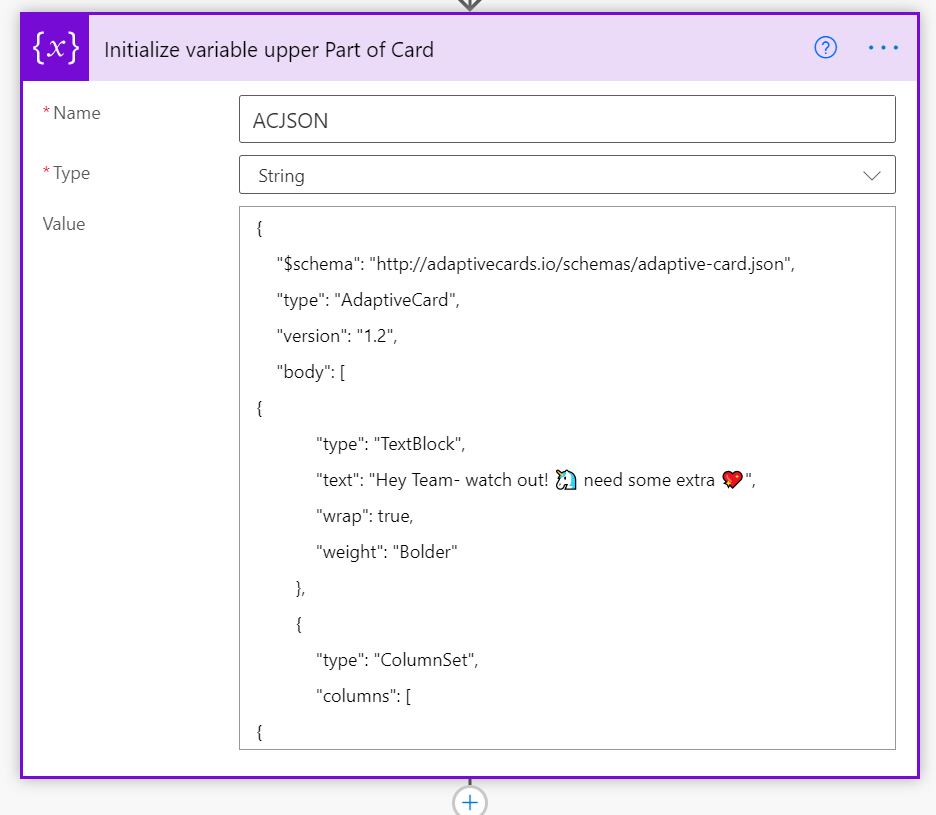
- We initialize variables for the 3 Headers “Name”, “Unicornibility” and “Party Readiness Index”
- We create an Apply to Each and loop over the values of our SharePoint list for each column by appending our variables.
- We append the upper part of our card by the 3 columns (consisting of the headers and rows) and the actionset plus end of the card
In case you wonder why we needed to somehow unclean cut the JSON – this is a bug in Power Automate. Although we defined our variables as string, Power Automate asked us to provide valid JSON. We could not provide valid JSON though, because we needed to cut the JSON into pieces. We needed therefore to find a way to make Power Automate believe, that we are not storing JSON in a string variable, and apparently a { at the beginning was a trigger for Power Automate to check if JSON was valid (which was not, but on purpose!).
Our Code would look color coded like this:
And if we now lay the color-code blocks over the Adaptive Card:
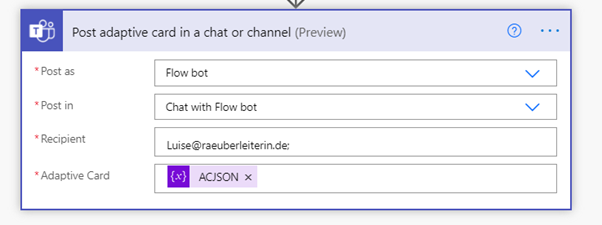
Send Adaptive Card
You may choose if you want to send the Post as the Flow bot or as a user or if you want to send this into a 1:1 chat or into a Channel. The Adaptive Card is our card variable.
Conclusion and what’s next
Although not natively supported, we can actually display a (faux) table in Adaptive Cards and bind this to a datasource. Potentially issues could occure here, as our columns are independent from each other. The Adaptive Cards renders columns, bnit not rows, which means that if we have different heights, it could be problematic to make them look good and even. What’s next? Find the limit how many rows we can display and what else we could do with Cards :’) What would you like to figure out? I am curious, please reply below!

by Scott Muniz | Mar 5, 2021 | Security
This article was originally posted by the FTC. See the original article here.
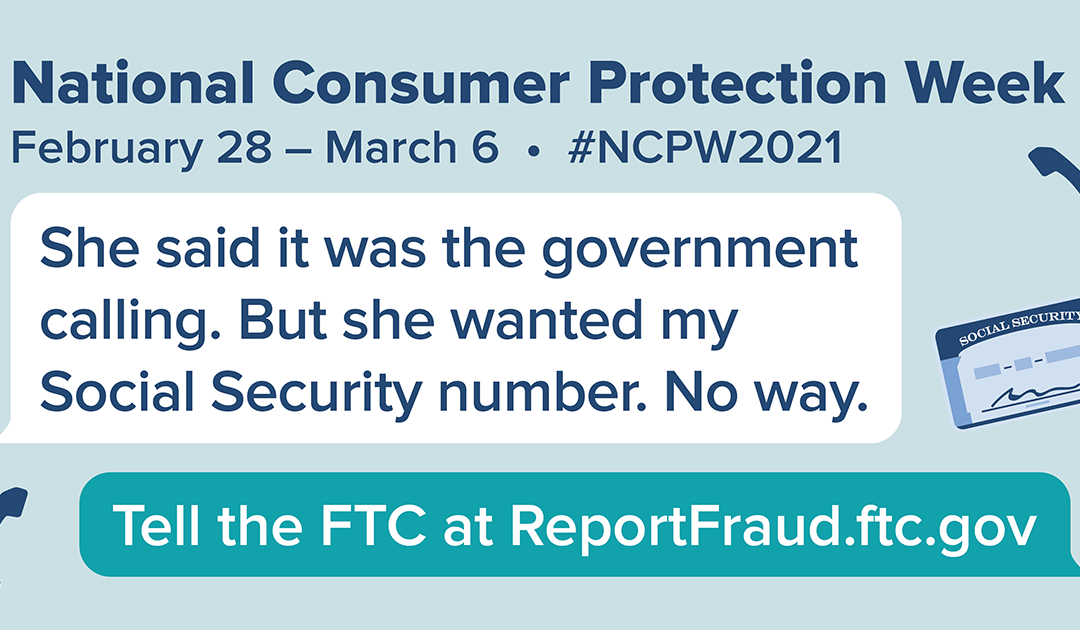
The pandemic has caused financial distress because of lost jobs, income, and homes, and emotional distress because of social isolation. This week, during National Consumer Protection Week (NCPW), we want your help to reach people who might be a bit cut off from their social network. The FTC knows that people who talk about scams are less likely to fall for them, and we hope to spark discussions by offering conversation-starting ideas. To close out NCPW, here are a few ideas to help you and the people you care about spot and avoid a “free prize” con.
Prize and lottery scams can start many ways, but they often begin with an unexpected phone call. The scammers may claim to be from the government. Or an official-sounding organization. They make wild claims about big winnings, and demand payment up front. If you get a call like this, hang up. You probably already know that. But you may know someone who doesn’t. So give a call to someone who might be a bit isolated, who could use a reminder about these scams. Chances are, they would like to hear from you, and have a chance to talk about how things are going and what’s on their mind.
Here are a few tips you can share about prize and lottery scams when you chat:
-
Legitimate contests don’t ask you to pay a fee, or give your bank account or credit card number to get your prize.
-
Never send money by wire transfer, gift card, or cryptocurrency. Anyone who asks you to pay for things that way is a scammer.
-
Don’t trust caller ID. Scammers can make it look like they’re calling from anywhere.
After you talk, invite your friend or relative to call you back if they have questions, or if they get a surprise phone call. If they say they already spotted a scam or sent money, please ask them to report to ReportFraud.ftc.gov. You’re welcome to file report for someone, if they ask for help.
Brought to you by Dr. Ware, Microsoft Office 365 Silver Partner, Charleston SC.
by Scott Muniz | Mar 5, 2021 | Security
This article was originally posted by the FTC. See the original article here.
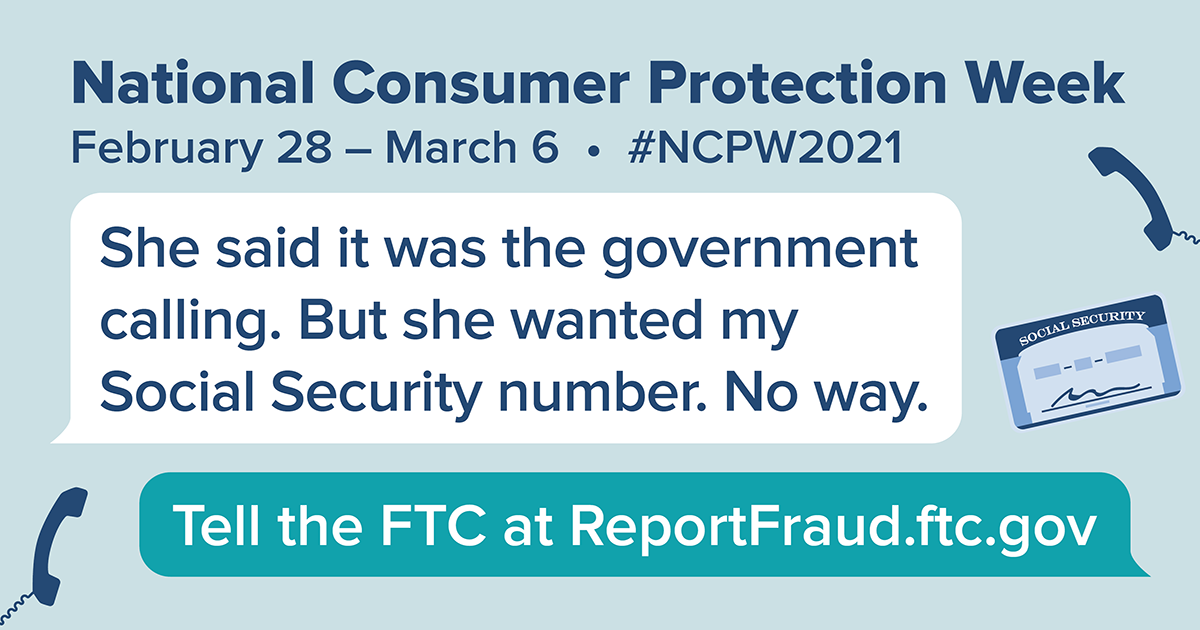
Lots of people are having trouble sleeping, thanks to the pandemic and all the parts of our lives it’s affecting. And it doesn’t help when you get a call saying you owe the government money. Oh, and, they add, you’ll go to jail if you don’t pay up immediately. That’s a scam, and nothing to lose sleep over. For those who are a little more cut off from people than usual, these calls might feel more real and worrying than they are. If you know someone might be cut off from others right now, reach out to them to make sure they know these calls are scams.
Here are some things you might share with them about government imposters.
First, plenty of people have spotted calls, texts, and emails from bogus government officials. In 2020, people reported losing more than $174 million to government imposter scams, with a median loss of $1,250.
Second, you can share a few ways to spot these scammers in the act:
- Don’t trust caller ID. Scammers manipulate caller ID to look like the call is coming from an official government number. Look up the agency’s number yourself, if you’re concerned, and give them a call. But don’t use the number in caller ID.
- Government agencies like the Internal Revenue Service (IRS) or the Social Security Administration (SSA) won’t call, text, or email you out of the blue to demand payment right away.
- Nobody legit will ever tell you to pay with gift cards, money transfers, or cryptocurrency.
- Never share personal information with anyone who contacts you. If you’re worried, look up the government agency’s information yourself to check with them.
Sharing these tips might just help someone you care about sleep a little more soundly. And, of course, if you spot a scammer, talk about it, and then tell the FTC at ReportFraud.ftc.gov. Each report helps protect your community.
This blog post was updated on March 5th, 2021.
Brought to you by Dr. Ware, Microsoft Office 365 Silver Partner, Charleston SC.

by Contributed | Mar 5, 2021 | Technology
This article is contributed. See the original author and article here.
An Introduction to the SharePoint Admin Center
Norm Young is an Office Apps & Services MVP working as the Director of Collaborative Analytics at UnlimitedViz, the makers of tyGraph. He is focused on SharePoint and the Power Platform and shares his passion through his blog and speaking at conferences. Norm is also an active community contributor and helps to organize the Citizen Developers User Group. Follow him on Twitter @stormin_30 and visit his blog.

Dataverse for Business Applications
Oscar Garcia is a Principal Software Architect who resides in South Florida. He is a Developer Technologies MVP and certified solutions developer with many years of experience building software solutions. He specializes in building cloud solutions using technologies like AWS, Azure, ASP.NET, NodeJS, AngularJS as well as BI projects for data visualization using tools like Power BI, Tableau and JMP. You can follow Oscar on Twitter @ozkary or his blog at ozkary.com

C#.NET CORE: IMPORT/EXPORT CSV LIBRARY
Asma Khalid is an Entrepreneur, ISV, Product Manager, Full Stack .Net Expert, Community Speaker, Contributor, and Aspiring YouTuber. Asma counts more than 7 years of hands-on experience in Leading, Developing & Managing IT related projects and products as an IT industry professional. Asma is the first woman from Pakistan to receive the MVP award three times, and the first to receive C-sharp corner online developer community MVP award four times. See her blog here.

Teams Real Simple with Pictures: Managing User Feedback to Microsoft with Powershell
Chris Hoard is a Microsoft Certified Trainer Regional Lead (MCT RL), Educator (MCEd) and Teams MVP. With over 10 years of cloud computing experience, he is currently building an education practice for Vuzion (Tier 2 UK CSP). His focus areas are Microsoft Teams, Microsoft 365 and entry-level Azure. Follow Chris on Twitter at @Microsoft365Pro and check out his blog here.

Running #Dapr in WSL2 Ubuntu 20-04 distro in #WindowsInsider Build 21277 RS and #VSCode
James van den Berg has been working in ICT with Microsoft Technology since 1987. He works for the largest educational institution in the Netherlands as an ICT Specialist, managing datacenters for students. He’s proud to have been a Cloud and Datacenter Management since 2011, and a Microsoft Azure Advisor for the community since February this year. In July 2013, James started his own ICT consultancy firm called HybridCloud4You, which is all about transforming datacenters with Microsoft Hybrid Cloud, Azure, AzureStack, Containers, and Analytics like Microsoft OMS Hybrid IT Management. Follow him on Twitter @JamesvandenBerg and on his blog here.
by Scott Muniz | Mar 5, 2021 | Security
This article was originally posted by the FTC. See the original article here.
If you used MoneyGram to send money to a scammer between January 1, 2013 and December 31, 2017, you may get a prefilled claim form in the mail soon. The claim forms, from claims administrator Gilardi & Co. LLC, are the first step in distributing money from the $125 million settlement with the FTC in 2018. In that case, the FTC and US Department of Justice (DOJ) charged that MoneyGram failed to meet agreements to crack down on consumer fraud involving money transfers.
You must return the claim form within 90 days
from the date on the form to be eligible for a refund.
These prefilled claim forms show eligible dollar loss amounts that are based on fraud reports people filed with MoneyGram and law enforcement. If you get a form and agree with the dollar loss amount shown:
- sign and date the form
- fill out the information the form asks for
- mail it back in the return envelope that came with the letter
If you get a form but don’t agree with the dollar loss amount shown:
- sign and date the form
- fill out the information the form asks for
- mail it back with copies of documents that back up the amount you claim. You can send copies of MoneyGram receipts, “send” forms, or transaction history reports with a listed eight-digit money transfer control number (MTCN). You can request a transaction history report on the MoneyGram website.
The claim form requires you to give your Social Security number (SSN). That’s because the federal Treasury Offset Program must find out whether you owe money to the US government before you can get a payment. It needs your SSN to do that.
You don’t have to pay to file your claim. You don’t need a lawyer to file a claim. Don’t pay anyone who contacts you and says they’ll help you file, or help you get your money back.
On June 1, 2021, people who didn’t get a prefilled form can start filing claims online at moneygramremission.com. When you file a claim online, you have to give a MoneyGram MTCN. Or, you will be able to print the claim form and mail it in with copies of MoneyGram receipts, “send” forms, and transaction history reports. If you plan to file in June, you can start to collect — and make copies of — your receipts and other paperwork now. Once that process opens, the deadline to file a claim is August 31, 2021.
For more information about eligibility, the claims process, and other topics, go to ftc.gov/moneygram and moneygramremission.com.
Brought to you by Dr. Ware, Microsoft Office 365 Silver Partner, Charleston SC.
by Contributed | Mar 5, 2021 | Technology
This article is contributed. See the original author and article here.
Dear IT Pros,
Today, we would discuss all things about USB flash drives management including access protection, Bitlocker encryption, AV security, and troubleshooting.
Firstly, we should not reinvent the wheel, so we start with Paul Bergson’s excellent Tech blog article “Manage USB Devices on Windows Hosts”, based on the document, you could use GPO, MEM Configuration Profiles Admx (Administrative Template) for controlling access to USB drives on windows 10 devices.
I high light the following capabilities of them:
Managing USB disk drive access by GPO:
- To Control Access to USB drive, In Computer Configuration > Policies > Administrative Templates > System > Device Installation > Device Installation Restrictions
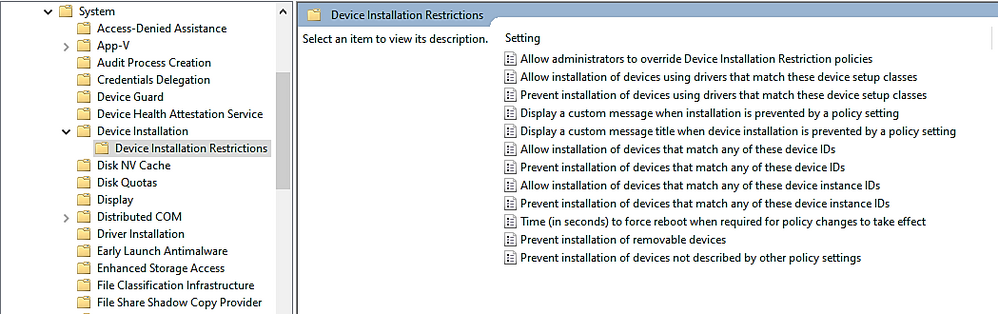
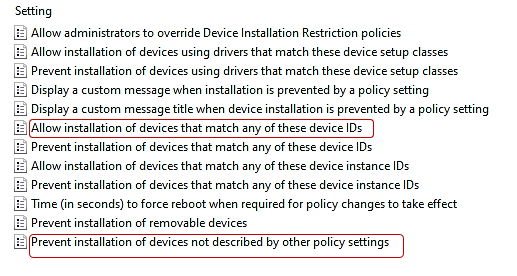
- To allow only specific USB drives based on Vendor ID or Device ID, you will need to configure at least 2 of the following settings:
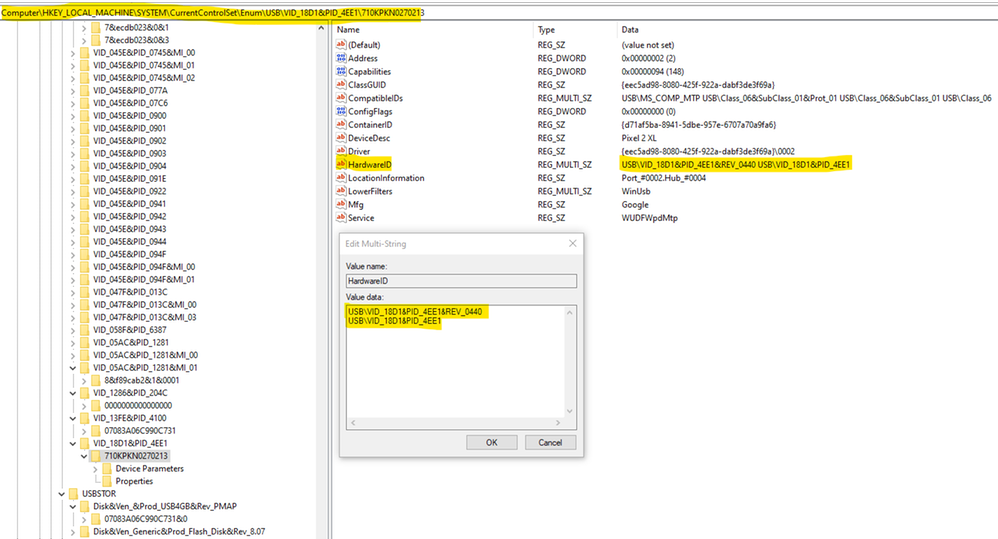
- You could gather the Device Hardware ID by Windows Device Manager as per Paul Bergson document and enter the information to the policy setting . An example of Hardware ID is shown here:
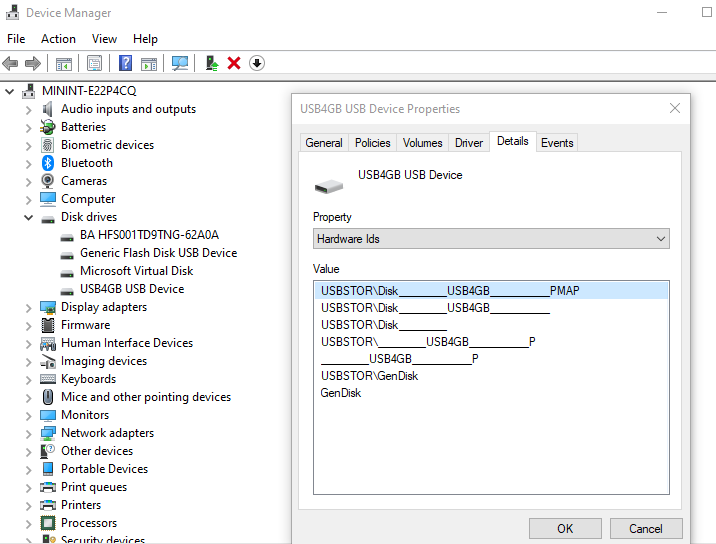
During OS plug and play enumeration process, the vendor ID, product ID, and revision number values are obtained from the USB device descriptor and record to Windows Registry. In the vvvvpppprrrrr key,
- vvvv is a 4-digit hexadecimal number that identifies the vendor
- pppp is a 4-digit hexadecimal number that identifies the product
- rrrr is a 4-digit hexadecimal number that contains the revision number of the device.
Example:
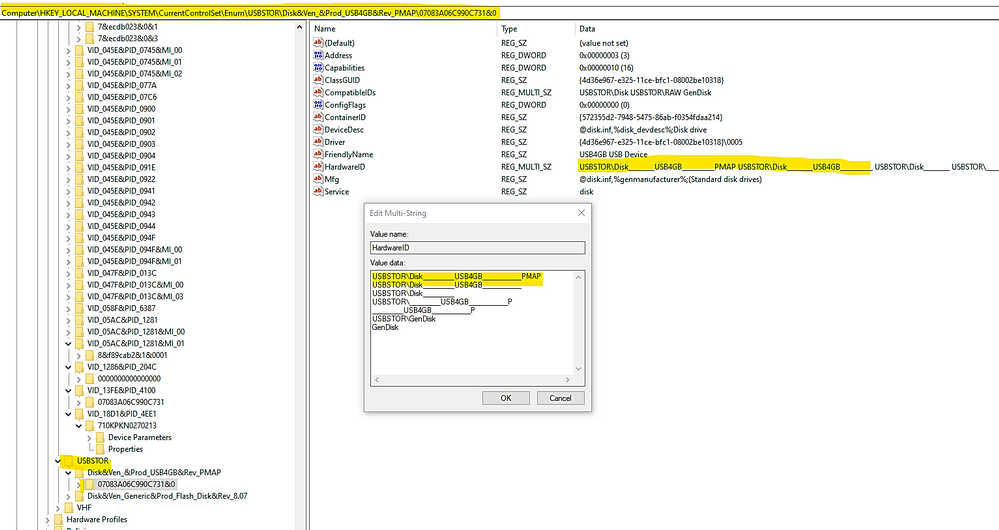
TIP : To prevent typo error due to the long name with a lot of underscore characters, you could use registry key instead ComputerHKEY_LOCAL_MACHINESYSTEMCurrentControlSetEnumUSBSTOR
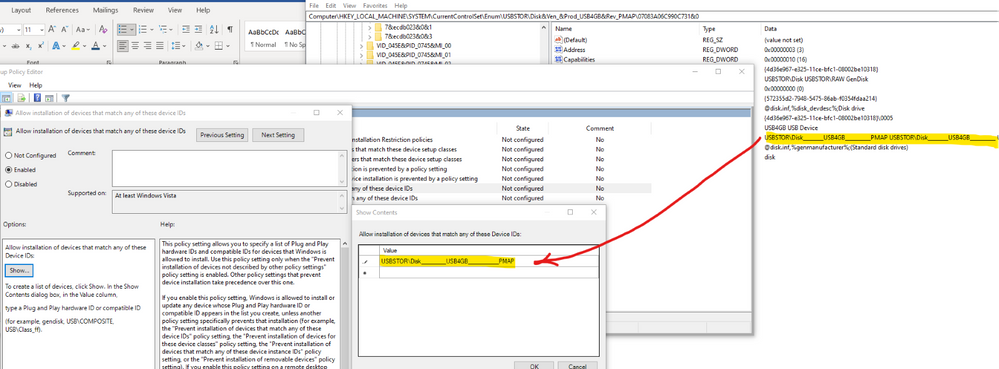
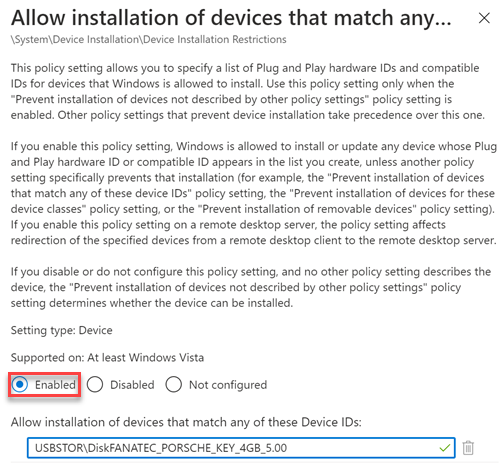
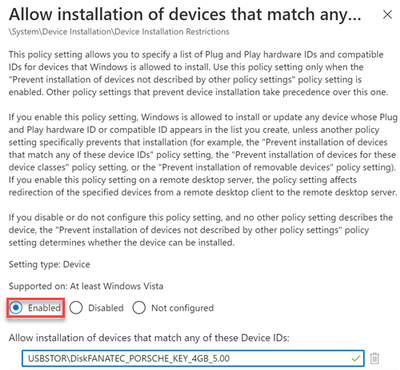
- To specify the allow list of USB drives, copy the hardware ID values and paste to the Device ID list in the policy setting named “Allow installation of devices that match any of these device IDs”, as shown here:
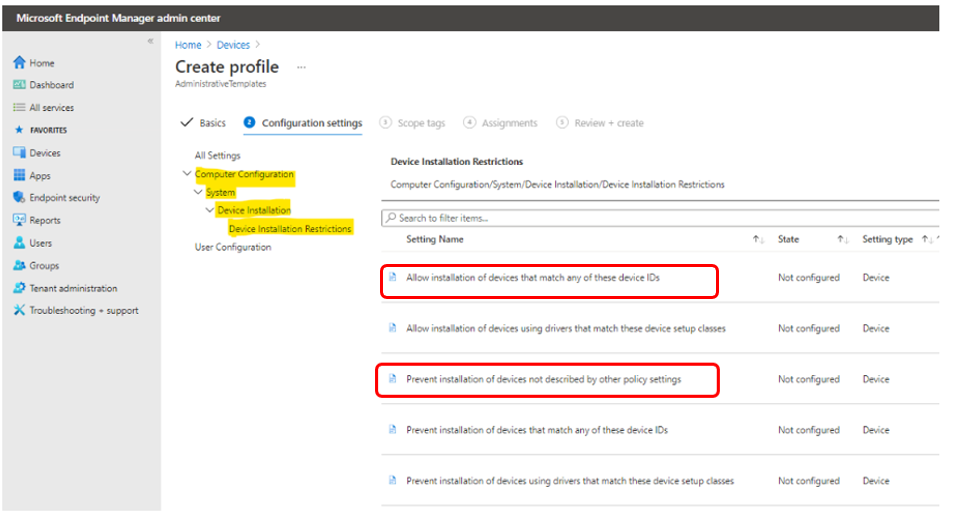
- To Control USB Drive Access by MEM Administrative Template:
You could do the same restriction using Microsoft Endpoint Manager (MEM)– Configuration Profile Administrative Template (admx)
- Managing USB Drives by MEM.
– Sign in to the Microsoft Endpoint Manager admin center.
– Devices > Configuration profiles > Create profile.
– Select Windows 10 and later in Platform, select Administrative Templates in Profile,
– Create.
In Basics, enter a descriptive name for the profile in Name. For example, Restrict USB devices. Enter a description for the profile in Description (this setting is optional). Next.
– In Computer Configuration System Device Installation Device Installation Restriction, configure the following settings:
- Select Prevent installation of devices not described by other policy settings, and then select Enabled.
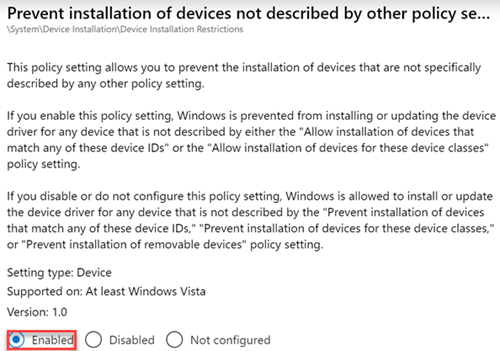
- Select Allow installation of devices that match any of these Device IDs, and then select Enabled. Look up the device vendor ID or product ID for devices that you want to allow, and then add the IDs to the list.
– In Assignments, select the device groups that will receive the profile, and then select Next.
– In Review + create, review your settings.
– When you select Create, your changes are saved and the profile is assigned.
– You could restrict all USB devices by type with class IDs:
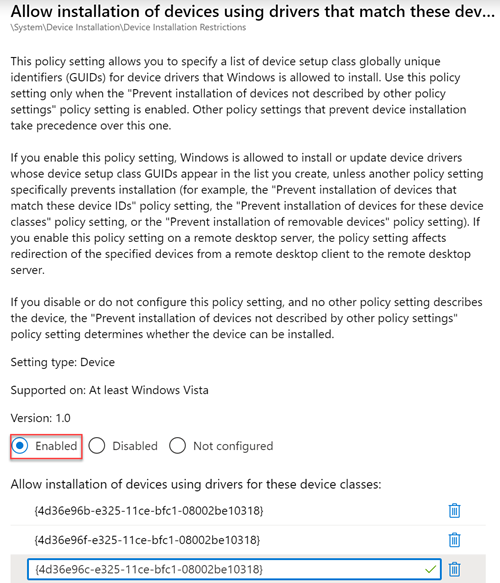
+ Select Allow installation of devices using drivers that match these device setup classes, and then select Enabled.
+ Add the GUID of device classes that you want to allow. In the following example, Keyboard, Mouse, and Multimedia classes are allowed.
USB Flash Drive Security
– To protect USB drive by Microsoft Defender Antivirus:
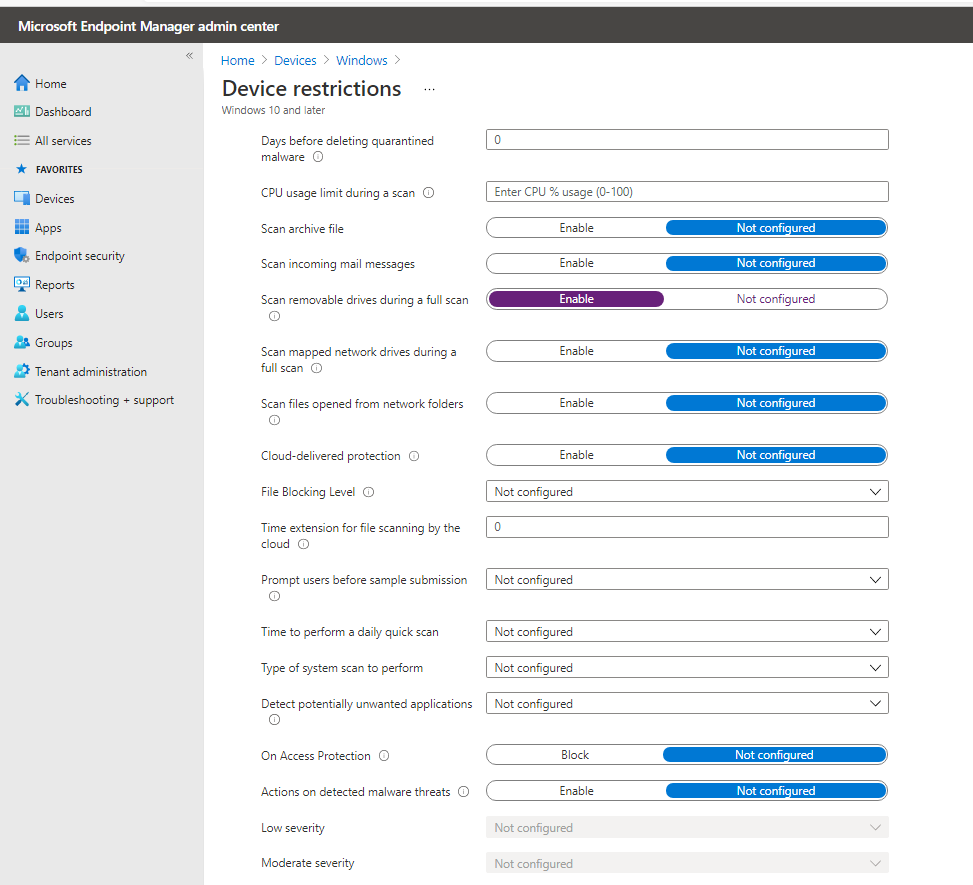
You could use the Microsoft Defender Antivirus real-time protection (RTP) to scan removable storage for malware.
An example of MEM policy for USB removable drive:
- Create Device Configuration Profile, Device Restriction for Windows 10 or later platform
- Click on Microsoft Defender for Antivirus
- Enable “Scan removable drive during a full scan”
– To prevent malicious process to be launched from the USB drive:
You could protect USB drive using Windows Defender Exploit Guard Policy by GPO, MECM (SCCM) or MEM to block untrusted process launched from USB drive in case of the malware file resided in USB drive.
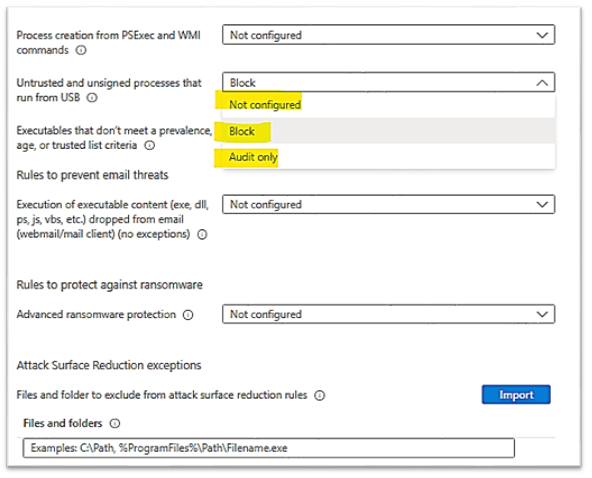
- We could use the Attack Surface Reduction (ASR) USB rules to block untrusted and unsigned processes that run from USB, the file types to be blocked include all executable files (such as .exe, .dll, or .scr).
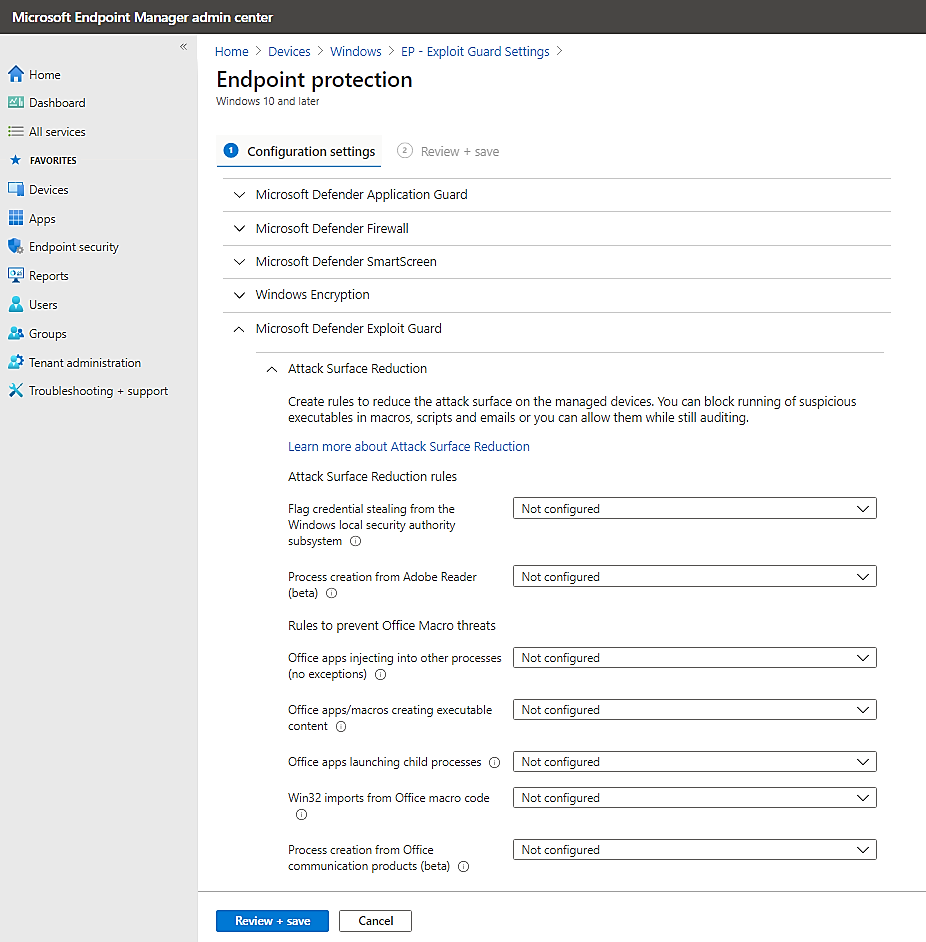
- An example of MEM Configuration ProfileEndpoint ProtectionMicrosoft Defender Exploit GuardAttack Surface Reduction – Untrusted and unsigned processes that run from USB is shown here:
Choose the action : block or audit only (allow the process to be launched but report its activities to Microsoft Defender for Endpoint)
 You can set attack surface reduction rules for devices that are running any of the following editions and versions of Windows:
Windows 10 Pro, version 1709 or later
Windows 10 Enterprise, version 1709 or later
Windows Server, version 1803 (Semi-Annual Channel) or later
Windows Server 2019
- To Allow Read Only to USB for User Group:
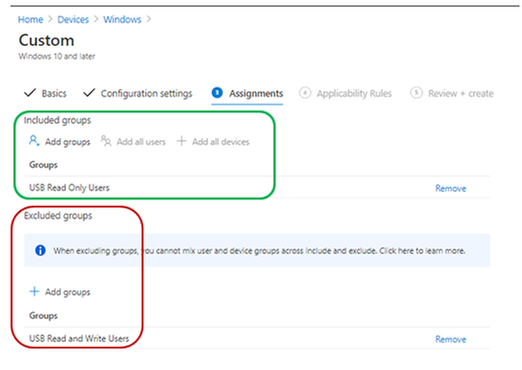
Supposed that you have 2 security group of users, the “USB Read only Users” and the “USB Read and Write Users” created in Azure AD. An User will have Read or Write access depended on the related group membership.
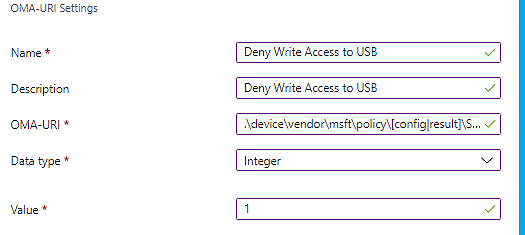
– To prevent users from writing to the USB drive (Preventing “Copy and paste” of Corporate data from other source to USB drives):
– Creating an Endpoint Manager Custom configuration profile for Windows 10 or later
Type: Custom,
OMA-URI: .Uservendormsftpolicy[config|result]Storage/RemovableDiskDenyWriteAccess
– Assign the policy to include group: “USB Read only Users”
Exclude group: “USB Read and Write Users”
- To Allow Read Only on USB for Device Group:
- You will do the same as the above steps but in Custom OMA-URI, replace the User path with Device path and assign it to the device groups.
To prevent devices from writing to the USB drive (Preventing “Copy and paste” of Corporate data from other source to USB drives):
Creating an Endpoint Manager Custom configuration profile for Windows 10 or later
Type: Custom, OMA-URI
.Devicevendormsftpolicy[config|result]Storage/RemovableDiskDenyWriteAccess
Assign the policy to include group: “USB Read only devices”
Exclude group: “USB Read and Write devices”
More information: Policy CSP – Storage – Windows Client Management | Microsoft Docs
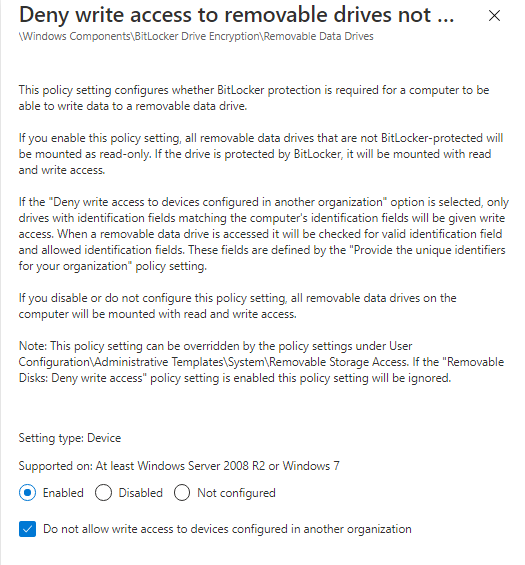
- If you use Bitlocker Encryption for USB, then, do not use the above Deny Write Access policy because it will override the “Deny write access to removable drives not protected by BitLocker” Policy as per the following statement:
– If the “Removable Disks: Deny write access” group policy setting is enabled this policy (Deny write access to removable drives not protected by BitLocker) setting will be ignored.
You should use the Bitlocker Deny Write Policy Setting instead.
- To Allow Read Only to USB encrypted by Bitlocker:
Create an Admx configuration profile :
- Computer ConfigurationWindows ComponentsBitlocker Drive EncryptionRemovable Data Drives
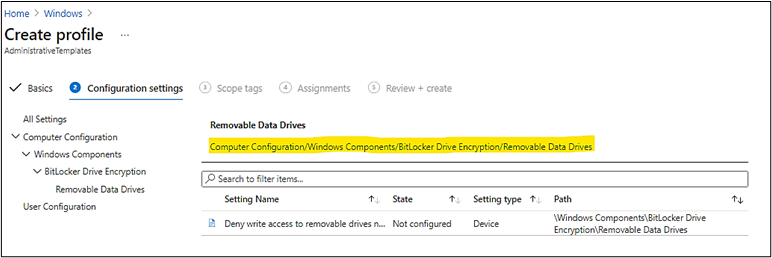
- Configure the setting as follow:
Testing on Client Workstation, Windows 10:
When you plug the USB drive into system and the drive was not encrypted by bitlocker before, you will be prompt to encrypt it first before you could use the USB drive.
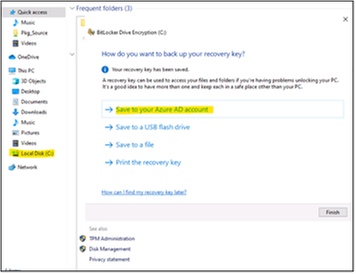
Then, you have to enter your secret password to protect the USB from being used by others. USB will be encrypted and ready for use.
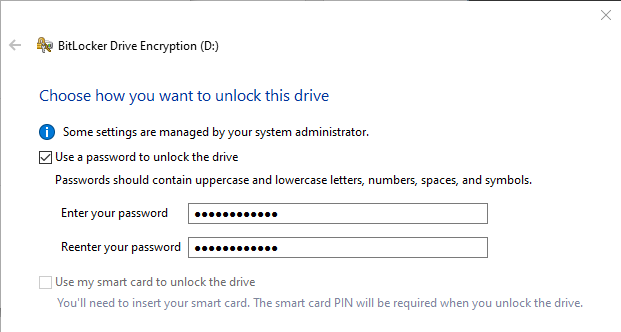
- Choose the encryption option:
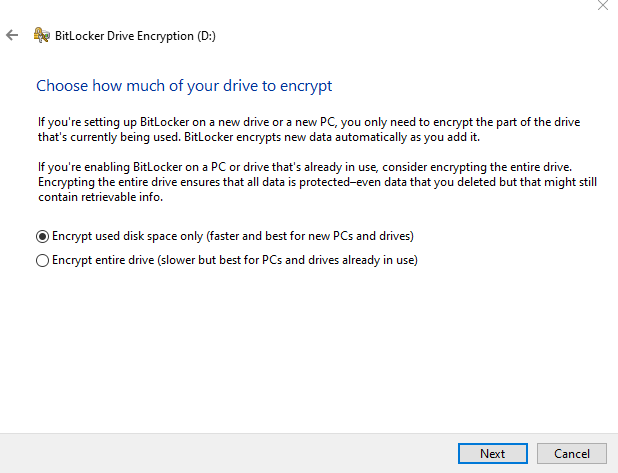
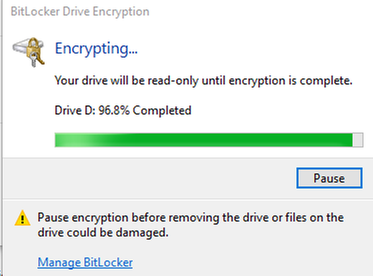
Next time, when you plug the Bitlocker USB drive into system, you will need to unlock the drive by your secret password above.
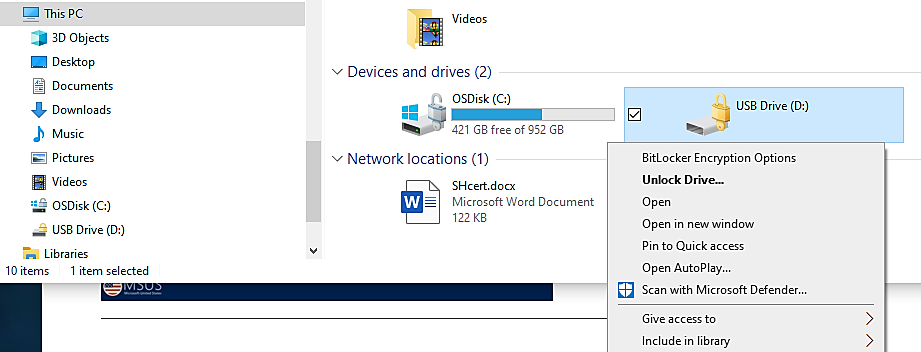
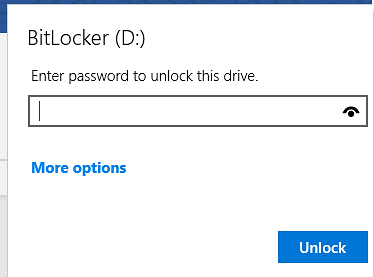
Enter password previously setup during bitlocker configuration time:
Monitoring and Audit USB Access:
- To view report on activities of USB disk across the organization,
You could use the M365 Security Center and run the device control report. Records may have a 12-hour delay from the time a media connection occurs to the time the event is reflected in the report card.
In the Microsoft 365 security center by going to Reports > Device protection.
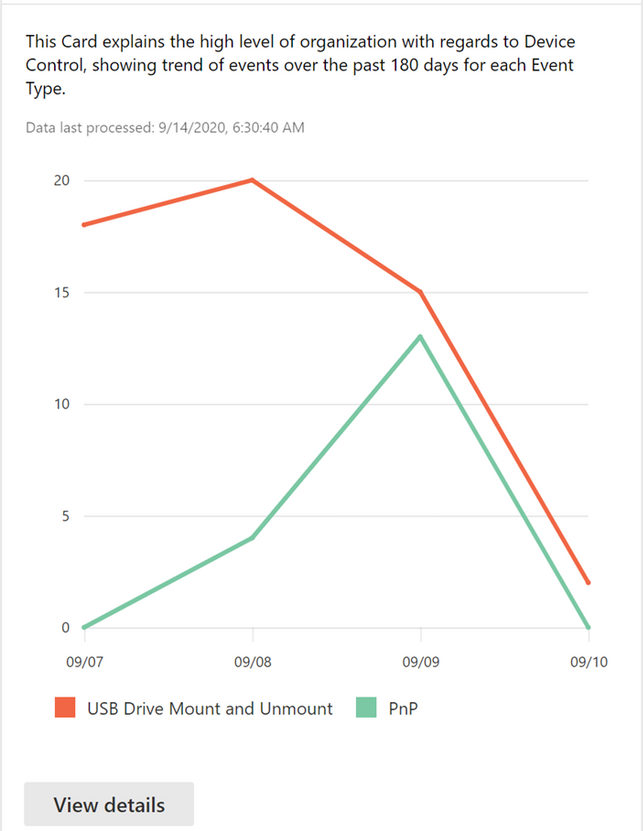
The View details button shows more media usage data in the device control report page.
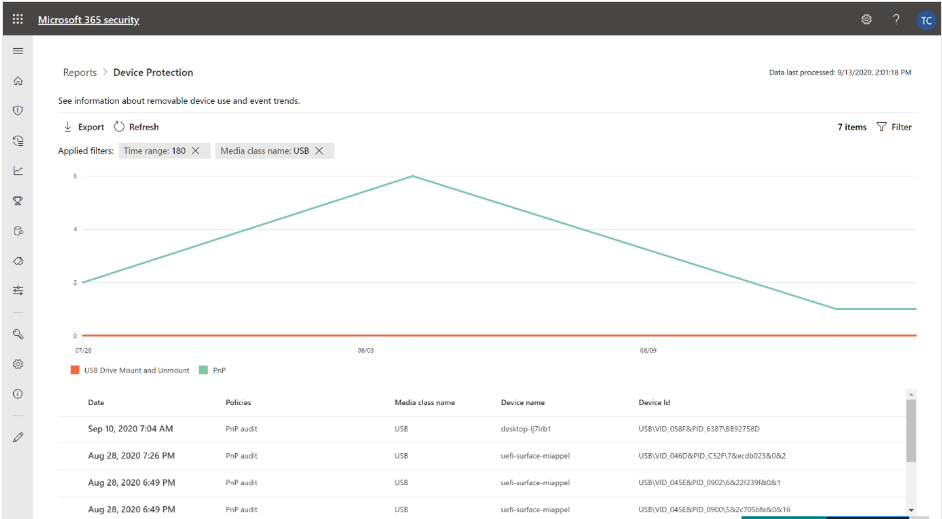
- To Audit USB disk activities
Hunting USB PnP Device Events:
In SecurityCenter.windows.com, select the Advanced hunting icon 
Run query for Device Events related to USB Device (plug and play – PNP device) with extended attributes:
DeviceEvents
| where ActionType == “PnpDeviceConnected“
| extend ParsedFields=parse_json(AdditionalFields)
|project ClassName=tostring(ParsedFields.ClassName), DeviceDescription=tostring(ParsedFields.DeviceDescription),
DeviceId=tostring(ParsedFields.DeviceId), VendorIds=tostring(ParsedFields.VendorIds), DeviceName
Hunting for USB drive and the USB manufacturer is NOT scandisk :
DeviceEvents
| where ActionType == “UsbDriveMount“
| where tolower(tostring(todynamic(AdditionalFields).Manufacturer)) != “scandisk”
| project USBMountTime = Timestamp, DeviceId,DeviceName , DriveLetter = tolower(tostring(todynamic(AdditionalFields).DriveLetter)), ProductName = tolower(tostring(todynamic(AdditionalFields).ProductName)),Manufacturer = tolower(tostring(todynamic(AdditionalFields).Manufacturer)), SerialNumber = tolower(tostring(todynamic(AdditionalFields).SerialNumber)), AdditionalFields, Timestamp
– To do Advanced Hunting for USB drives’ activities by MDE
- Use Microsoft Defender for Endpoint Advanced hunting, run the query to detect activities of any USB flash disk’s usage in your corporate environment.
- Detail steps are in the article “
“.
DeviceEvents
| where Timestamp > ago(1d)
| where ActionType == "UsbDriveMount"
| project USBMountTime = Timestamp, DeviceId, AdditionalFields
| extend DriveLetter = tostring(todynamic(AdditionalFields).DriveLetter)
| join (
DeviceFileEvents
| where Timestamp > ago(1d)
| where ActionType == "FileCreated"
| where FileName endswith ".docx" or FileName endswith ".pptx"
| parse FolderPath with DriveLetter '' *
| extend DriveLetter = tostring(DriveLetter)
)
on DeviceId, DriveLetter
| where (Timestamp - USBMountTime) between (0min .. 15min)
| summarize DistinctFilesCopied = dcount(SHA1), Events=makeset(pack("AccountName", InitiatingProcessAccountName, "Timestamp", Timestamp, "ReportId", ReportId, "FileName", FileName, "AdditionalDriveProperties", AdditionalFields)) by DeviceId, bin(Timestamp, 15m)
| where DistinctFilesCopied > 1
| mv-expand Events
| extend Timestamp = todatetime(Events.Timestamp), FileName = Events.FileName, AccountName = Events.AccountName, ReportId = tolong(Events.ReportId), AdditionalDriveProperties = Events.AdditionalDriveProperties
- Make further investigation and response on suspicious USB activity.
– For Thunderbolt Device included disk drive, Enable Direct Memory Access (DMA) protection settings to mitigate DMA attacks, including Kernel DMA Protection and blocking DMA until a user signs in.
Again, you could use the “Query for Mounted Storage that isn’t approved” of Paul Bergson.
To view another report example, please refer to the Techblog article Advanced hunting updates: USB events, machine-level actions, and schema changes – Microsoft Tech Community written by Daniel Naim.
USB Control for Mac OS:
According to the Program Team of Microsoft, MEM Endpoint Protection configuration profile to manage USB drive on Mac OS will be available in the future, “It’s in the roadmap. “
Troubleshooting
- A legitimate device is incorrectly blocked
You may find that USB devices that match the allowed device classes are incorrectly blocked. For example, a camera is blocked although the Multimedia class GUID {4d36e96c-e325-11ce-bfc1-08002be10318} was specified in the Allow installation of devices using drivers that match these device setup classes setting.
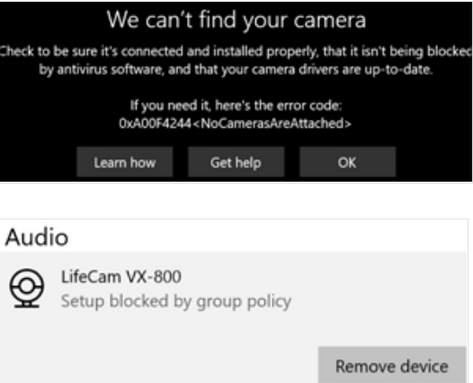
To fix this issue, follow these steps:
– On the Windows 10 device, open the %windir%infsetupapi.dev.log file.
– Look for Restricted installation of devices not described by policy in the file,
– Locate a line that reads Class GUID of device changed to: {GUID} within the same device install section.
In the following example, locate the line that reads Class GUID of device changed to: {36fc9e60-c465-11cf-8056-444553540000}.
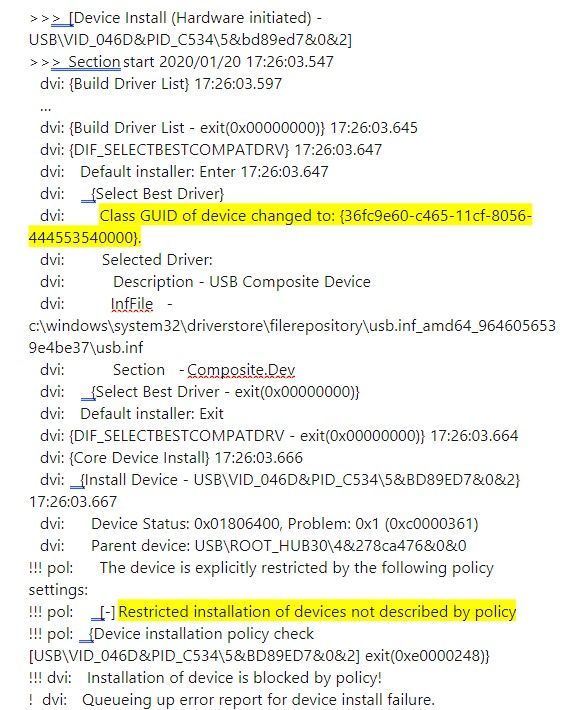
– In the device configuration profile, add the class GUID to the Allow installation of devices using drivers that match these device setup classes setting.
– If the issue persists, repeat steps 1 to 3 to add the additional class GUIDs until the device can be installed.
In the example, the following class GUIDs have to be added to the device profile:
– {36fc9e60-c465-11cf-8056-444553540000}: USB Bus devices (hubs and host controllers)
– {745a17a0-74d3-11d0-b6fe-00a0c90f57da}: Human Interface Devices (HID)
– {ca3e7ab9-b4c3-4ae6-8251-579ef933890f}: Camera devices
– {6bdd1fc6-810f-11d0-bec7-08002be2092f}: Imaging devices
- Could not format a Bitlocker USB drive:
Once Bitlocker Encrypted the drive and you want to reuse the drive for different purpose without knowing the protected password or the bitlocker recovery password, you have to firstly, clear the write protected attribute using diskpart command as shown here:
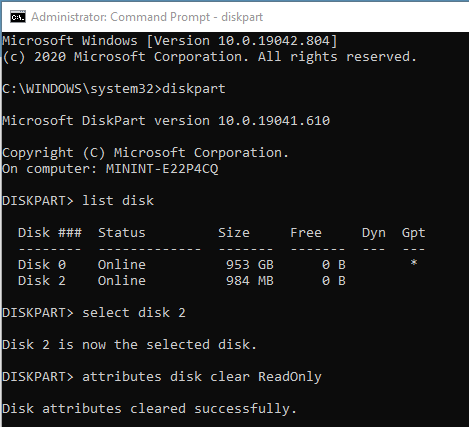
Then, you could format USB as usual.
In some situation, diskpart command could not clear the attribute, you will get the following warning when you clean the drive:
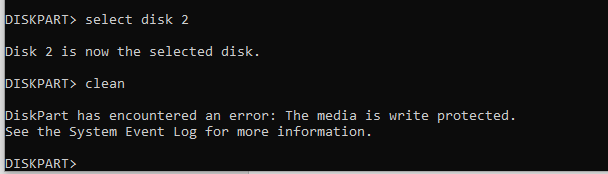
If you try to format the USB drive by GUI in File explorer, you still get the warning:
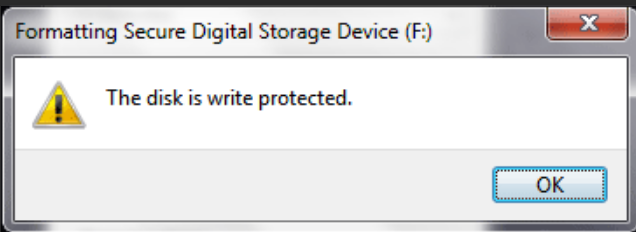
- You have to create (if it is not existed) or configure value for the Write Protected Key in Registry,
HKEY_LOCAL_MACHINESYSTEMCurrentControlSetControlStorageDevicePolicies >
WriteProtect. (DWORD),
Value: 0 (disabled)
- unplug and replug the drive again and do the above dispart command again, more detail is here.
Bitlocker Policy error and solutions
Open Event Viewer and review the following logs under Applications and Services logsMicrosoftWindows:
- Microsoft-Windows-BitLocker-API/BitLocker Operational
- Microsoft-Windows-BitLocker-API/BitLocker Management
- Microsoft-Windows-BitLocker-DrivePreparationTool/Operational
- Microsoft-Windows-BitLocker-DrivePreparationTool/Admin
More detail: Guidelines for troubleshooting BitLocker – Microsoft 365 Security | Microsoft Docs
Thanks for reading.
Until next time.
Reference
Disclaimer
The sample scripts are not supported under any Microsoft standard support program or service. The sample scripts are provided AS IS without warranty of any kind. Microsoft further disclaims all implied warranties including, without limitation, any implied warranties of merchantability or of fitness for a particular purpose. The entire risk arising out of the use or performance of the sample scripts and documentation remains with you. In no event shall Microsoft, its authors, or anyone else involved in the creation, production, or delivery of the scripts be liable for any damages whatsoever (including, without limitation, damages for loss of business profits, business interruption, loss of business information, or other pecuniary loss) arising out of the use of or inability to use the sample scripts or documentation, even if Microsoft has been advised of the possibility of such damages.
by Contributed | Mar 5, 2021 | Technology
This article is contributed. See the original author and article here.
Dear IT Pros,
Today, we would discuss all things about USB flash drives management including access protection, Bitlocker encryption, AV security, and troubleshooting.
We should not reinvent the wheel, so we start with Paul Bergson’s excellent Tech blog article “Manage USB Devices on Windows Hosts”. Based on the related document, you could use GPO, MEM Configuration Profiles Admx (Administrative Template) to control access to USB drives for windows 10 devices. I high light the following capabilities of them:
Managing USB disk drive access by GPO:
- To Control Access to USB drive, In Computer Configuration > Policies > Administrative Templates > System > Device Installation > Device Installation Restrictions
- To allow only specific USB drives based on Vendor ID or Device ID, you will need to configure at least 2 of the following settings:
- You could gather the Device Hardware ID by Windows Device Manager as per Paul Bergson document and enter the information to the policy setting . An example of Hardware ID is shown here:
During OS plug and play enumeration process, the vendor ID, product ID, and revision number values are obtained from the USB device descriptor and record to Windows Registry. In the vvvvpppprrrrr key,
- vvvv is a 4-digit hexadecimal number that identifies the vendor
- pppp is a 4-digit hexadecimal number that identifies the product
- rrrr is a 4-digit hexadecimal number that contains the revision number of the device.
Example:
TIP : To prevent typo error due to the long name with a lot of underscore characters, you could use registry key instead ComputerHKEY_LOCAL_MACHINESYSTEMCurrentControlSetEnumUSBSTOR
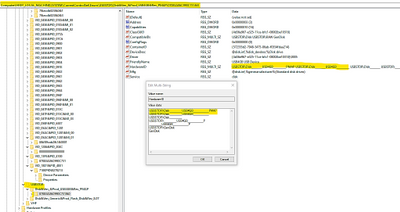
- To specify the allow list of USB drives, copy the hardware ID values and paste to the Device ID list in the policy setting named “Allow installation of devices that match any of these device IDs”, as shown here:
- To Control USB Drive Access by MEM Administrative Template:
You could do the same restriction using Microsoft Endpoint Manager (MEM)– Configuration Profile Administrative Template (admx)
To Setup Configuration Profile admx for USB device:
– Sign in to the Microsoft Endpoint Manager admin center.
– Devices > Configuration profiles > Create profile.
– Select Windows 10 and later in Platform, select Administrative Templates in Profile,
– Create.
In Basics, enter a descriptive name for the profile in Name. For example, Restrict USB devices. Enter a description for the profile in Description (this setting is optional). Next.
– In Computer Configuration System Device Installation Device Installation Restriction, configure the following settings:
- Select Prevent installation of devices not described by other policy settings, and then select Enabled.
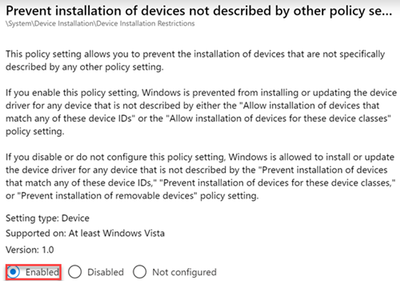
- Select Allow installation of devices that match any of these Device IDs, and then select Enabled. Look up the device vendor ID or product ID for devices that you want to allow, and then add the IDs to the list.
– In Assignments, select the device groups that will receive the profile, and then select Next.
– In Review + create, review your settings.
– When you select Create, your changes are saved and the profile is assigned.
- You could restrict all USB devices by type with class IDs:
- Select Allow installation of devices using drivers that match these device setup classes, and then select Enabled.
- Add the GUID of device classes that you want to allow. In the following example, Keyboard, Mouse, and Multimedia classes are allowed.
USB Flash Drive Security
– To protect USB drive by Microsoft Defender Antivirus:
You could use the Microsoft Defender Antivirus real-time protection (RTP) to scan removable storage for malware.
An example of MEM policy for USB removable drive:
- Create Device Configuration Profile, Device Restriction for Windows 10 or later platform
- Click on Microsoft Defender for Antivirus
- Enable “Scan removable drive during a full scan”
– To do Advanced Hunting for USB drives’ activities
- Use Microsoft Defender for Endpoint Advanced hunting, run the query to detect activities of any USB flash disk’s usage in your corporate environment.
- Detail steps are in the article “
“.
-
DeviceEvents
| where Timestamp > ago(1d)
| where ActionType == "UsbDriveMount"
| project USBMountTime = Timestamp, DeviceId, AdditionalFields
| extend DriveLetter = tostring(todynamic(AdditionalFields).DriveLetter)
| join (
DeviceFileEvents
| where Timestamp > ago(1d)
| where ActionType == "FileCreated"
| where FileName endswith ".docx" or FileName endswith ".pptx"
| parse FolderPath with DriveLetter '' *
| extend DriveLetter = tostring(DriveLetter)
)
on DeviceId, DriveLetter
| where (Timestamp - USBMountTime) between (0min .. 15min)
| summarize DistinctFilesCopied = dcount(SHA1), Events=makeset(pack("AccountName", InitiatingProcessAccountName, "Timestamp", Timestamp, "ReportId", ReportId, "FileName", FileName, "AdditionalDriveProperties", AdditionalFields)) by DeviceId, bin(Timestamp, 15m)
| where DistinctFilesCopied > 1
| mv-expand Events
| extend Timestamp = todatetime(Events.Timestamp), FileName = Events.FileName, AccountName = Events.AccountName, ReportId = tolong(Events.ReportId), AdditionalDriveProperties = Events.AdditionalDriveProperties
- Make further investigation and response on suspicious USB activity.
– For Thunderbolt Device included disk drive, Enable Direct Memory Access (DMA) protection settings to mitigate DMA attacks, including Kernel DMA Protection and blocking DMA until a user signs in.
– To prevent malicious process originated from USB drive:
- Protect USB drive using Windows Defender Exploit Guard Policy by GPO, MECM (SCCM) or MEM to block untrusted process launched from USB drive in case of the malware file resided in USB drive.
- We could use the Attack Surface Reduction (ASR) USB rules to block untrusted and unsigned processes that run from USB, the file types to be blocked include all executable files (such as .exe, .dll, or .scr).
- An example of MEM Configuration ProfileEndpoint ProtectionMicrosoft Defender Exploit GuardAttack Surface Reduction – Untrusted and unsigned processes that run from USB is shown here:
Choose the action : block or audit only (allow the process to be launched but report its activities to Microsoft Defender for Endpoint)
You can set attack surface reduction rules for devices that are running any of the following editions and versions of Windows:
Windows 10 Pro, version 1709 or later
Windows 10 Enterprise, version 1709 or later
Windows Server, version 1803 (Semi-Annual Channel) or later
Windows Server 2019
- To Allow Read Only to USB for User Group:
Supposed that you have 2 security group of users, the “USB Read only Users” and the “USB Read and Write Users” created in Azure AD. An User will have Read or Write access depended on the related group membership.
– To prevent users from writing to the USB drive (Preventing “Copy and paste” of Corporate data from other source to USB drives):
– Creating an Endpoint Manager Custom configuration profile for Windows 10 or later
Type: Custom,
OMA-URI: .Uservendormsftpolicy[config|result]Storage/RemovableDiskDenyWriteAccess
– Assign the policy to include group: “USB Read only Users”
Exclude group: “USB Read and Write Users”
- To Allow Read Only to USB for Device Group:
- You will do the same as the above steps but in Custom OMA-URI, replace the User path with Device path and assign it to the device groups.
To prevent devices from writing to the USB drive (Preventing “Copy and paste” of Corporate data from other source to USB drives):
Creating an Endpoint Manager Custom configuration profile for Windows 10 or later
Type: Custom, OMA-URI
.Devicevendormsftpolicy[config|result]Storage/RemovableDiskDenyWriteAccess
Assign the policy to include group: “USB Read only devices”
Exclude group: “USB Read and Write devices”
More information: Policy CSP – Storage – Windows Client Management | Microsoft Docs
- If you use Bitlocker Encryption for USB, then, do not use the above Deny Write Access policy because it will override the “Deny write access to removable drives not protected by BitLocker” Policy as per the following statement:
– If the “Removable Disks: Deny write access” group policy setting is enabled this policy (Deny write access to removable drives not protected by BitLocker) setting will be ignored.
You should use the Bitlocker Deny Write Policy Setting instead.
- To Allow Read Only to USB encrypted by Bitlocker:
Create an Admx configuration profile :
- Computer ConfigurationWindows ComponentsBitlocker Drive EncryptionRemovable Data Drives
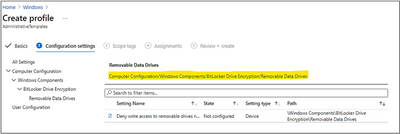
- Configure the setting as follow:
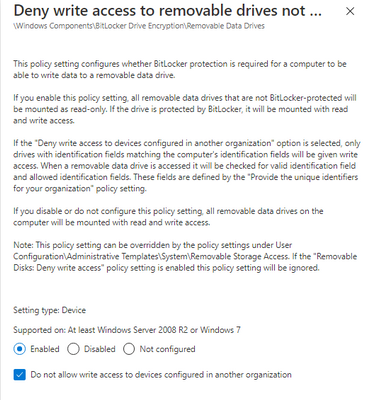
Testing on Client Workstation, Windows 10:
When you plug the USB drive into system and the drive was not encrypted by bitlocker before, you will be prompt to encrypt it first before you could use the USB drive.
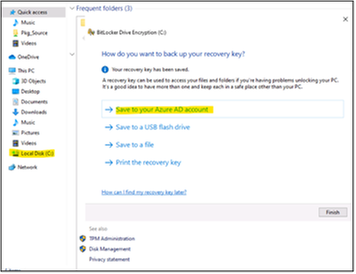
Then, you have to enter your secret password to protect the USB from being used by others. USB will be encrypted and ready for use.
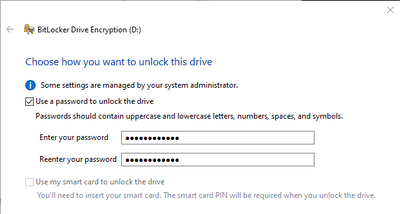
- Choose the encryption option:
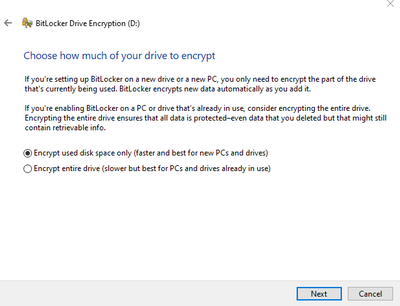
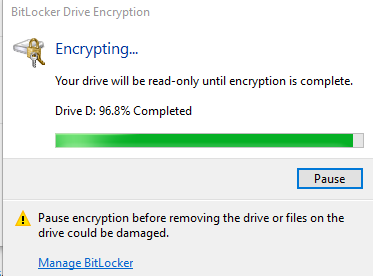
Next time, when you plug the Bitlocker USB drive into system, you will need to unlock the drive by your secret password above.
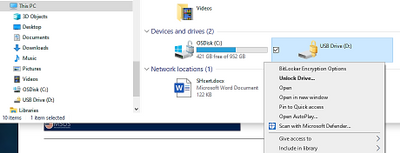
Monitoring and Audit USB Access:
- To view report on activities of USB disk across the organization,
you could use the M365 Security Center and run the device control report. Records may have a 12-hour delay from the time a media connection occurs to the time the event is reflected in the report card.
In the Microsoft 365 security center by going to Reports > Device protection.

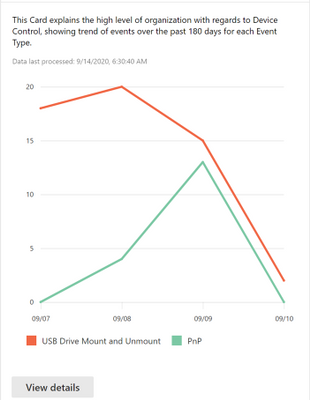
The View details button shows more media usage data in the device control report page.
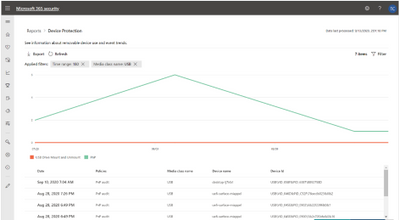
- To Audit USB disk activities
Hunting USB PnP Device Events:
In SecurityCenter.windows.com, select the Advanced hunting icon

, run query for Device Events related to USB Device (plug and play – PNP device) with extended attributes:
DeviceEvents
| where ActionType == “PnpDeviceConnected“
| extend ParsedFields=parse_json(AdditionalFields)
| project ClassName=tostring(ParsedFields.ClassName), DeviceDescription=tostring(ParsedFields.DeviceDescription),
DeviceId=tostring(ParsedFields.DeviceId), VendorIds=tostring(ParsedFields.VendorIds), DeviceName
Hunting for USB drive
hunt for UsbDriveMount and the manufacturer is NOT scandisk :
DeviceEvents
| where ActionType == “UsbDriveMount“
| where tolower(tostring(todynamic(AdditionalFields).Manufacturer)) != “scandisk”
| project USBMountTime = Timestamp, DeviceId,DeviceName , DriveLetter = tolower(tostring(todynamic(AdditionalFields).DriveLetter)), ProductName = tolower(tostring(todynamic(AdditionalFields).ProductName)),Manufacturer = tolower(tostring(todynamic(AdditionalFields).Manufacturer)), SerialNumber = tolower(tostring(todynamic(AdditionalFields).SerialNumber)), AdditionalFields, Timestamp
Again, you could use the “Query for Mounted Storage that isn’t approved” of Paul Bergson.
To view another report example, please refer to the Techblog article Advanced hunting updates: USB events, machine-level actions, and schema changes – Microsoft Tech Community written by Daniel Naim.
USB Control for Mac OS:
According to the Program Team of Microsoft, MEM Endpoint Protection configuration profile to manage USB drive on Mac OS will be available in the future, “It’s in the roadmap. “
Troubleshooting
- A legitimate device is incorrectly blocked
You may find that USB devices that match the allowed device classes are incorrectly blocked. For example, a camera is blocked although the Multimedia class GUID {4d36e96c-e325-11ce-bfc1-08002be10318} was specified in the Allow installation of devices using drivers that match these device setup classes setting.

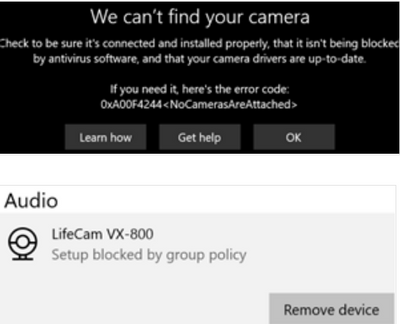
To fix this issue, follow these steps:
- On the Windows 10 device, open the %windir%infsetupapi.dev.log file.
- Look for Restricted installation of devices not described by policy in the file, and then locate a line that reads Class GUID of device changed to: {GUID} within the same device install section.
In the following example, locate the line that reads Class GUID of device changed to: {36fc9e60-c465-11cf-8056-444553540000}.
>>> [Device Install (Hardware initiated) – USBVID_046D&PID_C5345&bd89ed7&0&2]
>>> Section start 2020/01/20 17:26:03.547
dvi: {Build Driver List} 17:26:03.597
…
dvi: {Build Driver List – exit(0x00000000)} 17:26:03.645
dvi: {DIF_SELECTBESTCOMPATDRV} 17:26:03.647
dvi: Default installer: Enter 17:26:03.647
dvi: {Select Best Driver}
dvi: Class GUID of device changed to: {36fc9e60-c465-11cf-8056-444553540000}.
dvi: Selected Driver:
dvi: Description – USB Composite Device
dvi: InfFile – c:windowssystem32driverstorefilerepositoryusb.inf_amd64_9646056539e4be37usb.inf
dvi: Section - Composite.Dev
dvi: {Select Best Driver – exit(0x00000000)}
dvi: Default installer: Exit
dvi: {DIF_SELECTBESTCOMPATDRV – exit(0x00000000)} 17:26:03.664
dvi: {Core Device Install} 17:26:03.666
dvi: {Install Device – USBVID_046D&PID_C5345&BD89ED7&0&2} 17:26:03.667
dvi: Device Status: 0x01806400, Problem: 0x1 (0xc0000361)
dvi: Parent device: USBROOT_HUB304&278ca476&0&0
!!! pol: The device is explicitly restricted by the following policy settings:
!!! pol: [-] Restricted installation of devices not described by policy
!!! pol: {Device installation policy check [USBVID_046D&PID_C5345&BD89ED7&0&2] exit(0xe0000248)}
!!! dvi: Installation of device is blocked by policy!
! dvi: Queueing up error report for device install failure.
dvi: {Install Device – exit(0xe0000248)} 17:26:03.692
dvi: {Core Device Install – exit(0xe0000248)} 17:26:03.694
<<< Section end 2020/01/20 17:26:03.697
<<< [Exit status: FAILURE(0xe0000248)]
- In the device configuration profile, add the class GUID to the Allow installation of devices using drivers that match these device setup classes setting.
- If the issue persists, repeat steps 1 to 3 to add the additional class GUIDs until the device can be installed.
In the example, the following class GUIDs have to be added to the device profile:
- {36fc9e60-c465-11cf-8056-444553540000}: USB Bus devices (hubs and host controllers)
- {745a17a0-74d3-11d0-b6fe-00a0c90f57da}: Human Interface Devices (HID)
- {ca3e7ab9-b4c3-4ae6-8251-579ef933890f}: Camera devices
- {6bdd1fc6-810f-11d0-bec7-08002be2092f}: Imaging devices
- Could not format a Bitlocker USB drive:
Once Bitlocker Encrypted the drive and you want to reuse the drive for different purpose without knowing the protected password or the bitlocker recovery password, you have to firstly, clear the write protected attribute using diskpart command as shown here:
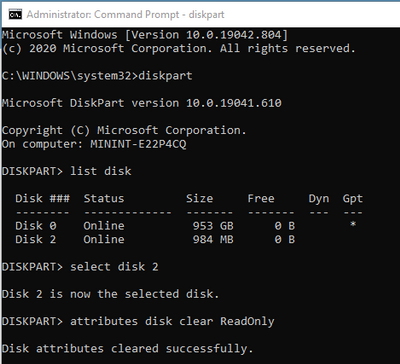
Then, you could format USB as usual.
In some situation, diskpart command could not clear the attribute, you will get the following warning when you clean the drive:
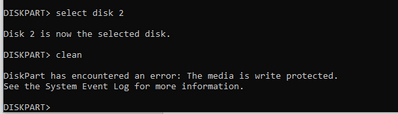
If you try to format the USB drive by GUI in File explorer, you still get the warning:
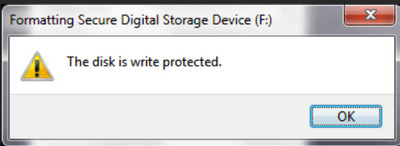
- You have to create (if it is not existed) or configure value for the Write Protected Key in Registry,
HKEY_LOCAL_MACHINESYSTEMCurrentControlSetControlStorageDevicePolicies >
WriteProtect. (DWORD),
Value: 0 (disabled)
- unplug and replug the drive again and do the above dispart command again, more detail is here.
- Bitlocker Policy error and solutions
Open Event Viewer and review the following logs under Applications and Services logsMicrosoftWindows:
- Microsoft-Windows-BitLocker-API/BitLocker Operational
- Microsoft-Windows-BitLocker-API/BitLocker Management
- Microsoft-Windows-BitLocker-DrivePreparationTool/Operational
- Microsoft-Windows-BitLocker-DrivePreparationTool/Admin
More detail: Guidelines for troubleshooting BitLocker – Microsoft 365 Security | Microsoft Docs
Thanks for reading.
Until next time.
Reference
Disclaimer
The sample scripts are not supported under any Microsoft standard support program or service. The sample scripts are provided AS IS without warranty of any kind. Microsoft further disclaims all implied warranties including, without limitation, any implied warranties of merchantability or of fitness for a particular purpose. The entire risk arising out of the use or performance of the sample scripts and documentation remains with you. In no event shall Microsoft, its authors, or anyone else involved in the creation, production, or delivery of the scripts be liable for any damages whatsoever (including, without limitation, damages for loss of business profits, business interruption, loss of business information, or other pecuniary loss) arising out of the use of or inability to use the sample scripts or documentation, even if Microsoft has been advised of the possibility of such damages.

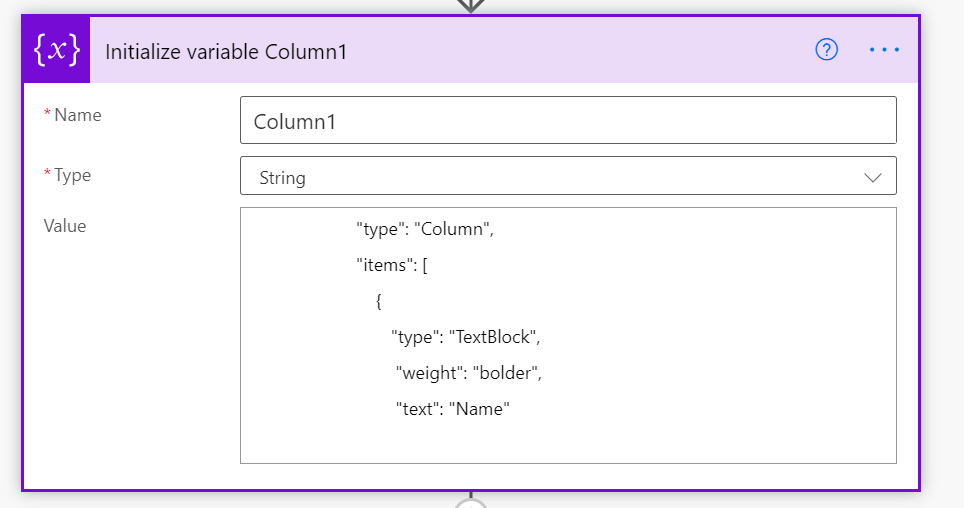
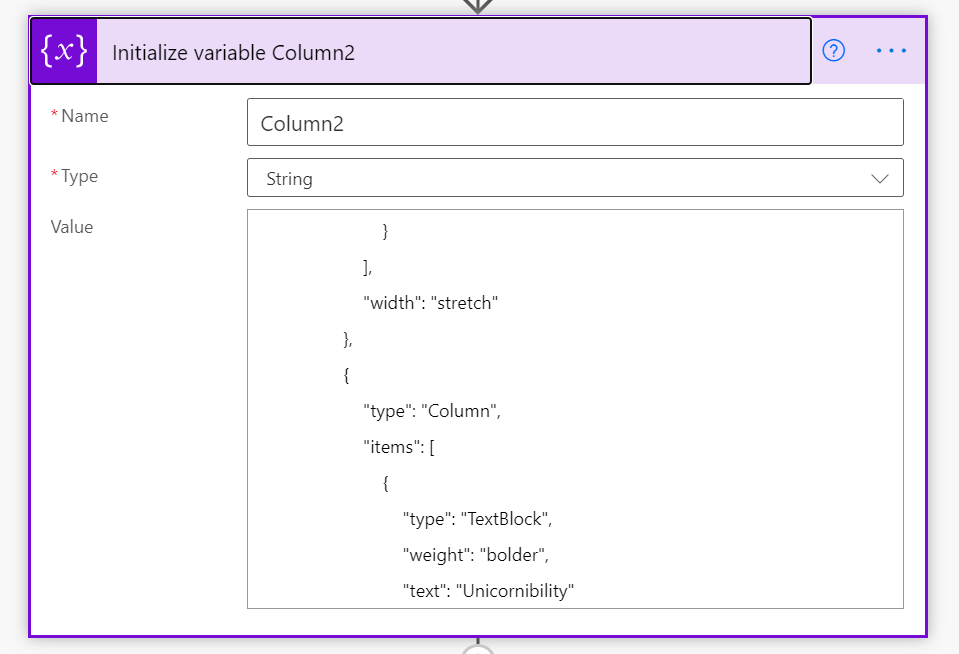
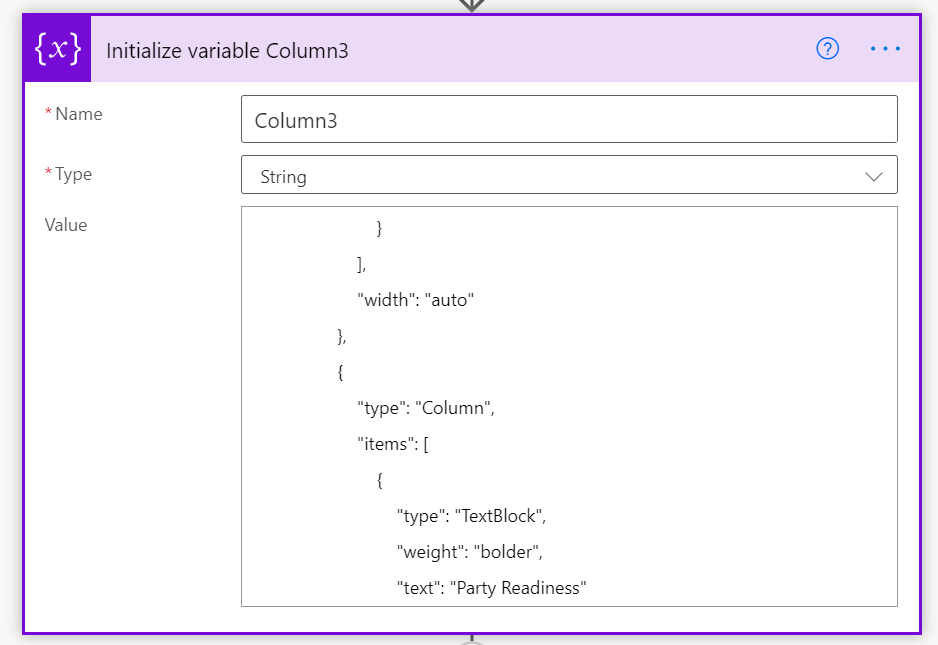
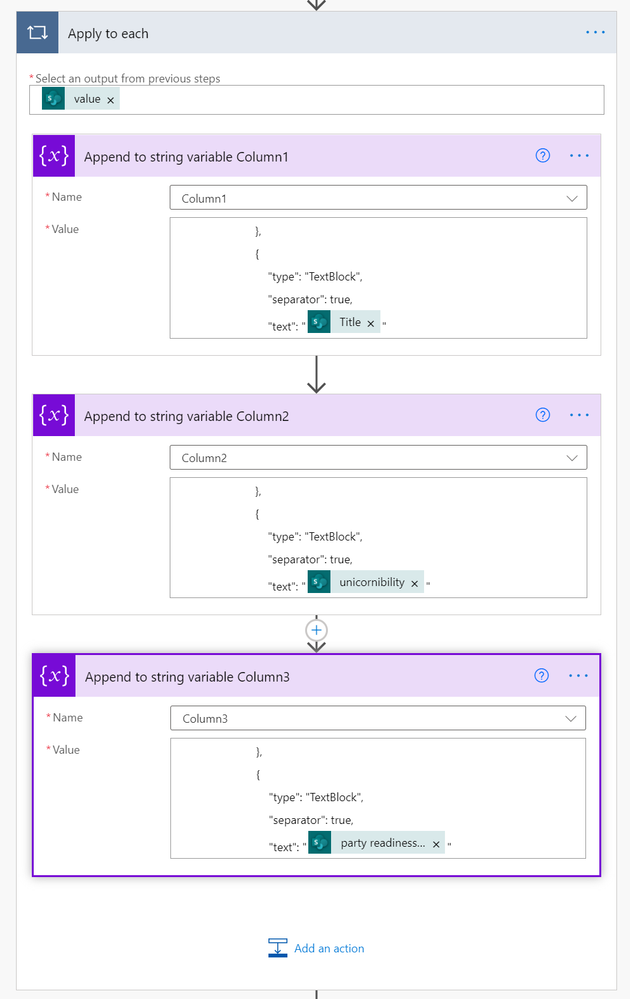
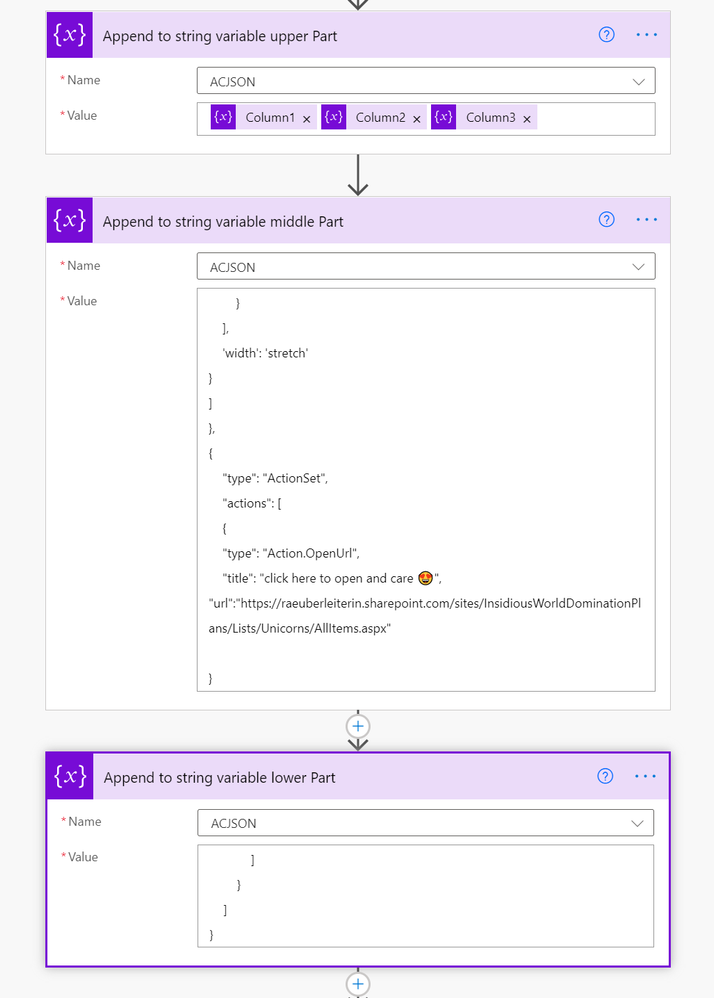
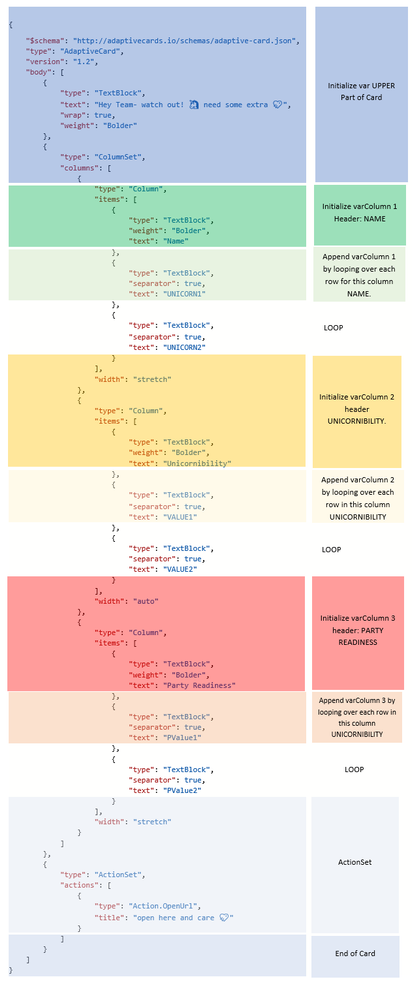
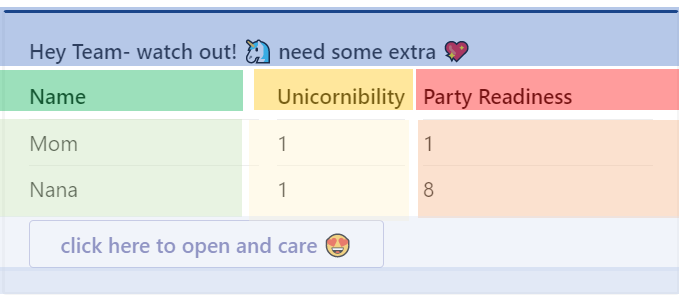


Recent Comments