by Contributed | Mar 9, 2021 | Technology
This article is contributed. See the original author and article here.
The patient journey is not just within the four walls of the hospital. Consumerism has changed our expectations of our healthcare experience. Tune in to hear two very distinct experiences from one patient.
Claire Bonaci
You’re watching the Microsoft us health and life sciences, confessions of health geeks podcast, a show that offers Industry Insight from the health geeks and data freaks of the US health and life sciences industry team. I’m your host, Claire Bonaci. On this podcast guest host, Antoinette Thomas our Us chief patient experience officer interviews colleague, John Barto on his contrasting experiences at two health institutions and the importance of the positive patient experience.
Antoinette Thomas
Welcome, everyone, to our Microsoft podcast, confessions of health geeks, my name is Antoinette Thomas, and I’m the chief patient experience officer for us health and life sciences. And today I have with me my colleague, John Barto. John, I’m hoping you’ll take a few minutes to introduce yourself.
John Barto
Sure, Antoinette. My name is obviously john Barto. I’m a former CIO from the healthcare industry, from a hospital and my job at Microsoft is to help health organizations understand how to create transition, or transformation in their environment using technology. It’s also to bring back nuggets from the customers to help our product organization to understand if there’s deficiencies in our technology and helping those transformations, how we might help overcome those. And it’s a, it’s a very rewarding experience, I get a chance to see so many different health care systems doing some wonderful things. And I get to share those amongst the different health systems. So it’s a very rewarding job. Thank you for asking.
Antoinette Thomas
You’re welcome. And it’s good to work with you. So we’re going to talk about an experience that you have had as a patient here in the last couple of months. And so as we all know, we’ve been living through a year of pandemic life in the United States. And you and I both work with our healthcare system customers. And their focus has been on pandemic protocols, frontline worker, safety, PPE, and all of that, rightly so. And this extreme stress that they’re undergoing managing through this unprecedented time have kept the patient experience front and center. However, we know their stories that are highlighted on the news every day about exceptional patient experiences. But I think it would be remiss of us to not talk about experiences where things could have gone better. And that’s why you’re here with us today. So I understand that your family was diagnosed with COVID over the Christmas season. And I’m really sorry to hear that you all had to be going through that at the same time. So I thank you for being here and willing to share this experience with us. So can you tell me more about those first few days?
John Barto
Yeah, I guess it was right before Christmas. I think the first diagnosis came in on my daughter on Christmas Eve. And we figured out that she had COVID. So we isolated her, made sure that nobody interacted with her. And we basically did. Only thing we ever did together was on Christmas Day, we went and took our presence outside and she said far away from us. And in the spirit of Christmas, we unwrapped presents. And then later that day, we served her food into her room, put her to her door, she came and got it. So we’re very close and very conscious on the isolation. But later that day, when we were having our Christmas meal, there was a bunch of texts coming in from my son, you know, the kids can’t sit at the table without having their phones and the texts come in and even on Christmas. And the texts were all saying I’ve been tested positive for COVID. I’ve been tested positive for COVID. And so that kind of threw my son and my wife and I into the thought process of we probably should be tested because we have my in laws that live in the house as well. And they’re they’re elderly, and we want to make sure we keep them from being exposed. So on Christmas day, we were looking around for a place to get tested in Christmas evening, which wasn’t very easy, right. And there was an emergency room that other people told us that they’d gone to and we went to that emergency room and we got tested and that was an awesome experience. It took us we got rapid test. It only took us probably about 45 minutes to determine where we were at test wise. And what we ended up finding out is that my son had been diagnosed as COVID and my wife and I were clear of COVID and so we sent my daughter and my son to a friend’s house. Their children that had COVID. And we kind of did this as a quarantine exercise to keep them away from everybody. And basically what happened is a couple days later, my wife was starting to feel not so good. So both her and I went for another test we we went through for a full PCR test, not a rapid test, and my wife came up diagnosed as as positive and I was still diagnosed as negative. And then a couple days later, they actually came back, this was interesting, they came back from the PCR test and determined that they had messed mine up with someone else. And that I was actually positive. So but at least they caught it, right. So they caught it. And those were those were done. And one of the local pharmacies, those PCR tests, we then isolated everyone at the other person’s house, the other family’s house, right. So the in laws didn’t get any exposure. But then we come to they started to come to some symptoms, we started to get them tested. My father in law, first of all tested positive, and then my mother in law tested positive at that same ER that we went to on Christmas where we took her. And an interesting thing about that is, while we’re covered by a good insurance, obviously working for Microsoft, my mother in law and father in law are on Medicare. And so that, er didn’t take Medicare. So we had to actually go out of pocket for the expense of getting even the test. And so that’s kind of how we learn that everyone was diagnosed with COVID. But there were some other interesting experiences that we had during away. So
Antoinette Thomas
I also think it’s really interesting that, you know, we’re talking about an entire extended family going through this at the same time. And just from you know, your comments about your testing experience, and benefits, and what that the difference was having Microsoft benefits and having Medicare benefits. So you know, that’s some interesting insights right there, from the extended family point of view. So, give me a little bit more about then what had transpired after your positive tests?
John Barto
Well, when we first when my wife first got a positive test, and I got a positive test, obviously, we work in the healthcare industry at Microsoft and I have a lot of people that had been communicating with me about, you know, you got to consider, if you have any underlying conditions, you got to consider going after this monoclonal antibody treatment. And, you know, I kind of looked around about, I didn’t really think a great deal about it, I do have one underlying condition that I’ve lived with all my life, which was actually a contributor and basically qualified me for that treatment. The first thing I did when I started to think about looking for it is I called my primary care physician, and only to find out that my primary care physician had left the practice that they were in without any notification. So I got ahold of the office where they used to work. And I started asking about these monoclonal antibody, no one there knew anything about it. I then called my benefit, my plan. And I said, You know want, to kind of investigate, how do I get this, and they told me to go call my primary care physician back. So I called the office again. And they came up with finally the solution of I needed to go to the hospital, they determine whether I was gonna be able to get that protocol. And I asked him, Well, how do you go to the hospital, the only way I know how to do that is just to go for an ER visit. And you know, you maybe get admitted maybe you won’t. But that’s the only way I know how to engage a hospital, you know, directly. And so they said, that’s probably the best thing to do. I called around to their hospitals, and asked them, which are those ers might have the treatment, I found one that said that they had been treating people in that way. And so we actually took the time to go. And by this time, after I’d done this investigation, which was roughly a two day period of time to get the investigation all done to figure out what I needed to do. My wife and I decided we were talking about going but we weren’t really overly concerned. And then my father last diagnosis came back that he was positive. And he’s definitely an in the outer condition and has some has some real needs. And so we decided we were gonna go ahead and do this, we’re going to take him along. So the three of us showed up at the ER, explaining to them at the front door of the ER and I was very articulate about this. We all know we have COVID we’re not here for that purpose. We’re here to get a monoclonal antibody. And I want to explain to you if that’s not possible, let’s just determine that right now. And we’ll go on our way and we won’t waste the resources of your health system. But we’re trying to do the right thing here. We’re trying to make sure we’re not basically putting ourselves in a position where we’re going to end up in one of your ICU units on a ventelator and those types of things. They basically took us in, they put us in rooms. After waiting for about two hours, they finally put us in a room. They did various different things to us from a treatment perspective. And every one of us was told we weren’t eligible for the monoclonal antibody. And mostly it was because they needed to know within 72 hours, within 72 hours of finding their protocol is within 72 hours of finding out you had COVID. That’s when they wanted to administer it. Well, frankly, we were at that er for six and a half hours. When I entered the ER, I was within the 72 hour protocol. When, when I, when I, when I finally got to the point, they said I wasn’t qualified, I was outside the 72 hour protocol. And so we had an experience that was very difficult for us. It made my father in law was elderly, he struggles to get around, keeping them in a place for six and a half hours and trying to do that kind of stuff. And then finding out that even though upfront, I told him directly. I wasn’t interested, if I couldn’t get it, we would leave. They basically put us in this position of spending all the time. And we’re still not sure how much money. Frankly, we haven’t been billed for those services. We don’t know how much that might have cost. And in my mind, that was a little bit crazy, because we wasted their resources, and did all that kind of stuff without really getting the result. Right. Yeah, that was one experience. And then the other side of the experience that’s actually very positive, is remember the ER I told you, we went to on Christmas Eve. That’s where my mother in law got her test to find out she was positive. And she was the last one. If you remember, she was the last one in the group that tested positive. Well, that was the day after we had just had this experience at the ER six and a half hours. We went, when we decided we needed to get her tested, we took her to the other er, the one we had a great experience with Christmas. When I showed up, they said she’s not you know covered. So you’re gonna have to come out of pocket, which was a relatively significant amount of money. But the experience was so good there on Christmas Eve that we decided we were going to go ahead and do it. And so I paid it out of pocket. We got her tested, she found that about 45 minutes later that she too had COVID. And we wrapped her up, put her in the car and took her back to the house right we were headed back to the house, got to the house, we were there for about 10 minutes. And a phone call comes in from the ER and it’s like you know you are eligible is basically a calling or is that she’s eligible for this thing called monoclonal antibody, which the irony of it is when I was doing my investigation, I checked out that ER as well as my, the place I normally go. And they said they didn’t have it yet. They were hoping to get it soon. So between that time and the time my mother in law got tested, they actually got the antibody, they followed up with us, they asked us if we wanted it, we actually negotiated a price for it since they weren’t covered under Medicare. And she went back to the hospital that night, that was actually New Year’s Eve. We went back to the hospital that night. And she spent all the way up till quarter to midnight, you know about a about a four and a half hour period getting the monoclonal antibody. So that was that was an awesome experience, from my perspective.
Antoinette Thomas
You’re just sharing two vastly different experiences. And in one thing that really stands out for me is the positive feedback loop of the second experience of taking the test for the testing and having to pay out of pocket and then being you know, upfront with you about that. And then reaching back out to you to say, Hey, wait a minute, bring her back. She’s eligible for this. And that’s very different than your your initial experience at the other facility.
John Barto
Yeah, hugely different. In fact, my father in law was probably the one that is most at risk, right from a health perspective. And what we did then is we had a tough time convincing them he still wanted to get the monoclonal antibody. So after she had that experience, we actually call that er back. Their protocol is slightly different than the one that we had originally gone to. And we basically had a lot of conversation with them and they said they would go ahead and take him in and give him the monoclonal antibody as well. So we did get it for both the in laws and you know, it’s been we’ve avoided any kind of real problems from the from the healthcare side of the business, none of us ended up in the hospital or admitted or anything like that. And we do believe that it’s because of that, that that those two are actually able to stay clear. It was pretty significant out of pocket expense for both of them. But the experience so much better, actually was a result, you know, it was better, but it also got resolved. So we were, we were very happy to go ahead and go out of pocket to pay for those kinds of expenses.
Antoinette Thomas
Yes. And it kept them out of the hospital with any, you know, awful symptomatology. So that’s good. That’s good. Um, I do have a question for you, though. So now having had these separate experiences, have you received a survey in the mail a patient experience survey? And if yes, have you filled them out to let them know,
John Barto
I have received no survey on either of the visits. And I’ve only actually been billed for the, for the one visit for my insurance, I have still not been billed for the visitor they awful visit, right, I haven’t been billed for any of that. haven’t even seen claims go gets my insurance on it. But but for the ER that we really like the one that we went to, on Christmas to get our testing done, we have received our billing and our insurance covered it all and all that kind of stuff. But I’ve never received a survey from either of the institute’s at this point. I suspect one will be coming, but it’s not
Antoinette Thomas
I hope one is going to be coming, I hope two will be coming. Because we know those are important. And we know that patients will generally remember the very last thing that happened, whether it was positive or negative, that happened inside that healthcare system. So again, two vastly different experiences for you and your family. So as we wrap this up, and you know, any words of wisdom for our listeners on what it’s like to go through this, and any recommendations you can make on if they are exploring, requesting the monoclonal antibodies, and your entire process with being diagnosed with COVID.
John Barto
Yeah, so. So first of all, while I haven’t I want to finish this thought process, well, I haven’t gotten a survey, obviously, I’m talking to you about my experiences, whether it comes through a survey or not, or it’s just consumer knowledge that is being passed around, you know, it is very important to kind of do things that are helping the experience along, if you want to get repeat business, I have chosen since to find another primary care provider, I will no longer be going to that health Health Institute that I used to go to. And, you know, that’s been the result of my experience. So first and foremost, and stay active with your primary care physicians, because I, you know, once a year, to find out there wasn’t even a primary care physician there was kind of surprising to me. So, so stay active with them. The other thing is, you know, I have a lot of people in the business, I know a lot of doctors and nurses because of my job, I think I was a little bit fortunate to get a lot of advice from them. And the fact that I needed to advocate for myself really, really heavily to make sure that the care that we received, was actually provided. And to be candid with the people as we checked into the ers and those types of things that, you know, I was aware that, that we wouldn’t qualify, and that if that was true, you know, find a different way, a different path. You need to kind of educate yourself, those types of things. And it’s not easy to do. I would say there’s a lot of when I started looking into it, there’s a lot of sites now that people are going to to kind of tell about their experiences and things like that through the process. But But this thought was ironic about it is what started the thought process for me about some press that came out that said these distributed through big warp speed, and they’re not. They’re just not being touched. And, and I think that’s why I felt like I should go after it. But I you need to advocate for yourself. I mean, it’s, you know, so accustomed [inaudlible]
Antoinette Thomas
Well, I think you’re bringing up an important point too, because, you know, john q public, joan q public, we’re so overwhelmed with all of the different bits and pieces that are coming from the news about where to go for testing, how to go for testing, you know, what’s the process after you get tested, it’s so hard to know. And this point you’re making about advocating for yourself because you know, you you know how to do that. And I tend to think of the millions of people that that don’t, you know, and how overwhelming that is. So those are very good points.
John Barto
I would say one thing, in addition to that is, it was a good learning experience for my children. Because you can imagine, with all of us having COVID, we had to take shifts as to who was helping who and, and so there were times where my daughter and my son had to be in those conversations with the medical professionals about, okay, my father in law cleared to get a monoclonal treatment, because I just had had enough I could do anywhere I needed to sleep, right. And so, so it’s actually taught a generation that they need to be able to do that. And I think they picked it up quicker than I probably would have, because their generation has got that curiosity and advocating for themselves, they got consumerism in their blood. And, you know, that’s what’s coming at the healthcare system. So you’ve got to be aware of that. We’ve got to reform stuff to be able to handle those types of resources there, those types of folks.
Antoinette Thomas
Yeah, I want to thank you again for coming on and and sharing your experience, because if it helps someone out there listening, then that’s what it’s all about. Thank you, john.
John Barto
Well, thank you. Thank you, Toni.
Claire Bonaci
Thank you all for watching. Please feel free to leave us questions or comments below. And check back soon for more content from the HLS industry team.
by Contributed | Mar 9, 2021 | Technology
This article is contributed. See the original author and article here.
Two Principal Program Managers from the Microsoft Teams Engineering group, Rima Reyes and Dave Jennings, deliver an update on current capabilities within Microsoft #Teams US Government (GCC High), feature roadmaps, and an overarching look at what’s to come on the platform.
News and Features Discussed:
- Multi Window UI
- Presenter View
- Meeting Reactions
- and much more!
https://youtu.be/IbKcMTLtXTw
https://www.youtube-nocookie.com/embed/IbKcMTLtXTw
Session Presented at CS2 Virtual Conference https://info.summit7systems.com/cs2
Rima Reyes https://www.linkedin.com/in/rimareyes/
Microsoft Teams in Office 365 GCC High https://info.summit7systems.com/blog/…
by Contributed | Mar 9, 2021 | Technology
This article is contributed. See the original author and article here.
Microsoft 365 Patterns and Practices (PnP) Community March 2021 update is out with a summary of the latest guidance, samples, and solutions from Microsoft or from the community for the community. This article is a summary of all the different areas and topics around the community work we do around Microsoft 365 ecosystem during the past month. Thank you for being part of this success. Sharing is caring!
What is Microsoft 365 Community (PnP)
Microsoft 365 PnP is a nick-name for Microsoft 365 Community activities coordinated by numerous teams inside of the Microsoft 365 engineering organizations. PnP is a community-driven open source initiative where Microsoft and external community members are sharing their learning’s around implementation practices for Microsoft 365. Topics vary from Microsoft Graph, Microsoft Teams, OneDrive and SharePoint. Active development and contributions happen in GitHub by providing contributions to the samples, reusable components, and documentation for different areas. PnP is owned and coordinated by Microsoft engineering, but this is work done by the community for the community.
The initiative is facilitated by Microsoft, but we have multiple community members as part of the PnP team (see team details in end of the article) and we are always looking to extend the PnP team with more community members. Notice that since this is open source community initiative, so there’s no SLAs for the support for the samples provided through GitHub. Obviously, all officially released components and libraries are under official support from Microsoft.
Some key statistics around Microsoft 365 PnP initiative from February 2021:
- Unique visitors during the past 2 weeks in PnP, OneDrive, Microsoft-Search, OfficeDev and SharePoint GitHub organization repositories – 71,936
- Overall unique contributors in the PnP, OneDrive, Microsoft-Search, OfficeDev and SharePoint GitHub organizations – 1,782
- Merged pull requests across PnP, OneDrive, Microsoft-Search, OfficeDev and SharePoint repositories (cumulative) – 20,423
- Closed issues and enhancements ideas cross PnP, OneDrive, Microsoft-Search, OfficeDev and SharePoint repositories (cumulative) – 20,724
- Microsoft 365 Community (PnP) YouTube channel had 79,339 views with 6,165 hours of watch time and 20,921 subscribers
- Microsoft 365 Developer YouTube channel had 38,802 views with 3,006 hours of watch time and 12,671 subscribers
Most viewed videos in the Microsoft 365 Community (PnP) YouTube channel during February 2021:
- Getting started with Site Designs in SharePoint Online – Laura Kokkarinen (Sulava) | 3,845
- Working with Microsoft Lists (webinar) – Harini Saladi, Miceile Barrett, Chakkaradeep Chandran and Mark Kashman | 3,631
- Architecting Your Intranet | Melissa Torres (Microsoft) | 2,278
- SharePoint Monthly Community Call – February 2021 | 1,795
- SharePoint Framework Tutorial 1 – HelloWorld WebPart | 1,764
- SharePoint App Bar – Global navigation and wayfinding | Melissa Torres (Microsoft) | 1,706
- Configure list custom header, footer and the form body with JSON | Chris Kent (DMI) | 1,588
- Introducing: New Employee Onboarding – a Microsoft Teams app template | Nidhi Sharma (Microsoft) | 1,585
- Migration to SharePoint, OneDrive, and Microsoft Teams in Microsoft 365, free and easy – Hani Loza (Microsoft) & Eric Warnke (Microsoft) | 1,578
- Latest on Power Automate integration within SharePoint Online | Chakkaradeep Chandran (Microsoft) | 1,534
Most viewed videos in the Microsoft 365 Developer YouTube channel during February 2021:
- Authenticate and connect with Microsoft Graph – June 2019 | 1,299
- Build Outlook Add-ins that integrate your solution seamlessly into your users’ Outlook experience | Juan Balmori, Hitesh Manwar – 1,213
- An introduction to Microsoft Graph for developers – Part I – Getting started – October 2019 | 1,044
- Getting Started with Microsoft Graph and Application Registration | 896
- Build and Office add-in using modern JavaScript tools and technologies | 838
- Create interactive conversational bots for Microsoft Teams | 828
- Develop multi-tenant applications with Microsoft Identity Platform – April 2020 | 763
- SharePoint Site Collection Level Permissions | 657
- Microsoft identity platform: Getting Started with Microsoft identity | 644
- Getting Started with Microsoft Graph | 644
Main resources around Microsoft 365 Community:
Latest Dev Blog posts
Here are the latest blog posts and announcements around Microsoft 365 development topics from https://developer.microsoft.com/en-us/microsoft-365/blogs.
Community call recording blog posts:
PnP Weekly video blog / podcast shows:
We highly recommend also subscribing on the Microsoft 365 Developer Podcast show, which is a great show covering also latest development in the Microsoft 365 platform from developer and extensibility perspective.
Community Calls
There are numerous different community calls on different areas. All calls are being recorded and published either from Microsoft 365 Developer or Microsoft 365 Community (PnP) YouTube channels. Recordings are typically released within the following 24 hours after the call. You can find a detailed agenda and links to specific covered topics on blog post articles at the Microsoft 365 developer blog when the videos are published.
If you are interested in doing a live demo of your solution or sample in these calls, please do reach out to the PnP Team members (contacts later in this post) and they are able to help with the right setup. These are great opportunities to gain visibility for example for existing MVPs, for community members who would like to be MVPs in the future or any community member who’d like to share some of their learnings.
Microsoft 365 Community (PnP) Ecosystem in GitHub
Most of the community driven repositories are in the PnP GitHub organization as samples are not product specifics as they can contain numerous different solutions or the solution works in multiple different applications.
- PnPjs – PnPjs Framework repository
- CLI Microsoft 365 – Cross-OS command line interface to manage Office 365 tenant settings
- generator-spfx – Open-source Yeoman generator which extends the out-of-the-box Yeoman generator for SharePoint with additional capabilities
- generator-teams – Open-source Microsoft Teams Yeoman generator – Bots, Messaging Extensions, Tabs, Connectors, Outgoing Web hooks and more
- teams-dev-samples – Microsoft Teams targeted samples from community and Microsoft engineering
- Sharing is Caring – Getting started on learning how to contribute and be active on the community from GitHub perspective.
- pnpcore – The PnP Core SDK is an SDK designed to work against Microsoft 365 with Microsoft Graph API first approach
- powershell – PnP PowerShell module which is PowerShell Core module targeted for Microsoft 365
- pnpframework – PnP Framework is a .Net Standard 2.0 library targeting Microsoft 365 containing the PnP Provisioning engine and a ton of other useful extensions
- https://github.com/pnp/teams-dev-samples – Samples around the Microsoft Teams development models from Microsoft and from the community
- sp-dev-fx-webparts – Client-side web part samples from community and Microsoft engineering
- sp-dev-fx-extensions – Samples and tutorial code around SharePoint Framework Extensions
- sp-dev-fx-library-components – Samples and tutorial code around the SharePoint Framework library components
- sp-starter-kit – Starter kit solution for SharePoint modern experiences
- sp-dev-fx-vs-extension – Open source Visual Studio IDE extension for creating SharePoint Framework solutions in the Visual Studio 2015 or 2017
- sp-dev-build-extensions – Different build extensions like gulp tasks and gulp plugins from the community and engineering around SharePoint development
- sp-dev-solutions – Repository for more polished and fine-tuned reusable solutions build with SharePoint Framework
- sp-dev-samples – Repository for other samples related on the SharePoint development topics – WebHooks etc.
- sp-dev-fx-controls-react – Reusable content controls for SharePoint Framework solutions build with React
- sp-dev-fx-property-controls – Reusable property pane controls to be used in web parts
- sp-dev-list-formatting – Open-source community-driven repository for the column and view formatting JSON definitions
- sp-dev-site-scripts – Open-source community-driven repository for community Site Designs and Site Scripts
- sp-dev-modernization – Tooling and guidance around modernizing SharePoint from classic to modern
- sp-power-platform-solutions – Solution and sample code for SharePoint Power Platform solutions
- powerfx-samples – Samples that demonstrate different usage patterns for the Power Fx low-code programming language
All SharePoint specific repositories or services supported directly by Microsoft are located in the SharePoint GitHub organization
PnP specific repositories – solution designs and tooling
- PnP – Main repository for SP add-in, Microsoft Graph etc. samples
- PnP-Sites-Core – Office Dev PnP Core component
- PnP-PowerShell – Office Dev PnP PowerShell Cmdlets
- PnP-Tools – Tools and scripts targeted more for IT Pro’s and for on-premises for SP2013 and SP2016
- PnP-Provisioning-Schema – PnP Provisioning engine schema repository
- PnP-IdentityModel – Open source replacement of Microsoft.IdentityModel.Extensions.dll
Repositories in the GitHub Microsoft Search organization controlled by the PnP initiative
Other related resources from GitHub
What’s supportability story around PnP material?
Following statements apply across all of the community lead and contributed samples and solutions, including samples, core component(s) and solutions, like SharePoint Starter Kit or PnP PowerShell. All Microsoft released SDKs and tools are supported based on the specific tool policies.
- PnP guidance and samples are created by Microsoft & by the Community
- PnP guidance and samples are maintained by Microsoft & community
- PnP uses supported and recommended techniques
- PnP is an open-source initiative by the community – people who work on the initiative for the benefit of others, have their normal day job as well
- PnP is NOT a product and therefore it’s not supported by Premier Support or other official support channels
- PnP is supported in similar ways as other open source projects done by Microsoft with support from the community by the community
- There are numerous partners that utilize PnP within their solutions for customers. Support for this is provided by the Partner. When PnP material is used in deployments, we recommend being clear with your customer/deployment owner on the support model
Please see the specifics on the supportability on the tool, SDK or component repository or download page.
Microsoft 365 PnP team model
In April 2020 we announced our new Microsoft 365 PnP team model and grew the MVP team quite significantly. PnP model exists for having more efficient engagement between Microsoft engineering and community members. Let’s build things together. Your contributions and feedback is always welcome! During August, we also crew the team with 5 new members. PnP Team coordinates and leads the different open-source and community efforts we execute in the Microsoft 365 platform.
We welcome all community members to get involved on the community and open-source efforts. Your input do matter!
Got feedback, suggestions or ideas? – Please let us know. Everything we do in this program is for your benefit. Feedback and ideas are more than welcome so that we can adjust the process for benefitting you even more.
Area-specific updates
These are different areas which are closely involved on the community work across the PnP initiative. Some are lead and coordinated by engineering organizations, some are coordinated by the community and MVPs.
Microsoft Graph Toolkit

Microsoft Graph Toolkit is engineering lead initiative, which works closely with the community on the open-source areas. The Microsoft Graph Toolkit is a collection of reusable, framework-agnostic web components and helpers for accessing and working with Microsoft Graph. The components are fully functional right of out of the box, with built in providers that authenticate with and fetch data from Microsoft Graph.
All the latest updates on the Microsoft Graph Toolkit is being presented in our bi-weekly Microsoft 365 Generic Dev community call, including the latest community contributors.
Microsoft 365 Community docs
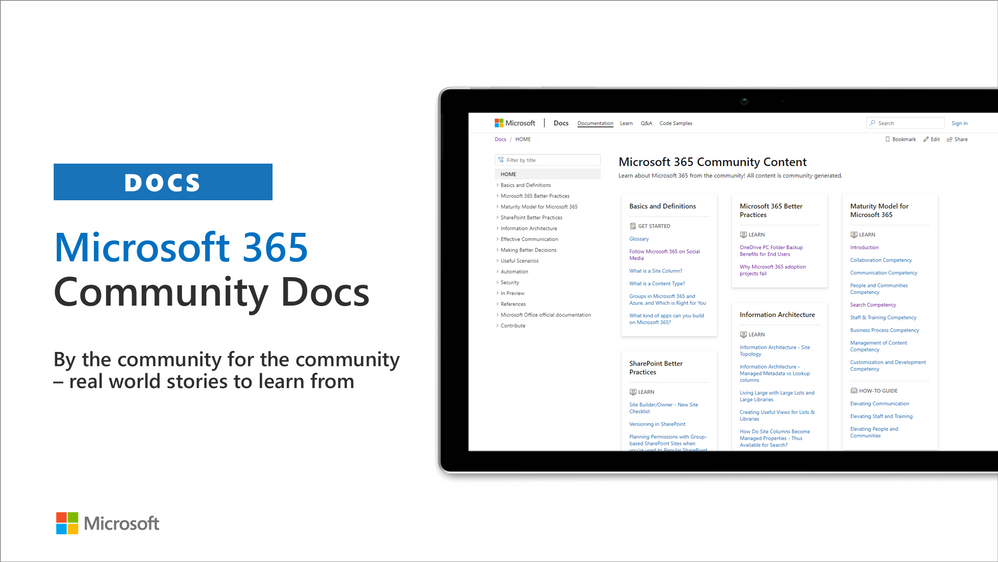
Community docs model was announced in the April 2020 and it’s great to see the interest for community to help each other by providing new guidance on the non-dev areas. See more on the announcement from the SharePoint blog – Announcing the Microsoft 365 Community Docs. We do welcome contributions from the community – our objective is to build a valuable location for articles from Microsoft and community together.
Latest updates on this area as follows:
Have ideas for articles or want to contribute yourself? – Get involved! Here are also some additional resources explaining the model more detailed.
SharePoint Framework development samples
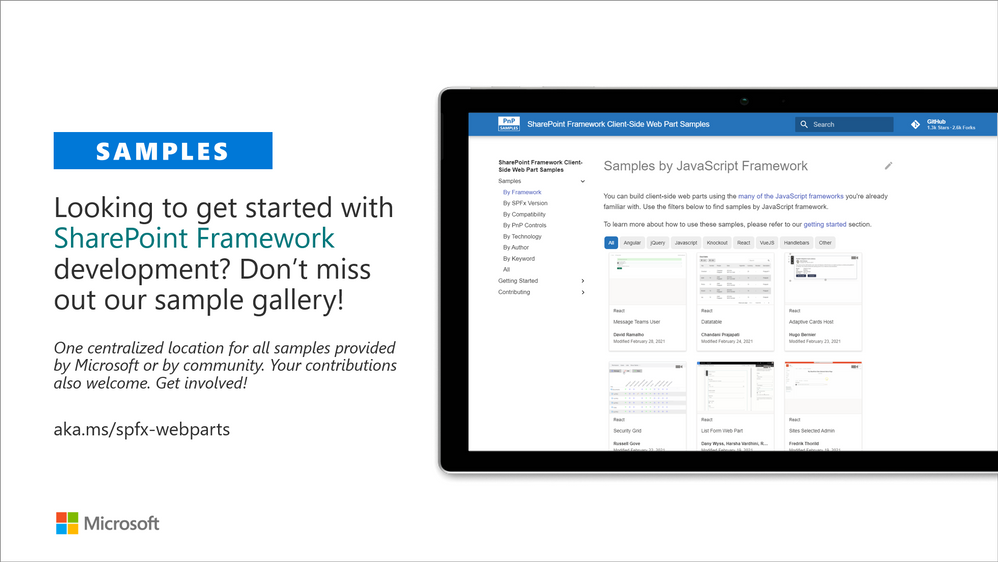
These are the updated SharePoint Framework samples which are available from the the different repositories.
How to find what’s relevant for you? Take advantage of our SharePoint Framework web part and extension sample galleries – includes also solutions which work in Microsoft Teams
Microsoft Teams community samples
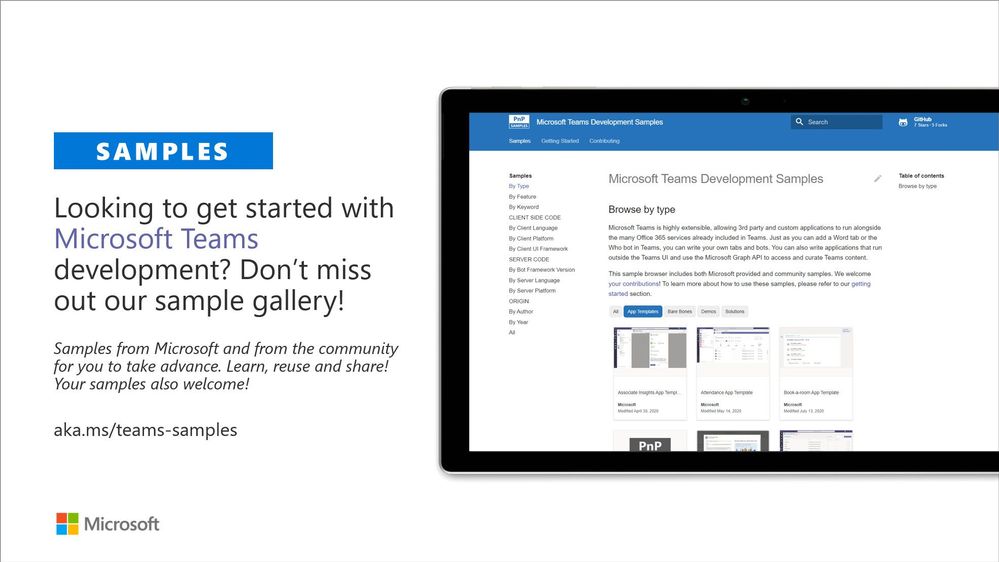
These are samples which have been contributed on the community samples since last summary. We do welcome all Microsoft Teams samples to this gallery. They can be implemented using in any technology.
- New sample bot-b2c-chat-bot by Abtin Amini, Sathya Raveendran, Saikrishna Neeli and Arun Kumar Anaparthi on building a Business to Citizen Consumer Communication Bot
- Updates to tab-sso to by Doğan Erişen to add MSAL.js support for signle sign on experience
If you are interested on Microsoft Teams samples, we have just released also new Microsoft Teams sample gallery. Contributions to Microsoft Teams samples is also more than welcome. This gallery already surfaces all Microsoft samples, Microsoft Teams app templates and community samples.
Sharing is Caring initiative
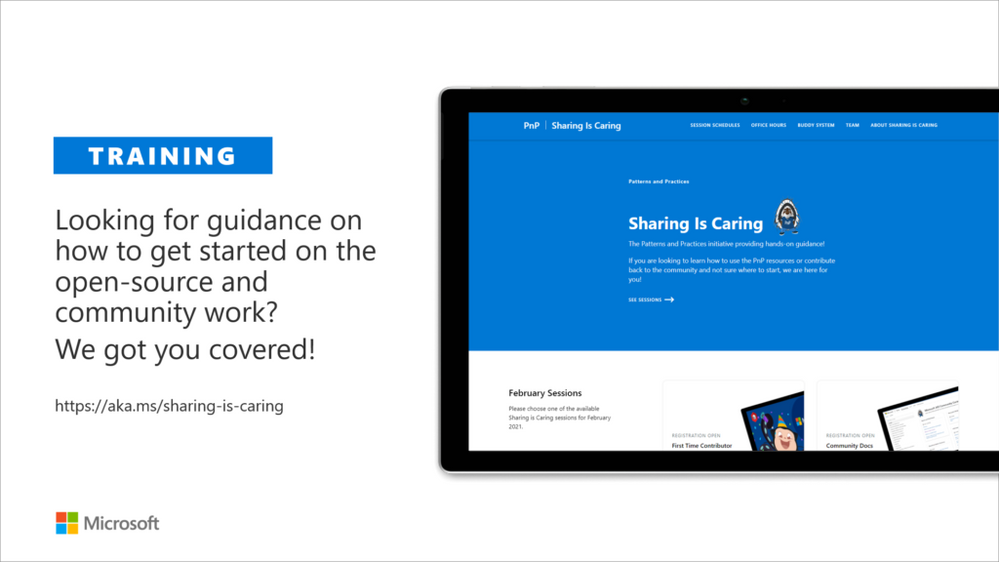
The “Sharing Is Caring” imitative is targeted for learning the basics around making changes in Microsoft Docs, in GitHub, submitting pull requests to the PnP repositories and in GitHub in general. Take advantage of this instructor lead training for learning how to contribute to docs or to open-source solutions. Everyone is welcome to learn how to get started on contributing to open-source docs or code!
- See more from the guidance documentation – including all upcoming instructor lead sessions which you can participate!
Different Microsoft 365 related open-source initiatives build together with the community
See exact details on the latest updates from the specific open-source project release notes. You can also follow up on the project updates from our community calls. There are numerous active projects which are releasing new versions with the community even on weekly basis. Get involved!
- Microsoft Look Book – Discover the modern experiences you can build with SharePoint in Microsoft 365. Look book provides design examples for SharePoint Online which can be automatically provisioned to any tenant in the world. See more from https://lookbook.microsoft.com. This service is also provided as open-source solution sample from GitHub.
- yo teams – Open-source Yeoman generator for Microsoft Teams extensibility. Supports creation of bots, messaging extensions, tabs (with SSO), connectors and outgoing Webhooks. See more from https://aka.ms/yoteams.
- PnP Framework – .NET Standard 2.0 SDK containing the classic PnP Sites Core features for SharePoint Online. More around this package from GitHub.
- PnP Core SDK – The PnP Core SDK is an SDK designed to work for Microsoft 365 with Graph API first approach. It provides a unified object model for working with SharePoint Online and Teams which is agnostic to the underlying API’s being called. See more around the SDK from documentation.
- PnP PowerShell – PnP PowerShell is a .NET Core 3.1 / .NET Framework 4.6.1 based PowerShell Module providing over 400 cmdlets that work with Microsoft 365 environments and more specifically SharePoint Online and Microsoft Teams. See more details from documentation.
- Reusable SharePoint Framework controls – Reusable controls for SharePoint Framework web part and extension development. Separate projects for React content controls and Property Pane controls for web parts. These controls are using Office UI Fabric React controls under the covers and they are SharePoint aware to increase the productivity of developers.
- Office 365 CLI – Using the Office 365 CLI, you can manage your Microsoft Office 365 tenant and SharePoint Framework projects on any platform. See release notes for the latest updates.
- PnPJs – PnPJs encapsulates SharePoint REST APIs and provides a fluent and easily usable interface for querying data from SharePoint sites. It’s a replacement of already deprecated pnp-js-core library. See changelog for the latest updates.
- PnP Provisioning Engine and PnP CSOM Core – PnP provisioning engine is part of the PnP CSOM extension. They encapsulate complex business driven operations behind easily usable API surface, which extends out-of-the-box CSOM NuGet packages. See changelog for the latest updates.
- PnP PowerShell – PnP PowerShell cmdlets are open-source complement for the SharePoint Online cmdlets. There are more than 300 different cmdlets to use and you can use them to manage tenant settings or to manipulate actual SharePoint sites. They See changelog for the latest updates.
- PnP Modern Search solution – The PnP ‘Modern Search’ solution is a set of SharePoint Online modern Web Parts allowing SharePoint super users, webmasters and developers to create highly flexible and personalized search based experiences in minutes. See more details on the different supported capabilities from https://aka.ms/pnp-search.
- Modernization tooling – All tools and guidance on helping you to transform you SharePoint to modern experiences from http://aka.ms/sppnp-modernize.
- SharePoint Starter Kit v2 – Building modern experiences with Microsoft Teams flavors for SharePoint Online and SharePoint 2019 – reference solution in GitHub.
- List formatting definitions – Community contributed samples around the column and view formatting in GitHub.
- Site Designs and Site Scripts – Community contributed samples around SharePoint Site Designs and Site Scripts in GitHub.
- DevOps tooling and scripts – Community contributed scripts and tooling automation around DevOps topics (CI/CD) in GitHub.
- Teams provisioning solution – Set of open-source Azure Functions for Microsoft Teams provisioning. See more details from GitHub.
Documentation updates
Please see all the Microsoft 365 development documentation updates from the related documentation sets and repositories as listed below:
Microsoft 365 Dev and Microsoft 365 Community (PnP) YouTube video channels
You can find all Microsoft 365 related videos on our YouTube Channel at http://aka.ms/m365pnp-videos or at Microsoft 365 Dev. These channels contains already a significant amount of detailed training material, demo videos, and community call recordings.
Here are the new Microsoft demo or guidance videos released since the last monthly summary:
Community demos as following:
PnP Weekly sessions – Community visitors and latest articles from Microsoft and community on Microsoft 365 topics.
Key contributors to the March 2021 update
Here’s the list of active contributors (in alphabetical order) since last release details in GitHub repositories or community channels. PnP is really about building tooling and knowledge together with the community for the community, so your contributions are highly valued across the Microsoft 365 customers, partners and obviously also at Microsoft.
Thank you for your assistance and contributions on behalf of the community. You are truly making a difference! If we missed someone, please let us know.
Companies: Here’s the companies, which provided support for PnP initiative for this month by allowing their employees working for the benefit of others in the community. There were also people who contributed from other companies during last month, but we did not get their logos and approval to show them in time for these communications. If you still want your logo for this month’s release, please let us know and share the logo with us. Thx.
Microsoft people: Here’s the list of Microsoft people who have been closely involved with the PnP work during last month.
PnP Team
PnP Team manages the PnP community work in the GitHub and also coordinates different open-source projects around Microsoft 365 topics. PnP Team members have a significant impact on driving adoption of Microsoft 365 topics. They have shown their commitment to the open-source and community-driven work by constantly contributing to the benefit of the others in the community.
Thank you for all that you do!
Here are the Microsoft Internal PnP Core team members:
Next steps
See all of the available community calls, tools, components and other assets from https://aka.ms/m365pnp. Get involved!
Got ideas or feedback on the topics to cover, additional partnerships, product feature capabilities? – let us know. Your input is important for us, so that we can support your journey in Microsoft 365.
“Sharing is caring”
Microsoft 365 Community (PnP) – March 9th 2021

by Scott Muniz | Mar 9, 2021 | Security, Technology
This article is contributed. See the original author and article here.
Official websites use .gov
A .gov website belongs to an official government organization in the United States.

Secure .gov websites use HTTPS A
lock ( )
) or
https:// means you’ve safely connected to the .gov website. Share sensitive information only on official, secure websites.
by Scott Muniz | Mar 9, 2021 | Security, Technology
This article is contributed. See the original author and article here.
Since December 2020, CISA has been responding to a significant cybersecurity incident involving an advanced persistent threat (APT) actor targeting networks of multiple U.S. government agencies, critical infrastructure entities, and private sector organizations. The APT actor added malicious code to multiple versions of the SolarWinds Orion platform and leveraged it—as well as other techniques, including—for initial access to enterprise networks. After gaining persistent, invasive access to select organizations’ enterprise networks, the APT actor targeted their federated identity solutions and their Active Directory/M365 environments. CISA has published two new resources on the follow-on activity from this compromise:
CISA encourages affected organizations to review and apply the necessary guidance in the Remediating Networks Affected by the SolarWinds and Active Directory/M365 Compromise web page and CISA Insights. For general information on CISA’s response to SolarWinds Orion compromise activity, refer to www.cisa.gov/supply-chain-compromise.

by Scott Muniz | Mar 9, 2021 | Security
This article was originally posted by the FTC. See the original article here.
Did you get a bill for a Small Business Administration (SBA) loan, but you didn’t apply for one? It’s likely that an identity thief applied for the loan using your personal or business information. The SBA has new guidance about reporting the fraud, and the FTC has tips to help you clear up any credit problems it may cause.
The SBA’s Office of Disaster Assistance has been issuing the loans under its COVID-19 Economic Injury Disaster Loan (EIDL) program. They’re designed to give financial help to small businesses and non-profit organizations. Criminals have taken advantage of the program by using stolen information to get loans in someone else’s name, or in the name of that person’s company. And now, the bills are landing in the mailboxes of people and businesses that never applied.
If you or your business is billed for an SBA EIDL loan you don’t owe:
- Report the problem right away to the SBA’s Office of Disaster Assistance and follow their guidance on what to do.
- While the SBA processes your identity theft report, you may still get monthly invoices. Keep these invoices until the SBA has finished reviewing your identity theft report.
If you run into other problems caused by the misuse of your personal information:
- Visit IdentityTheft.gov/steps, which will guide you through placing a free, one-year fraud alert on your credit, checking your free credit reports for other accounts you did not open, closing fraudulent accounts opened in your name, and adding a free extended fraud alert or credit freeze to your credit report.
- Report on IdentityTheft.gov all instances of fraudulent accounts that you find, including the SBA loan. You will get an Identity Theft Report that you can use to clear fraudulent information from your credit reports. Your personal credit may be affected by the identity theft. Keep a close eye on what’s in your credit report by checking it regularly. Visit annualcreditreport.com to get a free credit report every year from each of the three national credit agencies.
Brought to you by Dr. Ware, Microsoft Office 365 Silver Partner, Charleston SC.
by Contributed | Mar 9, 2021 | Dynamics 365, Microsoft 365, Technology
This article is contributed. See the original author and article here.
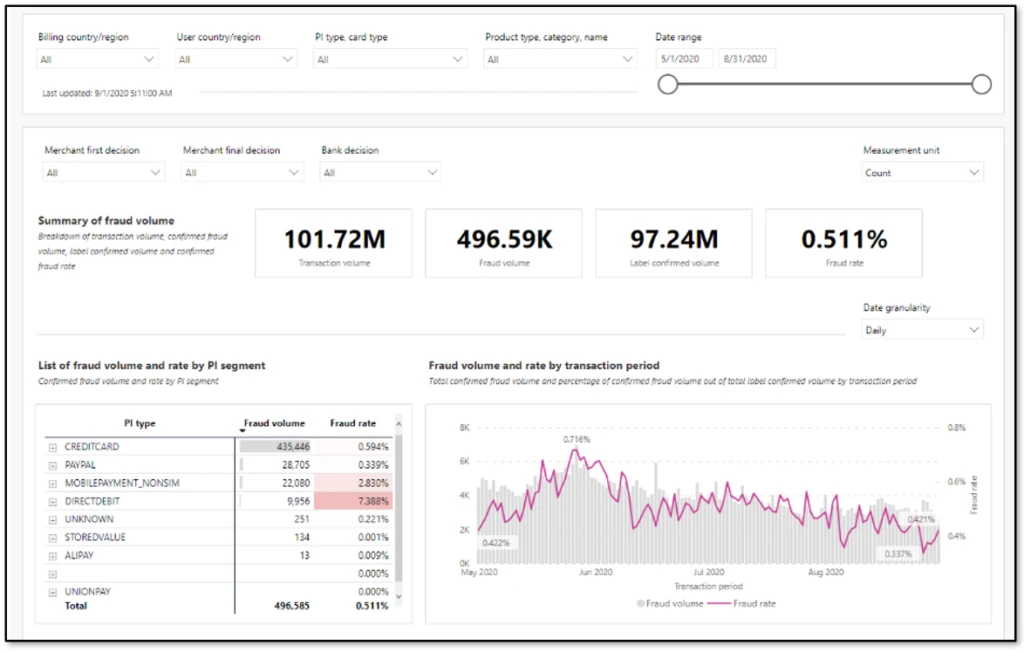
One of the most important aspects of fraud prevention is to know where you stand in the fight against fraud. An effective fraud scorecard makes you aware of current trends, helps identify any evolving problem areas, and empowers you to make decisions as an organization. Striking the right balance is important. Too much detail can drop adoption or cause you to miss unforeseen issues due to information paralysis. Too few details won’t deliver actionable insights, rendering the scorecard ineffective.
One way to strike that balance is to design a layered scorecard that is crisp, insightful, and appealing to all audiences.
Define the goal of the scorecard
Before you get started, you should know the answers to these questions:
- What is the scorecard supposed to say and to whom?
- Is it meant for consumption by senior management?
- Should it cater to analysts and fraud managers?
- Should it provide the ability to do deep analysis and define rules?
When any new patterns are found during investigations, it’s tempting to add additional views to the existing scorecard. Over time, such additions will bloat the scorecard and deplete its overall effectiveness. Defining a goal in advance and sticking to it will help to ensure that the value of the fraud scorecard remains intact.
After the goal is defined, the layers for a fraud scorecard can be carved out. Typically, three layers work best to offer insights that cater to different levels of consumers.
First layer: Exec summary
The purpose of this layer is to show the business impact as a snapshot. A view that can be taken as-is into executive review slides. Include only a few uber-level metrics. Profit efficiency, which measures overall impact from fraud, non-fraud, and optimization, should be the main metric in this view. Customer impact metrics, such as escalations or false positives and a split of fraud detected by automated system versus human reviews, can also be included. Representing these metrics as snapshots for a specific time, month, or week, and color coding them to measure against target or change from a previous time period will emphasize the goal of this view.
Second layer: Contributors
This layer should show what the current trends are and what is contributing to any changes in uber-level metrics. This will be the key monitor for fraud managers and the starting point for analysts. A trended view of key metrics, such as fraud rate, split by chargeback and other sources, rejection rate, top rules that were executed, challenge rate, and refund rate can be included here. Representing these as trend charts, with the ability to look back a few months, will make these most insightful.
Third layer: Drivers
This layer offers deep dive views on causation. Analysts can rely on this view to quickly identify drivers for any changing trends and react to evolving fraud patterns. Score distribution and respective fraud rates, segmentation slices such as geo-product-payment type can be included. If there are certain thresholds implemented to deter abuse, such as a maximum of five orders per month per user, then views can be added here to track users who are hovering just below the threshold.
Things to avoid in a fraud scorecard
It is important to not use a fraud scorecard as an investigative tool. A scorecard is meant to provide an aggregate view of where things stand, like the dashboard of a car. Investigations will require specific data at transaction level. Having the ability to slice data in multiple forms and link across transactions is quintessential for investigations. Trying to build one tool for both purposes can easily lead to large amounts of data, which slows down performance and dilutes value. Except for certain cases where you are using specialized Power BI and data exploratory tools, it’s always best to keep a fraud scorecard separate from investigative tools.
Next steps
If you’re already using Dynamics 365 Fraud Protection, use the account protection and purchase protection scorecards to gain business insights. Additionally, as described in our earlier post Do you monitor the pulse of your fraud protection operations?, you can also export transactional data into your existing workflows to augment your business-specific reports.
If you aren’t already using Dynamics 365 Fraud Protection, sign up for a live demo or a free trial to check out this and other capabilities that can help your business develop effective fraud protection strategies.
The post Best practices for building an effective fraud scorecard appeared first on Microsoft Dynamics 365 Blog.
Brought to you by Dr. Ware, Microsoft Office 365 Silver Partner, Charleston SC.
by Contributed | Mar 9, 2021 | Technology
This article is contributed. See the original author and article here.
You might have the cutting edge AI features but it is hard to know how useful it will be before letting your users beta test your prototype. You can build fast, deploy and deliver your app and iterate without writing any code, using AI Builder and Power Platform.
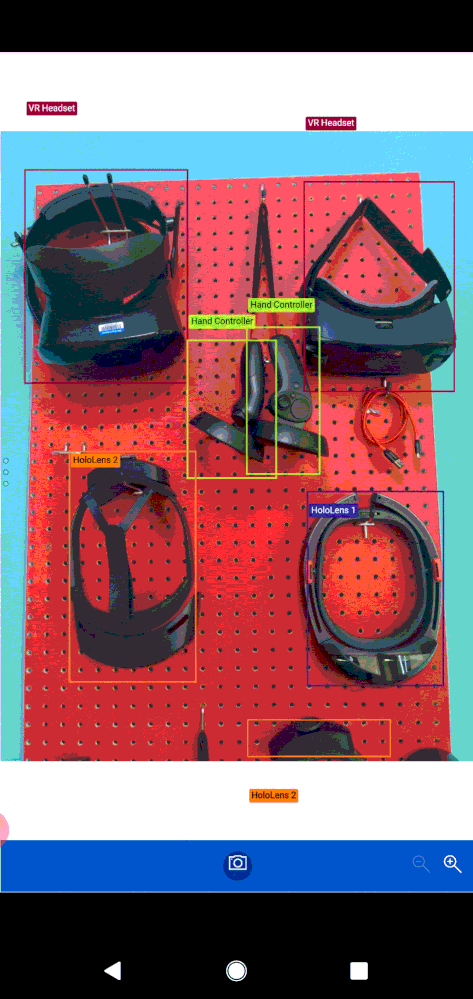
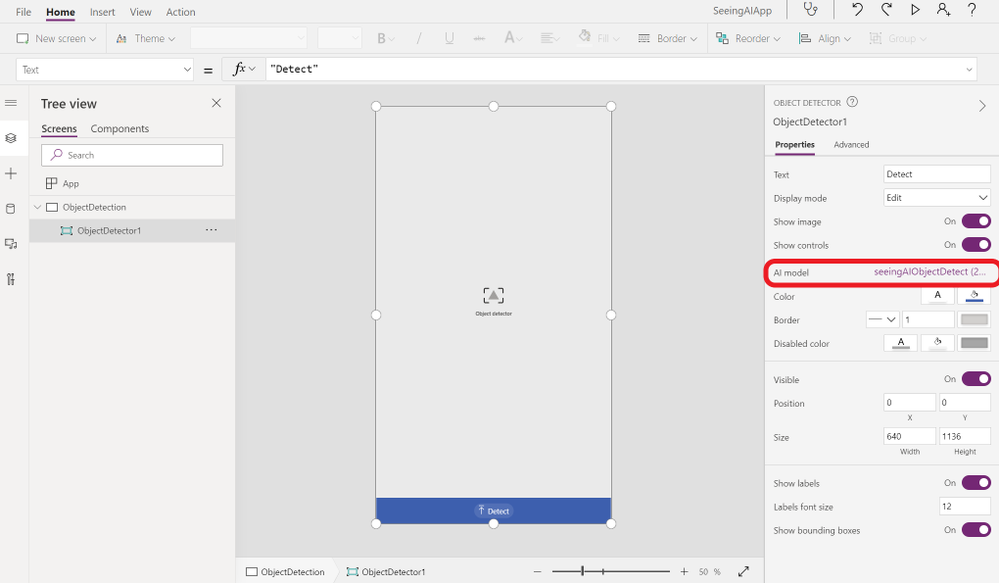
This article explains what Power Platform is, as well as go through a step by step process to create an application that detects objects from photos using Power Apps and AI Builder. Check out the video below to see the app we will build to detect different Mixed Reality Headsets such as HoloLens version 1 and 2 Augmented Reality and Virtual Reality headsets and their hand controllers.

What is Power Platform?
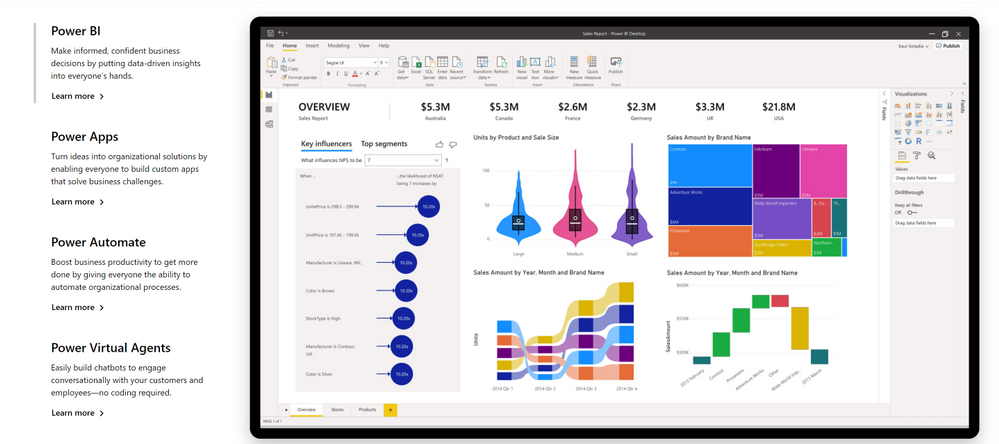
Power Platform is a set of tools, API‘s and SDK‘s that helps you analyze your data and build automations, applications and virtual agents with or without having to write any code.
What are Power Apps?
Power Apps, allows you to create applications with a drag and drop UI and easy integration of your data and 3rd party APIs through connectors.
A connector is a proxy or a wrapper around an API that allows the underlying service to talk to Microsoft Power Automate, Microsoft Power Apps, and Azure Logic Apps. It provides a way for users to connect their accounts and leverage a set of pre-built actions and triggers to build their apps and workflows. For example, you can use the Twitter connector to get tweet data and visualize it in a dashboard or use the Twilio connector to send your users text messages without having to be an expert in Twitter or Twilio APIs or having to write a line of code.
What is AI Builder?
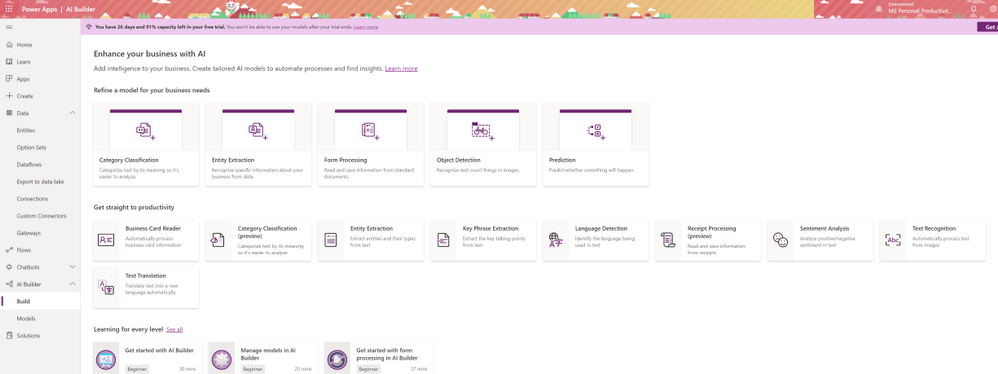
AI Builder is one of the additional features of Power Apps. With AI Builder, you can add intelligence to your apps even if you have no coding or data science skills.
What are some of the use cases for AI Builder?
Is AI Builder the right choice?
Can I use Power Apps and AI Builder for production?
Yes you can. As any tool that does things magically, AI Builder in Power Apps comes with a cost. That does not mean you can’t try your ideas out for free.
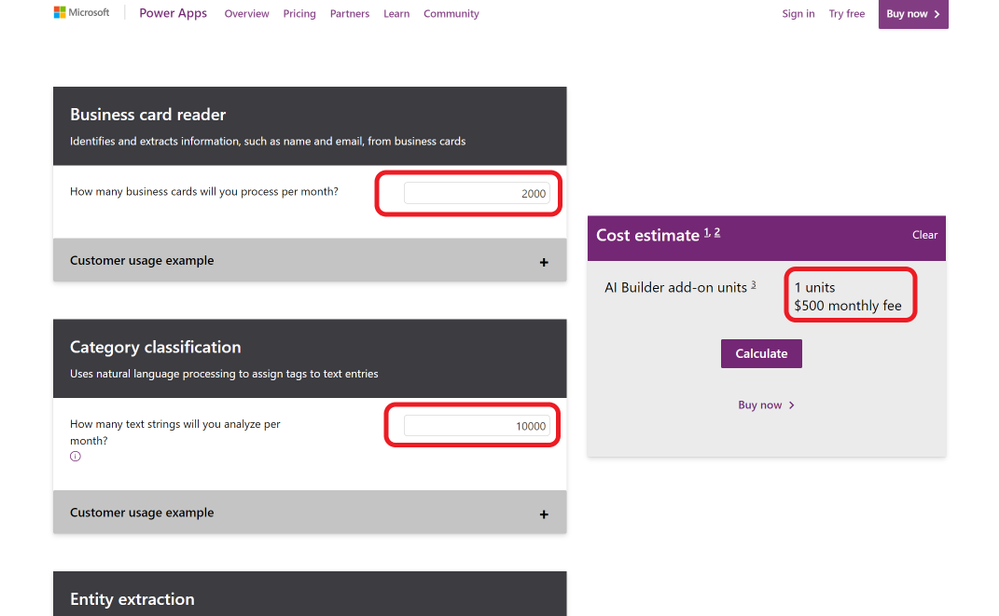
What will my production app cost?
If you want to go to production with Power Apps, it is a good idea to consider the costs. Thankfully there is an app for that. AI Builder Calculator lets you input what AI tools you will need and how many users will be accessing your app’s AI features and gives you the price it will cost you.
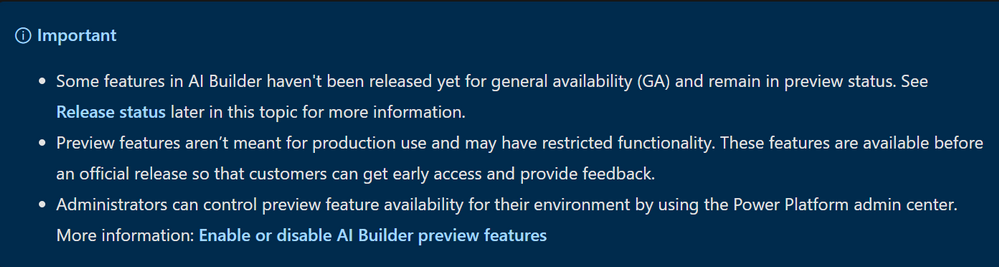
What are preview features?
What is Object Detection?
AI Builder Object detection is an AI model that you can train to detect objects in pictures. AI models usually require that you provide samples of data to train before you are able to perform predictions. Prebuilt models are pre-trained by using a set of samples that are provided by Microsoft, so they are instantly ready to be used in predictions.
Object detection can detect up to 500 different objects in a single model and support JPG, PNG, BMP image format or photos through the Power Apps control.
How to try out Object Detection capabilities?
You can try out and see how object detection works before having to create and accounts or apps yourself on the Azure Computer Vision page.
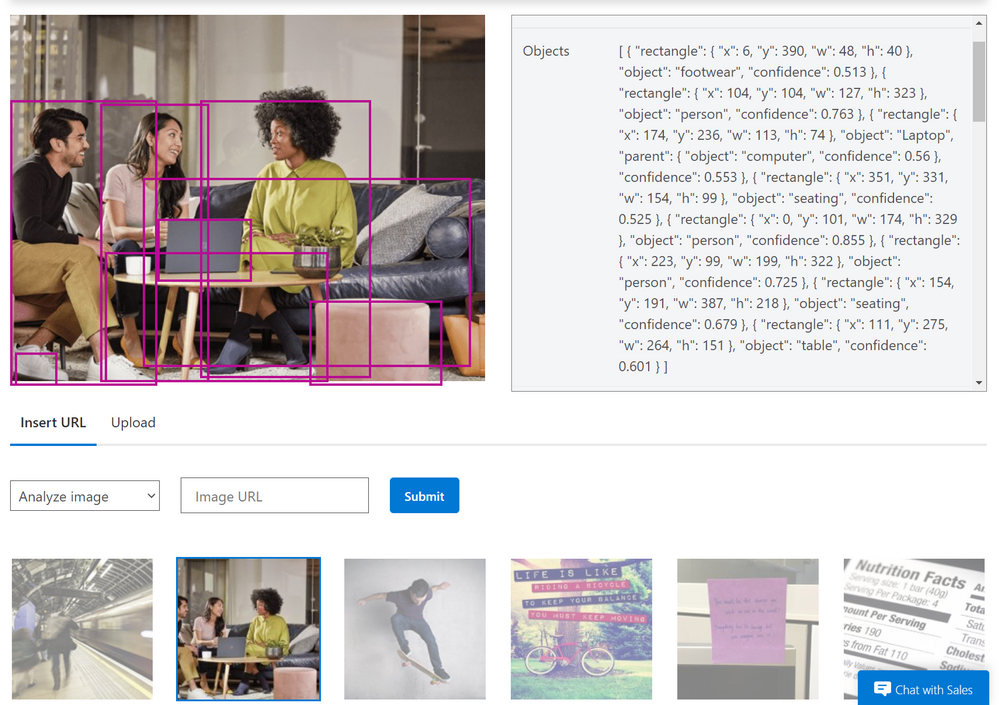
What can you do with Object Detection?
Object counting and inventory management
Wildlife animal recognition
How to detect objects from images?
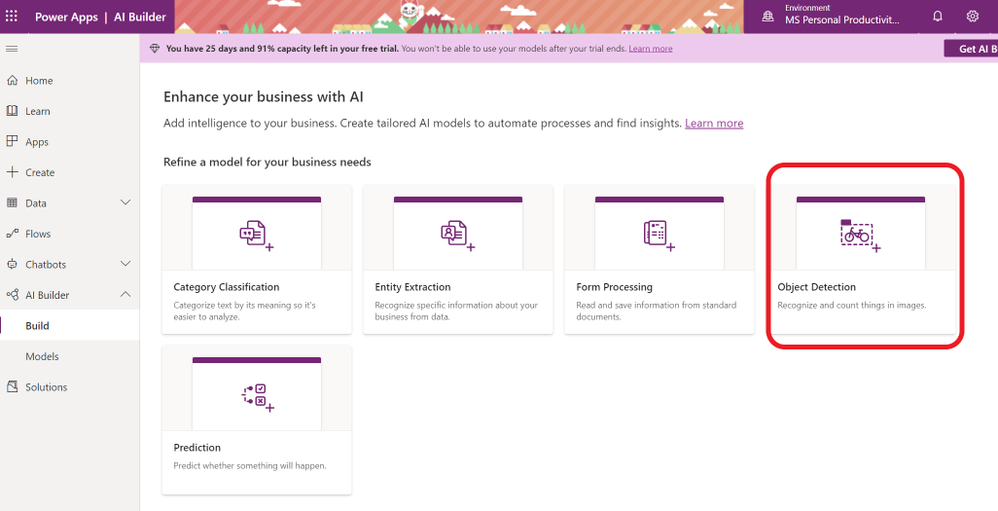
- To start creating your AI model for your app, sign in to Power Apps and click on AI Builder on the left hand menu. Select Object Detection from the “Refine Model for your business needs” option.
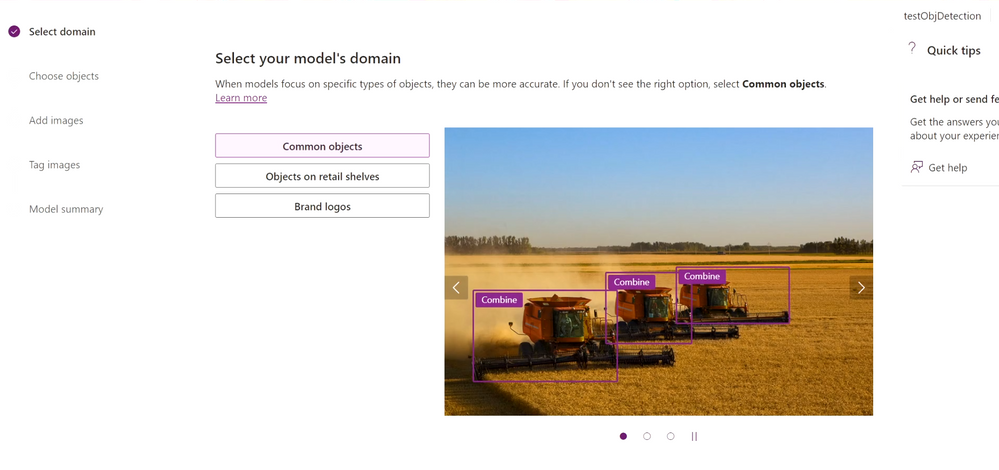
- Name the objects that you are going to detect.
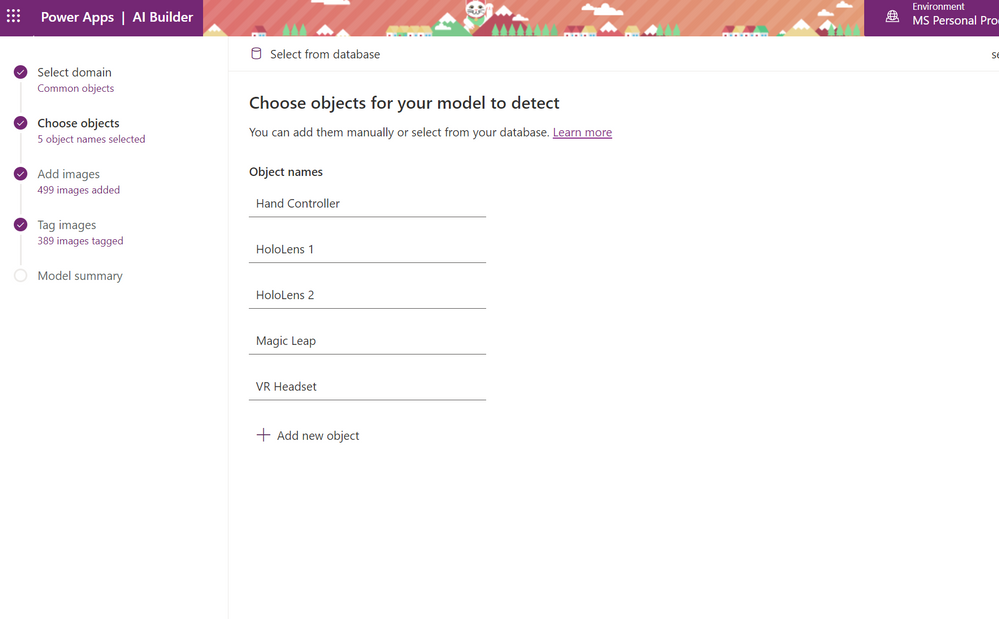
- Upload images that contain the object you will detect. To start with you can upload 15 images for each object.
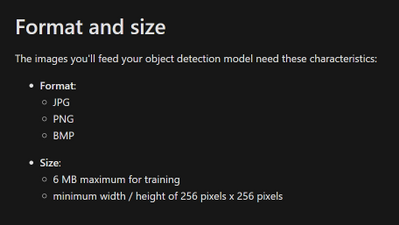
- Make sure each object has approximately the same amount of images tagged. If you have more examples of one object, the training data will be likely to detect that object when it is not.
- Tag your objects by selecting a square that your object is in and choosing the name of the object.
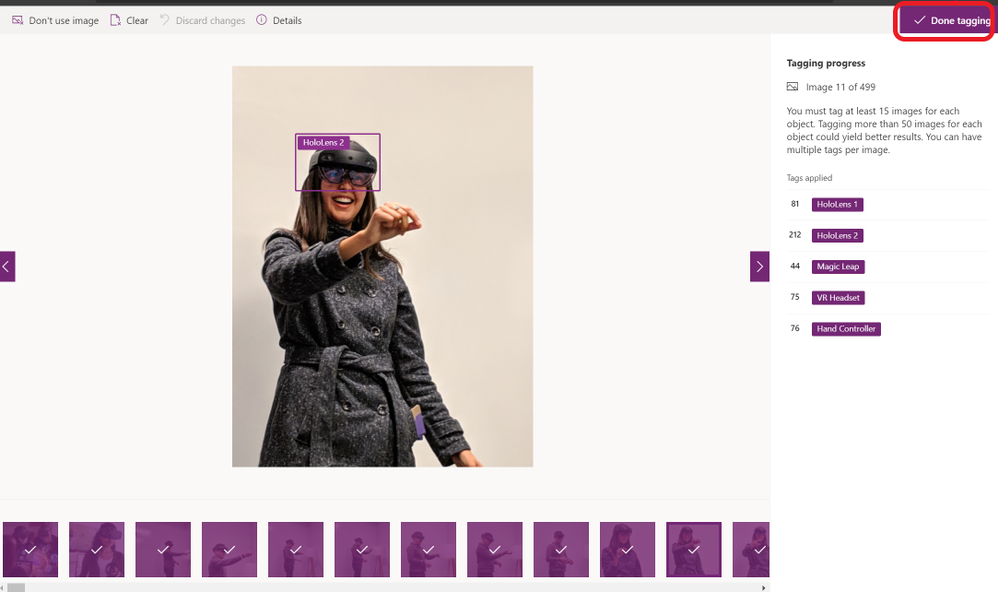
- Once you are done, choose Done Tagging and Train. Training process will take some time.
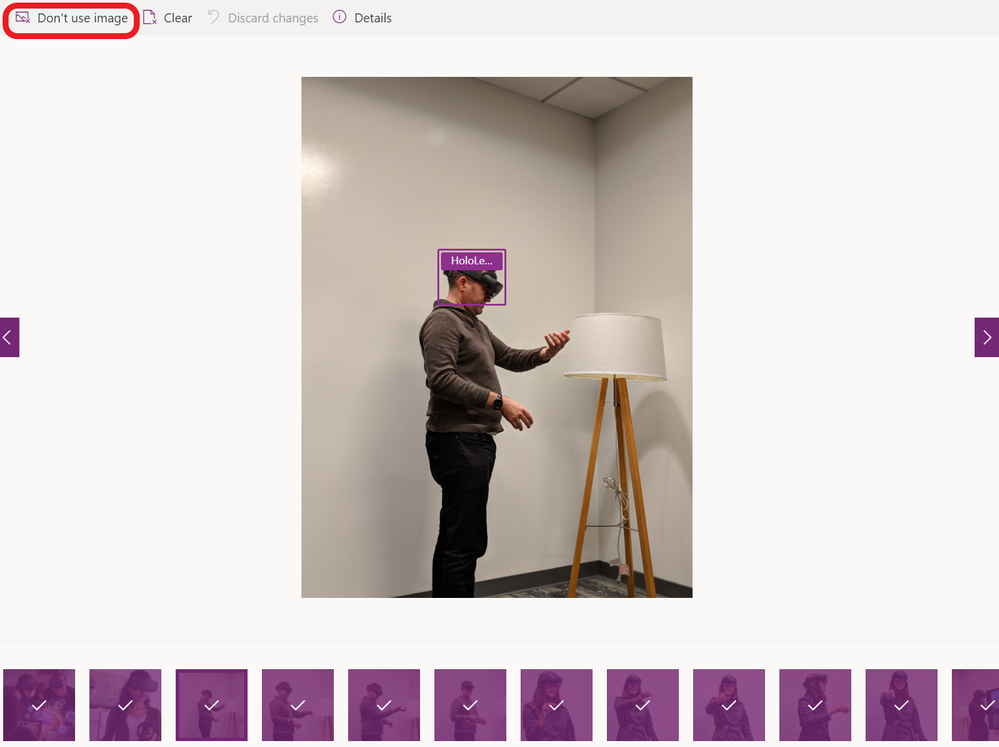
- If you choose to not use an image or clear any tags, you can do that at any time by going back to your model under the AI Builder on the left hand side menu and choose your model and choose edit.
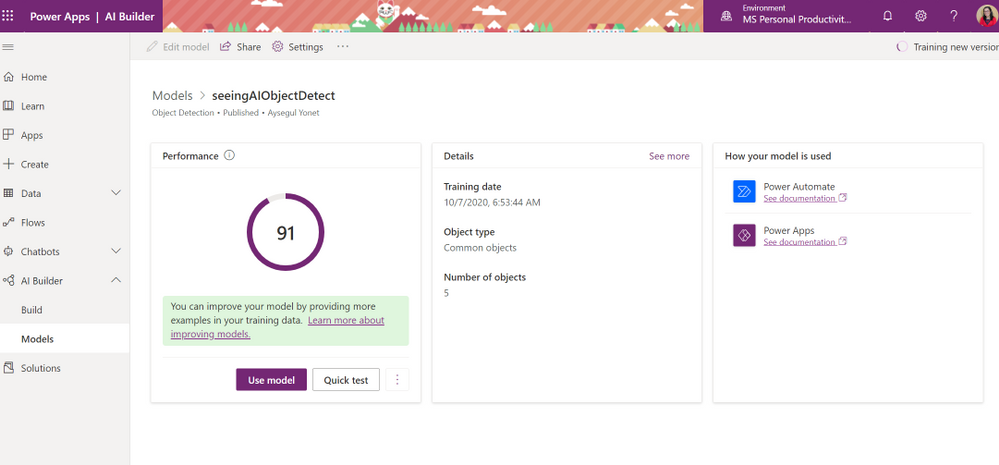
- AI Builder will give you a Performance score over 100 and a way to quickly test your model before publishing. You can edit your models and retrain to improve your performance. Next section will give you some best practices to improve your performance.
How to Improve Your Custom Model Performance?
by Contributed | Mar 9, 2021 | Technology
This article is contributed. See the original author and article here.
We are pleased to announce the new alert custom details and an improved version of entity mapping. Two new features which are part of a series of new alert enrichment capabilities in Azure Sentinel. Let’s go through them in the following:
Custom Details:
Overview
When a security alert is triggered in the environment, the information described in the alert is crucial for the security analyst to perform their investigation. Hence, it is important that the alert contains essential information and therefore the ability to include custom details in the alert will improve the efficiency of investigation. Custom details allows users to add custom information to the alert created within scheduled alert rules.
How do I configure it?
When creating or editing an analytics rule, you will find Alert enhancement – Custom details section under Set rule logic tab.
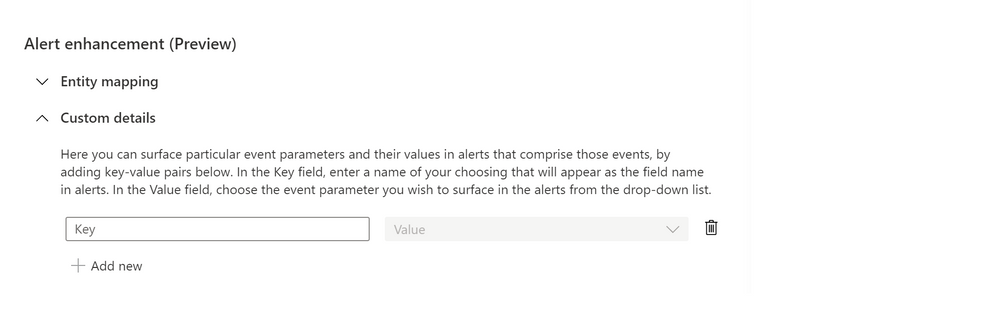
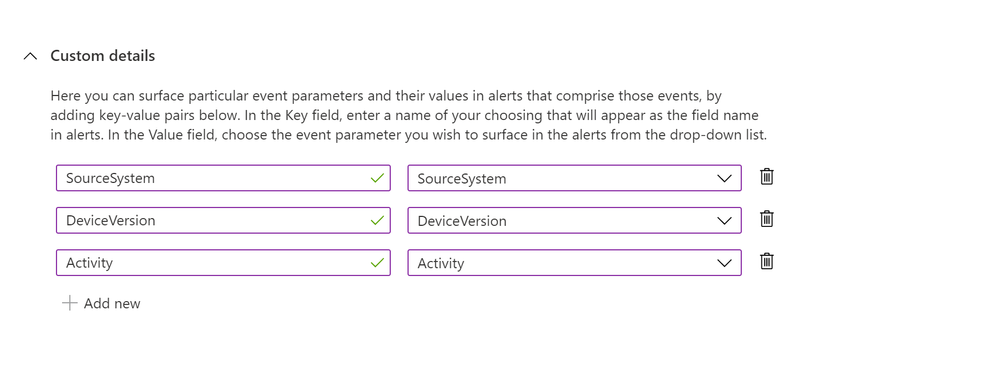
Start configuring the custom details by providing a name that will appear as the field name in alerts and its value from the drop-down list. You can add multiple key-value pairs (up to 20) by clicking on “Add new”.
Where to view the custom details
The custom details will be stored as a part of ‘ExtendedProperties‘ field in Json format. In the event where multiple alerts were triggered, each has its own custom details.
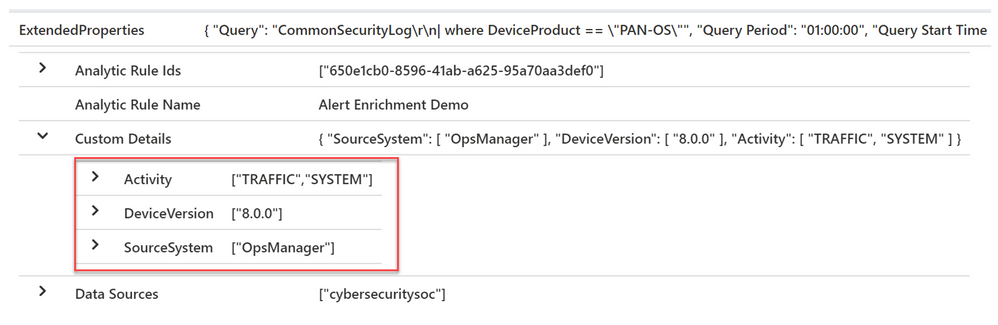
Below is the sample query to parse custom details where each field name will be unpacked as a column. The name of the column will be the field name with the prefix “custom_”.
SecurityAlert
| extend customDetails = parse_json(tostring(parse_json(ExtendedProperties).["Custom Details"]))
| evaluate bag_unpack (customDetails, "custom_")
Limitations
We wouldn’t want the alert to be overloaded, so we will limit the number of key-value pairs to 20 in a single analytics rule and the details are limited to 2 KB collectively. Additional details will be dropped when exceeding the limit.
Entity Mapping:
Overview
Entity mapping configuration is essential in building scheduled query analytics rules. It allows Azure Sentinel to recognize the entities and form the core of analysis which help you to investigate incidents effectively and efficiently.
In the past, you could only map five entity types in Analytic rules – users (accounts), hosts, IP addresses, URLs and file hashes. It has been our goal to enhance the entity mapping feature with more entity types and identifier options for a greater flexibility in identifying an entity.
The new entity mapping offers the following enhancements and functionalities:
- Supports additional entity types and identifiers (see the full list of supported Entity types and Identifiers).
- Supports multiple entities of the same kind on a single event.
- Supports strong and weak identifiers.
- Validates the configuration of mappings during rule creation.
- Unlike the previous version, the new entity mappings do not add codes to your query.
How do I configure it?
1. When creating or editing an analytics rule, you will find Alert enhancement – Entity mapping section under Set rule logic tab.
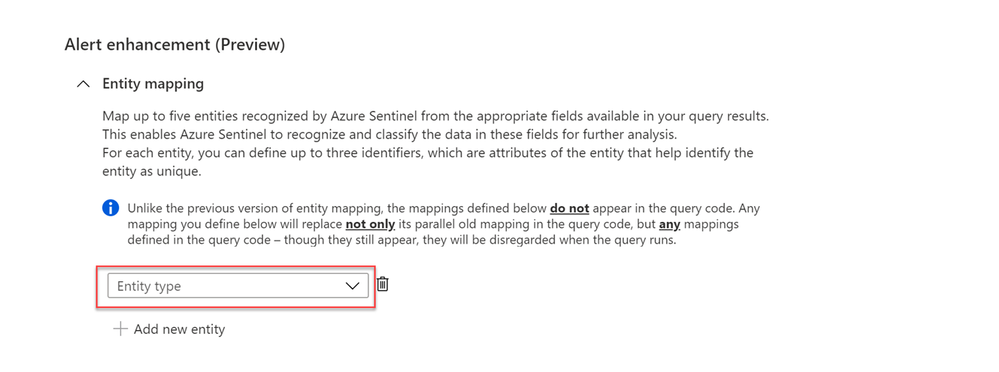
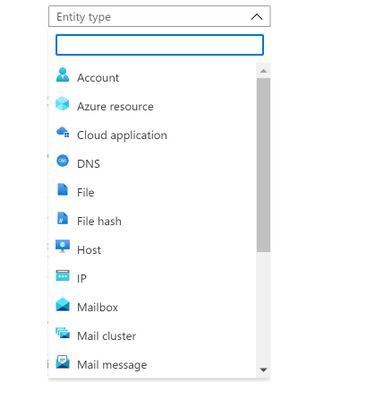
2. Select the entity type from the entity type drop-down list to start mapping (you may map up to a maximum of five entities at a time by clicking + Add new entity).
3. Choose the identifier for each entity from the identifier drop-down list. Some identifiers are required, others are optional. Then, select the correspond data field from the Value drop-down list. The Value list is populated by the data fields (columns) defined in the rule query.
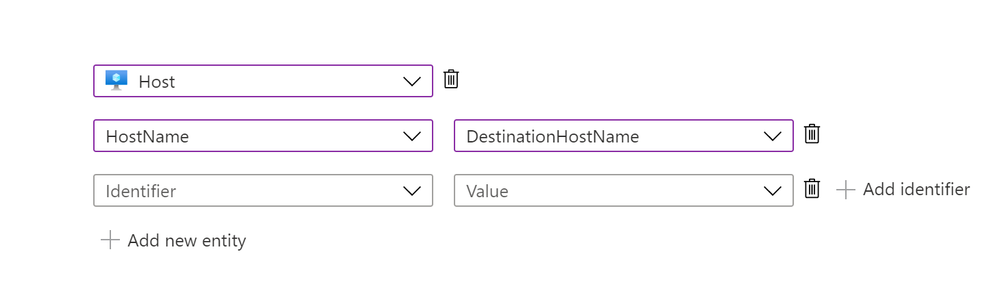
4. The number of definable identifiers for a given entity ranges from one to three, depending on the entity type. For example, IP entity has only one identifier, File entity can define up to two identifiers, while Host entity allows up to three.
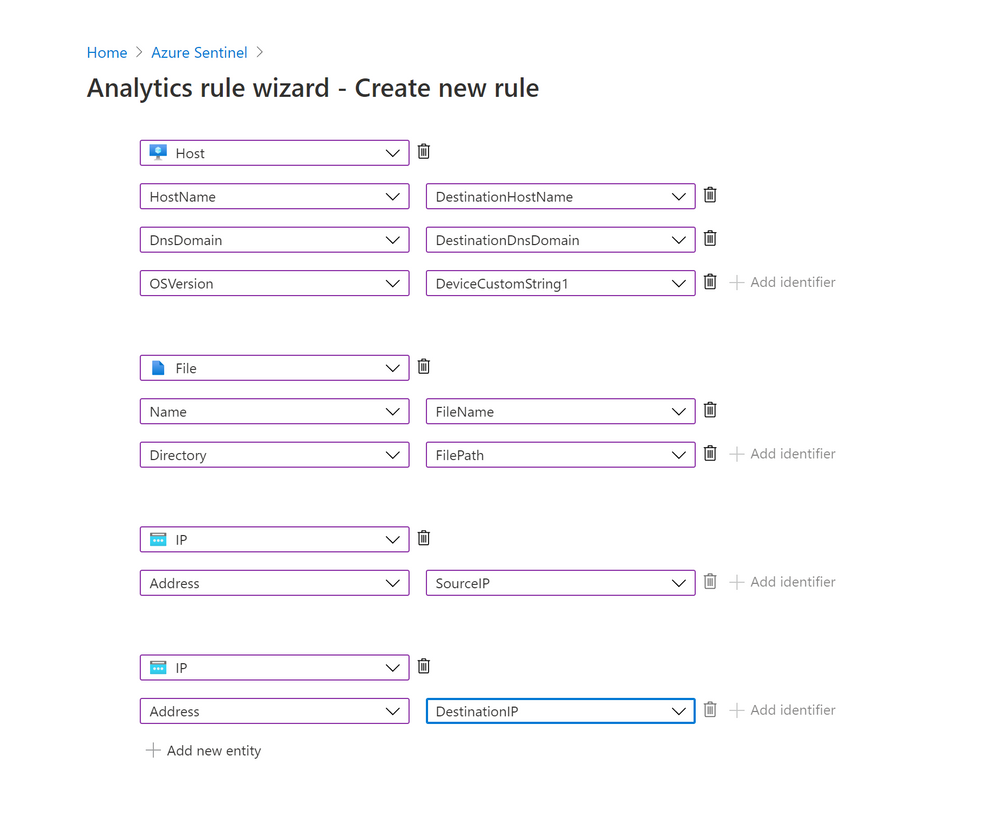
Note that adding more identifiers to an entity allows Azure Sentinel to discover more attributes of a particular entity. Hence, the discovered entity will have a richer information about the entity. This helps to increase the efficiency during incident investigation.
5. You can map more than one entity of the same type. For example, you can map two IP entities, one from a source IP address field and another one from a destination IP address field.
6. Unlike the previous version, the new entity mappings do not add any code to the rule’s query.
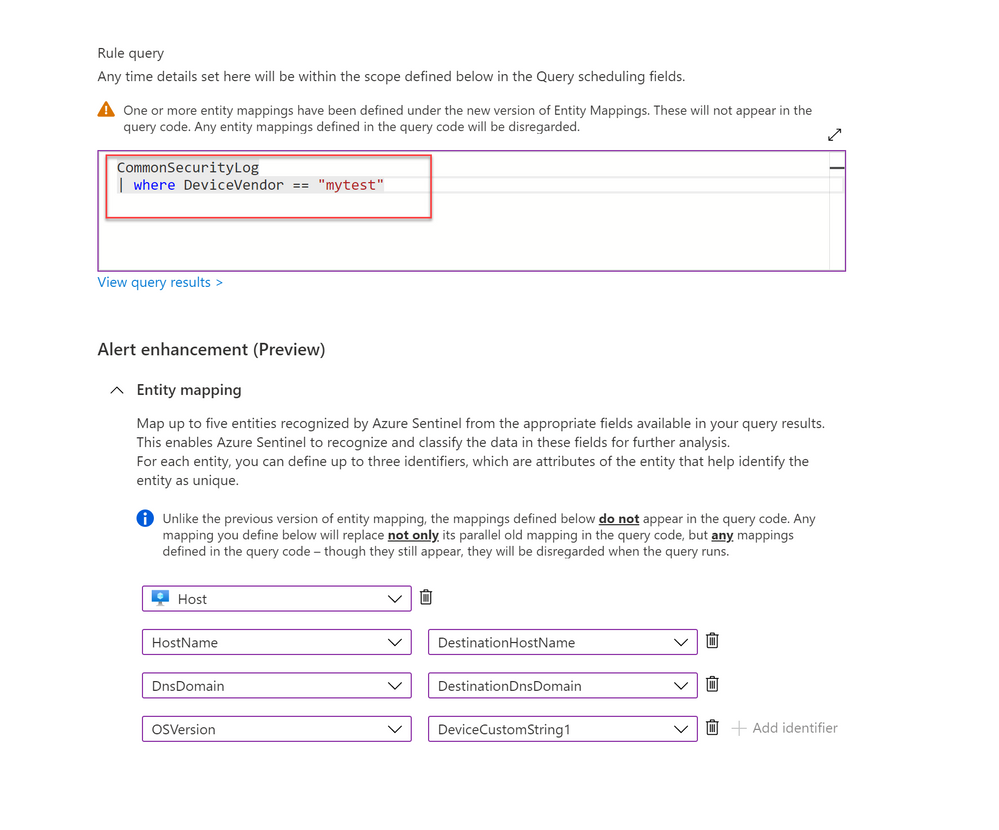
What about my previously defined entity mappings?
1. Your previously defined entity mappings will still be working as usual.
2. If you configured the new entity mapping on an existing analytics rule with previously defined entity mappings, the rule will disregard the old mapping without removing the mappings defined in the query code.
3. When you update a rule with the intention to add more entity mappings, you need to re-define all the entities via the new mapping.
For example, I have an existing rule with two entities defined (Account and Host) through the old mapping. If I wish to add another entity mapping (Registry Key), I need to define all the three entity types (Account, Host and Registry Key) with the new entity mapping feature.
4. Lastly, if you still need to use the old version of entity mapping (as long as the new version is still in preview), you can access it using the URL with feature flag (https://ms.portal.azure.com/?feature.EntityMapping=false). More information can be found here.
Get started today!
We encourage you to start using this feature as it will help to improve your efficiency by shorten the investigation time.
Try it out, and let us know what you think!
You can also contribute new connectors, workbooks, analytics and more in Azure Sentinel. Get started now by joining the Azure Sentinel Threat Hunters GitHub community.
Special thanks to @romarsia and @Innocent Wafula for the review.
by Contributed | Mar 9, 2021 | Technology
This article is contributed. See the original author and article here.
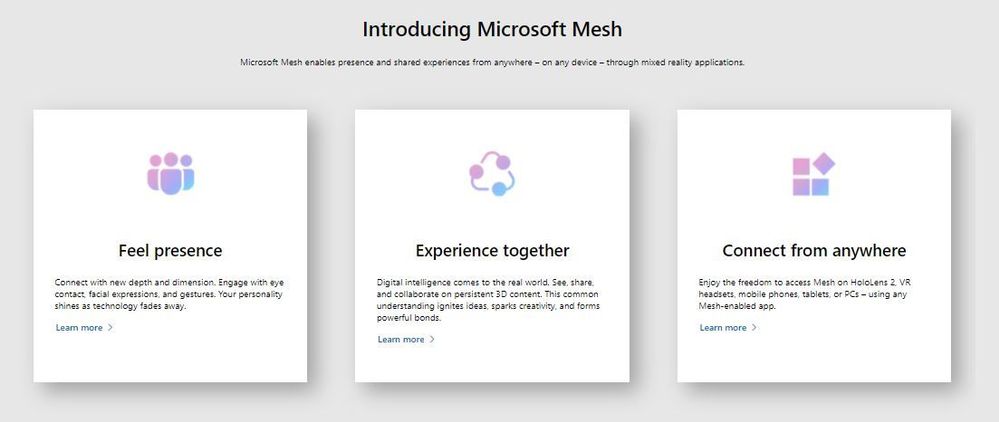
Microsoft Mesh, a new platform built on Microsoft Azure, enabling developers to build immersive, multiuser, cross-platform mixed reality apps. Microsoft Mesh enables its users to connect with presence, share across space, and collaborate in an immersive way as if they were in person regardless of physical location. Customers can leverage Mesh to enhance virtual meetings, conduct virtual design sessions, assist remotely better, learn together virtually, host virtual social gatherings and meet-ups.
Mesh-enabled apps: On top of the development platform, Microsoft Mesh also delivers some app experiences that bring the platform alive. The HoloLens 2 Mesh app and AltspaceVR with new enterprise capabilities are instantiations of the collaborative experience Mesh can light up for immersive headsets. These are just the first amongst many other experiences on their way, built by Microsoft and our partners.
Mesh developer platform is comprehensive, and the tools and capabilities are designed to help developers get started quickly and deliver engaging multiuser mixed reality experiences. As we learn from early adopters and preview customers, we’ll continue to evolve the SDK to support more engines and frameworks. If you have a compelling app scenario and would like to onboard to the preview, please join the MR developer program. This allows you to build your MR app with the help of some of the pioneers in the MR space and contribute to the Mesh platform along the way.
Resources on Microsoft Mesh
Video: Microsoft Mesh – Mechanics Session
Video: Microsoft Mesh – Ignite Session
Blog: Microsoft Mesh Innovation Story
Microsoft Mesh – A Technical Overview Blog Post https://aka.ms/MRMicrosoftMesh
Introduction to Microsoft Mesh – Ignite Session https://aka.ms/intro-mesh
If you want to be notified when the SDK is available, join the mixed reality developer program – invite people to join https://aka.ms/introducing-mesh at very bottom of the website.
If you want to install a preview of a Mesh-enabled app on your HoloLens 2: https://aka.ms/mr-mesh-app-preview







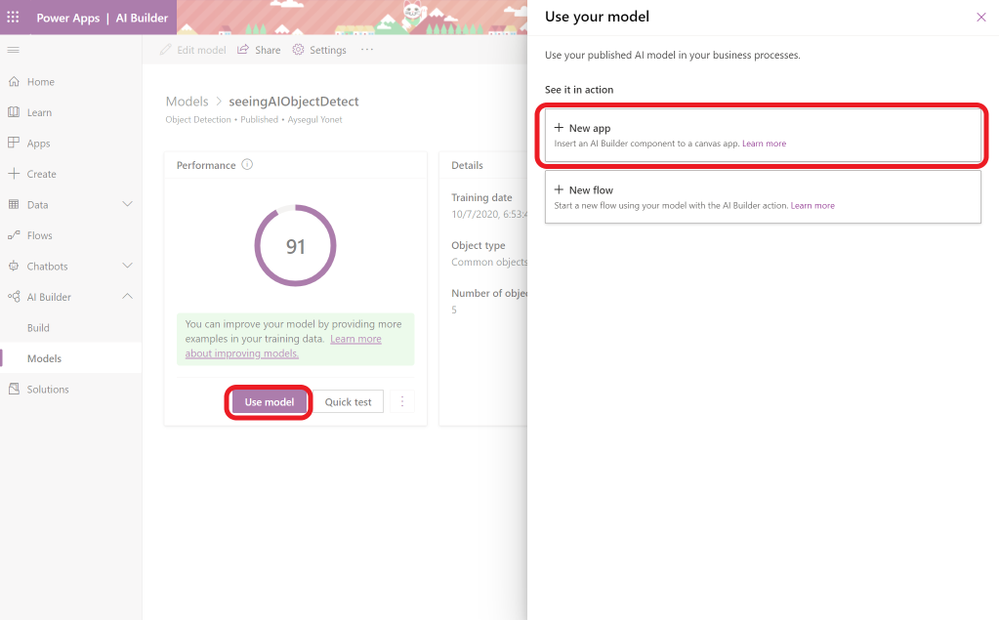

You can use pre-trained models to: