by Contributed | Mar 10, 2021 | Technology
This article is contributed. See the original author and article here.
In this installment of the weekly discussion revolving around the latest news and topics on Microsoft 365, hosts – Vesa Juvonen (Microsoft) | @vesajuvonen, Waldek Mastykarz (Microsoft) | @waldekm are joined by Belgium-based Senior Service Engineer from Microsoft – Bert Jansen | @o365bert.
Bert splits his time coaching ISVs and Partners on how to get the most out of their SharePoint Online experience and on PnP Community projects – Modernization and PnP Core SDK. This episode’s discussion focuses on why Partners and ISVs would be interested in Microsoft 365 – the Intelligent file handling platform, on-site migrations – on-prem to cloud – classic to modern, and on modern pages – APIs, Microsoft Graph and PnP Core SDK.
The session was recorded on Monday, March 8, 2021.
Did we miss your article? Please use #PnPWeekly hashtag in the Twitter for letting us know the content which you have created.
As always, if you need help on an issue, want to share a discovery, or just want to say: “Job well done”, please reach out to Vesa, to Waldek or to your Microsoft 365 PnP Community.
Sharing is caring!

by Contributed | Mar 10, 2021 | Technology
This article is contributed. See the original author and article here.
When developing your SPFx components, you usually first run them locally before deploying them (really?).
And then comes the time to work with API such as Microsoft Graph.
If you never use those permissions before in your SPFx projects (and the tenant with which you’re working), you realize that you have to:
- Add required API permissions in your
package-solution.json file
- Bundle / Ship your project
- Publish it
- Go to the SharePoint Admin Center Web API Permissions page
- Approve those permissions
All of this, just to play with the API as you didn’t plan to release your package in a production environment.
So what if you could bypass all these steps for both Graph and owned API?
Warning
This trick is just for development purposes. In Production environment, you should update your package-solution.json file to add required permissions and allow them (or ask for validation) in the API access page.
Prerequisites
- An Office 365 (Dev) Tenant or a Partner Demo Tenant
- The following Azure AD role at least
- Application Administrator
With Graph API
First, we’re going to play with Graph API through the Microsoft Graph Toolkit.
Prepare your sample
Init a SPFx project (WebPart one with React, let’s call it HelloApi), then add the Microsoft Graph Toolkit by executing npm i @microsoft/mgt @microsoft/mgt-react from the project’s root path.
Once done, open your main component file (let’s say here HelloApi.tsx) and add the PeoplePicker component like this:
import * as React from 'react';
import styles from './HelloApi.module.scss';
import { IHelloApiProps } from './IHelloApiProps';
import { escape } from '@microsoft/sp-lodash-subset';
import { PeoplePicker } from '@microsoft/mgt-react';

export default class HelloApi extends React.Component<IHelloApiProps, {}> {
  public render(): React.ReactElement<IHelloApiProps> {
    return (
      <div className={ styles.HelloApi }>
        <div className={ styles.container }>
          <div className={ styles.row }>
            <div className={ styles.column }>
              <span className={ styles.title }>Welcome to SharePoint!</span>
              <p className={ styles.subTitle }>Customize SharePoint experiences using Web Parts.</p>
              <p className={ styles.description }>{escape(this.props.description)}</p>
              <a href="https://aka.ms/spfx" className={ styles.button }>
                <span className={ styles.label }>Learn more</span>
              </a>
            </div>
          </div>
        </div>
        <PeoplePicker />
      </div>
    );
  }
}
Run it in remote workbench
Now run your sample with gulp serve and display your webpart in your remote workbench (https://contoso.sharepoint.com/_layouts/15/workbench.aspx). Try to use the PeoplePicker component: you’ll see that just by clicking on the search box, you’ll get We didn’t find any matches.
Display your developer toolbox (F12) and go to the browser console, you should see the following error:

As you can see, it’s a 403 error, which is well-known when using Graph API endpoints that have not been allowed on the first place.
Add Graph API through UI
From the Azure portal, display the Azure Active Directory (AAD), then select the App Registration menu and select All Applications, then click on SharePoint Online Client Extensibility Web Application Principal. It’s the AAD Application that holds the connection to the API (Microsoft and others) from SharePoint (SPFx or every other development) using the Implicit Flow.
Once here, click on Add a permission, then select Microsoft Graph and add the [People.Read] Graph API delegated permission (you can type the name of the permission in the available search box to get it easily).
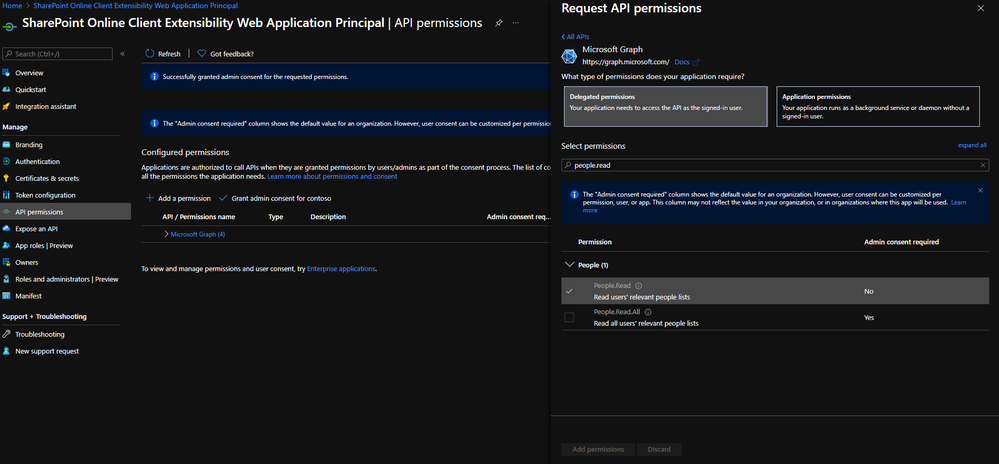
Once added, grant it by clicking on Grant admin consent for contoso.
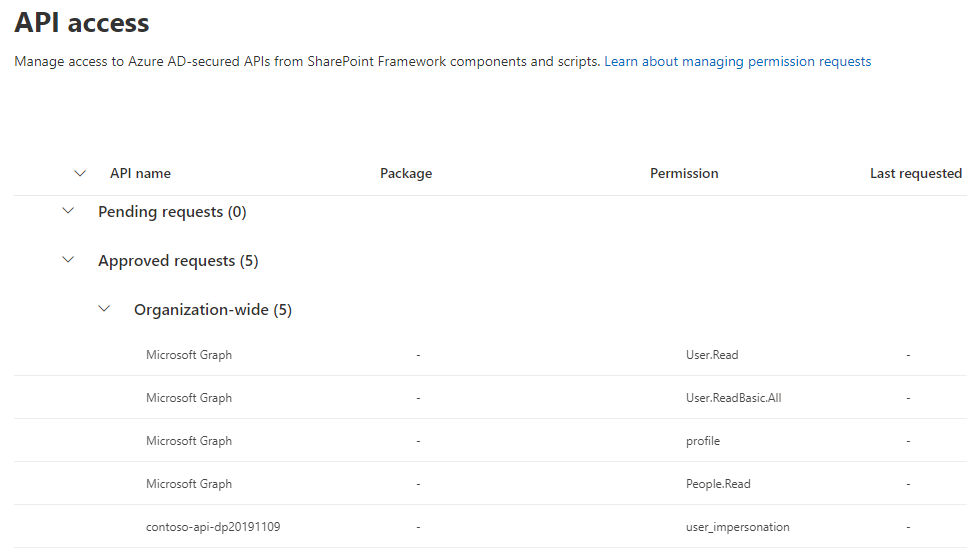
If you go in the API access page (https://contoso-admin.sharepoint.com/_layouts/15/online/AdminHome.aspx#/webApiPermissionManagement), you should see something like this:
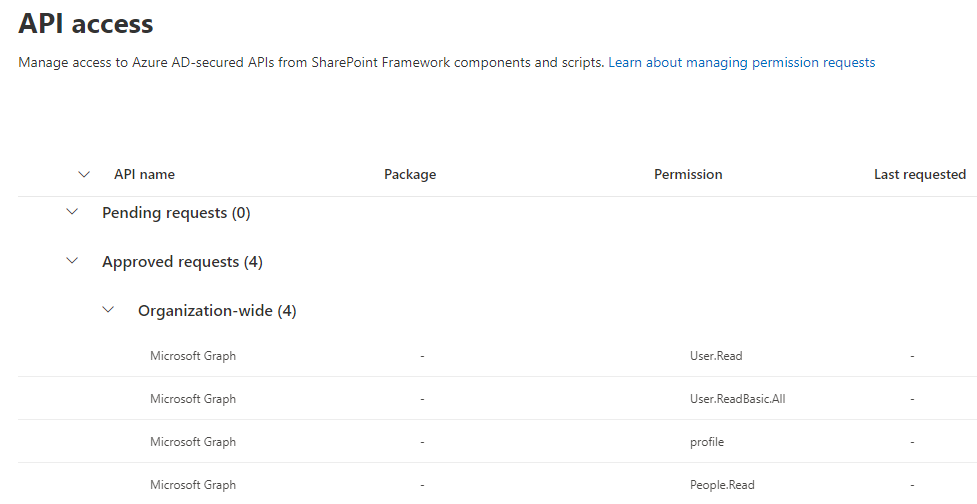 (other Graph API permissions displayed here won’t be necessary for the sample)
Warning
It can take a couple of minutes before consented permissions is effective, so don’t be surprised if it’s not working right away after approval.
Add Graph API through CLI for Microsoft 365
m365 login # Don't execute that command if you're already connected
m365 spo serviceprincipal grant add --resource 'Microsoft Graph' --scope 'People.Read'
Info
Don’t be surprised if by that way, the permission appears in the “Other permissions granted for [your tenant]”: it won’t prevent your SPFx solution to work.
Try again
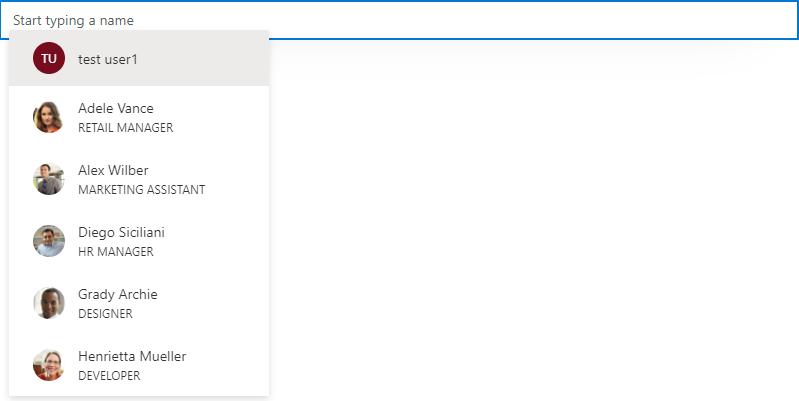
Now try to use the PeoplePicker component again: you’ll see that with the addition of the Graph API permission, you should be able to use that component!
With custom API
When using a custom API, it’s a little bit more tricky but easy to handle anyway.
You can follow this Microsoft article until the “Deploy the solution” part.
Instead of bundling and shipping, we’ll add the AAD App (called contoso-api-dp20200915 if we follow the mentioned article) created from the Azure Function Authentication part in the SharePoint Service Principal.
Add your AAD Application to the SharePoint Service Principal
Display again the AAD page, then select the App Registration menu, select All Applications and click on SharePoint Online Client Extensibility Web Application Principal. Once here, click on Add a permission, then select the My APIs tab and select the fresh added AAD App created before. Select the user_impersonation permission, then confirm.
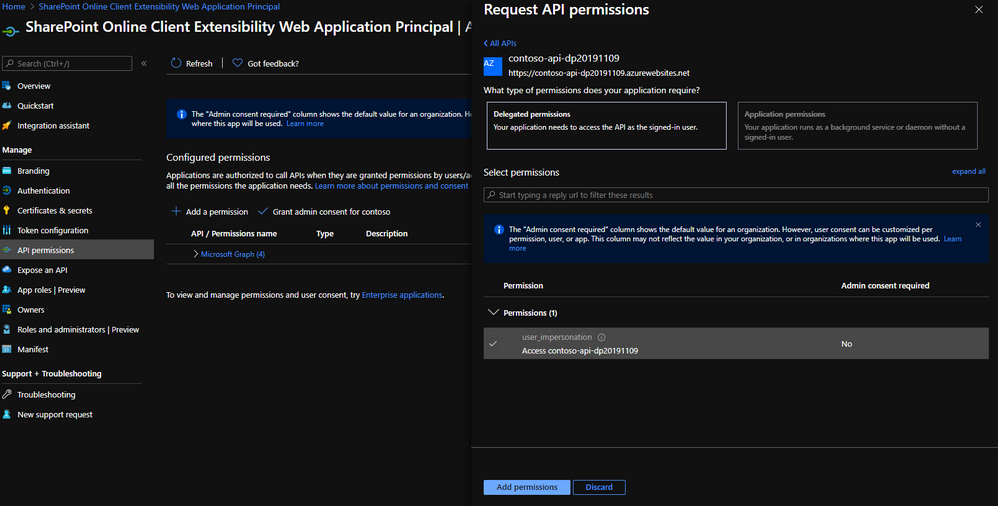
Finally, grant this permission by clicking on Grant admin consent for contoso.
If you go again in the API access page, you should see something like this:
Add custom API through CLI for Microsoft 365
m365 login # Don't execute that command if you're already connected
m365 spo serviceprincipal grant add --resource 'contoso-api-dp20200915' --scope 'user_impersonation'
Info
Don’t be surprised if by that way, the permission appears in the “Other permissions granted for [your tenant]”: it won’t prevent your SPFx solution to work.
Warning
If you use an Azure Function as an API and enable Managed Identity for any reason, you better have to rename the linked AAD Application to give it a different name than both your Function and its Managed Identity. Otherwise, the command will try to find a scope on it instead of the AAD App and fail.
Updated sample
To run your custom API from your SPFx component, you can update your sample like below:
IHelloApiProps.ts
import { AadHttpClientFactory } from '@microsoft/sp-http';

export interface IHelloApiProps {
  aadFactory: AadHttpClientFactory;
  description: string;
}
HelloApiWebPart.ts
// ...
export default class HelloApiWebPart extends BaseClientSideWebPart<IHelloApiWebPartProps> {

    // ...

    public render(): void {
        const element: React.ReactElement<IHelloApiProps> = React.createElement(
        HelloGraph,
        {
            description: this.properties.description,
            aadFactory: this.context.aadHttpClientFactory,
        }
        );

        ReactDom.render(element, this.domElement);
    }

  // ...
}
HelloApi.tsx
import * as React from 'react';
import styles from './HelloApi.module.scss';
import { IHelloApiProps } from './IHelloApiProps';
import { AadHttpClient, HttpClientResponse } from '@microsoft/sp-http';

interface IHelloApiState {
  ordersToDisplay: any;
}

export default class HelloApi extends React.Component<IHelloApiProps, IHelloApiState> {

 public constructor(props) {
    super(props);

    this.state = {
    ordersToDisplay: null
    };
 }

 public componentDidMount() {
    this.props.aadFactory
      .getClient('https://contoso-api-dp20191109.azurewebsites.net')
      .then((client: AadHttpClient): void => {
        client
          .get('https://contoso-api-dp20191109.azurewebsites.net/api/Orders', AadHttpClient.configurations.v1)
          .then((response: HttpClientResponse): Promise<any> => {
            return response.json();
          })
          .then((orders: any): void => {
            this.setState({
              ordersToDisplay: orders
            })
          });
      }).catch((err) => {
        console.log(err);
      });
  }

  public render(): React.ReactElement<IHelloApiProps> {
    return (
      <div className={ styles.HelloApi }>
        <div className={ styles.container }>
          <div className={ styles.row }>
            <div className={ styles.column }>
              <span className={ styles.title }>Welcome to SharePoint!</span>
              <p className={ styles.subTitle }>Customize SharePoint experiences using Web Parts.</p>
              <p className={ styles.description }>
               <ul>
                    {this.state.ordersToDisplay &&
                        this.state.ordersToDisplay.map(o => {
                            return <li>{o.rep}: {o.total}</li>
                        })
                    }
                </ul>
              </p>
            </div>
          </div>
        </div>
      </div>
    );
  }
}
Now you can run your sample locally and try it in your hosted workbench, playing with it and updating your WebPart as you want!
… And don’t forget to update your package-solution.json file to include the required APIs before shipping! 
Happy coding!
This article was cross-posted on my blog.
by Contributed | Mar 10, 2021 | Technology
This article is contributed. See the original author and article here.
Are you looking for some deep dive or beginner’s content to learn more about Windows Server? Are you looking to learn more about Hyper-V and Virtualization, file server and storage management, Windows Server high availability, how to use Active Directory, networking, and much more? We now have new learning paths on Microsoft Learn available for you! And it is free!
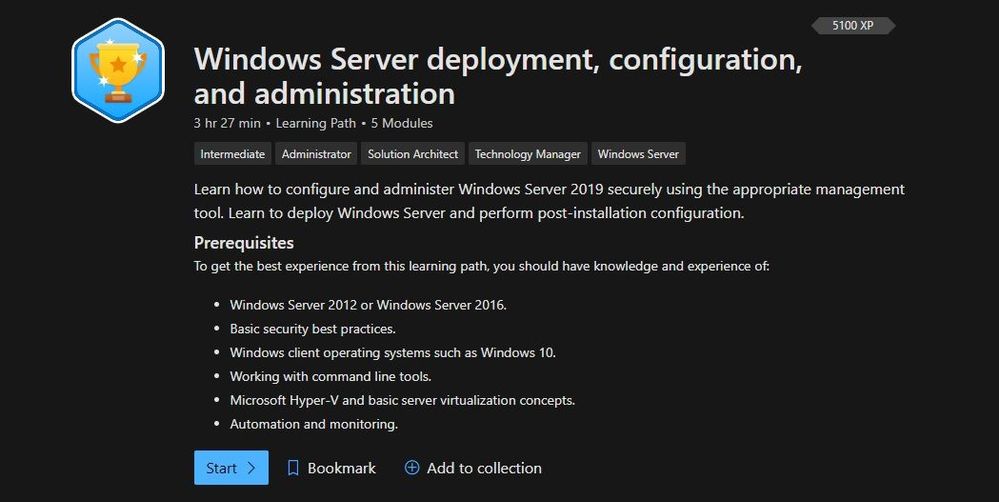
Windows Server deployment, configuration, and administration
Learn how to configure and administer Windows Server 2019 securely using the appropriate management tool. Learn to deploy Windows Server and perform post-installation configuration.
Check out this learning path here.
Windows Server deployment, configuration, and administration
Modules:
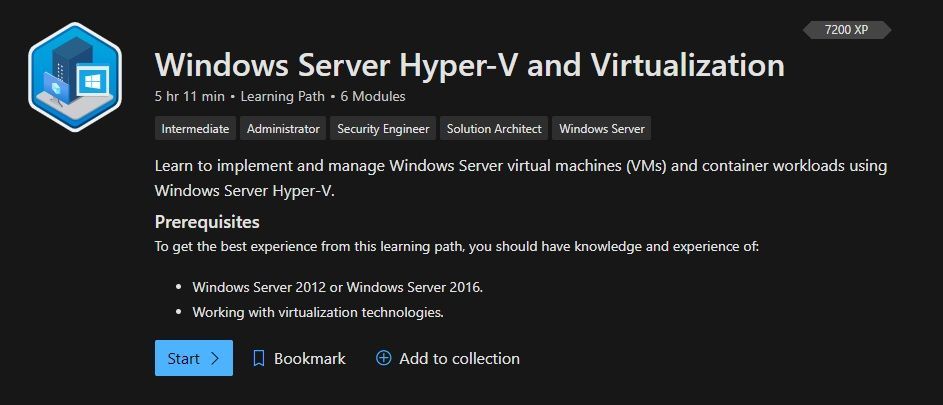
Windows Server Hyper-V and Virtualization
Learn to implement and manage Windows Server virtual machines (VMs) and container workloads using Windows Server Hyper-V.
Check out this learning path here.
 Windows Server Hyper-V and Virtualization
Modules:
Windows Server file servers and storage management
Learn to implement and manage Windows Server file servers and storage. Implement Storage Spaces, data deduplication, and Windows Server Storage Replica.
Check out this learning path here.
Modules:
Windows Server high availability
Learn to implement high availability Windows Server virtual machine (VM) workloads with Hyper-V Replica, Windows Server Failover Clustering, and Windows Server File Server high availability.
Check out this learning path here.
Modules:
Active Directory Domain Services
Learn about Active Directory Domain Services fundamentals, and then learn to configure and manage AD DS, Active Directory Certificate Services, and how to manage Group Policy Objects.
Check out this learning path here.
Modules:
Windows Server Network Infrastructure
Learn to implement and manage networking services in Windows Server 2019. Learn to deploy and manage DHCP, secure DNS, and implement IP Address Management (IPAM) and Web Application Proxy.
Check out this learning path here.
 Windows Server Network Infrastructure
Modules:
Conclusion
If you are implementing or managing Windows Server, we want to provide you with the right learning material. And now with the latest Windows Server learning paths on Microsoft Learn, you get exactly that. Let us know what you think, and leave a comment!
by Contributed | Mar 10, 2021 | Technology
This article is contributed. See the original author and article here.
Red Hat Linux Manual Deployment
Note: This document is in support of Microsoft Defender for Endpoint (MDE, formerly MDATP) on Red Hat Enterprise Linux (RHEL)
Disclaimer: This may not work on all versions of Linux.
System requirements:
- Linux server distributions and versions: Red Hat Enterprise Linux 7.2 or higher.
- The fanotify kernel option must be enabled.
Instructions to Prepare for MDE/MDATP Installation:
1. Connect to the RedHat server using Putty.
2. Install yum-utils if it isn’t already installed:
sudo yum install yum-utils
[azureuser@redhat ~]$ sudo yum install yum-utils
3. Install the RedHat MDATP Channel.
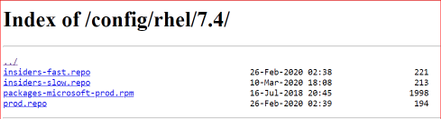
From a web browser go to https://packages.microsoft.com/config/ to select your OS, version, and channel.
4. I have RedHat Version 7.9 and chose the production channel 7.4 which is the highest version without going to the next major version. Copy the link with prod.repo to be included in the next step. For example: https://packages.microsoft.com/config/rhel/7.4/prod.repo
5. Install the Package.
sudo yum-config-manager –add-repo=https://packages.microsoft.com/config/rhel/7.4/prod.repo
[azureuser@redhat ~]$ sudo yum-config-manager –add– repo=https://packages.microsoft.com/config/rhel/7.4/prod.repo
Loaded plugins: langpacks, product-id
adding repo from: https://packages.microsoft.com/config/rhel/7.4/prod.repo
grabbing file https://packages.microsoft.com/config/rhel/7.4/prod.repo to /etc/yum.repos.d/prod.repo
repo saved to /etc/yum.repos.d/prod.repo
[azureuser@redhat ~]$
6. Install the Microsoft GPG public key:
sudo rpm –import http://packages.microsoft.com/keys/microsoft.asc
[azureuser@redhat ~]$ sudo rpm –import http://packages.microsoft.com/keys/microsoft.asc
[azureuser@redhat ~]$
7. Make all the metadata usable for the currently enabled yum repositories:
yum makecache
[azureuser@redhat ~]$ yum makecache
Loaded plugins: langpacks, product-id, search-disabled-repos
(1/5): packages-microsoft-com-prod/primary_db 118 kB 00:00:00
(2/5): packages-microsoft-com-prod/other_db 7.2 kB 00:00:00
(3/5): packages-microsoft-com-prod/filelists_db 341 kB 00:00:00
(4/5): rhui-microsoft-azure-rhel7/filelists 372 B 00:00:00
(5/5): rhui-microsoft-azure-rhel7/other 254 B 00:00:00
rhui-microsoft-azure-rhel7 1/1
rhui-microsoft-azure-rhel7 1/1
rhui-microsoft-azure-rhel7 1/1
Metadata Cache Created
[azureuser@redhat ~]$
Install MDE/MDATP Application:
- Run install command
sudo yum install mdatp
[azureuser@redhat ~]$ sudo yum install mdatp
Loaded plugins: langpacks, product-id, search-disabled-repos
packages-microsoft-com-prod | 3.0 kB 00:00:00
packages-microsoft-com-prod/primary_db 118 kB 00:00:00
Resolving Dependencies
–> Running transaction check
—> Package mdatp.x86_64 0:101.18.53-1 will be installed
–> Processing Dependency: libatomic for package: mdatp-101.18.53-1.x86_64
–> Running transaction check
—> Package libatomic.x86_64 0:4.8.5-44.el7 will be installed
–> Finished Dependency Resolution
Dependencies Resolved
========================================================================
Package Repository Arch Size Version
Installing:
mdatp x86_64 42 M 101.18.53-1 packages-microsoft-com-prod
Installing for dependencies:
libatomic x86_64 51 k 4.8.5-44.el7 rhui-rhel-7-server-rhui-rpms
Transaction Summary
Install 1 Package (+1 Dependent package)
Total download size: 42 M
Installed size: 145 M
Is this ok [y/d/N]: y
Downloading packages:
(1/2): libatomic-4.8.5-44.el7.x86_64.rpm | 51 kB 00:00:00
(2/2): mdatp_101.18.53.x86_64.rpm | 42 MB 00:00:01
——————————————————————————————————————————————
Total 32 MB/s | 42 MB 00:00:01
Running transaction check
Running transaction test
Transaction test succeeded
Running transaction
Installing : libatomic-4.8.5-44.el7.x86_64 1/2
Installing : mdatp-101.18.53-1.x86_64 2/2
Verifying : libatomic-4.8.5-44.el7.x86_64 1/2
Verifying : mdatp-101.18.53-1.x86_64 2/2
rhui-rhel-7-server-dotnet-rhui-rpms/x86_64/productid | 2.1 kB 00:00:00
rhui-rhel-7-server-rhui-extras-rpms/x86_64/productid | 2.1 kB 00:00:00
rhui-rhel-7-server-rhui-rpms/7Server/x86_64/productid | 2.1 kB 00:00:00
rhui-rhel-7-server-rhui-supplementary-rpms/7Server/x86_64/productid | 2.1 kB 00:00:00
rhui-rhel-server-rhui-rhscl-7-rpms/7Server/x86_64/productid | 2.1 kB 00:00:00
Installed:
mdatp.x86_64 0:101.18.53-1
Dependency Installed:
libatomic.x86_64 0:4.8.5-44.el7
Complete!
[azureuser@redhat ~]$
2. List all repositories. Make sure the ones in red are in the repository if you chose prod.repo (production).
yum repolist
[azureuser@redhat ~]$ yum repolist
Loaded plugins: langpacks, product-id, search-disabled-repos
repo name status
packages-microsoft-com-prod packages-microsoft-com-prod 89
[azureuser@redhat ~]$
3. Install the package from the production repository:
sudo yum —enablerepo=packages-microsoft-com-prod install mdatp
[azureuser@redhat ~]$ sudo yum –enablerepo=packages-microsoft-com-prod install mdatp
Loaded plugins: langpacks, product-id, search-disabled-repos
Package mdatp-101.18.53-1.x86_64 already installed and latest version
Nothing to do
[azureuser@redhat ~]$
Download the onboarding package & onboard
Download the onboarding package from Microsoft Defender Security Center from your Workstation:
- In Microsoft Defender Security Center, go to Settings > Device Management > Onboarding.
- In the first drop-down menu, select Linux Server as the operating system. In the second drop-down menu, select Local Script (for up to 10 devices) as the deployment method.
- Select Download onboarding package. Save the file as WindowsDefenderATPOnboardingPackage.zip to your workstation.
From the workstation copy WindowsDefenderATPOnboardingPackage.zip from the workstation to RHEL. Putty must be installed. Here we are using a key to log in and copy the file.
C:>pscp.exe -P 22 -i C:UsersazureuserDownloadsredhat_key.ppk C:usersAzureuserWindowsDefenderATPOnboardingPackage.zip azureuser@ipaddressoflinuxserver:/home/azureuser
WindowsDefenderATPOnboard | 5 kB | 5.6 kB/s | ETA: 00:00:00 | 100%
Connect back to Linux (putty)
[azureuser@redhat ~]$ cd ..
[azureuser@redhat home]$ cd azureuser/
[azureuser@redhat ~]$ ls
WindowsDefenderATPOnboardingPackage.zip
4. Unzip WindowsDefenderATPOnboardingPackage.zip
[azureuser@redhat ~]$ unzip WindowsDefenderATPOnboardingPackage.zip
Archive: WindowsDefenderATPOnboardingPackage.zip
inflating: MicrosoftDefenderATPOnboardingLinuxServer.py
[azureuser@redhat ~]$
5. Check the health of MDATP which should say no license found:
mdatp health –field org_id
[azureuser@redhat ~]$ mdatp health –field org_id
ATTENTION: No license found. Contact your administrator for help.
unavailable
[azureuser@redhat ~]$
6. Run Onboarding script:
MicrosoftDefenderATPOnboardingLinuxServer.py
[azureuser@redhat ~]$ sudo python MicrosoftDefenderATPOnboardingLinuxServer.py
Generating /etc/opt/microsoft/mdatp/mdatp_onboard.json …
[azureuser@redhat ~]$
7. Check the health of MDATP: mdatp health –field org_id
[azureuser@redhat ~]$ mdatp health –field org_id
“5447sdf90-2220-4161-82f7-0dgs2f39h8329-125fd412″
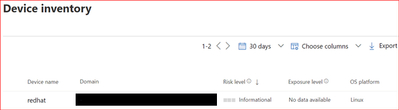
8. Check the MDATP Azure console:

by Contributed | Mar 10, 2021 | Technology
This article is contributed. See the original author and article here.
The SharePoint PnP Community monthly call is our general monthly review of the latest SharePoint and Microsoft 365 PnP topics (news, tools, extensions, features, capabilities, content and training), engineering priorities and community recognition for Developers, IT Pros and Makers. This monthly community call happens on the second Tuesday of each month. You can download recurrent invite from https://aka.ms/sp-call.
Call Summary:
If you’re looking at this blog post, then you are at the new Microsoft 365 PnP Community hub at Microsoft Tech Communities! Please take a moment to look around. The Microsoft 365 Update – Community (PnP) | March 2021is available. In this call, the Top 10 developer and non-developer entries in UserVoice are reviewed and top engineering priorities identified.
Your votes do influence engineering priorities. You are invited to attend the growing list of Sharing is Caring events. Register today. In Episode 117 of PnP Weekly tools and approaches for simplifying the move from Classic to Modern, on-prem to cloud were discussed. Why Modern? Well, one reason – Viva capabilities like the one that will be demonstrated today are available only in Modern. Testing of SPFx v1.12 is on the final stretch. Release expected any day.
Thank you to the 200 + active contributors and organizations actively participating in this PnP Community during February. You are truly amazing. The host of this call was Vesa Juvonen (Microsoft) @vesajuvonen. Q&A took place in the chat throughout the call.
Demo: Getting started with Microsoft Viva Topics – system and tools to help customers manage knowledge within their organizations through a conscious AI assisted strategy of connecting people and actionable knowledge. Content is ultimately rendered through the Topic web part. Topics along with aligned content and SMEs are initially discovered through AI algorithms, then confirmed and curated by humans. Topics draws on capabilities from across Microsoft and can be extended by you.
Actions:
- Register for Sharing is Caring Events
- First Time Contributor Session – March 22nd (EMEA, APAC & US friendly times available)
- Community Docs Session – March
- PnP – SPFx Developer Workstation Setup – March 10th
- PnP SPFx Samples – Solving SPFx version differences using Node Version Manager – March 11th
- PnP – AMA (Ask Me Anything) – SPFx Samples Edition – March 9th
- First Time Presenter – March 24th
- More than Code with VSCode – March 23rd
- Maturity Model Practitioners – March 16th
- PnP Office Hours – 1:1 session – Register
- Download the recurrent invite for this call – https://aka.ms/sp-call.
You can check the latest updates in the monthly summary and at aka.ms/spdev-blog.
This call was delivered on Tuesday, March 9, 2021. The call agenda is reflected below with direct links to specific sections. You can jump directly to a specific topic by clicking on the topic’s timestamp which will redirect your browser to that topic in the recording published on the Microsoft 365 Community YouTube Channel.
Call Agenda:
- UserVoice status for non-dev focused SharePoint entries – 4:10
- UserVoice status for dev focused SharePoint Framework entries – 5:08
- SharePoint community update with latest news and roadmap – 8:57
- Community contributors and companies which have been involved in the past month – 10:40
- Demo: Getting started with Microsoft Viva Topics – Naomi Moneypenny (Microsoft) | @nmoneypenny – 14:26
The full recording of this session is available from Microsoft 365 & SharePoint Community YouTube channel – http://aka.ms/m365pnp-videos.
- Presentation slides used in this community call are found at OneDrive.
Resources:
Additional resources on covered topics and discussions.
Additional Resources:
Upcoming calls | Recurrent invites:
“Too many links, can’t remember” – not a problem… just one URL is enough for all Microsoft 365 community topics – http://aka.ms/m365pnp.
“Sharing is caring”
SharePoint Team, Microsoft – 10th of March 2021
by Contributed | Mar 9, 2021 | Technology
This article is contributed. See the original author and article here.
Last November, we announced the first preview of Az Predictor, a PowerShell module for Azure that brings to your fingertips the entire knowledge of the Azure documentation customized to your current session.
Today we are announcing the second preview of Az Predictor and we want to share some clarity on our plans for the next few months.
What did we learn from the first preview?
Since the release of the first preview, we listened to customer feedback and identified some challenges.
- Customers believed that the predictor was not functional. Since the service that is used to deliver the predictions did not support outages, we believe this feedback is caused by the following reasons:
- The module had to be imported manually and several customers either forgot or did not know that they had to import the module.
- The default configuration of PSReadline had to be changed to show the predications from Az Predictor.
- With an accepted suggestion, the navigation through the parameter values can be complicated especially when the list of parameters is long.
- We were not making any suggestions for several modules (for example Az.MySql).
What has changed?
The module now exposes two cmdlets ‘Enable-AzPredictor’ and ‘Disable-AzPredictor’ to automatically import the module and configure PSReadline. The cmdlet also allows users to enable the settings for future sessions by updating the user’s PowerShell profile (Microsoft.PowerShell_profile.ps1).
Az.Tools.Predictor required API changes to the PowerShell engine to improve suggestions (requiring PowerShell 7.2 preview 3).
You can now use dynamic completers to easily navigate through the parameter value with the ‘Alt+A’ combination.
We are continuously improving the model that is serving the predictions displayed on your screen. This is the most important and invisible piece of software that makes the magic! The most recent update of the model now comprises the missing modules.
Getting started with preview 2
If you have installed the first preview:
- Close all your PowerShell sessions
- Remove the Az.Tools.Predictor module
To install the second preview of Az.Tools.Predictor follow these steps:
- Install PowerShell 7.2-preview 3
Go to: https://github.com/PowerShell/PowerShell/releases/tag/v7.2.0-preview.3
Select the binary that corresponds to your platform in the assets list.
- Launch PowerShell 7.2-preview 3 and Install PSReadline 2.2 beta 2 with the following:
Install-Module -Name PSReadLine -AllowPrerelease
More details about PSReadline: https://www.powershellgallery.com/packages/PSReadLine/2.2.0-beta2
- Install Az.Tools.Predictor preview 2
Install-module -name Az.Tools.Predictor -RequiredVersion 0.2.0
More details about Az.Tools.Predictor: https://www.powershellgallery.com/packages/Az.Tools.Predictor/0.2.0
- Enable Az Predictor
Enable-AzPredictor -AllSession
This command will enable Az Predictor in all further sessions of the current user.
Inline view mode (default)
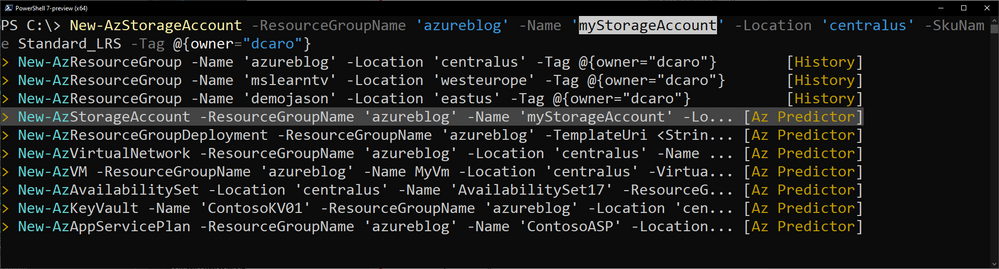
Once enabled, the default view is the “inline view” as shown in the following screen capture:
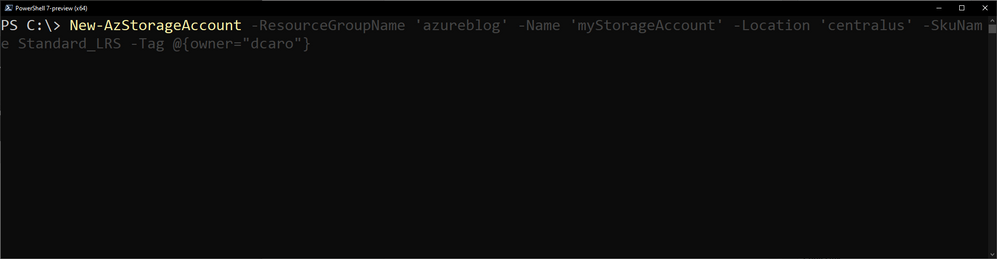
This mode show only one suggestion at a time. The suggestion can be accepted by pressing the right arrow or you can continue to type. The suggestion will dynamically adjust based on the text that you have typed.
You can accept the suggestion at any time then come back and edit the command that is on your prompt.
List view mode
This is definitely my favorite mode!
Switch to this view either by using the “F2” function key on your keyboard or run the following command:
Set-PSReadLineOption -PredictionViewStyle ListView
This mode shows in the a list down your current prompt a list of possible match for the command that you are typing. It combines suggestions from the history as well as suggestions from Az Predictor.
Select a suggestion and then navigate through the parameter values with “Alt + A” to quickly fill replace the proposed values with yours.
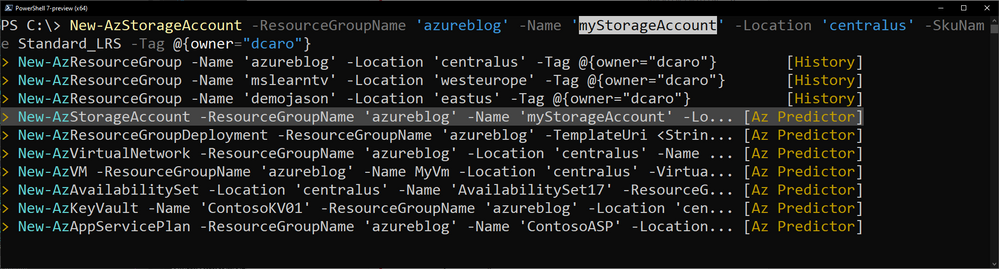
What’s next?
We are looking for feedback on this second preview.
We will continue to improve our predictor in the coming months. Stay tuned for our next update of the module.
Tell us about your experience. What do you like or dislike about Az Predictor?
Further Reading
by Contributed | Mar 9, 2021 | Technology
This article is contributed. See the original author and article here.
Access control is a fundamental building block for enterprise customers, where protecting assets at various levels is absolutely necessary to ensure that only the relevant people with certain positions of authority are given access with different privileges. This is more so prevalent in machine learning, where data is absolutely essential in building ML models, and companies are highly cautious about how the data is accessed and managed, especially with the introduction of GDPR. We are seeing an increasing number of customers seeking for explicit control of not only the data, but various stages of the machine learning lifecycle, starting from experimentation and all the way to operationalization. Assets such as generated models, cluster creation and model deployment require to be governed to ensure that controls are in line with the company’s policy.
Azure traditionally provides Role-based Access Control [1], which helps to manage access to resources; who can access these and what they can access. This is primarily achieved via the concept of roles. A role defines a collection of permissions.
Existing Roles in AML
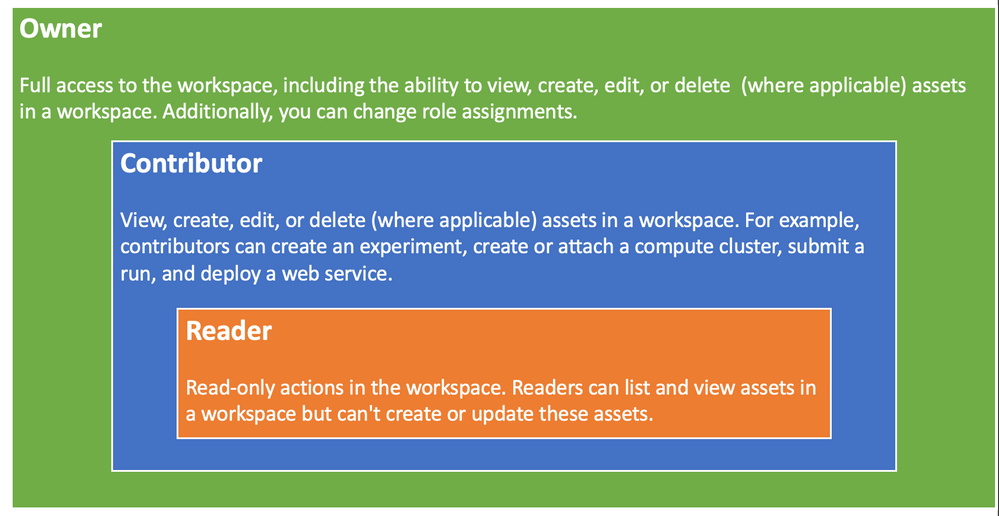
Azure Machine Learning provides three roles [3] for enterprise customers to provision as a coarse-grained access control, which is designed for simplicity in mind. The first role (Owner) has the highest level of privileges, that grants full control of the workspace. This is followed by a Contributor, which is a bit more restricted role that prevents users from changing role assignment. Reader having the most restrictive permissions and is typically read or view only (see figure 1 below).
Figure 1 – Existing AML roles
What we have found with the customers is that while Coarse-grained Access Control immensely simplifies the management of the roles, and works quite well with a small team, primarily working in the experimentation environment. However, when a company decides to operationalize the ML work, especially in the enterprise space, these roles become far too broad, and too simplistic. In the enterprise space, the deployment tends to have several stages (such as dev, test, pre-prod, prod, etc.), and require various skillset (data scientist, data engineer, etc.) with a greater control in each stage. For example, a Data Scientist may not operate in the production environment. A Data Engineer can only provision resources and should not have the ability to commission and decommission training clusters. Such governance policies are crucial for companies to be enforced and monitored to maintain integrity of their business and IT processes.
Unfortunately, such requirements cannot be captured with the existing roles. Enterprise needs a better mechanism to define policies for various assets in AML to satisfy their business specific requirements.
This is where the new exciting feature of advanced Role-based Access Control really shines. It is based on Fine-grained Access Control at component level (see figure 2) with a number of pre-built out of the box roles, plus the ability to create custom roles that can capture more complex governance access processes and enforce them.
Advance Fine-grained Role-based Access Control
The new advance Role-based Access Control feature of AML is really going to solve many of the enterprise problems around the ability to restrict or grant user permissions for various components. Azure AML currently defines 16 components with varying permissions.
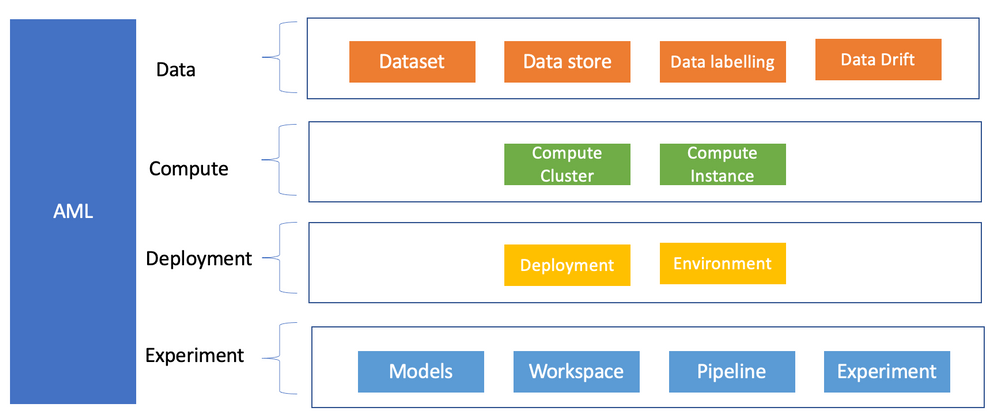
Figure 2 – Components Level RBAC
Each component defines a list of actions such as read, write, delete, etc. These actions can then be amalgamated together to create a custom specific role. To illustrate this with an example of a list of actions currently available for a Datastore component (see Figure 3 below).
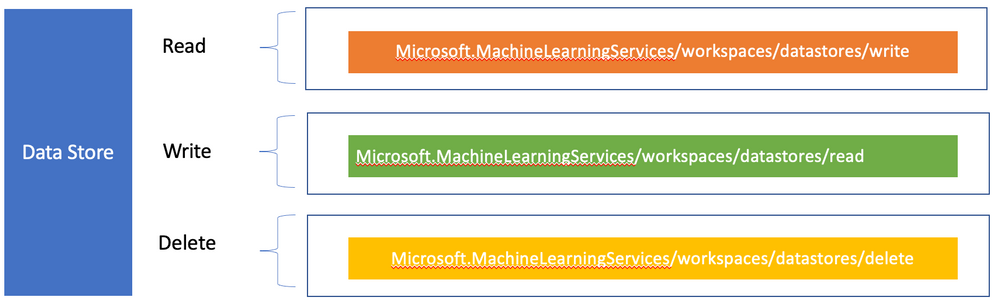
Figure 3 – Datastore Actions
A datastore along with Dataset are important concepts in Azure Machine Learning, since they provide access to various data sources, with lineage and tracking ability. Many enterprises have built global Datalake that contain terabytes of data which can contain highly sensitive information. Companies are quite protective of who can access these data, along with various business justifications for how these data are being accessed/used. It is therefore imperative that a tighter access control is mandated for a specific role, such as a Data Engineer to accomplish such a task.
Fortunately, AML advance access control provide custom roles. to cater for their company specific access control, which may be a hybrid of these roles. For such requirements, Azure caters for custom roles.
Custom Role
Custom role [4] allows creation of Fine-grained Access Control on various components, such as the workspace, datastore, etc.
- Can be any combination of data or control plane actions that AzureML+AISC support.
- Useful for creating scoped roles to a specific action like an MLOps Engineer
These controls are defined in a JSON policy definition, for example.
{

    “Name”: “Data Scientist”,

    “IsCustom”: true,

    “Description”: “Can run experiment but can’t create or delete datastore.”,

    “Actions”: [“*”],

    “NotActions”: [

        “Microsoft.MachineLearningServices/workspaces/*/delete”,

        “Microsoft.MachineLearningServices/workspaces/ datastores/write”,

        “Microsoft.MachineLearningServices/workspaces/ datastores /delete”,

        “Microsoft.MachineLearningServices/workspaces/datastores/write”,

        “Microsoft.Authorization/*/write”

    ],

    “AssignableScopes”: [

        “/subscriptions/<subscription_id>/resourceGroups/<resource_group_name>/providers/Microsoft.MachineLearningServices/workspaces/<workspace_name>”

    ]

}
The above code defines a Data Scientist who can run an experiment but cannot create or delete a Datastore. This role can be created using the Azure CLI (az role definition create -role-definition filename), however, the CLI ML extension needs to be installed first.
Role Operation Workflow
In an organization, the following activities are to be undertaken by various role owners.
- Sub admin comes in for an enterprise and requests Amlcompute quota
- They create an RG and a workspace for a specific team, and also set workspace level quota
- The team lead (aka workspace admin), comes in and starts creating compute within the quota that the sub admin defined for that workspace
- Data Scientist comes in and uses the compute that workspace admin created for them (clusters or instances).
Roles for Enterprise
AML provides a single environment for doing end-to-end experimentation to operationalization. For a start-up this is really useful as they tend to operate in a very agile manner, where many iterations can happen in a short period of time and having the ability to quickly move from ideation to production really reduces their cycle time. Unfortunately, this may not be the case for the enterprise customers, where they would typically be using either two or three environments to carry out their production workload such as: Dev, QA and Prod.
Dev is used to do the experimentation, while QA is catered for satisfying various functional and non-functional requirements, followed by Prod for deployment into the production for consumer usage.
The environments would also have various roles to carry out different activities, such as Data Scientist, Data Engineer and MLOps Engineer (see figure 8 below).
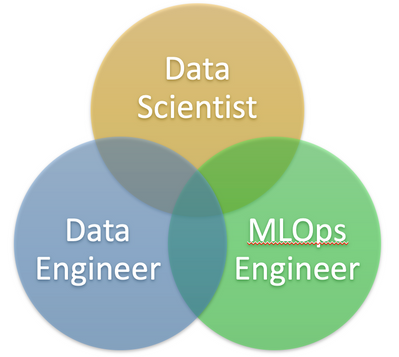
Figure 8 – Enterprise Roles
A Data Scientist normally operates in the Dev environment and has full access to all the permissions related to carrying out experiments, such as provisioning training clusters, building models, etc. While some permissions are granted in the QA environment, primarily related model testing and performance, and very minimal access to the Prod environment, mainly telemetry (see below Table 1).
A Data Engineer on the other hand primarily operates in the Build and QA environment. The main focus is related to the data handling, such as data loading, doing some data wrangling, etc. They have restricted access in the Prod environment.
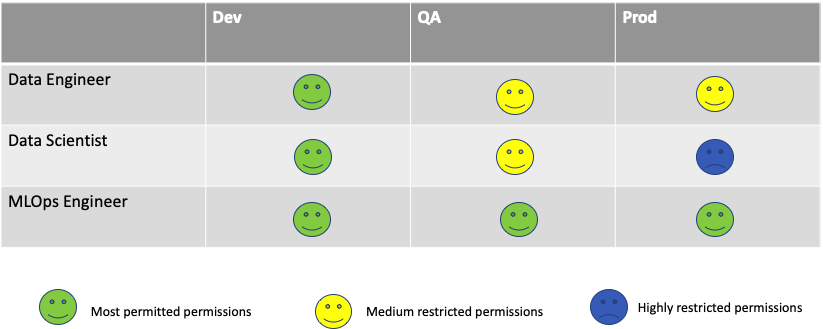
Table 1 – Role/environment Matrix
An MLOps Engineer has some permission in the Dev environment, but full permissions in the QA and Prod. This is because an MlOPs Engineer is tasked with building the pipeline, gluing things together, and ultimately deploying models in production.
The interesting part is how do all these roles and environments and other components fit together in Azure to provide the much-needed access governance for the enterprise customers.
Enterprise AML Roles Deployment
It is impressive for enterprises to be able to model these complex roles/environments mapping as shown in Table one. Fortunately these can be achieved in Azure using a combination of AD groups, roles and resource groups.
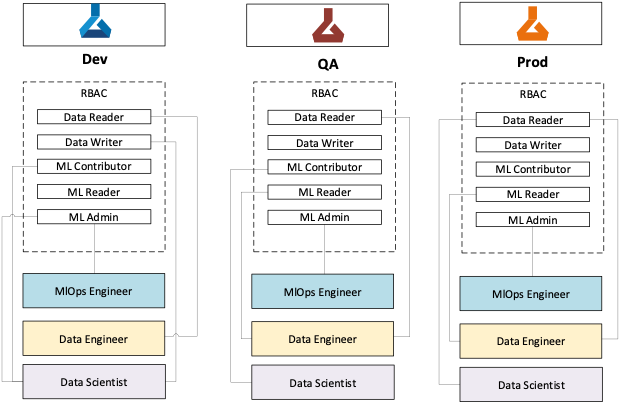
Figure 9 – Enterprise AML Roles Deployment
Fundamentally, Azure Active Directory groups play a major part in gluing all these components together to make it functional.
First step is to group the users specific to role(s) in a “Role AD group” for a given persona (DS, DE, etc.,). Then assign roles with various RBAC actions (Data Writer, MLContributor, etc.) to this AD group. All these users will now inherit the permissions specific to this role(s). Multiple AD groups will be created for different persona roles.
Separate AD groups (‘AD group for Environment’) are created for each environment (i.e. Dev, QA and Prod), the Role AD Groups are added to these Environment AD groups. This creates a mapping of users belonging to a specific role persona with given permissions to an environment.
The ‘AD group for Environment’ is then assigned to a resource group, which contains a specific AML Workspace. This ensures that the role permissions assigned to users will be enforced at the workspace level.
Summary
In this blog, we have discussed the new advance Role-based Access Control, and how it is being applied in a complex enterprise with various environments with different user personas.
The important point to note is the flexibility that comes with this new feature which can operate at any of the 16 AML components and be able to define Fine-grained Access Control for each through custom roles, and out of box four roles which should be sufficient for the majority of the customers.
References
[1] https://docs.microsoft.com/en-us/azure/role-based-access-control/overview
[2] https://azure.microsoft.com/en-gb/services/machine-learning/
[3] https://docs.microsoft.com/en-us/azure/machine-learning/concept-enterprise-security
[4] https://docs.microsoft.com/en-us/azure/role-based-access-control/custom-roles
Additional Links:
co-author: @Nishank Gupta
by Contributed | Mar 9, 2021 | Technology
This article is contributed. See the original author and article here.
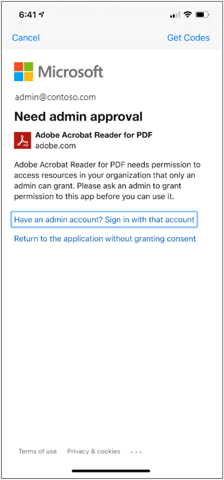
Adobe Acrobat recently updated their application to include deeper integration with Microsoft including access to OneDrive for Business files. This integration allows users to access their OneDrive for Business files from the Acrobat app. The improvements have a few configuration changes which will require that Intune admins approve the Adobe Acrobat app to connect to the Intune service. This is a one-time approval that you may not have had to do historically when connecting Adobe Acrobat and OneDrive for Business.
There are two options for this one-time approval:
- Use the latest Adobe Acrobat iOS and Android app and enable the OneDrive feature:
Adobe Acrobat Reader for PDF approval prompt
Use the link below to associate the two for your organization:
Permissions requested – Review for your organization | Adobe Acrobat Reader
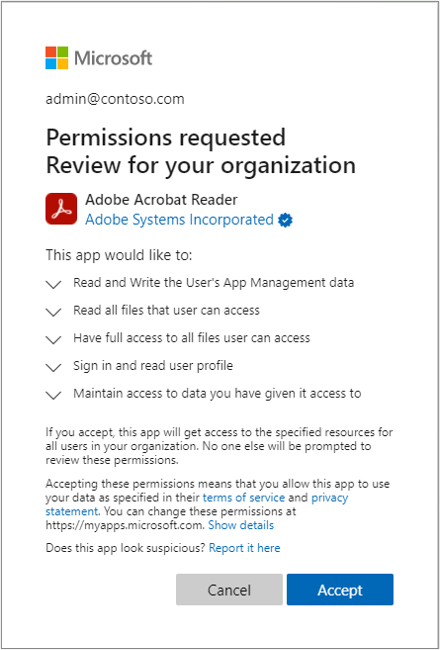 Admin consent – Permissions requested for review and approval process
Enjoy the integration!
More info and feedback
Let us know if you have any additional questions by replying to this post or reaching out to @IntuneSuppTeam on Twitter.
by Scott Muniz | Mar 9, 2021 | Security, Technology
This article is contributed. See the original author and article here.
SAP has released security updates to address vulnerabilities affecting multiple products. An attacker could exploit some of these vulnerabilities to take control of an affected system.
CISA encourages users and administrators to review the SAP Security Notes for March 2021 and apply the necessary updates.
by Contributed | Mar 9, 2021 | Technology
This article is contributed. See the original author and article here.
Overview
In 2021, each month we will be releasing a monthly blog covering the webinar of the month for the Low-code application development (LCAD) on Azure solution. LCAD on Azure is a new solution to demonstrate the robust development capabilities of integrating low-code Microsoft Power Apps and the Azure products you may be familiar with.
This month’s webinar is ‘Deliver Java Apps Quickly using Custom Connectors in Power Apps’ In this blog I will briefly recap Low-code application development on Azure, how the app was built with Java on Azure, app deployment, and building the app’s front end and UI with Power Apps.
What is Low-code application development on Azure?
Low-code application development (LCAD) on Azure was created to help developers build business applications faster with less code, leveraging the Power Platform, and more specifically Power Apps, yet helping them scale and extend their Power Apps with Azure services.
For example, a pro developer who works for a manufacturing company would need to build a line-of-business (LOB) application to help warehouse employees’ track incoming inventory. That application would take months to build, test, and deploy, however with Power Apps’ it can take hours to build, saving time and resources.
However, say the warehouse employees want the application to place procurement orders for additional inventory automatically when current inventory hits a determined low. In the past that would require another heavy lift by the development team to rework their previous application iteration. Due to the integration of Power Apps and Azure a professional developer can build an API in Visual Studio (VS) Code, publish it to their Azure portal, and export the API to Power Apps integrating it into their application as a custom connector. Afterwards, that same API is re-usable indefinitely in the Power Apps’ studio, for future use with other applications, saving the company and developers more time and resources. To learn more, visit the LCAD on Azure page, and to walk through the aforementioned scenario try the LCAD on Azure guided tour.
Java on Azure Code
In this webinar the sample application will be a Spring Boot application, or a Spring application on Azure, that is generated using JHipster and will deploy the app with Azure App service. The app’s purpose is to catalog products, product descriptions, ratings and image links, in a monolithic app. To learn how to build serverless PowerApps, please refer to last month’s Serverless Low-code application development on Azure blog for details. During the development of the API Sandra used H2SQL and in production she used MySQL. She then adds descriptions, ratings, and image links to the API in a JDS studio. Lastly, she applies the API to her GitHub repository prior to deploying to Azure App service.
Deploying the Sample App
Sandra leverages the Maven plug-in in JHipster to deploy the app to Azure App service. After providing an Azure resource group name due to her choice of ‘split and deploy’ in GitHub Actions she only manually deploys once, and any new Git push from her master branch will be automatically deployed. Once the app is successfully deployed it is available at myhispter.azurewebsites.net/V2APIdocs, where she copies the Swagger API file into a JSON, which will be imported into Power Apps as a custom connector.
Front-end Development
The goal of the front-end development is to build a user interface that end users will be satisfied with, to do so the JSON must be brought into Power Apps as a custom connector so end users can access the API. The first step is clearly to import the open API into Power Apps, note that much of this process has been streamlined via the tight integration of Azure API management with Power Apps. To learn more about this tighter integration watch a demo on integrating APIs via API management into Power Apps.
After importing the API, you must create a custom connector, and connect that custom connector with the Open API the backend developer built. After creating the custom connector Dawid used Power Apps logic formula language to collect data into a dataset, creating gallery display via the collected data. Lastly, Dawid will show you the data in a finalized application and walk you through the process of sharing the app with a colleague or making them a co-owner. Lastly, once the app is shared, Dawid walks you through testing the app and soliciting user feedback via the app.
Conclusion
To conclude, professional developers can rapidly build the back and front ends of the application using Java, or any programming language with Power Apps. Fusion development teams, professional developers and citizen developers, can collaborate on apps together, reducing much of the lift for professional developers. Please watch the webinar and complete the survey so, we can improve these blogs and webinars in the future.
Resources
- Low-code application development on Azure


Recent Comments