by Contributed | Mar 10, 2021 | Technology
This article is contributed. See the original author and article here.
With MySQL 5.7 and lower versions, you may have noticed that response times increase when querying TEXT columns in Azure Database for MySQL. In this blog post, we’ll take a deeper look at this behavior and some of the best practices to accommodate these fields.
While processing statements, MySQL server creates internal temporary tables that are stored in memory rather than on disk, so they are faster to query. These temporary tables store the intermediate results of a query or an aggregation of tables that include UPDATES or UNION statements.
Note: For more information about scenarios in which the MySQL engine creates temporary tables, see Internal Temporary Table Use in MySQL.
Users can also create temporary tables to gather results from complex searches that involve multiple queries, or to serve as staging tables.
However, MySQL memory tables don’t support BLOB or TEXT datatypes. If temporary tables have instances of TEXT column in the result of a query being processed, they get stored as a temporary table on disk rather than in memory. Every disk access is an expensive operation and incurs a performance penalty.
Azure Database for MySQL uses remote storage to provide the benefits of data-redundancy, high-availability, and reliability. The MySQL physical data and log files are stored on Azure Storage, independently from the database server.
Follow the steps below to determine if your queries are resulting in temporary tables, and if so, whether those tables are being created on disk or in memory.
Is my query resulting in a temporary table?
To determine whether a query is resulting a temporary table, run an Explain plan on the query:
EXPLAIN <query>;
EXPLAIN select name, count(*) from new_table group by name;
If the Explain plan includes an Extra column displaying the text Using temporary, then the query is using a temporary table to compute the result.

Is my query resulting in a disk table?
Let’s take a look at how to determine whether a temporary table is being created on disk or in memory. Consider a table called new_table created using the following schema and add some data:
CREATE TABLE `new_table` (
  `id` int(10) unsigned NOT NULL,
  `name` text(500) NOT NULL,
  `address` text(500) NOT NULL
)
To obtain a table count of temporary tables, I’ll run the following query:
SHOW SESSION STATUS LIKE ‘created_tmp%tables’;
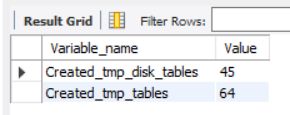
Note that there are currently 45 disk and 64 in-memory temporary tables.
Next, I’ll run the query I want to assess. In this case, the query performs a full-table scan on new_table and aggregates the number of times a particular name is present, where name is a column of TEXT datatype.
select name, count(*) from new_table group by name;
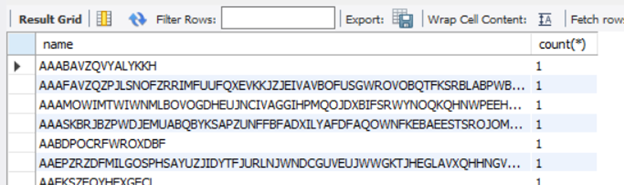
Now, I’ll rerun the query I used initially:
SHOW SESSION STATUS LIKE ‘created_tmp%tables’;
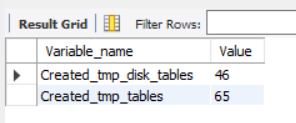
After rerunning the query, you’ll see that there disk temporary table count has increased to 46, so the query on new_table resulted in the creation of a disk table.
The best solution to improve query response times in such cases is to avoid using TEXT types unless you really need them. If you can’t avoid it, here are some remedial measures that can help reduce disk reads and improve performance.
MySQL version upgrade
MySQL 8.0 has an additional storage engine, named TempTable, which is the default engine for handling in-memory temporary tables. As of MySQL 8.0.13, the TempTable storage engine supports columns with BLOB-like storage – TEXT, BLOB, JSON or geometry types.
Let’s create a table with a similar schema as earlier and then run the tests to confirm the in-memory operation. Let’s look at the count of temporary tables before running the query.
SHOW SESSION STATUS LIKE ‘created_tmp%tables’;
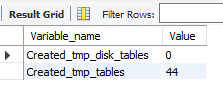
Notice that there are currently 0 disk tables and 44 memory tables.
Now let’s run the query aggregating a TEXT column.
select name, count(*) from new_table group by name;
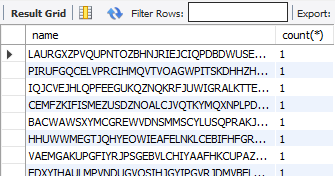
Let’s again look at the count of temporary tables.
SHOW SESSION STATUS LIKE ‘created_tmp%tables’;
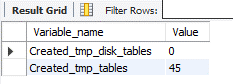
As you can see, the memory table count increased by 1, but no disk tables were created. Eliminating disk access should greatly improve response times.
Migrating to 8.0.13 can remove the disk-access penalty with its support of in memory operations. Before migrating to version 8, though, be sure to evaluate the other effects of migrating via a detailed cost-benefit analysis. Azure Database for MySQL supports minor versions > 8.0.13 on both Single Server and Flexible Server. You can find the latest supported versions on this page.
Use of VARCHAR
CHAR and VARCHAR are the most common datatypes for string handling. The CHAR datatype supports up to 255 characters, while the maximum length supported by VARCHAR depends on the total row length, which includes all the columns in the table. A maximum row-size of 65,535 bytes is supported.
Unless most of your columns contain long strings, it will usually suffice to use VARCHAR instead of TEXT. VARCHAR data can get processed and temporary tables will be created in-memory, which should bring a significant improvement in query response times.
An easy way to determine whether all columns will fit within the row length is to convert all the TEXT columns to VARCHAR. Let’s reuse the schema from the “new_table” to create a table called new_table1, but this time we’ll use VARCHAR instead of TEXT. I’ve increased the width of name field to 50,000 characters and the address to 20,000 characters to analyzed the limits on the row-size.
CREATE TABLE `new_table1` (
  `id` int(10) unsigned,
  `name` varchar(50000),
  `address` varchar(20000)
) ENGINE=InnoDB CHARACTER SET latin1;


The query results show that the row size too large as it exceeds 65,535 characters.
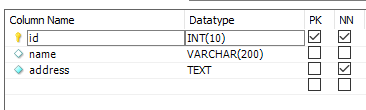
If you encounter the above error, reassess each column length or look to convert some of the smaller TEXT fields to substrings, as discussed later in the article. To convert the fields from TEXT to VARCHAR, alter the datatype using the ALTER TABLE command, as shown below:
ALTER TABLE new_table MODIFY name VARCHAR(200);
Using SUBSTRINGS
If changing the table structure from TEXT to VARCHAR is not a possible solution, you can also try the following method of using SUBSTR (column, position, length) to convert the values to character strings. This will enable the creation of in-memory temporary tables, reducing the performance overhead.
Ensure that the result set of the substring operation fits within the max_heap_table_size. Otherwise, the engine will push the result set to disk, negating the performance benefit.
Let’s verify the behavior of using substrings. As earlier, let’s obtain the count of temporary tables.
SHOW SESSION STATUS LIKE ‘created_tmp%tables’;
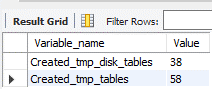
There are 38 disk and 58 memory tables. I’ll run the same query that aggregates the number of times a particular name is available in the table where name is a TEXT field.
select name, count(*) from new_table group by name;
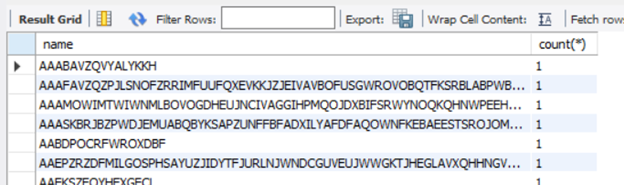
Now that I’ve received the result of the query, I’ll re-run the temporary table count to look more closely at the newly created tables.
SHOW SESSION STATUS LIKE ‘created_tmp%tables’;
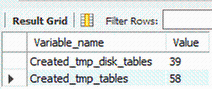
Running this led to the creation of one disk table.
Next, I’ll run the query extracting a character string of the TEXT field “name”.
SELECT SUBSTR(name, 1, 500), COUNT(*) FROM new_table GROUP BY SUBSTR(name, 1, 500);
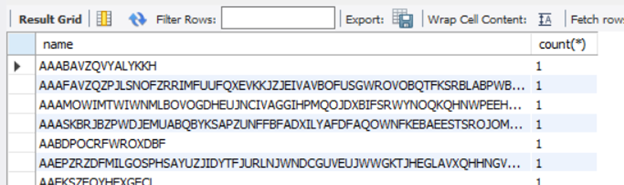
Running the query provides the same result set as it did earlier.
Let’s check the temporary table counts again.
SHOW SESSION STATUS LIKE ‘created_tmp%tables’;
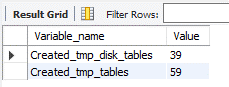
The query computation did not create any disk table. As you’ll notice from the above queries, when I used substrings, the query was processes in-memory and didn’t require a DDL operation.
Conclusion
We hope you now have a better understanding of why temporary tables are created, their impact of query performance, and some work arounds that you can try to minimize the impact. If you have any feedback or questions, please leave a comment below or email us at AskAzureDBforMySQL@service.microsoft.com.
Thank you!
by Scott Muniz | Mar 10, 2021 | Security, Technology
This article is contributed. See the original author and article here.
F5 has released a security advisory to address remote code execution (RCE) vulnerabilities—CVE-2021-22986, CVE-2021-22987—impacting BIG-IP and BIG-IQ devices. An attacker could exploit these vulnerabilities to take control of an affected system.
CISA encourages users and administrators review the F5 advisory and install updated software as soon as possible.
by Contributed | Mar 10, 2021 | Technology
This article is contributed. See the original author and article here.
Initial Update: Wednesday, 10 March 2021 18:34 UTC
We are aware of issues within Log Analytics and are actively investigating. Some customers may experience delayed log ingestion if their workspace is in the West Europe region.
- Work Around: none
- Next Update: Before 03/10 20:00 UTC
We are working hard to resolve this issue and apologize for any inconvenience.
-Jack Cantwell
by Contributed | Mar 10, 2021 | Technology
This article is contributed. See the original author and article here.
Earlier this week, we kicked off the “March Ahead with Azure Purview” blog series that will be focused on helping you get the most out of your Azure Purview implementation. ICYMI, the first blog post was on Azure Purview support of the Apache Atlas APIs and how you could use this to unify all your data. Leave a comment on what other topics you would like us to cover.
Let’s get started. I want to go through the important topic of access management within Azure Purview today. Depending on your org structure, this can be complex or simple to set up on your own. Here’s how I intend to take you through this topic:
- Overview of Azure roles in control plane and data plane to deploy and manage Azure Purview.
- What roles and tasks are required in Azure control plane (in Azure Portal) to deploy an Azure Purview Account and prerequisites to be able to scan data sources later in Purview.
- Required Access Permissions to scan data in Azure Purview.
Azure operations can be divided into two categories: control plane and data plane:
- You can use the control plane to manage resources in your subscription. For Azure Purview, you need to perform some operations at control plane such as deploying an Azure Purview Account or creating secrets in an Azure Key Vault resource.
The common dashboard for control plane is Azure Portal.
In this post I am going to explain tasks you need to perform in control plane in order to deploy an Azure Purview Account and setup required access.
- You can use the data plane to use capabilities exposed by your instance of a resource type, for example reading data inside an Azure Storage Account or managing data assets inside a Purview Account.
The common tool to manage Azure Purview through data plane is Azure Purview Studio.
Review my next blog post to read about Azure Purview roles in data plane!
Azure RBAC helps you manage roles and access for both control plane and data plane for Azure Purview. Azure Purview has also built-in roles which are part of Azure Built-in Roles. Assigning roles in Azure Purview can be done in Azure Resource Manager. It is recommended to use the least privilege model with absolute minimum permissions necessary to complete the task.
What roles do you need to deploy Azure Purview and perform initial setups?
Register required Resource Providers inside your Azure Subscription.
What roles can perform this task?
Owner at Subscription or Management Group level or /register/action operation for the resource provider in your subscription.
Why do you need this?
In the subscription you are planning to deploy an Azure Purview Account, prior to the deployment, the following Resource Providers must be registered:
- Microsoft.Purview
- Microsoft.Storage
- Microsoft.EventHub
Create an Azure Purview Account inside your Azure Subscription.
What roles can perform this task?
Owner or Contributor in Management Group, Subscription or resource group
Why do you need this?
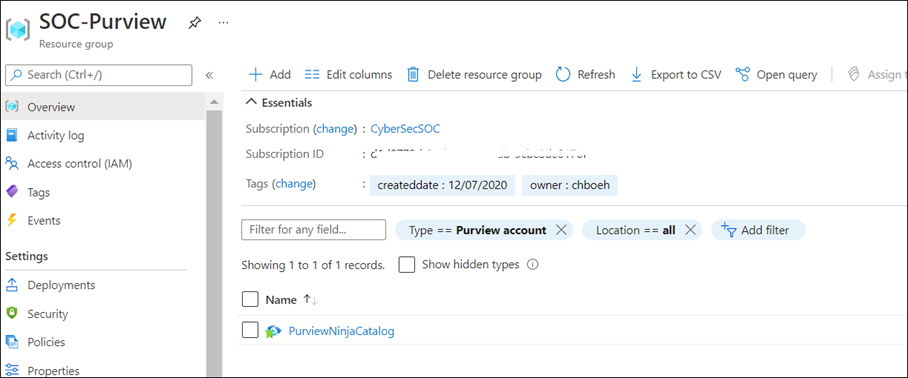
Azure Purview is an Azure resource; therefore, you would need to deploy an Azure Purview Account inside your Subscription in Azure. You can use Azure Portal to perform this operation.
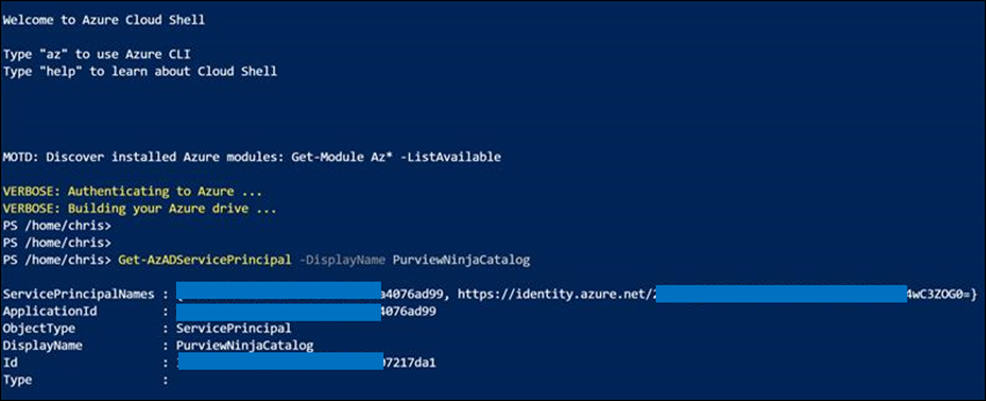
As soon as Azure Purview Account is created, a system Managed Identity is created automatically in Azure AD tenant. Use PowerShell command to validate whether the MSI is created:
Get-AzADServicePrincipal -DisplayName PurviewCatalog
(Use your own Azure Purview account name instead of PurviewCatalog).
Setup source authentication in Azure Purview
What roles can perform this task?
Depending on data source type and required authentication method, you may need to work with different teams in your organization such as database owners and Infrastructure admins.
Why do you need this?
To scan data sources, Azure Purview requires access registered data sources. This is done by using a Credential. to A credential is an authentication information that Azure Purview can use to authenticate to your registered data sources.
There are few options to setup the credentials for Azure Purview:
- Option 1: Managed Identity
- Option 2: Key Vault Secret
- Option 3: Service Principal
Option 1: Use Managed Identity
Configure required role assignment for your Azure Purview Managed Identity. When you create an Azure Purview account a system Managed Identity is created for your Azure Purview Account in your Azure AD tenant. Depending on type of resource, specific RBAC role assignments are required for the Azure Purview MSI to perform the scans.
The higher scope you assign the role to Azure Purview MSI, the less administrative task is required when new data sources are added to your subscriptions.
If you use this option: Assign Azure Purview Account’s MSI with required RBAC assignment at Data Sources.
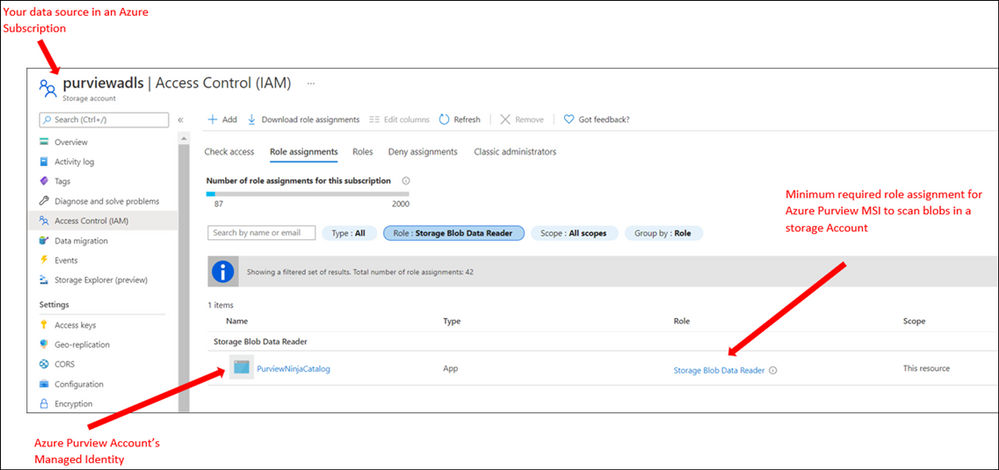
Note: If you have multiple data sources, for supported sources you can assign the role at higher level (for example at Subscription level) to reduce management overhead)
Option 2: Use Key Vault
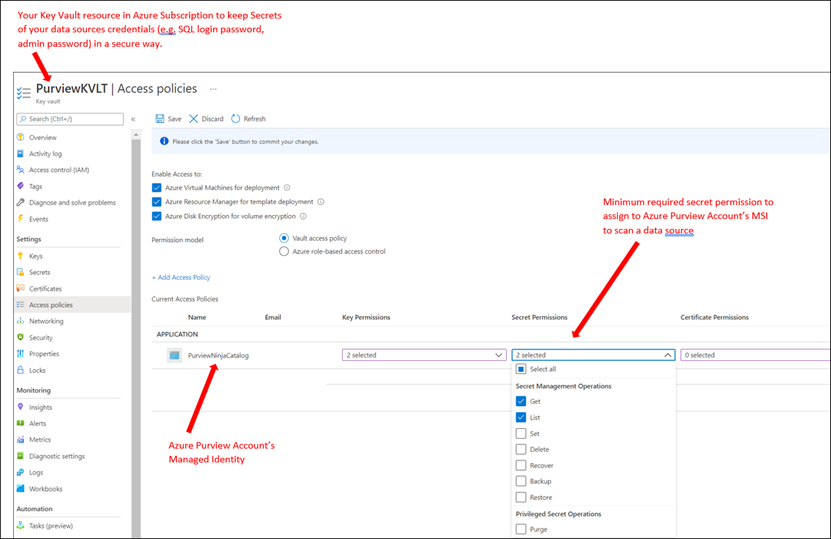
To setup a credential for supported data sources, you can create Secrets inside an Azure Key Vault to store credentials so Azure Purview can reach your data sources securely using the secrets. A Secret can be a storage account key, SQL login password or a password.
If you use this option: You need to deploy an Azure Key Vault resource in your subscription and assign Azure Purview Account’s MSI with required access permission to Secrets inside Azure Key Vault.
Option 3: Use Service Principals
In this method you can create a new or use an existing service principal in your Azure Active Directory tenant. If you need to create a new service principal, it is required to register an application in your Azure AD tenant and provide access to Service Principal in your data sources. Your Azure AD Global Administrator or other roles such as Application Administrator can perform this operation.
In summary, currently Azure Purview supports the following authentication methods for data sources:
Data Source
|
Minimum Required Access Level
|
Supported Authentication Methods
|
Azure (Multiple sources)
· Azure Blob Storage
· Azure Data Lake Storage Gen1
· Azure Data Lake Storage Gen2
· Azure SQL Database
· Azure SQL Database Managed Instance
· Azure Synapse Analytics
|
As stated below for each data source
|
· Managed Identity
· Service Principal
|
Azure Blob Storage
|
Storage Blob Data Reader
|
· Managed Identity (Recommended method)
· Storage Account Key (Azure Storage Account key saved in Azure Key Vault as Secret)
· Service Principal
|
Azure Data Lake Gen 1
|
Read
Execute
|
· Managed Identity (Recommended method)
· Service Principal
|
Azure Data Lake Gen 2
|
Storage Blob Data Reader
|
· Managed Identity (Recommended Method)
· Storage Account Key (key saved in Azure Key Vault)
· Service Principal
|
Azure SQL Database
|
db_datareader
|
· SQL authentication (SQL login password saved in Azure Key Vault)
· Managed Identity
· Service Principal
|
Azure SQL Database Managed Instance
|
db_datareader
|
· SQL authentication (SQL login password saved in Azure Key Vault)
· Managed Identity
· Service Principal
|
Azure Cosmos DB
|
N/A
|
· Account Key (Cosmos DB Read-only key saved in Azure Key Vault)
|
Azure Data Explorer
|
AllDatabasesViewer
|
· Service Principal
|
Azure Synapse Analytics
|
db_owner
|
· Managed Identity (Recommended method)
· SQL authentication (SQL login password saved in Azure Key Vault)
· Service Principal
|
On-premises SQL Server
|
db_datareader
|
· SQL authentication (SQL login password saved in Azure Key Vault)
|
Power BI tenant – Portal
|
read-only Power BI admin APIs
|
· Managed Identity
|
Amazon S3
|
AmazonS3ReadOnlyAccess
|
· AWS ARN, bucket name, and AWS account ID.
|
SAP ECC / S/4HANA
|
User account with
· STFC_CONNECTION (check connectivity)
· RFC_SYSTEM_INFO (check system information)
|
· Basic authentication (username with a password stored in Azure Key Vault)
|
Teradata
|
Read access to Teradata source
|
· Basic authentication (username with a password stored in Azure Key Vault)
|
Oracle
|
Full Sys Admin
|
· Basic authentication (username with a password stored in Azure Key Vault)
|
Assign Azure Purview Roles to Data and Security team
What roles can perform this task?
Owner at Management Group, Subscription, Resource Group or Purview resource
Why do you need this?
Assign RBAC roles to your Data and Security teams across the organization so they can manage and use Azure Purview as data governance solution.
You can assign roles based on different data and security personas in your organization. For example, some roles such as Data Engineers may need to setup configuration in Azure Purview, meanwhile other roles such as Data Stewards and Data Officers need to search Data Catalog or review Insights Reports. I will explain what roles exist in Azure Purview and highlight some of the differences of these roles in my next blog.
It is recommended to evaluate what access level each team needs and always assign roles based on least privilege model.
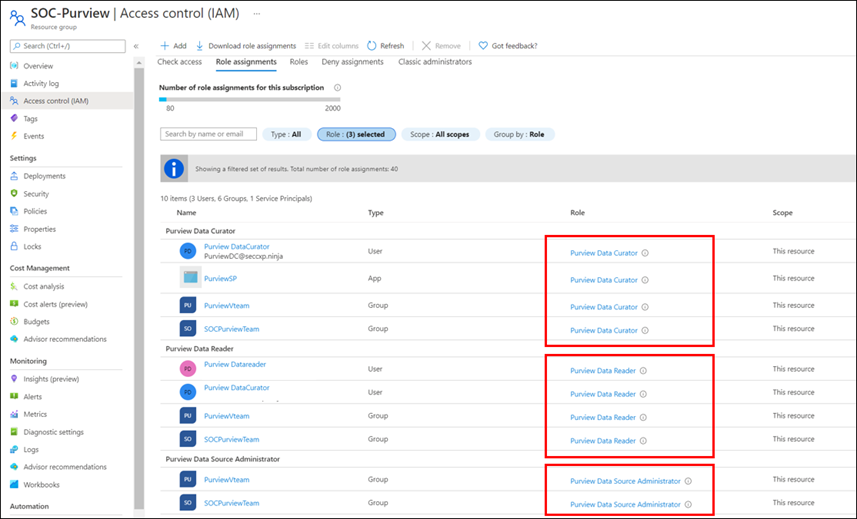
Note: Currently Role assignment for a role with dataActions are not supported at Management Group level at this moment. If you need to assign roles at higher level, create the Azure Purview role assignments at the subscription scope instead.
Summary and next steps:
We discovered what roles and tasks are required to deploy an Azure Purview Account and setup credentials to scan data sources.
- Get started now and create your Azure Purview account!
- Define roles and responsibilities at control plan to deploy Azure Purview Account. Learn more about Azure RBAC Roles.
- We would love you hear your feedback and know how Azure Purview helped your organization Please provide us your feedback.
In my next blog I will explain Azure Purview roles to manage Azure Purview in data plane!
![[Event Recap] Mixed Reality @ Microsoft Ignite Spring 2021](https://www.drware.com/wp-content/uploads/2021/03/medium-206)
by Contributed | Mar 10, 2021 | Technology
This article is contributed. See the original author and article here.
Microsoft Ignite Spring 2021 is a wrap! Were you able to participate and tune in live this year? We hope you had a great experience! If you missed the sessions being played live, fret not as we’ve got you covered with this recap. Read on to all get caught up.
Technologists around the world once again virtually converged for a 48-hour event jam-packed with topics such as driving innovation with cloud, evolving into a new reality with mixed reality, adapting to hybrid work world, and more. The conference kicked off on a high note with Satya’s keynote, which spotlighted organizations such as Mt Sinai Hospital and Kruger using Dynamics 365 Mixed Reality business application solutions like Remote Assist and Guides respectively. Mixed Reality was also prominently featured front and center in Alex Kipman’s keynote on Microsoft Mesh that included impressive visuals that garnered strong enthusiasm from technologists and the press alike, gaining coverage on media including Forbes, The Verge, ZDNet and more.
Additionally, we hosted a slew of interactive D365 Mixed Reality Connection Zone live sessions which included topics like switching to a mixed reality career, exploring real-life applications in healthcare, and how mixed reality truly augments and enhances the way we work.
Microsoft Ignite: Day 1 (Tuesday, March 2)
Alex Kipman revealed how Microsoft is bringing mixed reality to collaboration through a first-of-its-kind immersive keynote experience, delivered through a new platform, Microsoft Mesh. Through an integration of Microsoft Mesh with other enterprise solutions such as Microsoft Teams and Dynamics 365, we can all envision a future that includes building a wide variety of new and exciting 3D experiences on Mesh.
Mixed Reality Connection Zone sessions proved to be highly popular as well, with thousands of attendees participating in real-time across both days. On Day 1, we kicked off with the So you want to switch to a career in Mixed Reality moderated by Mixed Reality BizApps Program Manager Amara Anigbo, who facilitated a meaningful dialog between four successful women in a variety of interesting MR-related roles across Microsoft. They shared tips and tricks on how to get started in switching to a career in mixed reality, in addition to sharing their own unique, personal journey into the MR world.

Speaker stories included:
- Amara Anigbo, a Mixed Reality Program Manager at Microsoft and a recent graduate of Dickinson College where she received her B.S. in Computer Science. Amara believes in empowering those around her to achieve more and aspire for greatness. Read her story here.
- Catherine Diaz, a software engineer that worked on the Mixed Reality Toolkit (MRTK) for Unity. She has contributed to various items in the MRTK such as Leap Motion support, Tap to Place and other mixed reality input related components.
- Archana Iyer, a Product Manager in the Mixed Reality team. Archana’s day job involves helping build the Mixed Reality Object Understanding offering. She has worked on other Mixed Reality cloud solutions such as Azure Spatial Anchors and Azure Remote Rendering as a developer. She also has experience with large scale services from her time spent in Office 365.
- April Speight, an author and developer advocate based in Beverly Hills, CA. In January 2020, she and a team of 4 ambitious developers created Spell Bound, a VR learning experience designed to help children with dyslexia and dysgraphia learn letter formation and word recognition. Their team won Best in Learning, Education and Research as well as Best in Health and Wellness + Medical at the MIT Reality Hack. She has since taken on a role as a Sr. Cloud Advocate with the Spatial Computing technology team at Microsoft helping to onboard beginners in the XR space.



Later in the evening, we were thrilled to hear from Xerxes Beharry, Niels Broekhaus, Alexander Meijers, and moderator Alexander Petty in the Blending Worlds: Empowering Humans through Mixed Reality. These speakers captivated the audience by explaining the power and potential of mixed reality changing the world. They share how they are leveraging mixed reality to solve complex problems, create positive social impact and empower humans.
Key highlights included:
- Each individual took a “leap of faith” on Mixed Reality. Each speaker took a risk by stepping into the Mixed Reality. For example, Niels Broekhaus started his career as a Nurse, inspired by working in Healthcare. He had his first experience with HoloLens, saw many opportunities, and began to find ways to innovate the healthcare market to be more sustainable, contemporary and efficient.
- They also shared their community resources and how to get started in Mixed Reality. Xerxes recommended inclusive design resources and expresses the importance of accessibility to all humans. He recommends Microsoft’s Inclusive Design toolkit. Alexander also recommended using the MRTK for Unity as a quick developer tool, an open-source, cross-platform development kit for mixed reality applications.
- The speakers also talked about how to bring awareness to Mixed Reality and how important it is to engage future innovators and students. Alexandra shared about a ongoing student project group in Amsterdam that will be focusing on Dynamics 365 Remote Assist usage in healthcare. Alexander Meijers also shared about the importance of personally experiencing the HoloLens firsthand, and how essential it is to the future of MR.
- Lastly, they shared about their human experiences with MR/HoloLens and what was so memorable about involving others in the process.




Microsoft Ignite: Day 2 (Wednesday, March 3)
We continued the excitement on Day 2 with the session, Intro to Mixed Reality Business Apps + Real-Life Use Cases in Healthcare, featuring Katie Glerum, a Global Health Program Manager at Mount Sinai Health System, and Payge Winfield, a Mixed Reality solutions architect at Microsoft. Payge kicked off the conversation by sharing how you can get started infusing mixed reality into your everyday life and build confidence with Mixed Reality Business Apps like Remote Assist. She also walks us through core Mixed Reality deployment steps and best practices:
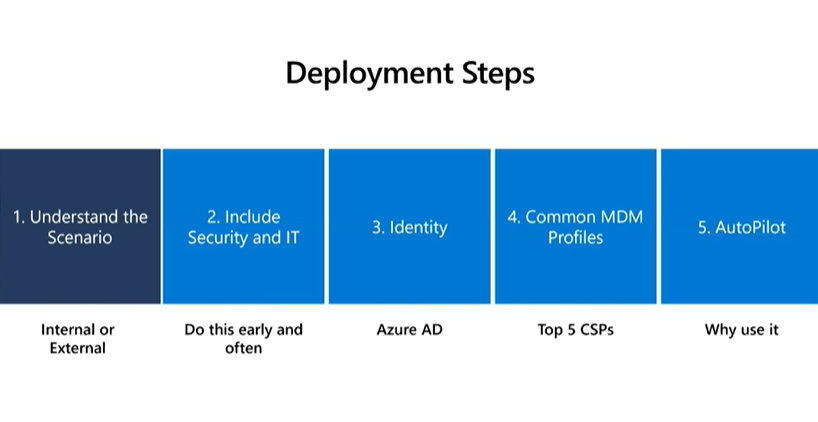
You can also read her comprehensive Remote Assist Best Practices Deployment Guide here.
Katie Glerum then shared about her first-hand experience of how Microsoft tech has helped enable global shared surgery across both the Mt. Sinai Hospital New York and their counterparts in Uganda. She shared the sobering statistic that currently over 5 billion people worldwide do not have access to safe and affordable surgery. In Uganda, 84% of the population lives in a rural area and over 75% must travel more than 2 hours for basic/essential surgical care. She shared about how Mt Sinai Hospital is using Microsoft technologies such as Dynamics 365 Remote Assist on HoloLens and Microsoft Teams to conduct critical, life-saving surgery and enabling real-time collaboration and knowledge sharing between New York City and Uganda:
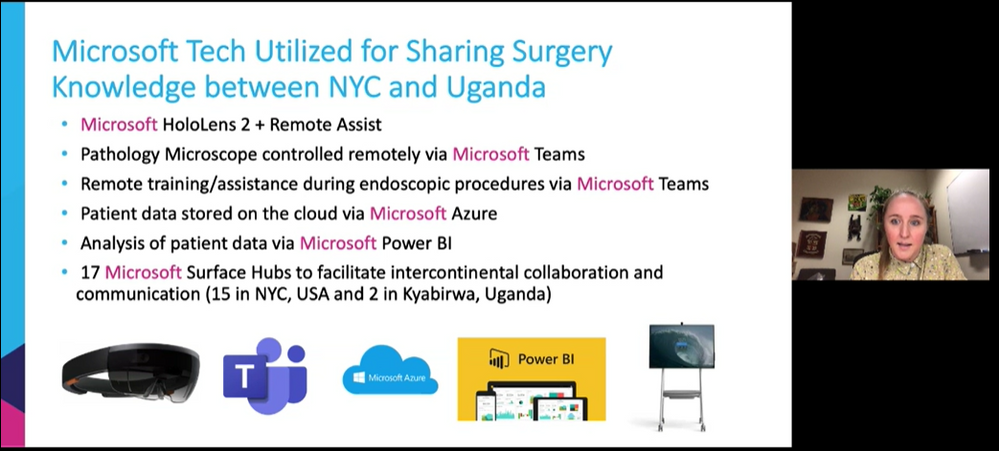

Mixed Reality HoloLens + Dynamics 365 Remote Assist enables knowledge share from surgeon in NYC to surgeons in Uganda, making surgical care to accessible to their community.
To wrap up the event, we had an engaging community table talk on Mixed Reality Business Applications. This was an informal way to chat with technologists and MR enthusiasts about all things MR Biz Apps across Dynamics 365 and Power Platform with Business Applications MVPs Mary Angiela Cerbolles, Daniel Christian, and Microsoft Indonesia Mixed Reality consultant Adityo Setyonugroho.
We are truly humbled and excited to share the future of tech in the mixed reality space with thousands of attendees on a global scale. We hope you will join us at the next Microsoft Ignite event this fall!
Catch the sessions above on-demand! Recording links below:
Share your Microsoft Ignite experience with us:
- What was favorite Mixed Reality session at Microsoft Ignite? Why?
- What do you hope to see from us at the next virtual conference?
Can’t wait till the next Microsoft Ignite? Join us at our next Mixed Reality x Microsoft Reactor session where we’re bringing back Anj Cerbolles, Daniel Christian and Adityo Setyonugroho on March 18 @ 8am PT once again to chat about Mixed Reality in Dynamics 365 and Power Platform.
Register now (it’s free!): https://aka.ms/LearnRA
We hope you enjoyed the Mixed Reality BizApps sessions @ Microsoft Ignite as much as we did.
See you in the fall!
#MixedReality
#Dynamics365
#MSIgnite
by Contributed | Mar 10, 2021 | Technology
This article is contributed. See the original author and article here.
Today, I worked on a service request that our customer is using this CmdLet to obtain all the secure connection string. Unfortunately, this CmdLet is deprecated and this command will be removed in a future release and the recomendation is to use the SQL database blade in the Azure portal to view the connection strings. In this situation, as our customer needs to have this call working until they will be able to change and test the code we suggested a workaround.
At the end, this cmdlet is providing the connection string for the database, in this situation, we wrote the following script in order to provide this information in the same way that CmdLet does.
Class ConnectionStrings
{
    [String] $ServerName
    [String] $DBName
    ConnectionStrings ([String] $ServerName, [String] $DBName)
    {
        $this.ServerName = $ServerName
        $this.DBName = $DBName
    }
    [string] AdoNetConnectionString()
    {
      return "Server=tcp:" + $this.ServerName + ".database.windows.net,1433;Initial Catalog=" + $this.DBName + ";Persist Security Info=False;User ID=UserName;Password={your_password};MultipleActiveResultSets=False;Encrypt=True;TrustServerCertificate=False;Connection Timeout=30;"
    }
    [string] JdbcConnectionString()
    {
      return "jdbc:sqlserver://"+ $this.ServerName + ".database.windows.net:1433;database=" + $this.DBName +";user=UserName@"+ $this.ServerName + ";password={your_password_here};encrypt=true;trustServerCertificate=false;hostNameInCertificate=*.database.windows.net;loginTimeout=30;"
    }
    [string] OdbcConnectionString()
    {
      return "Driver={ODBC Driver 13 for SQL Server};Server=tcp:" + $this.ServerName + ".database.windows.net,1433;Database=" + $this.DBName +";Uid=UserName;Pwd={your_password_here};Encrypt=yes;TrustServerCertificate=no;Connection Timeout=30;"
    }
    [string] PhpConnectionString()
    {
      $ConnString = [char]34 + "sqlsrv:server=tcp:" + $this.ServerName + ".database.windows.net,1433;Database=" + $this.DBName + [char]34
      $ConnString = $ConnString + "," + [char]34 + "UserName" + [char]34 + "," + [char]34 + "{your_password_here}" + [char]34
      return $ConnString
    }
}

Class ConnectionPolicy
{
    [String] $ServerName
    [String] $DBName
    [ConnectionStrings] $ConnectionStrings
    ConnectionPolicy ([String] $ServerName, [String] $DBName)
    {
        $this.ServerName = $ServerName
        $this.DBName = $DBName
        $this.ConnectionStrings = New-Object ConnectionStrings($ServerName,$DBName)
    }
}


Function Get-AzSqlDatabaseSecureConnectionPolicy
{
[CmdletBinding()]
param (
    [Parameter(Mandatory=$true, Position=0)]
    [string] $ServerName,
    [Parameter(Mandatory=$true, Position=1)]
    [string] $DbName )

 return New-Object ConnectionPolicy($ServerName,$DbName)
}
Now, running this example, we could have the same connection string that we have with the previous call
$getConnStrings = Get-AzSqlDatabaseSecureConnectionPolicy -ServerName "MyServer" -DbName "MyDatabase"
$adonet = $getConnStrings.ConnectionStrings.AdoNetConnectionString()
$jdbc   = $getConnStrings.ConnectionStrings.JdbcConnectionString()
$odbc   = $getConnStrings.ConnectionStrings.OdbcConnectionString()
$php    = $getConnStrings.ConnectionStrings.PhpConnectionString()
Enjoy!
![[Event Recap] Humans of IT @ Microsoft Ignite (March 2-4, 2021)](https://www.drware.com/wp-content/uploads/2021/03/large-808)
by Contributed | Mar 10, 2021 | Technology
This article is contributed. See the original author and article here.
Did you manage to participate and tune into the Humans of IT track @ Microsoft Ignite this year? We hope you had a great experience! If you missed the sessions being played live, fret not as we’ve got you covered with this recap. Read on to all get caught up!
Over 150,000 technology leaders came together virtually for a 48-hour event that was jam packed with topics such as driving innovation from the cloud, evolving into a new reality with mixed reality, adapting to hybrid work world, and more. Microsoft used the all-digital event as the stage to announce several updates for Teams, Outlook, and other Microsoft 365 apps and services, and even announced Mesh, a brand new social mixed reality platform.
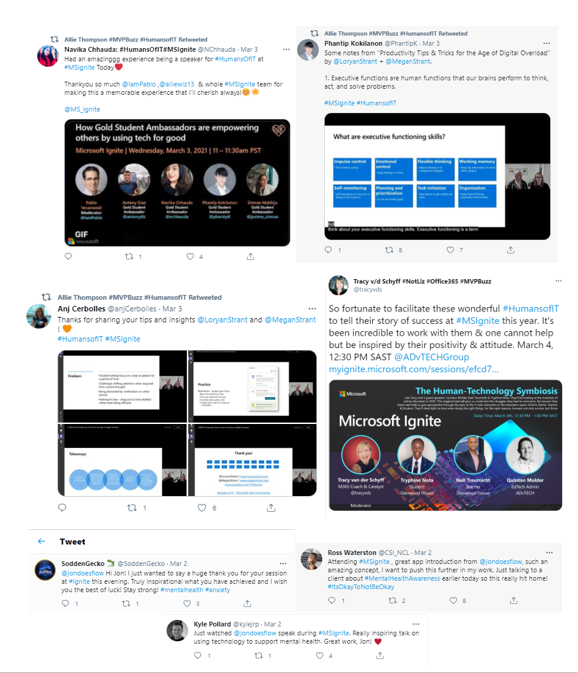
Want to hear what attendees have to say about Humans of IT at Microsoft Ignite? Check out all the tweets on Twitter via the #HumansofIT hashtag!
Microsoft Ignite: Day 1 (Tuesday, March 2)
The Humans of IT kicked off on an inspiring note with an empowering session, Mental Health Check in Power App: Using Tech to Manage Anxiety and Build Community, hosted by Jon Russell, a Power Platform consultant at Quantiq, a dad, husband, and anxiety sufferer who is passionate about mental health awareness, power platform and community. He shares how the blend of the three have changed his life.
Here were a few highlights:
- Through self awareness, community, Power Platform, and support from loved ones, Jon speaks with openness on how he’s been able to transform his anxiety and well-being
- Through his Passion for Community, John was able to use Power Platform to help with COVID volunteering, coordinating 250 volunteers covering 320 streets of Berkhamsted, UK. He also helped 500 people with an 18-week long surveys.
- As a visual learner, Jon expresses his passion for Power Automate and Power Virtual Agents. Inspired from last year’s Humans of IT sessions, Jon Russell decided to build an app to help people check in on their mental health journey. He shares live demo of canvas app.
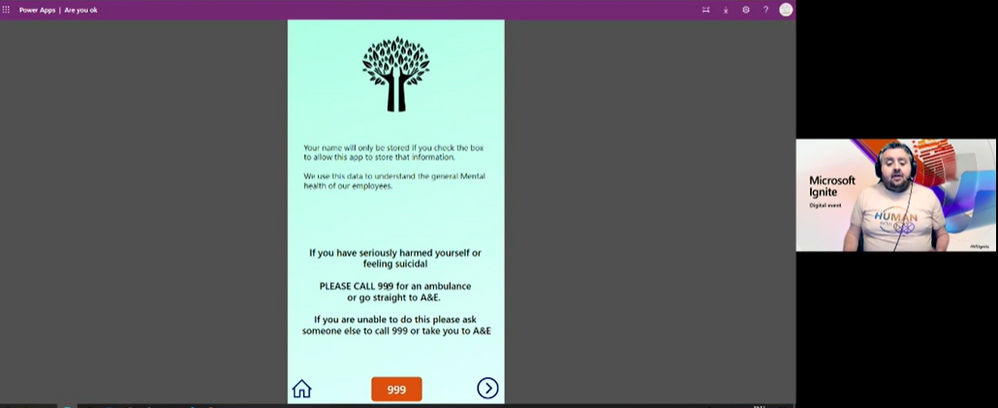
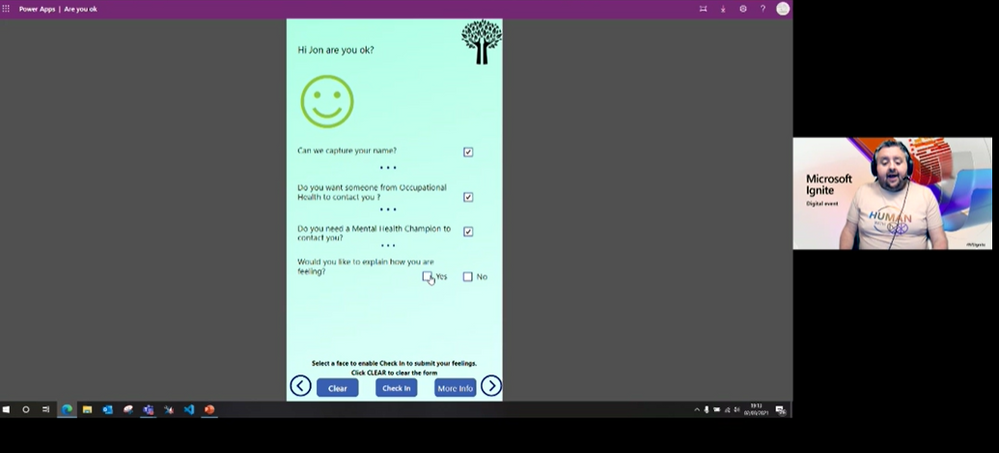
Later in the evening, we were thrilled to hear from Xerxes Beharry, Niel Broekhaus, Alexander Meijers, and moderator Alexander Petty in the Blending Worlds: Empowering Humans through Mixed Reality. These speakers captivated the audience by explaining the power and potential of mixed reality changing the world. They share how they are leveraging mixed reality to solve complex problems, create positive social impact and empower humans.
Key highlights included:
- Each individual took a “leap of faith” on Mixed Reality. Each speaker took a risk by stepping into the Mixed Reality. For example, Niels Broekhaus started his career as a Nurse, inspired by working in Healthcare. He had his first experience with HoloLens, saw many opportunities, and began to find ways to innovate the healthcare market to be more sustainable, contemporary and efficient.
- They also shared their community resources and how to get started in Mixed Reality. Xerxes recommended inclusive design resources and expresses the importance of accessibility to all humans. He recommends Microsoft’s Inclusive Design toolkit. Alexander recommends MRTK for Unity as a quick developer tool, an open-source, cross-platform development kit for mixed reality applications.
- The speakers also spoke about how to bring awareness to Mixed Reality and how important it is to engage future innovators and students. Alexandra Petty speaks about a student project group on Dynamics 365 Remote Assist with 5 students that will step into the world of MR. Alexander Meijers presents a challenge in the current gap around using HoloLens and how essential it is to the future of MR.
- Lastly, they share their human experiences with MR/HoloLens and what was so memorable about sharing the experience with others.




Microsoft Ignite: Day 2 (Wednesday, March 3)
Day 2 of Microsoft Ignite Humans of IT sessions included our future generation using tech for good, community transformation, productivity tips and tricks, and online education. Humans of IT started the day with the lovely Gold Student Ambassadors, who discussed their work in equality in education, renewable energies and building student communities on both a local and global level.
Pablo Veramendi, the director of Microsoft Learn Student Ambassadors, led the conversation with poise, showcasing the value of the MS Learn Student Ambassador program, introducing Simran Makhija, Navika Chhauda, Phanti Kokilanon, and Antony Diaz.
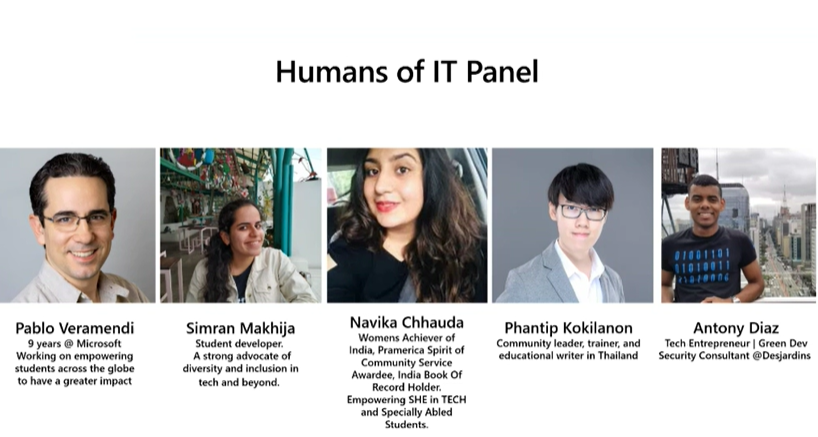
Each student ambassador shared their experiences using tech for good. Some example stories included:
- Simran mentions the Imagine Cup Tech for Good Hackathon. She created a solution that enables low-access communities to take pictures of codes with no need for computers or applications. This solution helps everyone to learn to code, ultimately impacting 250 learners who did not have access to computers.
- Navika shares her passion for women’s rights and enabling women better access to professional opportunities. She conducts local events to encourage marginalized women to be involved in STEM, in addition to performing outreach to women in rural areas.
- Phantip is passionate about sharing and helping. He writes tutorials to help people understand how to use technology, while also playing a role of a community leader and educational writer in Thailand, ensuring that tools are available in native Thai language.
- Anthony believes in learning, sharing, and making. He started with learning and sharing as a student ambassador, with an aim to connect to Latin America and North America student ambassadors on both a personal and professional level. He was able to assemble more than 2,000 students to learn how to use technologies and solve problems. These student stories were truly inspiring!
The inspiration continued with Transforming communities and nonprofit organizations through digital access, skilling, and support. The speaker, Darrell Booker, leads Microsoft’s Nonprofit Tech Acceleration (NTA) for Black and African American Communities program and is at the forefront of this work to combat the digital divide and empower nonprofits to have even more impact through access to and adoption of technology.
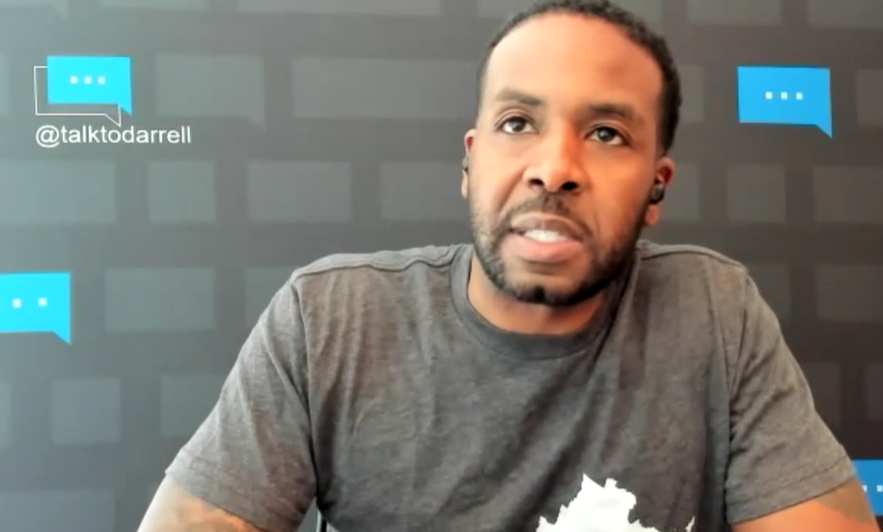
A few main core takeaways from Darrell’s session:
- The names and experiences of inspiring Black and African owned NGOs. such as a GiveBlck, an organization that exists to elevate all Black organizations in the United States and create an easy-to-use, comprehensive database to advance racial equity in giving.
- Transforming community starts with strengthening community. Microsoft has started a lot of initiatives such as hiring practices, diversifying suppliers, and providing capital to minority owned banks, providing necessary digital skills to the youth.
- Non-profits need help with their data and digital transformation to the cloud. For example, Microsoft worked with American Cancer Society to help them move to Azure Cloud to keep the organization running during remote work.
- Non-profits can sign up for the Nonprofit Tech Acceleration for Black and African American Communities program, that can match an organization with the technical software and services that will help increase the impact of their mission.
Day 2 continues with Productivity Tips & Tricks for the Age of Digital Overload, with Loryan and Megan Strant, M365 consultants who are married living with neurodiversity, juggling with Asperger’s, ADHD, personal and work lives. They share how M365 solutions have helped them be more productive.
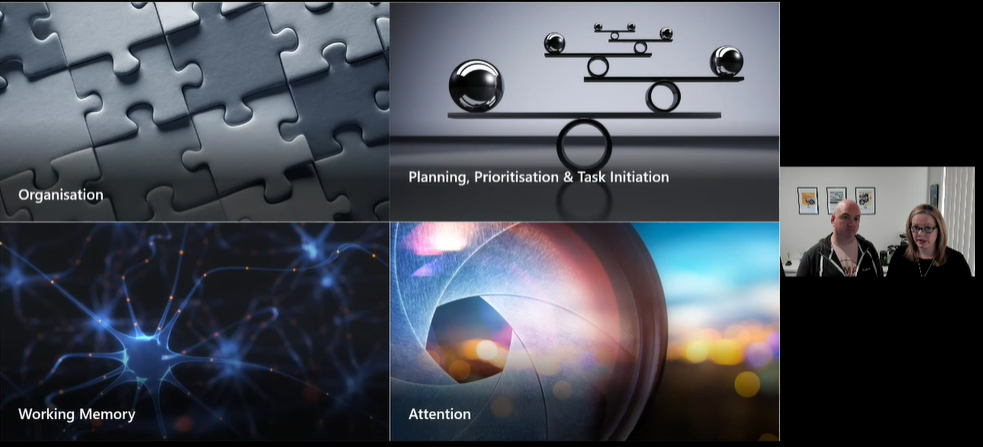
They hone in on four core areas of executive functioning: organization, working memory, attention, and planning, prioritization, and task initiative. They encourage the audience to think about their daily challenges and restructuring the day or work different, while exploring habits that individuals may not realize are impacting productivity.
Here were a few M365 tools they recommend:
To wrap up the event, Humans of IT ended with the Human-Technology Symbiosis: An EDU Success Story with speakers Tracy van der Schyff, Neil Treurnicht, Quinton Mulder, Tryphine Nota. They share the evolution of online education in 2020 and the struggles they had to overcome, lessons learned, and helped the audience gain perspective through the eyes of the main roles in the education space: EdTech Admin, Teach & Student.
We are truly grateful to have been able to share the voices of so many amazing speakers and (virtually) encouraged and inspired thousands of attendees this year on a global scale in a deeply meaningful, human way.
We hope you enjoyed the Humans of IT track @ Microsoft Ignite as much as we did, and we’ll see you next year!
Missed a session and want to catch up? Or perhaps you want to rewatch them all over again?
Share your Microsoft Ignite experience with us:
- What were your favorite Humans of IT session? Why?
- What do you hope to see from Humans of IT at the next virtual conference?
We want to hear from you in the comments below. Thank you for being a part of the community and this MS Ignite experience.
See you next time!
#HumansofIT
#MSIgnite
#CommunityRocks
#ConnectionZone

by Contributed | Mar 10, 2021 | Technology
This article is contributed. See the original author and article here.
Today, we announced support for running production .NET 5 apps on Azure Functions. With this release, we now support running .NET functions in a standalone process. Running in an isolated process decouples .NET functions from the Azure Functions host—allowing us to more easily support new .NET versions and address pain points associated with sharing a single process. However, creating this new isolated process model required significant effort and we were unable to immediately support .NET 5. This delay was not due to lack of planning or prioritization, but we understand the frustration from those of you who wished to move application architectures to the latest bits and weren’t able to do so until Azure Functions could run .NET 5.
One of our learnings during this release was the need for us to be more proactive and open about our plans and roadmap, specifically with .NET. In this post we’ll go into details on this new isolated process model for .NET function apps and share our roadmap for supporting future versions of .NET.
.NET isolated process—a new way to run .NET on Azure Functions
The Azure Functions host is the runtime that powers Azure Functions and runs on .NET and .NET Core. Since the beginning, .NET and .NET Core function apps have run in the same process as the host. Sharing a process has enabled us to provide some unique benefits to .NET functions, most notably is a set of rich bindings and SDK injections. A .NET developer is able to trigger or bind directly to the SDKs and types used in the host process—including advanced types like CloudBlockBlob from the Storage SDK or Message from the Service Bus SDK—allowing users to do more in .NET functions with less code.
However, sharing the same process does come with some tradeoffs. In earlier versions of Azure Functions, dependencies could conflict (notable conflicting libraries include Newtonsoft.Json). While flexibility of packages was largely addressed in Azure Functions V2 and beyond, there are still restrictions on how much of the process is customizable by the user. Running in the same process also means that the .NET version of user code must match the .NET version of the host. These tradeoffs of sharing a process motivated us to choose an out-of-process model for .NET 5.
Other languages supported by Azure Functions use an out-of-process model that runs a language worker in a separate, isolated process from the main Azure Functions host. This allows Azure Functions to rapidly support new versions of these languages without updating the host, and it allows the host to evolve independently to enable new features and update its own dependencies over time.
Today’s .NET 5 release is our first iteration of running .NET in a separate process. With .NET now following an annual release cadence and .NET 5 not being a long-term supported (LTS) release, we decided this is the right time to begin this journey.
A .NET 5 function app runs in an isolated worker process. Instead of building a .NET library loaded by our host, you build a .NET console app that references a worker SDK. This brings immediate benefits: you have full control over the application’s startup and the dependencies it consumes. The new programming model also adds support for custom middleware which has been a frequently requested feature.
While this isolated model for .NET brings the above benefits, it’s worth noting there are some features you may have utilized in previous versions that aren’t yet supported. While the .NET isolated model supports most Azure Functions triggers and bindings, Durable Functions and rich types support are currently unavailable. Take a blob trigger for example, you are limited to passing blob content using data types that are supported in the out-of-process language worker model, which today are string, byte[], and POCO. You can still use Azure SDK types like CloudBlockBlob, but you’ll need to instantiate the SDK in your function process.
Many of these temporary gaps will close as the new isolated model continues to evolve. However, there are no current plans to close any of these gaps in the .NET 5 timeframe. They will more likely will land in 2022. If any of these limitations are blocking, we recommend you continue to use .NET Core 3.1 in the in-process model.
.NET 5 on Azure Functions
You can run .NET 5 on Azure Functions in production today using the .NET isolated worker. Currently, full tooling support is available in Azure CLI, Azure Functions Core Tools, and Visual Studio Code. You can edit and debug .NET 5 projects in Visual Studio; full support is in progress and estimated to be available in a couple of months.
Future of .NET on Azure Functions
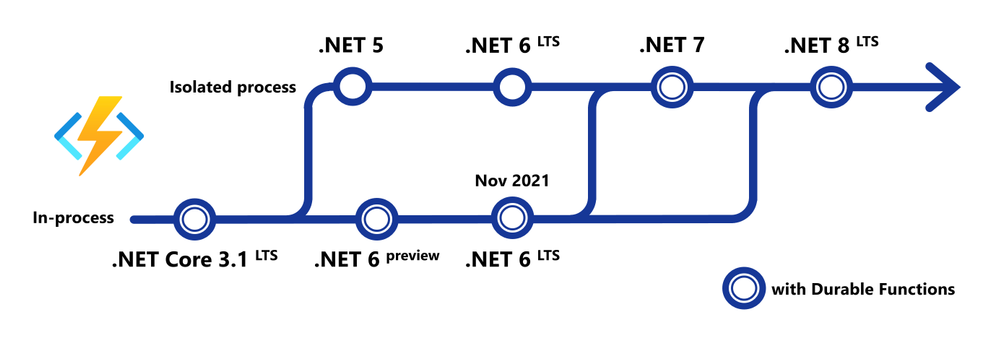
One of the most frequent pieces of feedback we’ve received is that Azure Functions needs to support new versions of .NET as soon as they’re available. We agree, and we have a plan to provide day 1 support for future LTS and non-LTS .NET versions.
.NET 6 LTS
.NET 6 functions will support both in-process and isolated process options. The in-process option will support the full feature set available in .NET Core 3.1 functions today, including Durable Functions and rich binding types. The isolated process option will provide an upgrade path for apps using this option for .NET 5 and initially will have the same feature set and limitations.
A few weeks ago, the .NET team released the first preview of .NET 6. In the first half of 2021, we will deliver a version of the Azure Functions host for running functions on .NET 6 preview using the in-process model. The initial preview of .NET 6 on Azure Functions will run locally and in containers. In the summer, we expect .NET 6 preview to be available on our platform and you’ll be able to deploy .NET 6 preview function apps without the use of containers.
On the same day .NET 6 LTS reaches general availability in November, you’ll be able to deploy and run .NET 6 Azure Functions.
.NET 7 and beyond
Long term, our vision is to have full feature parity out of process, bringing many of the features that are currently exclusive to the in-process model to the isolated model. We plan to begin delivering improvements to the isolated model after the .NET 6 general availability release.
.NET 7 is scheduled for the second half of 2022, and we plan to support .NET 7 on day 1 exclusively in the isolated model. We expect that you’ll be able to migrate and run almost any .NET serverless workload in the isolated worker—including Durable Functions and other targeted improvements to the isolated model.
.NET Framework
Currently, .NET Framework is supported in the Azure Functions V1 host. As the isolated model for .NET continues to evolve, we will investigate the feasibility of running the .NET isolated worker SDK in .NET Framework apps. This could allow users to develop apps targeting .NET Framework on newer versions of the functions runtime.
We are thrilled by the adoption and solutions we see running on Azure Functions today, accounting for billions of function executions every day. We are deeply grateful for the .NET community, many of you have been with us since day 1. Our hope is that this post gives clarity on our plans for supporting future versions of .NET on Azure Functions and evolving the programming model. Supporting our differentiated features while removing the constraints of the in-process model is a non-trivial task, and we plan to be open and communicative throughout the journey. We’ll be conducting a special .NET roadmap webcast on March 25 where we will make time to answer any questions you may have.
To get started building Azure Functions in .NET 5, check out Develop and publish .NET 5 functions.
by Contributed | Mar 10, 2021 | Technology
This article is contributed. See the original author and article here.
Hello friends,
This week marks a couple of special milestones for me: the 25th anniversary of my first day as a Microsoft employee, and the culmination of some great work the team is doing to empower Microsoft’s customers to do more and create great experiences with our identity services.
Last spring, I shared our vision for Azure Active Directory External Identities and encouraged customers to preview self-service sign-up, our first step toward unifying Microsoft’s identity offerings for employee, partner, and customer identity. During the past year, we’ve made significant improvements to Azure AD External Identities with the help of our preview customers, who view this work as critical to making their workflows more flexible, secure, and scalable.
Today, we are taking additional steps on this journey with the general availability (GA) of several External Identities features and a few new previews for B2B and B2C scenarios.
Flexible user experience
Delivering customized, intuitive experiences for customers and partners is a top priority for many organizations. Our customers tell us they want digital experiences that reflect their brand and reduce friction for their users.
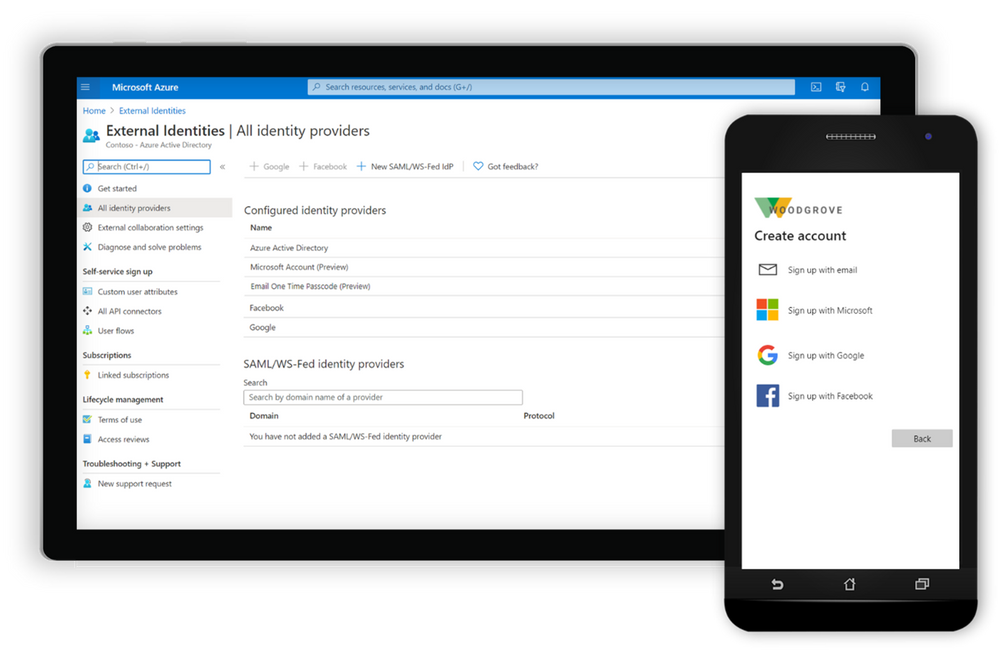
Configure the user experience for sign-up with customer user attributes, API Connectors, and Social IDs.
Now generally available, self-service sign-up user flows for Azure AD make it easy to create, manage, and customize onboarding experiences for external users with little to no application code. You can now:
- Integrate with more external identity providers, including Google and Facebook IDs (generally available), and email-based one-time passcodes or Microsoft accounts (in preview) so that customers and partners can seamlessly bring their own identities. We’ve also improved the experience for users who sign up with a social ID, allowing them to sign in with their email address. Learn more about how to enable self-service sign-up with social IDs.
- Define localizable custom user attributes to collect on the forms that external users complete during self-service sign-up when accessing apps and services in your organization such as Supplier ID or Account Number. Learn more about customizing attributes for your apps.
- Extend your flows with API connectors to validate user input, route information to an external workflow, or perform identity verification. Client certificate authentication of the API calls is now available in preview. Learn how to use API connectors.
- Configure all of the above leveraging the power of Microsoft Graph APIs.
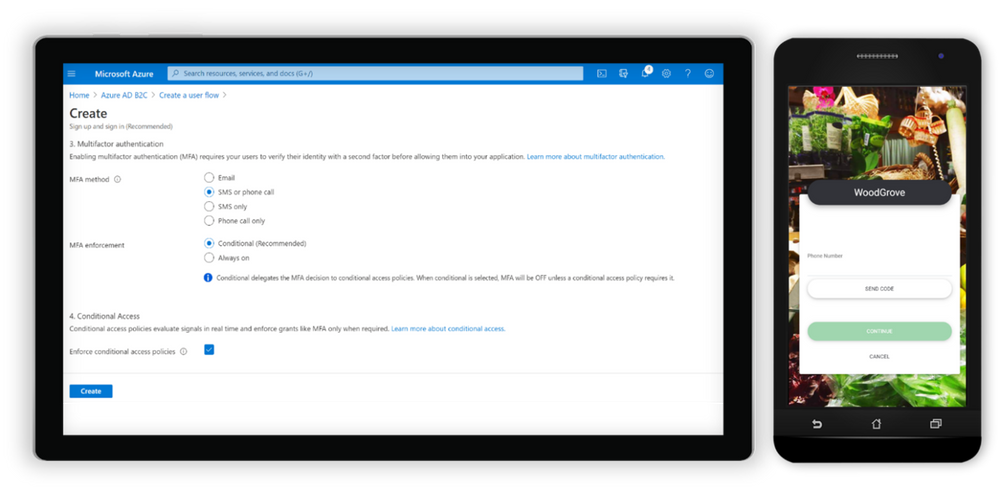
Configure next-generation user flows with Azure AD B2C.
To follow this, customers building consumer-facing apps can expect general availability of our improved next-generation user flows for Azure AD B2C in the next few weeks. You’ll be able to:
- Select and create B2C user flows with a new, simplified experience in the portal, and configure all features within the same user flow without the need for versioning in the future.
- Enable phone sign-up sign-in for users so they can sign up and sign in with a phone number using a one-time password (OTP) sent to their phone via SMS.
- Use API connectors, in preview, to extend and secure Azure AD B2C sign-up user flows.
- Enable users to access Azure AD B2C applications using sign-up and sign-in with Apple ID, currently in preview.
Identity Protection with risk-based Conditional Access is one of the most widely adopted security features for protecting Azure AD employee accounts. It’s now in preview for next-generation user flows and is expected to become generally available later this spring (details below).
Adaptive security
Securing data and protecting against unauthorized access is another high priority for our customers with external users and consumer-facing apps.
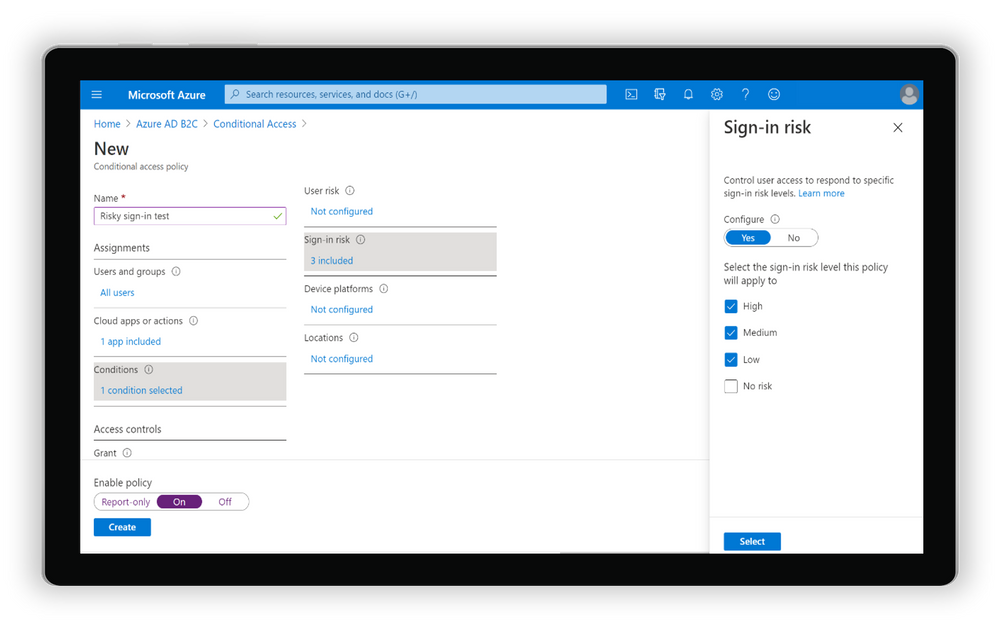
Set up risk-based Conditional Access policies for your B2C apps.
In a previous post, I shared that we are expanding the power of Azure AD Identity Protection with risk-based Conditional Access to Azure AD B2C. Since then, we’ve been working closely with customers to improve this experience. That means ensuring that the common patterns for user logins can be secured and protected against suspicious or irregular access.
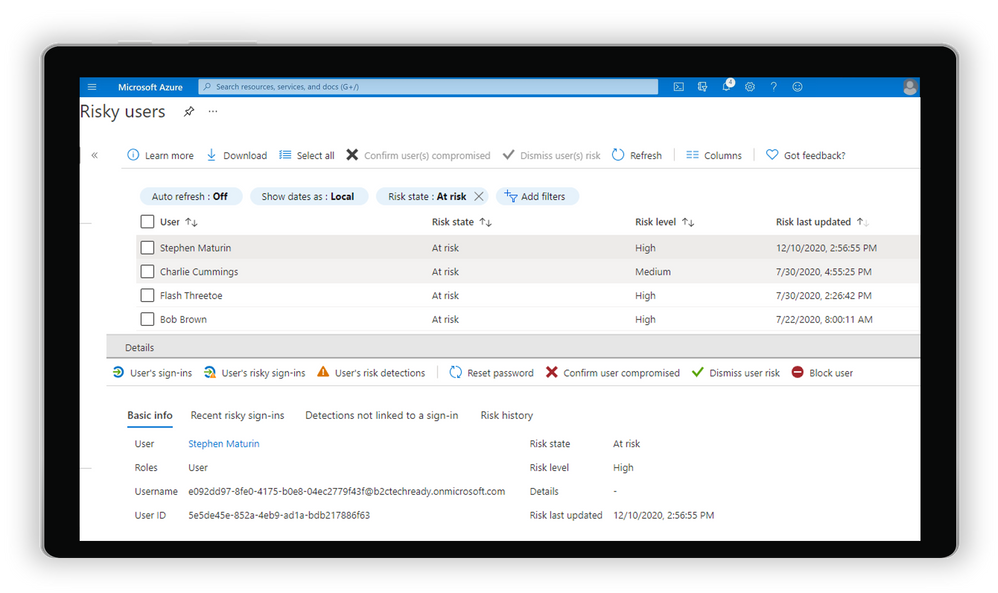
Risky users blades in Azure AD B2C portal.
Identity Protection and Conditional Access policies for Azure AD B2C are enabled for customers with Azure AD External Identities Premium P2, and we’re looking forward to making it generally available later this spring.
Scalable lifecycle and user management
As the number of external users in an organization grows, controlling who has access to which resources and for how long can be cumbersome. Many of you have shared that guest access reviews for Microsoft Teams and Microsoft 365 groups are helping to automate that process.
We’ve added new capabilities to help organizations manage external users in the cloud, while simplifying the admin experience for all users:
- Move guests to the cloud enables guests represented as internal users in the directory to connect and collaborate using External Identities, leaving their object ID, user principal name, group membership, and app assignments intact. Now generally available, Inviting members to B2B collaboration provides a better user experience for guests and improves overall security for the directory.
- Reset the redemption status for a guest user sends guests a new invitation to redeem their account for collaboration without having to redo existing access and memberships. Resetting redemption status, in preview, provides continuity for external users when their home tenant account is deleted, or when a new identity provider options become available.
Updating our External Identities SLA
Finally, we announced an update to our service level agreement (SLA) for Azure AD B2C tenants. Starting on May 25, 2021, our SLA for Azure AD B2C will promise a 99.99% uptime for Azure AD B2C user authentication, an improvement from our previous 99.9% SLA.
Thanks to all the incredible feedback this year, we’ve got many more great features on the roadmap to improve the experience, security, and manageability of all Azure AD External Identities scenarios. We love hearing from you, so keep trying our new features and sharing feedback through the Azure forum or by following @AzureAD on Twitter.
Learn more about Microsoft identity:
by Contributed | Mar 10, 2021 | Technology
This article is contributed. See the original author and article here.
We are super excited to announce that Durable Functions for Python is now generally available!
This has been in the works for some time now, and a lot of effort has gone into it. We are really thankful to everyone that contributed, and continues to contribute, as well as the community feedback on GitHub. All in all, we look forward to seeing the Durable programming model available for Python devs in the serverless space.
To get started, find the quickstart tutorial here!
You can also check out our PyPI package and our GitHub repo.
Finally, we encourage you to bookmark and review our Python Azure Functions performance tips here.
If you aren’t very familiar with Durable Functions but are a Python developer interested in serverless, then let’s get you up to speed! Alternatively, if you’re a programming languages nerd, like me, and are interested in programming models and abstractions for distributed computing and the web more generally, I think you’ll find this interesting too.
The serverless programming trade-off
If you’ve been in the serverless space for any amount of time, then you’re probably familiar with the programming constraints that this space generally imposes on a programmer. In general, serverless functions must be short-lived and stateless.
From the perspective of a serverless vendor, this makes sense. After all, a serverless app is an instance of a distributed program, so it needs to be resilient to all sorts of partial failures which include unbounded latency (some remote worker is taking too long respond), network partitions / connectivity problems, and many more. And so, if your functions are short-lived and stateless, a serverless vendor trying to recover from this kind of failure can just retry your function again and again until it succeeds.
You, as the programmer, take on these programming constraints in exchange for the many benefits of going serverless: elastic scaling, paying-per-invocation, and focusing on your business logic instead of on server management and scaling specifics.
Stateless woes and short-lived blues
In general, these programming constraints aren’t necessarily a big deal. After all, the serverless space is well-known as good fit for generating “glue code” that facilitates the interaction between other larger services; this is often well suited for those coding constraints.
But what happens when you do need state and long-running services? Here’s where we would have to get creative and perhaps take on a burden of a different kind. For example, to bring back state, you might take a dependency on some external storage, like a queue or a DB. Things get hairy quickly as your apps grows in complexity: you might need to add more storage sources, figure out a way to retry operations, a strategy for communicating error states, and will encounter many other difficult ways to shove–in state back to your stateless program. This is all possible to overcome, and folks have done it, but it’s not pretty. Can we do better?
Breaking serverless barriers with Durable Functions
Durable Functions is the result of identifying many application requirements that were previously difficult to satisfy in a serverless setting and developing a programming model that made them easy to express.
Let’s take a look at an example, in Python, of course.
Let’s say you’re trying to compose a series of serverless functions into a sequence, turning the output of the previous function into the input to the next. An example of this could be a serverless data analysis pipeline of 3 steps: get some data, process it, and render the summarized results. To make things more interesting, you also want to catch any exceptions in that pipeline and recover from them by calling some clean-up procedure.
So, how do we specify this with Durable Functions? See below.
def orchestrate_pipeline(context: df.DurableOrchestrationContext):
    try:
        dataset = yield context.call_activity('DownloadData')
        outputs = yield context.call_activity('Process', dataset)
        summary = yield context.call_activity('Summarize', outputs)
        return summary
    except:
        yield context.call_activity('CleanUp')
        Return "Something went wrong"
Let’s put the calling conventions and syntax minutia to the side for a moment. The snippet above is simply calling serverless functions in a sequence and composing them by storing their results in variables and passing those variables as the input to the next function in the sequence. Additionally, it wraps that sequence in a try-catch statement and, in the presence of some exception, it calls our clean-up procedure.
The snippet above is deceitfully simple. Remember that this is a serverless program, so each of these functions could be executing on a remote machine, and so normally we’d be required to communicate state across functions via some intermediate storage like a queue or DB. But here, it’s just simple variable-passing and try-catches. If you squint your eyes, it feels like the first naïve implementation you’d come up with if this was running on a single machine. In fact, that’s the point.
Durable Functions is giving you a framework that abstracts away the minutia of handling state in serverless and doing that for you. It integrates deeply with your programming language of choice such that syntax and idioms like if-statements, try-catches, variable-passing all work and serve as familiar tools of specifying a stateful serverless workflow.
Diving deeper into Durable Functions
We’re only scratching the surface here. The Durable Functions programming model introduces a wealth of tools, patterns, concepts, and abstractions to facilitate the development serverless apps. They are documented at length here so I encourage you to follow-up there if you want to learn more.
Once you start getting the hang of things, you can dive into more advanced concepts like Entities, which allow you to explicitly read and update shared pieces of state in serverless. These are really convenient if you need to implement a circuit breaker pattern for your application. You can learn more about them here and here.
Taking a step back from all these, let’s look at the bigger picture: programming a distributed application. The question of what are the right abstractions when programming for distribution is a question as old as our ability to ping a remote computer. That question has only grown more pressing as more of our applications have gone to the cloud and our business logic has gone serverless. Within this landscape, Durable Functions provides an answer to the challenge of implementing serverless workflows with ease; and that’s why I’m so excited to share this.
So, why Python?
Durable Functions is currently available in .NET, JavaScript, and most recently in Python as well. Considering the explosion of Data Science-centric use-cases in the Python community, I think serverless is well-suited for powering the kinds of large-scale data gathering and transformation pipelines that are so common in this domain.
Additionally, Python is a very productive high-level language which I think aligns well with the “batteries included” promise of serverless; I think many Python devs will feel right at home with a framework like Durable Functions that abstracts over the challenges of mainstream serverless coding constraints.
Learn more and keep in touch!
Keep in touch with me on Twitter via @davidjustodavid
and give @cgillum a follow for more Durable Functions goodness
We’re also quite active on the project’s GitHub issue board so you can always reach out there!


Recent Comments