by Contributed | Mar 29, 2021 | Technology
This article is contributed. See the original author and article here.
The March 2021 Cumulative Update Preview for Windows includes the following time zone update:
- Individuals and organizations in the Republic of South Sudan were recommended to temporarily set the time zone on their devices to “(UTC+2:00) Harare, Pretoria” from February 1, 2021 at 00:00.
- Beginning with the March 2021 Cumulative Update Preview, South Sudan customers will now move to a new Windows time zone, “(UTC+2:00) Juba”.
- This can be done in one of the two ways:
- Select the Windows logo key, type “time zone”, and select Change the time zone. From the time zone dropdown, select “(UTC+2:00) Juba”.
- Navigate to Control Panel > Date and Time > Change time zone. From the time zone dropdown, select “(UTC+2:00) Juba”. Select OK to apply the change.
- This change is for customers running the following Windows 10 versions:
- Windows 10, version 1809
- Windows 10, version 1903
- Windows 10, version 1909
- Windows 10, version 2004
- Windows 10, version 20H2
- South Sudan customers running other, supported versions of Windows will see the relevant changes in the April 2021 monthly quality update.
For Microsoft’s official policy on DST and time zone changes, please see Daylight saving time help and support. For information on how to update Windows to use the latest global time zone rules, see How to configure daylight saving time for Microsoft Windows operating systems.
by Contributed | Mar 29, 2021 | Technology
This article is contributed. See the original author and article here.
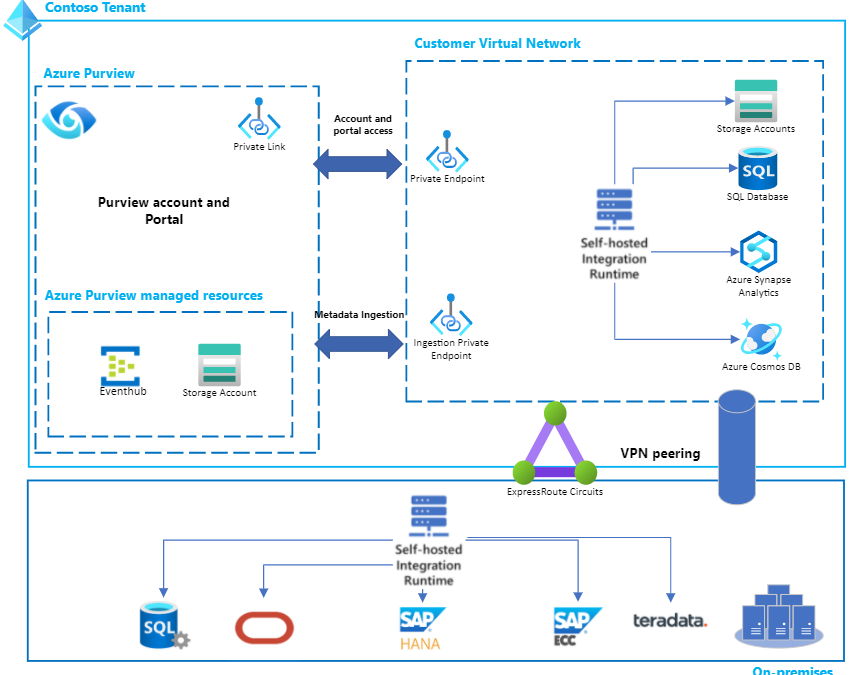
Earlier this week, we released a feature in Purview to use private endpoints for your accounts. Implementing this feature can unlock the following for you:
1. You can use private endpoints to allow clients and users on a virtual network (VNet) to securely access the Purview Data Catalog over a Private Link.
2. The private endpoint uses an IP address from the VNet address space for your Azure Purview account.
3. Network traffic between the clients on the VNet and the Purview account traverses over the VNet and a private link on the Microsoft backbone network, eliminating exposure from the public internet.
4. You can also ensure network isolation for your metadata flowing from the source which is being scanned to the Purview Data Map using ingestion Private endpoints.
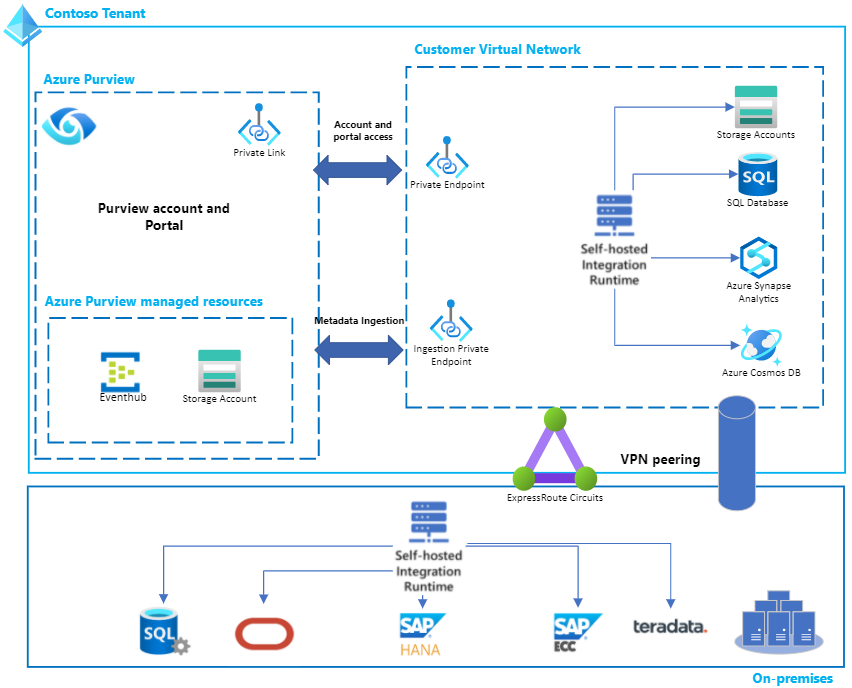
Now let’s get started. Below is some helpful guidance to set this up within your own environment.
Creating a new Azure Purview account with Private Endpoints for the account & portal
Navigate to the Azure portal and then to your Purview account.
Fill basic information, and set connectivity method to Private endpoint in Networking tab. Set up your ingestion private endpoints by providing details of Subscription, Vnet and Subnet that you want to pair with your private endpoint.
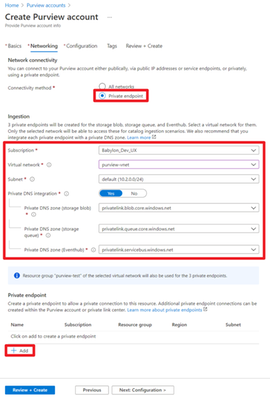
Create an ingestion private endpoint only if you intend to enable network isolation for end-to-end scan scenarios, for both your Azure and on-premises sources. We currently do not support ingestion private endpoints working with your AWS sources.
You can also optionally choose to set up a Private DNS zone for each ingestion private endpoint.
Click Add to add a private endpoint for your Purview account.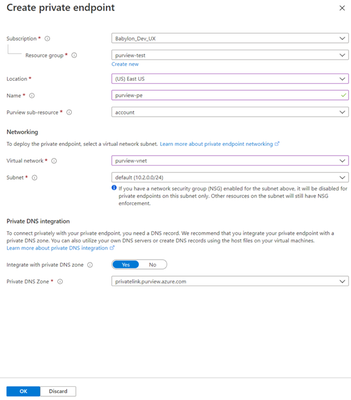
In the Create private endpoint page, set Purview sub-resource to account, choose your virtual network and subnet, and select the Private DNS Zone where the DNS will be registered (you can also utilize your own DNS servers or create DNS records using host files on your virtual machines).
Create a private endpoint for the Azure Purview studio
Navigate to the Purview account you just created, select the Private endpoint connections under the Settings section.
Click +Private endpoint to create a new private endpoint.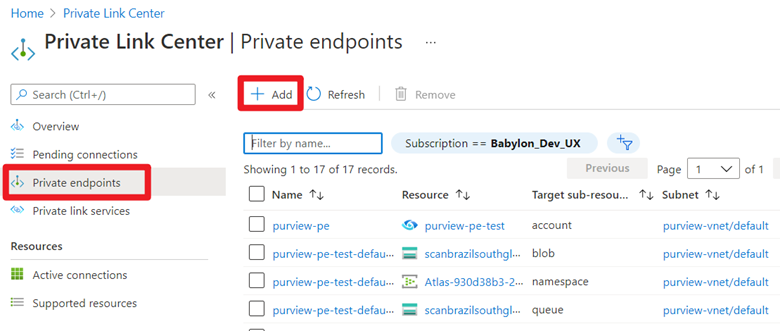
Fill in basic information.
In Resource tab, select Resource type to be Microsoft.Purview/accounts.
Select the Resource to be the newly created Purview account and select target sub-resource to be portal.
Select the virtual network and Private DNS Zone in the Configuration tab. Navigate to the summary page, and click Create to create the portal private endpoint.
Ingestion private endpoints and scanning sources in private networks, virtual networks and behind private endpoints
If you want to ensure network isolation for your metadata flowing from the source which is being scanned to the Purview Data Map, then you must follow these steps:
Enable an ingestion private endpoint by following steps in this section of the documentation.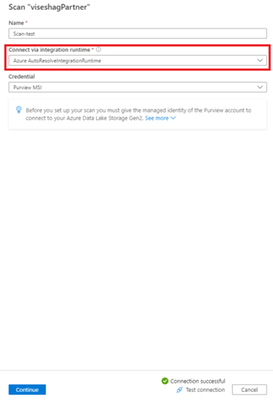
Scan the source using a self-hosted IR.
- All on-premises source types like SQL server, Oracle, SAP and others are currently supported only via self-hosted IR based scans. The self-hosted IR must run within your private network and then be peered with your Vnet in Azure. Your Azure vnet must then be enabled on your ingestion private endpoint by following steps here.
- For all Azure source types like Azure blob storage, Azure SQL Database and others, you must explicitly choose running the scan using self-hosted IR to ensure network isolation. Follow steps here to set up a self-hosted IR. Then set up your scan on the Azure source by choosing that self-hosted IR in the connect via integration runtime dropdown to ensure network isolation.
You can also set up private endpoints on your existing Purview accounts. To learn about this and more read our full documentation here today!

by Contributed | Mar 29, 2021 | Technology
This article is contributed. See the original author and article here.
We’re excited to share that our #BuildFor2030 campaign has returned with themes inspired by the United Nations Sustainable Development Goals, to continue our journey toward creating a more inclusive and sustainable future. As part of this campaign in 2020, we featured 80 partners, showing how our partners can leverage technology to make a difference.
In recognition of International Women’s Day 2021 this month, we are celebrating women in cloud, highlighting in our commercial marketplace partner solutions from women-led organizations driving digital transformation. In this blog post by Gavriella Schuster, read about how, together with the Microsoft partner community, we can uplift women in technology: Celebrating International Women’s Day with #BuildFor2030.
Discover and celebrate the partners being featured in #BuildFor2030 here.
Want to help amplify their impact? Use the frame above, comprised of the colors of the 17 UN SDGs, to help you spot featured partners of #BuildFor2030 on LinkedIn and Twitter.
Call for nominations:
If you have a solution that supports a more inclusive, sustainable, and equitable future, we’d love to celebrate your impact. Learn more and nominate your solution to be featured in #BuildFor2030.
by Contributed | Mar 29, 2021 | Technology
This article is contributed. See the original author and article here.
Do you wish you could take better notes during meetings or classes held on Microsoft Teams? Jeremy Chapman, from the Microsoft 365 team, demonstrates a new way to automate the process.
Now in Microsoft Teams, keeping detailed notes for your meetings just got easier, with in-context and automated meeting transcripts using the brand-new and AI-driven speech-to-text transcription capability built into Teams.
Once started, you can watch meeting transcription happen in real time. When the meeting is over, the transcript with speaker attribution is available to all meeting participants directly in the meeting’s chat. So everyone in the meeting can easily get to it and know what each person said.
QUICK LINKS:
00:23 — Meeting notes capability in Microsoft Teams
01:00 — Automated meeting transcription demo
02:13 — Finding the meeting transcript after the meeting
02:55 — Comparison with automatic captions in Microsoft Stream
03:21 — Enabling meeting transcription for Teams admins
03:37 — Closing remarks
Link References:
Find more shows in our work from home series at https://aka.ms/WFHmechanics
Unfamiliar with Microsoft Mechanics?
We are Microsoft’s official video series for IT. You can watch and share valuable content and demos of current and upcoming tech from the people who build it at Microsoft.
Video Transcript:
-Do you wish you could take better notes during meetings or classes held on Microsoft Teams? I’ll be the first to admit that I’m a terrible note taker and I’ve been in lots of meetings with people dedicated to taking meeting notes, but something like that isn’t practical for every meeting and it might just not be your favorite thing to do.
-So today I want to share another work-from-home tip that could make your note taking life a lot easier. So here I’m in a Teams meeting logged in as Adele, the meeting organizer, with two other people, Megan and Jeremy. Now, taking manual meeting notes in Teams has been around for a while. You just go into Settings, then click Take Notes. And this is a great capability to associate written notes with a meeting that everyone in the meeting can get to later. And, of course, you can type whatever you want to here. But that may have been hard to do if you were the one talking maybe or maybe you just wanted to focus on what was being said and not be distracted by typing, or maybe your keyboard was just kind of loud and you didn’t want to distract or disturb others.
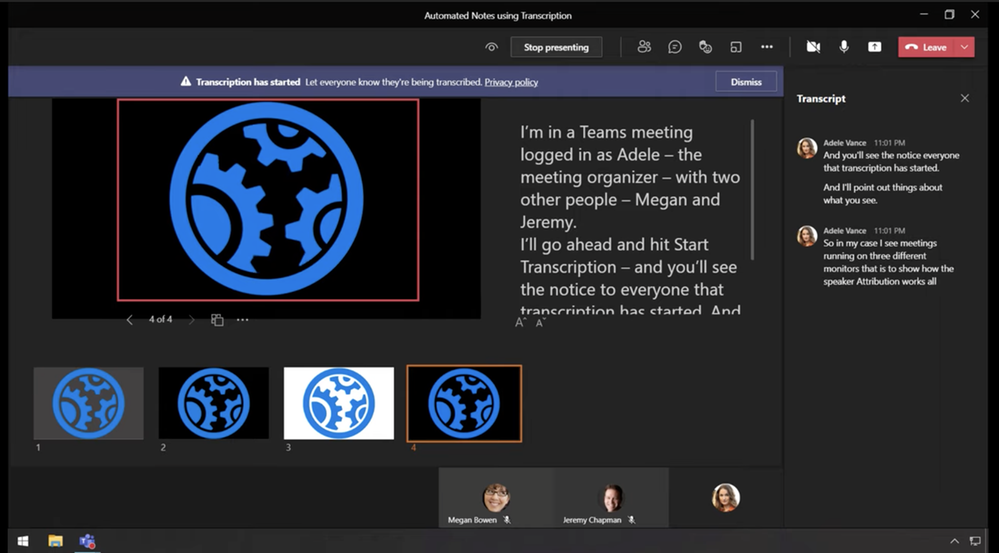
-Well, now in Microsoft Teams keeping detailed notes for your meetings just got better, with in-context and automated meeting transcripts using the brand new and AI-driven speech-to-text transcription capability built into Teams. So I’ll go back into the meeting and onto the menu. Then I’ll go ahead and hit Start Transcription, and you’ll see the notice to everyone that transcription has started here.
-And I’ll go ahead and point out a few cool things about what you’re seeing. So in my case, I have three meetings running on three different monitors. Now just to show how the speaker attribution works, I’ll mute Adele’s microphone here and enable Megan’s. And now I’m talking in the context of Megan. But now I’m going to go head and mute her microphone and enable mine in the Jeremy instance of the meeting. So now you can see that as each person talks, their name and image is next to what they are saying. So this is pretty important for keeping track of who said what. Now I’ll mute my microphone again, and re-enable Adele’s.
-Now I’ll go back into the ellipses and stop the transcription. And you’ll see a notification that it’s stopped and you can restart this also if you want to. And this is great if you don’t want something transcribed, for example. And now I can go ahead and leave the meeting and you’ll see my Notes tab is still open, so I’ll go ahead and click into Chat, and there’s our meeting transcript, and it’s available to everyone who participated in this meeting.
-And here I’ll open the transcript, and you’ll see where things evolve even more. Here as I scroll down, you can see the speaker attribution, so you know who said what. And you can download the transcript as a Word document here with .docx or as a Video Text Track or .vtt file, and each of those has speaker attribution noted throughout.
-Now, just to be fair, the previous integration with Microsoft Stream and meeting recordings would automatically create a caption file that was searchable in Stream, but to find it, you had to go into your video, click on the ellipses, and then update video details, and then right here in captions, your could hit Download, and again that was something that only the person who hit the record button during the meeting could do by default. But now it’s just part of the Teams meeting chat and anyone who was on that meeting can get to it. So if you don’t quite see the Start Transcription option yet in your meetings, it could be that it hasn’t made it to your tenant, or your Teams admin may need to enable policy for you with Allow Transcription enabled as you can see here in the Admin Center. Now, once it’s enabled, if you’re the meeting organizer, you just need to start the transcription and let the speech-to-text AI do the rest.
-That was another work-from-home tip that for me has personally been a game changer as I juggle the huge range of topics that we present on Microsoft Mechanics. To find more tips like this on Microsoft Mechanics, check out https://aka.ms/WFHMechanics. Subscribe to our channel if you haven’t already, and thanks so much for watching.
by Contributed | Mar 29, 2021 | Technology
This article is contributed. See the original author and article here.
I am a Sustainability activist at work. And that’s OK.
Hello there, Jessica here, I am a marketing leader at Microsoft. This article is to share with you how I am working on making sustainability everybody’s job at Microsoft, as I reflect on my own journey working with a group of smart and agile leaders of the Worldwide Sustainability Community at Microsoft. I believe it is everyone’s responsibility to help their corporations become more responsible and sustainable. If you are interested in helping your organization step up its environmental game, this article will help you get started. As our Chief Environmental Officer at Microsoft, Lucas Joppa says: it is bigger than all of us. It will take all of us to partner and build a more just and sustainable future for all.
TL-DR version of this article: my “Make sustainability everybody’s job at Microsoft” checklist. |
1. Gather
– Find your allies
– Create a structure
– Speak up
– Measure impact early
|
2. Educate
– Create learning opportunities
– Make participation easy
– Promote curiosity
|
3. Activate
– Drive engagement
– Empower leaders
– Inspire people (or try to)
|
Step 0 – Dare to make a difference at work.
In the past eight years, my husband and I have been intentional at reducing our family’s carbon footprint and living a more sustainable lifestyle. But when I had my second baby in Jan 2019, I didn’t feel it was enough. While I was in complete awe of this new beautiful (of course) human being, I also felt this urgent need to better align my personal commitment with my professional life. It was as if bringing a new human being on earth, I had an additional responsibility towards the planet.
I was still on maternity leave when I connected to Microsoft’s internal network in the desperate seek of likeminded people who could become my sustainability allies. And that’s how I found the nascent WW sustainability community (WWSC) of Microsoft employees. Just a few months earlier, in their own efforts of finding people who care about sustainability, Drew and Holly had just founded the community. Before my maternity leave ended, I had decided to become an active member of this new community. I had decided I would drive sustainability forward at work.
Step 1 – Get (it) together.
If you are looking to drive change at your company and collaborate with your fellow employees, I’d encourage you to create a structure early, like Drew and Holly did with the Worldwide Sustainability Community at Microsoft. Once we had the right structure in place, a few things followed almost organically: we defined leadership roles to manage the community (I started as Comms Lead), we got ourselves an executive sponsor (our very own Lucas Joppa), and we defined a rhythm of business (monthly community calls, bi-weekly leads calls). As we got more structured and organized, grassroots word of mouth started, and more employees joined us.
While we didn’t have a roadmap, most WWSC leads shared my urgent need to get the sustainability conversations started. Finding sustainability allies had an energizing effect: I felt stronger, I wanted to speak up. Next thing I knew, I was at one of our Monthly Employee Q&A sessions asking a question to Satya Nadella himself about sustainability. After that, all Q&A sessions with our Senior Leadership Team had an employee ask a sustainability question. The community didn’t organize the sustainability line of questions, people just got naturally energized and it became okay to ask. Let’s not forget this was mid-2019, right in the middle of Fridays for Future, Greta Thunberg, etc. and it was about time we discuss it at work.
My tip here: Don’t wait to have everything figured out to get the discussions going. It’s okay to speak up and ask questions, even more when you are ready to roll up your sleeves and be part of the answer.
Speaking up also helped us articulate our mission and vision as a Worldwide Community. We define our mission as “identifying and acting on areas where grassroots, employee-driven engagement can be an effective mechanism for change in the sustainability space inside Microsoft and beyond.” We defined our objectives for the community, with simple metrics around growth, geographic footprint, and engagement to measure our impact. That led us to step 2.
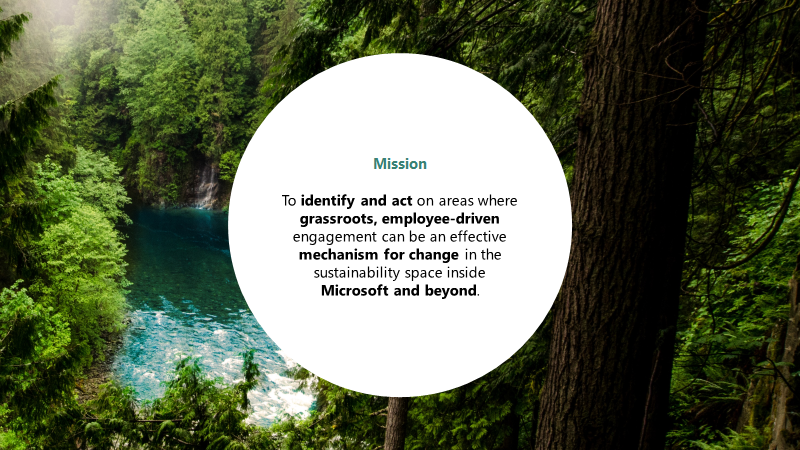 Microsoft Sustainability Mission Statement
Step 2 – Initiate a learning journey for all.
We were a group of people with a mission and a goal: to grow a community of informed, inspired and engaged employees that collaboratively drive positive environmental change at every level of the company.
We quickly doubled down on creating learning opportunities and providing resources for everyone to skill up on sustainability. We made sure that participation was easy for each learning opportunity.
We encouraged more people to speak up and share their stories. Our global community provided sharing opportunities such as monthly community calls where local initiatives could get global visibility. Connections were built. People who never met each other would connect and start working on common projects. I led a virtual team that organized our first Earth Day campaign 2020, right at the start of the Covid pandemic, encouraging employees to share their actions for Earth, from home. The point was to learn from each other and promote curiosity. We ended up reaching 350,000 people, with many employees sharing their actions for Earth on LinkedIn.
 Celebrate Earth
Step 3: Activate
After a 2.5-year journey, the community is now 3,600 members, 26 local chapters strong, and growing every day. This is not just our grassroots work that made us grow so big and so fast. In 2020, Microsoft made bold sustainability commitments around carbon, water, waste and biodiversity. A sustainability journey that started more than 10 years ago (with our internal carbon tax, our 100% renewable energy datacenters, and more) finally got the main stage it deserved. Every public announcement Microsoft made, more employees would join us, looking for ways to make sustainability part of their work.
The WWSC is now a legitimate internal partner, and we actively work with several teams to make sure Sustainability is infused in every important Microsoft beats. A good example is our internal Hackathon, where tens of thousands of Microsoft employees come together to bring world-changing ideas to life. Employees have the opportunity to join a Hack for Sustainability challenge, tackling important challenges and helping us identify emerging sustainability leaders. We empower these leaders to hack throughout the year on our community Actionbox, where teams can continue to work on their employee-led sustainability projects across the company, in all stages of development.
As Brad Smith, President of Microsoft says: “We’ll continue to keep our house in order and improve it, while increasingly addressing sustainability challenges around the globe by engaging our strongest assets as a company – our employees and our technologies. Meeting this raised ambition will take the work of everyone across Microsoft, as well as partnerships with our customers, policymakers, and organizations around the world.”
My personal wish for 2021 is to encourage employee activism and to give employees ways to take action for Earth. Two years ago, I used to hide this part of me at work. But not anymore. I am a climate activist. I am a social justice activist. I am fighting – as much as I can – for a sustainable and equal world for all. It makes me feel hopeful that big companies like Microsoft take a strong stand on these important issues and I am hoping this article inspires you to do it too.
Become familiar with Microsoft’s Environmental Sustainability Report through Drew’s article summarizing the 96-page document.
See my originally published article on my LinkedIn profile.
by Contributed | Mar 29, 2021 | Technology
This article is contributed. See the original author and article here.
Running SQL Server on an Azure virtual machine is one of the quickest and easiest ways to lift-and-shift your SQL workloads into the cloud. The great thing about SQL Server on Azure Virtual Machines is that it’s the same SQL Server database engine you’re used to running on-premises. For the most part, configuration, settings, maintenance, and performance tuning techniques are all going to be the same, but infrastructure configuration such as choosing the right VM size and designing a storage layout are going to be quite different. The choices you make when creating and configuring a SQL Server VM in Azure can have a dramatic impact on performance and cost, potentially improving performance by 35% or more while decreasing the cost. No one knows SQL Server like Microsoft, so it should be no surprise that Azure offers the best overall value for running your SQL Server workloads in the cloud.
There are many benefits to running your SQL Server workloads on Azure VMs:
- SQL IaaS Agent Extension adds an array of manageability features for your SQL Server VMs at no additional cost.
- Azure Hybrid Benefit allows you leverage your existing on-premises Software Assurance investment in Azure including the value-add of free HA/DR instances for business continuity.
- Security Center helps keeps your secure with Azure Defender for SQL.
- Competitive price-performance for your modern SQL Server transactional workload, as demonstrated in our recent GigaOm performance benchmark.
So how do you get the best price-performance possible when configuring your SQL Server on Azure VM? In this blog, we’re going to cover three key aspects to right-sizing (and right-configuring) your Azure VM for SQL Server that are based on some common pitfalls customers face when migrating their on-premises workloads to Azure VM:
- Choosing the best VM series and size for your workload
- Configuring storage for maximum throughput and lower cost
- Leveraging unique to Azure features such as host caching to boost performance at no additional cost
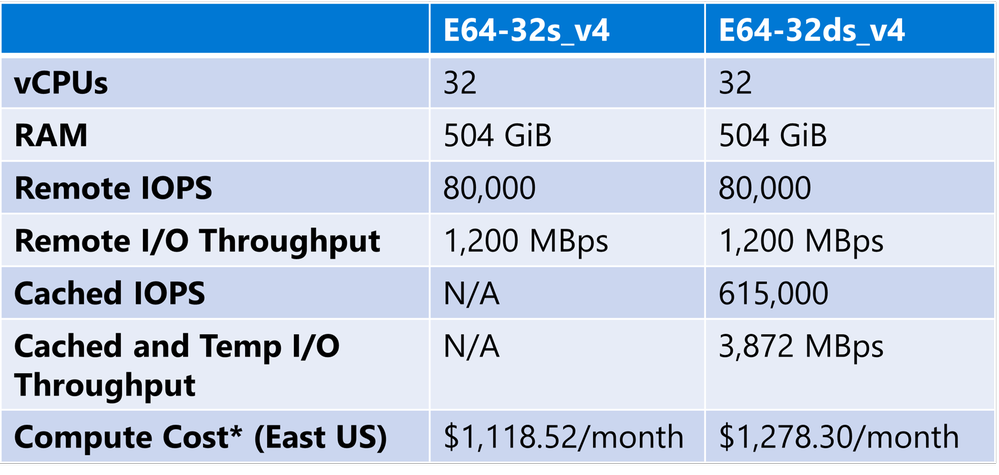
To help illustrate how small choices can have a big impact on price-performance, we conducted an internal experiment against two different VMs from our Memory Optimized series that are commonly used to host SQL Server workloads. Here are some specifications for the two VMs:
* This cost is for compute only with a 3-year reservation, assuming Azure Hybrid Benefit for both Windows OS and SQL Server licensing costs.
Note that these two VMs are very similar – they both have the same core count, RAM, and I/O throughput, but the E64-32ds_v4 VM has the addition of a fast local SSD that can be used for both temporary (ephemeral) storage within the VM and for host caching, also known as Azure BlobCache. Host caching is a great way to boost your performance with no additional cost, provided that you choose a VM size that supports it. This is particularly useful for SQL Server workloads which tend to be I/O intensive and read-heavy. In this case, the VM that supports caching is slightly more expensive, but as you’ll see in a moment, a little goes a LONG way when it comes to I/O throughput.
Speaking of I/O, how about storage configuration? You have a number of storage choices for Azure VM, but for SQL Server workloads we recommend managed disk, either Premium SSD or Azure ultra disk. Ultra disk provides high throughput at very low latency, but most SQL Server customers find Premium SSD meets their needs if it’s configured correctly. We generally recommend either P30 or P40 drives as these support host caching and provide reservations which can help with overall cost.
Coming back to our experiment, let’s assume that we have measured our on-prem workload and we estimate that we’ll need about 3 GBps of I/O throughput. You can’t get this from a single managed disk, so we’ll need to create a storage pool so that we can combine the throughput of multiple Premium SSDs. There are a few different ways we can do this, but generally a large number of small disks gives better price-performance than a small number of large disks. Here’s a comparison, both of these configurations assume 1-year reservation:
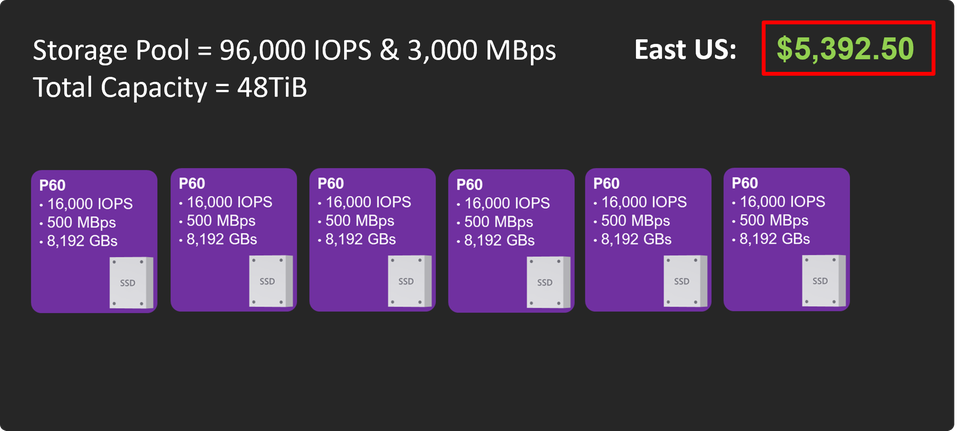
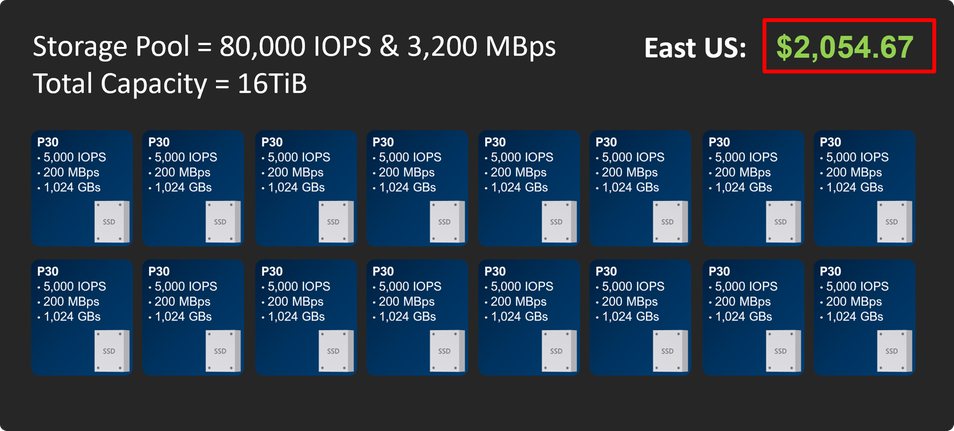
Note that the second configuration has a lot more drives, but the throughput is about the same. The capacity is lower, but we’re sizing for throughput here, not capacity. The price difference is pretty staggering. If you do need more capacity, you can go with larger drives – P40s would give you 32 TiB at $3,937.33/month and still support caching.
For our experiment, 16 TiB was more than enough storage, but we don’t want a single pool because we want to be able to configure the pools separately for data and log files. We created two pools as follows:
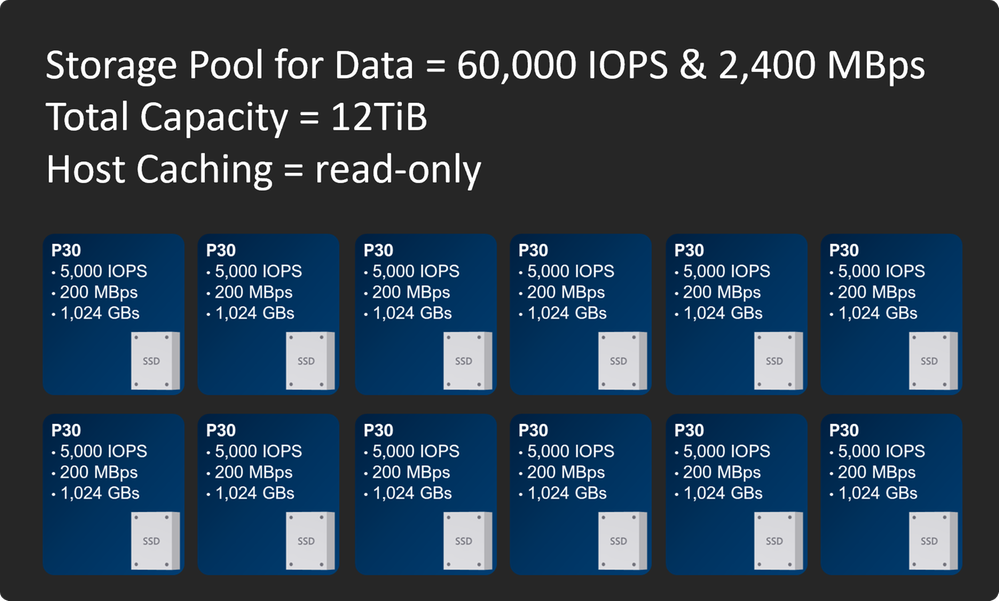
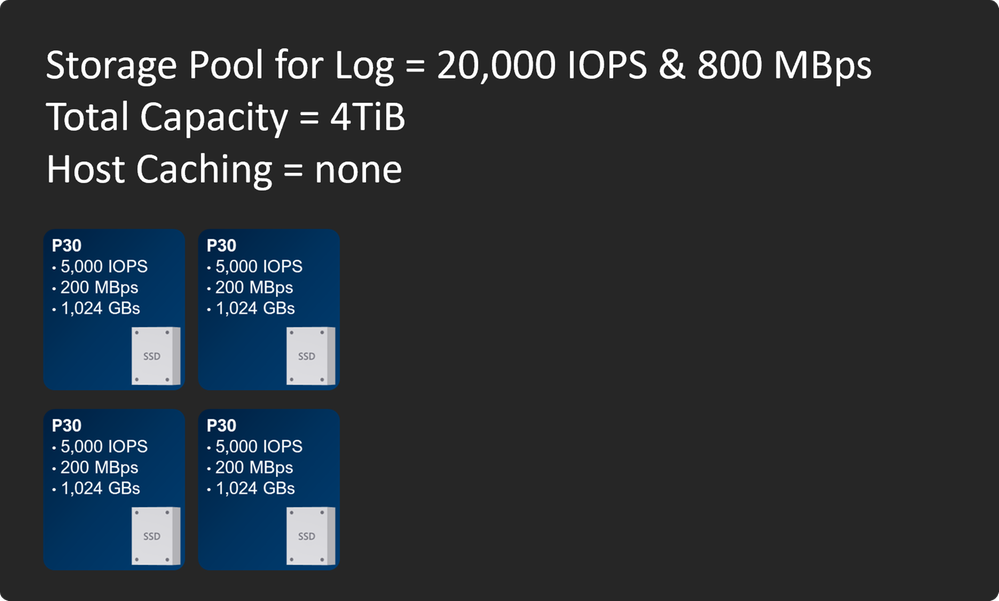
Note the cache settings. Writes in SQL Server are flagged as writethrough which means they always write directly to storage to guarantee durability. This means writes can’t take advantage of host caching. Since the transaction log is mostly writes, there’s no benefit to host caching there, and in fact enabling it for log drives can cause unnecessary overhead.
Data files on the other hand are read-heavy, even for most OLTP systems. Reads in SQL Server can take advantage of host caching, and we find that for many customers around 30% of data file reads will get satisfied from the cache, which frees up remote storage bandwidth for writes and other I/O. Remember that turning on host caching is free, so if you’re not configuring your storage and VM to take advantage of it, you’re leaving money (and I/O throughput) on the table!
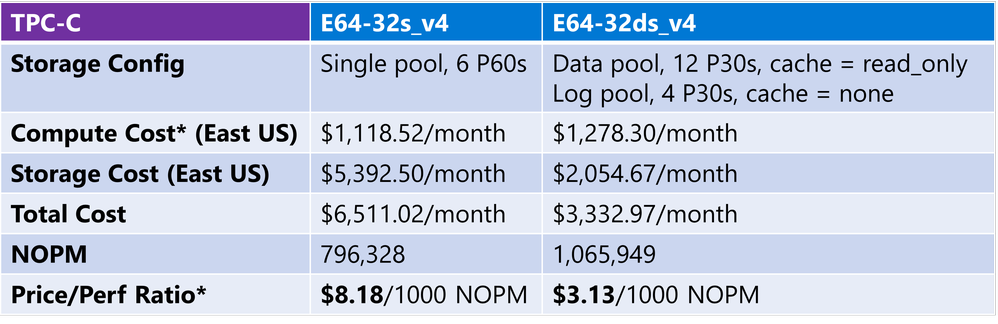
OK, so let’s get to the fun part. We used HammerDB to execute a TPC-C1 style workload against both of our VM configurations. Normally for SQL Server benchmarks we use TPC-E because it’s a more realistic workload, but HammerDB is a common tool used by many database professionals to stress and benchmark systems, so we thought it would be a good choice for this informal experiment in case you want to run something like this yourself. Check out the results. The performance metric used for these tests is New Orders Per Minute (NOPM):
* This cost is for compute only with a 3-year reservation, assuming Azure Hybrid Benefit for both Windows OS and SQL Server licensing costs.
Just by following the best practices we outlined above, we were able to get 34% MORE performance at 50% of the cost!
These are pretty amazing results, but we’re doing a benchmark-style test here, can you really expect these results in your production system with your workload? The answer is yes, and maybe even better than what we see here. The TPC-C workload is designed to stress a system hard, particularly in I/O throughput. Because of this, it’s heavily weighted in favor of writes, about 2 to 1 reads/writes or 67% read / 33% write. Most SQL Server workloads, even busy OLTP workloads, are closer to 80%-90% read / 10%-20% write, so you may see an even bigger benefit from read caching, particularly if you can downsize to a lower-cost VM with a smaller memory footprint.
So whether you’re already running SQL Server workloads in Azure VMs, are in the process of migrating your on-prem workloads to Azure, or just considering your options, be sure to check out the following resources to help you get the best performance for your cloud dollar in Azure:
Checklist: Performance best practices & guidelines – SQL Server on Azure VM | Microsoft Docs
Deep Dive: Azure SQL Virtual Machine Sizing | Data Exposed Live – YouTube
Eight ways to optimize costs on Azure SQL | Azure Blog and Updates | Microsoft Azure
1The HammerDB TPC-C workload is derived from the TPC-C Benchmark and as such is not comparable to published TPC-C Benchmark results, as the HammerDB TPC-C workload results do not fully comply with the TPC-C Benchmark.
by Contributed | Mar 29, 2021 | Technology
This article is contributed. See the original author and article here.
We continue to expand the Azure Marketplace ecosystem. For this volume, 110 new offers successfully met the onboarding criteria and went live. See details of the new offers below:
|
Applications
|
|
Alight.target: Alight’s project management platform based on Microsoft SharePoint provides effective task and document management. Alight.target creates user roles, preconfigured project plans, activities, and templates depending on the project type.
|
 |
Anitian Compliance Automation: FedRAMP: Quickly and confidently protect and certify cloud workloads. Running within your Microsoft Azure tenant, Anitian’s Compliance Automation platform unlocks a fast path to secure your new or existing workloads in Azure.
|
 |
APN Intranet: The implementation of a new intranet does not have to be expensive or labor intensive. APN Promise offers a ready-made and tested solution that can be functional in your organization within a few days.
|
 |
Baking on Demand: PreciTaste’s app manages retail baking inventory and labor. Sensors monitor live inventory and customer traffic to build a sales forecast, enabling AI-driven decisions on what to bake and when.
|
 |
Basic profiler offering: Replace and improve your risk-profiling questionnaire. Banks, asset managers, and robo-advisors can benefit from everyoneINVESTED’s investment risk profiles, which reduce dropouts during onboarding.
|
 |
BIND App: New Business Dimensions offers a statutory reporting platform for the financial sector. BIND is a data aggregation engine and reporting platform for delivering standardized reports according to local and European Union regulations.
|
 |
CloudVector EE: Continuously discovering and securing APIs across services and clouds, CloudVector by ArecaBay is a full-featured API threat protection platform that provides shadow API prevention, deep risk monitoring, and remediation.
|
 |
Colligo Engage Email Manager for Microsoft 365: Enabling automated and self-serve capture of metadata, Colligo simplifies saving emails and attachments into SharePoint, Microsoft Teams, and OneDrive while working in Microsoft Outlook.
|
 |
COVID-19 Vaccine Management – High-Risk Population: BroadReach Consulting’s app helps protect high-risk populations who should receive priority for vaccination. The solution uses machine learning and predictive analytics based on outlier lab tests and various predictive algorithms.
|
 |
DaltreyID: Eyes, voices, faces, and fingertips are unique to everyone. Eliminating the need for passwords, passes, and PINS, this intelligent middleware platform provides biometrics as a service.
|
 |
Data Science Virtual Lab – Generation 1: TrustAI provides this virtual machine installed with Ubuntu Bionic 18.04 LTS, preconfigured and tested for data science. Ubuntu 18.04 is a free, open-source distribution of Linux based on the Debian operating system.
|
 |
Demand Forecasting and Replenishment Solution: Using cutting-edge machine learning and deep learning models, CogniTensor’s solution is a combination of correlation analytics and prediction dashboards to assist you with your supply chain management objectives.
|
 |
Digilytics Revel FS solution built on Microsoft Azure: The typical lending process in the mortgage industry requires considerable manual intervention. Digilytics Revel streamlines the entire loan origination process.
|
 |
Digital Brick 365: Based on Microsoft 365 learning pathways, WEBSCIENCE’s platform supports enterprise-level adoption of Microsoft 365, offers over 800 pieces of training content, and includes tips and best practices. Digital Brick 365 is available only in Italian.
|
 |
Digital Services: Drive measurable digital productivity outcomes in your business with this end-to-end transformation solution. Digital Services provides digital presence, mobility, service automation, and internal web portals.
|
 |
Digital Workplace tailored for Microsoft 365: Fueling digital transformation, QueryNow’s Exalt is an easy-to-use digital workplace solution for Microsoft 365. Deliver your digital workplace in less than 30 minutes.
|
 |
Dom Digital Chile: Connecting to local government services, Dom Digital allows municipalities to process all construction procedures online, including permits, electronic signatures, and online payments. This app is available only in Spanish.
|
 |
Drupal with CentOS 7.9: This preconfigured image by Cognosys provides Drupal with CentOS 7.9. Drupal provides deep capabilities and endless flexibility on the web, making it easy to create, manage, and publish content.
|
 |
Drupal with CentOS 8.3: This preconfigured image by Cognosys provides Drupal with CentOS 8.3. Drupal provides deep capabilities and endless flexibility on the web, making it easy to create, manage, and publish content.
|
 |
Drupal with Ubuntu 18.04 LTS: This preconfigured image by Cognosys provides Drupal with Ubuntu 18.04 LTS. Drupal provides deep capabilities and endless flexibility on the web, making it easy to create, manage, and publish content.
|
 |
Drupal with Ubuntu 20.04 LTS: This preconfigured image by Cognosys provides Drupal with Ubuntu 20.04 LTS. Drupal provides deep capabilities and endless flexibility on the web, making it easy to create, manage, and publish content.
|
 |
Eigen Ingenuity Oil & Gas Digitalization platform: Built for engineers and managers who need to make decisions in asset-heavy industries, Eigen Ingenuity combines a digital twin to link all your information, search functionality, and visualization capabilities in one solution.
|
 |
Empowered Employee Platform for SMBs: Powered by Microsoft Azure, Powernet’s Empowered Employee platform provides your staff with secure access to their own modern desktop environment.
|
 |
Extract Filer: Using optical character recognition, computer vision, machine learning, and AI, Extract Filer can sort documents, extract information, and enter it into your document management systems and content management systems.
|
 |
FUEL Online Training Solution: FUEL creates, implements, and manages online learning academies. By combining cutting-edge technologies with the practicalities of sustaining limited IT infrastructure in developing countries, FUEL is accessible to even the most remote learners.
|
 |
Graspway Data-Driven e-Learning (Spanish version): This e-learning platform allows you to create, edit, and manage your users and courses, organize training content, and monitor the progress of your students. This solution is available only in Spanish.
|
 |
H-Scale for Payers: This next-generation healthcare data integration and management platform addresses big data processing, data quality monitoring, data streaming, security, and advanced analytics. H-Scale is built on Microsoft Azure.
|
 |
IamOK Corporate: A solution for contact tracing and social distancing, IamOK identifies devices through an anonymous digital ID and provides profiling functionality for security management through dashboard reports.
|
 |
ignio AI.Assurance: This autonomous assurance product leverages AI and machine learning to provide high-level automation through all stages of software testing. ignio AI.Assurance also improves release cycle agility through self-healing tests.
|
 |
In control with Building Insight: Building Insight collects relevant data from building management systems, including sensors, smart meters, access systems, and weather data. Building managers can use the dashboards and real-time models to respond to changes. This app is available only in Dutch.
|
 |
Joomla with CentOS 7.9: This preconfigured image by Cognosys provides Joomla with CentOS 7.9. Joomla is a content management system that enables you to build websites and powerful online applications.
|
 |
Joomla with CentOS 8.3: This preconfigured image by Cognosys provides Joomla with CentOS 8.3. Joomla is a content management system that enables you to build websites and powerful online applications.
|
 |
Joomla with Ubuntu 18.04 LTS: This preconfigured image by Cognosys provides Joomla with Ubuntu 18.04 LTS. Joomla is a content management system that enables you to build websites and powerful online applications.
|
 |
JSC Koll 365 Industrial Maintenance: Optimized for industrial maintenance, Koll 365 helps manage tasks, including prevention, remediation, improvement, and maintenance. This app is available only in Swedish.
|
 |
LibreNMS Image: Puppeteers provides this ready-to-run image of LibreNMS preconfigured for Microsoft Azure. LibreNMS is an open-source and fully featured network monitoring system.
|
 |
Micro Focus SMAX on Microsoft Azure: Powered by machine learning and AI-driven analytics, Micro Focus Service Management Automation X (SMAX) is an application management suite for IT service management, IT asset management, and enterprise service management.
|
 |
Nephos Cloud Desktop: Offering one place for people to access any application, Nephos Workspace makes it easy for organizations to embrace new technologies and the cloud without worrying about security or a compromised user experience.
|
 |
odoo: opensource ERP and CRM: Linnovate Technologies offers this preconfigured image containing Odoo. Odoo is an open-source ERP solution with several modules for various business requirements, including CRM, sales, warehouse management, project management, financial management, and HR management.
|
 |
OneClick.ai Augmented Forecasting: Boosted with external signals, such as events, weather, markets, macroeconomics, and social media, OneClick Forecast operationalizes AI in business planning for increased efficiency.
|
 |
OpenVINO DL Streamer – Edge AI Extension Module: This microservice is based on Intel’s Video Analytics Serving, which delivers video analytics pipelines built with OpenVINO DL Streamer. Developers can send video frames to the AI extension module for detection, classification, and tracking.
|
 |
OSIsoft Cloud Service (OCS): OSIsoft’s OCS is a SaaS platform used to aggregate, analyze, and share IIoT edge data and plant operations data (OT). The platform is cloud ready and quickly bridges the gap from OT to IT.
|
 |
Patient Flow: Using powerful predictive analytics, Allscripts’ integrated suite helps healthcare providers optimize capacity planning and discharge forecasting. Patient Flow improves bed management, housekeeping, transport operations, and communication.
|
 |
PRM One: Drive strategic engagement with ChannelAssist, a configurable channel manager platform for partner relationship management (PRM). ChannelAssist provides end-to-end development and management of channel engagement and incentive programs.
|
 |
Productivity X: Productivity X is a cloud-based service that provides an intelligent assistant integrated into apps and tools, including your SAP S/4HANA and Microsoft 365 systems. This app is available only in German.
|
 |
RecBuddy: Blackbook.ai’s platform helps you modernize accounting processes by using automated reconciliation powered by applied AI. RecBuddy enables accountants to certify transactions and rectify discrepancies that occur in a ledger. The included dashboard integrates with Microsoft Power BI and Tableau.
|
 |
Retail Employee Experience Platform: The Progress Retail platform provides a one-stop experience for modern retail employees, including dynamic learning, task management, and company communication to every team member within a retail organization.
|
 |
Revit to Augmented Reality – Construction QA App: Argyle’s plug-in for Autodesk Revit automates the QA process for Revit BIM models by converting them to augmented reality holograms for use with Microsoft HoloLens 2 on Argyle’s Azure-based cloud. Speed inspection, promote first-time quality, quantify and track errors, and more.
|
 |
Secure Internet Service: Secure Internet Service is a tool that allows you to connect safely to the internet from an electronic medical record terminal and browse and handle various files. This app is available only in Japanese.
|
 |
ServiceNow IT Asset Management (on ServiceNow DC): ServiceNow’s IT Asset Management lets you optimize hardware, software, and cloud costs while reducing risk. Automate workflow action from a native configuration management database and get a complete view of IT resources across on-premises and cloud environments.
|
 |
Shopperations: Shopperations is an easy-to-use marketing, planning, and budget management system for CPG brands and their agencies. With a few clicks, you can track sources of funds, standardize tactical planning, automate reporting, and more.
|
 |
ShortPoint for Microsoft Teams: Part of the ShortPoint framework, this app provides easy-to-build design elements and features, allowing you to provide additional features within Microsoft Teams. Extend your environment with tiles, animations, background videos, and more.
|
 |
Smarter SPLA: Smarter SPLA (service provider licensing agreements) from The Business Software Center provides improved SPLA reporting for hosted service providers. Smarter SPLA provides a painless method of tracking usage, generating reports, and exporting reports to the billing system.
|
 |
Solita Agile Data Engine for Azure Synapse Analytics: Solita’s Agile Data Engine is an integrated DataOps development and operations environment for designing, building, deploying, and running cloud-based data warehouse solutions using Azure Synapse Analytics.
|
 |
Spyglass Connected Factory: Mariner’s Spyglass Connected Factory provides alerting, monitoring, analysis of overall equipment effectiveness, and more. This virtual production manager also logs performance levels, events, and compliance metrics.
|
 |
StoreVue Signage: Advantech’s cloud platform is designed to help the retail industry simplify ad broadcasts and manage interactive digital signage. StoreVue Signage provides cost-effective performance and delivers state-of-the-art content distribution solutions.
|
 |
StoreVue Store BI: Advantech’s cloud-based business intelligence service is designed for retail store managers seeking to better understand store traffic. StoreVue Store BI integrates with several store analytics solutions and includes heatmaps and analysis of store traffic for more efficient retail management.
|
 |
Trasix: Trasix offers its cloud-based platform for the fashion and sporting goods industry, enabling seamless line planning, merchandizing, B2B order management, and presentation of 3D samples.
|
 |
Trust Evaluation System: Proposal (TES PRO): Trust Evaluation System: Proposal (TES PRO) is a blockchain-based proposal evaluation system that specializes in tracking qualitative evaluations performed by team members. The system outputs quantitative evaluation scores, price evaluation scores, and more. This app is available in South Korea.
|
 |
VZOR Stress Monitor: VZOR’s Stress Monitor service performs load tests and stress tests on mobile and web apps. Stress Monitor executes different navigation flows and determines the maximum service capacity in high-demand scenarios, with a goal of improving user experience. This app is available only in Spanish.
|
 |
VZOR Suite 360: VZOR’s Suite 360 is a comprehensive, unified monitoring platform for processes, apps, and information and communication technology infrastructure. Reduce the total cost of operation and consolidate monitoring data with Suite 360. This app is available only in Spanish.
|
 |
Web Filtering Proxy: Diladele’s Web Filtering Proxy runs natively on Microsoft Windows for easy integration with Active Directory. The app provides a secure web proxy, decrypts HTTPS traffic, filters HTTP requests, and inspects the contents of downloaded HTML pages. The app is managed using a Microsoft Management Console snap-in.
|
Consulting services
|
 |
2-Hour Data Sprint Exploration Assessment: Are you ready to break down the silos and unlock the power of your data? In the Razor Data Sprint, you will learn about the possibilities of data, how other businesses are using data, and what actions you can take to drive your data strategy.
|
 |
2-Week Assessment Cloud Ready: Using Microsoft Azure infrastructure and Azure DevOps, Viseo Consulting will quickly move your company to the cloud. Viseo Consulting will assess your IT environment and determine what to migrate.
|
 |
3-Week – HANA on Azure Assessment (AT): ITPC is a single point of contact for organizations in Austria that want to take advantage of the upcoming SAP S/4HANA transformation to leverage the benefits of SAP on Microsoft Azure for a datacenter transformation.
|
 |
3-Week – HANA on Azure Assessment (IN): ITPC is a single point of contact for organizations in India that want to take advantage of the upcoming SAP S/4HANA transformation to leverage the benefits of SAP on Microsoft Azure for a datacenter transformation.
|
 |
5-Day Business Assessment for Cloud Roadmap: Axians offers a comprehensive business assessment for organizations looking to maximize their cloud strategies. Axians will survey your current application ecosystem and determine the technical feasibility of migrating to Microsoft Azure.
|
 |
5-Week implementation of DataSight reports: Innofactor DataSight enables you to get actionable insights from your data with the implementation of an Azure-based Microsoft Power BI reporting environment and dashboards for your Microsoft Dynamics 365 data.
|
 |
8-Week – SAP on Azure Implementation (AT): Migrating your SAP landscape to Microsoft Azure helps you simplify infrastructure management, improve time to market, and lower your costs. Based in Austria and available in some European countries, ITPC AG can take care of all your SAP infrastructure challenges.
|
 |
8-Week – SAP on Azure Implementation (IN): Migrating your SAP landscape to Microsoft Azure helps you simplify infrastructure management, improve time to market, and lower your costs. Based in India and available in some Arabian Peninsula countries, ITPC India Pvt. Ltd. can take care of all your SAP infrastructure challenges.
|
 |
APN Server Migration to Azure 5-Day Proof of Concept: Relying on the Microsoft Cloud Adoption Framework for Azure, APN Promise will develop a proof of concept to migrate your on-premises server infrastructure to Microsoft Azure.
|
 |
App Modernization: 3-Week Assessment: To enable your organization for its migration journey, Slalom Build will move your applications using Microsoft Azure platform as a service and help you innovate with the power of Azure.
|
 |
Application Modernization: 10-Day Assessment: Devoteam will advise you on how to modernize your applications in Microsoft Azure. This assessment is based on Gartner’s main drivers of application modernization, best practices, and the Microsoft Cloud Adoption Framework for Azure.
|
 |
Axians Azure Cloud Managed Services: Onboarding your team into the Microsoft Azure Lighthouse environment, Axians’ services allow you to extend your IT team, cover additional operational hours, and expand your expertise with Microsoft-certified engineers.
|
 |
Azure Cloud Adoption Strategy Workshop – 4 Hours: Learn about the fundamental concepts of cloud technologies in this workshop from first frame networkers AG. The certified Microsoft Azure experts will help you plan your Azure adoption journey. This service is available in German.
|
 |
Azure Cloud Migration Assessment – 1 Week: Certified professionals at NewWave are ready to assist your business with your cloud migration needs. Deliverables include a cost optimization plan, a backup and disaster recovery plan, and a fully detailed plan to migrate to Microsoft Azure.
|
 |
Azure Data Platform – 2-Hour Briefing: Bridgeall will help you understand how to benefit from a data platform on Microsoft Azure. Bridgeall’s Azure data platform services include Azure Data Factory, Azure Synapse Analytics, Azure Data Lake, and Azure Analysis Services.
|
 |
Azure Data Platform & Analytics: 4-Week Briefing: QUANTIQ will migrate your existing data warehouse and advanced analytics workloads to Microsoft Azure. QUANTIQ will use fully managed services to deploy solutions for BI, reporting, and real-time analytics.
|
 |
Azure Enterprise Blockchain: 1-Day Workshop: This free workshop will clarify how the SICCAR platform, an innovative blockchain platform built on Microsoft Azure, enables secure data sharing and extends Azure capabilities with distributed ledger technology.
|
 |
Azure Governance & Oversight: 1-Day Workshop: In an interactive setting, DynTek specialists will help you create a plan for Microsoft Azure cloud governance by taking an in-depth look at the people, processes, and technologies currently in place within your organization.
|
 |
Azure IoT data hub 8-Week Implementation: Conclusion will implement an IoT data hub by using Azure IoT Edge, Azure IoT Hub, Azure Data Explorer, and Azure Functions. The outcome will support mission-critical systems and a large number of devices.
|
 |
Azure Managed Services: Claranet provides managed services for your Microsoft Azure instance, including all-day incident monitoring and management, as well as expert advice on infrastructure, automation, workloads, and project planning. This service is available only in Spanish.
|
 |
Azure Migration Implementation – 10 Weeks: Ready to migrate your on-premises services to Microsoft Azure? Newwave will help with the full migration, including technical documentation, cost optimization using Azure Cost Management + Billing, and monitoring.
|
 |
Catalyst Quickstart + WANdisco: 4-Week Implementation: With BlueGranite’s engagement, you can keep the most innovative workloads by seamlessly moving your big data to Microsoft Azure. This implementation focuses on migrating distributed file system data.
|
 |
Cloud Transformation: 2-Hour Workshop: ZS Associates’ cloud transformation workshop is the first step in your Microsoft Azure journey. The workshop will include an overview of the health and life science industry’s best practices and next steps for you.
|
 |
Cloud-native app development: 8-Week Implementation: Altoros will help you quickly launch a new product on the market and ensure smooth operation on Microsoft Azure. Altoros provides an end-to-end software product delivery package under the supervision of its engineers.
|
 |
Create Data Lakes in AWS S3 With Dynamics 365 Integration: With this integration, you can periodically update your Microsoft Dynamics 365 data onto an AWS S3 Data Lake. Create this integration in minutes without coding and specify the update intervals.
|
 |
Data Platform: 2-Week Implementation: Communicate Norge developed a foundation for a data platform built on Microsoft Azure technologies, enabling easy access to your business data. This offer is available only in Norway.
|
 |
Digital Identity and Access Mgmt Assessment: 8 Weeks: AdNovum will review the maturity of your identity and access management (IAM) strategy. The interactive workshops will help your teams enhance their skills in IAM, cybersecurity, and Microsoft Azure.
|
 |
FSI Cloud Security: Free 1-Day Workshop: Tailored to financial services clients, this free AirGate cloud security workshop will help you understand the benefits of Microsoft Azure and Microsoft 365 security to identify, protect, and remediate against threats and risks.
|
 |
HeroPath: 8-Week Data Modernization Implementation: Fueled by Azure Databricks, Azure Synapse Analytics, Azure Data Lake, and Microsoft Power BI, Lixar IT’s HeroPath Accelerator is a solution for migration to Microsoft Azure and creation of a modern data platform. Lixar IT will implement HeroPath in eight weeks.
|
 |
Kickstarter Windows Virtual Desktop: 5-Day Proof of Concept (NL): A specialist in end-user computing, Login Consultants Nederland has developed a comprehensive toolkit and best practices for Windows Virtual Desktop deployments. The Kickstarter quickly enables cloud-based desktops and applications.
|
 |
Kickstarter Windows Virtual Desktop: 5-Day Proof of Concept (NO): A specialist in end-user computing, Basefarm has developed a comprehensive toolkit and best practices for Windows Virtual Desktop deployments. Basefarm’s Kickstarter quickly enables cloud-based desktops and applications. This offer is available in Norway.
|
 |
LOGIN APPS & DESKTOPS on Windows Virtual Desktop: 5-Week Implementation: Login Consultants Nederland can implement a fully fledged virtual Windows workspace on Microsoft Azure. Running on Windows Virtual Desktop, this solution delivers virtual apps and desktops that are accessible from any location and any device.
|
 |
Microsoft Access Consulting: 1-Hour Assessment: IT Impact will review your Microsoft Access database online and suggest upgrades and improvements, including moving to Microsoft Azure. IT Impact will identify bugs and issues that might cause crashes, slow speed, or low performance.
|
 |
Migration & Integration Framework: 1-Hour Briefing: Adatis’ multi-purpose framework and reference architecture help deliver data migration and application integration projects without the need to develop multiple solutions or implement two sets of transformation logic.
|
 |
ML Predictive Excellence: 8-Week Proof of Concept: Drive healthcare outcomes for clinical insights, supply chain reliability, and administrative processes with Pariveda’s healthcare-focused machine learning rationalization and prototyping offer.
|
 |
Now2Cloud CAF: 4-Week Assessment: Aligned to the Microsoft Cloud Adoption Framework for Azure, Microland’s service helps enterprises evaluate and make the right choice of cloud technologies to maximize business benefits.
|
 |
Planning DW Azure Migration: 2-Week Implementation: Cerion delivers modern data platforms and data warehousing solutions on Microsoft Azure. Cerion will guide you through a three-step planning process to migrate your on-premises SQL Server data warehouse solution to Azure.
|
 |
Platform Modernization: 4-Week Implementation: QUANTIQ’s experts will review your specific needs and will modernize your existing apps on Microsoft Azure. This offer includes migrating apps to Azure, automated patching and maintenance, streamlined workflows, and auto-scaling your cloud usage.
|
 |
Remote Development: 3-Day Workshop: In CGI Germany’s three-day boot camp, you will learn everything you need to know about development in distributed teams, including how to use GitHub, Azure DevOps, Microsoft Teams, and Visual Studio Live-Share. This offer is available only in German.
|
 |
S/4HANA on Azure 100 users: 4-Week Implementation: GROUPE HISI will develop, qualify, and place into production an implementation of SAP S/4HANA on Microsoft Azure. This offer includes consulting and services for configuration of Azure infrastructure, OS, database, SAP, backups, and more.
|
 |
Security (Threat Protection) 2-Day Assessment: datac Kommunikationssysteme will analyze your needs and define a customized solution for identity and access management built on Microsoft 365. This offer is available only in German.
|
 |
SMART on FHIR Accelerator – 10-Week Implementation: DataArt will implement its accelerator to extend existing electronic health information solutions with SMART (substitutable medical applications, reusable technologies) on FHIR (fast healthcare interoperability resources) capabilities and FHIR APIs on Azure.
|
 |
SophosWall: 4-Week Proof of Concept: Reliance Infosystems will integrate its solution built on Sophos Security for Microsoft Azure into your Azure network to provide insights into your network security posture. Experience network threat visibility, protection, and response for public, private, and hybrid cloud environments.
|
 |
SQL Server Consultancy – 4-Hour Implementation: DATAMAZE SRL will help you manage your SQL Server infrastructure on Microsoft Azure, including optimization of your SQL instances, security configuration, and more. This offer is available only in Italian.
|
 |
SQL Server: Database Health Check – 4-Hour Assessment: DATAMAZE SRL will analyze the configuration of your on-premises or Azure-hosted databases to ensure performance, security, and reliability. This offer is available only in Italian.
|
 |
SQL Server: Migration to Azure – 8-Hour Assessment: DATAMAZE SRL will determine the infrastructure and planning requirements for migrating your SQL Server infrastructure to the cloud. This offer is available only in Italian.
|
 |
SQL Server: Server Health Check – 8-Hour Assessment: DATAMAZE SRL will analyze your Azure-based SQL infrastructure to identify areas to mitigate risk and improve performance, cost, and availability. This offer is available only in Italian.
|
 |
SSL Inspection 4: A10 Networks offers this hands-on course to provide users with the necessary skills to implement a system for inspection of SSL traffic. SSL Inspection 4 includes two A10 Advanced Core Operating System devices configured in a base environment for students to use during classroom discussion and lab exercises.
|
 |
The Digital Decarbonization: 8-Week Assessment: Atos International SAS will provide insight into your current and desired IT decarbonization practices. Get a roadmap detailing how you can achieve your desired decarbonization maturity by adopting cloud services on Microsoft Azure.
|
|
by Contributed | Mar 29, 2021 | Technology
This article is contributed. See the original author and article here.
Along with the burgeoning growth of remote work comes an urgent need for administrators with subject matter expertise in planning, delivering, and managing virtual desktop experiences and remote apps—for any device—on Azure.
If this is your skill set, the new Microsoft Certified: Windows Virtual Desktop Specialty certification can validate your ability to fulfill the tasks required of this key role and add value to your team and organization. To earn this certification, pass Exam AZ-140: Configuring and Operating Windows Virtual Desktop on Microsoft Azure, currently in beta.
Is this the right certification for you?
This certification is ideal for Azure administrators with expertise in delivering applications on Windows Virtual Desktop and optimizing them to run in multisession virtual environments. To deliver these experiences, they work closely with other Azure administrators and architects, along with Microsoft 365 administrators.
If you have deep experience in Azure technologies, including virtualization, networking, identity, storage, backup, resilience, and disaster recovery, you’re a great candidate for this certification. You leverage your understanding of on-premises virtual desktop infrastructure technologies for migrating to Windows Virtual Desktop. And, as a professional interested in this certification, you know how to use the Azure portal and Azure Resource Manager templates. You might also use PowerShell and Azure CLI for more efficient automation.
Ready to prove your skills?
Take advantage of the discounted beta exam offer. The first 300 people who take Exam AZ-140 (beta) on or before April 29, 2021, can get 80 percent off market price!
To receive the discount, when you register for the exam and are prompted for payment, use code AZ140LAHAINA. This is not a private access code. The seats are offered on a first-come, first-served basis. As noted, you must take the exam on or before April 29, 2021. Please note that this beta exam is not available in Turkey, Pakistan, India, or China.
Get ready to take Exam AZ-140 (beta):
Did you know that you can take any role-based exam online? Online delivered exams—taken from your home or office—can be less hassle, less stress, and even less worry than traveling to a test center—especially if you’re adequately prepared for what to expect. To find out more, check out my blog post, Online proctored exams: What to expect and how to prepare.
The rescore process starts on the day an exam goes live, and final scores for beta exams are released approximately 10 days after that. For details on the timing of beta exam rescoring and results, read my post, Creating high-quality exams: The path from beta to live. For more information, follow me on Twitter (@libertymunson).
Ready to get started?
Remember, the number of spots is limited to the first 300 candidates taking Exam AZ-140 (beta) on or before April 29, 2021.
Pass Exam AZ-140 (beta), earn your certification, and prove that you have what it takes to plan, implement, monitor, and maintain a Windows Virtual Desktop architecture and infrastructure. Be part of the solution that so many organizations are seeking, and make a difference deploying and administering remote technology for their workers.
Related announcements
Understanding Microsoft Azure certifications
Finding the right Microsoft Azure certification for you

by Scott Muniz | Mar 29, 2021 | Security
This article was originally posted by the FTC. See the original article here.
Lots of people are having difficulty paying their rent due to the pandemic. But today, the Centers for Disease Control (CDC) released an eviction moratorium order. It protects people from being evicted for not paying their rent if they complete a declaration form and give it to their landlord. This protection lasts until June 30, 2021.
If you qualify for this help, fill out and sign a declaration form (available in both English and Spanish) and give it to your landlord. If you need help understanding whether you qualify, the Housing and Urban Development has a list of housing counselors in your area who can answer your questions. And whether or not you qualify, it might be worth finding out more about rental assistance programs. There may be local programs that offer rental assistance and other help.
If landlords violate the CDC’s order, they can be subject to fines and even criminal penalties. So if things aren’t going the way you think they should with your landlord, you may be able to get legal help. Check for state or local protections for renters. And if you’re worried about being evicted, even with this moratorium in place, tell your state’s attorney general.
Get more information about what to do if your finances have been affected by the pandemic.
Brought to you by Dr. Ware, Microsoft Office 365 Silver Partner, Charleston SC.
by Contributed | Mar 29, 2021 | Technology
This article is contributed. See the original author and article here.
Inside Microsoft Teams is a live Microsoft Teams webcast series for IT professionals hosted by Stephen Rose. Season 3 is focused on voice of the IT Pro, as we are doing shows that focus on real world customers like Lego, Envision Technologies, and more, to discuss the tips, tricks, and lessons learned on how they deployed, managed, and secured Microsoft Teams. In addition, viewers will get to see the latest innovations for Teams rooms and devices.
 Microsoft Ignite Wrap-Up with Mary Jo Foley, Paul Thurrott and Brad Sams (aired March 9, 2021)
Our most recent episode, “Microsoft Ignite Wrap-Up” featured industry experts: Mary Jo Foley, Paul Thurrott, and Brad Sams. We discussed all the exciting announcements from Microsoft Ignite around Teams and Teams Platform! We dove into all the new capabilities that will make it easier to collaborate, stay connected, and build solutions in Teams.
In case you missed it, you can watch the episode here.
Below are highlighted enhancements within Teams that we discussed in our episode.
- Chat and collaboration – Teams Connect makes it much easier to share channels with anyone, internal, and external (if they have an Azure AD account). This feature helps improve cross-organizational collaboration. Teams and Microsoft Dynamics 365 now allow users to chat and share documents and manage meetings and webinars without leaving the Dynamics 365 workspace.
- Meetings – Microsoft is launching Dynamic View, View Switcher, Live Reactions, Presenter mode, and PowerPoint Live in Teams to help presenters feel confident and comfortable presenting during a meeting. These new features also allow meeting attendees to interact with the presentation by expressing live reactions and quick responses to messages.
- Virtual events and webinars – Teams now allows you to set up and run webinars just as efficiently as running a meeting. You can have up to 1,000 attendees and produce custom attendee registration and post-event attendee reports. Teams has also included moderation controls like disabling chat, audio, and video. If your webinar grows to over 1,000 attendees, Teams seamlessly scales to accommodate a 10,000-person view. Lastly, Teams and Dynamics 365 can collaborate to deliver any robust integrated marketing campaign capabilities to follow-up with webinar attendees.
- Security, compliance, and privacy – With all the new capabilities within Teams, Microsoft provides features to enable a secure environment to collaborate. Teams will support end-to-end encryption for online conversations. There is also further support for multi-geo, which will help customers meet data residency requirements.
In case you missed some of the Microsoft Teams announcements, here are some of the key resources to check out to get you up to speed:
Be sure to tune in for new episodes of Inside Microsoft Teams or watch the latest episodes on-demand here: aka.ms/InsideMSTeams.
We’ll continue to post recap blogs after each episode to stay up to date with all the exciting features of Teams and easily access the resources shared during the episode.
Stephen
For more information on Stephen or feel free to reach out here.



Recent Comments