Experiencing Data Access Issue in Azure portal for Log Analytics – 04/13 – Investigating

This article is contributed. See the original author and article here.

Initial Update: Tuesday, 13 April 2021 20:59 UTC

We are aware of issues within Log Analytics and are actively investigating. Customers ingesting telemetry in their Log Analytics Workspace in West Europe geographical region may have experienced intermittent data latency and incorrect alert activation.
  • Work Around: None
  • Next Update: Before 04/13 23:00 UTC
We are working hard to resolve this issue and apologize for any inconvenience.
-Eric Singleton

Partner-ready Resources for Microsoft Viva and SharePoint Syntex

This article is contributed. See the original author and article here.

Since our announcements for Microsoft Viva and SharePoint Syntex over the past months, we’ve seen great energy and enthusiasm from our partners to help support our vision to reimagine employee experience in Microsoft 365. 


To help all partners succeed, we’ve created the Employee Experience Partner Resource Center. It provides you with one place to go to find out about events and trainings and access self-service demos, learning paths, sales assets, and additional resources related to Microsoft Viva and SharePoint Syntex.


These resources are being shared broadly so you can accelerate development of your employee experience practice.  Visit the Employee Experience Partner Resource Center or read on to learn more about how you can:


  • Register for the Microsoft Viva: Fundamentals for Partners training

  • Join us at the AIIM Conference 2021

  • Create a new on-demand demo tenant for Microsoft Viva

  • Start on the new Microsoft Viva Topics learning paths

  • Check out available self-service resources, including pitch decks, white papers, workshops, and more


Microsoft Viva: Fundamentals for Partners (Training)


Join us for the Microsoft Viva: Fundamentals for Partners training event to learn about the value of Microsoft Viva, an Employee Experience Platform (EXP), and the opportunities for partners.


From customer experience – to business opportunity – to technical solutions, this three-part training offers an essential introduction. Register now for any or all the sessions in your preferred time zone.


  • April 26 – 28, 2021, 8:30-11:30 am PT (Americas)

  • May 10 – 12, 2021, 8:30-11:30 pm PT (APAC)

  • May 11 – 13, 2021, 2:00-5:00 am PT (EMEA)


AIIM Conference 2021


Join Microsoft 365 and the global information management community at the AIIM Conference 2021: A Galactic Digital Experience, April 27-29. Enjoy $50 off your registration with code: MICROSOFT.


We’re over the moon to be an Elite Sponsor of the conference. Connect with us at our keynote, sessions, and booth.


New CDX on-demand tenants for demo


Now available – CDX (Customer Digital Experiences) on-demand demo tenants for Microsoft Viva and SharePoint Syntex! The Microsoft Viva tenant type (at the bottom of the tenant type list) is based on the Microsoft 365 E5 Enterprise demo, and contains licensing and content for Viva Connections, Viva Topics, and SharePoint Syntex.


Also available are Microsoft Viva Topics demo card and SharePoint Syntex demo card, with guidance and additional content. The Viva Connections demo card will be available next week.


Demand for the demo tenants has been extremely high and we’re working to add more tenant inventory. If you get a “running low due to high demand” error, please be patient and check back on another day.


New Microsoft Viva Topics learning paths


We’re excited to release our first learning paths for Microsoft Viva Topics, which helps you put knowledge to work. Going live in late April 2021, these learning paths help solutions architects and administrators get their organizations started with Viva Topics and provide them with an overview of IT skills planning and learning for Viva Topics.


Self-service resources


Below is a selection of the self-service resources that you can use today to start adding Microsoft Viva & SharePoint Syntex to your offerings. You can use the sales assets freely to frame initial customer conversations, hold in-depth workshops, and provide more detailed thought leadership to customers.


Pitch decks


Microsoft Viva pitch deck


Knowledge customer pitch deck


SharePoint Syntex pitch deck


White papers


Forrester New Technology: The Projected Total Economic Impact of Microsoft 365 Knowledge & Content Services


Spiceworks/ZD Knowledge Sharing in a Changing World


Growing organizational intelligence with knowledge and content in Microsoft 365


Workshops


Knowledge Discovery Workshop (download .zip)


Insights Discovery Workshop on the Insights practice page on Transform


Intelligent Intranet envisioning workshop page


Partner practice pages


Employee Experience practice page on Transform (Microsoft Viva pitch deck, demos, and other partner resources)


Knowledge practice page on Transform (Microsoft Viva Topics pitch deck, SharePoint Syntex pitch deck)


Insights practice page on Transform (Microsoft Viva Insights partner resources, including the Insights Discovery Workshop)


Additional resources


Employee Experience practice page (Partners)


Microsoft Viva product page (Customers)


Viva Topics Resource Center (Customers)


SharePoint Syntex Resource Center (Customers)


Microsoft Content Services Partner Program


Visit the Microsoft Viva page and Microsoft Viva blog to learn more.


Analyzing COVID Medical Papers with Azure and Text Analytics for Health

Analyzing COVID Medical Papers with Azure and Text Analytics for Health

This article is contributed. See the original author and article here.

Automatic Paper Analysis


Automatic scientific paper analysis is fast growing area of studies, and due to recent improvements in NLP techniques is has been greatly improved in the recent years. In this post, we will show you how to derive specific insights from COVID papers, such as changes in medical treatment over time, or joint treatment strategies using several medications:

shwars_1-1618308829590.png


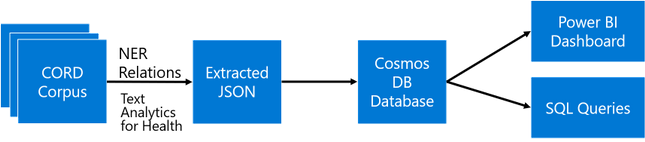
The main idea the approach I will describe in this post is to extract as much semi-structured information from text as possible, and then store it into some NoSQL database for further processing. Storing information in the database would allow us to make some very specific queries to answer some of the questions, as well as to provide visual exploration tool for medical expert for structured search and insight generation. The overall architecture of the proposed system is shown below:

ta-diagram.png

We will use different Azure technologies to gain insights into the paper corpus, such as Text Analytics for HealthCosmosDB and PowerBI. Now let’s focus on individual parts of this diagram and discuss them in detail.


If you want to experiment with text analytics yourself – you will need an Azure Account. You can always get free trial if you do not have one. And you may also want to check out other AI technologies for developers


COVID Scientific Papers and CORD Dataset


The idea to apply NLP methods to scientific literature seems quite natural. First of all, scientific texts are already well-structured, they contain things like keywords, abstract, as well as well-defined terms. Thus, at the very beginning of COVID pandemic, a research challenge has been launched on Kaggle to analyze scientific papers on the subject. The dataset behind this competition is called CORD (publication), and it contains constantly updated corpus of everything that is published on topics related to COVID. Currently, it contains more than 400000 scientific papers, about half of them – with full text.


This dataset consists of the following parts:


  • Metadata file Metadata.csv contains most important information for all publications in one place. Each paper in this table has unique identifier cord_uid (which in fact does not happen to be completely unique, once you actually start working with the dataset). The information includes:

    • Title of publication

    • Journal

    • Authors

    • Abstract

    • Data of publication

    • doi


  • Full-text papers in document_parses directory, than contain structured text in JSON format, which greatly simplifies the analysis.

  • Pre-built Document Embeddings that maps cord_uids to float vectors that reflect some overall semantics of the paper.


In this post, we will focus on paper abstracts, because they contain the most important information from the paper. However, for full analysis of the dataset, it definitely makes sense to use the same approach on full texts as well.


What AI Can Do with Text?


In the recent years, there has been a huge progress in the field of Natural Language Processing, and very powerful neural network language models have been trained. In the area of NLP, the following tasks are typically considered:


Text classification / intent recognition

In this task, we need to classify a piece of text into a number of categories. This is a typical classification task. Sentiment Analysis

We need to return a number that shows how positive or negative the text is. This is a typical regression task. Named Entity Recognition (NER)

In NER, we need to extract named entities from text, and determine their type. For example, we may be looking for names of medicines, or diagnoses. Another task similar to NER is keyword extraction.

Text summarization

Here we want to be able to produce a short version of the original text, or to select the most important pieces of text.

Question Answering

In this task, we are given a piece of text and a question, and our goal is to find the exact answer to this question from text.

Open-Domain Question Answering (ODQA)

The main difference from previous task is that we are given a large corpus of text, and we need to find the answer to our question somewhere in the whole corpus.


In one of my previous posts, I have described how we can use ODQA approach to automatically find answers to specific COVID questions. However, this approach is not suitable for serious research.


To make some insights from text, NER seems to be the most prominent technique to use. If we can understand specific entities that are present in text, we could then perform semantically rich search in text that answers specific questions, as well as obtain data on co-occurrence of different entities, figuring out specific scenarios that interest us.


To train NER model, as well as any other neural language model, we need a reasonably large dataset that is properly marked up. Finding those datasets is often not an easy task, and producing them for new problem domain often requires initial human effort to mark up the data.


Pre-Trained Language Models


Luckily, modern transformer language models can be trained in semi-supervised manner using transfer learning. First, the base language model (for example, BERT) is trained on a large corpus of text first, and then can be specialized to a specific task such as classification or NER on a smaller dataset.


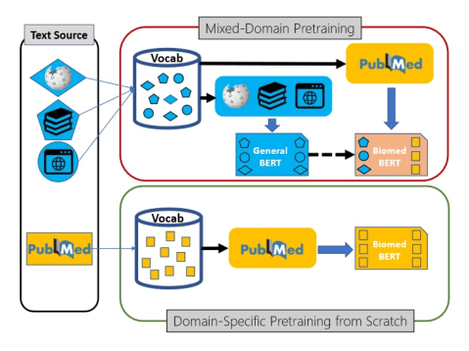
This transfer learning process can also contain additional step – further training of generic pre-trained model on a domain-specific dataset. For example, in the area of medical science Microsoft Research has pre-trained a model called PubMedBERT (publication), using texts from PubMed repository. This model can then be further adopted to different specific tasks, provided we have some specialized datasets available.pubmedbert.png

Text Analytics Cognitive Services


However, training a model requires a lot of skills and computational power, in addition to a dataset. Microsoft (as well as some other large cloud vendors) also makes some pre-trained models available through the REST API. Those services are called Cognitive Services, and one of those services for working with text is called Text Analytics. It can do the following:


  • Keyword extraction and NER for some common entity types, such as people, organizations, dates/times, etc.

  • Sentiment analysis

  • Language Detection

  • Entity Linking, by automatically adding internet links to some most common entities. This also performs disambiguation, for example Mars can refer to both the planet or a chocolate bar, and correct link would be used depending on the context.


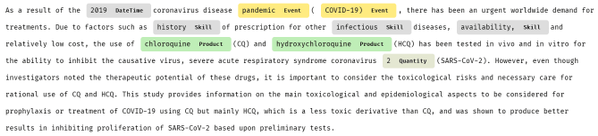
For example, let’s have a look at one medical paper abstract analyzed by Text Analytics:


shwars_0-1618309756290.png


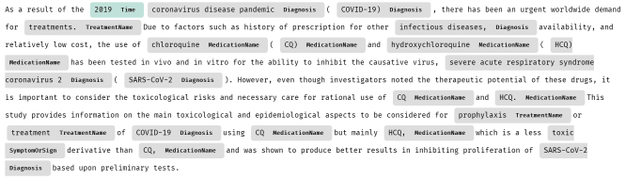
As you can see, some specific entities (for example, HCQ, which is short for hydroxychloroquine) are not recognized at all, while others are poorly categorized. Luckily, Microsoft provides special version of Text Analytics for Health.


Text Analytics for Health


Text Analytics for Health is a cognitive service that exposes pre-trained PubMedBert model with some additional capabilities. Here is the result of extracting entities from the same piece of text using Text Analytics for Health:

shwars_1-1618309813758.png

Currently, Text Analytics for Health is available as gated preview, meaning that you need to request access to use it in your specific scenario. This is done according to Ethical AI principles, to avoid irresponsible usage of this service for cases where human health depends on the result of this service. You can request access here.


To perform analysis, we can use recent version Text Analytics Python SDK, which we need to pip-install first:

pip install azure.ai.textanalytics==5.1.0b5

Note: We need to specify a version of SDK, because otherwise we can have current non-beta version installed, which lacks Text Analytics for Health functionality.


The service can analyze a bunch of text documents, up to 10 at a time. You can pass either a list of documents, or dictionary. Provided we have a text of abstract in txt variable, we can use the following code to analyze it:

poller = text_analytics_client.begin_analyze_healthcare_entities([txt])
res = list(poller.result())
print(res)


This results in the following object:


[AnalyzeHealthcareEntitiesResultItem(
id=0, entities=[
HealthcareEntity(text=2019, category=Time, subcategory=None, length=4, offset=20, confidence_score=0.85, data_sources=None,
related_entities={HealthcareEntity(text=coronavirus disease pandemic, category=Diagnosis, subcategory=None, length=28, offset=25, confidence_score=0.98, data_sources=None, related_entities={}): ‘TimeOfCondition’}),
HealthcareEntity(text=coronavirus disease pandemic, category=Diagnosis, subcategory=None, length=28, offset=25, confidence_score=0.98, data_sources=None, related_entities={}),
HealthcareEntity(text=COVID-19, category=Diagnosis, subcategory=None, length=8, offset=55, confidence_score=1.0,
data_sources=[HealthcareEntityDataSource(entity_id=C5203670, name=UMLS), HealthcareEntityDataSource(entity_id=U07.1, name=ICD10CM), HealthcareEntityDataSource(entity_id=10084268, name=MDR), …

As you can see, in addition to just the list of entities, we also get the following:


  • Enity Mapping of entities to standard medical ontologies, such as UMLS.

  • Relations between entities inside the text, such as TimeOfCondition, etc.

  • Negation, which indicated that an entity was used in negative context, for example COVID-19 diagnosis did not occur.


shwars_2-1618309813783.png


In addition to using Python SDK, you can also call Text Analytics using REST API directly. This is useful if you are using a programming language that does not have a corresponding SDK, or if you prefer to receive Text Analytics result in the JSON format for further storage or processing. In Python, this can be easily done using requests library:

uri = f"{endpoint}/text/analytics/v3.1-preview.3/entities/
         health/jobs?model-version=v3.1-preview.4"
headers = { "Ocp-Apim-Subscription-Key" : key }
resp = requests.post(uri,headers=headers,data=doc)
res = resp.json()
if res['status'] == 'succeeded':
    result = t['results']
else:
    result = None

(We need to make sure to use the preview endpoint to have access to text analytics for health)


Resulting JSON file will look like this:

{"id": "jk62qn0z",
 "entities": [
    {"offset": 24, "length": 28, "text": "coronavirus disease pandemic", 
     "category": "Diagnosis", "confidenceScore": 0.98, 
     "isNegated": false}, 
    {"offset": 54, "length": 8, "text": "COVID-19", 
     "category": "Diagnosis", "confidenceScore": 1.0, "isNegated": false, 
     "links": [
       {"dataSource": "UMLS", "id": "C5203670"}, 
       {"dataSource": "ICD10CM", "id": "U07.1"}, ... ]},
 "relations": [
    {"relationType": "Abbreviation", "bidirectional": true, 
     "source": "#/results/documents/2/entities/6", 
     "target": "#/results/documents/2/entities/7"}, ...],
}

Note: In production, you may want to incorporate some code that will retry the operation when an error is returned by the service. For more guidance on proper implementation of cognitive services REST clients, you can check source code of Azure Python SDK, or use Swagger to generate client code.


Using Cosmos DB to Store Analysis Result


Using Python code similar to the one above we can extract JSON entity/relation metadata for each paper abstract. This process takes quite some time for 400K papers, and to speed it up it can be parallelized using technologies such as Azure Batch or Azure Machine Learning. However, in my first experiment I just run the script on one VM in the cloud, and the data was ready in around 11 hours.

shwars_3-1618309813793.png


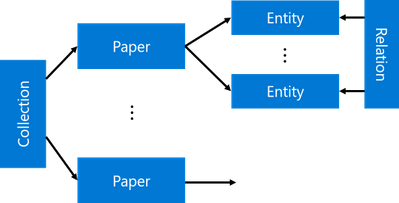
Having done this, we have now obtained a collection of papers, each having a number of entities and corresponding relations. This structure is inherently hierarchical, and the best way to store and process it would be to use NoSQL approach for data storage. In Azure, Cosmos DB is a universal database that can store and query semi-structured data like our JSON collection, thus it would make sense to upload all JSON files to Cosmos DB collection. This can be done using the following code:

coscli = azure.cosmos.CosmosClient(cosmos_uri, credential=cosmos_key)
cosdb = coscli.get_database_client("CORD")
cospapers = cosdb.get_container_client("Papers")
for x in all_papers_json:
    cospapers.upsert_item(x)

Here, all_papers_json is a variable (or generator function) containing individual JSON documents for each paper. We also assume that you have created a Cosmos DB database called ‘CORD’, and obtained required credentials into cosmos_uri and cosmos_key variables.


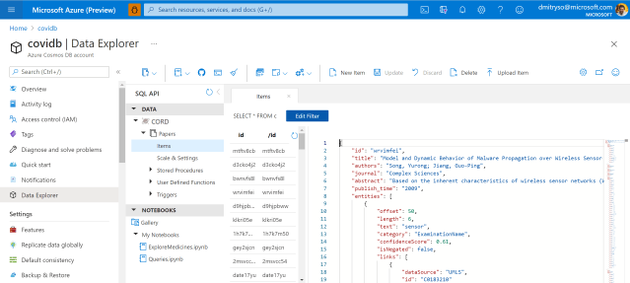
After running this code, we will end up with the container Papers will all metadata. We can now work with this container in Azure Portal by going to Data Explorer: 


shwars_4-1618309813810.png


Now we can use Cosmos DB SQL in order to query our collection. For example, here is how we can obtain the list of all medications found in the corpus:

-- unique medication names
SELECT DISTINCT e.text 
FROM papers p 
JOIN e IN p.entities 
WHERE e.category='MedicationName'

 Using SQL, we can formulate some very specific queries. Suppose, a medical specialist wants to find out all proposed dosages of a specific medication (say, hydroxychloroquine), and see all papers that mention those dosages. This can be done using the following query:

-- dosage of specific drug with paper titles
SELECT p.title, r.source.text
FROM papers p JOIN r IN p.relations 
WHERE r.relationType='DosageOfMedication' 
AND CONTAINS(r.target.text,'hydro')

You can execute this query interactively in Azure Portal, inside Cosmos DB Data Explorer. The result of the query looks like this:

[
 {
  "title": "In Vitro Antiviral Activity and Projection of Optimized Dosing Design of Hydroxychloroquine for the Treatment of Severe Acute Respiratory Syndrome Coronavirus 2 (SARS-CoV-2)",
  "text": "400 mg"
 },{
  "title": "In Vitro Antiviral Activity and Projection of Optimized Dosing Design of Hydroxychloroquine for the Treatment of Severe Acute Respiratory Syndrome Coronavirus 2 (SARS-CoV-2)",
   "text": "maintenance dose"
    },...]

A more difficult task would be to select all entities together with their corresponding ontology ID. This would be extremely useful, because eventually we want to be able to refer to a specific entity (hydroxychloroquine) regardless or the way it was mentioned in the paper (for example, HCQ also refers to the same medication). We will use UMLS as our main ontology.

--- get entities with UMLS IDs
SELECT e.category, e.text, 
  ARRAY (SELECT VALUE l.id 
         FROM l IN e.links 
         WHERE l.dataSource='UMLS')[0] AS umls_id 
FROM papers p JOIN e IN p.entities


Creating Interactive Dashboards


While being able to use SQL query to obtain an answer to some specific question, like medication dosages, seems like a very useful tool – it is not convenient for non-IT professionals, who do not have high level of SQL mastery. To make the collection of metadata accessible to medical professionals, we can use PowerBI tool to create an interactive dashboard for entity/relation exploration.
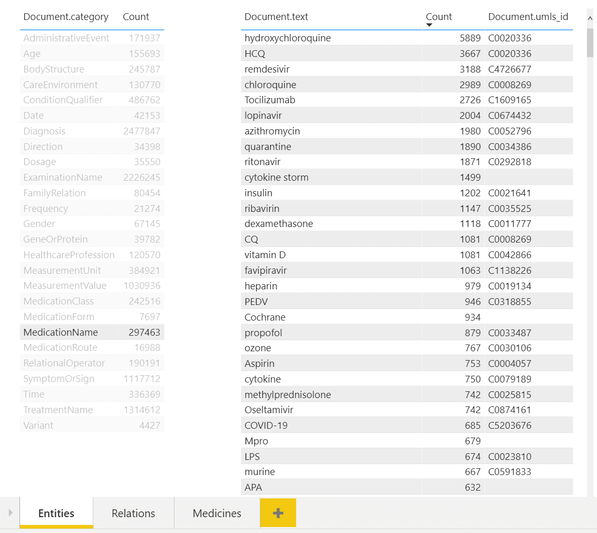


shwars_5-1618309813826.png


In the example above, you can see a dashboard of different entities. One can select desired entity type on the left (eg. Medication Name in our case), and observe all entities of this type on the right, together with their count. You can also see associated UMLS IDs in the table, and from the example above once can notice that several entities can refer to the same ontology ID (hydroxychloroquine and HCQ).


To make this dashboard, we need to use PowerBI Desktop. First we need to import Cosmos DB data – the tools support direct import of data from Azure.
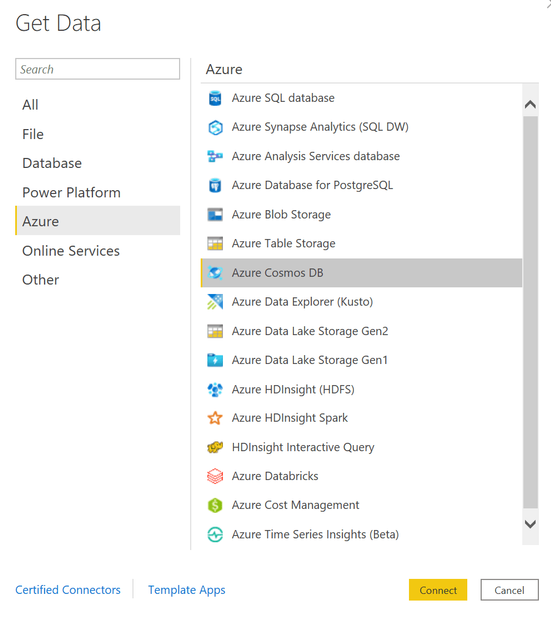

shwars_6-1618309813830.png

Then we provide SQL query to get all entities with the corresponding UMLS IDs – the one we have shown above – and one more query to display all unique categories. Then we drag those two tables to the PowerBI canvas to get the dashboard shown above. The tool automatically understands that two tables are linked by one field named category, and supports the functionality to filter second table based on the selection in the first one.


Similarly, we can create a tool to view relations:
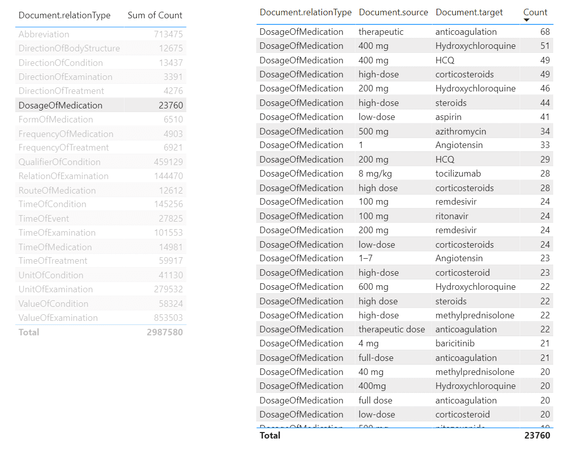


shwars_7-1618309813835.png


From this tool, we can make queries similar to the one we have made above in SQL, to determine dosages of a specific medications. To do it, we need to select DosageOfMedication relation type in the left table, and then filter the right table by the medication we want. It is also possible to create further drill-down tables to display specific papers that mention selected dosages of medication, making this tool a useful research instrument for medical scientist.


Getting Automatic Insights


The most interesting part of the story, however, is to draw some automatic insights from the text, such as the change in medical treatment strategy over time. To do this, we need to write some more code in Python to do proper data analysis. The most convenient way to do that is to use Notebooks embedded into Cosmos DB:
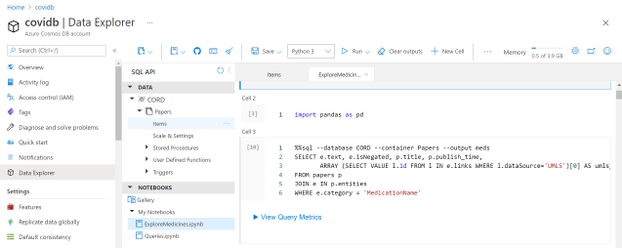


shwars_8-1618309813841.png


Those notebooks support embedded SQL queries, thus we are able to execute SQL query, and then get the results into Pandas DataFrame, which is Python-native way to explore data:

%%sql --database CORD --container Papers --output meds
SELECT e.text, e.isNegated, p.title, p.publish_time,
       ARRAY (SELECT VALUE l.id FROM l 
              IN e.links 
              WHERE l.dataSource='UMLS')[0] AS umls_id 
FROM papers p 
JOIN e IN p.entities
WHERE e.category = 'MedicationName'


 Here we end up with meds DataFrame, containing names of medicines, together with corresponding paper titles and publishing date. We can further group by ontology ID to get frequencies of mentions for different medications:

unimeds = meds.groupby('umls_id') 
              .agg({'text' : lambda x : ','.join(x), 
                    'title' : 'count', 
                    'isNegated' : 'sum'})
unimeds['negativity'] = unimeds['isNegated'] / unimeds['title']
unimeds['name'] = unimeds['text'] 
                  .apply(lambda x: x if ',' not in x 
                                     else x[:x.find(',')])
unimeds.sort_values('title',ascending=False).drop('text',axis=1)


 This gives us the following table:


umls_id title isNegated negativity name
C0020336 4846 191 0.039414 hydroxychloroquine
C0008269 1870 38 0.020321 chloroquine
C1609165 1793 94 0.052426 Tocilizumab
C4726677 1625 24 0.014769 remdesivir
C0052796 1201 84 0.069942 azithromycin
C0067874 1 0 0.000000 1-butanethiol


From this table, we can select the top-15 most frequently mentioned medications:

top = { 
    x[0] : x[1]['name'] for i,x in zip(range(15),
      unimeds.sort_values('title',ascending=False).iterrows())
}

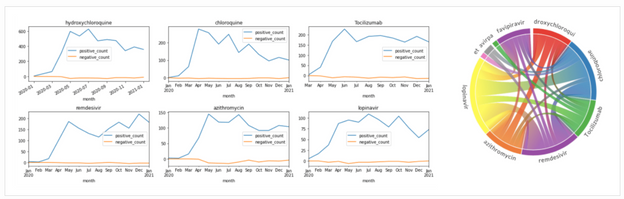
To see how frequency of mentions for medications changed over time, we can average out the number of mentions for each month:

# First, get table with only top medications 
imeds = meds[meds['umls_id'].apply(lambda x: x in top.keys())].copy()
imeds['name'] = imeds['umls_id'].apply(lambda x: top[x])

# Create a computable field with month
imeds['month'] = imeds['publish_time'].astype('datetime64[M]')

# Group by month
medhist = imeds.groupby(['month','name']) 
          .agg({'text' : 'count', 
                'isNegated' : [positive_count,negative_count] })


This gives us the DataFrame that contains number of positive and negative mentions of medications for each month. From there, we can plot corresponding graphs using matplotlib:

medh = medhist.reset_index()
fig,ax = plt.subplots(5,3)
for i,n in enumerate(top.keys()):
    medh[medh['name']==top[n]] 
    .set_index('month')['isNegated'] 
    .plot(title=top[n],ax=ax[i//3,i%3])
fig.tight_layout()
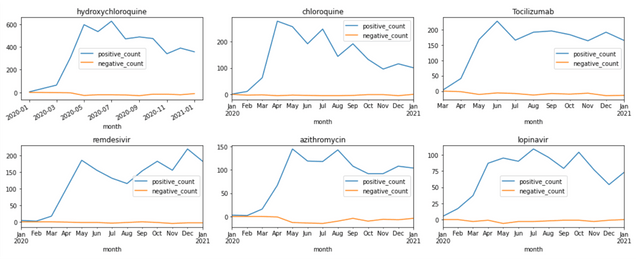


shwars_9-1618309813852.png


Visualizing Terms Co-Occurrence


Another interesting insight is to observe which terms occur frequently together. To visualize such dependencies, there are two types of diagrams:


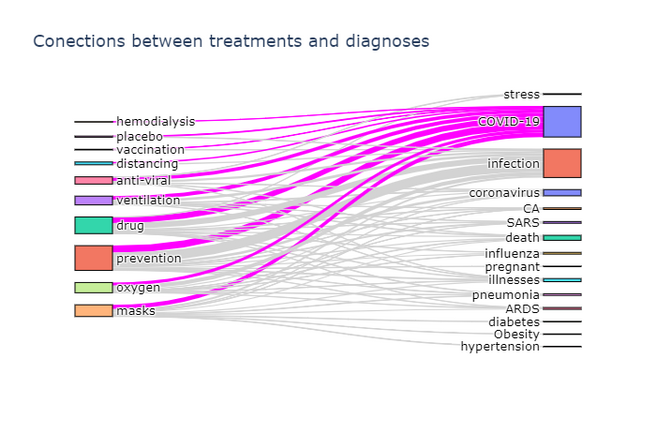
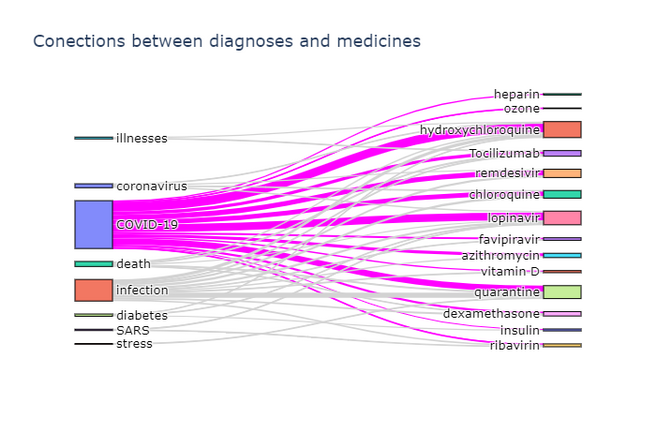
  • Sankey diagram allows us to investigate relations between two types of terms, eg. diagnosis and treatment

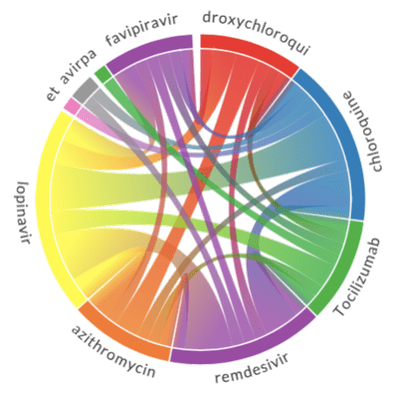
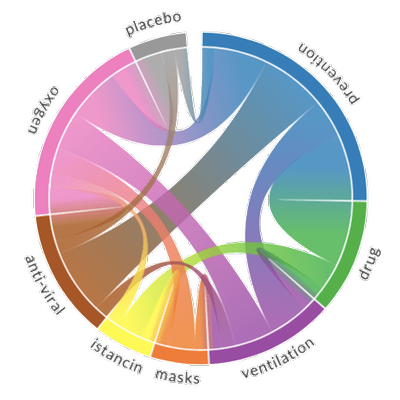
  • Chord diagram helps to visualize co-occurrence of terms of the same type (eg. which medications are mentioned together)


To plot both diagrams, we need to compute co-occurrence matrix, which in the row i and column j contains number of co-occurrences of terms i and j in the same abstract (one can notice that this matrix is symmetric). The way we compute it is to manually select relatively small number of terms for our ontology, grouping some terms together if needed:

treatment_ontology = {
 'C0042196': ('vaccination',1),
 'C0199176': ('prevention',2),
 'C0042210': ('vaccines',1), ... }

diagnosis_ontology = {
 'C5203670': ('COVID-19',0),
 'C3714514': ('infection',1),
 'C0011065': ('death',2),
 'C0042769': ('viral infections',1),
 'C1175175': ('SARS',3),
 'C0009450': ('infectious disease',1), ...}


Then we define a function to compute co-occurrence matrix for two categories specified by those ontology dictionaries:

def get_matrix(cat1, cat2):
    d1 = {i:j[1] for i,j in cat1.items()}
    d2 = {i:j[1] for i,j in cat2.items()}
    s1 = set(cat1.keys())
    s2 = set(cat2.keys())
    a = np.zeros((len(cat1),len(cat2)))
    for i in all_papers:
        ent = get_entities(i)
        for j in ent & s1:
            for k in ent & s2 :
                a[d1[j],d2[k]] += 1
    return a


 Here get_entities function returns the list of UMLS IDs for all entities mentioned in the paper, and all_papers is the generator that returns the complete list of paper abstracts metadata.


To actually plot the Sankey diagram, we can use Plotly graphics library. This process is well described here, so I will not go into further details. Here are the results:

shwars_10-1618309813867.png
shwars_11-1618309813875.png

Plotting a chord diagram cannot be easily done with Plotly, but can be done with a different library – Chord. The main idea remains the same – we build co-occurrence matrix using the same function described above, passing the same ontology twice, and then pass this matrix to Chord:

def chord(cat):
    matrix = get_matrix(cat,cat)
    np.fill_diagonal(matrix,0)
    names = cat.keys()
    Chord(matrix.tolist(), names, font_size = "11px").to_html()


 The results of chord diagrams for treatment types and medications are below:


shwars_12-1618309813883.png


shwars_13-1618309813895.png


Treatment types Medications


Diagram on the right shows which medications are mentioned together (in the same abstract). We can see that well-known combinations, such as hydroxychloroquine + azitromycin, are clearly visible.


Conclusion


In this post, we have described the architecture of a proof-of-concept system for knowledge extraction from large corpora of medical texts. We use Text Analytics for Health to perform the main task of extracting entities and relations from text, and then a number of Azure services together to build a query took for medical scientist and to extract some visual insights. This post is quite conceptual at the moment, and the system can be further improved by providing more detailed drill-down functionality in PowerBI module, as well as doing more data exploration on extracted entity/relation collection. It would also be interesting to switch to processing full-text articles as well, in which case we need to think about slightly different criteria for co-occurrence of terms (eg. in the same paragraph vs. the same paper).


The same approach can be applied in other scientific areas, but we would need to be prepared to train a custom neural network model to perform entity extraction. This task has been briefly outlined above (when we talked about the use of BERT), and I will try to focus on it in one of my next posts. Meanwhile, feel free to reach out to me if you are doing similar research, or have any specific questions on the code and/or methodology.




Learn about Bot Framework Composer’s new authoring experience and deploy your bot to a telephone

This article is contributed. See the original author and article here.

Customer expectations continue to increase, looking for immediate response and rapid issue resolution, across multiple channels 24/7. Nowhere is this more apparent than the contact center, with this landscape is driving the need for efficiencies, such as reducing call handling times and increasing call deflection rates – all whilst aiming to deliver a personalized and tailored customer experience.  


To help respond to this need, we announced the public preview of the telephony channel for Azure Bot Service in February 2021, expanding the already significant number of touch points offered by the service, to include this increasingly critical method of communication. 


Built on state-of-the-art speech services 


The new telephony channel, combined with our Bot Framework developer platform, makes it easy to rapidly build always-available virtual assistants, or IVR assistants, that provide natural language intent-based call handling and the ability to handle advanced conversation flows, such as context switching and responding to follow up questions and still meeting the goal of reducing operational costs for enterprises.  


This new capability combines several of our Azure and AI services, including our state-of-the-art Cognitive Speech Service, enabling fluid, natural-sounding speech that matches the patterns and intonation of human voices through Azure Text-to-Speech neural voices, with Azure Communications Services powering various calling capabilities. The channel also provides support for full duplex conversations and streaming audio over PSTN, support for DTMF, barge-in (allowing a caller to interrupt the virtual assistant) and more. Follow our roadmap and try out one of our samples on the Telephony channel GitHub repository. 


Improving our Conversational AI SDK and tools for speech experiences 


To compliment the introduction of the telephony channel and ensure our customers can create industry leading experiences, we have added new features to Bot Framework Composer, an open-source conversational authoring tool, featuring a visual canvas, built on top of the Bot Framework SDK, allowing you to extend and customize the conversation with code and pre-built components.  Updates to Composer to support speech experiences include, 


  • The ability to add tailored speech responses in seconds, either for a voice only or multi-modal (text and speech) agent. 

  • Addition of global application settings for your bot, allowing you to set a consistent voice font to be used on speech enabled channels, including taking care of setting the required base SSML tags. 

  • Authoring UI helpers that allow you to add additional common SSML (Speech Synthesis Markup Language) tags to control the intonation, speed and even the style of the voice used, including new styles available for our neural voice fonts, such as a dedicated Customer Service style. 


Comprehensive Contact Center solution through Dynamics 365 


Microsoft announced the expansion of Microsoft Dynamics 365 Customer Service omnichannel capabilities to include a new voice channel, that is built on this telephony channel infrastructure. With native voice, businesses receive seamless, end-to-end experiences within a single solution, ensuring consistent, personalized, and connected support across all channels of engagement. This new voice channel for Customer Service enables an all-in-one customer service solution without fragmentation or manual data integration required, and enables a faster time to value. Learn more here. 


Get started building for telephony! 


Get real-time digital analytics with Dynamics 365 Customer Insights

Get real-time digital analytics with Dynamics 365 Customer Insights

This article is contributed. See the original author and article here.

Navigating the past year has been a challenge as organizations have had to predict the unpredictablehow their business will adapt, how to retain and even grow customer relationships, and how to think long-term when circumstances can change daily. As we continue through 2021, the path is still uncharted, but what’s clear is the importance of knowing your customer. Microsoft Dynamics 365 Customer Insights, a powerful, real-time customer data platform (CDP) can help you bring together transactional, behavioral, and demographic data to create a 360-degree view of your customers. With the 2021 release wave 1 updates for engagement insights (preview) and audience insights in Dynamics 365 Customer Insights, we are elevating our Microsoft customer data platform with even more capabilities to help businesses: Get a holistic view of customers Predict customer needs Drive meaningful actions Rely on a trusted platform to optimize security Get a holistic view of customers To know how your customers are behaving, you need to see the data, whether that be how customers navigate your webpages, what they purchase and when, or why they are contacting customer service. But if this data is scattered across disparate IT systems, it’s hard to see a clear picture. With the addition of engagement insights, you can connect digital analytics with customer profile data to see your customers across touchpoints like web, mobile, transaction, and customer service. By pulling fragmented data together, you can rely on a single source of truth to inform your strategy. We believe you should be empowered to integrate your dataregardless of where it sits. Whether it is in the Microsoft ecosystem or any other system, you can ingest data into Dynamics 365 Customer Insights with prebuilt connectors. In this release, we are providing even more prebuilt connectors such as Experian for you to easily use. In this 2021 release wave 1, we are also introducing the seamless experience between Dynamics 365 Customer Insights and customer journey orchestration capabilities in Microsoft Dynamics 365 Marketing. With this new feature, you can build segments in Dynamics 365 Customer Insights to orchestrate real-time customer journeys in Dynamics 365 Marketing. Predict customer needs Data, even unified data, can mean little for your business without insights. But waiting for data insights can often take weeks or months, which can slow down the speed of your business. We offer out-of-the-box AI models, which are ready to apply as-is, and what would normally take weeks or months takes mere hours with Dynamics 365 Customer Insights. We know that your time is valuable and AI-driven insights can help you get value fast. We’ve added AI-powered suggestions to help segment your customers for more personalized messaging. In this 2021 release wave 1, we’ve also added predicted customer lifetime value as well as transaction and subscription churn to make it easier to identify high-value and at-risk customers. With the addition of the next best action and recommended product features, you can pinpoint which product to recommend a customer next and why. Drive meaningful actions Now that you know what your customers are doing and how you want to foster these relationships, it’s time to take action. Share your data insights with any application, whether through Microsoft or third-party platforms. Our vendor-neutral approach enables you to activate insights through apps like AutopilotHQ, Bing Ads, dotdigital, Facebook, Google Ads, HubSpot, LiveRamp, Marketo, Mailchimp, SendGrid, and more. Rely on a trusted platform to optimize your security Data privacy has become all the more important in recent years and we help you keep your data safe by letting you maintain full control of it. By replacing internal data storage with your own data lake, you can manage your data without relying on third-party data integration tools and APIs. In this 2021 release wave 1, we’ve added incremental data ingestion so that Dynamics 365 Customer Insights will only look for new and updated records since its last run, saving your business valuable time. And because Dynamics 365 Customer Insights is built on the trusted cloud platform Microsoft Azure, you can power your custom machine learning scenarios with the latest version of Azure Machine Learning web services. UNICEF Netherlands turn donors into lifetime supporters Private donors and volunteers are crucial to supporting UNICEF’s mission to help every child thrive, all over the world. With Dynamics 365 Customer Insights and customer journey orchestration in Dynamics 365 Marketing, UNICEF Netherlands can better engage donors and build lifetime loyalty by delivering real-time, personalized messages through the right platforms at the right time. “Dynamics 365 Customer Insights really helps us to segment the right audiences, to focus on them, to engage them in a very relevant way, and to retain them.”Astrid van Vonderen, Director of Fundraising and Private Individuals Learn more about Dynamics 365 Customer Insights and customer journey orchestration in our blog post, “Drive personalized interactions with real-time customer journey orchestration.”

The post Get real-time digital analytics with Dynamics 365 Customer Insights appeared first on Microsoft Dynamics 365 Blog.

Brought to you by Dr. Ware, Microsoft Office 365 Silver Partner, Charleston SC.

What’s new: Incident timeline

What’s new: Incident timeline

This article is contributed. See the original author and article here.

Building a timeline of a cyber security incident is one of the most critical parts of affective incident investigation and response. It is essential in order to understand the path of the attack, its scope and to determine appropriate response measures.


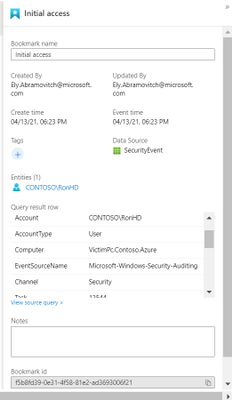
Now in public preview, we are redesigning the Azure Sentinel full incident page to display the alerts and bookmarks that are part of the incident in a chronological order. As more alerts are added to the incident, and as more bookmarks are added by analysts, the timeline will update to reflect the information known on the incidents.


Ely_Abramovitch_0-1618223843483.png


For each alert and bookmark, a side panel will be displayed to show details such as the entities involved, the status, the MITRE tactics used, custom details defined and many other details. Having these details available without further navigation can help with incident trigate and can reduce the overall investigation time.


Ely_Abramovitch_0-1618327531606.png              Ely_Abramovitch_1-1618327559153.png


We plan to extend this offering by adding additional elements to the timeline such as anomalies or activities and including elements from the incident response world such as analyst or automation actions. We will appreciate your feedback as to what will help with you procceses.


For further reading:


Discover cloud storage solutions at Azure Storage Day on April 29, 2021

Discover cloud storage solutions at Azure Storage Day on April 29, 2021

This article is contributed. See the original author and article here.

Guest post from the Azure Storage team


foo.png


We are excited to announce Azure Storage Day, a free digital event on April 29, 2021, where you can explore cloud storage solutions for all your enterprise workloads. Join us to:


  • Understand cloud storage trends and innovations—and plan for the future.

  • Map Azure Storage solutions to your different enterprise workloads.

  • See demos of Azure disk, object, and file storage services.

  • Learn how to optimize your migration with best practices.

  • Find out how real customers are accelerating their cloud adoption with Azure Storage.

  • Get answers to your storage questions from product experts.


This digital event is your opportunity to engage with the cloud storage community, see Azure Storage solutions in action, and discover how to build a foundation for all of your enterprise workloads at every stage of your digital transformation.
The need for reliable cloud storage has never been greater. More companies are investing in digital transformation to become more resilient and agile in order to better serve their customers. The rapid pace of digital transformation has resulted in exponential data growth, driving up demand for dependable and scalable cloud data storage services.


Register here.


Hope to see you there!


– Azure Storage Marketing Team


foo2.png

Don't open your door to grandparent scams

Don't open your door to grandparent scams

This article was originally posted by the FTC. See the original article here.

When it comes to scammers, nothing is sacred — including the bond between grandparent and grandchild. Lately, grandparent scammers have gotten bolder: they might even come to your door to collect money, supposedly for your grandchild in distress.

These kinds of scams still start with a call from someone pretending to be your grandchild. They might speak softly or make an excuse for why they sound different. They’ll say they’re in trouble, need bail, or need money for some reason. The “grandkid” will also beg you to keep this a secret — maybe they’re “under a gag order,” or they don’t want their parents to know. Sometimes, they might put another scammer on the line who pretends to be a lawyer needing money to represent the grandchild in court.

But, instead of asking you to buy gift cards or wire money (both signs of a scam), the scammer tells you someone will come to your door to pick up cash. Once you hand it over, your money is gone. But you might get more calls to send money by wire transfer or through the mail.

To avoid these scams and protect your personal information:

  • Take a breath and resist the pressure to pay. Get off the phone and call or text the person who (supposedly) called. If you can’t reach them, check with a family member to get the real story. Even though the scammer said not to.
  • Don’t give your address, personal information, or cash to anyone who contacts you. And anyone who asks you to pay by gift card or money transfer is a scammer. Always.
  • Check your social media privacy settings and limit what you share publicly. Even if your settings are on private, be careful about what personal identifiers you put out on social media.

If you lost money to this kind of scam, it was a crime, so file a report with local law enforcement. And if you get any kind of scam call, report it at ReportFraud.ftc.gov.

Telephone scammer calling a grandparent posing as a grandchild with play button indicating video

Brought to you by Dr. Ware, Microsoft Office 365 Silver Partner, Charleston SC.

The latest in Group Policy settings parity in Mobile Device Management

The latest in Group Policy settings parity in Mobile Device Management

This article is contributed. See the original author and article here.

By Go Komatsu – Sr. Program Manager | Windows and Aasawari Navathe, Program Manager II | Microsoft Endpoint Manager


Many organizations are looking to manage their endpoints via modern management to support the growing remote workforce and remove the need for on-premises connectivity. Years ago, the industry was starting to standardize on mobile management for endpoint management (through the Mobile Device Management (MDM) policy delivery channel). For Windows, it began standardizing with Windows Phone. At that time, it didn’t make sense to move over all Group Policy settings into modern management (via MDM). This resulted in an initial gap in management capabilities on MDM. Over time, with new Windows releases, we’ve continued to add more settings to MDM, but there were still some gaps that resulted in blocking customer migrations to modern management. Filling this long tail of MDM settings parity drove the need to focus on improvements to provide the best experience for customers.


Microsoft heard that customer feedback on MDM settings availability. Over the past year, both Windows and Microsoft Endpoint Manager – Intune teams were laser focused in closing that gap. If you are in the Windows Insider program, you may have noticed since H2 CY2020, new settings have become available in the Policy Configuration Service Provider (CSP) that were previously never available to customers in MDM. This was an intensive effort between several Windows component teams all trying to make sure that admins no longer considered setting availability in MDM as a blocker to move to modern management.


Over the past year, we also released Group Policy analytics in public preview. It is a tool and feature in Intune that analyzes your on-premises group policy objects (GPOs). It helps you determine how GPO settings translate to the cloud. The output shows which settings are supported by MDM providers, deprecated settings, or settings not available to MDM providers. There’s also the capability to directly migrate to a profile with those MDM settings in Endpoint Manager. Group Policy analytics also lists the settings and categories as they would be named when you make your eventual Device Configuration policy in MDM.


With the March, 2103 release of Microsoft Endpoint Manager and coming soon (expected), in the April, 2104 release of Intune, you will find:


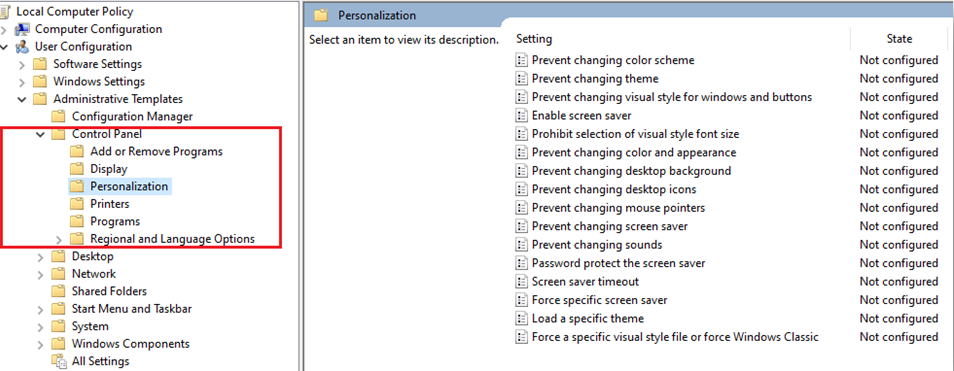
  1. The device configuration settings catalog has been updated to list thousands of settings that previously were not available for configuration via MDM (Figure 1). You will see these as being marked as available for Windows Insiders only. These include settings from Windows components like Control Panel (Figure 2), which are critical for security and desktop standardization.


Figure 1: Device configuration settings catalogFigure 1: Device configuration settings catalog


Figure 2: Control PanelFigure 2: Control Panel


2. The Group Policy analytics (preview) tool has been updated so that when you now go through the import process of your Group Policy object (GPO), the MDM Support column will reflect the newly available settings.


computer_2_aasawari.png


Call to action: If you want to try out these new settings, you can target any devices on a Windows Insiders build (Build 21343 or later).


Further, you can also import your GPO into the Group Policy analytics tool for the latest data in the MDM Support column.


Feedback
You can provide feedback on Group Policy analytics when you select Got feedback. To get information on the customer experience, the feedback is aggregated, and sent to Microsoft. Entering an email is optional, and may be used to get more information.


Upcoming milestones
The next key milestone will be a backport of these settings to in-market Windows versions. This will result in settings availability on Windows 10 2004 and newer releases. The estimated timeline for this backport will be H2 CY2021.


Learn more
https://aka.ms/gpanalyticsdocs 
Policy CSP – Windows Client Management | Microsoft Docs


Let us know if you have any questions by replying to this post or reaching out to @IntuneSuppTeam on Twitter.

Released: April 2021 Exchange Server Security Updates

Released: April 2021 Exchange Server Security Updates

This article is contributed. See the original author and article here.

Microsoft has released security updates for vulnerabilities found in:


  • Exchange Server 2013

  • Exchange Server 2016

  • Exchange Server 2019


These updates are available for the following specific builds of Exchange Server:


IMPORTANT: If manually installing security updates, you must install .msp from elevated command prompt (see Known Issues in update KB article).


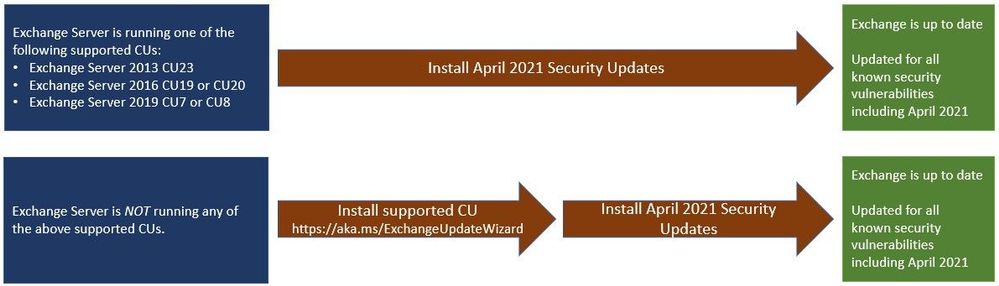
  • Exchange Server 2013 CU23

  • Exchange Server 2016 CU19 and CU20

  • Exchange Server 2019 CU8 and CU9


Vulnerabilities addressed in the April 2021 security updates were responsibly reported to Microsoft by a security partner. Although we are not aware of any active exploits in the wild, our recommendation is to install these updates immediately to protect your environment.


These vulnerabilities affect Microsoft Exchange Server. Exchange Online customers are already protected and do not need to take any action.


For additional information, please see the Microsoft Security Response Center (MSRC) blog. More details about specific CVEs can be found in Security Update Guide (filter on Exchange Server under Product Family).


Two update paths are:


ExApril21SU01.jpg


Inventory your Exchange Servers


Use the Exchange Server Health Checker script, which can be downloaded from GitHub (use the latest release), to inventory your servers. Running this script will tell you if any of your Exchange Servers are behind on updates (CUs and SUs).


Update to the latest Cumulative Update


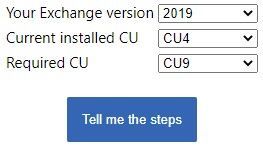
Go to https://aka.ms/ExchangeUpdateWizard and choose your currently running CU and your target CU. Then click the “Tell me the steps” button, to get directions for your environment.


ExApril21SU02.jpg


If you encounter errors during or after installation of Exchange Server updates


Make sure to follow the ExchangeUpdateWizard instructions and best practices for installation of updates carefully, including when to install using elevated command prompt. If you encounter errors during or after installation, see Repair failed installations of Exchange Cumulative and Security updates.


FAQs


My organization is in Hybrid mode with Exchange Online. Do I need to do anything?
While Exchange Online customers are already protected, the April 2021 security updates do need to be applied to your on-premises Exchange Server, even if it is used only for management purposes. You do not need to re-run the Hybrid Configuration Wizard (HCW) after applying updates.


Do the April 2021 security updates contain the March 2021 security updates for Exchange Server?
Yes, our security updates are cumulative. Customers who installed the March 2021 security updates for supported CUs can install the April 2021 security updates and be protected against the vulnerabilities that were disclosed during both months. If you are installing an update manually, do not double-click on the .msp file, but instead run the install from an elevated CMD prompt.


Is Microsoft planning to release April 2021 security updates for older (unsupported) versions of Exchange CUs?
No, we have no plans to release the April 2021 security updates for older or unsupported CUs. In March, we took unprecedented steps and released SUs for unsupported CUs because there were active exploits in the wild. You should update your Exchange Servers to supported CUs and then install the SUs. There are 47 unsupported CUs for the affected versions of Exchange Server, and it is not sustainable to release updates for all of them. We strongly recommend that you keep your environments current.


Can we use March 2021 mitigation scripts (like EOMT) as a temporary solution?
The vulnerabilities fixed in the April 2021 updates are different from those we fixed before. Therefore, running March 2021 security tools and scripts will not mitigate the vulnerabilities fixed in April 2021. You should update your servers as soon as possible.


Do I need to install the updates on ‘Exchange Management Tools only’ workstations?
Servers or workstations running only Microsoft Exchange Management Tools (no Exchange services) do not need to apply these updates.


Why are there security updates two months in a row?
Microsoft regularly releases Exchange Server security updates on ‘patch Tuesday’. We are always looking for ways to make Exchange Server more secure. You should expect us to continue releasing updates for Exchange Server in the future. The best way to be prepared for new updates is to keep your environment current.


Is there no update for Exchange Server 2010?
No, Exchange 2010 is not affected by the vulnerabilities fixed in the April 2021 security updates.


Is there a specific order of installation for the April 2021 security updates?
We recommend that you update all on-premises Exchange Servers with the April 2021 security updates using your usual update process.


NOTE: This post might receive future updates; they will be listed here (if available).


The Exchange Team