by Contributed | Apr 20, 2021 | Technology
This article is contributed. See the original author and article here.
While back-to-back meetings have become a hallmark of the pandemic era, our recent research proves that even small breaks between meetings can have a positive impact on our stress levels and our ability to focus and engage in meetings.
New settings in Microsoft Outlook make it easy to automatically carve out these essential breaks between back-to-backs – and because we know that one size does not fit all, companies have two options.
- This past summer we released settings that allow individuals to set scheduling defaults that automatically shorten meetings they schedule.
- And based on our research and customer feedback, today we are releasing an additional new setting that allows our commercial customers to set organization-wide scheduling defaults that shorten meetings and create space for breaks for everyone at a company.
The organization-wide setting can be deployed by company administrators using PowerShell.
Administrators can set the meetings in their organization to start late or end early automatically, determining if the break happens at the beginning or end of meetings. From there, a company can also apply different settings to different meeting lengths – 60 minutes and over or under 60 minutes. For example, you can make all meetings under 60 minutes start late with a five minute break and all meetings 60 minutes or over start late with a 10-minute break.
Because we know flexibility is important, once the setting is deployed at the organization level, it is easy for individuals to adjust the setting for their needs – for individual meetings, or all meetings they schedule – by following these instructions.
How does it work?
Once the PowerShell cmdlet has been enabled, the following will happen:
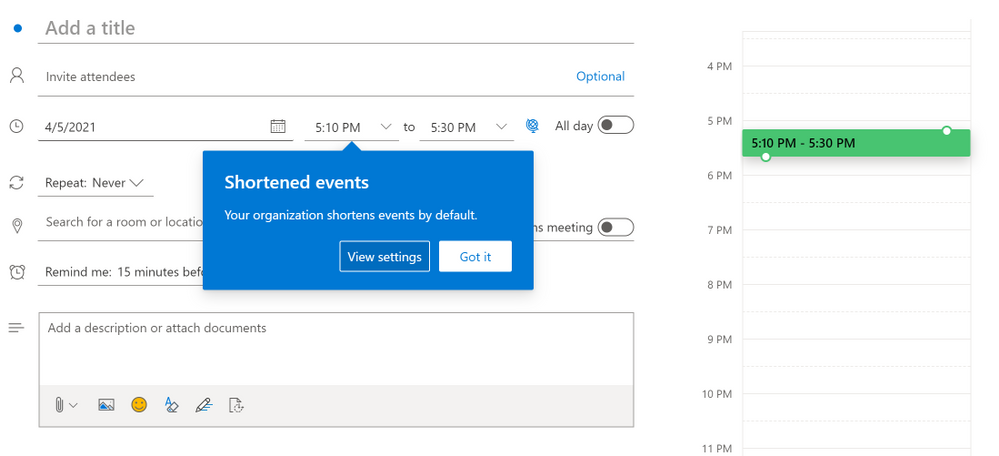
- Individuals in the organization will see their meeting length reduced when creating an event in Outlook.
- If a user has already created an individual setup at any point, the company-wide policy will not apply to them.
- For now, Outlook on the web will notify users that their organization has implemented a change in their meeting length
Outlook on the web users will see an in-app notification of the change
- The notification will come later to other Outlook clients and users will see it then
- If users have created an individual setup, they will not see the notification – since the change does not apply to them
- All Outlook clients in their latest version will respect the setting but for now only Outlook on the web will show the in-app notification of the change. For the most updated information on which versions respect the settings, read this article.
- Meetings scheduled from Microsoft Teams will not respect this setting at this time, but shortened events created in Outlook will show up in the Teams calendar with the shortened length. The capability will be coming to meetings scheduled from Teams in the future.
- We know that even in the same organization, teams and individuals have different needs so users can change their meeting length at any point and override the company setting by following the instructions in Make all your events shorter automatically – Office Support (microsoft.com)
How do I enable this?
For our main Microsoft Exchange Online PowerShell documentation, please go here. You can also follow the instructions below.
Admins can set the default settings for shortened events using Set-OrganizationConfig.
- [-ShortenEventScopeDefault <String | Uint32>]
The ShortenEventScopeDefault parameter specifies whether events start late or end early.
Possible values:
- None | 0: shortened events is OFF (i.e. unchecked in the UX) – This is the default value
- EndEarly | 1: end early
- StartLate | 2: start late
- [-DefaultMinutesToReduceShortEventsBy <Uint32>] – optional
The DefaultMinutesToReduceShortEventsBy parameter specifies the number of minutes to shorten events under 60-minutes long.
Possible values: 0-29.
Default value: 5.
This parameter cannot be set without the ShortenEventScopeDefault parameter.
- [-DefaultMinutesToReduceLongEventsBy <Uint32>] – optional
The DefaultMinutesToReduceLongEventsBy parameter specifies the number of minutes to shorten events that are 60-minutes or longer.
Possible values: 0-29.
Default value: 10.
This parameter cannot be set without the ShortenEventScopeDefault parameter.
Examples:
- (valid) All users in the organization start 5/10min late:
Set-OrganizationConfig -ShortenEventScopeDefault 2 (this uses the default length)
- (valid) All users in the organization have short (under 60 minutes) and long (60-minutes or longer) events start 5-min late:
Set-OrganizationConfig -ShortenEventScopeDefault 2 -DefaultMinutesToReduceLongEventsBy 5
- (invalid) All users in the tenant have events start 5 min late.
Set-OrganizationConfig -DefaultMinutesToReduceLongEventsBy 5 Invalid. Missing ShortenEventScopeDefault.
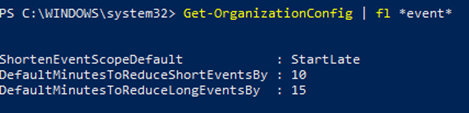
Note: Admins can see the current value of the settings using Get-OrganizationConfig cmdlet.
As always, your feedback helps us prioritize our work and understand better how we can help you, so stop by our UserVoice channel and share your ideas.
Thanks!
Gabriel

by Contributed | Apr 20, 2021 | Business, Microsoft 365, Microsoft Teams, Outlook, Technology
This article is contributed. See the original author and article here.
One thing is certain: hybrid work is the future of work. People want increased flexibility and a blended work model that grants them the freedom to work when and where it’s most comfortable for them. Hybrid work can deliver a future that people want and a future that I think will be better—but that doesn’t…
The post Research shows your brain needs breaks—Outlook and Microsoft Teams can help appeared first on Microsoft 365 Blog.
Brought to you by Dr. Ware, Microsoft Office 365 Silver Partner, Charleston SC.

by Contributed | Apr 20, 2021 | Technology
This article is contributed. See the original author and article here.
This series highlights Microsoft Learn Student Ambassadors who achieved the Gold milestone and have recently graduated from university. Each blog features a different student and highlights their accomplishments, their experience with the Student Ambassadors community, and what they’re up to now.
Today we’d like to introduce Sabiha Shaik, who is from the United Arab Emirates and graduated last September from the Birla Institute of Technology and Science Pilani, Dubai Campus.
Responses have been edited for clarity and length.
When you became a Student Ambassador in the Fall of 2018, did you have any specific goals you wanted to reach, like attain a skill or work on a particular quality? What were they, and did being a Student Ambassador help you achieve them?
I wanted to form connections with others who are as passionate about technology as I was, learn about upcoming technologies, and have an opportunity to reach as many people as possible and create a greater impact in my local community. Through the program, I was able to achieve all the above and so much more.
I was able to learn more about two specific areas I wanted to develop myself in–digital accessibility and mobile and web development. Attending weekly office hours, asking questions to Cloud Advocates, and participating in topic-specific hackathons all really helped me push my technical knowledge further. With the resources available to improve soft skills and interacting with other Student Ambassadors, I was able to increase the impact in my community by growing attendance at events.
I met many Student Ambassadors and was able to collaborate with a few along with a Microsoft Most Valuable Professional to start the MSInspir YouTube Channel. Since the channel started in Aug 2019, it has gained 41,789 views and a subscriber count of 1.59K. It includes 114 videos to date consisting of workshops, interviews, podcasts, and quick tips on all aspects related to technology.
Overall, the program was exactly what I needed as a student. It offered me a supportive community where I could be myself, thrive, and work towards building something that was much greater than myself. This community has had a tremendous impact on me, especially during university because I felt a bit left out as I couldn’t find others who were as passionate or interested in technology as I was. This community gave me a chance to not only develop technical skills and soft skills but also have connections to cherish even after leaving the program.
You’ve mentioned some of your accomplishments, but what was one of the accomplishments that you’re proudest of?
If I had to pick one, it would be speaking at the Student Zone of Microsoft Build 2020 about Microsoft MakeCode Arcade, where I gave a hands-on tutorial introducing programming concepts while creating a simple sprite-based game. Being able to interact and speak to an audience consisting of a mix of young students and new and experienced programmers who were looking to getting started creating games with block coding was truly an amazing experience. Session evaluations showed that 77% of the attendees learned new skills, and 88% were likely to use the skills discussed. It was amazing to learn that the session had such a huge impact, one that I was aiming to create when I joined the program. The session recording was later uploaded to YouTube where it was able to reach many more youths interested in getting started with programming, games, and block coding.
You graduated several months ago. What have you been up to since then?
I joined as a Junior Developer at the Chalhoub Group, the leading partner for luxury across the Middle East for over 60 years. I’m helping to develop the internal learning experience platform that employees use to learn everything from retail, leadership, digital and enabling artsthrough interactive interactions and experiences using code!
I still plan to continue conducting sessions and give back to the community during my free time.
If you could redo your time in the program, is there anything you would have done differently?
I don’t think there is a lot I would have done differently as my time in the program was filled with so many opportunities that I got to experience. I would probably have been a bit more confident and assured that what I’m doing is on the right track and do the thing, no matter how scary it might seem at first!
If you were to describe the Student Ambassadors community to a student who is considering joining, what would you say to convince them to join?
Imagine waking up every day knowing there is a community of people you can share your ideas with, collaborate with and leave a lasting impact on the world. That’s the Student Ambassadors program. The opportunities in the program are endless – you get to develop your soft skills, event organization skills, and marketing skills on top of technical skills, and you get to expand your network. It’s a program that provides you a perfect blend of everything you might want to experience as a student.
And what advice would you give to new Student Ambassadors?
You’ll get as much out of the program as much work as you put in it. Seek as many experiences as you can in the program. Any given week there are plenty of things that are happening in the Student Ambassador community. Be active in the program.
Set goals and milestones for yourself in the program and think of how you can work on it by thinking of specific things you can do in the Student Ambassador community to achieve them.
Reach out to others in the program to learn from them and experiment with their tips for your local community. It’s not often that you have access to such a huge network of students from all across the world!
Finally, remember that it’s all about giving back and being proud of what you’ve accomplished, even if it’s just making that difference for one person in your community.
Do you have a motto in life, a guiding principle that drives you?
Do one thing every day (or week) that scares you! Growth comes from new challenges, and one way to ensure you keep growing is to keep doing things outside your comfort zone.
Lastly, on a lighter note, can you share one random fun fact about you that not many people know?
I enjoy art and painting in my leisure time, specifically sketching and acrylic painting. I was a part of the graphic design club at university where I designed posters for various events.
Thank you, Sabiha, and good luck to you in all your future endeavors! Learn more about the Student Ambassadors community and start your own journey today.
by Scott Muniz | Apr 20, 2021 | Security, Technology
This article is contributed. See the original author and article here.
VMware has released a security update to address a vulnerability affecting NSX-T. An attacker can exploit this vulnerability to take control of an affected system
CISA encourages users and administrators to review VMSA-2021-0006 and apply the necessary update and workaround.
by Contributed | Apr 20, 2021 | Technology
This article is contributed. See the original author and article here.
The small island of Malta is about to become much bigger: April 24 is set to see scores of speakers and tech enthusiasts meet digitally for the country’s first-ever Data Saturday.
This Saturday’s event is scheduled to host the best speakers and technical sessions about Microsoft Data Platform available for free to the entire world.
The Maltese edition of Data Saturday, the larger event which enables the data community to run small regional events with little outlay or set-up difficulties, is made especially by the tech community for the tech community.
Co-organized by Data Platform MVP and Malta Microsoft Data Platform User Group member Dennes Torres, all speakers and organizers are volunteers, who expect to stay awake until late in the night to prepare an unforgettable learning experience.
Viewers, meanwhile, will play a part in deciding the conference itself: they will vote for the speakers and sessions.
For more information, visit the Meetup and Facebook pages.
by Scott Muniz | Apr 20, 2021 | Security, Technology
This article is contributed. See the original author and article here.
Mozilla has released security updates to address vulnerabilities in Firefox, Firefox ESR, and Thunderbird. An attacker can exploit some of these vulnerabilities to take control of an affected system.
CISA encourages users and administrators to review the Mozilla Security Advisories for Firefox 88, Firefox ESR 78.10, and Thunderbird 78.10, and apply the necessary updates.
by Contributed | Apr 20, 2021 | Technology
This article is contributed. See the original author and article here.
Numerous Government agencies make Healthcare Open Data available to the public at no cost. Data from the CDC, CMS, FDA, World Bank, US Census, USDA and many others provide rich sources of valuable data. These vast sources of robust and useful data are free to use but can have different file formats, different table structures, different context, and different data granularities. Ingesting all of this data into a common place where it can be used and shared is often time-consuming and challenging. I’ve put together a repository in GitHub called Power Pop Health to help with these challenges.
Power Pop Health is a collection of content intended to simplify the process of ingesting and prepping Healthcare Open Data for Analytics, Business Intelligence, Data Science, and more. Power Pop Health has a simple mission: Make it easy for you to ingest, transform and format Healthcare Open Data and common reference tables so that you can achieve more. The GitHub repository can be viewed at this link.
How does Power Pop Health work? I’ve tried to make it simple with low code/no code/no PowerShell deployment so that anyone can use it with nothing more than an Azure subscription and Power BI. Where code is necessary, there are cut-and-paste scripts with tutorial videos for the deployment:
- Step 1 – Ingest Raw Data into an Azure Data Lake
- Step 2 – Make the Data usable in Azure and/or Power BI
- Step 3 – You take it from here! The data is ready to blend with your Organizational data, use for training, create demos, analyze to find trends, etc.
What data is currently available in the first release of Power Pop Health?
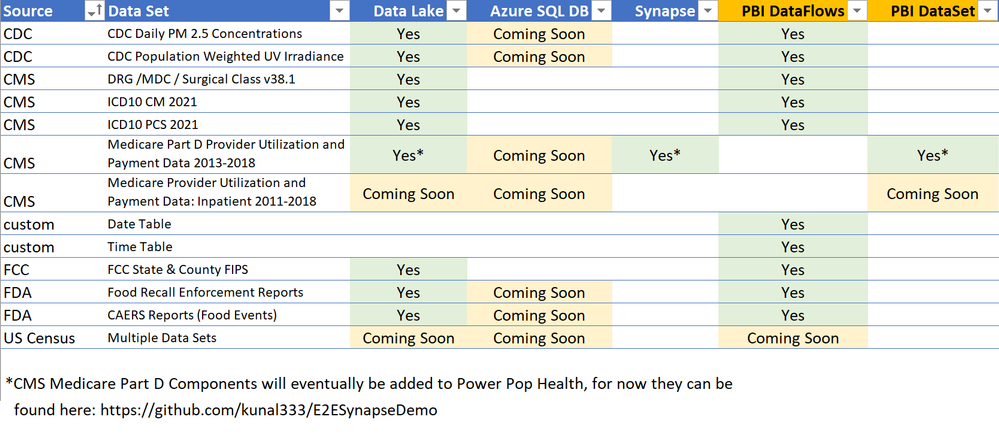
Over the last few years I have accumulated examples and tutorials that leverage public Healthcare data. This first release is a repository to share those examples in a unified format, and in one place. Future additions to this repository will be based on feedback from the community, with an initial plan to focus primarily on Population Health data such as Social Determinants of Health. Below is a chart of the data available in this first release:
Here’s a quick summary of each data set in the initial release. Before using these data sources, I’d also recommend reading the licensing terms from the data providers to ensure that you are using the data appropriately:
1. CDC Daily PM 2.5 Concentrations – Air Quality measurements at the level of States and Counties for 2001-2016.
2. CDC Population Weighted UV Irradiance – Ultraviolet Radiation measurements at the level of States and Counties for 2004-2015.
3. CMS DRG /MDC / Surgical Class v38.1 – Diagnoses Related Groups (DRGs), Major Diagnostic Categories, and Surgical Class version 38.1.
4. CMS ICD10 CM 2021 – 2021 ICD10 CM Diagnosis codes for the US.
5. CMS ICD10 PCS 2021 – 2021 ICD10 PCS Procedural codes for the US.
6. Date Table (DataFlows) – A custom Date Table that can be deployed to Power BI DataFlows.
7. Date Table (Power Query) – A custom Date Table that can be deployed to Power BI Power Query.
8. Time Table – (DataFlows) – A custom Time Table that can be deployed to Power BI DataFlows.
9. Time Table (Power Query) – A custom Time Table that can be deployed to Power BI Power Query.
10. FCC State & County FIPS – A reference table for State and County FIPS geographical mapping codes provided by the FCC.
11. FDA Food Recall Enforcement Reports – Foods that have been recalled.
12. FDA CAERS Reports (Food Events) – Adverse events attributed to Foods.
13. Medicare Part D Provider Utilization and Payment Data 2013-2018 – I’ll have this data available in the next release, but for now it is available in an end-to-end Azure Synapse and Power BI solution at this link: https://github.com/kunal333/E2ESynapseDemo
What’s coming next in Power Pop Health?
I’ll change the roadmap based upon feedback, popularity of data sources, and updates to Azure and Power BI. Tentatively the plan is to roll out three phases:
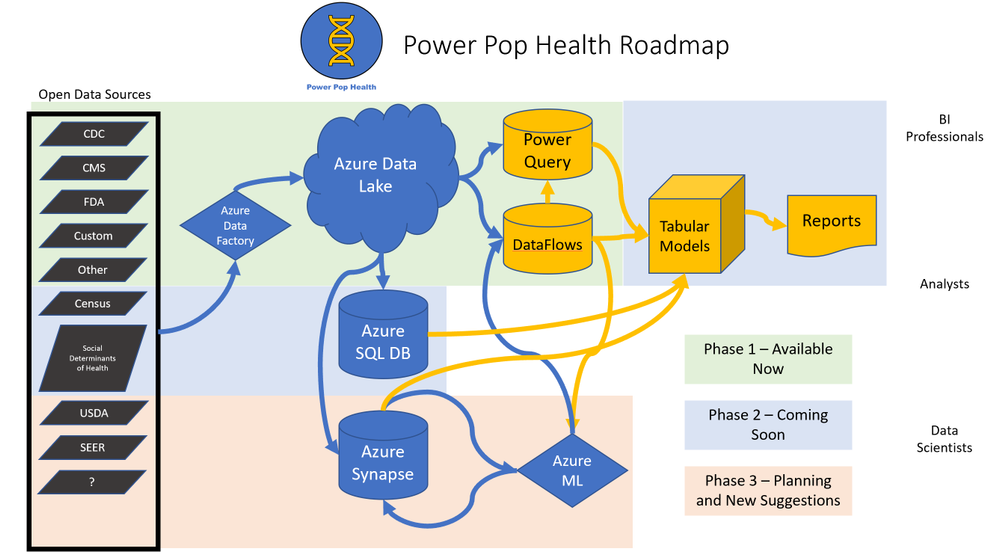
- Current Phase – Roll out a framework for ingesting several sources of healthcare, population health, reference tables and other Open Data into Azure Data Lake and Power BI DataFlows/Power Query.
- Phase 2 – Add additional data sources. Introduce an Azure SQL DB layer where larger tables of data can be curated and queried for high performance. Also add some Power BI PBIX files with examples of data visualization.
- Phase 3 and Beyond – Add additional data sources. Introduce an Azure Synapse layer including Azure ML.
How can you get started?
Read the landing page on the GitHub site at this link, and follow the instructions in the videos at the bottom of that page. Each source of Healthcare Open Data also has a folder containing specific instructions with links to videos describing how to deploy those datasets.
Suggestions and Questions
This launch is the first time I’m sharing the Power Pop Health content for feedback, so please pass along suggestions that can help make this repository better and more useful. Are there different data sets that would offer value? Would additional data transformations into other formats be helpful? Please direct suggestions and questions to my LinkedIn or Twitter accounts:
LinkedIn: https://www.linkedin.com/in/gregbeaumont
Twitter: https://www.twitter.com/grbeaumont
by Scott Muniz | Apr 20, 2021 | Security
This article was originally posted by the FTC. See the original article here.
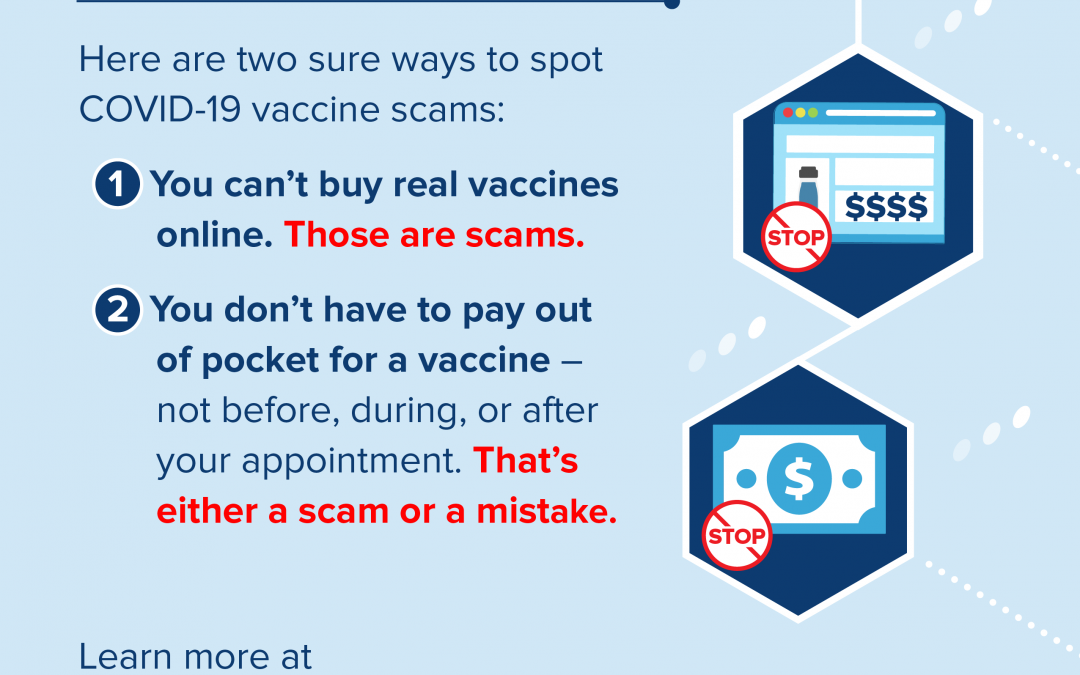
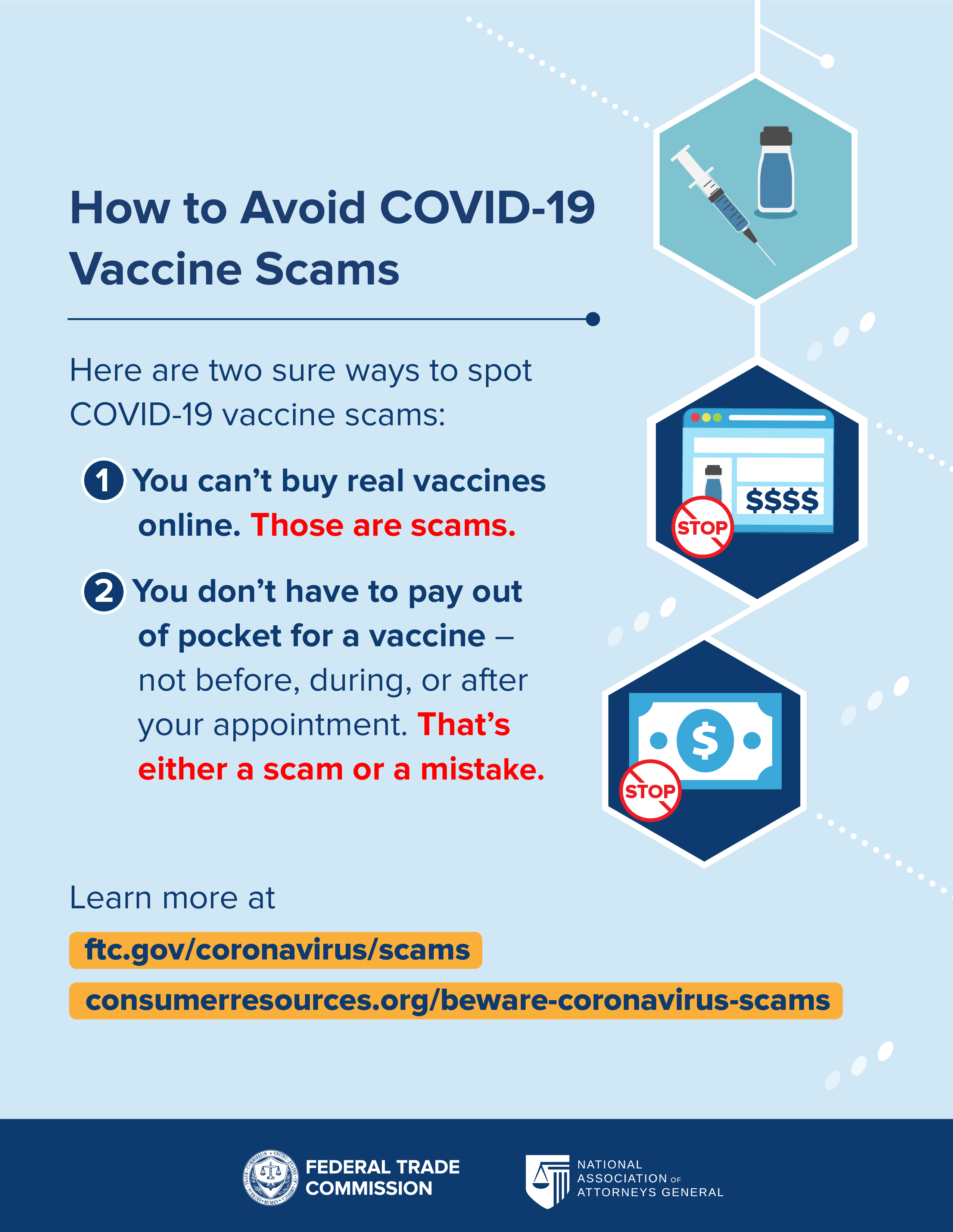
Scammers are doubling down on their efforts to scam people out of their money and personal information. That’s why the FTC and the National Association of Attorneys General (NAAG) are teaming up to remind you: No matter what anyone tells you, you can’t buy COVID-19 vaccines online and there’s no out-of-pocket cost to get the shots.
Here are some ways to avoid a vaccine-related scam:
- Ignore online ads, social media posts, or phone calls from people offering to sell you the COVID-19 vaccine. You can’t buy it — anywhere. The vaccine is only available at federal- and state-approved locations.
- Don’t pay to sign up for the vaccine. Anyone who asks for a payment to put you on a list, make an appointment for you, or reserve a spot in line is a scammer.
- Don’t pay out of pocket for a vaccine — not before, during, or after your appointment. That’s either a scam or a mistake. If you’re insured, the vaccination site might bill your insurance company for an administration fee. If you’re not insured, there’s a fund set up with the Health Resources & Services Administration (HRSA — part of U.S. Department of Health and Human Services) where sites can recover their administrative costs. Either way, though, they’re not supposed to bill you or charge a co-pay.
- Never share your personal, financial, or health information with people you don’t know. No one from a vaccine distribution site, health care provider’s office, pharmacy, or health care payer, like a private insurance company or Medicare, will call, text, or email you asking for your credit card or bank account number to sign you up to get the vaccine. And remember, you’re not required to give your Social Security number to a vaccination site. You shouldn’t be turned away.
- Contact a trusted source for information. Check with state or local health departments to learn when and how to get the COVID-19 vaccine. You can also talk with your health care provider or pharmacist.
- Don’t post your vaccination card to your social media account. Your vaccination card has information on it including your full name, date of birth, where you got your vaccine, and the dates you got it. When you post it to Facebook, Instagram, or to some other social media platform, you may be handing valuable information over to someone who could use it for identity theft.
Please share these tips with others, and stay connected to stay informed. Subscribe to consumer alerts from the FTC to get updates delivered right to your email inbox.
If you know about a COVID-19 vaccine scam, tell the FTC about it at ReportFraud.ftc.gov. Or, file a complaint with your state or territory attorney general through consumerresources.org, the consumer website of the National Association of Attorneys General.
Brought to you by Dr. Ware, Microsoft Office 365 Silver Partner, Charleston SC.
by Contributed | Apr 20, 2021 | Technology
This article is contributed. See the original author and article here.
Final Update: Tuesday, 20 April 2021 10:39 UTC
We’ve confirmed that all systems are back to normal with no customer impact as of 04/20, 10:00 UTC. Our logs show the incident started on 04/20, 09:25 UTC and that during the 35 minutes that it took to resolve the issue some customers may have experienced data access issue and delayed or missed Log Search Alerts in West Europe region.
- Root Cause: The failure was due to one of our dependent service.
- Incident Timeline: 35 minutes – 04/20, 09:25 UTC through 04/20, 10:00 UTC
We understand that customers rely on Azure Log Analytics as a critical service and apologize for any impact this incident caused.
-Vyom
Initial Update: Tuesday, 20 April 2021 10:09 UTC
We are aware of issues within Log Analytics and are actively investigating. Some customers may experience data access issue and delayed or missed Log Search Alerts in West Europe region.
- Work Around: None
- Next Update: Before 04/20 13:30 UTC
We are working hard to resolve this issue and apologize for any inconvenience.
-Vyom
by Contributed | Apr 20, 2021 | Technology
This article is contributed. See the original author and article here.
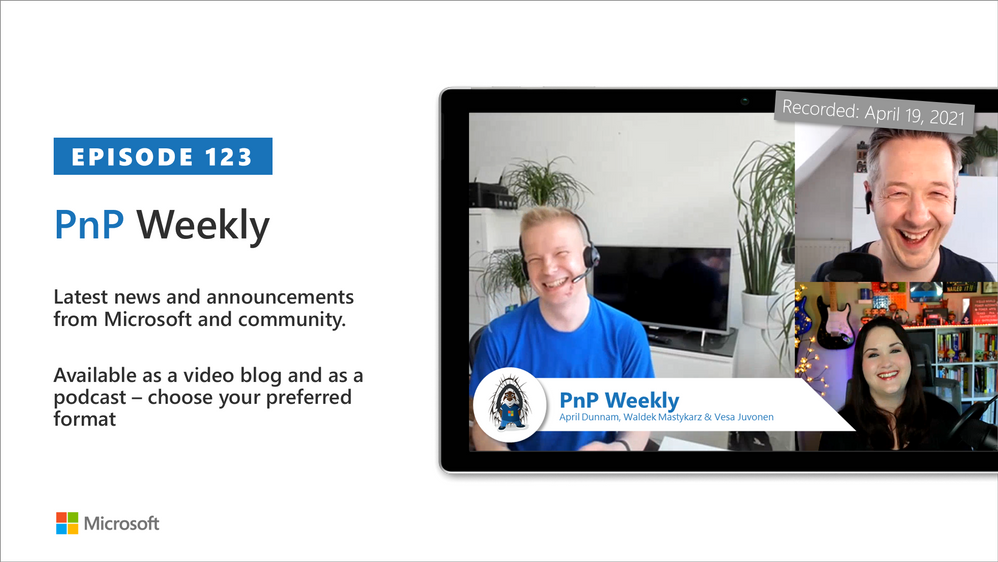
In this installment of the weekly discussion revolving around the latest news and topics on Microsoft 365, hosts – Vesa Juvonen (Microsoft) | @vesajuvonen, Waldek Mastykarz (Microsoft) | @waldekm are joined by a Power Platform Cloud Advocate April Dunnam (Microsoft) | @aprildunnam
Topics discussed in this session include:
- April’s currently role and focus areas as a Cloud Advocate
- Her experiences while starting her career in IT with her role models being for example Cathy Dew (Microsoft) and Laura Rodgers (IW Mentor)
- Discussion on the inclusiveness of the IT industry and in community efforts – we want everyone to feel welcome on getting involved!
- How to get started in the community – steps on getting involved in the community and growing your opportunities with the routes
- Power Platform and the different flavors of it – no-code, low-code, pro-code and more
Please remember to keep on providing us feedback on how we can help on this journey. We always welcome feedback on making the community more inclusive and diverse.
Covering also 24 articles from Microsoft and the Community.
This episode was recorded on Monday, April 19, 2021.
These videos and podcasts are published each week and are intended to be roughly 45 – 60 minutes in length. Please do give us feedback on this video and podcast series and also do let us know if you have done something cool/useful so that we can cover that in the next weekly summary! The easiest way to let us know is to share your work on Twitter and add the hashtag #PnPWeekly. We are always on the lookout for refreshingly new content. “Sharing is caring!”
Here are all the links and people mentioned in this recording. Thanks, everyone for your contributions to the community!
Events:
Microsoft articles:
Community articles:
Additional resources:
If you’d like to hear from a specific community member in an upcoming recording and/or have specific questions for Microsoft 365 engineering or visitors – please let us know. We will do our best to address your requests or questions.
“Sharing is caring!”


Recent Comments