
by Contributed | May 6, 2021 | Technology
This article is contributed. See the original author and article here.
2020 saw one of the biggest supply-chain attacks in the industry (so far) with no entity immune to its effects. Over 6 months later, organizations continue to struggle with the impact of the breach – hampered by the lack the visibility and/or the retention of that data to fully eradicate the threat.
Fast-forward to 2021, customers filled some of the visibility gap with tools like an endpoint detection and response (EDR) solution. Assuming all EDR tools are all equal (they’re not), organizations could move data into a SIEM solution to extend retention and reap the traditional rewards (i.e., correlation, workflow, etc.). While this would appear to be good on paper, the reality is that keeping data for long periods of time in the SIEM is expensive.
Are there other options? Pushing data to cold storage or cheap cloud containers/blobs is a possible remedy, however what supply chain attacks have shown us is that we need a way for data to be available for hunting – data stored using these methods often require data to be hydrated before it is usable (i.e., querying) which often comes at a high operational cost. This hydration may also come over with caveats, the most prevalent one being that restored data and current data often resides on different platforms, requiring queries/IP to be re-written.
In summary, the most ideal solution would:
- Retain data for an organization’s required length of time.
- Make hydration quick, simple, scalable, and/or, always online.
- Reduce or eliminate the need for IP (queries, investigations, …) to be recreated.
The solution
Azure Data Explorer (ADX) offers a scalable and cost-effective platform for security teams to build their hunting platforms on. There are many methods to bring data to ADX but this post will be focused be the event-hub which offers terrific scalability and speed. Data from Microsoft 365 Defender (M365D – security.microsoft.com), Microsoft’s XDR solution, more specifically data from the EDR, Microsoft Defender For Endpoint (MDE – securitycenter.windows.com) will be sent to ADX to solve the aforementioned problems.
Solution architecture:
Using Microsoft Defender For Endpoint’s streaming API to an event-hub and Azure Data Explorer, security teams can have limitless query access to their data.
Questions and considerations:
- Q: Should I go from Sentinel/Azure Monitor to the event-hub (continuous export) or do I go straight to the event hub from source?
A: Continuous export currently only supports up to 10 tables and carries a cost (TBD). Consider going directly to the event-hub
IF detection and correlations are not important (if they are, go to Azure Sentinel) and cost/operational mitigation is paramount.
- Q: Are all tables supported in continuous export?
A: Not yet. The list of supported tables can be found here.
- Q: How long do I need to retain information for? How big should I make the event-hub? + + +
A: There are numerous resources to understand how to size and scale. Navigating through this document will help you at least understand how to bring data in so sizing can be done with the most accurate numbers.
Prior to starting, here are several “variables” which will be referred to. To eliminate effort around recreating queries, keep the table names the same.
- Raw table for import: XDRRaw
- Mapping for raw data: XDRRawMapping
- Event-hub resource ID: <myEHRID>
- Event-Hub name: <myEHName>
- Table names to be created:
- DeviceRegistryEvents
- DeviceFileCertificateInfo
- DeviceEvents
- DeviceImageLoadEvents
- DeviceLogonEvents
- DeviceFileEvents
- DeviceNetworkInfo
- DeviceProcessEvents
- DeviceInfo
- DeviceNetworkEvents
Step 1: Create the Event-hub
For your initial event-hub, leverage the defaults and follow the basic configuration. Remember to create the event-hub and not just the namespace. Record the values as previously mentioned – Event–hub resource ID and event-hub name.
Step 2: Enable the Streaming API in XDR/Microsoft Defender for Endpoint to Send Data to the Event-hub
Using the previously noted event-hub resource ID and name and follow the documentation to get data into the event-hub. Verify the event-hub has been created in the event-hub namespace.
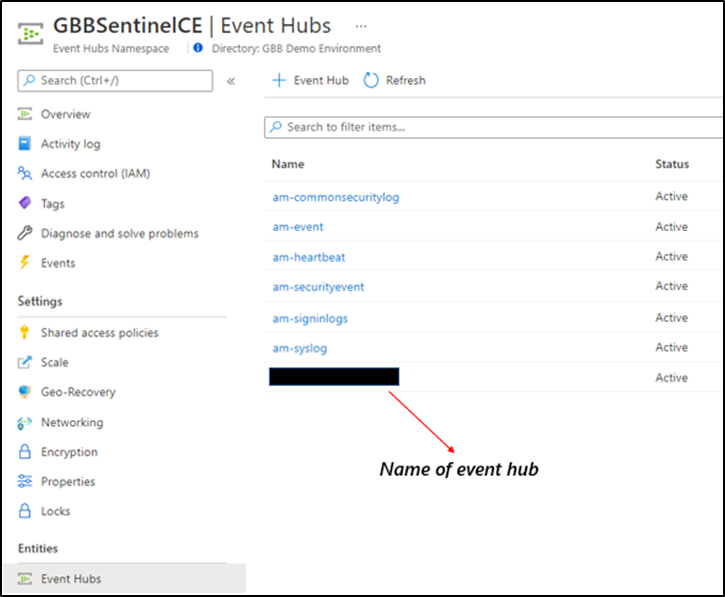 Create the event-hub namespace AND the event-hub. Record the resource ID of the namespace and name of the event-hub for use when creating the streaming API.
Step 3: Create the ADX Cluster
As with the event-hub, ADX clusters are very configurable after-the-fact and a guide is available for a simple configuration.
Step 4: Create a Data Connection to Microsoft Defender for Endpoint
Prior to creating the data connection, a staging table and mapping need to be configured. Navigate to the previously created database and select Query or from the cluster, select query, and make sure your database is highlighted.
Use the code below into the query area to create the RAW table with name XDRRaw:
//Create the staging table (use the above RAW table name)
.create table XDRRaw (Raw: dynamic)
The following will create the mapping with name XDRRawMapping:
//Pull the elements into the first column so we can parse them (use the above RAW Mapping Name)
.create table XDRRaw ingestion json mapping 'XDRRawMapping' '[{"column":"Raw","path":"$","datatype":"dynamic","transform":null}]'
With the RAW staging table and mapping function created, navigate to the database, and create a new data connection in the “Data Ingestion” setting under “Settings”. It should look as follows:
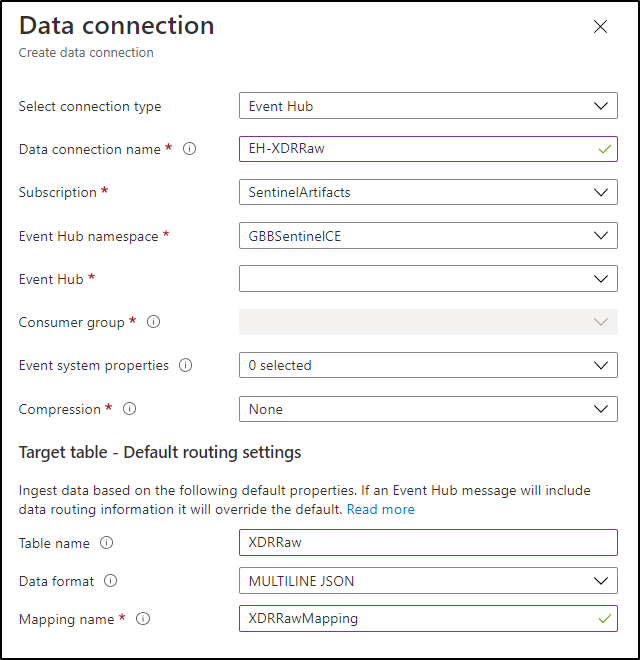 Create a data connection only after you have created the RAW table and the mapping.
NOTE: THE XDR/Microsoft Defender for Endpoint streaming API supplies multiple tables of data so using MULTILINE JSON is the data format.
If all permissions are correct, the data connection should create without issue… Congratulations! Query the RAW table to review the data sources coming in from the service with the following query:
//Here’s a list of the tables you’re going to have to migrate
XDRRaw
| mv-expand Raw.records
| project Properties=Raw_records.properties, Category=Raw_records.category
| summarize by tostring(Category)
NOTE: Be patient! ADX has a ingests in batches every 5 minutes (default) but can be configured lower however it is advised to keep the default value as lower values may result in increased latency. For more information about the batching policy, see IngestionBatching policy.
Step 4: Ingest Specified Tables
The Microsoft Defender for Endpoint data stream enables teams to pick one, some, or all tables to be exported. Copy and run the queries below (one at a time in each code block) based on which tables are being pushed to the event-hub.
DeviceEvents
//Create the parsing function
.create function with (docstring = "Filters data for Device Events for ingestion from XDRRaw", folder = "UpdatePolicies") XDRFilterDeviceEvents()
{
XDRRaw
 | mv-expand Raw.records
 | project Properties=Raw_records.properties, Category=Raw_records.category
 | where Category == "AdvancedHunting-DeviceEvents"
 | project
TenantId = tostring(Properties.TenantId),AccountDomain = tostring(Properties.AccountDomain),AccountName = tostring(Properties.AccountName),AccountSid = tostring(Properties.AccountSid),ActionType = tostring(Properties.ActionType),AdditionalFields = tostring(Properties.AdditionalFields),AppGuardContainerId = tostring(Properties.AppGuardContainerId),DeviceId = tostring(Properties.DeviceId),DeviceName = tostring(Properties.DeviceName),FileName = tostring(Properties.FileName),FileOriginIP = tostring(Properties.FileOriginIP),FileOriginUrl = tostring(Properties.FileOriginUrl),FolderPath = tostring(Properties.FolderPath),InitiatingProcessAccountDomain = tostring(Properties.InitiatingProcessAccountDomain),InitiatingProcessAccountName = tostring(Properties.InitiatingProcessAccountName),InitiatingProcessAccountObjectId = tostring(Properties.InitiatingProcessAccountObjectId),InitiatingProcessAccountSid = tostring(Properties.InitiatingProcessAccountSid),InitiatingProcessAccountUpn = tostring(Properties.InitiatingProcessAccountUpn),InitiatingProcessCommandLine = tostring(Properties.InitiatingProcessCommandLine),InitiatingProcessFileName = tostring(Properties.InitiatingProcessFileName),InitiatingProcessFolderPath = tostring(Properties.InitiatingProcessFolderPath),InitiatingProcessId = tostring(Properties.InitiatingProcessId),InitiatingProcessLogonId = tostring(Properties.InitiatingProcessLogonId),InitiatingProcessMD5 = tostring(Properties.InitiatingProcessMD5),InitiatingProcessParentFileName = tostring(Properties.InitiatingProcessParentFileName),InitiatingProcessParentId = tostring(Properties.InitiatingProcessParentId),InitiatingProcessSHA1 = tostring(Properties.InitiatingProcessSHA1),InitiatingProcessSHA256 = tostring(Properties.InitiatingProcessSHA256),LocalIP = tostring(Properties.LocalIP),LocalPort = tostring(Properties.LocalPort),LogonId = tostring(Properties.LogonId),MD5 = tostring(Properties.MD5),MachineGroup = tostring(Properties.MachineGroup),ProcessCommandLine = tostring(Properties.ProcessCommandLine),ProcessId = tostring(Properties.ProcessId),ProcessTokenElevation = tostring(Properties.ProcessTokenElevation),RegistryKey = tostring(Properties.RegistryKey),RegistryValueData = tostring(Properties.RegistryValueData),RegistryValueName = tostring(Properties.RegistryValueName),RemoteDeviceName = tostring(Properties.RemoteDeviceName),RemoteIP = tostring(Properties.RemoteIP),RemotePort = tostring(Properties.RemotePort),RemoteUrl = tostring(Properties.RemoteUrl),ReportId = tostring(Properties.ReportId),SHA1 = tostring(Properties.SHA1),SHA256 = tostring(Properties.SHA256),TimeGenerated = todatetime(Properties.Timestamp),Timestamp = todatetime(Properties.Timestamp),SourceSystem = tostring(Properties.SourceSystem),Type = tostring(Properties.Type), customerName = tostring(Properties.Customername)
}

//Create the table for DeviceEvents
.set-or-append DeviceEvents <| XDRFilterDeviceEvents()

//Set to autoupdate
.alter table DeviceEvents policy update
@'[{"IsEnabled": true, "Source": "XDRRaw", "Query": "XDRFilterDeviceEvents()", "IsTransactional": true, "PropagateIngestionProperties": true}]'
DeviceFileEvents
//Create the parsing function
.create function with (docstring = "Filters data for DeviceFileEvents for ingestion from XDRRaw", folder = "UpdatePolicies") XDRFilterDeviceFileEvents()
{
XDRRaw
 | mv-expand Raw.records
 | project Properties=Raw_records.properties, Category=Raw_records.category
 | where Category == "AdvancedHunting-DeviceFileEvents"
 | project
TenantId = tostring(Properties.TenantId),ActionType = tostring(Properties.ActionType),AdditionalFields = tostring(Properties.AdditionalFields),AppGuardContainerId = tostring(Properties.AppGuardContainerId),DeviceId = tostring(Properties.DeviceId),DeviceName = tostring(Properties.DeviceName),FileName = tostring(Properties.FileName),FileOriginIP = tostring(Properties.FileOriginIP),FileOriginReferrerUrl = tostring(Properties.FileOriginReferrerUrl),FileOriginUrl = tostring(Properties.FileOriginUrl),FileSize = tostring(Properties.FileSize),FolderPath = tostring(Properties.FolderPath),InitiatingProcessAccountDomain = tostring(Properties.InitiatingProcessAccountDomain),InitiatingProcessAccountName = tostring(Properties.InitiatingProcessAccountName),InitiatingProcessAccountObjectId = tostring(Properties.InitiatingProcessAccountObjectId),InitiatingProcessAccountSid = tostring(Properties.InitiatingProcessAccountSid),InitiatingProcessAccountUpn = tostring(Properties.InitiatingProcessAccountUpn),InitiatingProcessCommandLine = tostring(Properties.InitiatingProcessCommandLine),InitiatingProcessFileName = tostring(Properties.InitiatingProcessFileName),InitiatingProcessFolderPath = tostring(Properties.InitiatingProcessFolderPath),InitiatingProcessId = tostring(Properties.InitiatingProcessId),InitiatingProcessIntegrityLevel = tostring(Properties.InitiatingProcessIntegrityLevel),InitiatingProcessMD5 = tostring(Properties.InitiatingProcessMD5),InitiatingProcessParentFileName = tostring(Properties.InitiatingProcessParentFileName),InitiatingProcessParentId = tostring(Properties.InitiatingProcessParentId),InitiatingProcessSHA1 = tostring(Properties.InitiatingProcessSHA1),InitiatingProcessSHA256 = tostring(Properties.InitiatingProcessSHA256),InitiatingProcessTokenElevation = tostring(Properties.InitiatingProcessTokenElevation),IsAzureInfoProtectionApplied = tostring(Properties.IsAzureInfoProtectionApplied),MD5 = tostring(Properties.MD5),MachineGroup = tostring(Properties.MachineGroup),PreviousFileName = tostring(Properties.PreviousFileName),PreviousFolderPath = tostring(Properties.PreviousFolderPath),ReportId = tostring(Properties.ReportId),RequestAccountDomain = tostring(Properties.RequestAccountDomain),RequestAccountName = tostring(Properties.RequestAccountName),RequestAccountSid = tostring(Properties.RequestAccountSid),RequestProtocol = tostring(Properties.RequestProtocol),RequestSourceIP = tostring(Properties.RequestSourceIP),RequestSourcePort = tostring(Properties.RequestSourcePort),SHA1 = tostring(Properties.SHA1),SHA256 = tostring(Properties.SHA256),SensitivityLabel = tostring(Properties.SensitivityLabel),SensitivitySubLabel = tostring(Properties.SensitivitySubLabel),ShareName = tostring(Properties.ShareName),TimeGenerated =todatetime(Properties.Timestamp),Timestamp = todatetime(Properties.Timestamp),InitiatingProcessParentCreationTime = todatetime(Properties.InitiatingProcessParentCreationTime),InitiatingProcessCreationTime = todatetime(Properties.InitiatingProcessCreationTime),SourceSystem = tostring(Properties.SourceSystem),Type = tostring(Properties.Type)
}

//create table
.set-or-append DeviceFileEvents <| XDRFilterDeviceFileEvents()

//Set to autoupdate
.alter table DeviceFileEvents policy update
@'[{"IsEnabled": true, "Source": "XDRRaw", "Query": "XDRFilterDeviceFileEvents()", "IsTransactional": true, "PropagateIngestionProperties": true}]'
DeviceLogonEvents
//Create the parsing function
.create function with (docstring = "Filters data for DeviceLogonEvents for ingestion from XDRRaw", folder = "UpdatePolicies") XDRFilterDeviceLogonEvents()
{
XDRRaw
 | mv-expand Raw.records
 | project Properties=Raw_records.properties, Category=Raw_records.category
 | where Category == "AdvancedHunting-DeviceLogonEvents"
 | project
TenantId = tostring(Properties.TenantId),AccountDomain = tostring(Properties.AccountDomain),AccountName = tostring(Properties.AccountName),AccountSid = tostring(Properties.AccountSid),ActionType = tostring(Properties.ActionType),AdditionalFields = tostring(Properties.AdditionalFields),AppGuardContainerId = tostring(Properties.AppGuardContainerId),DeviceId = tostring(Properties.DeviceId),DeviceName = tostring(Properties.DeviceName),FailureReason = tostring(Properties.FailureReason),InitiatingProcessAccountDomain = tostring(Properties.InitiatingProcessAccountDomain),InitiatingProcessAccountName = tostring(Properties.InitiatingProcessAccountName),InitiatingProcessAccountObjectId = tostring(Properties.InitiatingProcessAccountObjectId),InitiatingProcessAccountSid = tostring(Properties.InitiatingProcessAccountSid),InitiatingProcessAccountUpn = tostring(Properties.InitiatingProcessAccountUpn),InitiatingProcessCommandLine = tostring(Properties.InitiatingProcessCommandLine),InitiatingProcessFileName = tostring(Properties.InitiatingProcessFileName),InitiatingProcessFolderPath = tostring(Properties.InitiatingProcessFolderPath),InitiatingProcessId = tostring(Properties.InitiatingProcessId),InitiatingProcessIntegrityLevel = tostring(Properties.InitiatingProcessIntegrityLevel),InitiatingProcessMD5 = tostring(Properties.InitiatingProcessMD5),InitiatingProcessParentFileName = tostring(Properties.InitiatingProcessParentFileName),InitiatingProcessParentId = tostring(Properties.InitiatingProcessParentId),InitiatingProcessSHA1 = tostring(Properties.InitiatingProcessSHA1),InitiatingProcessSHA256 = tostring(Properties.InitiatingProcessSHA256),InitiatingProcessTokenElevation = tostring(Properties.InitiatingProcessTokenElevation),IsLocalAdmin = tostring(Properties.IsLocalAdmin),LogonId = tostring(Properties.LogonId),LogonType = tostring(Properties.LogonType),MachineGroup = tostring(Properties.MachineGroup),Protocol = tostring(Properties.Protocol),RemoteDeviceName = tostring(Properties.RemoteDeviceName),RemoteIP = tostring(Properties.RemoteIP),RemoteIPType = tostring(Properties.RemoteIPType),RemotePort = tostring(Properties.RemotePort),ReportId = tostring(Properties.ReportId),TimeGenerated = todatetime(Properties.Timestamp),Timestamp = todatetime(Properties.Timestamp),InitiatingProcessParentCreationTime = todatetime(Properties.InitiatingProcessParentCreationTime),InitiatingProcessCreationTime = todatetime(Properties.InitiatingProcessCreationTime),SourceSystem = tostring(Properties.SourceSystem),Type = tostring(Properties.Type)
}

//create table
.set-or-append DeviceLogonEvents <| XDRFilterDeviceLogonEvents()

//Set to autoupdate
.alter table DeviceLogonEvents policy update
@'[{"IsEnabled": true, "Source": "XDRRaw", "Query": "XDRFilterDeviceLogonEvents()", "IsTransactional": true, "PropagateIngestionProperties": true}]'
DeviceRegistryEvents
//Create the parsing function
.create function with (docstring = "Filters data for DeviceRegistryEvents for ingestion from XDRRaw", folder = "UpdatePolicies") XDRFilterDeviceRegistryEvents()
{
XDRRaw
 | mv-expand Raw.records
 | project Properties=Raw_records.properties, Category=Raw_records.category
 | where Category == "AdvancedHunting-DeviceRegistryEvents"
 | project
TenantId = tostring(Properties.TenantId),ActionType = tostring(Properties.ActionType),AppGuardContainerId = tostring(Properties.AppGuardContainerId),DeviceId = tostring(Properties.DeviceId),DeviceName = tostring(Properties.DeviceName),InitiatingProcessAccountDomain = tostring(Properties.InitiatingProcessAccountDomain),InitiatingProcessAccountName = tostring(Properties.InitiatingProcessAccountName),InitiatingProcessAccountObjectId = tostring(Properties.InitiatingProcessAccountObjectId),InitiatingProcessAccountSid = tostring(Properties.InitiatingProcessAccountSid),InitiatingProcessAccountUpn = tostring(Properties.InitiatingProcessAccountUpn),InitiatingProcessCommandLine = tostring(Properties.InitiatingProcessCommandLine),InitiatingProcessFileName = tostring(Properties.InitiatingProcessFileName),InitiatingProcessFolderPath = tostring(Properties.InitiatingProcessFolderPath),InitiatingProcessId = tostring(Properties.InitiatingProcessId),InitiatingProcessIntegrityLevel = tostring(Properties.InitiatingProcessIntegrityLevel),InitiatingProcessMD5 = tostring(Properties.InitiatingProcessMD5),InitiatingProcessParentFileName = tostring(Properties.InitiatingProcessParentFileName),InitiatingProcessParentId = tostring(Properties.InitiatingProcessParentId),InitiatingProcessSHA1 = tostring(Properties.InitiatingProcessSHA1),InitiatingProcessSHA256 = tostring(Properties.InitiatingProcessSHA256),InitiatingProcessTokenElevation = tostring(Properties.InitiatingProcessTokenElevation),MachineGroup = tostring(Properties.MachineGroup),PreviousRegistryKey = tostring(Properties.PreviousRegistryKey),PreviousRegistryValueData = tostring(Properties.PreviousRegistryValueData),PreviousRegistryValueName = tostring(Properties.PreviousRegistryValueName),RegistryKey = tostring(Properties.RegistryKey),RegistryValueData = tostring(Properties.RegistryValueData),RegistryValueName = tostring(Properties.RegistryValueName),RegistryValueType = tostring(Properties.RegistryValueType),ReportId = tostring(Properties.ReportId),TimeGenerated = todatetime(Properties.Timestamp),Timestamp = todatetime(Properties.Timestamp),InitiatingProcessParentCreationTime = todatetime(Properties.InitiatingProcessParentCreationTime),InitiatingProcessCreationTime = todatetime(Properties.InitiatingProcessCreationTime),SourceSystem = tostring(Properties.SourceSystem),Type = tostring(Properties.Type)
}

//create table
.set-or-append DeviceRegistryEvents <| XDRFilterDeviceRegistryEvents()

//Set to autoupdate
.alter table DeviceRegistryEvents policy update
@'[{"IsEnabled": true, "Source": "XDRRaw", "Query": "XDRFilterDeviceRegistryEvents()", "IsTransactional": true, "PropagateIngestionProperties": true}]'
DeviceImageLoadEvents
//Create the parsing function
.create function with (docstring = "Filters data for DeviceImageLoadEvents for ingestion from XDRRaw", folder = "UpdatePolicies") XDRFilterDeviceImageLoadEvents()
{
XDRRaw
 | mv-expand Raw.records
 | project Properties=Raw_records.properties, Category=Raw_records.category
 | where Category == "AdvancedHunting-DeviceImageLoadEvents"
 | project
TenantId = tostring(Properties.TenantId),ActionType = tostring(Properties.ActionType),AppGuardContainerId = tostring(Properties.AppGuardContainerId),DeviceId = tostring(Properties.DeviceId),DeviceName = tostring(Properties.DeviceName),FileName = tostring(Properties.FileName),FolderPath = tostring(Properties.FolderPath),InitiatingProcessAccountDomain = tostring(Properties.InitiatingProcessAccountDomain),InitiatingProcessAccountName = tostring(Properties.InitiatingProcessAccountName),InitiatingProcessAccountObjectId = tostring(Properties.InitiatingProcessAccountObjectId),InitiatingProcessAccountSid = tostring(Properties.InitiatingProcessAccountSid),InitiatingProcessAccountUpn = tostring(Properties.InitiatingProcessAccountUpn),InitiatingProcessCommandLine = tostring(Properties.InitiatingProcessCommandLine),InitiatingProcessFileName = tostring(Properties.InitiatingProcessFileName),InitiatingProcessFolderPath = tostring(Properties.InitiatingProcessFolderPath),InitiatingProcessId = tostring(Properties.InitiatingProcessId),InitiatingProcessIntegrityLevel = tostring(Properties.InitiatingProcessIntegrityLevel),InitiatingProcessMD5 = tostring(Properties.InitiatingProcessMD5),InitiatingProcessParentFileName = tostring(Properties.InitiatingProcessParentFileName),InitiatingProcessParentId = tostring(Properties.InitiatingProcessParentId),InitiatingProcessSHA1 = tostring(Properties.InitiatingProcessSHA1),InitiatingProcessSHA256 = tostring(Properties.InitiatingProcessSHA256),InitiatingProcessTokenElevation = tostring(Properties.InitiatingProcessTokenElevation),MD5 = tostring(Properties.MD5),MachineGroup = tostring(Properties.MachineGroup),ReportId = tostring(Properties.ReportId),SHA1 = tostring(Properties.SHA1),SHA256 = tostring(Properties.SHA256),TimeGenerated = todatetime(Properties.Timestamp),Timestamp = todatetime(Properties.Timestamp),InitiatingProcessParentCreationTime = todatetime(Properties.InitiatingProcessParentCreationTime),InitiatingProcessCreationTime = todatetime(Properties.InitiatingProcessCreationTime),SourceSystem = tostring(Properties.SourceSystem),Type = tostring(Properties.Type)
}

//create table
.set-or-append DeviceImageLoadEvents <| XDRFilterDeviceImageLoadEvents()

//Set to autoupdate
.alter table DeviceImageLoadEvents policy update
@'[{"IsEnabled": true, "Source": "XDRRaw", "Query": "XDRFilterDeviceImageLoadEvents()", "IsTransactional": true, "PropagateIngestionProperties": true}]'
DeviceNetworkInfo
//Create the parsing function
.create function with (docstring = "Filters data for DeviceNetworkInfo for ingestion from XDRRaw", folder = "UpdatePolicies") XDRFilterDeviceNetworkInfo()
{
XDRRaw
 | mv-expand Raw.records
 | project Properties=Raw_records.properties, Category=Raw_records.category
 | where Category == "AdvancedHunting-DeviceNetworkInfo"
 | project
TenantId = tostring(Properties.TenantId),ConnectedNetworks = tostring(Properties.ConnectedNetworks),DefaultGateways = tostring(Properties.DefaultGateways),DeviceId = tostring(Properties.DeviceId),DeviceName = tostring(Properties.DeviceName),DnsAddresses = tostring(Properties.DnsAddresses),IPAddresses = tostring(Properties.IPAddresses),IPv4Dhcp = tostring(Properties.IPv4Dhcp),IPv6Dhcp = tostring(Properties.IPv6Dhcp),MacAddress = tostring(Properties.MacAddress),MachineGroup = tostring(Properties.MachineGroup),NetworkAdapterName = tostring(Properties.NetworkAdapterName),NetworkAdapterStatus = tostring(Properties.NetworkAdapterStatus),NetworkAdapterType = tostring(Properties.NetworkAdapterType),ReportId = tostring(Properties.ReportId),TimeGenerated = todatetime(Properties.Timestamp),Timestamp = todatetime(Properties.Timestamp),TunnelType = tostring(Properties.TunnelType),SourceSystem = tostring(Properties.SourceSystem),Type = tostring(Properties.Type)
}

//create table
.set-or-append DeviceNetworkInfo <| XDRFilterDeviceNetworkInfo()

//Set to autoupdate
.alter table DeviceNetworkInfo policy update
@'[{"IsEnabled": true, "Source": "XDRRaw", "Query": "XDRFilterDeviceNetworkInfo()", "IsTransactional": true, "PropagateIngestionProperties": true}]'
DeviceProcessEvents
//Create the parsing function
.create function with (docstring = "Filters data for DeviceProcessEvents for ingestion from XDRRaw", folder = "UpdatePolicies") XDRFilterDeviceProcessEvents()
{
XDRRaw
 | mv-expand Raw.records
 | project Properties=Raw_records.properties, Category=Raw_records.category
 | where Category == "AdvancedHunting-DeviceProcessEvents"
 | project
TenantId = tostring(Properties.TenantId),AccountDomain = tostring(Properties.AccountDomain),AccountName = tostring(Properties.AccountName),AccountObjectId = tostring(Properties.AccountObjectId),AccountSid = tostring(Properties.AccountSid),AccountUpn= tostring(Properties.AccountUpn),ActionType = tostring(Properties.ActionType),AdditionalFields = tostring(Properties.AdditionalFields),AppGuardContainerId = tostring(Properties.AppGuardContainerId),DeviceId = tostring(Properties.DeviceId),DeviceName = tostring(Properties.DeviceName),FileName = tostring(Properties.FileName),FolderPath = tostring(Properties.FolderPath),InitiatingProcessAccountDomain = tostring(Properties.InitiatingProcessAccountDomain),InitiatingProcessAccountName = tostring(Properties.InitiatingProcessAccountName),InitiatingProcessAccountObjectId = tostring(Properties.InitiatingProcessAccountObjectId),InitiatingProcessAccountSid = tostring(Properties.InitiatingProcessAccountSid),InitiatingProcessAccountUpn = tostring(Properties.InitiatingProcessAccountUpn),InitiatingProcessCommandLine = tostring(Properties.InitiatingProcessCommandLine),InitiatingProcessFileName = tostring(Properties.InitiatingProcessFileName),InitiatingProcessFolderPath = tostring(Properties.InitiatingProcessFolderPath),InitiatingProcessId = tostring(Properties.InitiatingProcessId),InitiatingProcessIntegrityLevel = tostring(Properties.InitiatingProcessIntegrityLevel),InitiatingProcessLogonId = tostring(Properties.InitiatingProcessLogonId),InitiatingProcessMD5 = tostring(Properties.InitiatingProcessMD5),InitiatingProcessParentFileName = tostring(Properties.InitiatingProcessParentFileName),InitiatingProcessParentId = tostring(Properties.InitiatingProcessParentId),InitiatingProcessSHA1 = tostring(Properties.InitiatingProcessSHA1),InitiatingProcessSHA256 = tostring(Properties.InitiatingProcessSHA256),InitiatingProcessTokenElevation = tostring(Properties.InitiatingProcessTokenElevation),LogonId = tostring(Properties.LogonId),MD5 = tostring(Properties.MD5),MachineGroup = tostring(Properties.MachineGroup),ProcessCommandLine = tostring(Properties.ProcessCommandLine),ProcessCreationTime = todatetime(Properties.ProcessCreationTime),ProcessId = tostring(Properties.ProcessId),ProcessIntegrityLevel = tostring(Properties.ProcessIntegrityLevel),ProcessTokenElevation = tostring(Properties.ProcessTokenElevation),ReportId = tostring(Properties.ReportId),SHA1 = tostring(Properties.SHA1),SHA256 = tostring(Properties.SHA256),TimeGenerated = todatetime(Properties.Timestamp),Timestamp = todatetime(Properties.Timestamp),InitiatingProcessParentCreationTime = todatetime(Properties.InitiatingProcessParentCreationTime),InitiatingProcessCreationTime = todatetime(Properties.InitiatingProcessCreationTime),SourceSystem = tostring(Properties.SourceSystem),Type = tostring(Properties.Type)
}

//create table
.set-or-append DeviceProcessEvents <| XDRFilterDeviceProcessEvents()

//Set to autoupdate
.alter table DeviceProcessEvents policy update
@'[{"IsEnabled": true, "Source": "XDRRaw", "Query": "XDRFilterDeviceProcessEvents()", "IsTransactional": true, "PropagateIngestionProperties": true}]'
DeviceFileCertificateInfo
//Create the parsing function
.create function with (docstring = "Filters data for DeviceFileCertificateInfo for ingestion from XDRRaw", folder = "UpdatePolicies") XDRFilterDeviceFileCertificateInfo()
{
XDRRaw
 | mv-expand Raw.records
 | project Properties=Raw_records.properties, Category=Raw_records.category
 | where Category == "AdvancedHunting-DeviceFileCertificateInfo"
 | project
TenantId = tostring(Properties.TenantId),CertificateSerialNumber = tostring(Properties.CertificateSerialNumber),CrlDistributionPointUrls = tostring(Properties.CrlDistributionPointUrls),DeviceId = tostring(Properties.DeviceId),DeviceName = tostring(Properties.DeviceName),IsRootSignerMicrosoft = tostring(Properties.IsRootSignerMicrosoft),IsSigned = tostring(Properties.IsSigned),IsTrusted = tostring(Properties.IsTrusted),Issuer = tostring(Properties.Issuer),IssuerHash = tostring(Properties.IssuerHash),MachineGroup = tostring(Properties.MachineGroup),ReportId = tostring(Properties.ReportId),SHA1 = tostring(Properties.SHA1),SignatureType = tostring(Properties.SignatureType),Signer = tostring(Properties.Signer),SignerHash = tostring(Properties.SignerHash),TimeGenerated = todatetime(Properties.Timestamp),Timestamp = todatetime(Properties.Timestamp),CertificateCountersignatureTime = todatetime(Properties.CertificateCountersignatureTime),CertificateCreationTime = todatetime(Properties.CertificateCreationTime),CertificateExpirationTime = todatetime(Properties.CertificateExpirationTime),SourceSystem = tostring(Properties.SourceSystem),Type = tostring(Properties.Type)
}

//create table
.set-or-append DeviceFileCertificateInfo <| XDRFilterDeviceFileCertificateInfo()

//Set to autoupdate
.alter table DeviceFileCertificateInfo policy update
@'[{"IsEnabled": true, "Source": "XDRRaw", "Query": "XDRFilterDeviceFileCertificateInfo()", "IsTransactional": true, "PropagateIngestionProperties": true}]'
DeviceInfo
//Create the parsing function
.create function with (docstring = "Filters data for DeviceInfo for ingestion from XDRRaw", folder = "UpdatePolicies") XDRFilterDeviceInfo()
{
XDRRaw
 | mv-expand Raw.records
 | project Properties=Raw_records.properties, Category=Raw_records.category
 | where Category == "AdvancedHunting-DeviceInfo"
 | project
TenantId = tostring(Properties.TenantId),AdditionalFields = tostring(Properties.AdditionalFields),ClientVersion = tostring(Properties.ClientVersion),DeviceId = tostring(Properties.DeviceId),DeviceName = tostring(Properties.DeviceName),DeviceObjectId= tostring(Properties.DeviceObjectId),IsAzureADJoined = tostring(Properties.IsAzureADJoined),LoggedOnUsers = tostring(Properties.LoggedOnUsers),MachineGroup = tostring(Properties.MachineGroup),OSArchitecture = tostring(Properties.OSArchitecture),OSBuild = tostring(Properties.OSBuild),OSPlatform = tostring(Properties.OSPlatform),OSVersion = tostring(Properties.OSVersion),PublicIP = tostring(Properties.PublicIP),RegistryDeviceTag = tostring(Properties.RegistryDeviceTag),ReportId = tostring(Properties.ReportId),TimeGenerated = todatetime(Properties.Timestamp),SourceSystem = tostring(Properties.SourceSystem),Type = tostring(Properties.Type)
}

//create table
.set-or-append DeviceInfo <| XDRFilterDeviceInfo()

//Set to autoupdate
.alter table DeviceInfo policy update
@'[{"IsEnabled": true, "Source": "XDRRaw", "Query": "XDRFilterDeviceInfo()", "IsTransactional": true, "PropagateIngestionProperties": true}]'
DeviceNetworkEvents
//Create the parsing function
.create function with (docstring = "Filters data for DeviceNetworkEvents for ingestion from XDRRaw", folder = "UpdatePolicies") XDRFilterDeviceNetworkEvents()
{
XDRRaw
 | mv-expand Raw.records
 | project Properties=Raw_records.properties, Category=Raw_records.category
 | where Category == "AdvancedHunting-DeviceNetworkEvents"
 | project
TenantId = tostring(Properties.TenantId),ActionType = tostring(Properties.ActionType),AdditionalFields = tostring(Properties.AdditionalFields),AppGuardContainerId = tostring(Properties.AppGuardContainerId),DeviceId = tostring(Properties.DeviceId),DeviceName = tostring(Properties.DeviceName),InitiatingProcessAccountDomain = tostring(Properties.InitiatingProcessAccountDomain),InitiatingProcessAccountName = tostring(Properties.InitiatingProcessAccountName),InitiatingProcessAccountObjectId = tostring(Properties.InitiatingProcessAccountObjectId),InitiatingProcessAccountSid = tostring(Properties.InitiatingProcessAccountSid),InitiatingProcessAccountUpn = tostring(Properties.InitiatingProcessAccountUpn),InitiatingProcessCommandLine= tostring(Properties.InitiatingProcessCommandLine),InitiatingProcessFileName = tostring(Properties.InitiatingProcessFileName),InitiatingProcessFolderPath = tostring(Properties.InitiatingProcessFolderPath),InitiatingProcessId = tostring(Properties.InitiatingProcessId),InitiatingProcessIntegrityLevel = tostring(Properties.InitiatingProcessIntegrityLevel),InitiatingProcessMD5 = tostring(Properties.InitiatingProcessMD5),InitiatingProcessParentFileName = tostring(Properties.InitiatingProcessParentFileName),InitiatingProcessParentId = tostring(Properties.InitiatingProcessParentId),InitiatingProcessSHA1 = tostring(Properties.InitiatingProcessSHA1),InitiatingProcessSHA256 = tostring(Properties.InitiatingProcessSHA256),InitiatingProcessTokenElevation = tostring(Properties.InitiatingProcessTokenElevation),LocalIP = tostring(Properties.LocalIP),LocalIPType = tostring(Properties.LocalIPType),LocalPort = tostring(Properties.LocalPort),MachineGroup = tostring(Properties.MachineGroup),Protocol = tostring(Properties.Protocol),RemoteIP = tostring(Properties.RemoteIP),RemoteIPType = tostring(Properties.RemoteIPType),RemotePort = tostring(Properties.RemotePort),RemoteUrl = tostring(Properties.RemoteUrl),ReportId = tostring(Properties.ReportId),TimeGenerated = todatetime(Properties.Timestamp),Timestamp = todatetime(Properties.Timestamp),InitiatingProcessParentCreationTime = todatetime(Properties.InitiatingProcessParentCreationTime),InitiatingProcessCreationTime = todatetime(Properties.InitiatingProcessCreationTime),SourceSystem = tostring(Properties.SourceSystem),Type = tostring(Properties.Type)
}

//create table
.set-or-append DeviceNetworkEvents <| XDRFilterDeviceNetworkEvents()

//Set to autoupdate
.alter table DeviceNetworkEvents policy update
@'[{"IsEnabled": true, "Source": "XDRRaw", "Query": "XDRFilterDeviceNetworkEvents()", "IsTransactional": true, "PropagateIngestionProperties": true}]'
Step 5: Review Benefits
With data flowing through, select any device query from the security.microsoft.com/securitycenter.windows.com portal and run it, “word for word” in the ADX portal. As an example, the following query shows devices creating a PNP device call:
DeviceEvents
| where ActionType == "PnpDeviceConnected"
| extend parsed=parse_json(AdditionalFields)
| project className=parsed.ClassName, description=parsed.DeviceDescription, parsed.DeviceId, DeviceName
In addition to being to reuse queries, if you are also using Azure Sentinel and have XDR/Microsoft Defender for Endpoint data connected, try the following:
- Navigate to your ADX cluster and get copy the scope. It will be formatted as <clusterName>.<region>/<databaseName>:
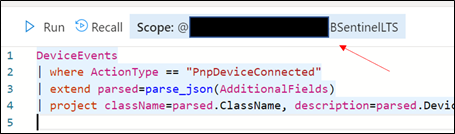 Retrieve the ADX scope for external use from Azure Sentinel.NOTE: Unlike queries in XDR/Microsoft Defender for Endpoint and Sentinel/Log Analytics, queries in ADX do NOT have a default time filter. Queries run without filters will query the entire database and likely impact performance.
- Navigate to an Azure Sentinel instance and place the query together with the adx() operator:
adx("###ADXSCOPE###").DeviceEvents
| where ActionType == "PnpDeviceConnected"
| extend parsed=parse_json(AdditionalFields)
| project className=parsed.ClassName, description=parsed.DeviceDescription, parsed.DeviceId, DeviceName
For example:

NOTE: As the ADX operator is external, auto-complete will not work.
Notice the query will complete completely but not with Azure Sentinel resources but rather the resources in ADX! (This operator is not available in Analytics rules though)
Summary
Using the XDR/Microsoft Defender for Endpoint streaming API and Azure Data Explorer (ADX), teams can very easily achieve terrific scalability on long term, investigative hunting, and forensics. Cost continues to be another key benefit as well as the ability to reuse IP/queries.
For organizations looking to expand their EDR signal and do auto correlation with 3rd party data sources, consider leveraging Azure Sentinel, where there are a number of 1st and 3rd party data connectors which enable rich context to added to existing XDR/Microsoft Defender for Endpoint data. An example of these enhancements can be found at https://aka.ms/SentinelFusion.
Additional information and references:
Special thanks to @Beth_Bischoff, @Javier Soriano, @Deepak Agrawal, @Uri Barash, and @Steve Newby for their insights and time into this post.
by Contributed | May 6, 2021 | Technology
This article is contributed. See the original author and article here.
This is a step-by-step example of how to use MSI while connecting from Spark notebook based on a support case scenario. This is for beginners in Synapse with some knowledge of the workspace configuration such as linked severs.
Scenario: The customer wants to configure the notebook to run without using the AAD configuration. Just using MSI.
Here you can see, synapse uses Azure Active Directory (AAD) passthrough by default for authentication between resources, the idea here is to take advantage of the linked server synapse configuration inside of the notebook.
Ref: https://docs.microsoft.com/en-us/azure/synapse-analytics/spark/apache-spark-secure-credentials-with-tokenlibrary?pivots=programming-language-scala
_When the linked service authentication method is set to Managed Identity or Service Principal, the linked service will use the Managed Identity or Service Principal token with the LinkedServiceBasedTokenProvider provider._
The purpose of this post is to help step by step how to do this configuration:
Requisites:
- Permissions: Synapse ( literally the workspace) MSI must have the RBAC – Storage Blob Data Contributor permission on the Storage Account.
- It should work with or without the firewall enabled on the storage. I mean firewall enable is not mandatory.
Follow my example with firewall enabled on the storage
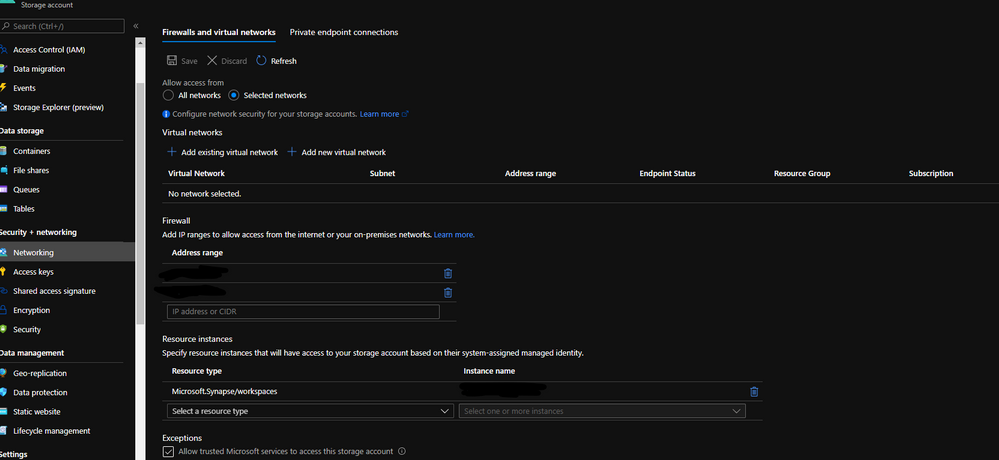
When you grant access to trusted Azure services inside of the storage networking, you will grant the following types of access:
- Trusted access for select operations to resources that are registered in your subscription.
- Trusted access to resources based on system-assigned managed identity.

Step 1:
Open Synapse Studio and configure the Linked Server to this storage account using MSI:
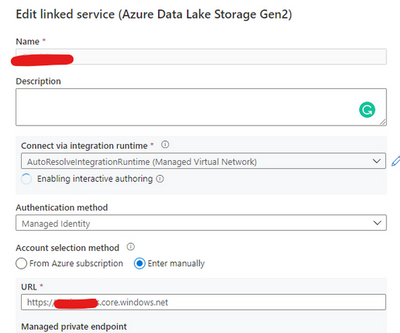
Test the configuration and see if it is successful.
Step 2:
Using config set point the notebook to the linked server as documented:
val linked_service_name = “LinkedServerName”
// replace with your linked service name
// Allow SPARK to access from Blob remotely
val sc = spark.sparkContext
spark.conf.set(“spark.storage.synapse.linkedServiceName”, linked_service_name)
spark.conf.set(“fs.azure.account.oauth.provider.type”, “com.microsoft.azure.synapse.tokenlibrary.LinkedServiceBasedTokenProvider”)
//replace the container and storage account names
val df = “abfss://Container@StorageAccount.dfs.core.windows.net/”
print(“Remote blob path: ” + df)
mssparkutils.fs.ls(df)
In my example, I am using mssparkutils to list the container.
You can read more about mssparkutils here: Introduction to Microsoft Spark utilities – Azure Synapse Analytics | Microsoft Docs
Additionally:
Following references permissions to Synapse workspace :
That is it!
Liliam UK Engineer
by Contributed | May 6, 2021 | Technology
This article is contributed. See the original author and article here.
The public folder (PF) migration endpoint in Exchange Online contains information needed to connect to the source on-premises public folders in order to migrate them to Office 365. PF migration endpoint can be based on either Outlook Anywhere (for Exchange 2010 public folders) or MRS (for Exchange 2013 and newer public folders).
In this blog post, we discuss PF migration endpoints for Exchange 2010 on-premises public folders. While Exchange 2010 is not supported, we have seen cases where customers still have these legacy Exchange servers and are working on their migrations.
To migrate Exchange 2010 PFs to Exchange Online you would typically follow our documented procedure. If you are reading this post, we assume that you are stuck at Step 5.4, specifically with the New-MigrationEndpoint -PublicFolder cmdlet. If this is the case, this article can help you troubleshoot and fix these issues. Some of this knowledge is getting difficult to find!
Exchange 2010 public folders are migrated to Exchange Online using Outlook Anywhere as a connection protocol. The migration endpoint creation will fail if there are issues with the way Outlook Anywhere is configured or if there are any issues with connecting to public folders using Outlook Anywhere (another sign of this is that Outlook clients cannot access on-premises public folders from an external network).
This means that from a functional perspective, you have an issue either with Outlook Anywhere or with the PF database (assuming that the steps you used to create the PF endpoints were correct).
Let’s look at the steps to troubleshoot PF migration endpoint creation.
Ensure Outlook Anywhere is configured correctly and is working fine
Outlook Anywhere uses RPC over HTTP. Before enabling Outlook Anywhere on the Exchange server, you need to have a Windows Component called RPC over HTTP (see reference here).
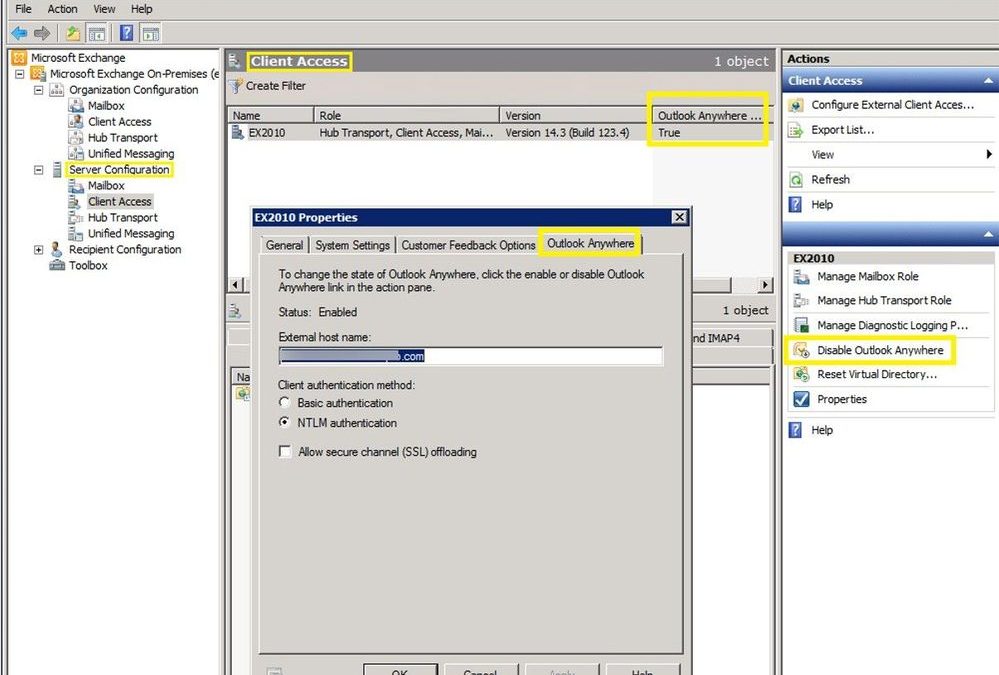
The next step is to check if Outlook Anywhere is enabled and configured correctly. You can run Get-OutlookAnywhere |FL in the Exchange Management Shell or use the Exchange Management Console to see if it is enabled (you would have a disable option if currently enabled):
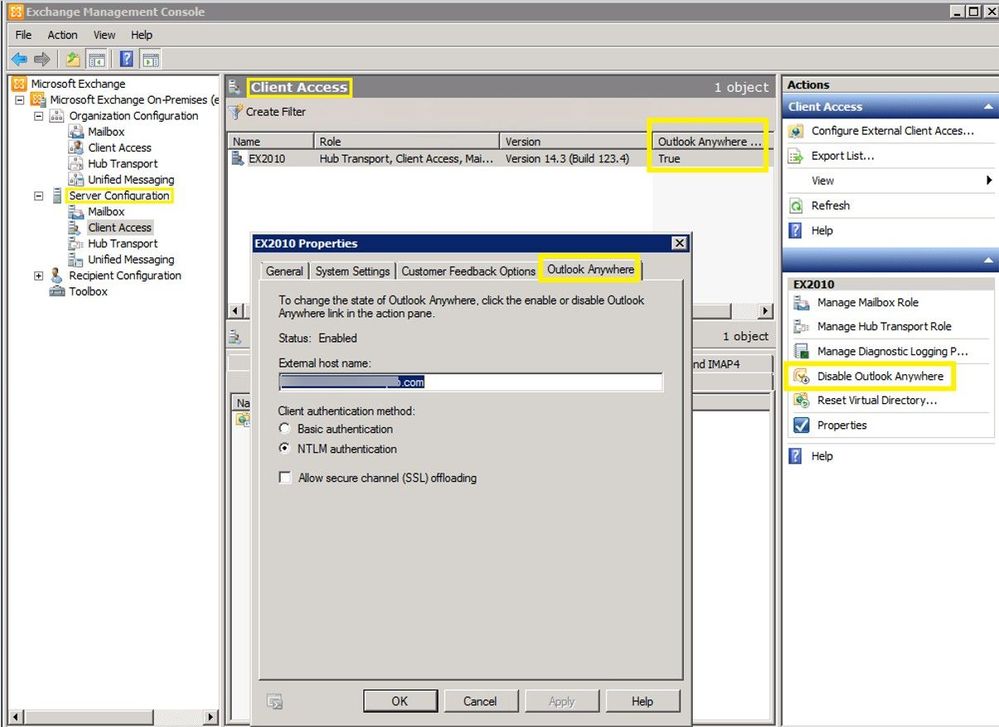
This is a good and complete article on how to manage Outlook Anywhere.
If Outlook Anywhere is published on Exchange 2013 and servers, it must be enabled on each Exchange 2010 server hosting a public folder database.
Checking Outlook Anywhere configuration:
- External hostname must be set and reachable over the Internet or at least reachable by Exchange Online IP Addresses. Check your firewall rules and public DNS and verify that your users can connect to Exchange on-premises server using Outlook Anywhere (RPC/HTTP) from an external network. You can use Test-MigrationServerAvailability from Exchange Online PowerShell (as explained later in this article) to verify connectivity from EXO to on-premises but keep in mind that when you do this you will be testing only with the EXO outbound IP address used at that moment. This is not necessarily enough to ensure you are allowing the entire IP range used by Exchange Online. Another tool you can use for verifying public DNS and connection to on-premises RPCProxy is the Outlook Connectivity test on Microsoft Remote Connectivity Analyzer. Please note that the outbound IP addresses for this tool (mentioned in Remote Connectivity Analyzer Change List (microsoft.com) are different from the Exchange Online outbound IP addresses, so having a passed test result here does not mean your on-premises Exchange server is reachable by Exchange Online.
- Ensure you have a valid third-party Exchange Certificate for Outlook Anywhere.
- Check that authentication method (Basic / NTLM) is correct on Outlook Anywhere on the RPC virtual directory. Make sure you use the exact Authentication configured in Get-OutlookAnywhere when you build the New-MigrationEndpoint -PublicFolder cmdlet.
- Verify that your registry keys are correct:
The ValidPorts setting at HKLMSoftwareMicrosoftRPCRPCProxy should cover 6001-6004 range:
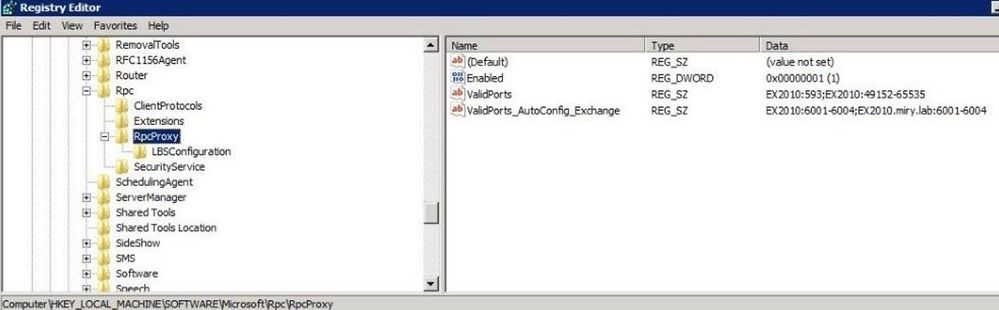
If you don’t have these settings for ValidPorts and ValidPorts_AutoConfig_Exchange, then you might want to reset the Outlook Anywhere virtual directory on-premises (by disabling and re-enabling Outlook Anywhere and restarting MSExchangeServiceHost). You should do this reset outside of working hours as Outlook Anywhere connectivity to the server will be affected.
As a last resort (if you still don’t see Valid Ports configured automatically), try to manually set them both to the following value: <ExchangeServerNetBIOS> :6001-6004; <ExchangeServerFQDN> :6001-6004; like in the image above. If the values are reverted automatically, then you need to troubleshoot the underlying Outlook Anywhere problem.
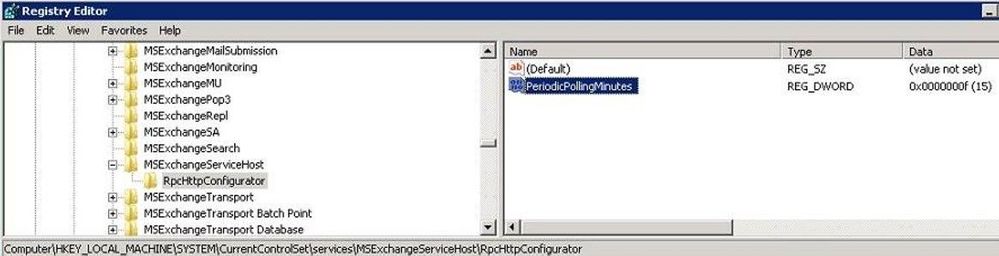
The PeriodicPollingMinutes key at HKEY_LOCAL_MACHINESystemCurrentControlSetServicesMSExchangeServiceHostRpcHttpConfigurator – by default the value is (15). It should not be set to 0.
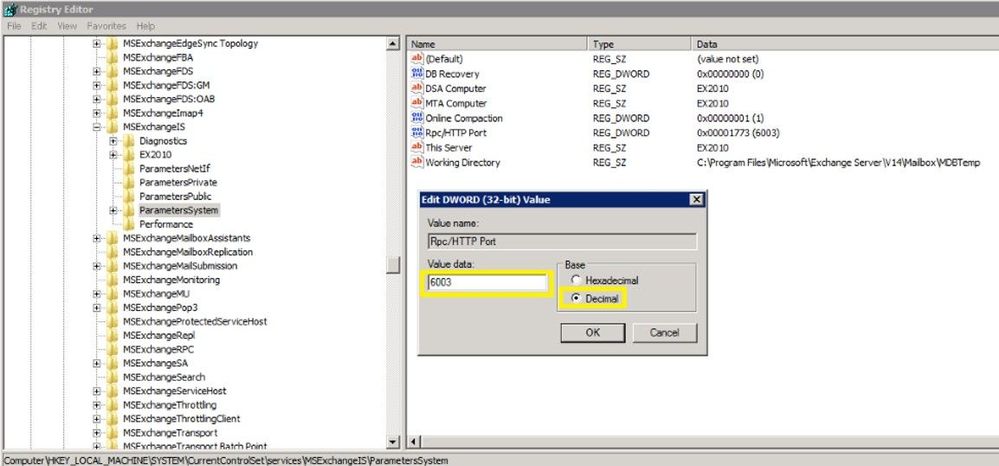
The Rpc/HTTP port key for Store service is set to 6003 under HKEY_LOCAL_MACHINESYSTEMCurrentControlSetservicesMSExchangeISParametersSystem
Verify that your Exchange services are listening on ports 6001-6004. From a command prompt on the Exchange server, run these 2 commands:
netstat -anob > netstat.txt
notepad netstat.txt
In the netstat.txt file, search for ports :6001, :6002, :6003 and :6004 and make sure no services other than Exchange are listening on these ports. Example:

Note: We already assume that services like MSExchangeIS, MSExchangeRPC, MSExchangeAB, W3Svc, etc. are up and running on the Exchange server; you can use Test-ServiceHealth to double check. Also, in IIS manager verify that the Default Web Site and Default Application Pool are started. Finally, verify that your PF database is mounted.
Verify that you are able to resolve both the NetBIOS and FQDN names of the Exchange server(s) hosting the PF database. In my examples above, Ex2010 is the NetBIOS name and Ex2010.miry.lab is the FQDN of my Exchange server.
Verify that users can connect to public folders using Outlook
Let’s say you have you verified that Outlook Anywhere is configured and working fine but you are still unable to create a PF migration endpoint. Configure an Outlook profile for a mailbox in the source on-premises environment (preferably the account specified as source credential) from external network machine and verify that the account can retrieve public folders.
I checked all these, but I still have problems!
We will now get into the next level of troubleshooting section but most of the times, if you managed to cover the above section, you should be fine with creating the PF migration endpoint. If not, let’s dig in further:
Check Outlook Anywhere connectivity test in ExRCA
Use EXRCA and run the Outlook Anywhere test using an on-premises mailbox as SourceCredential.
The tool will identify Outlook Anywhere issues (RPC/HTTP protocol functionality and connectivity on ports 6001, 6002 and 6004, Exchange certificate validity, if your external hostname is a resolvable name in DNS, TLS versions compatible with Office 365, and network connectivity).
Save the output report as an HTML file and follow the suggestions given to address them.
If you are filtering the connection IPs, add the Remote Connectivity Analyzer IP addresses (you can find them in this page here) to your allow list and try the Outlook connectivity test again. Most importantly, ensure that you allow all Exchange Online IP addresses to connect to your on-premises servers.
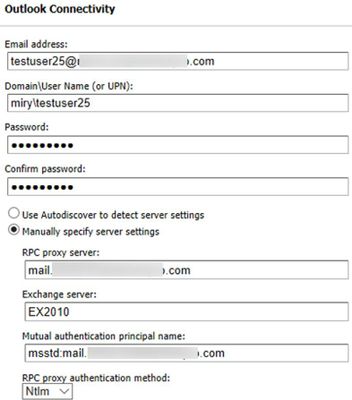
You can use the Outlook Connectivity test with or without Autodiscover. Here is an example of how to populate the Remote Connectivity Analyzer fields for this test if you want to bypass Autodiscover:
Use the Test-MigrationServerAvailability to test both PF and Outlook Anywhere Connectivity
Test-MigrationServerAvailability command simulates Exchange Online servers connecting to your source server and indicates any issues found.
Connect-ExchangeOnline
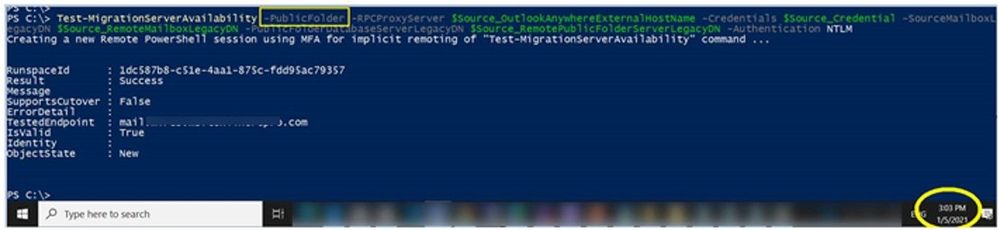
Test-MigrationServerAvailability -PublicFolder -RPCProxyServer $Source_OutlookAnywhereExternalHostName -Credentials $Source_Credential -SourceMailboxLegacyDN $Source_RemoteMailboxLegacyDN -PublicFolderDatabaseServerLegacyDN $Source_RemotePublicFolderServerLegacyDN -Authentication $auth
For example, I ran this at 3:03 PM UTC+2 on May 1, 2021. The timestamp is very important to know as we will be checking these specific requests from Exchange Online to Exchange on-premises servers by looking at the IIS and optionally FREB logs, HTTPerr logs and eventually HTTPProxy logs (if the front end is an Exchange 2013 or Exchange 2016 Client Access server). Details on how to retrieve and analyze these logs are in the next section.

Gather Verbose Error from the New-MigrationEndpoint -PublicFolder cmdlet
This step is very important in order to narrow down the issue you are facing, as a detailed error message can tell us where to look further (for example you would troubleshoot an Access Denied error differently from Server Unavailable). You need to make sure you are constructing the command to create the PF migration endpoint correctly.
For this, we go first to the Exchange Management Shell on-premises and copy-paste the following values to Exchange Online PowerShell variables. Examples from my lab:
Exchange Online PowerShell Variable
|
Exchange On-Premises Value
|
$Source_RemoteMailboxLegacyDN
|
Get-Mailbox <PF_Admin>).LegacyExchangeDN
|
$Source_RemotePublicFolderServerLegacyDN
|
(Get-ExchangeServer <PF server>).ExchangeLegacyDN
|
$Source_OutlookAnywhereExternalHostName
|
(Get-OutlookAnywhere).ExternalHostName
|
$auth
|
(Get-OutlookAnywhere).ClientAuthenticationMethod
|
$Source_Credential
|
Credentials of the on-premises PF Admin Account: User Logon Name (pre-Windows2000) in format DOMAINADMIN and password. Must be member of Organization Management group in Exchange on-premises.
|
Then, connect to Exchange Online PowerShell and run this:
# command to create the PF Migration Endpoint
$PfEndpoint = New-MigrationEndpoint -PublicFolder -Name PublicFolderEndpoint -RPCProxyServer $Source_OutlookAnywhereExternalHostName -Credentials $Source_Credential -SourceMailboxLegacyDN $Source_RemoteMailboxLegacyDN -PublicFolderDatabaseServerLegacyDN $Source_RemotePublicFolderServerLegacyDN -Authentication $auth
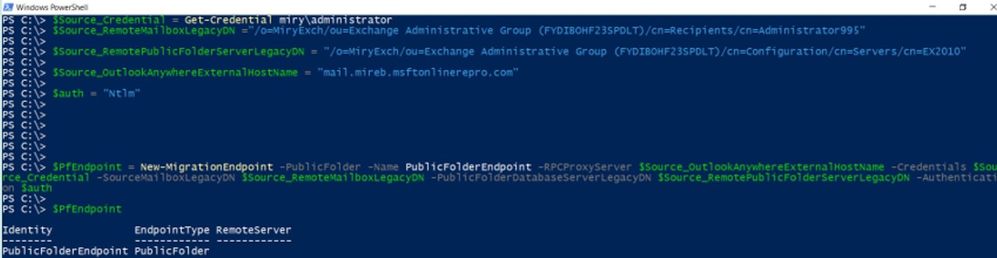
Supposing you have an error at New-MigrationEndpoint, you would run the following commands to get the verbose error:
# command to get serialized exception for New-MigrationEndpoint error
start-transcript
$Error[0].Exception |fl -f
$Error[0].Exception.SerializedRemoteException |fl –f
stop-transcript
When you run the commands to start/ stop the transcript, you will get the path of the transcript file so that you can review it in a program like Notepad.
Cross-checking on-premises logs at the times you do these tests
IIS logs for Default Web Site (DWS): %SystemDrive%inetpublogsLogFilesW3SVC1 – UTC Timezone
If you don’t find the IIS logs in the default location, check this article to see the location of your IIS logging folder.
After you run Test-MigrationServerAvailability or New-MigrationEndpoint -PublicFolder in Exchange Online PowerShell, go to each CAS and see if you have any RPCProxy traffic in IIS logs at the timestamp corelated with Test-MigrationServerAvailability that would come from Exchange Online. Search for /rpc/rpcproxy.dll entries in Notepad++, for example.
For my Test-MigrationServerAvailability at 3:03 (UTC+2 time zone), I have 2 entries for RPC, port 6003 UTC time zone (13:03):

As you can see, only 401 entries are logged (indicating a successful test). This is because the 200 requests are ‘long-runners’ and are not usually logged in IIS. The 401 entries for port 6003 are a good indicator that these requests from Exchange Online reached IIS on your Exchange server.
If RPC traffic is not found in the IIS logs at the timestamp of the Test-MigrationServerAvailability (for example, MapiExceptionNetworkError: Unable to make connection to the server. (hr=0x80040115, ec=-2147221227), then you likely need to take a network trace on the CAS and if possible on your firewall / reverse proxy when you do test-MigrationServerAvailability.
Now is a good moment to consider the network devices you have in front of your CAS. Do you have load balancer or a CAS array; do you have CAS role installed on the PF server? Collect a network trace on the CAS.
Also check if you have any entries / errors for RPC in HTTPerr logs (if you don’t see it in the IIS logs):
HTTPerr logs: %SystemRoot%System32LogFilesHTTPERR – Server Timezone
Finally, check the Event Viewer. Filter the log for Errors and Warnings and look for events correlated with the timestamp of the failure or related to public folders databases and RPC over HTTP.
Enable failed request tracing (FREB)
Follow this article to enable failed request tracing. If required to write something in the status code, you can put for example a range of 200-599. Then, reproduce the issue and gather the logs from %systemdrive%inetpublogsFailedReqLogFilesW3SVC1
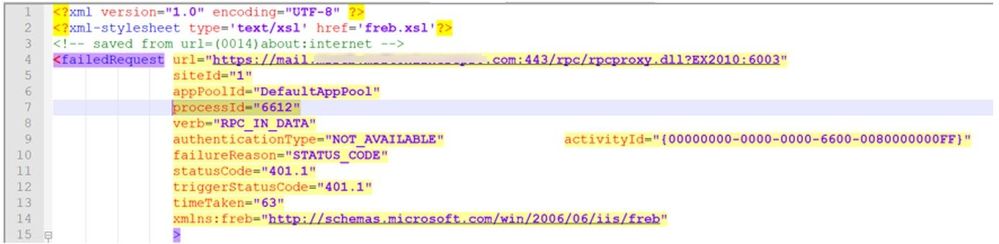
NOTE: Once you have reproduced the problem, revert the changes (uncheck Enable checkbox under Configure Failed Request Tracing). Not disabling this will cause performance problems!
Getting a MapiExceptionNoAccess error?
During a New-MigrationEndpoint or Test-MigrationServerAvailability test you might see a specific (common) error; we wanted to give you some tips on what to do about it.
Error text:
MapiExceptionNoAccess: Unable to make connection to the server. (hr=0x80070005, ec=-2147024891)
What it means:
This is an ‘Access Denied’ error for the PF admin and can happen when credentials or authentication is wrong.
Things to check:
- The correct authentication method is used (either Basic or NTLM).
- You are providing source credentials in domainusername format.
- The source credential provided is a member of Organization Management role group.
- As a troubleshooting best practice, it is recommended to create a new admin account (without copying the old account), make it a member of the Organization Management group, and try creating the PF migration endpoint using that account.
- Run the Outlook Connectivity test on Remote Connectivity Analyzer for domainadmin account and fix any reported errors.
- Check and fix any firewall/reverse proxy issues in the path before the Exchange server.
Thank you for taking the time to read this, and I hope you find it useful!
I would like to give special thanks to the people contributing to this blog post: Bhalchandra Atre, Brad Hughes, Trea Horton and Nino Bilic.
Mirela Buruiana
by Contributed | May 6, 2021 | Technology
This article is contributed. See the original author and article here.
The Workplace Analytics team is excited to announce our feature updates for May 2021. (You can see past blog articles here). This month’s update describes the following new features:
- Collaboration metrics with Teams IM and call signals
- Metric refinements
- Analyze business processes
- New business-outcome playbooks
- More focused set of query templates
- Workplace Analytics now supports mailboxes in datacenters in Germany
Collaboration metrics with Teams IM and call data
In response to customer feedback and requests, we are including data from Teams IMs and Teams calls in several collaboration and manager metrics. Queries that use those metrics will now give clearer insights about team collaboration by including this data from Teams. This change will help leaders better understand how collaboration in Microsoft Teams impacts wellbeing and productivity. It’s now possible to analyze, for example, the change in collaboration hours as employees have begun to use Teams more for remote work, or the amount of time that a manager and their direct report spend a Teams chat.
Changed metrics
The inclusion of Teams data changes the following metrics, organized by query:
In Person and Peer analysis queries
Collaboration hours
Working hours collaboration hours
After hours collaboration hours
Collaboration hours external
Email hours
After hours email hours
Working hours email hours
Generated workload email hours
Call hours
After hours in calls
Working hours in calls
In Person-to-group queries
Collaboration hours
Email hours
In Group-to-group queries
Collaboration hours
Email hours
For complete descriptions of these and all metrics that are available in Workplace Analytics, see Metric descriptions.
Metric refinements
In addition to adding Teams data to the metrics listed in the preceding section, we’ve made some other improvements to the ways that we calculate metrics, and we’ve added new metric filter options, as described here:
- Integration of Microsoft Teams chats and calls into metrics – In the past, the Collaboration hours metric simply added email hours and meeting hours together, but in reality, these activities can overlap. Collaboration hours now reflects the total impact of different types of collaboration activity, including emails, meetings, and – as of this release – Teams chats and Teams calls. Collaboration hours now captures more time and activity and adjusts the results so that any overlapping activities are only counted once.
- Improved outlier handling for Email hours and Call hours – When data about actual received email isn’t available, Workplace Analytics uses logic to impute an approximation of the volume of received mail. We are adjusting this logic to reflect the results of more recent data science efforts to refine these assumptions. Also, we had received reports about measured employees with extremely high measured call hours. This was a result of “runaway calls” where the employee joined a call and forgot to hang up. We have capped call hours to avoid attributing excessive time for these scenarios.
- Better alignment of working hours and after-hours metrics – Previously, because of limitations attributing certain types of measured activity to specific time of day, after-hours email hours plus Working hours email hours and after-hours collaboration hours plus Working hours collaboration hours did not add up to total Email hours or Collaboration hours. We have improved the algorithms for these calculations to better attribute time for these metrics, resulting in better alignment between working hours and after-hours metrics.
- New metric filter options – We’ve added new participant filter options to our email, meeting, chat, and call metrics for Person queries: “Is person’s manager” and “Is person’s direct report.” These new options enable you to filter activity where all, none, or at least one participant includes the measured employee’s direct manager or their direct report. You can use these new filters to customize any base metric that measures meeting, email, instant message, or call activity (such as Email hours, Emails sent, Working hours email hours, After hours email hours, Meeting hours, and Meetings).
Analyze business processes
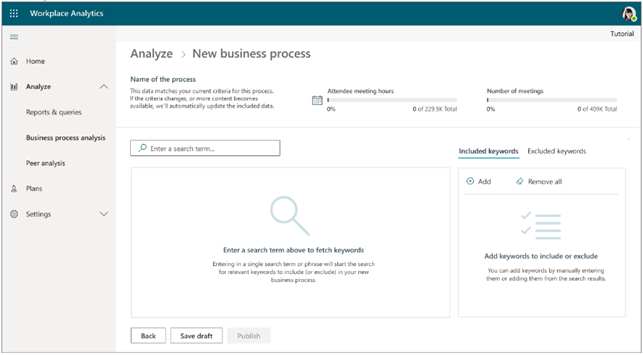
When you and your co-workers perform an organized series of steps to reach a goal, you’ve participated in a business process. In this feature release, we are providing the ability to analyze business processes — for example, to measure their cost in time and money. In doing so, we are proviadditional analytical capabilities to customers who would like to study aspects such as time spent on particular tasks (such as sales activities or training & coaching activities), the nature of collaboration by geographically diverse teams, branch-office work in response to corporate-office requests, and so on.
For example, your business might conduct an information-security audit from time to time. Your CFO or CIO might want to know whether too little, too much, or just the right amount of time is being spent on these audits, and whether the right roles of employees have been participating in them. You analyze a real-world business processes such as this by running Workplace Analytics meeting or person queries. And now, as you do this, you can use a digital “business process” as a filter. It’s these business-process filters that you define in the new business—process analysis feature.
The new business-process analysis feature of Workplace Analytics
For more information about business-process analysis in Workplace Analytics, see Business processes analysis.
New business-outcome playbooks
We’ve published four new analyst playbooks that introduce advanced analyses with Workplace Analytics and guide you in how to create and implement them. These playbooks will help you with the following use cases:
- Boost employee engagement – By joining engagement and pulse survey data with Workplace Analytics data, it’s now easier to uncover insights and opportunities around ways of working, employee wellbeing, manager relationships, and teams and networks.
- Improve customer focus and sales enablement – Improve the collaboration effectiveness of your salesforce by augmenting Workplace Analytics with CRM data.
- Enhance operational effectiveness – Identify areas to improve operational effectiveness, including business processes and organizational activity, through process analysis.
- Take insights to action – Drive behavioral change by using Workplace Analytics and MyAnalytics together.
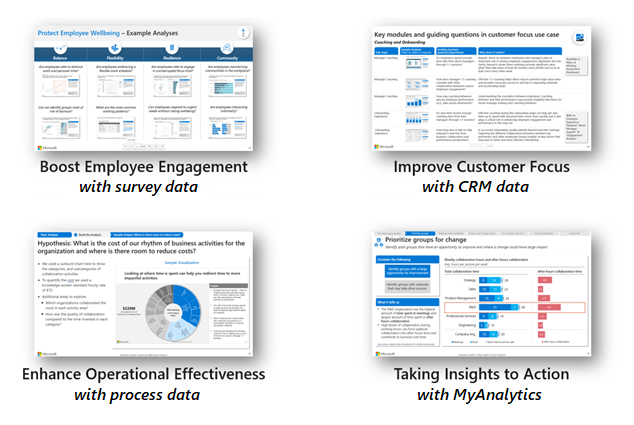
Each playbook provides a framework for conducting the analysis, sample outputs based on real work, and best practices for success to help you uncover opportunities more quickly and create valuable change. You can access the new playbooks through the Resource playbooks link in the Help menu of Workplace Analytics:

More focused set of query templates
To more clearly highlight the high-value and modern query templates that we offer in Workplace Analytics, we have focused the set of available query templates.
Over the past few years, we’ve released numerous query templates that help you solve new business problems and access rich insights. Unfortunately, so many templates appeared that it became challenging to differentiate them and choose the right one for your task. This month, we have removed some of the templates to make it easier to select and run the latest and greatest templates available.
Don’t worry though; the results of queries that you’ve already run, even from retired templates, will continue to appear on the Results page, and any Power BI templates that you’ve already set up will continue to run as expected.
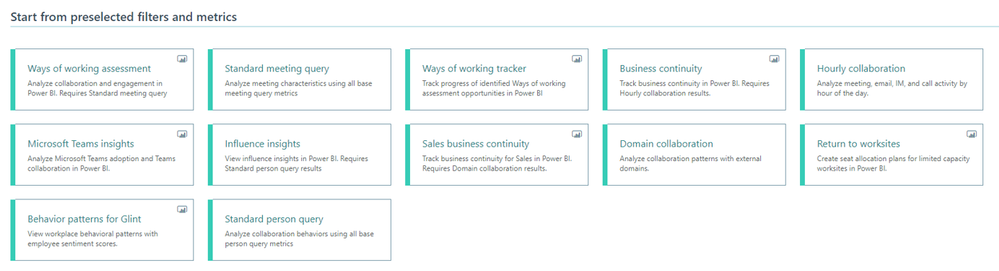
The new, more focused set of available query templates
For more information about Workplace Analytics queries, see Queries overview.
Workplace Analytics supports mailboxes in the Germany Microsoft 365 datacenter geo location
now offers full Workplace Analytics functionality for organizations whose mailboxes are in the Germany Microsoft 365 datacenter geo location. (Workplace Analytics now supports every Microsoft 365 datacenter geo location other than Norway and Brazil, which are expected to gain support soon.) See Environment requirements for more information about Workplace Analytics availability and licensing.
by Contributed | May 6, 2021 | Dynamics 365, Microsoft 365, Technology
This article is contributed. See the original author and article here.
All businesses operate in a competitive environment and customer experience (CX) is top of mind as we rise to today’s challenges of finding ways to differentiate, delivering on business goals and meeting increasing customer demands. Customers expect great experiences from the companies they interact with and companies that deliver superior experiences build strong bonds with their customers and perform better.
Microsoft Dynamics 365 Marketing is the secret weapon that will help you elevate your CX game across every department of your company, whether it’s marketing being tasked with driving growth, or the sales department optimizing in-store and online sales, or the customer service department driving retention, upsell and personalized care. With AI-assistance, business users can build event-based journeys that reach customers across multiple touchpoints, growing relationships from prospects, through sales and support.
Today marks a monumental event for Dynamics 365 Marketing: the much-anticipated real-time customer journey orchestration features are making their preview debut! Rich new features empower customer experience focused organizations to:
- Engage customers in real time.
- With features such as event-based customer journeys, custom event triggers, and SMS and push notifications, organizations can design, predict, and deliver content across the right channels in the moment of interaction, enabling hyper-personalized customer experiences.
- Win customers and earn loyalty faster.
- Integrations with Dynamics 365 apps make real-time customer journeys a truly end-to-end experience.
- Personalize customer experiences with AI.
- Turn insights into relevant action with AI-driven recommendations for content, channels, segmentation, and analytics.
- Customer Insights segment and profile integration allows organizations to build deep 1:1 personalization.
- Grow with a unified, adaptable platform.
- Easily customize and connect with tools you already use.
- Efficiently manage compliance requirements and accessibility guidelines.
Some of Dynamics 365 Marketing’s standout features are listed below. To read about all of the new features, check out the real-time customer journey orchestration user guide or see a demo of the real-time marketing features in action from Microsoft Ignite 2021.
1. Real-time, event-based customer journey orchestration
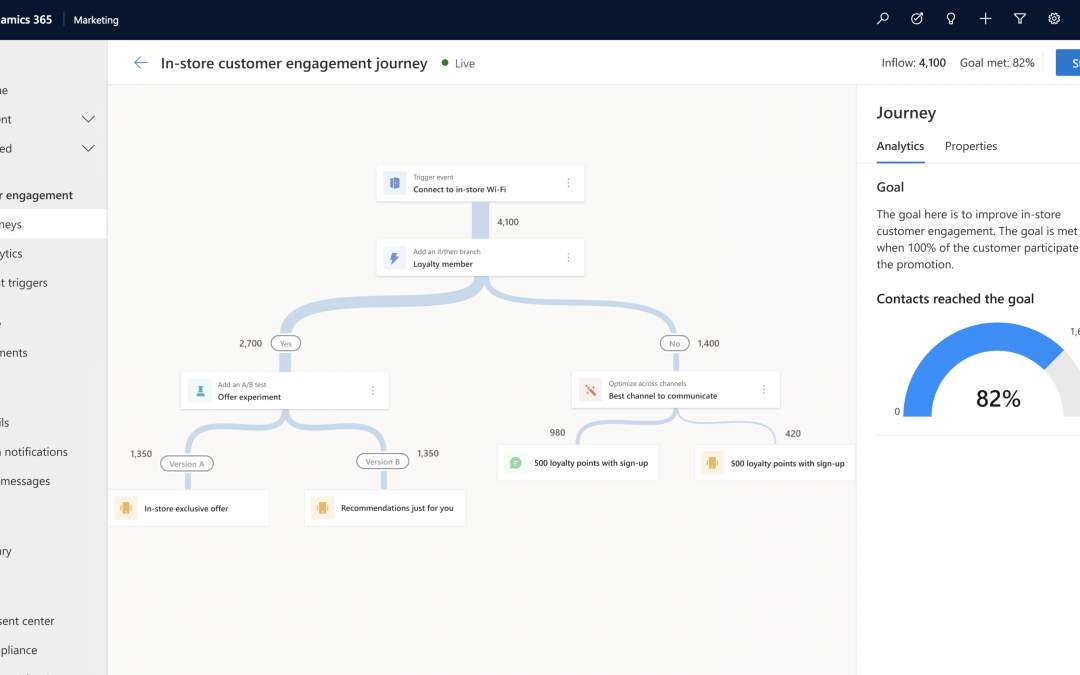
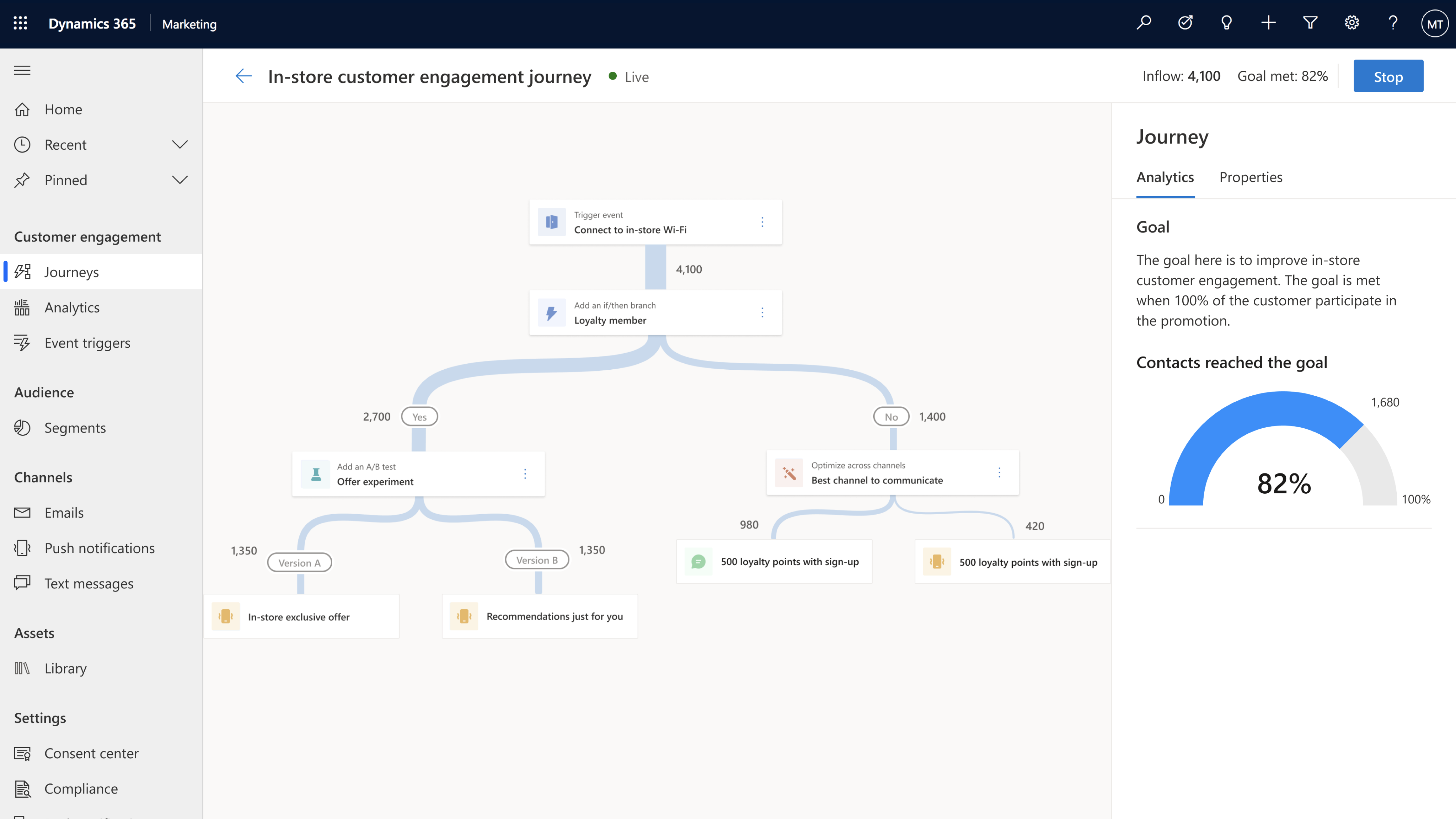
Looking for a better way to engage your audience over pre-defined segment-based marketing campaigns? Look to moments-based interactions that allow you to react to customers’ actions in real time with highly personalized content for each individual customer. These moments-based customer-led journeys are easy to create with our new intuitive customer journey designer which is infused with AI-powered capabilities throughout. You can orchestrate holistic end-to-end experiences for your customers that engage other connected departments in your company such as customer service, sales, commerce systems, and more. What’s even better? You don’t need a team of data scientists or developers to implement these journeys let the app do the heavy lifting for you. Use point-and-click toolbox in the designer to create each step in the journey, and AI-guided features to create, test, and ensure your message is delivered in the right channel for each individual customer.
2. Event catalog with built-in and custom events for triggering customer journeys
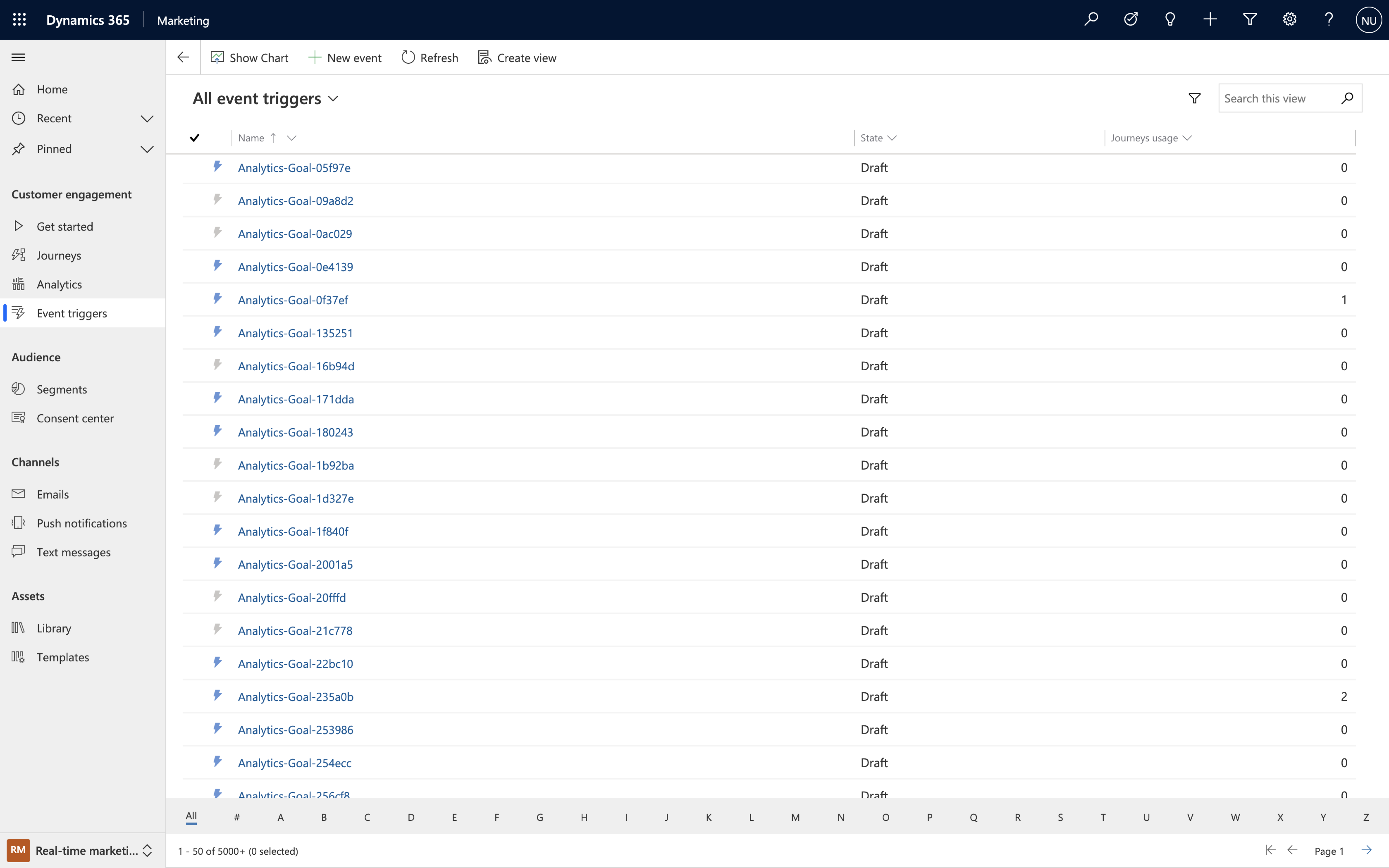
Journeys created with Dynamics 365 Marketing are customer led, they can start (or stop) when an event is triggered and can be executed in real time. “Events” are activities that your customer performs, including digital activities like interacting on your website, or physical ones like walking into a store and logging onto the Wi-Fi. Event triggers are the powerhouses behind the scenes that make it all happen, and you can create them quickly and easily by using built-in events from the intuitive event trigger catalog or creating custom events that are specific to your business.
By strategically using event triggers you can break down silos between business functions. Gone are the days of tone-deaf, disconnected communications from different departments, now you can deliver a congruous end-to-end experience for each of your customers.
3. Hyper-personalize customer journeys using data and insights from Dynamics 365 Customer Insights
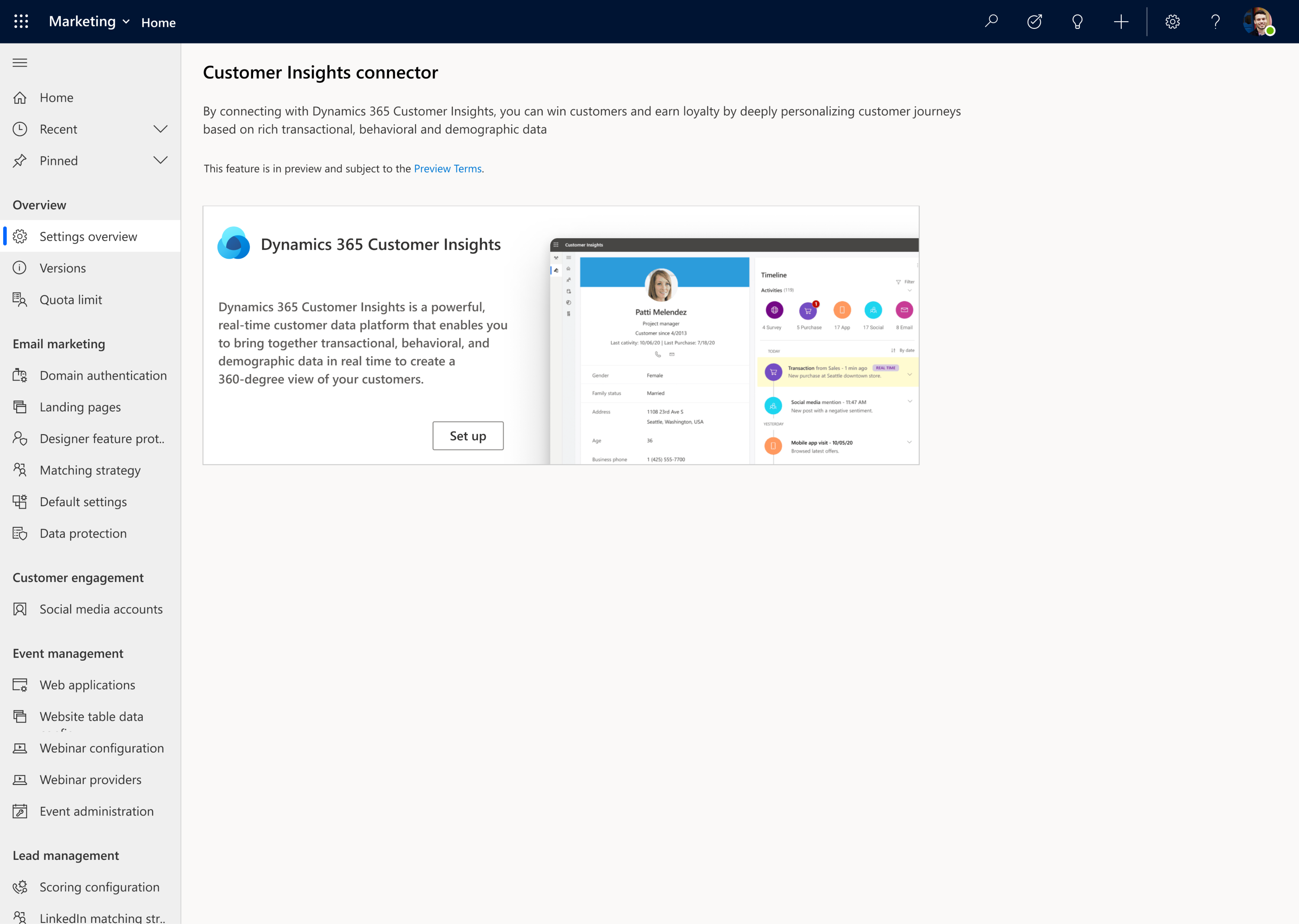
Dynamics 365 Marketing goes beyond a typical marketing automation tool by leveraging the power of data, turning that data into insights, and activating it. Microsoft’s customer data platform, Dynamics 365 Customer Insights, makes it easy to unify customer data, augment profiles and identify high-value customer segments. You can use this profile and segment data in Dynamics 365 Marketing to fine tune your targeting and further refine your journeys so that you can drive meaningful interactions by engaging customers in a personalized way.
4. Author personalized emails quickly and easily using the new email editor
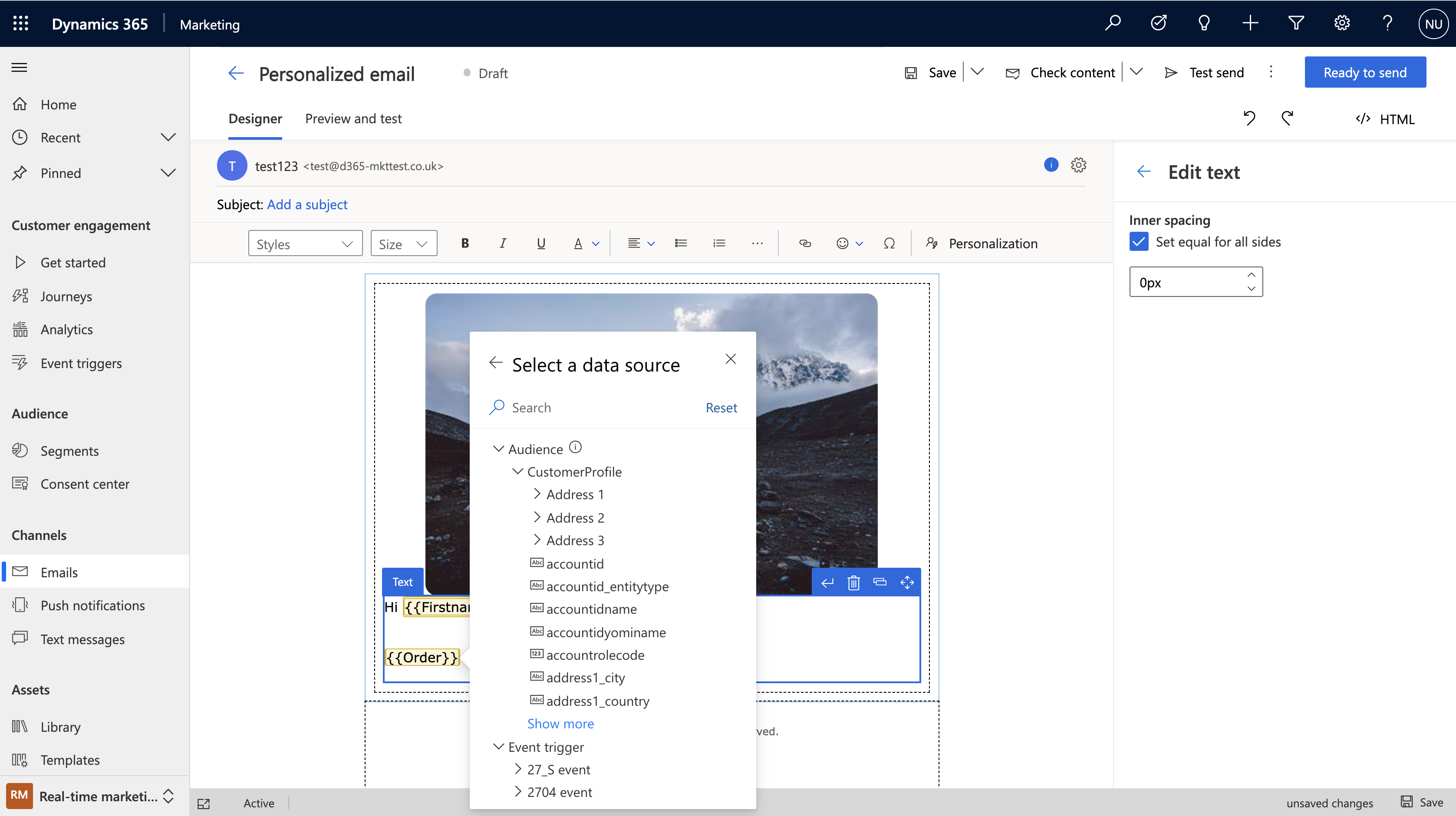
The completely new, intuitive, and reliable Dynamics 365 Marketing email editor helps you to produce relevant emails with efficiency and ease. The modern layout with the redesigned toolbox and property panes makes everything simpler to find. Personalization is also streamlined just click the “Personalization” button to navigate through all available data so you can customize your messages with speed and ease.
You can also take advantage of new AI-powered capabilities within the editor like AI-driven recommendations to help you to find the best media to complement the content in your messages. We make it easy to create professional emails with advanced dynamic content resulting in messages that better resonate with your customers.
5. Create and send personalized push notifications and SMS messages
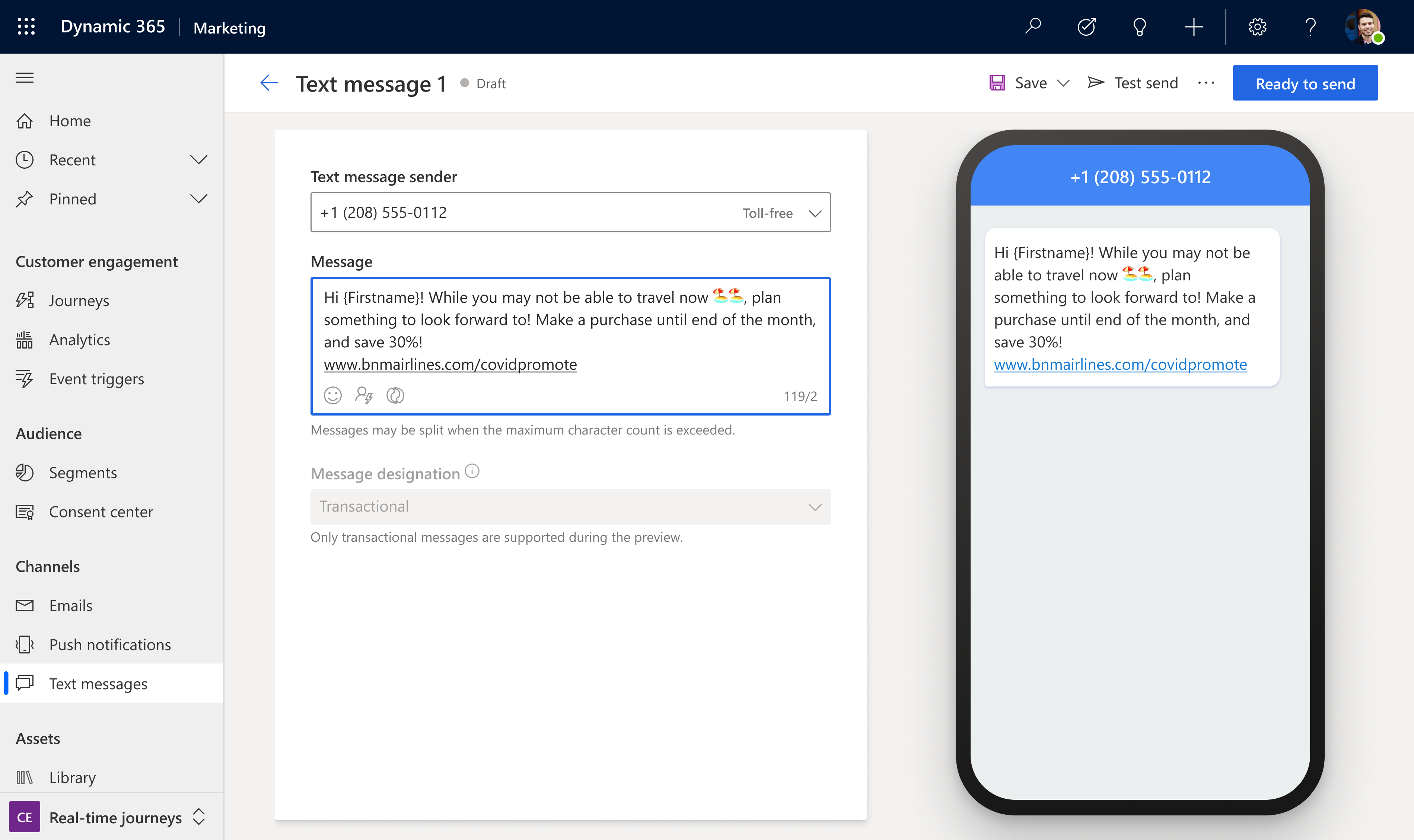
Because email is not the only channel to reach your customers, we have also streamlined personalization across SMS messages and push notifications and made both editors easy and intuitive to use so you can create beautiful, customized messages to keep your customers engaged throughout transactional communications, marketing campaigns, and customer service communications. Using these additional channels enables you to react to customer interactions across touchpoints.
6. Search, manage, and tag your digital assets with a new centralized asset library
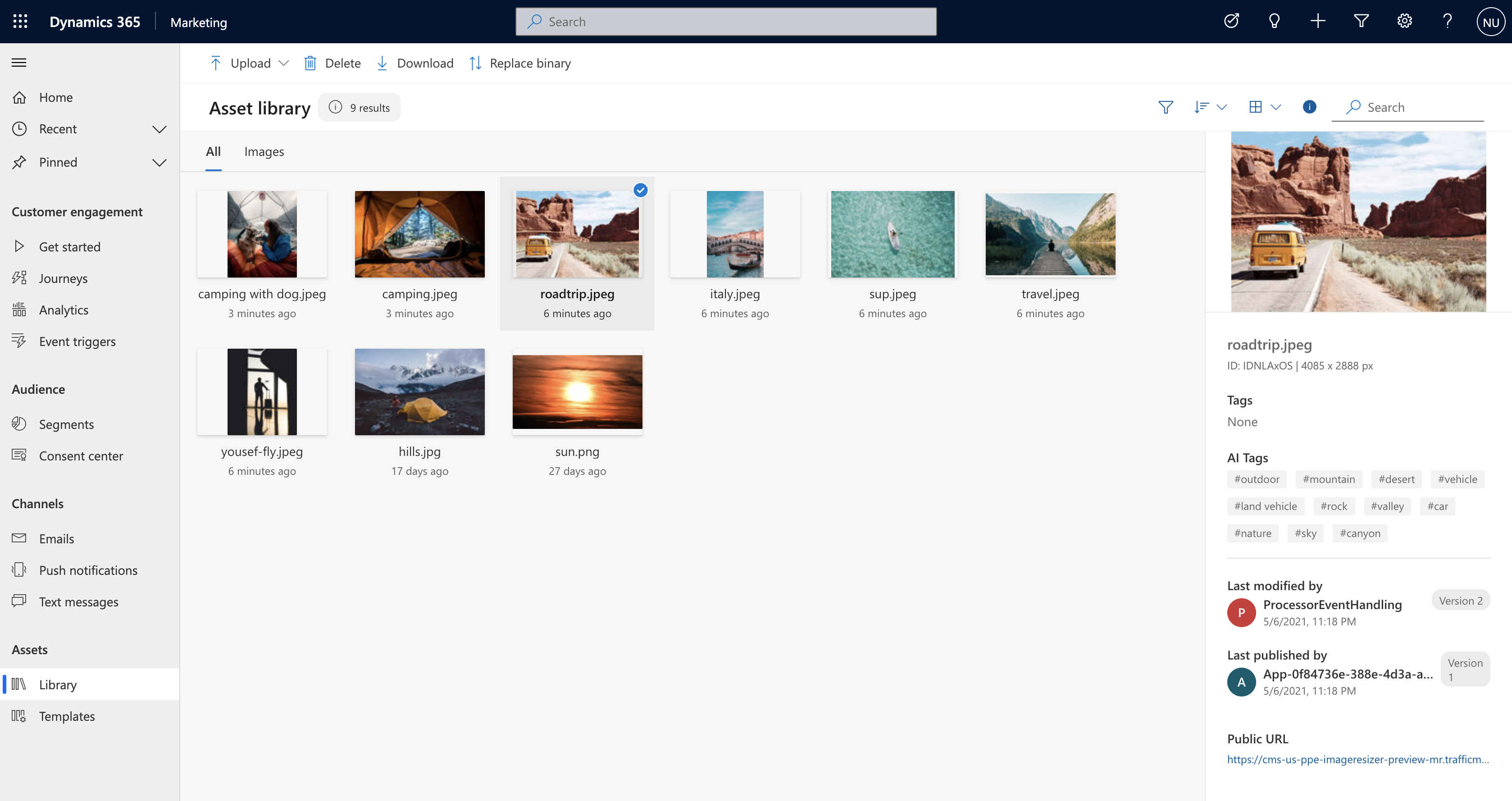
The new centralized asset library is the cherry on top of all channel content creation within Dynamics 365 Marketing. The new centralized library lets you upload files then AI automatically tags them for you. You can then search, update and add or delete images. No matter where you’re accessing the centralized library from, you’ll have access to the latest assets for your company helping you to build successful multitouch experiences for your customers.
7. Improve journey effectiveness with a built-in cross-journey aggregate dashboard
At the end of the day, you want to know if your customer journey is meeting its objectives. Dynamics 365 Marketing not only helps you to easily set the business and user-behavior goals for your customer journeys, it tracks progress towards those goals and gives you a clear dashboard with the results so you can troubleshoot areas of friction or see what’s working so you can recreate that same approach in other journeys. The new built-in analytics dashboard also makes it easy to view results and act upon cross-journey insights to further optimize individual journeys.
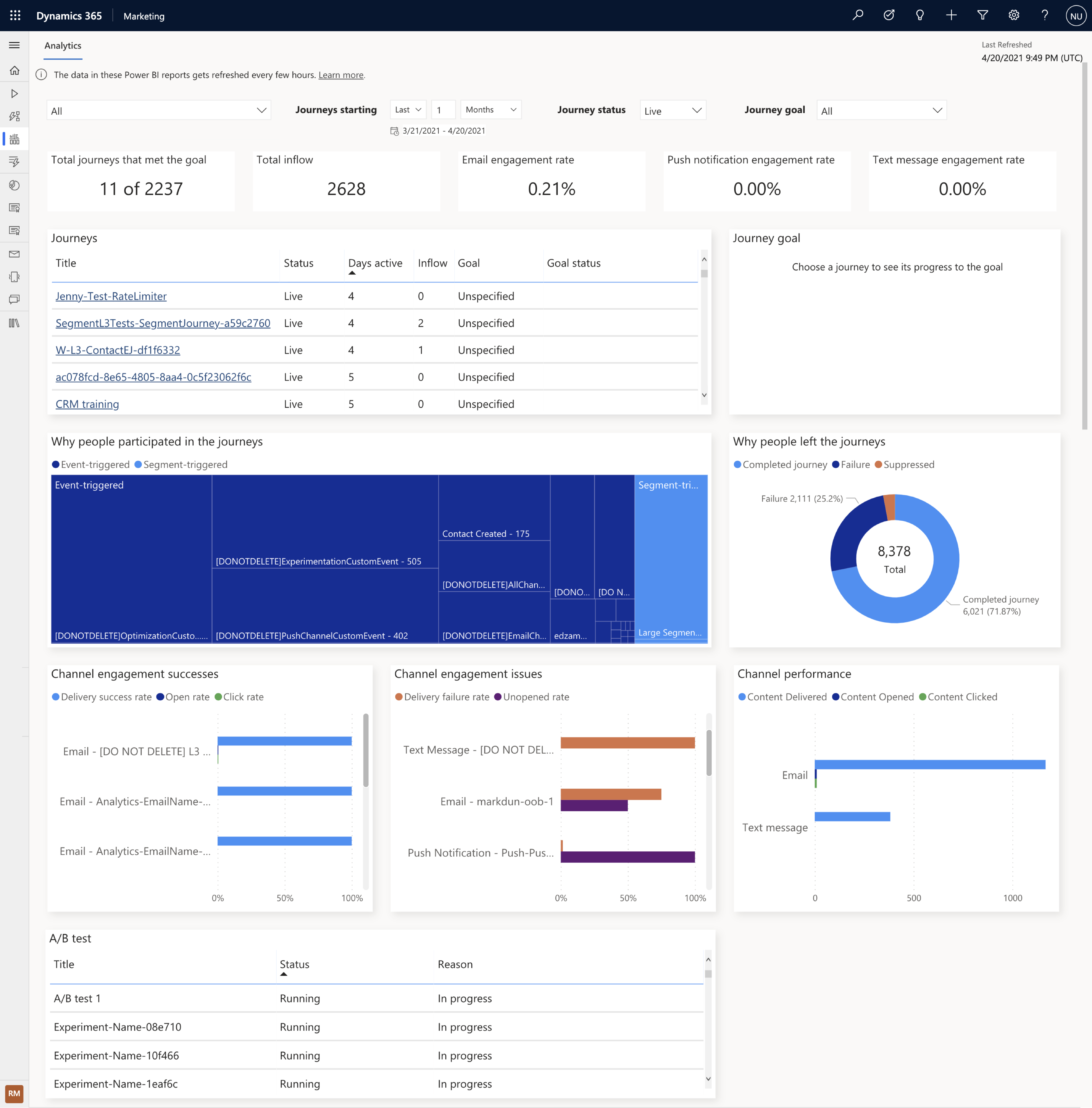
These preview capabilities are now available to customers who have environments located in the U.S. datacenter, and will be available to customers with environments located in the Europe datacenter starting early next week. When you log into the product, a notification banner will let you know when the preview capabilities are available for you to install. You can install these from the settings area of your app. If you are not a Dynamics 365 Marketing customer yet, get started with a Dynamics 365 Marketing free trial to evaluate them.
We look forward to hearing from you about the release wave 1 updates for Dynamics 365 Marketing and stay tuned, we have a lot more coming!
The post Microsoft Dynamics 365 Marketing customer journey orchestration preview now available appeared first on Microsoft Dynamics 365 Blog.
Brought to you by Dr. Ware, Microsoft Office 365 Silver Partner, Charleston SC.
by Contributed | May 6, 2021 | Technology
This article is contributed. See the original author and article here.
IoT Central REST API goes GA!
Azure IoT Central REST API is now Generally Available and you can access it through the production 1.0 endpoint. IoT Central is an IoT application platform that reduces the burden and cost of developing, managing, and maintaining enterprise-grade IoT solutions. And with this latest API release, building a companion experience like a field technician application or a web-app to power your business workflows is easier than ever before.
Our solution builders can now leverage these APIs and the breadth of the IoT Central extensibility surface to develop production-ready solutions for their customers. Based on customer feedback, we have iterated on our API surface and made new investments to evolve the capabilities further. Using the v1.0 API, you can now:
- Manage API tokens that provide access to your application.
- Create and manage device templates in DTDLv2 format.
- Create, onboard, and manage devices within your application.
- Retrieve the set of user roles that are defined in your application.
- Add, update, and remove users within your application.
The feedback from our customers and partners in the public preview program has helped shaped our 1.0 release. The following set of changes have been introduced in our 1.0 release and we encourage everyone to adapt to this version in their client applications.
- Support for DTDLv1 based device templates has now been deprecated. All new device templates exported and imported via the 1.0 API surface will be in DTDLv2 format.
- We are deprecating management of Applications from our IoT Central API surface. Please use our Azure SDK to manage the IoT Central application instances.
- A few routes to manage entities including legacy data exports, device groups and jobs will not be in the 1.0 API surface for this first release.
Take a look at our IoT Central REST API Sample Companion Application on GitHub to get started on your journey with IoT Central. You can leverage the existing samples here to learn more about how to authenticate and authorize to use the Azure IoT Central REST APIs, query data from IoT Central, among other things.
Coming soon to our API surface, first through preview and then to our GA branch, is a series of capabilities that will further enhance your device management and data capture experiences. These features include but are not limited to:
- Ability to programmatically create and manage job instances within your IoT Central application allowing you to manage your connected devices at scale. Jobs let you do bulk updates to device and cloud properties and run commands.
- A seamless way to configure our recently announced data export pipeline to route your valuable IoT insights into your business workflows.
- A query API enabling you to programmatically access data from within your IoT Central application and power your companion experiences built with IoT Central.
We are committed to continuously improving and adding new capabilities to our IoT Central API surface. If you have any feedback, suggestions, or questions, let us know on our Microsoft Q&A or on Stack Overflow or email us at iotcentralapihelp@microsoft.com.
We can’t wait to see what you’ll build with the IoT Central APIs!
by Contributed | May 6, 2021 | Technology
This article is contributed. See the original author and article here.
Understand the various cloud migration drivers, migration strategies, and various phases in the migration journey in this episode of Data Exposed with Venkata Raj Pochiraju. He’ll also introduce various database migration tools and services that Microsoft builds to help you in the migration journey.
Watch on Data Exposed
Resources:
by Contributed | May 6, 2021 | Technology
This article is contributed. See the original author and article here.
Sync Up is your monthly podcast hosted by the OneDrive team taking you behind the scenes of OneDrive, shedding light on how OneDrive connects you to all your files in Microsoft 365 so you can share and work together from anywhere. You will hear from experts behind the design and development of OneDrive, as well as customers and Microsoft MVPs. Each episode will also give you news and announcements, special topics of discussion, and best practices for your OneDrive experience.
So, get your ears ready and Subscribe to Sync up podcast!
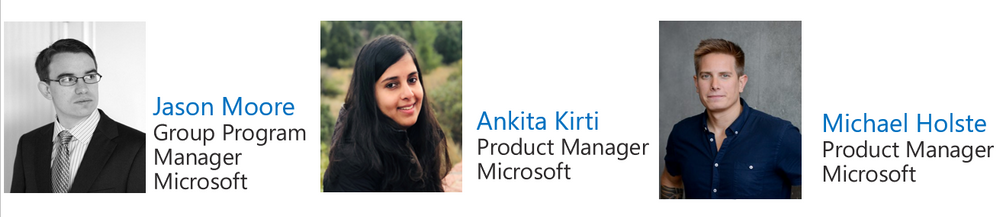
In this new world of hybrid work, Yammer offers employees a way to come together socially to share what’s going on in their lives, both inside and outside work. In episode 20, we learn more about Yammer and discuss how OneDrive supports tech engagement among your employees. Out guest is Michael Holste, Product Manager on the Microsoft 365 Product Marketing team responsible for employee engagement, including products like Yammer and Viva connections.
Tune in!
Meet your show hosts and guests for the episode:
Jason Moore is the Principal Group Program Manager for OneDrive and the Microsoft 365 files experience. He loves files, folders, and metadata. Twitter: @jasmo
Ankita Kirti is a Product Manager on the Microsoft 365 product marketing team responsible for OneDrive for Business. Twitter: @Ankita_Kirti21
Michael Holste – PMM Mike Holste is a Product Manager on the Microsoft 365 product marketing team responsible for Employee Engagement, including Yammer and Viva Connections.
Twitter: @Mike_Holste
Quick links to the podcast
Links to resources mentioned in the show:
Be sure to visit our show page to hear all the episodes, access the show notes, and get bonus content. And stay connected to the OneDrive community blog where we’ll share more information per episode, guest insights, and take any questions from our listeners and OneDrive users. We, too, welcome your ideas for future episodes topics and segments. Keep the discussion going in comments below.
As you can see, we continue to evolve OneDrive as a place to access, share, and collaborate on all your files in Office 365, keeping them protected and readily accessible on all your devices, anywhere. We, at OneDrive, will shine a recurring light on the importance of you, the user. We will continue working to make OneDrive and related apps more approachable. The OneDrive team wants you to unleash your creativity. And we will do this, together, one episode at a time.
Thanks for your time reading and listening to all things OneDrive,
Ankita Kirti – OneDrive | Microsoft
by Contributed | May 6, 2021 | Technology
This article is contributed. See the original author and article here.
We continue to expand the Azure Marketplace ecosystem. For this volume, 87 new offers successfully met the onboarding criteria and went live. See details of the new offers below:
|
Applications
|
|
Abilis Data Rocket: Abilis Data Rocket is an end-to-end data architecture solution that delivers scalable data ingestion, trusted stewardship, cloud-based warehousing, and on-demand visual analytics. Move quickly from data to insight to facilitate reaching your organizational goals.
|
 |
Airtonomy for Wind: Airtonomy offers a fully autonomous, drone-based solution to inspect wind turbines and other critical infrastructure. Leverage proactive, self-service damage detection to minimize maintenance costs and maximize business agility.
|
 |
AML Compliance & Fraud Management: Alessa on Microsoft Azure provides the anti-money laundering (AML) capabilities that banks, money services businesses, fintechs, casinos, insurance, and other regulated industries need in one integrated platform.
|
 |
ApiGo: Powered by Microsoft Azure, ApiGo enables you to quickly and securely share your financial services with fintechs while maintaining open banking regulations.
|
 |
Azure Cognitive Search Japanese Enhancement Pack: Acroquest Technology’s Japanese Enhancement pack for Microsoft Azure Cognitive Search helps improve operational efficiency by addressing Japanese-specific issues that arise when using Azure Cognitive Search in Japanese documents. This application is available only in Japanese.
|
 |
BizPay Central: BizPay Central is a Microsoft Azure-based cloud payroll platform for organizations of any size operating in Jamaica or the Cayman Islands. List multiple companies under one account, share reference data across all payrolls under the same company, and more.
|
 |
bSeated: bSeated is a search engine for meeting rooms for Microsoft Outlook. Empower your employees to quickly find the best available room with occupancy, tags, available devices, climate conditions, and other factors as searchable room properties.
|
 |
CentOS Server 7.9: Ntegral provides this preconfigured image of CentOS Server 7.9 optimized for production environments on Microsoft Azure. CentOS is a popular virtual machine platform for all workloads, including Node.js, web applications, and database platforms.
|
 |
ClinicOne Vaccination Management: ClinicOne provides a one-stop healthcare and medical diagnostic platform on Microsoft Azure for precise patient treatment, seamless clinic operation, and secure electronic health record management.
|
 |
Comprehensive Risk Management System: Available only in Spanish, bigDigit’s comprehensive risk management system on Microsoft Azure extends your organization’s ability to identify risks and facilitates cross-area collaboration for greater control.
|
 |
Couchbase Cloud – Database as a Service: Couchbase Cloud is a fully managed NoSQL database as a service hosted on your Microsoft Azure virtual network. Benefit from the in-memory performance of popular key-value data stores, the flexibility of JSON-based document databases, the familiarity of SQL, and the scalability of Azure.
|
 |
cytric Travel & Expense: Hosted on Microsoft Azure, cytric Travel & Expense facilitates the management of your organization’s complete travel program – from trip planning and booking to expense management and reimbursement.
|
 |
Deployment and Operation for the OSDU Platform: Cegal’s OSDU data platform as a service drives digital transformation by helping exploration and production industry players tear down information silos and centralize data from various applications, tools, and platforms in one centralized cloud solution.
|
 |
Egnyte for Microsoft Teams: Egnyte for Microsoft Teams enables you to access and share your Egnyte managed content directly in Teams. Take full advantage of Egnyte’s advanced content management capabilities without ever leaving the Teams interface.
|
 |
FWI Connected Workplace: FWI Connected Workplace helps offices create the future of the hybrid workplace with a data-driven space optimization, resource management, and IoT technology platform. Capabilities include space management, meeting room and desk booking, mobile wayfinding, contact tracing, and usage analytics.
|
 |
Global IDs Solution for Glossary Management: Global IDs glossary management solution enables enterprises to catalog their data assets using a scalable, automated process. Document your data environment comprehensively and empower users to find business-critical data and metadata quickly.
|
 |
Grytics for Communities: Grytics for Communities is a Microsoft Azure-based platform for analyzing, understanding, and monitoring all your workplace communities, including Microsoft Teams and Yammer. Identify best practices, produce automated reports, and galvanize your retention strategy.
|
 |
Home Agent: Genoa Performance’s Home Agent captures and analyzes all information related to employees working remotely. Available only in Portuguese, Home Agent delivers processed information through a Microsoft Power BI portal.
|
 |
Icertis Supplier Relationship Management App: Ensure compliance, minimize risk, and provide a more holistic view of supplier relationships with Supplier Relationship Management on Microsoft Azure. Optimize and consolidate workflows across the supplier management, sourcing, and contracting processes; increase visibility; and more.
|
 |
IIOT Remote Monitoring Solution: Monitor the health of remote industrial assets, detect anomalies, and predict potential degradation with Microland’s Remote Industrial Monitoring Solution, based on Microsoft Azure IoT.
|
 |
IN-D Aadhaar Number Masking: IN-D’s Masking Solution helps you identify Aadhaar images (both front and back) and mask them with the click of a button. IN-D’s technology in up to 99 percent accurate and can seamlessly integrate with client applications via a set of secure APIs.
|
 |
LTI Device Data Management: LTI Device Data Management is an accelerator solution that enables you to quickly onboard devices and sensors, define KPI dashboards, and monitor device health and connectivity status.
|
 |
Matrikon Data Broker: Matrikon Data Broker enables data connectivity to third-party shopfloor and field control automation components via Microsoft Azure IoT Hub. Matrikon Data Broker provides a secure, centralized access point, and it can be used directly with Azure IoT Hub or as a standalone application.
|
 |
MidVision RapidDeploy for VN Appliance 10.0: MidVision offers this virtual machine image with RapidDeploy 5.0 and IBM DataPower Gateway 10.0 installed on Red Hat Enterprise Linux. Easily and quickly deploy, roll back, and redeploy application and configuration changes to your stack environment, OS, or other software or configurations on the VM.
|
 |
MySQL on Ubuntu 20.04 LTS: Ntegral provides this preconfigured image of MySQL on Ubuntu 20.04 LTS. MySQL is a popular open-source relational database management system targeted for enterprise-scale applications on Microsoft Azure.
|
 |
Narecom AI – Machine learning AI that starts without the need for expertise: Narecom AI is a SaaS solution that allows you to start AI intuitively and easily without requiring knowledge of specialized programming technology. Simply upload data to build machine learning predictive models automatically.
|
 |
Nevis Authentication Cloud: Do you want to give your customers secure, simple, and passwordless access to your digital offers? The Nevis Authentication Cloud is a FIDO-certified solution that expands your infrastructure with passwordless authentication and transaction signatures.
|
 |
N-Genius Online: N-Genius Online facilitates digital payment acceptance across the Middle East and Africa with a flexible, powerful online payment gateway solution emphasizing mobile acceptance, ease of integration, and uncomplicated user experiences.
|
 |
Olive Data Ingestion Framework: Olive Data Ingestion Framework connects to any source to speed up data ingestion and transfer. The cloud-agnostic platform can be deployed with a minimal resource footprint and features a user-friendly web interface.
|
 |
PDCApp: Based on the plan–do–check–act (PDCA) cycle and available only in Brazilian Portuguese, PDCApp boosts your teams’ connectivity and drives digital transformation across your organization. Organize, analyze, and monitor goals and KPIs; evaluate employee performance; and more with PDCApp.
|
 |
PostgreSQL on Ubuntu 20.04 LTS: This preconfigured image from Ntegral provides PostgreSQL on Ubuntu 20.04 LTS. PostgreSQL is a relational database management system targeted for enterprise-scale applications on Microsoft Azure.
|
 |
PRISM: PRISM is a dynamic asset-management analytics service driven by Microsoft Power BI. It takes information from numerous data sources, including Snow Inventory, Snow License Manager, and in-house systems, and delivers detailed dashboards that are relevant to your organization’s needs.
|
 |
RPS .NET/Java App Data Protection in Dev/Test: Protect the confidential data sets of your .NET and Java applications in development/test environments with REGDATA’s RPS integration components and RPS protection server. Transform confidential data into anonymized or pseudonymized values for application testers and developers.
|
 |
RPS .NET/Java App Data Protection in Production: Protect the confidential data sets of your .NET and Java applications in production environments with REGDATA’s RPS integration components and RPS protection server. Capture and transform confidential data into encrypted, tokenized, or pseudonymized values.
|
 |
RPS for CRM Dynamics Application Data Protection: Protect the confidential data in your Microsoft Dynamics 365 production environment with REGDATA’s RPS integration components and RPS protection server. Capture and transform confidential data into encrypted, tokenized, or pseudonymized values.
|
 |
RPS for Databases Protection in Production: Protect confidential databases (SQL or NoSQL) in production environments with REGDATA’s RPS integration components and RPS protection server. Capture and transform confidential data into encrypted, tokenized, or pseudonymized values.
|
 |
Semantix Digital Onboarding: Semantix Digital Onboarding provides AI-based identity validation throughout the customer journey. Leverage facial recognition to validate customer identity across digital channel interactions with a smart, consolidated, scalable platform.
|
 |
Skeyetech: Skeyetech from Azur Drones is a drone-in-a-box solution designed to enhance security and support operations over sensitive sites. Skeyetech integrates easily with existing security solutions and offers mobility, higher responsiveness, outstanding visual capabilities, thermal imaging, and more.
|
 |
Solver Corporate Performance Management: Fast, data-driven decision-making is a key driver of your organization’s success. Solver is a cloud-based reporting and planning solution that enables better-informed business decisions with greater speed. Automate financial reporting, consolidation, analysis, budgeting, and forecasting processes.
|
 |
totemomail Email Encryption Gateway: totemomail offers user-friendly encryption for your email communication. It encrypts emails with internal and external recipients and protects email communications with business applications and devices, such as scanners.
|
 |
Transact Payments: As a one-stop shop payment provider, Transact Payments helps reduce the complexity of day-to-day operations for campus staff by delivering centralized payments, simplified reconciliation, and quick distribution of funds.
|
 |
TransformPlus for Reverse Engineering Legacy Apps: TCS MasterCraft TransformPlus enables the modernization of legacy applications by deciphering their functional and technical aspects to help organizations plan, strategize, and execute modernization.
|
 |
Traydstream: The Traydstream platform leverages machine learning to check more than 250,000 rule permutations against an underlying transaction, dramatically reducing the time to complete checks on the dozens of documents every transaction generates.
|
 |
Txture Cloud Transformation Platform: Txture Cloud Transformation helps cloud consulting professionals cut costs, reduce risk, and speed up cloud migrations by automating assessment and 6R decisions, comparing cloud target architectures, and automating migration wave planning.
|
 |
Uptake PM Strategy Explorer: Uptake PM Strategy Explorer delivers best-practice preventative maintenance strategies with recommended task frequency based on your organization’s equipment operating context. Easily explore, purchase, and download strategies from a comprehensive library of industrial equipment failure data.
|
 |
Waaila: Designed for seasoned analysts, marketing specialists, and anyone in between, Waaila on Microsoft Azure is an AI-powered solution that automates data quality monitoring for web analytics.
|
 |
Windows Server 2019 Small: Belinda provides this preconfigured, lightweight image of Windows Server 2019. This version of Windows Server 2019 is ideal for small businesses, which can use it as an application server, a dev-test environment, and more.
|
 |
Zylinc Novus: Built on Microsoft Azure and developed for businesses that deal with a high volume of inbound calls, Novus is a cloud-based communication platform that integrates with Microsoft Teams, Exchange Server, Azure Active Directory, and more to ensure optimized availability and reliability.
|
Consulting services
|
 |
AI Strategy Workshop: 5-Day Workshop: Transform your business’s artificial intelligence ideas and concepts into an actionable roadmap and implementation plan with dataroots’ AI Strategy Workshop. Learn how Microsoft Azure can leverage your AI solutions and how Azure services contribute to establishing an efficient AI solution environment.
|
 |
App Modernization Design: 4-Week Assessment: Get the information you need to determine which business applications are good candidates for migration to Microsoft Azure. Deliverables include an architecture document and a roadmap detailing Zure’s suggested project plan and cost estimate.
|
 |
Application Modernization: 5-Day Assessment: Codit’s Application Modernization assessment will help your organization design, build, and run an enterprise-grade Microsoft Azure PaaS architecture for the legacy application of your choice.
|
 |
Azure Active Directory Health Check: 2-Week Assessment: ADD will assess your Active Directory and Microsoft Azure Active Directory environment, then provide recommendations for utilizing the tools and resources already available in your organization to increase security and keep your data safe.
|
 |
Azure Data Pipelines: 10-Day Implementation: Emumba will identify a single dataset that can be batch ingested, transformed, and stored in an enterprise-quality data analytics platform, enabling you to perform analytics, build predictive AI/ML algorithms, and facilitate better business decisions.
|
 |
Azure Migration – 2-Week Assessment: CTGlobal will help you define, assess, and document your cloud journey based on your organization’s needs. This assessment includes bringing your Microsoft Azure environment to a governed state to ensure you can enforce or audit applicable laws, regulations, and internal policies.
|
 |
Azure Sentinel Accelerate: 10-Day Implementation: Akari Solutions’ pilot deployment of Microsoft Azure Sentinel helps customers explore and evaluate Azure services and technologies with a focus on security. This offer includes scoping, planning, and executing a pilot or proof of concept for Azure Sentinel.
|
 |
Azure Sentinel Proof of Concept: In this proof of concept, ProActive will review your infrastructure and datacenter platform before connecting your relevant data sources to Microsoft Azure Sentinel. Enable data monitoring, visualization, and analysis to drive informed decision-making across your organization.
|
 |
Azure Synapse – 2-Hour Briefing: Learn how Microsoft Azure Synapse Analytics helps businesses transform data into actionable insights in Bridgeall’s free briefing. Deliverables include an outline of a proposed implementation project and clearly defined next steps.
|
 |
Azure Well-Architected Review: 1-Week Assessment: Learn about the five pillars of Microsoft’s Azure Well-Architected Framework in Knowits’s one-week assessment. The Azure Well-Architected Framework features best practices to help customers build secure, high-performing, and resilient Microsoft Azure infrastructure for their applications.
|
 |
BUI Managed Windows Virtual Desktop in Azure:
BUI provides proactive monitoring, incident management, and change and patch management for your Windows Virtual Desktop environment on Microsoft Azure. Leverage performance, security, cost, and compliance monitoring with regular feedback sessions and best-practice recommendations.
|
 |
Build Teams-based Smart Workplaces: SJUSHIN provides consulting, environment configuration, hardware installation and monitoring, and ongoing management of a Microsoft Teams-based meeting room environment in your organization. This service is available only in Korean.
|
 |
Cloud Cost Optimization – 2-Week Assessment: Optimize Microsoft Azure costs and maximize ROI across your hybrid cloud environments with Communications Design & Management’s Cloud Cost Optimization assessment. De-allocate virtual machines when they’re not in use, configure Azure Automation to automate repetitive tasks, and more.
|
 |
Cloud Security Assessment: 2-Week Assessment: The Logicalis Production Ready Cloud Platform Cloud Security Assessment provides a rapid analysis of an existing Microsoft Azure environment compared against best practices for security, performance, agility, scale, and cost.
|
 |
CMMC Compliance with Azure: 4 Week Implementation: Insight’s Cybersecurity Maturity Model Certification (CMMC) services implementation helps clients use Microsoft Azure to meet the Department of Defense’s security and compliance standards. Achieve a mature security environment as defined by the DoD with speed and simplicity.
|
 |
Credit Scoring (CSaaS): 3-Week Proof of Concept: E-Level Cloud Services offers this three-week credit scoring as a service proof of concept. Manage your default risk with a precise estimation on the default probability of each client via Microsoft Azure Machine Learning.
|
 |
Data Discovery as a Service: 1-Week Assessment: Data Discovery as a Service from Apption Corporation empowers users to improve their data use by analyzing and understanding the personally identifiable information and data quality risk of Microsoft Azure data assets and other data assets.
|
 |
Data Literacy: 1-Day Workshop: VIQTOR DAVIS’s Data Literacy workshop explains how everyone in your organization can benefit from a good foundational understanding of what data is and why it’s important, its impacts on automation, and how to take advantage of Microsoft Azure data services.
|
 |
Data Platform Modernization: 10-Week Proof of Concept: Applied Information Sciences’ Data Platform Modernization engagement provides a path to enable safe and secure access to data sets, empowering business users to unlock the next big opportunities for their organization on Microsoft Azure.
|
 |
DevOps Modernization: 4-Week Assessment: Over the course of four weeks, Zure’s DevOps experts will gather information on your current and desired state of DevOps practices, processes, tooling, environment, and culture, then provide you with an actionable roadmap to boost DevOps across your organization.
|
 |
Disaster Recovery as a Service – 2-Hour Workshop: Learn how to protect your applications and data from disasters and service disruptions by enabling a full recovery on Microsoft Azure in Brainscale’s free Disaster Recovery as a Service workshop.
|
 |
Half-Day Defensive Coding Workshop: In this free workshop from Magenium Solutions, you will learn the basics of defensive coding to help avoid common security defects. Topics include defensive coding techniques, fundamentals of build validation, writing tests for your code, and designing to enhance security models.
|
 |
Informatica on Azure – 1-Hour Assessment: Utilizing a predefined architecture, Agile Solutions’ consultants will demonstrate how Informatica products can accelerate the migration of data into a strategic Microsoft Azure-based data hub using Azure SQL Database, Azure Data Lake Storage Gen2, and reporting via Microsoft Power BI.
|
 |
Integrate RosettaNet Standards with Azure: TwoConnect’s proof of concept covers how to take your supply chain logistics applications to the next level with Microsoft Azure. Learn how your business can benefit from consolidating RosettaNet messaging and standards with Azure services.
|
 |
Kublr Kubernetes – 4-Week Implementation: Eastbanc Technologies provides managed Kubernetes services ranging from consulting to microservices development and Kubernetes infrastructure management. Centrally deploy, run, and manage Kubernetes clusters across your environments with a comprehensive container orchestration platform.
|
 |
Machine Learning Ideation – 1-Day Workshop: Want to start developing your AI and Microsoft Azure Machine Learning strategy but don’t know where to start? Verne Information Technology’s one-day workshop will help you understand the potential of AI and what kinds of problems it can solve for your business.
|
 |
Managed Azure Subscription: This offering from Dionar provides your organization with seamless Microsoft Azure management access control via Azure Lighthouse. Take advantage of a fully automated Azure platform, enterprise security via Azure Sentinel, and 24/7 management and incident response.
|
 |
Migration Service: 4-Week Implementation: The Logicalis Cloud Migration Service provides a proven approach for migrating your datacenter environment to Microsoft Azure. Logicalis will migrate environments on an application, database, server, or workload basis depending on your business requirements.
|
 |
Mission Critical Azure: Wortell offers managed services for Microsoft Azure, including managing, monitoring, and deploying IaaS and PaaS resources using infrastructure as code/templates. Ensure your Azure environment remains secure and compliant.
|
 |
Power & Utilities Gap-Fit Model: 10-Week Assessment: ADD’s 10-week gap-fit assessment for power and utilities companies helps facilitate digital transformation by implementing an integrated value chain powered by Microsoft Azure Analytics and tailored to customers’ business needs.
|
 |
Retail & Wholesale Gap-Fit Model: 10-Week Assessment: ADD’s 10-week gap-fit assessment for retail and wholesale companies helps facilitate digital transformation by implementing an integrated value chain powered by Microsoft Azure Analytics and tailored to customers’ business needs.
|
 |
SAP on Azure: 1-Hour Briefing: Learn about the business benefits of moving your SAP environment to Microsoft Azure in this free briefing from Edenhouse. Take the risk out of your cloud journey and drive digital transformation across your organization with Edenhouse and Azure.
|
 |
Space Azure Lighthouse: Space Hellas offers a fully managed service for your mission-critical Microsoft Azure environment, providing easy Azure access control via Azure Lighthouse for customers with EA or CSP subscriptions on Azure.
|
 |
Space Managed Arc Services: Space Hellas offers a fully managed service for your mission-critical Microsoft Azure environment, providing easy Azure access control via Azure Lighthouse and Azure Arc for customers with EA or CSP subscriptions on Azure.
|
 |
The Assurance Cloud Service: The Assurance Cloud Service provides end-to-end performance, fault, and service quality management, supporting AI/ML-driven closed-loop assurance for hybrid, physical, and virtualized networks across all domains in a SaaS model.
|
 |
Windows Virtual Desktop for CMMC: 2-Week Implementation: Companies supplying products or services to the Department of Defense must control sensitive data types, such as CUI/ITAR. Summit 7 will deploy a Windows Virtual Desktop solution on Microsoft Azure Government to meet CMMC Level 3 Standards in an isolated enclave.
|
 |
Windows Virtual Desktop Jump-Start: 5-Day Implementation: Conterra’s Windows Virtual Desktop Jump-Start engagement is designed to help customers quickly respond to crisis or emergency situations in which enabling remote work to keep the business up and running is the top priority.
|
 |
Windows Virtual Desktop: 4-Week Implementation: Empower your employees to reach your workplace from anywhere while maintaining security with Svenska Coegi’s four-week Windows Virtual Desktop implementation. This service is available only in Swedish.
|
 |
Your State-of-the-Art Analytics Platform: 8-Week Proof of Concept: This eight-week engagement from pmOne facilitates the rapid development of AI solutions from prototype to business process integrated machine learning models. Integrate, prepare, and store data from disparate sources in Microsoft Azure Data Lake to boost AI development.
|
|
by Contributed | May 6, 2021 | Technology
This article is contributed. See the original author and article here.
May 2021 Edition Sections:
- Highlighted Events
- Microsoft Teams – IT Admins & Planning
- Microsoft Teams – End Users & Champions
- Security & Compliance
- Device Management
- Blogs & Articles of Interest
Highlighted
Upcoming Events
Live Panel: A Greener Public Service Through Tech
Join us as Dr. Julia Glidden, Microsoft’s Corporate Vice President for Worldwide Public Sector launches Microsoft’s Public Sector Center of Expertise with a live webinar, featuring a panel of experts who will discuss how public servants around the world are leveraging technology to create greener governments and societies. Register now.
PowerApps PowerAppathon : USA and Canada
The PowerAppathon Lab is a free, full-day event which provides a hands-on introduction to the Power Platform. For this special edition, we will be looking at the challenges, opportunities and use cases of Power Apps within the court system. Delegates are invited to join Microsoft and Pythagoras to learn how they can transform paper-based and inefficient processes by quickly creating purpose-built business applications. Where time zones allow, other countries and regions are welcome to join! Register now.
CityAge: Data-Driven Investments
Join Jeremy M. Goldberg, Microsoft Worldwide Director of Critical Infrastructure and former Interim-CIO at the State of New York to discuss how city leaders can better use data to make the right infrastructure investments to build healthier, more liveable and resilient cities for the future. Register now.
Go further with Microsoft Lists
Learn all you can do with Microsoft Lists – your smart information tracking app in Microsoft 365. See how Lists evolve from SharePoint lists to empower individuals and teams to create, share and track information – including innovation in Microsoft Teams, information side-by-side your team conversations. We will teach you how to use and create views, configure conditional formatting, adjust forms and more. Plus, we will highlight extending lists with the integrated Power Platform and answer all frequently, or infrequently, asked questions. Get ready to become a Microsoft Lists pro, for free!
- AMER: Monday, May 10, 2021 at 11:00am PT
- INDIA: Tuesday, May 11, 2021 at 9:00am IST
- EMEA: Wednesday, May 12, 2021 at 10:00am CEST
- LATAM: Thursday, May 13, 2021 at 10:00am BRT
- APAC: Friday, May 14, 2021 at 11:30am CST
Microsoft Teams – IT Admins & Planning
Microsoft Teams: Plan your upgrade (Start here!)
Discover everything you need to facilitate a successful upgrade to Teams. By the end of this workshop, participants will be able to: (1) Understand why a formal plan is crucial for upgrade success, (2) Identify the steps to the upgrade success framework, (3) Recognize common attributes of successful customers, and (4) Create and implement their own upgrade plan. The audience for this session is All (Business Sponsors, IT Admins, User Readiness/Change Manager, Project Lead).
- On-Demand Session
- Tuesday, May 4, 2021 at 6:00am PT
- Tuesday, May 4, 2021 at 10:00am PT
- Wednesday, May 5, 2021 at 10:00am PT
- Wednesday, May 5, 2021 at 4:00pm PT
- Thursday, May 6, 2021 at 8:00am PT
- Tuesday, May 11, 2021 at 6:00am PT
- Tuesday, May 11, 2021 at 10:00am PT
- Wednesday, May 12, 2021 at 10:00am PT
- Wednesday, May 12, 2021 at 4:00pm PT
- Thursday, May 13, 2021 at 8:00am PT
- Tuesday, May 18, 2021 at 6:00am PT
- Tuesday, May 18, 2021 at 10:00am PT
- Wednesday, May 19, 2021 at 10:00am PT
- Wednesday, May 19, 2021 at 4:00pm PT
- Thursday, May 20, 2021 at 8:00am PT
- Tuesday, May 25, 2021 at 6:00am PT
- Tuesday, May 25, 2021 at 10:00am PT
- Wednesday, May 26, 2021 at 10:00am PT
- Wednesday, May 26, 2021 at 4:00pm PT
- Thursday, May 27, 2021 at 8:00am PT
Microsoft 365 Virtual Training Day: Enable Remote Work with Microsoft Teams
To be productive in a remote environment, your employees need to be able to safely collaborate from anywhere. Microsoft 365 Virtual Training Day: Enabling Remote Work with Microsoft Teams helps you provide a remote workforce with the tools, resources and solutions they need to stay connected and productive. Join us to learn how to get the most out of Microsoft Teams online meetings, calling, video and chat, and empower your workforce to work from any location on any device. During this two-part training event, you will explore how to: (1) Enable your people to meet and collaborate from home, (2) Make productivity applications available on any device, and (3) Deliver the best remote user experience.
Teams Chalk Talk: Get to Teams – Zero to Production
Microsoft Teams can help your employees stay connected and collaborate with each other, especially in the current unprecedented time where remote work is a reality of employees around the world. Being able to chat, do video meetings and collaborate on Office documents within Teams can help companies stay productive. Whether you are a small business, a non-profit or a large organization, you can get started with Teams within Microsoft 365 or Office 365 suite – even before deploying any other Office app or service. Join Microsoft Teams experts as we review Teams implementation for collaboration, chat and meetings. We’ll share key configurations, considerations, best practices, and resources to get your users up and running quickly. After this session, you will be able to: (1) Recognize key success factors for technical and user readiness, (2) Identify pre-requisites and tenant setup for your environment, (3) Install the Teams clients appropriate for your organization, (4) Configure policies that enable your preferred user experiences, and (5) Leverage collaboration features to enhance remote work scenarios.
Customer Immersion Experience: Integrate Your Business into Microsoft Teams
The workforce relies on Microsoft Teams to chat, meet, and collaborate. But that’s just the beginning. Microsoft Teams can bring the applications and tools you’re already using, into one universal hub your workforce needs to get things done. During this interactive session, you will explore how to: (1) Integrate ready-to-use apps into the Teams experience, (2) Maintain control over which apps are accessible for your organization, (3) Create an App that embeds modern SharePoint pages in Teams using App Studio, (4) Manage permission and set up policies through the Admin Center, and (5) Scale business critical apps to your organization. Each session is limited to 15 participants, reserve your seat now.
Teams Chalk Talk: Energize your Live Events with Microsoft Teams
This 1-hour session will provide an opportunity to learn practical guidance about conducting engaging and energizing large, online virtual events using Microsoft Teams. This session is designed for anyone wishing to organize, produce or speak at a large, virtual event and is open to anyone. During this session, you will: (1) Understand best practices to ensure your large, online virtual event is successful using Microsoft Teams or Teams Live Events, (2) Gain practical, technical production knowledge to ensure your event is engaging, (3) Understand the Attendee experience, (4) Learn before-during-after tactics to build & continue your large, online event momentum with Webinar features, and (5) Leverage and understand step by step virtual event resources as found at aka.ms/virtualeventplaybook.
- Tuesday, May 11, 2021 at 3:00pm PT
- Thursday, May 13, 2021 at 4:00pm PT
- Tuesday, May 18, 2021 at 3:00pm PT
- Thursday, May 20, 2021 at 4:00pm PT
- Tuesday, May 25, 2021 at 3:00pm PT
- Thursday, May 27, 2021 at 4:00pm PT
Teams Chalk Talk: Taking charge of AV quality experiences
Are you looking to ensure users have optimal experiences with meetings and voice capabilities in Teams? During this session, we’ll discuss tools, reporting and best practices to help you manage service quality — from establishing a proactive strategy to resolving common quality issues as they arise. We’ll build upon best practices from Teams experts and make it real with examples of common scenarios that may arise as your organization embraces meetings and voice capabilities in Teams. Join us for an expert-led workshop for guidance on key resources and actionable insights to manage audio and video quality with Microsoft Teams. Your users will thank you for it! After this session, you will be able to: (1) Define key service metrics and user experience factors for quality, (2) Recognize concepts and metrics in core tools and resources that help you assess usage and quality, (3) Identify key indicators of poor experience in common scenarios and relevant actions to address, and (4) Establish a proactive quality management strategy to ensure optimal user experience.
- On-Demand: Core Concepts
- On-Demand: Call Quality Dashboard
- Tuesday, May 4, 2021 at 6:00am PT
- Wednesday, May 5, 2021 at 7:00am PT
- Wednesday, May 5, 2021 at 3:00pm PT
- Thursday, May 6, 2021 at 10:00am PT
- Tuesday, May 11, 2021 at 6:00am PT
- Wednesday, May 12, 2021 at 7:00am PT
- Thursday, May 13, 2021 at 10:00am PT
- Tuesday, May 18, 2021 at 6:00am PT
- Wednesday, May 19, 2021 at 7:00am PT
- Wednesday, May 19, 2021 at 3:00pm PT
- Thursday, May 20, 2021 at 10:00am PT
- Tuesday, May 25, 2021 at 6:00am PT
- Wednesday, May 26, 2021 at 7:00am PT
- Thursday, May 27, 2021 at 10:00am PT
Teams Chalk Talk: So…you want to make calls with Microsoft Teams?
Are you ready to add PSTN calling capabilities to Microsoft Teams? Join Microsoft Teams Engineering subject-matter-experts as they demystify the options for adding PSTN calling to Teams, provide you with best practices for configuring calling options and show you how to monitor call quality. After this session, you will be able to: (1) Understand the history of voice services in Microsoft products, (2) Identify what calling options in Microsoft Teams are right for you, (3) Configure your calling options in the Teams admin portal, and (4) Monitor and use call quality tools in Teams.
Teams Chalk Talk: Apps in Teams Fundamentals
Join Microsoft Teams experts as we review how you can deploy commonly-used applications directly within Teams, enabling your users to work more efficiently and effectively by accessing everything they need in a single interface. This foundational workshop covers basic capabilities across app management and security. With over 400 out-of-the-box applications available (and growing), you’re sure to find an app, or two, that your team can begin using today in Teams. After this session, you will be able to: (1) Identify suitable apps to meet the needs for your organization, (2) Recognize common attributes of successful app deployment, (3) Navigate security and compliance considerations for Teams’ apps, and (4) Determine the next steps to deploy an app to your environment.
- On-Demand Session
- Tuesday, May 4, 2021 at 8:00am PT
- Wednesday, May 5, 2021 at 6:00am PT
- Thursday, May 6, 2021 at 10:00am PT
- Tuesday, May 11, 2021 at 8:00am PT
- Wednesday, May 12, 2021 at 6:00am PT
- Thursday, May 13, 2021 at 10:00am PT
- Tuesday, May 18, 2021 at 8:00am PT
- Wednesday, May 19, 2021 at 6:00am PT
- Thursday, May 20, 2021 at 10:00am PT
- Tuesday, May 25, 2021 at 8:00am PT
- Wednesday, May 26, 2021 at 6:00am PT
- Thursday, May 27, 2021 at 10:00am PT
Teams Chalk Talk: Supercharge key workflows with apps in Teams
Join Microsoft Teams experts as we review high-value scenarios including incident management (help desk), employee engagement, and productivity that can be enhanced through simple integrations in Teams. We focus on popular enterprise applications your users may already be using every day. Come see how easy it is to connect your systems, increase automation, and deliver improved experiences by bringing the apps your organization relies on into Teams. After this session, you will be able to: (1) Understand common app integrations for Teams across multiple scenarios and user personas, and (2) Understand third-party apps available for key scenarios.
- Wednesday, May 5, 2021 at 8:00am PT
- Thursday, May 6, 2021 at 6:00am PT
- Wednesday, May 12, 2021 at 8:00am PT
- Thursday, May 13, 2021 at 6:00am PT
- Wednesday, May 19, 2021 at 8:00am PT
- Thursday, May 20, 2021 at 6:00am PT
- Wednesday, May 26, 2021 at 8:00am PT
- Thursday, May 27, 2021 at 6:00am PT
Microsoft Teams – End User & Champions
Get Started with Microsoft Teams
Join us to learn how to accomplish the fundamental tasks in Teams. Learn how to easily communicate with your co-workers, save time while working and collaborating, and see how teamwork and projects can be managed in a central space. In this training you will learn how to: (1) Set up your profile and notifications, (2) Use chat and calling for 1:1 and group conversations, sharing and collaboration in Microsoft Teams, (3) Schedule and attend meetings, (4) Align your workgroup and projects, and (5) Collaborate on files and tools.
- On-Demand Session
- Wednesday, May 5, 2021 at 8:00am PT
- Wednesday, May 5, 2021 at 2:00pm PT
- Wednesday, May 12, 2021 at 7:00am PT
- Friday, May 14, 2021 at 8:00am PT
- Wednesday, May 26, 2021 at 7:00am PT
- Friday, May 28, 2021 at 8:00am PT
Customer Immersion Experience: Getting Started with Microsoft Teams
Whether you are switching from Skype for Business or brand new, join us to learn the basics of how to use Teams to chat with your colleagues and collaborate on projects. Join us for this session and leave this with everything you need to start using Teams. During this 2-hour interactive session, you will explore how to: (1) Set up your profile and notifications in Microsoft Teams, (2) Use chat and calling for 1:1 and group conversations, sharing and collaboration in Microsoft Teams, (3) Schedule and conduct meetings in Microsoft Teams, and (4) Align your team and teamwork in Microsoft Teams. Each session is limited to 15 participants, reserve your seat now.
Microsoft Teams: Master working from home
Working from home offers the opportunity to maintain your workflow while allowing flexibility in how and where you get your work done. Shifting to a remote worker status can be an adjustment as you look for ways to balance home and work life, maintain focus and be fully productive. Microsoft Teams can help you stay connected to your team while providing access to all of the tools and resources you need to get your work done. Join us to learn tips that can help set you up for success as you transition into a ‘work from home’ scenario. During this session, we’ll share: (1) Guidance for setting up your home environment for work, (2) Best practices for maintaining your workflow while working at home, (3) Tips for staying connected to your team while remote, and (4) Insights for effectively supporting a remote team.
Microsoft Teams: Staying connected with your team while remote
We designed Microsoft Teams to be a virtual office you can take anywhere you go. Work seamlessly and transparently with your remote team and discover greater collaboration and productivity. Join us for this session and explore how to avoid communication sinkholes and do more together, no matter where you are. Each session is limited to 15 participants, reserve your seat now. During this interactive session, you will explore how to: (1) Work together as a team from anywhere and with more flexibility, (2) Connect instantly with team members for fast-paced decision making, (3) Meet with anyone, anywhere through audio, video, and web conferences, and (4) Boost team culture with the digital equivalent of an open office space.
Integrate apps to do more in Microsoft Teams
Do you want to get more done in Teams? Receive targeted and timely updates? Access services directly through Teams? Apps let you complete tasks, receive updates and communicate. This session introduces you to the key activities needed to get started with adding applications, bots and connectors in Microsoft Teams today. Through a series of live demonstrations and best practices, you’ll leave this session with everything you need to start using apps in Teams. After this session, you will be able to: (1) See how applications, bots and connectors can help you be more efficient while working in Teams, (2) Select an application, bot or connector for your workspace, (3) Install an application, bot or connector, and (4) Use an application, bot or connector in your workspace.
Explore teams and channels in Microsoft Teams
Do you need to regularly collaborate with your workgroup where you need to access shared files, apps, and conversation threads? Join us to learn how to extend collaboration, provide visibility, and manage teamwork from a central space. Microsoft Teams is a robust collaboration tool, providing you anywhere, anytime access to your group projects, daily operations, knowledgebase resources, and large scope initiatives. Use teams and channels to collaborate in virtual workspaces with your entire group. In this 1-hour training, you will learn how to: (1) Join and organize your teams and channels, (2) Use channels to streamline projects and operations, (3) Collaborate with your team members, and (4) Create and manage teams as an owner.
- Monday, May 3, 2021 at 12:00pm PT
- Thursday, May 6, 2021 at 8:00am PT
- Friday, May 7, 2021 at 11:00am PT
- Tuesday, May 11, 2021 at 11:00am PT
- Wednesday, May 12, 2021 at 8:00am PT
- Thursday, May 13, 2021 at 7:00am PT
- Monday, May 17, 2021 at 12:00pm PT
- Thursday, May 20, 2021 at 8:00am PT
- Friday, May 21, 2021 at 11:00am PT
- Monday, May 31, 2021 at 12:00pm PT
Run Effective Meetings with Microsoft Teams
Have you spent significant time and resources to prepare for a meeting and felt it wasn’t productive and not much was accomplished? Join us to learn how to make your meetings engaging, productive, and meaningful. Use Microsoft Teams for your entire meeting experience. In this training, you will learn how to: (1) Schedule and join meetings and initiate calls, (2) Use collaborative tools such as sharing, whiteboards, meeting notes, recording, and more, (3) Easily access important meetings and related content at any time, and (4) Assess which audio and video devices are best for your meeting needs.
- On-Demand Session
- Tuesday, May 4, 2021 at 10:00am PT
- Thursday, May 6, 2021 at 7:00am PT
- Monday, May 10, 2021 at 12:00pm PT
- Wednesday, May 12, 2021 at 8:00am PT
- Friday, May 14, 2021 at 11:00am PT
- Monday, May 17, 2021 at 12:00pm PT
- Tuesday, May 18, 2021 at 10:00am PT
- Thursday, May 20, 2021 at 7:00am PT
- Monday, May 24, 2021 at 12:00pm PT
- Wednesday, May 26, 2021 at 8:00am PT
- Friday, May 28, 2021 at 11:00am PT
Customer Immersion Experience: Running Effective Meetings with Microsoft Teams
Whether you are switching from Skype for Business or brand new, join us to learn the basics of how to use Teams to chat with your colleagues and collaborate on projects. Join us for this session and leave this with everything you need to start using Teams. During this 2-hour interactive session, you will explore how to: (1) Set up your profile and notifications in Microsoft Teams, (2) Use chat and calling for 1:1 and group conversations, sharing and collaboration in Microsoft Teams, (3) Schedule and conduct meetings in Microsoft Teams, and (4) Align your team and teamwork in Microsoft Teams. Each session is limited to 15 participants, reserve your seat now.
Use chat and calling features in Microsoft Teams
Join us to learn how to extend your circle of communication and collaboration with Microsoft Teams. Easily connect with your colleagues anywhere, anytime and manage all your conversations from one central platform. In this 1-hour training you will learn how to: (1) Send and reply to chat messages, (2) Use messaging tools to enhance your conversations, (3) Manage your chat conversations, and (4) Use calling features.
- Tuesday, May 4, 2021 at 7:00am PT
- Thursday, May 6, 2021 at 8:00am PT
- Monday, May 10, 2021 at 8:00am PT
- Tuesday, May 11, 2021 at 10:00am PT
- Thursday, May 13, 2021 at 8:00am PT
- Tuesday, May 18, 2021 at 7:00am PT
- Friday, May 21, 2021 at 8:00am PT
Build collaborative workspaces in Microsoft Teams
Do you need an online, collaborative workspace for your project or workgroup? Join us to explore effective, virtual workspaces for projects and workgroups. Microsoft Teams offer the flexibility to set up a workspace that suits your needs. In this training, you will learn how to: (1) Determine the best approach for your collaboration needs, (2) Create workspaces for your team to provide the best teamwork experience, and (3) Determine best practices in Microsoft Teams to enhance productivity.
Leverage pro tips and tricks for Microsoft Teams
Do you use Microsoft Teams on a regular basis and want to learn more? Are you looking for ways to increase your efficiency and productivity in Teams? Join us to discover ways to enhance communication and increase your efficiency and productivity within Teams. Learn how Teams can help organize your workday and make it easier to stay connected with colleagues. In this training, you will learn how to: (1) Leverage formatting best practices to help get your messages noticed and responded to, (2) Integrate tools and best practices to streamline and collaboration process, and (3) Implement strategies to manage and organize your work.
Microsoft 365 Virtual Training Day: Building Microsoft Teams Integrations and Workflows
Remote work requires smarter workflows. Microsoft 365 Virtual Training Day: Building Microsoft Teams Integrations and Workflows shows you how the Microsoft Teams developer platform makes it easy to integrate your apps and services to improve productivity, make decisions faster and create collaboration around existing content and workflows. Join us to learn how to build apps for Teams and create integrated, people-centered solutions that can transform productivity in your organization, whether you’re on-site or working remotely. During this two-part training event, you will explore how to: (1) Build modern enterprise-grade collaboration solutions with Microsoft Teams, (2) Transform everyday business processes with Microsoft 365 platform integrations for Power Platform, SharePoint and Microsoft Office, and (3) Use the wealth of data in Microsoft Graph to extend Microsoft 365 experiences and build unique intelligent applications.
Security & Compliance
Microsoft 365 Virtual Training Day: Secure and Protect Your Organization
When employees are confident in their ability to collaborate remotely and securely, they are free to achieve more without worry. Learn how to protect data, devices, and applications while simplifying IT and minimizing the impact on employees at Microsoft Security Virtual Training Day: Secure and Protect Your Organization. During this free two-part learning event and accompanying Q&A, you’ll form the foundations to safeguard your company’s digital footprint. During this training event, you will explore how to: (1) Craft identity synchronization, protection, and management, (2) Utilize security in Microsoft 365, and (3) Integrate cloud app security and device management plans.
Customer Immersion Experience: Protecting Assets and Empowering Your Defenders
Today’s workforce can work from anywhere, on any device, and on any app. Security teams need to understand threat signals from disconnected products and optimize security with minimal complexity. During this 2-hour interactive session, you will explore how to: (1) Safeguard users from malware attacks such as phishing and spoofing with Office 365, (2) Use the Windows Defender ecosystem to proactively monitor and protect your users, (3) Utilize Office 365 ATP to help protect users from bad links and attachments, and (4) Let machine learning and automation protect users from threats. Each session is limited to 15 participants, reserve your seat now.
Microsoft 365 Virtual Training Day: Protect Sensitive Information and Manage Data Risk
As people increasingly shift to remote work, protecting your organization’s information and managing risk should be a top priority. Microsoft Security Virtual Training Day: Protect Sensitive Information and Manage Data Risk teaches you how to take advantage of Microsoft technologies that identify and remediate risks that arise from creating, storing, sharing, and using sensitive data. In addition, you’ll learn how to protect that data throughout its entire life cycle—on-premises and across devices, apps, and cloud services. During this two-part training event, you will explore how to: (1) Understand, identify, and protect your most sensitive data, (2) Identify and take action on insider risks and code-of-conduct violations, and (3) Utilize information protection and governance.
Customer Immersion Experience: Simplifying Your Privacy and Compliance Journey
Your business needs to control how sensitive data is managed. Join us and explore how to assess your compliance risk, protect sensitive and business critical data, and respond efficiently to data discovery requests. During this 2-hour interactive session, you will explore how to: (1) Simplify assessment of compliance risk, (2) Integrate protection and governance of data, and (3) Intelligently respond to data discovery requests. Each session is limited to 15 participants, reserve your seat now.
Customer Immersion Experience: Protecting Your Sensitive Information
Data needs to be protected wherever it’s stored and whenever it travels, and you need the tools to monitor policy violations and risky behavior. Join us to explore how to implement a comprehensive and integrated approach across devices, apps, cloud services, and on-premises. During this 2-hour interactive session, you will explore how to: (1) Identify, monitor and automatically protect sensitive information across Office 365, (2) Help classify and protect documents and email, and (3) Use policies to enable BYOD scenarios by protecting data at the app level. Each session is limited to 15 participants, reserve your seat now.
Customer Immersion Experience: Creating a Secure Online Meeting
With the dramatic shift to remote work, we all continue to seek creative ways to stay connected and productive in our jobs. How do we recreate those meetings, calls, and large events that previously brought us together and helped us achieve our business goals? Do we have the right tools and devices to do so? And how do we do all of this while keeping security top of mind? These aren’t easy questions to answer. This one-hour session will give you the opportunity to test drive Microsoft Teams, Yammer, and Power BI in a live cloud environment. A facilitator will guide you as you create a virtual company-wide meeting and explore how to: (1) Build a communication and collaboration hub, (2) Engage employees through chat and polls, (3) Set up automated meeting captioning, translation, and transcripts, and (4) Use analytical tools to make sense of data, categorize it, and make it easier to visualize. Each session is limited to 15 participants, reserve your seat now.
Customer Immersion Experience: Protecting Identity, Apps, Data and Devices
Identity is at the center of security: don’t compromise when it comes to your company’s valuable information. Join us to explore how to use secure authentication, govern access, get comprehensive protection and set the right identity foundation. During this 2-hour interactive session, you will explore how to: (1) Enable password protection, (2) Bring multi-factor authentication to your Windows 10 users, (3) Protect your users and data through Office 365 multi-factor authentication, and (4) Use conditional access to protect across devices, locations and apps. Each session is limited to 15 participants, reserve your seat now.
Device Management
Office Hours: Managing Windows 10 Devices & Updates
To support your efforts to deliver and deploy updates to the Windows 10 devices being used by remote, onsite, and hybrid workers across your organization, and manage those devices effectively, we are continuing our series of weekly “office hours” for IT professionals here on Tech Community. During office hours, we will have a broad group of product experts, servicing experts, and engineers representing Windows, Microsoft Endpoint Manager (Microsoft Intune, Configuration Manager), security, FastTrack, and more. They will be monitoring the Windows 10 servicing space and standing by to provide guidance, discuss strategies and tactics, and, of course, answer any specific questions you may have. Office hours are text-based; there is no audio or virtual meeting component. To post a question, you just need to be a member of the Tech Community. Simply visit the Windows 10 servicing space and click Start a new conversation. At the start of office hours, we’ll pin a post outlining the individuals on hand, and their areas of expertise. Can’t attend at the designated time? Again, no problem. Post a question in the Windows 10 servicing space up to 24 hours in advance and we’ll make sure we review it during office hours.
Getting Started with Windows Virtual Desktop
Businesses are shifting to a desktop experience that empowers IT and enables employees to be more productive and secure, but not all employees sit in an office or always work from secure locations. With Windows Virtual Desktop, you can set up a scalable and flexible environment to unlock mobility, productivity and security. This new 2-hour session will give you the opportunity to get hands-on experience with Windows Virtual Desktop. During this session, you will explore how to: (1) Create your first Windows Virtual Desktop architecture, (2) Create images and assign them to users, (3) Operationalize the virtual desktop infrastructure with monitoring, scaling, and image management, and (4) Explore security best practices within Windows Virtual Desktop. Each session is limited to 15 participants, reserve your seat now.
Blogs & Articles of Interest
Public Sector Blog Website | RSS Feed
Featured Blog Roundup
Microsoft Teams Blog Website | RSS Feed
Office & Microsoft 365
Enterprise identity, mobility, and security
Microsoft Azure and Development
Windows, Operations, Management, and Deployment
Support and adoption
Misc
Thanks for stopping by and reading our monthly resources. Feel free to reach out in the comments below with any comments, questions or ideas on other events to add to the list. Here in Public Sector we want to make sure we are giving you the information and insights to best serve your needs in this community.


Recent Comments