This article is contributed. See the original author and article here.
At Microsoft we are continuously working to harden our environment and make it easier for customers and partners to apply patches and updates. Monthly, Microsoft issues several updates during what is commonly referred to as “Patch Tuesday.” During Patch Tuesday, Microsoft assigns Common Vulnerabilities and Exposure (CVE) numbers to cloud-based vulnerabilities when there is a specific message that we want to send about necessary action to take, either by our customers to protect themselves or by the industry to protect the ecosystem.
When Microsoft issues a CVE, there is almost always action required to be taken by the customer. In instances where customer action is required, Microsoft understands each customer has their own process and timeframe for applying updates. However, we recommend applying all updates as soon as possible.
As part of June’s “Patch Tuesday,” we issued CVE-2022-29149 to address a local Elevation of Privilege in Azure Open Management Infrastructure (OMI).
Over the past year, our team has been developing an Automatic Extension Upgrade feature and are excited to announce the availability of this capability for the Azure Log Analytics agent and Diagnostics extension for Linux.
Background
The Azure Log Analytics agent for Linux (aka OMS agent) and Diagnostics Extension for Linux (aka LAD agent) collects telemetry from Linux virtual machines. The OMS agent works in any cloud, on-premises machines, and machines monitored by System Center Operations Manager. Collected data is sent to your Log Analytics workspace in Azure Monitor. The Log Analytics agent also supports insights and other services in Azure Monitor such as VM insights, Microsoft Defender for Cloud, and Azure Automation. The LAD agent collects the same data types as OMS, but instead has the capability to send the collected data to a variety of data destinations, such as Azure Storage, Metrics, and Event Hub.
We strongly recommend enabling automatic updates for the OMS agent and LAD agent as soon as possible,
For the longer term, we recommend migrating to Azure Monitor agent that is not dependent on OMI. As communicated previously, the Log Analytics agent is on a deprecation path and will no longer be supported after August 31, 2024. As such, you must ensure migrating to the new Azure Monitor agent prior to that date. We also plan to bring the capabilities of the Diagnostics Extension for Linux (LAD) to Azure Monitor Agent at a later date.
This update ensures that customers get important security or performance updates to the extension as soon as possible without manual overhead.
As always, we welcome feedback from customers and partners which supports our efforts to continuously harden our products and services. We want to thank the Wiz team for their collaboration and commitment to helping make Azure customers more secure.
This article is contributed. See the original author and article here.
Cisco has released security updates to address vulnerabilities in Cisco Small Business RV160, RV260, RV340, and RV345 Series Routers. A remote attacker could exploit some of these vulnerabilities to take control of an affected system. For updates addressing lower severity vulnerabilities, see the Cisco Security Advisories page.
CISA encourages users and administrators to review Cisco advisory cisco-sa-sb-mult-vuln-CbVp4SUR and apply the necessary updates.
This article is contributed. See the original author and article here.
F5 has released security updates to address vulnerabilities in multiple products. A privileged attacker could exploit some of these vulnerabilities to take control of an affected system.
CISA encourages users and administrators to review the F5 security advisories and apply the necessary updates.
This article is contributed. See the original author and article here.
When performing an offensive security assessment, it’s common to find the assessment team attribute their actions to the MITRE ATT&CK knowledge base so that high-level stakeholders can visually see what techniques were successful and administrators & defenders can understand the techniques that were performed in order to remediate or defend against them in the future. However, the commonly utilized MITRE knowledge base lacks formal documentation of Azure or AzureAD-related tactics, techniques, or procedures (TTPs) that assessment teams can attribute to. Over the past year, Microsoft has worked with some of the top Azure security researchers to create the Azure Threat Research Matrix (ATRM), a matrix that provides details around the tactics & techniques a potential adversary may use to compromise an Azure Resource or Azure Active Directory.
To give security professionals an easily viewable framework to better visualize TTPs within Azure & Azure AD.
To educate professionals about the potential configuration risks that accompany Azure & Azure AD when not following best practices.
Scope & Intent
The ATRM is primarily focused on AzureAD and Azure Resource TTPs. Due to the nature of AzureAD being used by other products, such as M365, occasionally it is necessary to include techniques or technique details that also pertain to other products. An example is AZT303 – Managed Device Scripting, which documents abusing InTune, which is integrated with AzureAD, to execute scripts on devices. Additionally, there are some AzureAD techniques (specifically around hybrid-joined devices) that are not included due to that technique already being present in MITRE ATT&CK. The intent of the ATRM is not to replace MITRE ATT&CK, but to rather be an alternative for pure Azure Resource & AzureAD TTPs. However, we would like feedback on this decision from the community!
The additional purpose of the ATRM is to educate readers on the potential of Azure-based tactics, techniques, and procedures (TTPs). Commands that relate to a technique are added with the intention of defenders building alerts on those commands. While the commands are also listed to show how to abuse a given technique, certain parts are omitted or obfuscated to prevent malicious abuse.
Walkthrough of the ATRM Structure
In order for security professionals to find ATRM helpful in understanding potential risks, it is important to first understand the layout and content within the matrix.
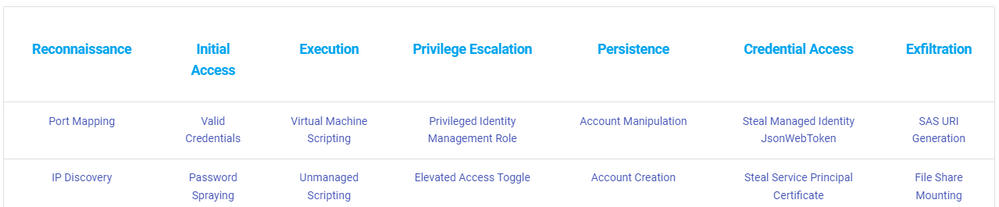
The top row designates the tactic, each sequentially having an ID starting with Reconnaissance at “AZT1”.
Figure 1: The top line represents the tactics and the columns represent the techniques that pertain to the tactic.
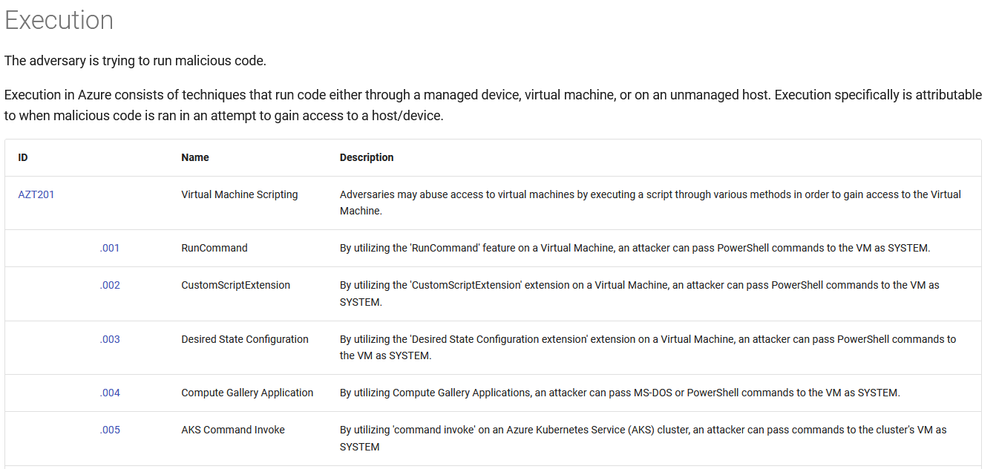
When clicking on a specific tactic, it will bring you to a list of techniques and sub-techniques associated with that tactic, with a short description.
Figure 2: Part of the page for the ‘Execution’ tactic.
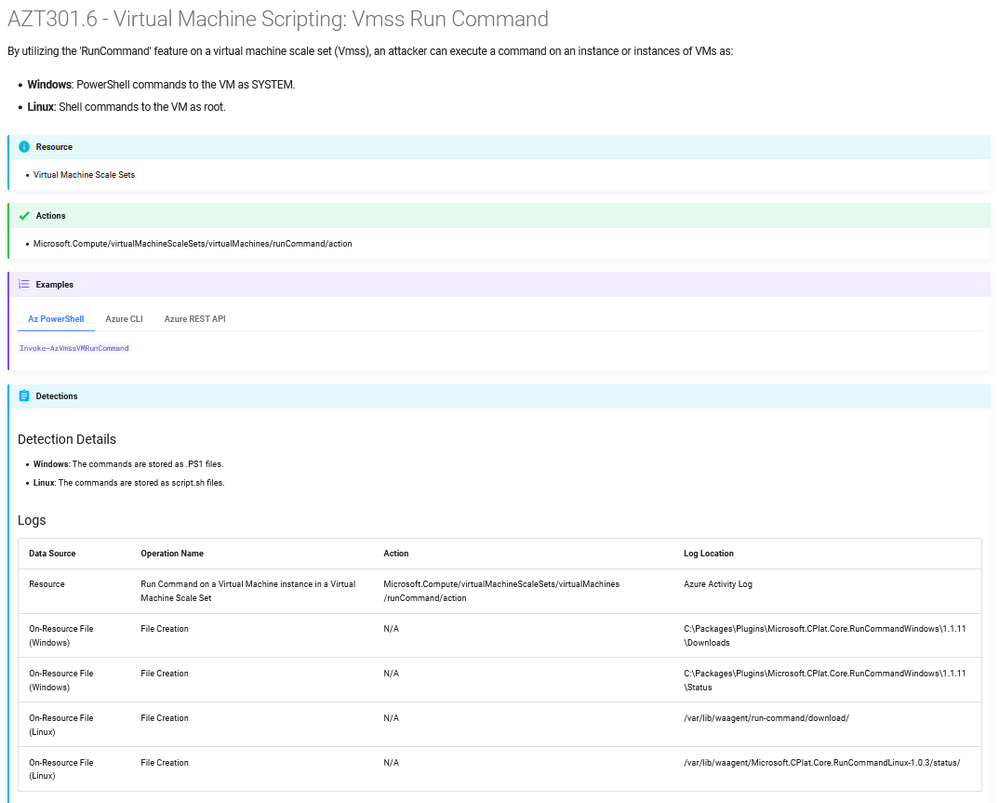
Clicking on the specific ID associated with the technique will bring you to the page on that technique or sub-technique.
Figure 3: The page for a sub-technique, AZT301.6 – Virtual Machine Scripting: Vmss Run Command.
The technique/sub-technique specific pages have several key topics of information.
Resource: The resource(s) that the technique effects
Examples of commands to utilize the technique, including using the portal
Any potential detections
Additional Resources
The Azure Threat Research Matrix is meant to be product-agnostic, meaning specific detection queries are for technologies within Azure by default and not an additional, paid solution.
Community Collaboration
Over the past several months, we’ve collaborated with some of the top researchers in the Azure security community to put together the TTPs within the matrix as it is released today. Their contributions have been extremely helpful and are on the list of acknowledgments here. One of the intended goals of the ATRM is to be as comprehensive as possible. With the hundreds of services and offerings within Azure, it’s difficult for one person to know every potential TTP within Azure and Azure AD. While internally at Microsoft we have dedicated research teams whose jobs are to research the potential abuse scenarios within Azure & Azure AD, we recognize that the community also has a large contribution to the security of our products. With this in mind, we openly invite feedback on the ATRM, from new techniques to additional data added, we would love to hear the greater security community’s input. The Azure Threat Research Matrix is being released under the MIT license and hosted on GitHub, which will openly welcome pull requests and issues.
This article is contributed. See the original author and article here.
VMware has released security updates to address multiple vulnerabilities in VMware’s Workspace ONE Access, Access Connector, Identity Manager, Identity Manager Connector, and vRealize Automation. A remote attacker could exploit some of these vulnerabilities to take control of an affected system.
CISA encourages users and administrators to review VMware Security Advisory VMSA-2022-0021 and apply the necessary updates.
This article is contributed. See the original author and article here.
This blog is co-authored with Shaofei Zhang, Xi Wang, Lei He, Sheng Zhao
Azure Neural Text-to-Speech (Neural TTS) has made rapid progress in speech quality, with voice models closely mirror natural speech at the sentence level (see more details here). However, in the real-life scenarios, TTS is used not just to read out single sentences but content within a long-form context such as paragraphs in web pages, audiobooks, or video subtitles.
In general, TTS synthesis generates paragraph or long-form audios by sentence. After each sentence is synthesized, they are concatenated together into paragraphs. Sentence-level speech synthesis only takes account of the single sentence information, with no consideration of the content before or after that sentence, even in the long-form context. The sentence generated with this approach would sound the same no matter how its context changes in paragraphs. As we know, scenarios like audiobooks or web content read-aloud usually consist of many paragraphs with context. Listeners usually expect that synthesized sentences in different contexts should sound dynamic in the pitch, rhythm, intonation, etc. in such scenarios so it creates a sense of coherence between sentences. Without the contextual information taken into the model, the sentence-level synthetic voices can be more monotone and less expressive, leading the listeners to feel less engaged.
In this blog, we introduce a new technical innovation that considers contextual information to model TTS voices for paragraph or long-form content reading. This new technology significantly improves the coherence and expressiveness when generating long audios, using Paragraph MOS (Mean Opinion Score) as metrics. With this new technology, we are glad to announce the public preview of Roger, a contextual voice model in English (US), to enable customers to generate more expressive and natural-sounding long-form audio content using Azure Neural TTS service.
Introducing Roger: the new contextual voice model
Roger is a voice that understands the paragraph content and automatically identifies the context for each sentence. Hence, he can adjust the pitch, rhythm, and intonation along with the context, and insert natural pauses as needed when reading paragraphs.
Listen to the samples below and hear how Roger expressively read paragraphs. Samples generated using the same voice’s sentence-level model are also provided as a baseline so you can compare how they differ in pause, intonation, rhythm, etc. inside and cross sentences.
Table 1: samples from Roger (sentence-level voice model as a baseline)
Scripts
Sentence Model
Contextual Model
A druid was a man of mystery and power, respected by all save the most arrogant churchmen and lords. ” Why have we been brought here, druid? ” Farrel asked. ” No doubt we will learn that in time, ” Valin said. ” But I sense our circle is not yet complete. Look, another joins us. ” With his short wooden wand he gestured down the hill, to where a maiden was stepping among the fallen stones. She wore a gown of white linen, loose and frayed.
Many others were asking different questions. Questions like “if they made it, why are they still sending people out?” and “I’m next, I don’t want to go, what’s down there?” float through our minds like clouds. Even as hushed whispers begin to break the silence, my Squad remains silent.
He then gazed at every soldier on that trench giving each of them a nod.” Do and die boys, do and die!” The twenty eight repeated the chant as the sound of the ghastly GEOMs began to resound.” Do and Die!” their voices drowning the GEOM swarm, taunting the monsters to finish them off.
With the integration of contextual information, the generated speech sounds more expressive and coherent in terms of the prosody inside sentence and cross sentences, and for the content that is very rich and expressive, the audio from contextual model is more stable and natural.
The technology behind
In this section, we describe the technology behind the new contextual voice model and introduce how we integrate contextual information into neural TTS voice modeling and build the text-based contextual encoder for long-form audio generation, followed by the quality benefit measurement.
Integrating contextual information to neural TTS modeling
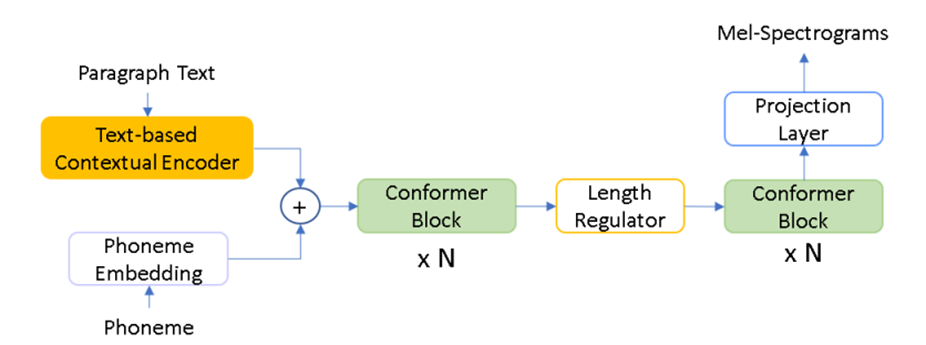
Given the same sentence with different context, the prosody of the generated speech could be different. Based on this concept, we use a text-based contextual encoder to extract the contextual information from paragraph text and use this information as a condition on the current sentence’s phoneme embedding to relieve one-to-many problems in the conventional TTS. To model long-form context, the long-form data such as paragraph text and paragraph-level voice samples are needed. As shown in Figure 1, we bring the phoneme embedding and contextual information from text-based contextual encoder together and then go through the same sentence level modeling process to generate the mel-spectrograms for audio waves.
Figure 1. Overall architecture of the contextual voice model
Text-based contextual encoder
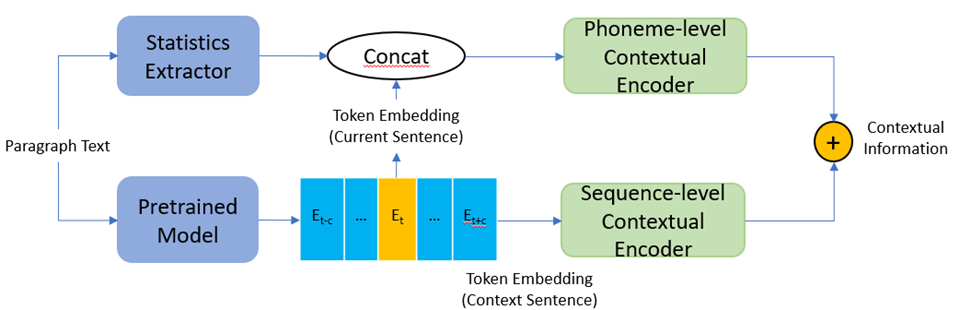
As shown in Figure 2, we use two branches to extract phoneme level and sequence level semantic and syntax information separately. Given a paragraph text, a token-level statistics extractor is used to calculate the syntactic information which covers the correlation among token, sentence, and paragraph. For each sentence centered in a predefined range of context, we use a pretrained model to extract the token-level semantic context embedding derived as current sentence token embedding and context sentence token embedding.
For the phoneme-level information extraction branch, token-level embedding of current sentence and statistical features will be concatenated and then go through a phoneme level contextual encoder to up-sample and encode to phoneme level contextual embedding.
Figure 2. Text-based contextual encoder
For the sequence-level information extraction branch, context sentence token embedding will go through a sequence-level contextual encoder to do some pooling and be encoded to a contextual representation which not only contains current but also historical and future information. Then these two-level contextual features will be combined as the final contextual information.
Quality benefits
We conducted a 10-point scale paragraph MOS to measure the voice quality of the proposed contextual model. The difference between paragraph MOS and general sentence MOS is mainly in two aspects: 1) the audios tested and cases for judgement are paragraphs, not single sentences; 2) The testers are asked not only to focus on the voice quality of a single sentence, but also the coherence cross sentences.
In this paragraph MOS test, we prepared 30 paragraphs including conversations and narrations from 10 genre novels for each TTS system (sentence-level model and contextual model), and 7 paragraphs for human recordings. 20 native speakers listened to the given audios and gave a score on a 10-point scale according to the overall impression (see table 2 for the definition of overall impression), along with some specific metrics, including naturalness, pleasantness, speech pause, stress, intonation, emotion, style matchiness and listening effort etc.
Table 2: Metric Definition of Paragraph MOS
Overall impression
How is your overall impression on this content reading, considering the inside and cross sentences? Consider if the voice is clear, natural, expressive, easy to understand and pleasant to listen to.
Paragraph MOS result shows that the contextual model significantly reduces the paragraph MOS gap with recording from -0.2 (sentence-level model) to -0.06 (contextual model), which is around 70% paragraph MOS reduction, and closely mirror human speech at the paragraph level.
Here are samples from contextual model and human recording for your reference.
Table 3: Samples from contextual model vs. human recording
Scripts
Contextual Model
Human
It was two stories high; showed no windows, nothing but a door on the lower story, and a blind forehead of a discolored wall, on the upper; the bore in every feature, the marks of prolonged and sordid negligence. The door, which was equipped with neither bell nor knocker, was blistered and distained. Tramps slouched in the recess and struck matches on the panels; children kept shop upon the steps; the schoolboy had tried his knife on the moldings; and for close on a generation no one had appeared to drive away these random visitors or to repair their ravages. Mr. Enfield and the lawyer were on the other side of the by-street; but when they came abreast at the entry, the former lifted up his cane and pointed. ” Did you ever remark that door? ” He asked; and when his companion had replied in the affirmative, ” It is connected in my mind, ” added he, ” with a very odd story. ” ” Indeed? ” Said Mr. Utterson, with a slight change of voice, ” and what was that? “
How to use it
With the above contextual modeling, an en-US voice (RogerNeural) is released to Azure TTS platform. You can find voice samples and sample code from Voice Gallery. Non developers can also create audio content directly without writing a single line of code, using our audio content creation tool. It’s recommended that long-form context (such as paragraph text, not single sentence) should be provided as text input when using Roger to generate audio content.
Get started
Neural Text-to-Speech (Neural TTS), a powerful speech synthesis capability of Azure Cognitive Services, enables users to convert text to lifelike speech. It can be used in various scenarios including voice assistant, content read-aloud capabilities, accessibility tools, and more. Azure Neural TTS has been integrated into many Microsoft Flag products, such as Edge Read Aloud, Word Read Aloud, Outlook Read Aloud etc. It’s also been adopted by many customers, such as AT&T, Duolingo, Progressive, and more. Up to now, 140 languages and variants are supported in Azure TTS, user can choose from more than 400 pre-set voices or use our Custom Neural Voice service to create their voice instead.
To explore the capabilities of Neural TTS with its different voice offerings, try the demo.
This article is contributed. See the original author and article here.
CISA and the Australian Cyber Security Centre (ACSC) have published a joint Cybersecurity Advisory on the top malware strains observed in 2021. Malicious cyber actors often use malware to covertly compromise and then gain access to a computer or mobile device. As malicious cyber actors have been using most of these top malware strains for more than five years, organizations have opportunities to better prepare, identify, and mitigate attacks from these strains.
CISA and ACSC encourage organizations to apply the recommendations in the Mitigations sections of the joint CSA. These mitigations include prioritizing patching all systems with known exploited vulnerabilities, enforcing multifactor authentication (MFA), securing remote desktop protocol (RDP) and other risky services, making offline backups of your data, and providing end-user awareness and training about social engineering and phishing. The appendix contains detection signatures organizations can employ in defending their networks. For more information on preventing malicious cyber actors from using 2021 top malware strains to exploit vulnerabilities, see:


Recent Comments