by Scott Muniz | Jul 7, 2020 | Uncategorized
This article is contributed. See the original author and article here.
As Microsoft closed out it’s fiscal year in June it went out with a bang with amount of security & compliance related news and announcements. As with every month’s newsletter, the articles that italicized should be priority reading.
General News
Lessons learned from the Microsoft SOC—Part 3d: Zen and the art of threat hunting
Exploiting a crisis: How cybercriminals behaved during the outbreak
Blue teams helping red teams: A tale of a process crash, PowerShell, and the MITRE ATT&CK evaluation
A deeper dive into the APT29 MITRE ATT&CK evaluation
11 security tips to help stay safe in the COVID-19 era
Remote Working: Fewer people working on-premises doesn’t mean less risk to their identities
Misconfigured Kubeflow workloads are a security risk
Barracuda and Microsoft: Removing security barriers to faster public cloud adoption
Zero Trust—Part 1: Networking
Stay ahead of multi-cloud attacks with Azure Security Center
Modernizing the security operations center to better secure a remote workforce
CISO Stressbusters: Post #2: 4 tips for getting the first 6 months right as a new CISO
Lessons learned from the Microsoft SOC—Part 3d: Zen and the art of threat hunting
The psychology of social engineering—the “soft” side of cybercrime
Azure Security & Compliance News
What’s New: Azure Sentinel Threat Hunting Enhancements
Azure Sentinel Ninja Training: The June 2020 update
Moving to cloud-based SIEM: the cost advantage
Sending enriched Azure Sentinel alerts to 3rd party SIEM and Ticketing Systems
Hunting for anomalous sessions in your data with Azure Sentinel
How do I start improving my security posture in the cloud?
How Secure Score affects your governance
Automating the onboarding on-premises, AWS and GCP VMs on Sentinel with Azure Arc
Stay ahead of attacks with Azure Security Center
Feeling fatigued? Cloud-based SIEM relieves security team burnout
Microsoft acquires CyberX to accelerate and secure customers’ IoT deployments
Using Azure Lighthouse and Azure Sentinel to Investigate Attacks Across Multiple Tenants
Move Your Azure Sentinel Logs to Long-Term Storage with Ease
What’s New: Livestream for Azure Sentinel is now released for General Availability
Azure Security Center new security alerts experience
Protecting your GitHub assets with Azure Sentinel
Deliver a Security Score weekly briefing
Sending alerts enriched with supporting events from Azure Sentinel to 3rd party SIEMs
Azure Files enhances data protection capabilities
How to respond to potential Malware uploaded to Azure Storage Blob
Azure Security Center Auto-connect to Sentinel
Azure Sentinel Agent: Collecting from servers and workstations, on-prem and in the cloud
Continuously Export Azure Security Center Alerts and Recommendations via Policy
Security Controls in ASC: Remediate Vulnerabilities
Microsoft 365 Security (All Up News)
Best security, compliance, and privacy practices for the rapid deployment of publicly facing Microsoft Power Apps intake forms
Improving defenses against Exchange server compromise
Setting up a secure collaboration environment
Setting up a secure collaboration environment – Security Admin POV
Setting up a secure collaboration environment – End user point of view
Webinar: Empower your remote workforce with data security in OneDrive and SharePoint
M365 Identity & Data Protection (Azure AD, Intune, AIP, MCAS)
General Availability: Microsoft Information Protection sensitivity labels in Teams/SharePoint sites
Announcing general availability of Microsoft Information Protection in Power BI
Inside Identity: Moving to a passwordless world with the FIDO Alliance
How-to: Password-less FIDO2 Security Key Sign-in to Windows 10 HAADJ Devices
Azure AD Mailbag: Frequent questions about using device-based Conditional Access for remote work
“Why are my users not prompted for MFA as expected?”
Give your HR and IT teams more reasons to cheer with improved integration between Workday & Azure AD
MCAS: Malware detection in real-time
Announcing the Android Enterprise security configuration framework
Protect and Secure Cloud-based Applications using Azure MFA
Proactively reduce lateral movement path risk to your organization with Azure ATP
Microsoft Endpoint Manager – Creating a WDAV Policy
Upcoming Exchange Online Device Access and Conditional Access changes with Outlook mobile
Building trust into digital experiences with decentralized identities (DID)
Role-based Access Control in Intune – Identifying Tenant-wide and Delegated Configurations
M365 Threat Protection (Office ATP, Windows Defender ATP, Azure ATP/ATA)
The science behind Microsoft Threat Protection: Attack modeling for finding and stopping evasive ransomware
Inside Microsoft Threat Protection: Mapping attack chains from cloud to endpoint
Microsoft Defender ATP has a new UEFI scanner
Say hello to the new alert page in Microsoft Defender ATP
Web shell threat hunting with Azure Sentinel and Microsoft Threat Protection
Configuring Microsoft Defender Antivirus for non-persistent VDI machines
Webinar: How to get started with Microsoft Defender ATP
Announcing Microsoft Defender ATP for Android
Microsoft Defender ATP for Linux is now generally available!
How to stream Microsoft Defender ATP hunting logs in Azure Data Explorer
Migrate the old Power BI App to Microsoft Defender ATP Power BI templates!
M365 Compliance & Governance
What’s new in Microsoft 365 Compliance and Risk Management
Exact Data Match Upcoming News
Records Management Webinar
Top 4 tips to protect your remote workforce with data compliance in OneDrive
Getting started with Insider Risk Management
eDiscovery for Teams Webinar
Regards,
Jeremy Windmiller | Enterprise Security Architect, CISSP, CEH, ITIL | Microsoft – Healthcare
by Scott Muniz | Jul 6, 2020 | Azure, Microsoft, Technology, Uncategorized
This article is contributed. See the original author and article here.
This week I discuss the fundamentals of Azure storage in this live session. I take you through a few real-world problems and find some solutions.
We’ll cover Azures Storage and solve three problems using it.
How do I create a static web site using blob storage?
Simple websites sometimes need simple solutions to host them. If you have a static website and just need to host some HTML and images, Azure blob storage allows you to easily enable static web hosting. You can keep costs low, customize your URL, integrate a Content Delivery Network to serve quickly and do so all while ensuring developers can deploy easily.
I take questions and give you a start with code and procedure to deploy it.
Follow AzureFunBytes on Twitter and Twitch for updates on future episodes.
Links for you!
Introduction to the core Azure Storage services
What is Azure Blob storage?
Introduction to Azure managed disks
Use the portal to attach a data disk to a Linux VM
Microsoft Learn: Core Cloud Services – Azure data storage options
Microsoft Learn: Azure Fundamentals
Microsoft LearnTV 24*7 streaming Azure content
Get $200 in free Azure credit along with 12 months of free services
by Scott Muniz | Jul 6, 2020 | Uncategorized
This article is contributed. See the original author and article here.
Labeled data is critical to training supervised learning models. Higher volumes and more accurate labeled data contribute to more accurate models but labeling data has traditionally been time-intensive and error-prone.
With Data Labeling in Azure Machine Learning, you now have a central place to create, manage, and monitor labeling projects. You can now manage data labeling projects seamlessly from within the studio web experience to generate and manage tasks reducing the back-and-forth of labelling data offline. With AML Data Labeling, you can load and label data and be ready to train in minutes.
To increase productivity and decrease costs for a given task, the Assisted Machine Learning labeling feature allows you to leverage automatic machine learning models to accelerate labeling by clustering like objectives and automatically prelabeling data when the underlying model has reached high confidence. This feature is available for image classification (multi-class or multi-label) and Object detection tasks, in Enterprise edition workspaces.
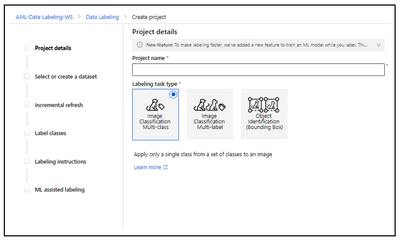
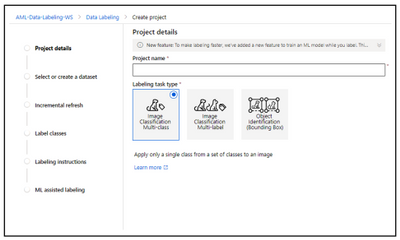
Data Labeling in Azure Machine learning now includes below capabilities:
Image Classification Multi-Class
This project type helps you to categorize an image when you want to apply only a single class from a set of classes to an image.
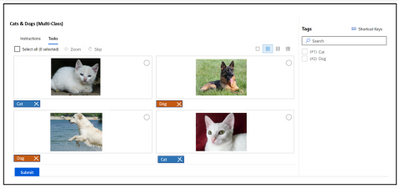
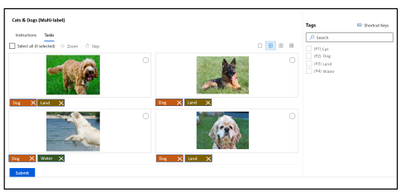
Image Classification Multi-label
This project type allows you to categorize an image when you want to apply one or more labels from a set of classes to an image. For instance, a photo of a dog might be labeled with both dog and land.
Object Identification (Bounding Box)
Use this project type when you want to assign a class and a bounding box to each object within an image. If your project is of type “Object Identification (Bounding Boxes),” you’ll specify one or more bounding boxes in the image and apply a tag to each box. Images can have multiple bounding boxes, each with a single tag.
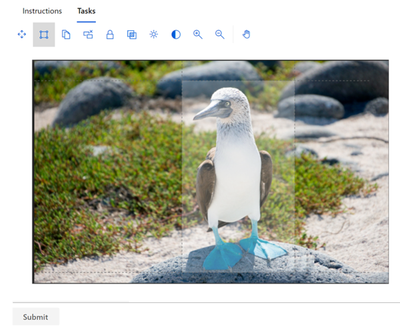
Assisted machine learning
The machine assisted labeling lets you trigger automatic machine learning models to accelerate the labeling task. At the beginning of your labeling project, the images are shuffled into a random order to reduce potential bias. However, any biases that are present in the dataset will be reflected in the trained model. For example, if 80% of your images are of a single class, then approximately 80% of the data used to train the model will be of that class. This training does not include active learning.
Enabling ML assisted labeling consists of two phases:
The exact number of labeled images necessary to start assisted labeling is not a fixed number. This can vary significantly from one labeling project to another. ML Assisted Labeling uses a technique called Transfer Learning, and the pre-labeling will be triggered when sufficient confidence is achieved which varies based on the dataset.
Since the final labels still rely on input from the labeler, this technology is sometimes called human in the loop labeling.
Clustering
After a certain number of labels are submitted manually, the machine learning model for image classification starts to group together similar images. These similar images are presented to the labelers on the same screen to speed up manual tagging. Clustering is especially useful when the labeler is viewing a grid of 4, 6, or 9 images.
The clustering phase does not appear for object detection models.
Prelabeling
After enough image labels are submitted, a classification model is used to predict image tags. Or an object detection model is used to predict bounding boxes. The labeler now sees pages that contain predicted labels already present on each image. For object detection, predicted boxes are also shown. Accuracy will vary depending images, labels, the domain, and other factors. With Pre-Labeling, you can review the predictions before committing the labels.
Once a machine learning model has been trained on your manually labeled data, the model is evaluated on a test set of manually labeled images to determine its accuracy at a variety of different confidence thresholds. This evaluation process is used to determine a confidence threshold above which the model is accurate enough to show pre-labels. The model is then evaluated against unlabeled data. Images with predictions more confident than this threshold are used for pre-labeling.
Resources
Learn more about the Azure Machine Learning service.
Get started with a free trial of the Azure Machine Learning service.
by Scott Muniz | Jul 6, 2020 | Uncategorized
This article is contributed. See the original author and article here.
It was 25 years ago that SAP and Microsoft started our great partnership based on the combination of our platforms: SAP R/3 and Microsoft SQL Server on Windows. We began with co-located development and support and have enhanced our partnership with each successive release of SAP software on Microsoft products.
Our joint projects started in small number 25 years ago. But it has grown continuously, and SQL Server remained and is still a very popular database platform with customers for SAP workload. And with the immense popularity of Microsoft Azure, we’re seeing more and more SAP customers move SAP NetWeaver systems to Azure and often combine this step with a migration to SQL Server. There are quite a few success stories of our joint customers. You can read about Malaysia Airlines or Mosaic implementation projects or how Microsoft IT runs Microsoft’s business on SAP products. Rio Tinto is another customer running very successfully with their SAP landscape hosted on Azure and using SQL Server as DBMS.
Microsoft and SAP continue to work together to release more functionalities, so, that SQL Server stays a great database platform to host SAP NetWeaver business processes and other SAP business processes that rely on SQL server as its DBMS platform. After past successes with features like Database Compression, Always On, Columnstore Indexes, we’ve continued working together with SQL Server 2019 and SAP NetWeaver. In SQL Server 2019, Microsoft has delivered performance improvements to the core database engine for further improvement to your SAP NetWeaver system which required no SAP code changes – simply upgrade your SQL Server version. Some of these improvements were:
- SQL Server Intelligent Query Processing further expands the database engine’s performance in all queries, with intelligence under the covers that will further improve your enterprise workload in parallel and under changing conditions.
- Scalar UDF Inlining: enhanced performance in inline user-defined functions for better performance in SAP Core Data Services
- Resumable Operations: make operations easier with improvements to online clustered columnstore index build and rebuild; as well as resumable online rowstore index build; as well as suspending and resuming the initial TDE encryption
- Mission Critical Enterprise High Availability and Disaster recovery with Always On: increases its spread by supporting up to 5 secondary replicas now, up from 3 in SQL Server 2017, along with further improvements coming.
For those customers already running their SAP NetWeaver based system on SQL Server, there will also be new important facts to learn before upgrading:
- The SAP SL Toolset tools will automatically enable the improved Cardinality Estimator first released with SQL Server 2014 when you either upgrade to SQL Server 2019 or you install it freshly. We did not enable it at the time of its original release since the effects are very system-specific and we wanted our customer base to experience enough testing before using it.
- Batch mode processing which, so far, was enabled on columnstore tables only, is working on rowstore tables with SQL Server 2019. This will improve operational analytics queries in SAP Business Suite for cases where additional columnstore indexes are not an option.
- CDS views that rely on User Defined Functions are expected to run faster as a result of new optimizations introduced with SQL Server 2019 based on feedback by SAP.
- Indirect Checkpoint as explained in SAP note # 2872557 got more scalability improvements to handle more challenging workload.
- Resumable Index Rebuild functionality got extended to resume initial index creation as well. This allows index rebuilds and index creation be distributed across time windows with low workload.
- To address even higher availability, SQL Server 2019 allows up to five synchronous replicas in an Availability Group, instead of 2 as before. This would allow you to run a High Availability configuration where you can distribute three synchronous replicas across three Azure Availability Zones in the same Azure region.
Our joint development team has worked diligently in recent years to try and lower the SAP Support Pack level barrier to upgrading to modern SQL Server versions. For example, in contrast to previous versions of SAP on SQL Server, the majority of SAP NetWeaver based systems on SQL Server can all upgrade to any of SQL Server 2016, or Server 2017 or SQL Server 2019 without having to apply any SAP Support Packs prior to the SQL Server upgrade. This way we reduce the upgrade and testing load of your operations teams when upgrading any SAP NetWeaver based system running on modern SQL Server versions.
Due to some pending development in SQL Server 2019, SAP only supports a minimum version of SQL Server 2019 CU3 for installation or deployment with SAP NetWeaver based systems. The reason CU3 is required at release for SQL Server 2019 is due to improvements made in SQL Server Always On and SQL Server Agent improvements.
The central SAP note for planning your SAP NetWeaver based system on SQL Server 2019 is note 2807743 . This note gives further details on which major versions of SAP NetWeaver based software can run on SQL Server 2019, the exact minimum SAP Support Packs required for specific SAP versions, etc. as well as further links to notes giving the software location, installation instructions, etc.
![[SQL Server on Azure VM] Automated Backups run daily when scheduled to run weekly](https://www.drware.com/wp-content/uploads/2020/07/large-221)
by Scott Muniz | Jul 6, 2020 | Azure, Microsoft, Technology, Uncategorized
This article is contributed. See the original author and article here.
When we enable Automated Backup for SQL Server as documented in https://docs.microsoft.com/en-us/azure/azure-sql/virtual-machines/windows/automated-backup and if we setup manual schedule with Weekly backup, we will continue to see the backup of the databases happen daily.
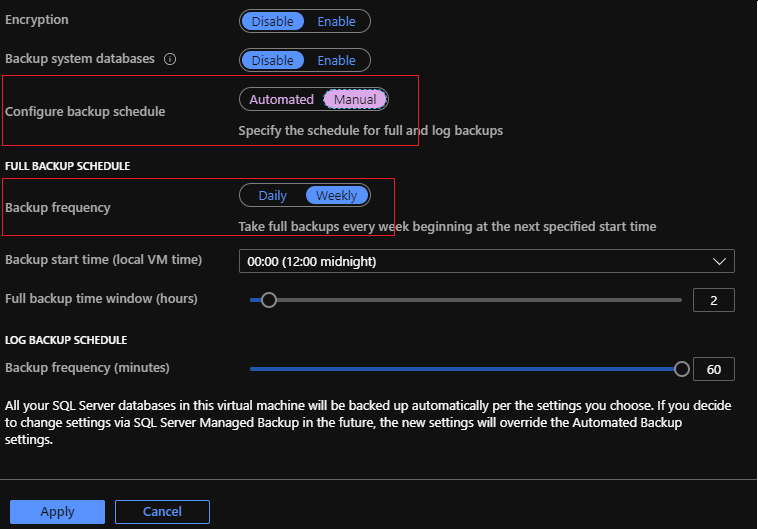
We had few of our customers report this so we wanted to blog about this issue and provide a workaround until the issue is fixed.
There are 2 issues with this, as you see, we do not have an option to select which day of the week you wanted the backup to happen and the other one is with the code issue. This is currently known issue and we are working to fix this in near future, but until then we can work around the issue and fix it by running the following T-SQL to modify and make the changes using Managed Backup commands:
-- Confirm the days_of_week has all the days selected and also get the information about backup_begin_time, backup_duration and log_backup_freq and update accordingly in below scripts
SELECT db_name,
       is_managed_backup_enabled,
       scheduling_option,
       full_backup_freq_type,
       days_of_week,
       backup_begin_time,
       backup_duration,
       log_backup_freq
FROM msdb.managed_backup.fn_backup_db_config(NULL)
WHERE is_managed_backup_enabled = 1
      AND full_backup_freq_type = 'WEEKLY';

NOTE: You see System databases Master, Model and MSDB because I had selected “Backup system database” option in earlier screen shot to enable backups for those aswell.
Things you need to note from about is “backup_begin_time”, “backup_duration” and “log_backup_freq” and parameter we are interested in updating is “@days_of_week“.
-- Updating the backup config instance wide so that any new databases created, they already get added with the required info.
-- We are updating @days_of_week to required day
EXEC msdb.managed_backup.sp_backup_config_schedule
     @database_name = NULL,
     @scheduling_option = 'CUSTOM',
     @full_backup_freq_type = 'WEEKLY',
     @days_of_week = 'Monday', 	-- needs updated to your required day
     @backup_begin_time = '00:00',	-- needs updated based on above output
     @backup_duration = '02:00',	-- needs updated based on above output
     @log_backup_freq = '01:00';	-- needs updated based on above output
GO

-- Remember for existing databases this will get applied when you manually modify the values for each of them. So we have to manually update for each existing database

DECLARE @DBNames TABLE
(RowID  INT IDENTITY PRIMARY KEY,
 DBName VARCHAR(500)
);

DECLARE @rowid INT;
DECLARE @dbname VARCHAR(500);
DECLARE @SQL VARCHAR(2000);

INSERT INTO @DBNames(DBName)
       SELECT db_name
       FROM msdb.managed_backup.fn_backup_db_config(NULL)
       WHERE is_managed_backup_enabled = 1
             AND full_backup_freq_type = 'WEEKLY';

SELECT @rowid = MIN(RowID)
FROM @DBNames;
WHILE @rowID IS NOT NULL
    BEGIN
        SET @dbname =
        (
            SELECT DBName
            FROM @DBNames
            WHERE RowID = @rowid
        );
        BEGIN
            SET @SQL = 'EXEC msdb.managed_backup.sp_backup_config_schedule
                                         @database_name =  ''' + '' + @dbname + '' + '''
                                         ,@scheduling_option = ''CUSTOM''
                                         ,@full_backup_freq_type = ''WEEKLY''
                                         ,@days_of_week = ''Monday''		-- needs updated to your required day
                                         ,@backup_begin_time =  ''00:00''	-- needs updated based on above output
                                         ,@backup_duration = ''02:00''	-- needs updated based on above output
                                         ,@log_backup_freq = ''01:00''';	-- needs updated based on above output
            EXECUTE (@SQL);
        END;
        SELECT @rowid = MIN(RowID)
        FROM @DBNames
        WHERE RowID > @rowid;
    END;
If we now again run the first query above and should see the days_of_week reflect to the day(s) of your choice.

Once done, it should work for any new database created.
Point to note, if you disable and re-enable the Automated backup before the fix is released, we will have to go over the same process again.
Hope this helps!
Regards,
Dinesh
Ref: managed_backup.fn_backup_db_config, sp_backup_config_schedule


Recent Comments