
Neural Text to Speech extends support to 15 more languages with state-of-the-art AI quality
This article is contributed. See the original author and article here.
Neural Text to Speech extends support to 15 more languages with state-of-the-art AI quality
This post was co-authored by Sheng Zhao, Anny Dow, Garfield He and Lei He.
Neural Text to Speech, part of Speech in Azure Cognitive Services, enables you to convert text to lifelike speech for more natural interfaces. Neural Text to Speech (Neural TTS) enables a wide range of scenarios, from audio content creation to natural-sounding voice assistants. Companies like the BBC and Motorola Solutions are using Text to Speech in Azure to develop conversational interfaces for their voice assistants.
To make it possible for more developers to add natural-sounding voices to their applications and solutions, today, we’re building on our language support with 15 new Neural TTS voices along with significant voice quality improvements.
Language support extended with 15 new voices
Our new Neural TTS voices include: Salma in Arabic (Egypt), Zariyah in Arabic (Saudi Arabia), Alba in Catalan (Spain), Christel in Danish (Denmark), Neerja in English (India), Noora in Finnish (Finland), Swara in Hindi (India), Colette in Dutch (Netherland), Zofia in Polish (Poland), Fernanda in Portuguese (Portugal), Dariya in Russian (Russia), Hillevi in Swedish (Sweden), Achara in Thai (Thailand), HiuGaai in Chinese (Cantonese, Traditional) and HsiaoYu in Chinese (Taiwanese Mandarin).
Hear samples of the voices, or try them with your own text in our demo.
|
Locale code |
Language |
Voice name |
Audio sample |
|
ar-EG |
Arabic (Egypt) |
“ar-EG-SalmaNeural” |
أتساءل ماذا يمكن ان يحدث لجسمك عندما تأكل الزنجبيل كل يوم لمدة شهر؟ |
|
ar-SA |
Arabic (Saudi Arabia) |
“ar-SA-ZariyahNeural” |
لديك نصف ساعة فقط؟
|
|
ca-ES |
Catalan (Spain) |
“ca-ES-AlbaNeural” |
L’obra és el retrat d’un moment històric de mobilització popular.
|
|
da-DK |
Danish (Denmark) |
“da-DK-ChristelNeural” |
Halvfjerds procent af din krop består af vand
|
|
en-IN |
English (India) |
“en-IN-NeerjaNeural” |
How about coming to the barbecue at the tennis club?
|
|
fi-FI |
Finnish (Finland) |
“fi-FI-NooraNeural” |
Tavoitteena on lisätä kohtuuhintaisten vuokra-asuntojen määrää kasvukeskuksissa.
|
|
hi-IN |
Hindi (India) |
“hi-IN-SwaraNeural” |
‘आयरन’ शब्द किस खेल से सम्बन्धित है ?
|
|
nl-NL |
Dutch (Netherland) |
“nl-NL-ColetteNeural” |
Alle oceanen zijn met elkaar verbonden en vormen samen één grote massa zout water.
|
|
pl-PL |
Polish (Poland) |
“pl-PL-ZofiaNeural” |
Wyjazd z Poznania planujemy o godzinie czwartej rano.
|
|
pt-PT |
Portuguese (Portugal) |
“pt-PT-FernandaNeural” |
Amanhã vai estar tanto calor que vou à praia.
|
|
ru-RU |
Russian (Russia) |
“ru-RU-DariyaNeural” |
В качестве примера он привел искусственный интеллект, беспилотную технику, генетику, медицину и образование.
|
|
sv-SE |
Swedish (Sweden) |
“sv-SE-HilleviNeural” |
Ett kul och intressant avsnitt även för dig som inte var på plats!
|
|
th-TH |
Thai (Thailand) |
“th-TH-AcharaNeural” |
เขาทำด้วยหัวใจบริสุทธิ์และต้องการให้ความยุติธรรมแก่ประชาชน
|
|
zh-HK |
Chinese (Cantonese, Traditional) |
“zh-HK-HiuGaaiNeural” |
了解該等基金的三大特點,有助投資者作出更明智的選擇。
|
|
zh-TW |
Chinese (Taiwanese Mandarin) |
“zh-TW-HsiaoYuNeural” |
如果一個人從一所優秀大學畢業,可能意味他有能力做大事。
|
Text-to-speech quality is measured by Mean Opinion Score (MOS), a widely-recognized scoring method for speech quality evaluation. For MOS studies, participants rate speech characteristics such as sound quality, pronunciation, speaking rate, and articulation on a 5-point scale. According to several MOS tests we have done (n>50 for each study), the average MOS score for the 15 new Neural TTS voices is above 4.1, about +0.5 higher than the scores for standard (non-neural) voices.
See the full language list for Neural TTS and standard voices.
Voice quality and performance improved with state-of-the-art neural speech synthesis models
Neural TTS initially achieved near-human-parity on sentence reading using a recurrent neural network (RNN) based sequence-to-sequence model. Inspired by the Transformer model—a powerful sequence-to-sequence modeling architecture that advanced the state-of-the-art in neural machine translation (NMT), Microsoft researchers piloted the Transformer and FastSpeech models on Neural TTS and saw significant improvements in performance and efficiency. The Transformer TTS model is based on the auto-regressive Transformer structure, which can produce speech output in the quality close to the actual human voices with 5x less training time. FastSpeech is a new text-to-speech model that improves speech synthesis speed, accuracy, and controllability.
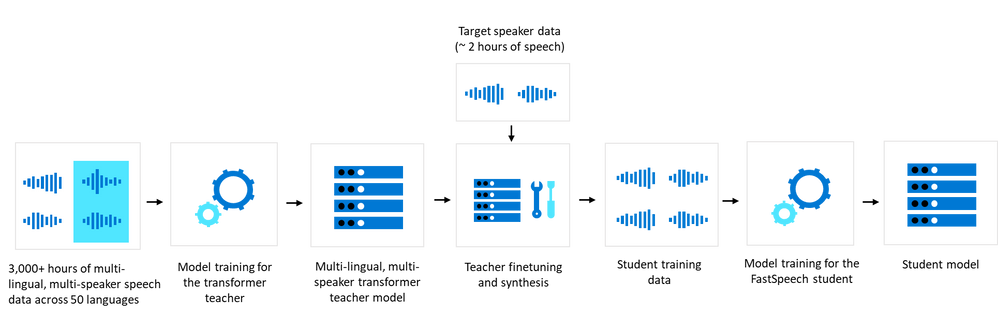
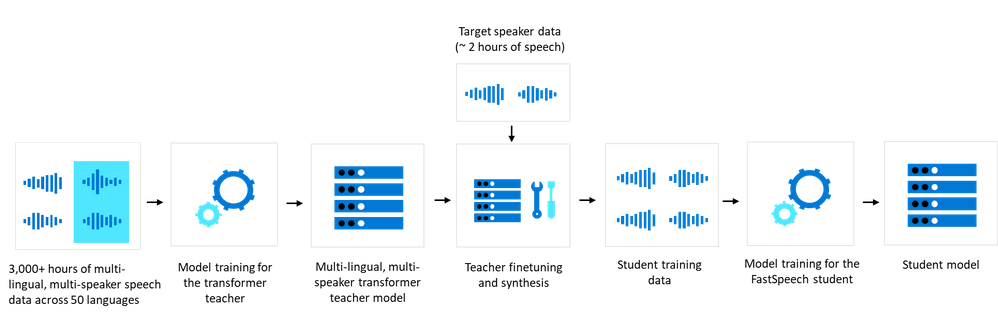
Multi-lingual and multi-speaker TTS recordings are first used to train a transformer base model. To scale TTS development for many locales and voices, it is vital to have a highly agile development process. We built a “transformer teacher model” with 3,000+ hours of speech data from hundreds of speakers in 50+ languages/locales —about 50x of a typical single language multi-speaker model.
By using around 2 hours of a target speaker’s data, we can now adapt the multi-lingual multi-speaker transformer teacher model to generate a new high quality model for the speaker that sounds very similar to the original recording. Then we can use a “finetuned teacher” to generate training data with rich content coverage to train a FastSpeech “student” for deployment that achieves the same quality as its finetuned teacher.
With this powerful multi-lingual model, we are also able to take the voice samples from one speaker in one language as input and transfer the voice into another target language, without losing quality.
With the Transformer and FastSpeech models, key improvements include:
Quality enhancements: The new models achieved significant MOS improvements over the previous robust LSTM-based Neural TTS models in our platform. For example, we did a side-by-side comparison on de-DE Kajta voice; the new model shows +0.4 comparative MOS gain over the baseline.
Higher performance: With the new models, users can get high quality Neural TTS output with faster response time. FastSpeech “students” have 10X inference speedup on mel-spectrogram generation using M60 GPUs compared to our previous production systems. Neural TTS can run 40% faster on a Kubernetes GPU Pod. We can also run Neural TTS on CPU with 0.06 RTF (Real Time Factor), which means 1 second of audio can be generated in 60ms on a Kubernetes CPU Pod.
Language-specific improvements
When developing Neural TTS for new languages, there are also language-specific challenges that need to be addressed to ensure high voice quality and performance.
For example, to make synthetic speech sound humanlike, it is critical to get pitch accents right. Japanese (ja-JP) poses challenges for speech synthesis because of its complicated pitch accents. However, most end-to-end TTS systems cannot perform well on pitch accents; we found that about 60% of production system’s problems in Japanese synthesis are related to intonation and accents.
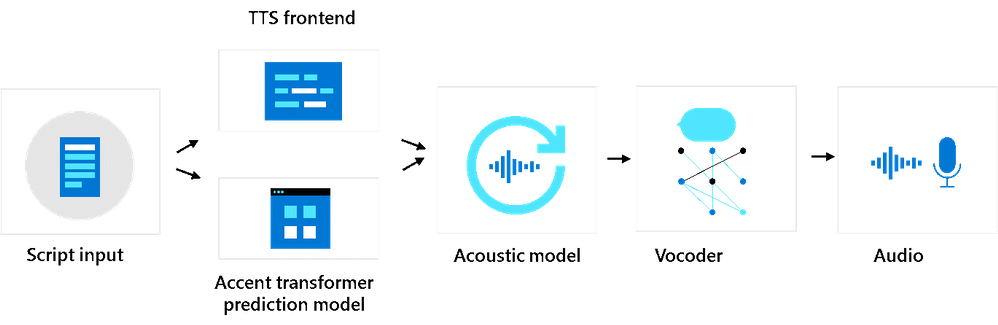
We built a transformer model to predict and account for pitch accent related features. The accent model predicts accent phrase boundaries and accent type information, and these accent features are introduced into the acoustic model. The teacher model and student model will use the accent features in training and synthesis.
With the pitch accent features, the voice quality improves significantly. Our MOS test shows that the new ja-JP voice, Nanami, has a +0.3 improvement in MOS score compared to the previous production system. This method is also applicable to other languages with pitch accents.
Here are some samples:
|
Text |
Sample of the old model without pitch accent support |
Sample of new model with pitch accent support |
|
1日2食に切り替える予定だ。 |
|
|
|
被災地には僕らの番組のため今も毎週のように行っています。 |
|
|
Create a custom voice with Neural TTS technology
The latest technical advancements in Neural TTS are also available in the Custom Neural Voice capability, enabling organizations to create a unique brand voice in multiple languages with 5-10X less data.
Learn more about the process for getting started with Custom Neural Voice.
Get started
With these updates, we’re excited to be powering natural and intuitive voice experiences for more customers. Text to Speech has more than 110 standard voices in over 40 languages and locales in addition to our growing list of Neural TTS voices. .
For more information:
- Try the TTS demo
- See our documentation
- Check out our sample code

Recent Comments