
by Scott Muniz | Jul 8, 2020 | Uncategorized
This article is contributed. See the original author and article here.

References and Information Resources
Responding to COVID-19 together
Our commitment to customers during COVID-19
Optimize Office 365 traffic for remote staff
How to quickly optimize Office 365 traffic for remote staff & reduce the load on your network infrastructure
Microsoft 365 live events assistance
Now available as a public preview. Administrators can get guidance and assistance to setup and deliver live event broadcasts from our live events support team.
Office 365 & Managing Crisis Communications
Microsoft 365 Public Roadmap
This link is filtered to show GCC, GCC High and DOD specific items. For more general information uncheck these boxes under “Cloud Instance”.
New to filtering the roadmap for GCC specific changes? Try this:
Stay on top of Office 365 changes
Here are a few ways that you can stay on top of the Office 365 updates in your organization.
Microsoft Tech Community for Public Sector
Your community for discussion surrounding the public sector, local and state governments.
Microsoft 365 for US Government Service Descriptions
Newsworthy Highlights
July Webinars & Remote Work Resources
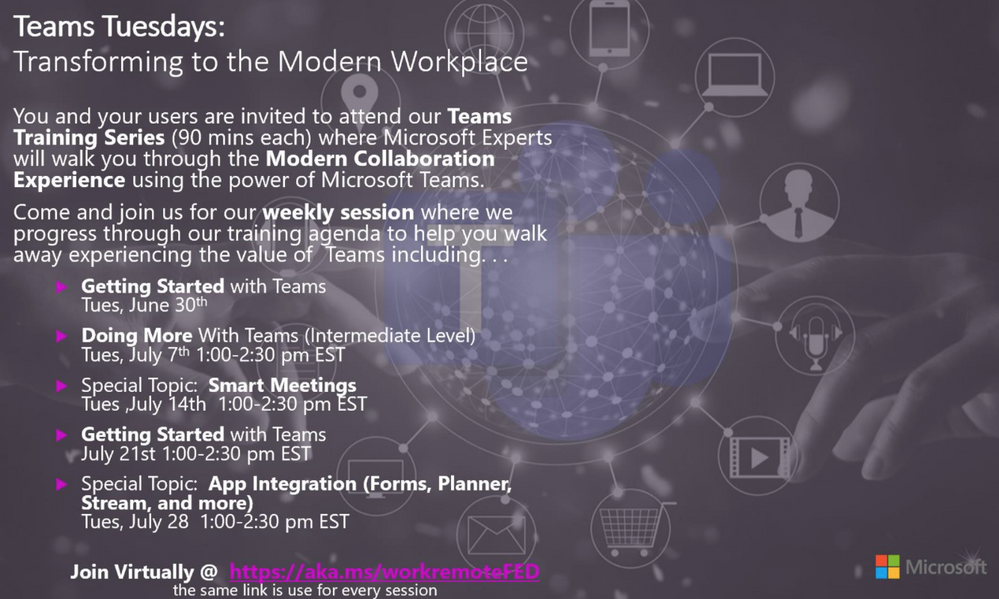
Join Virtually at https://aka.ms/workremoteFED
Making the Most of 3×3 Meeting Mode Experience
With the 3×3 meeting stage, the following behaviours are normal:
- Only avatars will be shown if no user is sharing video.
- Only video feeds will be shown as soon as one person starts to share video.
- The maximum number of avatars/video feeds shown on the meeting stage is nine. The actual number may be lower.
- If there are more than nine active video feeds, the feeds for the most active participants will be displayed on the meeting stage. All other participants will be represented using their avatar, just below the meeting stage.
- If there are fewer than nine active video feeds, Teams will arrange the video feeds automatically to fill the available space in the meeting stage. For example, four video feeds will show in a 2×2 grid. Six feeds will show in a 3×2 grid. Seven feeds will show as a 2×2 grid alongside a 1×3 grid.
- The arrangement of video feeds for participants may vary. Each participant will see the same video feeds, but the positioning of each feed may vary from user to user.
- If a participant shares an app/their desktop, a maximum of nine video feeds will be shown below the meeting stage (where the sharing session is shown). The actual number of video feeds displayed will be the same as the number of video feeds shown in the user’s meeting stage.
*Note: If a user’s hardware or bandwidth cannot support the additional load of displaying the app/desktop sharing feed, Teams will unsubscribe from a video feed to allow the sharing session to be shown.
Information for support
Familiarize yourself with the capabilities, expected behaviors, and known limitations. Additionally, understand that:
Teams supports 3×3 video only if the user’s hardware meets these minimum requirements:
- Dual core processor
- 8GB RAM
Administrators can see the minimum requirements in the article Hardware requirements for Microsoft Teams.
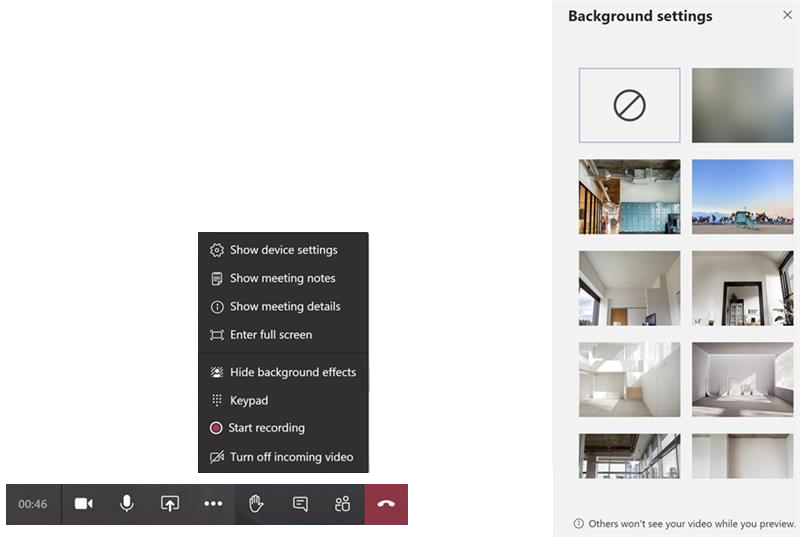
Background replacement now live in GCC
Backgrounds are now available for use in Teams for GCC
Teams attendance report
MC215375: Removing some Teams channel system messages
Safe Documents is now Generally Available
(GCC | GCC High | DOD)
SharePoint and OneDrive for Business File size limit increased to 100GB
(GCC | GCC High | DOD)
Enable communication site experience on classic team sites
Public Sector Blog Spotlight
Shifts in Microsoft Teams: How to Engage Frontline Workers in the GCC
Office 365 IP Endpoint and URL Latest Update
16 June 2020 – GCC
29 June 2020 – GCC
29 June 2020 – GCC High
29 June 2020 – DOD
Roadmap Changes This Month
Please feel free to offer any feedback or suggestions on how we can improve this communication.

by Scott Muniz | Jul 8, 2020 | Uncategorized
This article is contributed. See the original author and article here.
We have a guest post today from @thibaudcolas and @SanchuSankar from our Services Team. Quite a few people helped review the article below so many thanks to the numerous AIP/MIP and DLP PM’s that offered input!
1. Introduction
Is information protection critical or crucial to an organization?
For most of us, the answer seems to be an obvious YES. However, when it comes to directly investing in information protection mechanisms, the discussion seems to be around “Should I invest in information protection tools this year or can it be next year?”. This is possibly because information protection failures are often, a result of the failure of broader security controls.
You might have heard of the Cyber Kill Chain framework where a malicious actor goes through different phases such as reconnaissance, weaponization, delivery, exploitation etc. Typically, the original intention of intruders behind such attacks is data exfiltration. With the rapid increase in the number of security incidents worldwide, will an appropriate information protection solution be impactful to reduce the severity of such an intrusion?
I guess, we will never know answers to some of these questions. But it is safe to say that the adverse impact of these attacks will be far less if your sensitive data is identified, encrypted, and protected against its loss.
Having a comprehensive information protection solution is often a journey and depending on where organizations are in this journey, this could be a multi-year/multi-phased program.

It is also important to note that in addition to the components discussed in this article, elements such as Identity & Access Management (IAM) and device management controls should also be part of your information protection strategy.
2. Where are your crown jewels?
These days, due to their existing Information Security policies and/or compliance requirements, most organizations are conscious of the need to protect their data. However, what they often struggle with is to define a complete, up-to-date, and clear picture of what data they want to protect. In other words, where their “crown jewels” are located.
It is also important to note that “One-size-fits-all” approach doesn’t work for information protection and you need to have an information protection model that will work for you and your organization.
Most of my current engagements require me to work on data classification and protection but very few on data discovery. However, in an ideal world, I recommend organizations to start with a data discovery phase to “take stock” of the data lying around that can then be used to create a data classification model that suits their organization.
Data discovery

To help my customers to discover their data, I recommend using a combination of tools, helping with an integrated view and can possibly cover the majority of their data repositories.
This requires organizations to have a clear view on where their data is currently stored. It also needs careful planning to determine tools appropriate for your data store.
I recommend the below for the proactive scanning:
It is also recommended to leverage below features for added visibility of your sensitive information:
- Analytics Overview (Know your data):Overview on how the labels are being used across your tenant and what is being done with those items
- Content and Activity explorer: Additional details on the content and activity
The same technologies can be used for auto-classification.
Data classification

One of the first questions that I usually ask my customers on every engagement is “what is your main driver for enabling MIP?”. Most of the time, “protecting data” is their answer. They are not wrong, but what they often miss is the other key advantage that MIP brings – assigning value to your information in a way that humans and systems can understand and handle (e.g. apply protection).
Designing data classification for an organization can become a complicated and endless exercise. However, I recommend the below to make this process easier.
- Start with what already exists – Known classification models already exists and can be leveraged as a baseline while defining the model for your organization.
- Microsoft also have released a white paper recently to help organizations create their data classification framework.
- Make it simple – Keeping your data classification simple is extremely important when defining your data classification models. In case of end-users manually applying classification, the more complex it is, the more confused they will be on what the right classification is for their data. This often leads to information remaining as not classified and at worst, incorrectly classified. As an example, I usually recommend having a maximum of 4 and 6 top-level sensitivity labels.
- User training – Even with a simple classification taxonomy, your end-user adoption of the solution could be low. This is often because, even though end-users understand how sensitive the information is, they may not necessarily understand what it implies (e.g. encryption, mails being blocked etc.). Unexpected implications of classification labels might lead to poor user experience and frustrations which could then lead to poor adoption of the solution. This requires end-user education, trainings, and awareness campaigns that you must plan to include in your rollout. In our experience, awareness campaigns driven through posters, emails etc. are found to be more effective than classroom based formal trainings.
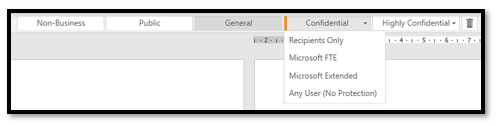
- Designing your taxonomy: Top-label = sensitivity; sublabels = scope – MIP has a notion of optional sub-labels included inside a top label (see below picture). I always recommend designing a classification taxonomy with top labels to assign sensitivity to the information, and potential sub-labels to scope the expected recipients of this information. This ensures you keep visibility across your IT environment where your valuable assets exist. In addition, these sub-labels can be used for any other specific scenarios like exemption of security controls (e.g. no DLP, no protection).
Finally, below recommendations should also be considered while defining your data classification model.
- Assign all sensitive type of information to a label and configure MIP automatic/recommended classification. This will ensure appropriate classification occurs at the time of creation as users use their Office applications.
- Ensure all emails and new/existing documents that were opened & saved are classified using default or mandatory labeling. I recommend “mandatory labeling” for Office documents and “default label” for Outlook. It might be annoying to force users to classify every email they send during the day and therefore “default label” should be more acceptable to them. I would expect fewer documents created or edited daily and therefore suggest “mandatory labeling” for the documents.
3. Preventing Data Leakage

Data Loss Prevention (DLP) is often the ultimate goal organizations want to achieve in an information protection effort. Frequently, this is also the most complex one to implement.
Key questions to consider:
- What data must be considered and protected from data loss?
- Channel for possible data loss (mails, files, Teams conversations)?
- Group of users handling data that you want to protect from data loss (groups, domain, external entities)?
Once you have answers for these, several layers of DLP should be implemented.
It might be complex to draft and implement a DLP strategy only based on sensitivity information types without context. For example, you might decide that sharing employee IDs is not permitted for most of the time except if they are shared with a specific partner organization or passport numbers are not allowed to be shared at all. Compliance requirements may require organizations to create policies/rules to protect every sensitive information type which eventually makes DLP mechanisms complex to implement and monitor. Therefore, DLP technologies should leverage sensitivity labels as the first (but not the only) line of defence. In addition, when encryption is applied with sensitivity labels, this also acts as your last layer of protection.
DLP based on sensitivity labels is probably the most agile method, but this would require all information to be correctly classified. Being realistic and pragmatic, we all know that this cannot be guaranteed. For this reason, DLP based on sensitive info types would still be required.
As you will be using both, you also need to ensure that the actions you perform in the case of detection of sensitive information type remain aligned to the actions you perform for the corresponding labels.
DLP based on Sensitivity labels
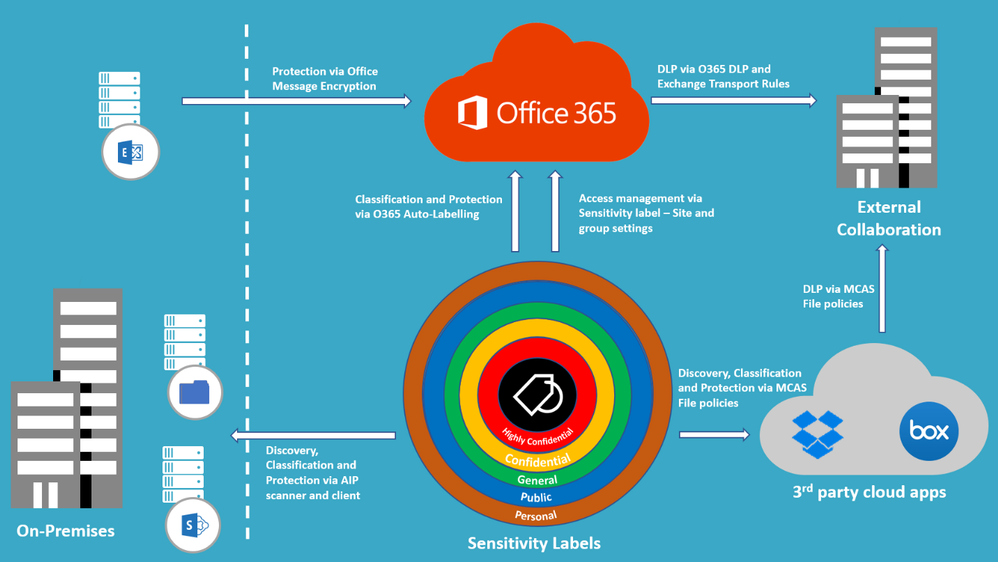
Emails: I usually recommend my customers to use Exchange Transport Rule (ETR) to block emails based on sensitivity labels.
Sharing from Cloud repositories: Currently, only MCAS using file policies has the capacity to restrict sharing to external users based on the sensitivity label.
Note: Microsoft is building a Unified DLP platform based on M365 DLP and will become sensitivity label aware. Once released, DLP mechanisms based on sensitivity labels should be migrated to M365 DLP.
DLP based on sensitive info types
Exchange Online, SharePoint Online, OneDrive for Business and Teams: I recommend using O365 DLP for sensitive info types in Office 365.
For 3rd party cloud apps: MCAS File policies can be leveraged for 3rd party cloud apps.
It is important to note that it takes additional time for the Office Data Loss Prevention (DLP) policy to scan the content and apply rules to help protect sensitive content. If external sharing is turned on, sensitive content could be shared and accessed by guests before the Office DLP rule finishes processing. To prevents guests from accessing newly added files until at least one Office DLP policy scans the content of the file, it is also recommended to enable some of the advanced capabilities in SharePoint Online such as “Sensitive by Default”.
The DLP technologies combined with Sensitive labels allow to apply the most powerful DLP approach when working in conjunction (e.g. block sharing of sensitive information, except if classified as Confidential).
4. Adapt your information protection strategy to new ways of work (BYOD, remote working)

In the old world, remote access using VPN or similar solution was always there. However, in the new world, majority of us take work laptop back home, or even use BYOD and work from home (in most cases without using VPN); so, the definition of a meaningful boundary where your data resides is distorted. Therefore, the traditional “protect your castle” mindset need to be adapted to reflect the new reality of life – remote working and boundaryless data.
Based on the paradigm shift of “Identity as the new perimeter” and “Zero Trust”, we should think about how to establish an information protection model for the new ways of working – people using shared computers, working from coffee shops/home/untrusted public networks etc. As you focus on protecting your data (both at rest and in-transit), planning and implementing identity protection (such as MFA for 100% of your employees), leveraging Secure Score to provide intelligent insights, and protecting your endpoints (such as using Advanced Threat Protection solutions, device management using Intune etc.) should also be considered and planned for.
But do you stop there? Do we need to be watchful of those curious people craning forward to look at what you have on your screen in the coffee shop? Will leave that up to you to figure out.
5. Summary
 Information protection Solution Summary
Solution components discussed in the previous sections can be summarized as below:
|
Use case
|
Components involved
|
Expected behavior
|
|
Scan and classify on-premises files
|
|
- AIP scanner – Time to scan depends on the number and size of files + number and performances of scanners.
- AIP client – Only scan documents opened within Office clients where AIP add-in is installed.
|
|
Scan and classify cloud files
|
- Office 365 auto-labeling for Office 365 repositories
- MCAS File Policies for 3rd party cloud apps
|
- Office 365 auto-labeling – Run in simulation mode at least 24h before applying labels.
|
|
Protect sensitive data from being shared with unauthorized recipients (emails, SharePoint/OneDrive links, Teams chats)
|
- Sensitive by default (SBD) enabled in SharePoint Online
- Sensitivity label with encryption
- Exchange Transport Rules (ETR)
- Office 365 DLP
- MCAS File Policies
- MIP site and group settings in Office 365
|
- SBD prevents external sharing of files until the file is scanned by Office 365 DLP
- Encryption of Sensitivity label prevents the consumption of information from any unauthorized user regardless where the data resides.
- ETR prevents mail’s exchanges based on recipients and sensitivity of the mail.
- Office 365 DLP centralizes DLP mechanisms of Exchange, SharePoint, OneDrive, and Teams to prevent sharing sensitive information.
- Prevent sharing based on sensitivity labels and info types using MCAS.
- Prevent guest access invitations on containers (O365 groups, SPO sites, Teams channels) with sensitive labels applied.
|
|
Protect sensitive information from being exfiltrated to unauthorized/unmanaged resources (endpoints, mobile/cloud apps)
|
- Intune MAM
- MCAS Session policies
- Conditional Access
- MIP site and group settings in Office 365
|
- Protect sensitive information on Windows endpoints
- Protect sensitive information on managed mobile applications
- Prevent downloading sensitive information on untrusted endpoints
- Control access of untrusted devices to “containers” based on the sensitivity label assigned (full access, web-only access without download, print nor sync options, or block access).
|
Table 2 – Information protection Solution Summary
Thanks for reading and we hope you find this useful! If you haven’t already, don’t forget to check out our resources available on the Tech Community.
Thanks!
@Adam Bell on behalf of the MIP and Compliance CXE team
by Scott Muniz | Jul 8, 2020 | Uncategorized
This article is contributed. See the original author and article here.
Do you want to proactively hunt for threat activity like an expert? Then don’t miss our upcoming webinar series, “Tracking the adversary”!
Michael Melone, Principal Program Manager at Microsoft and resident threat hunter, will start with the basics of threat hunting and cover more advanced techniques throughout the series. Our hope is that you’ll come out of this a rock star in advanced hunting and Kusto Query Language (KQL).
Michael brings more than seven years of threat hunting experience from his time with Microsoft Detection and Response Team (DART), where he responded to targeted attack incidents and helped our customers become cyber-resilient.
The details of the series are below. You can register to get a calendar invite at this registration link.
|
Go-live date
|
Subject
|
Webinar description
|
|
July 15th
|
Microsoft Threat Protection – Tracking the adversary, episode 1: KQL fundamentals
|
In the first episode, we will cover the basics of advanced hunting capabilities in Microsoft Threat Protection (MTP). Learn about available advanced hunting data and basic KQL syntax and operators. The best part? No slides!
|
|
July 22nd
|
Microsoft Threat Protection – Tracking the adversary, episode 2: Joins
|
In episode 2, we will continue learning about data in advanced hunting and how to join tables together. Learn about inner, outer, unique, and semi joins, as well as the nuances of the default Kusto innerunique join. Make Edgar F. Codd proud!
|
|
July 29th
|
Microsoft Threat Protection – Tracking the adversary, episode 3: Summarizing, pivoting, and visualizing Data
|
Now that we’re able to filter, manipulate, and join data, it’s time to start summarizing, quantifying, pivoting, and visualizing. In this episode, we will cover the summarize operator and some of the various calculations you can perform while diving into additional tables within MTP. We will turn our datasets into charts that can help improve analysis.
|
|
August 5th
|
Microsoft Threat Protection – Tracking the adversary, episode 4: Let’s hunt! Applying KQL to incident tracking
|
Time to track some attacker activity! In this episode, we will use our improved understanding of KQL and advanced hunting in Microsoft Threat Protection to track an attack. Learn some of the tips and tricks used in the field to track attacker activity, including the ABCs of cybersecurity and how to apply them to incident response.
|
We hope to see you!
by Scott Muniz | Jul 8, 2020 | Uncategorized
This article is contributed. See the original author and article here.
Hadas Bitran, Group Manager, Microsoft Healthcare
The healthcare industry is overwhelmed with data. Much of this healthcare data is in the form of unstructured text, such as doctor’s notes, medical publications, electronic health records, clinical trials protocols, medical encounter transcripts and more. Healthcare organizations, providers, researchers, pharmaceutical companies, and others face an incredible challenge in trying to identify and draw insights from all that information. Unlocking insights from this data has massive potential for improving healthcare services and patient outcomes.
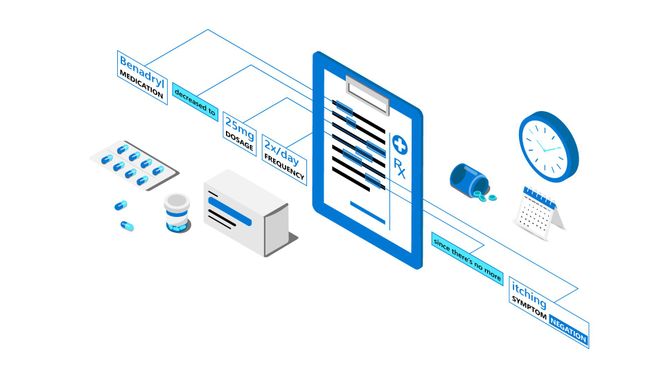
Today, we are excited to introduce Text Analytics for health, a new preview feature of Text Analytics in Azure Cognitive Services that enables developers to process and extract insights from unstructured medical data. Trained on a diverse range of medical data—covering various formats of clinical notes, clinical trials protocols, and more—the health feature is capable of processing a broad range of data types and tasks, without the need for time-intensive, manual development of custom models to extract insights from the data.
Uncover deep insights and relationships in medical data
With Text Analytics for health, users can detect words and phrases mentioned in unstructured text as entities that can be associated with semantic types in the healthcare and biomedical domain, such as diagnosis, medication name, symptom/sign, examinations, treatments, dosage, and route of administration. (For full list of health entity types and relationships, see the documentation.) In addition, users can extract more than 100 types of personally identifiable information (PII), including protected health information (PHI), in unstructured text.
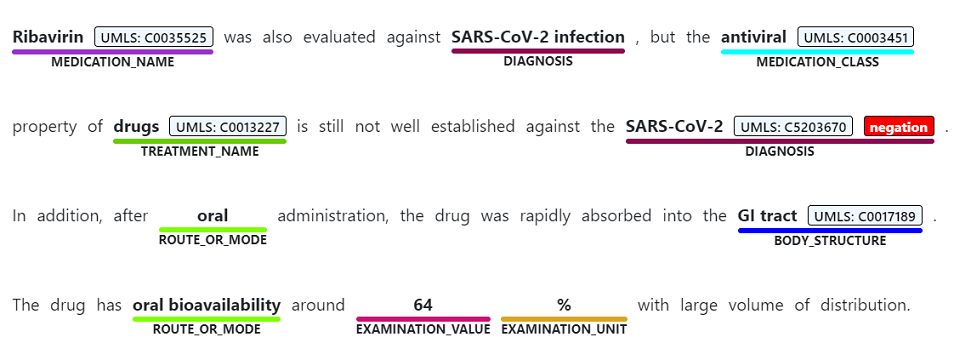
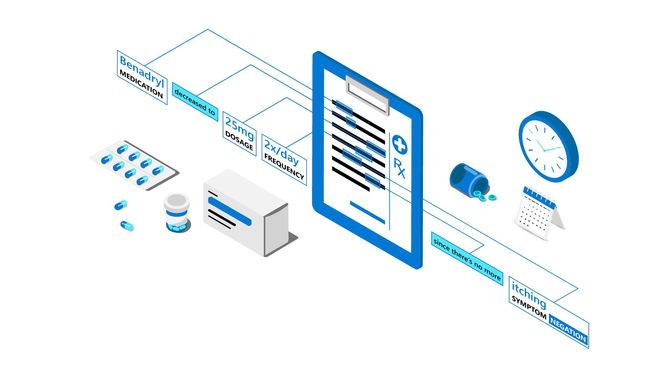
Text Analytics also links entities to medical ontologies and domain-specific coding systems (for example, the Unified Medical Language System), and identifies meaningful connections between concepts mentioned in text (for example, finding the relationship between a medication name and the dosage associated with it).
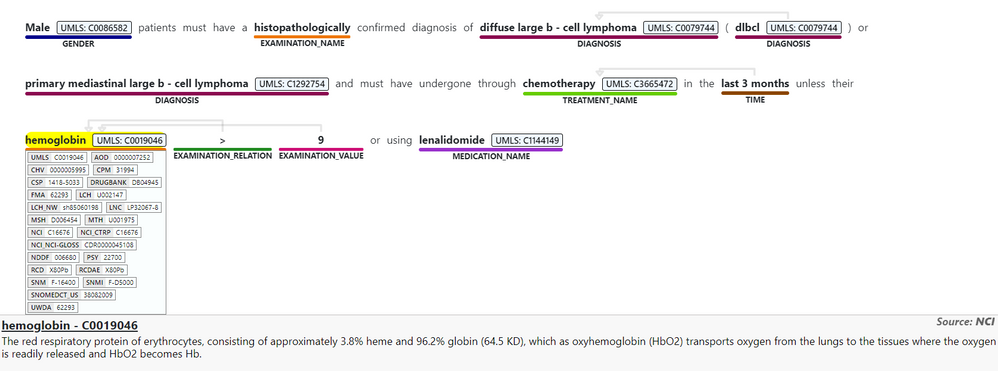
The meaning of medical content is also highly affected by modifiers, such as negation, which can have a critical implication if misdiagnosed. For example, it is important for healthcare professionals to determine when a patient “has not been diagnosed with something” or “ does not experience a certain symptom.” The health feature supports negation detection for the different entities mentioned in text.
Speed time to healthcare insights
Text Analytics for health enables researchers, data analysts, medical professionals and ISVs in the healthcare and biomedical space to unlock a wide range of scenarios—like producing analytics on historical medical data and creating prediction models, matching patients to clinical trials, or assisting in clinical quality reviews.
In response to the COVID-19 pandemic, Micosoft partnered with the Allen Institute for AI and leading research groups to prepare the COVID-19 Open Research Dataset, a free resource of over 47,000 scholarly articles for use by the global research community. With Cognitive Search and Text Analytics, we developed the COVID-19 search engine, which enables researchers to more quickly evaluate and gain insights from the overwhelming amount of information about COVID-19.
Learn more about using AI to mine unstructured research papers to fight COVID-19.
We are working closely with organizations such as the University College London (UCL), which is conducting reviews of medical research reports.
“One of our focuses as a research group is undertaking systematic reviews across a range of policy areas,” says Professor James Thomas at UCL, and Director of the EPPI-Centre’s Reviews Facility for the Department of Health, England. “We have been partnering with engineers at Microsoft and data scientists to build a ‘living’ reviews system – that automatically identifies relevant research for reviews as they are published. Text Analytics for health provides a powerful tool for extracting insights from clinical literature, with rich support for a wide range of healthcare terminology so that we can more quickly and accurately identify relevant information.”
At Microsoft, our goal within healthcare is to empower people and organizations to address the complex challenges facing the healthcare industry today, working closely with our customers and partners to bring healthcare solutions to life. We’re excited to make Text Analytics for health available in support of this mission.
Get started with Text Analytics for health
Text Analytics for health is currently available in containers. With containers, you can deploy resources in your own development environment that meets your specific security and data governance requirements.
The container provides REST-based query prediction endpoint APIs. The following JSON is an example API request and response body:

For more resources:

by Scott Muniz | Jul 8, 2020 | Uncategorized
This article is contributed. See the original author and article here.
Voice-enabled assistants—that enable users to search, ask questions, complete tasks, and much more—have been gaining increasing momentum and becoming integrated into consumer’s daily lives. Voice enables more seamless, natural interfaces, providing a more intuitive way of interacting with technology. In our current environment, voice and contactless experiences will play an increasingly important role, with the United States alone already seeing a 20 percent increase in preference for contactless operations (McKinsey 2020).
We saw some of this vision at Microsoft Build 2020 earlier this year where CTO Kevin Scott discussed emergent trends on the path to reshape software development, including the convergence of physical and digital worlds. One example centered around voice tech for food delivery, in which Boston Dynamics’ Spot robot completed curb-side deliveries using voice interaction.

We are committed to enabling developers and designers to build innovative voice-enabled solutions. To help make it easier to build voice commanding applications, today, we’re excited to announce the general availability of Custom Commands. Custom Commands is a capability of Speech in Azure Cognitive Services, that streamlines the process for creating task-oriented voice applications, providing a unified authoring experience with relatively lower complexity, helping you focus on building the best solution for your voice commanding scenarios.
Voice applications such as voice assistants listen to users and take an action in response. They involve transcribing the user’s speech, taking action on the text using natural language processing, and using voice to respond with text-to-speech. Custom Commands brings together the best of Speech and Language in Azure Cognitive Services—Speech to Text for speech recognition, Language Understanding for capturing spoken entities with speech adaptation, and voice response with Text to Speech, to accelerate the addition of voice capabilities to your apps iteratively and with low-code authoring experience.
Custom Commands is best suited for task completion or command-and-control scenarios that have a well-defined set of variables. In addition to the voice-activated delivery example with Boston Dynamics’ Spot, Custom Commands supports solutions in a variety of verticals including hospitality, automotive and retail. For example, you can build in-room voice-controlled experiences for your guests, enable in-vehicle communication and entertainment systems, or manage store inventory with an ambient smart speaker.
Building Voice Assistants
Speech in Azure Cognitive Services provides solutions for building voice assistants that are tailored for your use case. Custom Commands streamlines the process for creating voice-enabled apps for simple task completion (with a fixed vocabulary and defined set of variables).
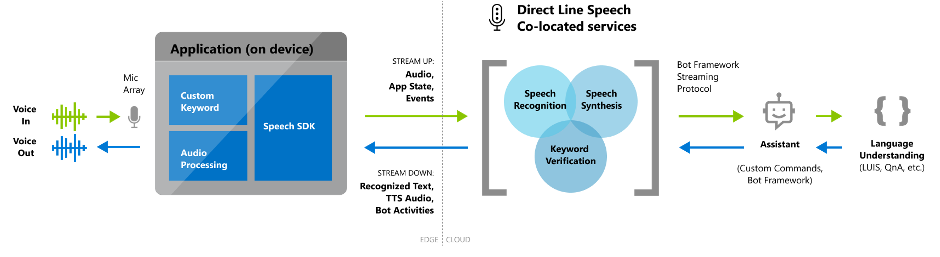
For some scenarios, you may also need a solution that handles more complex conversational interactions. For flexible voice assistants designed for open-ended conversational scenarios, Direct Line Speech enables you to build a robust solution that is optimized for voice-in, voice-out interaction with bots.
Here’s a sample reference architecture for an end-to-end voice assistant supported by Custom Commands:
Customization and Extensibility
With Custom Commands, our goal is to simplify the process of creating a unique voice-first experience that reflects your brand. You can configure multiple commands for commanding or task completion, add parameters and conditions to a particular task before completion, or configure interaction rules to handle confirmation prompts or one-step correction to help disambiguate.
Publish your app and integrate it with any client app using the Speech SDK. You can follow our documentation to integrate using the Speech SDK for C#, or build your own using our Speech SDK, which is available in multiple languages on various platforms.
It is very easy to integrate your app with the Speech SDK. Start by specifying the applicationId, subscriptionKey and region.
// Your application id
const string customCommandsApplicationId = "YourApplicationId";
// Your subscription key
const string customSubscriptionKey = "YourSpeechSubscriptionKey";
// The subscription service region.
const string region = "YourServiceRegion";

var customCommandsConfig = CustomCommandsConfig.FromSubscription(customCommandsApplicationId, customSubscriptionKey, region);
Then configure your client app to receive activity from the Custom Commands app.
// Implement event handlers
connector.ActivityReceived += (sender, activityReceivedEventArgs) => { ... };
Once you’ve published your app, consider adding a Custom Keyword to your app. Custom Keyword allows your product to be voice activated with a word or short phrase (for example, “Hey Cortana” is the keyword for the Cortana assistant).
Keywords generated using Custom Keyword can be easily integrated with your device or application via the Speech SDK. Note that audio only starts streaming to the cloud (for verification that the user said the keyword) after the keyword has been detected locally on the user’s device.
// Start listening for keyword
var model = KeywordRecognitionModel.FromFile("YourKeywordModelFileName");
connector.StartKeywordRecognitionAsync(model);
Finally, bring your app to life with natural-sounding voices using Text to Speech. You can either use one of our 100+ out-of-the-box voices, or create a custom voice for your brand.
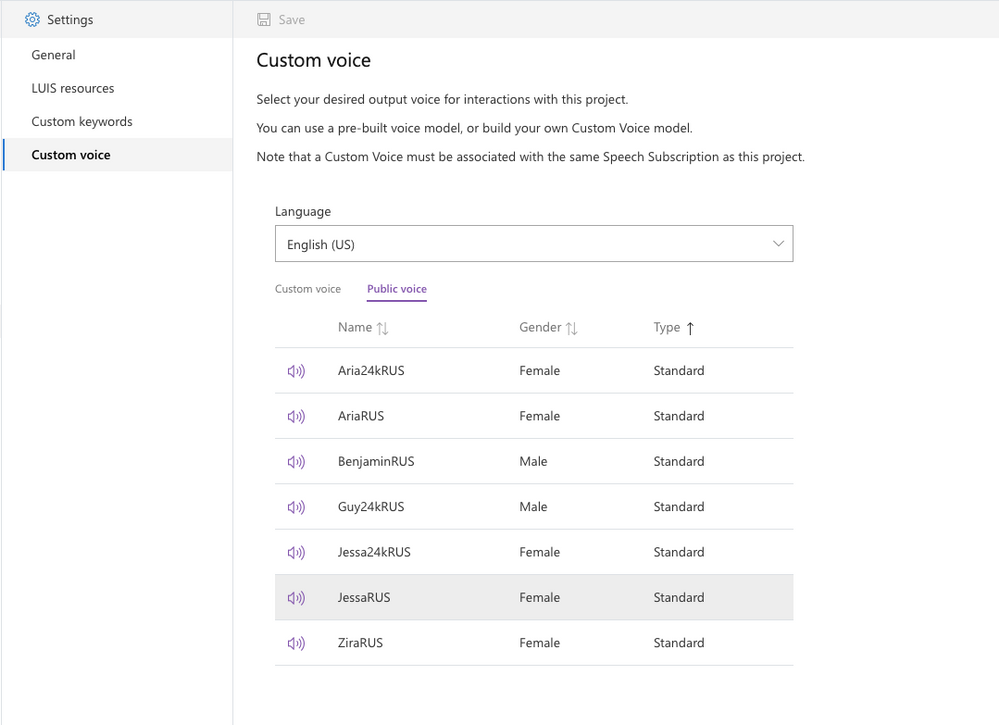
In addition, we provide comprehensive support for your development workflow, including the ability to import/export your app and integrate with continuous deployment pipelines.
We’re excited to see what you’ll build with Custom Commands.
Get started today
 Get started today and check out our demos at https://speech.microsoft.com/customcommands
Learn more with our documentation: Custom Commands documentation
Follow the Quickstart: Create a voice assistant using Custom Commands
Check out easy-to-deploy samples: Voice Assistants GitHub repository
See the video tutorial: Building Voice Assistants using Custom Commands


Recent Comments