by Scott Muniz | Jul 11, 2020 | Azure, Microsoft, Technology, Uncategorized
This article is contributed. See the original author and article here.
In this episode of One Ops Question, Dean Bryen answers the question “What is Azure Sentinel?”
Because the Internet is littered with dangers and threats you need Microsoft Azure Sentinel. IT’s a Security Incident and Event Management (SIEM) solution built right into Azure to deliver intelligent security analytics across your environments.
Azure Sentinel can be your way to view the intelligent security analytics and threat intelligence across all your environment alleviating the stress of fighting attacks, increasing volumes of alerts, and long resolution timeframes.
-
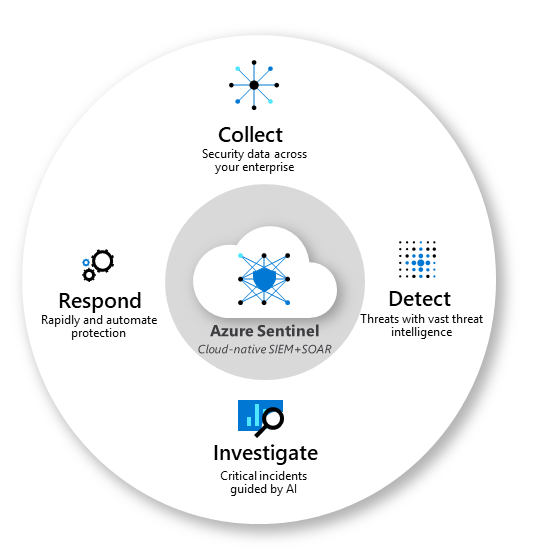
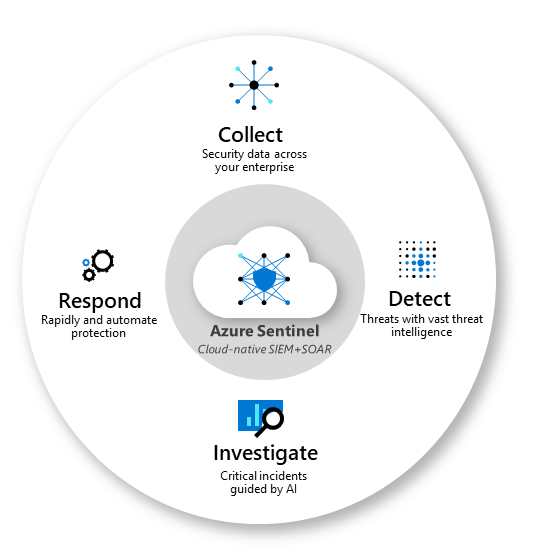
Collect data at cloud scale across all users, devices, applications, and infrastructure, both on-premises and in multiple clouds.
-
Detect previously undetected threats, and minimize false positives using Microsoft’s analytics and unparalleled threat intelligence.
-
Investigate threats with artificial intelligence, and hunt for suspicious activities at scale, tapping into years of cyber security work at Microsoft.
-
Respond to incidents rapidly with built-in orchestration and automation of common tasks.
To leverage Azure Sentinel, you need to enable Azure Sentinel, and then connect your data sources. Sources such as
- Microsoft Threat Protection solutions
- Microsoft 365 sources (including Office 365)
- Azure AD
- Azure ATP
- Microsoft Cloud App Security
- and more.
Once Sentinel is enabled in your subscription and that your data sources are connected you’re ready to visualize and get a detailed analysis of what’s happening on your environment
If you want peace of mind in the knowledge that your environment is being looked after. you need to try Azure Sentinel
Cheers!
Pierre
by Scott Muniz | Jul 10, 2020 | Uncategorized
This article is contributed. See the original author and article here.
How to configure windows authentication for Microsoft JDBC in Linux. (We use Squirrel to do this test)
- Install necessary packages
sudo yum install realmd krb5-workstation
sudo yum install sssd-tools
sudo yum install samba-common-tools
- Edit below network adapter file
sudo vi /etc/sysconfig/network-scripts/ifcfg-ens33
Add below information into this file
PEERDNS=no
DNS1=**<AD domain controller IP address>**
- Restart Network Service
sudo systemctl restart network
- Add below information into /etc/resolv.conf file
sudo vi /etc/resolv.conf
search MYTEST.COM
nameserver **<AD domain controller IP address>**
- Modify /etc/hosts file, add domain controller records
sudo vi /etc/hosts
192.168.232.128 Win2012AD
- Specify hostname in case the server hasn’t
sudo vi /etc/hostname
- Join Linux server into windows domain. Please replace yellow highlighted domain name and domain account. This account should have permission to add computer into domain and also have permission to login SQL SERVER.
sudo realm join MYTEST.COM -U ‘bobcai@MYTEST.COM’ -v
- When you have successfully joined windows domain, please modify /etc/krb5.conf file
sudo vi /etc/krb5.conf
The following yellow highlight parts should be changed to your own domain name. Domain name should be “uppercase”
# Configuration snippets may be placed in this directory as well
includedir /etc/krb5.conf.d/
[logging]
default = FILE:/var/log/krb5libs.log
kdc = FILE:/var/log/krb5kdc.log
admin_server = FILE:/var/log/kadmind.log
[libdefaults]
default_tkt_enctypes = aes256-cts
default_tgs_enctypes = aes256-cts
permitted_enctypes = aes256-cts
dns_lookup_realm = false
dns_lookup_kdc = yes
ticket_lifetime = 24h
renew_lifetime = 7d
forwardable = true
rdns = false
pkinit_anchors = /etc/pki/tls/certs/ca-bundle.crt
default_realm = MYTEST.COM
default_ccache_name = KEYRING:persistent:%{uid}
default_realm = MYTEST.COM
[realms]
# EXAMPLE.COM = {
# kdc = kerberos.example.com
# admin_server = kerberos.example.com
# }
MYTEST.COM = {
kdc = Win2012AD.MYTEST.COM:88
admin_server = Win2012AD.MYTEST.COM:749
default_domain = MYTEST.COM
}
[domain_realm]
# .example.com = EXAMPLE.COM
- Use Kinit to get Kerberos TGT.
I will use “bobcai” ticket to login SQL Server. So we need to run “kinit bobcai” to get bobcai’s TGT package.
[bobcai@centos7 Packages]$ kinit bobcai
Password for bobcai@MYTEST.COM:
- Use Klist to verify bobcai’s Kerberos ticket
[bobcai@centos7 Packages]$ klist
Ticket cache: KEYRING:persistent:1000:1000
Default principal: bobcai@MYTEST.COM
Valid starting Expires Service principal
03/03/2019 18:55:06 03/04/2019 04:55:06 krbtgt/MYTEST.COM@MYTEST.COM
renew until 03/10/2019 18:55:01
[bobcai@centos7 Packages]$
- Install Java using below commands
[bobcai@JDBCTEST ~]$ sudo su
[sudo] password for bobcai:
[root@JDBCTEST bobcai]# yum install java
- Download Squirrel SQL client. We use this tool to verify JDBC connectivity/authentication issue.
http://www.squirrelsql.org/#installation
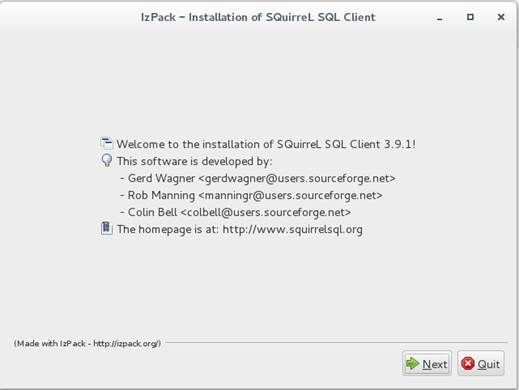
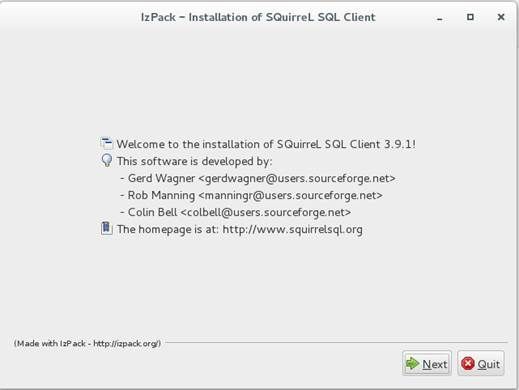
- Install Squirrel. Download squirrel-sql-3.9.1-standard.jar from above official web site. Install it using below command
[bobcai@JDBCTEST ~]$ java -jar squirrel-sql-3.9.1-standard.jar
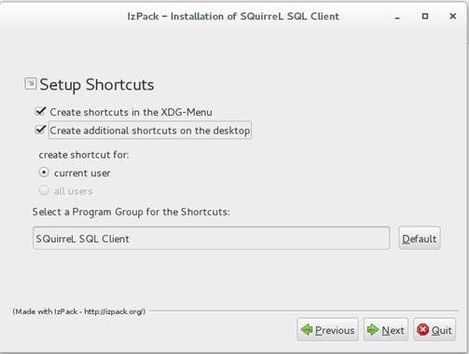
- When Squirrel is installed, Please download Microsoft JDBC. I am using Microsoft JDBC 6.0 to do this test.
https://www.microsoft.com/en-sg/download/details.aspx?id=11774
- Unzip sqljdbc_6.0.8112.200_enu.tar.gz which has been downloaded from above link. You will find ‘sqljdbc_6.0’ folder was created under the same path.
[bobcai@JDBCTEST ~]$ tar -zxf sqljdbc_6.0.8112.200_enu.tar.gz
- Double click Squirrel icon on Desktop
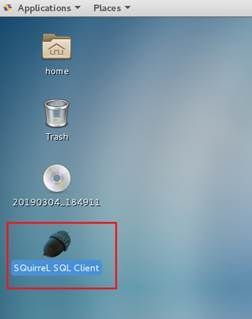
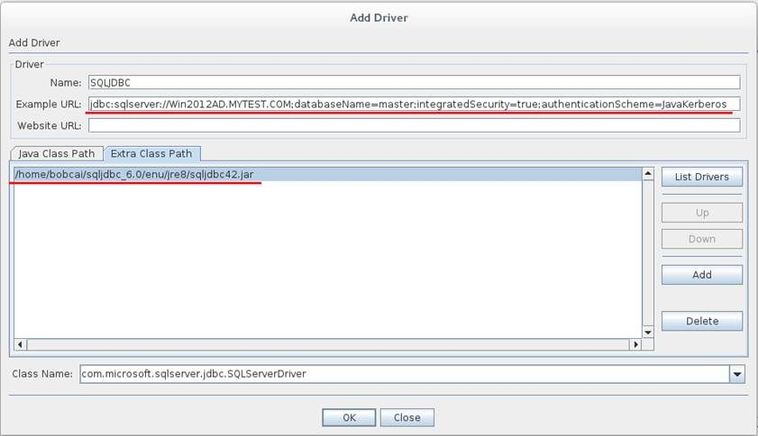
- Add SQLJDBC driver into Squirrel
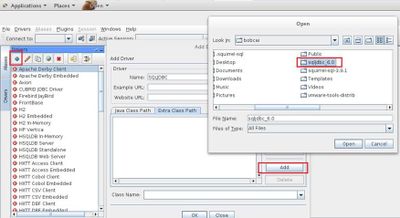
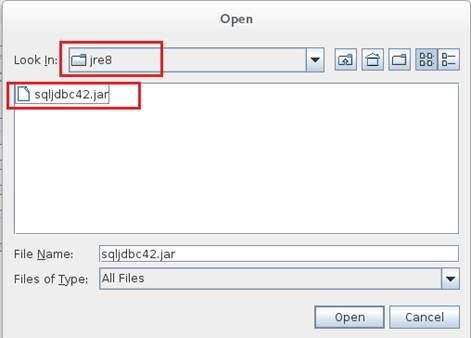
Load sqljdbc42.jar in jre8 folder.
- Add environment variable. ‘krb5cc_bobcai’ is Kerberos ticket cache file.
[bobcai@JDBCTEST ~]$ sudo vi /etc/profile
export KRB5CCNAME=/home/bobcai/krb5cc_bobcai
export JAVA_HOME=/usr/lib/jvm/jre-1.8.0
19. Create SQLJDBCDriver.conf file inside squirrel-sql-3.9.1 folder. Put below information into SQLJDBCDriver.conf file
SQLJDBCDriver {
com.sun.security.auth.module.Krb5LoginModule required useTicketCache=true;
};
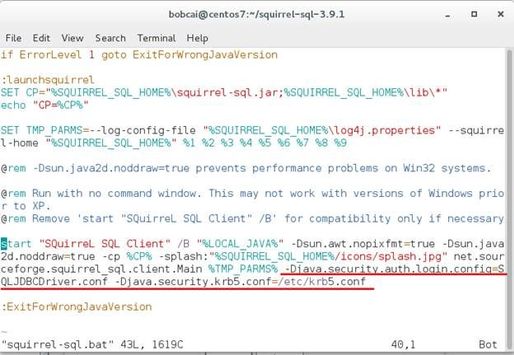
- Go into squirrel-sql-3.9.1 folder, modify squirrel-sql.bat file.
[bobcai@JDBCTEST squirrel-sql-3.9.1]$ vi squirrel-sql.bat
Add below parameters
-Djava.security.auth.login.config=SQLJDBCDriver.conf -Djava.security.krb5.conf=/etc/krb5.conf
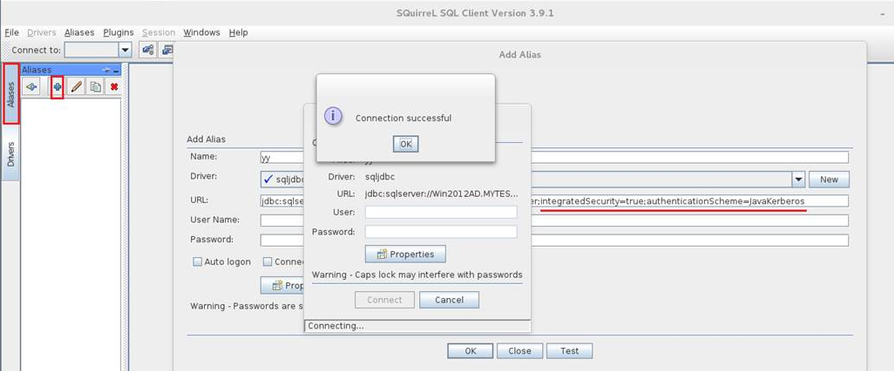
- Then test windows authentication in Squirrel in Linux. Connection successful !
by Scott Muniz | Jul 10, 2020 | Uncategorized
This article is contributed. See the original author and article here.
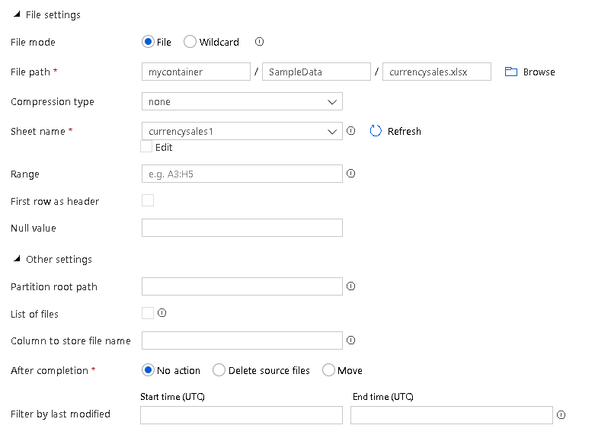
This week, the Microsoft Azure Data Factory team is enabling Excel as a native connector and a data flow connector for data transformation using Delta Lake. The Delta connector is currently available as a public preview.
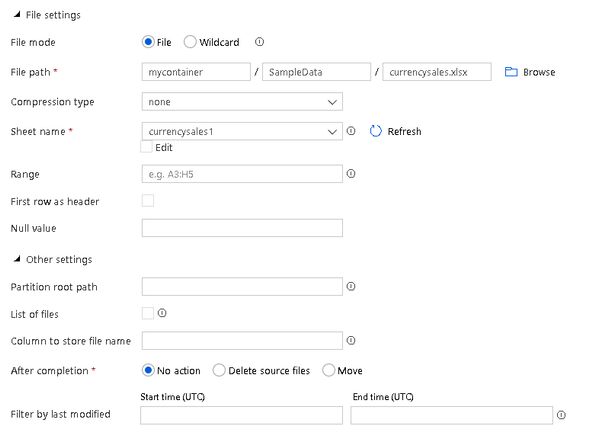
Now you can read data in ADF directly from your Excel spreadsheets using data factory datasets, or defining the properties and location of your spreadsheet directly in the data flows source and sink definition.
For example, you’ll be able to point to your Excel file and grab ranges of cells from different sheets and convert those to any of the other ADF support file formats. When using Excel as a source in data flows, you’ll be able to transform your Excel spreadsheets with data transformations and then store the results in the lake or database.
Here is a link to the online documentation for reading data directly from Excel spreadsheets in ADF.
The Delta connector enables data flows to read and write Delta files, allowing you to build powerful Data Lake based analytical solutions in ADF. You can now use data flows for ETL using Delta patterns that can transform data directly in the lake as well as perform database-style updates, deletes, inserts, upserts.
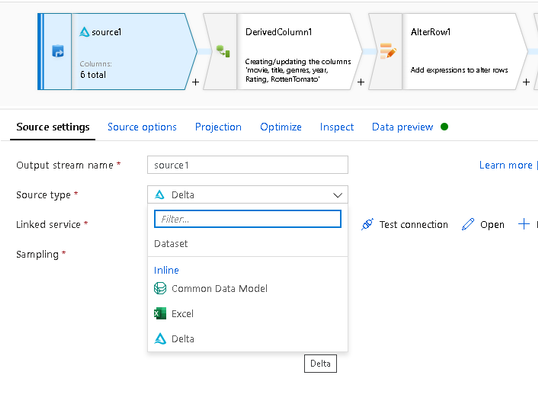
Delta is currently available in ADF as a public preview in data flows as an inline dataset. To learn how to use Delta in ADF and how ADF will manage the Spark Delta Lake parquet and log file environment for you, I’ve recorded this brief 15-minute walkthrough video:
The full online documentation of the ADF Delta connector is available here at this link.
by Scott Muniz | Jul 10, 2020 | Uncategorized
This article is contributed. See the original author and article here.
As previously announced, Microsoft recently made changes to the update channels for Microsoft 365 Apps. For the official announcement of these changes, read this blog post. For Microsoft Endpoint Configuration Manager admins that manage Microsoft 365 Apps updates, actions may be required depending on your environment.
Update packages in the Microsoft Update Catalog began using the new product name starting with releases on June 18, 2020. If you use an automatic deployment rule (ADR) to deploy updates using Configuration Manager, and you rely on the “Title” property, you will need to make changes to your ADR.
For example, the title of an update package released prior to June 9th, 2020 looks something like the following example:
Office 365 Client Update – Semi-annual Channel Version 1908 for x64 based Edition (Build 11929.20708)
For update packages released on and after June 18, 2020, the title of the update package will look something like the following example:
Microsoft 365 Apps Update – Semi-Annual Enterprise Channel Version 1908 for x64 based Edition (Build 11929.50000)
NOTE: Microsoft 365 Apps updates released on the regular June “patch Tuesday” on the 9th were replaced (and expired) by rebranded updates released on June 18th. If you have synced Microsoft 365 Apps updates since June 18th and have not fully deployed the updates released on the 9th, actions may be required.
- If you use an ADR that relies on the “Title” property, you’ll need to make changes as noted above to pick up the latest updates released.
- If you manually deployed the updates released on the 9th, which are now expired, you will need to select the latest updates to continue your deployments.
- No action is required if your ADR does not rely on the “Title” property.
- Microsoft 365 Apps updates released on July “patch Tuesday” on the 14th will of course be published using the new channel and product names.
Additional Resources:
A new wave of innovation to help IT modernize servicing of Microsoft 365 Apps for enterprise
Overview of update channels for Microsoft 365 Apps
Changes to update channels for Microsoft 365 Apps
Manage updates to Microsoft 365 Apps with Microsoft Endpoint Configuration Manager


Recent Comments