by Scott Muniz | Jul 13, 2020 | Azure, Microsoft, Technology, Uncategorized
This article is contributed. See the original author and article here.
While the Azure Security Center dashboard is extremely rich with detail information about different workloads, recommendations, and alerts, in some scenarios you may need to customize your dashboard to visualize only what is important for your daily activities.
ARG basics for Azure Security Center
Azure Resource Graph (ARG) provides an efficient way to query at scale across a given set of subscriptions for any Azure Resource. With ARG, you can query, visualize, or export Azure Security Center (ASC) recommendations in order to get the information that matters most to you.
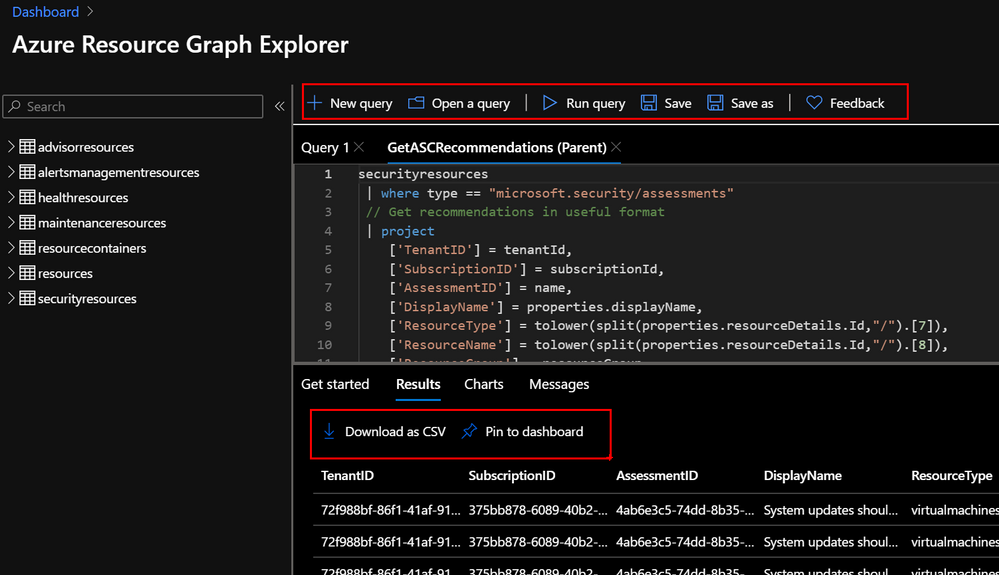
In the Azure Portal, navigate to Resource Graph Explorer and get familiar with the different options. You can create and save your favourite queries, export results into CSV and even pin them into your Azure Dashboard. Bellow you can see a very basic ARG query that will return the Azure Security Center recommendations from the selected subscriptions and arrange information in a more readable manner.
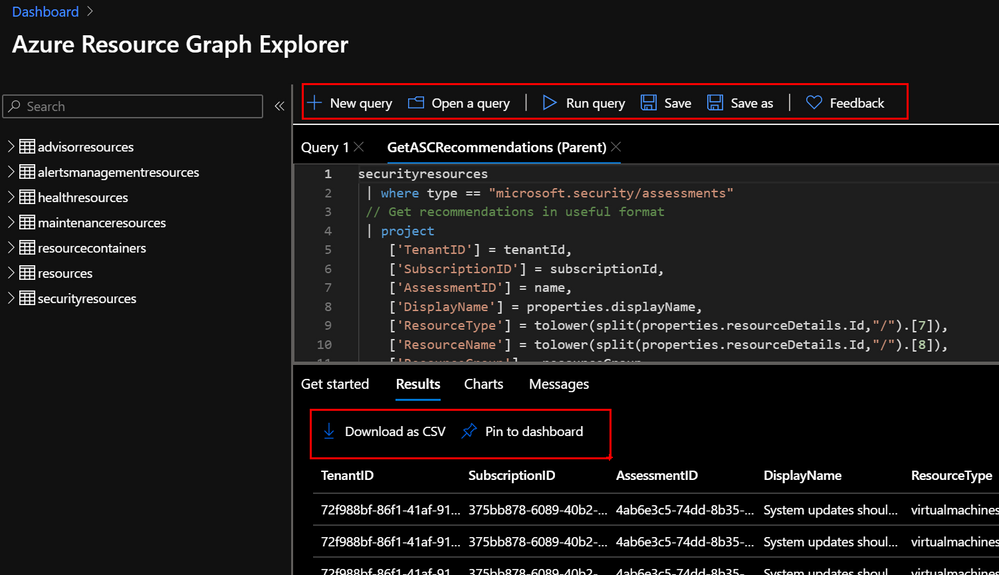
securityresources
 | where type == "microsoft.security/assessments"
 // Get recommendations in useful format
 | project
	['TenantID'] = tenantId,
	['SubscriptionID'] = subscriptionId,
	['AssessmentID'] = name,
	['DisplayName'] = properties.displayName,
	['ResourceType'] = tolower(split(properties.resourceDetails.Id,"/").[7]),
	['ResourceName'] = tolower(split(properties.resourceDetails.Id,"/").[8]),
	['ResourceGroup'] = resourceGroup,
	['ContainsNestedRecom'] = tostring(properties.additionalData.subAssessmentsLink),
	['StatusCode'] = properties.status.code,
	['StatusDescription'] = properties.status.description,
	['PolicyDefID'] = properties.metadata.policyDefinitionId,
	['Description'] = properties.metadata.description,
	['RecomType'] = properties.metadata.assessmentType,
	['Remediation'] = properties.metadata.remediationDescription,
	['RemediationEffort'] = properties.metadata.implementationEffort,
	['Severity'] = properties.metadata.severity,
	['Categories'] = properties.metadata.categories,
	['UserImpact'] = properties.metadata.userImpact,
	['Threats'] = properties.metadata.threats,
	['Link'] = properties.links.azurePortal
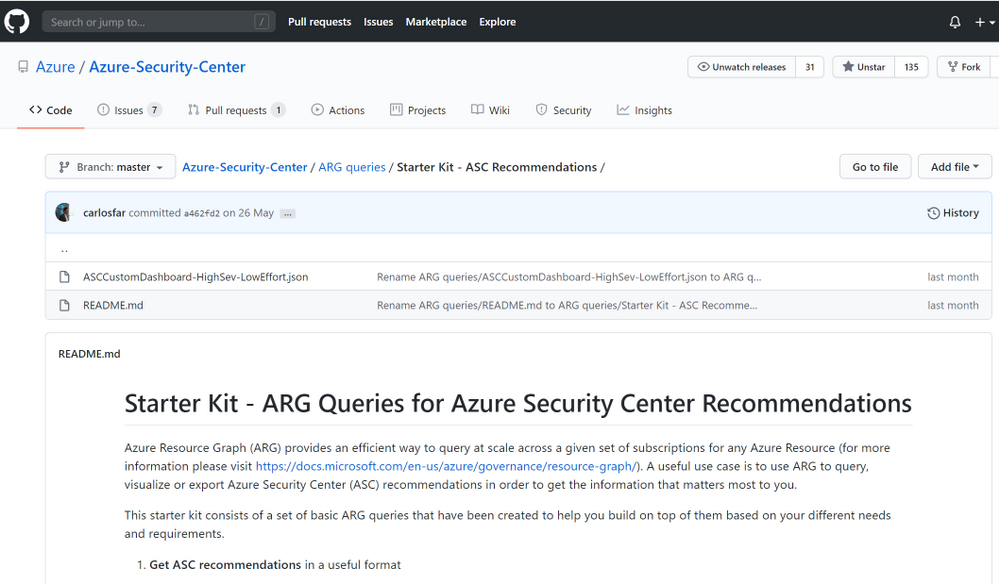
A Starter kit has been published in the Azure Security Center Github Community page to help you get familiar with recommendations as well as the data structure from Azure Security Center. Just copy/paste the ARG queries and start to customize them to your needs.
Creating your custom Dashboard
One of the coolest features of ARG, is that, apart from querying and exporting your results, you can easily create charts and dashboards directly from the Azure Resource Graph Explorer console and even pin them directly into your Azure Portal.
Let’s use one of the samples from the GIthub repo to query for High Severity and Low Remediation Effort recommendations.
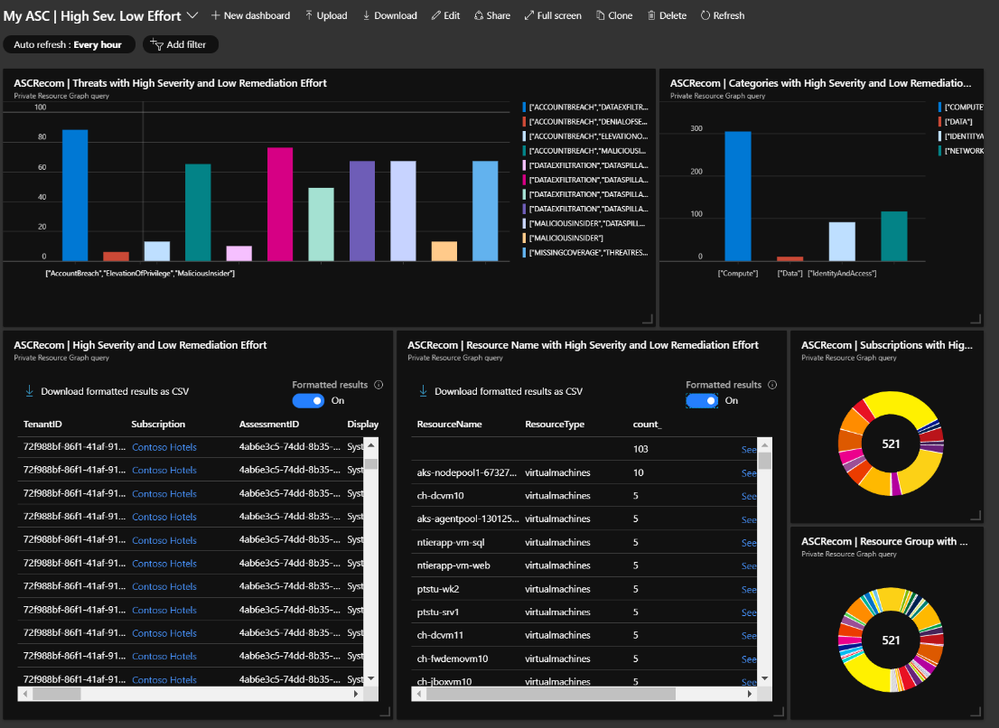
By simply adding a few lines to the initial examples shared above, we were able to build different views summarizing:
Threat vectors identified
// Filter
 | where Severity == "High"
 | where RemediationEffort == "Low"
// summarize and order
 | summarize count() by tostring(Threats)
 | order by count_
Type of impacted resources
// Filter
 | where Severity == "High"
 | where RemediationEffort == "Low"
// summarize and order
 | summarize count() by tostring(Categories)
 | order by count_
List of recommendations
// Filter
 | where Severity == "High"
 | where RemediationEffort == "Low"
List of impacted resources
// Filter
 | where Severity == "High"
 | where RemediationEffort == "Low"
// summarize and order
 | summarize count() by ResourceName, ResourceType
 | order by count_
Impacted subscriptions by threat vector
// Filter
 | where Severity == "High"
 | where RemediationEffort == "Low"
// summarize and order
 | summarize count() by SubscriptionID
 | order by count_
Impacted resource group by threat vector
// Filter
 | where Severity == "High"
 | where RemediationEffort == "Low"
// summarize and order
 | summarize count() by ResourceGroup
 | order by count_
Additional Resources
- ARG Starter Kit Github community – Link
- Azure Resource Graph – Link
- Azure Resource Graph API – Link
Reviewers
Special thanks to:
Yuri Diogenes, @Yuri Diogenes, Senior Program Manager (CxE ASC Team)
Tal Rosler, @tal_rosler, Program Manager (ASC Engineering Team)
by Scott Muniz | Jul 12, 2020 | Uncategorized
This article is contributed. See the original author and article here.
Introduction
This is John Barbare and I am a Sr Premier Field Engineer at Microsoft focusing on all things in the Cybersecurity space. In this tutorial I will walk you through the steps of creating an Attack Surface Reduction (ASR) rule policy in Microsoft Endpoint Manager (MEM) for your Windows Operating Systems and how to view the detections once applied.
In the last series, I gave an in depth overview of MEM, the licensing, several features it has to assist IT professionals, and then walked you through the steps of creating a Windows Defender Antivirus policy. I hope you found the first series beneficial as this series will add on to securing and protecting your overall attack surface. By creating and configuring a new ASR rule policy in MEM, this will further strengthen your overall security posture. It’s recommended to test in Audit mode before you decide and enable any of the ASR rules in enforce mode.
Microsoft recommends a balanced and pragmatic approach focused on reducing the overall attack surface. Implementing ASR rules is a great place to start. The picture below illustrates the threat protection life cycle. You will learn about each stage so you will be fully protected once you find out which ASR rules will lower your overall attack surface through Audit mode and be able to turn on different ones in enforce mode.
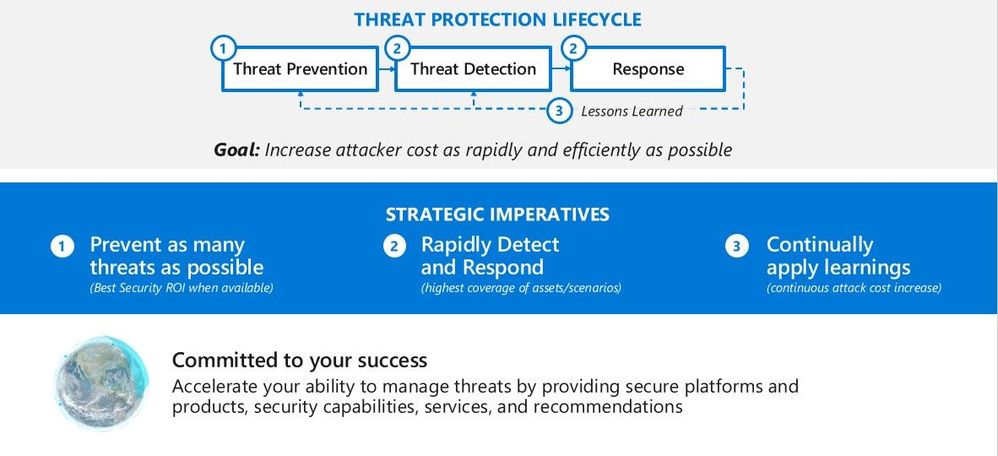 Threat Protection Lifecycle
What are Attack Surface Reduction Rules?
Attack surface reduction rules help prevent software behaviors that are often abused to compromise your device or network. For example, an attacker might try to run an unsigned script off a USB drive, or have a macro in an Office document make calls directly to the Win32 API. ASR rules can constrain these kinds of risky behaviors and improve your organization’s defensive posture to decrease your risk considerably from being attacked with Ransomware, various other types of malware, and other attack vectors.
If you are evaluating or executing a proof of concept from a 3rd party HIPS (Host Intrusion Prevention System) over to ASR rules, this article will assist you in the planning, development, and proper configuration in MEM. With the complete end to end protection Microsoft offers, this article will focus on the Attack Surface Reduction component of Windows Defender Exploit Guard as shown below in the green box.
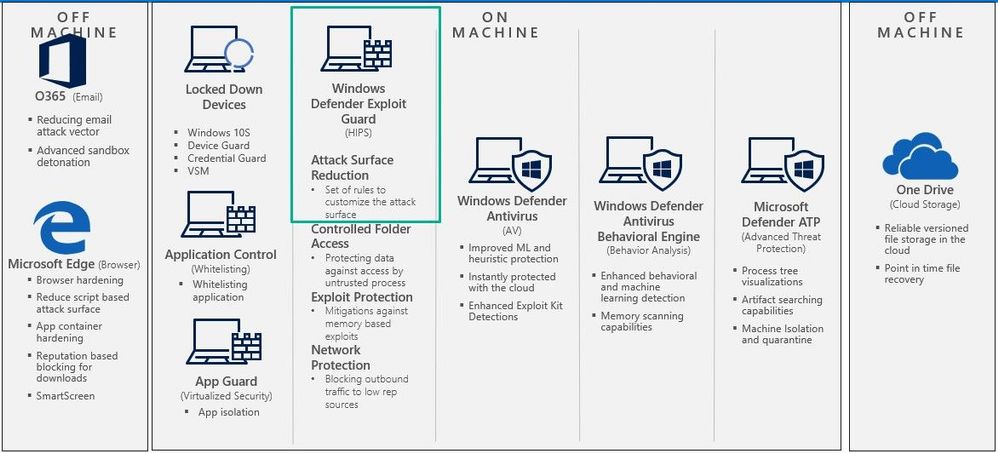 Exploit Guard – Attack Surface Reduction
You can learn more on how to customize ASR rules by excluding files and folders or adding custom text to the notification alert that appears on a user’s computer.
You can set ASR rules for devices running any of the following editions and versions of Windows:
ASR rules contain over a dozen configurable rules that can enable or disable specific behaviors. These rules do the following:
- Prevent actions and apps that are commonly used by malware, such as launching executables from email (.exe, .dll, .scr, .ps, .vbs, and .js)
- Scripts or applications that launch child processes
- Most rules can be set to Audit to monitor activity prior to being set to enforce
- All rules support exclusions based on file or folder names
- ASR rules support environmental variables and wildcards
ASR rules may block legitimate applications from making changes, so these features come with both an Audit mode and a Block mode. I always recommend to my customers when configuring ASR rules for the first time to conduct the changes in Audit mode first so it will allow for testing of the policy before moving any of the rules into Block mode.
List of all the ASR Rules
ASR rules are designed to help your organization reduce the overall attack surface of an endpoint by minimizing the locations where cyberthreats, malware, attacks, and Ransomware tends to emerge from. ASR rules fall into specific categories which are Microsoft Office, email based, Windows Management Interface (WMI) based, executable and script based, 3rd party application based, Windows credentials based, and device control based. All ASR rules, except for Block persistence through WMI event subscription, are supported on Windows 1709 and later.
Below is a chart displaying each ASR rule in the respective categories.
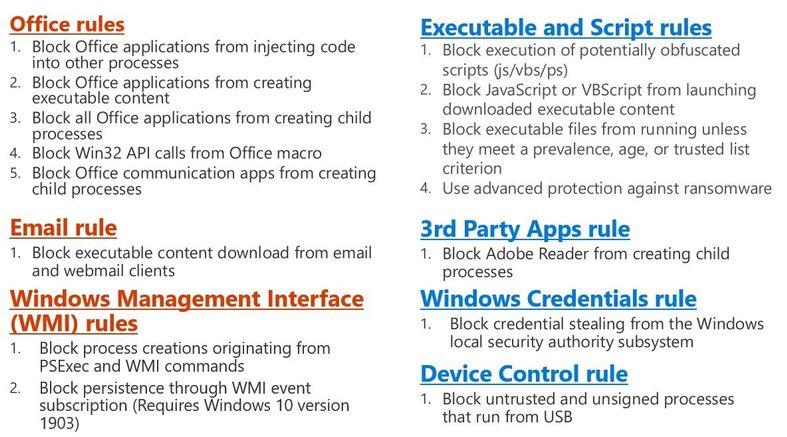 ASR Categories
Each ASR rule contains three settings:
1. Not configured: Disable the ASR rule
2. Block: Enable the ASR rule
3. Audit Mode: Evaluate how the ASR rule would impact your organization if enabled
Office Files Example
Smart ASR control provides the ability to block behavior that balances security and productivity. In the image below you can see how an Office file can be detected from malicious content by using ASR rules and Windows Defender Exploit Guard.
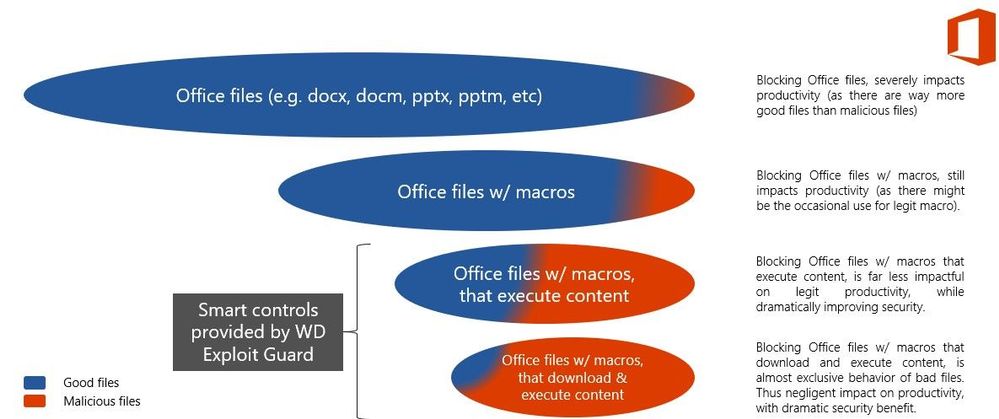 Office Files Example
Creating a new ASR Rule Policy
The first item we want to do is make sure that all the devices we want to push the new ASR rule policy are showing up inside MEM admin center. This paper assumes you have enrolled all the devices for your preferred method, and we are checking to make sure the devices are shown before creating or pushing out a new policy.
Navigate to the Microsoft Endpoint Manager admin center and login with your credentials https://endpoint.microsoft.com.
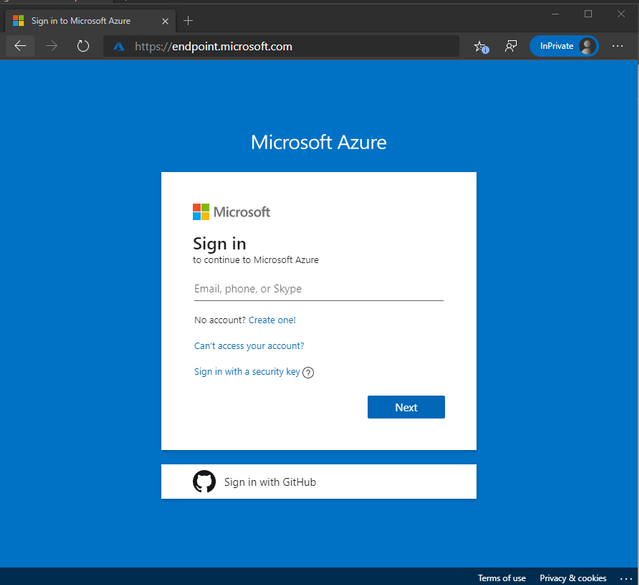 Login Screen
Once logged in you will arrive at the home page.
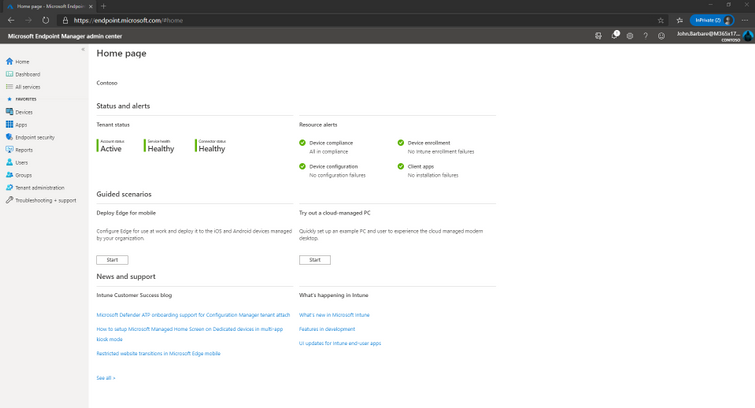 Home page of Microsoft Endpoint Manager
Select “Devices” and then “All devices” to make sure the device you will be applying the new ASR rule Policy has been synced.
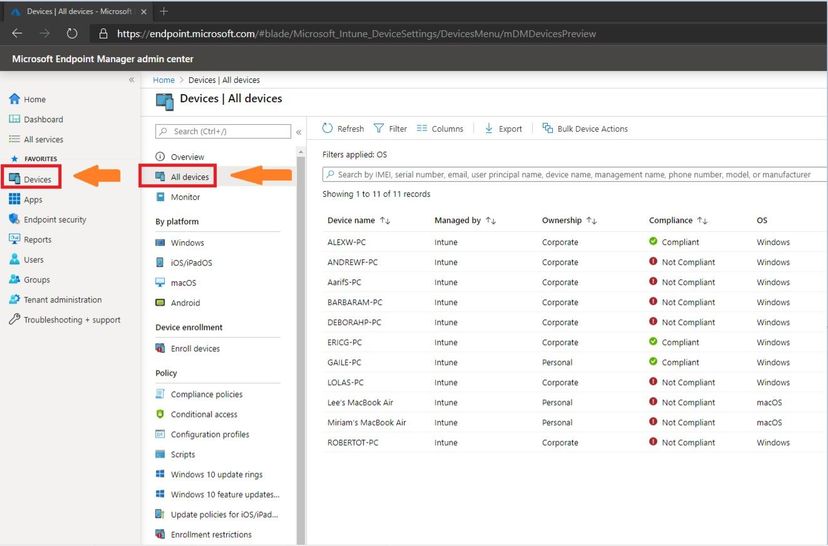 Selecting the All Devices Tab
Next, we will select the “Endpoint Security” tab which is under the “Device” tab.
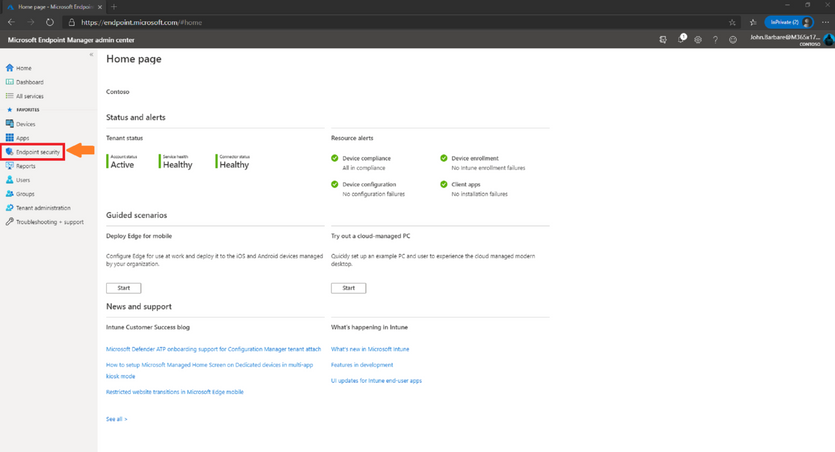 Endpoint Security Tab
This will bring you into the main policy dashboard to create the new ASR rule policy. First you will select “Attack Surface Reduction” under the “Manage” tab. Select “create policy” at the top, and then a window will open to pick the operating system “Platform” and “Profile”. For “Platform”, select Windows 10 and later and for “Profile”, select Microsoft Defender Antivirus and click “Create” at the bottom.
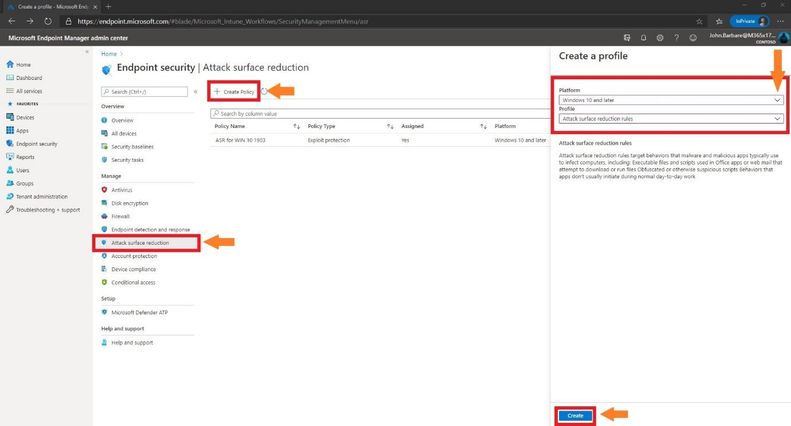 Creating the ASR Policy
This will bring you to the creation of the profile for ASR. Name the profile in the “basics” tab and then provide a brief description and click next.
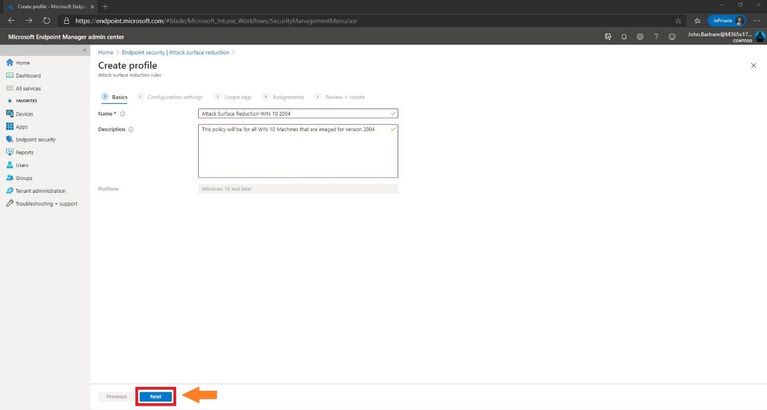 Creating the Profile
Configuration Settings
The next tab, “Configuration settings” is where you will configure the ASR rules. Always place each rule in Audit first to monitor for testing of the policy before moving any of the rules into Enable (Block) mode. You can also search for a setting in the top box underneath the settings and before the ASR rules.
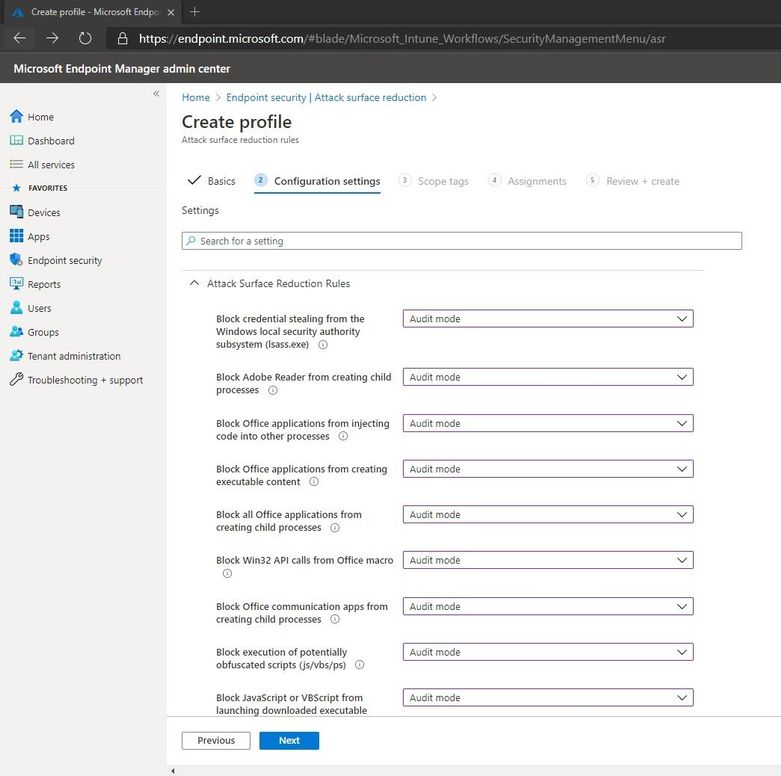 Configuring Settings for the ASR Policy
Once finished with setting the rules in Audit mode, one can add Exclude files and paths from attack surface reduction rules (declare files and folders that are excluded from configured ASR rules).
Added in Windows 10, version 1709. This policy setting allows you to prevent ASR rules from matching on files under the paths specified or for the fully qualified resources specified. Paths should be added under the Options for this setting. Each entry must be listed as a name value pair, where the name should be a string representation of a path or a fully qualified resource name.
As an example, a path might be defined as: “c:Windows” or “C:UsersjobarbarDocumentsPen_TestingRed_Team_Attack_Tools” to exclude all files in this directory. A fully qualified resource name might be defined as: “C:WindowsApp.exe”. Once finished with the ASR profile and settings, click next.
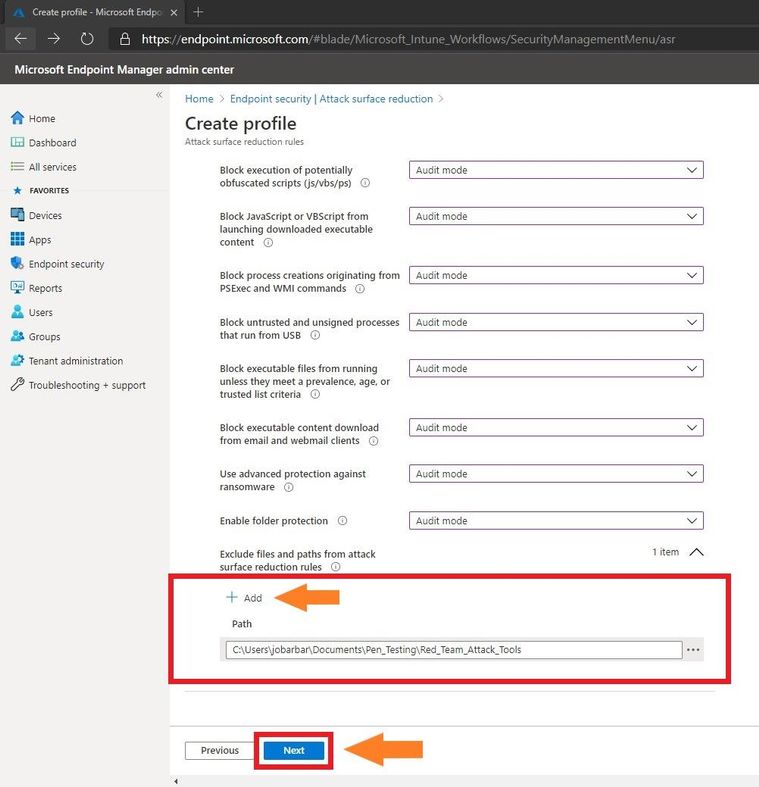 Add Folder Exclusions
I have several clients that always ask which ASR rules do you or Microsoft recommend we enforce even after testing. Every customer environment is different both in the architectural design and what is allowed or not allowed in the environment which might cause a line of business application to not work. Microsoft recommends enabling all ASR rules, but every case and customer is different. If you are still using Microsoft Endpoint Configuration Manager to manage your endpoints, then enabling the “Block process creations originating from PSExec and WMI commands” ASR rule should not be enabled. During your testing in Audit mode, please read and become familiar with what each ASR rule does and what it is designed to do on Microsoft’s ASR Rule documentation page to give an idea of what it will prevent.
Scope Tags
In the next window you will select any scope tags you have assigned for any of your devices and click next.
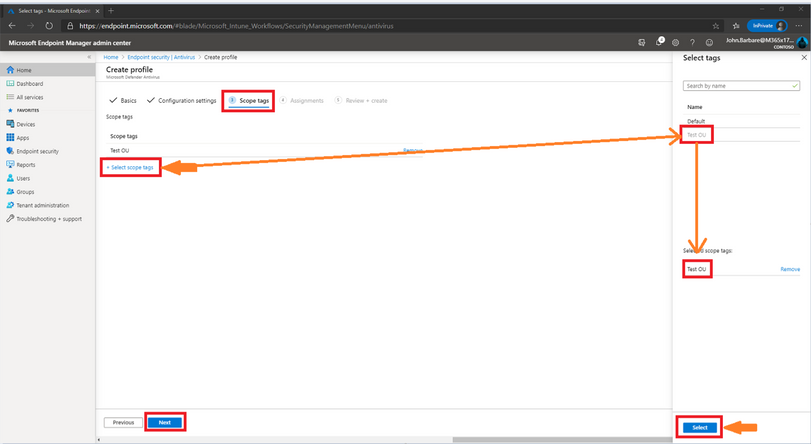 Selecting Scope Tags
When you create or update a profile, you can add scope tags and applicability rules to the profile.
Scope tags are a great way to filter profiles to specific groups. Some would include scope tags such as The_Citadel IT Team, Mr_Robot_ITDepartment, or Test-OU. Use RBAC and scope tags for distributed IT which has more information.
On Windows 10 devices, you can add applicability rules so the profile only applies to a specific OS version or a specific Windows edition. Applicability rules has more information.
Assignments
Next, we will have the option to assign the policy to select groups, all users, all devices, or all users and devices. Here we are targeting just a select group and will pick the IT Group for this new policy. Selecting the groups to include and IT Group will target the devices inside the group and then click select and then click next. This is the equivalent to applying a policy to an organizational unit in Group Policy Objects.
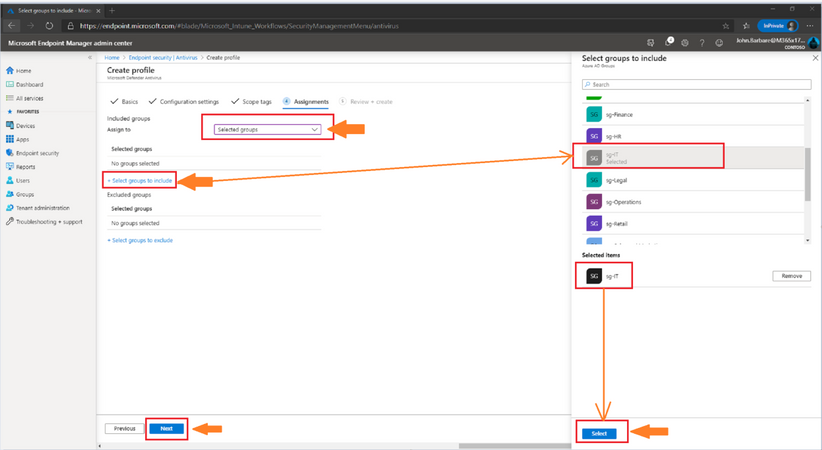 Targeting the Assignments for the ASR Policy
Many users ask when to use user groups and when to use device groups. The answer depends on your goal. Here is some guidance to get you started.
Device groups
If you want to apply settings on a device, regardless of who’s signed in, then assign your profiles to a devices group. Settings applied to device groups always go with the device, not the user.
Device groups are useful for managing devices that don’t have a dedicated user. For example, you have devices that print tickets, scan inventory, are shared by shift workers, are assigned to a specific warehouse, and so on. Put these devices in a devices group, and assign your profiles to this devices group.
User groups
Profile settings applied to user groups always go with the user, and go with the user when signed in to their many devices. It’s normal for users to have many devices, such as a Surface Pro for work, and a personal iOS/iPadOS device. And, it’s normal for a person to access email and other organization resources from these devices.
For example: You want to put a Help Desk icon for all users on all their devices. In this scenario, put these users in a users group, and assign your Help Desk icon profile to this users group.
To summarize, use device groups when you don’t care who’s signed in on the device, or if anyone is signed in. You want your settings to always be on the device. Use user groups when you want your settings and rules to always go with the user, whatever device they use.
Review and Create
Now let’s head over to finalizing up the newly created profile on the review and create profile page. You will see all the settings for the new ASR policy, and you can confirm before selecting create. I’ve attached two screenshots of the review + create section as all the ASR rule basics and configuration settings can’t be viewed in one screenshot.
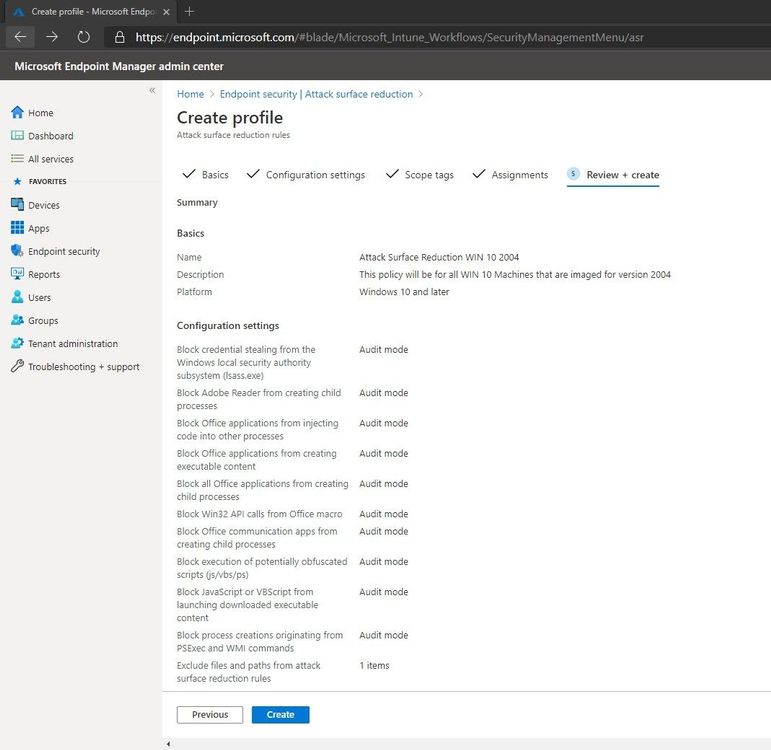 Summary of the new ASR Policy
After scrolling down one can see the rest of the configuration settings to make sure everything is correct before deploying out the new ASR rule policy. Go ahead and click on create to save the new ASR policy.
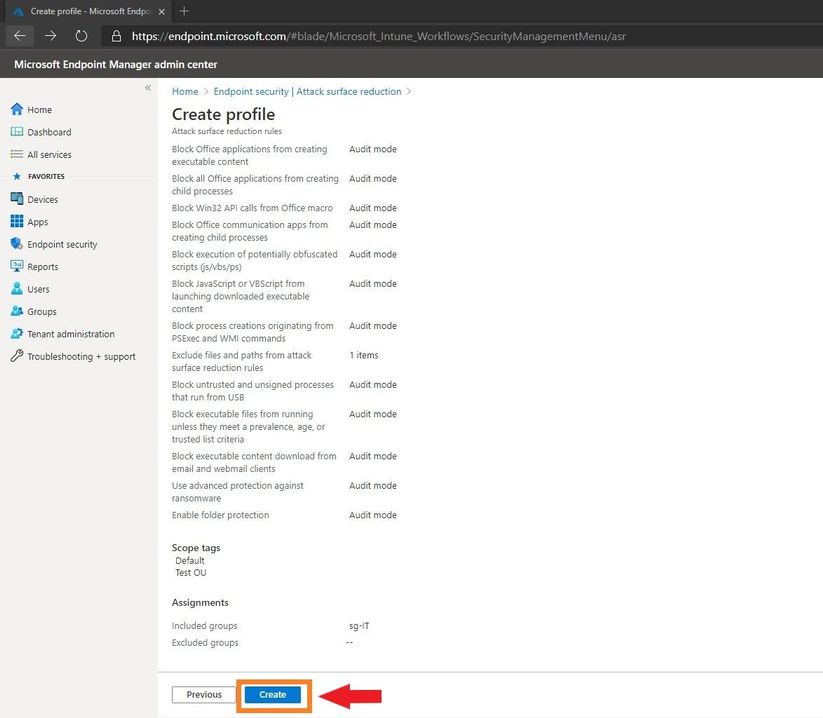 Summary of the new ASR Policy
The next page will bring you to the summary page where you can view the new ASR rule policy you just created. When you select the policy name that you have created, you will be redirected to the overview page which will display more detailed information.
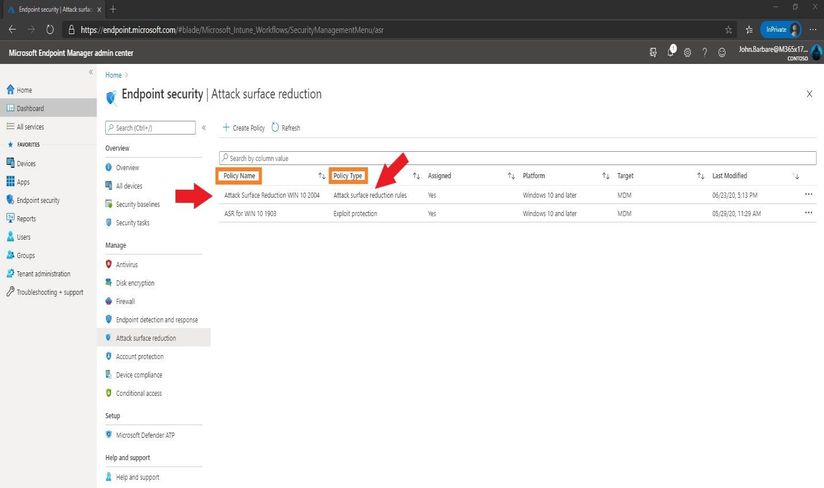 Showing The New ASR Policy
When you select a tile from this view, MEM displays additional details for that profile if they are available. In this case, it applied my new ASR rule policy to all devices I targeted successfully.
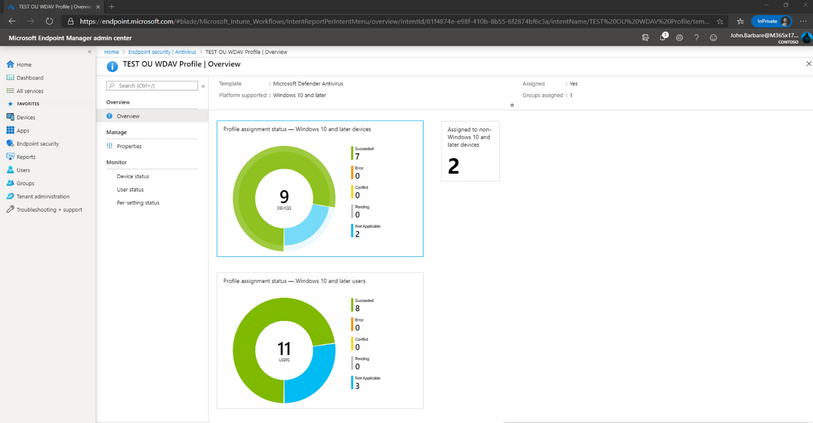 Viewing the newly applied ASR Policy to the targeted machines
Monitoring the ASR Rules in Audit Mode in Microsoft Defender ATP
Microsoft Defender ATP provides detailed reporting for events and blocks, as part of its alert investigation scenarios.
You can query Microsoft Defender ATP data by using advanced hunting. If you are running Audit mode, you can use advanced hunting to understand how attack surface reduction rules could affect your environment.
Login into https://securitycenter.windows.com and click on the advanced hunting tab.
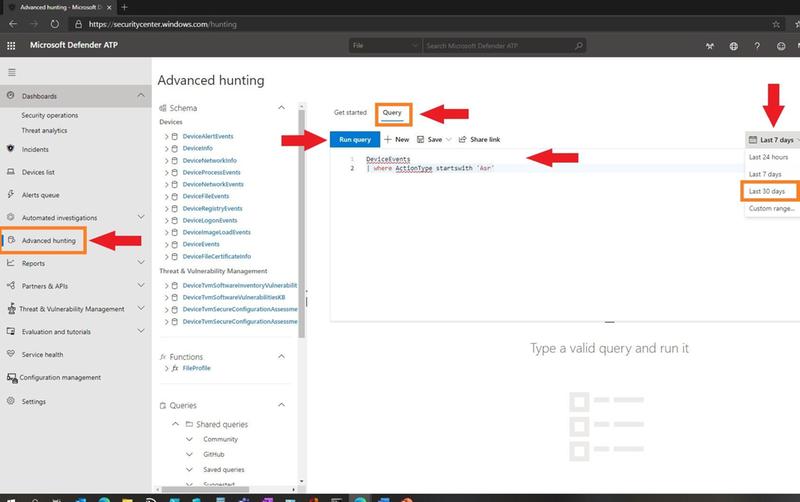 Advanced Hunting in MDATP for ASR Events
On the far right, you can change the time from last 24 hours, last 7 days, last 30 days, or a custom time range of your choosing. Click on the Query tab and type in the following query to search for all ASR rule events in Audit mode to see what is impacting your environment and which ASR rules are getting triggered.
DeviceEvents
| where ActionType startswith ‘Asr’
Click on the blue tab “Run Query” to see the results.
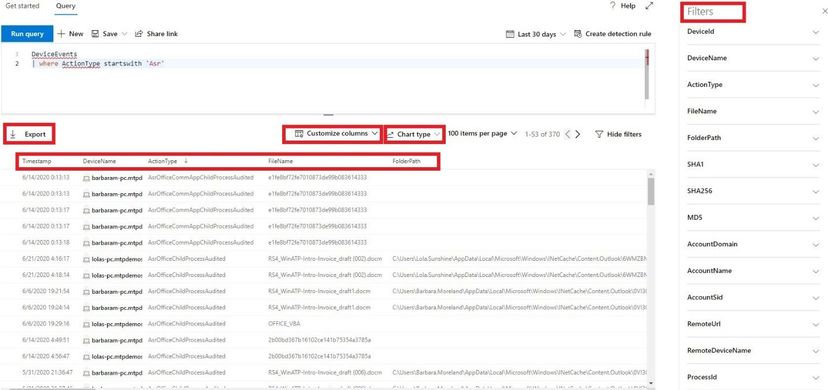 Results of Query
Once the results are displayed, you can filter out the columns in your report by selecting the customize columns. On the far right of the screen you see all the filters you can apply and scrolling down will show many more. As we take a look at the ASR rule Audit report, we can see the “Action Type” is the ASR rule that was audited and then the file name, folder path, and other columns in the report.
Clicking on the Export tab will download a .csv file with all the information included in the query as shown on the screen.
Clicking on the Chart type, you can view all the data in a table, column chart, stacked column chart, pie chart, donut chart, line chart, scatter chart, and area chart. Depending on how you want to view your data, it will display in each chart type as seen below.
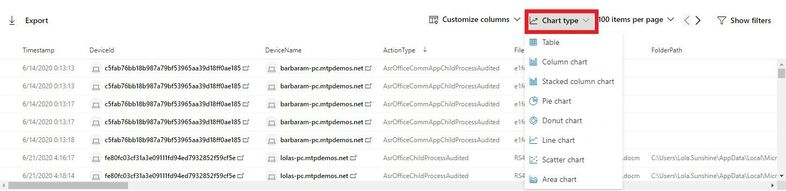 Selecting the Chart Type
Selecting the line chart, one can see each ASR rule Audit detections over a period of time. This is all customizable and can be exported in a .jpg file to include on a weekly update report to upper management.
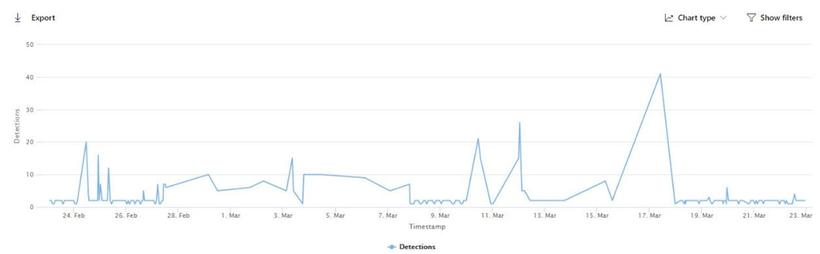 ASR Detections in the Populated Chart
For more information on advanced hunting, visit Microsoft’s documentation page.
Monitoring the ASR Rules in Audit Mode in Microsoft Threat Protection (MTP)
Login into https://security.microsoft.com and click on the Reports tab and view the ASR rules that are in Audit mode (blue) and any that are in Block mode (purple).
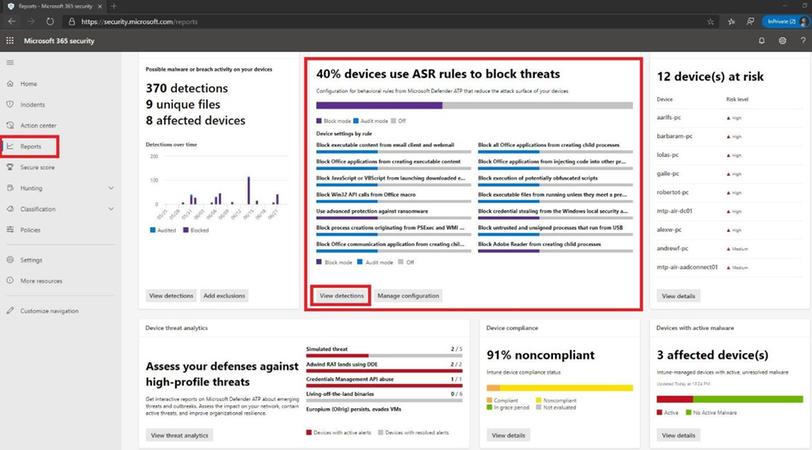 Microsoft Threat Protection ASR Events
Click on the view detections tab to see a more fine-grained ASR rule detection graph in Audit and Block mode over a period time and what has been detected.
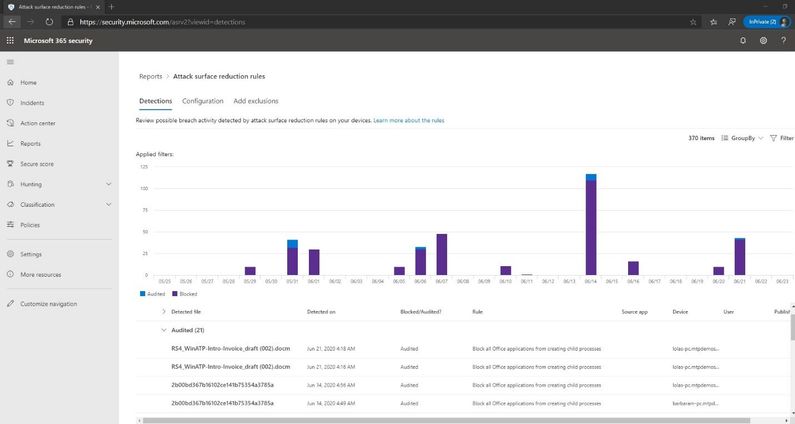 Viewing Audit Events in the Timeline
Many other methods exist to see what ASR rules are being audited in your environment. Since I mainly work with Microsoft Defender ATP and Microsoft Threat Protection with my customers, this is the primary way I view the detections. If you would like to use event viewer, you can create a custom view for the ASR rules by following the below steps:
- Type event viewer in the Start menu and open the Windows Event Viewer.
- On the left panel, under Actions, click Create Custom View.
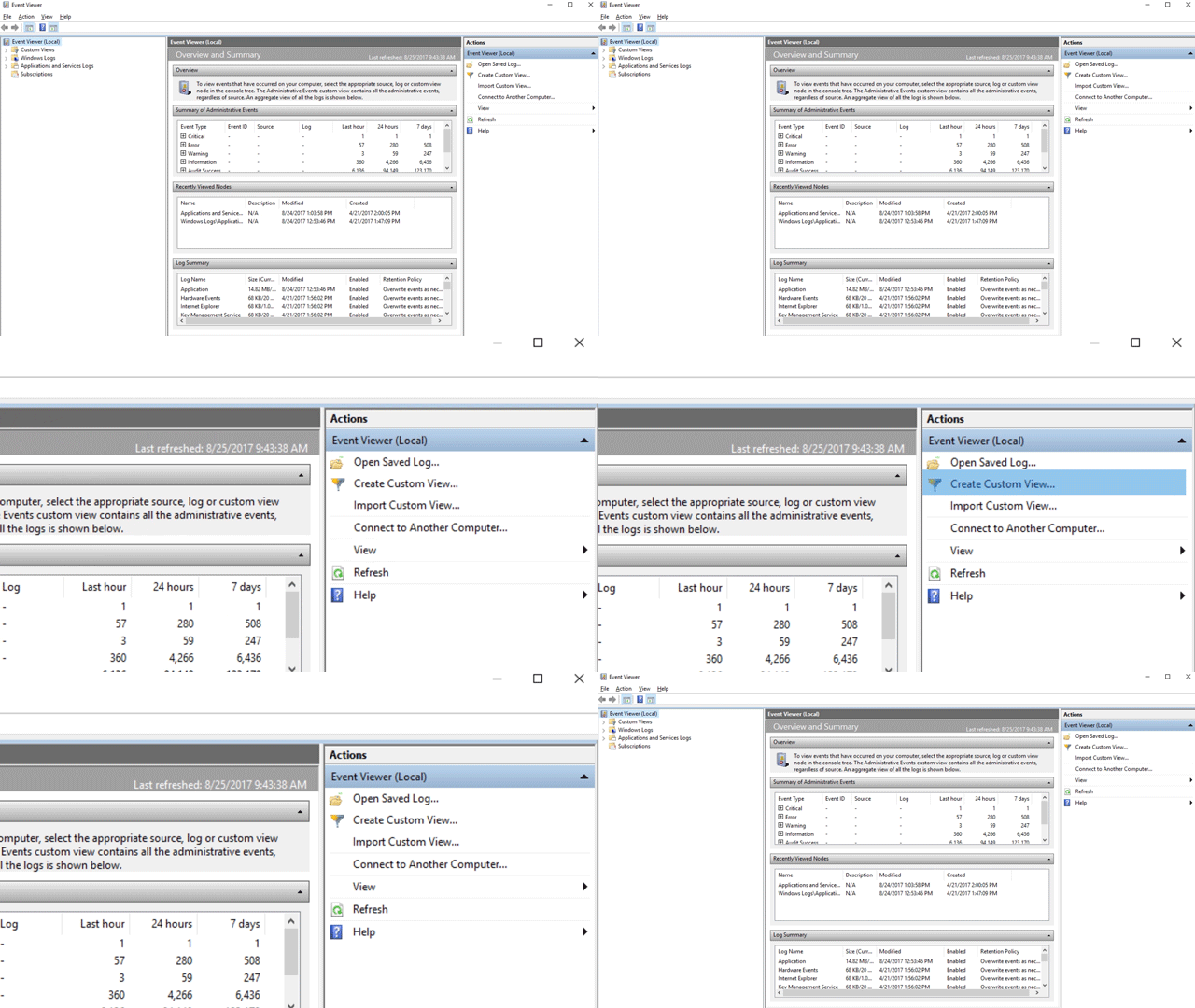 Creating Custom ASR View
- Go to the XML tab and click Edit query manually. You’ll see a warning that you won’t be able to edit the query using the Filter tab if you use the XML option. Click Yes.
- Paste the following XML code to filter only ASR rule events into the XML section.
<QueryList>
<Query Id=”0″ Path=”Microsoft-Windows-Windows Defender/Operational”>
<Select Path=”Microsoft-Windows-Windows Defender/Operational”>*[System[(EventID=1121 or EventID=1122 or EventID=5007)]]</Select>
<Select Path=”Microsoft-Windows-Windows Defender/WHC”>*[System[(EventID=1121 or EventID=1122 or EventID=5007)]]</Select>
</Query>
</QueryList>
- Click OK. Specify a name for your filter – ASR rule events.
- This will create a custom view that filters to only show the events related to that feature. Under custom views in event viewer you will see all the ASR rules that have been audited (event 1122).
|
Event ID
|
Description
|
|
5007
|
Event when settings are changed
|
|
1121
|
Event when rule fires in Block-mode
|
|
1122
|
Event when rule fires in Audit-mode
|
List of attack surface reduction events
All attack surface reduction events are located under Applications and Services Logs – Microsoft – Windows and then the folder or provider as listed in the following table.
You can access these events in Windows Event viewer:
- Type event viewer in the Start menu and open the Windows Event Viewer.
- Expand Applications and Services Logs – Microsoft – Windows and then go to the folder listed under Provider/source.
- Double-click on the sub item to see events. Scroll through the events to find the one you are looking.
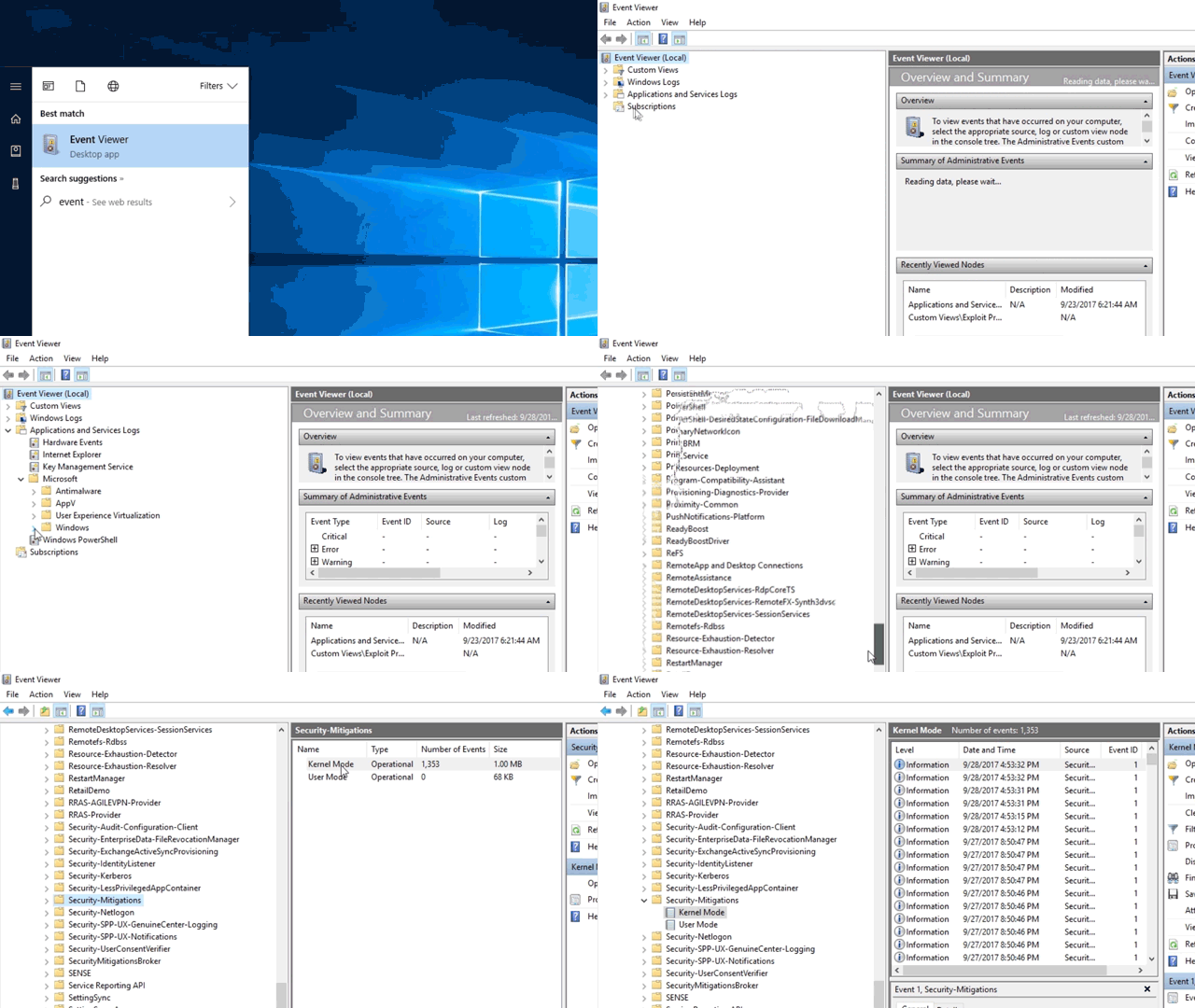 Viewing the ASR Events
Conclusion
Thanks for taking the time to read this article and I hope you had fun reading how to create an ASR rule policy using the new MEM console and how to see what processes are being audited in your environment using Microsoft Defender ATP, Microsoft Threat Protection, or event viewer. The next series I will show you how to setup, configure, and then deploy out Microsoft Defender ATP to your endpoints in MEM. Hope to see you in the next series and always protect your endpoints!
Thanks for reading and have a great Cybersecurity day!
































































Recent Comments