by Scott Muniz | Jul 15, 2020 | Uncategorized
This article is contributed. See the original author and article here.
Microsoft Rocket, an open-source project from Microsoft Research, provides cascaded video pipelines that combined with Live Video Analytics from Azure Media Services, makes it easy and affordable for developers to build video analytics applications in their IoT solutions. Unprecedented advances in computer vision and machine learning have opened opportunities for video analytics applications that are of wide-spread interest to society, science, and business. While computer vision models have become more accurate and capable, they are also becoming resource-hungry and expensive for 24/7 analysis of video. As a result, live video analytics across multiple cameras also means a large computational footprint on premises built with a good amount of expensive edge compute hardware (CPU, GPU etc.).
Total cost of ownership (TCO) for video analytics is an important consideration and pain point for our customers. With that in mind, we integrated Live Video Analytics from Azure Media Services and Microsoft Rocket (from Microsoft Research) to enable an order-of-magnitude improvement in throughput per edge core (frame per second analyzed per CPU/GPU core), while maintaining the accuracy of the video analytics insights.
In a previous blog, we introduced Azure Live Video Analytics (LVA), a state-of-the-art platform to capture, record, and analyze live videos and publish the results (video and/or video analytics) to Azure services (in the cloud and/or on the edge). With Live Video Analytics’ flexible live video workflows, developers are now empowered to analyze video with a specialized AI model of their choice, and build truly hybrid (cloud + edge) applications that can analyze live video in the customer’s environment and combine video analytics on their camera streams with data from other IoT sensors and/or business data to build enterprise-grade solutions.
What is Microsoft Rocket?
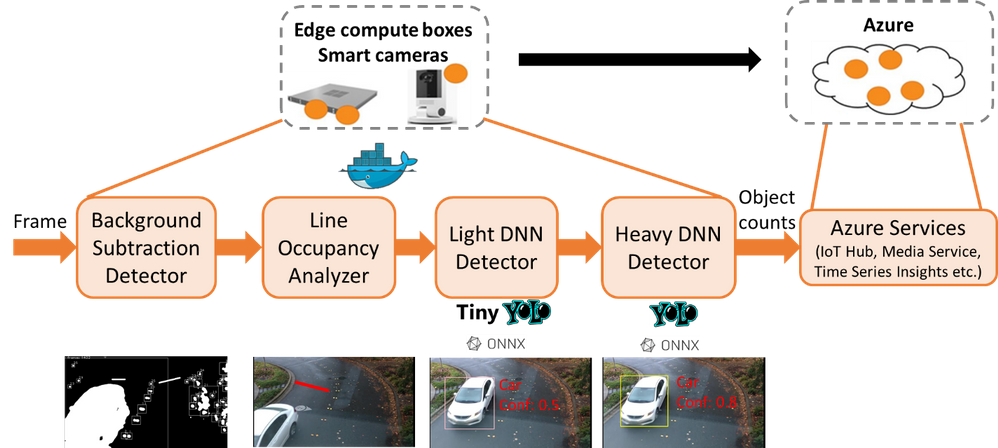
Microsoft Rocket is a video analytics system that makes it easy and affordable for anyone with a video stream to obtain intelligent and actionable outputs from video analytics. Microsoft Rocket provides cascaded video pipelines for efficiently processing live video streams. In the cascaded video pipeline, a decoded frame is first analyzed with a relatively inexpensive light Deep Neural Network (DNN) like Tiny YOLO. A heavy DNN such as YOLOv3 is invoked only when the light DNN is not sufficiently confident, thus leading to efficient GPU usage. You can plug in any ONNX, TensorFlow, or Darknet DNN model in Microsoft Rocket. You can also augment the cascaded pipeline with a simpler CPU-based motion filter based on OpenCV background subtraction, as shown in the figure below.
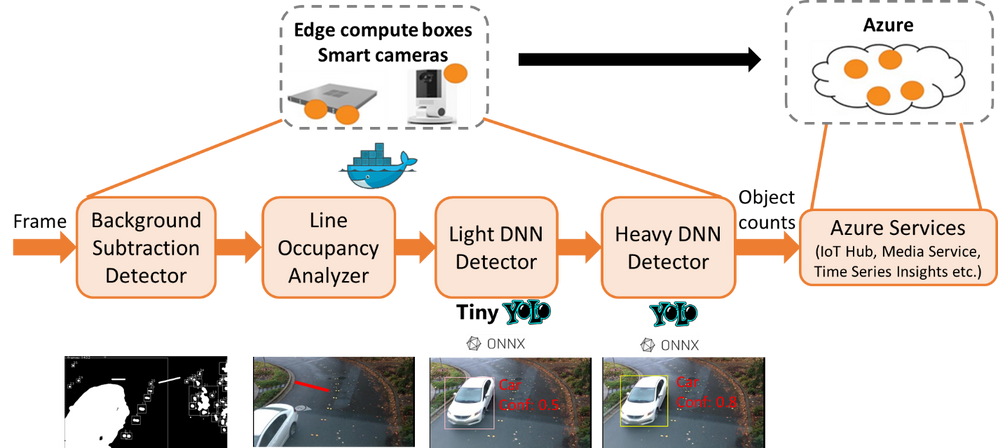
In the cascaded video analytics pipeline in the above figure, decoded video frames are filtered first using background subtraction detection and focused on a line of interest in the frame, before calling even the low-resource light DNN detection. Frames requiring further processing are passed through a heavy DNN detector.
Rocket plus Live Video Analytics’ cascaded video analytics pipelines lead to considerable efficiency when processing video streams (as we will quantify shortly). By filtering out frames with limited relevant information and being judicious about invoking resource-intensive operations on the GPU, it allows the analytics to not only keep up with the frame-rates of the incoming video stream, but also pack the analysis of more video analytics pipelines on an edge compute box.
Up to 17X improvement in efficiency!
We benchmarked our performance and compared it against naïve video analytics pipelines that execute the Yolov3 DNN on each frame of the video. As shown in the graph below, Rocket plus Live Video Analytics cascaded pipeline is up to nearly 17X more efficient in its processing, bumping up the video analytics pipeline’s processing rate from 10 frames/second with the Yolov3 DNN to over 200 frames/second. Benchmark results across the NVIDIA T4 (which is available in Azure Stack Edge), K80, and Tesla P100 GPUs show that the gains in efficiency hold across the different GPU classes. Further, by carefully tuning simple knobs for downsizing and sampling frames, the video analytics rate goes up to nearly 700 frames/second in our benchmarks with little loss in accuracy (as shown in the tables below).
As a result of these efficiency improvements, an edge compute box that can process only three video streams in parallel when the YoloV3 object detection model is executed on each frame, goes up all the way to processing 17 video streams in parallel with Rocket plus Live Video Analytics’ cascaded pipelines (with the requirement to process at the rate of at least 10 frames/second for acceptable accuracy, which we have seen in our prior engagements on traffic video analytics).
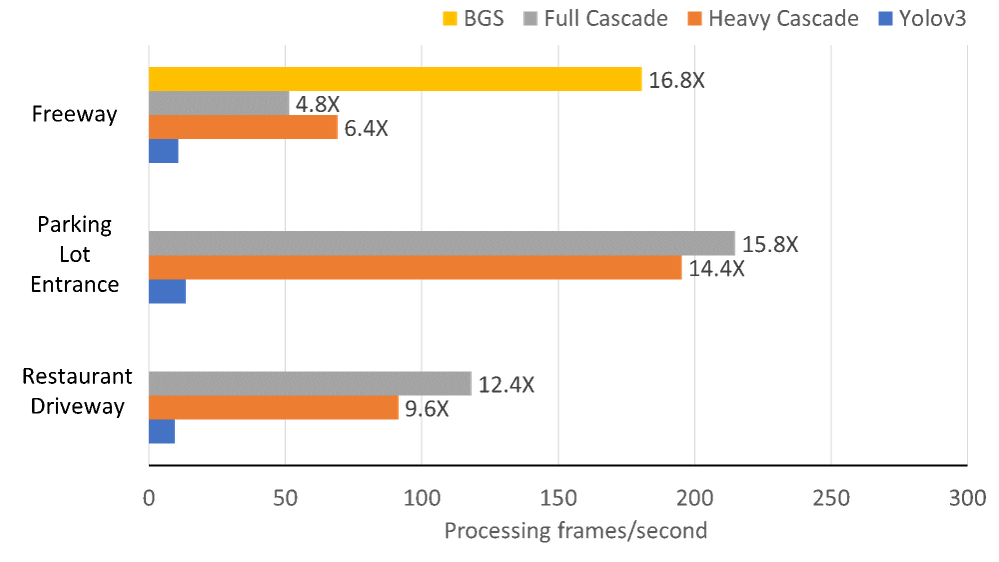
Benchmark results of Live Video Analytics and Rocket containers, with improvement factors marked alongside each bar. Live Video Analytics plus Rocket achieves ~17X higher processing rates (measured in frames/second) compared to naïve solutions that run Yolov3 DNN on each frame of the video. We measure the performance of two cascaded modes of Rocket after background subtraction (BGS): “Full Cascade” (BGS → Light DNN → Heavy DNN) and “Heavy Cascade” (BGS →Heavy DNN). In fact, when we count the cars on the freeway, we can also use just BGS alone for counting as the freeway lanes are unlikely to contain any other objects (and thus requires no confirmation from the DNNs of the objects being cars). The choice of the pipeline and parameters is video-specific.

Impact of varying the frame resolution and frame sampling on the processing rates. Note that for all the experiments in the table above, there was no drop in the accuracy of the video analytics.
Check out the code and take it for a spin!
You can now take advantage of the open-source reference app with extensive instructions to build and deploy Live Video Analytics and Rocket containers for highly efficient live video analytics applications on the edge (as shown in the architecture figure below). The project repository contains helpful Jupyter notebooks as well as a sample video file for easy testing of an object counter for various object categories crossing a line of interest in the video.
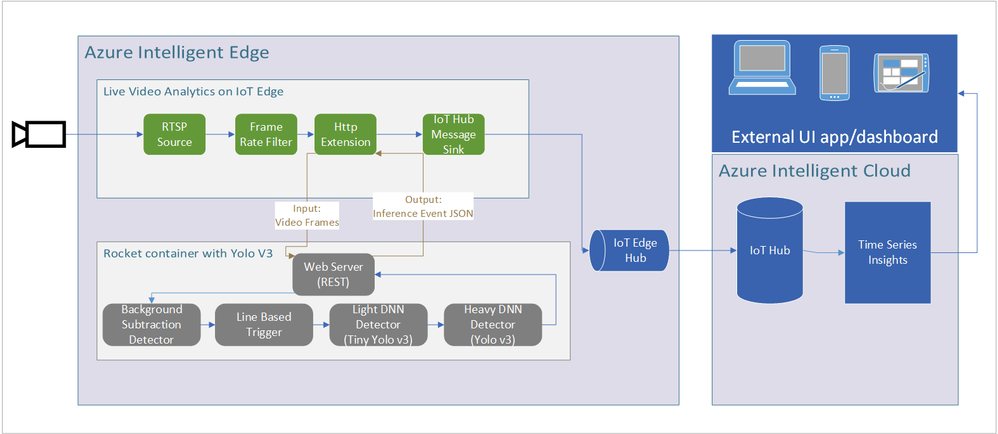
The above figure shows the architecture where the Azure Live Video Analytics container works in tandem with Microsoft Rocket’s container (with cascaded video analytics).
We also open-source
Microsoft Rocket’s cascaded pipeline for video analytics. This should allow for bringing in your own DNN models, adding efficiency improvements, and expanding the video analytics capabilities beyond the (line-of-interest based) object counter included in the code.
Check out the
source code of Microsoft Rocket, make your custom modifications for video analytics, and let us know your feedback! We have already tested it with many real-world use cases (e.g., for
road safety and efficiency), and look forward to hearing about your deployment experiences!
Contributors: Ganesh Ananthanarayanan, Yuanchao Shu, Mustafa Kasap, Avi Kewalramani, Milan Gada, Victor Bahl
by Scott Muniz | Jul 15, 2020 | Azure, Microsoft, Technology, Uncategorized
This article is contributed. See the original author and article here.
Machine learning is a complex and task heavy art, be it cleaning data, creating new models, deploying models, managing a model repository, or automating the entire CI/CD pipeline for machine learning.
As more companies embark on the journey of machine learning in everything they do, Microsoft Azure Machine Learning provides them with enterprise-grade capabilities to accelerate the machine learning lifecycle and empowers developers and data scientists of all skill levels to build, train, deploy, and manage models responsibly and at scale.
Azure Machine Learning studio is the web user interface of Azure Machine Learning, enabling data scientists to complete their end-to-end machine learning lifecycle, from cleaning and labeling data, to training and deploying models using cloud scalable compute, in a single enterprise-ready tool.
We are excited to announce that Azure Machine Learning studio is now generally available worldwide, supporting 18 languages and over 30 locales!
Azure Machine Learning studio caters to all skill levels, with authoring tools such as the automated machine learning user interface to train and deploy models in a click of a button, and the drag and drop designer to create ML pipelines using a visual interface. All resources and assets created during the ML process – notebooks, models, pipelines, are all available for team collaboration under one roof.
With this release, studio is even more comprehensive and easy to use
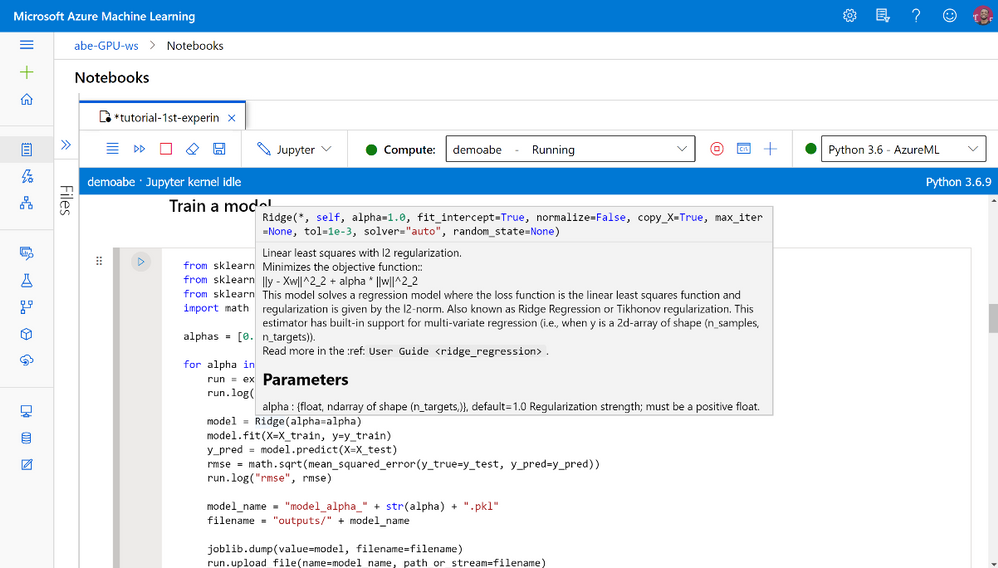
Notebooks: Intellisense, checkpoints, tabs, editing without compute, updated file operations, improved kernel reliability, and many more. Read more about Azure machine learning studio notebooks here.
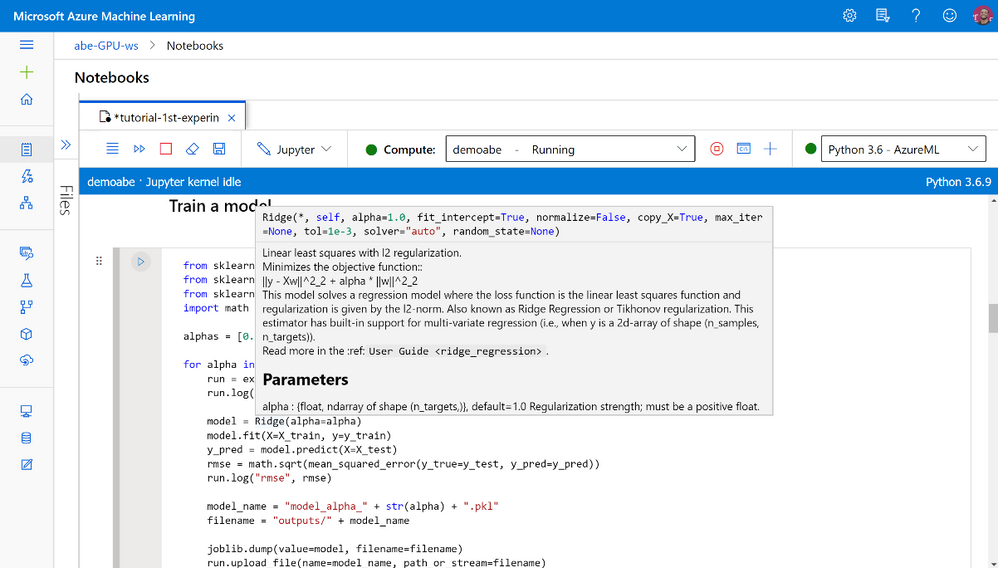 Notebooks are integrated into Azure Machine Learning studio
Experimentation: Compare multiple runs graphically using an improved charting visualization experience including chart smoothing, displaying aggregated data and more.
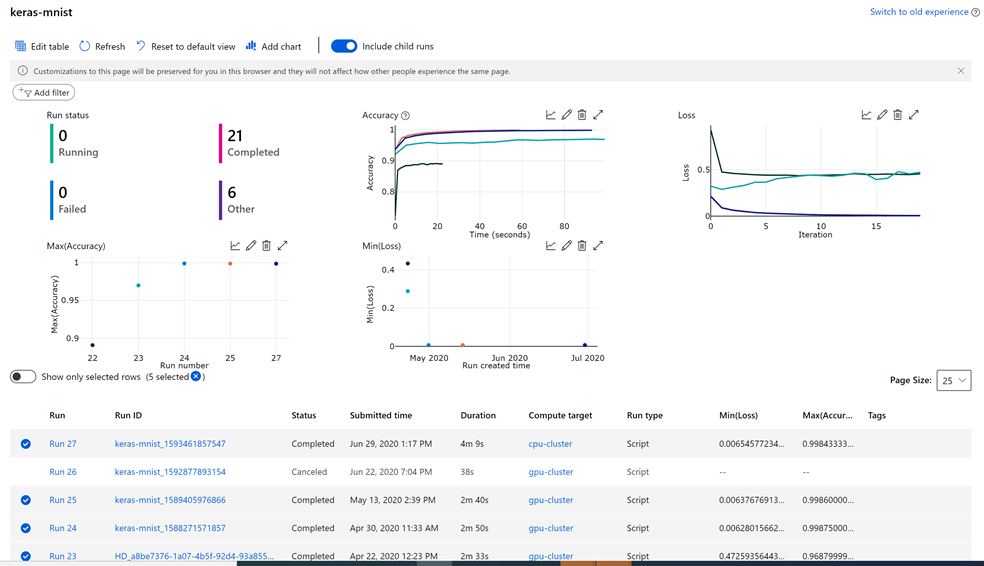 Charts and metrics for tracking and analyzing runs
Security: Granular Role Based Access Controls (RBAC) are now supported (in preview) out of the box for the most common actions in your studio workspace. Specific actions or controls will now be hidden based on your role assignment automatically as setup by your IT Admins.
Compute: Compute instance has tons of improvements in quality, reliability, availability, provisioning latency, and user experience:
New enterprise readiness and administrator capabilities:
- REST API and CLI support to help automate creation and management of compute instance
- ARM template support for provisioning compute instance with sample template documented and downloadable from UI
- Ability for admin to create compute instance on behalf of other users and assign to them through ARM template and REST API. Data scientists do not need to have create/delete RBAC permissions and can access Jupyter, JupyterLab, RStudio, use compute instance from integrated notebooks, and can start/stop/restart compute instances (this is in preview).
- Validating user subnet NSG rules in virtual network for improved compute instance creation.
- Encryption in transit using TLS 1.2
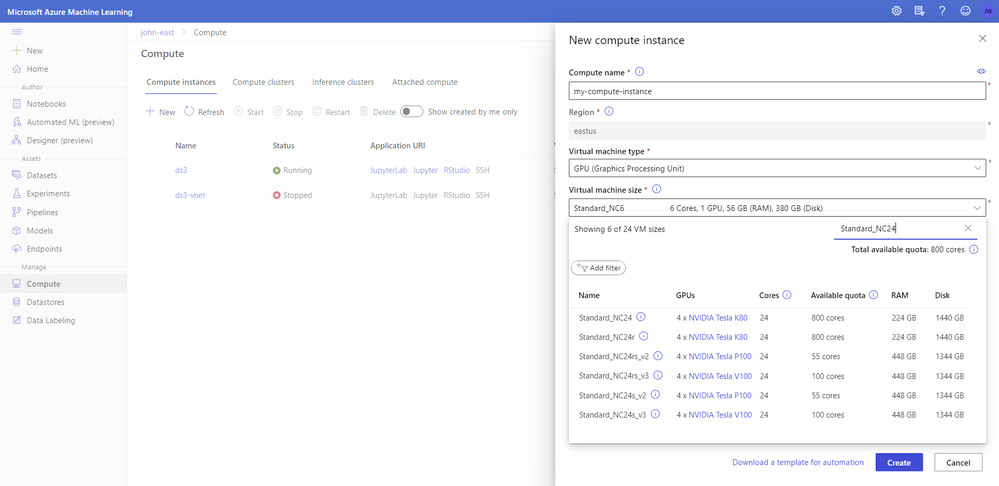 More information available in the updated compute creation panel
Designer (preview): Improved performance and reliability. Updates to user experience and new features:
- New graph engine, with new-style modules. Modules have colored side bars to show the status and can be resized.
- New asset library, to split Datasets, Modules, Models into 3 tabs
- Output setting. Enable user to set module output datastores.
- New modules:
- Computer Vision: Support image dataset preprocessing, and train PyTorch models (ResNet/DenseNet), and score for image classification
- Recommendation: Support Wide&Deep recommender
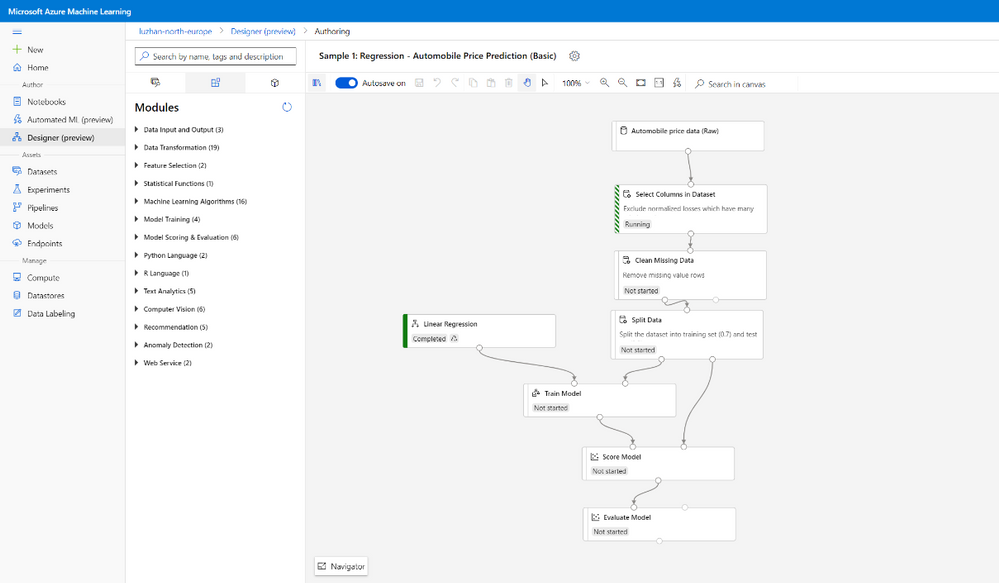 New style to Modules in the drag-and-drop Designer
Data Labeling: Create, manage, and monitor labeling projects directly inside the studio web experience. Coordinate data, labels, and team members to efficiently manage labeling tasks. Supports image classification, either multi-label or multi-class, and object identification with bounding boxes.
The machine learning assisted labeling feature (Preview) lets you trigger automatic machine learning models to accelerate the labeling task.
Learn more about Azure Machine Learning data labeling in this blog post.
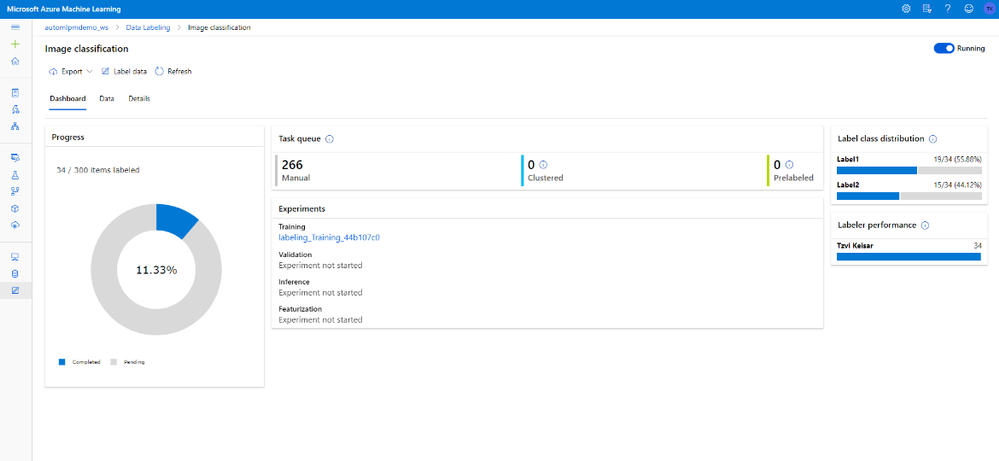 Data labeling updated style and machine learning assisted labeling
Fairlearn (preview): Azure Machine Learning is used for managing the artifacts in your model training and deployment process.
With the new fairness capabilities, users can store and track their models’ fairness (disparity) insights in Azure Machine Learning studio, easily share their models’ fairness learnings among different stakeholders. Beyond logging fairness insights within Azure Machine Learning run history, users can load Fairlearn’s visualization dashboard in studio to interact with mitigated or original models’ predictions and fairness insights, select a pleasant model, and register/deploy the model for scoring time.
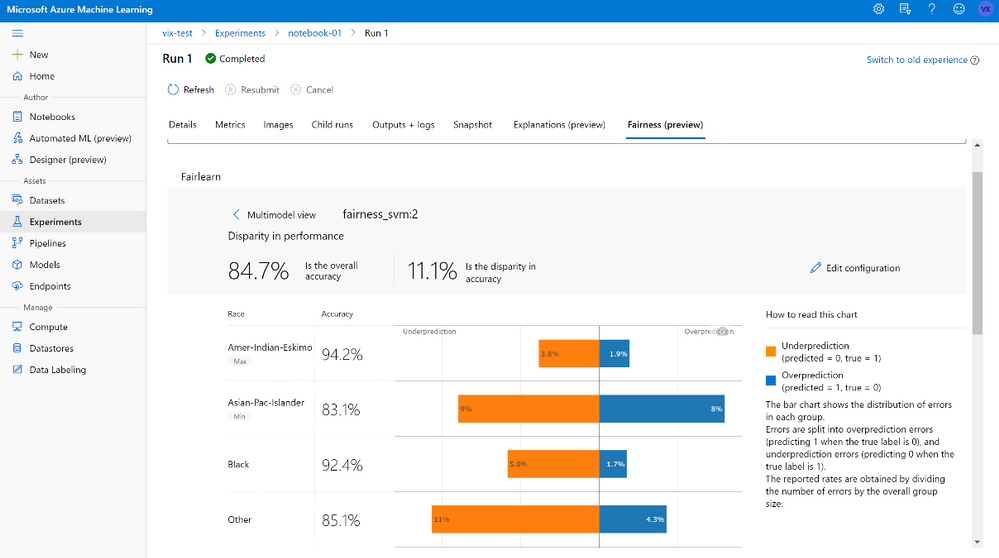 Fairlearn visualization now available as preview in the studio
Automated machine learning user interface (preview) Automated machine learning is the process of automating the time-consuming, iterative tasks of machine learning model development to enable non data scientists to operationalize their machine learning models.
The new Data Guardrails helps fix and alert users of potential data issues. The model details tab includes key information around the best model and the run. There is more control over which visualizations are generated – choose a metric of interest and visualizations pertaining to that metric will display.
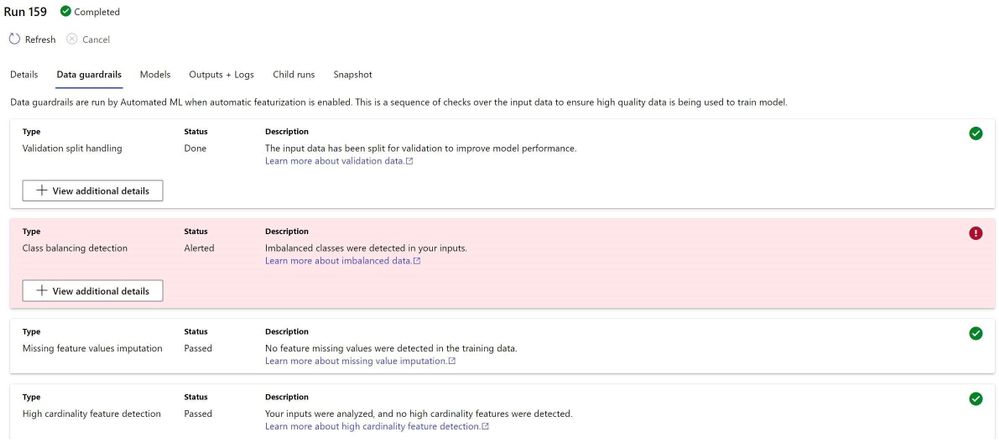 Data guardrails in automated machine learning will alert for issues in the data and even fix some of them
Continuing the journey together
Our customers inspire us to continue the journey, building together experiences that make machine learning easier to use, productive, and fun!
Send us your feedback
Use the feedback panel to share your thoughts with us
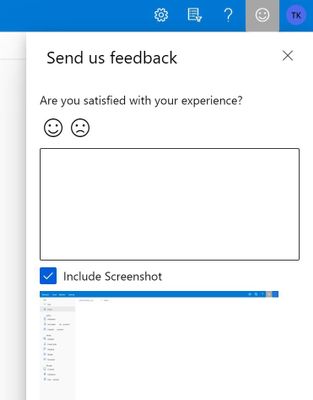 Feedback panel to share your thoughts
by Scott Muniz | Jul 15, 2020 | Azure, Microsoft, Technology, Uncategorized
This article is contributed. See the original author and article here.
By: Gourav Bhardwaj (VMware), Trevor Davis (Microsoft) and Jeffrey Moore (VMware)
Challenge
When moving to Azure VMware Solution (AVS) customers may want to maintain their operational consistency with their current 3rd party networking and security platforms. The types of 3rd party platforms could include solutions from Cisco, Juniper, or Palo Alto Networks and the means for connectivity is independent of the NSX-T Service Insertion/Network Introspection certification process for vSphere or AVS. The following is a use case based on an actual customer deployment.
Solution
The Azure VMware Solution environment allows access to the following VMware management components:
- vCenter User Interface (UI)
- NSX-T Manager User Interface (UI)
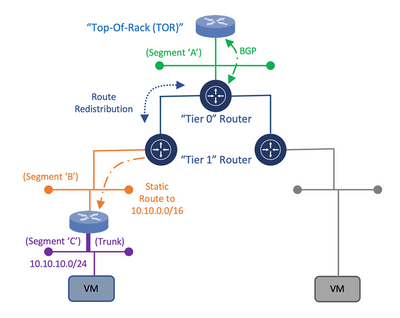
Within this architecture design, the uplink of the 3rd party appliance can be connected to a segment that is attached to the NSX-T “Tier 1” router while the individual or trunked downlinks of the appliance will support the connectivity of the Virtual Machine (VM) workloads which is similar to the On-Premises deployment model as depicted in the following diagram:
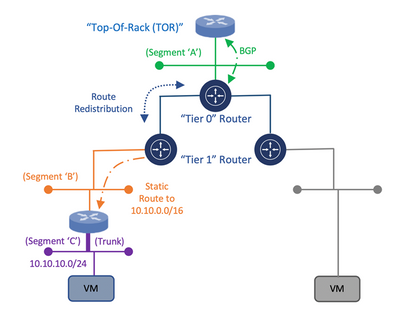
Diagram 1: Deployment Model for Connectivity of a 3rd Party Appliance with NSX-T
Once the appliance is attached to the NSX-T “Tier 1” router, static routes need to be configured to direct traffic through the 3rd Party appliance. Within the NSX-T Manager UI, the customer has the ability to create these static routes on the NSX-T “Tier 1” router which will assist in the network traffic direction through the 3rd Party appliance and to the customer’s VM workloads within AVS. Once the static routes are created, they can be redistributed within the dynamic routing protocol, Border Gateway Protocol (BGP).
This would allow for the static route information to be dynamically sent from the NSX-T “Tier 0” router through the uplink to the Top of Rack (ToR) platform and eventually, to the Azure Express Route backbone which will allow for the end-to-end connectivity from the customer’s locally attached On-Premises Express Route service to the AVS environment. This approach would provide a means to maintain the operational consistency between what is currently On-Premises and the Azure VMware Solution environment.
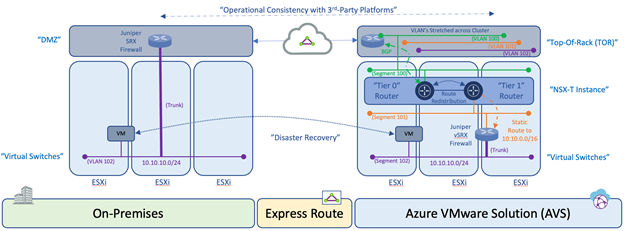
Diagram 2: Operational Consistency Deployment Model of 3rd Party Appliance in Azure VMware Solution
An additional consideration for this design is related to the location of the VM’s within the cluster and the potential vSphere Distributed Resource Scheduler (DRS) event which attempts to load balance the VM’s across the ESXi hosts within a cluster via vMotion based on available resources. During such as event, the 3rd Party appliance may reside on one ESXi host while the VM workload resides on another ESXi host. Within a customer’s On-Premises data center, this situation can be resolved by stretching the VLAN’s on the ToR switch that are associated to the uplinks and downlinks attached to the 3rd Party platform which would provide connectivity independent of which ESXi host the platforms and VM’s reside. Within Azure VMware Solution, this needs to occur as well using NSX Segments or vSphere Distributed Switch (VDS).
Once the solution is verified based on these mentioned topics, the customer is able to consume the 3rd Party platform within Azure VMware Solution in the same way as the On-Premises data center environment which will align with the requirement for operational consistency between On-Premises and AVS for services such as Disaster Recovery.
Author Bio’s:
Gourav Bhardwaj
Staff Cloud Solutions Architect (VMware)
VCDX 76 (VCDX-xx)
Digital and workspace transformation expert; Speaker at conferences and workshops.
LinkedIn: https://www.linkedin.com/in/vcdx076/
Trevor Davis
Azure VMware Solutions, Sr. Technical Specialist (Microsoft)
Twitter: @vTrevorDavis
LinkedIn: https://www.linkedin.com/in/trevorpdavis/
Jeffrey Moore
Staff Cloud Solutions Architect (VMware)
3xCCIE (#29735 – RS, SP, Wireless), CCDE (2013::20)
Focused on incubation and acceleration efforts for Azure VMware Solution (AVS).
LinkedIn: https://www.linkedin.com/in/jjtm/
Twitter: @Jeffrey_29735


Recent Comments