What’s New: Incident Auto-refresh hits GA!

What’s New: Incident Auto-refresh hits GA!

This article is contributed. See the original author and article here.

This installment is part of a broader series to keep you up to date with the latest features in Azure Sentinel. The installments will be bite-sized to enable you to easily digest the new content.


Regardless of the size and tooling of your SOC, it’s important to have a single queue and govern quality of it. Having a single place to go for reactive analysis and ensuring that place produces high quality alerts are key enablers of SOC effectiveness and responsiveness. As a complement to the quality piece, the queue must be updated to enable SOC analysts to work with the most up to date incidents. To improve the effectiveness of SOC analysts, we are delighted to announce that the Auto-Refresh capability is now generally available.


The Auto-refresh feature will enable your SOC analyst to automatically refresh the incidents queue in Sentinel to make sure analysts have an updated list of incidents to triage. The feature, when turned on, will check for new incidents every 30 seconds and update the queue if new ones are found/update those that already exist in the list.


Walk-through:


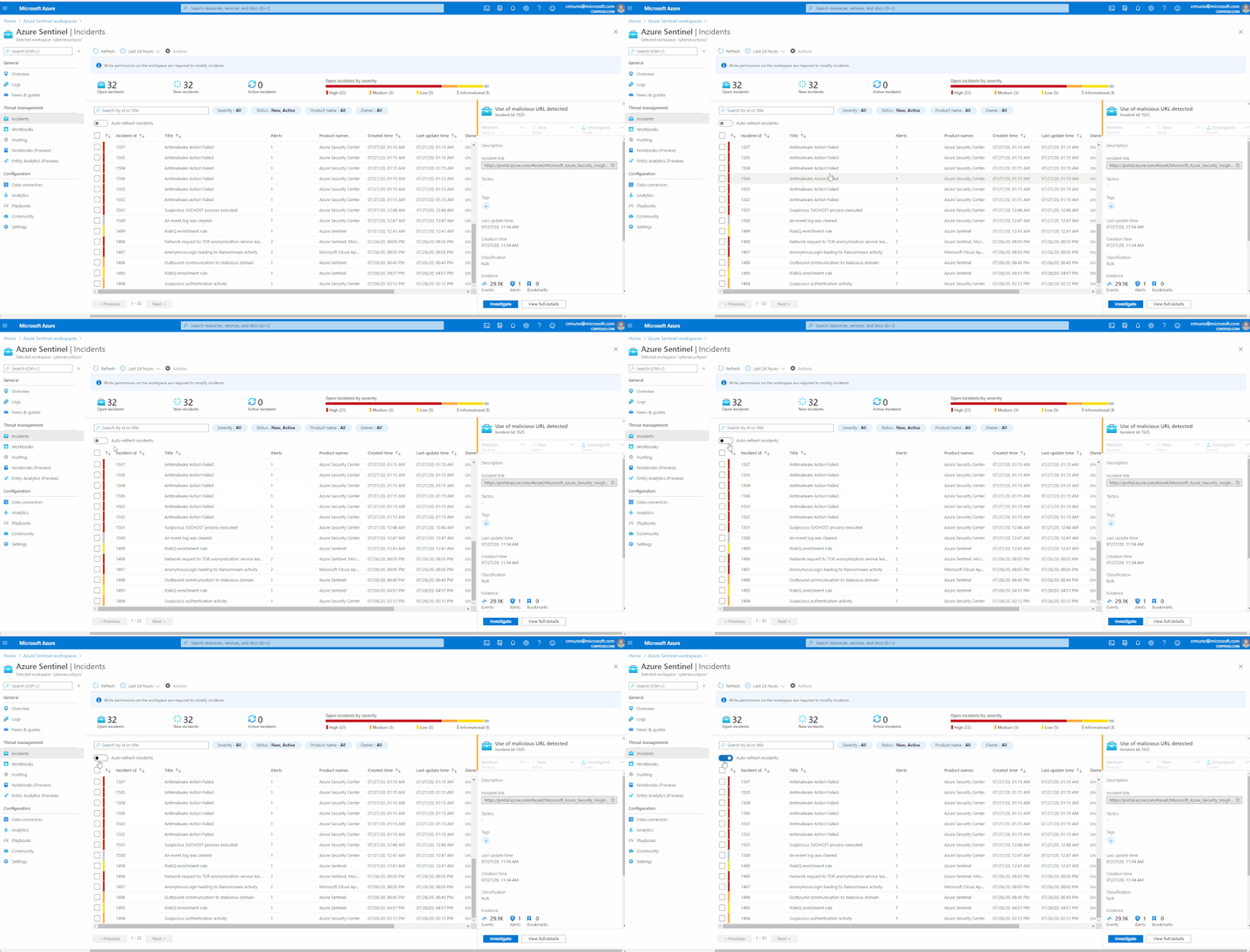
On the top left of the incidents table, you will find the new auto-refresh toggle.


When turned on, the incidents queue will be automatically refreshed every 30 seconds if there are new incidents and update existing incidents.


Figure 1: Auto Refresh CapabilityFigure 1: Auto Refresh Capability


Get started today!


We encourage you to leverage the auto-refresh capability to ensure SOC analysts have an updated list of incidents to work with. This feature will improve the detection and investigation experience across your security operations center.


Try it out, and let us know what you think!

Azure Marketplace new offers – Volume 80

Azure Marketplace new offers – Volume 80

This article is contributed. See the original author and article here.

We continue to expand the Azure Marketplace ecosystem. For this volume, 86 new offers successfully met the onboarding criteria and went live. See details of the new offers below:

Applications

5G-ready AI-enabled Operational Analytics.png

5G-ready AI-enabled Operational Analytics: Offered as a service on Microsoft Azure, Nokia’s AVA enables carriers to move out of private datacenters and manage their networks securely, efficiently, and at scale using AI-enabled automation.

Air flights Schedule.png

Air flights Schedule: AIRPLANE SOLUTIONS S.L. offers this suite of API services that provides a single source of airline flight information based on the International Air Transport Association’s (IATA) Standard Schedules Information Manual (SSIM) standard.

Air Quality Sensors and Analytics.png

Air Quality Sensors & Analytics: Leveraging AI and IoT technologies and built on Microsoft Azure, Breeze Technologies’ low-cost air-quality sensors gather real-time air-quality insights and provide tailored recommendations for efficient and effective clean air throughout urban environments.

All you can Meet- Teams Meeting Room as a Service.png

All you can Meet: Teams Meeting Room as a Service: Wortell’s Videobutler service for Microsoft Teams provides personal support to meeting participants to help optimize collaboration and ensure successful remote meetings.

Altaro Office 365 Backup for MSPs.png

Altaro Office 365 Backup for MSPs: Altaro Office 365 Backup for MSPs is a monthly subscription program enabling managed service providers, IT resellers, and IT consultants to provide backup and recovery services for Office 365 mailboxes as well as OneDrive and SharePoint files.

AML Compliance and Fraud Management.png

AML Compliance & Fraud Management: Alessa provides anti-money laundering (AML) capabilities that banks, fintechs, casinos, and other regulated industries need in one platform. It integrates with core systems and facilitates due diligence, screening, transaction monitoring, and regulatory reporting.

Archivist Security Twin Platform.png

Archivist Security Twin Platform: Jitsuin’s Archivist Security Twin Platform delivers the transparency, collaboration, and automation needed to move fast and fix connected things while boosting digital transformation. It helps reveal, reduce, and report risks in IoT while building trust with secure distributed ledgers.

Arkose Labs Fraud Prevention Platform.png

Arkose Labs Fraud Prevention Platform: Combining real-time risk assessments with interactive enforcement challenges, the Arkose Labs fraud prevention platform eliminates automated attacks and provides organizations with long-term protection against fraud and abuse.

AutoCom Clean.png

AutoCom Clean: AutoCom Clean is a cloud-based task management system that sends tailored cleaning and disinfecting tasks to employees’ mobile devices. Generate reports for task completion and product usage along with service receipts for customers. This app is available in Spanish.

AutoCom Delivery.png

AutoCom Delivery: AutoCom Delivery is a cloud-based task management system that facilitates the delivery of clients’ grocery orders and contactless order collection. This app is available in Spanish.

Aviatrix Controller Meter License - PAYG.png

Aviatrix Controller Meter License – PAYG: The Epirus Azure Blockchain Service Explorer is a complete solution for providing insight into your blockchain deployments on Microsoft Azure, providing detailed views for interpreting tokens, contracts, accounts, transactions, and block data on your ledger.

Barracuda CloudGen WAF for China.png

Barracuda CloudGen WAF for China: Barracuda CloudGen WAF is a feature-rich application security platform that protects applications from advanced threats and zero-day attacks. It scans vulnerabilities and remediates them with a single click, ensuring security and compliance for your applications and data.

BindTuning Design - SharePoint & Office 365 Themes.png

BindTuning Design – SharePoint & Office 365 Themes: BindTuning Design provides easy-to-use tools so you can quickly and without coding create an intranet design aligned with your brand. The large selection of SharePoint and Office 365 themes are easily customizable with BindTuning Design’s powerful point-and-click customization tool.

Bookbot.png

Bookbot: Bookbot is a virtual reading assistant that listens to children read aloud and helps them as they progress, guiding them through its reading levels until they become confident, independent readers.

Cerebreon - Intelligent Debt Recovery Platform.png

Cerebreon – Intelligent Debt Recovery Platform: Cerebreon is a SaaS solution that empowers creditors to make automated, data-driven decisions while maximizing debt recovery. It provides a single platform to extract, analyze, and transfer debt data while maintaining GDPR compliance and industry regulations.

Citrix ADM Onprem Agent.png

Citrix ADM Onprem Agent: The Citrix ADM on-premises agent works as an intermediary between the Citrix Application Delivery Management (ADM) service and NetScaler instances on Microsoft Azure, providing a secure channel for configuration, logs, and telemetry data.

citrix.services (DaaS).png

citrix.services (DaaS): ProTechnology GmbH offers its managed remote desktop as a service (DaaS) based on the latest Citrix and Microsoft technologies. The cloud-based solution fully integrates with your IT environment, uses your user authentication method, and is available for any workspace.

Claims automation modules for property and vehicle insurance.png

Claims automation modules for property and vehicle insurance: Powered by AI computer vision technologies, MotionsCloud helps property and vehicle insurance companies streamline and automate claims processes and evaluate damages using data-driven, customer-centric interfaces.

CloudHealth Cloud Management Platform.png

CloudHealth Cloud Management Platform: VMware’s CloudHealth platform helps organizations optimize, secure, and govern their Microsoft Azure and multicloud environments. Deliver higher-quality products and solutions faster while keeping costs under control with CloudHealth.

Sonda Comply SaaS.png Comply SaaS Probe: Comply, a governance and tax compliance solution by SONDA, determines withheld taxes, calculates indirect taxes, and helps companies meet federal and municipal obligations. This app is available only in Brazilian Portuguese.
daenet Visual Components Detector (VCD).png

daenet Visual Components Detector (VCD): The correct identification of components and spare parts in complex machines can be a time-consuming and error-prone task. Visual Components Detector uses machine learning and AI-powered image classification to identify products.

DAML on Azure Database.png

DAML on Azure Database: The DAML programming language enables enterprises to bring innovative business processes to market quickly. DAML on Azure Database is built on Digital Asset’s open-source DAML on PostgreSQL integration and takes full advantage of the highly available, resilient Azure database stack.

Data-driven Disaster Resilience.png

Data-driven Disaster Resilience: Leveraging AI/ML, IoT, and cloud-edge technologies with real-time data and advanced analytics, IPgallery’s solution helps cities improve their ability to monitor, predict, and respond to sudden shocks and long-term stresses, such as floods, wildfires, and other crises.

Demand Solutions Supply Chain Management Platform.png

Demand Solutions Supply Chain Management Platform: The Demand Solutions Supply Chain Management Platform combines AI and advanced analytics to automate planning, accelerate cycle times, improve operating performance, break down business silos, and deliver greater visibility throughout your organization.

Digital OSS.png

Digital OSS: Netcracker Digital OSS enables the rapid creation and delivery of high-value digital services on hybrid networks and automates and simplifies processes to help organizations gain improved operational agility and efficiency.

Documénteme Facturación Electrónica.png

Documénteme Facturación Electrónica: The Documénteme electronic invoicing solution for Colombia runs as a service on Microsoft Azure and is ISO27001-certified to ensure compliance with legal and government regulations.

Email Auditor19.png

Email Auditor 19: Email Auditor 19 is an automated email audit system that uses artificial intelligence to help prevent fraud and establish an effective compliance system. This app is available only in Japanese.

Employee Self Service by AGIT Development Center.png

Employee Self Service by AGIT Development Center: Employee Self Service (ESS) is a human resources solution that enables employees to perform many job-related functions, such as applying for reimbursement, updating personal information, and accessing company benefits information. This app is available in Indonesia.

Epsagon.png

Epsagon: The Epsagon SaaS platform delivers automated, cloud-native application performance monitoring and troubleshooting. It’s designed to make DevOps teams more efficient by identifying problems, correlating data, and finding root causes.

GDi Ensemble A3.png

GDi Ensemble A3: GDi Ensemble A3 is an enterprise asset management solution that enables organizations to digitize and optimize material asset maintenance operations, resulting in higher efficiency and reduced costs.

GDi Ensemble W4.png

GDi Ensemble W4: GDi Ensemble W4 is a workforce management solution featuring web and mobile applications that enable organizations to efficiently plan, forecast, and schedule work and related resources to meet service-level goals.

Glaass Pro.png

Glaass Pro: Glaass Pro is a construction management solution designed to handle the scale and complexity of enterprise projects. Glaass Pro includes Glaass Core with customizable modules to help teams deliver projects on time and within budget.

Grafana Image Renderer Container Image.png

Grafana Image Renderer Container Image: The Grafana Image Renderer is a plug-in for Grafana that uses Headless Chrome to render panels and dashboards as PNG images. Bitnami container images follow industry standards and are continuously monitored for vulnerabilities and application updates.

HAProxy Community on CentOS.png

HAProxy Community on CentOS: HAProxy Community is free open-source software that provides a high-availability load balancer and proxy server for TCP- and HTTP-based applications that spreads requests across multiple servers. Websoft9 images are packaged using industry best practices and are continually updated.

Horizon.png

horizon: Truenorth Corporation’s horizon is a process automation tool that works independently, beside, or integrated with traditional ERP or CRM tools. It enables users to create and manage forms-based processes, define levels of approval, and visualize processes to make better business decisions.

HYDRA COVID-19 Risk Management Platform.png

HYDRA COVID-19 Risk Management Platform: Designed to increase safety and provide holistic situational awareness, HYDRA COVID-19 Risk Management Platform helps users make decisions based on insights and take quick action to protect people and create safe working environments.

IdProo.png

IdProo: IdProo helps businesses manage identity and centralized access across all systems in their organization, making it easier for users to utilize products and technologies. It’s designed to improve user experience and to boost security and employee productivity.

iGeneration - Digital Twin Implementation.png

iGeneration – Digital Twin Implementation: Adfolks’ iGeneration on Azure for Industrial IoT connects to multiple streaming services, including Azure IoT Hub, Azure Event Hubs, and Apache Kafka to create real-time applications and dashboards.

InvSolv - Inventory Management.png

InvSolv – Inventory Management: The InvSolv inventory management system integrates with retail ERP, warehouse management, and other business systems to provide real-time stock levels, future stock availability, demand forecasting, and dashboards and reports.

IoTSense - Full Scale IoT Platform.png

IoTSense – Full Scale IoT Platform: A full-scale IoT platform with edge and cloud capabilities, IoTSense is device- and network-agnostic, allowing users to use existing hardware, as well as current devices and sensors, on a multitude of networks.

MachineScope - Additive workflow management and analytics.png

MachineScope – Additive workflow management & analytics: MachineScope is a closed-loop workflow management and analytics solution for additive manufacturing (3D printing) that offers a single-pane-of-glass system to manage workflows and performance of multi-vendor 3D printers.

mailDocPRO.png

mailDocPRO: mailDocPRO manages certified email (PEC) and corporate correspondence to help optimize business processes, secure data, and reduce costs. This app is available only in Italy.

Moody's Analytics GridLink As A Service (GlaaS).png

Moody’s Analytics GridLink As A Service (GlaaS): Moody’s Analytics GridLink as a Service (GlaaS) lets you submit AXIS actuarial modeling jobs to a cloud-based infrastructure for processing using a pay-per-use model. GlaaS server farms are deployed in multiple Microsoft Azure regions to ensure redundancy and respect data residency requirements.

navigine platform.png

Navigine Platform: The Navigine Platform provides mobile developers and system integrators with development tools for creating indoor navigation and tracking services. Build applications that leverage indoor navigation, marketing, analytics, and tracking functionalities with the Navigine Platform.

Nuclei.png

Nuclei: Designed to provide seamless customer experience, real-time integration with third-party products, and a data-driven approach to digital transformation, Nuclei enables users to increase customer engagement through several merchant and wealth management services.

OpsRamp ITOM and AIOps Platform.png

OpsRamp ITOM + AIOps Platform: OpsRamp provides an IT operations management platform for hybrid enterprises, delivered with service-centric artificial intelligence for operations (AIOps). Put productivity, governance, visibility, and control back in the hands of modern IT operations teams with OpsRamp.

Peg.png

Peg: The Peg software suite powers influencer marketing for more than 1,700 companies across 169 countries. Peg connects to Shopify, AppsFlyer, Adjust, and Google Analytics to measure the ROI of performance-driven influencer marketing.

Power Analytics Portal - (Power BI Embedded App).png

Power Analytics Portal – (Power BI Embedded App): Share unlimited Microsoft Power BI reports and dashboards with Power Analytics Portal from BITECHSOL. Power Analytics Portal is built on Power BI Embedded, a Microsoft Azure service that lets developers embed visuals, reports, and dashboards into an app.

PredictSense - Automated Machine Learning.png

PredictSense – Automated Machine Learning: PredictSense, an automated machine learning platform, enables you to quickly solve complex business problems with its high-power algorithms. PredictSense builds predictive models that help you make precise and optimal business decisions.

PremierOne Cloud CAD.png

PremierOne Cloud CAD: PremierOne Cloud CAD from Motorola Solutions helps agencies manage calls faster and allocate resources more efficiently. PremierOne Cloud CAD is powered by Motorola Solutions’ CommandCentral platform.

Prometeia PFTPro.png

Prometeia PFTPro: PFTPro from Prometeia enables banks to automate routine tasks while providing personalized wealth management services for various investor segments. It also ensures compliance with FIDLEG, MiFID II, and other regulations.

QuickReach- Intelligent Process Automation.png

QuickReach: Intelligent Process Automation: QuickReach, an intelligent process automation platform from BlastAsia, lets you rapidly build automated workflows without coding. Features include a workflow builder, an automation designer, and AI add-ins.

rapyuta dot io.png

rapyuta.io: Accelerate your robotics solution development with rapyuta.io, a portal that offers unified runtime, managed infrastructure, and flexibility and scalability advantages. Build and manage robots across multiple sites with centralized access to business, engineering, and operations metrics.

Recordsure Docs.png

Recordsure Docs: Designed to handle regulated industries’ document workflows, the Recordsure Docs product suite brings client documentation into a single electronic case file and offers programmable search filters to accelerate review time.

Recordsure Voice.png

Recordsure Voice: The Recordsure Voice product suite offers game-changing speech analytics for regulated industries. Using AI technology, it helps teams triage content, classify conversations, extract key facts, and gauge risk with advanced anomaly detection.

Retail media development OMO solution AI Beacon-AI Tag.png

Retail media development OMO solution “AI Beacon/AI Tag”: AI Beacon helps retailers improve profitability by visualizing the customer journey, while AI Tag utilizes near-field communication technology to issue coupons by linking with products on the shelf. Both solutions are available only in Japanese.

S3 Building Insights Platform.png

S3 Building Insights Platform: The S3 Building Insights platform integrates data from disparate systems to monitor energy usage, security systems, equipment performance, space utilization, and more. Customers can choose from a range of turnkey modules.

Search and analysis of Instagram bloggers.png

Search and analysis of Instagram bloggers: Yoloco’s search and analysis service uses AI and filters to help brands and advertising agencies find Instagram bloggers so they can improve their sales and influencer marketing campaigns. This app is available in English and Russian.

Silk Cloud Data Platform.png

Silk Cloud Data Platform: Through real-time data reduction, thin provisioning, and continuous resource optimization, the Silk Cloud Data Platform allows organizations to get 10 times the performance out of their cloud data while spending 30 percent less.

smartQED Free App.png

smartQED Free App: smartQED helps operations, support, and DevOps teams systematically solve complex problems. Its machine learning-powered visual workspace enables efficient collaboration for fast incident resolution.

Solar PV App.png

Solar PV App: OrxaGrid’s Solar PV App helps building owners calculate the optimal size of solar panels for their roof so they can save money on their energy bills. The software will consider location, orientation, angle, roof surface, tariff information, and more.

Status List.png

Status List: Made for companies that run HTTP services, Status List monitors uptime and provides instant notification when services fail, degrade, or resume. Tackle your issues long before your customers call.

stickers.png

stickers: MojiLaLa Unlimited provides you with access to more than 60,000 artistic and animated emoji stickers to enhance your chat, email, or video messaging experience. Always find the right sticker to express yourself and share with your family and friends.

SyncHub.png

SyncHub: SyncHub lets you sync your cloud data with Microsoft Power BI in real time. Run advanced reports and analytics beyond the reporting already available in your cloud apps, and say goodbye to manual CSV exports and incomplete reports.

TAIKAI - Online Hackathons and Open Innovation Platform.png

TAIKAI – Online Hackathons and Open Innovation Platform: TAIKAI’s platform allows companies to run online hackathons and open innovation challenges, connecting them with promising freelancers, universities, and startups.

Trask ZenID.png

Trask ZenID: Trask ZenID’s optical character recognition and data capture functions speed up the client identity verification process and can detect high-quality counterfeit IDs, passports, or licenses. This app is available only in Czech.

Tresorit.png

Tresorit: Tresorit’s content platform empowers users with seamless cross-device collaboration while protecting files from unauthorized access, disclosure, and loss. Tresorit’s patented technology features end-to-end encryption.

Trifacta for Azure.png

Trifacta for Azure: Trifacta, a modern data preparation platform, cleans and prepares data for analytics and machine learning. Trifacta is integrated with numerous Microsoft Azure services, including Azure Data Factory, Azure SQL Data Warehouse, Azure Data Lake Storage, and Azure Blob storage.

Univonix Automated PBX Migration to Microsoft Teams.png

Univonix Automated PBX Migration to Microsoft Teams: Planner and Migrate, two parts of Univonix’s suite of migration services, offer advanced process automation for PBX assessment, planning, and provisioning to Microsoft Teams. Smoothly transition from legacy PBX (Cisco CUCM, Avaya CM, Mitel, Siemens, Nortel) to Teams.

Univonix PBX Assessment for Migration to Microsoft Teams.png

Univonix PBX Assessment for Migration to Microsoft Teams: The Univonix PBX Assessment is an advanced migration tool that delivers an aggregated view of all users, extensions, and devices on your legacy PBX voice configuration. It also maps your feature parity when migrating to Microsoft Teams.

Vault-ERP.png

Vault-ERP: Vault-ERP resource planning software can help you manage your business and increase productivity with solutions across HR, sales, projects, operations, and company culture. Take advantage of time tracking, financial planning, reporting, and more.

Vectra AI.png

Vectra AI: Vectra AI’s Cognito platform accelerates threat detection using artificial intelligence to enrich collected network metadata. Vectra AI offers three apps on the Cognito platform: Cognito Stream, Cognito Recall, and Cognito Detect.

VisionSense.png

VisionSense: VisionSense, Winjit’s computer vision product, applies machine learning to huge data sets for advanced image processing, matching, and object detection (2D and 3D), which can be used in smart surveillance, advanced analytics, and more.

Voyager Labs.png

Voyager Labs: Voyager Labs enables law enforcement agencies and private-sector clients to collect and analyze massive amounts of unstructured data, helping them combat crime, fraud, trafficking, terror attacks, and other threats.

Wearable SaaS for Firstline workers.png

Wearable SaaS for Firstline workers: Turnpike wearable devices empower retail staff with information and recommendations gathered from IoT sensors, point-of-sale systems, and AI cameras. This veritable sixth sense allows staff to increase efficiency and customer satisfaction.

WEBFRONT-KS(WAF-BYOL).png

WEBFRONT-KS(WAF-BYOL): The WEBFRONT-K web application firewall from PIOLINK provides web security with dual detection engines to prevent cyberattacks. WEBFRONT-K offers high speed and stability, supporting small and large-scale businesses alike.

WordLift.png

WordLift: WordLift’s natural language processing (NLP) allows you to inject structured data into your content, which helps search engines serve your content to the right person at the right time. Power up your SEO with WordLift’s AI and personalized knowledge graphs.

Yeastar for Microsoft Teams.png

Yeastar for Microsoft Teams: This integration from Qunifi lets users on the Yeastar PBX System use their phones or the native Linkus Unified Communications softphone to connect with Microsoft Teams users.

Consulting services

1 Day Workshop- Artificial Intelligence.png

1 Day Workshop: Artificial Intelligence: Designed for business and IT stakeholders, this workshop from Trianz IT and Cloud Solutions Pvt. Ltd. will help you understand the AI products and services offered by Microsoft Azure and how best to use them.

AzMigrate - 8 Week Implementation.png

AzMigrate – 8 Week Implementation: BrainScale will assess your infrastructure and applications, prepare a secure landing zone in Microsoft Azure that meets your organizational compliance needs, perform a migration with the tool of your choice, and optimize your workload on Azure.

Azure DevOps- 2-Day Bootcamp Workshop.png

Azure DevOps: 2-Day Bootcamp Workshop: This workshop from SP Technology Co. Ltd. will provide hands-on training of microservices architecture, Docker, and Microsoft Azure DevOps. The workshop will be conducted in Korean.

Cloud Migration- 2 hour free Workshop.png

Cloud Migration- 2 hour free Workshop: Move AS will help you understand how Microsoft Azure can give your organization a competitive advantage. This includes streamlining the transition process by applying a proven integration approach based on a set number of servers, applications, and workloads.

Dyncloud Retail- 10-Wk Implementation.png DynCloud Retail: 10-Wk Implementation: Gonzalez, Cortina, Glender y Cia will implement DynCloud Retail, which helps optimize and strengthen your end-to-end processes for inventory management, supply chain optimization, e-commerce, marketing, and mobile point-of-sale services. This offer is available in Spanish.
Pre-Configured Accounting- 4 Wk-Implementation.png Pre-Configured Accounting: 4 Wk-Implementation: Best Practices Consulting will implement Pre-Configured Accounting, a configuration in Microsoft Dynamics 365 that standardizes financial processes so companies can comply with tax requirements. This offer is available only to customers in Mexico.
Security Service - 1 Hour Briefing.png

Security.Service – 1 Hour Briefing: Get a cloud security overview in this briefing from A3Cloud Solutions. Experts from A3Cloud Solutions will cover deployment best practices, Microsoft Azure cybersecurity services, and more.

Windows Virtual Desktop in Azure- 2 week PoC.png

Windows Virtual Desktop in Azure- 2 week PoC: Suitable for organizations that haven’t already virtualized their desktops, this proof of concept from Move AS offers a comprehensive virtualization service through Windows Virtual Desktop.

Collation conflict when moving Azure SQL DB to SQL server on-premises or Azure VM using SQLPackage.

Collation conflict when moving Azure SQL DB to SQL server on-premises or Azure VM using SQLPackage.

This article is contributed. See the original author and article here.

Error message sample:

*** Error importing database: Could not import package. Error SQL72014: .Net SqlClient Data Provider: Msg 468, Level 16, State 9, Procedure GETTABLESWITHOPENCURSORS, Line 142 Cannot resolve the collation conflict between “SQL_Latin1_General_CP1_CI_AS” and “Latin1_General_100_CI_AS_KS_WS_SC” in the equal to operation.



error1.png


Error cause:

The conflict is happening because the database containment is enabled on source, hence it is forcing the same on target that makes any system or temp objects to use the default windows collation “Latin1_General_100_CI_AS_KS_WS_SC” instead of the instance/DB collation “SQL_Latin1_General_CP1_CI_AS”.


What can enable containment on Azure SQL DB?

When exporting Azure SQL DB to a Bacpac the containment is None by default, unless database has a contained database users created under it, then it will force the containment to Partial.

In SQLPackage, the DAC framework will force enabling the containment during the import process if one of the below conditions is true:

  • If source database containment = Partial in model.xml.
  • If containment was not being set in model.xml file and database has a contained database users.

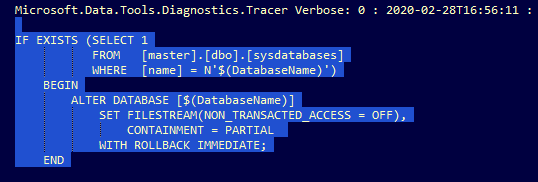
In our scenario, the second option is true, hence the containment was being forced during the import of the bacpac, you can see it in SQLPackage logs as mentioned below:
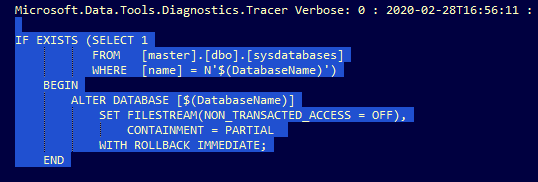
logs1.png


Resolution/Workaround:

In order to disable containment in Azure SQL DB, you need to drop the contained DB users created under the database, and it will set the containment = None when importing the database to target SQL server.


How to identify and drop contained DB users is Azure SQL DB?

1. Detect the contained DB users:   

   A. Run the below script to list all users:


select name as username,

       create_date,

       modify_date,

       type_desc as type,

       authentication_type_desc as authentication_type

from sys.database_principals

where type not in (‘A’, ‘G’, ‘R’, ‘X’)

      and sid is not null

      and name != ‘guest’

order by username;


   B.  Users with authentication_type DATABASE is a contained DB user:

            ssms1.png


2. Remove the contained DB user on source database by following the below steps:

  A. Run the below script to confirm if the user is an owner to a schema:

      SELECT s.name

      FROM sys.schemas s

      WHERE s.principal_id = USER_ID(‘test2’);

  B. If it’s an owner to a schema, then change the owner for this schema to dbo

      ALTER AUTHORIZATION ON SCHEMA::<SchemaName> TO dbo;

  C. Drop the user now under the database.

      DROP USER [test2]
Microsoft Launcher Preview Deprecation

This article is contributed. See the original author and article here.

Thanks to everyone who used Preview Launcher! Based on user feedback, we’ve developed and are gradually releasing a new version (v6) of Microsoft Launcher. We’re also waiting until the end of August to phase out Preview Launcher so users have more time to transition to the new version of Microsoft Launcher. 


We’ve also gotten feedback that some Preview Launcher users haven’t been able to import their Preview settings when they download the new version of Microsoft Launcher. If you run into this problem, it’s because the latest version of Microsoft Launcher isn’t available for your device yet. If you wait to download Microsoft Launcher until later in August when the latest version is available for all devices, that should solve the problem so you can easily restore your settings from Preview Launcher 

Kafka Connect with HDInsight Managed Kafka

Kafka Connect with HDInsight Managed Kafka

This article is contributed. See the original author and article here.

Kafka Connect

In a normal Kafka cluster a producer application produces a message and publishes it to Kafka and a consumer application consumes the message from Kafka.

In these circumstances it is the application developer’s responsibility to ensure that the producer and consumers are reliable and fault tolerant.

Kafka Connect is a framework for connecting Kafka with external systems such as databases, storage systems, applications , search indexes, and file systems, using so-called Connectors, in a reliable and fault tolerant way.

Kafka Connectors are ready-to-use components, which can help import data from external systems into Kafka topics and export data from Kafka topics into external systems. Existing connector implementations are normally available for common data sources and sinks with the option of creating ones own connector.

A source connector collects data from a system. Source systems can be entire databases, applications or message brokers. A source connector could also collect metrics from application servers into Kafka topics, making the data available for stream processing with low latency.

A sink connector delivers data from Kafka topics into other systems, which might be indexes such as Elasticsearch, storage systems such as Azure Blob storage, or databases.

**Most connectors are maintained by the community, while others are supported by Confluent or its partners at Confluent Connector Hub. One can normally find connectors for most popular systems like Azure Blob ,Azure Data Lake Store, Elastic Search etc.

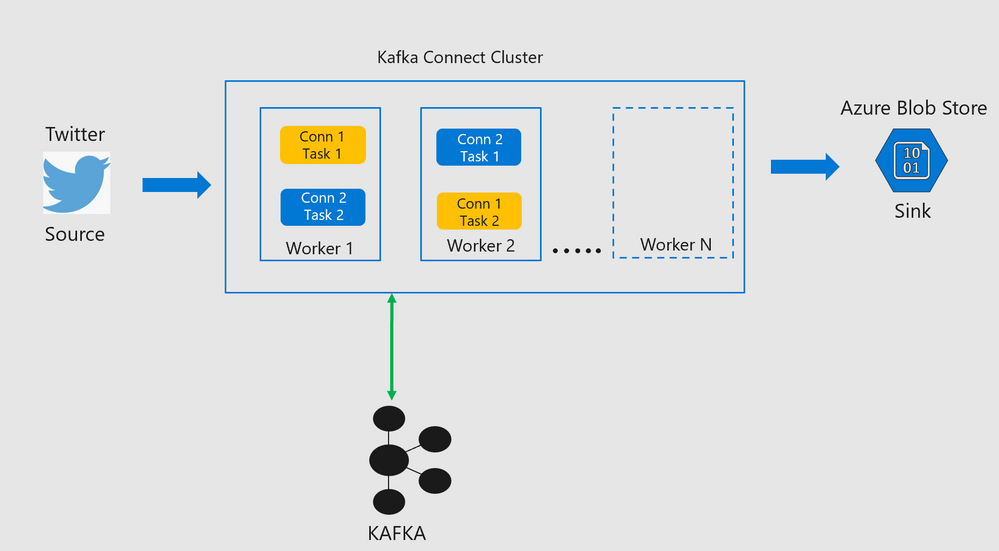
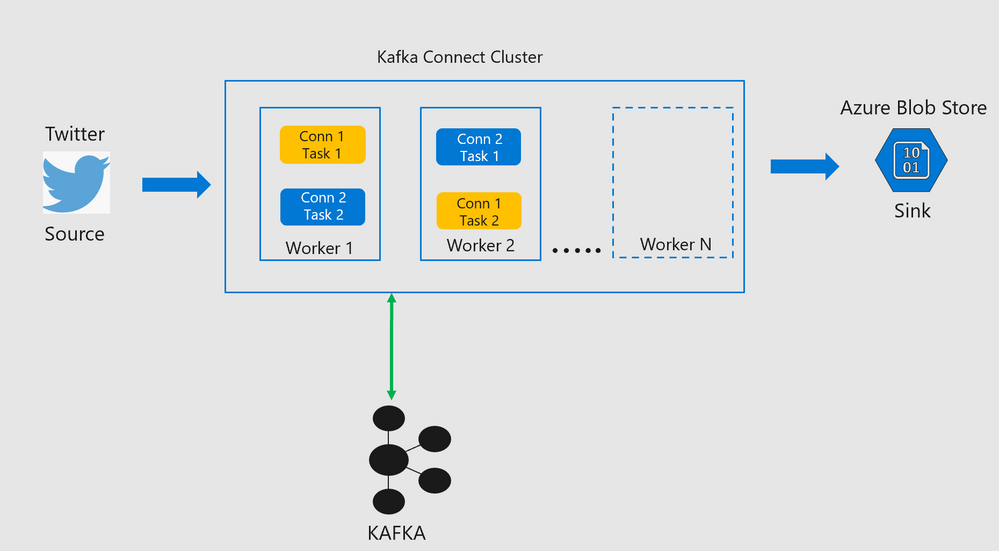
Every connector spawns tasks which are then distributed across workers in the Kafka Connect cluster.

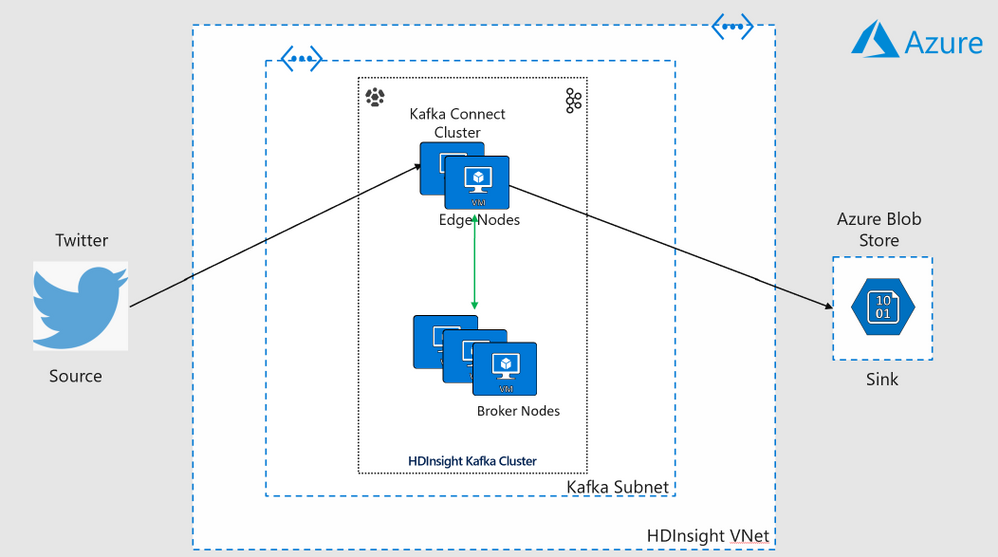
Kafka Connect Architecture
pic1.png

pic2.png


Lab Objectives

  • This lab explores ways to use Kafka Connect on an HDInsight Managed Kafka Cluster in both Standalone Mode and Distributed Mode.The connect cluster in both the setups would ingest messages from twitter and write them to an Azure Storage Blob.

Standalone Mode

  • A single edge node on an HDInsight cluster will be used to demonstrate Kafka Connect in standalone mode.

Distributed Mode

  • Two edge nodes on an HDInsight cluster will be used to demonstrate Kafka Connect in distributed mode.

  • Scalability is achieved in Kafka Connect with the addition of more edges nodes to the HDInsight cluster either at the time of creation or post creation.

  • Since the number of edge nodes can be scaled up or down on an existing cluster , this functionality can be used to scale the size of the Kafka Connect cluster as well.

Deploy a HDInsight Managed Kafka with  Kafka connect standalone 

In this section we would deploy an HDInsight Managed Kafka cluster with two edge nodes inside a Virtual Network and then enable Kafka Connect in standalone mode on one of those edge nodes.

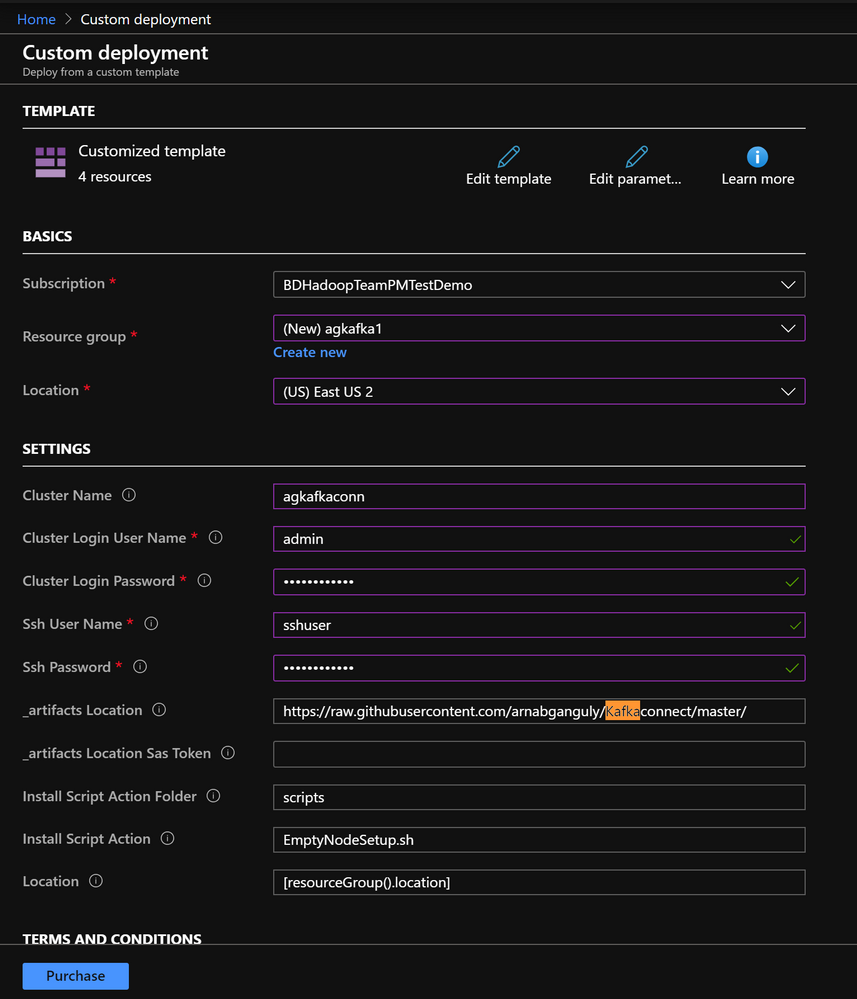
  • On the Custom deployment template populate the fields as described below. Leave the rest of their fields at their default entries

    • Resource Group : Choose a previously created resource group from the dropdown
    • Location : Automatically populated based on the Resource Group location
    • Cluster Name : Enter a cluster name( or one is created by default)
    • Cluster Login Name: Create a administrator name for the Kafka Cluster( example : admin)
    • Cluster Login Password: Create a administrator login password for the username chosen above
    • SSH User Name: Create an SSH username for the cluster
    • SSH Password: Create an SSH password for the username chosen above
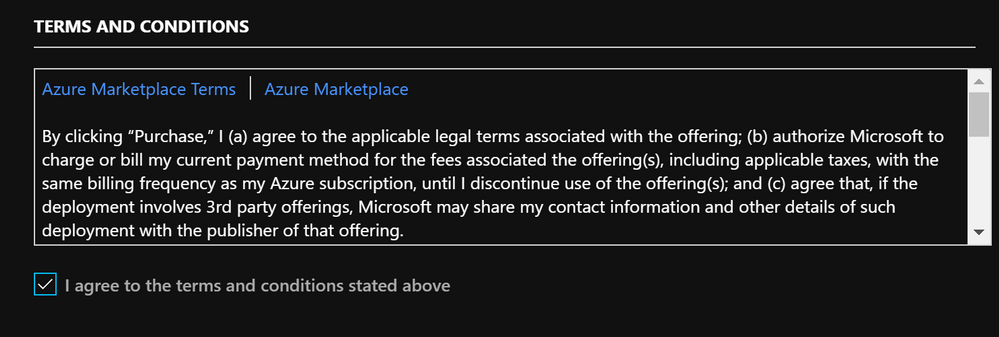
  • Check he box titled “I agree to the terms and conditions stated above” and click on Purchase.

  • Wait till the deployment completes and you get the Your Deployment is Complete message and then click on Go to resource.


pic3.png


pic4.png

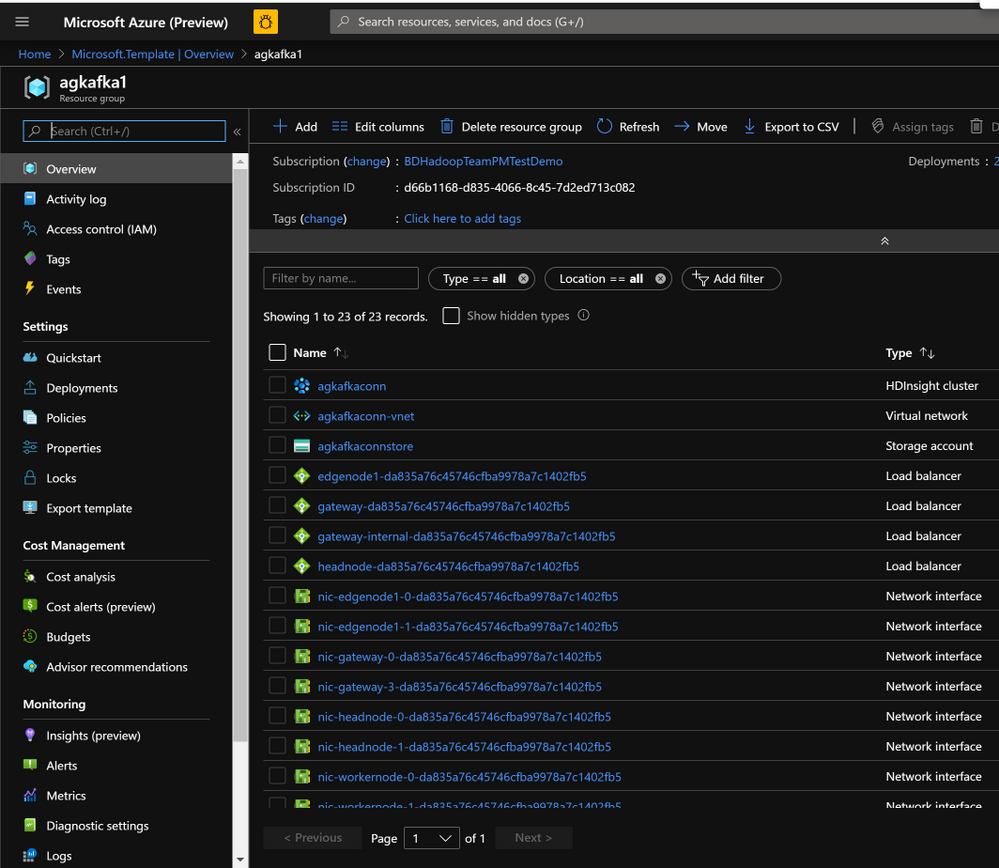
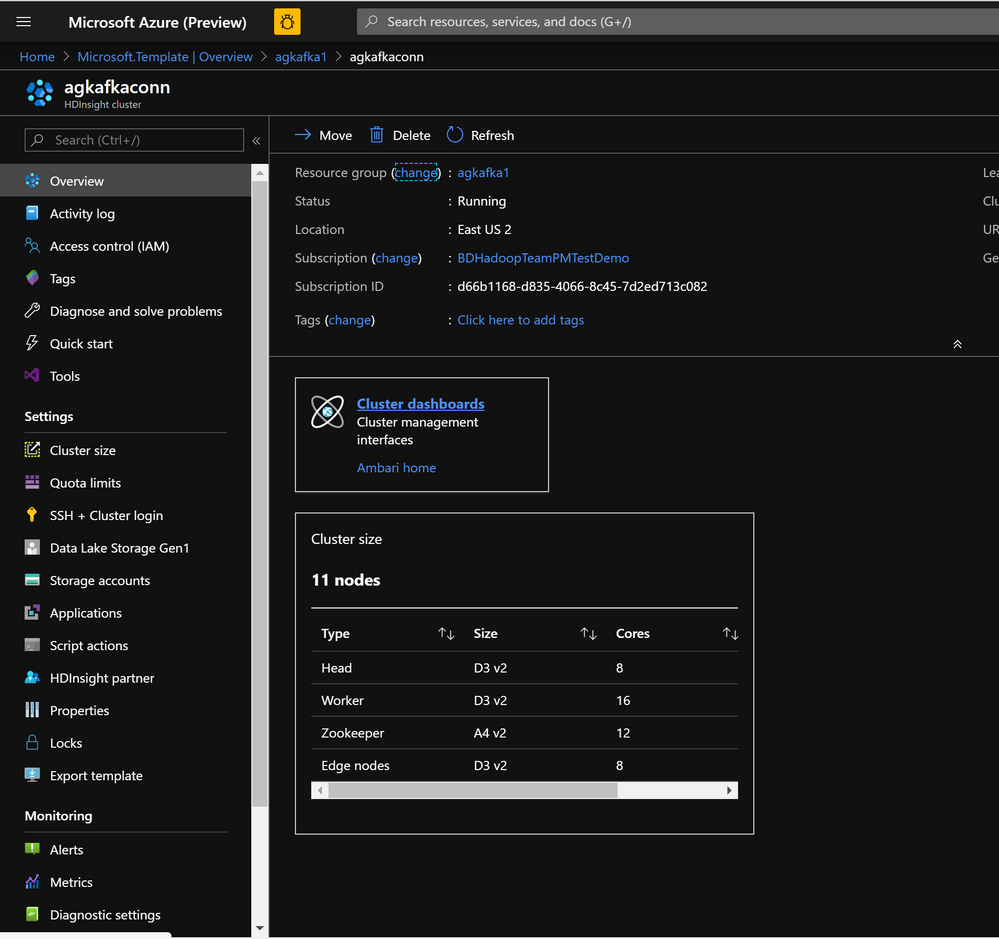
  • On the Resource group explore the various components created as part of the Deployment . Click on the HDInsight Cluster to open the cluster page.


pic5.png


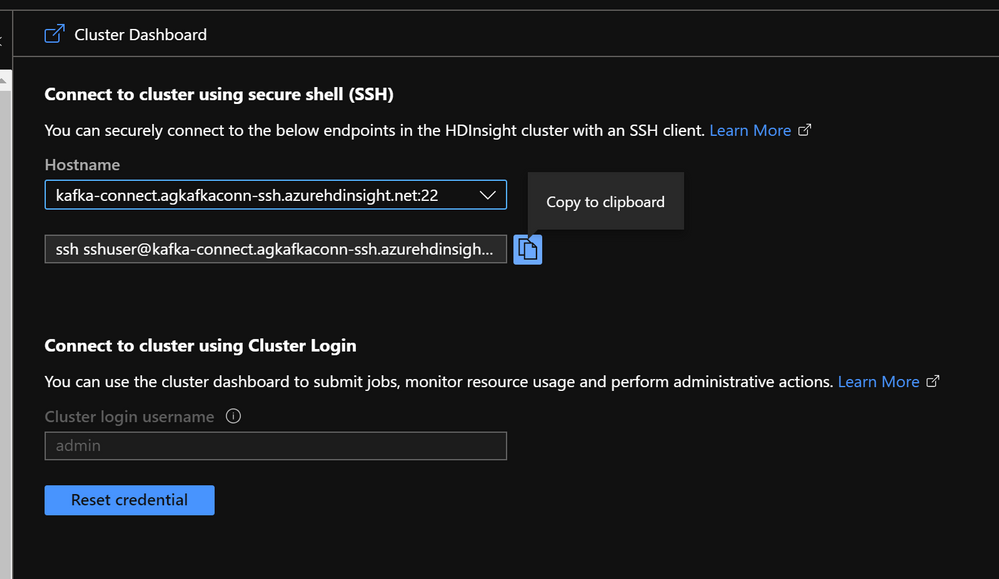
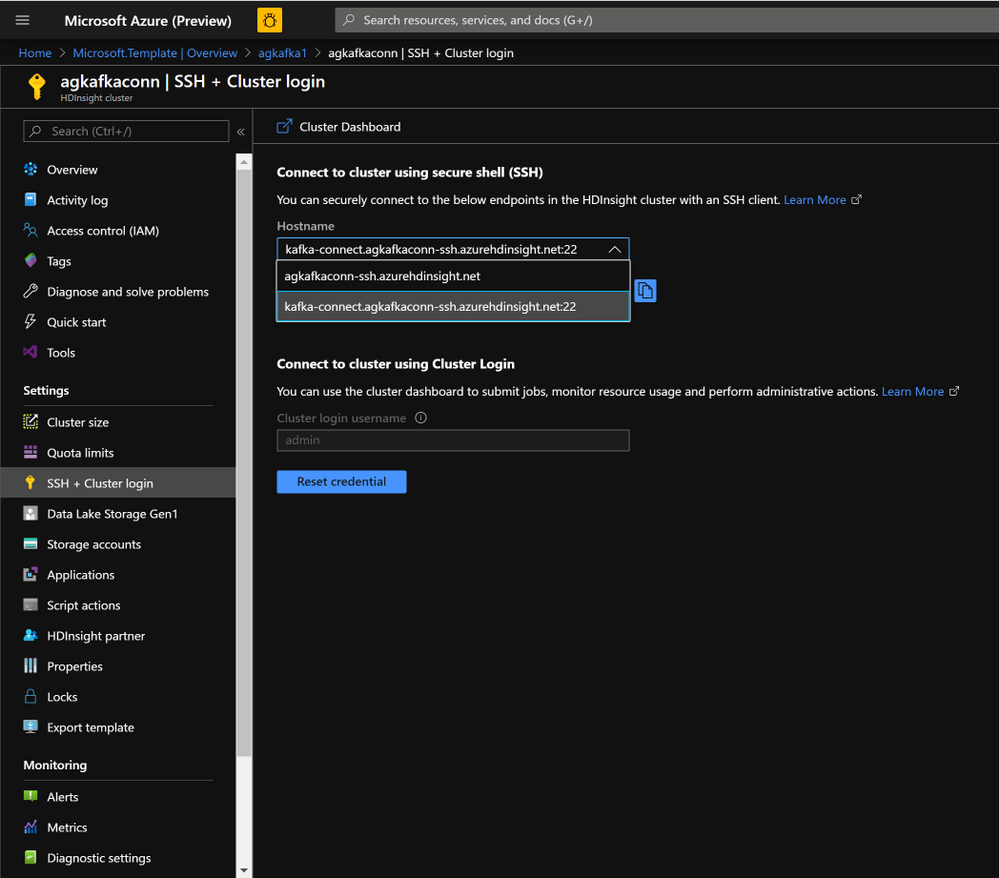
  • On the HDInsight cluster page click on the SSH+Cluster login blade on the left and get the hostname of the edge node that was deployed.

pic6.pngpic8.png


  • Using an SSH client of your choice ssh into the edge node using the sshuser and password that you set in the custom ARM script.

Note: In this the Kafka Connect standalone mode you will need to make config changes on a single edge node.


pic10.png


  • In the next sections we would configure the Kafka Connect standalone on a single edge node.

Configure Kafka Connect in Standalone Mode

Acquire the Zookeeper and Kafka broker data

  • Set up password variable. Replace PASSWORD with the cluster login password, then enter the command
export password='PASSWORD' 
  • Extract the correctly cased cluster name
export clusterName=$(curl -u admin:$password -sS -G "http://headnodehost:8080/api/v1/clusters" | jq -r '.items[].Clusters.cluster_name')
  • Extract the Kafka Zookeeper hosts
export KAFKAZKHOSTS=$(curl -sS -u admin:$password -G https://$clusterName.azurehdinsight.net/api/v1/clusters/$clusterName/services/ZOOKEEPER/components/ZOOKEEPER_SERVER | jq -r '["(.host_components[].HostRoles.host_name):2181"] | join(",")' | cut -d',' -f1,2);
  • Validate the content of the KAFKAZKHOSTS variable
echo  $KAFKAZKHOSTS
  • Zookeeper values appear in the below format . Make a note of these values as they will be used later
zk1-ag4kaf.q2hwzr1xkxjuvobkaagmjjkhta.gx.internal.cloudapp.net:2181,zk2-ag4kaf.q2hwzr1xkxjuvobkaagmjjkhta.gx.internal.cloudapp.net:2181
  • To extract Kafka Broker information into the variable KAFKABROKERS use the below command
export KAFKABROKERS=$(curl -sS -u admin:$password -G https://$clusterName.azurehdinsight.net/api/v1/clusters/$clusterName/services/KAFKA/components/KAFKA_BROKER | jq -r '["(.host_components[].HostRoles.host_name):9092"] | join(",")' | cut -d',' -f1,2);
  • Check to see if the Kafka Broker information is available
echo $KAFKABROKERS
  • Kafka Broker host information appears in the below format
wn1-kafka.eahjefyeyyeyeyygqj5y1ud.cx.internal.cloudapp.net:9092,wn0-kafka.eaeyhdseyy1netdbyklgqj5y1ud.cx.internal.cloudapp.net:9092

Configure Kafka Connect in standalone mode

  • To run Kafka Connect in standalone mode one needs to look at two important files.

  • connect-standalone.properties : Located at /usr/hdp/current/kafka-broker/bin

  • connect-standalone.sh : Located at /usr/hdp/current/kafka-broker/bin


Note : The reason we create two copies of the connect-standalone. properties file below is to separate the rest.port property to different ports. If you do not do this , you will run into a rest.port conflict when you try creating the connectors.


  • Copy theconnect-standalone.properties to connect-standalone.properties-1 and populate the properties as shows below.
sudo cp /usr/hdp/current/kafka-broker/config/connect-standalone.properties /usr/hdp/current/kafka-broker/config/connect-standalone-1.properties
bootstrap.servers=<Enter the full contents of $KAFKABROKERS>
key.converter.schemas.enable=true
value.converter.schemas.enable=true
offset.storage.file.filename=/tmp/connect.offsets1
offset.flush.interval.ms=10000
rest.port=8084
plugin.path=/usr/hdp/current/kafka-broker/connectors/jcustenborder-kafka-connect-twitter-0.3.33,/usr/hdp/current/kafka-broker/connectors/confluentinc-kafka-connect-azure-blob-storage-1.3.2
  • Copy the connect-standalone.properties to “connect-standalone.properties-2` and edit the properties as below( Note the changed rest.port )
sudo cp /usr/hdp/current/kafka-broker/config/connect-standalone.properties /usr/hdp/current/kafka-broker/config/connect-standalone-2.properties
bootstrap.servers=<Enter the full contents of $KAFKAZKHOSTS>
key.converter.schemas.enable=true
value.converter.schemas.enable=true
offset.storage.file.filename=/tmp/connect.offsets1
offset.flush.interval.ms=10000
rest.port=8085
plugin.path=/usr/hdp/current/kafka-broker/connectors/jcustenborder-kafka-connect-twitter-0.3.33,/usr/hdp/current/kafka-broker/connectors/confluentinc-kafka-connect-azure-blob-storage-1.3.2

Deploy the Kafka Connect Plugins


pic9.png

  • Create a new folder path on the edge node and set its properties
   sudo mkdir /usr/hdp/current/kafka-broker/connectors
   sudo chmod 777 /usr/hdp/current/kafka-broker/connectors 
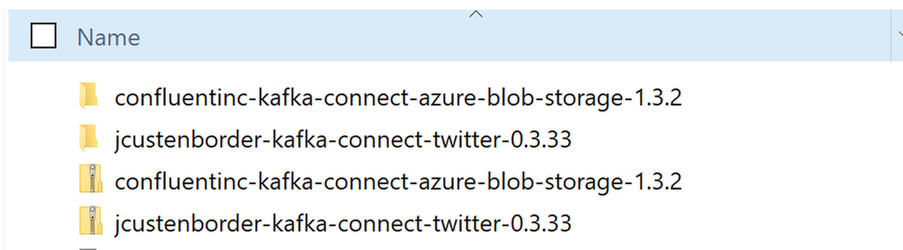
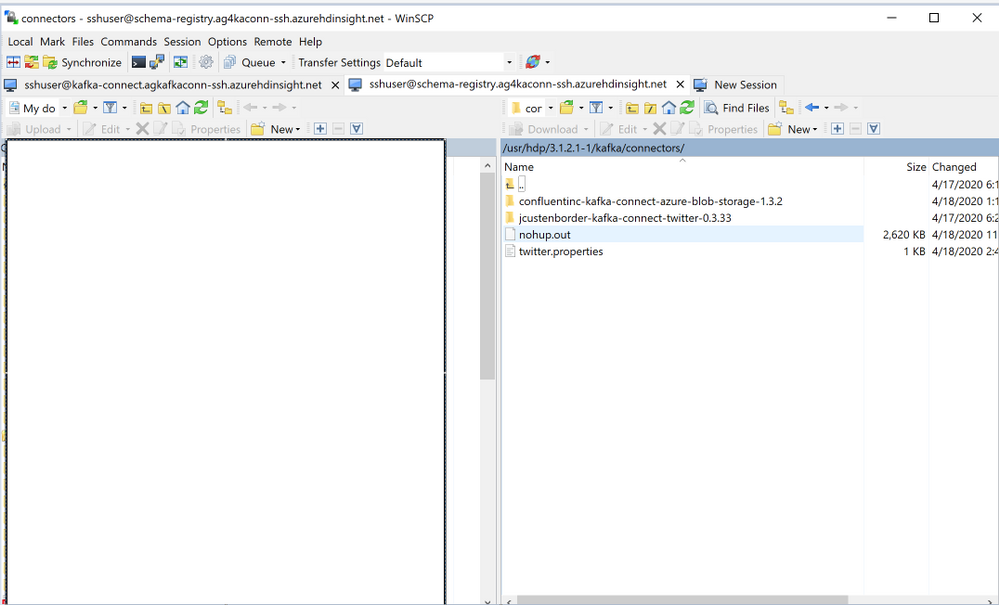
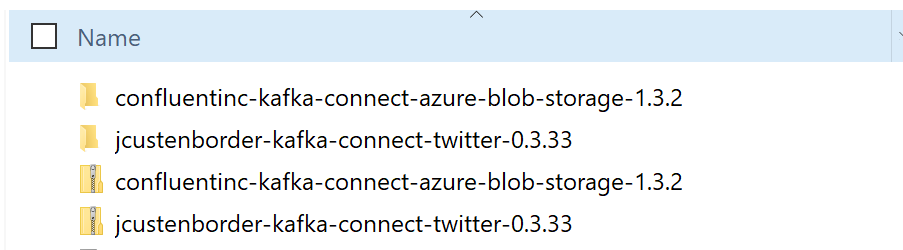
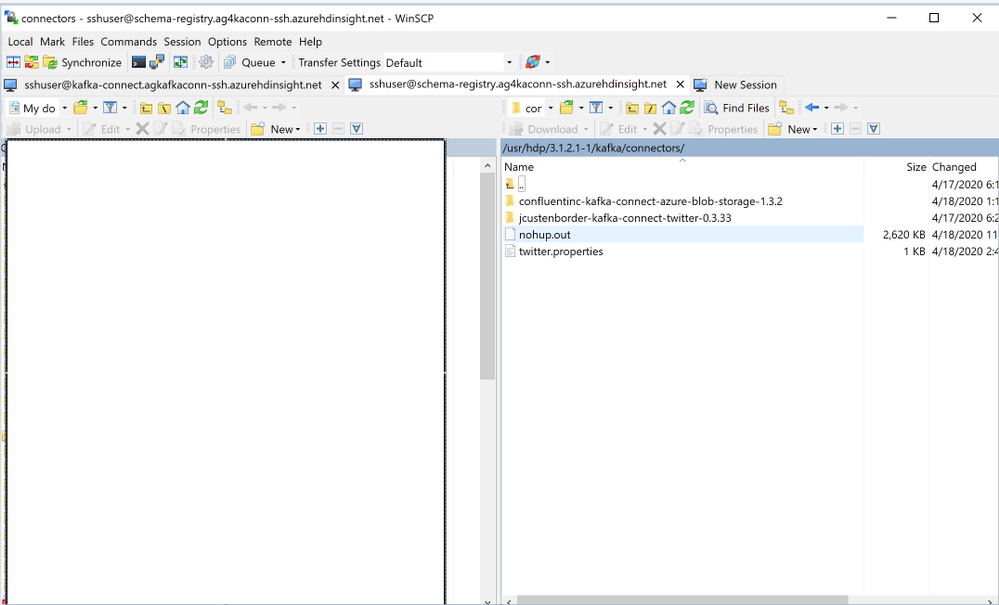
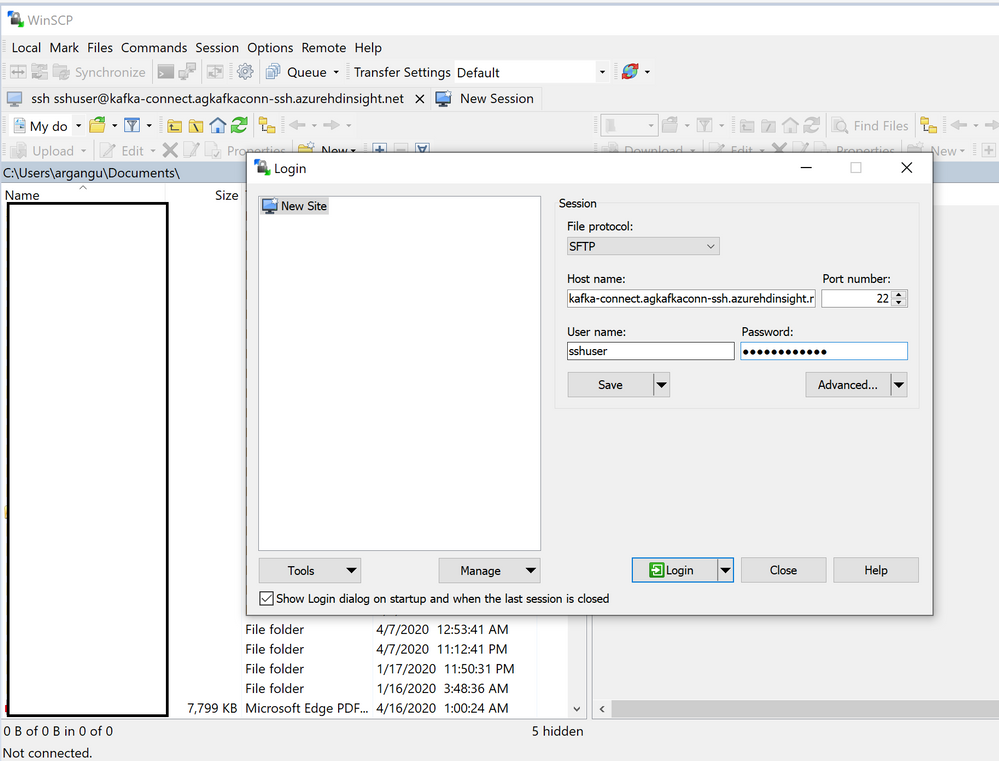
  • Using WINSCP or any other SCP tool of your choice upload the Kafka Connect plugins into the folder path /usr/hdp/current/kafka-broker/connectors


pic11.png


pic12.png


Configure Kafka Connect plugin for streaming data from Twitter to Kafka

Create a Twitter App and get the credentials

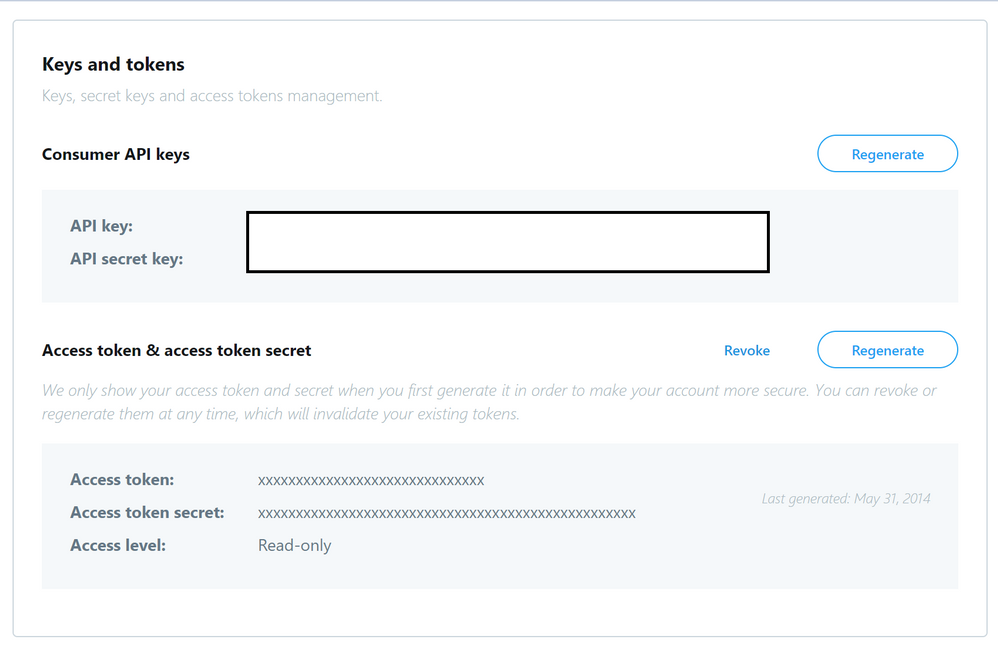
  • Go to https://dev.twitter.com/apps/new and log in, if necessary
  • Enter your Application Name, Description and your website address. You can leave the callback URL empty.
  • Accept the TOS, and solve the CAPTCHA.
  • Submit the form by clicking the Create your Twitter Application
  • Copy the below information from the screen for later use in your properties file.
twitter.oauth.consumerKey
twitter.oauth.consumerSecret
twitter.oauth.accessToken
twitter.oauth.accessTokenSecret


pic25.png


Update the Kafka Connect plugin for Twitter properties file

  • Navigate to the folder path /usr/hdp/current/kafka-broker/connectors and create a new properties file called twitter.properties
cd /usr/hdp/current/kafka-broker/connectors/
sudo vi twitter.properties
  • Insert the below Twitter Connect plugin properties into the properties file.
"name": "Twitter-to-Kafka",
"connector.class": "com.github.jcustenborder.kafka.connect.twitter.TwitterSourceConnector",
"tasks.max": 1,
"kafka.status.topic":"twitterstatus",
"kafka.delete.topic":"twitterdelete",        
"topic": "twitter1",   
"twitter.oauth.consumerKey":"<twitter.oauth.consumerKey>",
"twitter.oauth.consumerSecret":"<twitter.oauth.consumerSecret>",
"twitter.oauth.accessToken":"<twitter.oauth.accessToken>",
"twitter.oauth.accessTokenSecret":"<twitter.oauth.accessTokenSecret>",
"filter.keywords":"keyword1,keyword2 ,...",
"process.deletes":false


Configure Kafka Connect plugin for Azure Blob Storage Sink connector

  • Create a regular Azure Blob storage account and a container on Azure and note the storage access keys

  • Navigate to the folder path /usr/hdp/current/kafka-broker/connectors and create a new properties file called blob.properties

cd /usr/hdp/current/kafka-broker/connectors/
sudo vi blob.properties
  • Insert the below Azure Blob Storage Sink plugin properties into the properties file
name=Kafka-to-Blob
connector.class=io.confluent.connect.azure.blob.AzureBlobStorageSinkConnector
tasks.max=1
topics=twitterstatus
flush.size=3
azblob.account.name=<Azure Blob account Name>
azblob.account.key=<security key>
azblob.container.name=<container name>
format.class=io.confluent.connect.azure.blob.format.avro.AvroFormat
confluent.topic.bootstrap.servers=<Enter the full contents of $KAFKAZKHOSTS>
confluent.topic.replication.factor=3
  • In the next section we would use the command line to start separate connector instances for running Source Tasks and Sink Tasks.


Start source tasks and sink tasks

  • From the edge node run each of the below in a separate session to create new connectors and start tasks.

Start Source connector

  • In a new session start the source connector
sudo /usr/hdp/current/kafka-broker/bin/connect-standalone.sh /usr/hdp/current/kafka-broker/config/connect-standalone-1.properties /usr/hdp/current/kafka-broker/connectors/twitter.properties
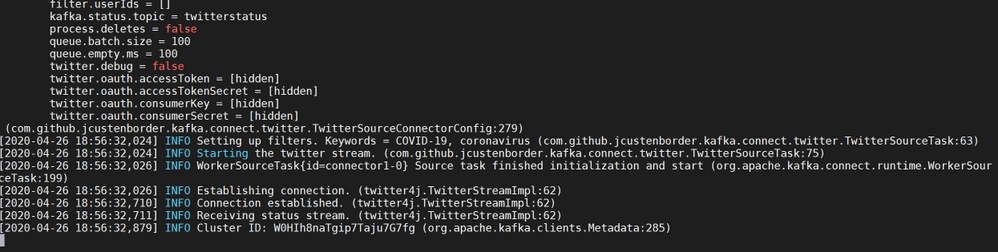
  • If the connector is created and tasks are started you will see the below notifications

pic21.png


  • Message ingestion from Twitter will start immediately thereafter.

pic22.png


  • One other to way to test if Twitter Messages with the keywords are indeed being ingested is to start a console consumer in a fresh session and start consuming messages from topic twitterstatus .In a new session , launch a console consumer. (Make sure $KAFKAZKHOSTS still holds values of Kafka brokers)
/usr/hdp/current/kafka-broker/bin/kafka-console-consumer.sh --bootstrap-server $KAFKAZKHOSTS --topic twitterstatus 
  • If everything is working , you should see a stream of relevant Twitter Messages on the console with specified keywords.

Start Sink Connector

  • In a new session start the sink connector
sudo /usr/hdp/current/kafka-broker/bin/connect-standalone.sh /usr/hdp/current/kafka-broker/config/connect-standalone-2.properties /usr/hdp/current/kafka-broker/connectors/blob.properties
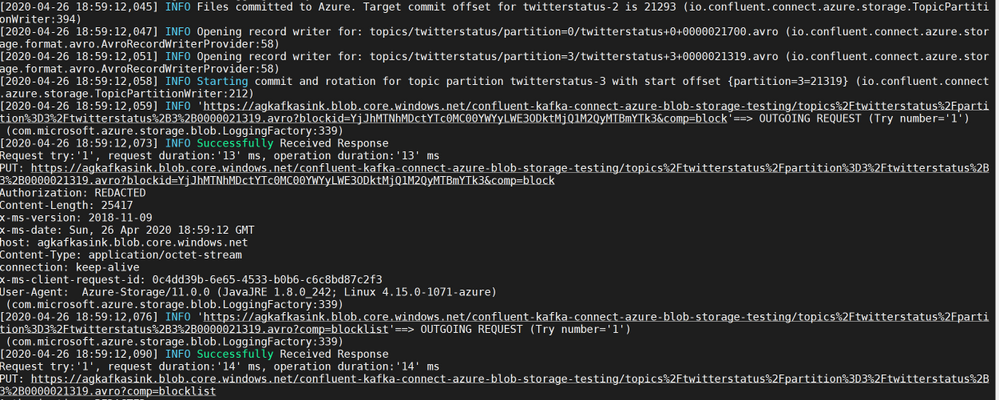
  • If the connector is created and tasks are started you will see the below notifications

pic23.png


  • Messages from the Kafka Topic twitterstatus will be written to container on the Azure Blob Store

pic24.png


  • Authenticate into your Azure portal and navigate to the storage account to validate if Twitter Messages are being sent to the specific container.

pic19.png

pic20.png

  • This ends the section for Kafka Connect in standalone mode. 

    Deploy an HDInsight Managed Kafka cluster with a Kafka Connect cluster in distributed mode. 

In this section we would deploy an HDInsight Managed Kafka cluster with two Edge Node inside a Virtual Network and then enable distributed Kafka Connect on both of those edge nodes

  • Click on the Deploy to Azure Button to start the deployment process

    Deploy to
     Azure  

  • On the Custom deployment template populate the fields as described below. Leave the rest of their fields at their default entries

    • Resource Group : Choose a previously created resource group from the dropdown
    • Location : Automatically populated based on the Resource Group location
    • Cluster Name : Enter a cluster name( or one is created by default)
    • Cluster Login Name: Create a administrator name for the Kafka Cluster( example : admin)
    • Cluster Login Password: Create a administrator login password for the username chosen above
    • SSH User Name: Create an SSH username for the cluster
    • SSH Password: Create an SSH password for the username chosen above
  • Check he box titled “I agree to the terms and conditions stated above” and click on Purchase.

  • Wait till the deployment completes and you get the Your Deployment is Complete message and then click on Go to resource.
 

pic3.png


pic4.png


  • On the Resource group explore the various components created as part of the Deployment . Click on the HDInsight Cluster to open the cluster page.
pic5.png


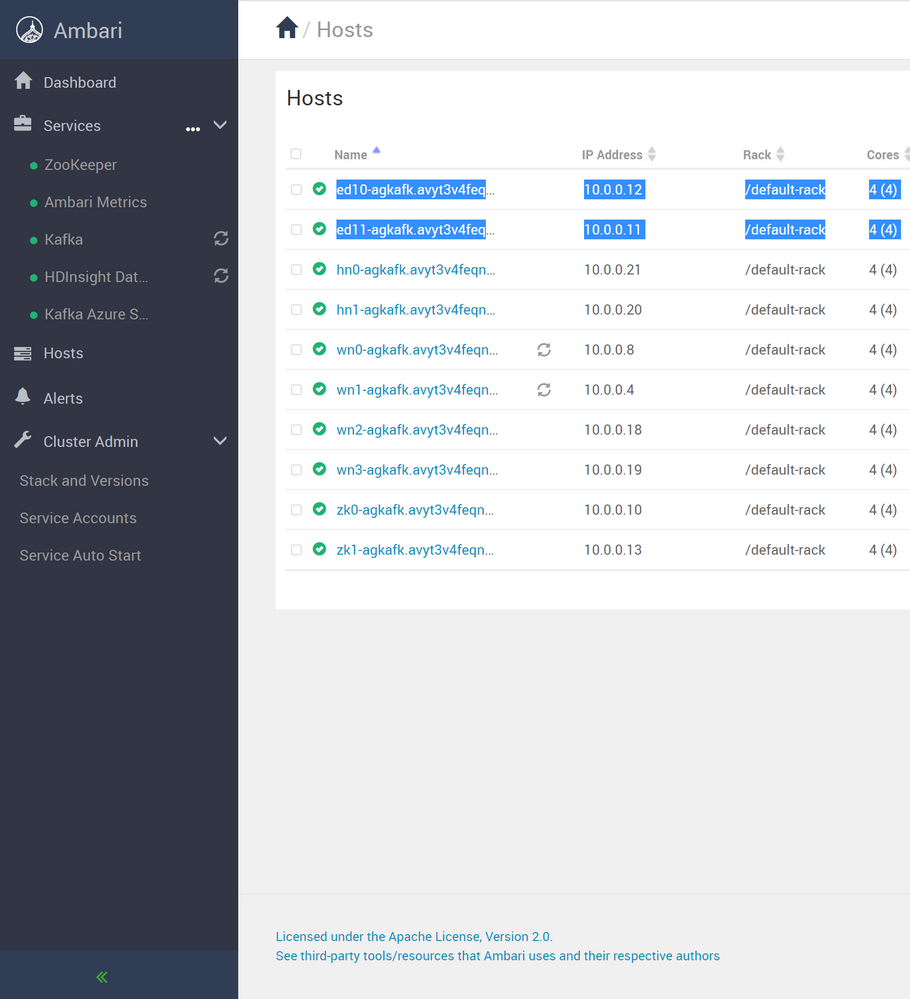
  • Log into Ambari from the cluster page to get the Hostnames(FQDN) of the edge nodes . They should appear in the below format
ed10-ag4kac.ohdqdgkr0bpe3kjx3dteggje4c.gx.internal.cloudapp.net
ed12-ag4kac.ohdqdgkr0bpe3kjx3dteggje4c.gx.internal.cloudapp.net


pic7.png


  • On the HDInsight cluster page click on the SSH+Cluster login blade on the left and get the hostname of the edge node that was deployed.
pic10.png


  • Using an SSH client of your choice ssh into the edge node using the sshuser and password that you set in the custom ARM script. You will notice that you have logged into edge node ed10

Note: In this lab you will need to make config changes in both the edge nodes ed10 and ed12 . To log into ed12 simply ssh into ed12 from ed10

sshuser@ed10-ag4kac:~$ ssh ed12-ag4kac.ohdqdgkr0bpe3kjx3dteggje4c.gx.internal.cloudapp.net
  • In the next sections we would configure the Kafka Connect distributed on both the edge nodes.


Configure Kafka Connect in Distributed Mode

Acquire the Zookeeper and Kafka broker data

  • Set up password variable. Replace PASSWORD with the cluster login password, then enter the command
export password='PASSWORD' 
  • Extract the correctly cased cluster name
export clusterName=$(curl -u admin:$password -sS -G "http://headnodehost:8080/api/v1/clusters" | jq -r '.items[].Clusters.cluster_name')
  • Extract the Kafka Zookeeper hosts
export KAFKAZKHOSTS=$(curl -sS -u admin:$password -G https://$clusterName.azurehdinsight.net/api/v1/clusters/$clusterName/services/ZOOKEEPER/components/ZOOKEEPER_SERVER | jq -r '["(.host_components[].HostRoles.host_name):2181"] | join(",")' | cut -d',' -f1,2);
  • Validate the content of the KAFKAZKHOSTS variable
echo  $KAFKAZKHOSTS
  • Zookeeper values appear in the below format . Make a note of these values as they will be used later
zk1-ag4kaf.q2hwzr1xkxjuvobkaagmjjkhta.gx.internal.cloudapp.net:2181,zk2-ag4kaf.q2hwzr1xkxjuvobkaagmjjkhta.gx.internal.cloudapp.net:2181
  • To extract Kafka Broker information into the variable KAFKABROKERS use the below command
export KAFKABROKERS=$(curl -sS -u admin:$password -G https://$clusterName.azurehdinsight.net/api/v1/clusters/$clusterName/services/KAFKA/components/KAFKA_BROKER | jq -r '["(.host_components[].HostRoles.host_name):9092"] | join(",")' | cut -d',' -f1,2);
  • Check to see if the Kafka Broker information is available
echo $KAFKABROKERS
  • Kafka Broker host information appears in the below format
wn1-kafka.eahjefyeyyeyeyygqj5y1ud.cx.internal.cloudapp.net:9092,wn0-kafka.eaeyhdseyy1netdbyklgqj5y1ud.cx.internal.cloudapp.net:9092

Configure the nodes for Kafka Connect in Distributed mode

Create the topics you will need

  • Create the Offset Storage topic with a name of your choice . Here we use agconnect-offsets
/usr/hdp/current/kafka-broker/bin/kafka-topics.sh --create --replication-factor 3 --partitions 8 --topic agconnect-offsets --zookeeper $KAFKAZKHOSTS
  • Create the Config Storage topic with a name of your choice. Here we use agconnect-configs
/usr/hdp/current/kafka-broker/bin/kafka-topics.sh --create --replication-factor 3 --partitions 8 --topic agconnect-configs --zookeeper $KAFKAZKHOSTS
  • Create the Status topic with a name of your choice. Here we use agconnect-status
/usr/hdp/current/kafka-broker/bin/kafka-topics.sh --create --replication-factor 3 --partitions 8 --topic agconnect-status --zookeeper $KAFKAZKHOSTS
  • Create the Topic for storing Twitter Messages. Here we use twitterstatus
/usr/hdp/current/kafka-broker/bin/kafka-topics.sh --create --replication-factor 3 --partitions 8 --topic twitterstatus --zookeeper $KAFKAZKHOSTS


Deploy the Kafka Connect Plugins


pic9.png


  • Note: The below step needs to be repeated for both ed10 and ed12 edge nodes

    • Create a new folder path on the edge node
       sudo mkdir /usr/hdp/current/kafka-broker/connectors
       sudo chmod 777 /usr/hdp/current/kafka-broker/connectors 
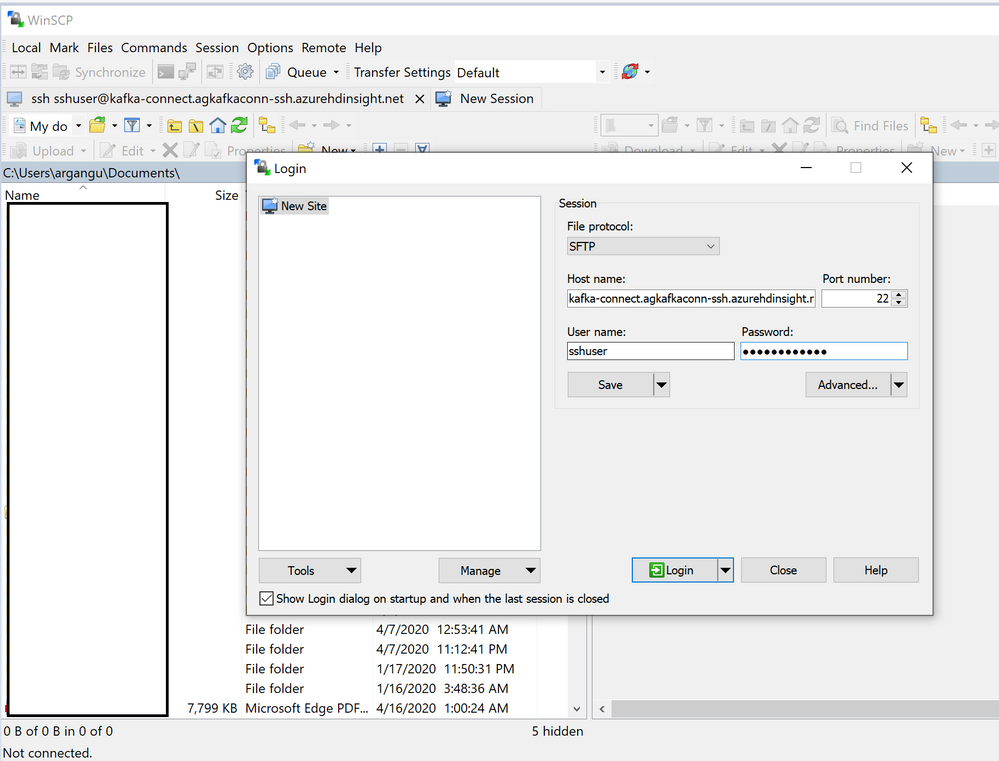
    
  • Using WINSCP or any other SCP tool of your choice upload the Kafka Connect Plugins into folder path created in the last step

pic12.pngpic11.png


  • Transfer the files to ed12 using the below command. Make sure that folders have the right permissions for this operation.
    rsync -r /usr/hdp/current/kafka-broker/connectors/ sshuser@<edge-node12-FQDN>:/usr/hdp/current/kafka-broker/connectors/

Note: The below steps needs to be repeated for both ed10 and ed12 edge nodes

Configure Kafka Connect

  • To run Kafka Connect in distributed mode one needs to look at two important files.

  • connect-distributed.properties : Located at /usr/hdp/current/kafka-broker/bin/conf

  • connect-distributed.sh : Located at /usr/hdp/current/kafka-broker/bin/

  • In distributed mode, the workers need to be able to discover each other and have shared storage for connector configuration and offset data. Below are some of important parameters we would need to configure.

    • group.id : ID that uniquely identifies the cluster these workers belong to. Make sure this value is not changed between the edge nodes.
    • config.storage.topic: Topic to store the connector and task configuration state in.
    • offset.storage.topic: Topic to store the connector offset state in.
    • rest.port: Port where the REST interface listens for HTTP requests.
    • plugin.path: Path for the Kafka Connect Plugins
  • Edit the connect-distributed.properties file sudo vi /usr/hdp/current/kafka-broker/conf/connect-distributed.properties

  • In the connect-distributed.properties file, define the topics that will store the connector state, task configuration state, and connector offset state. Uncomment and modify the parameters in connect-distributed.properties file as shown below. Note that we use some of the topics we created earlier.

bootstrap.servers=<Enter the full contents of $KAFKABROKERS>
group.id=agconnect-cluster

key.converter=org.apache.kafka.connect.json.JsonConverter
value.converter=org.apache.kafka.connect.json.JsonConverter

key.converter.schemas.enable=true
value.converter.schemas.enable=true

offset.storage.topic=agconnect-offsets
offset.storage.replication.factor=3
offset.storage.partitions=25

config.storage.topic=agconnect-configs
config.storage.replication.factor=3

status.storage.topic=agconnect-status
status.storage.replication.factor=3
status.storage.partitions=5

offset.flush.interval.ms=10000

rest.port=8083

plugin.path=/usr/hdp/current/kafka-broker/connectors/jcustenborder-kafka-connect-twitter-0.3.33,/usr/hdp/current/kafka-broker/connectors/confluentinc-kafka-connect-azure-blob-storage-1.3.2
  • Start Kafka Connect in distributed mode in the background on the Edge Node .
nohup  sudo  /usr/hdp/current/kafka-broker/bin/connect-distributed.sh  /usr/hdp/current/kafka-broker/conf/connect-distributed.properties &
  • Repeat the same steps on other edge node to start Kafka Connect in distributed mode

Note : A file nohup.out is created in the same folder from where it is executed. If you are interested in exploring the startup logs simply cat nohup.out

Kafka Connect REST API

Note : In distributed mode, the REST API is the primary interface to the Connect cluster. Requests can be made from any edge node and the REST API automatically forwards requests. By default REST API for Kafka Connect runs on port 8083 but is configurable in connector properties

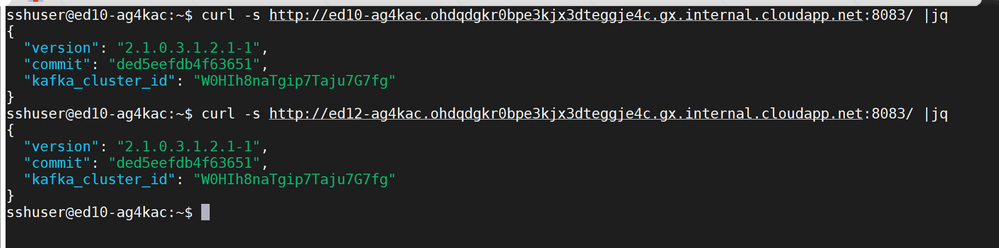
  • Use the below REST API calls from any edge node to verify of Kafka Connect is working as expected on both the nodes
curl -s http://<edge-node-FQDN>:8083/ |jq

curl -s http://<edge-node-FQDN>:8083/ |jq
  • If Kafka Connect is working as expected each of the REST API calls will return an output like below
{
  "version": "2.1.0.3.1.2.1-1",
  "commit": "ded5eefdb4f63651",
  "kafka_cluster_id": "W0HIh8naTgip7Taju7G7fg"
}


pic14.png


  • In this section we started Kafka Connect in distributed mode alongside an HDInsight cluster and verified it using the Kafka REST API.

  • In the next section we would use Kafka REST API’s to start separate connector instances for running Source Tasks and Sink Tasks.

Create connectors and start tasks

Create a Twitter App and get the credentials

  • Go to https://dev.twitter.com/apps/new and log in, if necessary
  • Enter your Application Name, Description and your website address. You can leave the callback URL empty.
  • Accept the TOS, and solve the CAPTCHA.
  • Submit the form by clicking the Create your Twitter Application
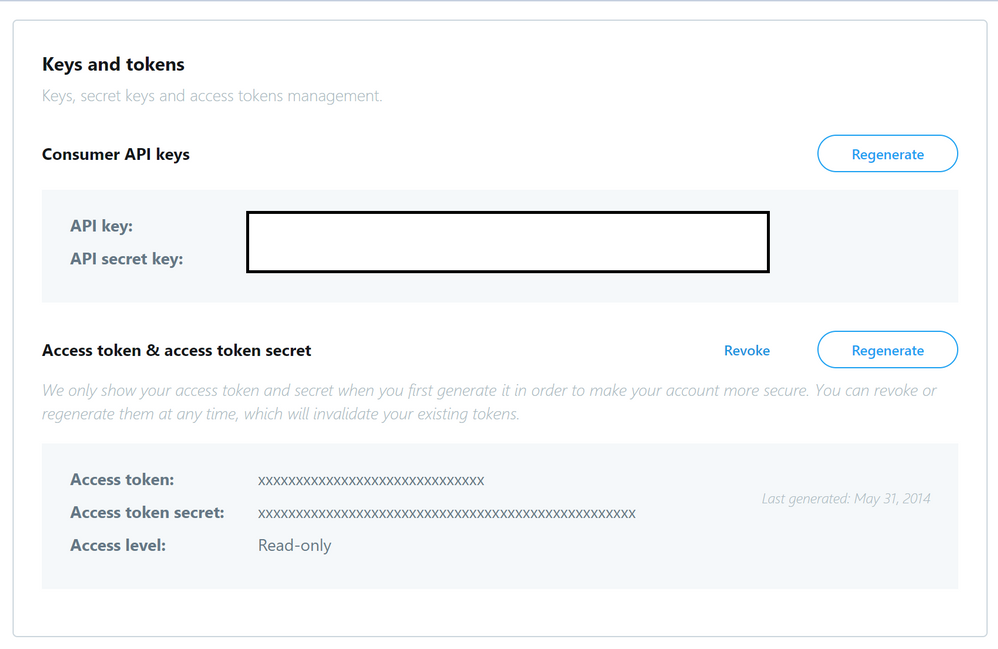
  • Copy the below information from the screen for later use in your properties file.
twitter.oauth.consumerKey
twitter.oauth.consumerSecret
twitter.oauth.accessToken
twitter.oauth.accessTokenSecret
 

pic25.png

Source Task

  • From any edge node run the below to create a new connector and start tasks. Note that the number of tasks can be increased as per the size of your cluster.
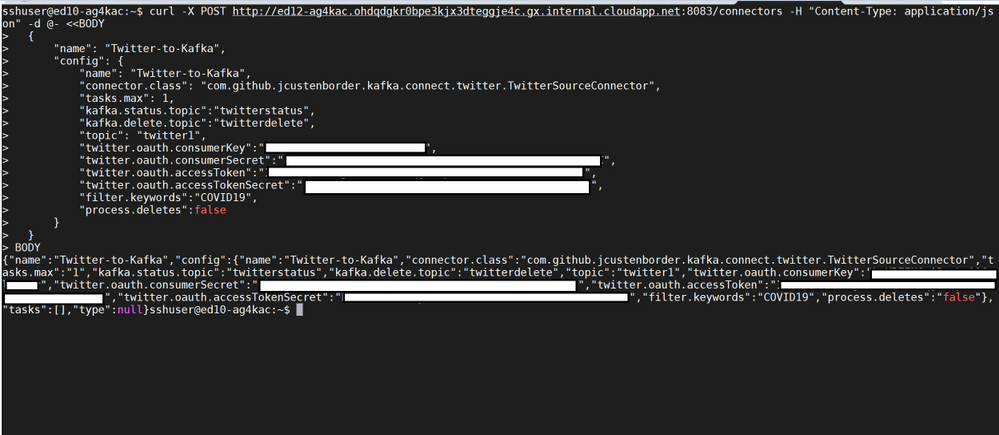
curl -X POST http://<edge-node-FQDN>:8083/connectors -H "Content-Type: application/json" -d @- <<BODY
  {
      "name": "Twitter-to-Kafka",
      "config": {
          "name": "Twitter-to-Kafka",
          "connector.class": "com.github.jcustenborder.kafka.connect.twitter.TwitterSourceConnector",
          "tasks.max": 3,
          "kafka.status.topic":"twitterstatus",
          "kafka.delete.topic":"twitterdelete",        
          "twitter.oauth.consumerKey":"<twitter.oauth.consumerKey>",
          "twitter.oauth.consumerSecret":"<twitter.oauth.consumerSecret>",
          "twitter.oauth.accessToken":"<twitter.oauth.accessToken>",
          "twitter.oauth.accessTokenSecret":"<twitter.oauth.accessTokenSecret>",
          "filter.keywords":"<keyword>",
          "process.deletes":false
      }
  }
BODY 
  • If the connector is created , you will see a notification like below.


pic15.png


  • Use the Kafka REST API to check if the connector Twitter-to-Kafkawas created
curl -X GET http://ed10-ag4kac.ohdqdgkr0bpe3kjx3dteggje4c.gx.internal.cloudapp.net:8083/connectors
["local-file-source","Twitter-to-Kafka"]


pic16.png


  • One way to test if Twitter Messages with the keywords are being ingested is to start a console consumer in a different session and start consuming messages from the topic twitterstatus .
/usr/hdp/current/kafka-broker/bin/kafka-console-consumer.sh --bootstrap-server $KAFKAZKHOSTS --topic twitterstatus 
  • If everything is working , you should see a stream of relevant Twitter Messages on the console with specified keywords.

  • Try pausing the tasks in the connector , this should also pause the Twitter Stream on the console producer.

curl -X PUT http://<edge-node-FQDN>:8083/connectors/Twitter-to-Kafka/pause 
  • Try resuming the tasks in the connector , this should also resume the Twitter Stream on the console producer.
curl -X PUT http://<edge-node-FQDN>:8083/connectors/Twitter-to-Kafka/resume 

Sink Task

  • Create a regular Azure Blob storage account and a container on Azure and note the storage access keys

  • From any edge node run the below to create a new connector and start tasks. Note that the number of tasks can be increased as per the size of your cluster.

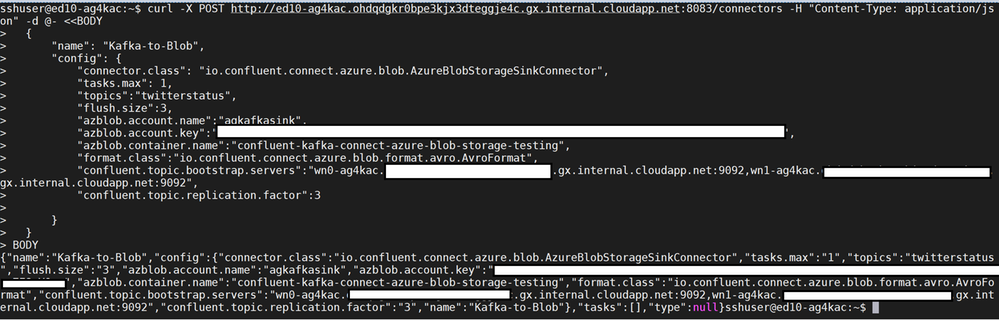
curl -X POST http://<edge-node-FQDN>:8083/connectors -H "Content-Type: application/json" -d @- <<BODY
  {
      "name": "Kafka-to-Blob",
      "config": {
          "connector.class": "io.confluent.connect.azure.blob.AzureBlobStorageSinkConnector",
          "tasks.max": 1,
          "topics":"twitterstatus",
          "flush.size":3,
          "azblob.account.name":"<Storage-account-name>",
          "azblob.account.key":"<Storage-accesss-key>",
          "azblob.container.name":"<Container-name>",
          "format.class":"io.confluent.connect.azure.blob.format.avro.AvroFormat",
          "confluent.topic.bootstrap.servers":"Enter the full contents of $KAFKAZKHOSTS",   
          "confluent.topic.replication.factor":3

      }
  }
BODY
  • If the connector is created , you will see a notification like below.


pic17.png


  • Use the Kafka REST API to check if the connector Kafka-to-Blobwas created. You should see both the source and sink connectors.
curl -X GET http://<edge-node-FQDN>:8083/connectors
["local-file-source","Twitter-to-Kafka","Kafka-to-Blob"]


pic18.png


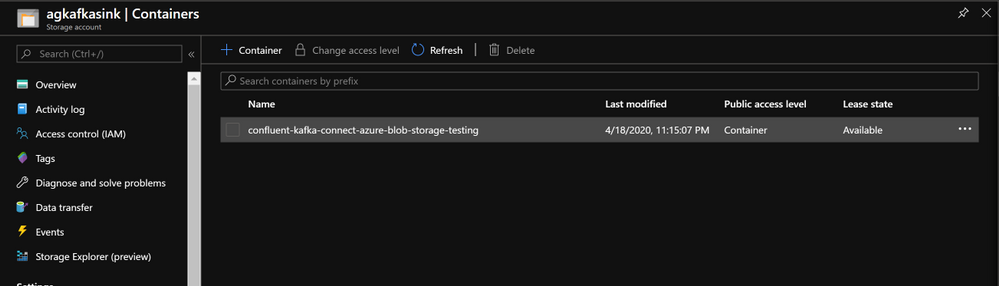
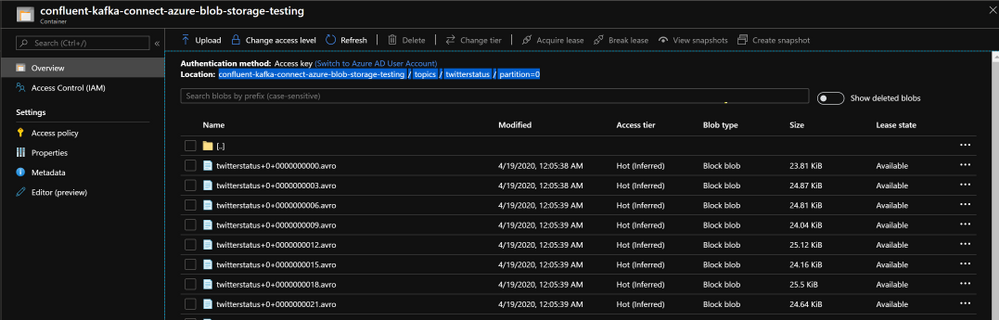
Authenticate into your Azure portal and navigate to the storage account to validate if Twitter Messages are being sent to the specific container.
 

pic19.pngpic20.png

  • In this section we saw how the source and sink connectors were created . In the next section , we will explore some Kafka REST API’s to control Kafka Connect.

Kafka REST APIs

Commonly used REST APIs for Kafka Connect

  • Below are some commonly used REST APIs for controlling KAFKA Connect

  • Status of distributed connect

curl -s http://<edge-node-FQDN>:8083/ |jq
  • Get list of Connect
curl -X GET http://<edge-node-FQDN>:8083/connector-plugins | jq
  • Get list of connectors in the cluster
curl -X GET http://<edge-node-FQDN>:8083/connectors
  • Get Status of connector
curl -X GET http://<edge-node-FQDN>:8083/connectors/<connector-name>
  • Get connector Tasks
curl -X GET http://<edge-node-FQDN>:8083/connectors/<connector-name>/tasks
  • Restart a connector
curl -X POST http://<edge-node-FQDN>:8083/connectors/<connector-name>/restart
  • Delete a connector
curl -X DELETE http://<edge-node-FQDN>:8083/connectors/<connector-name>/
  • Pause a connector
curl -X PUT http://<edge-node-FQDN>:8083/connectors/<connector-name>/pause
  • Resume a connector
curl -X PUT http://<edge-node-FQDN>:8083/connectors/<connector-name>/resume