
by Scott Muniz | Jul 30, 2020 | Uncategorized
This article is contributed. See the original author and article here.

In today’s fast paced organizational environments employee onboarding as well as facility equipment training are two areas that many organizations struggle with. How do I get started with a central onboarding point? How do I acclimate new hires to the various facilities? Additionally, where facility equipment training is required how can I do so contextually and in a manner that is intuitive and engaging.
In this HLS Show Me How video I focus on the creation of immersive tours and training using SharePoint Spaces new object, 360’ Tour. Along the way I also show how to quickly set up a rich Employee Onboarding Environment, how to enable SharePoint Spaces and more. In the second video of this series I will demonstrate how to create easy access to the Space and Tour using both SharePoint Online Navigation as well as direct integration into Microsoft Teams.
Resources:
Thanks for visiting – Michael Gannotti LinkedIn | Twitter | Facebook | Instagram
 Michael Gannotti
by Scott Muniz | Jul 30, 2020 | Uncategorized
This article is contributed. See the original author and article here.
When advising on Microsoft 365 projects, I’m asked by my clients, “What does good look like on Yammer?” As Yammer caters to a variety of purposes, my usual answer is, it depends. It is important to first have clarity of what your organisation, a community or a group want to achieve from engaging our workforce.
When we break it down into several scenarios, we can explore what good looks like from the perspective of these three: senior leadership engagement, connecting fristline workers and active communities.
1: Senior leadership engagement
This is a common scenario for successful adoption of Yammer. Yammer’s success is particularly dependent on digital leadership: the visibility of senior leaders, managers and influencers to set the tone and the agenda.
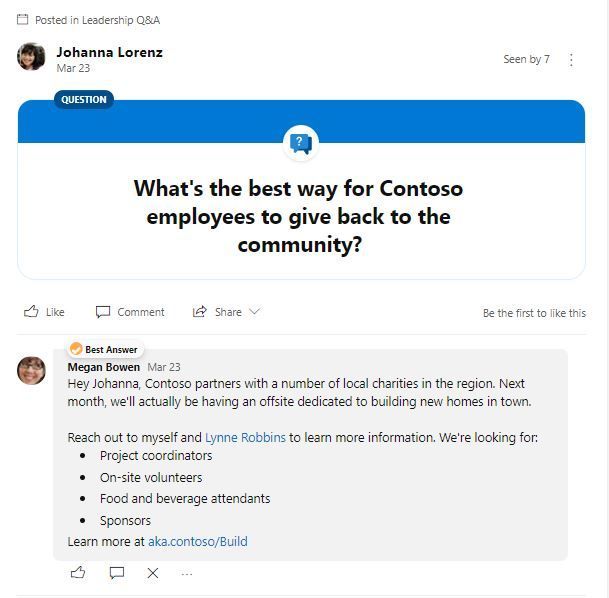
Leaders can move beyond just broadcasting their messages to listening to employees. One of the most important behaviours of a leader on Yammer is to listen. It’s a place for conversations, discussions, and stories. Leaders listening and responding to the employees conversations, tends to lead to a more engaged employee.
We need leaders to be involved in Yammer to help get others talking. A leader responding or liking a post really makes an impact, their presence matters and sets the tone of the Yammer network.
As this research from SWOOP Analytics shows, if a senior leader recognises a post by liking or responding, the person affected increased their activity per day by over 50%. This is incredibly significant – this shows the power of leaders to engage us rather than simple to tell us.
Here’s what good looks like for leaders:
- Respond more than you post. This shows you are listening and actively engaging with the workforce.
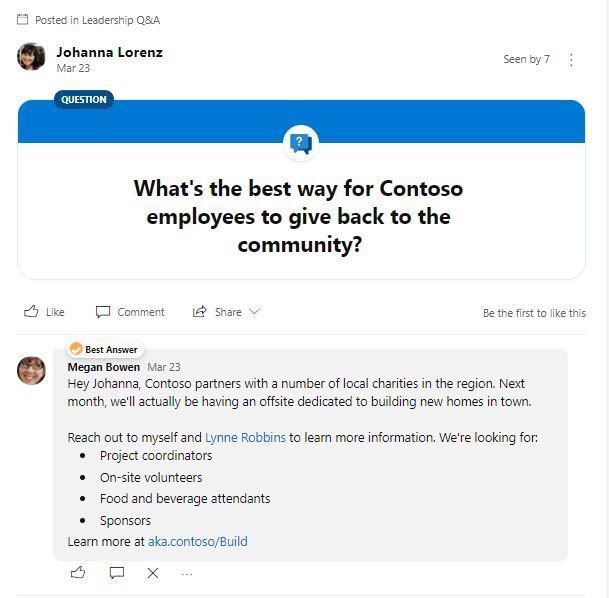
- Ask questions. A question is the most powerful tool in digital conversations: it breaches the barrier between leadership and the workforce, it is a way of admitting that we don’t have all of the answers, it helps get answers in complex systems. And most importantly of all, a question starts a conversation.
- Be human. Where leaders are open, honest and are themselves, they invite empathy and build trust. And what is the biggest barrier to people engaging with social tools, both enterprise and personal? In my experience, it’s a lack of trust.
- Set goals. If we want to tap into the voice of the crowd – and want focused and relevant contributions – then let’s set some goals. What are we, as an organisation or department, focusing on? Visibility of our priorities means we get more helpful contributions and less cats.
2. Engaging with firstline workers
Yammer is one of my favourite ways of engaging firstline workers with the activities and, most importantly, people of the wider organisation. Firstline workers, often without access to corporate systems, are typically well out of the loop, relying on their managers to communicate matters.
Yammer provides a simple way to both connect and facilitate full circle of two way engagement. Organizations can get the perspectives from all roles, which becomes essential if we really want to get a handle on change and innovation in complex working environments.
If firstline workers experience a disconnect from head office and their colleagues, Yammer can be where they can connect with both. Yammer gives them a platform to share and to be seen – and most importantly, being encouraged to be heard.
Here’s what good looks like for firstline workers:
- Activity is more than just views and likes. Yammer gives firstline workers a place to have a voice – not just connecting with leadership, but also with each other.
- Engagement is seen not just between individuals, but between locations. Having conversations between individual locations and regions can create a sense of belonging. This can be done by running challenges on a location basis, such as campaigns run by KFC to improve safety incident reporting in stores by encouraging a competitive approach.
- Being invited to contribute to organisation-wide programs. The crowd-sourcing of ideas based on the day-to-day experienced by firstline workers opens up huge opportunities denied to us by closed communications channels. Such programs, if carried out properly, can realise huge savings, such as this campaign run by Centrica which resulted in savings of £5 million.
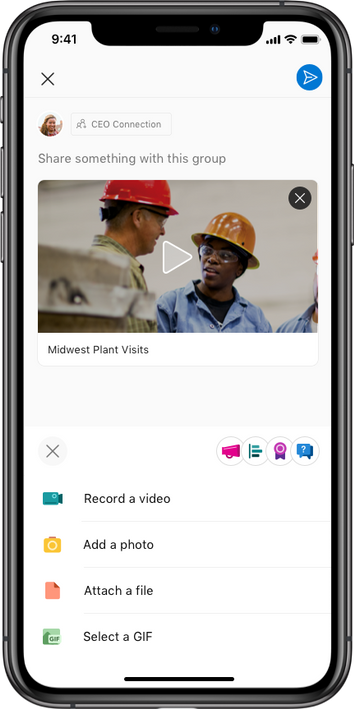
- Real-time knowledge is shared within communities. Posts are made based on observations from the firstline, often containing uploads of photos from mobile devices. Firstline workers –access to a huge amount of information that can be valuable to their colleagues back in the office, such as a change in local conditions or a new hazard that has been experienced. Reporting these back through Yammer gives real-time knowledge which can be far more valuable than submitting into a closed reporting process – by which time it may be too late.
3. Community Managers
Communities are the bread and butter of Yammer. And with Yammer groups being rebranded as communities, this reflects the natural position of Yammer as a place for community conversations, as opposed to specific team and project-based conversations.
Very simply, communities are where people come together through a common need or connection/ There is one single thing that everyone has in common. With large and distributed workforces, Yammer is often the only place where we can all get together.
Once a need arises, communities can be incredibly powerful due to the diverse nature of people they comprise. Work-focused communities, ideally, are made up of individuals from completely different teams and business units who have a common interest or need.
The success of a community, however, depends largely on one thing: A community manager. The activity spreader, the network glue, the conversation catalyst.
Here’s what good looks like for community managers on Yammer:
- Members span the across the organization. Community members are from different parts of the organisation and are not working together as a team or on a project.
- Membership is open to all – it’s not closed for ‘secret stuff’.
- The purpose of the community is clear – there is an obvious need or problem to solve that is known by all members.
- Building community management early on. Communities may need some active management from community managers, such as inviting in relevant people and building conversations, such as by using @mentions
- Communities have an even spread of activity. Conversations are not dominated by a small number of individuals, but rather are equally distributed among a diverse group of people.
- New posts are written as questions as much as statements. Communities are great places to share experiences and ideas, but they are also perfect for getting help. Asking a question also generates 150% more replies – a great conversation starter if you want to build a thread
- More than 25% of members are active. Anything less, and it largely becomes a forum for a small number of people to broadcast their thoughts.
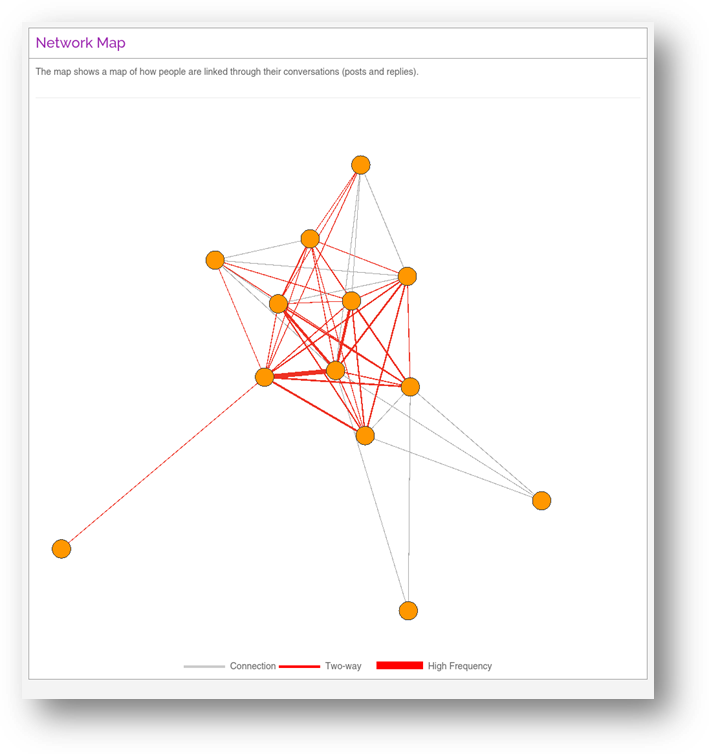
Example network map from SWOOP Analytics of a Yammer community showing well distributed conversations, with most members responding to each-other relatively frequently.
So how are you doing?
You may only need a few tweaks to what you are currently doing to help evolve your conversations and communities in Yammer. By listening and learning from one another, you’ll be able to use Yammer as a tool to meet the needs of your organisations using their most powerful asset – their people.
And that’s what good looks like.
A diverse group of people meeting their needs and the organisation’s needs in one place.

I’m Andrew Pope, and my passion is helping medium and large organisations connect their technology with their people – finding new and important ways of work that meet everyone’s needs.
I help improve collaboration and make digital working safe and purposeful through facilitation, strategy development and virtual card games. If you’d like a chat, please ping me at andrew@innosis.eu
by Scott Muniz | Jul 30, 2020 | Alerts, Microsoft, Technology, Uncategorized
This article is contributed. See the original author and article here.
In the last part of this two-part series, Shreya Verma takes a deeper dive into backup options by showing us point-in-time, long-term retention, and geo restore demos. To learn about the different backups options Azure SQL provides and how to effectively manage them, watch part one.
Watch on Data Exposed
Additional Resources:
Overview of Business Continuity
Automated Backups
Backup Cost Management
PiTR and Geo-Restore
Long-Term Retention
Recovery Drills
Azure SQL Blogs
View/share our latest episodes on Channel 9 and YouTube!
by Scott Muniz | Jul 30, 2020 | Alerts, Microsoft, Technology, Uncategorized
This article is contributed. See the original author and article here.
Setting up Telegraf, InfluxDB and Grafana using Azure CycleCloud
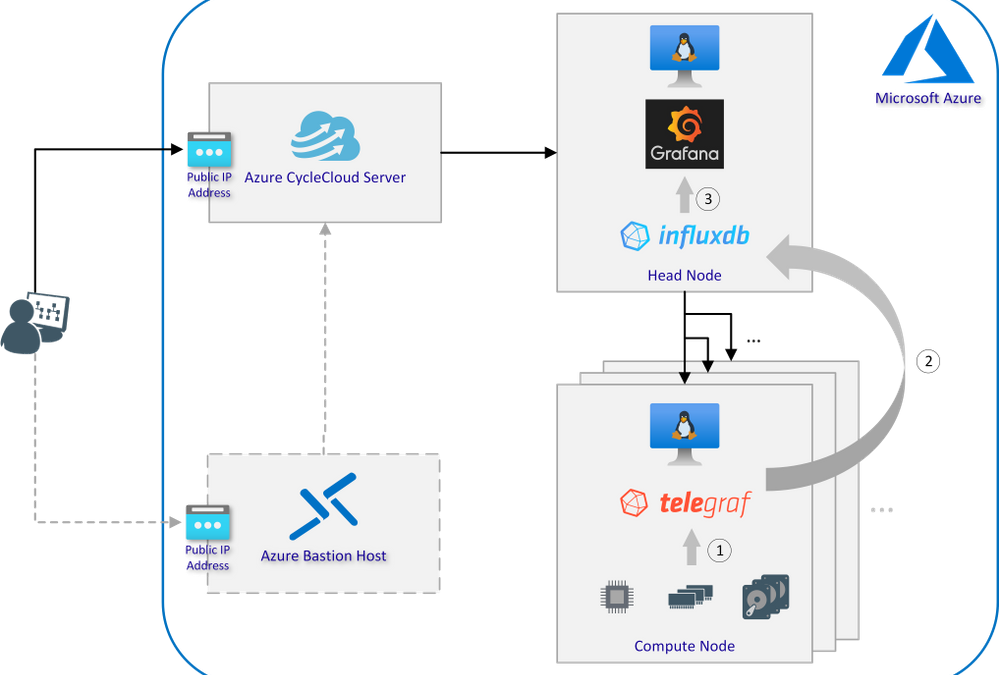
Architecture Overview
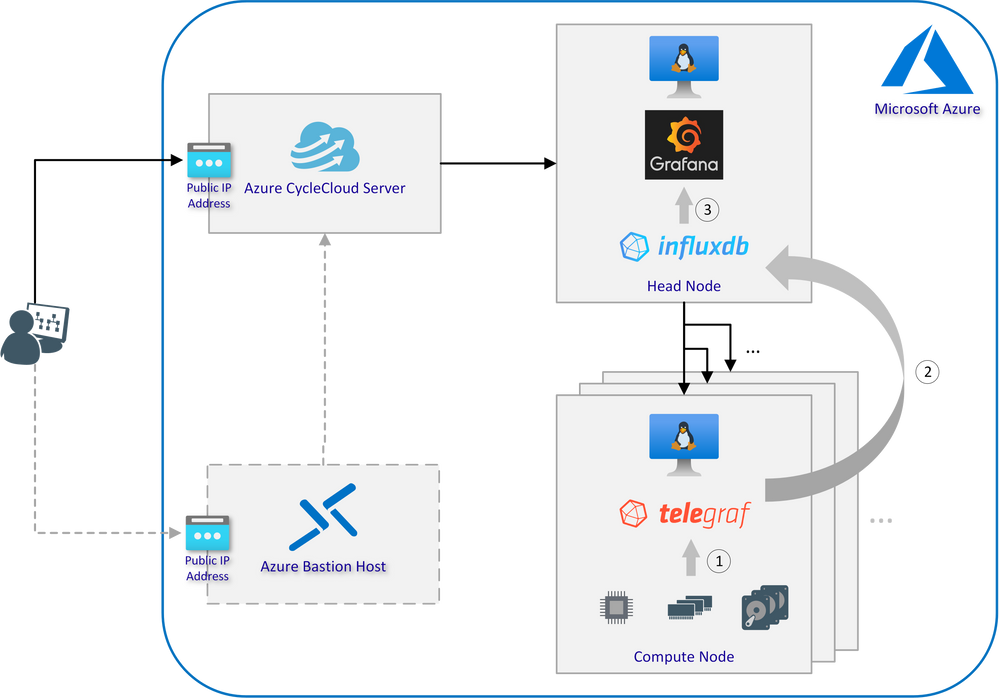
Interaction of Telegraf, InfluxDB and Grafana:
- Telegraf is a plugin-driven server agent for collecting and reporting system metrics and events
- InfluxDB is an open source time series database designed to handle high write and query loads and used to store the data from all compute nodes collected by Telegraf
- Using Grafana to turn metrics into graphs based on time-series data stored in InfluxDB
Prerequisites
- Azure account with an active subscription
- Azure CycleCloud instance which can be set up as described here
- Working CentOS or Ubuntu base image to deploy clusters with Azure CycleCloud
- Optional: Azure Bastion host configured to access the subnet in which the cluster will be deployed
Step-by-Step Installation Guide
- Connect to your Azure CycleCloud server via SSH (if necessary through the Bastion host)
- Use git to clone the aztig GitHub repository or download it from the website and extract it in a folder of your choice:
sudo yum install -y git
git clone https://github.com/andygeorgi/aztig.git
- Create a new CycleCloud project using the CycleCloud CLI:
cyclecloud project init cc-aztig
You will be prompted to enter the name of a locker. Press Enter to display a list of all valid Lockers and select one:
Project 'cc-aztig' initialized in …
Default locker:
Valid lockers: MS Azure-storage
Default locker: MS Azure-storage
- Link or copy the init scripts from the cloned GitHub repository to the project folder:
ln -s $(pwd)/aztig/specs/master cc-aztig/specs/master
ln -s $(pwd)/aztig/specs/execute cc-aztig/specs/execute
- Edit the configuration files for both node types and add a password for InfluxDB:
cat cc-aztig/specs/master/cluster-init/files/config/aztig.conf
INFLUXDB_USER="admin"
INFLUXDB_PWD="<INSERTPW>"
GRAFANA_SHARED=/mnt/exports/shared/scratch
cat cc-aztig/specs/execute/cluster-init/files/config/aztig.conf
INFLUXDB_USER="admin"
INFLUXDB_PWD="<INSERTPW>"
GRAFANA_SHARED=/mnt/exports/shared/scratch
Make sure that the parameters in both files are exactly the same!
- Switch to the CycleCloud project folder and upload it to the specified locker:
cd cc-aztig/
cyclecloud project upload
Uploading to az://rgdemogpv2/cyclecloud/projects/cc-aztig/1.0.0 (100%)
Uploading to az://rgdemogpv2/cyclecloud/projects/cc-aztig/blobs (100%)
Upload complete!
- Navigate to the CycleCloud web portal and create a new cluster (see “Software Versions Tested” for tested and working templates)
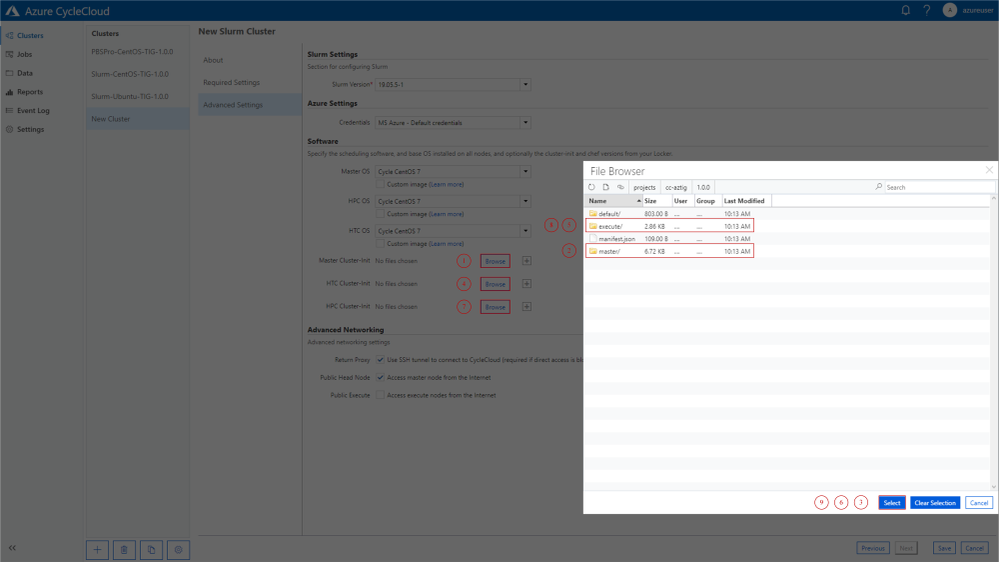
- In the advanced settings select the master folder for the head node and the execute folder for all nodes to be monitored:
-
Start the cluster and use SSH port forwarding to access Grafana on the head node without exposing the ports to the public Internet:
ssh -A -l azureuser -L 8080:<PRIVATE-HEAD-NODE-IP>:3000 -N <PUBLIC-CC-IP>
Insert the private IP of your head node and the IP of the jump host (e.g. CycleCloud server or Bastion host)
- Login to Grafana by opening http://localhost:8080 and follow the steps for the first log in attempt from the Grafana documentation
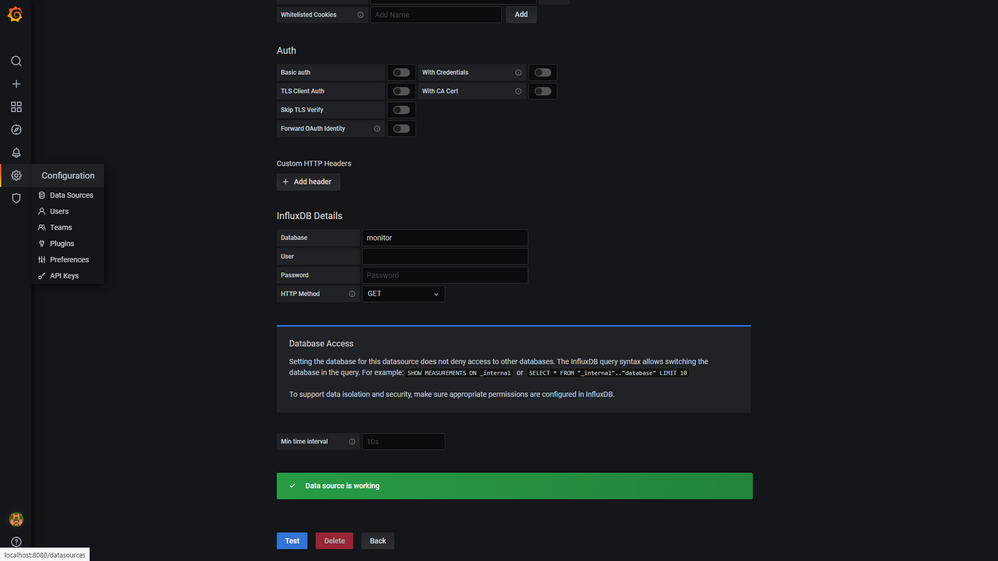
- After setting your password, verify that the aztig data-source is working correctly:
-
Finally import the Telegraf system dashboard which is included into the GitHub repository: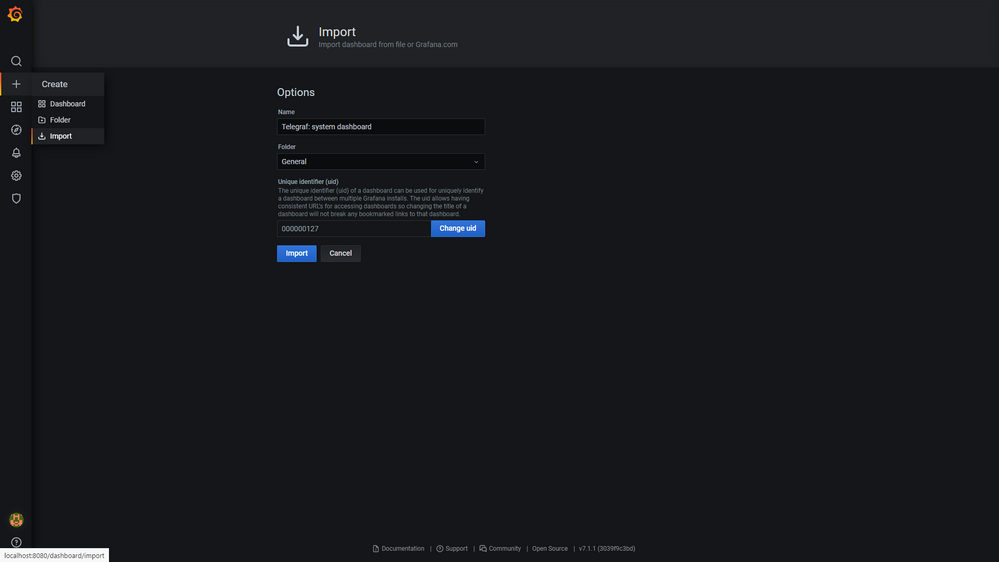
- After successful import you should be redirected to the dashboard, where all collected metrics are displayed:
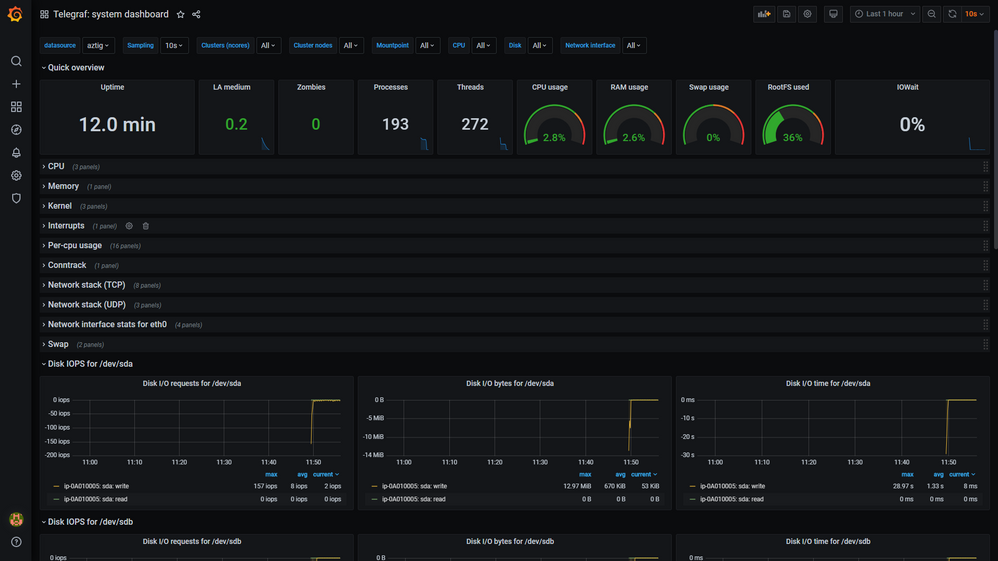 Note that an error is displayed if no data is available in InfluxDB. It will disappear as soon as first data comes in.
Customisation, Debugging and Optimisation
- By default the head node is observed as well. To remove it from the list of monitored nodes the init script for the client can be deleted from the master folder:
cc-aztig/specs/master/cluster-init/scripts/011-aztig-client.sh
- Data collection can represent a significant overhead, depending on how many metrics and nodes need to be monitored. Therefore, it is highly recommended to adapt the telegraph configuration to the specific needs:
cc-aztig/specs/execute/cluster-init/files/config/telegraf.conf
- In case of connection problems between Telegraf and InfluxDB check the firewall settings. By default InfluxDB listens on port 8086. Some example rules are already included in the master init script and can be commented out/adopted if necessary.
cc-aztig/specs/master/cluster-init/scripts/010-aztig-server.sh
- Instead of manually selecting the init scripts in the GUI, CycleCloud also offers the ability to create customised cluster templates that include the scripts by default. Follow the instructions in the CycleCloud documentation to set the parameters accordingly.
Software Versions Tested
by Scott Muniz | Jul 30, 2020 | Uncategorized
This article is contributed. See the original author and article here.
Welcome to the monthly Healthcare and Life Sciences blog recap, July edition! Check out the resources below:
Webcasts Recorded:
- Voices of #HealthcareCloud
- The Power of the Platform: Watch as Microsoft showcases 3 unique solutions for the clinical, operational and financial sides of the business for providers:
- CollabCasts with Sam Brown
- Virtual Events Using SharePoint Spaces: Have you been looking for ways to create virtual events, conferences, employee on-boarding, facility tours, or even training? On Wednesday, July 8th, at 12 noon eastern, Microsoft’s Healthcare and Life Sciences Teams Technical Specialists Michael Gannotti and Sam Brown introduced SharePoint Spaces, showed a live demonstration of a Virtual Conference, and gave you the resources to get started on your own.
- Microsoft Teams in Health and Life Sciences Event: On Wednesday 7/29 at 12 noon EST, Microsoft, Kinly, Pexip and two of their healthcare customers (MVP Health and Becton Dickinson) teamed up to show how Teams integrates with your existing workflows and technologies to drive more productivity. Check it out to see a live demo of Microsoft’s new 85″ Surface Hub 2, great insights from our customer panel, and more!
- Social Sessions with Mike Gannotti
- Episode 9 – Alfred Ojukwu – Session 2 of 2: Last month, Mike and Microsoft’s Alfred Ojukwu discussed Microsoft Surface devices. This month, they switched gears to address a topic with significant implications for individuals’ careers aspirations: having a personal board of directors. This is a subject that Alfred is passionate about and which he frequently speaks on within Microsoft as well as to outside entities.
Industry Expert Posts:
- Confessions of Health Geeks Podcasts
- Secrets I found out 1 year in at Microsoft: The tables are turned and the producer becomes the presenter! Andrea McGonigle, Microsoft’s National Managing Director of Health and Life Sciences, interviews Claire Bonaci, Microsoft’s Director of Business Development in Health and Life Sciences and producer of the “Confessions of Health Geeks” podcast. Listen in as she reflects on her experiences within her year here at Microsoft.
- Empowering Nurse Innovation in the NurseHack4Health: First Virtual Hackathon: The World Health Organization designated 2020 as the Year of the Nurse and Midwife to raise awareness of nurses and midwives’ significant and varied roles in healthcare. On May 15, Johnson and Johnson, Sonsiel, Dev Up and Microsoft partnered to host NurseHack4Health, giving nurses and clinicians an opportunity to define new ways to save lives. Microsoft’s Chief Nursing Officer Molly McCarthy talks with the winners of the hackathon about their solutions.
Security Resource:
- Microsoft Security Matters Newsletter – June 2020 – Jeremy Windmiller, Enterprise Security Architect: Jeremy has been providing a newsletter to customers that consolidates resources for Microsoft Security Products and Services. Check out the June newsletter.
July’s HLS Blog Contributors:

Claire Bonaci, Director, Business Development, Health and Life Sciences

Michael Gannotti, Principal Technical Specialist, Microsoft Teams

Jeremy Windmiller, Microsoft Senior Technical Specialist, Security and Compliance

Vasu Sharma, Microsoft Customer Success Manager

Shelly Avery, Senior Technical Specialist, Microsoft Teams
Thanks for reading and let us know how else our Microsoft team can help!

Sam Brown, Technical Specialist, Microsoft Teams


Recent Comments