by Contributed | May 28, 2021 | Technology
This article is contributed. See the original author and article here.
こんにちは SQL Server サポートチームです。
今回は、SQL Server R Services またはSQL Server Machine Learning Servicesをオフラインでインストールまたは更新プログラムを適用するための方法について紹介します。
日本語版のSQL Server をご利用いただいているお客様より、オフライン環境でSQL Server R Services またはSQL Server Machine Learning Servicesをインストールまたは更新プログラムを適用した際に、失敗するというお問い合わせをいただくことがあります。
これはSQL Server の不具合が原因となりますが、修正目途がたっていない状況となりますため、ブログで回避策を紹介させていただきます。
作業の流れは下記の通りとなります。
1.SQL Server R Services またはSQL Server Machine Learning Servicesをオフラインでインストールする場合
1) インターネットに接続できる環境で、リリースバージョンにあったcab ファイルをダウンロードします。
各リリースバージョンのcabファイルのダウンロード URL は、次のページをご確認ください。
SQL Server 2019 の場合:
https://docs.microsoft.com/ja-jp/sql/machine-learning/install/sql-ml-component-install-without-internet-access?view=sql-server-ver15#1—download-2019-cabs
SQL Server 2017 の場合:
https://docs.microsoft.com/ja-jp/sql/machine-learning/install/sql-ml-component-install-without-internet-access?view=sql-server-2017#1—download-2017-cabs
SQL Server 2016 の場合:
https://docs.microsoft.com/ja-jp/sql/machine-learning/install/sql-ml-component-install-without-internet-access?view=sql-server-2016#1—download-2016-cabs
2) 適用対象のサーバーに、cabをコピーします。
※ 任意のパスで結構です。ここでは例として、C:Temp にコピーするとします。次からの手順は、C:Temp 配下にコピーした場合の手順となります。
3) 各cabファイルの末尾が1033となっているため、1041にコピーします。
例)SQL Server 2019 の場合
SPO_4.5.12.120_1033.cab -> SPO_4.5.12.120_1041.cab
SPS_9.4.7.25_1033.cab -> SPS_9.4.7.25_1041.cab
SRO_3.5.2.125_1033.cab -> SRO_3.5.2.125_1041.cab
SRS_9.4.7.25_1033.cab -> SRS_9.4.7.25_1041.cab
この結果C:Temp 配下に、次のファイルが存在することになります。
SPO_4.5.12.120_1033.cab
SPS_9.4.7.25_1033.cab
SRO_3.5.2.125_1033.cab
SRS_9.4.7.25_1033.cab
SPO_4.5.12.120_1041.cab
SPS_9.4.7.25_1041.cab
SRO_3.5.2.125_1041.cab
SRS_9.4.7.25_1041.cab
4) インストールを行います。
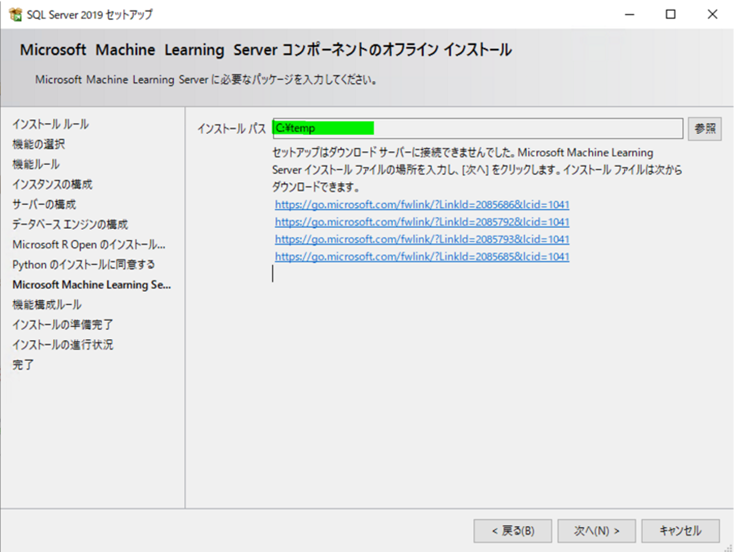
※ [Microsoft Machine Learning Server コンポーネントのオフライン インストール] では [インストール パス] に、「C:Temp」を指定します。
4-1) インストール メディアを開き、setup.exe を右クリックし、管理者として実行します。
4-2) セットアップ ウィザードで、オープンソースの R または Python コンポーネントに対するライセンスのページが表示されたら、 [同意する] をクリックします。 ライセンス条項に同意すると、次の手順に進むことができます。
4-3) [オフライン インストール] ページが表示されたら、 [インストール パス] に、以前にコピーした CAB ファイルが格納されているフォルダーを指定します。
図1.Microsoft Machine Learning Server コンポーネントのオフライン インストール画面
4-4) 画面の指示に従って続行し、インストールを完了します。
参考情報 セットアップの実行
https://docs.microsoft.com/ja-jp/sql/machine-learning/install/sql-ml-component-install-without-internet-access?view=sql-server-ver15#run-setup
2.SQL Server R Services またはSQL Server Machine Learning Servicesの更新プログラムをオフラインで適用する場合
1) インターネットに接続できる環境で、更新プログラムにあったcab ファイルをダウンロードします。
各更新プログラム用のcabファイルのダウンロード URL は、次のページをご確認ください。
SQL Server 2019 の場合:
https://docs.microsoft.com/ja-jp/sql/machine-learning/install/sql-ml-cab-downloads?view=sql-server-ver15#sql-server-2019-cabs
SQL Server 2017 の場合:
https://docs.microsoft.com/ja-jp/sql/machine-learning/install/sql-ml-cab-downloads?view=sql-server-2017#sql-server-2017-cabs
SQL Server 2016 の場合:
https://docs.microsoft.com/ja-jp/sql/machine-learning/install/sql-ml-cab-downloads?view=sql-server-2016#sql-server-2016-cabs
2) 適用対象のサーバーに、cabをコピーします。
※ 任意のパスで結構です。ここでは例として、C:Temp にコピーするとします。次からの手順は、C:Temp 配下にコピーした場合の手順となります。
3) 各cabファイルの末尾が1033となっているため、1041にコピーします。
例)SQL Server 2019 の場合
SPO_4.5.12.120_1033.cab -> SPO_4.5.12.120_1041.cab
SPS_9.4.7.25_1033.cab -> SPS_9.4.7.25_1041.cab
SRO_3.5.2.125_1033.cab -> SRO_3.5.2.125_1041.cab
SRS_9.4.7.25_1033.cab -> SRS_9.4.7.25_1041.cab
この結果C:Temp 配下に、次のファイルが存在することになります。
SPO_4.5.12.120_1033.cab
SPS_9.4.7.25_1033.cab
SRO_3.5.2.125_1033.cab
SRS_9.4.7.25_1033.cab
SPO_4.5.12.120_1041.cab
SPS_9.4.7.25_1041.cab
SRO_3.5.2.125_1041.cab
SRS_9.4.7.25_1041.cab
4) インストールを行います。
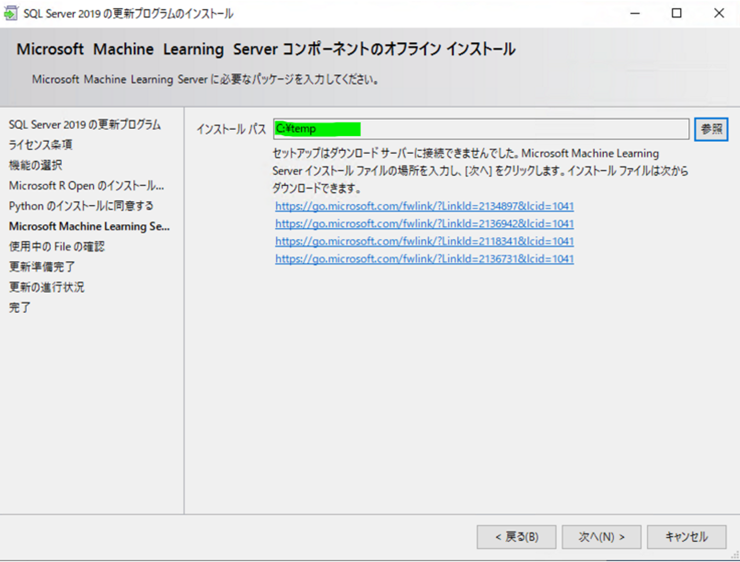
※ [Microsoft Machine Learning Server コンポーネントのオフライン インストール] では [インストール パス] に、「C:Temp」を指定します。
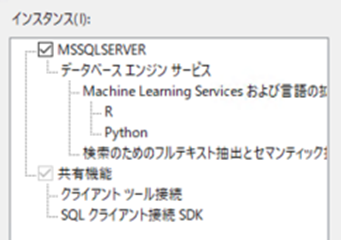
4-1) 更新プログラムのインストーラーを実行します。ライセンス条項に同意し、[機能の選択] ページで、累積的な更新プログラムが適用される機能を確認します。
機械学習機能を含む、現在のインスタンスにインストールされているすべての機能が表示されます。
図2. 機能の選択画面
4-2) ウィザードを続行し、R および Python ディストリビューションのライセンス条項に同意します。
[オフライン インストール] ページが表示されたら、 [インストール パス] に、以前にコピーした CAB ファイルが格納されているフォルダーを指定します。
図3. Microsoft Machine Learning Server コンポーネントのオフライン インストール画面
参考情報 累積的な更新プログラムの適用
https://docs.microsoft.com/ja-jp/sql/machine-learning/install/sql-ml-component-install-without-internet-access?view=sql-server-ver15#apply-cumulative-updates
※ 本Blogの内容は、2021年5月現在の内容となっております。
by Contributed | May 28, 2021 | Technology
This article is contributed. See the original author and article here.
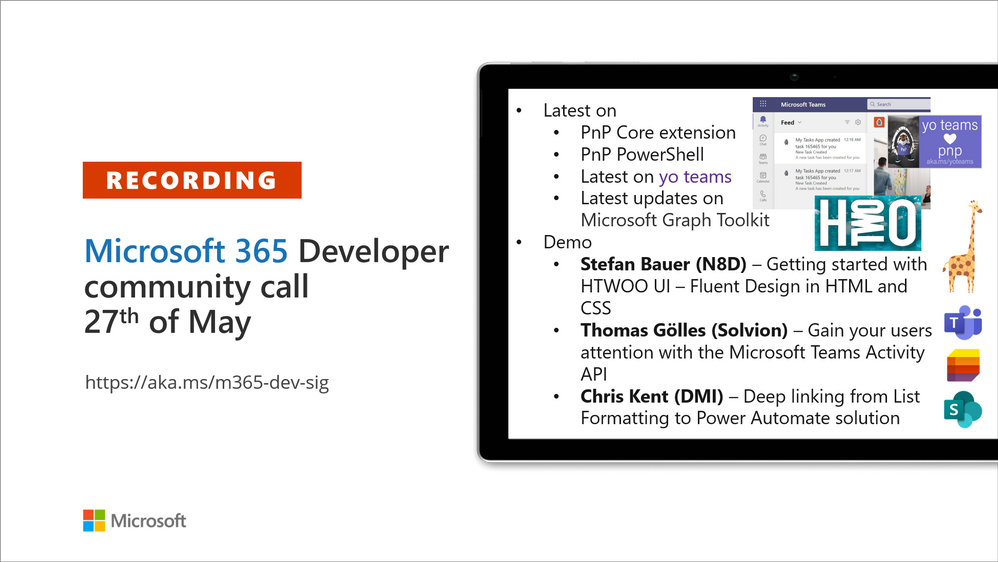
Recording of the Microsoft 365 – General M365 development Special Interest Group (SIG) community call from May 27, 2021.
Call Summary
Latest news from Microsoft 365 engineering and updates on open-source projects: PnP .NET libraries, PnP PowerShell, modernization tooling, on yo Teams, on Microsoft Graph Toolkit, and on Microsoft Teams Samples.
Join on the Viva Connections private preview! The Microsoft Teams Toolkit v2 is now available! Looking to get started with Microsoft Teams development? Don’t miss out our Teams samples gallery! Check out the Microsoft 365 Extensibility look book gallery, and register now for June trainings on Sharing-is-caring. Recent PnP project releases include – yo Teams generator-teams (apps generator) v3.1.0 GA, v3.2.0 Preview, yo teams-build-core (gulp tasks) v1.2.0 Preview, and Microsoft Graph Toolkit v2.2.0 GA along with insights into MGT vNext.
Open-source project status:
Project |
Current Version |
Release/Status |
PnP .NET Libraries – PnP Framework |
v1.4.0 |
Prepping for v1.5.0 release week of May 31 |
PnP .NET Libraries – PnP Core SDK |
v1.1.0 |
Prepping for v1.2.0 release week of May 31 |
PnP PowerShell |
v1.5.0 (just added Cmdlets for Viva Connections and Syntex) |
Prepping for v1.6.0 (June) |
Yo teams – generator-teams |
Released v3.1.0 GA, v3.2.0 Preview |
Preview with Viva Connections support |
Yo teams – yoteams-build-core |
v1.1.0, v1.2.0 Preview |
|
Yo teams – msteams-react-base-component |
v3.1.0 |
|
Microsoft Graph Toolkit (MGT) |
v2.2.0 GA |
|
Additionally, 2 new Teams samples were delivered in the last 2 weeks. The host of this call was David Warner II (Catapult Systems) | @DavidWarnerII. Q&A takes place in chat throughout the call.
Actions:
- Join on the Viva Connections private preview! | aka.ms/viva/connections/preview/register
- Feedback wanted: Regarding PnP PowerShell – “What if we did not return classic CSOM objects from the cmdlets?” Comments to: @erwinvanhunen.
- Register for Sharing is Caring Events:
- First Time Contributor Session – June 29th (EMEA, APAC & US friendly times available)
- Community Docs Session – May
- PnP – SPFx Developer Workstation Setup – June 17th
- PnP SPFx Samples – Solving SPFx version differences using Node Version Manager – June 24th
- AMA (Ask Me Anything) – Microsoft Graph & MGT – June 8th
- AMA (Ask Me Anything) – Microsoft Teams Dev – June
- First Time Presenter – June 30th
- More than Code with VSCode – May 27th, June 16th
- Maturity Model Practitioners – June 15th
- PnP Office Hours – 1:1 session – Register
- PnP Buddy System – Request a Buddy
- Download the recurrent invite for this call – http://aka.ms/m365-dev-sig
- Call attention to your great work by using the #PnPWeekly on Twitter.
Microsoft Teams Development Samples: (https://aka.ms/TeamsSampleBrowser)

Hello! it’s always great to see everyone on the call today. Thanks for participating.
Demos delivered in this session
Getting started with HTWOO UI – Fluent Design in HTML and CSS – an open-source community driven Fluent UI driven framework that’s just HTML, CSS and a bit of JS. Simple to use in the Microsoft 365 ecosystem, same branding as Fluent UI. Complete component library – tables, typography, avatars, icons, dialogs and more. Steps through HTWOO install – a npm package and 2 theme aware SPFx web parts. Complete documentation and samples.
Gain your users attention with the Microsoft Teams Activity Feed API – send activity notifications from both apps that live outside Teams and others (like static tabs) inside Teams, to Teams tabs, bots, chat. Uses the activity feed notification APIs in Microsoft Graph. Presenter review types of metadata on messages, requirements for sending defined activity type notifications, app registration, consent, manifest, notifications settings in Teams, etc. Then steps through the code for simple and advanced notifications.
Deep linking from List Formatting to Power Automate solution – Integrate lists, list formatting and Power Apps. Achieve similar look and feel using same SVG icons in lists and Power App. Call for list data from a Power App. Launch a Power App and send mail from within a list. Color SVG icons using fill properties in Inkscape SVG Editor. Showed using code from 2 samples in this demo.
Thank you for your work. Samples are often showcased in Demos.
Topics covered in this call
- PnP .NET library updates – Bert Jansen (Microsoft) @O365bert – 5:50
- PnP PowerShell updates – Erwin van Hunen (Valo Intranet) @erwinvanhunen – 8:21
- yo Teams updates – David Warner II (Catapult Systems) @DavidWarnerII – 10:00
- Microsoft Graph Toolkit updates – Nikola Metulev (Microsoft) | @metulev – 10:31
- Microsoft Teams Samples – David Warner II (Catapult Systems) @DavidWarnerII – 13:38
Demo: Getting started with HTWOO UI – Fluent Design in HTML and CSS – Stefan Bauer (N8D) | @StfBauer – 15:31
Demo: Gain your users attention with the Microsoft Teams Activity Feed API – Thomas Gölles (Solvion) | @thomyg – 29:54
Demo: Deep linking from List Formatting to Power Automate solution – Chris Kent (DMI) | @theChrisKent – 44:55
Resources:
Additional resources around the covered topics and links from the slides.
General resources:
Upcoming Calls | Recurrent Invites:
General Microsoft 365 Dev Special Interest Group bi-weekly calls are targeted at anyone who’s interested in the general Microsoft 365 development topics. This includes Microsoft Teams, Bots, Microsoft Graph, CSOM, REST, site provisioning, PnP PowerShell, PnP Sites Core, Site Designs, Microsoft Flow, PowerApps, Column Formatting, list formatting, etc. topics. More details on the Microsoft 365 community from http://aka.ms/m365pnp. We also welcome community demos, if you are interested in doing a live demo in these calls!
You can download recurrent invite from http://aka.ms/m365-dev-sig. Welcome and join in the discussion. If you have any questions, comments, or feedback, feel free to provide your input as comments to this post as well. More details on the Microsoft 365 community and options to get involved are available from http://aka.ms/m365pnp.
“Sharing is caring”
Microsoft 365 PnP team, Microsoft – 28th of May 2021
by Contributed | May 27, 2021 | Technology
This article is contributed. See the original author and article here.
The Hardware Lab Kit (HLK) for Windows Server 2022 hardware and software testing for Windows Hardware Compatibility Program (WHCP) is now available at the Partner Center for Windows Hardware, https://docs.microsoft.com/en-us/windows-hardware/test/hlk/.
The updated version of the Windows Hardware Lab Kit (HLK), along with updated playlist for testing Windows Server 2022 hardware, may be downloaded at that location. The Playlist may be updated in the future, so it is best to check for new versions regularly.
Vendors may download the Windows Server 2022 Eval version of the operating system for testing purposes here, https://www.microsoft.com/en-us/evalcenter/evaluate-windows-server-2022-preview
Vendors may also download the Virtual Hardware Lab Kit (VHLK) here, https://docs.microsoft.com/en-us/windows-hardware/test/hlk/.
The VHLK is a complete pre-configured HLK test server on a Virtual Hard Disk (VHD). The VHLK VHD can be deployed and booted as a Virtual Machine (VM) with no installation or configuration required.
As with previous releases of the HLK or VHLK, this version is intended for testing for Windows Server 2022. Earlier, or preview, versions of the OS and HLK cannot be used for testing Windows Server 2022. Previous versions of the HLK to be used for testing previous Windows Server versions remain available from the Hardware Dev Center.
Windows Server 2022 WHCP Playlist
For Windows Server 2022, the release playlist has been consolidated for both X64 and ARM64 architecture.
by Contributed | May 27, 2021 | Technology
This article is contributed. See the original author and article here.
Microsoft’s unified Data Loss Prevention solution provides a simple and unified approach to protecting sensitive information from risky or inappropriate sharing, transfer, or use.
Today we are pleased to announce the General Availability of the Microsoft Compliance Extension for Chrome, available from the Chrome web store here.
Many organizations use the Chrome browser to support sensitive workflows and with this extension, customers now have Microsoft DLP and Insider Risk Management capabilities within the Chrome browser of their onboarded endpoint devices, so they can:
- Use Chrome as an approved browser with DLP for working with sensitive data
- Create custom and fine-grained DLP policies for Chrome to ensure sensitive data is properly handled and protected from disclosure including:
- Audit mode: Records policy violation events without impacting end-user activity
- Block with Override mode: Records and blocks the activity, but allows the user to override when they have a legitimate business need
- Block mode: Records and blocks the activity without giving the user the ability to override
- Use DLP events from Microsoft Compliance Extension for Chrome to support Insider Risk Management assessments and investigations
- Deliver new insights related to the obfuscation, exfiltration, or infiltration of sensitive information by insiders. For more information on Insider Risk Management, check out the Tech Community blog.
With the Microsoft Compliance Extension for Chrome, users are automatically alerted when they take a risky action with sensitive data and are provided with actionable policy tips and guidance to remediate properly.
As with other Microsoft unified DLP capabilities, the Microsoft Compliance Extension for Chrome provides the same familiar look and feel that users are already accustomed to from the applications and services they use every day. This reduces end-user training time and alert confusion and increases user confidence in the prescribed guidance and remediation offered in the policy tips. This approach can help improve policy compliance – without impacting productivity.
The Microsoft Compliance Extension for Chrome Browser – Use Case Examples
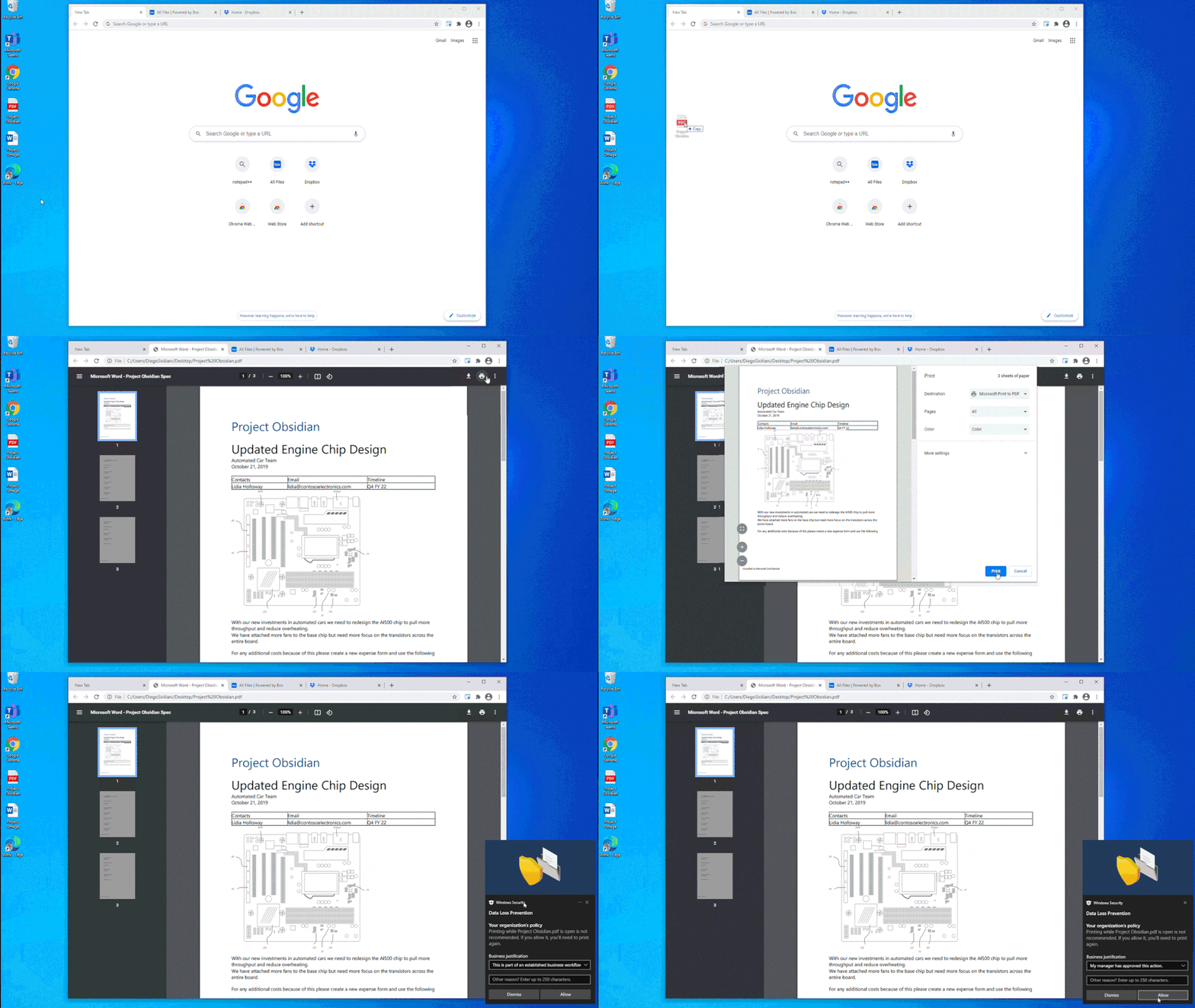
In Figure 1: Chrome DLP block with override for printing, we see how an organization can configure a DLP policy that allows the use of Chrome as an approved application to view sensitive data while protecting it from being printed. In this example, the policy was also configured to allow the information worker to override the policy when there is a justified business need. The business justification is logged as part of the DLP event in Compliance Center and can be reviewed at a later date to ensure compliance with approved business justifications.
Figure 1: Chrome DLP block with override for printing
In Figure 2: Chrome DLP allowing upload of a sensitive file to a sanctioned service domain, we see how a customer configured a DLP policy to allow an information worker using Chrome to upload a sensitive file to Box, an approved service domain
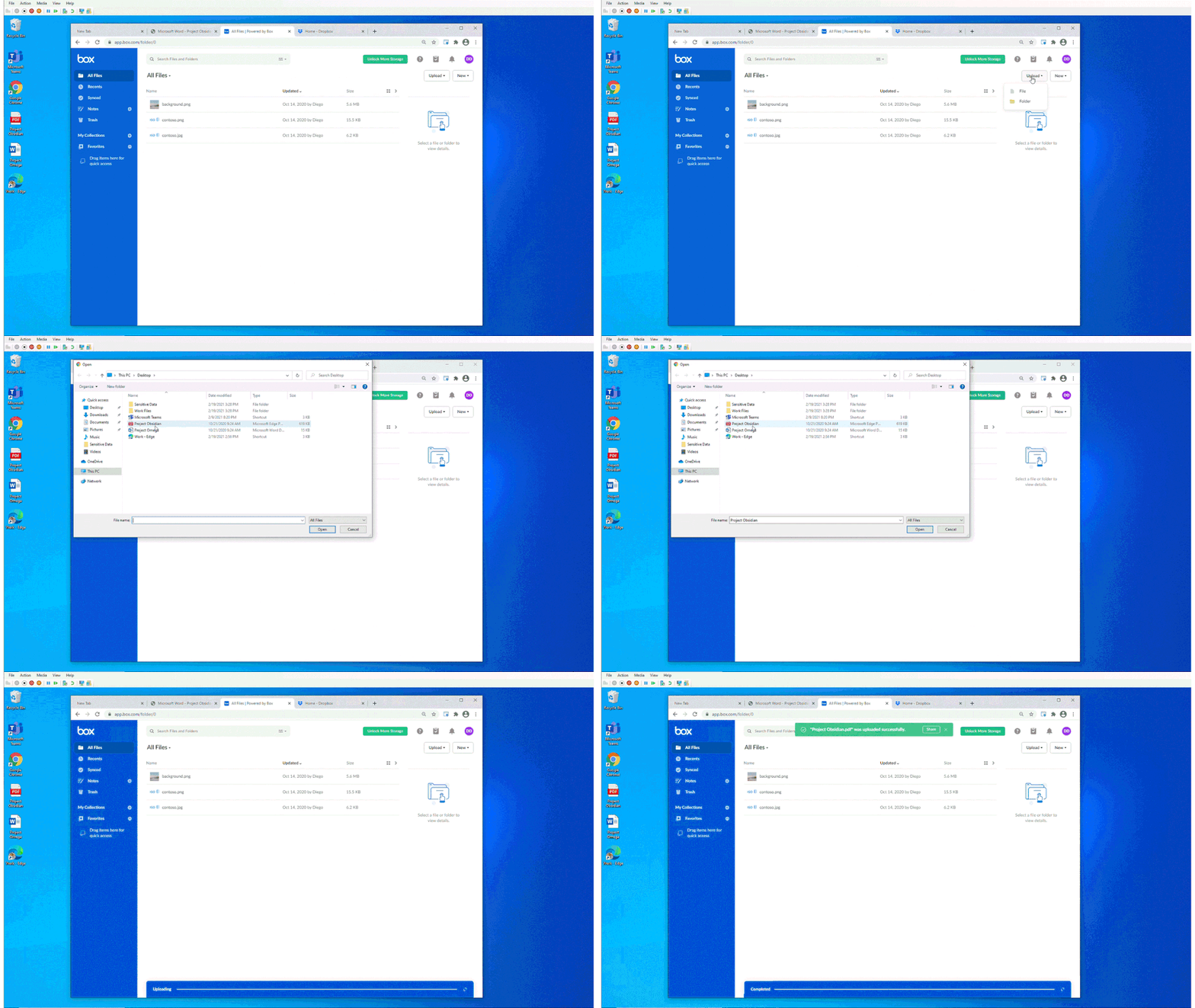
Figure 2: Chrome DLP allowing upload of a sensitive file to a sanctioned service domain
In Figure 3: Chrome DLP blocking upload of a sensitive file to an unsanctioned service domain, we see how a customer configured a DLP policy to block an information worker from using Chrome to upload a sensitive file to Dropbox. Dropbox is defined as an unsanctioned service domain in this DLP policy. In this instance, the policy was not configured to support user override and the user is unable to upload the document Dropbox. This policy violation is recorded as a DLP event and is available to be reviewed with full context in Compliance Center.
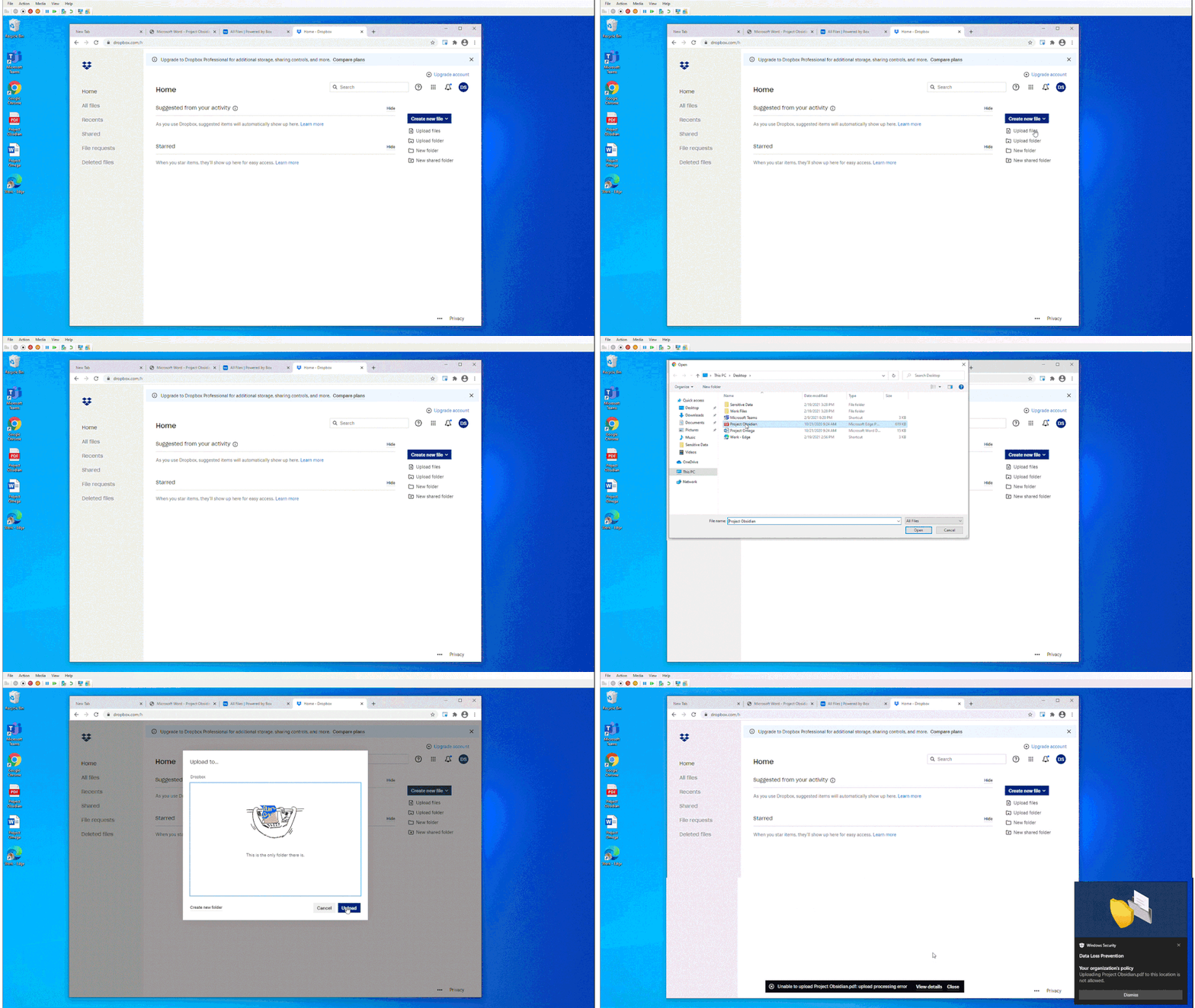
Figure 3: Chrome DLP blocking upload of a sensitive file to an unsanctioned service domain
The Microsoft Compliance Extension for Chrome in Compliance Center
In Figure 4: Compliance Center with Chrome App Event Filter, we see how an organization can apply a new filter to list Chrome related events for review and investigation.
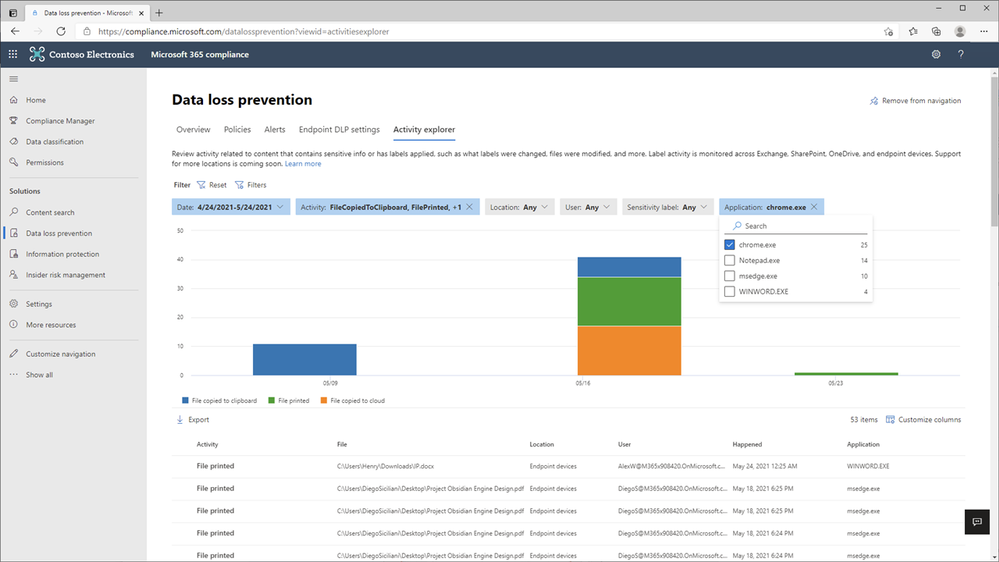
Figure 4: Compliance Center with Chrome App Event Filer
In Figure 5: Chrome File Print Event Details 1 and Figure 6 – Chrome File Print Event Details 2, we see the full details of the Chrome file print event for review and investigation.
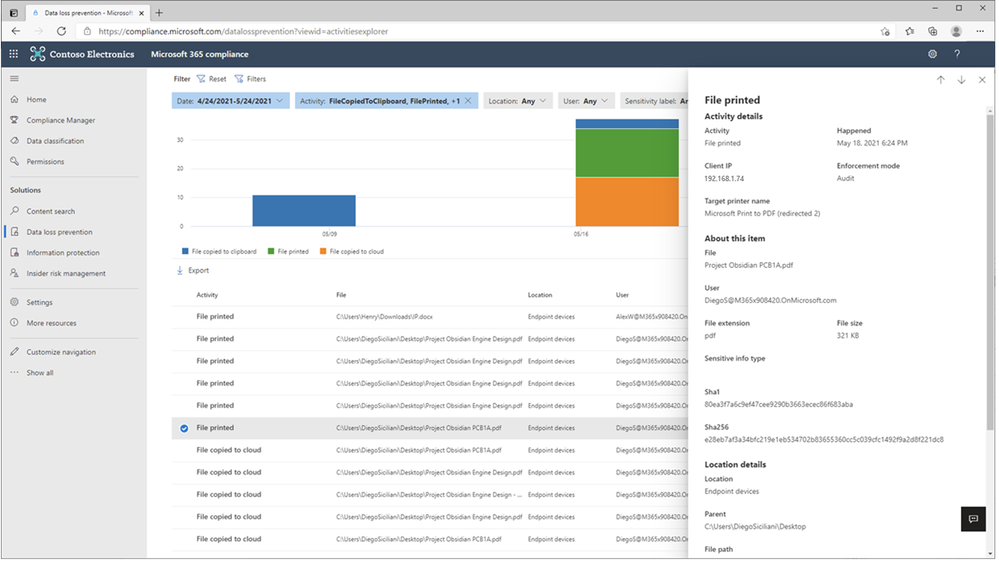
Figure 5: Chrome File Print Event Details 1
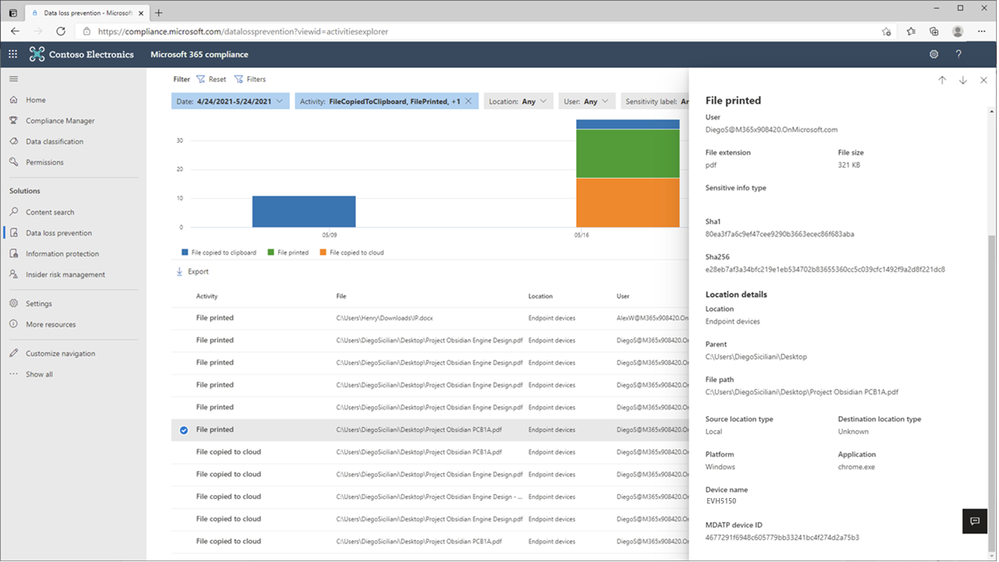
Figure 6: Chrome File Print Event Details 2
In Figure 7: Chrome File Copied to Cloud Event Details 1 and Figure 8 – Chrome File Copied to Cloud Event Details 2, we see the full details of the Chrome file upload to Dropbox event for review and investigation.
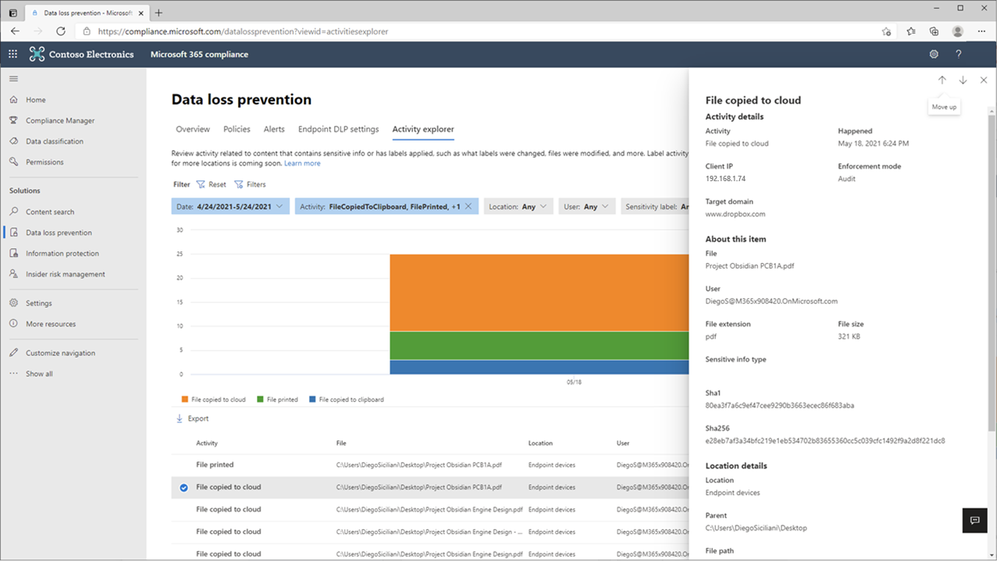
Figure 7: Chrome File Copied to Cloud Event Details 1
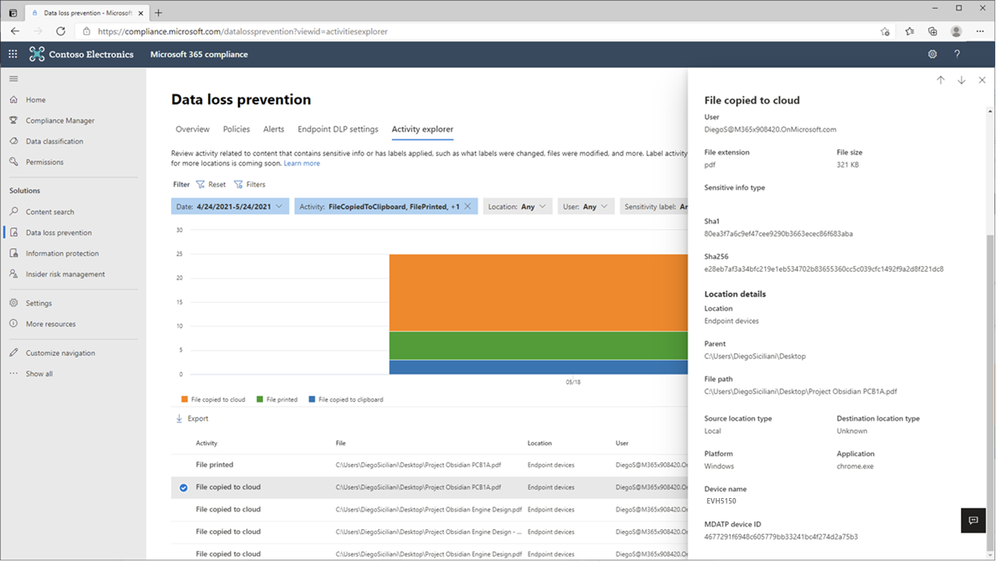
Figure 8: Chrome File Copied to Cloud Event Details 2
Microsoft Unified DLP Quick Path to Value
To help customers accelerate their deployment of a comprehensive information protection and data loss prevention strategy across all their environments containing sensitive data and help ensure immediate value, Microsoft provides a one-stop approach to data protection and DLP policy deployment within the Microsoft 365 Compliance Center.
Microsoft Information Protection (MIP) provides a common set of classification and data labeling tools that leverage AI and machine learning to support even the most complex of regulatory or internal sensitive information compliance mandates. MIP’s over 150 sensitive information types and over 40 built-in policy templates for common industry regulations and compliance offer a quick path to value.
Consistent User Experience
No matter where DLP is applied, users have a consistent and familiar experience when notified of an activity that is in violation of a defined policy. Policy Tips and guidance are provided using a familiar look and feel users are already accustomed to from applications and services they use every day. This approach can reduce end-user training time, eliminates alert confusion, increases user confidence in prescribed guidance and remediation, and improves overall compliance with policies – without impacting productivity.
Integrated Insights
Microsoft DLP integrates with other Security & Compliance solutions such as MIP, Microsoft Defender, and Insider Risk Management to provide broad and comprehensive coverage and visibility required by organizations to meet regulatory and policy compliance.
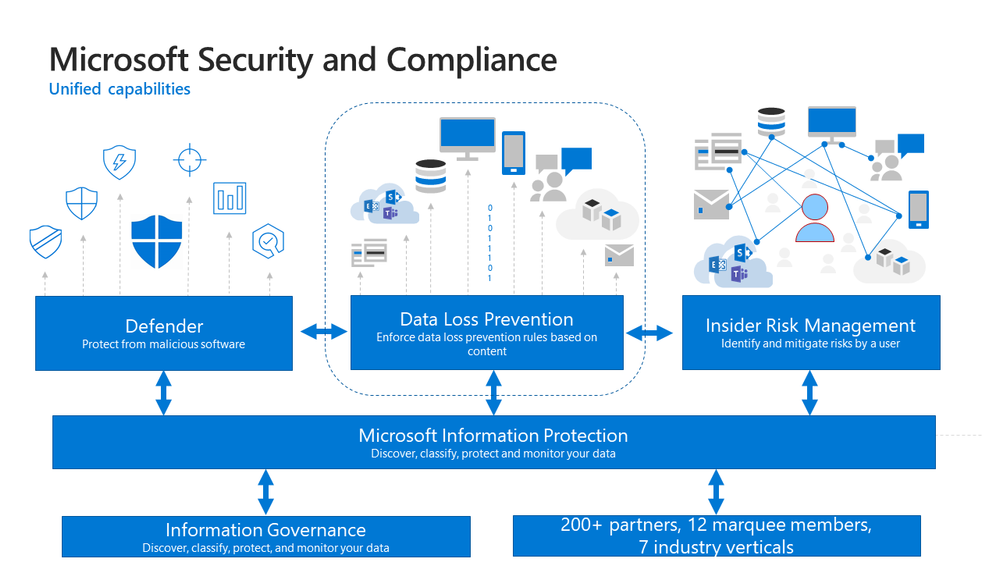
Figure 9: Integrated Insights
This approach reduces the dependence on individual and uncoordinated solutions from disparate providers to monitor user actions, remediate policy violations and educate users on the correct handling of sensitive data at the endpoint, on-premises, and in the cloud.
Get Started
Microsoft DLP solution is part of a broader set of Information Protection and Governance solutions that are part of the Microsoft 365 Compliance Suite. You can sign up for a trial of Microsoft 365 E5 or navigate to the Microsoft 365 Compliance Center to get started today.
Additional resources:
- For more information on Data Loss Prevention, please see this and this
- For videos on Microsoft Unified DLP approach and Endpoint DLP see this and this
- For a Microsoft Mechanics video on Endpoint DLP see this
- For more information on the Microsoft Compliance Extension for Chrome see this and this
- For more information on DLP Alerts and Event Management, see this
- For more information on Sensitivity Labels as a condition for DLP policies, see this
- For more information on Sensitivity Labels, please see this
- For more information on conditions and actions for Unified DLP, please see this
- For the latest on Microsoft Information Protection, see this and this
- For more information on AIP scanner, see this
Thank you,
The Microsoft Information Protection team
by Contributed | May 27, 2021 | Technology
This article is contributed. See the original author and article here.
If you’re facing issues with Function App key creation, this document has a few troubleshooting tips that could help you fix it.
First, ensure you’ve reviewed these docs related to Function App storage connections:
Symptom:
Host level and Function level Key creation failure in Function Apps
Issue verification:
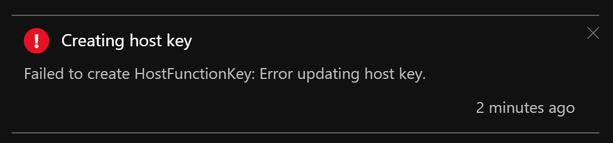
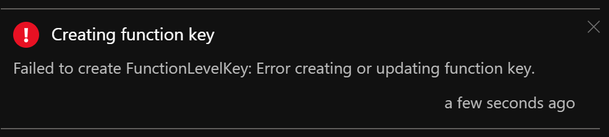
Portal – When your Function App is unable to create host level or function level keys, you may see these error messages:
AzCLI – If key creation fails with AzCLI, the error messages are as below:


In addition to this, Function execution could also be returning HTTP 401 (HTTP 500) in some cases.
Troubleshooting:
Function App keys are placed in the azure-webjobs-secrets folder in Blob Container. If this folder is missing, this could mean that the Function App is unable to connect to the storage account referenced by the Function App Application Setting “AzureWebJobsStorage”. This could happen either because of a network misconfiguration or because of an issue on the storage side. We will explore both these causes below.
- Know the outbound Connectivity path for your Function App: Ensure the storage account referenced by the Function App Application Setting “AzureWebJobsStorage” is reachable from the Function App.
- Does the storage account allow access to all networks? If not, what path do you expect the Function App to take to reach the Storage? (Internet/Virtual Network?)
- If you want the Function App to reach the storage account via its public IP, ensure the storage account allows all the IPs listed under outbound IPs in the Function App’s properties blade.
- If your App is integrated with a Virtual Network, ensure this subnet is allowed on the storage account firewall.
- Missing WebJobs secrets folder?
- Once you ensure network connectivity is present between the Function App and Storage, you should be able to see the azure-webjobs-secrets folder under Blob containers as seen below. If you don’t see this folder, it could be because of a missing Vnet integration.
- I’ve seen cases where the Vnet & Subnet are allowed on the Storage Account Firewall but customers sometimes forget to actually integrate the App with the Vnet. This causes the secrets folder to be absent on the storage.
- Also, ensure Service Endpoints/Private Endpoints are configured correctly.
- Erroneous storage connection string?
- Archived Blob Storage?
- Check access tier for files inside azure-webjobs-secrets folder:

- When a blob is in archive storage, the blob data is offline and can’t be read or modified. To read or download a blob in archive, you must first rehydrate it to an online tier. You can’t take snapshots of a blob in archive storage.
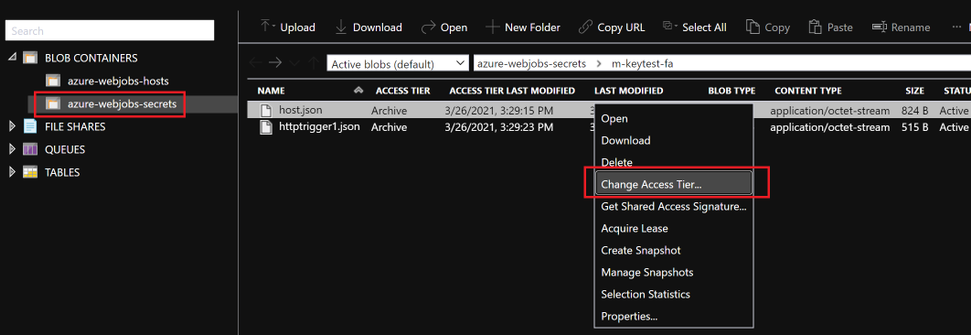
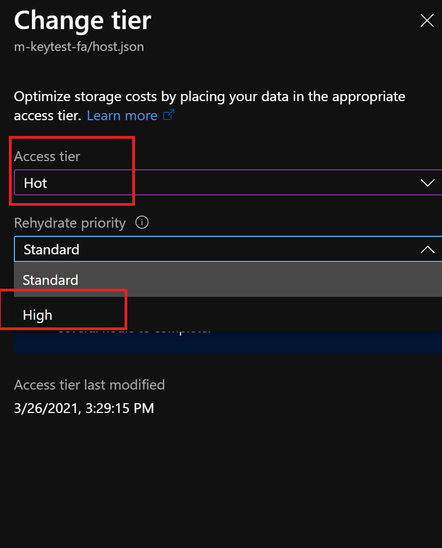
- Solution: Rehydrated storage blobs to Hot – High priority mode. After about 75mins, the blobs will be ready with the modified access tier. Function Key creation will succeed now and the issue with HTTP 401 and HTTP 500 should be resolved.

I hope this helps!


Recent Comments