How to foster customer loyalty through personalized experiences

How to foster customer loyalty through personalized experiences

This article is contributed. See the original author and article here.

These days, customer experience is everything. Happy customers are loyal customers, but, as a group, they can be an elusive audience. Three quarters of consumers have tried new shopping behaviors since the pandemic started and 73 percent expect to continue to incorporate different brands they’ve tried into their routines.1 As we see a slow, but continued return to normal in 2022, the path to customer loyalty remains uncertain. 

It’s likely not a surprise to most marketers that keeping a customer involves far less investment than acquiring a new one. Studies show, driving customer loyalty is worth the effortincreasing retention rates by as little as 5 percent could increase sales by over 25 percent.2

How do you know which customers are likely to stay and which ones are on their way out the proverbial door? And, if you can keep their attention, what’s the best way to ensure they have a positive experience?

Let’s look at three actions you can take to understand and engage customers who may be at risk of abandoning your brand and how Microsoft Dynamics 365 Customer Insights can help companies foster customer loyalty

Understanding churn

In the U.S., even the most loyal customers won’t tolerate a bad experience, with 17 percent saying they will walk away after one negative engagement. In Latin America, the risk of losing customers is even higher, with 49 percent saying they will walk away from a brand after just one bad experience.3

Knowing which customers are likely to churn can help your marketing efforts be more successful. Predicting which customers may abandon your brand allows you to focus your retention engagements on desired and higher-value customers and on increasing their loyalty. Machine learning models and AI-driven analytics can speed up the process of predicting if, and when, a customer is likely to stop using your service or product.

Trusted solutions like Dynamics 365 Customer Insights help companies leverage machine learning and AI-driven insights to predict customer behavior, allowing you to learn from human interactions at-scale using predictive data. The easiest way to start with predictive data is to use pre-defined models. Out-of-box models like the ones available in Dynamics 365 Customer Insights give you the benefit of speed. You can train your models quickly and start learning about your customers now, rather than starting model development from scratch.

Pre-built solutions don’t block you from customizing your models later. With Dynamics 365 Customer Insights you can customize the AI or bring your own with Azure Machine Learning. Train a customized model, schedule models to run on a regular basis, and integrate the output as an attribute of a customer record. You can also set your model to retrain itself regularly so that you are continuously improving your results. For custom predictive insights, you can use Azure Machine Learning and Azure Synapse Analytics, which combine customer data with enterprise data to develop, train, and fine-tune machine learning models.

With an out-of-box model you may learn customers have a stronger likelihood of churn based on the time since their last purchase in a particular product category. Adding an additional factor to that model such as the type of device used for online purchases could help your teams spot opportunities for improving customer engagements. For example, you may learn customers who shop on their mobile device for a more complex product have a higher need for support services if you want to reduce their product return rates. Learn more about how Dynamics 365 Customer Insights leverages AI and machine learning to predict data and customer behaviors.

Making room for improvement

Customers have more channels and platforms than ever before to express their opinions and share their experiences. Today’s customers expect high quality products, services, and brand experiences and they’re not shy about telling other shoppers, and you, when you’ve missed the mark.

Using Sentiment Analysis to synthesize customer feedback with business aspects can help you better understand and respond to your customers’ needs and wants. Whether it’s a comment made online about an order arriving later than expected, or a heartfelt thank you to a service rep who created an exceptional in-store experience, these inputs are valuable insights.

The challenge is in making sense of increasing volumes of customer data without lowering accuracy and increasing labor costs. Natural Language Processing is a type of AI that gives machines the ability to understand text in a way that is similar to how humans do the same. Natural Language Processing powers sentiment analysis by quicky assigning a sentiment score to each comment and then associating that feedback with aspects of your business. This automated process can help you make valuable insights actionable ones with less effort and at a lower cost. Quickly understand not only what your customers are saying, but why. Find out what’s working well, and which business processes or customer touchpoints may need attention.

Some examples of how you can improve your customers’ experiences using Sentiment Analysis are:

  • Identifying customers with negative sentiment, and using that insight to focus your campaigns and engagements and optimize them for higher satisfaction and loyalty.
  • Learning about touchpoints with issues and opportunities that are pointed out by customers and working to optimize underperforming processes or aspects of your business.
  • Segmenting customers based on their sentiment and running personalized campaigns with targeted sales, marketing, and support efforts such as rewards for happy customers delivered through your loyalty program.

The more you understand about if and how your customers’ expectations are being met and the faster you can act on your findings, the more likely you are to drive higher levels of customer satisfaction and reduce churn. Customers today are more engaged than ever. Listening to them, understanding what they want, and then meeting, or exceeding their expectations, is key to earning their loyalty.

Creating unique experiences

Customers often churn because the experience you crafted didn’t deliver on their expectations. A positive customer experience can lead to a 10 percent to 15 percent boost in sales conversion rates, but consumers not only want a positive experience, 80 percent want it personalized.4

Customers want to feel valued. Remember the last time your favorite barista had your perfect drink order ready by the time you reached the counter? Imagine scaling out that feeling at hyper scale, making each one of your customers feel just as special as you did while walking out of the coffee shop.

Hyper-personalization leverages the immense amount of value already within your customer data, using AI to help you deliver the right message, through the right channel, at the right time. While personalization isn’t necessarily a new concept, traditional methods of generic segmentation will no longer hold your customers’ attention.

By combining transactional, demographic, and behavioral data, and creating 360-degree views of your customers you can deliver targeted, personalized journeys. Customized engagements informed by past interactions along with individual insights such as customer lifetime value and brand affinities reduce the effort required to deliver what customers want now. Delivering tailored, next best recommendations minimizes friction points in the purchase process by helping customers quickly find what they actually need.

Learn more about Dynamics 365 Customer Insights

When customers get what they need, they become your loyal and raving fans. To learn more about how your company can drive customer loyalty through personalized experiences, visit the Dynamics 365 Customer Insights webpage. Sign up for a free Dynamics 365 Customer Insights trial to experience how you can deliver personalized customer experiences with the ultimate 360-degree view of your customers.


Sources:

1- The great consumer shift: Ten charts that show how US shopping behavior is changing, McKinsey & Company

2- Prescription for Cutting Costs, Bain & Company

3- Experience is everything: Here’s how to get it right, PwC

4- Personalizing the customer experience: Driving differentiation in retail, McKinsey & Company

The post How to foster customer loyalty through personalized experiences appeared first on Microsoft Dynamics 365 Blog.

Brought to you by Dr. Ware, Microsoft Office 365 Silver Partner, Charleston SC.
Azure AD required for Update Compliance after October 15, 2022

Azure AD required for Update Compliance after October 15, 2022

This article is contributed. See the original author and article here.

Update Compliance enables organizations to monitor security, quality, and feature updates for Windows 10 or 11 Professional, Education, and Enterprise editions. It’s also one of many services powered by the Windows diagnostic data processor configuration, which allows IT administrators to authorize data to be collected from devices under their management. This blog prepares you for an upcoming set of changes in the requirements for Update Compliance.


The Windows diagnostic data processor configuration was announced in 2021. IT administrators leveraging this configuration are considered the data controllers for Windows diagnostic data collected from their enrolled devices. As defined by the European Union General Data Protection Regulation (GDPR), the data controller role allows you to determine the purposes and means of the processing of personal data.


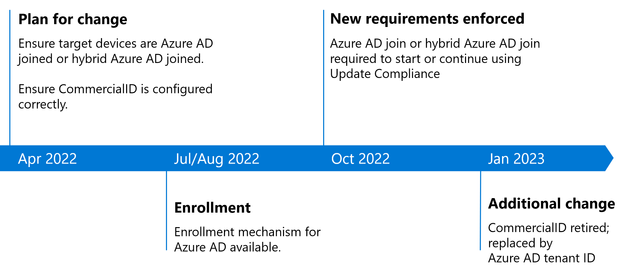
To use the Windows diagnostic data processor configuration, targeted devices must be Azure Active Directory (Azure AD) joined or hybrid Azure AD joined. As a result, beginning October 15, 2022, devices that are neither joined nor hybrid joined to Azure AD will no longer appear in Update Compliance. All Windows diagnostic data processor prerequisites must be met to continue using the service after that date. The timeline for this change is as follows:


Paul_Reed_0-1651596966289.png


How to prepare for this change


Whether you are a current or new Update Compliance user, ensure that you meet the Azure AD requirement before October 15, 2022 to ensure continuity of your reporting. If your organization has not yet moved to Azure AD, we recommend that you begin your deployment now in preparation for this change. Additionally, if you do not yet have your CommercialID configured, you can do so now. Joining Azure AD and ensuring that your CommercialID is properly configured are two independent steps that can be taken in any order. As of October 15th, both steps will need to be taken to use or continue using Update Compliance.  These steps can be taken in any order prior to October 15th and further guidance will be released in the coming months.


What is the difference between Active Directory and Azure AD?


Azure AD is suitable for both cloud-only and hybrid organizations of any size or industry and can reduce the cost of managing Windows devices (except Home editions). Key capabilities include single sign-on (SSO) for both cloud and on-premises resources, Conditional Access through mobile device management (MDM) enrollment and MDM compliance evaluation, and self-service password reset and Windows Hello PIN reset on the lock screen. To learn more, see What is an Azure AD joined device?


Next steps


For a step-by-step guide on how to enroll your devices into Azure AD, see How to: Plan your Azure AD join implementation. This guide provides prescriptive guidance on how to:


  • Review your scenarios

  • Review your identity infrastructure

  • Assess your device management

  • Understand considerations for applications and resources

  • Understand your provisioning options

  • Configure enterprise state roaming

  • Configure Conditional Access


Alternatively, if you have an on-premises Active Directory environment, you may opt for hybrid Azure AD join. In that case, follow the steps outlined in Plan your hybrid Azure Active Directory join deployment. You can learn more about co-management of your cloud and on-premises devices with hybrid Azure AD at Plan your Azure Active Directory device deployment.


Note: Workplace Join does not meet the requirements for Update Compliance after October 15, 2022


Whether or not your devices are already Azure AD joined (or hybrid joined), you can enroll in and configure Update Compliance by following these instructions: Get started with Update Compliance.


To summarize, if your devices are still using on-premises Azure Directory, we recommend that you plan for this upcoming change to Update Compliance. In early 2023, we will replace the use of CommercialID in Update Compliance with Azure AD tenant ID. We will provide additional steps to help you register your Azure AD tenant ID so your targeted devices are properly configured for Update Compliance in the near future. Follow the Windows IT Pro Blog, or @MSWindowsITPro on Twitter, to be informed when these steps are available.


For the latest information on the types of Windows diagnostic data and the ways you can manage it within your organization, see Enable Windows diagnostic data processor configuration


Continue the conversation. Find best practices. Visit the Windows Tech Community.


Manage Finance and Operations apps in the Power Platform admin center

Manage Finance and Operations apps in the Power Platform admin center

This article is contributed. See the original author and article here.

More and more customers are using process orchestration between their front-office and back-office business applications. Low-code and no-code tools are proliferating. Fusion teamsin which pro developers, IT admins, and citizen developers collaborate to build softwareare popular. It’s no wonder the job of administering these applications has become a growing challenge. We’re making that job a little easier by bringing the management of Finance and Operations apps and other Microsoft Dynamics 365 apps into a single experience for the first time.

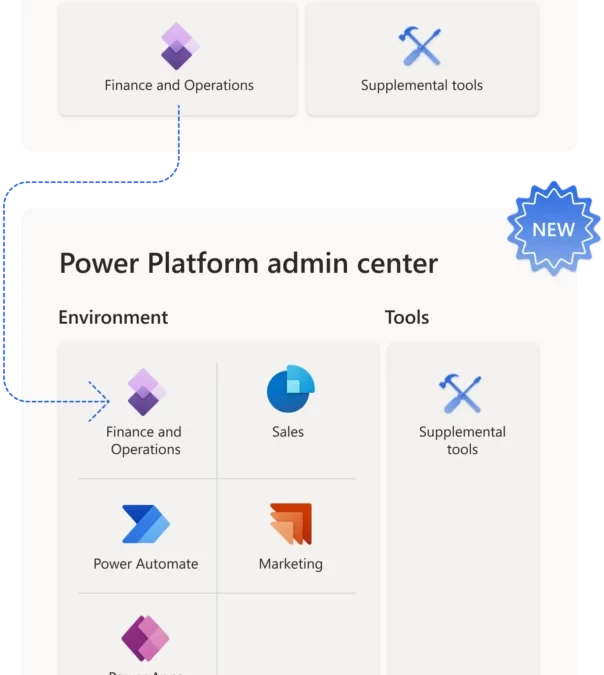
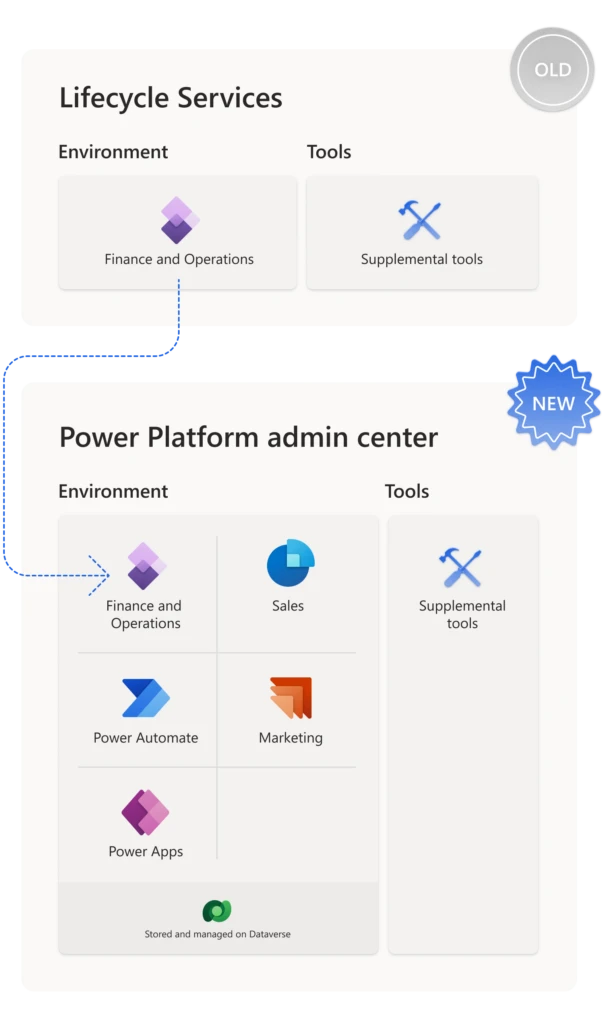
While other Dynamics 365 apps are managed in the Power Platform admin center, today admins must manage Finance and Operations apps in a dedicated portal called Lifecycle Services. Over the next several release waves, we’re making Finance and Operations apps available to be installed and managed in the Power Platform admin center.

Manage Dynamics 365 applications all in one place

Illustration showing that administration of Finance and Operations apps is moving from Lifecycle Services to the Power Platform admin center.

Today, every instance of a Finance and Operations application is considered an environment. Customers are entitled to a sandbox and a production environment when they purchase licenses for Finance, Supply Chain Management, Commerce, or Project Operations, and they deploy these environments in Lifecycle Services.

In the Power Platform admin center, you have more flexibility. A single environment can govern many Dynamics 365 apps, such as Marketing, Sales, and Field Service, as well as hosting Power Automate flows and Power Apps. The improvement we’re introducing is that Finance and Operations apps can be installed in the Power Platform environment model like any other Dynamics 365 application.

Giving Finance and Operations admins more choices

Administrators have differing needs based on the applications their company uses. If you don’t need Power Platform capabilities, you can continue to use Lifecycle Services to manage your Finance and Operations environments and apps. In the future, we’ll provide a way to migrate environments from Lifecycle Services to the admin center, should you choose to do so.

If you want to manage all your Dynamics 365 apps in a single environment and admin center, the new capability is available for Project Operations trials. Project Operations environments come with dual-write, business events, and virtual entity support, drastically reducing setup time. We’re adding support for Finance, Supply Chain Management, and Commerce trials, and will support sandbox and production environments in the future as well. Eventually, customers will be able to choose the Power Platform admin center for all their administration and governance needs.

Next steps

Sign up for a Project Operations trial and give us your feedback!

The post Manage Finance and Operations apps in the Power Platform admin center appeared first on Microsoft Dynamics 365 Blog.

Brought to you by Dr. Ware, Microsoft Office 365 Silver Partner, Charleston SC.
Workstream fallback queues ensure no customer goes unattended

Workstream fallback queues ensure no customer goes unattended

This article is contributed. See the original author and article here.


Imagine your eagerly awaited brand-new speakers finally arriveand they don’t work. The first thing you do is call customer support, expecting a quick response. You hear crickets instead. How likely are you to buy from that company again? According to a recent study, two-thirds of shoppers would stop doing business with a brand after just two to three poor customer service experiences. Organizations let customers go unattended at their peril. Use of a fallback queue to catch misrouted queries is imperative.

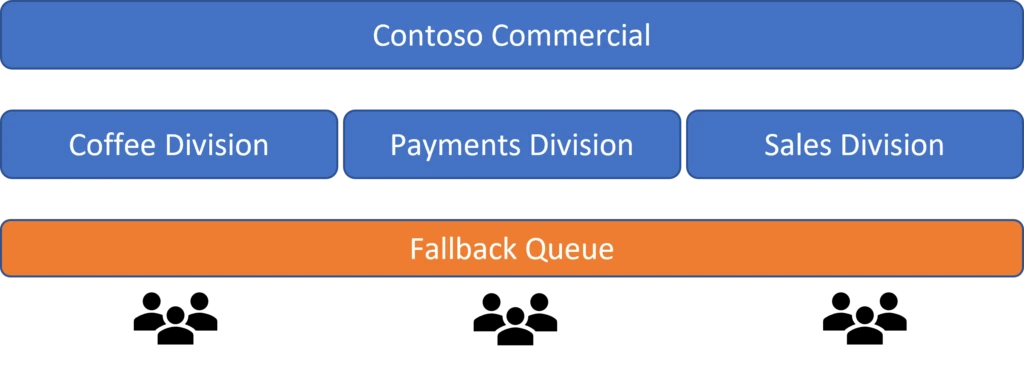
One fallback queue for multiple divisions is a customer service nightmare

Businesses use fallback queues to make sure no customer query falls into a crack. For organizations with multiple divisions, however, managing a fallback queue becomes a tedious task if only one queue is used for this purpose.

Diagram that illustrates multiple divisions of a company using one fallback queue.

In this scenario, supervisors must be hyper-vigilant for any work that’s sent to the fallback queue. Agents in different divisions who are assigned to a monolithic queue may receive cases that they aren’t proficient in solving. They may also lack access to data outside of their division that they need to resolve a case.

Introducing workstream-level fallback queues in unified routing

Microsoft Dynamics 365 Customer Service is introducing an enhancement in unified routing to address these issues: workstream-level fallback queues.

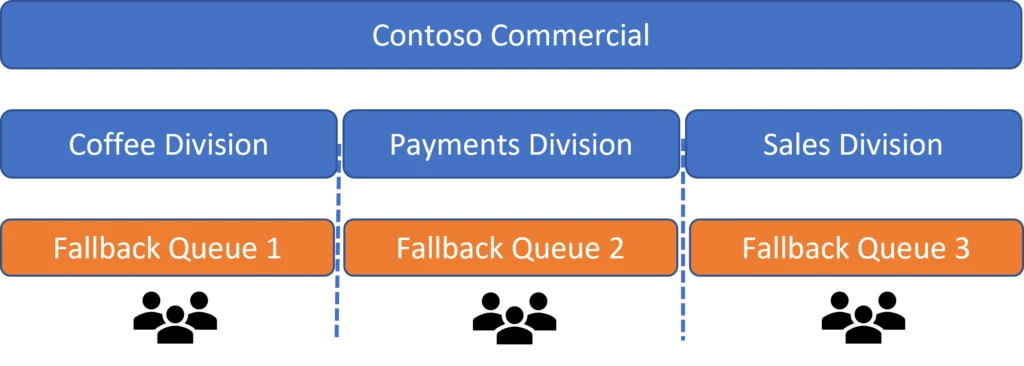
Workstreams group the same type of customer queries. We’ve also seen businesses using workstreams to differentiate between their internal groups or divisions. Organizations can now create different fallback queues for each of their workstreams in the unified routing settings. Whenever the routing system can’t identify the queue to which an incoming work item should go, it routes the query to a workstream-level fallback queue.

Diagram that illustrates multiple divisions of a company, each with its own fallback queue.

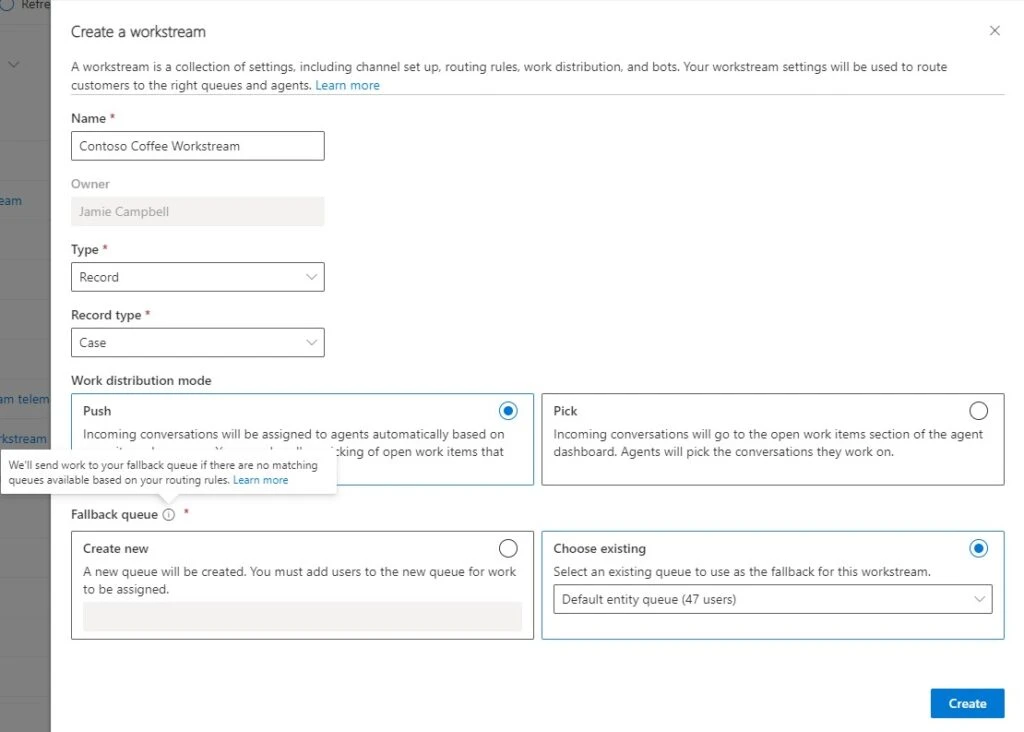
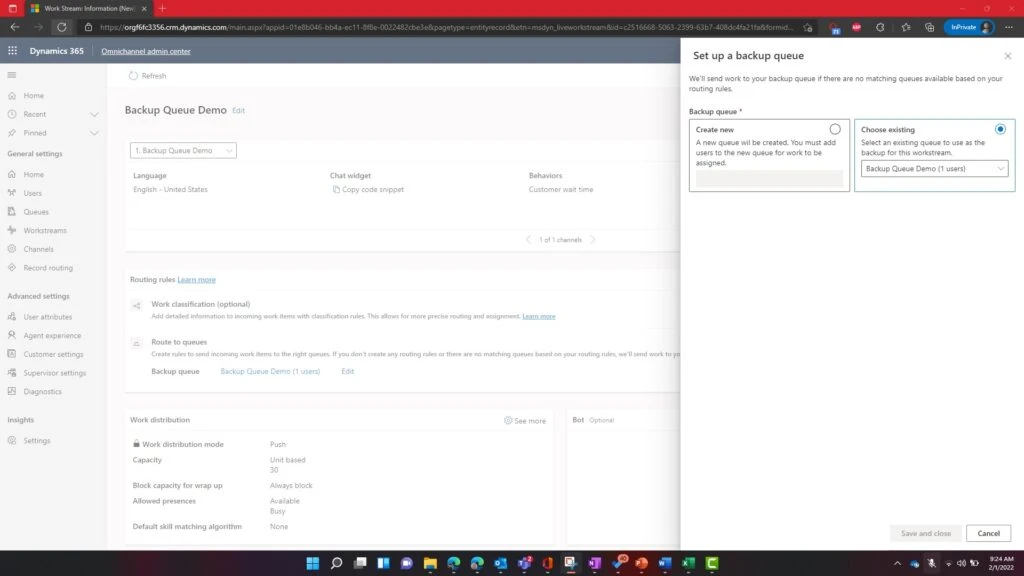
Administrators can create a new fallback queue or choose an existing queue to use as a fallback. They can assign a fallback queue to a different workstream at any time. Admins can assign agents to fallback queues according to their business requirements.

Screenshot of fallback queue options when creating a workstream in Customer Service.
Screenshot of fallback queue options when creating routing rules in the Omnichannel admin center.

Managing fallback queues is easy with Power Automate

It isn’t enough to have a fallback queue for each workstream, however. Businesses also need to monitor their routing systems so that the fallback queues themselves don’t become a customer query graveyard. Organizations can use a Power Automate workflow to notify internal stakeholders, like supervisors and administrators, whenever a work item is routed to a fallback queue. Here’s how:

Send an email when a work item is routed to a workstream-level fallback queue

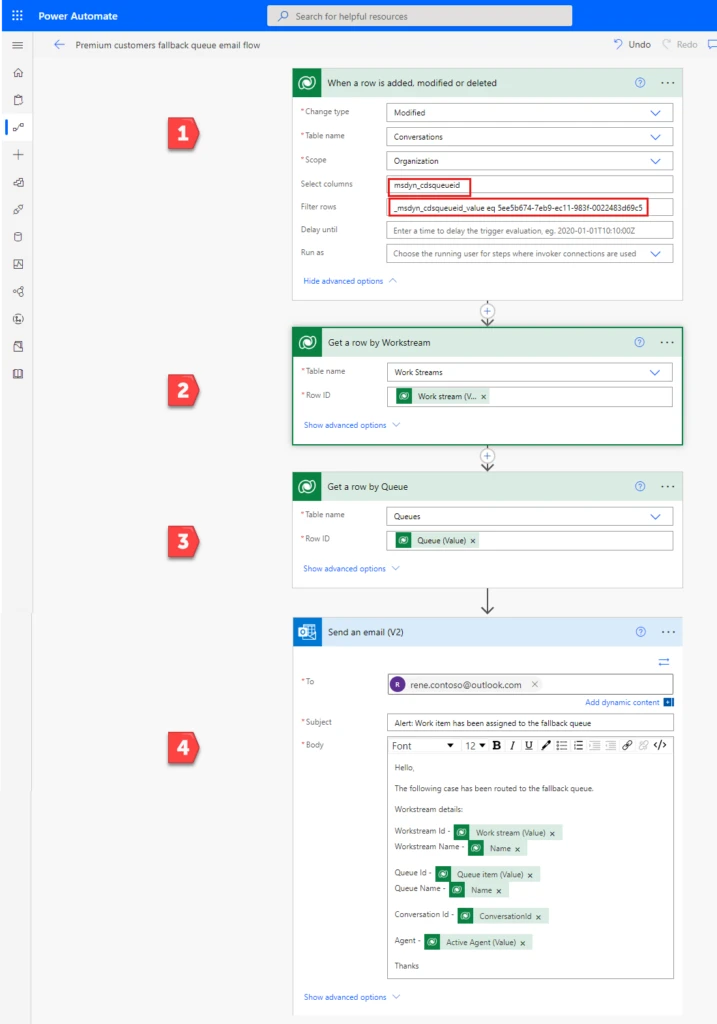
When a query is routed to a queue, the queue is associated with the work item in the Conversations table. We’ll use that action to trigger our flow. In the same action, we’ll determine whether the associated queue is a fallback queue by matching its ID. That’s Step 1 in the screenshot below.

Steps 2 and 3 get the name of the workstream and the “friendly” name of the fallback queue. The friendly name will be more helpful than the queue ID when we include it in the email that we send in Step 4.

Step 1: When a work item is routed to a queue, determine whether the queue is a fallback queue

  1. Open your fallback queue in the Customer Service admin center.
  2. In the URL, find the string that starts with “queueRecordId”%3A” and ends with “%2C and copy everything between the quotation marks. This is the queue ID.
    For example, if the URL contains “queueRecordId”%3A”5ee5b674-7eb9-ec11-983f-0022483d69c5″%2C, the queue ID is 5ee5b674-7eb9-ec11-983f-0022483d69c5.
Screenshot of a fallback queue URL with the queue ID portion highlighted.
  1. In Power Automate, create an automated cloud flow. Select the Microsoft Dataverse trigger When a row is added, modified or deleted.
  2. Set Change type to Modified, Table name to Conversations, and Scope to Organization.
  3. In Select columns, enter the following string: msdyn_cdsqueueid
  4. In Filter rows, enter the following string, replacing {queue ID} with the ID you found in step 1: _msdyn_cdsqueueid_value eq {queue ID}

Step 2: Find the name of the workstream that’s associated with the conversation

  1. Insert a new step. Select Microsoft Dataverse as the connector and Get a row by Workstream as the action.
  2. Set Table name to Work Streams.
  3. In Row ID, select the dynamic content Work stream (Value).

Step 3: Find the name of the queue that’s associated with the workstream

  1. Insert a new step. Select Microsoft Dataverse as the connector and Get a row by Queue as the action.
  2. Set Table name to Queues.
  3. In Row ID, select the dynamic content Queue (Value).

Step 4: Send an email

  1. Insert a new step. Select Office 365 Outlook as the connector and Send an email (V2) as the action.
  2. In To, enter the address or addresses to notify when a work item is routed to the fallback queue.
  3. Enter the subject and body of the email.
    In our example, we’ve included both the IDs and the names of the workstream and fallback queue using dynamic text that was collected in the preceding steps.

Save and test your flow.

Here’s the entire flow. Numbered steps in red arrows correspond to the steps provided earlier.

Screenshot of the completed flow, with Steps 1 through 4 highlighted.

It’s been our constant goal in unified routing to provide customers with robust and flexible routing solutions. Fallback queue enhancement not only gives freedom to businesses in terms of distributing their incoming workload. It also makes it easier for supervisors to monitor and manage their organization’s fallback queues.

This blog post is part of a series of deep dives that will help you deploy and use unified routing at your organization. See other posts in the series to learn more.

References

What Customer Service Leaders Should Be Prioritizing in 2022

Next steps

Read the fallback queue documentation.

The post Workstream fallback queues ensure no customer goes unattended appeared first on Microsoft Dynamics 365 Blog.

Brought to you by Dr. Ware, Microsoft Office 365 Silver Partner, Charleston SC.
Using research to unlock the potential of hybrid work

Using research to unlock the potential of hybrid work

This article is contributed. See the original author and article here.

Just last month, we released our 2022 Annual Work Trend Index to better understand how work has changed over the past two years. The biggest takeaway is clear: we’re not the same people that went home to work in early 2020.

The post Using research to unlock the potential of hybrid work appeared first on Microsoft 365 Blog.

Brought to you by Dr. Ware, Microsoft Office 365 Silver Partner, Charleston SC.