#StopRansomware: Vice Society

This article is contributed. See the original author and article here.

Summary

Actions to take today to mitigate cyber threats from ransomware:

• Prioritize and remediate known exploited vulnerabilities.
• Train users to recognize and report phishing attempts.
• Enable and enforce multifactor authentication.

Note: This joint Cybersecurity Advisory (CSA) is part of an ongoing #StopRansomware effort to publish advisories for network defenders that detail various ransomware variants and ransomware threat actors. These #StopRansomware advisories include recently and historically observed tactics, techniques, and procedures (TTPs) and indicators of compromise (IOCs) to help organizations protect against ransomware. Visit stopransomware.gov to see all #StopRansomware advisories and to learn more about other ransomware threats and no-cost resources.

The Federal Bureau of Investigation (FBI), the Cybersecurity and Infrastructure Security Agency (CISA), and the Multi-State Information Sharing and Analysis Center (MS-ISAC) are releasing this joint CSA to disseminate IOCs and TTPs associated with Vice Society actors identified through FBI investigations as recently as September 2022. The FBI, CISA, and the MS-ISAC have recently observed Vice Society actors disproportionately targeting the education sector with ransomware attacks.

Over the past several years, the education sector, especially kindergarten through twelfth grade (K-12) institutions, have been a frequent target of ransomware attacks. Impacts from these attacks have ranged from restricted access to networks and data, delayed exams, canceled school days, and unauthorized access to and theft of personal information regarding students and staff. The FBI, CISA, and the MS-ISAC anticipate attacks may increase as the 2022/2023 school year begins and criminal ransomware groups perceive opportunities for successful attacks. School districts with limited cybersecurity capabilities and constrained resources are often the most vulnerable; however, the opportunistic targeting often seen with cyber criminals can still put school districts with robust cybersecurity programs at risk. K-12 institutions may be seen as particularly lucrative targets due to the amount of sensitive student data accessible through school systems or their managed service providers.

The FBI, CISA, and the MS-ISAC encourage organizations to implement the recommendations in the Mitigations section of this CSA to reduce the likelihood and impact of ransomware incidents.

Download the PDF version of this report: pdf, 521 KB

Download the IOCs: .stix 31 kb

Technical Details

Note: This advisory uses the MITRE ATT&CK® for Enterprise framework, version 11. See MITRE ATT&CK for Enterprise for all referenced tactics and techniques.

Vice Society is an intrusion, exfiltration, and extortion hacking group that first appeared in summer 2021. Vice Society actors do not use a ransomware variant of unique origin. Instead, the actors have deployed versions of Hello Kitty/Five Hands and Zeppelin ransomware, but may deploy other variants in the future.

Vice Society actors likely obtain initial network access through compromised credentials by exploiting internet-facing applications [T1190]. Prior to deploying ransomware, the actors spend time exploring the network, identifying opportunities to increase accesses, and exfiltrating data [TA0010] for double extortion–a tactic whereby actors threaten to publicly release sensitive data unless a victim pays a ransom. Vice Society actors have been observed using a variety of tools, including SystemBC, PowerShell Empire, and Cobalt Strike to move laterally. They have also used “living off the land” techniques targeting the legitimate Windows Management Instrumentation (WMI) service [T1047] and tainting shared content [T1080].

Vice Society actors have been observed exploiting the PrintNightmare vulnerability (CVE-2021-1675 and CVE-2021-34527 ) to escalate privileges [T1068]. To maintain persistence, the criminal actors have been observed leveraging scheduled tasks [T1053], creating undocumented autostart Registry keys [T1547.001], and pointing legitimate services to their custom malicious dynamic link libraries (DLLs) through a tactic known as DLL side-loading [T1574.002]. Vice Society actors attempt to evade detection through masquerading their malware and tools as legitimate files [T1036], using process injection [T1055], and likely use evasion techniques to defeat automated dynamic analysis [T1497]. Vice Society actors have been observed escalating privileges, then gaining access to domain administrator accounts, and running scripts to change the passwords of victims’ network accounts to prevent the victim from remediating. 

Indicators of Compromise (IOCs)

Email Addresses

v-society.official@onionmail[.]org

ViceSociety@onionmail[.]org

OnionMail email accounts in the format of [First Name][Last Name]@onionmail[.]org

TOR Address

http://vsociethok6sbprvevl4dlwbqrzyhxcxaqpvcqt5belwvsuxaxsutyad[.]onion

IP Addresses for C2

Confidence Level

5.255.99[.]59

High Confidence

5.161.136[.]176

Medium Confidence

198.252.98[.]184

Medium Confidence

194.34.246[.]90

Low Confidence

See Table 1 for file hashes obtained from FBI incident response investigations in September 2022.

Table 1: File Hashes as of September 2022

MD5

SHA1

fb91e471cfa246beb9618e1689f1ae1d

a0ee0761602470e24bcea5f403e8d1e8bfa29832

3122ea585623531df2e860e7d0df0f25cce39b21

41dc0ba220f30c70aea019de214eccd650bc6f37

c9c2b6a5b930392b98f132f5395d54947391cb79

MITRE ATT&CK TECHNIQUES

Vice Society actors have used ATT&CK techniques, similar to Zeppelin techniques, listed in Table 2.

Table 2: Vice Society Actors ATT&CK Techniques for Enterprise

Initial Access

Technique Title

ID

Use

Exploit Public-Facing Application

T1190

Vice Society actors exploit vulnerabilities in an internet-facing systems to gain access to victims’ networks.

Valid Accounts

T1078

Vice Society actors obtain initial network access through compromised valid accounts.

Execution

Technique Title

ID

Use

Windows Management Instrumentation (WMI)

T1047

Vice Society actors leverage WMI as a means of “living off the land” to execute malicious commands. WMI is a native Windows administration feature.

Scheduled Task/Job

T1053

Vice Society have used malicious files that create component task schedule objects, which are often mean to register a specific task to autostart on system boot. This facilitates recurring execution of their code.

Persistence

Technique Title

ID

Use

Modify System Process

T1543.003

Vice Society actors encrypt Windows Operating functions to preserve compromised system functions.

Registry Run Keys/Startup Folder

T1547.001

Vice Society actors have employed malicious files that create an undocumented autostart Registry key to maintain persistence after boot/reboot.

DLL Side-Loading

T1574.002

Vice Society actors may directly side-load their payloads by planting their own DLL then invoking a legitimate application that executes the payload within that DLL. This serves as both a persistence mechanism and a means to masquerade actions under legitimate programs.

Privilege Escalation

Technique Title

ID

Use

Exploitation for Privilege Escalation

T1068

Vice Society actors have been observed exploiting PrintNightmare vulnerability (CVE-2021-1675 and CVE-2021-34527) to escalate privileges.

Defense Evasion

Technique Title

ID

Use

Masquerading

T1036

Vice Society actors may attempt to manipulate features of the files they drop in a victim’s environment to mask the files or make the files appear legitimate.

Process Injection

T1055

Vice Society artifacts have been analyzed to reveal the ability to inject code into legitimate processes for evading process-based defenses. This tactic has other potential impacts, including the ability to escalate privileges or gain additional accesses.

Sandbox Evasion

T1497

Vice Society actors may have included sleep techniques in their files to hinder common reverse engineering or dynamic analysis.

Lateral Movement

Technique Title

ID

Use

Taint Shared Content

T1080

Vice Society actors may deliver payloads to remote systems by adding content to shared storage locations such as network drives.

Exfiltration

Technique Title

ID

Use

Exfiltration

TA0010

Vice Society actors are known for double extortion, which is a second attempt to force a victim to pay by threatening to expose sensitive information if the victim does not pay a ransom.

Impact

Technique Title

ID

Use

Data Encrypted for Impact

T1486

Vice Society actors have encrypted data on target systems or on large numbers of systems in a network to interrupt availability to system and network resources.

Account Access Removal

T1531

Vice Society actors run a script to change passwords of victims’ email accounts.

Mitigations

The FBI and CISA recommend organizations, particularly the education sector, establish and maintain strong liaison relationships with the FBI Field Office in their region and their regional CISA Cybersecurity Advisor. The location and contact information for FBI Field Offices and CISA Regional Offices can be located at www.fbi.gov/contact-us/field-offices and www.cisa.gov/cisa-regions, respectively. Through these partnerships, the FBI and CISA can assist with identifying vulnerabilities to academia and mitigating potential threat activity. The FBI and CISA further recommend that academic entities review and, if needed, update incident response and communication plans that list actions an organization will take if impacted by a cyber incident.

The FBI, CISA, and the MS-ISAC recommend network defenders apply the following mitigations to limit potential adversarial use of common system and network discovery techniques and to reduce the risk of compromise by Vice Society actors:

Preparing for Cyber Incidents

  • Maintain offline backups of data, and regularly maintain backup and restoration.  By instituting this practice, the organization ensures they will not be severely interrupted, and/or only have irretrievable data.
  • Ensure all backup data is encrypted, immutable (i.e., cannot be altered or deleted), and covers the entire organization’s data infrastructure. Ensure your backup data is not already infected.
  • Review the security posture of third-party vendors and those interconnected with your organization. Ensure all connections between third-party vendors and outside software or hardware are monitored and reviewed for suspicious activity.
  • Implement listing policies for applications and remote access that only allow systems to execute known and permitted programs under an established security policy.
  • Document and monitor external remote connections. Organizations should document approved solutions for remote management and maintenance, and immediately investigate if an unapproved solution is installed on a workstation.
  • Implement a recovery plan to maintain and retain multiple copies of sensitive or proprietary data and servers in a physically separate, segmented, and secure location (i.e., hard drive, storage device, the cloud).

Identity and Access Management

  • Require all accounts with password logins (e.g., service account, admin accounts, and domain admin accounts) to comply with National Institute of Standards and Technology (NIST) standards for developing and managing password policies.
    • Use longer passwords consisting of at least 8 characters and no more than 64 characters in length;
    • Store passwords in hashed format using industry-recognized password managers;
    • Add password user “salts” to shared login credentials;
    • Avoid reusing passwords;
    • Implement multiple failed login attempt account lockouts;
    • Disable password “hints”;
    • Refrain from requiring password changes more frequently than once per year unless a password is known or suspected to be compromised.
      Note: NIST guidance suggests favoring longer passwords instead of requiring regular and frequent password resets. Frequent password resets are more likely to result in users developing password “patterns” cyber criminals can easily decipher.
    • Require administrator credentials to install software.
  • Require phishing-resistant multifactor authentication for all services to the extent possible, particularly for webmail, virtual private networks, and accounts that access critical systems.
  • Review domain controllers, servers, workstations, and active directories for new and/or unrecognized accounts.
  • Audit user accounts with administrative privileges and configure access controls according to the principle of least privilege. 
  • Implement time-based access for accounts set at the admin level and higher. For example, the Just-in-Time (JIT) access method provisions privileged access when needed and can support enforcement of the principle of least privilege (as well as the Zero Trust model). This is a process where a network-wide policy is set in place to automatically disable admin accounts at the Active Directory level when the account is not in direct need. Individual users may submit their requests through an automated process that grants them access to a specified system for a set timeframe when they need to support the completion of a certain task.

Protective Controls and Architecture

  • Segment networks to prevent the spread of ransomware. Network segmentation can help prevent the spread of ransomware by controlling traffic flows between—and access to—various subnetworks and by restricting adversary lateral movement.
  • Identify, detect, and investigate abnormal activity and potential traversal of the indicated ransomware with a networking monitoring tool. To aid in detecting the ransomware, implement a tool that logs and reports all network traffic, including lateral movement activity on a network. Endpoint detection and response (EDR) tools are particularly useful for detecting lateral connections as they have insight into common and uncommon network connections for each host.
  • Install, regularly update, and enable real time detection for antivirus software on all hosts.
  • Secure and closely monitor remote desktop protocol (RDP) use.
    • Limit access to resources over internal networks, especially by restricting RDP and using virtual desktop infrastructure. If RDP is deemed operationally necessary, restrict the originating sources and require MFA to mitigate credential theft and reuse. If RDP must be available externally, use a VPN, virtual desktop infrastructure, or other means to authenticate and secure the connection before allowing RDP to connect to internal devices. Monitor remote access/RDP logs, enforce account lockouts after a specified number of attempts to block brute force campaigns, log RDP login attempts, and disable unused remote access/RDP ports.

Vulnerability and Configuration Management

  • Keep all operating systems, software, and firmware up to date. Timely patching is one of the most efficient and cost-effective steps an organization can take to minimize its exposure to cybersecurity threats. Organizations should prioritize patching of vulnerabilities on CISA’s Known Exploited Vulnerabilities catalog.
  • Disable unused ports.
  • Consider adding an email banner to emails received from outside your organization.
  • Disable hyperlinks in received emails.
  • Disable command-line and scripting activities and permissions. Privilege escalation and lateral movement often depend on software utilities running from the command line. If threat actors are not able to run these tools, they will have difficulty escalating privileges and/or moving laterally.
  • Ensure devices are properly configured and that security features are enabled.
  • Disable ports and protocols that are not being used for a business purpose (e.g., RDP Transmission Control Protocol Port 3389).
  • Restrict Server Message Block (SMB) Protocol within the network to only access servers that are necessary, and remove or disable outdated versions of SMB (i.e., SMB version 1). Threat actors use SMB to propagate malware across organizations.

REFERENCES

REPORTING

The FBI is seeking any information that can be shared, to include boundary logs showing communication to and from foreign IP addresses, a sample ransom note, communications with Vice Society actors, Bitcoin wallet information, decryptor files, and/or a benign sample of an encrypted file.

The FBI, CISA, and the MS-ISAC strongly discourage paying ransom as payment does not guarantee victim files will be recovered. Furthermore, payment may also embolden adversaries to target additional organizations, encourage other criminal actors to engage in the distribution of ransomware, and/or fund illicit activities. Regardless of whether you or your organization have decided to pay the ransom, the FBI and CISA urge you to promptly report ransomware incidents to a local FBI Field Office, or to CISA at report@cisa.gov or (888) 282-0870. SLTT government entities can also report to the MS-ISAC (SOC@cisecurity.org or 866-787-4722).

DISCLAIMER

The information in this report is being provided “as is” for informational purposes only. The FBI, CISA, and the MS-ISAC do not endorse any commercial product or service, including any subjects of analysis. Any reference to specific commercial products, processes, or services by service mark, trademark, manufacturer, or otherwise, does not constitute or imply endorsement, recommendation, or favoring by the FBI, CISA, or the MS-ISAC.

Revisions

September 6, 2022: Initial Version

This product is provided subject to this Notification and this Privacy & Use policy.
Improved For-each loop performance in Stateless Workflows

Improved For-each loop performance in Stateless Workflows

This article is contributed. See the original author and article here.

Introduction


For-each loop is a common construct in many languages, allowing collections of items to be processed the same way. Within Logic Apps, for-each loops offer a way to process each item of a collection in parallel – using a fan-out / fan-in approach that, in theory, speeds up the execution of a workflow.


But for-each loop in Logic Apps, in both Consumption and Standard skus, has been a performance pain point because of how they are executed under the hood. To provide resiliency and distributed execution at scale, performance end up being sacrificed, as a lot of execution metadata must be stored and retrieved from Azure Storage, which adds network and I/O latency, plus extra compute cost, thanks to serialization/deserialization.


With stateless workflows, an opportunity to improve the performance of for-each loop arises. As stateless workflows run in-memory and are treated as atomic items, the resiliency and distribution requirements can be removed – this removes a dependency on Azure Storage to store the state of each action, which removes both I/O and networking latency, while also removing most of the serialization/deserialization costs.


The original for-each loop code was shared between stateful and stateless workflows. But as performance on stateless was not scaling we rethought the way we execute for-each loop in the context of a Stateless workflow. Those changes almost doubled the performance of for-each loop within the context of stateless, as we were able to achieve a 91% speedup in our benchmark scenario.


Benchmark


In order to compare the performance of a stateless workflow before and after the code changes, we used a familiar scenario – which we used for our previous performance benchmark blogpost, modifying it slightly to process a batch of messages using a for-each loop instead of the split-on technique we used previously. You can find the modified workflow definitions here.


We deployed the same workflow to two Logic Apps – one which used the previous binaries and another running the optimized binaries – and used a payload of 100 messages in an array delivered by a single POST request. The for-each loop turned this into 100 iterations, executing with a concurrency limit of 10. We then measured the time it took for each Logic App to complete all 100 iterations. The total execution time can be found below:


Batch Execution (100 messages)


Total execution time (seconds)


Previous binaries


30.91


Optimized binaries


16.24


As per results above we confirmed that the optimized app took 47.6% less time to execute, which means 90.7% execution speedup.


Analysis


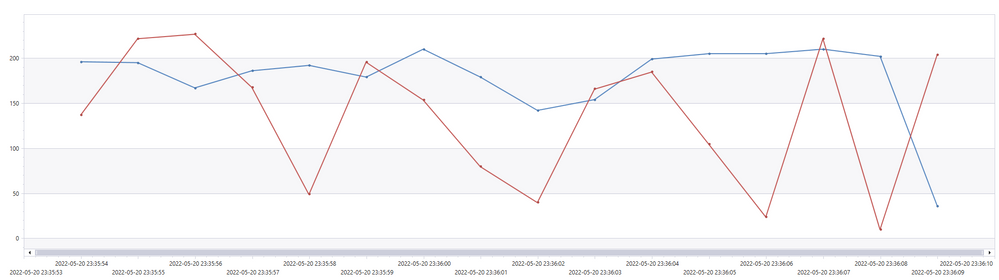
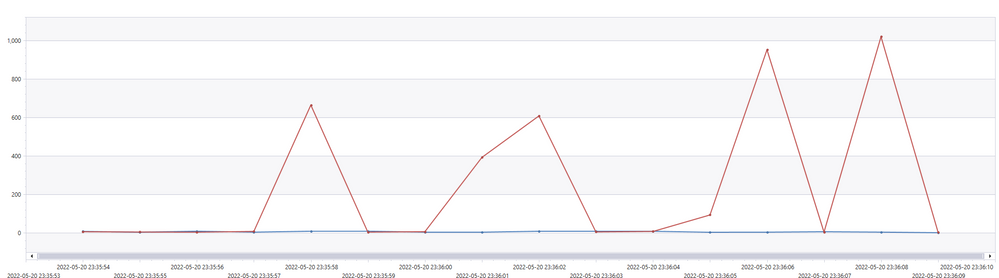
Two interesting graphs are that of execution delay and jobs per second.


Execution delay is the time difference between when a job was scheduled to be executed and when it was actually executed. Lower is better.


WSilveira_0-1662329294437.png


Red = unoptimized


Blue = optimized


From the graph, we see that the unoptimized execution experienced spikes in executing delay. This was due to a synchronization mechanism that we used to wait for a distributed batches of for-each repetition to complete. We were able to optimize that delay away.


Jobs per second is another metric that we looked at because under the hood, all workflows are translated into a sequence of jobs. Higher is better.


WSilveira_1-1662329294448.png


Red = unoptimized


Blue = optimized


We can see that the optimized version remains higher and steadier, meaning that compute resources were more efficiently utilized.


What about Stateful workflows?


As Stateful workflows still run in a distributed manner like Consumption workflows, this optimization is not directly applicable. To maximize the performance of a for-each loop in Stateful, the most important factor is to make sure the app is scaling out enough to handle the workload.

Return of the Power BI join with Kusto

Return of the Power BI join with Kusto

This article is contributed. See the original author and article here.

Return of the join in Power BI with Kusto


Summary


If you are not interested in all the details:


  • You can add to the source statement in Power Query for dimension tables the clause: IsDimension=true

  • You can use both dimensions and fact tables in Direct Query mode, and create relationships between them after you add this setting

  • You can see an example in the attached PBI file


Before


The experience of many users, trying out Power BI with Kusto/ADX data was not always great.


Kusto’s main claim to fame is great performance with very large tables.


Trying to use such tables in PBI using Direct Query was not always fast and sometimes failed with errors about not enough memory to perform the query.


The reason behind this problem in many cases was the use of joins between tables.


Joins in Kusto


You can read about joins here.


One of the important recommendations is when joining a large table (Fact) with a much smaller table (Dimension), is to mention the small table first:


Customers | join kind=rightouter FactSales on CustomerKey


It is also recommended in such cases to add a hint:


Customers | join hint.strategy=broadcast kind=rightouter FactSales on CustomerKey


The hint allows the join to be fully distributed using much less memory.


Joins in PBI


When you create a relationship between two tables from Kusto, and both tables use Direct Query, PBI will generate a join between the two tables.


The join will be structured in this way:


FactSales | join Customers on CustomerKey


This is exactly the opposite of the recommended way mentioned above.


Depending on the size of the fact table, such a join can be slow, use a lot of memory or fail completely.


Recommended strategies until now


In blogs and presentations, we recommended few workarounds.


I’m mentioning it here because I would like to encourage you to revisit your working PBI reports and reimplement the joins based on the new behavior that was just released.


Import the dimension tables


If the dimension tables are imported, no joins will be used.


Any filters based on a dimension table will be implemented as a where based on the column that is the base of the relationship. In many cases this where statement will be very long:


| where CustomerKey in (123,456,678,…) .


If you filter on the gender F and there are 10,00 customers with F in the gender column, the list will include 10,000 keys.


This is not optimal an in extreme cases it may fail.


Join the table in a Kusto function and use the function in PBI


This solution will have good performance, but it requires more understanding of KQL and is different from the way normal PBI tables behave


Join the tables on ingestion using an update policy


Same as the previous method but requires even a deeper understanding of Kusto.


New behavior


Starting from the September version of PBI desktop, the Kusto connector was updated, and you can use relationships between dimension tables and fact table like with any other source with a few changes:


  • In every table that is considered a dimension add IsDimension=true to source step so it will look like


DanyHoter_0-1662301816588.png


  • The data volume of the dimension tables (The columns you will use) should not exceed 10 megabytes.

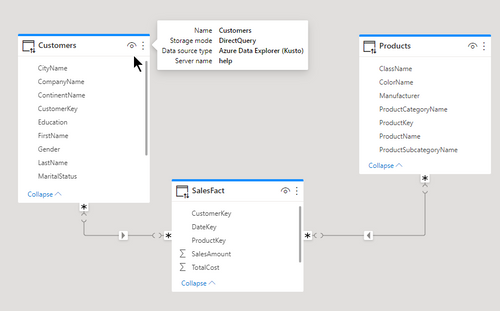
  • Relationships between two tables from Kusto will be identified by PBI as M:M. You can leave it as M:M but be sure to set the filtering direction to single from the dimension to the fact.

  • When the relationship is M:M, the join kind will be inner. If you want a rightouter join (because you are not sure you have full integrity) you need to force the relationship to be 1:1. You can edit the model using Tabular editor (V2 is enough)


DanyHoter_1-1662301816594.png


Before and after


In the attached example you can see two dimension tables with relationships to a fact table. The relationships are M:M and you can see the generated KQL in the text box.


The query as shown takes 0.5 seconds of CPU and uses 8MB of memory


The same query without the new setting takes 1.5 seconds of CPU and 478MB of memory.


Reading Project Online OData with Azure Data Factory

Reading Project Online OData with Azure Data Factory

This article is contributed. See the original author and article here.

The first problem we hear from customers moving to Azure Data Factory (ADF), who have been using SQL Server Integration Services (SSIS) to get their Project Online OData, is that the authentication and authorization is not straightforward.  There isn’t a simple choice to login to Project Online, so you have to make a call to get a token which can then be used in the REST calls to OData.  The following post steps through the process.  I’m not going deep into the details of ADF and won’t cover all the steps of making an App Registration – there are plenty of resources out there, and this concentrates on the authentication then pulls in some Project level data.  It gets more complicated obviously when you also want tasks and assignments, but the same approaches used with SSIS will work just as well in ADF.


TL;DR – if you know all about ADF and Project Online and App Registrations and just want the auth piece – jump to the M365Login section – just about halfway down, or just take a look at https://github.com/LunchWithaLens/adf which has definitions for the whole pipeline.


What you will need:


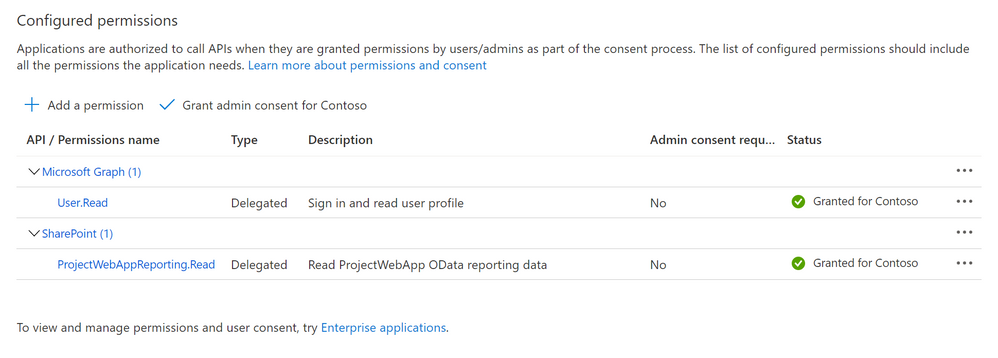
  • An App Registration in Azure Active Directory that allows you to read the Project reporting data.  You will need your Tenant ID and also the Client ID and registered secret of the App Registration


The require App Registration SettingsThe require App Registration Settings


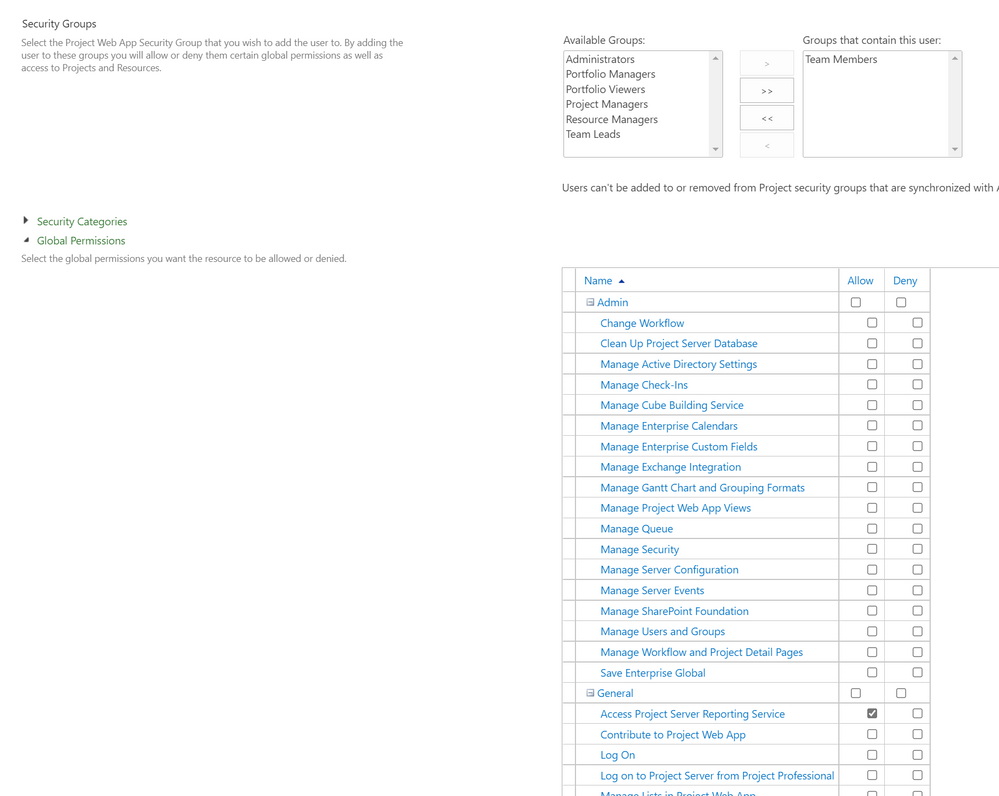
  • A user account that just needs Access to Project Server reporting service.  You will need the account name and password.  The authentication will use the Resource Owner Password Credential (ROPC).  This method of authentication is not recommended when other approaches are available (see Microsoft identity platform and OAuth 2.0 Resource Owner Password Credentials ) but as there is no “app-only” authentication options for Project Online this is one such occasion when this is the only way.  To ensure this is as secure as possible we will be storing the username and password in Azure Key Vault (AKV).  


Minimum user settings for the account (although they don't need Team Member)Minimum user settings for the account (although they don’t need Team Member)


In this example they are also a team member, but that is not necessary.


  • An Azure Data Factory resource in Azure

  • Somewhere to write the data.  In this example I cover both saving out as Json to blob storage in Azure, as well as saving to SQL Server (in this case hosted in Azure.  You will need connection strings for whatever storage you are using

  • If using SQL Server you will need stored procedures that will do the data handling – more details later


Once you have all these pieces in place, we can continue with ADF to:


  • Add Linked Services 

  • Add Datasets

  • Build a pipeline


Linked Services


We need 4 linked services


  1. An Azure Key Vault where we will be storing our account details and App Registration secret

  2. A REST linked service – basically our OData endpoint

  3. Azure Blob Storage (not necessary – but I found it useful in debugging before I added it all into SQL Server)

  4. SQL Server


To keep this blog relatively short, I’m not going into all the details of setting up AKV, just that using a managed identity makes it fairly easy to use in AFD.  


The REST linked literally just needs the base URL configured – and this will be the URL for your PWA instance’s OData feed, along with any select options to limit the returned fields.  As an example, I used:


https://<tenantname>.sharepoint.com/sites/pwa/_api/ProjectData/Projects?$select=ProjectId,ProjectActualCost,ProjectActualDuration,ProjectActualFinishDate,ProjectActualStartDate,ProjectActualWork,ProjectCost,ProjectCreatedDate,ProjectCurrency,ProjectDescription,ProjectDuration,ProjectFinishDate,ProjectIdentifier,ProjectLastPublishedDate,ProjectModifiedDate,ProjectName,ProjectPercentCompleted,ProjectPercentWorkCompleted,ProjectStartDate,ProjectStatusDate,ProjectWork


This limited the columns returned to just those I needed.  The authentication type was left as anonymous as I was handling this latter with a bearer token.


The Azure Blog storage isn’t a necessity – if you want to use one then easy to configure but I won’t go into the full details here.  Ping me in the comments if you can’t find good resources to help.


Finally the SQL Server, and mine was a database I was already using for something else to which I just added a couple of tables and sprocs.  In an earlier attempt I’d configured a more expensive SQL Server instance than I’d realised – and blown through my monthly allowance…  The SQL Server linked service allows easy connectivity to an AKV to get the connection string – for a secure configuration.


Datasets


The datasets match up to 3 of the linked services.  My “RestResource1” to link to my REST, my “ProjectTable” to match up to my SQL database and a specific table, and my “json1” that I use to connect to my blob storage to save a file.  Again, configuring these I leave as an exercise for the reader :) , but the GitHub repo has definitions for all of these so you can see how they hang together.  The pipeline will help them make more sense too – which comes next.


The Pipeline


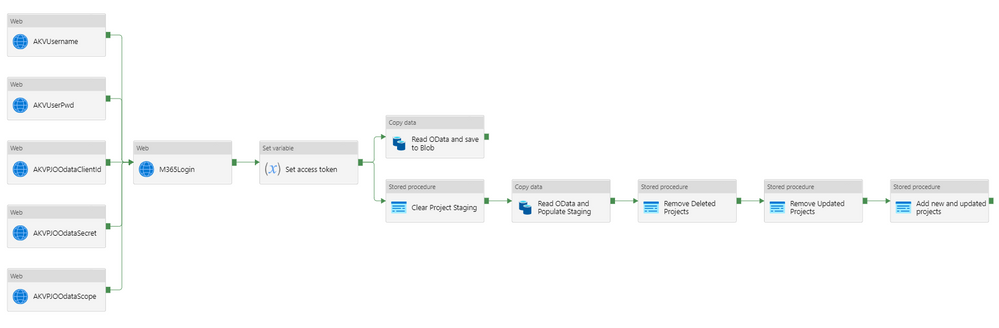
To help visualize where we are headed, first we can look at the final short pipeline:


The full end-to-end pipelineThe full end-to-end pipeline


The first column of activities is reading the required data from AKV.  The names should make it obvious what the data is, the username and password, the ClientId and secret for the app registration, then finally the scope for the authentication call.  This isn’t strictly a ‘secret’ but I put in in the AKV as it helps when demonstrating (or recording) the solution to be able to show the values.  Exposing the scope is no big deal and avoids having to redact stuff in any recording I do.


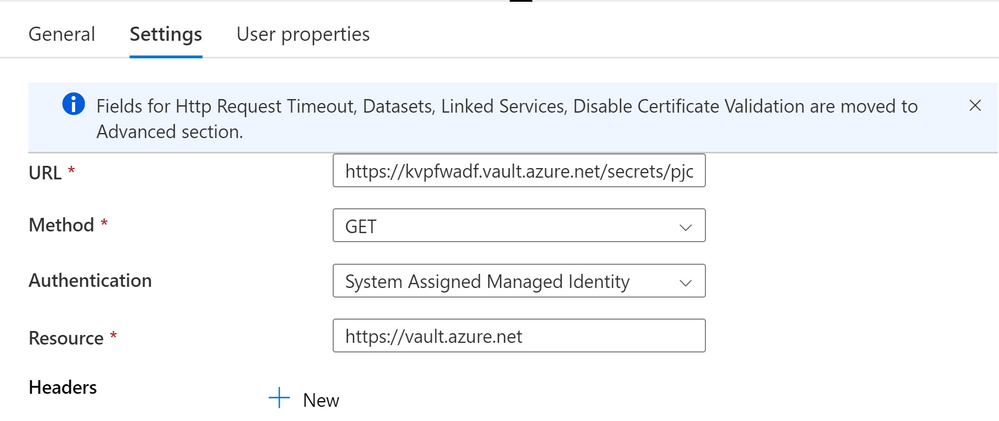
The only part defined for these activities are the settings – and the scope one is a good example:


Example KeyVault settingsExample KeyVault settings


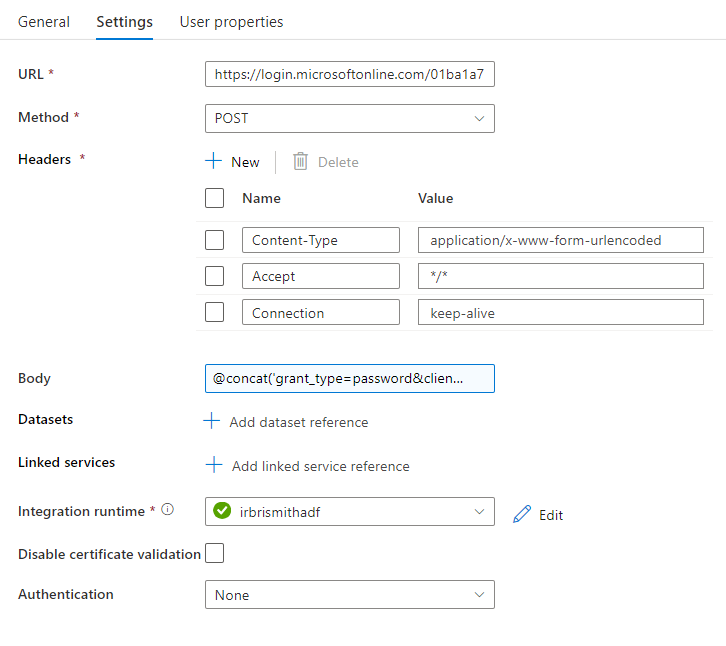
The most interesting step, and maybe the only one you are interested in, is the one I called M365Login – and that is just my name – there isn’t a special activity, it is just a web activity.  The settings for this one are as follows:


Web call settings to get tokenWeb call settings to get token


The URL is of the form https://login.microsoftonline.com/<tenantid>/oauth2/v2.0/token and the method is POST and the headers configured as shown above with Content-Type application/x-www-form-urlencoded, Accept */* and Connection keep-alive.  The Body is the key part – and is using the concatenation function and brings in the values from the previous calls to AKV.  The full form looks something like the following, where I have used specific names for my AKV activities – yours may vary.


@concat(‘grant_type=password&client_id=’,activity(‘AKVPjoClientId’).output.value,‘&client_secret=’,activity(‘AKVPjoODataSecret’).output.value,‘&scope=’,activity(‘AKVPjoScope’).output.value,‘&username=’,activity(‘AKVUserName’).output.value,‘&password=’,activity(‘AKVUserPassword’).output.value)


Basically it is using the output.value property of the previous steps to complete the “grant_type” body needed for an ROPC call.


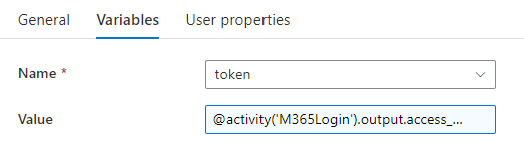
I then use a Set variable action to take the response and keep the token for later use.


Variable setting for tokenVariable setting for token

The full string used in the Value is @activity(‘M365Login’).output.access_token


Now I have my token I can use that to make my REST call to Project Online’s OData endpoint using a Copy data activity.  First I use a Stored procedure activity to clear out my staging table.  Take a look at the GitHub for more details, but it is just a ‘delete from’ call.

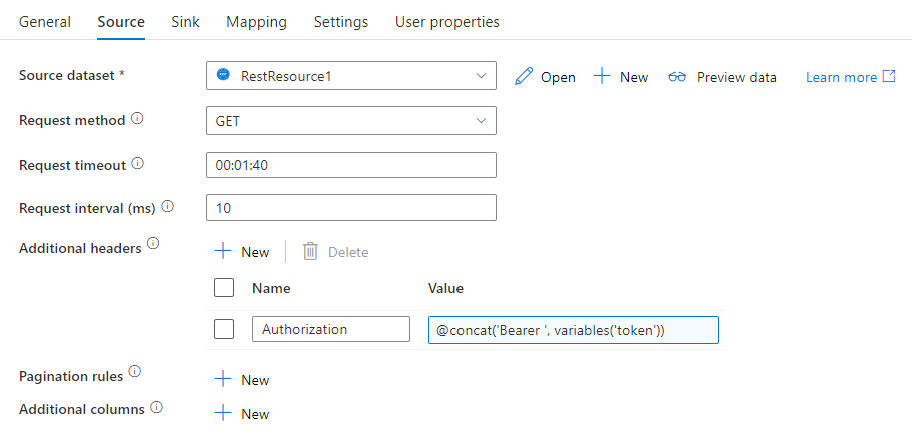
The copy data activity has a source and sink (destination) and I use one to read and then write to blob storage, then another to read and write to SQL.  I’ll concentrate on the second, which has Source settings configured like this:

Source data settingsSource data settings

The source dataset is my REST dataset, I add the header Authorization with a Value of  


@concat(‘Bearer ‘,variables(‘token’))


 which gets the token from my variable called token, and I have also set the Pagination rulesRFC5988 with a Value True (although that isn’t in the above screenshot.

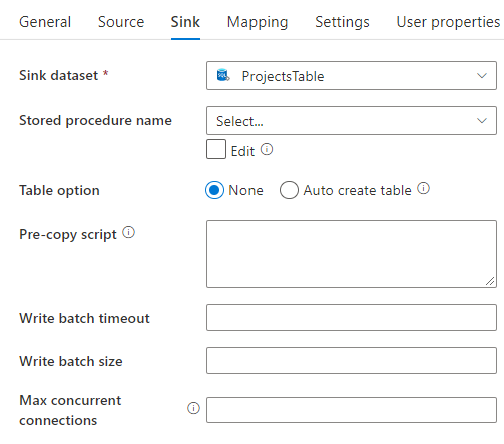
The Sink settings are as follows:

Sink data settingsSink data settings

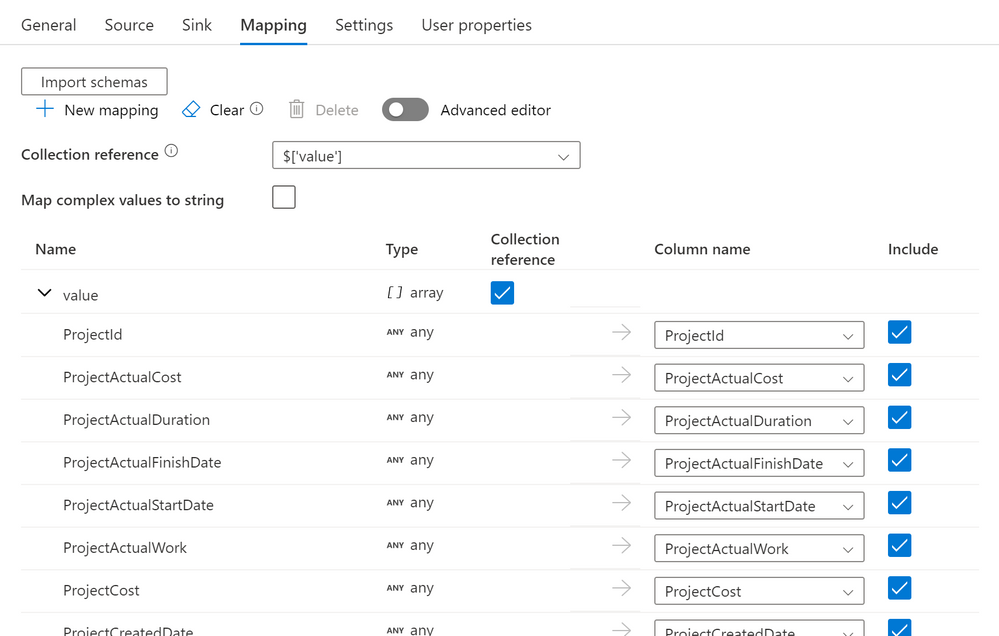
with the sink dataset as my SQL dataset ‘ProjectsTable’.  The magic happens on the Mappings tab – and I had created a table that matched the columns I was returning from REST – so just a 1:1 mapping.  You can get more adventurous here if you need to do anything fancy:

Data mapping from OData to my SQL tableData mapping from OData to my SQL table


Once that is complete, we have a populated Project staging table with the current projects read from OData.  The final steps are then just 3 stored procedure steps that remove deleted projects from the live project table (by deleting if they do not now exist in staging). also deleting any projects that have been updated (the modified date is newer in the staging table) and then finally copying in the updated and new plans from staging to the live table. 

As mentioned, this is just the basics and only looks at Projects – but the main focus here was the authentication steps of getting the token with ROPC, then using the token in the REST call. 


I appreciate I have glossed over a lot of the detail here so happy to fill in some of the gaps if required in the comments section or another blog if needed.  However, if you know ADF and already use SSIS – the authentication piece was probably all you came for.