
by Contributed | Jul 25, 2022 | Dynamics 365, Microsoft 365, Technology
This article is contributed. See the original author and article here.
Data protection and privacy regulations, such as the General Data Protection Regulation (GDPR) in the European Union and the California Consumer Privacy Act (CCPA) in the United States, give individuals the right to govern how an organization uses their personal data. These regulations allow people to opt in or out of having their personal data collected, processed, or shared, and require organizations to implement reasonable procedures and practices to obtain and respect their customers’ data use consent.
What is consent?
What do we mean when we talk about “consent” in the context of data protection and privacy? Simply put, it’s an individual’s decision about whether and how data about them is collected and used. Easy to define, but extraordinarily complex in practice.
Organizations have multiple types of information about their customers, including transactional data (such as membership renewals), behavioral data (such as URLs visited), and observational data (such as time spent on specific webpages). Additionally, customers can have multiple types of contact points (such as email addresses, phone numbers, and social media handles). Adding to an already complex challenge, the purposes for using customer data can vary across an organization’s lines of business and can number in the dozens.
Consider the example of an online sports franchise that has two different lines of business: football merchandise and memberships. The organization will need to capture the following information to use a customer’s data with their consent:
- Organization: Contoso Football Franchise
- Line of business: Football merchandise
- Contact point: someone@example.com
- Purpose for using data: Email communications with promotional offers for football merchandise
- Consent preference: Opt-in/opt-out
A customer’s consent to collect and use their data must be obtained for each data source, contact point, and use or purpose.
The challenge: Obtain consent for multiple types of personal data and contact points
Every industry around the globe is affected by privacy legislation and related requirements, from the Health Insurance Portability and Accountability Act (HIPAA) in the healthcare industry, to the Children’s Online Privacy Protection Act (COPPA) in online services, to legal frameworks such as the GDPR, to state-specific acts such as the CCPA. Requesting and respecting your customer’s consent for each contact point, type of data, and the purposes to which the data is putwhich must comply with all applicable data protection and privacy regulationsquickly becomes a monumental task.
The solution: Include consent in your customer data platform
One way to be sure you’ve captured granular levels of consent preferences is to ingest customer data from various sourcestransactional, behavioral, and observationalinto a customer data platform (CDP). A CDP like Microsoft Dynamics 365 Customer Insights helps you build a complete picture of individual customers that includes their consent for specific uses of their data.
Unified customer profiles in Customer Insights provide 360-degree views of your customers, including the consent they’ve granted for using their data. Customer Insights enables companies to add their captured consent data as a primary attribute, ensuring that you can honor your customers’ preferences for the collection, processing, and use of their data. Capturing consent preferences can help you power personalized experiences for customers while at the same time respecting their right to privacy.
Respecting customers’ preferences for specific data use purposes is key to building trust relationships. Dynamics 365 Marketing automatically applies consent preferences through subscription centers to support compliance with the GDPR, CCPA, HIPAA, and other data protection and privacy regulations.
Why include consent in a unified customer profile?
Here are three common scenarios that illustrate the significant advantages to having consent data as part of a single, unified customer profile.
Consent data is specific to lines of business and, hence, is often fragmented.
Consider our earlier example of the online sports franchise with two different lines of business, football merchandise and memberships. This organization is likely to have separate consent data captured by each line of business for the same customer. It makes a lot of sense to unify these consent data sources into a single profile to enforce organization-wide privacy policies.
The customer can revoke consent at any time and expects the business to honor the change with immediate effect. For instance, when a customer who is browsing a website revokes consent for tracking, it must stop immediately. Otherwise, the business risks losing the customer’s trust and could be in violation of regulatory requirements.
When customer consent data isn’t stored with the unified profile, there can be significant delays in syncing data between the marketing application and the consent data source. As part of a unified profile, however, consent data can be updated automatically and the updated profiles can be used to refresh segments, ensuring that customers who have revoked consent are excluded from the segments in a timely manner.
Personal data is anonymized or pseudonymized. Anonymized or pseudonymized customer data is often used for machine learning and AI processing, for instance. If customers’ consent to use their data for this purpose is recorded in separate anonymized or pseudonymized user profiles, it becomes much harder to map a given customer profile across different data sources. When the consent data is stored in a unified profile, however, the organization can continue to get the benefit of data from combined customer interactions when the user identity is anonymized or pseudonymized.
Learn more
Check out the following resources to learn more about customer consent, unified profiles in Dynamics 365 Customer Insights, the GDPR, and the CCPA.
The post Honor customer data use consent with unified profiles in Dynamics 365 Customer Insights appeared first on Microsoft Dynamics 365 Blog.
Brought to you by Dr. Ware, Microsoft Office 365 Silver Partner, Charleston SC.
by Contributed | Jul 25, 2022 | Technology
This article is contributed. See the original author and article here.
Overview
As more businesses convert OT systems to digital IT infrastructures, security operations center (SOC) teams and chief information security officers (CISOs) are increasingly responsible for handling threats from OT networks.
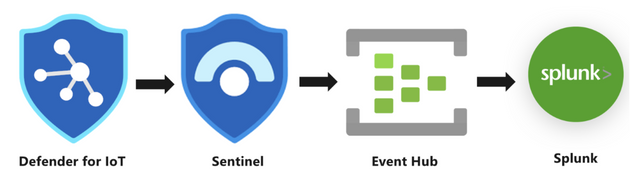
Defender for IoT’s built-in integration with Sentinel helps bridge the gap between IT & OT security challenge. Sentinel enables SOC teams to reduce the time taken to manage and resolve OT incidents efficiently by providing out-of-the-box capabilities to analyze OT security alerts, investigate multistage IT/OT attacks, utilize Azure Log Analytics for threat hunting, utilize threat intelligence, and automate incident response using SOAR playbooks.
Customer engagements have taught us that sometimes customers prefer to maintain their existing SIEM, alongside Microsoft Sentinel, or as a standalone SIEM.
In this blog, we’ll introduce a solution that sends Microsoft Defender for IoT alerts to an Event Hub that can be consumed by a 3rd party SIEMs. You can use this solution with Splunk, QRadar, or any other SIEM that supports Event Hub ingestion.
Preparation and use
In this blog, we’ll use Splunk as our example.
The following describe the necessary preparation steps:
- Connect your alerts from Defender for IoT to Microsoft Sentinel
- Register an application in Azure AD
- Create an Azure Event Hub Namespace
- Prepare Azure Sentinel to forward Incidents to Event Hub
- Configure Splunk to consume Azure Sentinel Incidents from Azure Event Hub
1. Connect your alerts from Defender for IoT to Microsoft Sentinel
The first step is to enable the Defender for IoT data connector so that all Defender for IoT alerts are streamed into Microsoft Sentinel (a free process).
In Microsoft Sentinel, under Configuration, select Data Connectors and then locate Microsoft Defender for IoT data connector. Open the connector page, select the subscription whose alerts you want to stream into Microsoft Sentinel, and then select Connect.
For more information, see Connect your data from Defender for IoT to Microsoft Sentinel
2. Register an application in Azure AD
You’ll need Azure AD to be defined as a service principal for Splunk Add-on for Microsoft Cloud Services.
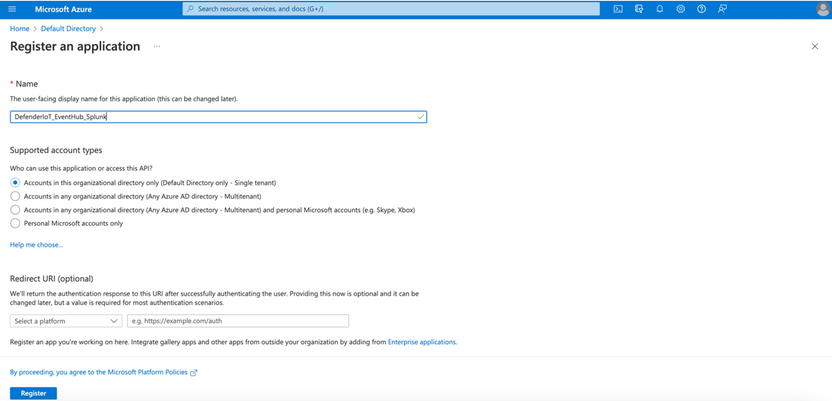
- To register an app in Azure AD, open the Azure Portal and navigate to Azure Active Directory > App Registrations > New Registration. Fill the Name and click Register.
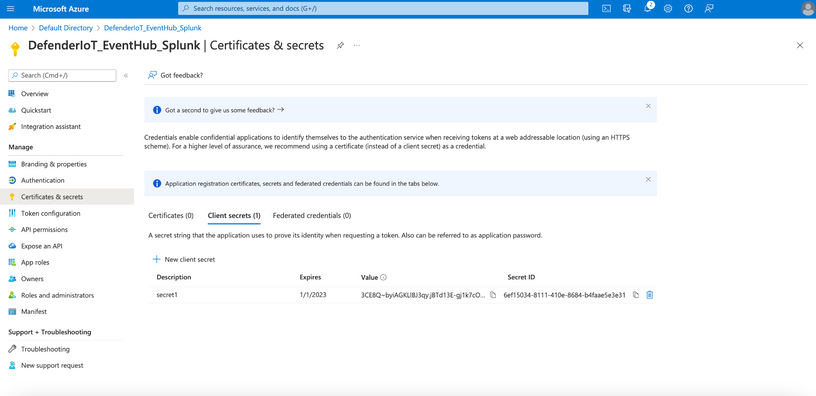
- Click Certificates & secrets to create a secret for the Service Principle. Click New client secret and note its value.
- To grant the required permissions to read data from the app, click API permissions > Add a permission and select Microsoft Graph > Application permissions > SecurityEvents.ReadWrite.All.
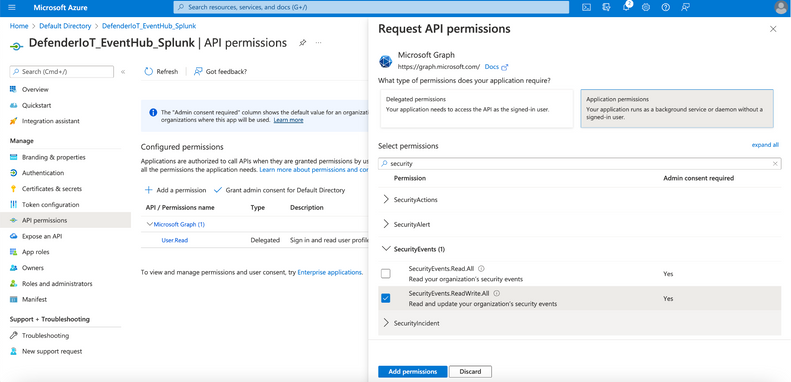
Ensure that the granted permission is approved by admin.
- For the next step of setting up Splunk Add-on for Microsoft Cloud Services, note the following settings:
- The Azure AD Display Name
- The Azure AD Application ID
- The Azure AD Application Secret
- The Tenant ID
3. Create an Azure Event Hub Namespace
- In the Azure Portal, navigate to Event Hubs > New to create a new Azure Event Hub Namespace. Define a Name, select the Pricing Tier and Throughput Units and click Review + Create.
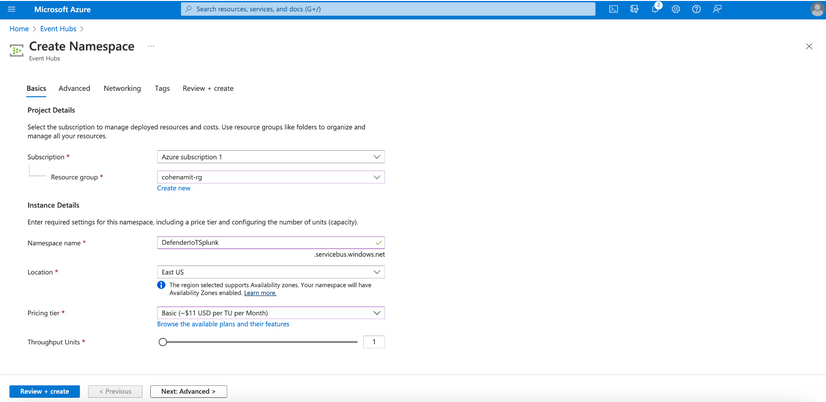
- Once the Azure Event Hub Namespace is created click Go to resource and click + Event Hubs to create an Azure Event Hub within the Azure Event Hub Namespace.
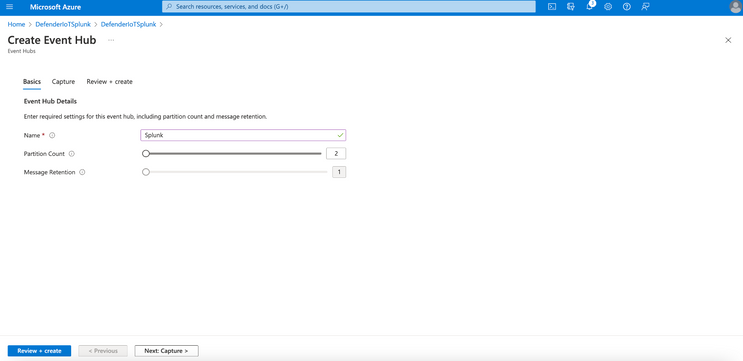
- Define a Name for the Azure Event Hub, configure the Partition Count, Message Retention and click Review + Create.
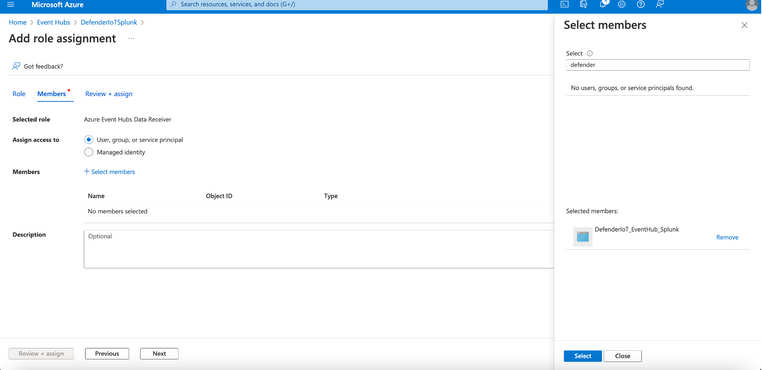
- Navigate to Access control (IAM) and Click + Add > Add role assignment to add the Azure AD Service Principle created before and delegate as Azure Event Hubs Data Receiver and click Save.
- For the configuration of Splunk Add-on for Microsoft Cloud Services app, make a note of following settings:
- The Azure Event Hub Namespace Host Name
- The Azure Event Hub Name
4. Prepare Azure Sentinel to forward Incidents to Event Hub
To forward Microsoft Sentinel incidents or alerts to Azure Event Hub, you’ll need to define your Microsoft Sentinel workspace with a data export rule.
- In the Azure Portal, navigate to Log Analytics > select the workspace name related to Microsoft Sentinel > Data Export > New export rule.
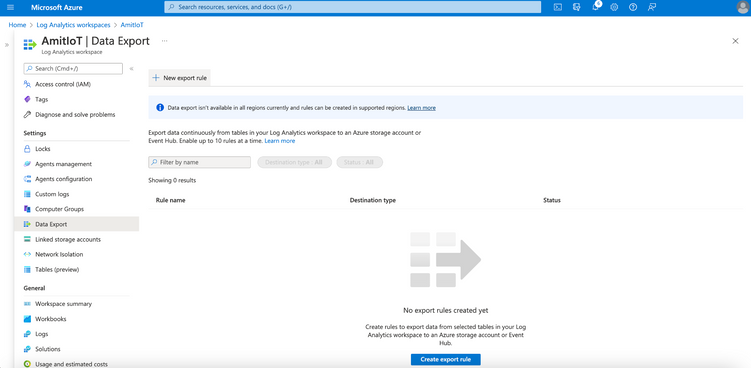
- Name the rule, configure the Source as SecurityIncident and the Destination as Event Type utilizing the Event Hub Namespace and Event Hub Name configured previously. Click on Create.
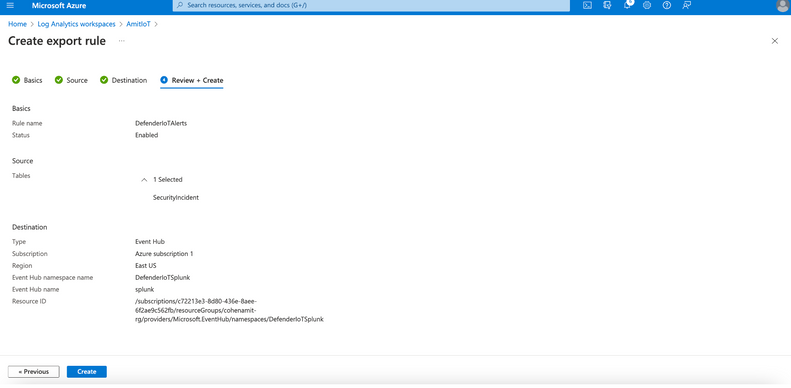
5. Configure Splunk to consume Microsoft Sentinel Incidents from Azure Event Hub
For Microsoft Defender for IoT alerts to be ingested into Azure Event Hub, install the Splunk Add-on for Microsoft Cloud Services app.
- For the installation, open the Splunk portal and navigate to Apps > Find More Apps. For the dashboard find the Splunk Add-on for Microsoft Cloud Services app and Install.
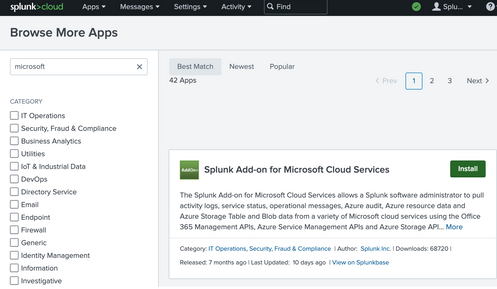
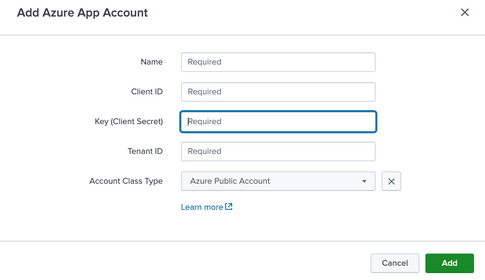
- To add the Azure AD Service Principal, open the Splunk app and navigate to Azure App Account > Add. Use the details you’d noted earlier:
Define a Name for the Azure App Account
Add the Client ID, Client Secret, Tenant ID
Choose Azure Public Cloud as Account Class Type
Click Update to save and close the configuration.
Now navigate to Inputs within the Splunk Add-on for Microsoft Cloud Services app and select Azure Event Hub in Create New Input selection.
Define a Name for the Azure Event Hub as Input, select the Azure App Account created before, define the Event Hub Namespace (FQDN), Event Hub Name, let the other settings as default and click Update to save and close the configuration.
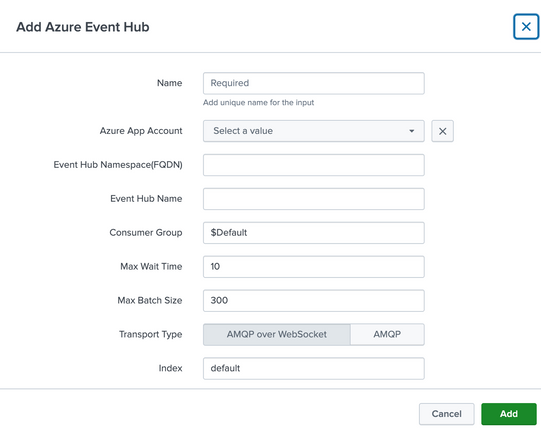
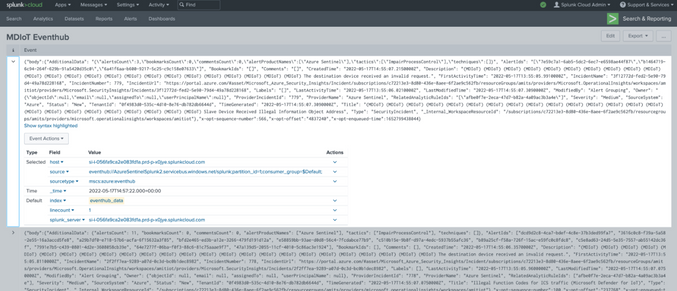
Once the ingestion is processed, you can query the data by using sourcetype=”mscs:azure:eventhub” in search field.
Disclaimer: The use of EventHub and Log Analytics export rule may incur an additional charge. For more information, see Event Hubs pricing and Log Data Export pricing
by Contributed | Jul 23, 2022 | Technology
This article is contributed. See the original author and article here.
Mithun Prasad, PhD, Senior Data Scientist at Microsoft and Manprit Singh, CSA at Microsoft
Speech is an essential form of communication that generates a lot of data. As more systems provide a modal interface with speech, it becomes critical to be able to analyze human to computer interactions. Interesting market trends point that voice is the future of UI. This claim is further bolstered now with people looking to embrace contact less surfaces with the recent pandemic.
Interactions between agents and customers in a contact center remains dark data that is often untapped. We believe the ability to transcribe speech in the local dialects/slang should be in the midst of a call center advanced analytics road map such as the one proposed in this McKinsey recommendation. To enable this, we want to bring the best from the current speech transcription landscape, and present it in a coherent platform which businesses can leverage to get a head start on local speech to text adaptation use cases.
There is tremendous interest in Singapore to understand Singlish.
Singlish is a local form of English in Singapore that blends words borrowed from the cultural mix of communities.
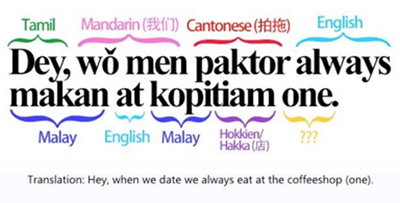
An example of what Singlish looks like
A speech recognition system that could interpret and process the unique vocabulary used by Singaporeans (including Singlish and dialects) in daily conversations is very valuable. This automatic speech transcribing system could be deployed at various government agencies and companies to assist frontline officers in acquiring relevant and actionable information while they focus on interacting with customers or service users to address their queries and concerns.
Efforts are on to understand calls made to transcribe emergency calls at Singapore’s Civil Defence Force (SCDF) while AI Singapore has launched Speech Lab to channel efforts in this direction. Now, with the release of the IMDA National Speech Corpus, local AI developers now have the ability to customize AI solutions with locally accented speech data.
IMDA National Speech Corpus
The Infocomm Media Development Authority of Singapore has released a large dataset, which is:
• A 3 part speech corpus each with 1000 hours of recordings of phonetically-balanced scripts from ~1000 local English speakers.
• Audio recordings with words describing people, daily life, food, location, brands, commonly found in Singapore. These are recorded in quiet rooms using a combination of microphones and mobile phones to add acoustic variety.
• Text files which have transcripts. Of note are certain terms in Singlish such as ‘ar’, ‘lor’, etc.
This is a bounty for the open AI community in accelerating efforts towards speech adaptation. With such efforts, the trajectory for the local AI community and businesses are poised for major breakthroughs in Singlish in the coming years.
We have leveraged the IMDA national speech corpus as a starting ground to see how adding customized audio snippets from locally accented speakers drives up accuracy of transcription. An overview of the uptick is in the below chart. Without any customization, the holdout set performed with an accuracy of 73%. As more data snippets were added, we can validate that with the right datasets, we can drive accuracy up using human annotated speech snippets.
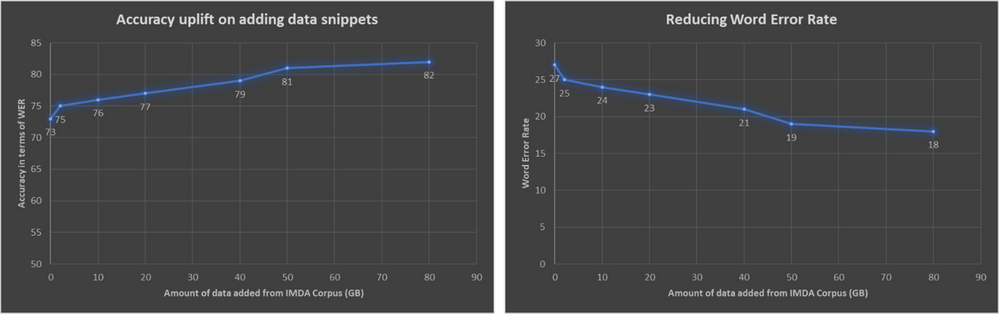
On the left is the uplift in terms of accuracy. The right correspondingly shows the Word Error Rate dropping on addition of more audio snippets
Keeping human in the loop
The speech recognition models learn from humans, based on “human-in-the-loop learning”. Human-in-the-Loop Machine Learning is when humans and Machine Learning processes interact to solve one or more of the following:
- Making Machine Learning more accurate
- Getting Machine Learning to the desired accuracy faster
- Making humans more accurate
- Making humans more efficient
An illustration of what a human in the loop looks like is as follows.
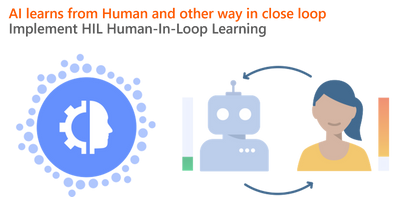
In a nutshell, human in the loop learning is giving AI the right calibration at appropriate junctures. An AI model starts learning for a task, which eventually can plateau over time. Timely interventions by a human in this loop can give the model the right nudge. “Transfer learning will be the next driver of ML success.”- Andrew Ng, in his Neural Information Processing Systems (NIPS) 2016 tutorial
Not everybody has access to volumes of call center logs, and conversation recordings collected from a majority of local speakers which are key sources of data to train localized speech transcription AI. In the absence of significant amounts of local accented data with ground truth annotations, and our belief behind transfer learning to be a powerful driver in accelerating AI development, we leverage existing models and maximize their ability to understand towards local accents.
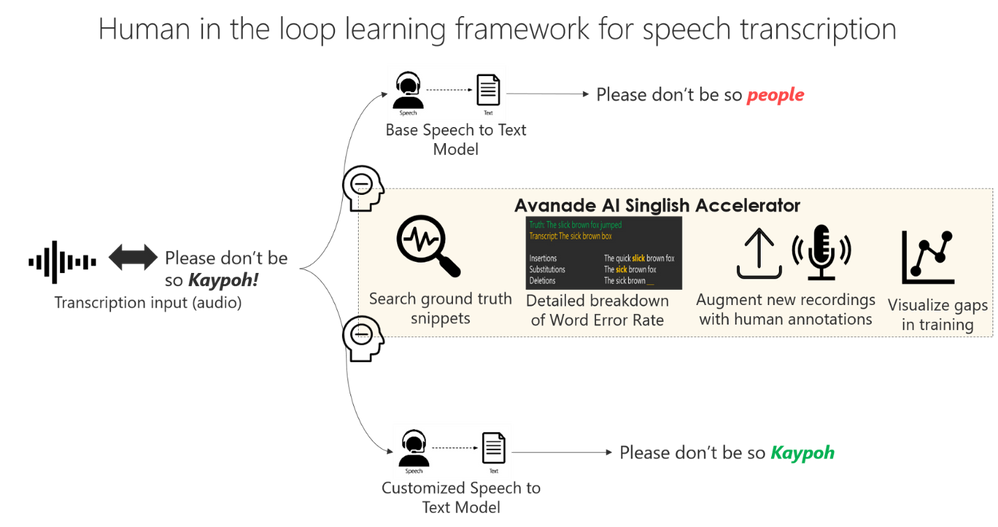
The framework allows extensive room for human in the loop learning and can connect with AI models from both cloud providers and open source projects. A detailed treatment of the components in the framework include:
- The speech to text model can be any kind of Automatic Speech Recognition (ASR) engine or Custom Speech API, which can run on cloud or on premise. The platform is designed to be agnostic to the ASR technology being used.
- Search for ground truth snippets. In a lot of cases when the result is available, a quick search of the training records can point to the number of records trained, etc.
- Breakdown on Word Error Rates (WER): The industry standard to measure Automatic Speech Recognition (ASR) systems is based on the Word Error Rate, defined as the below
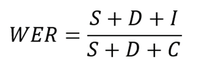
where S refers to the number of words substituted, D refers to the number of words deleted, and I refer to the number of words inserted by the ASR engine.
A simple example illustrating this is as below, where there is 1 deletion, 1 insertion, and 1 substitution in a total of 5 words in the human labelled transcript.

Word Error Rate comparison between ground truth and transcript (Source: https://docs.microsoft.com/en-us/azure/cognitive-services/speech-service/how-to-custom-speech-evaluate-data)
So, the WER of this result will be 3/5, which is 0.6. Most ASR engines will return the overall WER numbers, and some might return the split between the insertions, deletions and substitutions.
However, in our work (platform), we can provide a detailed split between the insertions, substitutions and deletions.
- The platform built has ready interfaces that allow human annotators to plug audio files with relevant labeled transcriptions, to augment data
- It ships with dashboards which show detailed substitutions, such as how often was the term ‘kaypoh’ transcribed as ‘people’.
The crux of the platform is the ability to control the existing transcription accuracy, by getting a detailed overview of how often the engine is having trouble transcribing certain vocabulary, and allowing human to give the right nudges to the model.
References and useful links
- https://yourstory.com/2019/03/why-voice-is-the-future-of-user-interfaces-1z2ue7nq80?utm_pageloadtype=scroll
- https://www.mckinsey.com/business-functions/operations/our-insights/how-advanced-analytics-can-help-contact-centers-put-the-customer-first
- https://www.straitstimes.com/singapore/automated-system-transcribing-995-calls-may-also-recognise-singlish-shanmugam
- https://www.aisingapore.org/2018/07/ai-singapore-harnesses-advanced-speech-technology-to-help-organisations-improve-frontline-operations/
- https://livebook.manning.com/book/human-in-the-loop-machine-learning/chapter-1/v-6/17
- https://www.youtube.com/watch?v=F1ka6a13S9I
- https://ruder.io/transfer-learning/
- https://www.imda.gov.sg/programme-listing/digital-services-lab/national-speech-corpus
*** This work was performed in collaboration with Avanade Data & AI and Microsoft.
by Contributed | Jul 22, 2022 | Technology
This article is contributed. See the original author and article here.
Hey there, MTC’ers! It’s been a busy week, so let’s jump right on in and look at what’s been happening in the Community this past week.
MTC Moments of the Week
This week, Community Events made a triumphant return with a double hitter!
Earlier this month, @Alex Simons published a blog post announcing the general availability of Microsoft Entra Permissions Management, and this past Tuesday, July 19, we had our first Entra AMA featuring @Nick Wryter, @Laura Viarengo, and @Mrudula Gaidhani.
Then, on Thursday, we had Tech Community Live: Endpoint Manager edition, which featured four AMA live streams all about the latest Endpoint Manager capabilities, including Windows Autopilot, Endpoint Analytics, and more! Thank you to everyone who attended :)
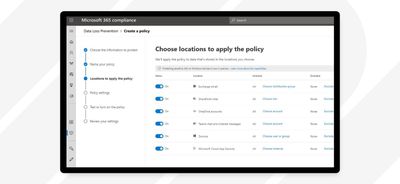
On the blogs this week, @Rafal Sosnowski published a post announcing the sunset of Windows Information Protection (WIP) and sharing resources on its successor, Microsoft Purview Data Loss Prevention (DLP), which you can try for free by enabling the free trial from the Microsoft Purview compliance portal.
I also want to shout out @Sergei Baklan for helping @Jammin2082 with their Morse code translator in Excel. What a cool way to use Excel!
Unanswered Questions – Can you help them out?
Every week, users come to the MTC seeking guidance or technical support for their Microsoft solutions, and we want to help highlight a few of these each week in the hopes of getting these questions answered by our amazing community!
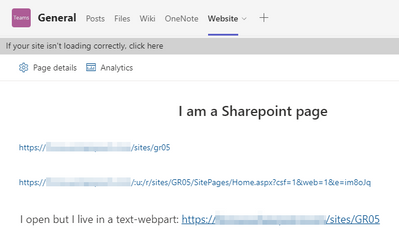
This week, @Florian Hein shared a scenario they’ve run into involving links to Sharepoint pages not opening from within Teams. Have you experienced this before?
Meanwhile, new contributor @eliekarkafy is looking for guidance in building documentation for an Azure Governance Framework. If you have recommendations or a template to share, hop in and help a fellow MTC’er!
Next Week – Mark your calendars!


Recent Comments