VMware Releases Security Updates

This article is contributed. See the original author and article here.

VMware has released security updates to address multiple vulnerabilities in vCenter Server and Cloud Foundation. A remote attacker can exploit this vulnerability to obtain access to sensitive information.

CISA encourages users and administrators to review VMware Security Advisory VMSA-2021-0027 and apply the necessary updates.

Celebrate Hanukkah without the scams

Celebrate Hanukkah without the scams

This article was originally posted by the FTC. See the original article here.

Hanukkah is all about spending time with loved ones, celebrating traditions, and, for many, giving gifts. So, as you start preparing for all eight nights, here are some things you can do to avoid scammers when shopping online:

  • Check the seller before you buy. Search online for the name of the seller and product, plus words like “complaint” and “scam.” And read reviews about the seller and their products, too.
  • Look at the seller’s refund and shipping policies. Look for things like who pays the cost for shipping returns, how long you have to return the product, and whether there are any other fees you might have to pay. Check out the seller’s shipping policy, too. If they don’t promise a time to send out your order, they must ship within 30 days.
  • Pay by credit card. Using a credit card gives you more rights to dispute the charge if something goes wrong than other types of payment. And never buy from sellers that only accept gift cards, money transfers, or cryptocurrency for payment.

If you spot a scam or experience problems shopping online, the FTC wants to hear about it at ReportFraud.ftc.gov.

Brought to you by Dr. Ware, Microsoft Office 365 Silver Partner, Charleston SC.

Use intelligence to transform routing of service delivery requests

Use intelligence to transform routing of service delivery requests

This article is contributed. See the original author and article here.

Any call center that uses unified routing to manage and assign incoming support requests is going to notice gains in efficiency. The core routing capabilities in Dynamics 365 Customer Service use skill matching and priority to help determine assignments. However, bringing intelligence to the challenge of efficient routing can move you closer to world-class service.

With the unified routing release in April of 2021, we introduced intelligent skill finder as the first capability related to intelligent work classification. It empowers organizations to identify which skills are required by the agent to address an incoming work item. AI models are trained to understand the skills required to address customer inquiries, and then a match is made to agent skills, helping to assign the calls to agents. In this new release, we’re adding two more capabilities to intelligent work classification: customer sentiment identification and effort estimation for routing. These capabilities will enable organizations to harness state-of-the-art AI to improve customer satisfaction and reduce resolution times.

Understanding customer needs with sentiment identification

Matching agents to calls based on skills is a basic capability in unified routing. What if you could also gauge customer sentiment based on keywords, and then route calls to agents best able to handle those various emotions?

Let’s better understand this with a scenario. Imagine Contoso Coffee is operating a support center and has implemented unified routing. They recently had a high volume of unhappy customers, and they brainstormed about how best to use their existing staff to address these concerns. Contoso Coffee realizes that customer sentiment could be used as a signal to influence call routing; some agents are better at managing unhappy customers. Contoso decides to adopt sentiment prediction in unified routing. They take a few simple steps:

  1. Contoso’s admin opts into the feature and tries it out using the Dry Run tool, where the admin can test phrases specific to their organization and view the sentiment prediction.
  2. The admin set up a skill for managing work items predicted to include low (unhappy) sentiment, and that skill is assigned to their agents who have the right training to handle it.
  3. The admin configured a rule to predict sentiment, and it attaches the low sentiment management skill to work items when sentiment is low.
  4. The dry run option is used to start testing out the rule, with work items assigned based on the score.
  5. Now, once the rule is in production, new work items predicted to have low sentiment have a higher priority to be matched to agents with the appropriate management skillset.

As a result, Contoso Coffee was able to address the spike in unhappy customers, leveraging their agents to maintain customer satisfaction.

Learn more about using customer sentiment in classification in this short video introduction:

This embed requires accepting cookies from the embed’s site to view the embed. Activate the link to accept cookies and view the embedded content.

This site uses cookies for analytics, personalized content and ads. By continuing to browse this site, you agree to this use.

Read more in the documentation about using sentiment prediction-based model in work classification.

Estimate effort to increase assignment efficiency

A key contributor to an effective contact center is understanding how long it will take to address support requests. Organizations do not have a simple way to understand how much time it will take agents to address incoming work items. Effort estimation replaces manual processes with the use of AI. This intelligence interprets the issue and uses historical support data to generate a work estimate.

Highlights of this capability include:

  • For training, a business admin can specify which work items to train on and define effort for their organization.
  • Use the dry run experience to test out the model on customer data and view real effort estimations prior to integrating into the routing process.
  • Add it to existing routing capabilities such as route to queue rules.
  • Review diagnostics for insight into how the work item was routed using effort estimations.
  • Train multiple custom models based on individual customer data.

Learn more about effort-based routing in this short video introduction:

This embed requires accepting cookies from the embed’s site to view the embed. Activate the link to accept cookies and view the embedded content.

This site uses cookies for analytics, personalized content and ads. By continuing to browse this site, you agree to this use.

Read more in the documentation about using the effort estimation model in unified routing.

Matching required skills to agents

In any contact center, each agent will have a different set of skills to offer, and organizations should use those skills appropriately to best address customer requests. To maximize agent potential, it is critical for any organization to understand the skills required to address a work item and identify the agent that is best suited to address it. Intelligent skill finder takes the guesswork out of this by using AI to predict the skills required to address an incoming work item, and then matching those required skills to corresponding agents.

Highlights of this capability include:

  • For training, a business admin can specify which work items to train.
  • Use it with skill-based routing.
  • Models can improve over time based on the agent feedback loop.
  • Review diagnostics for insight into how the work item was routed using skill predictions.
  • Train multiple custom models based on individual customer data.

Next steps

Visit the Dynamics 365 Customer Service Community Forum to share your thoughts.

This blog post is part of a series of deep dives that will help you deploy and use unified routing at your organization. See other posts in the series to learn more.

The post Use intelligence to transform routing of service delivery requests appeared first on Microsoft Dynamics 365 Blog.

Brought to you by Dr. Ware, Microsoft Office 365 Silver Partner, Charleston SC.

What are people reporting at DoNotCall.gov?

What are people reporting at DoNotCall.gov?

This article was originally posted by the FTC. See the original article here.

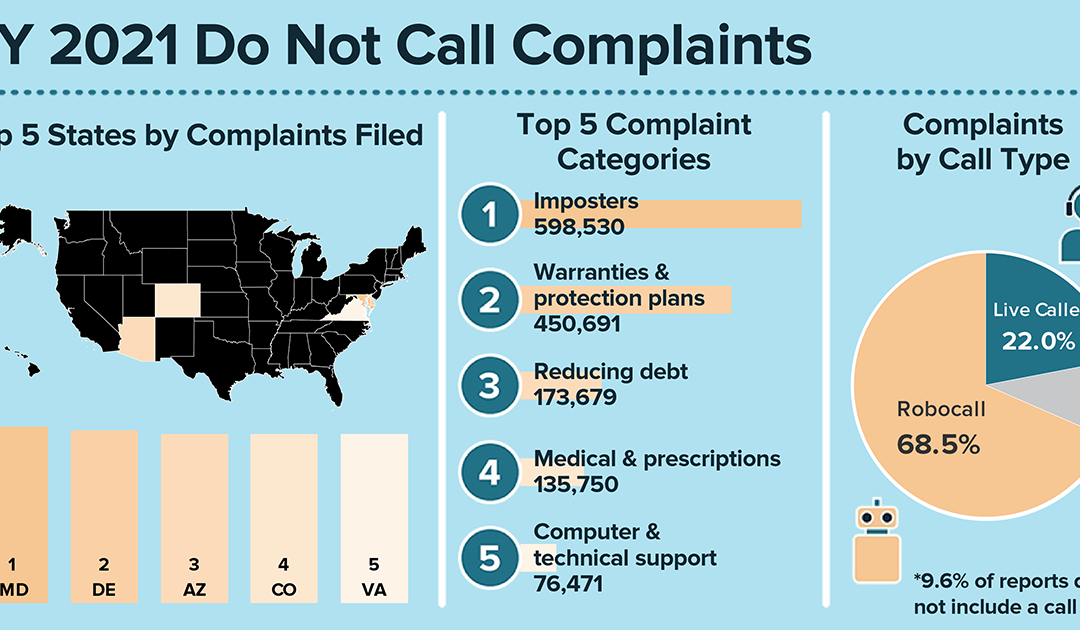
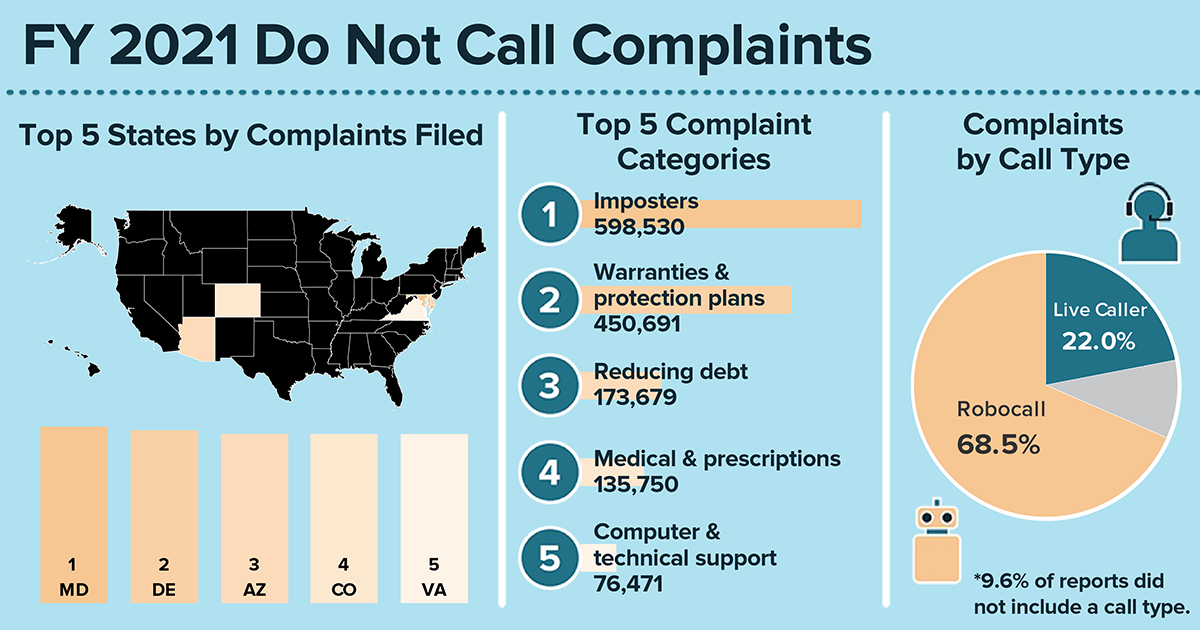
Graphic showing complaint data from the FY2021 Do Not Call databookIn the past 18 years of the National Do Not Call Registry, those of you signed up for the registry (244 million phone numbers right now) have reported millions upon millions of unwanted sales calls over the years. Here’s a quick look at what you’ve reported this year at DoNotCall.gov about the calls you’re getting:

  • The overwhelming majority of calls reported were robocalls — 68 percent of the 5 million calls you reported during the fiscal year ending October 2021 were robocalls. (If you answer the phone and hear a recorded message instead of a live person, it’s a robocall). Another 22 percent were live calls.
  • The most common topic of the calls you reported was imposters, including calls from scammers pretending to be the Social Security Administration or IRS.
  • The next most-reported topic — up by more than 175,000 from last year — was warranties and protection plans. Following that were calls about debt reduction, medical and prescription issues, and computers and technical support.

Learn more about these reports, including data for your state.

Your reports show what we all know — even if you’re on the registry, you’re still getting unwanted calls. Legitimate, law-abiding companies typically follow the Do Not Call rules. But scammers often ignore them. To get fewer calls, read about some steps you can take to block unwanted calls.

And please, keep reporting calls at DoNotCall.gov. The FTC and other law enforcement agencies analyze reports to identify and take action against the people responsible for illegal calls and scams. The FTC also takes the phone numbers you report and releases them each business day to help telecommunications carriers and other industry partners that are working on call-blocking and call-labeling solutions.

Learn more about blocking unwanted calls at ftc.gov/calls.

Brought to you by Dr. Ware, Microsoft Office 365 Silver Partner, Charleston SC.

The 5-Minute Recap: Everything new with Security, Compliance, and Identity on Microsoft Learn

This article is contributed. See the original author and article here.

Welcome to our new monthly blog series featuring the latest Security, Compliance, and Identity content updates on Microsoft Learn! This is our first post, and we’re highlighting recently released updates, including a new learning path we launched during Cybersecurity Awareness Month. Starting in January, we’ll highlight new learning paths, modules, and other content updates we make each month to give you the skills you need on your learning journey.


Read on to check out some of the latest updates from our Security, Compliance, and Identity portfolio.


Introduction to cybersecurity


Knowing the fundamentals of cybersecurity is a first step toward protecting against cyberthreats. Our new learning path—Describe the basic concepts of cybersecurity—delivers foundational knowledge about cybersecurity concepts including cryptography, authentication, and authorization, along with exploring ways to protect yourself and your business from cyberattacks.


AZ – 500: Microsoft Azure Security Technologies


This four-part series of learning paths will equip you with the knowledge you need to take Exam AZ-500.


This learning path will teach you how to secure Azure solutions with Azure Active Directory, implement hybrid identity, deploy Azure AD identity protection, and configure Azure AD privileged identity management.


This learning path will teach you how to lock down the infrastructure and network resources that are running in your Azure environment.


This learning path will teach you how to deploy and secure Azure Key Vault, configure application security features, implement storage security, and configure and manage SQL database security.


This learning path will teach you how to configure and manage Azure monitor, enable, and manage Azure Security Center, and configure and monitor Azure Sentinel.


You can take Exam AZ-500: Microsoft Azure Security Technologies once you have completed the learning path to earn a certification.


Microsoft Endpoint Configuration Manager


Microsoft Endpoint Configuration Manager—which is part of Microsoft Endpoint Manager—helps you protect the on-premises devices, apps, and data that the people at your organization use to stay  productive. Our newest module, Understand co-management using Microsoft Endpoint Configuration Manager, provides an in-depth look at how to enable co-management based on the implementation path that best suits your organization. You’ll also:


  • Learn about the benefits of co-management

  • Understand the co-management prerequisites

  • Learn about paths to implement co-management


We’re excited to hear how you use these updated resources on your journey to certification!