by Contributed | Mar 8, 2021 | Technology
This article is contributed. See the original author and article here.
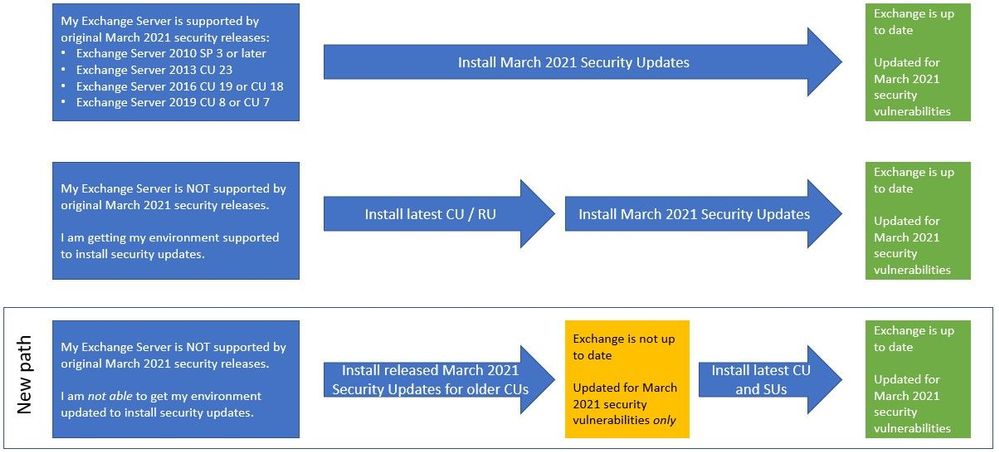
To help customers more quickly protect their environments in light of the March 2021 Exchange Server Security Updates, Microsoft is producing an additional series of security updates (SUs) that can be applied to some older (and unsupported) Cumulative Updates (CUs). The availability of these updates does not mean that you don’t have to keep your environment current. This is intended only as a temporary measure to help you protect vulnerable machines right now. You still need to update to the latest supported CU and then apply the applicable SUs. If you are already mid-update to a later CU, you should continue with that update.
With these new updates, you will have a new path you can take:
What are these updates?
- These update packages contain only fixes for March 2021 CVEs (CVE-2021-26855, CVE-2021-26857, CVE-2021-26858, CVE-2021-27065); no other product updates or security fixes are included. Installing these updates does not mean an unsupported CU is now supported.
- Updates are available only through the Microsoft Download Center (not on Microsoft Update).
- We are producing updates only for some older CUs for Exchange 2016 and 2019.
- If you are running a version of Exchange not covered by these updates, consider either rolling forward to a CU package that has an applicable SU, or rolling forward to a supported CU (preferred option). In case you need to go forward with CUs, please see: best practices for installation of Exchange updates (applies to all versions of Exchange).
About installation of these updates
- These updates must be installed from an elevated command prompt:
- Download the update but do not run it immediately.
- Select Start, and type CMD.
- In the results, right-click Command Prompt, and then select Run as administrator.
- If the User Account Control dialog box appears, choose Yes, and then select Continue.
- Type the full path of the .msp file, and then press Enter.
- Installing the SUs mentioned here and then installing a later CU will make the server vulnerable to exploits again until the CU you install contains the March 2021 security fixes (Exchange 2016 CU 20 and Exchange 2019 CU 9 – and newer – will include March 2021 security updates).
- Installing updates requires a reboot (even if not prompted). The server will not be protected until after the reboot.
- After installing one of these updates, you might see older Exchange security updates for your older CU available for download from Microsoft Update. Install the older security update from Microsoft Update and your servers will stay protected (for 4 CVEs mentioned before).
- If you run into issues after installation, please see https://aka.ms/exupdatefaq first. You can also uninstall these updates (using Add/Remove Programs) if needed.
These additional updates are about to be to available in KB5000871.
IMPORTANT: You must install .msp updates from elevated command prompt (see Known Issues in the update KB article)
If you install these additional updates, please ensure that you continue to bring your Exchange environment to supported state as soon as possible. Our original announcement Released: March 2021 Exchange Server Security Updates contains information and resources that can help you plan your updates, troubleshoot problems, and help you with mitigations, investigation, and remediation of the vulnerabilities.
Additional news about investigations
To aid defenders in investigating these attacks where Microsoft security products and tooling may not be deployed, we are releasing a feed of observed indicators of compromise (IOCs). The feed of malware hashes and known malicious file paths observed in related attacks is available in both JSON and CSV formats at the below GitHub links. This information is being shared as TLP:WHITE.
Please keep checking this blog post for any related updates.
The Exchange Team
by Contributed | Mar 8, 2021 | Dynamics 365, Microsoft 365, Technology
This article is contributed. See the original author and article here.
It comes as no surprise that today’s world is driving a seismic shift in B2B sales. Customers are rapidly adopting digital buying behavior, and sellers are feeling the pressure to reinvent themselves. Organizations must commit to empowering and enabling their sellers if they want to adapt to the new landscape and remain resilient in their markets. Companies that are successfully navigating selling today are doing two key things:
- Working smarter: streamlining and scaling sales activities with powerful digital tools.
- Being more strategic: leveraging sales operation roles to focus sales teams on the next critical steps to win accounts with the most opportunity.
While digital selling and optimized sales operations are important for helping sales teams orient their efforts in the post-pandemic marketplace, they are only as good as the data they rely on. New opportunities and new pockets of growth are missed if your data is stale or inaccurate. Compiling that data manually takes time, and trusted and reliable data can be hard to find.
Equipping sellers with reliable, actionable, and relevant real-time data is essential if sellers are going to embrace relationship selling and make the most of the time they have available with customers. Confidence in the “next best steps” and clear direction are what sellers need to turn an opportunity into a victory.
Dynamics 365 and LinkedIn Sales Solutions bring the human touch to digital experiences
Microsoft already brings Dynamics 365 Sales and LinkedIn Sales Navigatortogether, enabling sellers to deliver more personalized and meaningful engagement with customers. By providing a unified view of data, Dynamics 365 Sales and LinkedIn Sales Navigator work in tandem to:
- Empower sellers to find key decision makers
- Keep sellers connected to buyers
- Reduce sales friction
Together, Dynamics 365 and LinkedIn Sales Solutions ensure sellers can build deep, trusted relationships with buyers, and deliver the authentic and personalized engagement that today’s buyers demand.
Introducing LinkedIn Sales Insights for Dynamics 365 Sales
In February, LinkedInannounced the general availability of LinkedIn Sales Insights, a new product in the LinkedIn Sales Solutions portfolio that is powered by over 740 million members on LinkedIn to help sales organizations identify and size potential opportunities, get a clearer view of the market, and plan more confidently. With this integration, customers who integrate Sales Insights into Dynamics 365 Sales can feel more confident about their sales planning in knowing that their CRM is powered by the reliable, trusted, and aggregated data produced by LinkedIn Sales Insights.
By bringing together aggregated data at scale with powerful tools that reveal actionable insights, teams are focused, productive, and successful. Intelligent automation that leverages the depth and accuracy of buyer records from LinkedIn helps sellers strategically engage, develop connections, and turn relationships into revenue. With LinkedIn Sales Insights for Dynamics 365, you can expect:
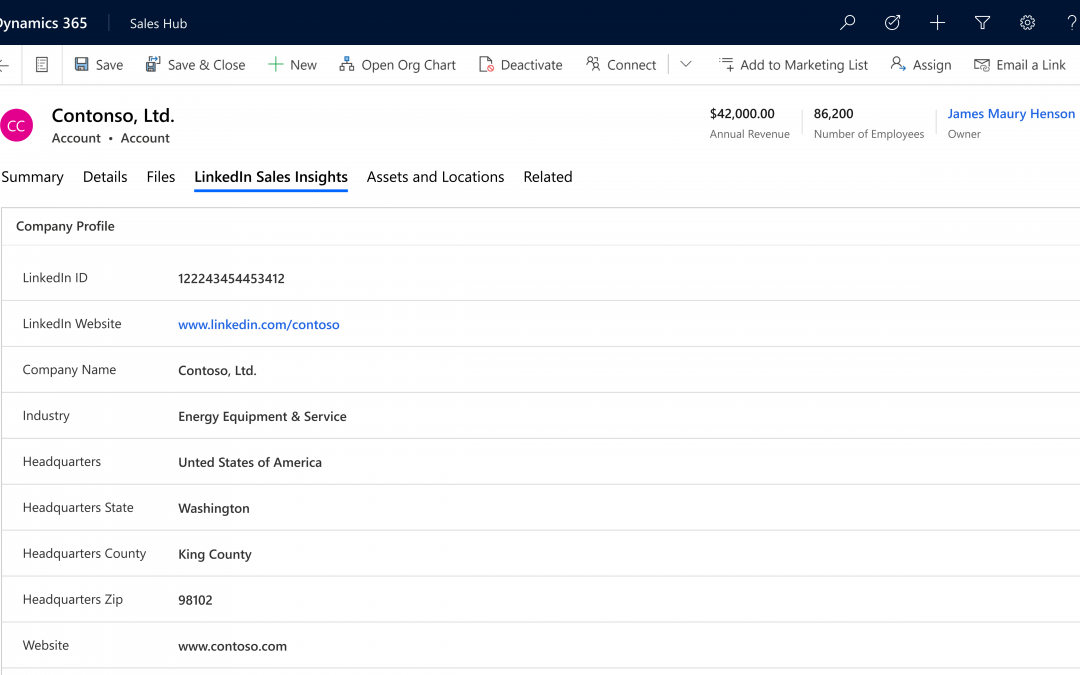
- Account planning and prioritizationwith LinkedIn Sales Insights, company information can be brought into Dynamics 365 Sales to help more confidently plan and prioritize knowing the data powering your CRM is reliable.
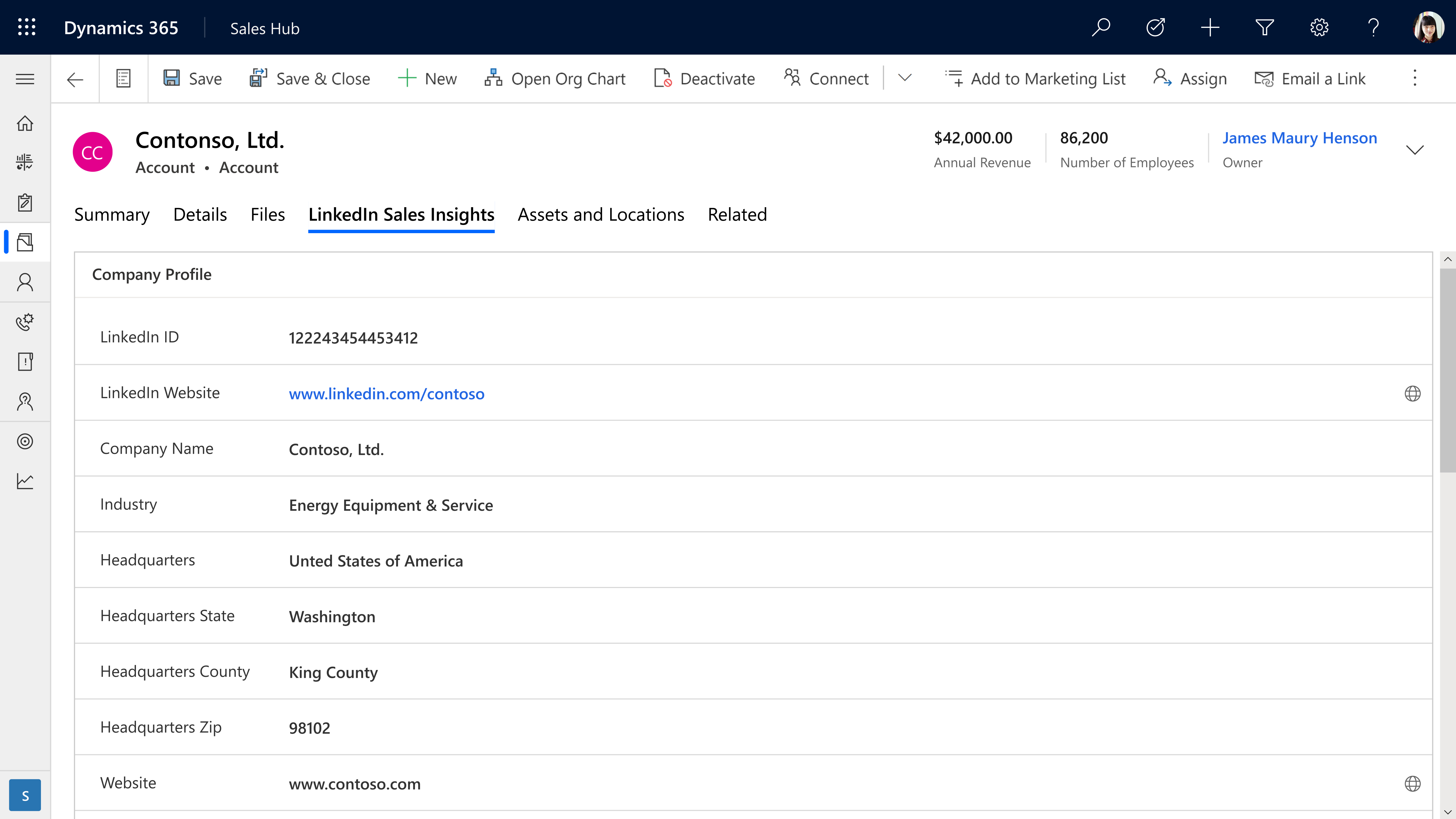
- Harvesting opportunities within existing accounts is simpler and far easier with integrated tools that keep a pulse on key accounts.
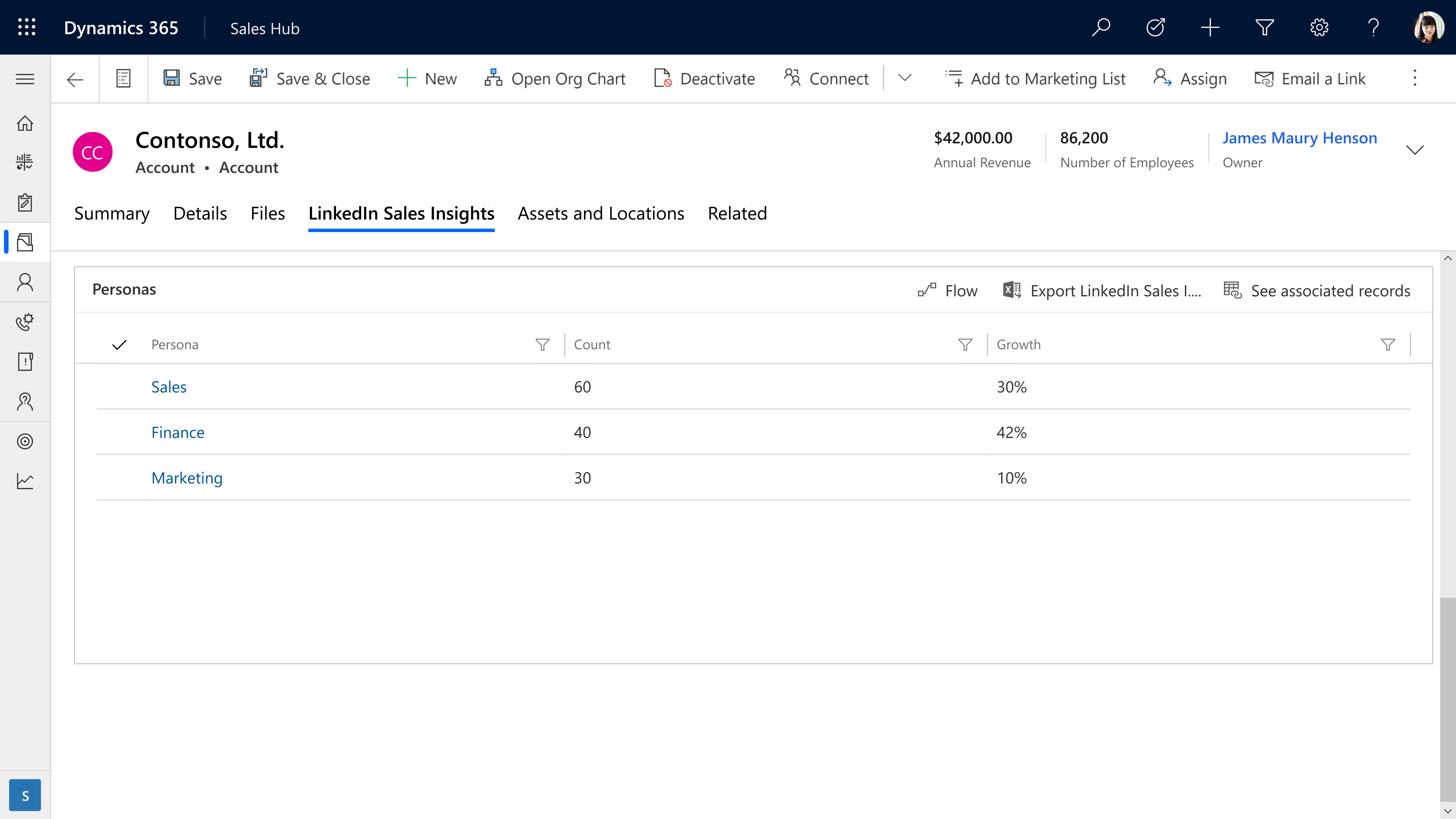
- Opportunities are more accurately evaluated by drilling down into size and growth of specific company departments, functions, and job titles to more accurately size opportunities.
Learn more
Together, LinkedIn Sales Solutions and Microsoft Dynamics 365 support stronger relationships and an increased pipeline by delivering the most current data with powerful intelligence and tools to make sales teams even more customer-centric.
LinkedIn Sales Insights can help your team harness the power of reliable data. Learn more about LinkedIn Sales Insights for Dynamics 365 and discover how it can help transform your sales planning.
Ready to empower your sales team? Read about LinkedIn Sales Insights integration with Dynamics 365 and view the installation guide for LinkedIn Sales Insights for Dynamics 365 Sales.
Want to learn more about Dynamics 365 Sales? Watch a demo or take a guided tour to see how Dynamics 365 Sales can empower your sellers with actionable insights.
The post Smarter sales planning with LinkedIn Sales Insights for Dynamics 365 Sales appeared first on Microsoft Dynamics 365 Blog.
Brought to you by Dr. Ware, Microsoft Office 365 Silver Partner, Charleston SC.

by Contributed | Mar 8, 2021 | Technology
This article is contributed. See the original author and article here.
Together with our friends from Microsoft Project and Dynamics 365 Project Operations, we invite you to join us for a free digital event to reimage your project management. No matter the shape, size, or complexity of your work, Project, Planner, and Project Operations can help you deliver quality results on time, and this event will show you how.
The Reimagine Project Management with Microsoft virtual event is Thursday, March 18, 2021 from 8:00 AM-9:30 AM PST.
Register now for Reimagine Project Management with Microsoft to:
- Discover new features and best practices during the keynote and 6+ hours of additional on-demand demos and product walkthroughs.
- Engage with our product teams and partners by signing up for roundtables on a range of topics related to our project management solutions.
- Connect with Microsoft experts, technology partners, and peers to expand your network.
>Register now
by Contributed | Mar 8, 2021 | Technology
This article is contributed. See the original author and article here.
COVID-19 spread has changed our day-to-day life in unprecedented ways. Organizations around the world are taking action to, contain and help prevent further spread of the disease by using AI technologies like computer vision, help ensure the safety of the employees and customers.
Azure Cognitive Services now, provides Mask detection functionality, to assist application developers in building solutions that can help monitor and contain the spread. Mask detection can be deployed anywhere, from the cloud leveraging Face service, to the edge using Spatial analysis service.
Mask detection on the edge
Spatial analysis is, a capability of Computer Vision, part of Azure Cognitive Services. This capability understands people’s movements in a physical space by analyzing real-time video, significantly increasing efficiency, and providing valuable insights for enabling various scenarios including,
- Counting people in a space for maximum occupancy
- Understanding the distance between people for social distancing measures
- Determining customer footfall such as in retail spaces
- Determining wait time in a checkout line
- Determining trespassing in protected areas
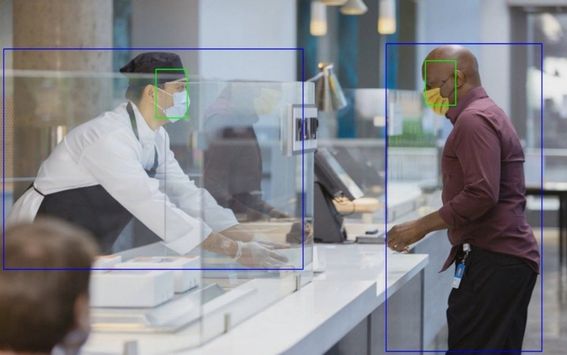
Spatial analysis can now detect whether a person is wearing a protective face covering or not. With this new capability, businesses can leverage insights to build applications that can measure safety and enhance compliance. For example, a business can aggregate data of percentage of people wearing masks in a physical space to improve compliance measures. To help ensure the safety of people working in a given space, mask detection can also be used to notify when a person may accidentally enter the space without a face mask.
Mask detection can be enabled for the following spatial analysis operations – personcount, personcrossingline and personcrossingpolygon. The classifier model can be enabled by configuring the ‘ENABLE_FACE_MASK_CLASSIFIER’ parameter to True, this is disabled by default. The attributes, face_mask or face_noMask, will be returned as metadata with confidence score for each person detected in the video stream.
Face mask and Person detection with Spatial analysis
Spatial analysis operations provide a real-time video analysis pipeline on new and existing RTSP cameras. The deployment of the spatial analysis container on edge devices is facilitated by Azure IoT Hub. When video is streamed and processed by spatial analysis, the container emits AI insight events about people’s movement which in turn are sent to Azure IoT Hub as IoT telemetry. From IoT Hub you can create various routes to other Azure services and build your business solutions.
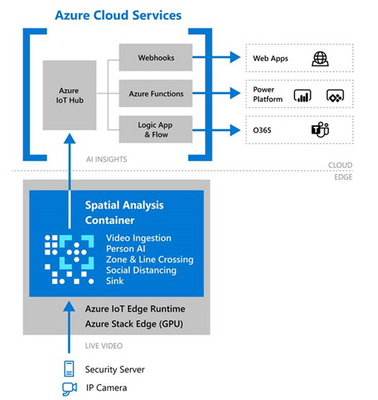 Spatial analysis container deployment with Azure IoT
The events from each operation are egressed to Azure IoT Hub on JSON format. Sample JSON for an event output by cognitiveservices.vision.spatialanalysis-personcount operation.
{
    "events": [
        {
            "id": "3733eb36935e4d73800a9cf36185d5a2",
            "type": "personLineEvent",
            "detectionIds": [
                "90d55bfc64c54bfd98226697ad8445ca"
            ],
            "properties": {
                "trackingId": "90d55bfc64c54bfd98226697ad8445ca",
                "status": "CrossLeft"
            },
            "zone": "doorcamera"
        }
    ],
    "sourceInfo": {
        "id": "camera_id",
        "timestamp": "2020-08-24T06:06:53.261Z",
        "width": 608,
        "height": 342,
        "frameId": "1340",
        "imagePath": ""
    },
    "detections": [
        {
            "type": "person",
            "id": "90d55bfc64c54bfd98226697ad8445ca",
            "region": {
                "type": "RECTANGLE",
                "points": [
                    {
                        "x": 0.491627341822574,
                        "y": 0.2385801348769874
                    },
                    {
                        "x": 0.588894994635331,
                        "y": 0.6395559924387793
                    }
                ]
            },
            "confidence": 0.9005028605461121,
            "metadata": {
	        "attributes": {
	            "face_Mask": 0.99
	        }
	    }
        }
    ],
    "schemaVersion": "1.0"
}
Learn how to build business applications with spatial analysis, follow these instructions to deploy a sample Azure Web Application that presents a live view of people counting events in a physical space. You can modify this app with other spatial analysis operations and make modifications based on the event output of the container.
Mask detection in the cloud
Mask detection is also available through the Face Detection cloud endpoint in Azure Cognitive Face API Service. This capability analyses images, detects one or more human faces along with attributes for each face in the image. Face mask attribute is available with the latest detection_03 model, along with additional attribute “noseAndMouthCovered” that provides insight about whether the mask covers both the nose and mouth.
To leverage the latest mask detection capability, users need to specify the detection model in the API request – assign the model version with the detectionModel parameter to detection_03. Refer to How to specify a detection model to learn more about the capabilities of each detection model and sample code to call it.
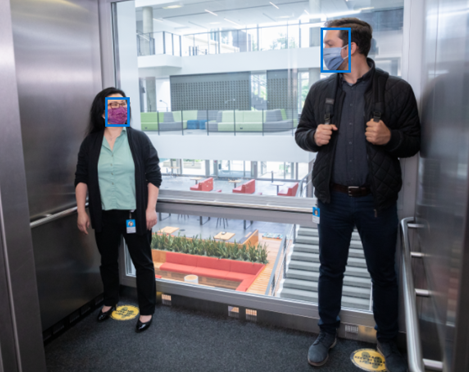 Face mask detection with Face Service
Detection_03 API response with face mask attribute:
  {
    "faceId": "eee58bd3-0b54-4f48-9a96-c9c60724ee80",
    "faceRectangle": {
      "top": 171,
      "left": 1212,
      "width": 79,
      "height": 125
    },
    "faceAttributes": {
      "mask": {
        "type": "faceMask",
        "noseAndMouthCovered": “true”
      }
  },
  {
   "faceId": "2d83c3c1-7266-4b84-b47b-a65645368021",
    "faceRectangle": {
      "top": 364,
      "left": 600,
      "width": 66,
      "height": 80
    },
    "faceAttributes": {
      "mask": {
        "type": "faceMask",
        "noseAndMouthCovered": “true”
     }
  },
Responsible AI and Deployment Guide
Microsoft’s principled approach enables developers to build rich solutions while ensuring responsible use.
Responsible deployment recommendations for spatial analysis is provided in accordance with Microsoft Responsible AI Principles: fairness, reliability & safety, privacy & security, inclusiveness, transparency, and human accountability. For general guidelines and specific recommendations for height, angle, and camera-to-focal-point-distance, see Camera placement guide. And refer to Face API Transparency Note to get clear guidance on use of facial recognition to help ensure it fits your goals and achieve accurate results.
Get Started
Learn more with our documentation Spatial analysis, QuickStart: Face Service
Follow the tutorial to Create a People Counting Web App, Detect faces using the .NET SDK
Learn about Azure Stack Edge and Azure IoT Hub


Recent Comments