by Contributed | Mar 8, 2021 | Technology
This article is contributed. See the original author and article here.
Projects come in all shapes and sizes with differing complexity. Visibility and collaboration coupled with flexibility can help accelerate your efforts to deliver projects on time.
Join us on Thursday, March 18, 2021 from 8:00 AM—9:30 AM Pacific Time for the keynote of the Reimagine Project Management with Microsoft conference. At this free digital event, you’ll find out the latest on Microsoft Project, Microsoft Planner, and Dynamics 365 Project Operations.
Register now for Reimagine Project Management with Microsoft to:
- Discover new features and best practices during the keynote and 6+ hours of additional on-demand demos and product walkthroughs.
- Engage with our product teams and partners by signing up for roundtables on a range of topics related to our project management solutions.
- Connect with Microsoft experts, technology partners, and peers to expand your network.
>Register now
by Contributed | Mar 8, 2021 | Technology
This article is contributed. See the original author and article here.
Today I am excited to share how you can maximize user productivity AND protect your most sensitive resources with Conditional Access authentication context. Conditional Access is the Zero Trust control plane that allows you to target policies for access to all your apps – old or new, private or public, on prem or multi-cloud. And now, with Conditional Access authentication context, you can apply different policies within those apps.
I have asked Caleb Baker, a PM on the Identity team, to tell you more. Let us know what you think!
Alex Weinert
————————–
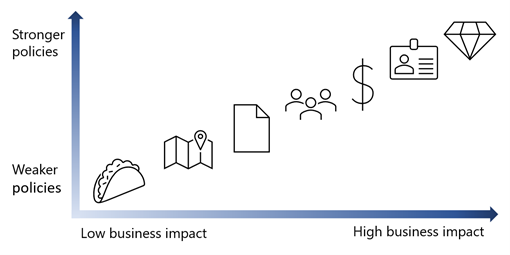
Hello! We are incredibly excited to introduce Conditional Access authentication context, because it really empowers you to apply policies in exactly the ways you’ve told us you want to. Your HR handbook and secret plans in SharePoint can have different access policies, and your company’s financials app can apply a different standard between reading balances and wiring funds.
Conditional Access authentication context lets you target policies for data and actions within an app so you can refine your Zero Trust policies for least privileged access while minimizing user friction.
With the public preview, which will start soon, we are adding support to several Microsoft services as well as support for SaaS apps and line-of-business apps:
Microsoft Cloud App Security (MCAS) file upload and download: Use the MCAS session proxy to trigger Conditional Access policy when files are uploaded or downloaded from a Microsoft application SaaS application or apps that use the Application Proxy in Azure Active Directory.
Azure AD Privileged Identity Management (PIM) role activation: When a user activates Azure AD or Azure roles, you can require Conditional Access policies like Azure AD multifactor authentication, third-party multi-factor authentication, device compliance, Azure Identity Protection risk levels, or location-based controls. This will make it more difficult for an attacker to act in a privileged role.
Microsoft Information Protection (MIP) labeled SharePoint site collections: Use MIP labels to identify sensitive SharePoint sites and apply Conditional Access policies so your organization’s most sensitive data is kept secure.
SaaS app integration: Conditional Access authentication context support is not just for Microsoft apps. SaaS apps can use the same approach to protect your data and actions. We’d like to thank SaaS app providers like LumApps and Powell Software for their help in validating the approach and showcasing how authentication context can be used by all apps.
Line-of-business apps: The same integration available to SaaS apps is there for your apps. Do you have sensitive employee data in your HR app, or need protection for high-value transactions? Conditional Access will help you add extra security.
Look for the public preview in April!
User experience
Here’s what a user sees when authentication context is used to protect an app resource. In this case, we’ll show the MCAS integration, but the user experience is similar in all cases. The user will need to accept terms of use before downloading classified files.
After signing into a cloud app, they are redirected to the MCAS session proxy. At this point, if there’s a Conditional Access policy applied to user sign-in, like multifactor authentication, the user will be prompted.
When they try to download a classified document, MCAS intercepts the click and displays a page to tell the user an additional security check is required.
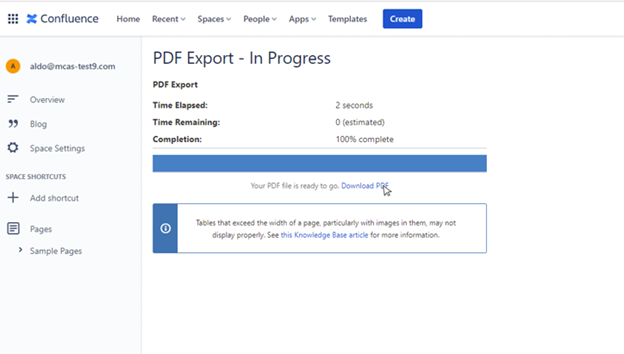
A user clicks on Download PDF.
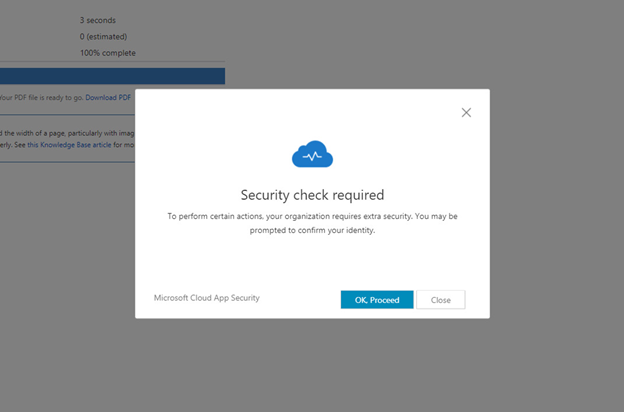
User receives a notification that additional security checks are required.
After clicking OK, Proceed, the user is prompted to agree to the organization’s terms of use, on a page triggered by authentication context.
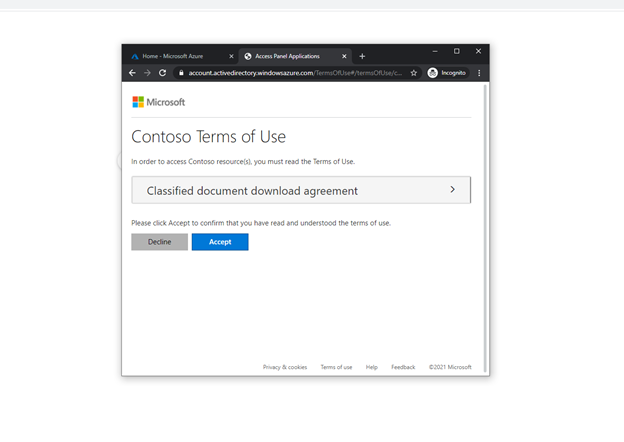
Any app can use this functionality to require a Conditional Access authentication context and make use of the existing Conditional Access controls.
How it works
You may be curious about how this all works behind the scenes. It’s a familiar standards-based pattern that’s used when an app requires Azure AD multifactor authentication, except we’ve allowed the app to make a sign-in request that will trigger Conditional Access policy. After a user signs in, app controls if additional policies need to be enforced. A redirect and new sign-in request is sent back to Azure AD, and the user is then prompted to complete any policy requirements. This way, the app can use its own business logic to trigger additional policies when needed.
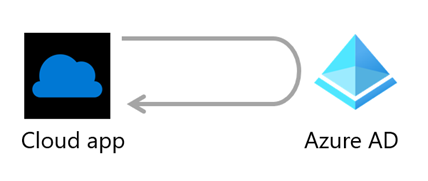
The app or MCAS then inspects claims in the sign-in token to tell if the required authentication context and Conditional Access policies have been satisfied. If the required claim is present, the user will be granted access.
Protocol support is built on top of industry standards in OpenID Connect. authentication context reference value with the claims request parameter to give apps a way to trigger policy.
What’s next
We’re finalizing the details of the release and will get the public preview out soon. Then, we plan to extend support to more Microsoft apps and work with more SaaS apps. Our goal is to allow you to create more granular security policies, where you need them, and help move you forward on your Zero Trust journey.
We look forward to hearing your feedback and suggestions!
Learn more about Microsoft identity:

by Contributed | Mar 8, 2021 | Technology
This article is contributed. See the original author and article here.
These Imagine Cup World Finalists have teamed up and used their passion and creativity to develop new ways to solve pressing earth-related issues with Azure IoT, Storage, Artificial Intelligence, and other innovative tech.
The 2021 Imagine Cup is all about innovating to help solve pressing global issues, and this year’s competition is focused on solutions in four social good categories: Earth, Education, Healthcare, and Lifestyle. All tech ideas submitted to the competition were developed under the category that best aligned with a team’s passion and motivation to make a difference. In this feature, we’ll look at innovations leveraging IoT, gamification, and more in the Earth category.
Earth overview
Students creating projects in the Earth category could build a solution encompassing issues like climate change, agriculture, or green tech. A wide variety of solutions focused on sustainability were submitted, applying Azure technology in unique and innovative ways to environmental issues.
Why it matters
Sustainable Software Engineering is a field which is becoming increasingly important in the work for both climate conservation and designing a sustainable future for all. This field not only focuses on applications that are sustainable in themselves, but also recognizes we all have a part to play in the climate solution through applying tech to help create a better world. Agriculture is also a focus of earth-related innovation, including developing tools to assist farmers, creating more sustainable farming practices, and reducing risk to crops and natural resources.
Our Earth category World Finalists developed projects with a sustainable philosophy at their core, which have the potential to impact our global climate, agriculture, and natural environment.
Meet our Earth category World Finalists:
Team Green Guru, United States
Project: Green Guide
Green Guide is a mobile app that leverages gamification to empower users to lead sustainable and eco-friendly lifestyles.
|
|
Team Intelligent Hives, Poland
Project: Intelligent Hives – Bee Monitoring System
On average, 30% of bee colonies are unable to survive into the next season. Intelligent Hives brings beekeeping into the 21st century. The team’s intelligent solution helps save bees, beekeepers, money, and time.
|
 |
Team ProTag, New Zealand
Project: ProTag
ProTag is a smart ear tag for livestock that can detect the early onset of illness in real-time, lowering costs and increasing animal welfare along with farmers’ peace of mind.
|
 |
Team SimplyLCA, Germany
Project: SimplyLCA
SimplyLCA aims to enable companies of every size to participate in the journey towards a sustainable future. To become eco-friendly as a company, the platform uses Azure Storage and Visual Studio Code to allow users to exchange, trade, and publish primary supplier-specific Life Cycle Assessment data.
|
 |
Team Spiffeng, Singapore
Project: IoT Hydroponic System
The team’s project is an end-to-end automated IoT hydroponic system. It consists of a hydroponics greenhouse connected to an app, which allows real-time remote monitoring and data analysis of user preferences and habits.
|
 |
Team Virtual Radiologist, Nepal
Project: Pico Sat
Pico Sat is a miniature version of an environmental satellite, which provides users information about environmental parameters like altitude, temperature, humidity, pressure, dust, and pressure.
|
 |
We’re so inspired by these students’ passion to make a difference and are excited to see them pitch their projects at the World Finals this month. Four winning teams will be selected from each of the competition categories, taking home USD10,000 and Azure credits. These teams will also move forward to the World Championship for the chance to win USD75,000 and mentorship with Microsoft CEO, Satya Nadella. Two runner-up teams in each category will take home USD2,500 plus Azure credits.
Follow the action
Follow these teams’ journey on Instagram and Twitter as they head to the World Finals to compete.
by Contributed | Mar 8, 2021 | Technology
This article is contributed. See the original author and article here.
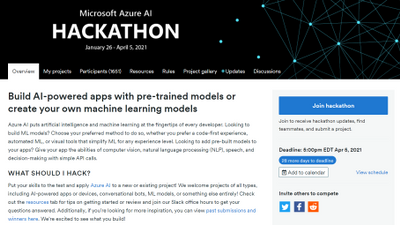
If you’ve been looking for a reason to get started with AI to solve a particular problem or use case, look no further! We invite you to put your skills to the test and apply Azure AI to a new or existing project. As you may have seen in an earlier post by Anand Raman, we have been hosting an Azure AI hackathon in which you can submit your project and be eligible to win prizes. Developers of all backgrounds and skill levels are welcome to join and submit any form of AI project, whether using Azure AI to enhance existing apps with pre-trained machine learning (ML) models with Cognitive Services or building your own custom ML models with Azure Machine Learning.
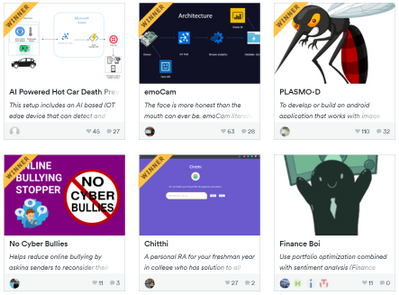
AI Hackathon homepage
If you’re interested in participating, visit the Azure AI Hackathon page to get started. The deadline is April 5th so you still have time to build and submit a project! Use one or more of the following Azure AI services to build a new project or update an existing project: Azure Machine Learning, Azure Cognitive Services, Bot Framework and Azure Cognitive Search. Projects may integrate with other Azure services, open source technologies (including but not limited to frameworks, libraries, and APIs) and physical hardware of your choice.
If you’re looking for a little inspiration, below are a few examples of past winners:
2019 First Place– Trashé
 Trashe Smarter Recycling solution
Submitted by Nathan Glover and Stephen Mott, Trashé is a SmartBin that aims to help people make more informed recycling decisions. While the idea is super impactful, it’s even more powerful when you see it in action- not just the intelligence, but the end-to-end scenario of how it can be applied in a real-world environment.
This team used many Azure services to connect the hardware, intelligence, and presentation layers—you can see this is a well-researched architecture that is reusable in multiple scenarios. Azure Custom Vision was a great choice in this case, enabling the team create a well performing model with very little training data. The more we recycle, the better the model will get. It was great to see the setup instructions included to help build unique versions of Trashé so users can contribute to helping the environment by recycling correctly within their local communities—this community approach is incredibly scalable.
2019 Second Place- AfriFarm
Niza Siwale’s app recognizes crop diseases from images using Azure Machine Learning service and publishes the findings so anyone can track disease breakouts. This also provides a real-time update for government agencies to act quickly and provide support to affected communities. As quoted by Niza, this project has an incredible reach to a possible 200 million farmers whose livelihoods depend on farming in Africa.
Creating a simple Android application where users can take photos of crops to analyze if each farmer is getting information when they need it, users can also contribute their own findings back to the community around them keeping everyone more informed and connected. Using the popular Keras framework along with the Azure Machine Learning service, this project built and deployed a good plant disease recognition model which could be called from the application. Any future work or improved versions of models can be monitored and deployed in a development cycle. From this, the progression of the model can be tracked over time.
2019 Third Place- Water Level Anomaly detector
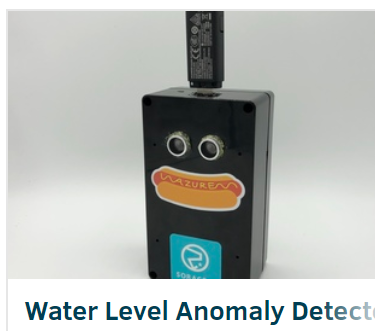
Roy Kincaid’s project identifies drastic changes in water levels using an ultrasonic sensor that could be useful for detecting potential floods and natural disasters. This information can then be used to provide adequate warning for people to best prepare to major changes in their environment. Water Level Anomaly Detector could also be beneficial for long-term analysis of the effects of climate change. This is another great example of an end-to-end intelligent solution.
Roy is well skilled in the hardware and connection parts of this project, so it was brilliant to see the easy integration of the Anomaly Detector API from Azure Cognitive Services and to hear how quickly Roy could start using the service. Many IoT scenarios have a similar need for detecting rates and levels; in fact, Roy had hinted at coffee level detector in the future. In a world where we all want to do our part to help the environment, it’s a great example of how monitoring enables us to measure changes over time and be alerted when issues arise.
These are just 3 of the past winners and submissions. For more inspiration, visit our gallery of past submissions.
Resources to get started




Recent Comments