by Contributed | Mar 9, 2021 | Technology
This article is contributed. See the original author and article here.
It is hard to believe it is just one year since all of us around the world began staying at home due to COVID-19 and though it’s been quite the challenge, it’s taught us how important it is to lean on each other. Through all the bad…the isolation, an overload of work, concern for loved ones, fear of the unknown, and wondering if life will ever get back to normal, there have been some silver linings. I’ve heard great stories of people around the community starting podcasts with one another without ever meeting in person, individuals digging into the Microsoft Technical Community to interact with others during down time, and event organizers opening their virtual doors to the world allowing for global audiences and speakers to interact with one another. Thank you for allowing Microsoft Teams to be a big part of your life the past year. We are looking forward to a brighter year ahead and excited for the innovation yet to come.
We had an exciting Ignite week last week and in case you missed it, some of our MVPs recapped the following Microsoft Teams sessions. Have a read:
- Microsoft Ignite Live Blog: FS189 – Easy, intuitive webinars with Microsoft Teams
- Microsoft Ignite Live Blog: FS191 – Secure and Compliant Collaboration with Microsoft Teams
- Microsoft Ignite Live Blog: FS192, OD380, OD378 – Latest Innovations in Teams Calling and Meetings
- Microsoft Ignite Live Blog: KEY06 – The Hybrid Workplace
If you are interested in sharing your knowledge, experience, or story with community, we’d love to hear from you. We invite all community members to participate in the Microsoft Teams Community Blog Space aka.ms/teamscommunityblog; submit your blog idea at aka.ms/teamscommunityblogger.
As announced last month, Microsoft Teams Engineering would like to recognize community members who make significant contributions to improving the product and sharing their knowledge with community by presenting the Microsoft Teams Community Star Award; I am excited to share the community member we’d like to recognize for February 2021. It’s not a surprise the Microsoft Teams space in the Tech Community has seen significant growth over the past year given the increase in use. With that increase comes a need for community members to participate by sharing tips and tricks, experiences, and answering questions of others. Every month since May 2020, Christian Jernqvist Bergström, an M365 and Teams specialist in Sweden, has been one of the top 5 contributors to the discussion board (in February 2021 he was number one!) and has replied to a total of 2131 posts since becoming a member in February 2020. With a new baby at home, it’s a miracle Christian had time to tend to others and it’s a true testament to his love for community. Thank you, Christian Bergström, for your commitment to Microsoft Teams, for your passion of the product, but mostly – thank you for your love of helping others. You are a true Community Star! (Anyone can nominate an individual for the Microsoft Teams Community Star Award – MVPs are not eligible).
The thought of getting together is exciting and it seems like there is a light at the end of the tunnel with many community events confirming in-person event dates. I’d like to share a few of the events we’re looking forward to. For a full list, please visit: aka.ms/CommunityEvents. If you have your own user group or community event, be sure your event is listed in the Tech Community.
We celebrated International Women’s Day on March 8th and the Women in Teams Community hosted the second monthly gathering on the 9th. All women and allies are invited to participate in monthly gatherings with Microsoft and Community speakers and regular discussions in Microsoft Teams. This month, we welcomed @Sandya Rao, Principal Group Product Manager for Personal and Small Room Devices for Microsoft Teams, and Community Members and allies Peter Rising and David Patrick. To join, please sign-up at aka.ms/WomenInTeams. All are welcome.
On behalf of the Microsoft Teams Engineering Team, we wish you health, happiness, and a Happy March. We love seeing you on camera but we’re very much looking forward to seeing you in person soon.
Stay well,
Laurie
by Contributed | Mar 9, 2021 | Technology
This article is contributed. See the original author and article here.
Meet the students working to transform education with Augmented Reality, Artificial Intelligence, chatbots, and more!
The 2021 Imagine Cup is all about innovating to help solve pressing global issues, and this year’s competition is focused on solutions in four social good categories: Earth, Education, Healthcare, and Lifestyle. All tech ideas submitted to the competition were developed under one category that best aligned with a team’s passion and motivation to make a difference. In this feature, we’ll look at innovations for Education.
Education overview
The Education category focuses on innovating to change the way students across the globe learn. This encompasses empowering every student on the planet to achieve more, and encouraging lifelong learning, employability, and equal opportunity through tech. Our Education category finalists have developed solutions to support global students, which include a community-driven resource catalog, Augmented Reality support for individuals with learning disabilities, and low-cost remote learning facilitation.
Why it matters
Education influences all our lives and leads to empowerment, opportunity, and developing new skills and technologies the world needs. This field also faces many challenges, including unequal access to education and learning resources, availability of teaching support, and educator tools for effectively teaching new skills.
Our Earth category World Finalists have created projects to empower learners and educators, increase access to learning, and support global students finding their paths to make their own impact.
Meet our Education category World Finalists:
Team Agent of Change, Japan
Project: Ujiyan
Ujiyan is a lightweight platform-agnostic chatbot to conduct school assessments. Teachers can publish multiple choices questions using the team’s web app and students can access the test via messenger apps. The goal is to make remote learning more accessible for every student.
|
|
Team Cafrilearn, Kenya
Project: Makini
The team’s project consists of a mobile application that supports their device, which allows facilitation of digital learning at an affordable cost to low income families and marginalized communities.
|
 |
Team Hands-On Labs, United States
Project: Hands-On Labs – How can we enable every student to have a truly ‘hands-on’ learning experience’ online?
Hands-On Labs is a set of remote laboratories that allows students to observe and remotely control physical tools online in real-time for their courses. The team aims to provide an active learning experience to students from any background all around the world.
|
 |
Team JAN/A, Czech Republic
Project: KnowledgePicker
KnowledgePicker is a community-driven catalog of learning resources organized into network of topics. The project aims to gather links to learning resources and collect ratings and reviews from real learners to determine the best resources.
|
 |
Team Myotics, Canada
Project: Myo Code
Myo Code helps students learn to code complex apps without the challenges of learning a new language. The team developed an AI natural language processing system that enables beginners in computer science to begin coding in their own native language. The goal is to create a zero-barrier entry point into the field of programming for all students.
|
 |
Team Nyansapo AI, United States
Project: Digital Literacy Assessment
The team’s mobile app enables instructors to assess the literacy level of multiple children at once and track the individual literacy progress of children over time. As a digital assessment tool, the projects makes it easy for instructors to collect, organize, and analyze assessment data to effectively place students in the best educational level.
|
|
Team QueryCity, Pakistan
Project: QueryCity
QueryCity aims to make education accessible for all with its efficient Student’s Search Engine, which features thousands of questions and answers to all subjects. The solution hopes to help students save money on textbooks and other resources.
|
 |
Team Tandemly, United States
Project: Tandemly
Using an array of built-in services and Augmented Reality, Tandemly aims to enhance and transform the educational experience for individuals with learning disabilities.
|
 |
We’re so inspired by these students’ passion to make a difference and are excited to see them pitch their projects at the World Finals this month. Four winning teams will be selected from each of the competition categories, taking home USD10,000 and Azure credits. These teams will also move forward to the World Championship for the chance to win USD75,000 and mentorship with Microsoft CEO, Satya Nadella. Two runner-up teams in each category will take home USD2,500 plus Azure credits.
Follow the action
Follow these teams’ journey on Instagram and Twitter as they head to the World Finals to compete.
by Contributed | Mar 9, 2021 | Technology
This article is contributed. See the original author and article here.
This post is co-authored by Sharon Xu Program Manager, Azure Notebooks.
Today we are very proud to announce the next set of productivity features and improvements for the notebook experience. Since we announced the GA release of Notebooks in Azure Machine Learning (Azure ML), we have focused on listening to feedback and analyzing usage preferences. Over the past few months, we have incrementally improved the notebook experience while simultaneously contributing back to the open source nteract project. The Azure ML team recently released a robust set of new functionalities designed to improve data scientist productivity and collaboration in Azure ML Notebooks.
Data scientist & Developer Productivity
We have spoken to several data scientists and developers to fully understand the additional features needed to improve productivity while developing machine learning projects. From feedback, we have found that users constantly needed the following enhancements to speed up their workflow: a clear indication that a cell has finished running, a way to templatize common code excerpts, a way to check variable contents and more. The following list is a culmination of the most highly requested productivity features:
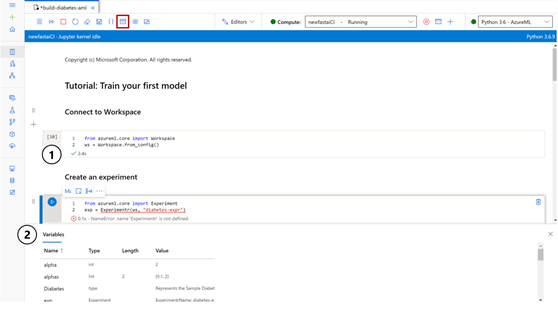
- Cell Status Bar. The status bar located in each cell indicates the cell state: whether a cell has been queued, successfully executed, or run into an error. The status bar also displays the execution time of the last run.
- Variable Explorer. provides a quick glance into the data type, size, and contents of your variables and dataframes, allowing for quicker and simpler debugging.
Figure 1: (1) Cell status bar (2) Variable explorer
- Notebook snippets (preview). Common Azure ML code excerpts are now available at your fingertips. Navigate to the code snippets panel, accessible via the toolbar, or activate the in-code snippets menu using Ctrl + Space. Sign up for preview now.
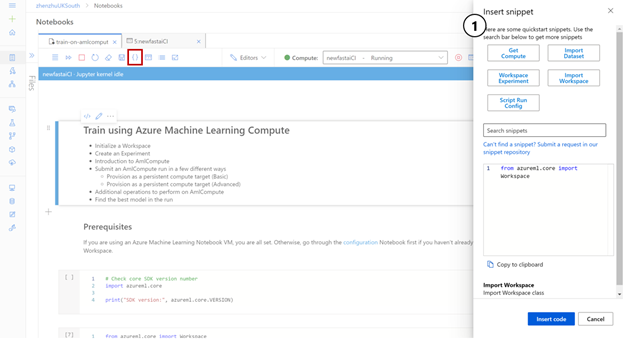
Figure 2 (1) Notebook snippets panel, showing all useful snippets
- IntelliCode. IntelliCode provides intelligent autocompletion suggestions using a ML algorithm that analyzes the context of your notebook code. IntelliCode suggestions are designated with a star.
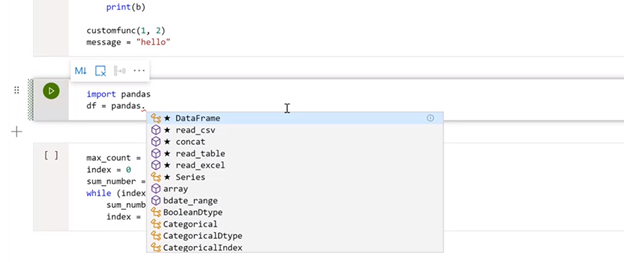
Figure 3: IntelliCode in Azure ML Notebooks
- Keyboard shortcuts with full Jupyter parity. Azure ML now supports all the keyboard shortcuts available in Jupyter and more.
- Table of Contents. For large notebooks, the Table of Contents panel then allows you to navigate to the desired section. The sections of the notebook are designated by the Markdown headers.
- Markdown Side-by-side Editor in Notebooks. Within each notebook, the new side-by-side editor allows you to view the rendered results of your Markdown cells directly in your notebook editing.
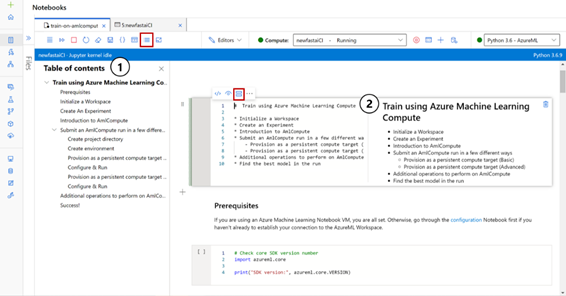
Figure 4: (1) Table of content pane (2) Markdown side by side
Collaboration and Sharing
An increasing number of data scientists and developers are creating notebooks collaboratively and sharing these notebooks across their team We heard feedback that most users feel like they are missing adequate tools to edit notebooks simultaneously or share their notebooks with a broader audience. Users often resort to screen shares and calls to complete or present work within a notebook. We recently just release a few new features to help combat some of these issues:
- Co-editing (preview). Co-editing makes collaboration easier than ever. The notebook can now be shared by sending the notebook URL, allowing multiple users to edit the notebook in real time.
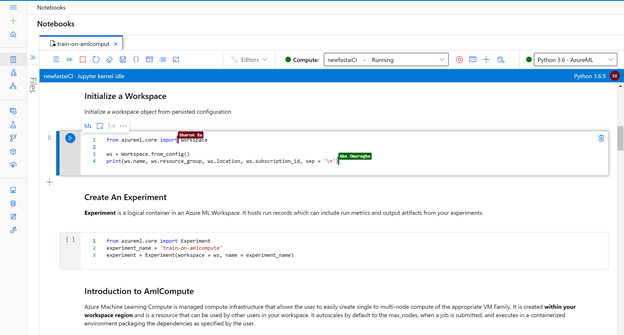
Figure 5: Live Co-editing in Azure ML
- Export Notebook as Python, LaTeX or HTML. When you feel satisfied with the results from your notebook and ready to present to your colleagues, you can export the notebook to various formats for easy sharing. LaTeX, HTML, and .py are currently supported.
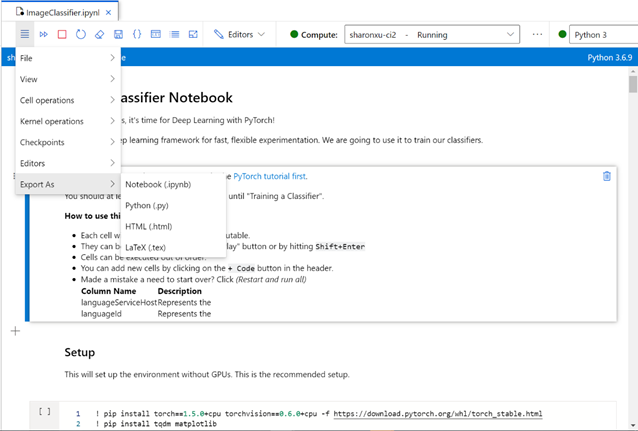
Figure 6: Export Notebooks as Python and more in Azure ML
Get Started Today
To begin using these features in Azure ML Notebooks, you will first need to create an Azure Machine Learning. Your Azure ML workspace serves as your one-stop-shop for all your machine learning needs, where you can create and share all your machine learning assets.
Once you have your workspace set up, you can get started using all the features in the Azure ML Notebooks experience. The notebooks experience aims to provide you with integrated suite of data science tools. Users can start working with a highly productive and collaborative Jupyter notebook editor directly in their workspace as well as quickly access other ML assets such as experiment details, datasets, models, and more.
With the addition of this host of features, notebooks in Azure ML aims to improve every aspect of your development needs – collaboration, code editing, debugging. Give these features a try and . The feedback provided by our community is what drives us to improve and build new features. As we continue to push out new releases, keep an eye out, because the team has a few more exciting features coming out soon.
by Contributed | Mar 9, 2021 | Technology
This article is contributed. See the original author and article here.
Authored with Idan Basre, Product Manager, Microsoft Cloud App Security
Microsoft Cloud App Security and Microsoft Information Protection are a dynamic duo, here to protect data wherever it resides in your applications. If you’ve never been introduced, Microsoft Information Protection gives you the ability to take your files through the many stages of your workloads: Google Drive, Workday, Salesforce, Box, Exchange, Teams, SharePoint, OneDrive, and more. Regardless of your platform, we’ve got you covered.
Information protection is a key component of a CASB, and should deliver an integrated, nuanced understanding of your organization’s sensitive-labeled data as it‘s leveraged in your cloud environment. This brief two-minute video demonstrates the deep reach of information protection in Microsoft Cloud App Security:
In Microsoft Cloud App Security, Microsoft’s CASB solution, security and compliance capabilities sit between users and your organization’s cloud environment. Administrators can sanction and unsanction apps, manage their users, the activities of individual users and the files that are being modified, as well as any files that might be at risk. Microsoft Cloud App Security also brings control to in-session real-time policies, blocking uploads or preventing certain activities being conducted in real-time. Organizations are increasingly adopting SaaS applications to access their data wherever it sits. This brings greater risk to data that sits outside the corporate network, which customers have framed in three key areas.
First, customers have shared that they need to “control sensitive data in non-Microsoft applications.” Customers require a deep understanding of the sensitive data in their cloud applications and the ability to control it.
Second, customers asked to “control end-users using sensitive data on unmanaged devices.” In remote work scenarios, end users frequently bring their own unmanaged devices into an organization’s environment. It‘s imperative to control which applications end users have access to and how end users leverage sensitive information in their organization.
The third scenario customers requested pertains to “the new normal of leveraging more and more SaaS apps. We need to prevent users from oversharing.” Users that overshare sensitive information can be harmful and cause damage by sharing with colleagues who don’t need access to this data, or potentially sharing sensitive information outside of an organization without a justifiable business reason.
Control sensitive data in non-Microsoft applications
It’s getting tougher to validate where your sensitive data is and maintain appropriate control over its access and use. With a unified, holistic view of file locations, whether at rest or in transit (real-time control), you can authoritatively manage data in Microsoft Cloud App Security. Admins have the power to discover sensitive files and decide to control them, protect them, make them private to external sharing, or notify the file owner if files are being shared inappropriately.
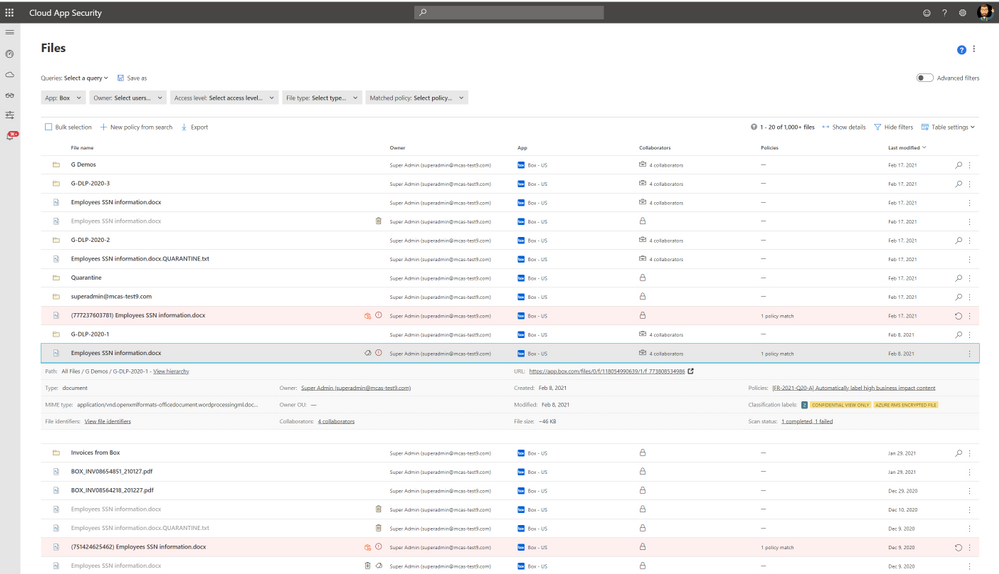
The screenshot below displays a file page with different kinds of files, filtered by Box. The file is labeled with a classification that results in encryption.
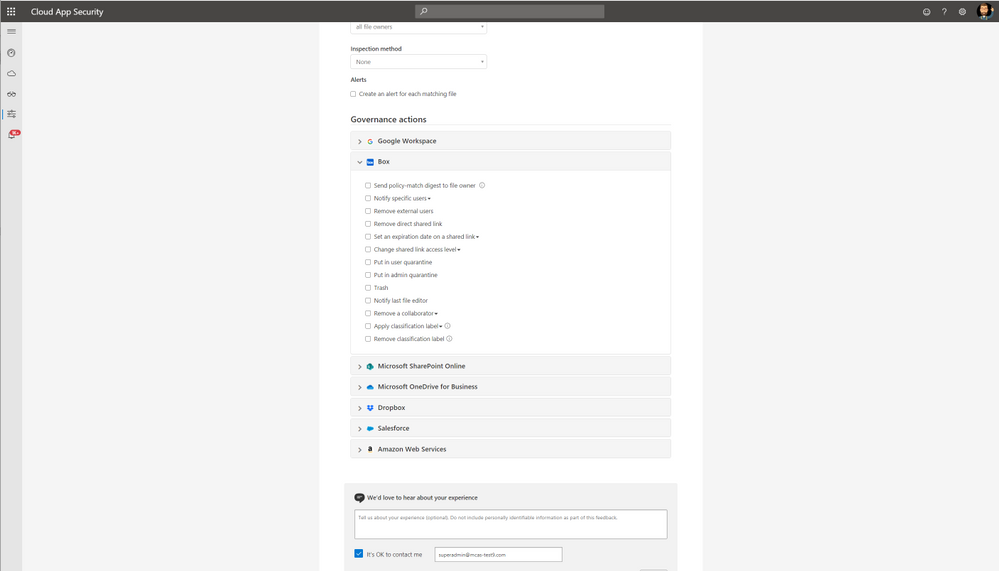
With a clear governance policy, every workload has its own governance section with ability to notify specific users, remove external users or direct shared links, place certain files in quarantine via the admin quarantine page, or trash a file entirely. If organizations are leveraging sensitivity labels, the “Apply or Remove” action powerfully protects files with a label, which encrypts the file. Should the file travel outside your organization, any non-permissioned recipient would not be able to see it. Below is a screenshot of the policy that can be enforced:
Control end-users using sensitive data on unmanaged devices
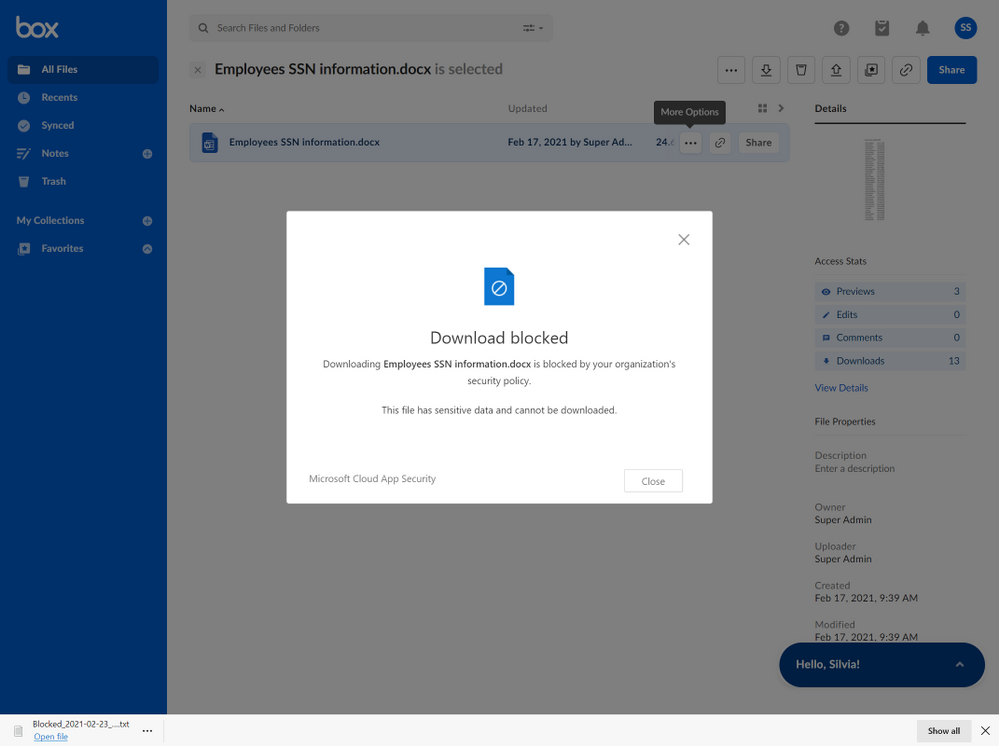
End users accessing data on unmanaged devices is a reality. In order to protect data, Microsoft Cloud App Security uses a real-time, data-in-transit solution that blocks downloads of sensitive data files to unmanaged devices. When organizational users try to download these files, the download action can be blocked by defining in a policy which sensitive information types should be protected from this action when using an unmanaged device. Here, we see the screen that the user would encounter when this policy is deployed:
You can choose and organize sensitive information types from over 200 sensitive information types pre-loaded into Microsoft Cloud App Security. Our product team is continually adding to these sensitive data types, but if you cannot find the one you want, you can also define your own custom data type. During policy creation, the more detailed admins are about the selection of these data types, the higher the rates of “true positive” results, and strongest possibility to receive appropriate notifications on your desired sensitive information type. These types are also customizable.
In addition, a session policy can control and block real-time activities. For example, Cloud App Security can block in real time copy or print activities for files with sensitive data. Whether it’s Microsoft data or not, the admin controls the activity, the user, and their properties by the app leveraged in sessions. The admin can also control devices leveraged in sessions (managed or unmanaged), IP addresses, locations, specific users, and more. When a user from an unmanaged device tries to cut, copy or print data from a file that contains a sensitive data type, it’s blocked. Even if a user is in a private browser session mode, these actions can be monitored.
You can also block file downloads or encrypt files on the fly. Even if users from unmanaged devices download sensitive files, the file is protected when Microsoft Information Protection sensitivity labels are applied, thereby encrypting the file. If a user tries to open a sensitive file without the correct credentials, the open action will also be blocked.
Prevent users from oversharing
There’s no doubt that oversharing harms your organization. Users with good intentions, but a poor understanding of the data they’re leveraging, is a common scenario. The same is true of well-intentioned users who don’t realize compliance and security policies are being infringed upon by sharing sensitive data. Admins can remove external sharing and direct sharing links from one central location, leveraging integration with Microsoft Cloud App Security in the Microsoft 365 Compliance Center, as shown here:
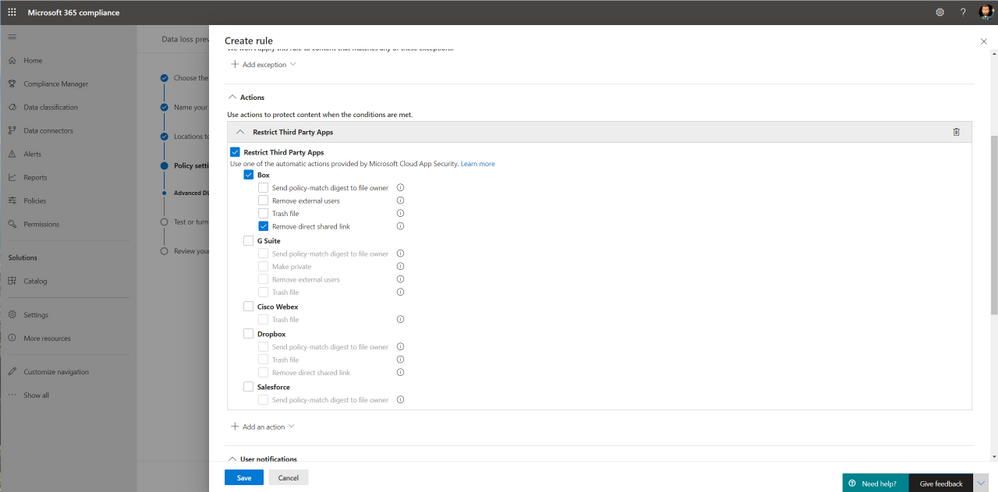
When you create a policy in Microsoft Information Protection, it leverages the Microsoft 365 Compliance Center. Choose which policy should be applied in order to granularly permit or exclude users and devices, and instances of cloud buckets and applications you want to control. When you apply this policy to non-Microsoft applications, you can also restrict different workloads with the deep capabilities of Microsoft Cloud App Security.
To benefit from this powerful combination, configure Cloud App Security and your DLP policies. Then explore the activity alerts in the Activity Explorer of Microsoft Information Protection. With labels, workloads, users and all the data you need to control sensitive information in your organization, you’re assured that your data is safe. In the future, you will be able to apply labels and protect files with even greater granularity.
For further training and information, view Idan’s twenty-minute discussion on information protection in Microsoft Cloud App Security:
Feedback
We welcome your feedback or relevant use cases and requirements for this pillar of Cloud App Security by emailing CASFeedback@microsoft.com and mention Information Protection.
Learn more
For further information on how your organization can benefit from Microsoft Cloud App Security, connect with us at the links below:
To experience the benefits of full-featured CASB, sign up for a free trial—Microsoft Cloud App Security.
Follow us on LinkedIn as #CloudAppSecurity. To learn more about Microsoft Security solutions visit our website. Bookmark the Security blog to keep up with our expert coverage on security matters. Also, follow us at @MSFTSecurity on Twitter, and Microsoft Security on LinkedIn for the latest news and updates on cybersecurity.


Recent Comments