by Contributed | Mar 10, 2021 | Technology
This article is contributed. See the original author and article here.
The recent NOBELIUM incident has brought the issue of supply chain security into sharp focus, particularly that of the software supply chain. In this blog we will look at why it is important for organizations to monitor their software development, build, and release process to help secure their own internal software supply chains as well as the those of wider industry.
Whilst this blog looks specifically at the NOBELIUM related activity as one example, it goes far beyond this activity to look at other monitoring opportunities in Continuous Integration/Continuous Deployment (CI/CD) solutions.
This blog uses Microsoft’s security monitoring solution Azure Sentinel, and Microsoft’s cloud CI/CD solution Azure DevOps as the focus point, however the monitoring principles and approaches could also be applied to other technology stacks.
Covered in this blog:
- Recent history of Software Supply Chain Attacks
- Importance of Monitoring and Data Collection requirements
- How to Monitor via Azure Sentinel for NOBELIUM Activity and Beyond
The Recent History of Software Supply Chain Attacks
Whilst the NOBELIUM incident was the latest high profile software supply chain attack, it is far from the first such attack; NotPetya and CCleaner attacks were both high profile software supply chain attack examples. These supply chain attacks have seen threat actors target a different part of the software development and release process, for different outcomes.
- For the NOBELIUM incident, we know from the report from CrowdStrike that attackers used sophisticated malware to silently inject malicious code into files before building them, and then covering its tracks.
- In the case of NotPetya, it is suspected that attackers compromised a vulnerable server used to distribute the software and replaced the legitimate code with their compromised version.
- With CCleaner, the exact compromise process is not known but the reporting provided by Avast shows that attackers compromised several machines including a build server.
- Microsoft has previously detected threat actors compromising software packages used by other software developers to insert malicious code into the final software packages.
The range of attacks here shows that it is important that all organizations conducting software development invest time and effort into securing their build and release processes.
The Importance of Monitoring
Monitoring and response are critical elements of any security program. When it comes to software development, build, and release processes monitoring is especially important.
The list of previous attacks targeting these processes show that many processes include opportunities for attackers, and the fast-paced, collaborative, and innovative nature of software development can mean that maintaining comprehensive preventative controls is infeasible. Thankfully for defenders, the data provided by most software development, build, and release processes presents multiple threat detection opportunities, and organizations should ensure that effective monitoring is conducted for as many of these opportunities as possible in order to detect and respond to threats that might target the process.
How to Monitor with Azure Sentinel
Microsoft Azure Sentinel is Microsoft’s scalable, cloud-native, security information event management (SIEM) and security orchestration automated response (SOAR) solution. Azure Sentinel allows organizations to easily collect data at cloud scale across all users, devices, services and locations. This makes it an ideal platform for collecting auditing data from a wide range of software development, build, and release processes whether it be on-premises build agents or a cloud hosted CI/CD solution.
Once data is collected into Azure Sentinel it’s possible to conduct advanced investigations into the data, as well as set up proactive detections for future activity. By leveraging this capability organizations can identify threats targeting their software development, build, and release process as well as act proactively to identify future threats, allowing them to secure their internal software supply chains as well as protect consumers further down the supply chain.
In the following sections we will look first at the monitoring opportunities available for the specific threat of NOBELIUM before then moving to look at other monitoring opportunities in CI/CD solutions, focusing on Azure DevOps. Each section will address how to collect the required data, and how to hunt for activity and establish proactive monitoring for future threats.
Monitoring Opportunities for NOBELIUM Activity
Due to the reporting of several parties involved in the response to the NOBELIUM attack including FireEye, CrowdStrike, and SolarWinds we have insight into how the attackers operated, including at the software build compromise level. Details of the SolarWinds software compromise SUNSPOT malware can be found in the CrowdStrike report but a summary of the actions taken by the actor include:
- Deploy malware on build server, set mutexes and log files locally.
- Monitor for the build process to start and, when run, check the command line arguments passed to it indicate the building of targeted software packages.
- If targeted software is being built, create a backup of the legitimate code files on disk and replace the target code files with malicious code files.
- Once build is complete, replace malicious code files with legitimate code from the backups created.
These details allow for the identification of two key monitoring opportunities:
- Detect the initial deployment of malware onto build servers.
- Modification of source code files during build process execution.
Data collection with Microsoft Defender for Endpoint
Before defining precise monitoring logic, you must collect relevant data on which to apply logic to.
One way of getting the data required to enable both opportunities is to deploy Microsoft Defender for Endpoint (MDE) to build servers. Not only will this provide in build detections for the known SUNSPOT malware it will also provide telemetry to Azure Sentinel that can be used to hunt for malware artifacts as well as the modification of source code files.
For more information on how to connect MDE to Azure Sentinel, see the Azure Sentinel documentation.
Data collection with Windows Event Logs
For organizations without MDE, it’s still possible to enable the second of our two detection opportunities using Windows Event Logs.
For this opportunity, you must collect events from:
- Build servers relating to process creation, to detect when a build process is started
- File modification events, to detect when code files are modified
In Windows Event Logs, these are represented by:
- Event ID 4688: A new process has been created
- Event ID 4663 An attempt was made to access an object
Enabling 4688 Event Collection
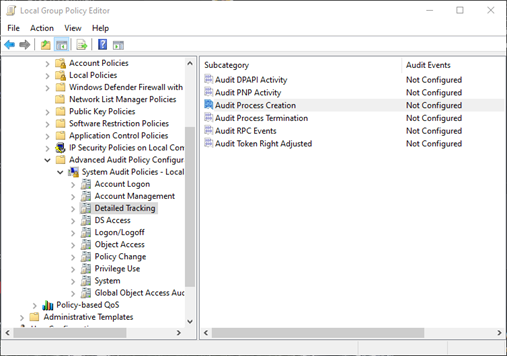
To enable the Audit Process Creation policy to generate 4688 events, edit the following group policy:
Computer Configuration > Policies > Windows Settings > Security Settings > Advanced Audit Configuration > Detailed Tracking > Audit Process Creation
Enabling 4663 Event Collection
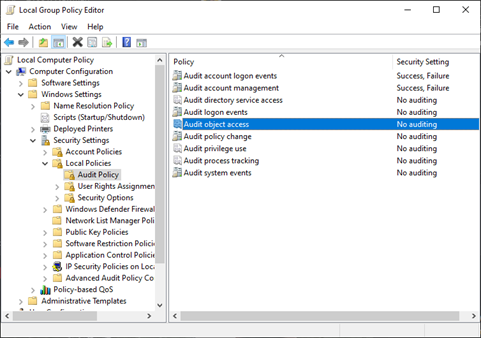
To enable Audit Object Access policy to generate 4663 events, edit the following group policy:
Computer Configuration > Policies > Windows Settings > Security Settings > Local Policies > Audit Policy > Audit object access
Setting security access control lists on collection objects
Once enabled, it is also necessary to set a security access control list (SACL) on the specific objects to collect these events.
Due to the volume of events generated by this policy, we recommend that these SACLs only be applied to a very limited subset of folders. SACLs specifically applied to files are removed when the file is deleted, so we recommend that:
- These SACLs be applied at the lowest level of folder that isn’t going to be regularly modified as part of the build process
- Inheritance be set to ensure SACLs are applied to all files created under these folders[i]
For this build compromise scenario, SACLs should ideally be enabled for folders that contain source files being built. Security teams will need to work with development teams to identify where these files are stored on build servers.
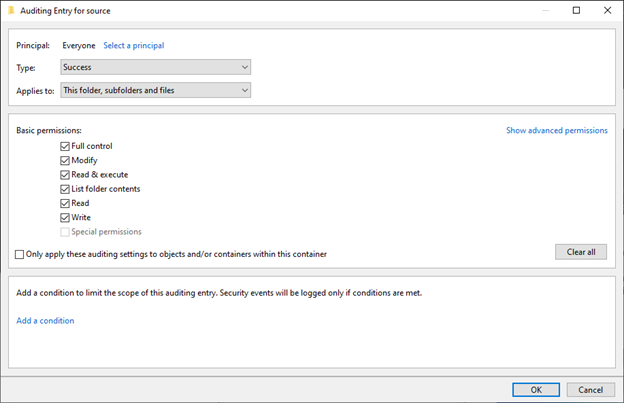
Once identified, auditing of them can be enabled by selecting the relevant folder properties, selecting the Security tab, and clicking Advanced.
In the window that opens:
- Select the Auditing tab, and add an audit policy.
- Select Principal and set this to Everyone, and then select the Full control permission box.
- Finally ensure that Applies to is set to the appropriate scope for the code files being monitored[ii].
In addition to generating the events on build servers, you must also ensure that the events are being collected by Azure Sentinel to allow for querying and detection of them.
Detections
Once the required data has been collected organizations can establish detections to detect future (or historical) activity like the NOBELIUM build process compromise.
The Microsoft Threat Intelligence Center (MSTIC) has created a detection query for Azure Sentinel to look for the pattern of code files being modified when a build process is run within the Windows Event Logs discussed above. This detection logic was chosen to allow for the potential detection of other threat actors attempting to perform any similar attack, rather than just a detection of the specific SUNSPOT malware.
The query below contains several customizable elements to help defenders reduce false positive rates, these have been configured by default for a generic environment where C++/C# development is being conducted. The customizable elements are as follows:
- timeframe – how often (and far back) to run the detection.
- time_window – how close together should build process creation and code file modification occur for a detection to be raised.
- build_processes – a list of process names associated with build processes.
- allow_list – a list of processes that are known to modify code files and should be excluded for detections.
You can also edit the types of source code files to look for. By default, the query is configured for .cp and .ccp files.
To proactively identify future threats, we recommend that organizations run the following query against historical datasets, as well as enable it in Azure Sentinel as an Analytics rule:
// How far back to look for events from
let timeframe = 1d;
// How close together build events and file modifications should occur to alert (make this smaller to reduce FPs)
let time_window = 5m;
// Edit this to include build processes used
let build_processes = dynamic(["MSBuild.exe", "dontnet.exe", "VBCSCompiler.exe"]);
// Include any processes that you want to allow to edit files during/around the build process
let allow_list = dynamic([""]);
SecurityEvent
| where TimeGenerated > ago(timeframe)
// Look for build process starts
| where EventID == 4688
| where Process has_any (build_processes)
| summarize by BuildParentProcess=ParentProcessName, BuildProcess=Process, BuildAccount = Account, Computer, BuildCommand=CommandLine, timekey= bin(TimeGenerated, time_window), BuildProcessTime=TimeGenerated
| join kind=inner(
SecurityEvent
| where TimeGenerated > ago(timeframe)
// Look for file modifications to code file
| where EventID == 4663
| where Process !in (allow_list)
// Look for code files, edit this to include file extensions used in build.
| where ObjectName endswith ".cs" or ObjectName endswith ".cpp"
// 0x6 and 0x4 for file append, 0x100 for file replacements
| where AccessMask == "0x6"  or AccessMask == "0x4" or AccessMask == "0X100"
| summarize by FileEditParentProcess=ParentProcessName, FileEditAccount = Account, Computer, FileEdited=ObjectName, FileEditProcess=ProcessName, timekey= bin(TimeGenerated, time_window), FileEditTime=TimeGenerated)
// join where build processes and file modifications seen at same time on same host
on timekey, Computer
// Limit to only where the file edit happens after the build process starts
| where BuildProcessTime <= FileEditTime
| summarize make_set(FileEdited), make_set(FileEditProcess), make_set(FileEditAccount) by timekey, Computer, BuildParentProcess, BuildProcess
If you have Microsoft Defender for Endpoint (MDE) in your build servers you can also use the following Azure Sentinel query that uses MDE telemetry in place of Windows Event logs:
// How far back to look for events from
let timeframe = 1d;
// How close together build events and file modifications should occur to alert (make this smaller to reduce FPs)
let time_window = 5m;
// Edit this to include build processes used
let build_processes = dynamic(["MSBuild.exe", "dontnet.exe", "VBCSCompiler.exe"]);
// Include any processes that you want to allow to edit files during/around the build process
let allow_list = dynamic([]);
DeviceProcessEvents
| where TimeGenerated > ago(timeframe)
// Look for build process starts
| where FileName has_any (build_processes)
| summarize by BuildParentProcess=InitiatingProcessFileName, BuildProcess=FileName, BuildAccount = AccountName, DeviceName, BuildCommand=ProcessCommandLine, timekey= bin(TimeGenerated, time_window), BuildProcessTime=TimeGenerated
| join kind=inner(
DeviceFileEvents
| where TimeGenerated > ago(timeframe)
| where InitiatingProcessFileName !in (allow_list)
| where ActionType == "FileCreated"  or ActionType == "FileModified"
// Look for code files, edit this to include file extensions used in build.
| where FileName endswith ".cs" or FileName endswith ".cpp"
| summarize by FileEditParentProcess=InitiatingProcessParentFileName, FileEditAccount = InitiatingProcessAccountName, DeviceName, FileEdited=FileName, FileEditProcess=InitiatingProcessFileName, timekey= bin(TimeGenerated, time_window), FileEditTime=TimeGenerated)
// join where build processes and file modifications seen at same time on same host
on timekey, DeviceName
// Limit to only where the file edit happens after the build process starts
| where BuildProcessTime <= FileEditTime
| summarize make_set(FileEdited), make_set(FileEditProcess), make_set(FileEditAccount) by timekey, DeviceName, BuildParentProcess, BuildProcess
You can also use MDE telemetry to look for specific IOCs related to the SUNSPOT malware with the following Azure Sentinel queries:
let SUNSPOT_Hashes = dynamic(["c45c9bda8db1d470f1fd0dcc346dc449839eb5ce9a948c70369230af0b3ef168", "0819db19be479122c1d48743e644070a8dc9a1c852df9a8c0dc2343e904da389"]);
union isfuzzy=true(
DeviceEvents
| where InitiatingProcessSHA256 in (SUNSPOT_Hashes)),
(DeviceImageLoadEvents
| where InitiatingProcessSHA256 in (SUNSPOT_Hashes))

union isfuzzy=true
(DeviceFileEvents
| where FolderPath endswith "vmware-vmdmp.log"),
(SecurityEvent
| where EventID == 4663
| where ObjectName endswith "vmware-vmdmp.log")
Other Monitoring Opportunities for Build Process Threats
In the last section we explored the monitoring opportunities related to the NOBELIUM build process compromise. However, as detailed in the opening of this blog, NOBELIUM is not the only attack targeting software development, build, and release processes.
As such, organizations need to have monitoring in place for a broader scope of activity than just that represented by NOBELIUM. In this section we focus on other monitoring opportunities that exist in CI/CD solutions, using Azure DevOps as an example and again using Azure Sentinel as the monitoring solution.
The same monitoring opportunities can be applied to other CI/CD solutions and implemented using other monitoring technologies. By sharing details via this blog, Microsoft hopes to help the largest number of organizations possible, whether they are Azure Sentinel customers or not.
Azure DevOps
Azure DevOps and specifically Azure Pipelines provide software development, build, and deployment services in the cloud. An attacker looking to compromise a build process of an organization who use these services is going to have to interact with the service. Due to Azure DevOps auditing capabilities any such interaction is going to provide defenders with opportunities to monitor for and detect any suspicious behavior.
As with nearly all cloud services, identity is the primary security boundary for Azure DevOps services. MSTIC has provided multiple detections and hunting queries for cloud identity activity. Defenders should leverage these to identify suspicious identity events relating to these services. Additionally, Azure DevOps provides granular logging related to user activity which should be collected and monitored.
Collecting Azure DevOps Audit Logs with Azure Sentinel
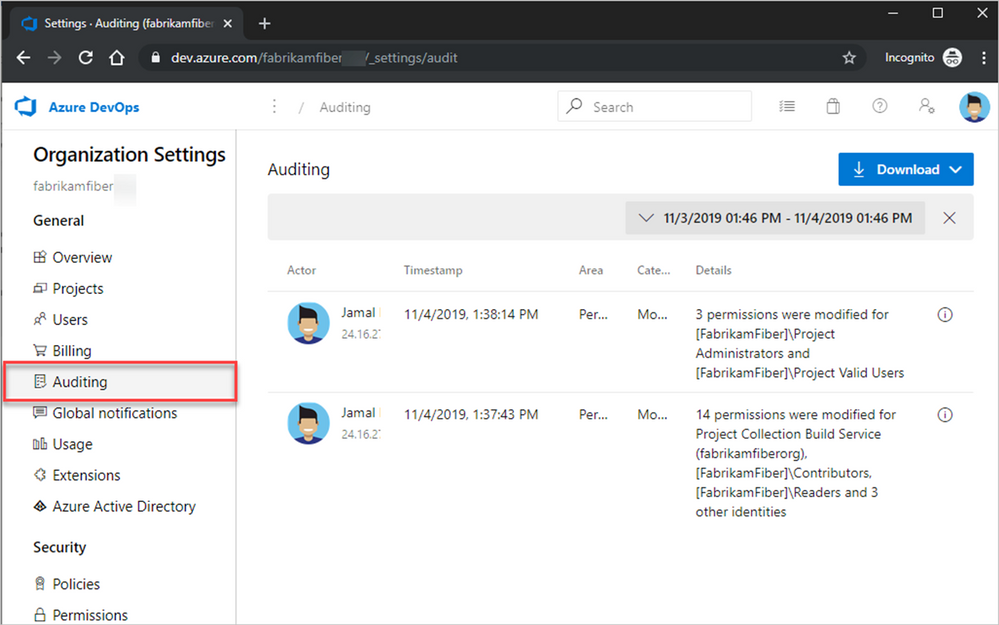
Azure DevOps audit logs are accessible via the Azure DevOps portal by logging in, selecting Organization settings > Auditing[iii].
Security teams using Azure Sentinel should also ingest these logs into Azure Sentinel so that the logs can be correlated with other data, and so that Azure Sentinel’s security analytics capabilities can be applied to the logs. You can ingest these logs into Azure Sentinel via an audit stream.
Go to Azure Dev Ops > Organization Settings > Auditing > Streams > New stream > Azure Monitor Logs
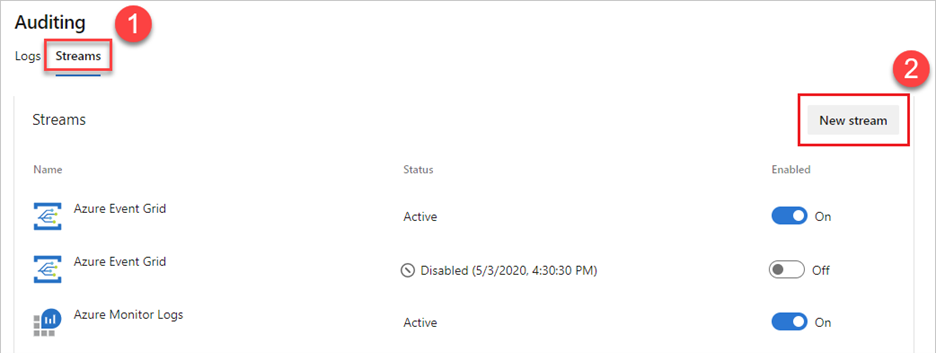
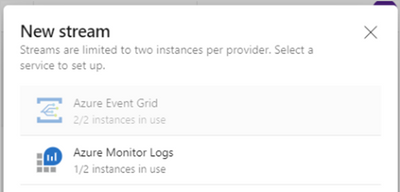
You will then be prompted to provide a Workspace ID, and Shared Key. These should be the Workspace ID and Access Key of your Azure Sentinel Instance.
These can be found by going to Azure Sentinel > Settings > Workplace settings > Agents Management.
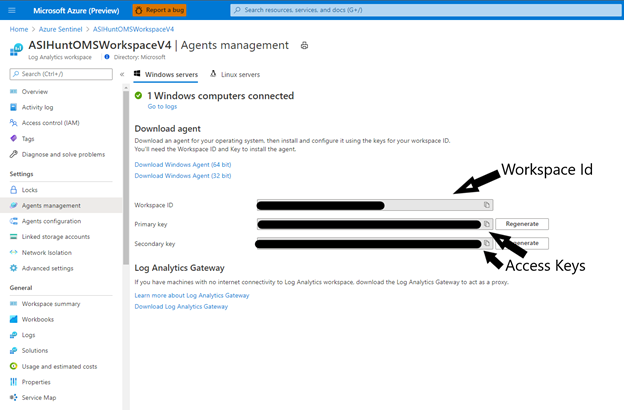
Once configured, Azure DevOps audit logs will appear in your Azure Sentinel Workspace under the AzureDevOpsAuditing table.
More details on configuring Azure DevOps Auditing streams can be found in the Azure DevOps documentation.
Monitoring and Hunting in Azure DevOps Audit Logs
The Azure DevOps Audit Log is a rich data source that provides significant details about most[iv] actions users can take. Below are details of some of the key fields to understand when threat hunting in this data.
Field Name
|
Description
|
ActorUPN
|
The UPN of the user performing the action (or Object Id if a Service Principal).
|
ActorDisplayName
|
The friendly display name of the user performing the action.
|
Authentication Mechanism
|
How the user authenticated to Azure DevOps – commonly seen are SessionToken, Oauth, and PAT (Personal Access Token). This can be useful for hunting for administrative actions conducted via an authentication method not commonly seen.
|
ScopeDisplayName
|
The scope an operation was applied to. This shows the name of the object scoped, and the type of object. E.g. ‘name (type)’
|
ProjectName
|
The name of the Azure DevOps project the action was applied to.
|
IpAddress
|
Client IP of the user performing the action.
|
UserAgent
|
The UserAgent string of the user performing the action.
|
Area
|
The high level type of action performed, these generally correlate to the core features of Azure DevOps.
|
OperationName
|
The specific Operation carried out. Format is AreaName.ActionName. e.g. Policy.PolicyConfigModified
|
Details
|
String description of the Operations details.
|
Data
|
Dynamic data object containing specific details of the operation, the structure depends on the Operation.
|
Category
|
High level category of the Operations, e.g. Modify, Create, Delete
|
This data source provides a wide range of monitoring opportunities and MSTIC has collaborated with teams across Azure to develop Azure Sentinel detections and hunting queries using this data, for potential software build compromise activity.
Unlike with the NOBELIUM monitoring opportunities, where each opportunity was an element in a single attack, the following queries each represent a separate, individual monitoring opportunity that defenders can leverage to detect potentially malicious activity.
An attack may be detected at one or more of these opportunities depending on its nature. For each opportunity we present a short summary of each opportunity, its significance for defenders and its position in an attack based on Mitre ATT&CK.
Detections
These queries are designed to be more accurate indicators of malicious activity than Hunting Queries. Whilst False Positives (FPs) are possible, the rates should be significantly smaller than with Hunting Queries and therefore the output of these can be considered more reliable indicators of malicious attacker activity.
New PA, PCA, or PCAS added to Azure DevOps
ATT&CK Technique: T1078.004
Description: In order for an attacker to be able to interact with any CI/CD solution they will need to gain elevated permissions. In Azure DevOps these permissions take the form of a small number of key administrative permissions. If the principle of least privilege is applied the number of users granted these permissions should be small. Note that permissions can also be granted via
This query gets details of accounts added to these roles and joins it with a summary of the operations conducted by that user immediately after being granted these permissions in order to provide analysts with context.
Query:
Spoiler (Highlight to read)
AzureDevOpsAuditing
| where OperationName =~ "Group.UpdateGroupMembership.Add"
| where Details has_any ("Project Administrators", "Project Collection Administrators", "Project Collection Service Accounts", "Build Administrator")
| project-reorder TimeGenerated, Details, ActorUPN, IpAddress, UserAgent, AuthenticationMechanism, ScopeDisplayName
| extend timekey = bin(TimeGenerated, 1h)
| extend ActorUserId = tostring(Data.MemberId)
| project timekey, ActorUserId, AddingUser=ActorUPN, TimeAdded=TimeGenerated, PermissionGrantDetails = Details
| join (AzureDevOpsAuditing
| extend timekey = bin(TimeGenerated, 1h)) on timekey, ActorUserId
| summarize ActionsWhenAdded = make_set(OperationName) by ActorUPN, AddingUser, TimeAdded, PermissionGrantDetails
AzureDevOpsAuditing
| where OperationName =~ “Group.UpdateGroupMembership.Add”
| where Details has_any (“Project Administrators”, “Project Collection Administrators”, “Project Collection Service Accounts”, “Build Administrator”)
| project-reorder TimeGenerated, Details, ActorUPN, IpAddress, UserAgent, AuthenticationMechanism, ScopeDisplayName
| extend timekey = bin(TimeGenerated, 1h)
| extend ActorUserId = tostring(Data.MemberId)
| project timekey, ActorUserId, AddingUser=ActorUPN, TimeAdded=TimeGenerated, PermissionGrantDetails = Details
| join (AzureDevOpsAuditing
| extend timekey = bin(TimeGenerated, 1h)) on timekey, ActorUserId
| summarize ActionsWhenAdded = make_set(OperationName) by ActorUPN, AddingUser, TimeAdded, PermissionGrantDetails
Build Agents Added of new OS Type or New User
ATT&CK Technique: T1053
Description: As seen with threata actors such as NOBELIUM, attackers can look to subvert a build process by controlling build servers. Azure DevOps uses agent pools to execute pipeline tasks. An attacker could insert compromised agents that they control into the pools in order to execute malicious code. This query looks for users adding agents to pools they have not added agents to in the last 30 days or adding agents to a pool of an OS that has not been added to that pool in the last 30 days. This detection has potential for false positives so has a configurable allow list to allow for certain users to be excluded from the logic.
Query:
Spoiler (Highlight to read)
let lookback = 14d;
let timeframe = 1d;
// exclude allowed users from query such as the ADO service
let allowed_users = dynamic(["Azure DevOps Service"]);
union
// Look for agents being added to a pool of a OS type not seen with that pool before
(AzureDevOpsAuditing
| where TimeGenerated > ago(lookback) and TimeGenerated < ago(timeframe)
| where OperationName =~ "Library.AgentAdded"
| where ActorUPN !in (allowed_users)
| extend AgentPoolName = tostring(Data.AgentPoolName)
| extend OsDescription = tostring(Data.OsDescription)
| where isnotempty(OsDescription)
| extend OsDescription = tostring(split(OsDescription, "#", 0)[0])
| project AgentPoolName, OsDescription
| join kind=rightanti (AzureDevOpsAuditing
| where TimeGenerated > ago(timeframe)
| where OperationName == "Library.AgentAdded"
| extend AgentPoolName = tostring(Data.AgentPoolName)
| extend OsDescription = tostring(Data.OsDescription)
| where isnotempty(OsDescription)
| extend OsDescription = tostring(split(OsDescription, "#", 0)[0])) on AgentPoolName, OsDescription),
// Look for users addeing agents to a pool that they have not added agents to before.
(AzureDevOpsAuditing
| where TimeGenerated > ago(lookback) and TimeGenerated < ago(timeframe)
| extend AgentPoolName = tostring(Data.AgentPoolName)
| where ActorUPN !in (allowed_users)
| project AgentPoolName, ActorUPN
| join kind=rightanti (AzureDevOpsAuditing
| where TimeGenerated > ago(timeframe)
| where OperationName == "Library.AgentAdded"
| where ActorUPN !in (allowed_users)
| extend AgentPoolName = tostring(Data.AgentPoolName)
) on AgentPoolName, ActorUPN)
| extend AgentName = tostring(Data.AgentName)
| extend OsDescription = tostring(Data.OsDescription)
| extend SystemDetails = Data.SystemCapabilities
| project-reorder TimeGenerated, OperationName, ScopeDisplayName, AgentPoolName, AgentName, ActorUPN, IpAddress, UserAgent, OsDescription, SystemDetails, Data
let lookback = 14d;
let timeframe = 1d;
// exclude allowed users from query such as the ADO service
let allowed_users = dynamic([“Azure DevOps Service”]);
union
// Look for agents being added to a pool of a OS type not seen with that pool before
(AzureDevOpsAuditing
| where TimeGenerated > ago(lookback) and TimeGenerated < ago(timeframe)
| where OperationName =~ “Library.AgentAdded”
| where ActorUPN !in (allowed_users)
| extend AgentPoolName = tostring(Data.AgentPoolName)
| extend OsDescription = tostring(Data.OsDescription)
| where isnotempty(OsDescription)
| extend OsDescription = tostring(split(OsDescription, “#”, 0)[0])
| project AgentPoolName, OsDescription
| join kind=rightanti (AzureDevOpsAuditing
| where TimeGenerated > ago(timeframe)
| where OperationName == “Library.AgentAdded”
| extend AgentPoolName = tostring(Data.AgentPoolName)
| extend OsDescription = tostring(Data.OsDescription)
| where isnotempty(OsDescription)
| extend OsDescription = tostring(split(OsDescription, “#”, 0)[0])) on AgentPoolName, OsDescription),
// Look for users addeing agents to a pool that they have not added agents to before.
(AzureDevOpsAuditing
| where TimeGenerated > ago(lookback) and TimeGenerated < ago(timeframe)
| extend AgentPoolName = tostring(Data.AgentPoolName)
| where ActorUPN !in (allowed_users)
| project AgentPoolName, ActorUPN
| join kind=rightanti (AzureDevOpsAuditing
| where TimeGenerated > ago(timeframe)
| where OperationName == “Library.AgentAdded”
| where ActorUPN !in (allowed_users)
| extend AgentPoolName = tostring(Data.AgentPoolName)
) on AgentPoolName, ActorUPN)
| extend AgentName = tostring(Data.AgentName)
| extend OsDescription = tostring(Data.OsDescription)
| extend SystemDetails = Data.SystemCapabilities
| project-reorder TimeGenerated, OperationName, ScopeDisplayName, AgentPoolName, AgentName, ActorUPN, IpAddress, UserAgent, OsDescription, SystemDetails, Data
ADO Agent Pool Created and Deleted.
ATT&CK Technique: T1578
Description: As well as adding build agents to an existing pool to execute malicious activity within a pipeline an attacker could create a completely new agent pool and use this for execution. Azure DevOps allows for the creation of agent pools with Azure hosted infrastructure or self-hosted infrastructure. Given the additional customizability of self-hosted agents this detection focuses on the creation of new self-hosted pools. To further reduce false positive rates the detection looks for pools created and deleted quickly (within 7 days by default), as an attacker is likely to remove a malicious pool once used to reduce/remove evidence of their activity.
Query:
Spoiler (Highlight to read)
let lookback = 14d;
let timewindow = 7d;
AzureDevOpsAuditing
| where TimeGenerated > ago(lookback)
| where OperationName =~ "Library.AgentPoolCreated"
| extend AgentCloudId = tostring(Data.AgentCloudId)
| extend PoolType = iif(isnotempty(AgentCloudId), "Azure VMs", "Self Hosted")
// Comment this line out to include cloud pools as well
| where PoolType =~ "Self Hosted"
| extend AgentPoolName = tostring(Data.AgentPoolName)
| extend AgentPoolId = tostring(Data.AgentPoolId)
| extend IsHosted = tostring(Data.IsHosted)
| extend IsLegacy = tostring(Data.IsLegacy)
| extend timekey = bin(TimeGenerated, timewindow)
// Join only with pools deleted in the same window
| join (AzureDevOpsAuditing
| where TimeGenerated > ago(lookback)
| where OperationName =~ "Library.AgentPoolDeleted"
| extend AgentPoolName = tostring(Data.AgentPoolName)
| extend AgentPoolId = tostring(Data.AgentPoolId)
| extend timekey = bin(TimeGenerated, timewindow)) on AgentPoolId, timekey
| project-reorder TimeGenerated, ActorUPN, UserAgent, IpAddress, AuthenticationMechanism, OperationName, AgentPoolName, IsHosted, IsLegacy, Data
let lookback = 14d;
let timewindow = 7d;
AzureDevOpsAuditing
| where TimeGenerated > ago(lookback)
| where OperationName =~ “Library.AgentPoolCreated”
| extend AgentCloudId = tostring(Data.AgentCloudId)
| extend PoolType = iif(isnotempty(AgentCloudId), “Azure VMs”, “Self Hosted”)
// Comment this line out to include cloud pools as well
| where PoolType =~ “Self Hosted”
| extend AgentPoolName = tostring(Data.AgentPoolName)
| extend AgentPoolId = tostring(Data.AgentPoolId)
| extend IsHosted = tostring(Data.IsHosted)
| extend IsLegacy = tostring(Data.IsLegacy)
| extend timekey = bin(TimeGenerated, timewindow)
// Join only with pools deleted in the same window
| join (AzureDevOpsAuditing
| where TimeGenerated > ago(lookback)
| where OperationName =~ “Library.AgentPoolDeleted”
| extend AgentPoolName = tostring(Data.AgentPoolName)
| extend AgentPoolId = tostring(Data.AgentPoolId)
| extend timekey = bin(TimeGenerated, timewindow)) on AgentPoolId, timekey
| project-reorder TimeGenerated, ActorUPN, UserAgent, IpAddress, AuthenticationMechanism, OperationName, AgentPoolName, IsHosted, IsLegacy, Data
External Upstream Source Added to Azure DevOps Feed
ATT&CK Technique: T1199
Description: Build pipelines often take dependencies from other pipelines or other feeds as part of the process. An attacker could compromise the build process by introducing a compromised upstream item. The detection looks for new external sources added to an Azure DevOps feed that may detect the addition of a malicious source. An allow list can be customized to explicitly allow known good sources.
Reference: https://www.microsoft.com/security/blog/2018/07/26/attack-inception-compromised-supply-chain-within-a-supply-chain-poses-new-risks/#:~:text=A%20new%20software%20supply%20chain%20attack%20unearthed%20by,installer%20the%20unsuspecting%20carrier%20of%20a%20malicious%20payload.
Query:
Spoiler (Highlight to read)
// Add any known allowed sources and source locations to the filter below (the NuGet Gallery has been added here as an example).
let allowed_sources = dynamic(["NuGet Gallery"]);
let allowed_locations = dynamic(["https://api.nuget.org/v3/index.json"]);
AzureDevOpsAuditing
	// Look for feeds created or modified at either the organization or project level
	| where OperationName matches regex "Artifacts.Feed.(Org|Project).Modify"
	| where Details has "UpstreamSources, added"
	| extend FeedName = tostring(Data.FeedName)
	| extend FeedId = tostring(Data.FeedId)
	| extend UpstreamsAdded = Data.UpstreamsAdded
	// As multiple feeds may be added expand these out
	| mv-expand UpstreamsAdded
	// Only focus on external feeds
	| where UpstreamsAdded.UpstreamSourceType !~ "internal"
	| extend SourceLocation = tostring(UpstreamsAdded.Location)
	| extend SourceName = tostring(UpstreamsAdded.Name)
	// Exclude sources and locations in the allow list
	| where SourceLocation !in (allowed_locations) and SourceName !in (allowed_sources)
	| extend SourceProtocol = tostring(UpstreamsAdded.Protocol)
	| extend SourceStatus = tostring(UpstreamsAdded.Status)
    	| project-reorder TimeGenerated, OperationName, ScopeDisplayName, ProjectName, FeedName, SourceName, SourceLocation, SourceProtocol, ActorUPN, UserAgent, IpAddress
// Add any known allowed sources and source locations to the filter below (the NuGet Gallery has been added here as an example).
let allowed_sources = dynamic([“NuGet Gallery”]);
let allowed_locations = dynamic([“https://api.nuget.org/v3/index.json”]);
AzureDevOpsAuditing
// Look for feeds created or modified at either the organization or project level
| where OperationName matches regex “Artifacts.Feed.(Org|Project).Modify”
| where Details has “UpstreamSources, added”
| extend FeedName = tostring(Data.FeedName)
| extend FeedId = tostring(Data.FeedId)
| extend UpstreamsAdded = Data.UpstreamsAdded
// As multiple feeds may be added expand these out
| mv-expand UpstreamsAdded
// Only focus on external feeds
| where UpstreamsAdded.UpstreamSourceType !~ “internal”
| extend SourceLocation = tostring(UpstreamsAdded.Location)
| extend SourceName = tostring(UpstreamsAdded.Name)
// Exclude sources and locations in the allow list
| where SourceLocation !in (allowed_locations) and SourceName !in (allowed_sources)
| extend SourceProtocol = tostring(UpstreamsAdded.Protocol)
| extend SourceStatus = tostring(UpstreamsAdded.Status)
| project-reorder TimeGenerated, OperationName, ScopeDisplayName, ProjectName, FeedName, SourceName, SourceLocation, SourceProtocol, ActorUPN, UserAgent, IpAddress
Build Pipeline Created and Deleted in One Day
ATT&CK Technique: T1072
Description: An attacker with access to a CI/CD solution could create a pipeline to inject artifacts used by other pipelines, or to create a malicious software build that looks legitimate by using a pipeline that incorporates legitimate elements. An attacker would also likely want to cover their tracks once conducting such activity. This query looks for Azure DevOps Pipelines created and deleted within the same day; this is unlikely to be legitimate user activity in most cases.
Query:
Spoiler (Highlight to read)
let timeframe = 14d;
// Get Release Pipeline Creation Events and group by day
AzureDevOpsAuditing
| where TimeGenerated > ago(timeframe)
| where OperationName =~ "Release.ReleasePipelineCreated"
// Group by day
| extend timekey = bin(TimeGenerated, 1d)
| extend PipelineId = tostring(Data.PipelineId)
| extend PipelineName = tostring(Data.PipelineName)
// Rename some columns to make output clearer
| project-rename TimeCreated = TimeGenerated, CreatingUser = ActorUPN, CreatingUserAgent = UserAgent, CreatingIP = IpAddress
// Join with Release Pipeline Deletions where Pipeline ID is the same and deletion occurred on same day as creation
| join (AzureDevOpsAuditing
| where TimeGenerated > ago(timeframe)
| where OperationName =~ "Release.ReleasePipelineDeleted"
// Group by day
| extend timekey = bin(TimeGenerated, 1d)
| extend PipelineId = tostring(Data.PipelineId)
| extend PipelineName = tostring(Data.PipelineName)
// Rename some things to make the output clearer
| project-rename TimeDeleted = TimeGenerated, DeletingUser = ActorUPN, DeletingUserAgent = UserAgent, DeletingIP = IpAddress) on PipelineId, timekey
| project TimeCreated, TimeDeleted, PipelineName, PipelineId, CreatingUser, CreatingIP, CreatingUserAgent, DeletingUser, DeletingIP, DeletingUserAgent, ScopeDisplayName, ProjectName, Data, OperationName, OperationName1
let timeframe = 14d;
// Get Release Pipeline Creation Events and group by day
AzureDevOpsAuditing
| where TimeGenerated > ago(timeframe)
| where OperationName =~ “Release.ReleasePipelineCreated”
// Group by day
| extend timekey = bin(TimeGenerated, 1d)
| extend PipelineId = tostring(Data.PipelineId)
| extend PipelineName = tostring(Data.PipelineName)
// Rename some columns to make output clearer
| project-rename TimeCreated = TimeGenerated, CreatingUser = ActorUPN, CreatingUserAgent = UserAgent, CreatingIP = IpAddress
// Join with Release Pipeline Deletions where Pipeline ID is the same and deletion occurred on same day as creation
| join (AzureDevOpsAuditing
| where TimeGenerated > ago(timeframe)
| where OperationName =~ “Release.ReleasePipelineDeleted”
// Group by day
| extend timekey = bin(TimeGenerated, 1d)
| extend PipelineId = tostring(Data.PipelineId)
| extend PipelineName = tostring(Data.PipelineName)
// Rename some things to make the output clearer
| project-rename TimeDeleted = TimeGenerated, DeletingUser = ActorUPN, DeletingUserAgent = UserAgent, DeletingIP = IpAddress) on PipelineId, timekey
| project TimeCreated, TimeDeleted, PipelineName, PipelineId, CreatingUser, CreatingIP, CreatingUserAgent, DeletingUser, DeletingIP, DeletingUserAgent, ScopeDisplayName, ProjectName, Data, OperationName, OperationName1
Audit Stream Disabled
ATT&CK Technique: T1562.008
Description: Azure DevOps allows for audit logs to be streamed to external storage solutions such as SIEM solutions. An attacker looking to hide malicious Azure DevOps activity from defenders may look to disable data streams before conducting activity and then re-enabling the data stream after (so as not to raise data threshold-based alarms). Looking for disabled audit streams can identify this activity, and due to the nature of the action it is unlikely to have a high false positive rate.
Query:
Spoiler (Highlight to read)
AzureDevOpsAuditing
| where OperationName =~ "AuditLog.StreamDisabledByUser"
| extend StreamType = tostring(Data.ConsumerType)
| project-reorder TimeGenerated, Details, ActorUPN, IpAddress, UserAgent, StreamType
AzureDevOpsAuditing
| where OperationName =~ “AuditLog.StreamDisabledByUser”
| extend StreamType = tostring(Data.ConsumerType)
| project-reorder TimeGenerated, Details, ActorUPN, IpAddress, UserAgent, StreamType
Pipeline Modified by User who hasn’t modified it before.
ATT&CK Technique: T1584.006, T1578
Description: There are several potential pipeline steps that could be modified by an attacker to inject malicious code into the build cycle. A likely attacker path is the modification to an existing pipeline that they have access to. This detection looks for users modifying a pipeline when they have not previously been observed modifying or creating that pipeline before. This query also joins events with data to Azure AD Identity Protection (AAD IdP) in order to show if the user conducting the action has any associated AAD IdP alerts, you can also choose to filter this detection to only alert when the user also has AAD IdP alerts associated with them.
Query:
Spoiler (Highlight to read)
// Set the lookback to determine if user has created pipelines before
let timeback = 14d;
// Set the period for detections
let timeframe = 1d;
// Get a list of previous Release Pipeline creators to exclude
let releaseusers = AzureDevOpsAuditing
| where TimeGenerated > ago(timeback) and TimeGenerated < ago(timeframe)
| where OperationName in ("Release.ReleasePipelineCreated", "Release.ReleasePipelineModified")
// We want to look for users performing actions in specic projects so we creat this userscope object to match on
| extend UserScope = strcat(ActorUserId, "-", ProjectName)
| summarize by UserScope;
// Get Release Pipeline creations by new users
AzureDevOpsAuditing
| where TimeGenerated > ago(timeframe)
| where OperationName =~ "Release.ReleasePipelineModified"
| extend UserScope = strcat(ActorUserId, "-", ProjectName)
| where UserScope !in (releaseusers)
| extend ActorUPN = tolower(ActorUPN)
| project-away Id, ActivityId, ActorCUID, ScopeId, ProjectId, TenantId, SourceSystem, UserScope
// See if any of these users have Azure AD alerts associated with them in the same timeframe
| join kind = leftouter (
SecurityAlert
| where TimeGenerated > ago(timeframe)
| where ProviderName == "IPC"
| extend AadUserId = tostring(parse_json(Entities)[0].AadUserId)
| summarize Alerts=count() by AadUserId) on $left.ActorUserId == $right.AadUserId
| extend Alerts = iif(isnotempty(Alerts), Alerts, 0)
// Uncomment the line below to only show results where the user as AADIdP alerts
//| where Alerts > 0
// Set the lookback to determine if user has created pipelines before
let timeback = 14d;
// Set the period for detections
let timeframe = 1d;
// Get a list of previous Release Pipeline creators to exclude
let releaseusers = AzureDevOpsAuditing
| where TimeGenerated > ago(timeback) and TimeGenerated < ago(timeframe)
| where OperationName in (“Release.ReleasePipelineCreated”, “Release.ReleasePipelineModified”)
// We want to look for users performing actions in specic projects so we creat this userscope object to match on
| extend UserScope = strcat(ActorUserId, “-“, ProjectName)
| summarize by UserScope;
// Get Release Pipeline creations by new users
AzureDevOpsAuditing
| where TimeGenerated > ago(timeframe)
| where OperationName =~ “Release.ReleasePipelineModified”
| extend UserScope = strcat(ActorUserId, “-“, ProjectName)
| where UserScope !in (releaseusers)
| extend ActorUPN = tolower(ActorUPN)
| project-away Id, ActivityId, ActorCUID, ScopeId, ProjectId, TenantId, SourceSystem, UserScope
// See if any of these users have Azure AD alerts associated with them in the same timeframe
| join kind = leftouter (
SecurityAlert
| where TimeGenerated > ago(timeframe)
| where ProviderName == “IPC”
| extend AadUserId = tostring(parse_json(Entities)[0].AadUserId)
| summarize Alerts=count() by AadUserId) on $left.ActorUserId == $right.AadUserId
| extend Alerts = iif(isnotempty(Alerts), Alerts, 0)
// Uncomment the line below to only show results where the user as AADIdP alerts
//| where Alerts > 0
Variable Group Modified by New User.
ATT&CK Technique: T1578
Description: Variables can be configured and used at any stage of the build process in Azure DevOps to inject values. An attacker with the required permissions could modify or add to these variables to conduct malicious activity such as changing paths or remote endpoints called during the build. As variables are often changed by users just detecting these changes would have a high false positive rate. This detection looks for modifications to variable groups where that user has not been observed modifying them before.
Query:
Spoiler (Highlight to read)
let lookback = 14d;
let timeframe = 1d;
let historical_data =
AzureDevOpsAuditing
| where TimeGenerated > ago(lookback) and TimeGenerated < ago(timeframe)
| where OperationName =~ "Library.VariableGroupModified"
| extend variables = Data.Variables
| extend VariableGroupName = tostring(Data.VariableGroupName)
| extend VariableGroupId = tostring(Data.VariableGroupId)
| extend UserKey = strcat(VariableGroupId, "-", ActorUserId)
| project UserKey;
AzureDevOpsAuditing
| where TimeGenerated > ago(timeframe)
| where OperationName =~ "Library.VariableGroupModified"
| extend variables = Data.Variables
| extend VariableGroupName = tostring(Data.VariableGroupName)
| extend VariableGroupId = tostring(Data.VariableGroupId)
| extend UserKey = strcat(VariableGroupId, "-", ActorUserId)
| where UserKey !in (historical_data)
| project-away UserKey
| project-reorder TimeGenerated, VariableGroupName, ActorUPN, IpAddress, UserAgent
let lookback = 14d;
let timeframe = 1d;
let historical_data =
AzureDevOpsAuditing
| where TimeGenerated > ago(lookback) and TimeGenerated < ago(timeframe)
| where OperationName =~ “Library.VariableGroupModified”
| extend variables = Data.Variables
| extend VariableGroupName = tostring(Data.VariableGroupName)
| extend VariableGroupId = tostring(Data.VariableGroupId)
| extend UserKey = strcat(VariableGroupId, “-“, ActorUserId)
| project UserKey;
AzureDevOpsAuditing
| where TimeGenerated > ago(timeframe)
| where OperationName =~ “Library.VariableGroupModified”
| extend variables = Data.Variables
| extend VariableGroupName = tostring(Data.VariableGroupName)
| extend VariableGroupId = tostring(Data.VariableGroupId)
| extend UserKey = strcat(VariableGroupId, “-“, ActorUserId)
| where UserKey !in (historical_data)
| project-away UserKey
| project-reorder TimeGenerated, VariableGroupName, ActorUPN, IpAddress, UserAgent
New Extension Added.
ATT&CK Technique: T1505
Description: Extensions added additional features to Azure DevOps. An attacker could use a malicious extension to conduct malicious activity. This query looks for new extensions that are not from a configurable list of approved publishers.
Query:
Spoiler (Highlight to read)
let allowed_publishers = dynamic([]);
AzureDevOpsAuditing
| where OperationName =~ "Extension.Installed"
| extend ExtensionName = tostring(Data.ExtensionName)
| extend PublisherName = tostring(Data.PublisherName)
| where PublisherName !in (allowed_publishers)
| project-reorder TimeGenerated, OperationName, ExtensionName, PublisherName, ActorUPN, IpAddress, UserAgent, ScopeDisplayName, ScopeType, Data
let allowed_publishers = dynamic([]);
AzureDevOpsAuditing
| where OperationName =~ “Extension.Installed”
| extend ExtensionName = tostring(Data.ExtensionName)
| extend PublisherName = tostring(Data.PublisherName)
| where PublisherName !in (allowed_publishers)
| project-reorder TimeGenerated, OperationName, ExtensionName, PublisherName, ActorUPN, IpAddress, UserAgent, ScopeDisplayName, ScopeType, Data
Pipeline Retention Settings Reduced to Zero.
ATT&CK Technique: T1564
Description: AzureDevOps retains items such as run records and produced artifacts for a configurable amount of time. An attacker looking to reduce the footprint left by their malicious activity may look to reduce the retention time for artifacts and runs to 0.
Query:
Spoiler (Highlight to read)
AzureDevOpsAuditing
| where OperationName =~ "Pipelines.PipelineRetentionSettingChanged"
| where Data.SettingName in ("PurgeArtifacts", "PurgeRuns")
| where Data.NewValue == 0
| project-reorder TimeGenerated, OperationName, ActorUPN, IpAddress, UserAgent, Data
AzureDevOpsAuditing
| where OperationName =~ “Pipelines.PipelineRetentionSettingChanged”
| where Data.SettingName in (“PurgeArtifacts”, “PurgeRuns”)
| where Data.NewValue == 0
| project-reorder TimeGenerated, OperationName, ActorUPN, IpAddress, UserAgent, Data
PAT used with browser.
ATT&CK Technique: T1564
Description: Personal Access Tokens (PATs) are used as an alternate password to authenticate into Azure DevOps. PATs are intended for programmatic access for use in code or applications. Given this they can be prone to attacker theft if not adequately secured. This query looks for the use of a PAT in authentication which is from a User Agent containing a rendering engine, indicating a browser. This should not be normal activity and could be an indicator of an attacker using a stolen PAT.
Query:
Spoiler (Highlight to read)
AzureDevOpsAuditing
| where AuthenticationMechanism startswith "PAT"
// Look for useragents that include a rendering engine
| where UserAgent has_any ("Gecko", "WebKit", "Presto", "Trident", "EdgeHTML", "Blink")
AzureDevOpsAuditing
| where AuthenticationMechanism startswith “PAT”
// Look for useragents that include a rendering engine
| where UserAgent has_any (“Gecko”, “WebKit”, “Presto”, “Trident”, “EdgeHTML”, “Blink”)
Hunting Queries
These are queries that are designed to look for abnormal activity that may not necessarily be malicious but could be an indicator of attacker activity and therefore deserves further investigation. These queries could have a significant (FP) rate and should be used as a starting point for further analysis and hunting.
Release Pipeline Created in Project by New User
ATT&CK Technique: T1053
Description: An attacker could look to create a new poisoned pipeline in a CI/CD solution and attach a build process to it. This hunting query looks for new Azure DevOps pipelines being created in projects where the creating user has not been seen creating a pipeline before. This query could have a significant false positive rate and records should be triaged to determine if a user creating a pipeline is authorized and expected.
Query:
Spoiler (Highlight to read)
// Set the lookback to determine if user has created pipelines before
let timeback = 30d;
// Set the period for detections
let timeframe = 1d;
// Get a list of previous Release Pipeline creators to exclude
let releaseusers = AzureDevOpsAuditing
| where TimeGenerated > ago(timeback) and TimeGenerated < ago(timeframe)
| where OperationName =~ "Release.ReleasePipelineCreated"
// We want to look for users performing actions in specific organizations so we creat this userscope object to match on
| extend UserScope = strcat(ActorUPN, "-", ProjectName)
| summarize by UserScope;
// Get Release Pipeline creations by new users
AzureDevOpsAuditing
| where TimeGenerated > ago(timeframe)
| where OperationName =~ "Release.ReleasePipelineCreated"
| extend UserScope = strcat(ActorUPN, "-", ProjectName)
| where UserScope !in (releaseusers)
| extend ActorUPN = tolower(ActorUPN)
| project-away Id, ActivityId, ActorCUID, ScopeId, ProjectId, TenantId, SourceSystem, UserScope
// See if any of these users have Azure AD alerts associated with them in the same timeframe
| join kind = leftouter (
SecurityAlert
| where TimeGenerated > ago(timeframe)
| where ProviderName == "IPC"
| extend AadUserId = tostring(parse_json(Entities)[0].AadUserId)
| summarize Alerts=count() by AadUserId) on $left.ActorUserId == $right.AadUserId
| project-reorder TimeGenerated, ProjectName, Details, ActorUPN, IpAddress, UserAgent, Alerts
// Set the lookback to determine if user has created pipelines before
let timeback = 30d;
// Set the period for detections
let timeframe = 1d;
// Get a list of previous Release Pipeline creators to exclude
let releaseusers = AzureDevOpsAuditing
| where TimeGenerated > ago(timeback) and TimeGenerated < ago(timeframe)
| where OperationName =~ “Release.ReleasePipelineCreated”
// We want to look for users performing actions in specific organizations so we creat this userscope object to match on
| extend UserScope = strcat(ActorUPN, “-“, ProjectName)
| summarize by UserScope;
// Get Release Pipeline creations by new users
AzureDevOpsAuditing
| where TimeGenerated > ago(timeframe)
| where OperationName =~ “Release.ReleasePipelineCreated”
| extend UserScope = strcat(ActorUPN, “-“, ProjectName)
| where UserScope !in (releaseusers)
| extend ActorUPN = tolower(ActorUPN)
| project-away Id, ActivityId, ActorCUID, ScopeId, ProjectId, TenantId, SourceSystem, UserScope
// See if any of these users have Azure AD alerts associated with them in the same timeframe
| join kind = leftouter (
SecurityAlert
| where TimeGenerated > ago(timeframe)
| where ProviderName == “IPC”
| extend AadUserId = tostring(parse_json(Entities)[0].AadUserId)
| summarize Alerts=count() by AadUserId) on $left.ActorUserId == $right.AadUserId
| project-reorder TimeGenerated, ProjectName, Details, ActorUPN, IpAddress, UserAgent, Alerts
New Package Feed Created.
ATT&CK Technique: T1195
Description: An attacker could look to introduce upstream compromised software packages by creating a new package feed within Azure DevOps. This query looks for new Feeds and includes details on any Azure AD Identity Protection alerts related to the user account creating the feed to assist in triage.
Query:
Spoiler (Highlight to read)
let timeframe = 30d;
let alert_threshold = 0;
AzureDevOpsAuditing
| where  TimeGenerated > ago(timeframe)
| where OperationName matches regex "Artifacts.Feed.(Org|Project).Create"
| extend FeedName = tostring(Data.FeedName)
| extend FeedId = tostring(Data.FeedId)
| join kind = leftouter (
SecurityAlert
| where TimeGenerated > ago(timeframe)
| where ProviderName == "IPC"
| extend AadUserId = tostring(parse_json(Entities)[0].AadUserId)
| summarize Alerts=count() by AadUserId) on $left.ActorUserId == $right.AadUserId
| extend Alerts = iif(isempty(Alerts), 0, Alerts)
| project-reorder TimeGenerated, Details, ActorUPN, IpAddress, UserAgent
let timeframe = 30d;
let alert_threshold = 0;
AzureDevOpsAuditing
| where TimeGenerated > ago(timeframe)
| where OperationName matches regex “Artifacts.Feed.(Org|Project).Create”
| extend FeedName = tostring(Data.FeedName)
| extend FeedId = tostring(Data.FeedId)
| join kind = leftouter (
SecurityAlert
| where TimeGenerated > ago(timeframe)
| where ProviderName == “IPC”
| extend AadUserId = tostring(parse_json(Entities)[0].AadUserId)
| summarize Alerts=count() by AadUserId) on $left.ActorUserId == $right.AadUserId
| extend Alerts = iif(isempty(Alerts), 0, Alerts)
| project-reorder TimeGenerated, Details, ActorUPN, IpAddress, UserAgent
Build Check Removed.
ATT&CK Technique: T1578
Description: Build checks can be built into a pipeline in order to control the release process, these can include things such as the successful passing of certain steps, or an explicit user approval. An attacker who has altered a build process may look to remove a check in order to ensure a compromised build is released. This hunting query simply looks for all check removal events, these should be relatively uncommon. In the output, Type shows the type of Check that was deleted.
Query:
Spoiler (Highlight to read)
AzureDevOpsAuditing
| where OperationName =~ "CheckConfiguration.Deleted"
| extend ResourceName = tostring(Data.ResourceName)
| extend Type = tostring(Data.Type)
| project-reorder TimeGenerated, OperationName, ResourceName, Type, ActorUPN, IpAddress, UserAgent
AzureDevOpsAuditing
| where OperationName =~ “CheckConfiguration.Deleted”
| extend ResourceName = tostring(Data.ResourceName)
| extend Type = tostring(Data.Type)
| project-reorder TimeGenerated, OperationName, ResourceName, Type, ActorUPN, IpAddress, UserAgent
New Release Approver.
ATT&CK Technique: T1078
Description: Releases in Azure Pipelines often require a user authorization to perform the release. An attacker that has compromised a build may look to self-approve a release using a compromised account to avoid user focus on that release. This query looks for release approvers in pipelines where they have not approved a release in the last 30 days. This query can have a significant false positive rate so it is best suited as a hunting query rather than a detection.
Query:
Spoiler (Highlight to read)
let lookback = 30d;
let timeframe = 1d;
AzureDevOpsAuditing
| where TimeGenerated > ago(lookback) and TimeGenerated < ago(timeframe)
| where OperationName in ("Release.ApprovalCompleted", "Release.ApprovalsCompleted")
| extend PipelineName = tostring(Data.PipelineName)
| extend ApprovalType = tostring(Data.ApprovalType)
| extend StageName = tostring(Data.StageName)
| extend ReleaseName = tostring(Data.ReleaseName)
| summarize by PipelineName, ActorUPN, ApprovalType
| join kind=rightanti (
AzureDevOpsAuditing
| where TimeGenerated > ago(timeframe)
| where OperationName in ("Release.ApprovalCompleted", "Release.ApprovalsCompleted")
| extend PipelineName = tostring(Data.PipelineName)
| extend ApprovalType = tostring(Data.ApprovalType)
| extend StageName = tostring(Data.StageName)
| extend ReleaseName = tostring(Data.ReleaseName)) on ActorUPN
| project-reorder TimeGenerated, PipelineName, ActorUPN, ApprovalType, StageName, ReleaseName, IpAddress, UserAgent, AuthenticationMechanism
let lookback = 30d;
let timeframe = 1d;
AzureDevOpsAuditing
| where TimeGenerated > ago(lookback) and TimeGenerated < ago(timeframe)
| where OperationName in (“Release.ApprovalCompleted”, “Release.ApprovalsCompleted”)
| extend PipelineName = tostring(Data.PipelineName)
| extend ApprovalType = tostring(Data.ApprovalType)
| extend StageName = tostring(Data.StageName)
| extend ReleaseName = tostring(Data.ReleaseName)
| summarize by PipelineName, ActorUPN, ApprovalType
| join kind=rightanti (
AzureDevOpsAuditing
| where TimeGenerated > ago(timeframe)
| where OperationName in (“Release.ApprovalCompleted”, “Release.ApprovalsCompleted”)
| extend PipelineName = tostring(Data.PipelineName)
| extend ApprovalType = tostring(Data.ApprovalType)
| extend StageName = tostring(Data.StageName)
| extend ReleaseName = tostring(Data.ReleaseName)) on ActorUPN
| project-reorder TimeGenerated, PipelineName, ActorUPN, ApprovalType, StageName, ReleaseName, IpAddress, UserAgent, AuthenticationMechanism
New Agent Pool Created.
ATT&CK Technique: T1578
Description: Agent Pools provide a valuable resource to build processes. Creating and using a compromised agent pool in a pipeline could allow an attacker to compromise a build process. The creation of an agent pool on its own is not malicious, it is an event that is likely to occur rarely which makes it effective for manual hunting through manual validation of creation events.
Query:
Spoiler (Highlight to read)
AzureDevOpsAuditing
| where OperationName =~ "Library.AgentPoolCreated"
| extend AgentPoolName = tostring(Data.AgentPoolName)
| extend AgentPoolId = tostring(Data.AgentPoolId)
| extend IsHosted = tostring(Data.IsHosted)
| extend IsLegacy = tostring(Data.IsLegacy)
| project-reorder TimeGenerated, ActorUPN, UserAgent, IpAddress, AuthenticationMechanism, OperationName
AzureDevOpsAuditing
| where OperationName =~ “Library.AgentPoolCreated”
| extend AgentPoolName = tostring(Data.AgentPoolName)
| extend AgentPoolId = tostring(Data.AgentPoolId)
| extend IsHosted = tostring(Data.IsHosted)
| extend IsLegacy = tostring(Data.IsLegacy)
| project-reorder TimeGenerated, ActorUPN, UserAgent, IpAddress, AuthenticationMechanism, OperationName
PAT used with new operation.
ATT&CK Technique: T1578
Description: PATs are typically used for repeated, programmatic tasks. This query looks for PATs based authentication being used with an Operation not previously associated with PAT based authentication. This could indicate an attacker using a stolen PAT to perform malicious actions.
Query:
Spoiler (Highlight to read)
let lookback = 30d;
let timeframe = 3d;
let PAT_Actions = AzureDevOpsAuditing
| where TimeGenerated > ago(lookback) and TimeGenerated < ago(timeframe)
| where AuthenticationMechanism startswith "PAT"
| summarize by OperationName;
AzureDevOpsAuditing
| where TimeGenerated > ago(timeframe)
| where AuthenticationMechanism startswith "PAT"
| where OperationName !in (PAT_Actions)
let lookback = 30d;
let timeframe = 3d;
let PAT_Actions = AzureDevOpsAuditing
| where TimeGenerated > ago(lookback) and TimeGenerated < ago(timeframe)
| where AuthenticationMechanism startswith “PAT”
| summarize by OperationName;
AzureDevOpsAuditing
| where TimeGenerated > ago(timeframe)
| where AuthenticationMechanism startswith “PAT”
| where OperationName !in (PAT_Actions)
Build Deleted After Pipeline Modification.
ATT&CK Technique: T1053
Description: An attacker altering pipelines may look to delete builds to reduce the footprint they leave on a system. This query looks for a build pipeline being deleted within 1 hour of a pipeline being modified. This event may produce false positives but should not be so common that it can’t be effectively used as part of hunting.
Query:
Spoiler (Highlight to read)
AzureDevOpsAuditing
| where OperationName =~ "Release.ReleaseDeleted"
| extend PipelineId = tostring(Data.PipelineId)
| extend PipelineName = tostring(Data.PipelineName)
| extend timekey = bin(TimeGenerated, 1h)
| join (AzureDevOpsAuditing
| where OperationName =~ 'Release.ReleasePipelineModified'
| extend PipelineId = tostring(Data.PipelineId)
| extend PipelineName = tostring(Data.PipelineName)
| extend timekey = bin(TimeGenerated, 1h)) on timekey, PipelineId, ActorUPN
| where TimeGenerated1 < TimeGenerated
| extend ReleaseName = tostring(Data.ReleaseName)
| project-rename TimeModified = TimeGenerated1, TimeDeleted = TimeGenerated, ModifyOperation = OperationName1, ModifyUser=ActorUPN1, ModifyIP=IpAddress1, ModifyUA= UserAgent1, DeleteOperation=OperationName, DeleteUser=ActorUPN, DeleteIP=IpAddress, DeleteUA=UserAgent
| project-reorder TimeModified, ProjectName, PipelineName, ModifyUser, ModifyIP, ModifyUA, TimeDeleted, DeleteOperation, DeleteUser, DeleteIP, DeleteUA,ReleaseName
AzureDevOpsAuditing
| where OperationName =~ “Release.ReleaseDeleted”
| extend PipelineId = tostring(Data.PipelineId)
| extend PipelineName = tostring(Data.PipelineName)
| extend timekey = bin(TimeGenerated, 1h)
| join (AzureDevOpsAuditing
| where OperationName =~ ‘Release.ReleasePipelineModified’
| extend PipelineId = tostring(Data.PipelineId)
| extend PipelineName = tostring(Data.PipelineName)
| extend timekey = bin(TimeGenerated, 1h)) on timekey, PipelineId, ActorUPN
| where TimeGenerated1 < TimeGenerated
| extend ReleaseName = tostring(Data.ReleaseName)
| project-rename TimeModified = TimeGenerated1, TimeDeleted = TimeGenerated, ModifyOperation = OperationName1, ModifyUser=ActorUPN1, ModifyIP=IpAddress1, ModifyUA= UserAgent1, DeleteOperation=OperationName, DeleteUser=ActorUPN, DeleteIP=IpAddress, DeleteUA=UserAgent
| project-reorder TimeModified, ProjectName, PipelineName, ModifyUser, ModifyIP, ModifyUA, TimeDeleted, DeleteOperation, DeleteUser, DeleteIP, DeleteUA,ReleaseName
Variable Added and Removed
ATT&CK Technique: T1564
Description: Variables can be used at various stages of a pipeline to inject static variables. Depending on the build process these variables could be added by an attacker to get a build process to conduct an unwanted action such as communicating with an attacker-controlled endpoint or injecting values into code. This query looks for variables that are added and then deleted in a short space of time. This is not normally expected behavior and could be an indicator of attacker creating elements and then covering tracks. If this hunting query produces only a small number of events in an environment it could be promoted to a detection.
Query:
Spoiler (Highlight to read)
let timeframe = 7d;
AzureDevOpsAuditing
| where TimeGenerated > ago(timeframe)
| where OperationName =~ "Library.VariableGroupModified"
| extend variables = Data.Variables
| extend VariableGroupName = tostring(Data.VariableGroupName)
| join (AzureDevOpsAuditing
| where TimeGenerated > ago(timeframe)
| where OperationName =~ "Library.VariableGroupModified"
| extend variables = Data.Variables
| extend VariableGroupName = tostring(Data.VariableGroupName)) on VariableGroupName
| extend len = array_length(bag_keys(variables))
| extend len1 = array_length(bag_keys(variables1))
| where (TimeGenerated < TimeGenerated1 and len > len1) or (TimeGenerated1 > TimeGenerated and len1 < len)
| project-away len, len1
| extend VariablesRemoved = set_difference(bag_keys(variables), bag_keys(variables1))
| project-rename TimeCreated=TimeGenerated, TimeDeleted = TimeGenerated1, CreatingUser = ActorUPN, DeletingUser = ActorUPN1, CreatingIP = IpAddress, DeletingIP = IpAddress1, CreatingUA = UserAgent, DeletingUA = UserAgent1
| project-reorder VariableGroupName, TimeCreated, TimeDeleted, VariablesRemoved, CreatingUser, CreatingIP, CreatingUA, DeletingUser, DeletingIP, DeletingUA
let timeframe = 7d;
AzureDevOpsAuditing
| where TimeGenerated > ago(timeframe)
| where OperationName =~ “Library.VariableGroupModified”
| extend variables = Data.Variables
| extend VariableGroupName = tostring(Data.VariableGroupName)
| join (AzureDevOpsAuditing
| where TimeGenerated > ago(timeframe)
| where OperationName =~ “Library.VariableGroupModified”
| extend variables = Data.Variables
| extend VariableGroupName = tostring(Data.VariableGroupName)) on VariableGroupName
| extend len = array_length(bag_keys(variables))
| extend len1 = array_length(bag_keys(variables1))
| where (TimeGenerated < TimeGenerated1 and len > len1) or (TimeGenerated1 > TimeGenerated and len1 < len)
| project-away len, len1
| extend VariablesRemoved = set_difference(bag_keys(variables), bag_keys(variables1))
| project-rename TimeCreated=TimeGenerated, TimeDeleted = TimeGenerated1, CreatingUser = ActorUPN, DeletingUser = ActorUPN1, CreatingIP = IpAddress, DeletingIP = IpAddress1, CreatingUA = UserAgent, DeletingUA = UserAgent1
| project-reorder VariableGroupName, TimeCreated, TimeDeleted, VariablesRemoved, CreatingUser, CreatingIP, CreatingUA, DeletingUser, DeletingIP, DeletingUA
These Hunting and Detection queries provide opportunities to monitor for potentially malicious behavior related to build processes in Azure DevOps. In addition to monitoring for suspicious activity it is important to ensure that preventative security measures are applied to your build pipelines. Best practice for securing Azure DevOps can be found at docs.microsoft.com
Summary
This blog has showcased how defenders can use monitoring to monitor their internal software build process to protect their supply chain as well as protecting others further down the supply chain. We have addressed how to monitor for NOBELIUM specific activity as well as wider monitoring opportunities using Azure DevOps as an example. Whilst many monitoring opportunities have been presented here there are other monitoring opportunities in build systems that haven’t been addressed here including detecting attackers accessing sensitive information.
The queries detailed in this blog as well as many others covering additional scenarios are available on the Azure Sentinel GitHub site under Detections and Hunting Queries.
MSTIC would like to thank the Azure DevOps security team and the Azure Red Team for their help and support in this work.
[i] Ensure ‘Applied To:’ is set to ‘This folder, subfolder and files’
[ii] Should you wish you can set the Type of collection to ‘All’ but this scenario only required the collection of Success events.
[iii] Only Project Collection Administrators have access to the auditing feature.
[iv] But notably not all.








 ) or https:// means you’ve safely connected to the .gov website. Share sensitive information only on official, secure websites.

Recent Comments