by Contributed | Mar 17, 2021 | Technology
This article is contributed. See the original author and article here.
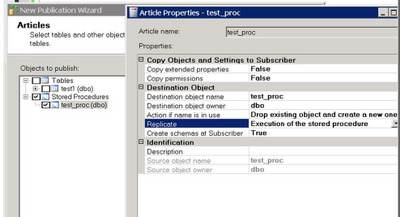
With Transactional Replication you can replicate execution of the Stored Procedure like this:
This has several advantages as discussed in this article:
https://docs.microsoft.com/en-us/sql/relational-databases/replication/transactional/publishing-stored-procedure-execution-in-transactional-replication?view=sql-server-ver15
When you enable CDC at the Database level, replication of the stored procedure execution will NOT work. This is By Design. CDC does not support tracking at stored procedure execution level, which means individual rows logged by stored proc execution need to be flagged with REPLICATE bit, which makes it impossible for transactional replication to replicate stored proc execution. As a result, ‘stored proc execution’ will work only when transactional replication is enabled and CDC is disabled.
by Contributed | Mar 17, 2021 | Technology
This article is contributed. See the original author and article here.
In this month’s community call, there is a quick roadmap update – 9 features in development to be delivered in Schema versions 1.4, 1.5, 1.6 over the next 3 months. Then there is a deep dive with demos and Q&A, focused on the Action.Execute feature and underlying Universal Actions Model for Microsoft Teams, Outlook and more, rolling out mid-April in Schema v1.4. The new Action.Execute action type synchronizes activity (payload) in the back-end while rendering cards natively in Teams and Outlook front-ends. Developers no longer need to build separate applications for each environment. The call was hosted by Matt Hidinger (Microsoft). Presenters include Shiladitya Saha (Microsoft Teams) and Karan Thapar (Microsoft Outlook). Recorded on March 11, 2021.
Demo:
Deep dive into Universal Actions for Microsoft Teams and Outlook – cards authored using the new Action.Execute action type “just work” in Teams chats, Outlook emails and more thanks to seamless back-end activity synchronization. Action.Execute can return a new card to replace the current one. Several light demos show the experience. Also shown: Contextual views in Teams bots/adaptive cards – allows specific users to have individualized cards and Sequential Workflows support on Teams – progress through a multi-step process in a single adaptive card using auto invoke and synchronized refresh capabilities.
Referenced in this call:
Resources in General:
Stay connected:
by Scott Muniz | Mar 17, 2021 | Security
This article was originally posted by the FTC. See the original article here.
Let’s say you get an email about a charge to your credit card for something you aren’t expecting or don’t want. Your first instinct may be to immediately call the company or respond to the email and to stop the payment. Scammers know that, and are taking advantage of it in a new phishing scheme.
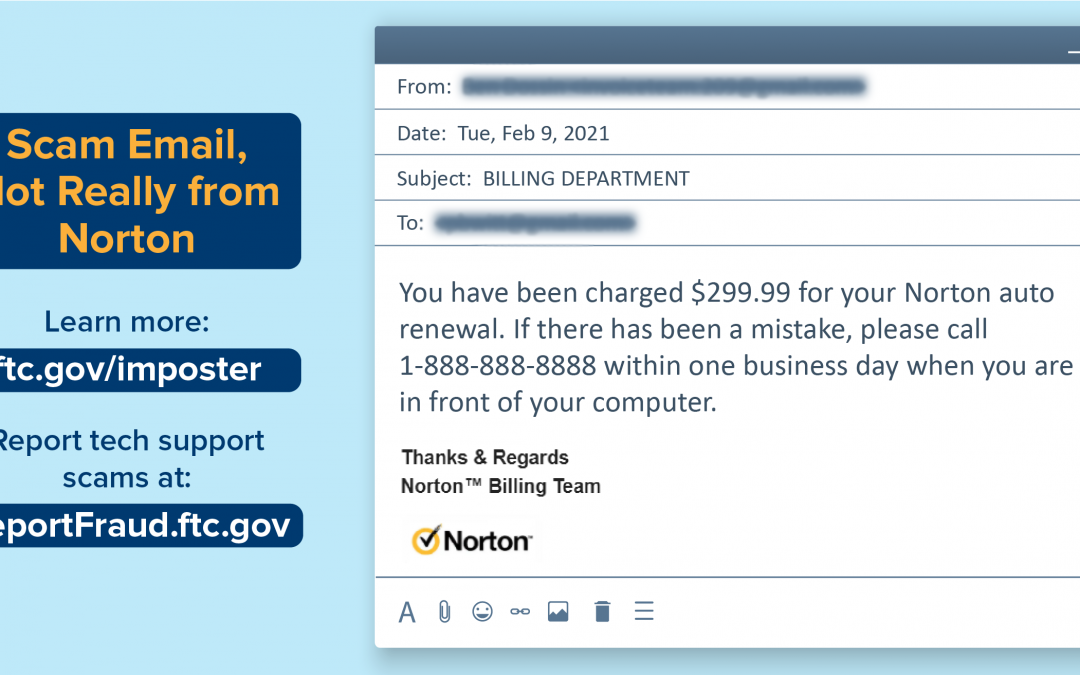
People tell us they’re getting emails that look like they’re from Norton, a company that sells antivirus and anti-malware software. (Tip: the emails are NOT from Norton.) The emails say you’ve been (or are about to be) charged for a Norton product — maybe an auto renewal or new order. If this is a mistake, the email says, you should call immediately. (Tip: don’t.)
![Scam Email, Not Really from Norton. Learn more: ftc.gov/imposter. Report tech support scams at: ReportFraud.ftc.gov. Image of an email. From: [redacted]. Date: Tue, Feb 9, 2021. Subject: BILLING DEPARTMENT. To: [redacted]. Body of email: "You have been charged $299.99 for your Norton auto renewal. If there has been a mistake, please call 1-999-999-9999 within one business day when you are in front of your computer. Thanks & Regards, Norton (TM) Billing Team." Image of Norton logo with yellow circle and black checkmark.](https://www.drware.com/wp-content/uploads/2021/03/21023_norton_scam_blog_graphics_v1-01.png)
If you call, you’ll be connected to a scammer. Some scammers might ask you to “verify” your credit card information, while others might say they need your password to remote into your computer so they can remove the Norton program. But if you let them, they could install malware, block you from getting to your own files, and sell you worthless services.
If you get an email or text you’re not sure about:
- Don’t click on any links.
- Don’t use the number in the email or text. If you want to call the company that supposedly sent the message, look up their phone number online.
Remember:
- Never give your password to a stranger on the phone, even if they claim to be from a company you recognize.
- If you did give out your password, change it right away, update your computer’s security software, run a scan, and delete anything it identifies as a problem.
- Make your passwords long, strong, and complex.
- Don’t give your bank account, credit card, or personal information over the phone to someone who contacts you out of the blue.
And if you do get a fake email like this, help your community by reporting it to the FTC at ReportFraud.ftc.gov.
Brought to you by Dr. Ware, Microsoft Office 365 Silver Partner, Charleston SC.
by Contributed | Mar 17, 2021 | Technology
This article is contributed. See the original author and article here.
Get in on March’s #MonthOfMEM
Two days of Microsoft Ignite just wasn’t enough to contain all of the technical skill-building, question-answering, and 1:1 engaging that the Microsoft Endpoint Manager engineering and product teams had to offer. That’s why we introduced the #MonthOfMEM: three dedicated weeks of post-Ignite training, Ask the Experts, 1:1 consultations, and real-world experience sharing designed to help IT pros build their knowledge, skills, and connections with the people building the endpoint management capabilities they rely on every day.
In the public sector? We’re here for you!
Join one of our three remaining Ask the Experts sessions, each of which is conveniently preceded with 24 hours of early access on the Tech Community to ensure that everyone has a chance to get their questions to our experts. We’ve already done two of these fun, informative events—two more to go!
We’re also offering free 1:1 consultations with the engineering team March 15-19 from 12:00 a.m. to 2:00 p.m. Pacific Time. This is a great opportunity for dedicated troubleshooting and specific advice for your environment and needs!
And, on March 24th, IT administrators from the University of Washington will be sharing their insights on how they were able to use Windows Autopilot and Intune to successfully deploy and manage devices in an education environment.
After the #MonthOfMEM
We’ll continue to host monthly Ask Microsoft Anything (AMA) events on the Tech Community. Folks can stay tuned to the to the Microsoft Endpoint Manager AMA space for details and bookmark the Microsoft Endpoint Manager blog for a full recap of the #MonthOfMEM and links to recordings of all activities on demand in the Video Hub.
by Contributed | Mar 17, 2021 | Technology
This article is contributed. See the original author and article here.
Hi Teams Community,
We’re back with another addition to Support Diagnostics for Microsoft Teams. @Chunlong Li has written our second offering in the Microsoft Remote Connectivity Analyzer.
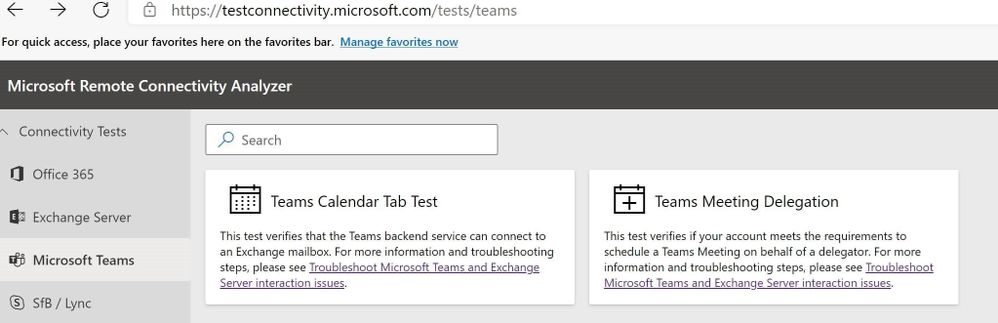
This new test will help you troubleshoot and test if you meet requirements to Schedule a Teams Meeting on behalf of a Delegate. If you’re assisting one of your users with Teams Delegate configuration or troubleshooting, this diagnostic is for you!
Typical symptoms of Delegate issues include an error message in Outlook:
Looks like you don’t have permission to schedule meetings for this account. Talk to the owner to get permission and try again.
To access the new diagnostic, navigate to Microsoft Remote Connectivity Analyzer, select Microsoft Teams, then click on the Teams Meeting Delegation test.
At a high level the Diagnostic attempts to create a test meeting in the Delegator’s calendar using the provided user account credentials and returns the result from the Teams Scheduling Service. Success indicates Delegation is configured correctly and should work for the Delegate.
Any failures will result in an error message that can be used by Support to assist Administrators in troubleshooting further. In fact we expect this Diagnostic to greatly lessen the administrative burden of collecting Outlook and Teams client logs to troubleshoot these issues. For the vast majority of failure cases the output from the MRCA Teams Meeting Delegation test should be all we need to help you fix the issue!
Please give this new Diagnostic a try with your Teams users’ Delegation issues, and let us know how it goes?
Thanks!
Microsoft Teams Support


Recent Comments