by Contributed | Mar 1, 2021 | Technology
This article is contributed. See the original author and article here.
As ever more applications are built to be cloud native, services like Redis are essential to enable these applications to perform and scale under heavy loads. To allow developers to utilize the speed and flexibility of Redis without the hassle of operation, Azure offers Azure Cache for Redis, a fully managed Redis service. A third-party benchmark recently showed that Azure Cache for Redis can improve latency and throughput performance by up to 800% when added to existing Azure architectures. To build on this powerful technology, we announced an innovative collaboration with Redis Labs almost a year ago to bring their Redis Enterprise software to Azure as a part of Azure Cache for Redis. Customers both large and small have been excited to try the expanded capabilities during the preview, and developers have found novel ways to solve their application challenges with the offering. Today, we’re proud to announce the general availability of the Enterprise and Enterprise Flash tiers of Azure Cache for Redis.
What’s in the box?
The new Enterprise offerings enhance and expand the range of use cases for Redis today. Redis modules from Redis Labs, like RediSearch and RedisTimeSeries, enable new use-cases for Redis such as real-time search and IoT data ingestion. At the same time, the offering also improves your existing Redis experience by making caches larger, more resilient, and capable of being distributed around the globe. The powerful features available include:
- Active Geo-Replication (in Preview)
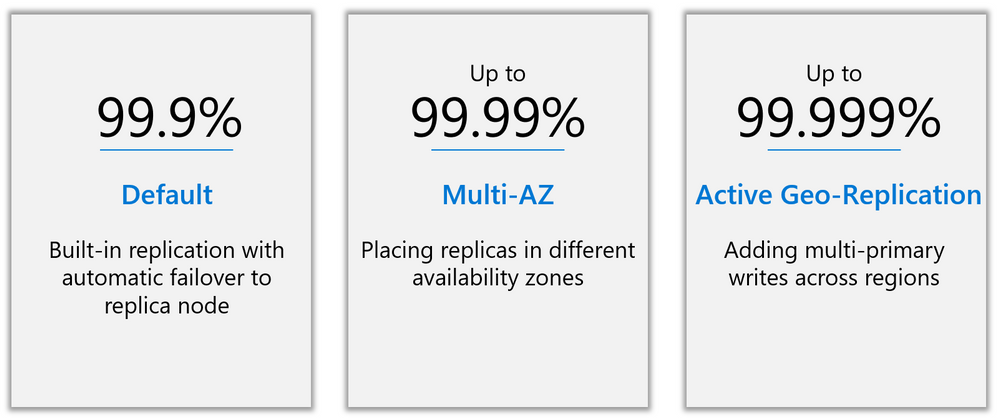
- Higher availability—architected for 99.99% with zone redundancy, and 99.999% with active geo-replication.
- Redis Modules, including
- RediSearch
- RedisBloom
- RedisTimeSeries
- The latest version of Redis—Redis 6.0
- Redis on Flash, using both DRAM and NVMe storage to enable cache sizes up to 13TB at a lower price per GB.
If you currently use Redis Enterprise on-prem, this offering allows you to enjoy many of your favorite features in a native Azure solution. Streamlined billing, familiar security and monitoring tools, and the ability to use your Azure spend commitment are all included. Even better, support for the Enterprise offering on Azure is backed all day, every day by the Microsoft support team, who have a direct line to the experts at Redis Labs if additional assistance is needed.
Active Geo-Replication
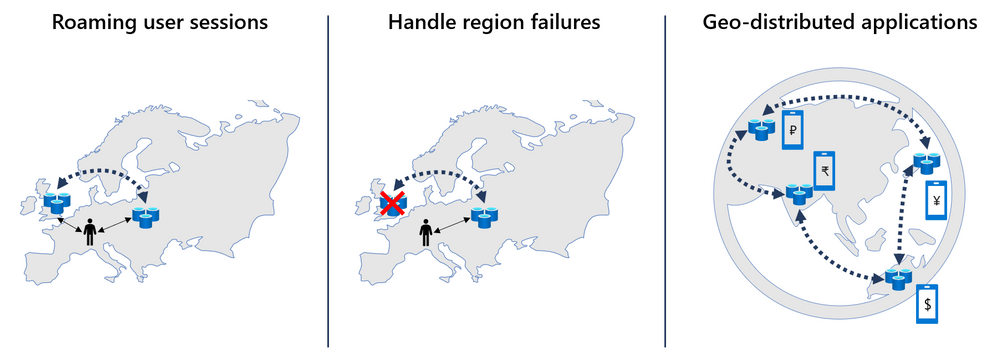
New in the Enterprise offering is a much-requested upgrade: the ability to geo-replicate data across caches in an active-active configuration. Now in preview, this feature allows data to be written locally in more than one region, with changes automatically replicated to and merged with other regions. Active geo-replication enables you to create a worldwide distributed cache with local latency access for users around the globe. This feature opens many exciting possibilities:
One key application is handling user sessions across regions. A huge advantage of Redis is the blazing-fast latencies gained from accessing data in-memory. If a user is far away from the data center holding the cache, however, this advantage is limited due to network latency. With active geo-replication, user session data can follow a user without complicated data management on the backend. The data is simply duplicated to the Redis instance in the closest data center, with all changes synchronized automatically.
Another important use case is with applications that are distributed worldwide. Active geo-replication greatly simplifies the data layer by reducing the need to manage geographies. For instance, a mobile game might have a worldwide leaderboard. Instead of developing infrastructure to share and rank scores between regions, high scores from each user can simply be written to a Redis sorted set that is distributed across regions worldwide. Through conflict-free resolution in active geo-replication, scores will be ranked seamlessly.
Increased Availability
One significant advantage of active geo-replication is that it makes a Redis deployment substantially more resilient to single-region failures. This, combined with the option to deploy Redis across multiple availability zones in a single region, provides two additional high-availability options. Deploying across availability zones gives up to 99.99% availability, while active geo-replication is designed for up to 99.999% availability—less than six minutes of downtime per year. This increased resiliency is essential to many retail and financial services customers who rely on Redis for inventory or pricing systems.
Redis Modules + Redis 6.0
The Redis Enterprise offering on Azure doesn’t just boost geographic distribution and availability, however. It also includes powerful features that enable new use cases. With the introduction of Redis 6.0, Azure Cache for Redis users gain access to the Redis Streams data type for the first time. Streams can be used to implement messaging systems, allowing Kafka-like functionality where clients can intelligently consume items from the stream. Three Redis Modules are additionally supported: RedisBloom, RediSearch, and RedisTimeSeries:
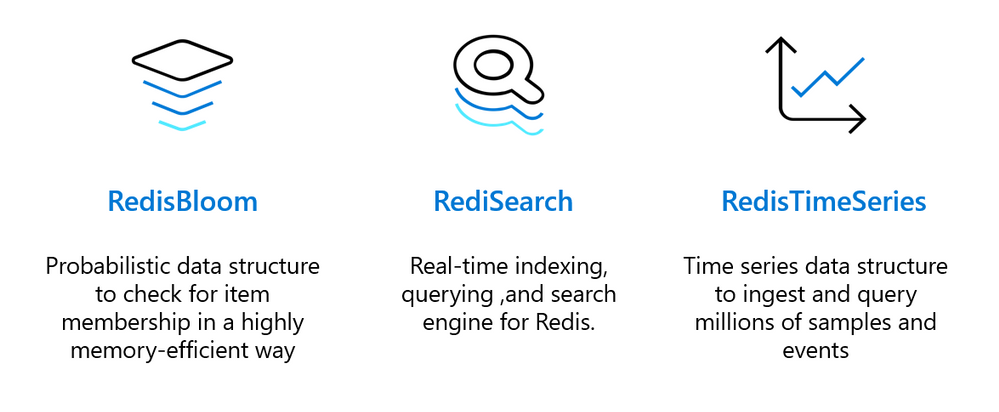
Customers like SitePro have already started using these highly-effective modules in their workflows, for example using RedisTimeSeries for IoT data ingestion:
“We are extremely excited about the added functionality in the Azure Cache for Redis, Enterprise Tiers. We know, love, and have used Redis for years as a key component in our industry leading real-time IoT control & monitoring platform. The Enterprise tiers allow us to do more with Redis by leveraging the RedisTimeSeries module to support data collection and analytics from hundreds of thousands of IoT sensors. “
-CEO and President

Learn More
Interested in learning more? Watch the session at Microsoft’s Ignite conference for a deeper dive and a demo of active geo-replication, and read the blog from Redis Labs.
Want to go ahead and give the new features a try? Read the documentation, and start your free Azure trial today.
by Contributed | Mar 1, 2021 | Technology
This article is contributed. See the original author and article here.
Update 1 of the Azure Sphere OS version 21.02 is now available for evaluation in the Retail Eval feed. This release fixes a security vulnerability discovered since the last release. This update will not restart the 21.02 evaluation period because the change will not impact any customer scenarios. The Retail feed will continue to deliver OS version 21.01 until we publish 21.02 later this week.
The evaluation release includes only an OS update; it does not include an updated SDK.
For more information on Azure Sphere OS feeds and setting up an evaluation device group, see Azure Sphere OS feeds and Set up devices for OS evaluation.
For self-help technical inquiries, please visit Microsoft Q&A or Stack Overflow. If you require technical support and have a support plan, please submit a support ticket in Microsoft Azure Support or work with your Microsoft Technical Account Manager. If you would like to purchase a support plan, please explore the Azure support plans.
by Contributed | Mar 1, 2021 | Technology
This article is contributed. See the original author and article here.
We continue to advocate for our learners to have a continuous learning mindset. This key principle is critical because cloud technologies are rapidly changing and it’s important to keep your skills current. Plus, maintaining an active certification can validate your up-to-date knowledge and your ability to perform in the job role. A couple months ago, we announced a new approach – free certification renewals – to reduce stress, complexity, and cost of keeping your certifications active.
Today, we’re proud to announce that 19 certifications are now available to renew on Microsoft Learn, with additional certifications following shortly. Within six months of your role-based or specialty certification expiring, you’re eligible to renew it by passing an online assessment – at no cost and on your own schedule. If you’re within the eligibility window, visit your Certification Dashboard to find more information about renewing your certification.
How can you prepare?
To help you prepare for the certification renewal assessment, we offer a curated collection of bite-sized learning content aligned to each assessment, and you can access it at any time – even before you’re eligible to renew your certification. Completing the collection is optional but we highly recommend it, especially if you’re not familiar with the latest technology updates. To understand what the assessment might include, you can review the skills measured section on the renewal page specific to your certification. Based on your assessment performance, we’ll also curate a personalized collection of learning content for you to save so you can learn which topics you might need to spend more time on.
When should you take the assessment?
Another key principle we’re adopting is to help learners keep their certification active with more flexibility and less friction. The eligibility window begins within six months before your certification expires, providing you the ability to complete the assessment online at a time that works best for you.
You may take the assessment as many times as you need to pass. If you don’t pass the first time, you may immediately attempt it again. After your second attempt, you must wait at least 24 hours before trying again. Keep in mind that you must pass the renewal assessment before your certification expires, otherwise the assessment will no longer be accessible and you’ll need to earn the certification again by passing the required exam (or exams). Be sure to factor this in as you plan to renew your certification. Note that the renewal assessment won’t be available to you prior to your eligibility window, but the learning collection will always be available so you can continuously learn and keep your skills up to date.
What if you have multiple certifications? To avoid renewing your certifications in the same week or month, you’ll have the flexibility to stagger your renewal assessment time frames, thanks to the six-month eligibility window. We recommend that you review the expiration dates for all certifications you currently have and plan your renewal assessment cadence accordingly. For example, if you have three certifications expiring in December, your eligibility window for all three certifications begins in June. You may decide to spread out your workload by taking one renewal assessment in June, another in August, and the third in October.
No matter when you pass the assessment, your certification will be extended by an additional year from its current expiration date. Note that if you have an expert-level certification for which an associate-level certification is a prerequisite, you only need to pass the assessment for the expert-level certification to renew it. Your associate-level certification needs to be renewed separately, and you need to follow the eligibility window based on when you earned that certification. In other words, you aren’t required to pass two renewal assessments to keep your expert-level certification active. If you choose to let your associate-level certification expire, you can keep your expert-level certification active by passing the renewal assessment for that certification only.
Exam updates and their impact on renewal
Renewal assessments are at the certification level and not for individual exams that lead up to the certification. Assessments are kept in sync with any changes made to the certification exams to help ensure that content and skills measured are aligned. If updates are made to the exam (or exams) that lead to a certification you already have, there’s no need to re-take the updated exam as changes will be reflected in the skills measured within the renewal assessment.
For example, if you earned a Microsoft Certified: Azure Administrator Associate certification by passing Exam AZ-103 initially, no action is required on your part to take the replacement Exam AZ-104. You only need to pass the certification renewal assessment to keep your certification active. If a certification retires altogether because the job role associated with it has evolved, the ability to renew the certification will no longer be available.
What about newly released certifications?
As we continue to invest in new certifications, we’ll also release associated renewal assessments and collections of learning content approximately six months after the certification has been in market. Additionally, renewal assessments will be updated periodically to reflect changes to the technology that impact the job role. To keep your certifications active, be sure to pass the assessment every year before your certification expires.
Find details on how to renew your Microsoft Certification. We’re excited to share the evolution of our certification program to help you validate your up-to-date skills with more flexibility while supporting you through your continuous learning journey.
by Contributed | Mar 1, 2021 | Technology
This article is contributed. See the original author and article here.
Howdy folks,
It’s that special time of year with another digital edition of Microsoft Ignite on the horizon. We know that security is top-of-mind for you and your business leaders, maybe now more so than ever. So we’re excited to share several Azure AD announcements that will help you strengthen your Zero Trust defenses in this current era of hybrid work. We’ll be updating our key news on Tuesday morning as Microsoft Ignite starts, so please watch our Microsoft Security blog for further announcements.
Once you’ve checked that out, be sure to tune in to Azure Active Directory: our identity vision and roadmap airing first at Wednesday, March 3rd at 5:00pm PT, delivered by Joy Chik, as she shares a deeper dive on how Azure AD helps you maximize control while enabling a seamless and secure user experience. Joy will be joined by a team of our identity expert to show off cool demos and share best practices to strengthen your authentication, simplify onboarding, and secure access to all your apps.
Please also join our experts for a live Q&A where they will answer your burning questions on our identity announcements, tips for deploying secure passwordless solutions, and Zero Trust as the proactive approach to cybersecurity.
No matter where you are in the world, I hope you will join us through our live and pre-recorded sessions. Join the conversation on Twitter and LinkedIn with the hashtag #MSIgnite.
Additional technical deep dive sessions available starting Tuesday
- Go passwordless | Hands-on tour in Azure AD with FIDO2 keys and Temporary Access Pass – watch
- Taking identity and privacy to a new level – watch
- Prevent attacks by protecting your applications with Azure Active Directory – watch
- Winning Azure Active Directory strategies for identity, security, and governance – watch
- Zero Trust – The proactive approach to cybersecurity – watch
Looking for more ways to engage with our identity content and experts?
Visit the Connection Zone where various engagement opportunities will help deepen your knowledge and skills.
- Compete and win free certification exams while building your expertise by participating in Cloud Skill Challenges
- Tune into Plan implement and administer conditional access, a Learn Live session which will highlight how to plan and implement security defaults, test, and troubleshoot conditional access policies implement application controls and session management as well as how to configure smart lockout thresholds.
- Want to have your questions answered by a Microsoft Professional? Visit One-on-one Consults to schedule a 45-minute consultation where you can engage directly with an identity expert.
Best regards,
Alex Simons (Twitter: @alex_a_simons)
Corporate Vice President Program Management
Microsoft Identity Division
by Contributed | Mar 1, 2021 | Technology
This article is contributed. See the original author and article here.
Can you remember 2015? Apple launched the Apple Watch, Microsoft launched Windows 10, and we announced AzureRM v1.0!
After years of service and coexistence with its replacement, the time has come to share the next steps we are taking with AzureRM.
Looking back
In 2018, we introduced a new generation of PowerShell modules named “Az”, bringing several advantages:
- Based on .NET Standard library for cross–platform execution.
- Addressed customer feedback about the length of commands.
- Reduced inconsistencies between cmdlets and modules.
After two years of existence and continuous improvements, the Az PowerShell modules feature the following benefits:
We are now announcing that the AzureRM PowerShell module will retire by 29 February 2024.
If you are still using AzureRM modules, we advise you to migrate to Az at your earliest convenience.
How do I migrate?
When we talked with customers, the effort needed to migrate scripts based on AzureRM to Az was one of the main blockers.
We provide a toolkit comprised of three options to help you migrate to Az:
- A PowerShell module to convert your scripts automatically.
- A compatibility mode with the “Enable-AzureRmAlias” cmdlet allowing you to run AzureRM scripts with Az modules.
- A VSCode extension if you want to perform the migration of your scripts with an IDE.
The following page has all the resources and technical information to help you migrate your scripts to Az: https://docs.microsoft.com/powershell/azure/migrate-from-azurerm-to-az
Open an issue on GitHub if you encounter problems with the migration toolkit.
Products and services using AzureRM
Some products and services have dependencies on the AzureRM modules. We are working closely with them to provide you with a path forward.
Next steps
We encourage you to start your migration as soon as possible and share with the community best practices that you may have, including tips and tricks.
The entire team is listening to your feedback and welcomes issues and contributions.
And as always, you can reach out to us via Twitter @azureposh


Recent Comments