Import historical data to optimize fraud protection

Import historical data to optimize fraud protection

This article is contributed. See the original author and article here.

To help boost your fraud protection strategy, we’ve released an improved data upload experience in Dynamics 365 Fraud Protection. The centralized interface guides you through importing historical data for purchase protection and loss prevention.

For details about this feature, refer to the schema for purchase protection and loss prevention. If some fields are not applicable to your industry, you can leave them blank. We recommend that you upload as much information as possible to capitalize on the adaptive machine learning capabilities.

Steps to improve your data uploadexperience

1. Export data from your data warehouse and prepare your data to match the schema.
We recommend uploading 3 to 6 months of historical data for optimal results.Upload data from at least 10 unique staff/POS devices to generate your first Loss Prevention report. For Purchase Protection, we suggest loading 3 to 6 months of mature data where refunds and label data are present.

2.Prepare your data to match the schema. Pay attention to the date format, which requires ISO 8601 in UTC time.

You can use DateTime.UtcNow.ToString(“o”) to convert datetime format.

For SQL, you can use SELECT: CONVERT(VARCHAR(33), DateColumn, 127) FROM MyTable.

Or, you can use the Excel function =CONCAT(TEXT([cell],”yyyy-mm-ddThh:mm:ss”),”.0000000Z”) to make the conversion.

Be sure to review and remove all escaped characters, such as commas, new line characters, and multi-line characters.

3. Prepare data files to upload.

Save the data in UTF-8 encoding.You can split a file that exceeds 10 GB into multiple uploads. Try to make the column header the same as what is specified in the schema to leverage the auto-mapping capability.

4. Upload the file in the Fraud Protection portal.

Follow the directions for purchase protection and loss prevention, upload the data file, and then map the data columns accordingly. When data upload and mapping is complete, you can start processing the data.

The processing may take some time depending on the size of data. A loss prevention report will be generated and ready to view after data processing is complete. For purchase assessments, the assessments are ready to use when data upload is complete. You can integrate purchase APIs, if you have not already done so, and then use the assessment scores to make decisions about your transactions.

To upload historical data and enhance your fraud prevention journey, feel free tosign in now. If you’re not currently using Dynamics 365 Fraud Protection, you cansign up for a free trial.

The post Import historical data to optimize fraud protection appeared first on Microsoft Dynamics 365 Blog.

Brought to you by Dr. Ware, Microsoft Office 365 Silver Partner, Charleston SC.
Help fight COVID vaccine scams: Share these tips with those you know

Help fight COVID vaccine scams: Share these tips with those you know

This article was originally posted by the FTC. See the original article here.

Since the start of the pandemic, people are spending a lot more time alone at home. What’s more, there’s a lot of confusion about when, how, and where to sign up and get vaccinated. Add those two things together, and you get scammers taking advantage and spreading false information, hoping isolated people will believe their lies.  


 As you may have noticed from yesterday’s blog, this week we’re focusing on ways you can connect with people who are isolated while fighting fraud at the same time. Today, we’re highlighting tips you can share to help people avoid COVID vaccine scams.

  • Don’t pay to sign up for the COVID vaccine. Anyone who asks for a payment to put you on a list, make an appointment for you, or reserve a spot in line is a scammer.
  • You can’t pay to get early access to the vaccine. That’s a scam.
  • On Medicare? You don’t have to pay to get the COVID-19 vaccine. Only scammers will ask you to pay.
  • Ignore sales ads for the vaccine. You can’t buy it – anywhere. It’s only available at federal- and state-approved locations.
  • Nobody legit will call, text, or email about the vaccine and ask for your Social Security, bank account, or credit card number. That’s a scam.

Thanks for being a friendly fraud fighter!

Brought to you by Dr. Ware, Microsoft Office 365 Silver Partner, Charleston SC.
Microsoft 365 Defender now delivers unified experiences across endpoint, email and collaboration

Microsoft 365 Defender now delivers unified experiences across endpoint, email and collaboration

This article is contributed. See the original author and article here.

Today we are announcing the public preview of the integration of our endpoint and email and collaboration capabilities into Microsoft 365 Defender. Security teams can now manage all endpoint, email and cross product investigations, configuration, and remediation within a single unified portal.  Now is the time to start using this new unified experience in preview and as we move to general availability of the unified experience the previously distinct portals will be phased out.


We are also announcing new and enhanced features only available in the Microsoft 365 Defender portal to help you respond faster such as new unified investigation pages for alerts and specifically email, as well as a brand-new Learning hub surfacing best practice and instructional resources to help you leverage the platform.


Getting familiar with Microsoft 365 Defender and the unified portal


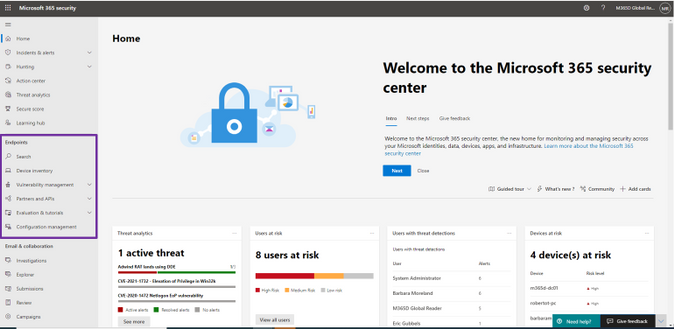
For Microsoft Defender for Endpoint users, existing capabilities are now available within Microsoft 365 Defender. To get started, navigate to security.microsoft.com. You will find everything you are used to in the navigation bar on the left, under “Home” or under Endpoints. Learn what’s changed in our in-depth documentation. 


 endpoint_features.png


Figure 1: Endpoint features integrated into Microsoft 365 Defender.  


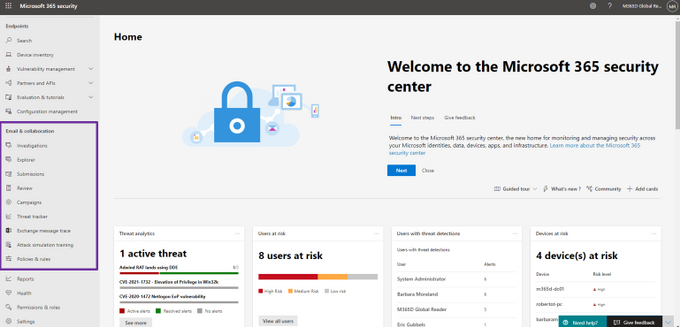
For Microsoft Defender for Office 365 users, the Threat Management capabilities and email security-related reports are now available in Microsoft 365 Defender under Email & collaboration in the navigation bar. To get started, go to security.microsoft.com. Learn what’s changed in our in-depth documentation


 email_features.png


Figure 2: Email and collaboration features integrated into Microsoft 365 Defender. 


If you have integrations and connections with SIEM solutions such as Azure Sentinel, these will continue to work and no changes are required. When you are ready to move all of your users to the new experience you can enable automatic URL redirection for Microsoft Defender for Endpoint and automatic URL redirection for Microsoft Defender for Office 365. If you have built custom detections or use device-related queries in Microsoft Defender for Endpoint, follow the links to learn how to migrate them. Compliance-related Office 365 features are available in the Microsoft 365 compliance center 


There are lots of exciting new areas to explore:


  • Unified alerts queue. See prioritized alerts from across your Microsoft 365 security products in a single, unified alerts queue.

  • Unified user page. Visualize any user entity in a single dashboard. This new page allows security professionals to investigate every asset related to the user and imports critical information from all your deployed Microsoft 365 security products.

  • Unified investigation page. This view provides details for automatic investigation and response including triggering alerts, impacted assets and deep-dive details across your Endpoint and Office 365 environments.

  • Learning hub. Leverage official guidance from resources such as the Microsoft security blog, the Microsoft security community on YouTube, and the official documentation at docs.microsoft.com. These resources, articles, videos and how-to guides give you best practices and instructions on how to take advantage of the features in Microsoft 365 Defender.

  • Email entity page. A frequent request from customers has been better email investigation capabilities. Now you have a 360-degree view of an email alert integrated with context and related data from across the Microsoft 365 environment. This includes enhancements such as junk mailbox rules, spam confidence levels and authentication and detonation details. 

  • Integrated alert detail page. A comprehensive point of view for a specific alert including the alert story, timeline, alert classification, impacted entities, related incidents and more. 

  • Role-based access in Microsoft 365 Defender. Microsoft 365 Defender now recognizes RBAC configurations and custom roles from the individual Microsoft 365 solutions and holistically enforces them at the cross-product level. Check out the documentation for more details.

  • Threat analytics. Leverage detailed threat intelligence reports from Microsoft security experts to understand the most critical real world threats and actors. Related alerts and incidents in a customer environment are escalated for remediation and recommendations are provided to remediate any vulnerabilities and exposures. Learn more.


We’re excited to hear your feedback as you explore the unified portal and we will continue to update the documentation throughout the preview.  Our mission is to empower you with the most unified extended detection and response (XDR) solution in the industry so that you can focus on what’s important: preventing and remediating threats. 


To read more about the unified portal experience, check out: 


Microsoft 365 PnP Weekly – Episode 116

Microsoft 365 PnP Weekly – Episode 116

This article is contributed. See the original author and article here.

pnp-weekly-116.png


In this installment of the weekly discussion revolving around the latest news and topics on Microsoft 365, hosts – Vesa Juvonen (Microsoft) | @vesajuvonen, Waldek Mastykarz (Microsoft) | @waldekm are joined by Porto, Portugal-based MVP, João Mendes – Senior Office 365 Solution/Architect Developer, Storm Technology Ltd | @joaojmendes.     


The episode’s discussion focuses on being familiar with your tools in order to create beautiful apps, the need for a Fluent tutorial, and top features that could be added to SPFx one day and on João’s story-filled career.


The session was recorded on Monday, March 1, 2021.


Did we miss your article? Please use #PnPWeekly hashtag in the Twitter for letting us know the content which you have created. 


As always, if you need help on an issue, want to share a discovery, or just want to say: “Job well done”, please reach out to Vesa, to Waldek or to your Microsoft 365 PnP Community.


Sharing is caring!

Experiencing Data Access Issue in Azure portal for Log Analytics – 03/02 – Resolved

This article is contributed. See the original author and article here.

Final Update: Tuesday, 02 March 2021 11:41 UTC

We’ve confirmed that all systems are back to normal with no customer impact as of 03/02, 10:40 UTC. Our logs show the incident started on 03/02, 08:30 UTC and that during the  2 Hours & 10 minutes that it took to resolve the issue some customers may have experienced intermittent data latency, data access and incorrect alert activation in Japan East region.
  • Root Cause: The failure was due to issue with one of our backend service which became unhealthy during the impacted window.
  • Incident Timeline: 2 Hours & 10 minutes – 03/02, 08:30 UTC through 03/02, 10:40 UTC
We understand that customers rely on Azure Log Analytics as a critical service and apologize for any impact this incident caused.

-Vyom