by Contributed | Mar 2, 2021 | Technology
This article is contributed. See the original author and article here.
Hello folks,
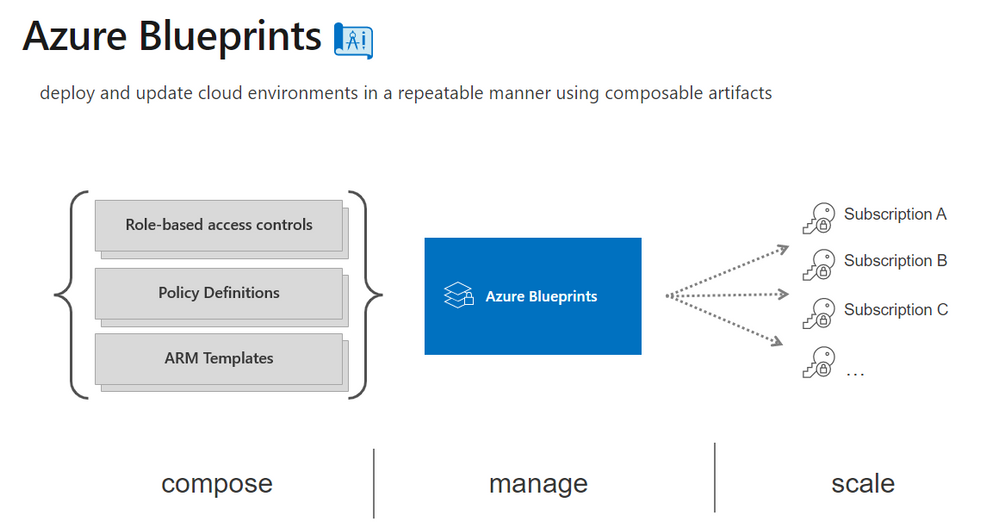
I’ve had a few conversations lately with IT pros and operations folks that made me think that there may be a disconnect or some confusion about the role of Azure blueprints and ARM templates specs.
There were comments like “are blueprint still even a thing?” and “I’m not bothering with Blueprints since templates specs are almost here.”
Maybe I’m missing the meaning of these interactions. Or there is a disconnect. I’m not 100% sure, however, if there is a chance that someone in the community is confused, I decided to cover the difference and when you would them. We’re not going to take you through the creation of each of these since there are many tutorials and resources available online already.
For example:
The same can be said for ARM Templates Specs
So, let’s start.
What Is Azure Blueprints?
In any enterprise you always have teams that are responsible for defining what and how resources are deployed in your environment. (on-prem, in the cloud or in both). Your networking team defines the network design, the IP addressing, the routing… Your security team defines what services are allowed, who has access… Your legal department may have requirements for compliance such as where you can deploy your resources… You get the picture.
Without any tools to allow you to tie all these requirements together you end up with a deployment process that can take a long time because every teams wants and needs to sign-off on your deployment. And it makes it difficult to replicate since in most cases its tied together with custom scripting.
Azure Blueprint allows you to create a way to package all these components together and makes it super easy to “stamp” your blueprint on any environment dev, test, prod or other.
There are samples available here
What is Azure Resource Manager (ARM) Templates Specs?
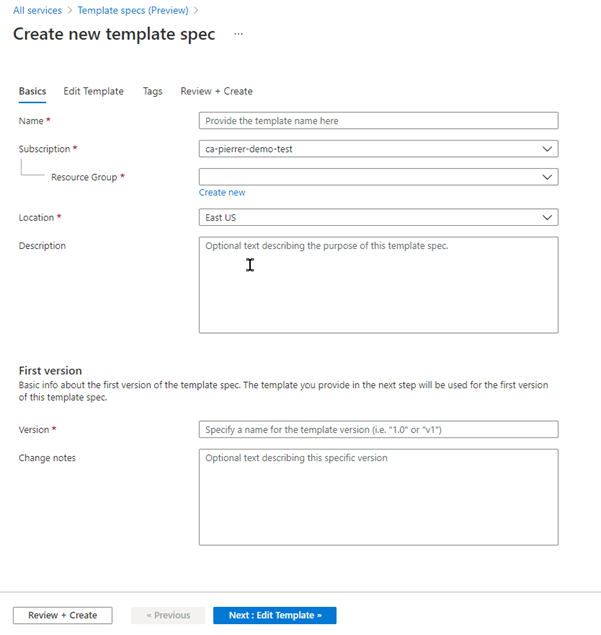
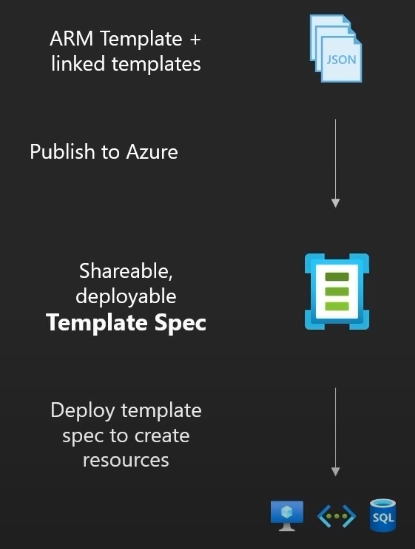
One of the greatest problems when managing your infrastructure as code (IaC) with Azure templates is marrying the need for manageable, secure, versions-controlled way while sharing templates. You can use GitHub, or any other “repo”, however if you’re deploying linked templates for example the link requires either a publicly accessible point or a shared access signature to a blob therefore making them secure is more problematic.
Template Specs is a new resource type for storing ARM templates in a resource group. The purpose of doing that is to allow more efficient sharing, deployment, and control of the Templates shared within an organization. In effect your templates become a first party resource type stored in your subscription. They can be standalone or modular, thus providing you with a very flexible way to deploy them.
And yes, Templates Specs also includes an RBAC (Role based access control) but it’s to control who has access to the template itself and what I can do with it (Read access, vs contributor access for example). Not RBAC in terms of controlling what is the access of the resource deployed by said template.
Conclusion
Now that we’ve covered what both Blueprints and Templates Specs are, we understand that:
- Yes, Azure Blueprints are still a thing and you should be investigating them in your own environment if you’re not already, to ensure all your deployments conform to all the requirements of your organization.
- Azure Resource Manager Template Specs will NOT displace the need for Blueprints since they server a completely separate purpose.
I can even see in the future, Azure Blueprint pointing at Templates Specs as artifacts within a blueprint.
There you have it folks. Let me know in the comments below if you’d like us to cover specific subjects.
Cheers.
Pierre
by Contributed | Mar 2, 2021 | Technology
This article is contributed. See the original author and article here.
Introduction
Welcome to another customer offering article to inform you about how to configure, setup, and deploy endpoint protection policies which include protective measures from Microsoft. In this article, we will present Premier Services Offerings WorkshopPLUS – Device Protection with Microsoft Endpoint Manager and Microsoft Defender for Endpoint.
Offering Overview
With customers needing a deployment solution to push out Microsoft security policies and configurations, this offering will address this and more. This Premier offering builds on the fundamental security components and features of any Microsoft Endpoint Configuration Manager environment such as RBAC or role-based administration, Endpoint Protection, Exploit Guard, Application Guard, Microsoft Defender for Endpoint, BitLocker Drive Encryption, and Compliance Settings. With this new customer offering, we were able to provide a 3-day hands on training in a live demo tenant to meet and exceed customer expectations.
What the workshop entails
What’s Included
The content of this offering is a mix of education, administration, compliance, and security best practices at the L200-L300 level. This offering focuses on the breadth of Microsoft Endpoint Configuration Manager, Microsoft Defender for Endpoint, M365 Security (on-prem and in the cloud), and also Intune. The Device Protection with Microsoft Endpoint Manager and Microsoft Defender for Endpoint workshop is a three day engagement where you will learn about configuring a tenant using labs hosted in the cloud (Microsoft Labs on Demand) with a full M365 E5 license (EMS E5 + M365 E5 + Office 365 E5). Each module contains scenarios that provide students with in-depth expertise, tools, and hands-on experience to help implement and troubleshoot security related concepts as they pertain to Microsoft Endpoint Configuration Manager.
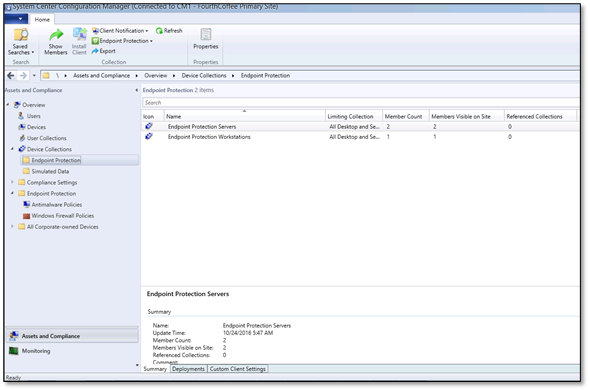 Endpoint Protection policies
Areas Covered
The sections below sections are covered in detail throughout the three-day offering and expand on each objective to maximize your understanding of each topic and focus area through knowledge transfer modules.
Introduction to Endpoint Security – Overall introduction to security settings and recommendations that can be managed using Microsoft Endpoint Configuration Manager and Intune.
Role Based Access Control – Overview of Role Based Administration Control concept in Microsoft Endpoint Configuration Manager, including the reporting feature.
Endpoint Protection Technologies Overview – Objectives focus on a deeper dive into the technologies that make up Endpoint Protection.
Antimalware Policies – Objectives focus on learning the basic concepts and terminology for Endpoint Protection Antimalware Policies for Microsoft Defender Antivirus.
CAMP and Security Intelligence Updates – Objectives focus on managing Endpoint Protection Definition updates through Configuration Manager.
Endpoint Protection Alerts and Reporting – Objectives focus on how to configure and use alerts and report notifications within Configuration Manager.
Endpoint Protection Troubleshooting – Objectives focus on learning troubleshooting techniques for securing endpoints.
Exploit Guard and Application Guard – Objectives focus on learning about Attack Surface Reduction, Controlled Folder Access, and Exploit and Network Protection. You will also learn how to mitigate security threats using containers by deploying Application Guard.
Microsoft Defender for Endpoint – Objectives focus on learning how to onboard endpoints to Microsoft Defender for Endpoint using Microsoft Endpoint Configuration Manager and explore basic operational possibilities within Microsoft Defender for Endpoint portal.
Device Encryption – Learn what is BitLocker and explore modern management possibilities to control device encryption with Microsoft Endpoint Configuration Manager and Intune.
Compliance settings – Dive deeper into the compliance settings topic, including management possibilities using Microsoft Endpoint Manager (Intune).
Hands on with Labs on Demand
During this offering there are multiple hands-on labs exercises using Microsoft’s Labs on Demand. Each student will be an administrator of their own demo tenant where they will create and deploy security policies using Microsoft Endpoint Configuration Manager. Once the polices are deployed to another machine, the student will be able to view and test out those policies. The areas are listed below are covered in the lab exercises:
- Endpoint Security
- Implementing RBAC
- Endpoint Protection policies
- CAMP and Security Intelligence updates
- Endpoint protection alerts and reporting
- Endpoint protection troubleshooting
- Exploit Guard and Application Guard
- Microsoft Defender for Endpoint
- Device Encryption
- Compliance settings
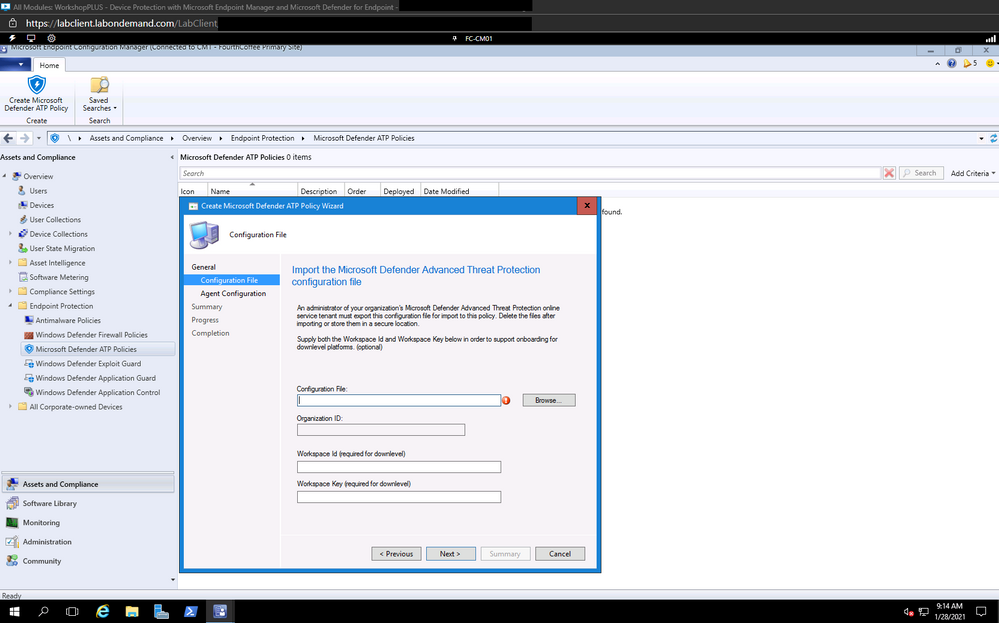 Creating the configuration file for Endpoints for MDE
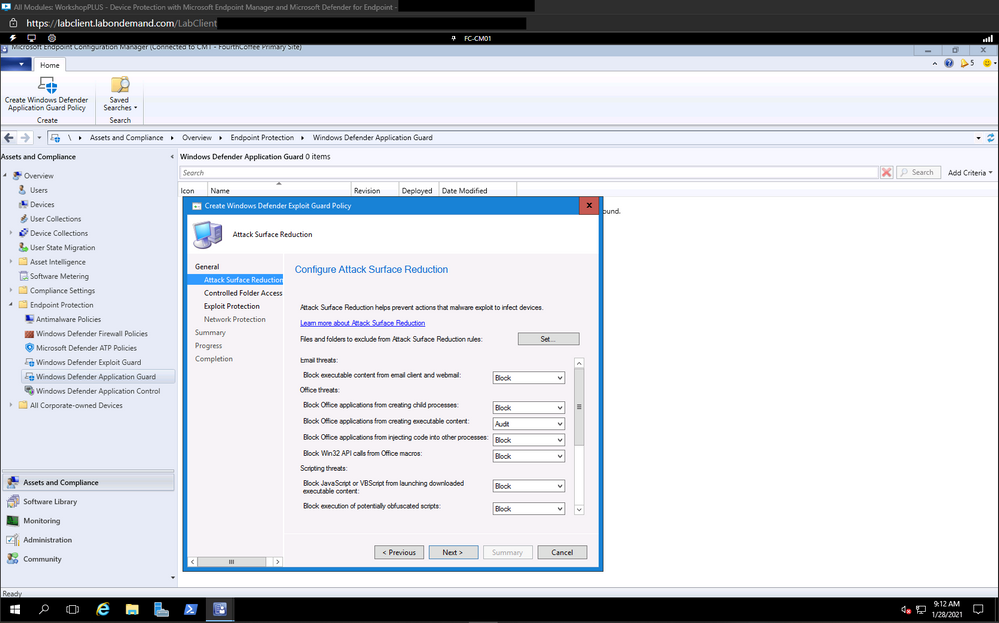 Configuring Attack Surface Reduction Rules
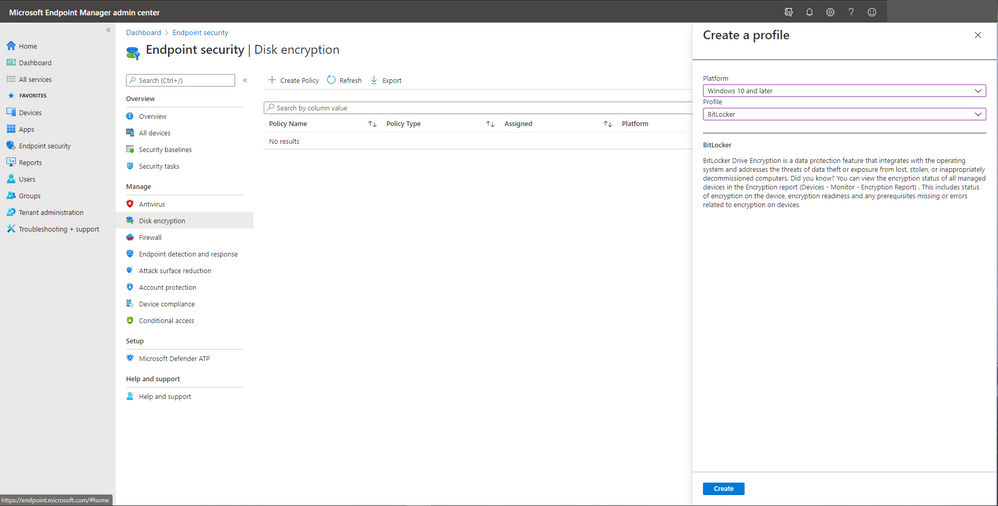 Configuring Bitlocker drive encryption in MEM
Objectives
After completing this course, you will understand how to set up, configure, and manage Microsoft Endpoint Configuration Manager Role Based Access, Endpoint Protection for Microsoft Endpoint Manager, Application Guard and Exploit Guard integration, Microsoft Defender for Endpoint, BitLocker Drive Encryption, and compliance settings.
Key Personnel For this Offering
This course is targeted at IT staff who have already started designing and implementing Microsoft Endpoint Configuration Manager integration with Microsoft Security products and concepts. To ensure that students are successful at the end of this WorkshopPLUS, it is highly recommended they meet the following criteria:
- Existing knowledge of Microsoft Endpoint Configuration Manager
- Moderate knowledge of Windows Platform and Microsoft Security products
- Basic knowledge of Microsoft Endpoint Manager (Intune)
Disclaimer
As of this writing, the above modules are in scope. However, they might change as Microsoft Endpoint Configuration Manager, Intune, Microsoft Defender for Endpoint, and M365 Security are subject to change.
Follow up and feedback
For further information, please contact your Microsoft Account Representative, Customer Success Account Manager (CSAM), or Service Delivery Manager (SDM).
To improve this or any other workshop, we always consider feedback from you. At Microsoft, achieving a high level of satisfaction among our customers and partners around the world is a core component of our business. For that reason, please don’t hesitate to complete the surveys and provide feedback.
Credit
Special thanks and credit to the development team:
Anton Tatarkin, Senior Customer Engineer, Intune / EMS / Configuration Manager, Netherlands
John Barbare, Senior Customer Engineer – Cybersecurity, Monitoring Solutions (Sentinel, M365 Defender, MDE, MDI, MCAS), Unites States
Charles Baldridge, Customer Engineer, Configuration Manager, United States
by Contributed | Mar 2, 2021 | Technology
This article is contributed. See the original author and article here.
We are excited to introduce the preview of Zone Redundant Storage (ZRS) option for Azure managed disks! This capability provides synchronous replication of data across the three Zones in a region, enabling disks to tolerate Zonal failures which may occur due to natural disasters or hardware issues. ZRS option is currently supported for Premium SSD and Standard SSD disks.
Use ZRS disks for legacy applications to achieve better availability
You can achieve high availability for your workloads using application-level replication across two zones, for example, SQL Always On. However, suppose you are using industry-specific proprietary software or legacy applications like older versions of SQL Server, which don’t support application-level synchronous replication; ZRS disks will provide improved availability via storage-level replication. For example, if a zone goes down due to natural disasters or hardware failures, ZRS disk will continue to be operational. If your virtual machine (VM) in the affected Zone becomes unavailable, you could use a virtual machine in another zone and attach the same ZRS disk.
Use ZRS with shared disks
You can also use the ZRS option for shared disks to provide improved availability for clustered or distributed applications like SQL FCI, SAP ASCS/SCS. You can attach a shared ZRS disk to primary and secondary VMs allocated on different zones to take advantage of both ZRS disks and Availability Zones for VMs for higher availability. In the event of a primary zone failure, you can quickly fail over to the secondary VM using SCSI persistent reservation.
Use ZRS disks to achieve zero RPO
For LRS disks, you can achieve better durability by taking frequent backups of your disks using ZRS snapshots. You can also enable cross-zone disaster recovery for LRS disks via Azure Site Recovery. However, these options do not provide zero Recovery Point Objective (RPO). If your application must meet zero RPO, then ZRS disks could be the solution.
Pricing and performance
You can find the price for Premium SSD and Standard SSD ZRS disks at the disks storage pricing page. The IOPS and bandwidth provided by ZRS disks is same as the corresponding LRS disks. For example, a P30 (128 GiB) LRS Premium SSD disk provides 5000 IOPS and 200 MB/second bandwidth, which is same for P30 ZRS Premium SSD disk. Disk latency for ZRS is higher than that of Locally Redundant Storage (LRS) due to the cross zonal copy of data.
Get started
If you are interested in participating in the preview, request access by filling out this form. A list of regions where the feature is supported can be tracked on the documentation page. We will keep adding new regions throughout the public preview.
Review the ZRS disks preview documentation to learn how to do the following:
- Create a VM with ZRS OS and data disks.
- Create multiple VMs in different zones with a shared ZRS disk.
- Create VMSS with ZRS OS and data disk.
by Contributed | Mar 2, 2021 | Technology
This article is contributed. See the original author and article here.
1. Hotnews : Updates to SAP on Azure Documentation
SAP introduced a new feature called HANA data volume partitioning with HANA 2.0 Support Pack Stack 3.
This feature places multiple Hana datafiles onto multiple disks, thereby avoiding the requirement to aggregate disks using LVM. Some Linux Administrators prefer simpler disk structures.
Example: Rather than aggregating 4 x P30 in LVM and placing one large datafile, multiple datafiles can be placed onto 4 separate disks.
Microsoft has updated the SAP Hana on Azure documentation to reflect the usage of this new feature. Customers should test scenarios such as Backup/Restore and DB integrity check.
SAP HANA Azure virtual machine storage configurations – Azure Virtual Machines | Microsoft Docs
SAP HANA Azure virtual machine ANF configuration – Azure Virtual Machines | Microsoft Docs
SAP HANA – Partitioning Data Volumes | SAP Blogs
Other recent documentation updates for Azure NetApp Files include:
Azure Virtual Machines Oracle DBMS deployment for SAP workload
HA for SAP HANA scale-up with ANF on RHEL
SAP HANA scale-out HSR with Pacemaker on Azure VMs on RHEL
SAP HANA scale-out with standby node on Azure VMs with ANF on SLES
SAP HANA scale-out with standby node on Azure VMs with ANF on RHEL
NFS v4.1 volumes on Azure NetApp Files for SAP HANA
Azure Storage Configuration page is frequently updated. It is recommended to review recent changes in:
SAP HANA Azure virtual machine storage configurations. Recently the disk performance table has been updated to include Azure Premium Disk Burst functionality
More information on Disk Performance Tiers can be found here: Performance tiers for Azure managed disks – Azure Virtual Machines | Microsoft Docs
Recent price reductions and performance improvements are announced here More IOPS at no additional cost for Azure Files premium tier | Azure updates | Microsoft Azure
The main SAP on Azure site https://azure.microsoft.com/en-us/solutions/sap/
SAP on Azure Resources https://azure.microsoft.com/en-us/solutions/sap/resources/
SAP on Azure Updates on the main Azure site https://azure.microsoft.com/en-us/updates/?query=sap
SAP on Azure Documentation “Getting Started” https://docs.microsoft.com/en-us/azure/virtual-machines/workloads/sap/get-started
2. New Azure Monitoring Agent
A new Azure Monitoring Agent is currently in preview and will become Generally Available in due course.
Azure Monitor agent overview – Azure Monitor | Microsoft Docs
The new Azure Monitoring Agent (AMA) has advantages over the current monitoring framework
AMA fully supports Multi-homed Linux VMs and control over version upgrades
AMA is still in Public Preview, but when released AMA will become the default agent installed when a new VM is created. The previous Log Analytics solution will still be available for manual installation.
AMA can also monitor non-Azure servers using ARC Azure Arc – Azure Management | Microsoft Azure
To join the AMA Preview https://aka.ms/AMAgent
Supported Operating Systems include popular Windows, Suse and Redhat releases used by SAP customers Overview of the Azure monitoring agents – Azure Monitor | Microsoft Docs
3. Tuning for SIOS LifeKeeper on Oracle Linux
A significant number of SAP on Azure customers run on Oracle database. Microsoft is continuing to improve and optimize the Azure platform for SAP on Oracle customers. In recent time we have published guidance for deploying Oracle 19.8 on Oracle Linux 8.2 with Automatic Storage Management (ASM). In the future we will publish blogs on Oracle DataGuard and SnapShot Backup of ASM systems.
Oracle customers are often using SIOS LifeKeeper cluster software for the ASCS cluster. Testing has shown the following configuration is optimal for DB, ASCS and SAP Application servers
- Increase SIOS cluster timeout to 45 sec (5 sec heartbeats x 9 failures)
- Set /proc/sys/net/ipv4/tcp_retries2 = 9 (originally set to 15) on cluster VMs
- Set ASCS/SCS for ENSA1 profile parameter to: enque/encni/set_so_keepalive = true restart SAP ASCS/SCS to enable settings
- Set net.ipv4.tcp_keepalive_time = 300 (originally set to 7200) on ALL VMs
Thanks for Goran for contributing this item
SIOS Lifekeeper: Linux High Availabillity Cluster Software | SIOS
4. Recommended Blogs for SAP on Azure Customers & Consultants
Many new useful blogs have been created by Microsoft for SAP customers
Part 1: Application Gateway WAF v2 setup for Internet facing SAP Fiori Apps
The blog provides details to configure Application Gateway WAF v2 which acts a first line of defense for Internet facing SAP Fiori Apps in Azure.
NOTE: There is a difference in the end-to-end SSL setup process with respect to the version of application gateway used (v1 or v2). As this blog highlights configuration using application gateway SKU v2, you will find a difference in setup process if you configure application gateway v1.
Part 2: Single Sign On Configuration using SAML and Azure Active Directory for Public and Internal URLs
We already have an official tutorial that describes Azure Active Directory Single Sign On (SSO) integration with SAP Fiori, but this blog extend the use on achieving SAML based SSO for two different URLs (Public and Internal).
Thanks to Bartosz Jarkowski for contributing this blog on SQL Server TDE with Azure Key Vault
https://blogs.sap.com/2021/01/19/your-sap-on-azure-part-25-sql-server-transparent-data-encryption-with-azure-key-vault/
Thanks to Philipp Leitenbauer for releasing this useful tool – version 2.0 of the Hana on Azure Quality Check tool
SAP-on-Azure-Scripts-and-Utilities/QualityCheck at main · Azure/SAP-on-Azure-Scripts-and-Utilities · GitHub
Thanks to Vamshi Polasa for releasing this whitepaper on migrating Oracle workloads to Azure
https://techcommunity.microsoft.com/t5/running-sap-applications-on-the/migrating-sap-on-oracle-workloads-to-azure/ba-p/2109839
Thanks to Anjan for providing a procedure to replication Linux Pacemaker ASCS clusters with ASR
SAP ASCS HA Cluster (in Linux OS) failover to DR region using Azure Site Recovery – Microsoft Tech Community
Another major customer is moving from SAP ECC on Azure to S4 running on Hana Enterprise Cloud running on Azure.
Zespri selects SAP cloud solutions in multi-year deal – SAP Australia & New Zealand News Center
Thanks to Ralf Klahr for this video about CONA (Coca Cola North America)
https://tv.netapp.com/detail/video/6230415190001
Thanks to Goran Condric and others for these blogs on automating system shutdown & startup
Optimize your Azure Costs by Automating SAP System Start – Stop – Microsoft Tech Community
Hey, SAP Systems! My PowerApp says Snooze! But only if you’re ready yet | SAP Blogs
5. SQL Server 2019 CU8 Distributed Network Name
A new feature has been added in SQL Server 2019 CU8 that eliminates the requirement to have a Internal Load Balancer for the SQL Server AlwaysOn Listener. This new feature simplifies the setup, configuration and operations of SQL Server AlwaysOn. Customers may also notice that failover times are faster with a DNN.
A Distributed Network Name (DNN) Listener can be retrofitted to an existing configuration that has a conventional ILB. Documentation on the setup and configuration of a DNN can be found here https://docs.microsoft.com/en-us/azure/azure-sql/virtual-machines/windows/availability-group-distributed-network-name-dnn-listener-configure
It is recommended to set MultiSubnetFailover=True and review https://docs.microsoft.com/en-us/azure/azure-sql/virtual-machines/windows/availability-group-dnn-interoperability
Note: this feature is exclusively available only as of SQL Server 2019 with CU8 or higher and Windows 2016 or higher.
The default.pfl and Windows environment variables should be updated. A sample ENV can be seen below. The TCP port number specified in the powershell command must be added to both the ENV and default.pfl. The format should be <listenername>,<port>. A comma and not a “.” or “:” must be used
MSSQL_CONNOPTS=MultiSubnetFailover=yes
MSSQL_DBNAME=P01
MSSQL_SCHEMA=p01
MSSQL_SERVER=dnnp01lsnr,6789
The latest SQL Server Service Pack and CU is always supported by SAP and can be downloaded from here https://techcommunity.microsoft.com/t5/sql-server/bg-p/SQLServer/label-name/SQLReleases
SQL Server 2019 CU8 Availability Groups Supports DNNs (microsoft.com)
6. Running Oracle on Azure NetApp Files
It is now supported to run Oracle 19.8 DBMS on Oracle Linux 8.2 connection over NFS to Azure NetApp Files. NetApp features such as Snapshot backup can be used for near instant Backup & Restore
Note: VM skus with very high network quota may be needed
7. SUSE Linux 15 Service Pack 2 – Remove Mount Option NOBARRIER
SUSE Linux Enterprise Server 15 (SLES 15) or SUSE Linux Enterprise Server 15 for SAP Applications (SLES for SAP 15) is now certified and supported for both NetWeaver and Hana. The /etc/fstab option NOBARRIER has been depreciated for some time. Suse 15.2 uses a Linux 5.0 kernel. The option NOBARRIER will now cause an error and should be removed. On most modern Linux distributions the NOBARRIER option will be ignored.
The correct IO Scheduler options are documented here SAP HANA Azure virtual machine storage configurations – Azure Virtual Machines | Microsoft Docs
Azure Site Recovery and Azure Hana Backup are both supported on Suse 15 Service Pack 2 (Linux Kernel 5.0)
List of SUSE Linux Enterprise Server kernel (version and release date) | Support | SUSE
8. Update on Support Matrix for SAP on Azure
In recent months many new features have become available for SAP customers. The list below is a very brief overview of recommended features and updated documentation
- Azure Disk Encryption is now supported for Gen2 Windows VMs. Gen2 Linux VM support is in progress
- Redhat 8.2 is now certified for Netweaver and Hana.
- Suse 15.2 is now certified for Netweaver and Hana
- Azure Site Recovery now works with Linux Pacemaker clusters and the procedure for protecting and recovering Pacemaker clusters after an ASR failover is documented here https://techcommunity.microsoft.com/t5/blogs/blogworkflowpage/blog-id/SAPApplications/article-id/722
- Azure Site Recovery Portal support for PPG is now live https://docs.microsoft.com/en-us/azure/site-recovery/how-to-enable-replication-proximity-placement-groups
- Azure Backup for Hana now supports incremental backups Azure Backup for SAP HANA databases now supports Incremental backups – Public preview | Azure updates | Microsoft Azure
- Azure backup increased SAP HANA soft limit from 2 TB to 8 TB volume
- Customers with a requirement for Immutable Storage for legal or compliance reasons and/or to prevent modification of objects such as backups can use https://docs.microsoft.com/en-us/azure/storage/blobs/storage-blob-immutable-storage
- Customers are recommended to review “Azure Monitor for SAP” which is in preview – https://docs.microsoft.com/en-us/azure/virtual-machines/workloads/sap/azure-monitor-providers
The Azure platform offers ADE and additional encryption solutions. These will be discussed in an upcoming blog:
- Double Encryption https://docs.microsoft.com/en-us/azure/virtual-machines/disks-enable-double-encryption-at-rest-portal
- Encyption at Host https://docs.microsoft.com/en-us/azure/virtual-machines/disks-enable-host-based-encryption-portal
9. New Azure Monitor Counters – Guest VM Throttling
Customers and Partners should setup Azure Monitor and leverage new performance counters to ensure SAP on Azure solutions are correctly sized for optimal cost savings and performance.
Over-sizing VMs leads to excessive costs. Undersizing VMs can lead to performance and stability problems.
Each Azure VM is assigned a specific quota of CPU, RAM, Disk & Network. If these quotas are saturated for extended periods performance and stability problems may occur. It is recommended to size VMs such that there are only momentary spikes to 100% for brief periods, typically no more than tens of seconds
Forunately the Azure platform comes with Azure Monitor – a very powerful and useful tool. https://docs.microsoft.com/en-us/azure/azure-monitor/overview
Azure Monitor Quickstarts for Linux and Windows can be found here https://docs.microsoft.com/en-us/azure/azure-monitor/learn/quick-monitor-azure-vm
A list of all the Azure Monitor metrics can be found here
https://docs.microsoft.com/en-us/azure/azure-monitor/platform/metrics-supported but the more useful counters for SAP IaaS VMs can be found here Azure Monitor supported metrics by resource type – Azure Monitor | Microsoft Docs
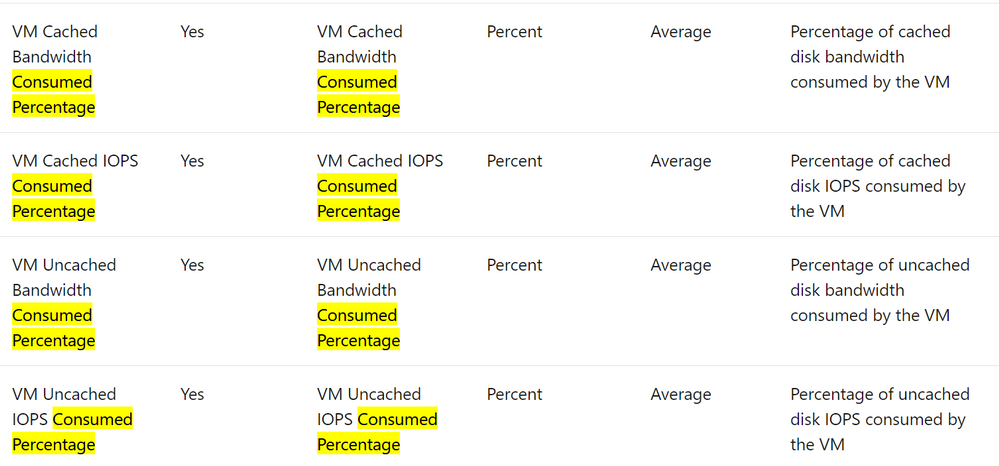
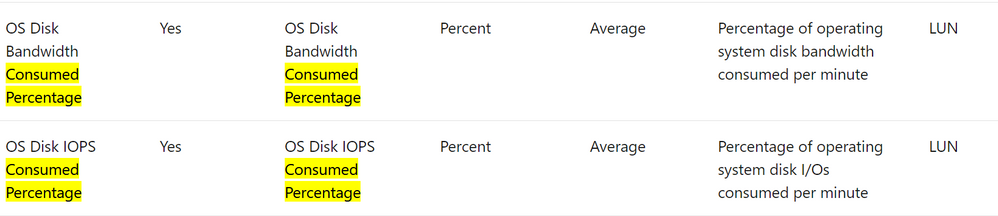
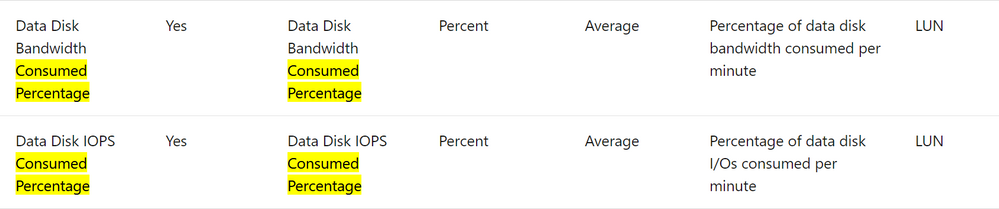
The counters that monitor disk quota consumption are labelled “Consumed Percentage”. In addition to the below monitoring the network throughput may also be useful.
The quotas of typical VMs used for SAP systems can be found in this link below.
Edv4 and Edsv4-series – Azure Virtual Machines | Microsoft Docs
Additional Links & Notes
The new Azure Portal Application is faster and has useful features – available for download
https://portal.azure.com/App/Download
Redhat support cycle and support dates Red Hat Enterprise Linux Life Cycle – Red Hat Customer Portal
Azure Files NFS 4.1 is now in Preview https://azure.microsoft.com/en-us/updates/azure-files-support-for-nfs-v41-is-now-in-preview/ Azure Files NFS removes the need for a highly available NFS VM infrastructure
Azure Certification and Training courses
Collections – MicrosoftAzuretrainingandcertifications | Microsoft Docs
SAP on Azure Free Online Training Course. Exam AZ-120: Planning and Administering Microsoft Azure for SAP Workloads
https://docs.microsoft.com/en-us/learn/certifications/exams/az-120
A free Certification Exam offer is here https://docs.microsoft.com/en-us/learn/certifications/microsoft-build-cloud-skills-challenge-2020-free-certification-exam-offer
This Red Hat article How to in-place upgrade SAP environments from RHEL 7 to RHEL 8 – Red Hat Customer Portal describes the supported combinations. For HANA, according to the article the in-place upgrade is only supported on non-cloud systems: “The in-place upgrade of RHEL 7 with SAP HANA can be performed from RHEL 7.7 to RHEL 8.2 only, on x86_64 only, and on non-cloud systems only. A SAP HANA system running on RHEL 7.6 or earlier must be updated to RHEL 7.7 “
by Contributed | Mar 1, 2021 | Technology
This article is contributed. See the original author and article here.
Since Ignite last September, we’ve been focused on delivering enhancements to Azure Disk Storage to help our customers migrate their mission-critical workloads to Azure. Today, at Microsoft Ignite 2021, we are excited to share a new set of innovations for Azure Disk Storage across key elements, including reliability, scale & performance, security, data protection, and cloud native applications.
This blog post gives you an overview of these new capabilities which will help you run your business-critical applications on Azure.
Reliability
Increase availability for your applications with Zone redundant storage (ZRS) on Premium and Standard SSDs, in preview
- Provide synchronous replication of data across zones in a region, enabling disks to tolerate zonal failures which may occur due to natural disasters or hardware issues.
- Enable customers to maximize their virtual machine availability without the need for application-level replication of data across zones, not commonly supported by legacy applications such as old versions of SQL or industry-specific proprietary software. This means that if a virtual machine becomes unavailable in an affected zone, you can continue to work with the disk by mounting it to a virtual machine in a different zone.
- Can be used with shared disks to provide improved availability for clustered or distributed applications like SQL FCI, SAP ASCS/SCS or GFS2.
Sign-up for the preview.
Read the blog and documentation to learn more about ZRS for Azure managed disks.
Scale & Performance
Achieve sustained higher performance by changing tiers without disruption to your workloads, in preview
In November 2020, we announced the general availability of performance tiers on Premium SSDs, which provides you the flexibility to scale the disk performance without increasing the disk size by selecting a higher performance tier. You can also change tiers to bring the disk back to your baseline performance tier, enabling you to achieve higher performance and cost savings. Performance tiers is critical for planned events like a seasonal sales promotion or running a training environment, where you need to achieve sustained higher performance for a few hours or days and then return to the normal performance levels. Now, in preview, you can change the performance tiers of Premium SSD without any downtime to your application – even when the disk is attached to a running virtual machine.
Sign-up for the preview.
Read the documentation to learn more about performance tiers on Premium SSDs.
Boost disk performance on-demand with new disk bursting experience on Premium SSDs, in preview
We are extending disk bursting support for larger Premium SSDs (above 512 GiB) with a new enhanced experience. Unlike credit-based bursting where you can only burst your performance if you have accrued credits, on-demand bursting allows you to burst up to 6x of the provisioned limit (up to 30,000 IOPS and 1,000 MBps) whenever needed. On-demand disk bursting is most suitable for mission-critical workloads where a limit in performance cannot be tolerated even for unexpected spikes. With on-demand disk bursting, you will be charged a burst enablement fee and for any additional transactions over the provisioned limit.
Read the documentation to learn more about on-demand bursting.
Security & Data Protection
Keep your data secure with auto-key rotation of customer-managed keys, in preview
Azure managed disks provide end to end encryption of data with your keys stored in Azure Key Vault. Now, you can choose to enable automatic rotation of your keys. When you generate a new version of a key in your Key Vault, the system will automatically update all the managed disks, snapshots, and images to the new key version within an hour.
Read the documentation to learn more about auto-key rotation of customer managed keys.
Protect your critical data with per disk backup, in preview
Per disk backup provides snapshot lifecycle management by automating periodic creation of snapshots and retaining it for configured duration using a backup policy. You can easily manage disk snapshots with no additional costs and without need for custom scripting or any management overhead. This is an agent-less and crash-consistent backup solution that takes point in time backup of a managed disk using incremental snapshots with support for multiple backups per day.
Several key aspects of per disk backup include:
- Faster and more frequent backups without disruption to your applications
- Supports backup and restore for both OS and data disks (including shared disks), regardless of whether they are currently attached to a running Azure Virtual machine.
- Cost-effective solution to backup specific disks
Sign-up for the preview.
Read the documentation to learn more.
Cloud Native Applications
Deploy and protect Stateful Kubernetes applications with Azure Disk CSI Driver, generally available
Container Storage Interface (CSI) is a standard for exposing block and file storage systems to containerized workloads on Kubernetes. With the GA of the Azure Disk CSI driver, starting in Kubernetes v1.20, you can now:
- Take advantage of the latest Azure Disk functionality by updating to the new CSI driver version, without the need to wait for Kubernetes release cycles.
- Create, manage and delete disk volume snapshots via Kubernetes native API, as well as, create new disk volumes pre-populated with the data from a snapshot via Kubernetes dynamic volume provisioning – providing a singular interface for volume and snapshot management.
- Use RWX raw block volumes from multiple pods.
Azure Disk CSI driver is now available with Kubernetes v1.20 onwards with AKS Engine and will be available on AKS coming soon.


Recent Comments