by Contributed | Oct 26, 2023 | Technology
This article is contributed. See the original author and article here.
If you’ve been working with Azure OpenAI for a while, chances are you’ve heard of Semantic Kernel. It is a library implemented in multiple programming languages that can handle prompt templates, manage conversation state, integrate with plugins and many other features essential to building an advanced LLM-infused application. But how exactly do you “deploy” Semantic Kernel?
Being a software library, Semantic Kernel can be deployed to any compute option capable of running Python, C# or Java. You’ve probably seen sample repositories with Jupyter notebooks you can use to explore the functionality. But in most cases you can’t give your end-users a notebook! In this article, we’ll give you an example and a solution accelerator that you can use to bring your AI application to production faster.
Solution Architecture
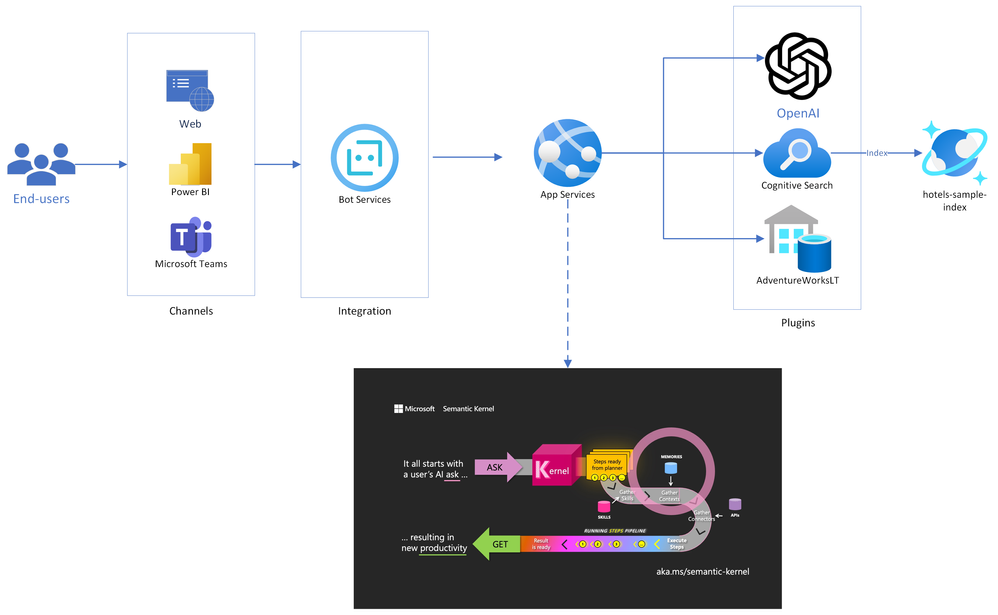
Below is the architecture diagram for the solution accelerator we put together. You can also pull the source code and deploy it yourself from our Github repo!
As you can see in the diagram, Semantic Kernel is at the core of the solution, and will act as the orchestrator of the chat experience. It is deployed into an App Services instance, which will also be running the Bot Framework SDK. This enables our bot to be deployed across multiple channels, including web pages, Teams, and even third-party chat platforms like Slack.
The flow of chat messages is as follows:
- End-users connect to a messaging channel your bot is published to, such as Web or Teams;
- Messages get processed through Azure Bot Services, which communicates with a .NET application running on App Services.
- The .NET application runs a Semantic Kernel Stepwise Planner at its core. The planner elaborates a series of steps to process the user’s request, and then executes it.
- Each step of the plan is formulated through Azure OpenAI, and the executed against Cognitive Search (traditional RAG pattern), Azure SQL (structured data RAG) or any other externally connected plugins.
- Now with the data gathered from plugins, the question is resubmitted to Azure OpenAI, where a final answer is formulated and presented to the end user. This concludes a conversation turn.
Built-in use cases
1. Traditional Retrieval-Augmented Generation (RAG)
To test out the traditional RAG pattern, we integrated a sample from the Azure Cognitive Search product called hotels-sample. It’s an index containing names, descriptions and other information about hotels, which you can search and filter through to explore the service.
First, we implemented the SearchPlugin class:
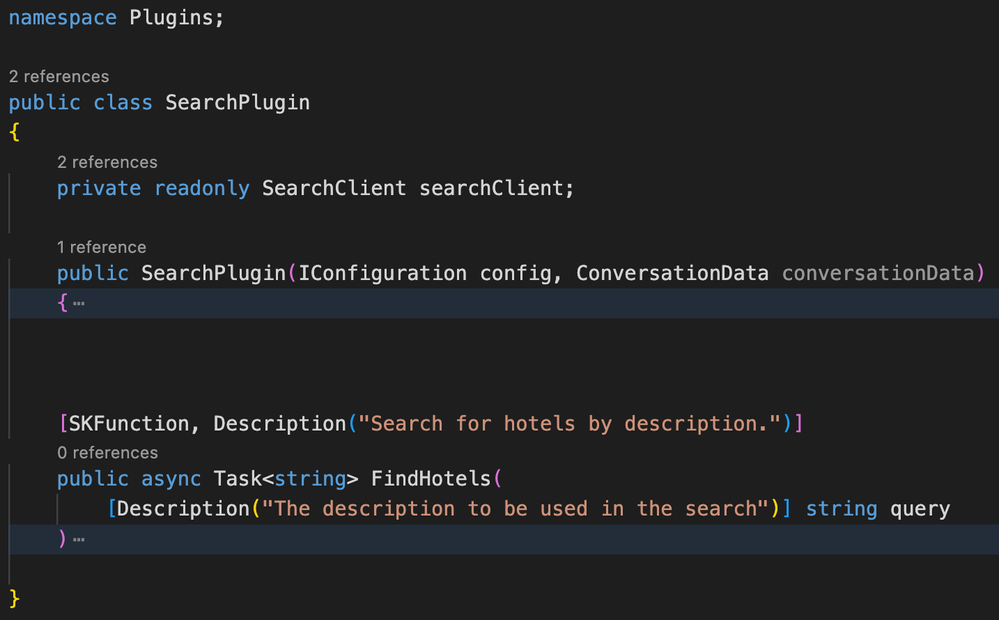
Notice how Semantic Functions – the functionality that Semantic Kernel can call upon – are structured. Each Semantic Function and each of its arguments must be annotated with a human-readable description. This description will then be passed to the LLM so it can decide when to utilize that function, and pass in the right parameters. You can check out the source code in our repo, but this function is basically submitting a search to the Azure Cognitive Search index.
With debugging enabled, we can see each step of how the interaction happens:
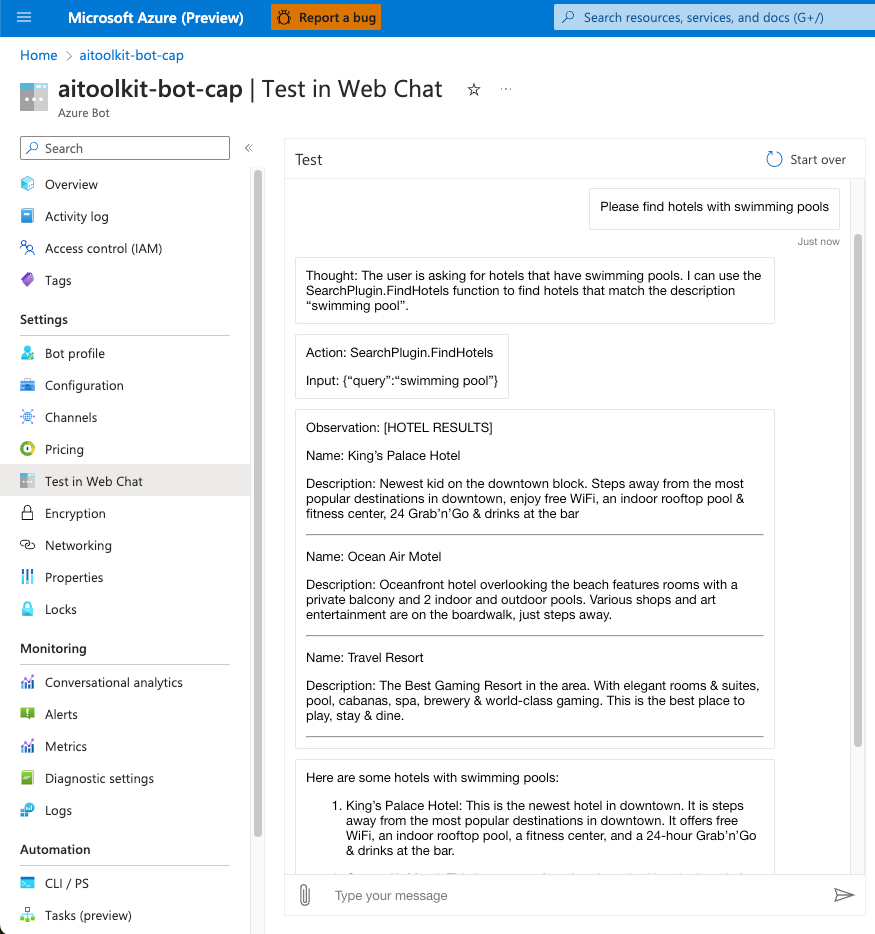
1. Thought: GPT-4 receives the question and determines it needs to use the SearchPlugin to respond.
2. Action: In the same step, GPT-4 formulates an action call with the appropriate parameters. The action is constructed in JSON format.
3. Observation: The plugin returns some hotel names and descriptions.
4. Final Answer: GPT-4 determines it now has all the information it needs, and provides an answer to the end user. Typically, this would be the only response the user sees!
This process of Thought-Action-Observation may repeat multiple times until the model obtains the required information. We’ll see an example of that in the next scenario.
2. Structured Data Retrieval-Augmented Generation
Much like Azure Cognitive Search, a SQL Database can be consumed by Semantic Kernel using the same technique. Again, we start by implementing a Plugin:
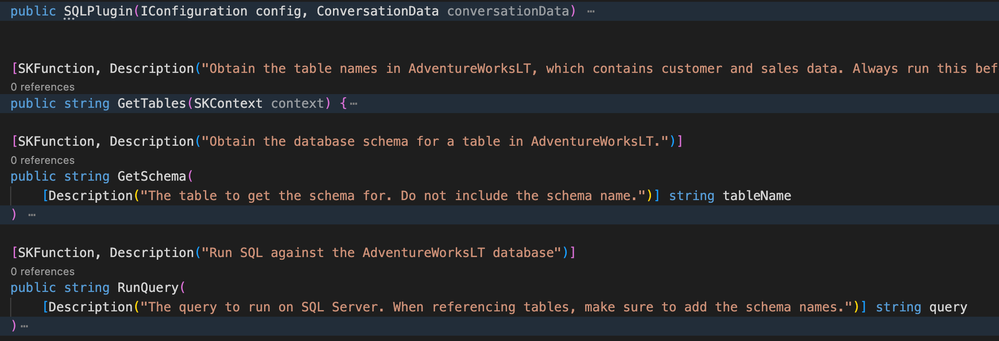
This is slightly more complex – we added three Semantic Functions:
- GetTables: Gets all tables in the database;
- GetSchema: Gets the schema for a specific table;
- RunQuery: Runs a query on the database;
We then expect the Semantic Kernel Planner to combine these as needed to reach a response. Let’s see an example, again with the debugging enabled to view intermediate steps:
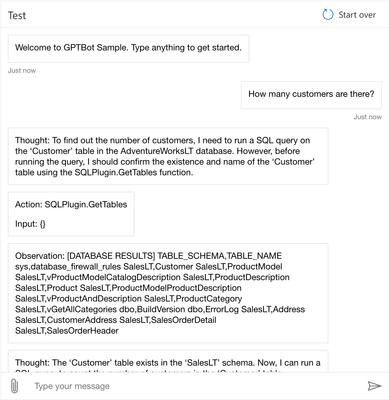
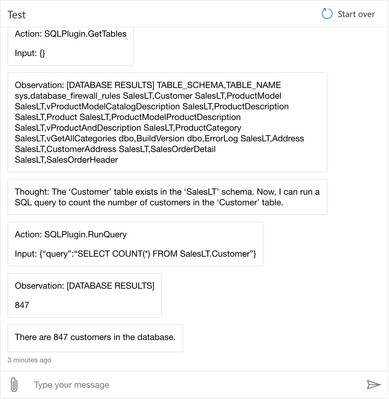
This time, the conversation flow goes like this:
- Thought: GPT-4 receives the question and determines it needs to use the SQLPlugin to respond.
- Action: The first action required is to list tables to get the right table name for customers
- Observation: The plugin returns the table names in the database.
- Thought: Now knowing the correct table name, GPT-4 can formulate a query to get the number of customers
- Action: The action is to run a COUNT query on the SalesLT.Customer table
- Observation: The plugin returns the count of customers
- Final Answer: GPT-4 determines it now has all the information it needs, and provides the number of customers to the end user. Again, in a production scenario, this is the only answer the end-user would see.
3. Upload and analyze documents
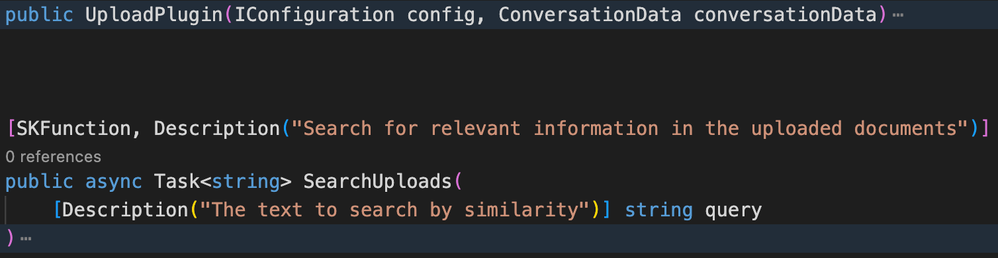
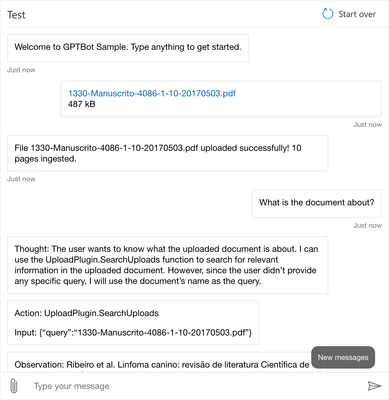
The third and final common scenario we added to the accelerator is the upload of documents. Users can use the built-in upload function to send PDF files, and the bot will break them down and use Vector search to find relevant information.
Once again, starting with the plugin implementation:
And moving on to the Web Chat:

Conclusion
Semantic Kernel is a very powerful and extensible tool, but deployment can be a challenge if you don’t know where to start. In this article, we provided a solution accelerator template you can use to quickly get to production, and create your own plugins and extensions.
Also please note that you’re responsible for what plugins you place in the hands of your end users! Imagine what would happen if a user asked “please drop the AdventureWorksLT database”. For that reason, you need to make sure your application has the precise role assignments to enable the actions it needs to perform, while limiting anything that should be out of its reach. Always keep security first!
In case you missed the GitHub repository link, here it is! Make sure to drop a star if it helped you!
https://github.com/Azure/semantic-kernel-bot-in-a-box
by Contributed | Oct 25, 2023 | Technology
This article is contributed. See the original author and article here.
We’re excited to share the public preview of delegating Azure role assignment management using conditions. This preview gives you the ability to enable others to assign Azure roles but add restrictions on the roles they can assign and who they can assign roles to.
As the owner of an Azure subscription, you likely get requests from developers to grant them the ability to assign roles in your subscription. You could assign them the Owner or User Access Administrator role, but those roles grant permission to assign any Azure role (including Owner!), and that’s probably a lot more permission than necessary for that developer’s scenario. You could instead make role assignments for these developers on demand, but that makes you an unnecessary and impractical bottleneck in their workflow.
Another common case we hear about is a deployment pipeline that needs to make role assignments as part of the deployment process, for example to grant a virtual machine managed identity access to Azure Storage and other resources. You don’t want to assign the deployment pipeline the Owner or User Access Administrator role because again, it’s a lot more permission than is needed for the scenario.
We created this feature so you can grant permission to create role assignments, but only under specific conditions, such as for specific roles. You can do this in two ways:
- Make a role assignment that is constrained using conditions.
- Use a new built-in role that has built-in conditions.
Let’s look at each scenario.
How to delegate role assignment management using conditions
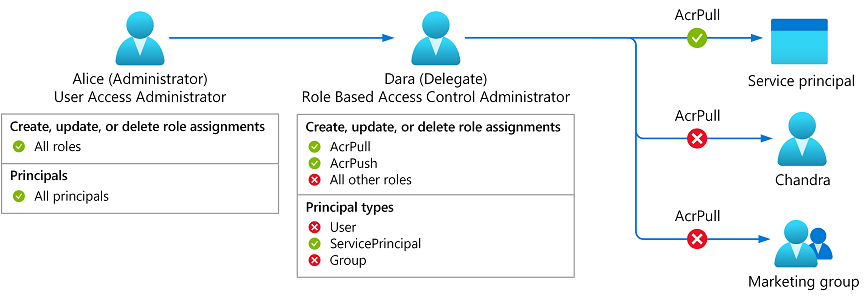
Meet Dara, a developer who needs to enable an Azure Kubernetes Service (AKS) managed identity to pull images from an Azure Container Registry (ACR). Now, you can assign Dara the Role Based Access Administrator role and add conditions so she can only assign the AcrPull and AcrPush roles and only to service principals.
Figure 1: Delegate Azure role assignment management using conditions.
Let’s look at how to do this step by step:
Step 1: When creating a new role assignment, on the Privileged administrator roles tab select the new Role Based Access Control Administrator role. You could also select any built-in or custom role that includes the Microsoft.Authorization/roleAssignments/write action.
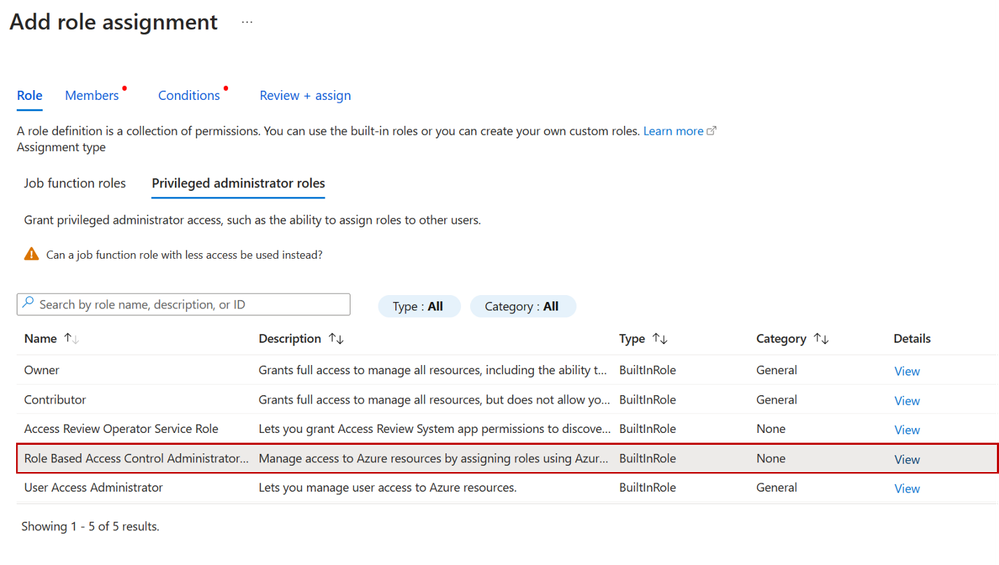 Figure 2: Select role
Step 2: On the Members tab, select the user you want to delegate the role assignments task to.
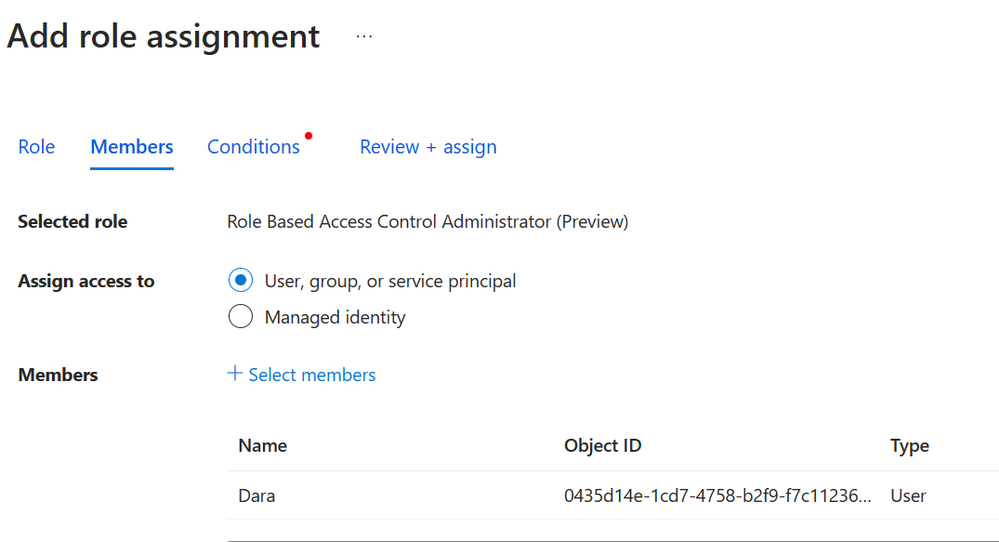 Figure 3: Select members
Step 3: On the Condition tab, click Add condition to add the condition to the role assignment.
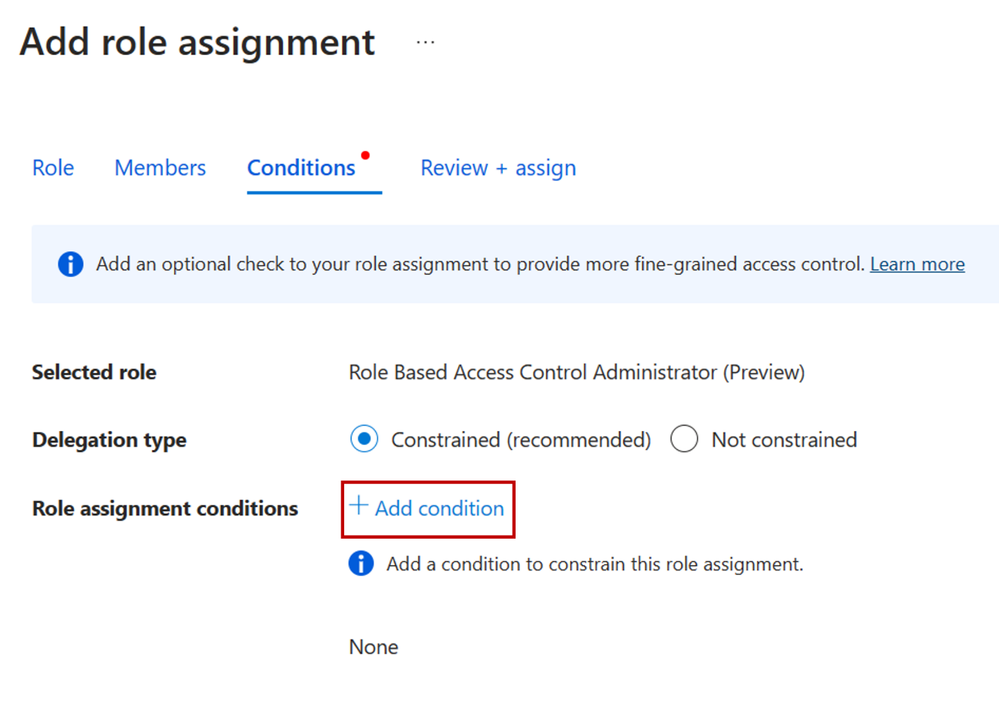 Figure 4: Add condition to role assignment
Step 4: On the Add role assignment condition page, specify how you want to constrain the role assignments this user can perform by selecting one of the templates. For example, if you only want to restrict the roles that a user can assign (ex. AcrPull and AcrPush) and the type of principals the user can assign roles to (ex. service principals), select the Constrain roles and principal types template.
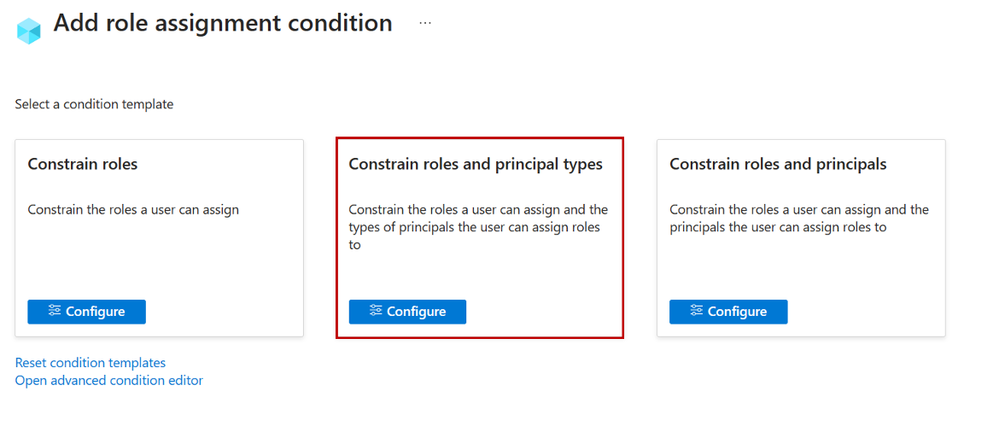 Figure 5: Select role template
Step 5: On the Constrain roles and principal types pane, add the roles you want the user to be able to assign and select to what principal types the user can assign roles to.
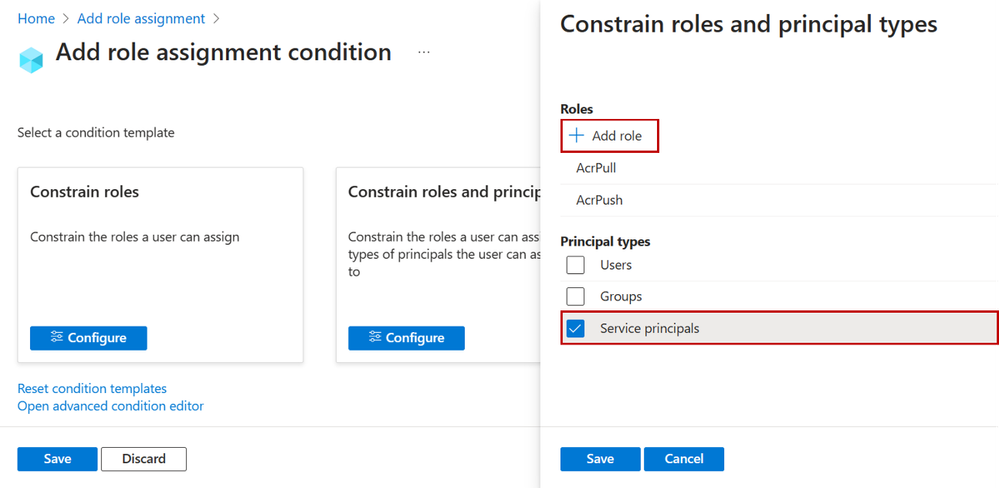 Figure 6: Select role and principal type
Step 6: Save the condition and complete the role assignment. 
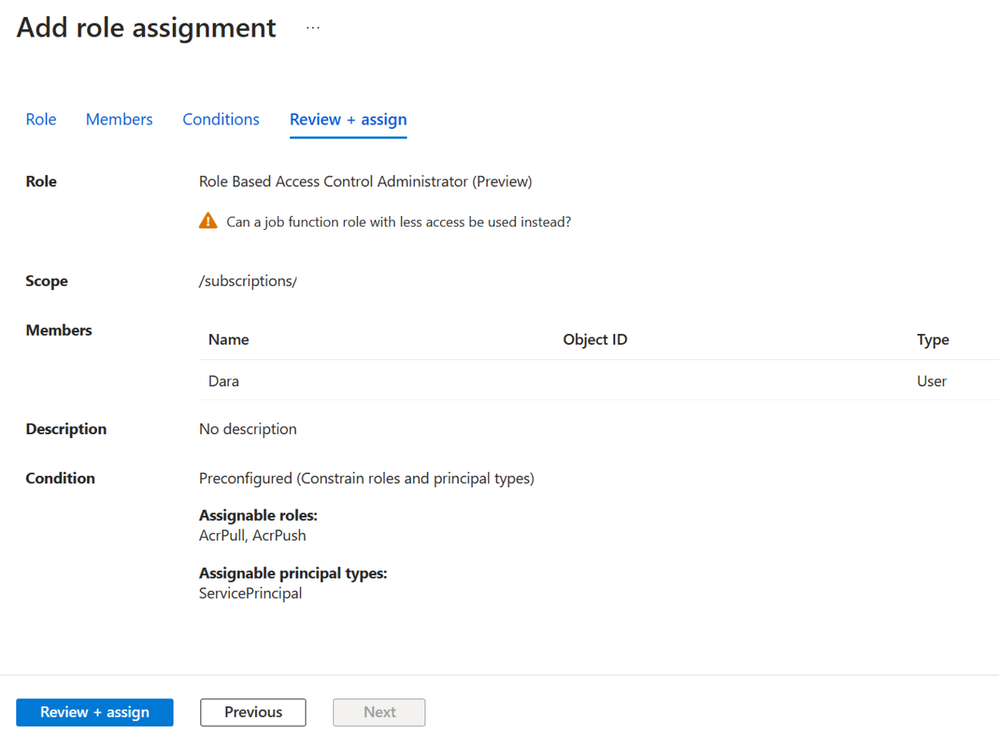 Figure 7: Review role assignment with conditions
How to delegate role assignment management using a new built-in role with built-in conditions
Now Dara wants to control who can sign into virtual machines using Microsoft Entra ID credentials. To do this, Dara needs to create role assignments for the Virtual Machine User Login or Virtual Machine Administrator Login roles. In the past, you had to grant Dara the Owner or User Access Administrator role so she could make these assignments. Now, you can grant Dara the new Virtual Machine Data Access Administrator role. Then, Dara will only be able to assign the roles needed to manage access to the virtual machine.
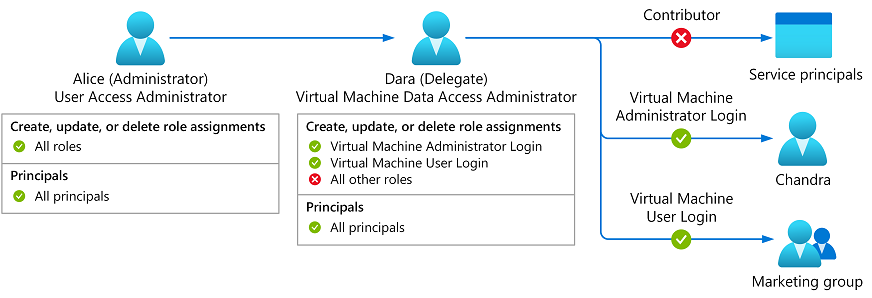 Figure 8: Virtual Machine Data Access Administrator
Similarly, you can assign Key Vault Data Access Administrator role to trusted users managing key vaults, enabling them to assign only Azure Key Vault-related roles.
To assign the new built-in roles with built-in conditions, start a new role assignment, select the Job function roles tab, and select a role with built-in conditions, such as Virtual Machine Data Access Administrator. Then complete the flow to add a new role assignment.
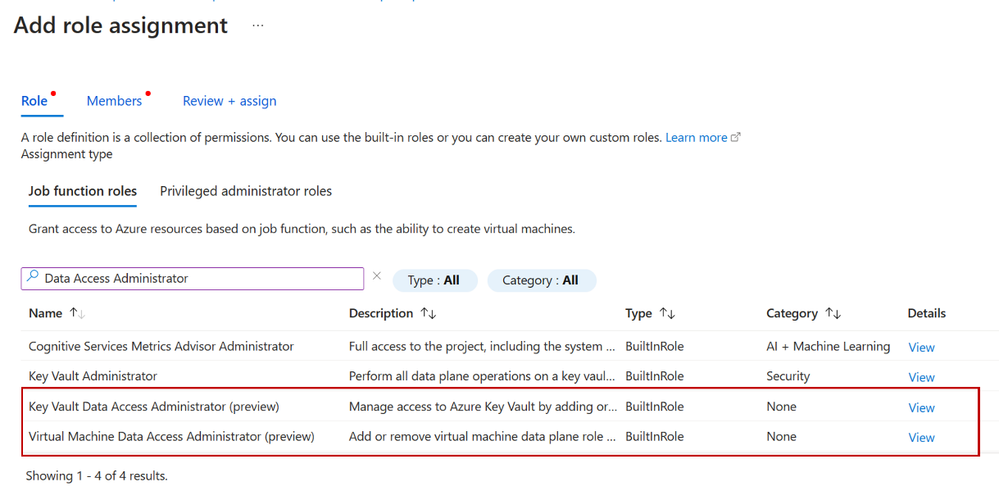 Figure 9 Select Key Vault or Virtual Machine Data Access Administrator
Roles with built-in conditions have Data Access Administrator as part of the role name. Also, you can check if a role definition contains a condition. In the Details column, click View, select the JSON tab, and then inspect the condition property. Over time we’ll add more roles with built-in conditions, for the most common scenarios, to make it easy to manage resources and manage access to those resources with simple role assignments.
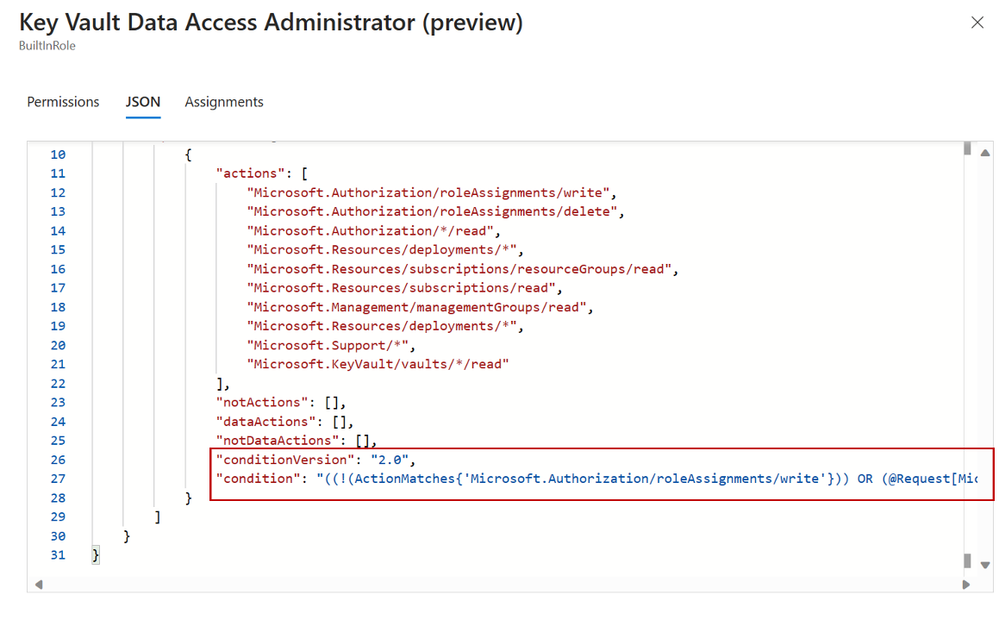 Figure 10: Key Vault Data Access Admin JSON view definition
Next steps
We have several examples for you to get started and customize as needed. Delegating Azure role assignments with conditions is supported using the Azure portal, Azure Resource Manager REST API, PowerShell, and Azure CLI. Try it out and let us know your feedback in the comments or by using the Feedback button on the Access control (IAM) blade in the Azure portal!
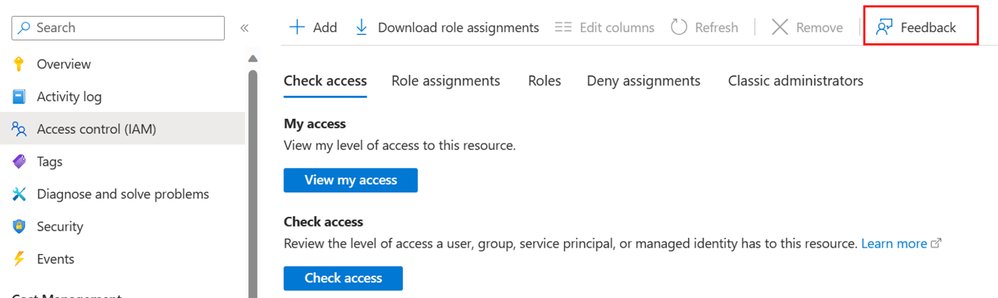 Figure 11: Provide feedback
Stuart Kwan
Partner Manager, Product Management
Microsoft Entra
Learn more about Microsoft Entra:
by Contributed | Oct 24, 2023 | Technology
This article is contributed. See the original author and article here.
A much-awaited calendaring feature is finally coming to Outlook: the capability of keeping the events you decline on your calendar.
In Settings, once you turn on the feature, declined events will no longer disappear but remain on your calendar so you can easily recollect related info or docs, find associated chats, or even take actions like updating your previous response (RSVP) and forwarding it to someone else; all while keeping your agenda free at that time slot.
Worldwide release for the ability to preserve declined events is planned for the second half of November 2023. Once it is out, this is what you can do to take advantage of it:
Step 1: Enable the feature
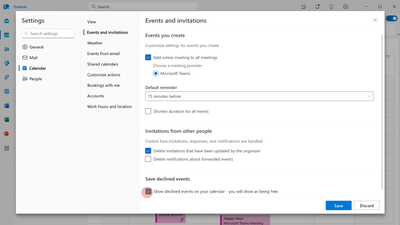
The ability to preserve declined events will be disabled by default. You can enable it in Outlook on the web or in the new Outlook for Windows by manually checking “Show declined events in your calendar…” in Settings > Calendar > Events and invitations > Save declined events.
Step 2: Decline Events
Once it’s enabled, you can start declining events or meeting invites and they will automatically be preserved.
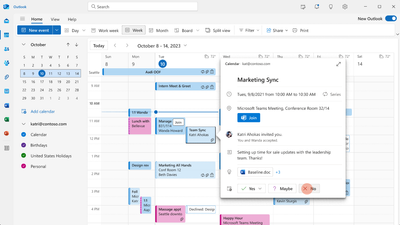
Please note that events declined from the classic Outlook for Windows will not be preserved, but events declined from all other Outlook clients (new Outlook for Windows, Outlook on the web, Outlook for Mac, Outlook for Android, Outlook for iOS) and Microsoft Teams will be preserved.
Step 3: View Declined Events
Once preserved, declined events will be viewable on any calendar surface, including the classic Outlook for Windows, Teams, and even third-party apps.
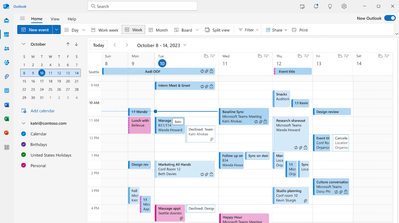
We hope this feature will improve your calendaring experience, making your time management easier.
Cheers!
by Contributed | Oct 23, 2023 | Technology
This article is contributed. See the original author and article here.
Overview
Microsoft Azure services already operate in TLS 1.2-only mode. There are a limited number of services that still allow TLS 1.0 and 1.1 to support customers with legacy needs. For customers who use services that still support legacy protocol versions and must meet compliance requirements, we have provided instructions on how to ensure legacy protocols and cipher suites are not negotiated. For example, HDInsight provides the minSupportedTlsVersion property as part of the Resource Manager template. This property supports three values: “1.0”, “1.1” and “1.2”, which correspond to TLS 1.0+, TLS 1.1+ and TLS 1.2+ respectively. Customers can set the allowed minimum version for their HDInsight resource.
This document presents the latest information on TLS protocols and cipher suite support with links to relevant documentation for Azure Offerings. For offerings that still allow legacy protocols to support customers with legacy needs, TLS 1.2 is still preferred. The documentation links explain what needs to be done to ensure TLS 1.2 is preferred in all scenarios.
Documentation Links
FAQ (Frequently Asked Questions)
What is meant by legacy protocols?
Legacy protocols are defined as anything lower than TLS 1.2.
What is meant by legacy cipher suites?
Cipher suites that were considered safe in the past but are no longer strong enough or they PFS. While these ciphers are considered legacy, they are still supported for some backward compatibility customer scenarios.
What is the Microsoft preferred cipher suite order?
For legacy purposes, Windows supports a large list of ciphers by default. For all Microsoft Windows Server versions (2016 and higher), the following ciphers are the preferred set of cipher suites. The preferred set of cipher suites is set by Microsoft’s security policy. It should be noted that Microsoft Windows uses the IANA (Internet Assigned Numbers Authority) cipher suite notation. This link shows the IANA to OpenSSL mapping. It should be noted that Microsoft Windows uses the IANA (Internet Assigned Numbers Authority) cipher suite notation. This link shows the IANA to OpenSSL mapping.
TLS_ECDHE_ECDSA_WITH_AES_256_GCM_SHA384
TLS_ECDHE_ECDSA_WITH_AES_128_GCM_SHA256
TLS_ECDHE_RSA_WITH_AES_256_GCM_SHA384
TLS_ECDHE_RSA_WITH_AES_128_GCM_SHA256
TLS_ECDHE_ECDSA_WITH_AES_256_CBC_SHA384
TLS_ECDHE_ECDSA_WITH_AES_128_CBC_SHA256
TLS_ECDHE_RSA_WITH_AES_256_CBC_SHA384
TLS_ECDHE_RSA_WITH_AES_128_CBC_SHA256
Why is ChaCha20-Poly1305 not included in the list of approved ciphers?
ChaCha20-Poly1305 PolyChacha ciphers are supported by Windows and can be enabled in scenarios where customers control the OS.
Why are CBC ciphers included in the Microsoft preferred cipher suite order?
The default Windows image includes CBC ciphers. However, there are no known vulnerabilities related to the CBC mode cipher suites. We have mitigations for CBC side-channel attacks.
Microsoft’s preferred cipher suite order for Windows includes 128-bit ciphers. Is there an increased risk with using these ciphers?
AES-128 does not introduce any practical risk but different customers may have different preferences with regard to the minimum key lengths they are willing to negotiate. Our preferred order prioritizes AES-256 over AES-128. In addition, customers can adjust the order using the TLS Cmdlets. There is also a group policy option detailed in this article: Prioritizing Schannel Cipher Suites – Win32 apps | Microsoft Docs.
Thanks for reading!
by Contributed | Oct 21, 2023 | Technology
This article is contributed. See the original author and article here.
In the digital age, spatial data management and analysis have become integral to a wide array of technical applications. From real-time tracking to location-based services and geospatial analytics, efficient handling of spatial data is pivotal in delivering high-performance solutions.
Azure Cache for Redis, a versatile and powerful in-memory data store, rises to this challenge with its Geospatial Indexes feature. Join us in this exploration to learn how Redis’s Geospatial Indexes are transforming the way we manage and query spatial data, catering to the needs of students, startups, AI entrepreneurs, and AI developers.
Introduction to Redis Geospatial Indexes
Azure Cache for Redis Geo-Positioning, or Geospatial, Indexes provide an efficient and robust approach to store and query spatial data. This feature empowers developers to associate geographic coordinates (latitude and longitude) with a unique identifier in Redis, enabling seamless spatial data storage and retrieval. With geospatial indexes, developers can effortlessly perform a variety of spatial queries, including locating objects within a specific radius, calculating distances between objects, and much more.
In Azure Cache for Redis, geospatial data is represented using sorted sets, where each element in the set is associated with a geospatial coordinate. These coordinates are typically represented as longitude and latitude pairs and can be stored in Redis using the GEOADD command. This command enables you to add one or multiple elements, each identified by a unique member name, to a specified geospatial key.
If you’re eager to explore the Azure Cache for Redis for Geo-positioning, be sure to tune in to this Open at Microsoft episode hosted by Ricky Diep, Product Marketing Manager at Microsoft and Roberto Perez, Senior Partner Solutions Architect at Redis.
Spatial Queries with Redis
Azure Cache for Redis equips developers with a set of commands tailored for spatial queries on geospatial data. Some of the key commands include:
– GEOADD: Adds a location(s) to the geospatial set.
– GEODIST: Retrieves the distance between two members.
– GEOSEARCH: Retrieves location(s) by radius or by a defined geographical box.
– GEOPOS: Retrieves the position of one or more members in a geospatial set.
These commands empower developers to efficiently perform spatial computations and extract valuable insights from their geospatial data.
Benefits of Redis Geospatial Indexes
In-Memory Performance: Azure Cache for Redis, as an in-memory database, delivers exceptional read and write speeds for geospatial data. This makes it an excellent choice for real-time applications and time-critical processes.
Flexibility and Scalability: Redis Geospatial Indexes can handle large-scale geospatial datasets with ease, offering consistent performance even as the dataset grows.
Simple Integration: Azure Cache for Redis enjoys wide support across various programming languages and frameworks, making it easy to integrate geospatial functionalities into existing applications.
High Precision and Accuracy: Redis leverages its geospatial computations and data to ensure high precision and accuracy in distance calculations.
Common Use Cases
Redis Geospatial Indexes find applications in a diverse range of domains, including:
Location-Based Services (LBS): Implementing location tracking and proximity-based services.
Geospatial Analytics: Analyzing location data to make informed business decisions, such as optimizing delivery routes or targeting specific demographics.
Asset Tracking: Efficiently managing and tracking assets (vehicles, shipments, etc.) in real-time.
Social Networking: Implementing features like finding nearby users or suggesting points of interest based on location.
Gaming Applications: In location-based games, Redis can be used to store and retrieve the positions of game elements, players, or events, enabling dynamic gameplay based on real-world locations.
Geofencing: Redis can help create geofences, which are virtual boundaries around specific geographical areas. By storing these geofences and the locations of mobile users or objects, you can detect when a user enters or exits a specific region and trigger corresponding actions.
For use cases where only geospatial data is needed, users can leverage the GeoSet command. However, if use cases require storing more than just geospatial data, they can opt for a combination of RedisJSON + RediSearch or Hash + RediSearch, both available in the Enterprise tiers, to accomplish real-time searches.
Conclusion
Redis Geospatial Indexes present a potent and efficient solution for storing, managing, and querying spatial data. By harnessing Azure Cache for Redis’s in-memory performance, versatile commands, and scalability, developers can craft high-performance applications with advanced spatial capabilities. Whether it’s location-based services, geospatial analytics, or real-time tracking, Redis Geospatial Indexes empower students, startups, AI entrepreneurs, and AI developers to unlock the full potential of spatial data processing.
Additional Resources


Recent Comments