by Contributed | Jun 16, 2021 | Technology
This article is contributed. See the original author and article here.
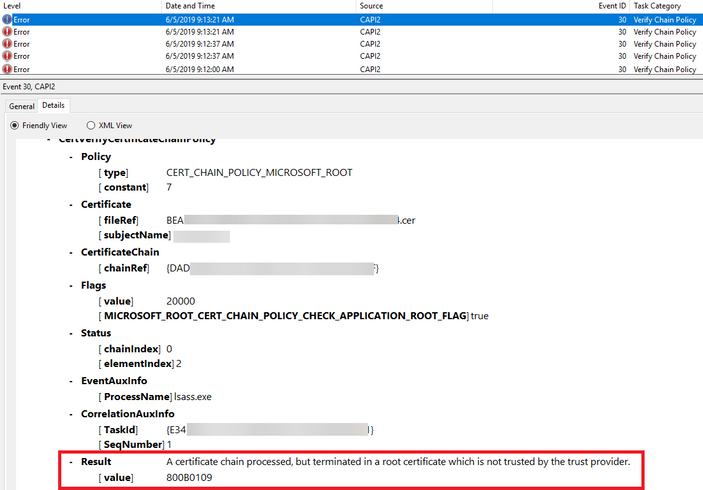
A certificate chain processed, but terminated in a root certificate which is not trusted by the trust provider. (0x800b0109)
Client Certificate is a digital certificate which confirms to the X.509 system. It is used by client machines/users to prove their identity to the remote server.
We normally get 403 errors if the client certificate authentication is not configured properly. In this article, we will talk about the error “403 – Access denied” while browsing a site hosted on IIS (internet information services).
“403 – Access denied” might be a custom error message thrown from the application code. Hence, we need to get the exact status code and sub-status code from the IIS logs stored in the location C:inetpublogsLogFilesW3SVC{site_id}
In this scenario, IIS logs had the error code 403.16.
HTTP 403.16 indicates that the Client certificate is untrusted or invalid : If IIS is not configured to use a CTL, SSL client certificate authentication will fail with the 403.16 error condition. This error occurs because SChannel.dll wrongly considers the client certificate to be untrusted
As a troubleshooting step, we can enable CAPI2 logging to get more details on 403.16 error. Below are the steps to enable it.
- In the Event Viewer, go to Application and Services Logs -> Microsoft -> Windows -> CAPI 2 to get the CAPI 2 channel.
- Right-click on “Operational” and select “Enable Log”. This will enable CAPI2 Diagnostics logging.
CAPI2 logging has generated below event log for 403.16 error.
Above highlighted error message would occur when there is a non-self-signed certificate present in Trusted root Certification authorities certificate store on the MMC console. We can resolve 403.16 error by removing the non-self-signed certificate from the Trusted root Certification authority. Please refer the article for more details.
Please note that this is a probable solution for this issue. We need to find the exact error/issue details by enabling appropriate logging.
Note:
We can make use of below command to list the non-self-signed certificate exists on the trusted root authority.
Get-Childitem cert:LocalMachineroot -Recurse | Where-Object {$_.Issuer -ne $_.Subject} | Format-List * | Out-File “c:computer_filtered.txt
Hope this helps !!
by Contributed | Jun 16, 2021 | Technology
This article is contributed. See the original author and article here.
Call Summary:
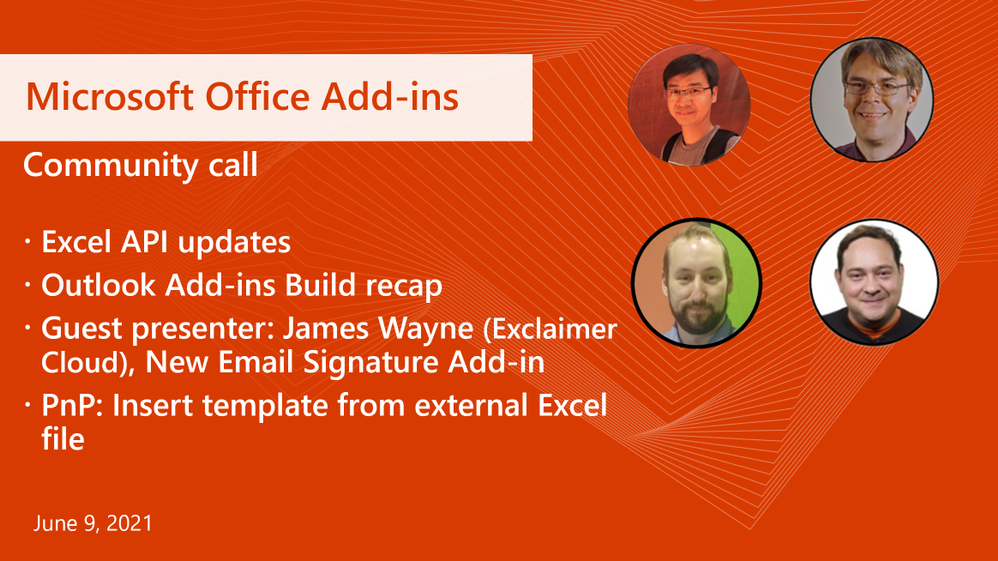
This month’s community call features presentations – Excel v1.13 API updates (highlights 2 new APIs insertWorksheetFromBase64 and onFormulaChanged event), Outlook Add-ins – Build 2021 recap (GA for Event- Driven Add-in with onCompose Event and for Mailbox 1.10 for Outlook), New Email Signature Add-in (Exclaimer’s Outlook Add-in product uses latest Outlook Add-ins capabilities), and PnP: Insert template from external Excel file (insert external Excel file into the open Excel worksheet and populate it with JSON data). This month’s Community spotlight recognizes MVPs Damien Bird (DamoBird365) and Maarten van Stam. Thank you! Q&A in chat throughout call. The call was hosted by David Chesnut (Microsoft) | @davidchesnut. Microsoft Presenters: Raymond Lu and Juan Balmori | @juaneloBalmori. Special guest presenters James Wayne and Phillip Vetter from Exclaimer Cloud. Recorded on June 9, 2021.
Agenda:
June’s call, hosted by David Chesnut, featured the following presenters and topics:
- Excel API updates – Raymond Lu (Microsoft) – 1:31
- Outlook API updates – Juan Balmori (Microsoft) | @juaneloBalmori – 13:17
- New Email Signature Add-in – James Wayne (Exclaimer Cloud) – 21:27
- PnP: Insert template from external Excel file – David Chesnut (Microsoft) | @davidchesnut – 37:12
Q&A (Question & Answers)
Unfortunately, we had some issues with the chat during the call. We apologize to folks who were not able to ask a question. If you have a question, you can reach out to us by using our short survey form. We’ll address any questions in the form during the next call.
Can you fix Teams add-ins functionality for online meetings? Association between Outlook events and online meetings is non-existent. The Teams SDK currently works online with single instance meetings, but there is no way to associate custom data with event instance and event series. For example, the SDK does not let you get meeting instance start time.
We can help with Office Add-ins development, but this is a good question for Microsoft Teams. We recommend asking this question on office-teams-app-dev – Microsoft Q&A. Thanks!
Are there plans to provide access to the Outlook auto-complete list via office-js? The list is available in the UI on mobile, OWA and desktop clients while entering recipients. It would be useful for us to be able to access it (or a list of commonly used email addresses for the user) via office-js to check the entered recipients.
There are no plans at this time, but this sounds like a great idea! Please create a feature request for this on our ideas page at https://aka.ms/m365dev-suggestions. Thanks!
There are many videos and articles aboutsSingle sign-on for Office Add-ins. The Yeoman generator uses the NPM package “msal” but there is also an NPM package called “@azure/msal-browser” and another one called “@azure/msal-react”. Can these all be used inside an Office Add-in? Which ones are the recommended ones to use?
In general you can use most web libraries with an Office Add-in. For SSO you don’t need an authentication library to get the user identity token, since you just call getAccessToken(). However, you should implement a fallback sign-in dialog for scenarios where SSO will fail. In these cases using an authentication library makes the process easier. There is no requirement to use MSAL, but if you do, you should use the official MSAL package for the framework/language of choice as recommended by Microsoft Azure. For more information see Enable single sign-on for Office Add-ins – Office Add-ins | Microsoft Docs
I am attempting to implement the shared JavaScript runtime. However, I get an error when adding the <Runtimes> section. The error is: The element ‘Host’ in namespace ‘http://schemas.microsoft.com/office/taskpaneappversionoverrides‘ has invalid child element ‘Runtimes’ in namespace ‘http://schemas.microsoft.com/office/taskpaneappversionoverrides‘. List of possible elements expected: ‘AllFormFactors, DesktopFormFactor’ in namespace ‘http://schemas.microsoft.com/office/taskpaneappversionoverrides‘.
This error can occur if the <Runtimes> section is not in the expected location. Be sure to put the <Runtimes> section just below the <Host> tag as follows:
<Hosts>
<Host xsi:type=”Workbook”>
<Runtimes>
<Runtime resid=”Taskpane.Url” lifetime=”long” />
</Runtimes>
In general if you run into a manifest error, you can compare the manifest to one that works and look for any significant differences. For example you could compare against this PnP sample manifest that uses a shared runtime.
You can also run manifest validation which can provide more information about the error.
Resources:
Excel API updates
Outlook add-ins Build conference recap
Exclaimer Cloud Signatures Outlook add-in
- <TBD: Link to demo video>
PnP: Insert an external Excel file and populate it with JSON data
Office Add-ins community call
Office Add-ins feedback
The next Office Add-ins community call is on Wednesday, July 14, 2021 at 8:00AM PDT. Get the calendar invite at https://aka.ms/officeaddinscommunitycall.
by Contributed | Jun 16, 2021 | Technology
This article is contributed. See the original author and article here.
This set of beginner tutorials will introduce you to the open source .NET platform and the C# programming language over 3 sessions!
There’s a wonderful welcoming community out there that wants YOU to learn how to code! We’ll talk about where to start, what you can build, where C# fits into a world with many programming languages, and share resources to explore as YOU learn C#!
Learn more and view sessions on demand after the live event https://developer.microsoft.com/en-us/reactor/eventseries/CSharp/
Sessions & Registrations
1. Let’s Learn C# with Scott and Cherita at the Microsoft Reactor! Part 1
Register for these LIVE Events or view on demand
2. Let’s Learn C# with Scott and Cherita at the Microsoft Reactor! Part 2 16th June 2021 08:00 AM – 09:00 AM (Pacific)
Register Now3. Let’s Learn C# with Scott and Cherita at the Microsoft Reactor! – Part 3 17th June 08:00 AM – 09:00 AM (Pacific)
Register Now
Microsoft Learn & Resources
Understanding what languages your teaching your students
The goal of this survey is to better understand your perception of teaching coding to students and explore
ways in which we can better support you.
Please complete the following survey to help us understand what programming languages you are teaching your students
All responses are anonymous. The Microsoft Privacy Policy: https://privacy.microsoft.com/en-us/privacystatement. Information collected will not be used for any type of advertising or other marketing activities. Data collected will be deleted after 30 days.
Estimated time to complete: 3 mins.
by Contributed | Jun 16, 2021 | Technology
This article is contributed. See the original author and article here.
Organizations in every industry and sector are rethinking how business is done by evolving processes and products to meet new employee and customer needs. Envision being able to centrally manage equipment through low-power devices that connect legacy equipment and deliver data to Azure IoT over any protocol. Imagine modernizing how equipment is monitored and managed by using small IoT devices, instead of replacing all your infrastructure.
Tartabit IoT Bridge, a solution published to Azure Marketplace, is a complementary IoT service that extends Microsoft Azure IoT to support devices that use protocols not natively supported by Azure IoT, such as low-power wide area network (LPWAN), LightweightM2M (LWM2M), and CoAP. With Tartabit IoT Bridge, developers can rapidly integrate low-power, low-bandwidth devices into their Azure IoT-centric solutions. The low-code, no-code solution provides bi-directional options for use with Azure IoT Hub, Azure IoT Central, Azure Event Hub, and Azure Cosmos DB.
Microsoft interviewed Sigurdur Hjalmarsson, CEO at Taggr A/B, to learn what he had to say about the solution.
What do you like best about Tartabit?
Installation was painless. You just provision the devices, and they appear in Azure IoT.
We operate in the market for constrained IoT devices. These are small, battery-powered, very versatile, and efficient devices that connect legacy equipment to Azure IoT. Constrained IoT devices use network protocols and legacy protocols not natively supported by Microsoft Azure. We needed to communicate with many different types of networks.
Tartabit IoT Bridge solved our problem, and we can now focus on delivering faster to our customers. Tartabit IoT Bridge helps our devices talk to Azure IoT over any network.
How has the service helped your organization?
It straight out solves the problem of simplifying getting data from devices into Azure IoT across different networks. It is both flexible and simple to use.
Not a lot of companies pay attention to this network IoT issue. This product fills in the exact gap.
How is customer service and support for Tartabit?
Service is exceptional. We are in Europe, and when we have a problem and report it, they get on it right away and it is solved by mid-day. I wish my organization worked like that.
Any recommendations to other users considering this product?
I would recommend Tartabit IoT Bridge to any Azure customer who needs to connect various legacy devices and deliver data into Azure IoT over different protocols. Tartabit can easily turn any second-class protocols into first-class protocols.
What is your overall rating for this product?
4.5 out of 5 stars.
With over 25,000 apps and services to support innovation in your IT portfolio, Azure Marketplace is empowering users to find cloud applications built on Azure, such as Tartabit IoT Bridge. Explore Azure Marketplace to find apps and services curated by category, workload, and industry. Plus, take advantage of free, short trials on selected apps to see if they’re right for you.
by Contributed | Jun 16, 2021 | Technology
This article is contributed. See the original author and article here.
Welcome back to Reconnect, the biweekly series that catches up with former MVPs and their current activities.
This week we are thrilled to be joined by none other than four-time Windows Mobile MVP Christophe Cordonnier! Hailing from Vendée, France, Christophe currently works as a systems and networks administrator. “I’ve always loved IT and I’m really happy to have my passion for my job,” Christophe says.
Christophe started his career about 35 years ago as a computer scientist with Windows 3.1 and Windows NT3.51. Today, he remains happy to work within the Windows ecosystem and in an industry that he enjoys.
Looking back on his time as an MVP, Christophe says he is proud to have worked with Windows Phone and attend two MVP Summits. “Those summits were without a doubt the ‘best computer moments’ that I have experienced in my life, so thanks Microsoft for that!”
“It’s a shame that Microsoft no longer offers Windows Phone because they were without a doubt the best smartphones on the market.”
Nonetheless, Christophe maintains his passion for all things mobile with his website Smartphone France, which has been sharing the latest and greatest in cellular tech since 2002.
Speaking to the next generation of MVPs, Christophe recommends: “Be yourself and above all do it for fun. If you do things for fun you will become very good and can go very far.”
“I am proud today to be part of this Reconnect community. It’s really nice of Microsoft to keep in mind the ‘old guys’ and keep the passion and spirit alive!”
For more on Christophe, check out his Twitter @spfrance


Recent Comments