
by Contributed | Jun 25, 2021 | Technology
This article is contributed. See the original author and article here.
ATTACK SURFACE REDUCTION: WHY IS IMPORTANT AND HOW TO CONFIGURE IN PRODUCTION
Silvio Di Benedetto is founder and CEO at Inside Technologies. He is a Digital Transformation helper, and Microsoft MVP for Cloud Datacenter Management. Silvio is a speaker and author, and collaborates side-by-side with some of the most important IT companies including Microsoft, Veeam, Parallels, and 5nine to provide technical sessions. Follow him on Twitter @s_net.

WSP Deployer: Deploy WSP SharePoint 2019 Solutions using PowerShell
Mohamed El-Qassas is a Microsoft MVP, SharePoint StackExchange (StackOverflow) Moderator, C# Corner MVP, Microsoft TechNet Wiki Judge, Blogger, and Senior Technical Consultant with +10 years of experience in SharePoint, Project Server, and BI. In SharePoint StackExchange, he has been elected as the 1st Moderator in the GCC, Middle East, and Africa, and ranked as the 2nd top contributor of all the time. Check out his blog here.

My favorite Power BI announcements from the Business Application Summit
Marc Lelijveld is a Data Platform MVP, Power BI enthusiast, and public speaker who is passionate about anything which transforms data into action. Currently employed as a Data & AI consultant in The Netherlands, Marc is often sharing his thoughts, experience, and best-practices about Microsoft Data Platform with others. For more on Marc, check out his blog.

Microsoft Whiteboard in Teams meeting has new look and tools
Vesku Nopanen is a Principal Consultant in Office 365 and Modern Work and passionate about Microsoft Teams. He helps and coaches customers to find benefits and value when adopting new tools, methods, ways or working and practices into daily work-life equation. He focuses especially on Microsoft Teams and how it can change organizations’ work. He lives in Turku, Finland. Follow him on Twitter: @Vesanopanen

Teams Real Simple with Pictures: Getting Hands on with Boards
Chris Hoard is a Microsoft Certified Trainer Regional Lead (MCT RL), Educator (MCEd) and Teams MVP. With over 10 years of cloud computing experience, he is currently building an education practice for Vuzion (Tier 2 UK CSP). His focus areas are Microsoft Teams, Microsoft 365 and entry-level Azure. Follow Chris on Twitter at @Microsoft365Pro and check out his blog here.
by Contributed | Jun 25, 2021 | Technology
This article is contributed. See the original author and article here.
Configure the CI pipeline
The source and target are ready, let’s configure the CI pipeline first.
Create a pipeline and build the back-end project first
In the Azure DevOps console click the left navigation link Pipelines under Pipelines and the New pipeline button in the upper right corner.
Follow the wizard. Choose Azure Repos Git for Where your code.
For Select a repository selects the ASP_Backend library prepared earlier.
For Configure your pipeline, click the Show more button, and then click ASP.Net Core.
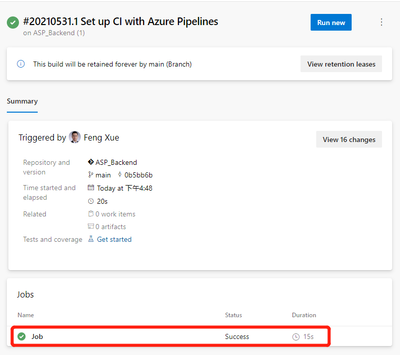
Click the Save and run button in the upper right corner. For the prompted float layer, use the default value. Click Save and run buttons in the lower right corner to run the pipeline. It then jumps to the pipeline execution page. Wait a minute, we’ll see the job done, and there’s a green check icon in front of Job, indicating that this first step, ASP.Net build, was successful.
The integrated pipeline was created successfully, and the first task was completed. But until now, nothing has been generated or saved. It doesn’t matter, let’s go step by step to explain in detail, leading you to create a pipeline from scratch. Next, let’s save the artifact.
Save the artifact
Let’s go back to the Pipeline we just created and click the Edit button in the upper right corner to see that this is a YAML file.
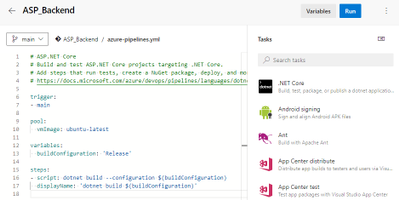
Here’s the concrete steps to be taken by this pipeline, and you can see that there’s only one step now, which is to build the current back-end project using dotnet build. Let’s add another 2 steps.
- task: DotNetCoreCLI@2
  displayName: 'dotnet publish'
  inputs:
    command: publish
    publishWebProjects: false
    projects: '**/*. csproj'
    arguments: '--configuration $(BuildConfiguration) --output $(build.artifactstagingdirectory)'
    zipAfterPublish: true

- task: PublishBuildArtifacts@1
  inputs:
PathtoPublish: '$(Build.ArtifactStagingDirectory)/'
The first of the two new steps is to publish the artifact to the specified path, and the second is to save the published artifact.
Click the Save button in the upper right corner, then the Run button, and wait patiently for a while for our updated Pipeline to finish. Then come back to the results page of the task execution and you’ll see 1 Published under Related.
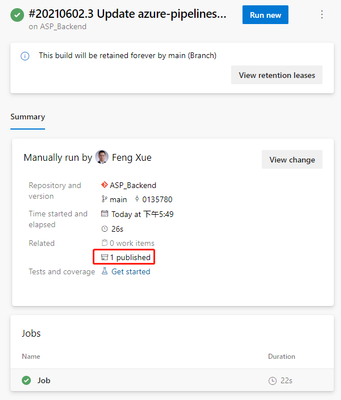
Clicking on this 1 Published link will take you to the following artifact page.
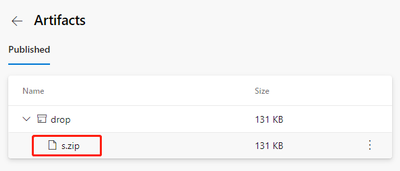
We can download this artifact file s.zip by clicking its name. After downloading, open this compressed package file with unzip command, you can see that inside the package is built files by dotnet build command.
unzip -l s.zip
Archive:  s.zip
  Length     Date   Time    Name
 --------    ----   ----    ----
   138528  06-02-21 09:50   ASP_Backend
    10240  06-02-21 09:50   ASP_Backend.Views.dll
    19136  06-02-21 09:50   ASP_Backend.Views.pdb
   106734  06-02-21 09:50   ASP_Backend.deps.json
    11264  06-02-21 09:50   ASP_Backend.dll
    20392  06-02-21 09:50   ASP_Backend.pdb
      292  06-02-21 09:50   ASP_Backend.runtimeconfig.json
    62328  04-23-21 18:32   Microsoft.AspNetCore.SpaServices.Extensions.dll
      162  06-02-21 09:50   appsettings. Development.json
      196  06-02-21 09:50   appsettings.json
      487  06-02-21 09:50   web.config
        0  06-02-21 09:50   wwwroot/
     5430  06-02-21 09:50   wwwroot/favicon.ico
 --------                   -------
   375189                   13 files
At this point, back-end builds and artifacts are saved. Let’s take a look at the build of the front end. Before we can build the front end, we need to include a second source repository into the current pipeline.
by Contributed | Jun 25, 2021 | Technology
This article is contributed. See the original author and article here.
Call Summary:
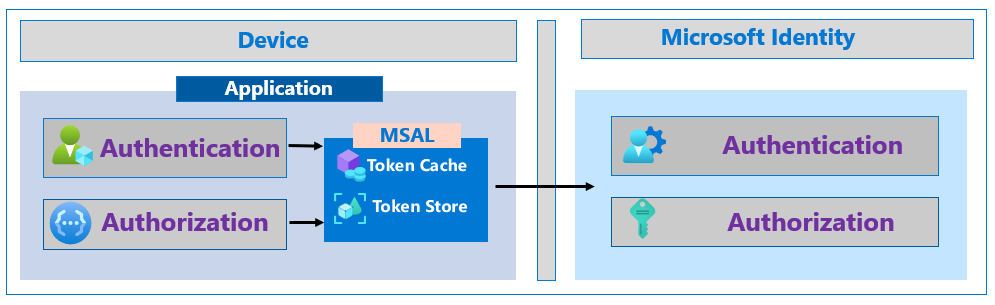
This month’s in-depth topic: Increase the resilience of authentication and authorization applications you develop. Tips for adding and increasing resiliency in apps that sign-in users and apps without users. Using a Microsoft Authentication Library and best practices to follow if you use a different library. Authorization with JWT and using Microsoft Continuous Access Evaluation (CAE). Demo and tips on evaluating/adopting CAE. Resilient methods for fetching metadata and validating tokens including use of customized token validation, as needed. This session was delivered by Microsoft Program Managers Harish Suresh | @harish_suresh and Kyle Marsh | @kylemar and was recorded on June 17, 2021. Live and in chat Q&A throughout call
Resources:
Actions:
Stay connected:
by Scott Muniz | Jun 25, 2021 | Security, Technology
This article is contributed. See the original author and article here.
Citrix has released security updates to address vulnerabilities in Hypervisor. An attacker could exploit these vulnerabilities to cause a denial-of-service condition.
CISA encourages users and administrators to review Citrix Security Update CTX316325 and apply the necessary updates.
by Contributed | Jun 25, 2021 | Technology
This article is contributed. See the original author and article here.
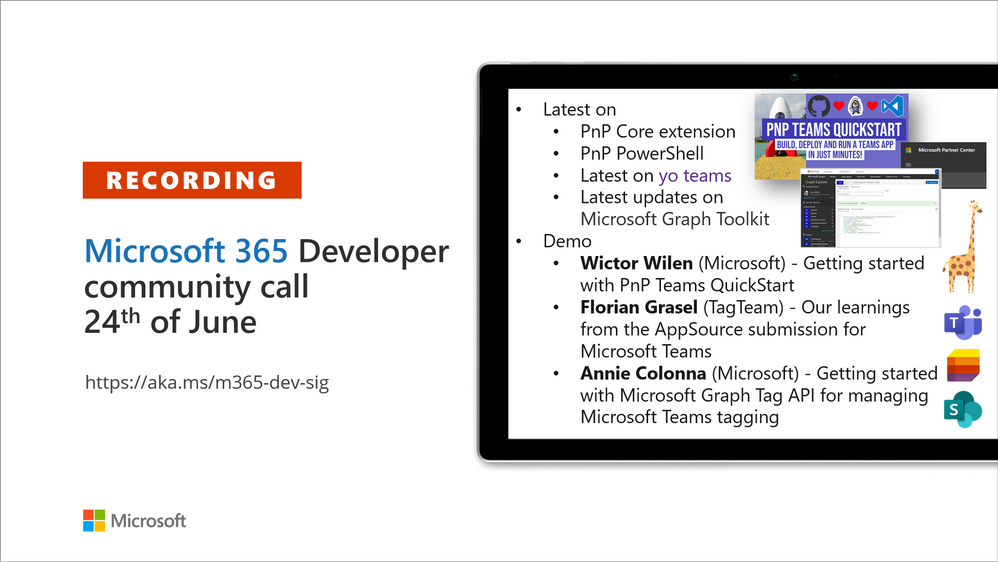
Recording of the Microsoft 365 – General M365 development Special Interest Group (SIG) community call from June 24, 2021.
Call Summary
Summer break and community call schedule updates reviewed. Preview the new Microsoft 365 Extensibility look book gallery. Looking to get started with Microsoft Teams development? Don’t miss out on our Teams samples gallery (updated sample browser in June), and the new Microsoft 365 tenant – script samples gallery – scripts for PowerShell and CLIs. Sign up and attend one of a growing list of events hosted by Sharing is Caring this month. Announced PnP Recognition Program. Check out the new PnP Teams Quickstart. Latest updates on PnP projects covered off. Added Teams SSO Provider, sample and other components to Microsoft Graph Toolkit (MGT) v.2.2.0 GA.
Open-source project status: (Bold indicates new this call)
Project |
Current Version |
Release/Status |
PnP .NET Libraries – PnP Framework |
v1.5.0 GA |
Version 1.6.0 – Summer 2021 |
PnP .NET Libraries – PnP Core SDK |
v1.2.0 GA |
Version 1.3.0 – Summer 2021 |
PnP PowerShell |
v1.6.0 GA |
|
Yo teams – generator-teams |
v3.2.0 GA |
v3.3.0 Preview soon |
Yo teams – yoteams-build-core |
v1.2.0 GA, v1.2.1 Preview |
|
Yo teams – yoteams-deploy |
v1.1.0 GA |
|
Yo teams – msteams-react-base-component |
v3.1.0 |
|
Microsoft Graph Toolkit (MGT) |
v2.2.0 GA |
Added Teams SSO Provider in Preview |
Additionally, 1 new Teams samples were delivered in the last 2 weeks. Great work! The host of this call was David Warner II (Catapult Systems) | @DavidWarnerII. Q&A takes place in chat throughout the call.
Actions:
- Register for Sharing is Caring Events:
- First Time Contributor Session – June 29th (EMEA, APAC & US friendly times available)
- Community Docs Session – TBD
- PnP – SPFx Developer Workstation Setup – TBD
- PnP SPFx Samples – Solving SPFx version differences using Node Version Manager – June 24th
- Ask Me Anything – Teams Dev – July 13th
- First Time Presenter – June 30th
- More than Code with VSCode – TBD
- Maturity Model Practitioners – 3rd Tuesday of month, 7:00am PT
- PnP Office Hours – 1:1 session – Register
- PnP Buddy System – Request a Buddy
- Download the recurrent invite for this call – http://aka.ms/m365-dev-sig
- Call attention to your great work by using the #PnPWeekly on Twitter.
Microsoft Teams Development Samples: (https://aka.ms/TeamsSampleBrowser)

Thank you for joining for today’s PnP Community call. It’s a full house!
Demos delivered in this session
Getting started with PnP Teams QuickStart – create a Teams SSO tab in 15 minutes using browser-based Codespaces currently in preview. Follow presenter as he creates a new Teams tab, registers it in Azure AD, accesses Graph for presence courtesy of Microsoft/Teamsfx js library, deploys app in App Store, and deletes app when done. PnP Teams Quick Start is based on GitHub Codespaces = your virtual machine in the cloud.
Our learnings from the AppSource submission for Microsoft Teams – a first timer documents the journey – a 7-step process going from idea to app in AppSource. Solid tips beyond the process that every product team should consider ranging from extension opportunities and testing to devices and post publishing maintenance. Prepare to fail gracefully and learn openly as the journey includes working closely with a Microsoft submissions team that’s completely interested in your success.
Getting started with Microsoft Graph Tag API for managing Microsoft Teams tagging – this presentation focuses on people centric tags used in Teams to categorize, to @mention and to start a chat. Teams makes it nearly effortless to create, manage and use tags to connect people and groups. New Beta APIs, available week of June 28th, address many tag management challenges – permissions, membership updates, tapping data that exists outside immediate org. Glimpse at what’s next.
Thank you for your work. Samples are often showcased in Demos.
Topics covered in this call
Resources:
Additional resources around the covered topics and links from the slides.
General resources:
Upcoming Calls | Recurrent Invites:
General Microsoft 365 Dev Special Interest Group bi-weekly calls are targeted at anyone who’s interested in the general Microsoft 365 development topics. This includes Microsoft Teams, Bots, Microsoft Graph, CSOM, REST, site provisioning, PnP PowerShell, PnP Sites Core, Site Designs, Microsoft Flow, PowerApps, Column Formatting, list formatting, etc. topics. More details on the Microsoft 365 community from http://aka.ms/m365pnp. We also welcome community demos, if you are interested in doing a live demo in these calls!
You can download recurrent invite from http://aka.ms/m365-dev-sig. Welcome and join in the discussion. If you have any questions, comments, or feedback, feel free to provide your input as comments to this post as well. More details on the Microsoft 365 community and options to get involved are available from http://aka.ms/m365pnp.
“Sharing is caring”
Microsoft 365 PnP team, Microsoft – 25th of June 2021


Recent Comments