by Contributed | Nov 24, 2021 | Technology
This article is contributed. See the original author and article here.
Data warehouse, data integration, and big data analytics together are continuing to grow at planetary scale in enterprises. Azure Synapse Analytics provides limitless analytics services to query data using different compute engines and programming languages. Azure Synapse workspaces allow the data engineering, machine learning, and BI projects to coexist without creating silos in experiences, processes, and tools. As data continues to explode and be used, it’s more important than ever to fully govern the data.
The Azure Purview integration in Azure Synapse provides a comprehensive data governance solution with a single pane of glass for all analytics workloads. Organizations can run a variety of analytics projects and put data to work much more quickly, productively, and securely, generating insights from all data sources. The embedded data discovery experience in Azure Synapse powered by Azure Purview further increases data agility and time to insights.
In this blog, you will learn how to govern your Azure Synapse workspace by connecting to Azure Purview for automated data discovery and classifications in the Purview Data Map. You can further use the Purview Data Catalog to search enterprise data and use contextual gestures to build analytics workloads.
Register and scan in Azure Purview
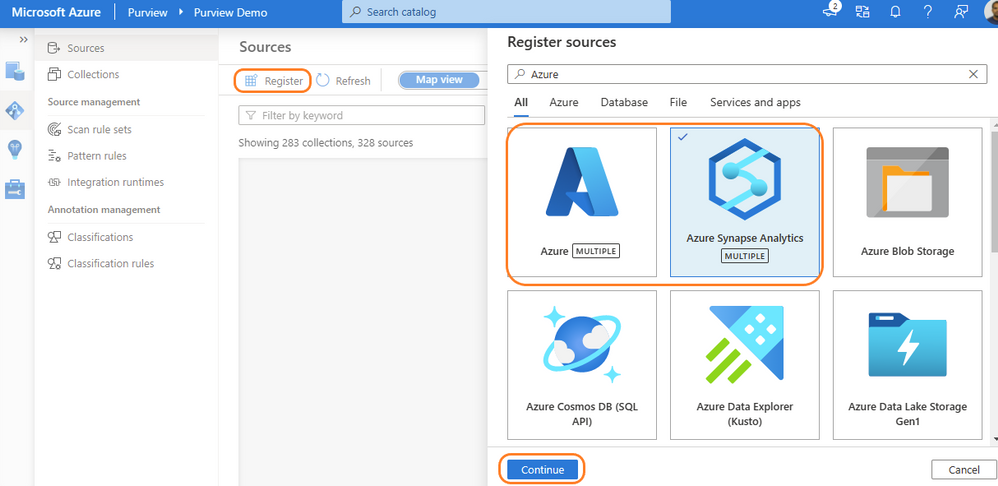
Purview data source administrators can start by registering an Azure Synapse workspace under a collection of the Purview Data Map. Admins can choose to register individual workspaces or simply register the Azure Subscription containing all Azure Synapse workspaces. With a few clicks, a recurring scan can be set for automated data discovery of technical metadata and classifications. Azure Purview can support 200-plus classifications that look for sensitive and PII data while scanning. The admin can configure specific databases of a workspace and credentials managed in Azure Key vault for secured connection while scanning. Creating a private endpoint is supported for scanning Azure Synapse workspaces behind VNET. Read more details on how to register and scan Azure Synapse Analytics workspaces.
Register Azure Purview from Azure Synapse workspace
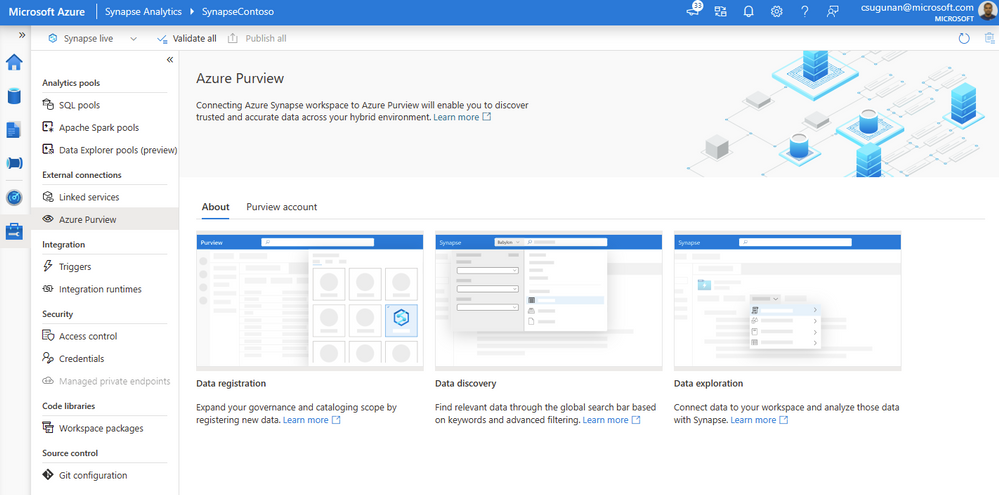
Azure Synapse contributors can register an Azure Purview account by navigating to Manage > External connections > Azure Purview. With a single click, the Azure Synapse workspace is integrated with Azure Purview for data governance. Azure Purview helps discover all data across your organization, track lineage of data, and create a business glossary wherever it is stored: on-premises, across clouds, in SaaS applications, and in Microsoft Power BI. Read step-by-step documentation to Connect Synapse workspace to Azure Purview.
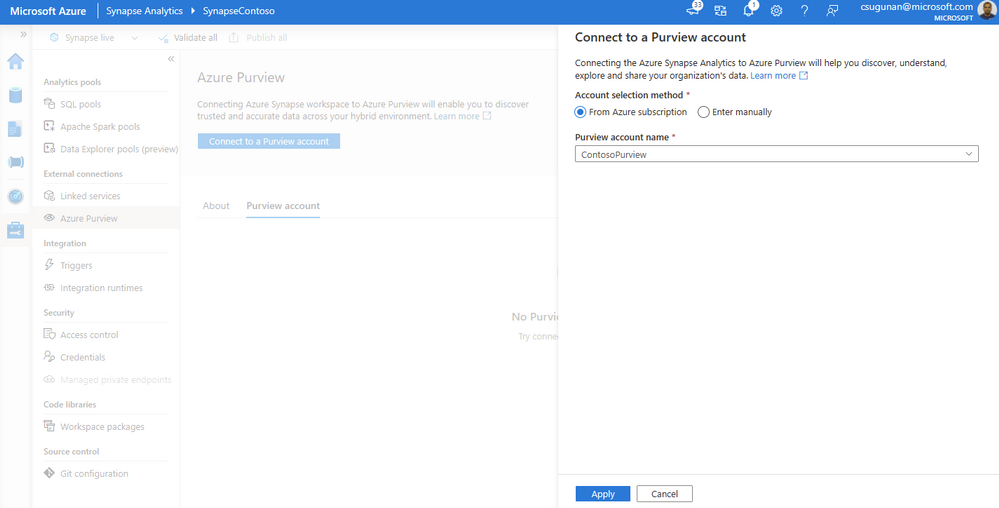
Select a Purview account from the dropdown or enter the resource URI manually and click apply. To connect a Purview account behind VNET, read how to Access a secured Azure Purview account.
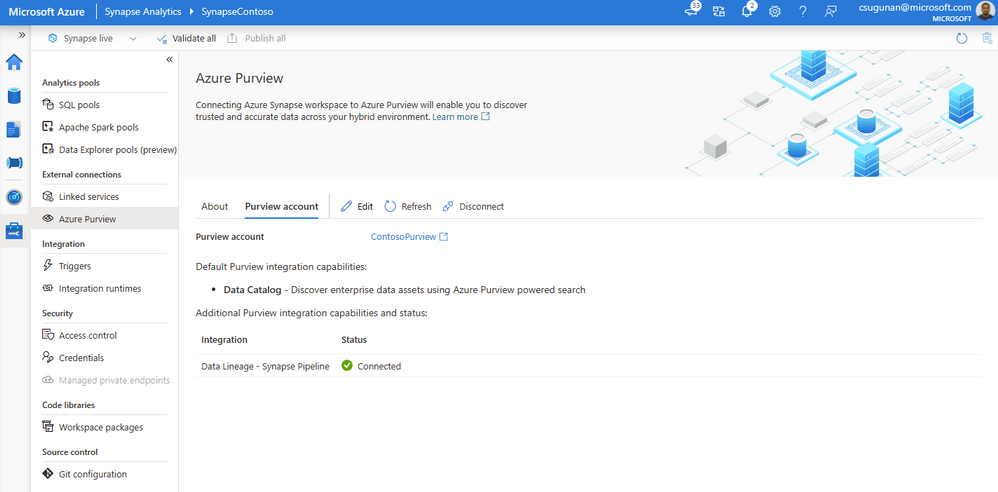
Once registration is complete, the connection and integration status are shown in the details section.
Search and use enterprise data
The search box in the Azure Synapse workspace menu bar is now powered by Azure Purview for the Data, Develop, and Integrate sections. Start typing the keyword in the search bar to let Purview’s intuitive search automatically complete and match the asset by relevance on name, classification, labels, contacts, and more.
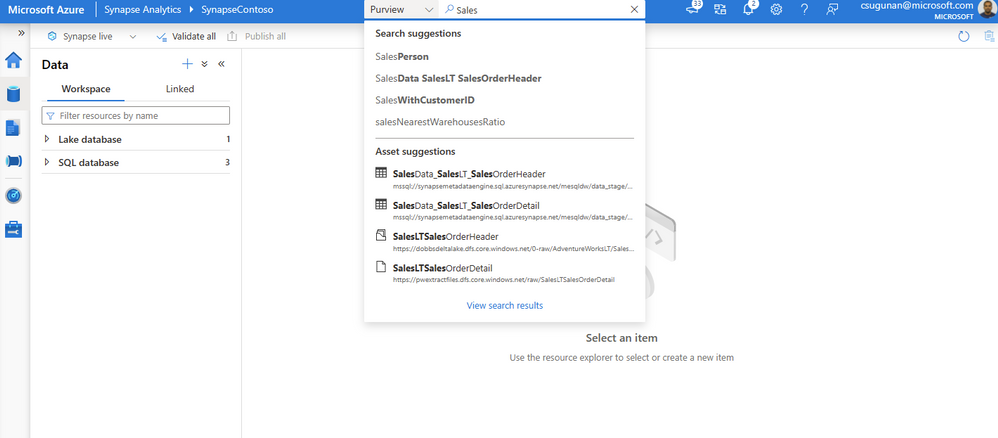
Search results are displayed in a dedicated tab for Purview. The familiar search result page experience of Purview is retained inside the Azure Synapse workspace.
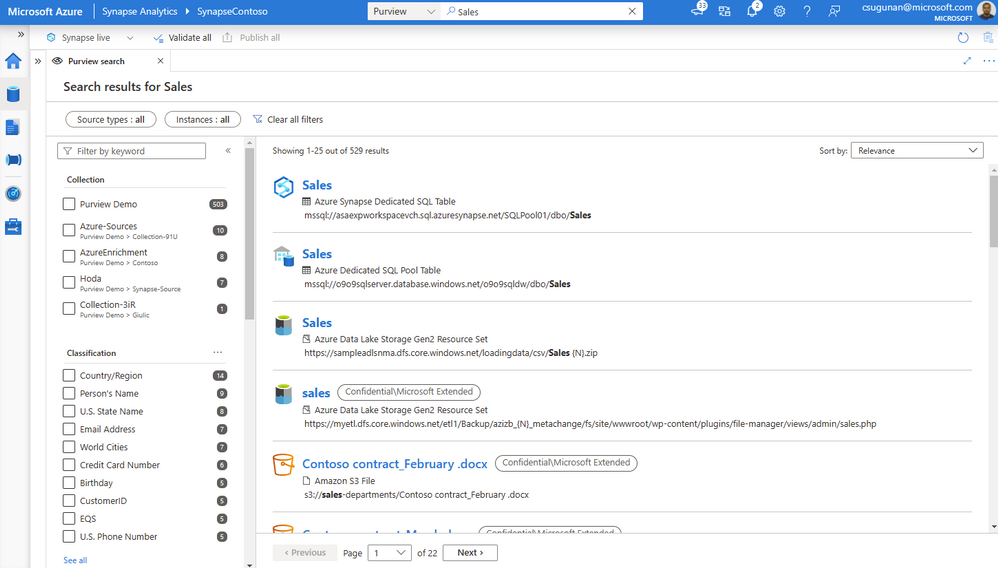
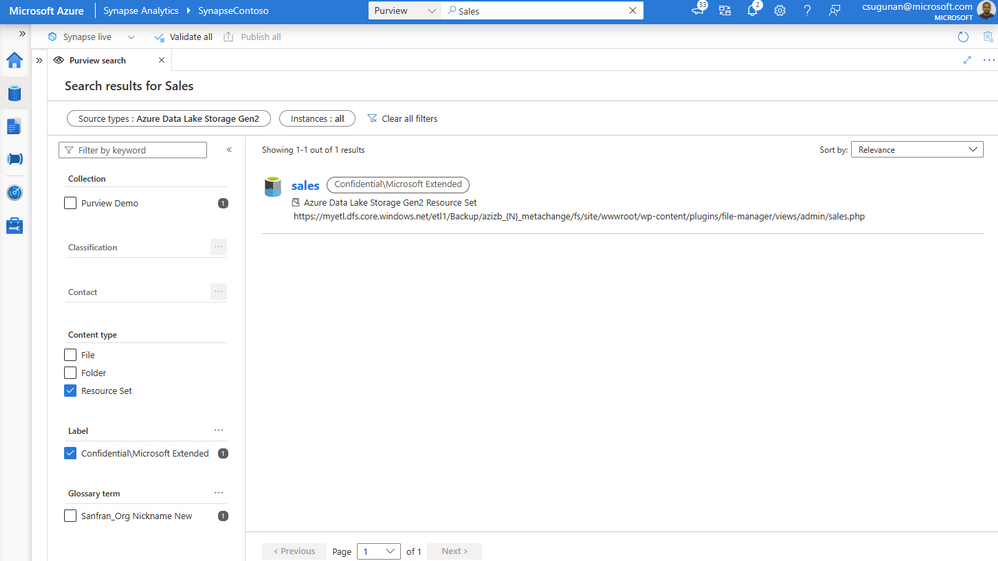
With a few clicks, narrow down the search results to exact assets in Purview.
Time to insights with contextual gestures
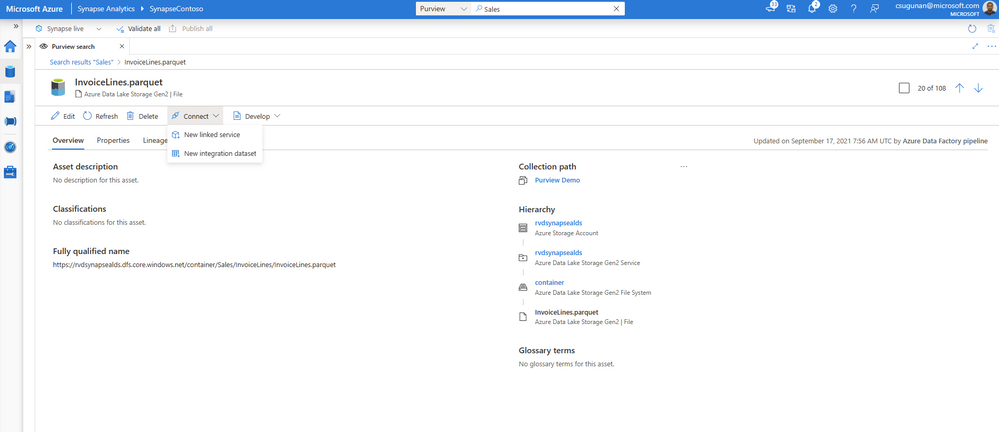
In the asset details page, Azure Synapse users can perform a variety of contextual gestures to connect for further analytics. Depending on the asset type discovered, users can use the following gestures:
- SQL Script experiences to query top 100 rows or create external table
- Notebook experiences to create a Spark table or load to DataFrame
- Data integration experiences such as new linked service, integration dataset, and development dataflows.
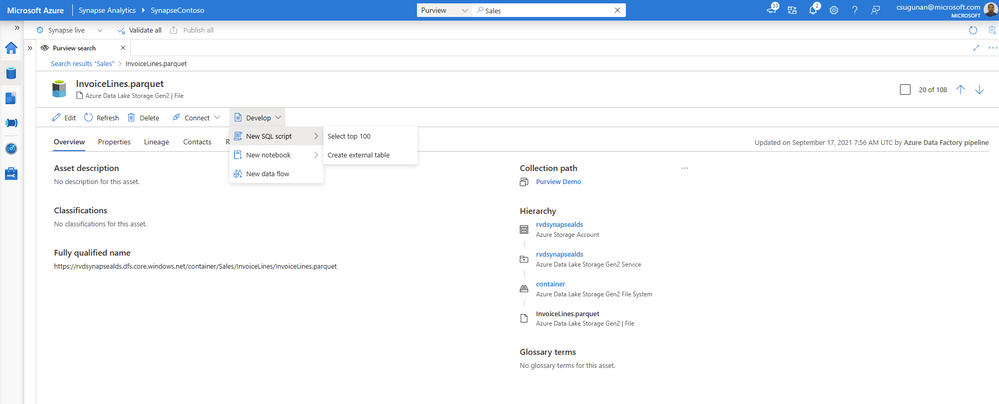
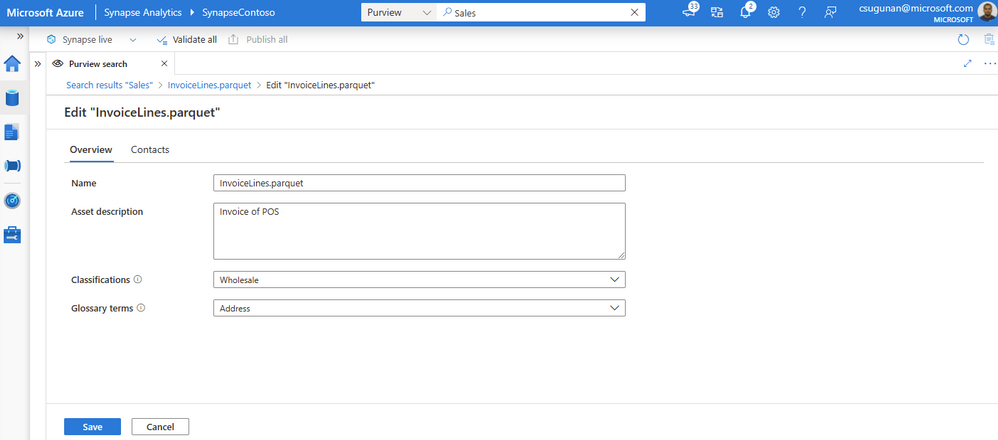
Data producers can directly edit the asset from the Azure Synapse workspace and curate by adding business glossary, description, classifications, and contact details.
Automated data lineage from Azure Synapse
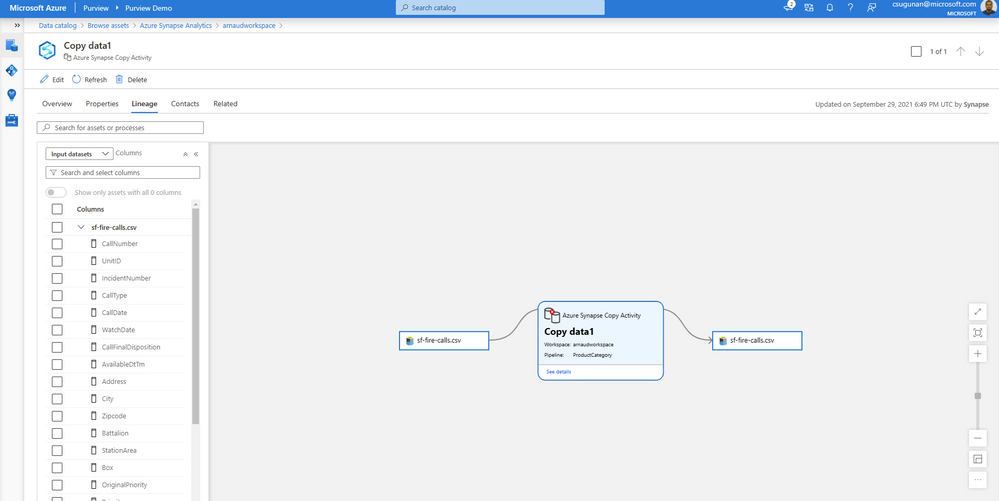
Data lineage from Azure Synapse are automatically pushed to the connected Purview account for copy and data flow activity. Detailed documents are available for Metadata and lineage from Azure Synapse Analytics.
The lineage metadata is pushed to Purview in real time at the end of each pipeline run. It includes granular details such as column lineage, pipeline run status, row count, and additional metadata.
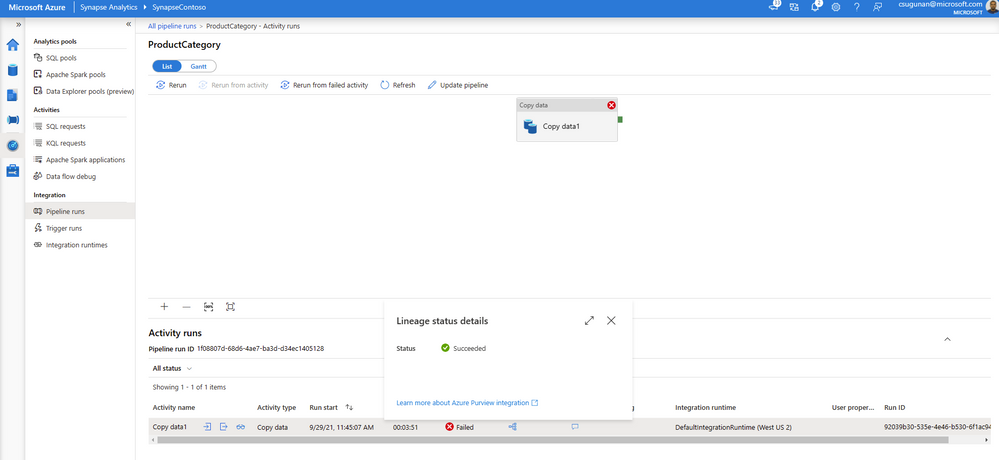
Lineage status is available from the pipeline run monitoring page of the Azure Synapse workspace.
Get started with Azure Purview today
- Quickly and easily create an Azure Preview account to try the generally available features.
- Read quick start documentation on how to connect an Azure Synapse workspace to an Azure Purview account
by Scott Muniz | Nov 24, 2021 | Security, Technology
This article is contributed. See the original author and article here.
VMware has released security updates to address multiple vulnerabilities in vCenter Server and Cloud Foundation. A remote attacker can exploit this vulnerability to obtain access to sensitive information.
CISA encourages users and administrators to review VMware Security Advisory VMSA-2021-0027 and apply the necessary updates.
by Contributed | Nov 23, 2021 | Technology
This article is contributed. See the original author and article here.
Welcome to our new monthly blog series featuring the latest Security, Compliance, and Identity content updates on Microsoft Learn! This is our first post, and we’re highlighting recently released updates, including a new learning path we launched during Cybersecurity Awareness Month. Starting in January, we’ll highlight new learning paths, modules, and other content updates we make each month to give you the skills you need on your learning journey.
Read on to check out some of the latest updates from our Security, Compliance, and Identity portfolio.
Introduction to cybersecurity
Knowing the fundamentals of cybersecurity is a first step toward protecting against cyberthreats. Our new learning path—Describe the basic concepts of cybersecurity—delivers foundational knowledge about cybersecurity concepts including cryptography, authentication, and authorization, along with exploring ways to protect yourself and your business from cyberattacks.
AZ – 500: Microsoft Azure Security Technologies
This four-part series of learning paths will equip you with the knowledge you need to take Exam AZ-500.
This learning path will teach you how to secure Azure solutions with Azure Active Directory, implement hybrid identity, deploy Azure AD identity protection, and configure Azure AD privileged identity management.
This learning path will teach you how to lock down the infrastructure and network resources that are running in your Azure environment.
This learning path will teach you how to deploy and secure Azure Key Vault, configure application security features, implement storage security, and configure and manage SQL database security.
This learning path will teach you how to configure and manage Azure monitor, enable, and manage Azure Security Center, and configure and monitor Azure Sentinel.
You can take Exam AZ-500: Microsoft Azure Security Technologies once you have completed the learning path to earn a certification.
Microsoft Endpoint Configuration Manager
Microsoft Endpoint Configuration Manager—which is part of Microsoft Endpoint Manager—helps you protect the on-premises devices, apps, and data that the people at your organization use to stay productive. Our newest module, Understand co-management using Microsoft Endpoint Configuration Manager, provides an in-depth look at how to enable co-management based on the implementation path that best suits your organization. You’ll also:
- Learn about the benefits of co-management
- Understand the co-management prerequisites
- Learn about paths to implement co-management
We’re excited to hear how you use these updated resources on your journey to certification!
by Contributed | Nov 22, 2021 | Technology
This article is contributed. See the original author and article here.
Microsoft Defender for Endpoint’s Evaluation Lab is an environment that allows security teams to seamlessly test their defense against threats. We are excited to share that the Evaluation Lab now supports adding Windows 11, Windows Server 2016, and Linux devices. In addition, we’d also like to announce a new partnership with Red Canary’s open-source simulation library, Atomic Red Team!
NOTE: Both updates are only available in the Microsoft 365 Defender portal at security.microsoft.com.
Expanded OS support
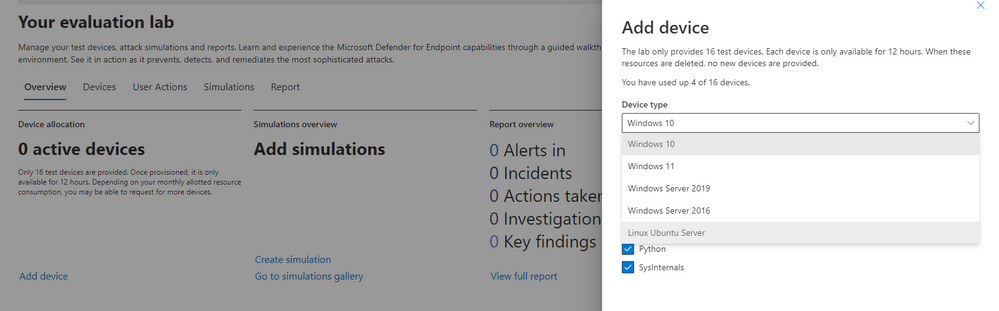
The evaluation lab now supports the following operating systems: Windows 10, Windows 11, Windows Server 2019, Windows Server 2016 and Linux (Ubuntu). To create a new device, simply select it within the “Add device” wizard. The new device will automatically be onboarded with no required additional steps.
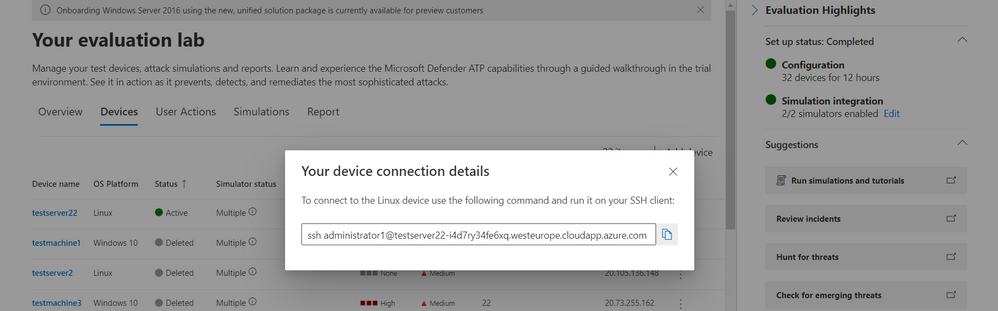
Once created, you can connect to the device via RDP (Windows) or SSH (Linux). You can connect to a Linux device using any SSH client.
Atomic Red Team simulations
Powered by Red Canary, Atomic Red Team is an open-source library of tests that security teams can use to simulate adversarial activity in their environments. Atomic tests are simple – each test is mapped to a single MITRE ATT&CK® technique or sub-technique, most of them have no prerequisites, and many come with easy-to-use configuration and cleanup commands.
Evaluation Lab users can now use Atomic Red Team simulations to evaluate Microsoft Defender for Endpoint’s detection capabilities against both Windows and Linux threats. The simulations are provided as script files, so that security teams can choose to run them in the Evaluation lab or any other testing environment of their choice.
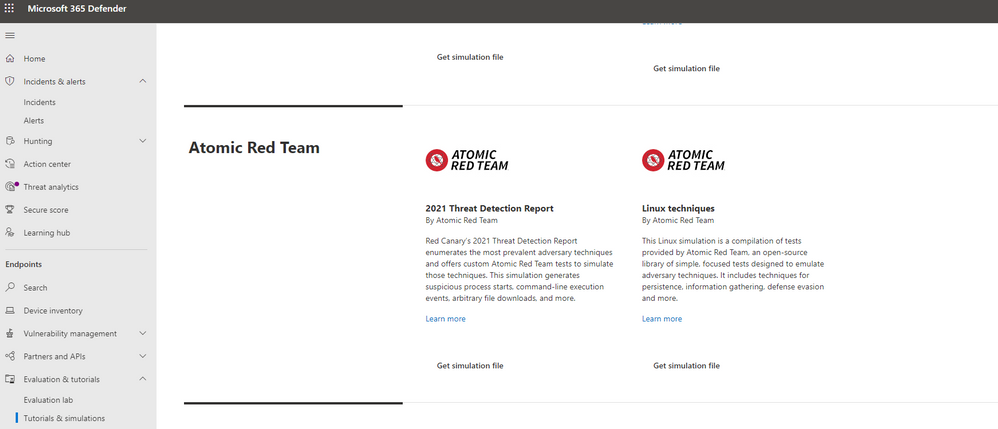
The first simulation, 2021 Threat Detection Report, executes tests according to Red Canary’s latest report of top Windows techniques associated with confirmed threats, as compiled from roughly 20,000 confirmed threats detected across customer environments.
The second simulation, Linux techniques, is a collection of simple tests compiled to allow security teams to evaluate Microsoft Defender for Endpoint’s detection capabilities against common Linux persistence, discovery, and defense evasion techniques.
We’re looking forward to you trying out the Evaluation Lab updates. Let us know your thoughts and feedback in the comments below or through the feedback tool in the portal!
by Scott Muniz | Nov 22, 2021 | Security, Technology
This article is contributed. See the original author and article here.
As Americans prepare to hit the highways and airports this Thanksgiving holiday, CISA and the Federal Bureau of Investigation (FBI) are reminding critical infrastructure partners that malicious cyber actors aren’t making the same holiday plans as you. Recent history tells us that this could be a time when these persistent cyber actors halfway across the world are looking for ways—big and small—to disrupt the critical networks and systems belonging to organizations, businesses, and critical infrastructure.
There are actions that executives, leaders, and workers in any organization can take proactively to protect themselves against cyberattacks, including possible ransomware attacks, during the upcoming holiday season—a time during which offices are often closed, and employees are home with their friends and families. Although neither CISA nor the FBI currently have identified any specific threats, recent 2021 trends show malicious cyber actors launching serious and impactful ransomware attacks during holidays and weekends, including Independence Day and Mother’s Day weekends.
CISA and the FBI strongly urge all entities–especially critical infrastructure partners–to examine their current cybersecurity posture and implement best practices and mitigations to manage the risk posed by cyber threats. Specifically, CISA and the FBI urge users and organizations to take the following actions to protect themselves from becoming the next victim:
- Identify IT security employees for weekends and holidays who would be available to surge during these times in the event of an incident or ransomware attack.
- Implement multi-factor authentication for remote access and administrative accounts.
- Mandate strong passwords and ensure they are not reused across multiple accounts.
- If you use remote desktop protocol (RDP) or any other potentially risky service, ensure it is secure and monitored.
- Remind employees not to click on suspicious links, and conduct exercises to raise awareness.
Additionally, CISA and the FBI recommend maintaining vigilance against the multiple techniques cybercriminals use to gain access to networks, including:
Finally—to reduce the risk of severe business/functional degradation should your organization fall victim to a ransomware attack—review and, if needed, update your incident response and communication plans. These plans should list actions to take—and contacts to reach out to—should your organization be impacted by a ransomware incident. Note: for assistance, review available incident response guidance, such as the Ransomware Response Checklist in the CISA-MS-ISAC Joint Ransomware Guide, the Public Power Cyber Incident Response Playbook, and the new Federal Government Cybersecurity Incident and Vulnerability Response Playbooks.
CISA and the FBI urge users and organizations to take these actions immediately to protect themselves against this threat. For a comprehensive overview, see the joint Cybersecurity Advisory Ransomware Awareness for Holidays and Weekends. For more information and resources on protecting against and responding to ransomware, visit StopRansomware.gov, a centralized, whole-of-government webpage providing ransomware resources and alerts.


Recent Comments