by Contributed | Jan 10, 2022 | Technology
This article is contributed. See the original author and article here.
Howdy folks,
We’re thrilled to announce the General Availability (GA) of Continuous Access Evaluation (CAE) as part of the overall Azure AD Zero Trust Session Management portfolio!
CAE introduces real-time enforcement of account lifecycle events and policies, including:
- Account revocation
- Account disablement/deletion
- Password change
- User location change
- User risk increase
On receiving such events, app sessions are immediately interrupted and users are redirected back to Azure AD to reauthenticate or reevaluate policy. With CAE, we have introduced a new concept of Zero Trust authentication session management that is built on the foundation of Zero Trust principles–Verify Explicitly and Assume Breach. With the Zero Trust approach, the authentication session lifespan now depends on session integrity rather than on a predefined duration. This work is consistent with an industry effort called Shared Signals and Events, and we’re proud to be the first company in the group with a generally available implementation of continuous access!
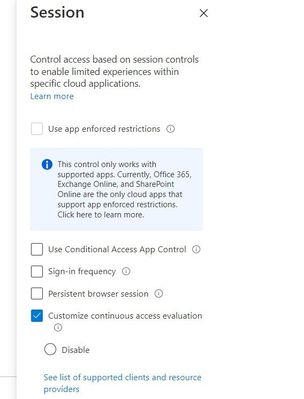
In fact, we’re so excited about CAE that we auto-enabled it for all tenants. Azure AD Premium 1 customers can make configuration changes or disable CAE in a session blade of Conditional Access.
Session blade of CAE for customizing configurations
With this GA, you’ll be more secure and resilient because the real-time enforcement of policies can safely extend session duration. In case of any Azure AD outages, users with CAE sessions can ride out these outages without ever noticing them.
“With CAE, gone are the days where we are waiting for the session to be revoked or the user to be reauthenticated for critical services like Exchange Online and SharePoint Online. If we ever had a security incident pop with a user identity, knowing that the token can be revoked instantly, is confidence inspiring. Further, the long default session lifetime with CAE is another benefit we welcome, particularly from the perspective of additional resilience to potential outages.”
— BRIDGEWATER
CAE has been one of our most popular preview features and has already been deployed successfully by thousands of customers across millions of users. You can learn more about CAE here, including a full list of apps that support CAE today.
As always, we’d love to hear any feedback or suggestions you have. Let us know what you think in the comments below or on the Azure AD feedback forum.
Best regards,
Alex Simons (Twitter: @alex_a_simons)
Corporate Vice President Program Management
Microsoft Identity Division
Learn more about Microsoft identity:
by Contributed | Jan 9, 2022 | Technology
This article is contributed. See the original author and article here.
I want to share with you here in this article an example of SQL Injection, how it can be used to access sensitive data and harm the database, and what are the recommendations and steps that can be done to protect your application or website from being vulnerable to SQL Injection.
I created a simple web site with a few lines of code:
- Added System.Data and System.Data.SqlClient Namespaces.
- Create connection, command and Data Adapter objects to execute an SQL command and fill the data table object.
- The command is a Select command query on one of database tables and the result set is filtered by email address, the value that is entered by the user before hitting search button.
- The result will be shown on a grid view object on the page.
The Web Page code:
using System;
using System.Collections.Generic;
using System.Linq;
using System.Web;
using System.Web.UI;
using System.Web.UI.WebControls;
using System.Data;
using System.Data.SqlClient;
namespace SqlInjection
{
    public partial class _Default : Page
    {
        protected void Page_Load(object sender, EventArgs e)
        {
        }
        protected void BtnSearch_Click(object sender, EventArgs e)
        {

            string connetionString;
            System.Data.SqlClient.SqlConnection cnn;
            connetionString = @"Data Source=xxx.database.windows.net;Initial Catalog=xxx;User ID=xxx  ;Password=xxx ";
            cnn = new SqlConnection(connetionString);
            cnn.Open();
            SqlCommand command = new SqlCommand("SELECT customerid as ID,Firstname + ' ' + lastname as Name,companyname as Company, emailaddress as Email,phone FROM saleslt.customer WHERE EmailAddress = '" + txtEmail.Text + "'", cnn);
            SqlDataAdapter MyDataadapter;
            MyDataadapter = new SqlDataAdapter(command);
            command.Parameters[0].Value = txtEmail.Text;
            command.ExecuteScalar();
            DataTable Datatbl;
            Datatbl = new DataTable();
            MyDataadapter.Fill(Datatbl);
            GridView.DataSource = Datatbl;
            GridView.DataBind();
             cnn.Close();
        }
    }
}
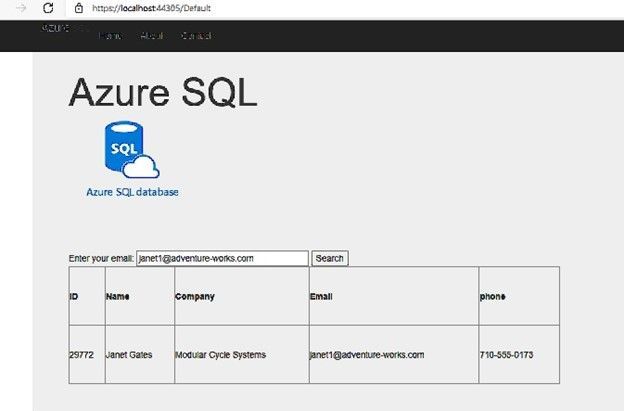
The application is working fine and retrieves data from the database as below screenshot:
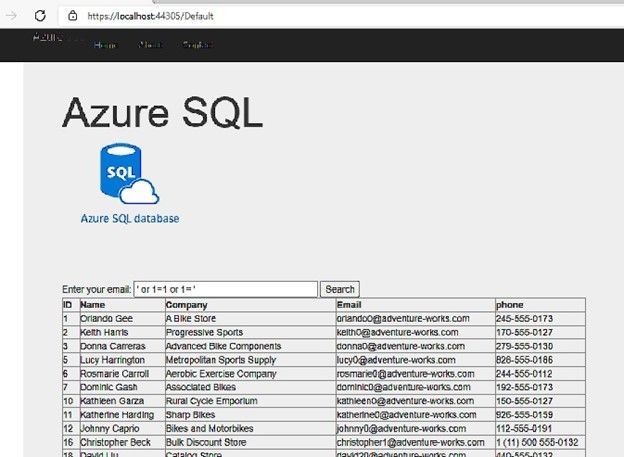
But, if I change the email address value to be ‘ or 1=1 or 1=’ instead of any email address, I will get all the data of the “customers” table, as below screenshot:
If I try something else, like searching for example: ‘ or 1=2 union select object_id,name,schema_name(schema_id), name , name from sys.tables; select 0 where 1= ‘
Here I did not get the query’s table data, I added union statement to get database tables names using sys.tables system view, and I’ve got the following result:
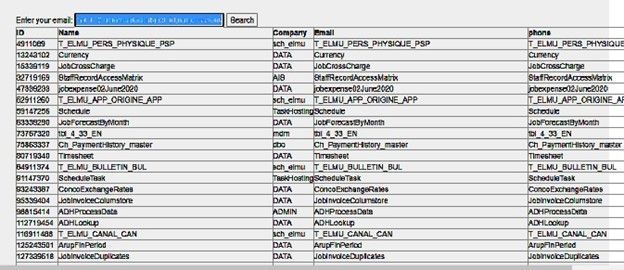
Now I am able to simply get the list of all database tables and view any table I want, using same SQL injection scenario.
Also, I tried to insert the value : ‘ or 1=2; truncate table dbo.product; select 0 where 1= ‘ ,and I was able to truncate the product table.
The Queries that have been executed on the database are:
(@0 nvarchar(110))SELECT customerid as ID,Firstname + ' ' + lastname as Name,companyname as Company, emailaddress as Email,phone FROM saleslt.customer WHERE EmailAddress = '' or 1=2 union select object_id,name,schema_name(schema_id), name , name from sys.tables; select 0 where 1= ''
(@0 nvarchar(58))SELECT customerid as ID,Firstname + ' ' + lastname as Name,companyname as Company, emailaddress as Email,phone FROM saleslt.customer WHERE EmailAddress = '' or 1=2; truncate table dbo.product; select 0 where 1= ''
How to avoid SQL Injection:
Use Parameters:
I Modified my C# code and added the required parameter to the SQL Command as the following:
        protected void BtnSearch_Click(object sender, EventArgs e)
        {

            string connetionString;
            System.Data.SqlClient.SqlConnection cnn;
            connetionString = @"Data Source=xxx.database.windows.net;Initial Catalog=xxx;User ID=xxx  ;Password=xxxxx ";
            cnn = new SqlConnection(connetionString);
            cnn.Open();
            SqlCommand command = new SqlCommand("SELECT customerid as ID,Firstname + ' ' + lastname as Name,companyname as Company, emailaddress as Email,phone FROM saleslt.customer WHERE  EmailAddress = @0", cnn);
            command.Parameters.Add(new SqlParameter("0", 1));
            SqlDataAdapter MyDataadapter;
            MyDataadapter = new SqlDataAdapter(command);
            command.Parameters[0].Value = txtEmail.Text;
            command.ExecuteScalar();
            DataTable Datatbl;
            Datatbl = new DataTable();
            MyDataadapter.Fill(Datatbl);
            GridView.DataSource = Datatbl;
            GridView.DataBind();
            cnn.Close();
        }
Now, if I try the SQL injection it is not working any more, it is giving no result at all:
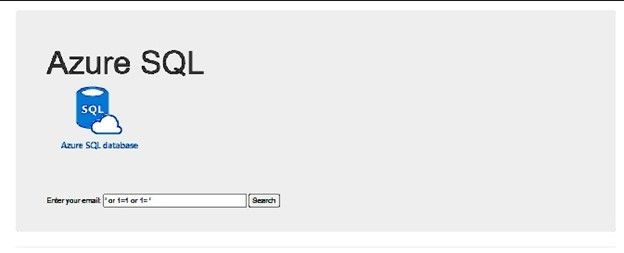
Whatever the value I write on the email text box, the query that is executed on the database is always the following:
(@0 nvarchar(26))SELECT customerid as ID,Firstname + ' ' + lastname as Name,companyname as Company, emailaddress as Email,phone FROM saleslt.customer WHERE EmailAddress = @0
Microsoft Defender:
Microsoft Defender for Cloud – an introduction | Microsoft Docs
Microsoft Defender for Cloud (Azure Security center) can detect such attacks and notify the customer, I received the following email alert:
An application generated a faulty SQL statement on database ‘xxxx’. This may indicate that the application is vulnerable to SQL injection.
|
|
|
Activity details
Severity
|
Medium
|
Subscription ID
|
xxx
|
Subscription name
|
xxx
|
Server
|
xx
|
Database
|
xx
|
IP address
|
81.xx.xx.xx
|
Principal name
|
tr*****
|
Application
|
.Net SqlClient Data Provider
|
Date
|
November 28, 2021 14:50 UTC
|
Threat ID
|
2
|
Potential causes
|
Defect in application code constructing faulty SQL statements; application code doesn’t sanitize user input and may be exploited to inject malicious SQL statements.
|
Investigation steps
|
For details, view the alert in the Azure Security Center.
To investigate further, analyze your audit log.
|
Remediation steps
|
Read more about SQL Injection threats, as well as best practices for writing safe application code. Please refer to Security Reference: SQL Injection.
|
|
|
|
|
|
|
|
Give the Application the minimum required permissions:
In the example I shared, the attacker was able to get any data he wants, table names and even was able to truncate or drop tables and more. Maybe it is easier to give permissions as sysadmin or db_owner in one step, but it recommended to give only required permissions (execute permission for example) and only on specific objects required by the application.
Use Application to validate data:
In my web page, the user should use the email address to search for data, it should have an expression special for the email address, and it could not contain spaces and part like 1=1 or .
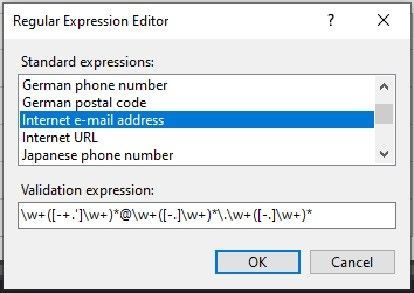
I added a “Reqular expression Validator” object to the page and linked it to the text box I use for the email address.
Below is the validation expression for the email address:
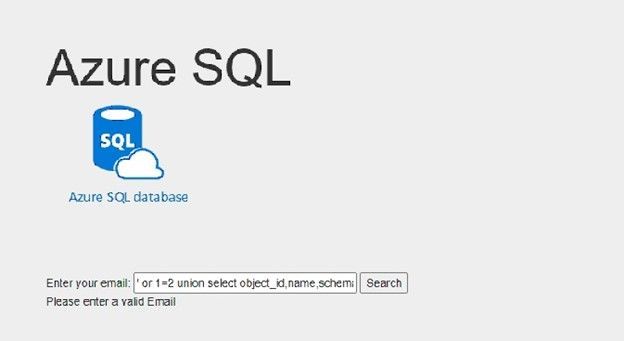
Now I am not able to run the SQL injection again, I get a validation error instead:
by Contributed | Jan 7, 2022 | Technology
This article is contributed. See the original author and article here.
We are thrilled to welcome Barracuda Virtual Reactor® on Azure. With this technology, engineers can simulate fluid, particulate-solid, thermal and chemically reacting behavior in industrial fluid-particle processes while gaining the on-demand and virtually unlimited computing capacity of Azure.
Virtual ReactorTM is the industry-standard tool for many applications in refining, petrochemicals, cement manufacture, power generation and other energy-intensive industries. Today, the same award-winning technology is enabling, and reducing the time to market for, multiple sustainability technologies that are changing our planet for the better. Examples include advanced recycling of plastics, waste-to-energy/fuels/chemicals, renewable fuels, hydrogen production and other decarbonization applications.
Fluid-particle systems in these industries tend to operate 24/7 for years on end, and hence, even small improvements in reliability and performance lead to a tremendous economic impact. Barracuda® reduces the risk of making changes to existing processes by identifying the root cause(s) of underperformance, performing virtual testing of changes and identifying additional optimization opportunities. Similarly, the software empowers those developing new technologies to economically explore a wide range of possibilities during R&D while compressing development, scale-up and commercialization timeframes.
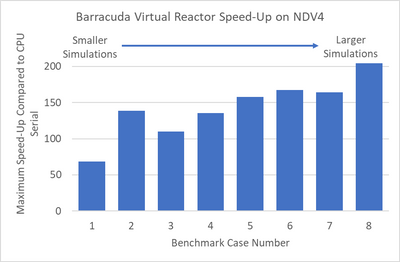
We recently tested Virtual Reactor on Azure’s state-of-the-art NDv4 virtual machines (VMs)to showcase performance scalability across a variety of models. We have highlighted the results of the Virtual Reactor with our ND96asr_v4 VM, and the performance is shown below across 8 different sizes.
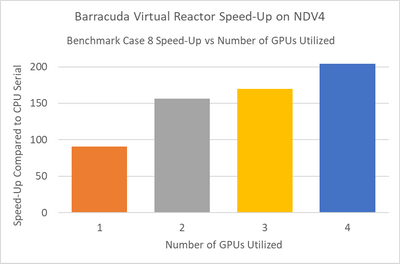
Smaller simulations which in our tests had less than 25 million computational particles, achieved maximum speed-up when running in multi-GPU mode using two NVIDIA A100 Tensor Core GPUs. Larger simulations achieved maximum speed-up when using four GPUs. The speed-up scaling1 from one to four GPUs is shown below for benchmark case 82.
NOTE: Case 8 is a simulation benchmark case containing 55M particles; for additional GPU scaling questions please contact CPFD
The ND A100 v4 series starts with a single virtual machine and eight NVIDIA A100 Tensor Core GPUs. ND A100 v4-based deployments can scale up to thousands of GPUs with 1.6 Tb/s of interconnect bandwidth per VM. Each GPU within the VM is provided with its own dedicated, topology-agnostic NVIDIA Quantum 200Gb/s InfiniBand networking. These connections are automatically configured between VMs occupying the same virtual machine scale set, and support GPUDirect RDMA.
Each GPU features third-generation NVIDIA NVLink connectivity for communication within the VM, and the instance is also backed by 96 physical second-generation AMD Epyc™ CPU cores.
These instances provide excellent performance for many AI, ML and analytics tools that support GPU acceleration ‘out-of-the-box,’ such as TensorFlow, Pytorch, Caffe, RAPIDS and other frameworks. Additionally, the scale-out InfiniBand interconnect is supported by a large set of existing AI and HPC tools built on NVIDIA’s NCCL2 communication libraries for seamless clustering of GPUs.
“Azure’s multi-GPU virtual machines powered by NVIDIA A100 Tensor Core GPUs provide the global Barracuda Virtual Reactor user community with instant access to the latest high performance computing resources without the overhead of purchasing and maintaining on-premise hardware. The observed speed-ups of over 200x, combined with the convenience of the Azure Platform, provide our clients with virtually unlimited, on-demand, compute bandwidth as they tackle some of our planet’s toughest engineering, energy and sustainability challenges.”
Peter Blaser, Vice President of Operations, CPFD Software
“We welcome Barracuda Virtual Reactor to Azure and are excited to showcase this exciting technology to customers in process industries who will benefit immensely from our purpose-built NVIDIA GPU hosts that are designed to deliver superior cost performance for this workload. Azure and CPFD have joined forces to offer customers a compelling range of options to explore Virtual Reactor on Azure and pick the best VM sizing suited to their use case requirements.”
Kurt Niebuhr, Azure Compute HPC | AI Workload Incubation & Ecosystem Team Lead
About CPFD
CPFD Software is advancing multiphase simulation and technology. Our flagship product, Barracuda Virtual Reactor, is a physics-based engineering software package capable of predicting fluid, particulate-solid, thermal and chemically reacting behavior in fluidized bed reactors and other fluid-particle systems reducing the risk associated with design, scale-up, commercialization, and trouble-shooting of industrial processes. The Virtual Reactor technology is accessible through software licensing, consulting, or engineering services.
NOTE:
1For additional GPU scaling questions please contact CPFD
2Case 8 is a simulation benchmark case containing 55M particles




Recent Comments