by Contributed | Feb 7, 2022 | Technology
This article is contributed. See the original author and article here.
It’s a challenging time in software security; migration to the modern cloud, the largest number of remote workers ever, and a global pandemic impacting staffing and supply chains all contribute to changes in organizations. Unfortunately, these changes also give bad actors opportunities to exploit organizations:
“Cybercriminals are targeting and attacking all sectors of critical infrastructure, including healthcare and public health, information technology (IT), financial services, and energy sectors. Ransomware attacks are increasingly successful, crippling governments and businesses, and the profits from these attacks are soaring.”
– Microsoft Digital Defense Report, Oct 2021
|
For years Microsoft Office has shipped powerful automation capabilities called active content, the most common kind are macros. While we provided a notification bar to warn users about these macros, users could still decide to enable the macros by clicking a button. Bad actors send macros in Office files to end users who unknowingly enable them, malicious payloads are delivered, and the impact can be severe including malware, compromised identity, data loss, and remote access. See more in this blog post.
“A wide range of threat actors continue to target our customers by sending documents and luring them into enabling malicious macro code. Usually, the malicious code is part of a document that originates from the internet (email attachment, link, internet download, etc.). Once enabled, the malicious code gains access to the identity, documents, and network of the person who enabled it.”
– Tom Gallagher, Partner Group Engineering Manager, Office Security
|
For the protection of our customers, we need to make it more difficult to enable macros in files obtained from the internet.
Changing Default Behavior
We’re introducing a default change for five Office apps that run macros:
VBA macros obtained from the internet will now be blocked by default.
For macros in files obtained from the internet, users will no longer be able to enable content with a click of a button. A message bar will appear for users notifying them with a button to learn more. The default is more secure and is expected to keep more users safe including home users and information workers in managed organizations.
“We will continue to adjust our user experience for macros, as we’ve done here, to make it more difficult to trick users into running malicious code via social engineering while maintaining a path for legitimate macros to be enabled where appropriate via Trusted Publishers and/or Trusted Locations.”
– Tristan Davis, Partner Group Program Manager, Office Platform
|
This change only affects Office on devices running Windows and only affects the following applications: Access, Excel, PowerPoint, Visio, and Word. The change will begin rolling out in Version 2203, starting with Current Channel (Preview) in early April 2022. Later, the change will be available in the other update channels, such as Current Channel, Monthly Enterprise Channel, and Semi-Annual Enterprise Channel.
At a future date to be determined, we also plan to make this change to Office LTSC, Office 2021, Office 2019, Office 2016, and Office 2013.
End User Experience
Once a user opens an attachment or downloads from the internet an untrusted Office file containing macros, a message bar displays a Security Risk that the file contains Visual Basic for Applications (VBA) macros obtained from the internet with a Learn More button.
 A message bar displays a Security Risk showing blocked VBA macros from the internet
The Learn More button goes to an article for end users and information workers that contains information about the security risk of bad actors using macros, safe practices to prevent phishing & malware, and instructions on how to enable these macros by saving the file and removing the Mark of the Web (MOTW).
What is Mark of the Web (MOTW)?
The MOTW is an attribute added to files by Windows when it is sourced from an untrusted location (Internet or Restricted Zone). The files must be saved to a NTFS file system, the MOTW is not added to files on FAT32 formatted devices.
IT Administrator Options
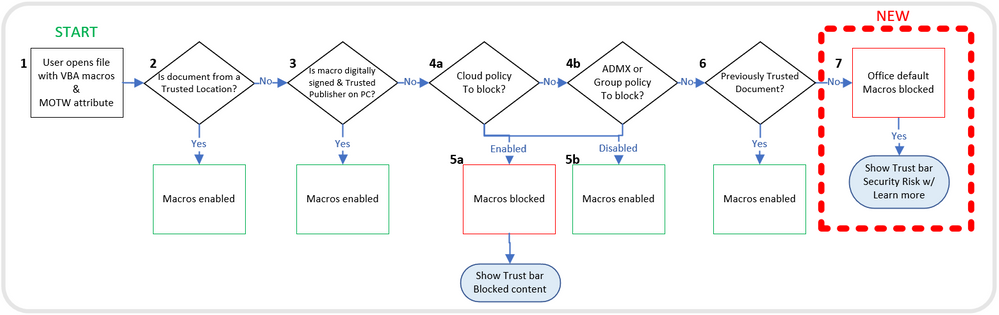
This chart shows the evaluation flow for Office files with VBA macros and MOTW:
Evaluation flow for Office files with VBA macros and MOTW
Organizations can use the “Block macros from running in Office files from the Internet” policy to prevent users from inadvertently opening files from the internet that contain macros. Microsoft recommends enabling this policy, and if you do enable it, your organization won’t be affected by this default change.
“Setting policy is a powerful tool for IT Admins to protect their organizations. For years we’ve recommended blocking macros obtained from the internet in our security baselines, and many customers have done so. I’m pleased Microsoft is taking the next step to securing everyone with this policy by default!”
– Hani Saliba, Partner Director of Engineering, Office Calc
|
Additionally, there are two other options to know your files are safe:
- Opening files from a Trusted Location
- Opening files with digitally signed macros and providing the certificate to the user, who then installs it as a Trusted Publisher on their local machine
To learn more about how to get ready for this change and recommendations for managing VBA macros in Office files, read this article for Office admins.
Thank you,
Office Product Group
VBA Team & Office Security Team
More helpful information on the threats of Ransomware:
Continue the conversation by joining us in the Microsoft 365 Tech Community! Whether you have product questions or just want to stay informed with the latest updates on new releases, tools, and blogs, Microsoft 365 Tech Community is your go-to resource to stay connected!
by Scott Muniz | Feb 7, 2022 | Security, Technology
This article is contributed. See the original author and article here.
The Federal Bureau of Investigation (FBI) has released a Flash report detailing indicators of compromise (IOCs) associated with attacks, using LockBit 2.0, a Ransomware-as-a-Service that employs a wide variety of tactics, techniques, and procedures, creating significant challenges for defense and mitigation.
CISA encourages users and administrators to review the IOCs and technical details in FBI Flash CU-000162-MW and apply the recommend mitigations.
by Contributed | Feb 5, 2022 | Technology
This article is contributed. See the original author and article here.
Moved from: bobsql.com
Download attachment to read the full content.
SQL Server uses 3 types of affinity to control where the SQL Server worker threads execute. Before explaining the different scheduler affinity types let me clarify some terminology.
Node Types
SQL Server makes a specific distinction between scheduling and memory nodes.
Scheduling nodes: sys.dm_os_nodes
Memory nodes: sys.dm_os_memory_nodes
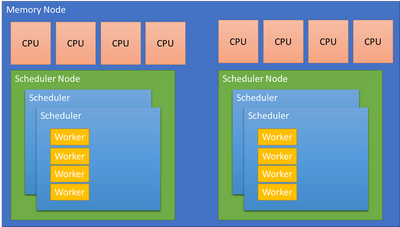
A scheduling node is a used to group a set of SQLOS schedulers. The scheduling node must :
- Remain within a single memory node.
- Can be configured to use a subset of the CPUs presented by the OS from the same memory node.
For example: A memory node with 64 CPUs is a complete, Operating System, scheduler group. SQL Server may choose to divide the memory node allowing for better partitioning and performance. The Soft Numa feature may take the 64 CPUs and create 8 scheduler nodes, each managing 8 CPUs or 4 scheduler nodes managing 16 CPUs, etc. The decision is performance driven.
A memory node represents the memory associated with a group of CPUs from the physical hardware. SQL Server aligns schedulers and other partitioned structures with the memory node to reduce access to remote, NUMA node memory when possible. A memory node may have 1 or more scheduling nodes, but a scheduling node can only be assigned to a single memory node.
…
by Contributed | Feb 4, 2022 | Technology
This article is contributed. See the original author and article here.
Many organizations want to provide Microsoft Teams to their employees, but not in a “no strings attached” way. With our customers, we often see the need for a provisioning solution, so people aren’t creating teams without thinking.
With “traditional” team creation (i.e. the built-in “Create a team” functionality) a lot of the teams that get created don’t leverage the full potential that Microsoft Teams has to offer. When a team is created as a blank slate the owner has to know what the possibilities are and how to set it up, to create a team fit for their need. On the other hand, templates don’t satisfy users’ needs either. There is no such thing as “one size fits all”. Again, to modify it, the user needs to have a certain level of knowledge.
A different approach
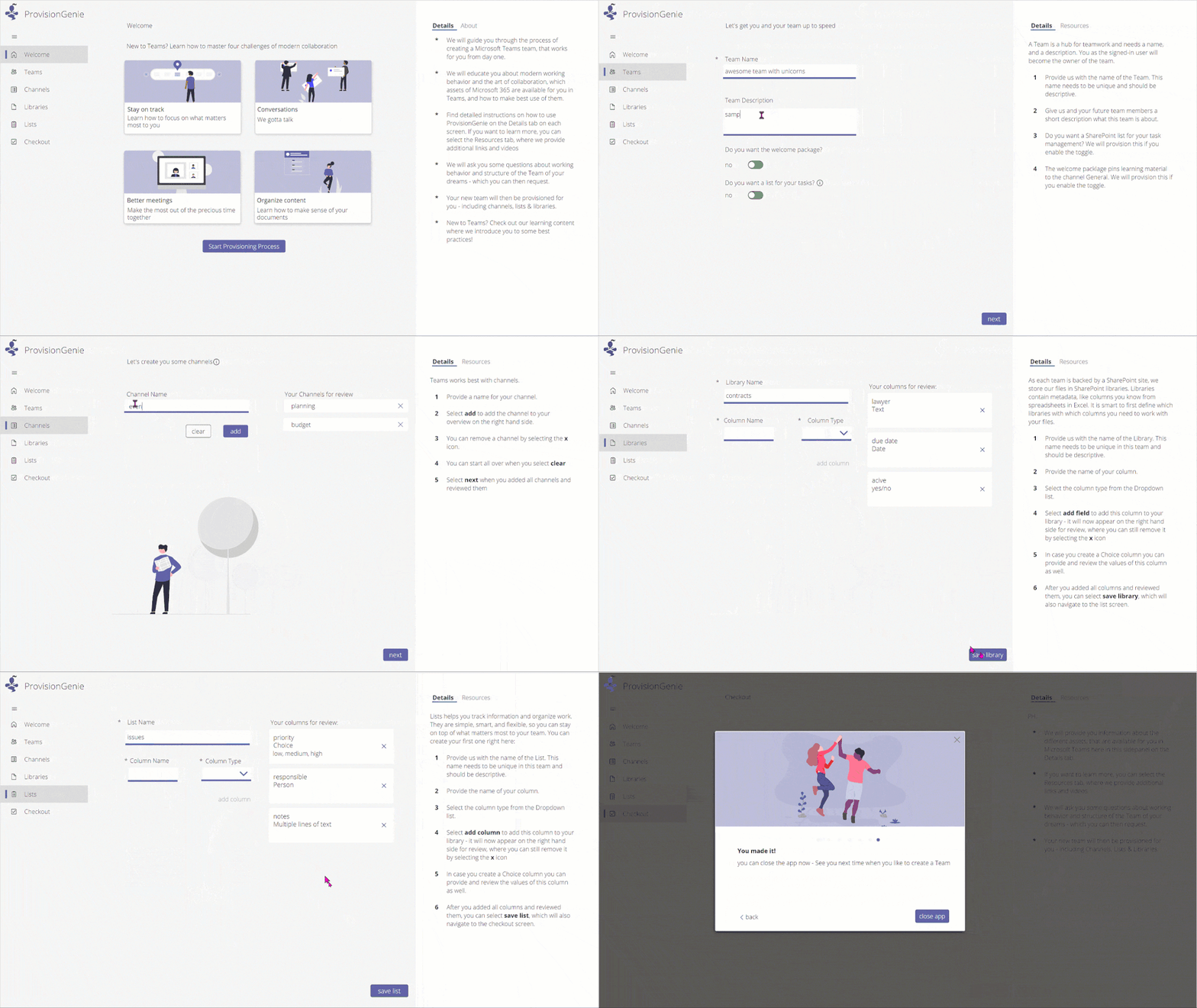
To tackle these two challenges when it comes to Microsoft Teams provisioning, we had a vision of a provisioning solution where we blend learning with the process of creating your team. We provide the why, the user decides the what, and the tool takes care of the how. This is how ProvisionGenie ? was born.
ProvisionGenie is a tool that guides the user through the creation process. Someone who desires a team can start up the application from inside Microsoft Teams, so they stay in the flow of their work. They will need to provide some basic information such as the name, description, and members of the team. Then the tool continues with some of the essential building blocks of a great Microsoft Teams team: channels, lists and libraries. The user gets information on why they would care about these things, and they can customize them to their liking.
An enterprise-ready solution
ProvisionGenie is built with companies in mind: a scalable database, a reliable workflow engine and a Teams-like user interface.
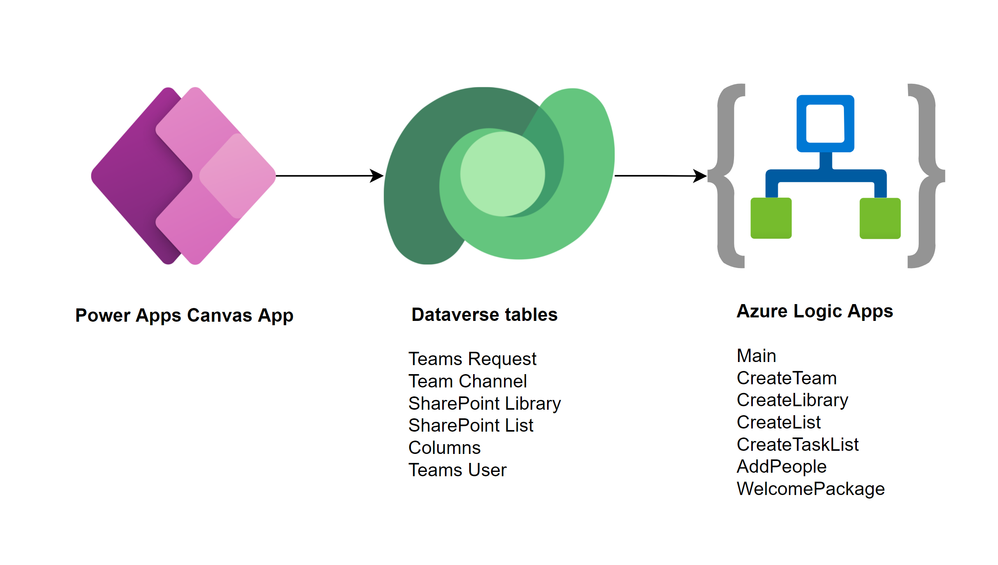
The data is stored in Microsoft Dataverse, the relational database built into the Power Platform that allows for advanced security scenarios. In the current version, we focus on the front-end for the users of the application. By storing our data in Dataverse however, we can expand this relatively easily in the future with a model-driven application for administrators.
Azure Logic Apps take care of the workflows and logic of creating the team with its resources. Logic Apps not only offer better permission management, they can also be deployed across tenants automatically. They are more scalable and therefore performant compared to their low-code counterpart Power Automate.
Finally, a Power Apps canvas app is used to create a beautiful user interface that fits seamlessly into Microsoft Teams. With a canvas app, there is full control over the look and feel of the UI. The canvas app provides the different options to the user and saves the configuration in Dataverse. There is no direct link between the canvas app and the Logic Apps.
A community driven initiative
ProvisionGenie was born out of the collaboration of two community members because we wanted to provide a different solution for Microsoft Teams provisioning.
We decided quite early in the process that we wanted this to be a solution for the community, by the community. Therefore, this is an open-source project which you can find on GitHub (<<link>>) and to which everyone is welcome to contribute.
Bios
Carmen Ysewijn
Power Platform Architect | Microsoft Business Applications MVP
Carmen is a Business Applications MVP and Power Platform Architect at Qubix (Belgium) with a passion to find the right solution for any challenge that arises. With this solution-oriented approach, she helps customers improve their business processes. She loves to share the knowledge she gains along the way on her blog or speaking at conferences.
Luise Freese
Microsoft MVP, Microsoft 365 Consultant, Power Platform Developer
Luise helps customers around the globe to improve their business processes and to get rid of everything that only keeps them busy without adding value in a meaningful way. She is a member of the M365 PnP team and supports developers in extending Microsoft 365. She loves all things community, open-source, stickers, and the number 42.
To write your own blog on a topic of interest as a guest blogger in the Microsoft Teams Community, please submit your idea here: https://aka.ms/TeamsCommunityBlogger
by Scott Muniz | Feb 4, 2022 | Security, Technology
This article is contributed. See the original author and article here.
CISA has added one new vulnerability to its Known Exploited Vulnerabilities Catalog, based on evidence that threat actors are actively exploiting the vulnerabilities listed in the table below. These types of vulnerabilities are a frequent attack vector for malicious cyber actors of all types and pose significant risk to the federal enterprise.
| CVE Number |
CVE Title |
Required Action Due Date |
| CVE-2022-21882 |
Microsoft Win32k Privilege Escalation Vulnerability |
02/18/2022 |
Binding Operational Directive (BOD) 22-01: Reducing the Significant Risk of Known Exploited Vulnerabilities established the Known Exploited Vulnerabilities Catalog as a living list of known CVEs that carry significant risk to the federal enterprise. BOD 22-01 requires FCEB agencies to remediate identified vulnerabilities by the due date to protect FCEB networks against active threats. See the BOD 22-01 Fact Sheet for more information.
Although BOD 22-01 only applies to FCEB agencies, CISA strongly urges all organizations to reduce their exposure to cyberattacks by prioritizing timely remediation of Catalog vulnerabilities as part of their vulnerability management practice. CISA will continue to add vulnerabilities to the Catalog that meet the meet the specified criteria.


Recent Comments