by Contributed | Apr 26, 2022 | Technology
This article is contributed. See the original author and article here.
You’ve probably been told that Azure Synapse is just for very large data projects. Which is true. It is designed for limitless storage and super powerful compute. But there are ways to start with smaller datasets and grow from there by integrating new data engines to the workspace. In this episode of Data Exposed: MVP Edition with Armando Lacerda and Anna Hoffman, you will learn how to tailor Synapse to your data volume profile and position your cloud data pipeline for growth and expansion when needed.
About Armando Lacerda:
Armando Lacerda is a 30+ years computer geek. He’s been working with SQL Server since version 6.5, Azure SQL DB since 2010 and Azure SQL DW / Synapse Dedicated SQL pool since 2017. As an independent contractor he has helped multiple companies to adopt cloud technologies and implement data pipelines at scale. Armando also contributes with multiple local user groups around the Bay Area in San Francisco/CA and around the world. He has presented in multiple conferences on data platform topics as well as Microsoft certification prep. You can also find him riding his motorcycle up and down highway 1.
About MVPs:
Microsoft Most Valuable Professionals, or MVPs, are technology experts who passionately share their knowledge with the community. They are always on the “bleeding edge” and have an unstoppable urge to get their hands on new, exciting technologies. They have very deep knowledge of Microsoft products and services, while also being able to bring together diverse platforms, products and solutions, to solve real-world problems. MVPs make up a global community of over 4,000 technical experts and community leaders across 90 countries/regions and are driven by their passion, community spirit, and quest for knowledge. Above all and in addition to their amazing technical abilities, MVPs are always willing to help others – that’s what sets them apart. Learn more: https://aka.ms/mvpprogram
Resources:
Linked services in Azure Data Factory and Azure Synapse Analytics
Create an Azure AD user from an Azure AD login in SQL Managed Instance
Configure and manage Azure AD authentication with Azure SQL
by Scott Muniz | Apr 25, 2022 | Security, Technology
This article is contributed. See the original author and article here.
CISA has added seven new vulnerabilities to its Known Exploited Vulnerabilities Catalog, based on evidence of active exploitation. These types of vulnerabilities are a frequent attack vector for malicious cyber actors and pose significant risk to the federal enterprise. Note: to view the newly added vulnerabilities in the catalog, click on the arrow on the of the “Date Added to Catalog” column, which will sort by descending dates.
Binding Operational Directive (BOD) 22-01: Reducing the Significant Risk of Known Exploited Vulnerabilities established the Known Exploited Vulnerabilities Catalog as a living list of known CVEs that carry significant risk to the federal enterprise. BOD 22-01 requires FCEB agencies to remediate identified vulnerabilities by the due date to protect FCEB networks against active threats. See the BOD 22-01 Fact Sheet for more information.
Although BOD 22-01 only applies to FCEB agencies, CISA strongly urges all organizations to reduce their exposure to cyberattacks by prioritizing timely remediation of Catalog vulnerabilities as part of their vulnerability management practice. CISA will continue to add vulnerabilities to the Catalog that meet the meet the specified criteria.
by Contributed | Apr 25, 2022 | Technology
This article is contributed. See the original author and article here.
We are excited to share major updates to the Malware protection capabilities of Microsoft Defender for Endpoint on Android. These new capabilities form a major component of your next-generation protection in Microsoft Defender for Endpoint. This protection brings together machine learning, big-data analysis, in-depth threat research, and the Microsoft cloud infrastructure to protect Android devices (or endpoints) in your organization.
Today, we are thrilled to announce the public preview of this new, enhanced anti-malware engine capability!
What to expect with this enhancement:
- Cloud Integration with support for metadata-based ML models, file classifications and reputation-based ML models, etc.
- Better support for false positive and false negative prevention.
- Reduced memory and CPU footprints.
- Integrates seamlessly with Microsoft 365 Defender portal across platforms.
- Threat nomenclature: The change in threat / malware name will now be in accordance with the standard naming scheme followed across all platforms, including Windows. This is part of the effort for aligning our nomenclature across all platforms and having a single naming mechanism for consistency.
Changes to Android Threat names as depicted in the security center portal will be as under:
<Platform>.<Category>.<Family>.variant —-> [Threat Type]:[Platform]/[Malware Family].[Variant]?![Suffixes]?
Example:
Old Syntax New Syntax
Android.Trojan.FakeInst.YB
|
TrojanSpy:AndroidOS/Nyleaker.B
|
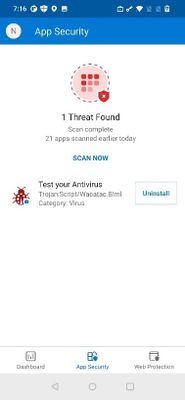
There are no changes to the user experience aside from the threat naming:
Screenshot showing a threat detection on the device
Microsoft 365 Defender portal example:
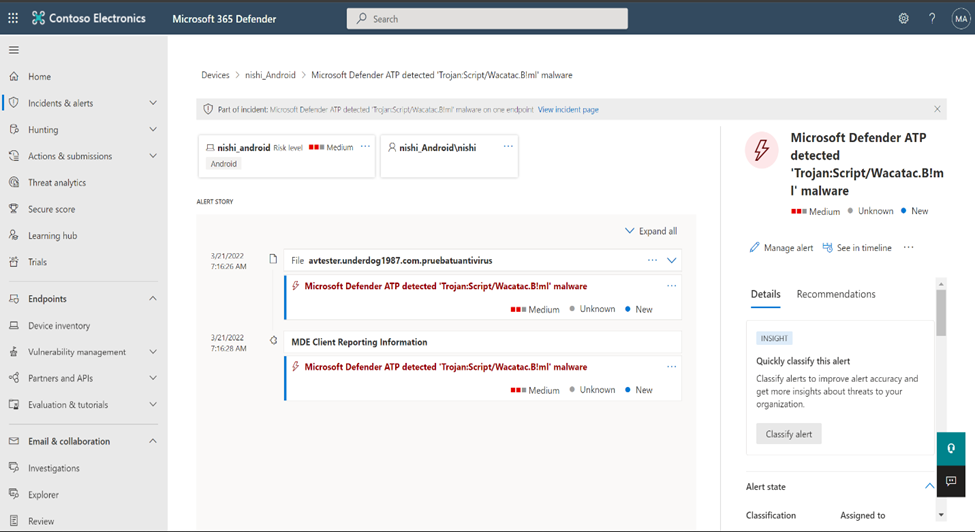 Screenshot showing an alert in the portal with the new naming convention
Getting started with the preview:
To get started, an IT Admin needs to use Microsoft Endpoint Manager (MEM) – Intune – to manage deployments from Managed Google Play’s pre-production tracks for Android.
https://docs.microsoft.com/en-us/microsoft-365/security/defender-endpoint/android-intune?view=o365-worldwide
Use the recommended minimum version as 1.0.3825.0301. Sometime after GA, APKs older than version 1.0.3825.0301 would stop getting Antimalware protection, so it’s recommended to plan for an upgrade.
We welcome your feedback and look forward to hearing from you! You can submit feedback through the Microsoft Defender Security Center or through the Microsoft 365 security center.
by Contributed | Apr 24, 2022 | Technology
This article is contributed. See the original author and article here.
Activity Logs Insights is a centralised place to see all of the activities done in a resource or resource group, information such as who administrators deleted, updated or created resources, and whether the activities failed or succeeded. This article explains how to enable and use Activity log insights.
- Note: This current version of Activity Log Insights is a preview, and offers basic Activity logs insights. The next version, planned for the upcoming months, will offer additional information and insights
To enable Activity Logs Insights, simply configure the Activity log to export to a Log Analytics workspace.
To view Activity logs insights on a resource group or a subscription level:
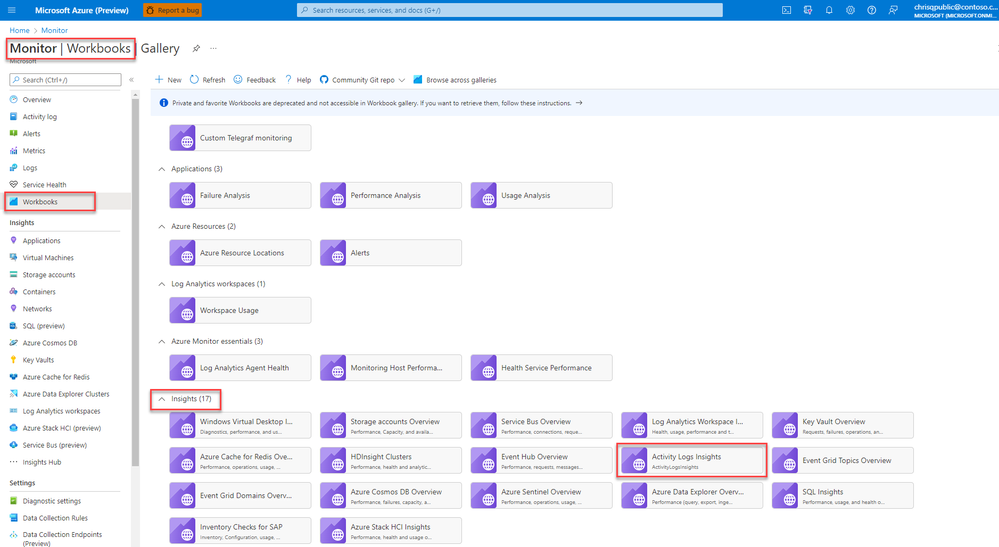
In the Azure portal, select Monitor > Workbooks.
Select Activity Logs Insights in the Insights section.
- At the top of the Activity Logs Insights page, select:
- One or more subscriptions from the Subscriptions dropdown.
- Resources and resource groups from the CurrentResource dropdown.
- A time range for which to view data from the TimeRange dropdown.
o To view Activity Logs Insights on a resource level:
In the Azure portal, go to your resource, select Workbooks.
Select Activity Logs Insights in the Activity Logs Insights section.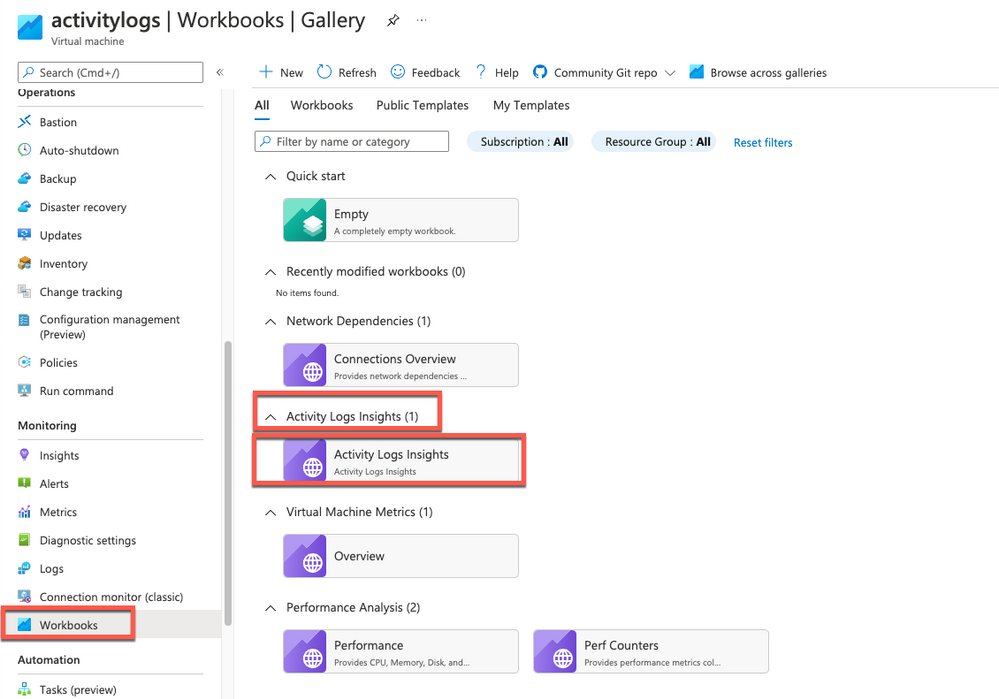
At the top of the Activity Logs Insights page, select:
- A time range for which to view data from the TimeRange dropdown.
- To learn more about Activity Logs Insights, see this article.
by Contributed | Apr 23, 2022 | Technology
This article is contributed. See the original author and article here.
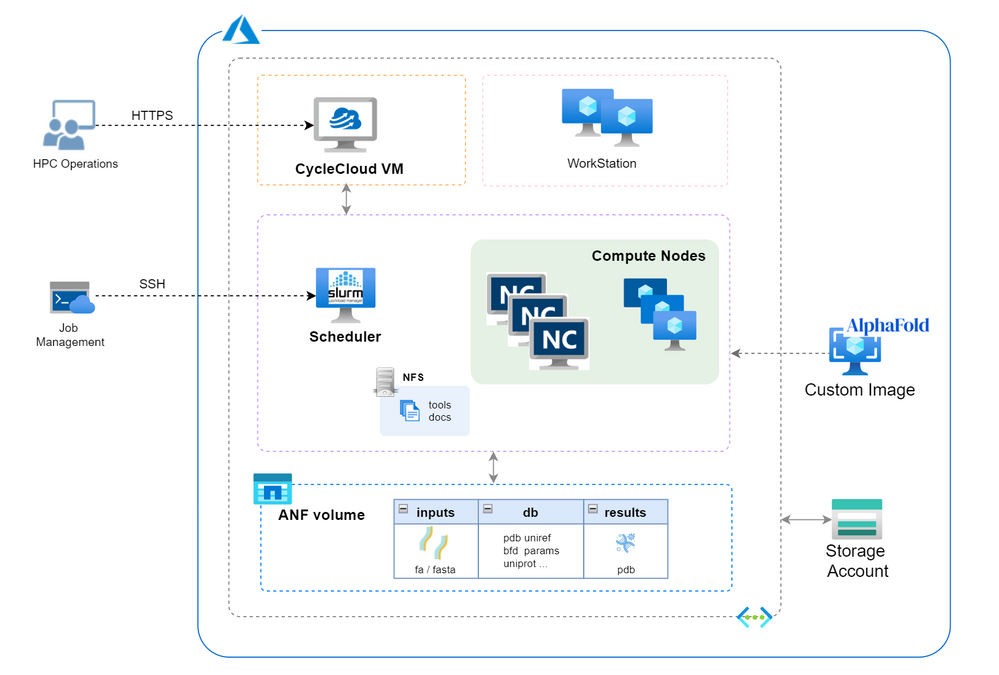
Since released from July last year, AlphaFold2 protein folding algorithm is often used by more researchers and companies to drive more innovations for molecular analysis, drug discovery & etc. To build an AlphaFold2 computing cluster rapidly on the cloud will be the necessary step to leverage agility of cloud computing without CAPEX ahead.
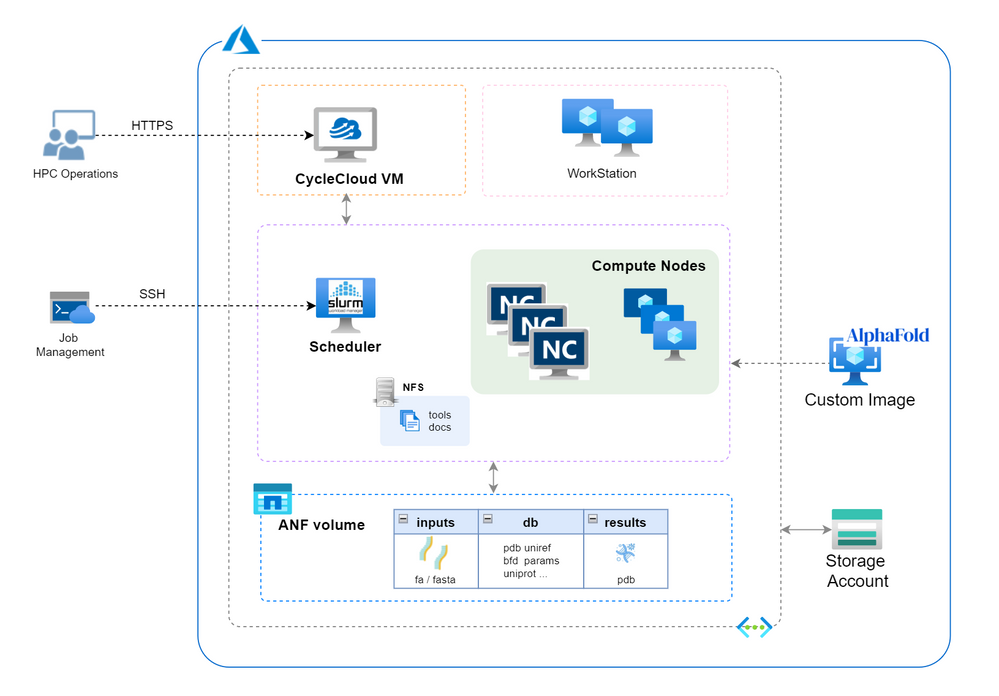
Azure HPC stack has complete portfolio suitable for running AlphaFold2 in large scale, including GPU, storage and orchestrator service. This blog brings detailed steps of building AlphaFold2 HPC cluster on Azure to fasten your process.
Architecture
Build Steps
- Prerequisites
- Check GPU quota and Azure NetApp Files(ANF) quota. SKU of NCsv3_T4 will be used in this building and NV_A10_v5 SKU (in preview) will also be suitable in the next.
- Create a storage account with unique name (eg. saAlphaFold2 ) for CycleCloud using.
- Prepare a SSH key pair in Azure portal.
- Determine your working region with consideration of ANF service availability (eg. Southeast Asia).
- Create a resource group in selected region (eg. rgAlphaFold).
- Set Azure Cloud Shell ready for use.
- Build CycleCloud environment following ARM template method. Set the VNet name as “vnetprotein“. Use the “saAlphaFold2” as the related storage account. After all the resources are built, you can find the CycleCloud UI portal address in console “Home->Virtual Machines->cyclecloud->Overview->DNS name”. Go through the first login process using your username and password.
- Config ANF storage. Follow the steps to set up an ANF volume. Consider the dataset size of AlphaFold2, suggest to set the capacity pool and volume size as 4TB at least. Set the volume name as “volprotein” and create a dedicate subnet with CIDR “10.0.2.0/24” in Visual Network “vnetprotein“. In “Protocol” settings, set file path also as “volprotein” and select “NFSv4.1”. After volume is ready, remember the “Mount path” info like “10.0.2.4:/volprotein“.
- Prepare the VM image.
- Boot a VM using the “CentOS-based 7.9 HPC – x64 Gen2” marketplace image and change the OS disk size as 128GB.
- Connect the VM by SSH and install AlphaFold2 components using below commands.
sudo yum install epel-release python3 -y
sudo yum install aria2 -y
sudo yum-config-manager --add-repo=https://download.docker.com/linux/centos/docker-ce.repo
sudo yum repolist -v
sudo yum install -y https://download.docker.com/linux/centos/7/x86_64/stable/Packages/containerd.io-1.4.3-3.1.el7.x86_64.rpm
sudo yum install docker-ce -y
sudo systemctl --now enable docker
distribution=$(. /etc/os-release;echo $ID$VERSION_ID)
&& curl -s -L https://nvidia.github.io/libnvidia-container/$distribution/libnvidia-container.repo | sudo tee /etc/yum.repos.d/nvidia-container-toolkit.repo
sudo yum clean expire-cache
sudo yum install -y nvidia-docker2
sudo systemctl restart docker
sudo usermod -aGdocker $USER
newgrp docker
docker run --rm --gpus all nvidia/cuda:11.0-base nvidia-smi
sudo su
cd /opt
git clone https://github.com/deepmind/alphafold.git
cd alphafold/
sudo docker build -f docker/Dockerfile -t alphafold .
sudo pip3 install -r docker/requirements.txt
Check the “docker images” to confirm the “alphafold:latest” is ready in the list.
- Build the custom image. Keep in the same SSH window and execute as below and go ahead with a ‘y’ confirmation.
sudo waagent -deprovision+user
Back to Cloud Shell. Execute these commands to produce the custom image.
export myVM=vmImgAlpha
export myImage=imgAlphaFold2
export myResourceGroup=Rampup-study
az vm deallocate --resource-group $myResourceGroup --name $myVM
az vm generalize --resource-group $myResourceGroup --name $myVM
az image create --resource-group $myResourceGroup --name $myImage --source $myVM --hyper-v-generation V2
After accomplished, find the image’s “Resource ID” in console “Home->Images->Properties” page and remember it for further usage, which the form is as “/subscriptions/xxxx-xxxx-x…/resourceGroups/…/providers/Microsoft.Compute/images/imgAlphaFold2“.
- Create HPC cluster for Alphafold2.
- Create a new cluster in CycleCloud and select “Slurm” as the scheduler type. Set parameter as below with other as is. Save the configuration then.
- “Require setting” page – HPC VM Type: Standard_NC8as_T4_v3, Max HPC Cores: 24, Subnet ID: vnetprotein-compute.
- “Network Attached Storage” page – Add NFS Mount: clicked, NFS IP: 10.0.2.4, NFS Mount point: /volprotein, NFS Export Path: /volprotein.
- “Advanced Settings” page – Scheduler & HPC OS both with “Custom image” option clicked and stuff with custom image resource ID string in step 4.
- Start the cluster and wait several minutes to wait cluster in ready.
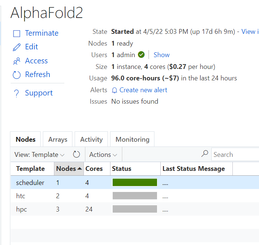
- Login scheduler. Below steps aim to prepare dataset. Total size of the Alphafold2 dataset is ~2.2TB. Suggest to execute each download sentence in download_all_data.sh if you want to save some time, such as download_pdb70.sh, download_uniref90.sh & etc.. Dataset preparation may need several hours as expected.
mkdir /volprotein/AlphaFold2
mkdir /volprotein/AlphaFold2/input
mkdir /volprotein/AlphaFold2/result
sudo chmod +w /volprotein/AlphaFold2
/opt/alphafold/scripts/download_all_data.sh /volprotein/AlphaFold2/
- Run samples
- A sample Slurm job script is as below. Save it as run.sh.
#!/bin/bash
#SBATCH -o job%j.out
#SBATCH --job-name=AlphaFold
#SBATCH --nodes=1
#SBATCH --cpus-per-task=4
#SBATCH --gres=gpu:1
INPUT_FILE=$1
WORKDIR=/opt/alphafold
INPUTDIR=/volprotein/AlphaFold2/input
OUTPUTDIR=/volprotein/AlphaFold2/result
DATABASEDIR=/volprotein/AlphaFold2/
sudo python3 $WORKDIR/docker/run_docker.py --fasta_paths=$INPUTDIR/$INPUT_FILE --output_dir=$OUTPUTDIR --max_template_date=2020-05-14 --data_dir=$DATABASEDIR --db_preset=reduced_dbs
- Now we can submit the AlphaFold2 computing jobs! Submit this job with a test sample (*.fa or *.fasta) in /volprotein/AlphaFold2/input. At the first running, cluster need several minutes waiting compute nodes get ready. Parallel jobs can be submitted and will be running on different compute node according Slurm’s allocation. Then we can use “squeue” to check the Slurm queue status. Meanwhile, there are resource monitoring graphic in CycleCloud UI to grasp the performance status of this AlphaFold2 cluster. After certain job is done, check the info in .out file and the pdb result file in /volprotein/AlphaFold2/result.
sbatch run.sh input.fa
sbatch run.sh P05067.fasta
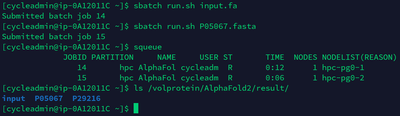
- Tear down. When no need to use this cluster, directly delete the resource group “rgAlphaFold” will tear down the related resources in it.
Reference links
deepmind/alphafold: Open source code for AlphaFold. (github.com)
Azure CycleCloud Documentation – Azure CycleCloud | Microsoft Docs
Azure NetApp Files documentation | Microsoft Docs


Recent Comments