by Scott Muniz | Sep 2, 2022 | Security, Technology
This article is contributed. See the original author and article here.
CISA, the National Security Agency (NSA), and the Office of the Director of National Intelligence (ODNI), have published part one of a three-part joint publication series, Securing Software Supply Chain Series – Recommended Practices for Developers. This guidance—created by the Enduring Security Framework (ESF), a public-private cross-sector working group led by the NSA and CISA—focuses on software developers and provides suggested practices to ensure a more secure software supply chain.
CISA encourages acquiring organizations, software suppliers, and network operators to review the guidance and consider the recommendations. See CISA’s ICT Supply Chain Risk Management Task Force, ICT Supply Chain Resource Library, National Risk Management Center (NRMC) webpages for more information.

by Contributed | Sep 1, 2022 | Technology
This article is contributed. See the original author and article here.
Microsoft Defender for Cloud Apps |
 |
Webinar Sep 14 9AM PST: Manage your SaaS Security Posture with Microsoft. In the current evolution of SaaS apps, there are many different SaaS configurations and posture options. Misconfigurations are one of them and is a potential risk for your organization that can lead to a breach or sensitive data leakage. Learn how to easily manage your SaaS Security Posture with Microsoft and prevent this potential risk. Register here. |
 |
Protecting apps that use non-standard ports with session controls. This feature allows Microsoft Defender for Cloud Apps to enforce session policies for applications that use port numbers other than 443. |
|
Feature parity between commercial and government offerings. We have expanded our support for GCC customers who can now benefit from the SecOps experience features within Defender for Cloud Apps all from the Microsoft 365 Defender portal. |
 |
Azure AD “Security Reader” role alignment. As of August 28 2022, users who were assigned an Azure AD Security Reader role won’t be able to manage the Microsoft Defender for Cloud Apps alerts. To continue to manage alerts, the user’s role should be updated to an Azure AD Security Operator. Currently the Azure AD “Security Reader” role may manage Defender for Coud Apps alerts while the same role may only view alerts from all other workloads. The purpose of this change is to align the AAD “Security Reader” role assignments to provide clarity for the customers, prevent confusion of the same role use. |
 |
Hunt for Azure subscriptions using Defender for Cloud Apps. This blog describes how attackers can compromise Azure subscriptions and use them for malicious activities. In addition, it shows how Microsoft Defender for Cloud Apps data can help hunt for these activities and how to mitigate the risk of compromised subscriptions. |
|
Protect sensitive SharePoint sites with Defender for Cloud Apps. This blog walks through the configuration of Azure AD, Purview, SharePoint Online and Defender for Cloud Apps to block downloads of a file that has sensitive content. This will also provide an example of how you can configure it in your own environment. |
|
Microsoft Defender for Endpoint |
|
Microsoft Defender for Identity |
|
Webinar Sep 6 9AM PST: Microsoft Defender for Identity | Identity Targeted Attacks – A Researcher’s Point of View. Attendees will get a peek behind the curtain and see how our research teams deal with newly disclosed identity vulnerabilities, and how that information is turned into an alert in Defender for Identity. Register here. |
|
Microsoft Defender for IoT |
|
Webinar Sep 14 8AM PST: The Last Piece of the XDR Puzzle – Augmenting IT SecOps with IoT Security. Security teams invest heavily in bringing security-related telemetry and data into a single place, with the vision of “one XDR to rule them all”. But many overlook a huge bulk of the network that remains obscure – IoT and unmanaged devices. Join us in reviewing how Microsoft Defender for IoT integrates with M365D to complete the XDR story with IoT visibility, assessment, and security. Register here. |
|
Microsoft Defender for Office 365 |
|
Exciting Feature Updates to Attack Simulation Training. We have been hearing from a lot of our enterprise customers that payload technique variety is key to any long-term end user behavior change program. To help facilitate we are pleased to announce two new payload techniques. |
|
Improving the reporting experience in Microsoft Defender for Office 365. These new reporting features and improvements will help refine SecOps professional’s workflows when assessing Office 365 security effectiveness. |
|
Announcing the release of step-by-step guides! These guides are there to help you with common tasks across the product in a flash, with the minimum information & clicks needed, reducing the time needed by your admins to secure your enterprise. |
|
Introducing tenant blocks via admin submissions. You can now block suspicious entities when submitting emails, URLs, or attachments for Microsoft to review. |
|
Mastering Configuration in Defender for Office 365 – Part Three. This blog is the final installment of a three-part series detailing the journey we’re on to simplify configuration of threat protection capabilities in Office 365 to enable best-in class protection for our customers. |
|
Automatic Redirection to Microsoft 365 Defender is coming! All security-related functionality will be automatically redirected from the Office 365 Security & Compliance Center (https://protection.office.com) to the Microsoft 365 Defender portal. Additional details on our docs page. |
|
Introducing new actions from the Email Entity page! With these changes, you’ll no longer have to move to a different page to take response actions.
|
|
|
|
Microsoft Secure Score |
|
Microsoft Secure Score is adding new improvement actions for Information Protection and anti-spam policies.
We’re updating Microsoft Secure Score improvement actions to ensure a more accurate representation of your organization’s security posture. This update will include new recommendations as Microsoft Secure Score improvement actions for Microsoft Information Protection and for anti-spam policies in Defender for Office 365.
|
|
by Scott Muniz | Sep 1, 2022 | Security, Technology
This article is contributed. See the original author and article here.
Apple has released security updates to address a vulnerability (CVE-2022-32893) in iPhone 5s, iPhone 6, iPhone 6 Plus, iPad Air, iPad mini 2, iPad mini 3, and iPod touch (6th generation). Exploitation of this vulnerability could allow an attacker to take control of affected device.
CISA encourages users and administrators to review Apple’s advisory HT213428 and apply necessary updates.
by Scott Muniz | Aug 31, 2022 | Security, Technology
This article is contributed. See the original author and article here.
CISA has released two Industrial Control Systems (ICS) advisories on September 01, 2022. These advisories provide timely information about current security issues, vulnerabilities, and exploits surrounding ICS.
CISA encourages users and administrators to review the newly released ICS advisories for technical details and mitigations:
by Contributed | Aug 31, 2022 | Technology
This article is contributed. See the original author and article here.
We are excited to announce the General Availability (GA) of enabling Zone Redundancy for Azure SQL Hyperscale databases. The zone redundant configuration utilizes Azure Availability Zones to replicate databases across multiple physical locations within an Azure region. By selecting zone redundancy, you can make all layers of your Hyperscale databases resilient to a much larger set of failures, including catastrophic datacenter outages, without any changes of the application logic. For more information see Hyperscale zone redundant availability.
Creating a zone redundant Hyperscale Database
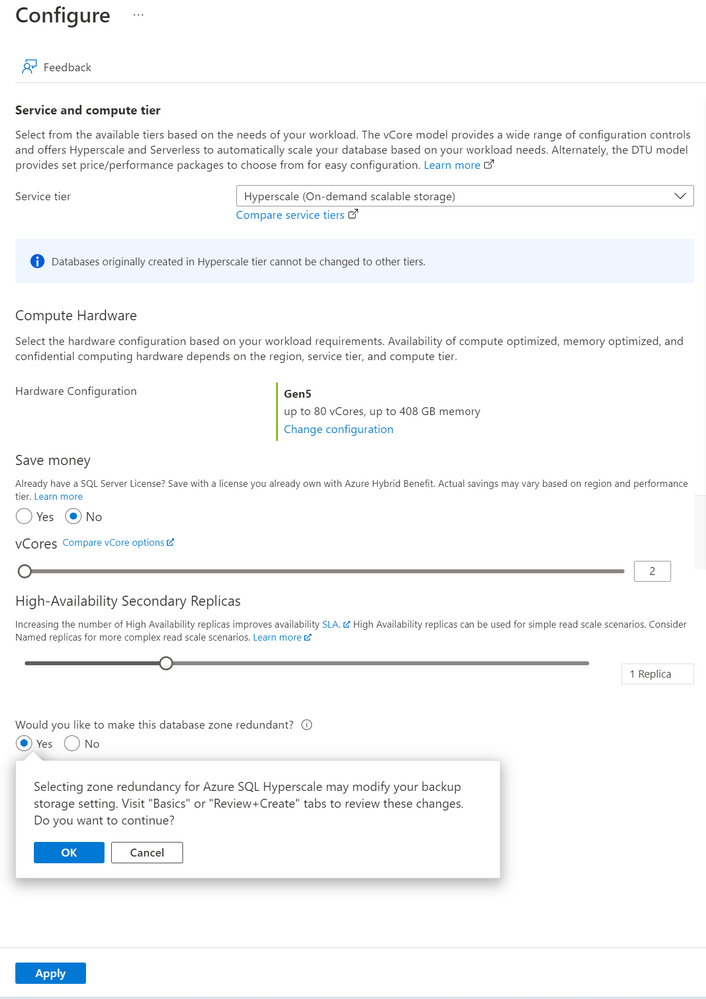
A zone redundant Hyperscale database can be created with Portal, Azure CLI, PowerShell, or REST API. Zone redundancy for Hyperscale service tier can only be specified at database creation. This setting cannot be modified once the resource is provisioned. Database copy, point-in-time restore, or creating a geo-replica can be used to update the zone redundant configuration for an existing Hyperscale database.
Portal
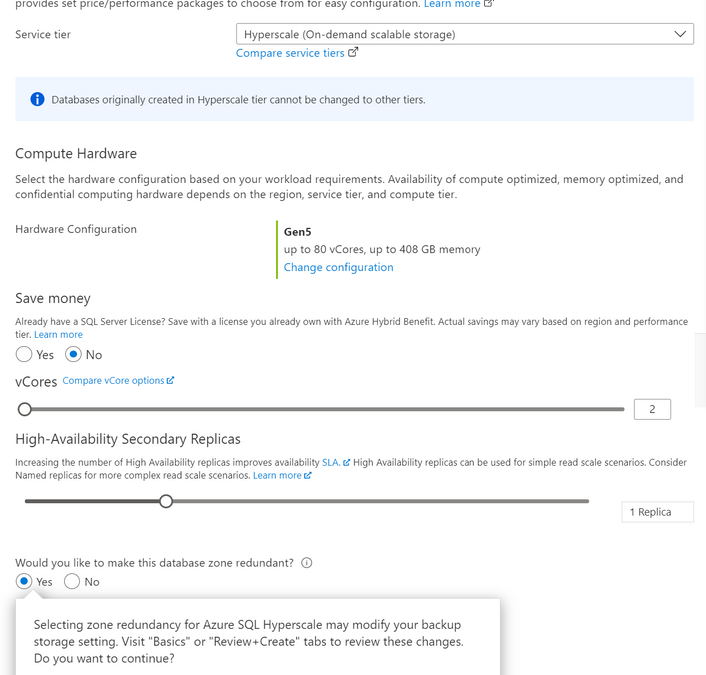
The following image illustrates how to use Azure portal to configure a new Hyperscale database to be zone redundant. This can be configured in the Configure database blade when creating a new database, creating a geo replica, creating a copy database, doing a point in time restore or doing a geo restore. Zone-redundant or Geo-zone-redundant backup storage and at least 1 High-Availability Secondary Replica must be specified.
CLI
The following CLI commands can be used to create a zone redundant Hyperscale database using the –zone-redundant {false, true} parameter.
The Hyperscale database must have at least 1 high availability replica and zone-redundant or geo-zone-redundant backup storage. Below is an example CLI command for creating a new zone redundant Hyperscale database.
az sql db create -g mygroup -s myserver -n mydb -e Hyperscale -f Gen5 –ha-replicas 1 –-zone-redundant -–backup-storage-redundancy Zone
PowerShell
The following PowerShell commands can be used to create a zone redundant Hyperscale database using the -ZoneRedundant parameter.
The Hyperscale database must have at least 1 high availability replica and zone-redundant or geo-zone-redundant backup storage must be specified. Below is an example PowerShell command for creating a new zone redundant Hyperscale database.
New-AzSqlDatabase -ResourceGroupName "ResourceGroup01" -ServerName "Server01" -DatabaseName "Database01" -Edition “Hyperscale” -HighAvailabilityReplicaCount 1 -ZoneRedundant -BackupStorageRedundancy Zone
Current Limitations
- Zone redundant configuration can only be specified during database creation. This setting cannot be modified once the resource is provisioned. Database copy, point-in-time restore, or creating a geo-replica can be used to update the zone redundant configuration for an existing Hyperscale database. When using one of these update options, if the target database is in a different region than the source or if the database backup storage redundancy from the target differs from the source database, the copy operation will be a size of data operation.
- Named replicas are not currently supported.
- Only Gen5 compute is supported.
- Zone redundancy cannot currently be specified when migrating an existing database from another Azure SQL Database service tier to Hyperscale.
Regions where this is available
All Azure regions that have Availability Zones support zone redundant Hyperscale database.




Recent Comments