
by Scott Muniz | Oct 13, 2022 | Security, Technology
This article is contributed. See the original author and article here.
Official websites use .gov
A .gov website belongs to an official government organization in the United States.

Secure .gov websites use HTTPS
A
lock ( )
) or
https:// means you’ve safely connected to the .gov website. Share sensitive information only on official, secure websites.
by Contributed | Oct 13, 2022 | Technology
This article is contributed. See the original author and article here.
Azure autoscale automatically increase or decrease the number of VM instances for an Azure virtual machine scale set (VMSS) that run your application. This automated and elastic behavior reduces the management overhead to monitor and optimize the performance of your application. You create rules that define the acceptable performance for a positive customer experience. When those defined thresholds are met, autoscale rules take action to adjust the capacity of your scale set. You can also schedule events to automatically increase or decrease the capacity of your scale set at fixed times.
Now you can use machine learning to help manage and scale out your Virtual Machine Scale Sets with Predictive autoscale. The capacity needs of your Virtual Machine Scale Sets are forecasted based on the historical CPU patterns. When enabled, the predicted overall CPU load is observed and scale-out occurs in advance and in time to meet the demand.
Predictive autoscale complements loads that have cyclical workload patterns and are especially advantageous when Virtual Machines have long provisioning times. Having the scale out occur before the workload demand covers peak load while lowering the costs.
Predictive autoscale is available for Virtual Machine Scale Sets and support scale out only for Percentage CPU metrics only. Users will have to continue to create standard autoscale settings when creating scale ins for Virtual Machine Scale Sets.
Predictive autoscale can be configured via Azure Portal, CLI and PowerShell.
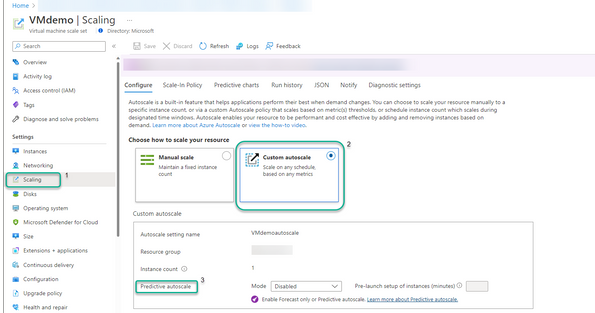
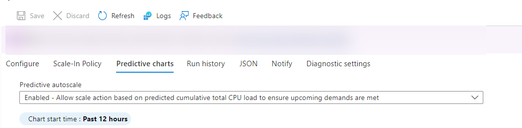
To get started with predictive autoscale from Azure Portal navigate to their Virtual Machine Scale Set scaling blade and then to Predictive autoscale section
Using the Predictive Autoscale dropdown selection, you can:
- Enable forecast only mode
- Enable predictive autoscale
- Disable predictive autoscale. This is the default setting when you first land on the page for predictive autoscale.
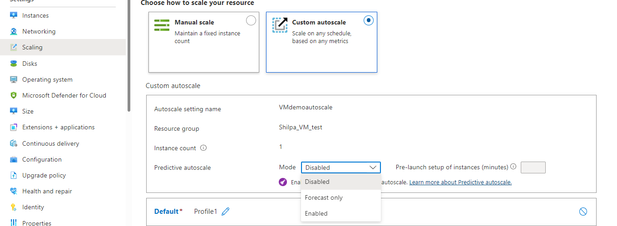
Once you’ve made your predictive autoscale selection (i.e. enable forecast only or predictive autoscale) and optionally configure how far in advance you want to scale out click on Save and then the process starts.
A new tab is now available in the scaling tab: Predictive Charts which provides you an in depth overview of the forecasted CPU as well as any autoscaling that occurs if predictive autoscale is enabled.
Please note that Predictive autoscale requires a minimum of 7 days of history to provide predictions. The most accurate results come from 15 days of historical data.
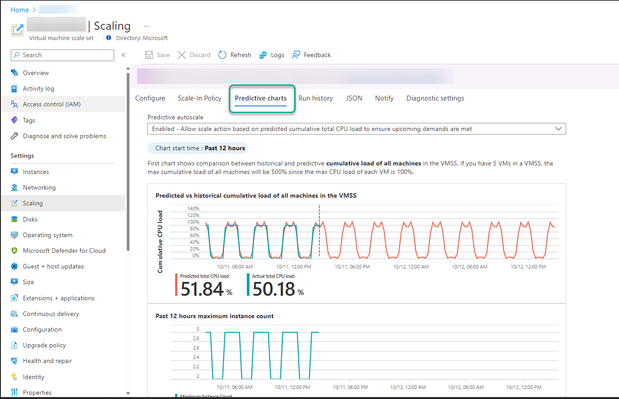
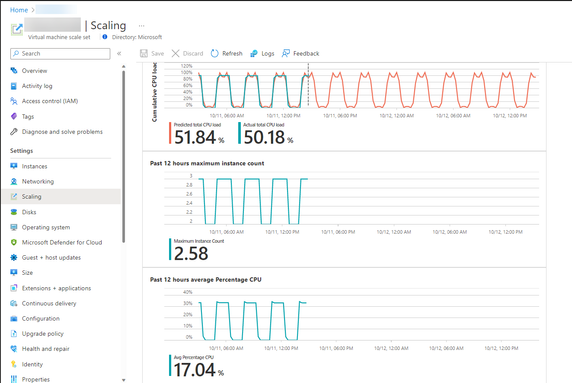
- The top chart shows an overlaid comparison of actual versus predicted total CPU percentage. The time span of the graph shown is from the last 24 hours to the next 24 hours.
- The middle chart shows the number of instances running at specific times over the last 24 hours.
- The bottom chart shows the current Average CPU utilization over the last 24 hours
In addition to this you have an option to enable/ disable forecast only or predictive autoscale as well as the ability to view the charts with time grain ranging from 12 hours to 7 days.
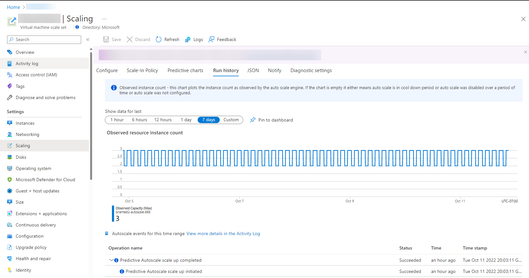
You can head over to Run History to review when scale outs occur due to predictive autoscale.
The forecast model observes the different capacity needs during the day and manages the overall load on an as needed basis. You will need to create a standard autoscale while creating predictive autoscale as it provides a fall back in case of say, missing forecast data. Predictive autoscale can work with other autoscale conditions, autoscale will always observe the request for highest number of resources to address any workload requirements.
Predictive autoscale is generally available in all public regions as of today, Oct 12, 2022. For more information you can refer to the documentation or email: predautoscalesupport@microsoft.com
by Contributed | Oct 12, 2022 | Technology
This article is contributed. See the original author and article here.
Join us Oct 19th
Please join us for our next Federal Business Applications Webinar on October 19th where the Microsoft team will be joined by partner NetImpact Strategies.
NetImpact Strategies will showcase two Microsoft Store approved software solutions built on top of the Power Platform.
First, DX360 Security ARMOR intelligent automation for Cyber compliance and continuous monitoring including RMF ATO and FedRAMP authorizations and defensive cyber operations.
Second, Public Sector Case Management (PSCM) suite that provides fully configurable life cycle case management processes for various case types including Investigative, FOIA, Benefits and Grants. PSCM also provides secure public portal to enable citizen (G2C) and business (G2B) interfaces for delivery of case management services.
Agenda:
- Product & Community Updates
- NetImpact Strategies Demonstration
- Question and Answer Session
To register for this event, please go to the signup link below,
https://aka.ms/FedBizAppsWebinar
All of our past webinar events and recordings can be found in the link below,
https://github.com/microsoft/Federal-Business-Applications/blob/main/whitepapers/webinar-series/README.md
by Scott Muniz | Oct 11, 2022 | Security, Technology
This article is contributed. See the original author and article here.
Adobe has released security updates to address multiple vulnerabilities in Adobe software. An attacker can exploit some of these vulnerabilities to take control of an affected system.
CISA encourages users and administrators to review Adobe Security Bulletins and apply the necessary updates.
• Adobe Cold Fusion APSB22-44
• Adobe Acrobat and Reader APSB22-46
• Adobe Commerce and Magneto Open Source APSB22-48
• Adobe Dimension APSB22-57
by Scott Muniz | Oct 11, 2022 | Security, Technology
This article is contributed. See the original author and article here.
Official websites use .gov
A .gov website belongs to an official government organization in the United States.
Secure .gov websites use HTTPS
A
lock () or
https:// means you’ve safely connected to the .gov website. Share sensitive information only on official, secure websites.


Recent Comments