by Contributed | Apr 6, 2021 | Technology
This article is contributed. See the original author and article here.
Hello Folks,
I’ve always believed that one of the true roles of IT in any organizations is to help the business units achieve their goals while maintaining adequate control over company resources. This is not an all-encompassing rule. It’s just my own personal view of our role.
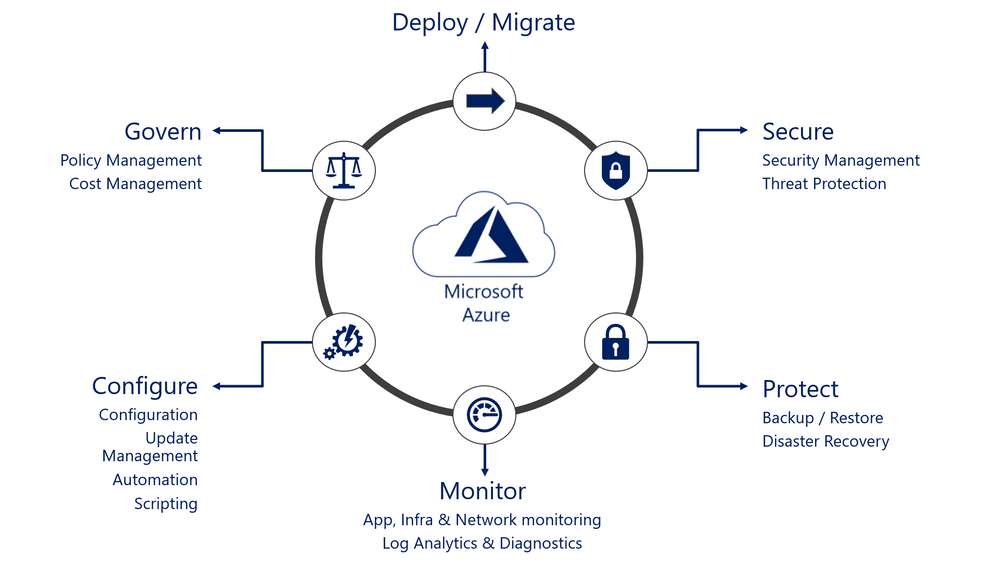
But to perform that role, we need to ensure that resources that are deployed are at the very least adequately inventoried, protected, monitored, and operated. Basically, we need to ensure that all the facets of the operation lifecycle of our resources are covered.
That means that when deploying a new VM in Azure for example you need to ensure you’ve enrolled it in the following services:
These services if performed manually one by one could take you a significant amount of time. And yes, I know… This can be automated through Azure Resource Manager (ARM) templates, through PowerShell scripts, Azure CLI Scripts, and other means. However, when you do that, you now have to manage your environment AND your custom code.
In comes Azure Automanage… A new service, currently in preview (at publishing time) that helps you automate this process without the need to create your own code for it. For a demo of Azure Automanage you can see Sarah Lean’s first look video.
I meet with Dean Wells, Principal PM Manager for Azure Automanage. He shared the genesis of the service, the current state and the roadmap for added functionality.
Even if this service is in preview, there are resources available for you to lean and try this new functionality.
Resources:
Check it out and let us know what you think.
Cheers!
Pierre
by Contributed | Apr 6, 2021 | Technology
This article is contributed. See the original author and article here.
Hi,
I’m excited to announce this new map and I’m happy to see the great success (beyond expectations) of this map series. With nearly 300K views, these maps even gave birth to a more exhaustive book.
FYI, here are all the maps of the series:
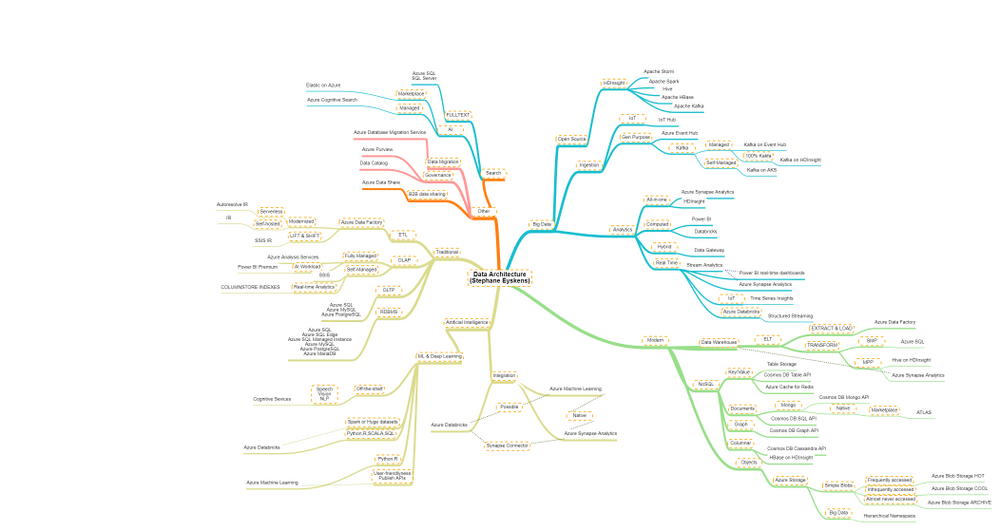
Admittedly, the data map was by far the hardest to build, because there is a big functional overlap across data services. Nevertheless, I tried to identify the primary use case of each service, or where a given service shines the most.
The purpose of the this map is to see, in a glimpse, which services may suit your functional needs but it is up to you to dig deeper.
Here is the map:
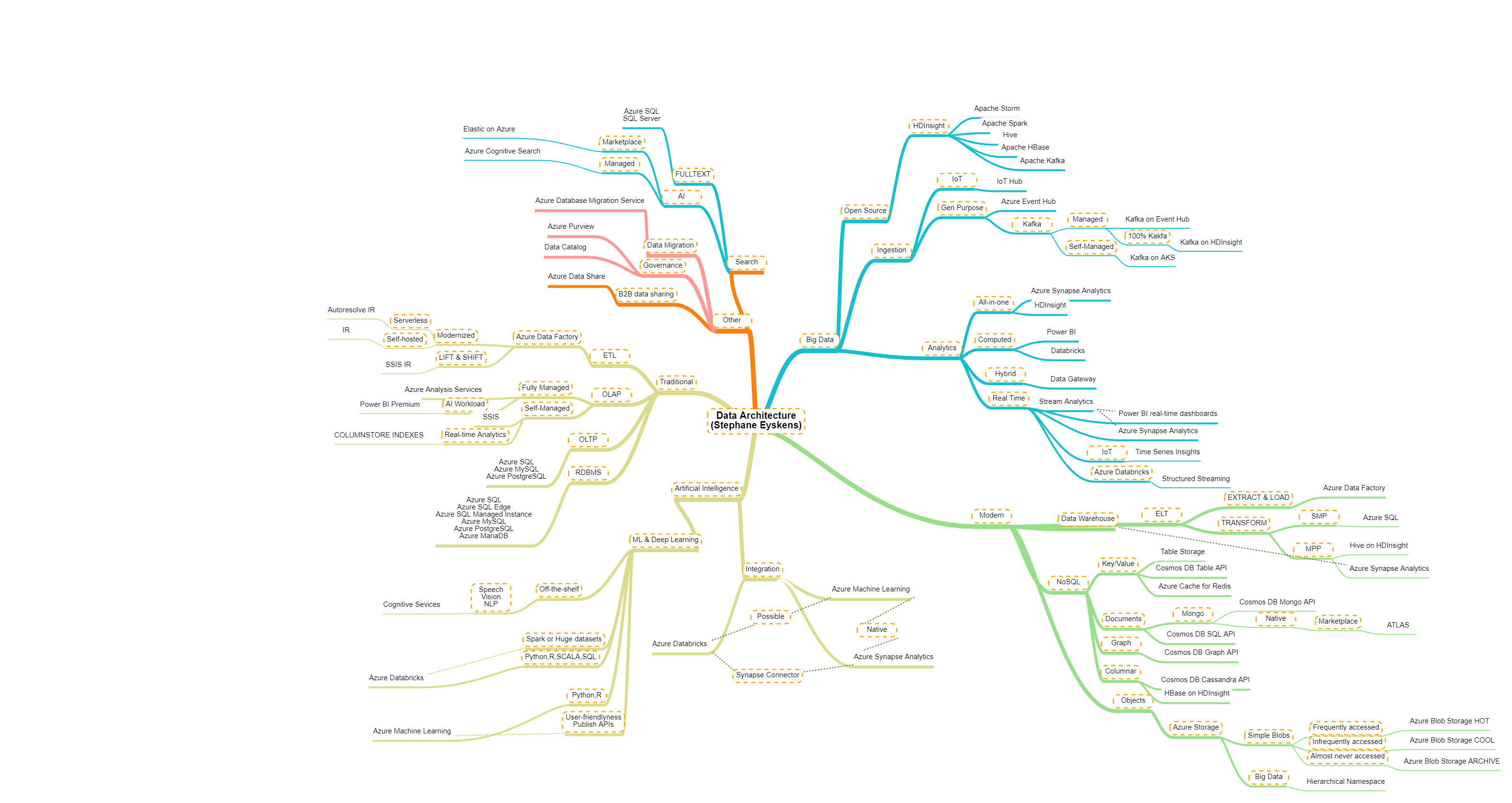
which focuses on the following areas:
- Traditional: many enterprises still deal with traditional BI and there is nothing wrong with it! This category regroups Azure services which you can use to build your cubes, run your ETL jobs, etc.
- Modern: this category is the counterpart of the traditional category. For example, ELT is the modern counterpart of ETL…that’s a bit the spirit :). You may of course find services that are in both sides.
- Big Data: Big Data is also recent in the data lanscape, so it could have been a subset of the modern group, but for sake of clarity, I decided to make it a separate group.
- Artificial Intelligence: AI is on every lips so I couldn’t skip it although this category was hard to craft. There is so much overlap across AI services that it’s kind of hard to categorize them. I tried to have a very condensed group.
- Others: in this category, you’ll find concerns such as “sharing data with other companies”, “Governing data”, etc.
One note though: Microsoft is pushing hard on Azure Synapse Analytics and their aim is to have a all-in-one service, that combines decades of on-premises data practices and the most modern and top-notch data features. So, you’d better keep an eye on its development!
Here is the pointer to the map:
by Contributed | Apr 5, 2021 | Technology
This article is contributed. See the original author and article here.
The Azure Data Factory (ADF) engineering team values each opportunity to engage the community, and to hear directly from customers, and how we can work together to build better products together with customers. Thank you for working with the ADF team together to drive innovations in the product and helping others to be successful with ADF.
We are excited to share with you some of these recent ADF Product updates and put together the at-a-glance view of all the ADF product innovations that shipped recently to help you discover and learn about the latest updates.
- New regions – We are excited to share that Azure Data Factory is now available in two additional Azure regions: Norway East and UAE North. With that, Azure Data Factory is now supported in more than 30 Azure regions, and growing. Learn more about Azure regions where Azure Data Factory is available.
- Azure Data Factory and Azure Purview Integration – Bringing Data Integration + Data Governance together enable organizations to derive tremendous insights into lineage, policy management, and more. We can’t wait to see you can achieve with using Azure Data Factory and Azure Purview together.
- New connectivity and data flow improvements for Azure Data Factory
- Event trigger
We can’t wait to see what you build with Azure Data Factory.
Read more about the latest Azure Data Factory innovation on the Azure Data Factory blog.
by Contributed | Apr 5, 2021 | Technology
This article is contributed. See the original author and article here.
2020 has been a year like no other. In just a few months’ time, businesses have transformed and have accelerated their efforts to migrate to the cloud. Following our announcement of Azure VMware Solution (AVS) last year, we have been helping customers accelerate this move to cloud by providing an easy lift and shift migration. Albeit customers love the same operational experience for VMware workloads and use familiar VMware technologies like vCenter, NSX Manager, HCX etc. in AVS, they also want to leverage security integrations that they have invested in for years. Below are a few common questions that we get from customers around this topic.
How can they use the same firewalls/tools that they have been using for years?
How do they maintain the same security posture?
How can they use the same firewall for both Azure and VMware workloads in AVS?
In this blog series, we plan to discuss native security options, 3rd party firewall integration with AVS along with a deep dive into configuration details. First in the series, this blog would summarize the security options available at your disposal.
Let’s start with the built-in security capabilities that you can leverage in AVS.
Built-in security/firewall with VMware NSX-T – VMware NSX-T is the default networking stack in AVS and it provides out-of-box security features that you can use to protect your workloads. Following are the capabilities that you can leverage.
Distributed Firewall (DFW) –A stateful L3-L7 firewall that powers micro-segmentation and runs on your ESXi hosts in your AVS private cloud. DFW rules are enforced on the vNIC level of a VM workload and what that means is that the traffic is either allowed or dropped on the vNIC level based on the rule you defined. So, there is no more hair-pinning that traffic through a centralized or perimeter firewall. From a feature standpoint, it’s rich and allows you to define security rules using network or application constructs. You could group the workloads using static (IPSet/NSX constructs like Segment etc.) or dynamic membership (VM tags, guest OS etc.). Even when you have a perimeter firewall, you should secure your East-West traffic.
Gateway Firewall – A L4-L7 aware stateful North-South firewall that can be configured on NSX-T Tier-1 Gateway in AVS. It can also be used as an Inter-tenant or Inter-zone firewall i.e. filtering traffic between different tenants of your organization each with a dedicated Tier-1 Gateway.
Azure Firewall – A managed, stateful firewall with built-in HA and SLA of 99.99% (when deployed in two or more availability zones). Customers can configure L3-L7 policies to filter traffic and take advantage of threat intelligence-based filtering to alert and deny traffic from/to known malicious IP addresses and domains. Please refer to the Azure firewall feature set here.
If you are already using Azure firewall capabilities deployed in Azure Virtual WAN to protect resources in VNETs, you can connect the same virtual WAN hub over an express route connection to AVS and route internet traffic from AVS to Azure firewall.
Let’s switch gears and talk about the 3rd party firewall integration with Azure VMware Solution. There is a strong desire from customers to continue using the same firewall in AVS that they have been using in an on-premises datacenter. Based on the use-case, you could deploy a 3rd party firewall NVA in AVS private cloud or SDDC or leverage a firewall from Azure marketplace. Let’s double click on both options.
3rd Party firewall deployed as NVA in AVS private cloud or SDDC –Before we discuss this integration, it’s important to understand NSX-T deployment in AVS private cloud. When you create a private cloud in AVS, a default NSX-T Tier-0 Gateway configured in Active/Active mode and a default NSX-T Tier-1 Gateway configured in Active/Standby mode is deployed for you. Users can connect segments (logical switches) and provide East-West and North-South connectivity to the workloads connected on these segments.
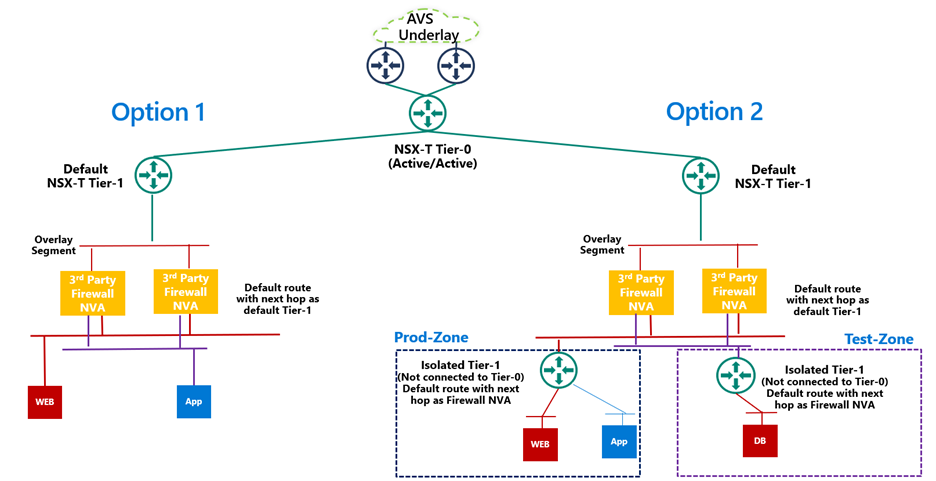
A 3rd party firewall NVA can be connected southbound to the default NSX-T Tier-1 gateway and this firewall can act as a North-South firewall or East-West firewall depending upon your use case. This integration is supported in following topologies.
- Option 1: Workload segments are directly connected to the firewall and the gateway on workloads is 3rd party firewall. This topology restricts the users with numerous segments as the vNICs on the NVA becomes a limiting factor.
- Option 2: Workload segments are connected to an isolated Tier-1 and this Tier-1 gateway provides northbound connectivity to a 3rd party firewall. This topology solves the problem of limited number of vNICs on NVA as you connect 100s of workload segments to an isolated Tier-1 which connects to the firewall NVA northbound. In this topology, isolated Tier-1s simulate security zones and the firewall can provide East-West filtering between security zones and North-South filtering for all traffic.
We will discuss routing and other configuration details for these topologies in next part of this blog series.
3rd Party firewall deployed in Azure VNET – Customers can also deploy a 3rd party firewall in Azure VNET and route traffic from AVS to this firewall via Azure Virtual WAN hub. To redirect internet traffic from AVS VMs to the firewall NVA, you need to connect AVS to an express route gateway in Azure virtual WAN and propagate a default route. Next, you configure a default route in Azure Virtual WAN hub to direct internet bound traffic to a NVA in spoke VNET.

We will go through the configuration details in greater detail in upcoming blogs. Stay tuned!
Summary
Azure VMware Solution customers have multiple security options available to protect their workloads. Some of these firewalling capabilities can be used out of the box to provide East-West and North-South firewalling. Along with the built-in security capabilities, customers can also leverage the 3rd party firewalls or next-gen firewalls to provide additional security and maintain the same security posture as they have on-premises.
Following are a few resources to learn more about Azure VMware Solution.
Learn Azure VMware Solution Networking
Try Azure VMware Solution Hands-on-lab




Recent Comments