by Contributed | Apr 8, 2021 | Technology
This article is contributed. See the original author and article here.
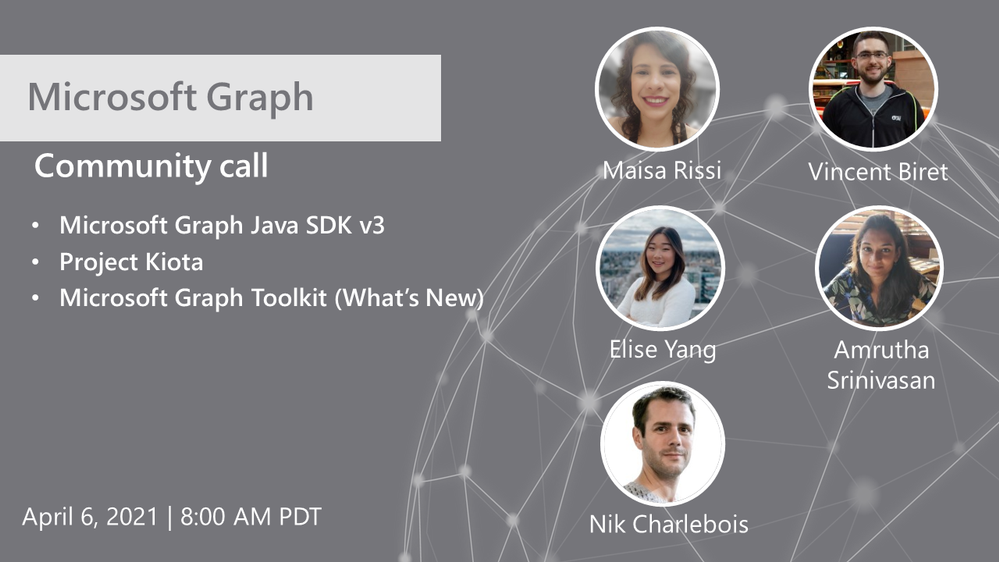
Hosted by Nik Charlebois, this month’s call covered topics including the Microsoft Graph Java SDK version 3, project Kiota and an overview of what’s new with the Microsoft Graph Toolkit.
Topics:
Microsoft Graph Java SDK version 3
Maisa Rissi from the Microsoft Graph SDK team delivers an update on Microsoft Graph Java SDK version 3 – new features including a streamlined authentication with Azure Identity and improved batch support. To learn more about enhanced capabilities with the release of version 3, go to https://developer.microsoft.com/en-us/microsoft-365/blogs/microsoft-graph-java-sdk-v3-adds-enhanced-capabilities-with-general-availability/.
Project Kiota
Vincent Biret from the Microsoft Graph team introduced Project Kiota, a new project to project to build an OpenAPI based code generator for creating SDKs for HTTP APIs. To learn more about the project or to get involved, go to https://GitHub.com/Microsoft/Kiota
What’s New with the Microsoft Graph Toolkit
Elisa Yang and Amrutha Srinivasan from the Microsoft Graph Toolkit team gave an overview of new features being rolled out and worked on in the Graph toolkit, including a new electron provider. To learn more about the Microsoft Graph Toolkit, go to: https://aka.ms/MGT
Microsoft Graph TAP program
As part of our TAP program for Microsoft Graph, we are looking for additional partners and customers to join. Benefits to participation in the program include:
- Monthly TAP calls with workload deep dives
- Early access / notification of upcoming features
- Case studies and keynote showcases
- Share feedback and feature requests
Complete the submission for our review at https://aka.ms/GraphTAPForm.
Actions:
Resources:
General Resources:
Stay connected:
by Contributed | Apr 8, 2021 | Technology
This article is contributed. See the original author and article here.
Introduction
Hello everyone, this is Andrew Coughlin and I am a Customer Engineer at Microsoft focusing on Azure IaaS. In this blog I will be discussing an issue I came across while working with one of my customers.
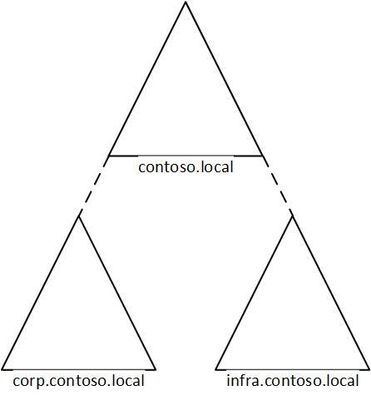
I was working with a customer to setup Active Directory authentication for Azure Files over smb for a storage account in their environment. Below shows a generic layout of how the domain is setup. The domain had a single forest with multiple domains inside that forest:
Domain
|
Resource Type
|
contoso.local
|
Domain controllers
|
corp.contoso.local*
|
users, workstations, groups, domain controllers
|
infra.contoso.local*
|
servers, service accounts, domain controllers
|
*AD Connect Sync is configured
The storage account was going to be joined to infra.contoso.local, and admin account the user was logged into the workstation running the commands was part of the corp.contoso.local domain.
Prerequisites
- Ensure these steps have been completed before setting up the storage account.
- Create a storage account as documented here, then create a Azure File Share as documented here.
Troubleshooting Steps
We started following the documentation as noted here, for setting up Authentication for Active Directory Domain Services authentication over SMB for Azure file shares. However, when we ran the Join-AzStorageAccountForAuth, it would fail with the following error message:
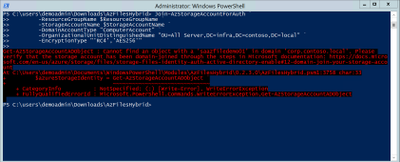
While reviewing the error message I noticed something strange, it is looking at corp.contoso.local, instead of infra.contoso.local, even though we specified the OU that the storage account should be joined to. The reason behind this is because the admin account we are logged into the system with is part of corp.contoso.local. After doing some research I then noticed there was a -Domain switch in the Join-AzStorageAccountForAuth.
We then ran the command with the -Domain “infra.contoso.local” switch and once completed we received a success status which showed the storage account had been joined.
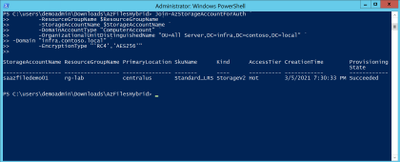
Next, we want to verify the storage account had been joined and checked the OU that I specified in the join command and confirmed the storage account was in the correct OU.
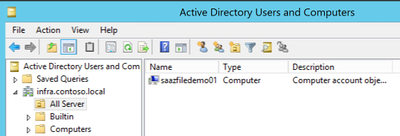
Then we proceeded with the rest of the steps as outlined in the documentation.
Conclusion
If you have ran into this issue, I hope you find this blog helpful and reduces the time in troubleshooting this error when joining a storage account to your Active Directory Domain. Thank you for taking the time to read this blog and have a great day!
Disclaimer
The sample scripts are not supported under any Microsoft standard support program or service. The sample scripts are provided AS IS without warranty of any kind. Microsoft further disclaims all implied warranties including, without limitation, any implied warranties of merchantability or of fitness for a particular purpose. The entire risk arising out of the use or performance of the sample scripts and documentation remains with you. In no event shall Microsoft, its authors, or anyone else involved in the creation, production, or delivery of the scripts be liable for any damages whatsoever (including, without limitation, damages for loss of business profits, business interruption, loss of business information, or other pecuniary loss) arising out of the use of or inability to use the sample scripts or documentation, even if Microsoft has been advised of the possibility of such damages.
by Contributed | Apr 8, 2021 | Technology
This article is contributed. See the original author and article here.
Hello Folks,
I’ve been working with some colleagues on a shared demo environment, and one issue came up during a session with customers that highlighted a problem. If any of us change the local admin password of the servers or redeploys the environment with a password of their own. We no longer can access it without contacting the group and request the new password.
I started to look a way to regularly update the password from a location that is built specifically for storing passwords and other secrets. Namely, Azure Key Vault.
And, I had just read the PowerShell’s Team blog announcing the general availability of their SecretManagement and SecretStore modules. That seemed like the best candidates to help. The SecretManagement module helps users manage secrets by providing a common set of cmdlets to interface with secrets across vaults. IT utilizes an extensible model where local and remote vaults (including Azure Key Vaults) can be registered and unregistered for use in accessing and retrieving secrets.
The module provides the following cmdlets for accessing secrets and managing SecretVaults:
- Get-Secret
- Get-SecretInfo
- Get-SecretVault
- Register-SecretVault
- Remove-Secret
- Set-Secret
- Set-SecretInfo
- Set-SecretVaultDefault
- Test-SecretVault
- Unregister-SecretVault
The solution
To address our issue, we took the following steps.
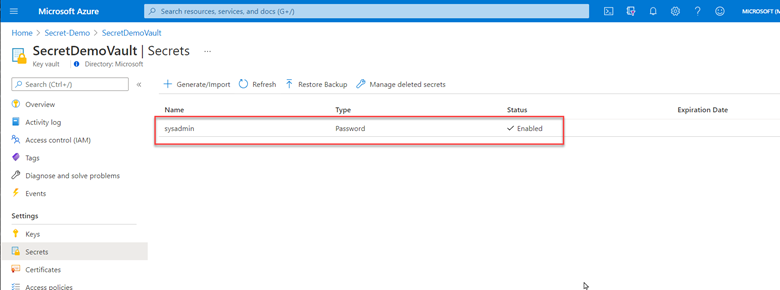
1- Created a key vault and created/stored a secret with a complex password. (because it’s in the demo resource group, we can all retrieve the secret when needed)
2- Deployed Azure Automation in our environment and created a Run as account to provide authentication for managing resources in Azure with the Azure cmdlets.
3- Created a new Runbook that would get the secret from Key vault using PowerShell Microsoft.PowerShell.SecretManagement module and using the Azure VMAccess extension would update the local admin password to the one retrieved from Key vault. (The sample code available below). Of course, this is proof of concept at this point and needs to be worked on. However, it does open the door to other usage. This could be re-used and modified to run on a schedule to generate a new complex password and store it in Key Vault, then update all the servers in your environment with the new password on a regular basis.
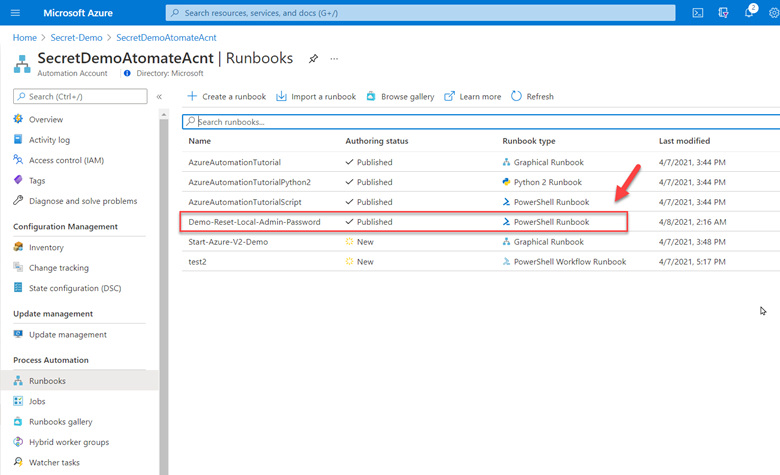
4- Here is the sample code.
param(

    [string]$ResourceGroupName = "Secret-Demo",
    [string]$vaultname = "SecretDemoVault"

)
Disable-AzContextAutosave -Scope Process

$VERSION = "1.0"
$currentTime = (Get-Date).ToUniversalTime()

Write-Output "Runbook started. Version: $VERSION at $currentTime"
Write-Output "---------------------------------------------------"

# Authenticate with your Automation Account
	$connection = Get-AutomationConnection -Name AzureRunAsConnection
    # Wrap authentication in retry logic for transient network failures
    $logonAttempt = 0
    while(!($connectionResult) -and ($logonAttempt -le 10))
    {
        $LogonAttempt++
        # Logging in to Azure...
        $connectionResult = Connect-AzAccount `
                                -ServicePrincipal `
                                -Tenant $connection.TenantID `
                                -ApplicationId $connection.ApplicationID `
                                -CertificateThumbprint $connection.CertificateThumbprint

        Start-Sleep -Seconds 30
    }

    $AzureContext = Get-AzSubscription -SubscriptionId $connection.SubscriptionID
    $SubID = $AzureContext.id
    Write-Output "Subscription ID: $SubID"
    Write-Output "Resource Group: $ResourceGroupName"
    Write-Output "VaultName: $vaultname"

# Get Secret from KeyVault
    Register-SecretVault -Name AzKeyVault -ModuleName Az.KeyVault -VaultParameters @{ AZKVaultName = $vaultname; SubscriptionId = $SubID }
    $secret = Get-Secret -Vault AzKeyVault -Name sysadmin
    Write-Output "SecretValue :  $secret"
    $Credential = New-Object -TypeName PSCredential -ArgumentList "sysadmin", $secret

# Get a list of all virtual machines in subscription
    $VMList = Get-AzVM -ResourceGroupName $ResourceGroupName
    foreach ($vm in $VMList)
    {
        Write-Output "Reseting password on $vm.name"
        Set-AzVMAccessExtension -ResourceGroupName $ResourceGroupName -VMName $Vm.Name -Credential $Credential -typeHandlerVersion "2.0" -Name VMAccessAgent
    }
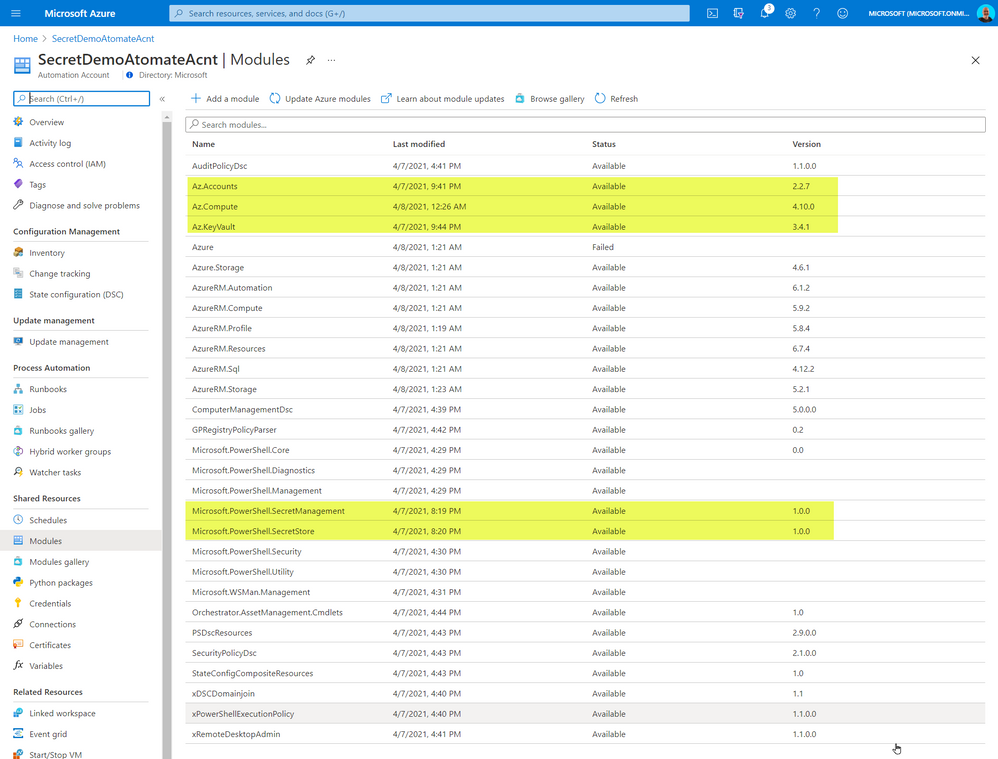
The code above required me to import some PowerShell Modules into our Automation environment. The modules I imported from the gallery
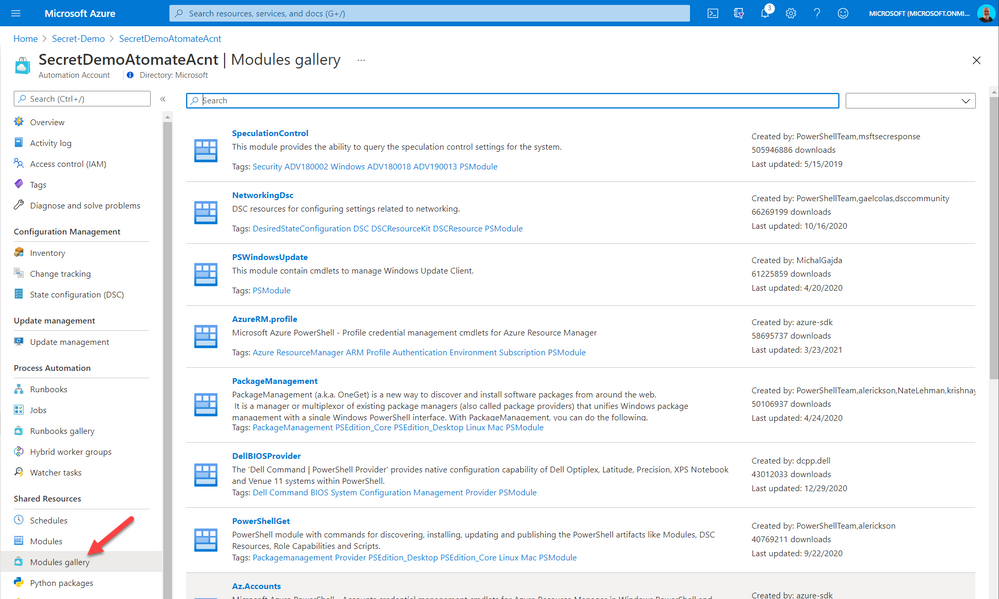
The added modules were the following:
- Az.Accounts
- Az.Compute
- AZ.KeyVault
- Microsoft.PowerShell.SecretManagement
- Microsoft.PowerShell.SecretStore
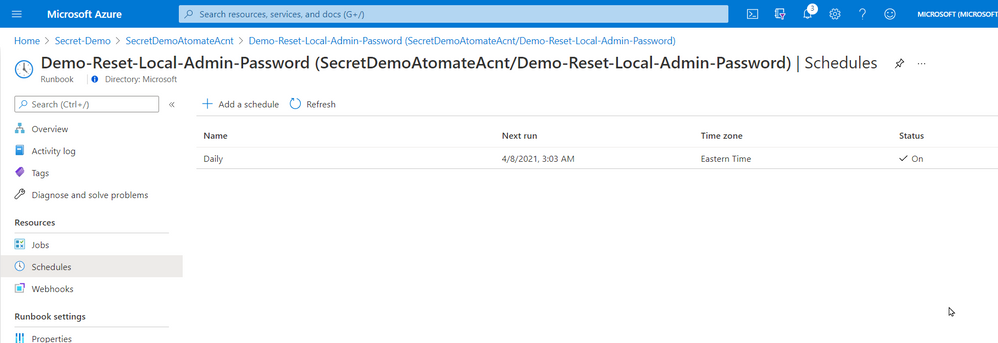
5- Once created and published I linked the Runbook to a schedule that will execute the script nightly.
That’s it! a simple solution based on a new PowerShell module that provides us with loads of value. Maybe it will be of value for you too.
Cheers!
Pierre
by Contributed | Apr 8, 2021 | Technology
This article is contributed. See the original author and article here.
Overview & Use Case
Thanks to Ivan Ovchinnikov, Lead integration developer at Group-IB, Rijuta Kapoor from Microsoft Azure Sentinel Threat Intelligence team, Sreedhar Ande from Microsoft Azure Sentinel PG, the whole Group-IB Threat Intelligence and Azure Sentinel Threat Intelligence Product Group teams for the technical brainstorming, contributing and proof reading!
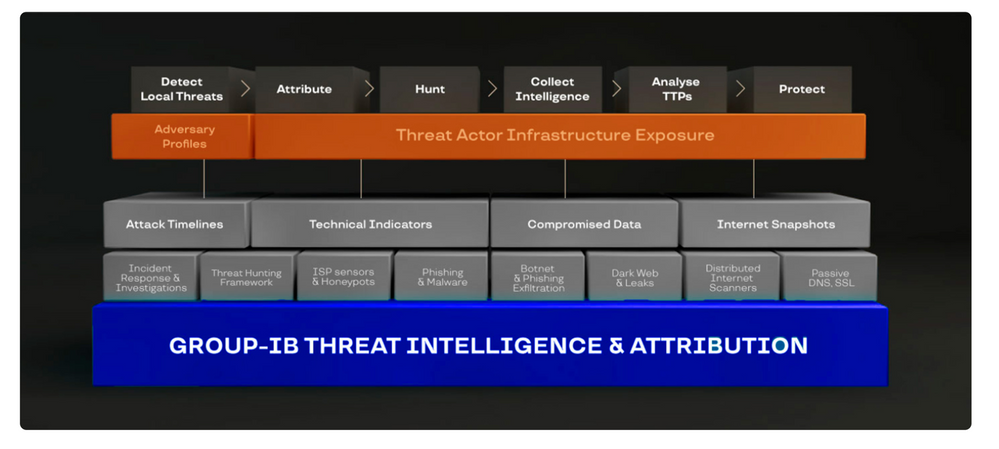
Group-IB Threat Intelligence & Attribution (TI&A) is a system for analyzing and attributing cyberattacks, threat hunting, and protecting network infrastructure based on data relating to adversary tactics, tools and activity. TI&A combines unique data sources and experience in investigating high-tech crimes and responding to complex multi-stage attacks worldwide. The system stores data on threat actors, domains, IPs, and infrastructures collected over the last 15 years, including those that criminals attempted to wipe out. The functionality of the system helps customize it to the threat landscape not only relevant to a particular industry, but also to a specific company in a certain country. Below is the high-level architecture of Group-IB TI&A:
SOC team requirement is to ingest Group-IB TI&A feeds & indicators based on multiple TI collections to Azure Sentinel (and writes them to Microsoft Security Graph API to be listed under Azure Sentinel ThreatIntelligenceIndicators table and custom log tables as well) for automatic scanning and detecting matched TI feeds/indicators across their organizational data sources logs for further investigation and analysis.
Implementation
First let’s understand and get more technical details on the Group-IB TI&A collections to see how we can ingest and map these feeds/indicators to the Azure Sentinel Threat Intelligence data types via TI&A APIs and Azure Sentinel Automation (Playbooks):
gib-tia
|
Collection
|
Has Indicators
|
Indicators Content
|
Description
|
GIBTIA_APT_Threats
|
apt/threat
|
Yes
|
GIB APT Threat Indicator(IPv4)
GIB APT Threat Indicator(domain)
GIB APT Threat Indicator(url)
GIB APT Threat Indicator(md5)
GIB APT Threat Indicator(sha256)
GIB APT Threat Indicator(sha1)
|
Group-IB continuously monitors activities undertaken by hacker groups, investigate, collect, and analyze information about all emerging and ongoing attacks. Based on this information, we provide IOC’s related to APT Groups Attacks
|
GIBTIA_APT_ThreatActor
|
apt/threat_actor
|
No
|
N/A
|
This collection contains APT groups’ info, with detailed descriptions
|
GIBTIA_Attacks_ddos
|
attacks/ddos
|
Yes
|
GIB DDoS
Attack(IPv4)
|
The “DDoS attacks” collection contains a DDoS Attacks targets and C2 indicators
|
GIBTIA_Attacks_deface
|
attacks/deface
|
Yes
|
GIB Attack Deface(url)
|
The “Deface” collection contains information about online resources that have become subject to defacement attacks (the visual content of a website being substituted or modified)
|
GIBTIA_Attacks_phishing
|
attacks/phishing
|
Yes
|
GIB Phishing Domain(domain)
GIB Phishing IP(IPv4)
GIB Phishing URL(url)
|
The “Attacks Phishing” collection provides information about various phishing resources (including URLs, Domains and IPs.)
|
GIBTIA_Attacks_phishing_kit
|
attacks/phishing_kit
|
Yes
|
GIB Phishing Kit Email(email)
|
The “Atacks Phishing Kits” collection contains information about the archives of phishing kits. Emails gotten from kits can be obtained as indicators
|
GIBTIA_BP_phishing
|
bp/phishing
|
Yes
|
GIB Phishing Domain(domain)
GIB Phishing IP(IPv4)
GIB Phishing URL(url)
|
The “BP Phishing” collection provides events related to clients company
|
GIBTIA_BP_phishing_kit
|
bp/phishing_kit
|
Yes
|
GIB Phishing Kit Email(email)
|
The “BP Phishing Kit” collection provides phishing kits related to clients company
|
GIBTIA_Compromised_account
|
compromised/account
|
Yes
|
GIB Compromised Account CNC(url)
GIB Compromised Account CNC(domain)
GIB Compromised Account CNC(IPv4)
|
This collection contains credentials collected from various phishing resources, botnets, command-and-control (C&C) servers used by hackers
|
GIBTIA_Compromised_card
|
compromised/card
|
Yes
|
GIB Compromised Card CNC URL(url)
GIB Compromised Card CNC Domain(domain)
GIB Compromised Card CNC IP(IPv4)
|
This collection contains information about compromised bank cards. This includes data collected from card shops, specialized forums, and public sources
|
GIBTIA_Compromised_imei
|
compromised/imei
|
Yes
|
GIB Compromised IMEI CNC Domain(domain)
GIB Compromised IMEI CNC URL(url)
GIB Compromised IMEI CNC IP(IPv4)
|
The section contains data on infected mobile devices, which is obtained by analyzing mobile botnets. It does not contain personal data and is available to all system users
|
GIBTIA_Compromised_mule
|
compromised/mule
|
Yes
|
GIB Compromised Mule CNC Domain(domain)
GIB Compromised Mule CNC URL(url)
GIB Compromised Mule CNC IP(IPv4)
|
This section contains information about bank accounts to which threat actors have transferred or plan to transfer stolen money. Man-in-the-Browser (MITB) attacks, mobile Trojans, and phishing kits allow fraudsters to make money transfers automatically. Playbook provides C2 data related to compromitation
|
GIBTIA_HI_Threats
|
hi/threat
|
Yes
|
GIB HI Threat Indicator(domain)
|
Group-IB continuously monitors activities undertaken by hacker groups, investigate, collect, and analyze information about all emerging and ongoing attacks. Based on this information, we provide IOC’s related to Hackers Attacks
|
GIBTIA_HI_ThreatActor
|
hi/threat_actor
|
No
|
N/A
|
This collection contains non-APT groups’ and Individual hackers info, with detailed descriptions
|
GIBTIA_Malware_cnc
|
malware/cnc
|
Yes
|
GIB Malware CNC Domain(domain)
GIB Malware CNC URL(url)
GIB Malware CNC IP(IPv4)
|
The “Malware” collection contains Malwares C2 detected by group IB
|
GIBTIA_Malware_Targeted_Malware
|
malware/targeted_malware
|
Yes
|
GIB Malware Targeted Malware(md5)
GIB Malware Targeted Malware(sha1)
GIB Malware Targeted Malware(sha256)
GIB Malware Targeted Malware Inject(md5)
|
The “Targeted Trojans” section contains information about malicious programs targeting the client’s infrastructure. Information is collected by examining a multitude of malicious files and investigating various incidents
|
GIBTIA_OSI_GitLeak
|
osi/git_leak
|
No
|
N/A
|
Open-source repositories such as GitHub contain codes that anyone can search for. They are often used by threat actors planning to attack a specific company. The “Git Leaks” section contains the above data in code repositories
|
GIBTIA_OSI_PublicLeak
|
osi/public_leak
|
No
|
N/A
|
The “Public leaks” collection contains the leaked clinets data collected on popular file-sharing resources or text/information exchange websites
|
GIBTIA_OSI_Vulnerability
|
osi/vulnerability
|
No
|
N/A
|
The “Vulnerabilities” collection displays information about vulnerabilities detected in the software by version
|
GIBTIA_Suspicious_ip_open_proxy
|
suspicious_ip/open_proxy
|
Yes
|
GIB Open Proxy Address(IPv4)
|
The “Open proxy” collection proviedes information about lists of proxy servers that are publicly available on various online resources related to anonymity. In addition, proxy servers may be configured as open proxies intentionally or as a result of misconfiguration or breaches
|
GIBTIA_Suspicious_ip_socks_proxy
|
suspicious_ip/socks_proxy
|
Yes
|
GIB Socks Proxy Address(IPv4)
|
The “Socks proxy” collection providess information about addresses where malware that turns infected computers into SOCKS proxies has been installed. Such computers (bots) are rented out and used in various attacks to ensure the attacker as much anonymity as possible
|
GIBTIA_Suspicious_ip_tor_node
|
suspicious_ip/tor_node
|
Yes
|
GIB Tor Node Address(IPv4)
|
The “Tor Node” collection displays information about Tor exit nodes, which are the final Tor relays in the circuit. The nodes act as a medium between a Tor client and public Internet
|
#Deployment Steps
The whole custom connectors code & deployment templates with detailed instructions and considerations already been uploaded at Azure Sentinel github Playbooks repo
Step(1): Azure Sentinel gib-tia Playbooks
- Deploy GIBIndicatorsProcessor playbook first
- Deploy required collections Playbooks and configure the following parameters:
- GIB Username – is a login to access Group-IB TI&A Web Interface
- Save only indicators – set to true if only indicators enrichment is required, otherwise, an additional table in Workspace with full event content will be created
- Some collections provide no indicators, so do not have this parameter configurable and add Group-IB TI&A events only in Log Workspace
- GIB Action – This is an action required to set in a particular indicator type provided through the current collection.(The action to apply if the indicator is matched from within the target Product security tool. Possible values are: unknown, allow, block, alert)
- GIB API URL – is an GIB TI&A API URL
- Configure API Key variable. API Key can be generated in the Profile Section in Group-IB TI&A Web Interface
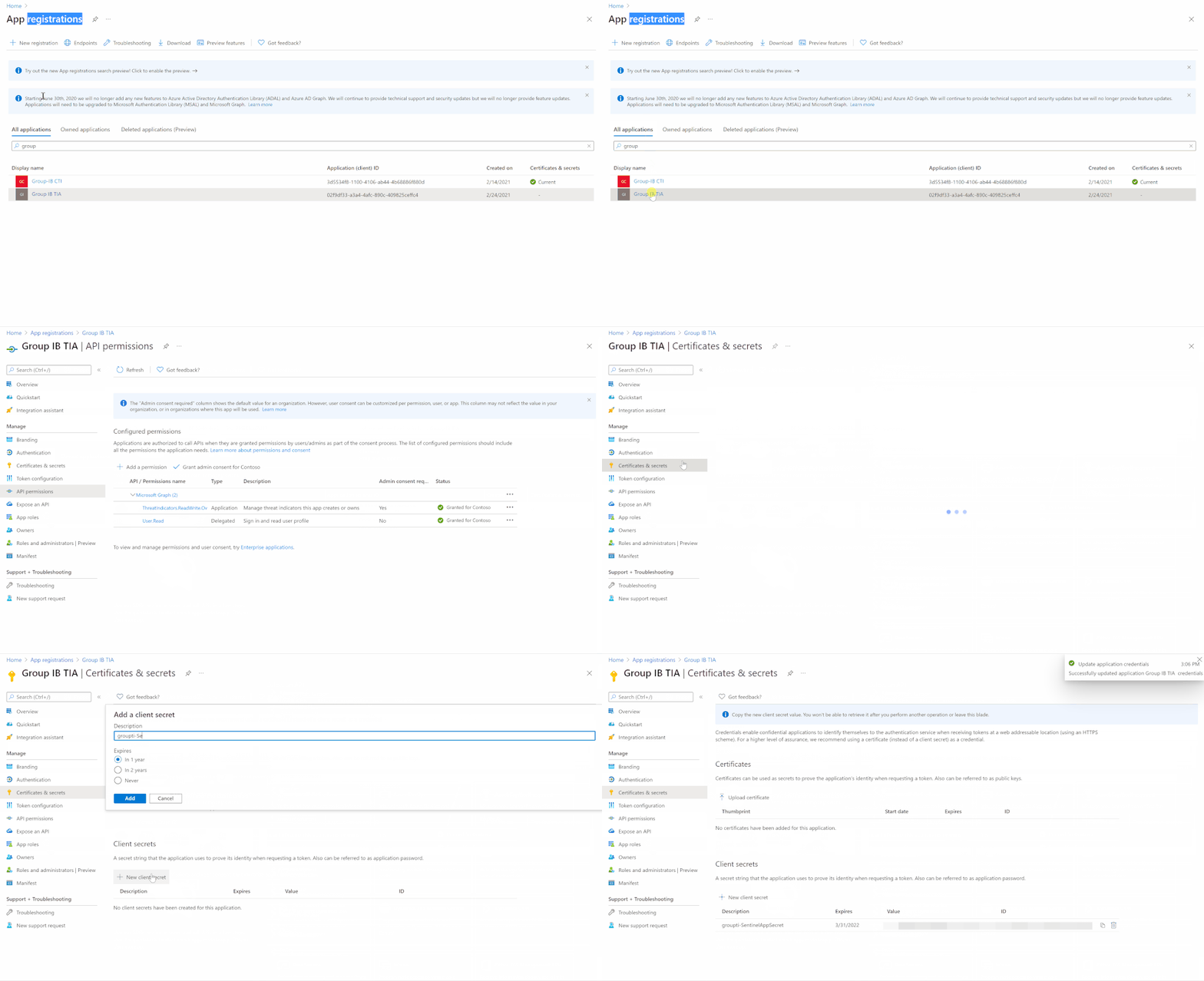
Step(2): Register an Azure AD App for TI Indicators Graph API Write Access
- Go to Azure Active Directory / App Registrations
- Create +New Registration
- Give it a name. Click Register
- Click API Permissions Blade
- Click Add a Permission
- Click Microsoft Graph
- Click Application Permissions
- Check permissions for ThreatIndicators (ThreatIndicators.ReadWrite.OwnedBy). Click Add permissions
- Click grant admin consent for domain.com
- Click Certificates and Secrets
- Click New Client Secret
- Enter a description, select never. Click Add
- IMPORTANT. Click copy next to the new secret and paste it somewhere temporarily. You cannot come back to get the secret once you leave the blade
- Copy the client ID from the application properties and paste it somewhere as you will need it to be added to the Playbooks
- Also copy the tenant ID from the AAD directory properties blade
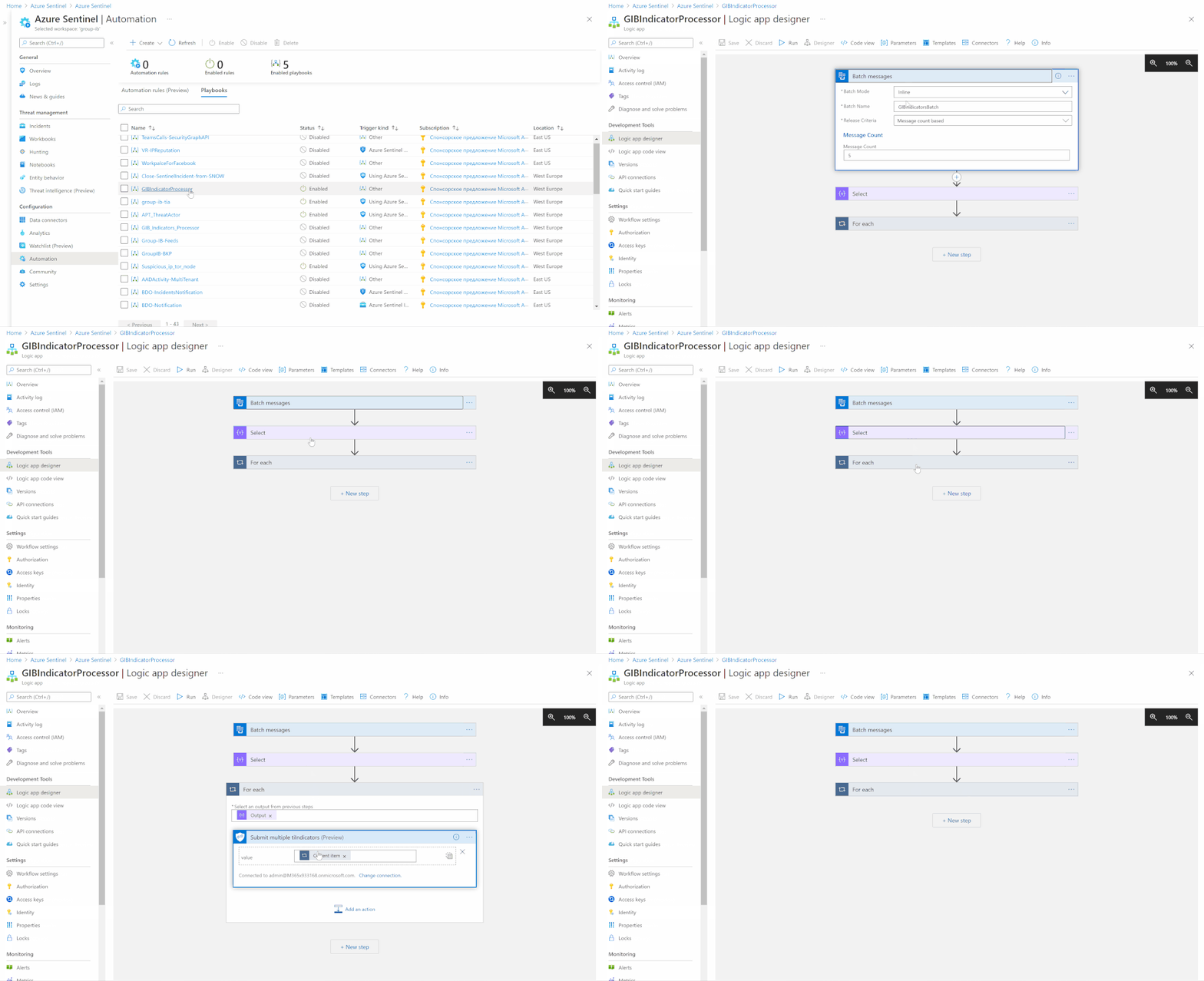
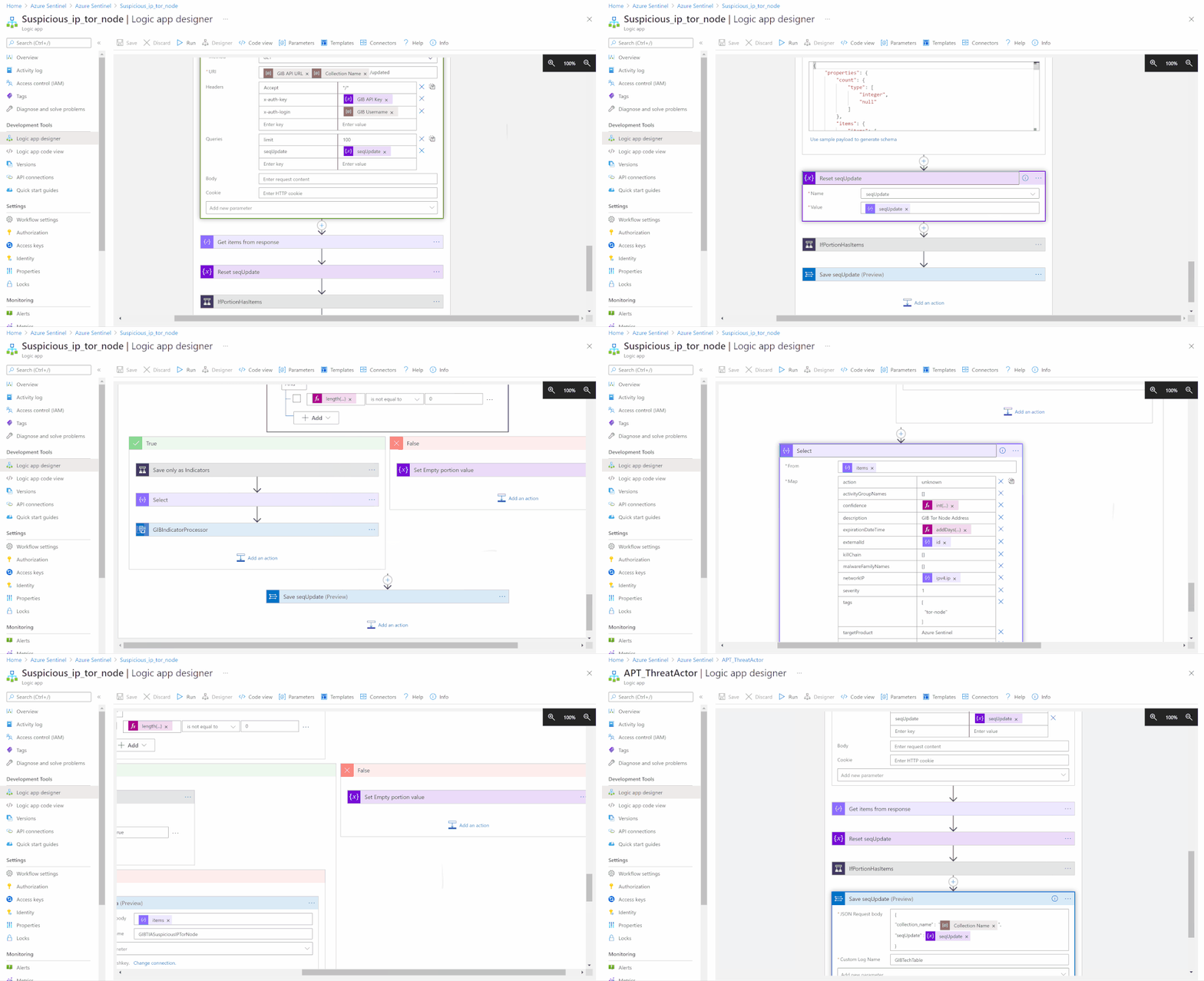
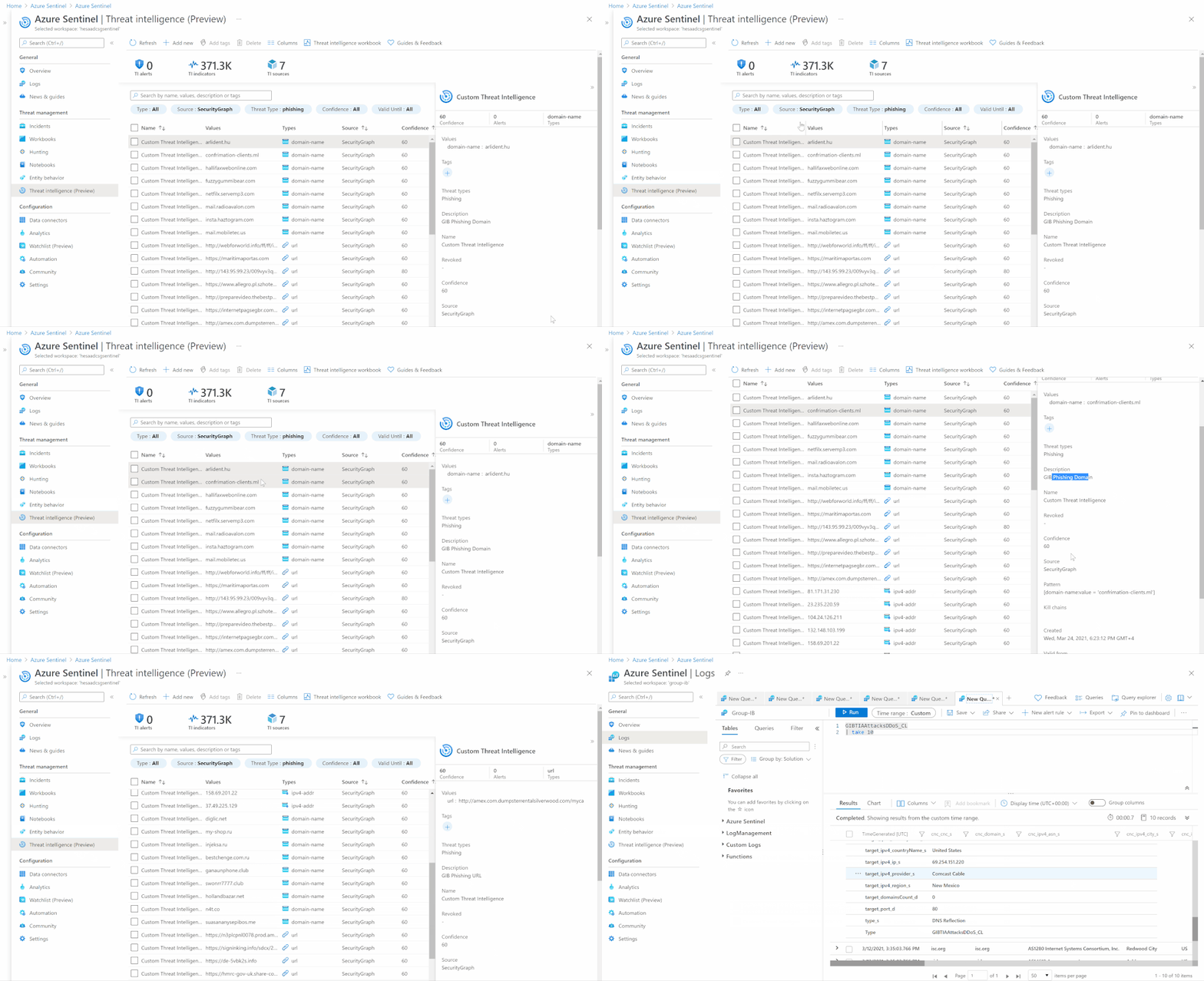
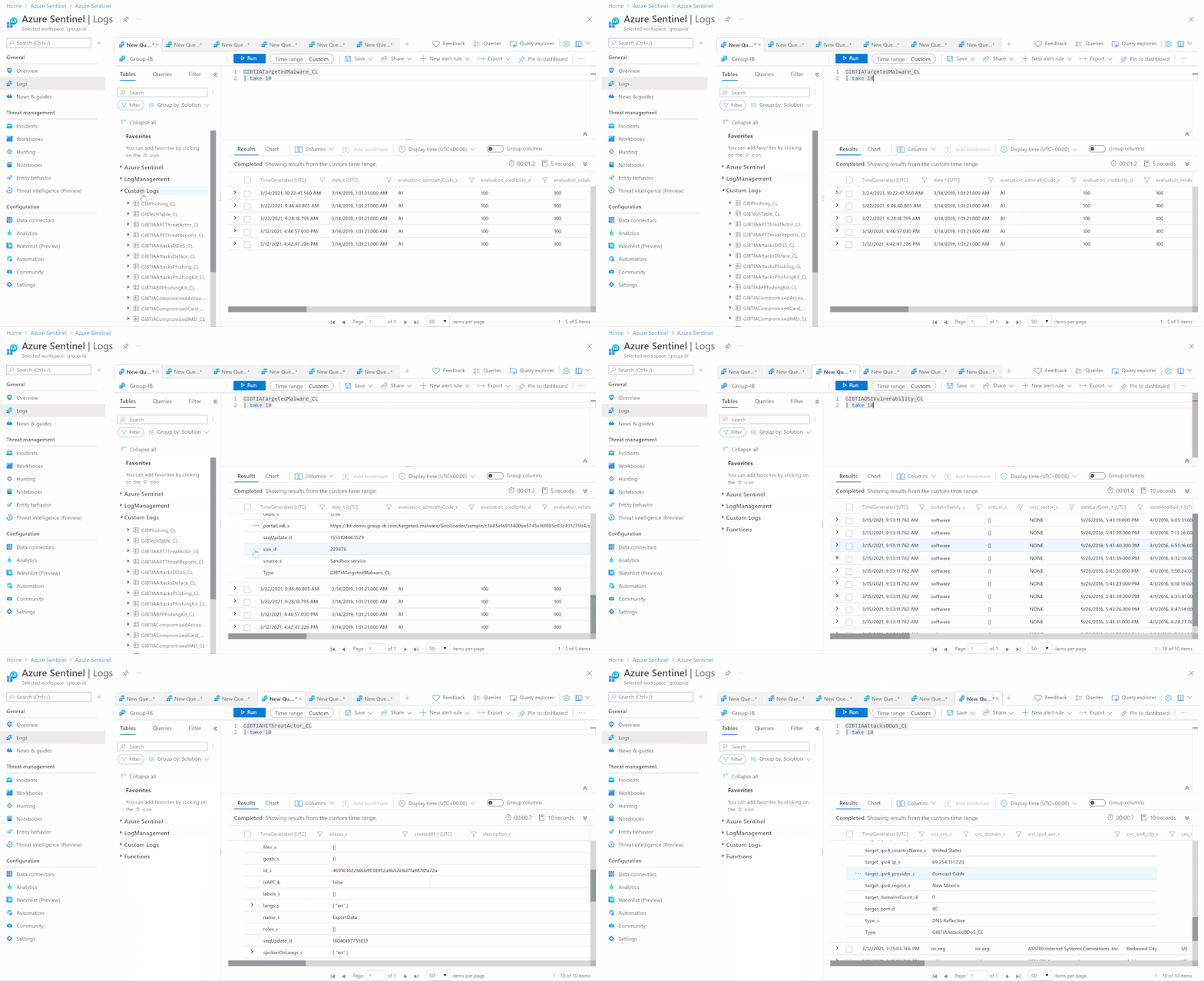
Detection & Investigation
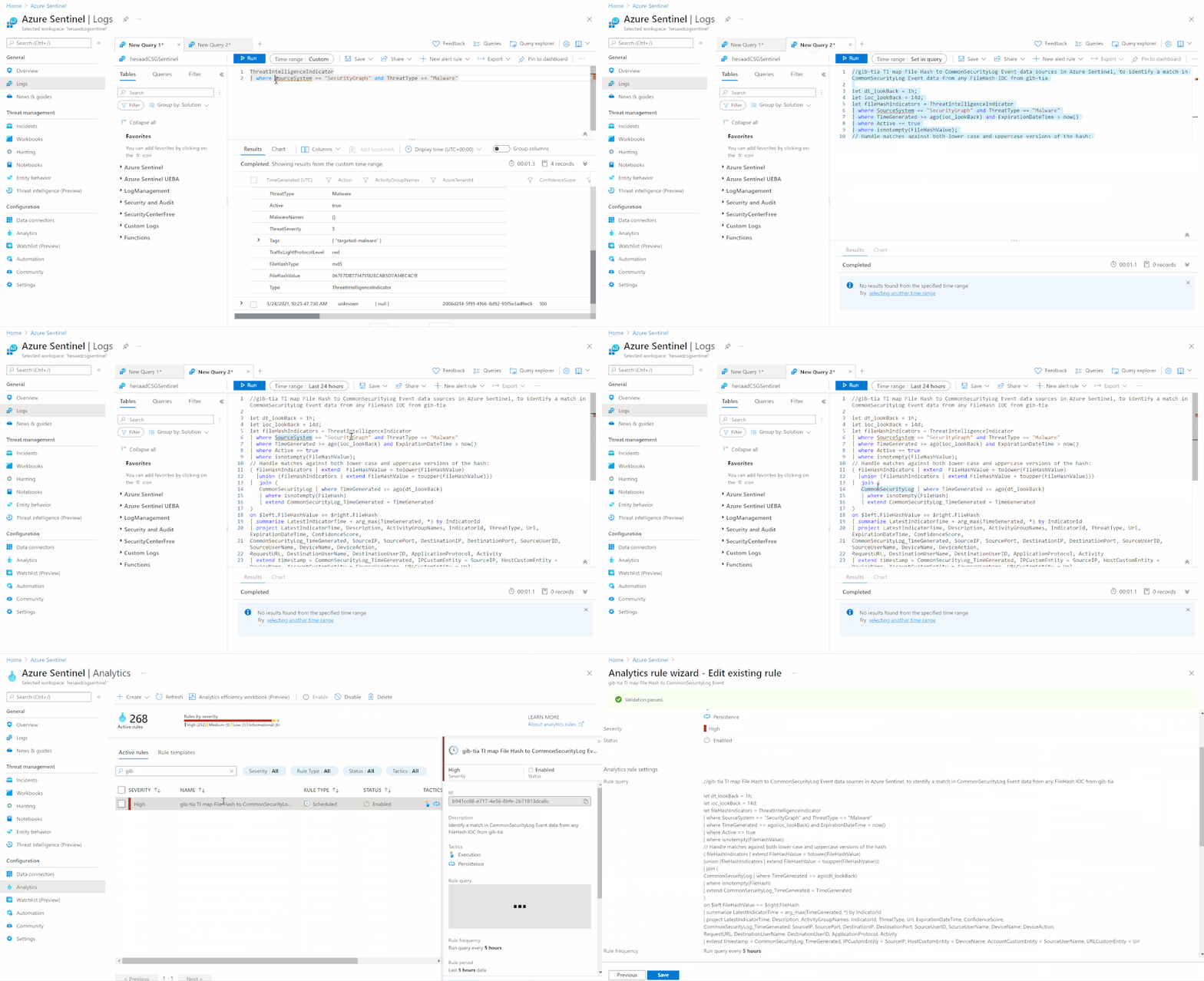
A sample Azure Sentinel Analytics rule to identify a match in CommonSecurityLog Event data from any FileHash IOC from gib-tia, we highly recommend you to check out the list of the Azure Sentinel TI Out of the box TI analytics rules:
//gib-tia TI map File Hash to CommonSecurityLog Event data sources in Azure Sentinel, to identify a match in CommonSecurityLog Event data from any FileHash IOC from gib-tia

let dt_lookBack = 1h;

let ioc_lookBack = 14d;

let fileHashIndicators = ThreatIntelligenceIndicator

| where SourceSystem == "SecurityGraph" and ThreatType == "Malware"

| where TimeGenerated >= ago(ioc_lookBack) and ExpirationDateTime > now()

| where Active == true

| where isnotempty(FileHashValue);

// Handle matches against both lower case and uppercase versions of the hash:

( fileHashIndicators | extend  FileHashValue = tolower(FileHashValue)

  |union (fileHashIndicators | extend FileHashValue = toupper(FileHashValue)))

|  join (

   CommonSecurityLog | where TimeGenerated >= ago(dt_lookBack)

   | where isnotempty(FileHash)

   | extend CommonSecurityLog_TimeGenerated = TimeGenerated

)

on $left.FileHashValue == $right.FileHash

| summarize LatestIndicatorTime = arg_max(TimeGenerated, *) by IndicatorId

| project LatestIndicatorTime, Description, ActivityGroupNames, IndicatorId, ThreatType, Url, ExpirationDateTime, ConfidenceScore,

CommonSecurityLog_TimeGenerated, SourceIP, SourcePort, DestinationIP, DestinationPort, SourceUserID, SourceUserName, DeviceName, DeviceAction,

RequestURL, DestinationUserName, DestinationUserID, ApplicationProtocol, Activity

| extend timestamp = CommonSecurityLog_TimeGenerated, IPCustomEntity = SourceIP, HostCustomEntity = DeviceName, AccountCustomEntity = SourceUserName, URLCustomEntity = Url
Get started today!
We encourage you to try it now!
You can also contribute new connectors, workbooks, analytics and more in Azure Sentinel. Get started now by joining the Azure Sentinel Threat Hunters GitHub community.
by Contributed | Apr 7, 2021 | Technology
This article is contributed. See the original author and article here.
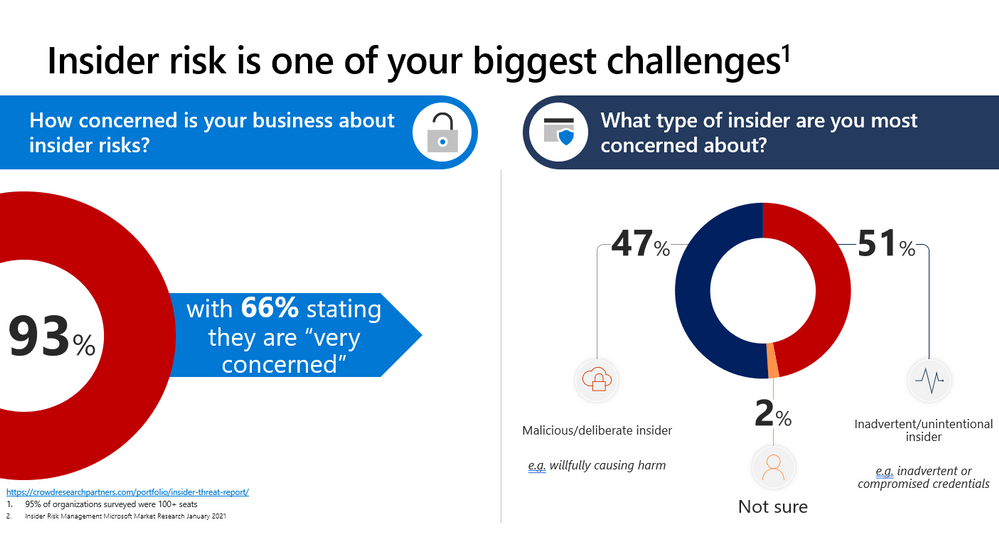
This webinar covers new announcements and recent updates in our risk management products – Insider Risk Management.
Watch on-demand
Resources:
Insider risk management in Microsoft 365 – Microsoft 365 Compliance | Microsoft Docs
Get started with Insider Risk Management
This webinar was presented on March 24, 2021, and the recording can be found here.
Attached to this post are:
- The FAQ document that summarizes the questions and answers that came up over the course of both webinars.
- A PDF copy of the presentation.
Thanks to those of you who participated during the two sessions and if you haven’t already, don’t forget to check out our resources available on the Tech Community.
Thanks!
@Robin_Baldwin on behalf of the MIP and Compliance CXE team


Recent Comments