
by Contributed | Apr 8, 2021 | Technology
This article is contributed. See the original author and article here.
Oxford’s AI Team 1 solution to Project 15’s Elephant Listening Project
Who are we?
Members of Microsoft Project 15 have approached Oxford University to help analyse these audio recordings to better monitor for threats and elephant well-being. We will use the machine learning algorithms to help identify, classify, and respond to acoustic cues in the large audio files gathered from Elephant Listening Project
What are we trying to do?
Microsoft’s Project 15’s
Elephant Listening Project Challenge document
The core of this project is to assist in Project 15’s mission to save elephants and precious wildlife in Africa from poaching and other threats. Project 15 has tied with the Elephant Listening Project (ELP) to cleverly record acoustic data of the rural area in order to listen for threats to elephants and monitor their health
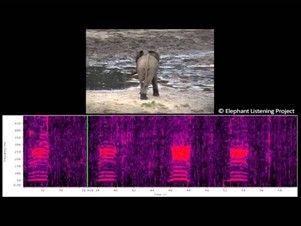
Baby elephant calling out for mama elephant.
How are we going to do it?
Documentation for video (here)
Data preview / feature engineering
The key to many machine learning challenges boils down to data quality: not enough data or too much data. In this case, the rich audio files proves expensive and time-consuming to analyse in full. Hence, MATLAB 2020b and the Audio Toolbox was used to truncate audio files down into processable sizes.
Before we began, we conducted a brief literaure search on what kind of audio snippets we needed to truncate out. A paper analysed gunshots in cultivated environments (Raponi et al.) and characteristed two distinctive signals in the acoustic profile in most guns: a muzzle blast and ballistic shockwave. From this, we had a better clue of what kind of audio snippet profiles we should extract.
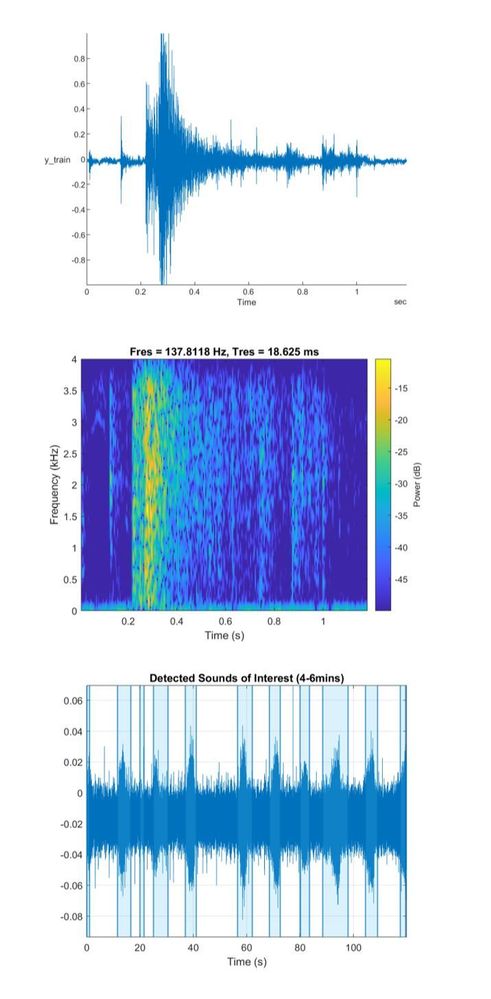
A variety of ELP audios were obtained and placed into a directory to work within MATLAB 2020b to ensure the audio snippets obtained reflected the diverse African’ environment. DetectSpeech, a function in MATLAB’s audio toolbox was used to extract audios of interest; audio snippets whose signal to noise ratio suggested speech due to it’s high frequency signal. These extracted snippets were compared to a gunshot profile obtained from the ELP with the spectrogram shown. This method allowed us to only analyse segments of the large 24hr audio file.
This datastore will be used later in validating and testing our models.
Modelling
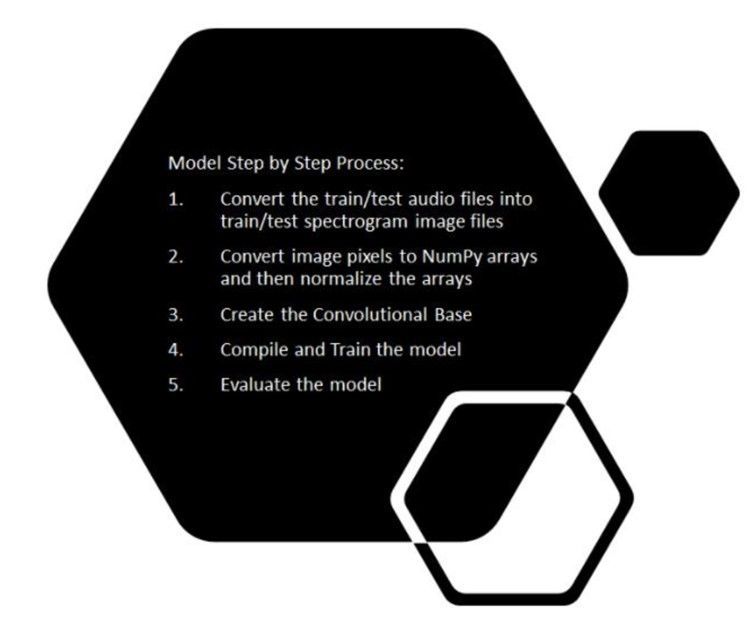
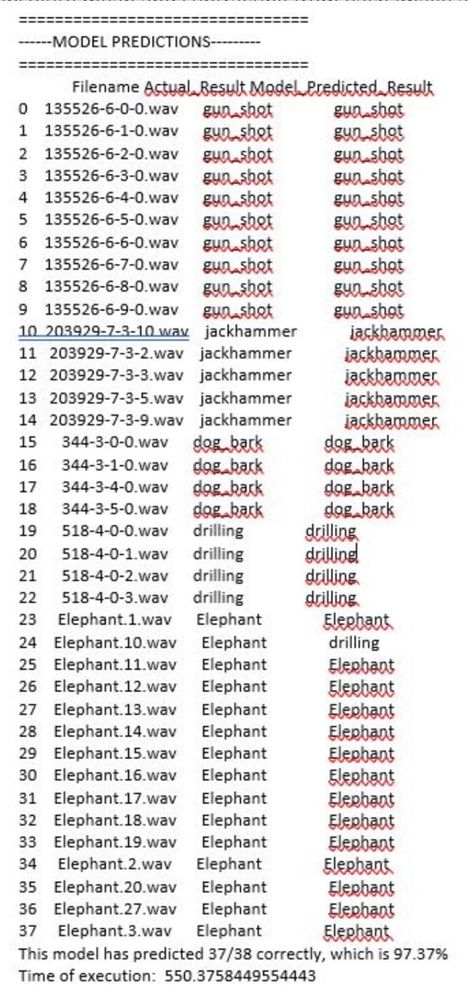
We developed and designed a deep learning model that would take in a dataset of audio files and classify elephant sounds, gunshot sounds and other urban sounds. We had approximately 8000 audio files as our training set and 2000 audio files as our testing set ranging from elephant sounds, gunshot sounds, to urban sounds. The procedure we followed was to convert these audio files into spectrograms and then classify based on the spectrogram images. The step-by-step process is highlighted below:
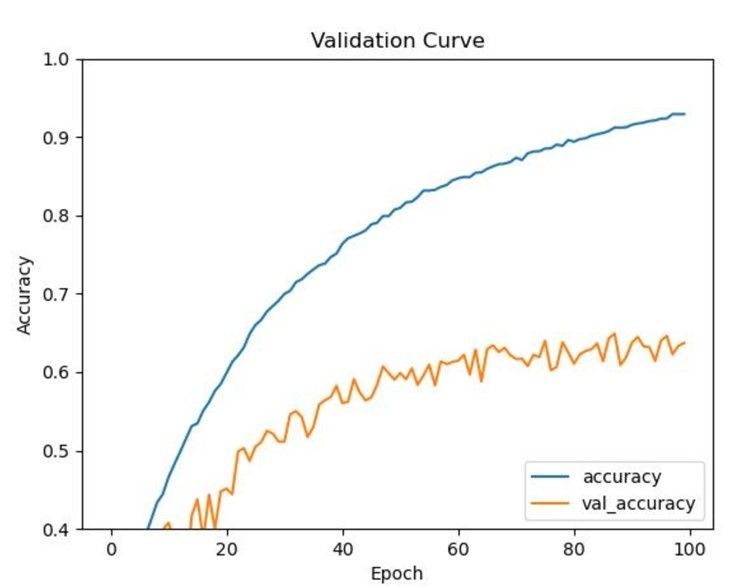
After getting the spectrograms, we converted the spectrograms into Numpy arrays with each pixel of an image is represented as an array. Spectrograms frequencies vary for each class of an audio file. The sound frequency pattern is different for elephants, gunshots, etc. We want to be able to classify each audio based on the differences in sound frequencies captured in spectrogram images. After converting spectrograms into Numpy arrays, we normalized each numpy representation of a spectrogram by taking the absolute mean and subtracting from each image and then diving by 256. From this point, we applied convolutional later and started training the model. We adjusted the hyperparameters to see which would yield better accuracy in classifying audio files. SGD has better generalization performance than ADAM. SGD usually improves model performance slowly but could achieve higher test performance. The figure below shows the results of the model:
Deployment Strategy
Our actual deployment strategy (as mentioned in our video presentation) is to deploy the built model to an Edge Device (NVIDIA jetson Nano connected to a microphone – in our case) which would be present in the location and perform real time inferencing. The device would wake up whenever there is a sound and perform the inferencing to detect either gunshots or elephant noise.
As of now we have our model deployed on cloud – using Azure ML Studio and is hosted through a docker endpoint (through ACI). Presently inferencing is being performed on the cloud using this endpoint. As an arrangement to this approach, all our data is hosted locally in our cloud workspace environment for the time being.
Simultaneously we are also testing the model deployment on our preferred edge device. Once this is done, we will be able to enable real time inferencing on the edge. Post successful completion of this we will also modify our data storage approach.
Conclusion and Future Directions
Currently we have a working model which is able to detect gunshots as well as elephant sound. Our model is deployed on cloud and is ready for inferencing.
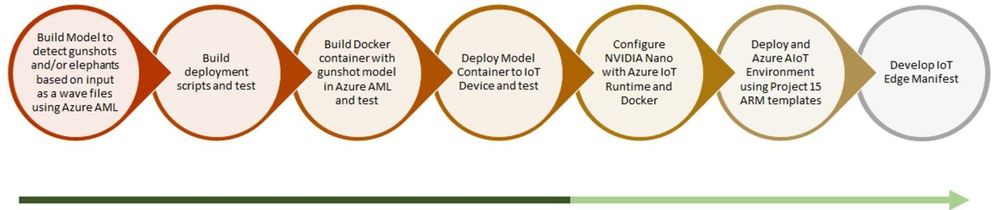
As per our end to end workflow – we are testing our model container deployed on our preferred IoT Device. Once this test is a success, we will configure our edge device with azure IoT runtime and docker. And then, test the same for real time edge inferencing with gunshot and elephant sound.
Upon the success of this, we will automate the entire deployment process using an ARM template. Once we reach a certain level of maturity technically and are ready to scale – we will develop an IoT Edge Deployment Manifest for replicating the desired configuration properties across a group of Edge Devices.
Our next steps solely for improving model performance –
- Classify elephant sounds based on demographics
- Combine gunshots with ambient sounds (Fourier transform)
- Eventually rework the way we infer so that a spectrogram file does not have to be created and ingested by the Keras model. This would be more of an in memory operation
Contact us if you’d like to join us in helping Project 15
Although we are proud of our efforts, we recognise more brains out there can help inject creativity into this project to further assist Project 15 and ELP. Please visit our GitHub repo (here) to find more information on our work and where you can help!
https://github.com/Oxford-AI-Edge-2020-2021-Group-1/AI4GoodP15
by Contributed | Apr 8, 2021 | Technology
This article is contributed. See the original author and article here.
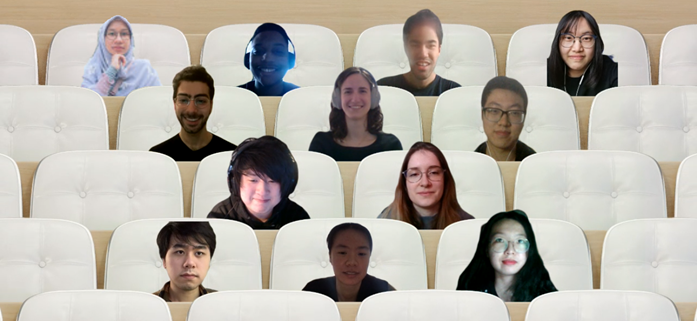
Team members (from top left to right):
Emeralda Sesari, Khesim Reid, Arzhan Tong, Xinyuan Zhuang, Omar Beyhum, Lydia Tsami, Yanke Zhang, Chon Ng, Elena Aleksieva, Zisen Lin, Yang Fan, Yifei Zhao
Supported by:
Lee Stott, Microsoft
Dean Mohamedally, University College London
Giovani Guizzo, University College London
The Team
We are a group of 12 students at University College London (UCL). UCL’s Industry Exchange Network (IXN) programme enabled us to work on this project in collaboration with Microsoft as part of a course within our degree.
Introduction
Attendance and engagement monitoring is an important but exceptionally challenging process universities and colleges; especially during the COVID-19 pandemic in 2020, students attend both online synchronous and asynchronous courses around the world. Predictably, we need a sensible course monitoring system to facilitate teaching staff and learning administrators who set the curriculum to better manage students in their courses, not just during the pandemic. ORCA is a system that was created for this purpose.
ORCA is designed to complement the online learning and collaboration tools of schools and universities, most notably Moodle and Microsoft Teams. In brief, it can generate visual reports based on student attendance and engagement metrics, and then provide them to the relevant teaching staff.
Since ORCA is designed to integrate with both MS Teams and Moodle, our entire development team (12 students in total) is grouped into two small groups (the MS Teams group and the Moodle group). The two groups set up the main functionalities of ORCA together and implemented the integrations with the respective platforms separately.
In short, ORCA is aimed to:
- assess the effectiveness of online learning by gathering data on students’ use of online learning including students’ attendance and engagement from both MS Teams and Moodle;
- keep track of the status of students that may impact their education;
- help teaching staff and learning administrators get actionable insights from data to improve teaching methods.
Design
ORCA allows institutions to gain insights about students’ attendance and engagement with online platforms. To accomplish this, the ORCA system mainly integrates with Moodle and Microsoft Graph
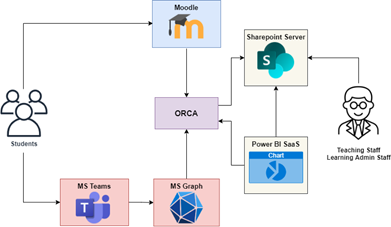
Figure 1: ORCA’s design
These two external systems send out notifications to ORCA whenever students interact with Moodle and Microsoft Teams respectively. ORCA then standardizes the incoming information into a common format and stores it on Sharepoint lists which the relevant teaching and learning administration staff can access to check attendance.
ORCA also gives the option to store student engagement data in a database which can be exposed to the Power BI dashboarding service and embedded into Sharepoint, allowing staff to visualize how students interact with online content.
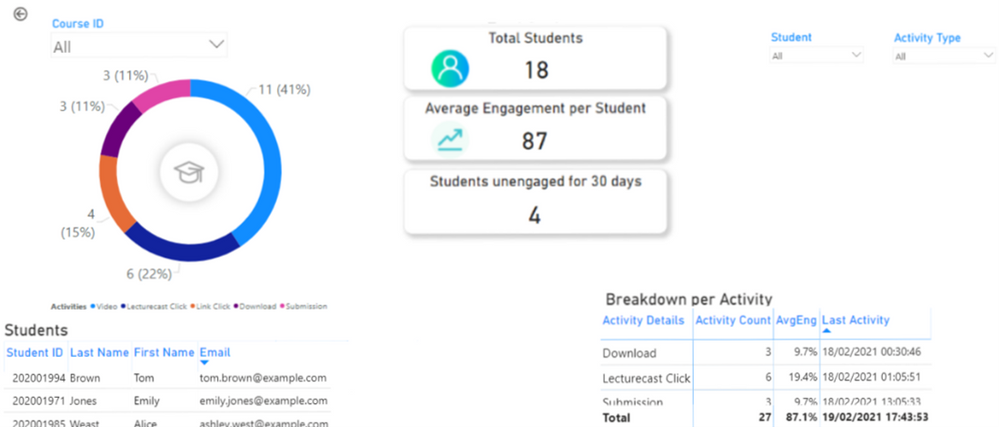
Figure 2: Student engagement visualized through Power BI
Implementation
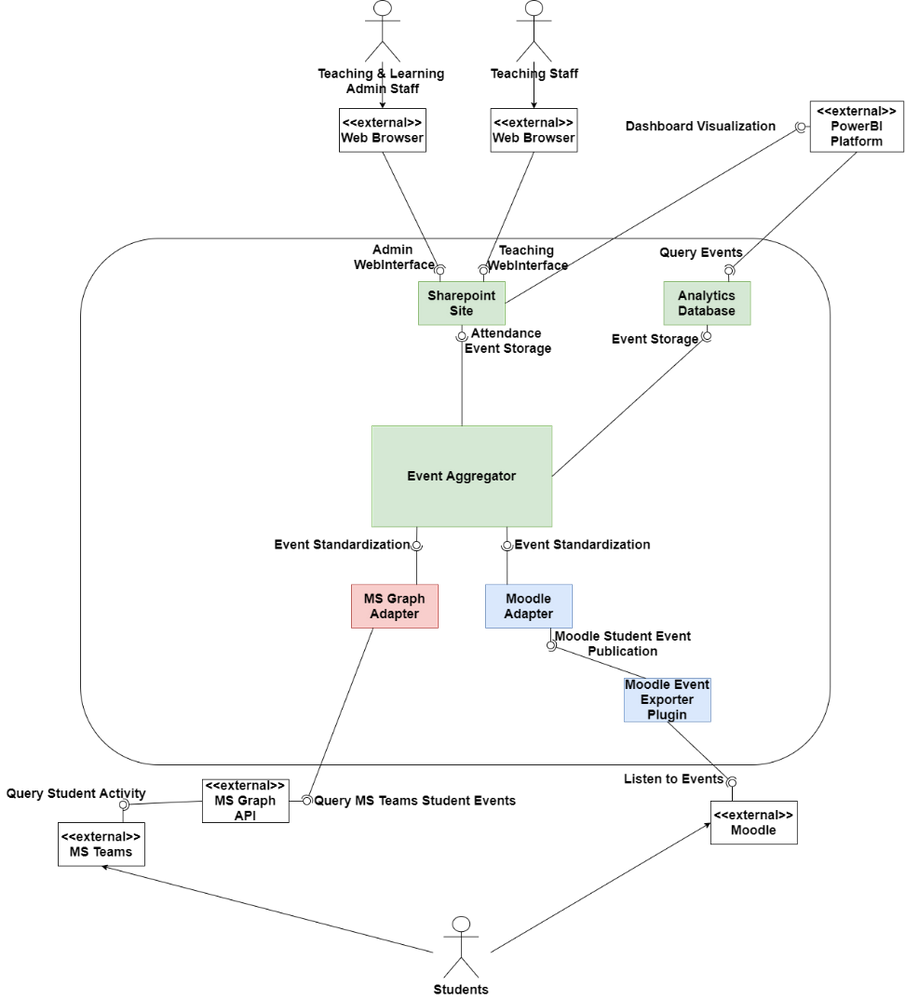
Figure 3: ORCA’s architecture
ORCA is a .NET 5 application implemented in C#. Figure 3 shows the main architecture of ORCA. The core of the system, the event aggregator, is where all the information is collected from different sources. The event aggregator interfaces with pluggable API adapters, which allow data (i.e., student events) from a different system to be standardized so that the event aggregator can persist them for future analysis.
So far, there are 2 main API adapters, the MS Graph Adapter which is notified by Microsoft’s Graph API whenever students join lectures, and the Moodle Adapter, which receives information about student activity through a plugin that can be installed on an institution’s Moodle server. The Moodle Adapter also follows the IMS Caliper standard, which allows it to integrate with any Learning Management System implementing the standard, such as Blackboard Learn.
ORCA can be automatically deployed to the Azure cloud or configured to run on a custom (on-premises) Windows, Linux, or macOS machine of an IT Administrator’s choosing. Powershell scripts and precompiled binaries are provided in our Github Releases page to automate configuration and deployment, although ORCA’s centralized configuration can also be manually changed.
ORCA makes use of Azure Resource Manager (ARM) Templates to define the resources it requires to run on the Azure cloud. By packaging a script which dynamically generates an ARM template based on the IT Administrator’s configuration choices, we can automatically provision and configure a webserver and optional database to run ORCA on the cloud within minutes. If a database was selected, the script also generates Power BI dashboards which automatically connect to the provisioned database.
Future Work
While the ORCA project is a functional software product that can be deployed to an institution’s infrastructure, we have yet to run it against real student data during the development stage due to privacy concerns. To comply with privacy regulations, current testing is based on synthetically generated data. We are in the process of piloting ORCA with UCL’s Information Services Division to better assess how the system meets institutions’ needs in a more productionized environment.
We also hope to increase ORCA’s level of customization and allow administrators to configure which activities count towards engagement, and at what point they should be automatically alerted about student inactivity.
ORCA is an open source project which any institution can adopt, contribute to, or simply inspire themselves from to build their own solution.
You can check it out at https://github.com/UCL-ORCA/Orca
by Contributed | Apr 8, 2021 | Technology
This article is contributed. See the original author and article here.
The Office Rangers (/u/OfficeRangers) will be hosting a Reddit AMA next Thursday, April 15th from 9:00 – 1:00 PDT. We will be covering all topics around the Microsoft 365 Apps for enterprise manageability, deployment and performance. covering all topics around Office deployment and manageability. Be sure to join us and ask us anything!
Link to AMA to follow shortly!
by Contributed | Apr 8, 2021 | Technology
This article is contributed. See the original author and article here.
Microsoft Sessions at NVIDIA GTC
This year’s NVIDIA GTC event is certain not to disappoint. The big buzz around cloud-based NVIDIA GPUs is the introduction of deep learning and AI capabilities complementary to existing visualization, rendering, and gaming workflows. Having on-demand versatility by which GPUs can be consumed and transacted empowers greater productivity and efficiency with enhanced VDI/DaaS, real-time visualizations, and more immersive gaming & entertainment experiences.
This year we are sharing examples of some of the most versatile GPU-powered resources anywhere in the public cloud, with a clear understanding of maximum cost-for-performance metrics. We’re focusing on three main application use cases for GPUs:
- Visualization, including 3D design rendering, remote rendering, and desktop virtualization
- AI for machine learning, model training and inferencing
- Edge Computing for hybrid scenarios, decoupled environments, and IoT device ecosystems
Microsoft Digital Sessions at NVIDIA GTC
Microsoft will be supporting the following pre-recorded sessions at GTC this year.
SESSION ID
|
TITLE
|
SPEAKER(S)
|
S32779
|
Azure: Empowering the World with High-Ambition AI and HPC
|
Girish Bablani, CVP, A and Ian Buck, VP Data Center, NVIDIA
|
S31060
|
Get to Solutioning: Strategy and Best Practices When Mapping Designs from Edge to Cloud
|
Paul DeCarlo Principal Cloud Advocate Microsoft
|
S31074
|
The Possibilities of Intelligence: How GPUs are Changing the Game across Industries
|
Rishabh Gaur Technical Architect Microsoft
|
S31141
|
Inferencing at Scale with Triton, Azure, and Microsoft Word Online
|
David Langworthy Architect Microsoft, Mahan Salehi Deep Learning Software PM NVIDIA, Emma Ning SPM Microsoft
|
S31330
|
Interactive Visualization of Large-Scale Super-Resolution Digital Core Samples in Azure
|
Kadri Umay WW CTO Process Manufacturing and Resources Microsoft Josephina Schembre-McCabe Digital Rock Technology R&D Specialist Chevron
|
S31582
|
Accelerating Large-Scale AI and HPC in the Cloud
|
Eddie Weill Data Scientist & Solutions Architect NVIDIA Jon Shelley HPC/AI Benchmarking Team, Principal PM Manager, Azure Compute Microsoft
|
S31594
|
Seamlessly Deploy Graphics-Intensive Geoscience Applications On-Prem and in the Cloud via Azure Stack HUB
|
Gaurang Candrakant Principal PM, Azure Edge + Platform Microsoft Shashank Panchangam Chief product Manager, Cloud services Halliburton
|
S31610
|
Accelerating AD/ADAS Development with Auto-Machine Learning + Auto-Labeling at Scale
|
Henry Bzeih CSO/CTO Automotive Microsoft Willy Kuo Chief Architect Linker Networks
|
S31614
|
Edge-Native Application Research using Azure Stack Hub by Carnegie Mellon University
|
Kirtana Venkatraman Program Manager 2 Microsoft James Blakley Living Edge Lab Associate Director Carnegie Mellon University Thomas Eiszler Senior Research Scientist Carnegie Mellon University
|
S31884
|
Latest Enhancements to CUDA Debugger IDEs
|
Julia Reid Program Manager 2 Microsoft Steve Ulrich Software Engineering Manager NVIDIA
|
S31873
|
Using Unreal Engine Anywhere from the Cloud to your HMD
|
Patrick Cesium xx Cesium Pete Rivera xx Microsoft Tim Woodard Senior Solutions Architect NVIDIA Sebastien Loze Epic Games Veronica Yip CloudXR Product Manager NVIDIA Sean Young Director of Global Business Development, Manufacturing NVIDIA
|
S32001
|
Deploy Compute and Software Resources to Run State-of-the-Art GPU-Supported AI/ML Applications in Azure Machine Learning with Just Two Commands
|
Accelerated Data Science
Krishna Anumalasetty Principal Program Manager Microsoft Manuel Reyes Gomez Developer Relations Manager NVIDIA
|
S32107
|
Building GPU-Accelerated Pipelines on Azure Synapse Analytics with RAPIDS
|
Rahul Potharaju Principal Big Data R&D Manager Microsoft Alexander Spiridonov Solution Architect NVIDIA
|
S31860
|
Introducing NVIDIA Nsight Perf SDK: A Graphics Profiling Toolbox
|
Avinash Baliga Software Engineering Manager NVIDIA Austin Kinross Senior Software Engineer Microsoft
|
S31644
|
Profiling PyTorch Models for NVIDIA GPUs
|
Geeta Chauhan PyTorch Partner Engineering Lead Facebook AI Gisle Dankel Software Engineer Facebook Maxim Lukiyanov Product Manager, PyTorch Profiler Microsoft
|
S32224
|
Accelerating Deep Learning Inference with OnnxRuntime-TensorRT
|
Steven Li Software Engineer Microsoft Kevin Chen NVIDIA Peter Pyun Principal Data Scientist NVIDIA
|
S32228
|
Build Immersive Mixed-Reality Experiences with Azure Remote Rendering.
|
Rachel Peters Senior Program Manager Azure Remote Rendering, Microsoft
|
S32240
|
ONNX Runtime: Accelerating PyTorch and TensorFlow Inferencing on Cloud and Edge
|
Peter Pyun Principal Data Scientist NVIDIA Emma Ning Senior Product Manager Microsoft
|
E32336
|
Microsoft Azure InfiniBand HPC Cloud User Experience and Best Practices
|
Gilad Shainer SVP Marketing, Networking NVIDIA Jithin Jose Senior Software Engineer, Microsoft Azure Microsoft
|
SS33079
|
Enterprise ready ML Model Training on NVIDIA GPUs across Hybrid Cloud, leveraging Kubernetes
|
Saurya Das Product Manager, Azure ML Microsoft
|
S31076
|
Bringing AI to the Edge
|
Rishabh Gaur Technical Architect Microsoft
|
S32184
|
Azure Live Video Analytics with Nvidia DeepStream
|
Avi Kewalramani Sr. Product Manager Microsoft
|
NVIDIA DLI Training Powered by Azure
Microsoft is proud to host the NVIDIA DLI instructor-led online training covering AI, accelerated computing, and accelerated data science all powered on Microsoft Azure.
This year’s GTC event is shaping up to mark a major leap forward in how GPUs are utilized for modern application and service development workflows.








Recent Comments