by Contributed | Apr 20, 2021 | Technology
This article is contributed. See the original author and article here.
The small island of Malta is about to become much bigger: April 24 is set to see scores of speakers and tech enthusiasts meet digitally for the country’s first-ever Data Saturday.
This Saturday’s event is scheduled to host the best speakers and technical sessions about Microsoft Data Platform available for free to the entire world.
The Maltese edition of Data Saturday, the larger event which enables the data community to run small regional events with little outlay or set-up difficulties, is made especially by the tech community for the tech community.
Co-organized by Data Platform MVP and Malta Microsoft Data Platform User Group member Dennes Torres, all speakers and organizers are volunteers, who expect to stay awake until late in the night to prepare an unforgettable learning experience.
Viewers, meanwhile, will play a part in deciding the conference itself: they will vote for the speakers and sessions.
For more information, visit the Meetup and Facebook pages.
by Contributed | Apr 20, 2021 | Technology
This article is contributed. See the original author and article here.
Numerous Government agencies make Healthcare Open Data available to the public at no cost. Data from the CDC, CMS, FDA, World Bank, US Census, USDA and many others provide rich sources of valuable data. These vast sources of robust and useful data are free to use but can have different file formats, different table structures, different context, and different data granularities. Ingesting all of this data into a common place where it can be used and shared is often time-consuming and challenging. I’ve put together a repository in GitHub called Power Pop Health to help with these challenges.
Power Pop Health is a collection of content intended to simplify the process of ingesting and prepping Healthcare Open Data for Analytics, Business Intelligence, Data Science, and more. Power Pop Health has a simple mission: Make it easy for you to ingest, transform and format Healthcare Open Data and common reference tables so that you can achieve more. The GitHub repository can be viewed at this link.
How does Power Pop Health work? I’ve tried to make it simple with low code/no code/no PowerShell deployment so that anyone can use it with nothing more than an Azure subscription and Power BI. Where code is necessary, there are cut-and-paste scripts with tutorial videos for the deployment:
- Step 1 – Ingest Raw Data into an Azure Data Lake
- Step 2 – Make the Data usable in Azure and/or Power BI
- Step 3 – You take it from here! The data is ready to blend with your Organizational data, use for training, create demos, analyze to find trends, etc.
What data is currently available in the first release of Power Pop Health?
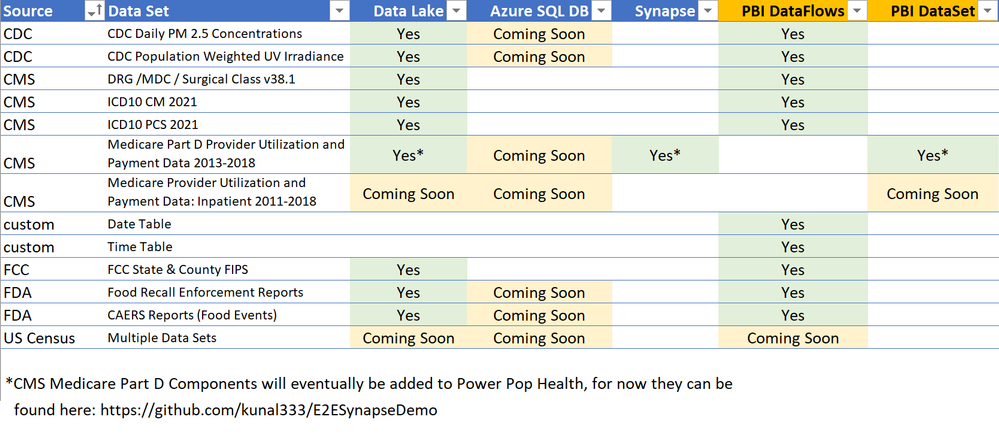
Over the last few years I have accumulated examples and tutorials that leverage public Healthcare data. This first release is a repository to share those examples in a unified format, and in one place. Future additions to this repository will be based on feedback from the community, with an initial plan to focus primarily on Population Health data such as Social Determinants of Health. Below is a chart of the data available in this first release:
Here’s a quick summary of each data set in the initial release. Before using these data sources, I’d also recommend reading the licensing terms from the data providers to ensure that you are using the data appropriately:
1. CDC Daily PM 2.5 Concentrations – Air Quality measurements at the level of States and Counties for 2001-2016.
2. CDC Population Weighted UV Irradiance – Ultraviolet Radiation measurements at the level of States and Counties for 2004-2015.
3. CMS DRG /MDC / Surgical Class v38.1 – Diagnoses Related Groups (DRGs), Major Diagnostic Categories, and Surgical Class version 38.1.
4. CMS ICD10 CM 2021 – 2021 ICD10 CM Diagnosis codes for the US.
5. CMS ICD10 PCS 2021 – 2021 ICD10 PCS Procedural codes for the US.
6. Date Table (DataFlows) – A custom Date Table that can be deployed to Power BI DataFlows.
7. Date Table (Power Query) – A custom Date Table that can be deployed to Power BI Power Query.
8. Time Table – (DataFlows) – A custom Time Table that can be deployed to Power BI DataFlows.
9. Time Table (Power Query) – A custom Time Table that can be deployed to Power BI Power Query.
10. FCC State & County FIPS – A reference table for State and County FIPS geographical mapping codes provided by the FCC.
11. FDA Food Recall Enforcement Reports – Foods that have been recalled.
12. FDA CAERS Reports (Food Events) – Adverse events attributed to Foods.
13. Medicare Part D Provider Utilization and Payment Data 2013-2018 – I’ll have this data available in the next release, but for now it is available in an end-to-end Azure Synapse and Power BI solution at this link: https://github.com/kunal333/E2ESynapseDemo
What’s coming next in Power Pop Health?
I’ll change the roadmap based upon feedback, popularity of data sources, and updates to Azure and Power BI. Tentatively the plan is to roll out three phases:
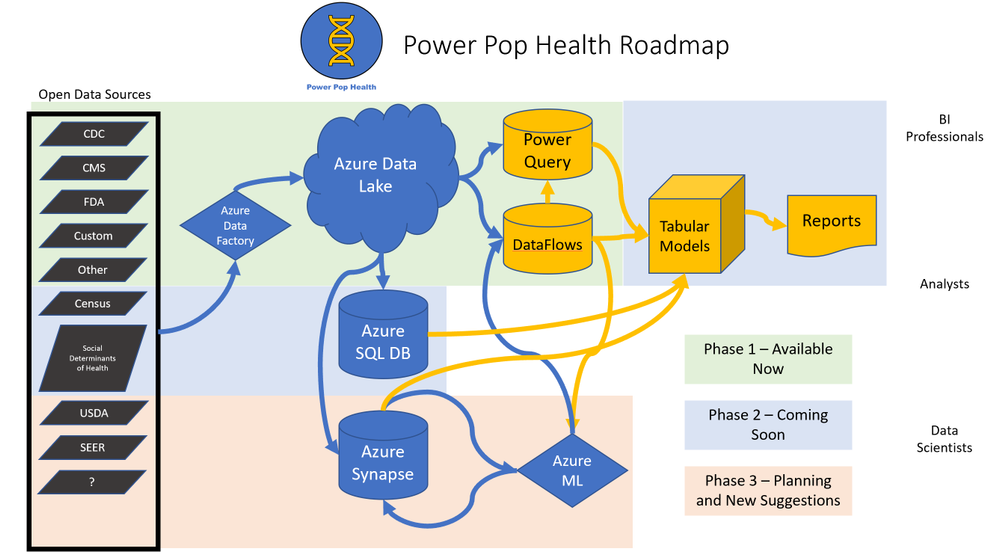
- Current Phase – Roll out a framework for ingesting several sources of healthcare, population health, reference tables and other Open Data into Azure Data Lake and Power BI DataFlows/Power Query.
- Phase 2 – Add additional data sources. Introduce an Azure SQL DB layer where larger tables of data can be curated and queried for high performance. Also add some Power BI PBIX files with examples of data visualization.
- Phase 3 and Beyond – Add additional data sources. Introduce an Azure Synapse layer including Azure ML.
How can you get started?
Read the landing page on the GitHub site at this link, and follow the instructions in the videos at the bottom of that page. Each source of Healthcare Open Data also has a folder containing specific instructions with links to videos describing how to deploy those datasets.
Suggestions and Questions
This launch is the first time I’m sharing the Power Pop Health content for feedback, so please pass along suggestions that can help make this repository better and more useful. Are there different data sets that would offer value? Would additional data transformations into other formats be helpful? Please direct suggestions and questions to my LinkedIn or Twitter accounts:
LinkedIn: https://www.linkedin.com/in/gregbeaumont
Twitter: https://www.twitter.com/grbeaumont

by Contributed | Apr 20, 2021 | Technology
This article is contributed. See the original author and article here.
In this installment of the weekly discussion revolving around the latest news and topics on Microsoft 365, hosts – Vesa Juvonen (Microsoft) | @vesajuvonen, Waldek Mastykarz (Microsoft) | @waldekm are joined by a Power Platform Cloud Advocate April Dunnam (Microsoft) | @aprildunnam
Topics discussed in this session include:
- April’s currently role and focus areas as a Cloud Advocate
- Her experiences while starting her career in IT with her role models being for example Cathy Dew (Microsoft) and Laura Rodgers (IW Mentor)
- Discussion on the inclusiveness of the IT industry and in community efforts – we want everyone to feel welcome on getting involved!
- How to get started in the community – steps on getting involved in the community and growing your opportunities with the routes
- Power Platform and the different flavors of it – no-code, low-code, pro-code and more
Please remember to keep on providing us feedback on how we can help on this journey. We always welcome feedback on making the community more inclusive and diverse.
Covering also 24 articles from Microsoft and the Community.
This episode was recorded on Monday, April 19, 2021.
These videos and podcasts are published each week and are intended to be roughly 45 – 60 minutes in length. Please do give us feedback on this video and podcast series and also do let us know if you have done something cool/useful so that we can cover that in the next weekly summary! The easiest way to let us know is to share your work on Twitter and add the hashtag #PnPWeekly. We are always on the lookout for refreshingly new content. “Sharing is caring!”
Here are all the links and people mentioned in this recording. Thanks, everyone for your contributions to the community!
Events:
Microsoft articles:
Community articles:
Additional resources:
If you’d like to hear from a specific community member in an upcoming recording and/or have specific questions for Microsoft 365 engineering or visitors – please let us know. We will do our best to address your requests or questions.
“Sharing is caring!”
by Contributed | Apr 20, 2021 | Technology
This article is contributed. See the original author and article here.
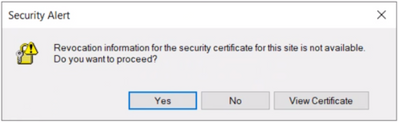
User may get the following security alert on certificate resigning SSL when trying to connect with any of the AAD options from SSMS:
“Revocation information for the security certificate for this site is not available. Do you want to proceed?”
Yes No View Certificate
This happens when a client using Internet Explorer (IE) sends a request to an Online Certificate Status Protocol (OCSP ) server to verify if the certificate has been revoked. If the IE browser is configured to expect an OCSP response and it’s not able to determine the revocation status of the certificate, the user gets prompted with the above security alert. Chrome is not affected because it disabled OCSP checks by default in 2012, due to latency and privacy issues.
Mitigation steps:
To fix Server certificate revocation failed problems, a workaround is to turn off this setting – “Check for server certification revocation” in IE options, which will disable this for all OAUTH negotiations system-wide. To disable this option, perform the following steps.
- Type gpedit.msc in windows search and click OK.
- Navigate to Computer Configuration > Administrative Templates > Windows Components > Internet Explorer > Internet Control Panel > Advanced Page or Internet Explorer > Tools > Internet options > Advanced
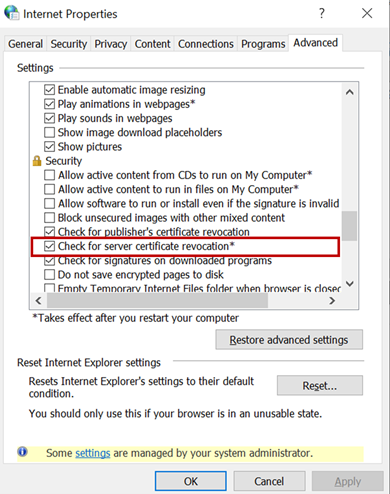 check for server certificate revocation
- Uncheck “Check for server certificate revocation”.
- Reboot the server. *IMPORTANT: It takes effect after you restart your computer.
- Remove CRL/OCSP disk cache entries on the client machine. From the Windows command line run:
> certutil -urlcache CRL delete
> certutil -urlcache OCSP delete
- Perform “Clear SSL state” in Internet Explorer > Internet Options > Content.
On the client machine run gpupdate /force in the CMD window to force update the group policy. You can apply the GPO under user configuration, so the corresponding registry change will be under HKEY_CURRENT_USER.
Open Registry Editor and go to the path HKEY_CURRENT_USERSOFTWAREPoliciesMicrosoftWindowsCurrentVersionInternet SettingsCertificateRevocation with REG_DWORD 0
Open IE and check the setting, it should be disabled.
Troubleshooting connectivity with AAD options:
Open a PowerShell with administrative rights from the troublemaking machine and run below commands.
#OPTION 1 – bypass SQL Azure DB to see if your communication works with Azure AD from your machine
> Install-Module MSOnline > Import-Module MSOnline > $Msolcred = Get-credential
# use your federated credenaials (i.e john@contoso.com + password)

> Connect-MsolService -Credential $MsolCred
and check the federated authentication group
> Get-MsolGroup -MaxResults 10 –Searchstring  mygroup@contoso.com | format-list
# displays group info as it is represented in Azure AD (i.e. mygroup or check the individual user)

> Get-MsolUser -UserPrincipalName john@contoso.com | format-list
You should see what is stored in Azure AD under a specific user or group alias/name.
#OPTION 2 – Check the minimum connectivity requirement
Check connectivity to AAD endpoint for Password and Integrated authentication:
> tnc login.windows.net -port 443
Check connectivity to AAD endpoint for Universal with MFA authentication:
> tnc login.microsoftonline.com -port 443
Note that additional endpoints might be required, depending on AAD and on-premises AD setup. Capturing and debugging network or Fiddler traces is what usually helps in those situations.
Additional points to check – Make sure the firewall configuration is correctly set up
- Check your firewall settings and make sure it allows communication with the above AAD endpoints: login.windows.net and login.microsoftonline.com.
- Ensure the AAD required ports are not blocked by the firewall.
Note: The above error is mostly triggered when using SSMS. Azure Data Studio doesn’t have this issue because it has a custom MFA implementation that doesn’t use an old embedded IE browser.
by Contributed | Apr 20, 2021 | Technology
This article is contributed. See the original author and article here.
Hello folks,
A couple weeks ago I wrote about how I leveraged PowerShell SecretManagement to generalize a demo environment. In that article I only talked about Windows virtual machines running in Azure. However, my colleague Thomas Maurer revisited the topic in his article, Stop typing PowerShell credentials in demos using PowerShell SecretManagement. Thomas really concentrated on how the local Secret Store can help when you have demos of local scripts that need secrets, versus my article that concentrated more on how the SecretManagement module paired with the Az.KeyVault module can help manage not only demo environment but help manage local accounts across production environments.
In response to both these articles we got a lot of questions, so I decided to address one of them here.
Will it work for linux?
Absolutely, you can have PowerShell on Linux, and import the modules mentioned in the articles.
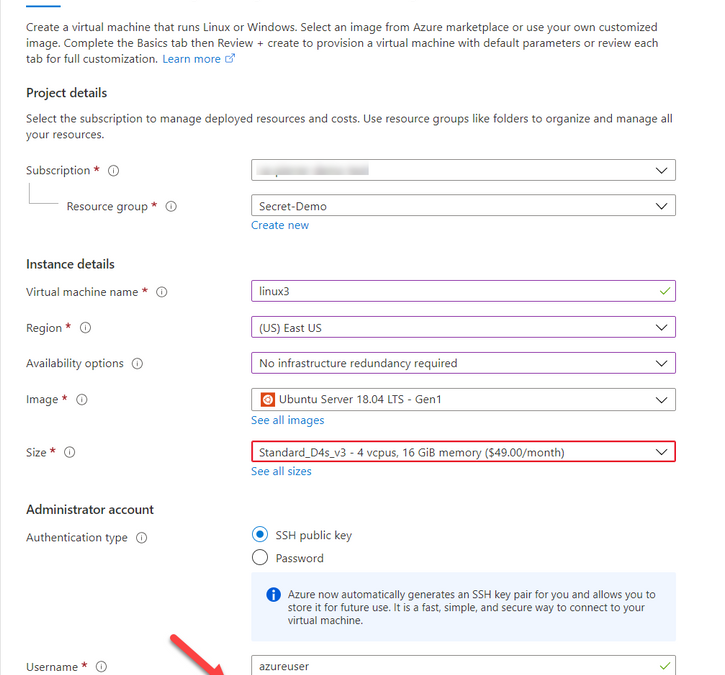
One of the differences that in most case we use SSH keys to access a VM running in Azure. And Azure has a couple ways of storing that information. When creating a VM you can Generate one at deployment, upload your own, or use an existing one already in azure.

When using “Use existing one stored in Azure” it refers to a separate repo in azure different than Azure Key Vault. It actually saves the key in a portal service SSK Keys.
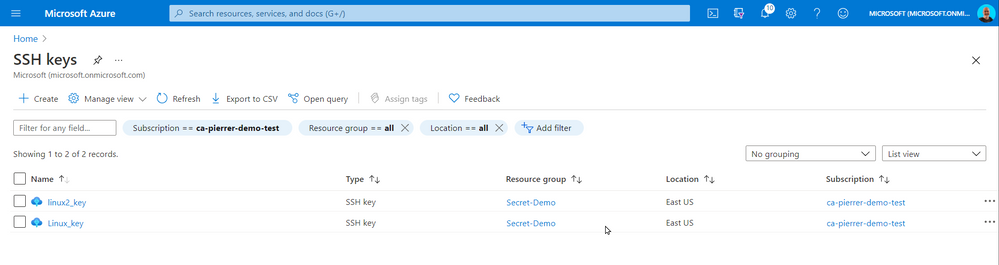
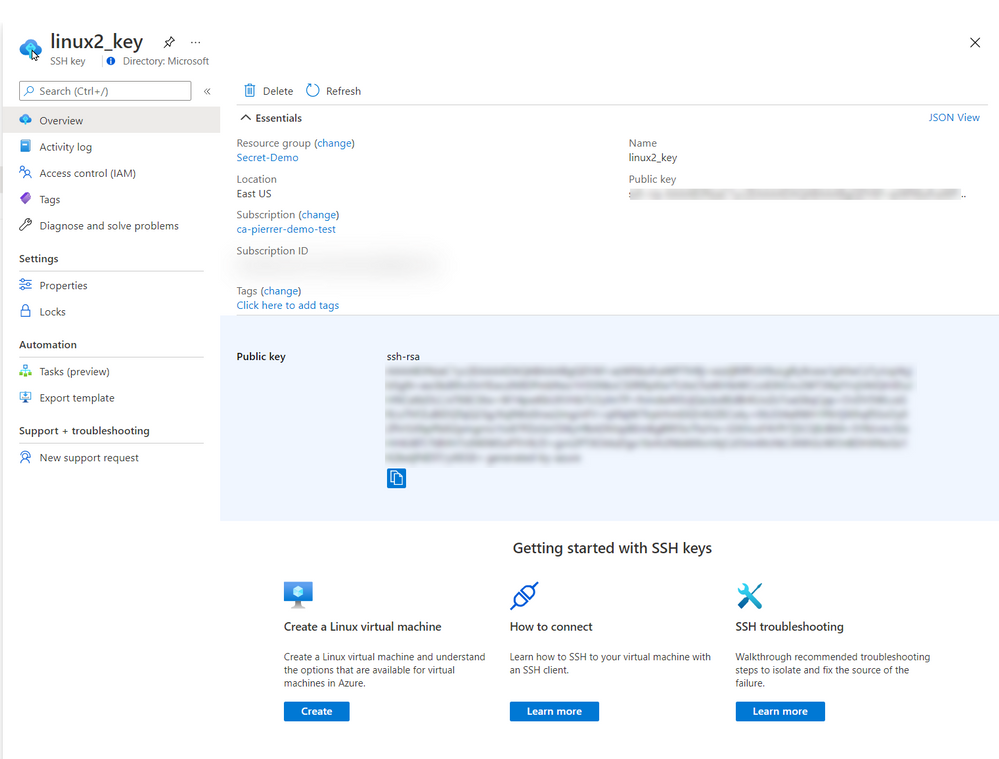
The SSH Keys portal service does give you the ability to get the public key so you can connect to the appropriate VMs.
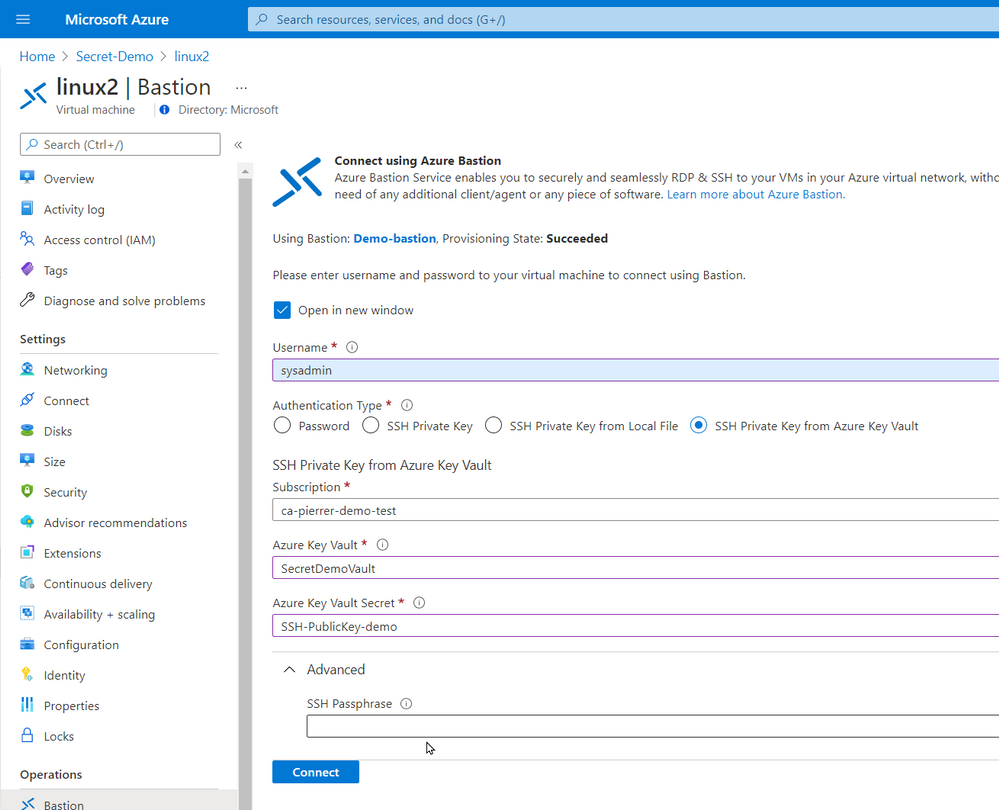
In the production environment that I’m currently involved we do not allow public IP assigned to VMs without a proper business case. I actually agree with this policy. So, we use Azure Bastion. Connecting using Azure Bastion offers the possibility to use one of several ways to authenticate to the VMs.
- Password
- SSH Private Key
- SSH Private Key from Local File
- SSH Private Key from Azure Key Vault
By using Azure Key Vault you can also manage the SSH keys by setting expiration dates, apply proper versioning, assign tags AND have them available to the Azure Bastion with the option of requesting the Passphrase.
Just like my previous article. You can even schedule an Azure Automation task, or an Azure Function to monitor the expiration dates and renewregenerate the SSH Keys for you.
I used the same Azure automation as the last article with a new runbook to create the SSH keys for my environment and store them in Azure Key Vault
param(

    [string]$ResourceGroupName = "Secret-Demo",
    [string]$vaultname = "SecretDemoVault"

)
Disable-AzContextAutosave -Scope Process

$VERSION = "1.0"
$SecretStoreName = "AzKeyVault"
$currentDay = (get-date).ToString("dMyyyyhhmmtt")
$ExpirationDate = (GET-DATE).AddMonths(2)

Write-Output "Runbook started. Version: $VERSION at $currentDay"
Write-Output "---------------------------------------------------"

# Authenticate with your Automation Account
	$connection = Get-AutomationConnection -Name AzureRunAsConnection
    # Wrap authentication in retry logic for transient network failures
    $logonAttempt = 0
    while(!($connectionResult) -and ($logonAttempt -le 10))
    {
        $LogonAttempt++
        # Logging in to Azure...
        $connectionResult = Connect-AzAccount `
                                -ServicePrincipal `
                                -Tenant $connection.TenantID `
                                -ApplicationId $connection.ApplicationID `
                                -CertificateThumbprint $connection.CertificateThumbprint

        Start-Sleep -Seconds 30
    }

# Set Azure Context

    $AzureContext = Get-AzSubscription -SubscriptionId $connection.SubscriptionID
    $SubID = $AzureContext.id
    Write-Output "Subscription ID: $SubID"
    Write-Output "Resource Group: $ResourceGroupName"
    Write-Output "VaultName: $vaultname"
    Write-Output "Local store name: $SecretStoreName"

#Create Password

    $Length = 24
    $characters = @([char[]]@(48..57),[char[]]@(65..90),[char[]]@(97..122),@('!','#','%','^','*','(',')','-','+','/','{','}','~','[',']'))
    $SSH_KEY_PASSWORD = ($Characters | Get-Random -Count $Length ) -join ''

# Register keyvault

Register-SecretVault -Name $SecretStoreName -ModuleName Az.KeyVault -VaultParameters @{ AZKVaultName = $vaultname; SubscriptionId = $SubID }

# create key and set it in Key Vault

$KeyPath = $env:TEMP
Write-Output "Key File path: $KeyPath"


New-RSAKeyPair -Length 2048 -Password $password -Path $KeyPathid_rsa -Force

$SSH_PRIVATE_KEY = Get-Content $KeyPath/id_rsa
$SSH_PUBLIC_KEY = Get-Content $KeyPath/id_rsa.pub
$SSH_PUBLIC_PEM = Get-Content $KeyPath/id_rsa.pem


Write-Output "SSH Passphrase: $SSH_KEY_PASSWORD"
Write-Output "SSH private Key: $SSH_PRIVATE_KEY"
Write-Output "SSH public Key - pub: $SSH_PUBLIC_KEY"
Write-Output "SSH public Key - pem: $SSH_PUBLIC_PEM"


Set-Secret -Name "SSH-Passphrase-demo" -Secret $SSH_KEY_PASSWORD -Vault $SecretStoreName
Set-Secret -Name "SSH-PrivateKey-demo" -Secret $SSH_PRIVATE_KEY -Vault $SecretStoreName
Set-Secret -Name "SSH-PublicKey-demo" -Secret $SSH_PUBLIC_KEY -Vault $SecretStoreName
Set-Secret -Name "SSH-PublicKeypem-demo" -Secret $SSH_PUBLIC_PEM -Vault $SecretStoreName
Please note that this runbook uses the New-RSAKeyPair cmdlet from the PEMEncrypt module imported in my Automantion environment from the PowerShell Galery.
Now, again this is a proof-of-concept piece of code. For production use a lot of changes would be required (not an exhaustive list)
- Expiration dates you be set.
- A function to validate that the afore mentioned expiration is not imminent.
- A function to update the key on each Linux VM in a set environment.
- …
So, in conclusion, yes, you can use these new module on a Linux VM of you can use these new modules to help you manage the access to these VMs.
I hope this helps.
Cheers!


Recent Comments