Capturing DebugDiag dumps for a specific method/function call

This article is contributed. See the original author and article here.

Debug Diag involves various methods of dump collection methods that can be incorporated. In this blog we would be dealing with one such method that helps to capture crash dumps on particular exception only when it contains a specific function in its call stack.


When can you use this type of data collection?


You can use this method to capture the dumps if you are facing the below challenges:


  • Your application pool recycles very frequently making it difficult to monitor the process ID for procdump command to run

  • The exception being targeted can occur in other scenarios as well, hence generating a lot of false positive dumps

  • We know call stack of the exception or a specific function call where the exception comes from


Steps to capture dumps for an exception occurring from specific method :


  1. Download the latest Debug Diagnostic Tool v2 Update 3 from https://www.microsoft.com/en-us/download/details.aspx?id=58210

  2. Open the Debug diag collection

  3. Once you open this , you will automatically be prompted with Select Rule Type wizard, if not select Add Rule from the bottom pane

  4. Select Crash and chose A specific IIS web application pool

  5. Chose the required application pool and click Next

  6. Click on Exceptions and got to Add Exception in the following prompt that appears

  7. Chose the type of exception your require and select Custom from Action Type

  8. Once you chose Custom you will be presented with a page to add your script

  9. Add the following script :

    If Instr(UCASE(Debugger.Execute("!clrstack")),ucase("Your function here")) > 0 Then
    
                                                          CreateDump "Exception",false
    
    End If


  10. Alternatively if you want to capture a dump for an exception that might be coming from two different methods you can use this:

    If Instr(UCASE(Debugger.Execute("!clrstack")),ucase("function 1")) > 0 Then
    
                                                           CreateDump "Exception",false
    
    ElseIf  Instr(UCASE(Debugger.Execute("!clrstack")),ucase("function2 ")) > 0 Then
    
                                                          CreateDump "Exception",false
    
    End If 


  11. Set the Action Limit to number of dumps to be captured and hit OK

  12. Click Save and Close and Next in the following command prompt that appears

  13. Alter the Rule name and location in next prompt if required

  14. Chose Activate the rule now and Finish


For example, Let’s assume that we are getting the exception “System.Threading.ThreadAbortException” from method “EchoBot.dll!Microsoft.BotBuilderSamples.Controllers.BotController.PostAsync() Line 33”. In this scenario we will follow the below steps :


  1. Complete the steps from step 1 to step 6 as written above

  2. Chose the CLR Exception from the list of exceptions presented to you

  3. In Exception Type Equals column add :  System.Threading.ThreadAbortException

  4. In Action Type , chose Custom from drop down menu

  5. In the Provide DebugDiag Script Commands For Custom Actions prompt that appears paste the following script :

    If Instr(UCASE(Debugger.Execute("!clrstack")),ucase("Microsoft.BotBuilderSamples.Controllers.BotController.PostAsync")) > 0 Then
    
                                                          CreateDump "Exception",false
    
    End If


  6. Follow the steps from 11 to 14 above to complete the configuration


This rule creates the dump on System.Threading.ThreadAbortException that occurs from Microsoft.BotBuilderSamples.Controllers.BotController.PostAsync.


More information:

The script indicates debug diag to capture the dump when it hits the exception you selected and involves the function call ( you mentioned in script ) in it’s call stack.
 

Localize your website with Microsoft Translator

Localize your website with Microsoft Translator

This article is contributed. See the original author and article here.

Web Localization and Ecommerce


Using Microsoft Azure Translator service, you can localize your website in a cost-effective way. With the advent of the internet, the world has become a much smaller place. Loads of information are stored and transmitted between cultures and countries, giving us all the ability to learn and grow from each other. Powered by advanced deep learning, Microsoft Azure Translator delivers fast and high-quality neural machine-based language translations, empowering you to break through language barriers and take advantage of all these powerful vehicles of knowledge and data transfer.


Research shows that 40% of internet users will never buy from websites in a foreign language[1]. Machine translation from Azure, supporting over 90 languages and dialects, helps you go to market faster and reach buyers in their native languages by localizing your web assets: from your marketing pages to user-generated content, and everything in-between.


Up to 95% of the online content that companies generate is available in only one language. This is because localizing websites, especially beyond the home page, is cost prohibitive outside of the top few markets. As a result, localized content seldom extends one or two clicks beyond a home page. However, with machine translation from Azure Translator Service, content that wouldn’t otherwise be localized can be, and now most of your content can reach customers and partners worldwide.


How to localize your website in a cost-effective way?


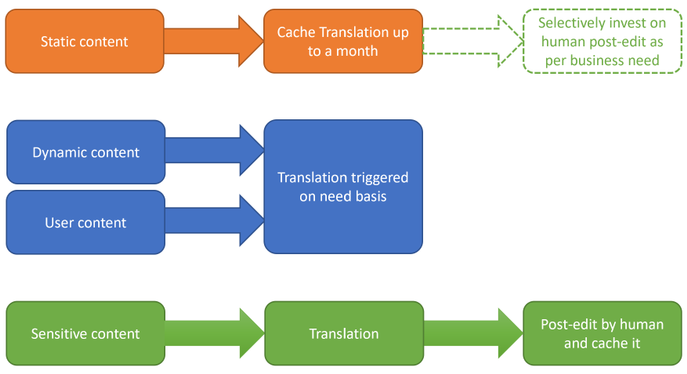
The first step is to understand the nature of your website content and classify them. It is critical as each of them needs different levels of localization. There are four types of content: a) static and dynamic, b) generated by you and posted by customer, c) sensitive like ‘Terms of Use’, d) part of UX elements.


Static content like about the organization, product or service description, user guides, terms of use, etc. can be translated once (or less frequently) offline into all required target languages.  Translation results could be cached and served from your webserver.  This could substantially reduce the cost of translation.  Machine translation models which powers Azure Translator service are regularly updated to improve quality. Hence consider refreshing the translations once a quarter if not every month.


User generated content like customer reviews, information requests, etc. are dynamic in nature, not all of them requiring translations, and to be translated on need basis only. You could plan for an UX element in the webpage which could initiate translation on need basis. Target language for translation could be identified based on user browser language. Likewise, responses to customer could be translated back into the language of original request or comment.


Sensitive content like terms of use, company policies, are recommended to do a human review post-machine translation. 


Text in UX elements of the webpage like menu, labels in forms, etc. are typically one or two words and have restricted space.  Hence recommended to do a UX testing post translation for fit and finish.  If necessitates look for alternate translation or human review.


Localization.png


Due to the speed and cost-effective nature that Azure Translator Service provides, you can easily test which localization option is optimal for your business and your users. For example, you may only have the budget to localize in dozens of languages and measure customer traffic in multiple markets in parallel. Using your existing web analytics, you will be able to decide where to invest in human translation in terms of markets, languages, or pages. For example, if the machine translated information passes a defined page view threshold, your system may trigger a human review of that content. In addition, you will still be able to maintain machine translation for other areas, to maintain reach.


By combining pure machine translation and paid translation resources, you can select different quality levels for the translations based on your business needs.


How to use Azure Translator service to translate static content


Pre-requisite:


  • Create an Azure subscription

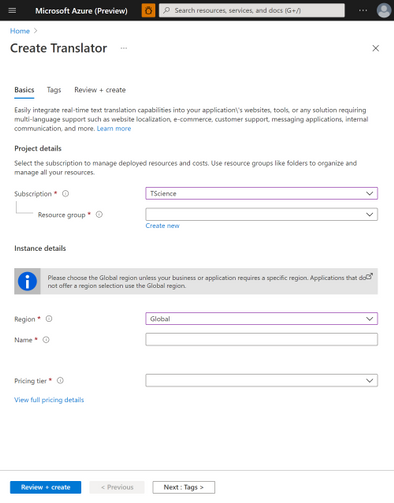
  • Once you have an Azure subscription, create a Translator resource in the Azure portal.

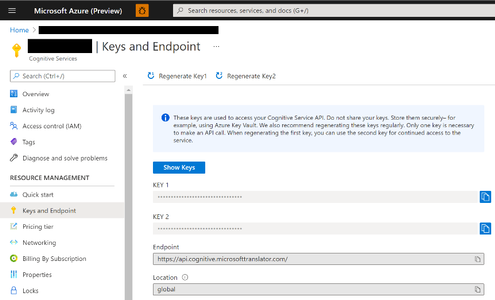
  • Once Translator resource it created, go to the resource, and select ‘Keys and Endpoint’ which is used to connect your application to the Translator service.


Krishna_Doss_2-1619114278286.pngKrishna_Doss_3-1619114278302.png


Translating static webpage content:


Below code sample shows how to translate an element in the webpage.  You could use it and iterate for each element in your webpage requiring translation.


import os, requests, uuid, json
subscription_key = "YOUR_SUBSCRIPTION_KEY"
endpoint = "https://api.cognitive.microsofttranslator.com"
path = '/translate'
constructed_url = endpoint + path

params = {
    'api-version': '3.0',
    'to': ['de'], # target language
    'textType': 'html' 
}

headers = {
    'Ocp-Apim-Subscription-Key': subscription_key,
    'Content-type': 'application/json',
    'X-ClientTraceId': str(uuid.uuid4())
}

# You can pass more than one object in body.
body = [{
    "text": "<p>The samples on this page use hard-coded keys and endpoints for simplicity. 
    Remember to <strong>remove the key from your code when you're done</strong>, and 
    <strong>never post it publicly</strong>. For production, consider using a secure way of 
    storing and accessing your credentials. See the Cognitive Services security article 
    for more information.</p>"
}]

request = requests.post(constructed_url, params=params, headers=headers, json=body)
response = request.json()
print (response[0]['translations'][0]['text']) # shows how to access the translated text from response


Localization is just a fraction of the things that you can do with Translator, so don’t let the learning stop here. Check out recent new Translator features, additional doc links to dive deeper, and join the Translator Ask Microsoft Anything session on 4/27.


Get started:


[1]  CSA Research – Can’t Read, Won’t Buy – B2C Analyzing Consumer Language Preferences and Behaviors in 29 Countries https://insights.csa-research.com/reportaction/305013126/Marketing

Introducing the GREATEST and LEAST T-SQL functions in Azure Synapse Analytics

This article is contributed. See the original author and article here.


We are excited to announce that the GREATEST and LEAST T-SQL functions are now generally available in Azure Synapse Analytics (serverless SQL pools only).


This post describes the functionality and common use cases of GREATEST and LEAST in Azure Synapse Analytics, as well as how they provide a more concise and efficient solution for developers compared to existing T-SQL alternatives.


Functionality


GREATEST and LEAST are scalar-valued functions and return the maximum and minimum value, respectively, of a list of one or more expressions.


The syntax is as follows:

GREATEST ( expression1 [ ,...expressionN ] )
LEAST ( expression1 [ ,...expressionN ] )


As an example, let’s say we have a table CustomerAccounts and wish to return the maximum account balance for each customer:


CustomerID Checking Savings Brokerage
1001 $ 4,294.10 $ 14,109.84 $ 3,000.01
1002 $ 51,495.00 $ 97,103.43 $ 0.02
1003 $ 10,619.73 $ 33,194.01 $ 5,005.74
1004 $ 24,924.33 $ 203,100.52 $ 10,866.87


Prior to GREATEST and LEAST, we could achieve this through a searched CASE expression:

SELECT CustomerID, GreatestBalance =
    CASE
        WHEN Checking >= Savings and Checking >= Brokerage THEN Checking
        WHEN Savings > Checking and Savings > Brokerage THEN Savings
        WHEN Brokerage > Checking and Brokerage  > Savings THEN Brokerage
    END
FROM CustomerAccounts;


We could alternatively use CROSS APPLY

SELECT ca.CustomerID, MAX(T.Balance) as GreatestBalance
FROM CustomerAccounts as ca
CROSS APPLY (VALUES (ca.Checking),(ca.Savings),(ca.Brokerage)) AS T(Balance)
GROUP BY ca.CustomerID;


Other valid approaches include user-defined functions (UDFs) and subqueries with aggregates.


However, as the number of columns or expressions increases, so does the tedium of constructing these queries and the lack of readability and maintainability.


With GREATEST, we can return the same results as the queries above with the following syntax:

SELECT CustomerID, GREATEST(Checking, Savings, Brokerage) AS GreatestBalance 
FROM CustomerAccounts;


Here is the result set:

CustomerID  GreatestBalance
----------- ---------------------
1001            14109.84
1002            97103.43
1003            33194.01
1004           203100.52

(4 rows affected)


Similarly, if you previously wished to return a value that’s capped by a certain amount, you would need to write a statement such as:

DECLARE @Val INT = 75;
DECLARE @Cap INT = 50;
SELECT CASE WHEN @Val > @Cap THEN @Cap ELSE @Val END as CappedAmt;


With LEAST, you can achieve the same result with:

DECLARE @Val INT = 75;
DECLARE @Cap INT = 50;
SELECT LEAST(@Val, @Cap) as CappedAmt;


The syntax for an increasing number of expressions is vastly simpler and more concise with GREATEST and LEAST than with the manual alternatives mentioned above


As such, these functions allow developers to be more productive by avoiding the need to construct lengthy statements to simply find the maximum or minimum value in an expression list.


Common use cases


Constant arguments


One of the simpler use cases for GREATEST and LEAST is determining the maximum or minimum value from a list of constants:

SELECT LEAST ( '6.62', 33.1415, N'7' ) AS LeastVal;


Here is the result set. Note that the return type scale is determined by the scale of the highest precedence argument, in this case float.

LeastVal
--------
6.6200

(1 rows affected)


Local variables


Perhaps we wish to compare column values in a WHERE clause predicate against the maximum value of two local variables:

CREATE TABLE dbo.studies (
    VarX varchar(10) NOT NULL,
    Correlation decimal(4, 3) NULL
);

INSERT INTO dbo.studies VALUES ('Var1', 0.2), ('Var2', 0.825), ('Var3', 0.61);
GO

DECLARE @PredictionA DECIMAL(2,1) = 0.7;
DECLARE @PredictionB DECIMAL(3,2) = 0.65;

SELECT VarX, Correlation
FROM dbo.studies
WHERE Correlation > GREATEST(@PredictionA, @PredictionB);
GO


Here is the result set: 

VarX       Correlation
---------- -----------
Var2              .825

(1 rows affected)


Columns, constants and variables


At times we may want to compare columns, constants and variables together. Here is one such example using LEAST:

CREATE TABLE dbo.products (
    prod_id INT IDENTITY(1,1),
    listprice smallmoney NULL
);

INSERT INTO dbo.products VALUES (14.99), (49.99), (24.99);
GO

DECLARE @PriceX smallmoney = 19.99;

SELECT LEAST(listprice, 40, @PriceX) as LeastPrice
FROM dbo.products;
GO


And the result set:

LeastPrice
------------
     14.99
     19.99
     19.99


Summary


GREATEST and LEAST provide a concise way to determine the maximum and minimum value, respectively, of a list of expressions.


For full documentation of the functions, see GREATEST (Transact-SQL) – SQL Server | Microsoft Docs and LEAST (Transact-SQL) – SQL Server | Microsoft Docs.


These new T-SQL functions will increase your productivity and enhance your experience with Azure Synapse Analytics.


Providing the GREATEST developer experience in Azure is the LEAST we can do.


John Steen, Software Engineer
Austin SQL Team


Introducing the GREATEST and LEAST T-SQL functions

This article is contributed. See the original author and article here.


We are excited to announce that the GREATEST and LEAST T-SQL functions are now generally available in Azure SQL Database, as well as in Azure Synapse Analytics (serverless SQL pools only) and Azure SQL Managed Instance.


The functions will also be available in upcoming releases of SQL Server.


This post describes the functionality and common use cases of GREATEST and LEAST in Azure SQL Database, as well as how they can provide a more concise and efficient solution for developers compared to existing T-SQL alternatives.


Functionality


GREATEST and LEAST are scalar-valued functions and return the maximum and minimum value, respectively, of a list of one or more expressions.


The syntax is as follows:

GREATEST ( expression1 [ ,...expressionN ] )
LEAST ( expression1 [ ,...expressionN ] )


As an example, let’s say we have a table CustomerAccounts and wish to return the maximum account balance for each customer:


CustomerID Checking Savings Brokerage
1001 $ 4,294.10 $ 14,109.84 $ 3,000.01
1002 $ 51,495.00 $ 97,103.43 $ 0.02
1003 $ 10,619.73 $ 33,194.01 $ 5,005.74
1004 $ 24,924.33 $ 203,100.52 $ 10,866.87


Prior to GREATEST and LEAST, we could achieve this through a searched CASE expression:

SELECT CustomerID, GreatestBalance =
    CASE
        WHEN Checking >= Savings and Checking >= Brokerage THEN Checking
        WHEN Savings > Checking and Savings > Brokerage THEN Savings
        WHEN Brokerage > Checking and Brokerage  > Savings THEN Brokerage
    END
FROM CustomerAccounts;


We could alternatively use CROSS APPLY

SELECT ca.CustomerID, MAX(T.Balance) as GreatestBalance
FROM CustomerAccounts as ca
CROSS APPLY (VALUES (ca.Checking),(ca.Savings),(ca.Brokerage)) AS T(Balance)
GROUP BY ca.CustomerID;


Other valid approaches include user-defined functions (UDFs) and subqueries with aggregates.


However, as the number of columns or expressions increases, so does the tedium of constructing these queries and the lack of readability and maintainability.


With GREATEST, we can return the same results as the queries above with the following syntax:

SELECT CustomerID, GREATEST(Checking, Savings, Brokerage) AS GreatestBalance 
FROM CustomerAccounts;


Here is the result set:

CustomerID  GreatestBalance
----------- ---------------------
1001            14109.84
1002            97103.43
1003            33194.01
1004           203100.52

(4 rows affected)


Similarly, if you previously wished to return a value that’s capped by a certain amount, you would need to write a statement such as:

DECLARE @Val INT = 75;
DECLARE @Cap INT = 50;
SELECT CASE WHEN @Val > @Cap THEN @Cap ELSE @Val END as CappedAmt;


With LEAST, you can achieve the same result with:

DECLARE @Val INT = 75;
DECLARE @Cap INT = 50;
SELECT LEAST(@Val, @Cap) as CappedAmt;


The syntax for an increasing number of expressions is vastly simpler and more concise with GREATEST and LEAST than with the manual alternatives mentioned above


As such, these functions allow developers to be more productive by avoiding the need to construct lengthy statements to simply find the maximum or minimum value in an expression list.


Common use cases


Constant arguments


One of the simpler use cases for GREATEST and LEAST is determining the maximum or minimum value from a list of constants:

SELECT LEAST ( '6.62', 33.1415, N'7' ) AS LeastVal;


Here is the result set. Note that the return type scale is determined by the scale of the highest precedence argument, in this case float.

LeastVal
--------
6.6200

(1 rows affected)


Local variables


Perhaps we wish to compare column values in a WHERE clause predicate against the maximum value of two local variables:

CREATE TABLE dbo.studies (
    VarX varchar(10) NOT NULL,
    Correlation decimal(4, 3) NULL
);

INSERT INTO dbo.studies VALUES ('Var1', 0.2), ('Var2', 0.825), ('Var3', 0.61);
GO

DECLARE @PredictionA DECIMAL(2,1) = 0.7;
DECLARE @PredictionB DECIMAL(3,2) = 0.65;

SELECT VarX, Correlation
FROM dbo.studies
WHERE Correlation > GREATEST(@PredictionA, @PredictionB);
GO


Here is the result set: 

VarX       Correlation
---------- -----------
Var2              .825

(1 rows affected)


Columns, constants and variables


At times we may want to compare columns, constants and variables together. Here is one such example using LEAST:

CREATE TABLE dbo.products (
    prod_id INT IDENTITY(1,1),
    listprice smallmoney NULL
);

INSERT INTO dbo.products VALUES (14.99), (49.99), (24.99);
GO

DECLARE @PriceX smallmoney = 19.99;

SELECT LEAST(listprice, 40, @PriceX) as LeastPrice
FROM dbo.products;
GO


And the result set:

LeastPrice
------------
     14.99
     19.99
     19.99


Summary


GREATEST and LEAST provide a concise way to determine the maximum and minimum value, respectively, of a list of expressions.


For full documentation of the functions, see GREATEST (Transact-SQL) – SQL Server | Microsoft Docs and LEAST (Transact-SQL) – SQL Server | Microsoft Docs.


These new T-SQL functions will increase your productivity and enhance your experience with Azure Synapse Analytics, Azure SQL Database, and Azure SQL Managed Instance.


Providing the GREATEST developer experience in Azure is the LEAST we can do.


John Steen, Software Engineer
Austin SQL Team


[Guest Blog] A Journey of Firsts in Mixed Reality

[Guest Blog] A Journey of Firsts in Mixed Reality

This article is contributed. See the original author and article here.

This guest blog was written by Kimberly Castro, Program Manager in Microsoft’s Cloud + AI division. She shares about her career journey transitioning from the military into in the world of mixed reality as part of our Humans of Mixed Reality series.


I knew I wanted to be a part of Mixed Reality the first time I heard about it. I had just finished my interview loop with Microsoft when I heard that one more team wanted to talk to me before leaving. Shortly after, which actually felt like an eternity due to interview nerves, I was in a focus room with Miguel Sussffalich. After a few questions, he started telling me everything he could about the IVAS program.


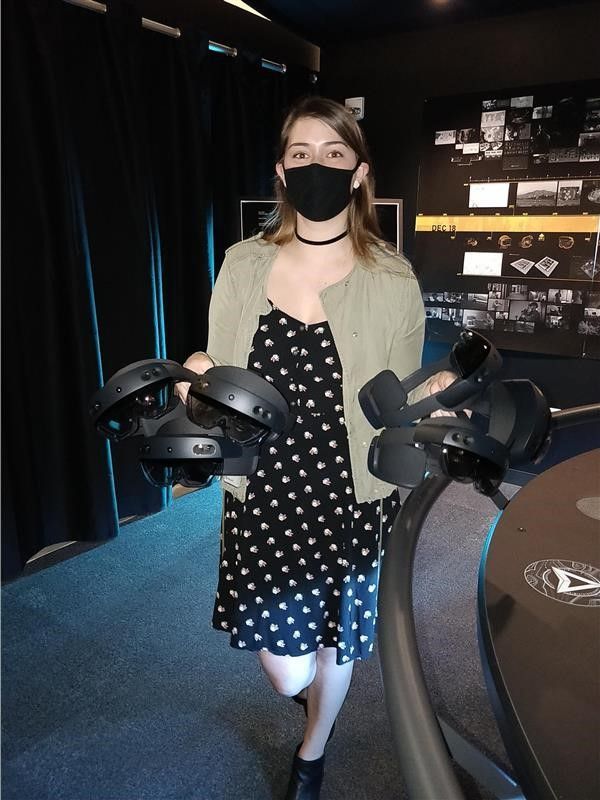
Demos.jpg


Admittedly I was late to the game. I had never put on a VR/AR/MR headset, never heard of the HoloLens, and if I’m completely honest, I’d never used a Microsoft product aside from the Office Suite. You see, I grew up in an Apple household. You’re probably wondering how someone like me even managed to land an interview at Microsoft in the first place, especially coming from a rather non-traditional tech background.


After graduating from the University of Arizona in 2013, I enlisted in the Army as a Linguist. I spent the next two years learning Mandarin Chinese and eventually found myself in the Special Operations Command working Intelligence, Surveillance, and Reconnaissance (ISR) missions. After one more year, I started doing similar work at the NSA. At that point, I started seeing myself in a government contractor position once fulfilling my enlistment contract. It would’ve been an incredibly natural and easy transition to make. Not a whole year had passed when the Army said it was time for me to move again – my 7th move in 5 years. I was extremely frustrated to have to pack up my life and travel across the country again, but I had always wanted to spend time in the Pacific Northwest – and it ended up being my best move yet.


As the end of my contract was nearing, I received approval to participate in the Microsoft Software and Systems Academy (MSSA), a transition program for active duty military and veterans, which is essentially a C# bootcamp. Upon completing MSSA you are guaranteed a first-round interview in the form of a phone screening with Microsoft. I did well enough at the first round to be invited back to participate in a full interview loop.


I was sitting across from Miguel, learning about the IVAS program for the first time. He told me about a synthetic training environment where soldiers could practice clearing an enemy and a hostage-filled building safely and effectively. I was immediately transported back six years to basic training, where I first experienced the military’s Glass House training drill. Glass House is a generous term – in reality, it is just tape placed in a square on the ground, in a field, with a door-sized opening. “Rooms” were extended or added with more tape to alter the scenario, making an already limited training environment increasingly vague and less effective. You and your team members would have to imagine the walls, the roof, the enemy, the hostages, everything. The drill sergeants would yell out increasingly complex instructions, and eventually, your team would fail, reset, and try again. Of course, there was no way to know if you missed an enemy or pointed your weapon at a hostage or team member by accident, just whatever the drill sergeants could see. Additionally, with all the imagining that had to be done, it was impossible to realistically create the stress levels that an experience like that would entail in real-life. Essentially it wasn’t the best way to train, but it was all we had.


As soon as Miguel paused, I said, “Oh, this is going to save lives,” and from then on I was hooked.


I graduated from the MSSA program with offers from three different teams within Microsoft and an offer from another company. None of the other scopes of work came close to the experience I knew Mixed Reality was going to provide. So, in January of 2020, I joined the Delaware team as a program manager. I was just as excited as I was terrified. I was so sure people would quickly find out I was a fraud who tricked her way into Microsoft – over a year later, and I still have moments when I feel like this. I like to joke that it’s not imposter syndrome because I’m actually an imposter (I know, I know).


Within mere days of joining the team, I experienced my first hologram. A friend slapped a HoloLens 2 device on my head and showed me a bunch of cute animals dancing around. He explained that I could resize the figures and place them wherever I wanted in the physical space. I think I stayed in device for about an hour playing with everything I could; it felt like magic. I would’ve stayed for longer, but I suddenly remembered that I was in the middle of the dev space yelling out, “This is so cool!” every few minutes while people were working. To this day, one of my favorite things to do is run demonstrations to show off what is possible with Mixed Reality. I love seeing people experience the magic of their first hologram or surprising someone who has seen it all before by dropping them in the middle of New York City or the bottom of the Red Sea.


Another aspect I enjoy is customer focus and human-centered design. The infinite feedback loop and drive to figure out what someone needs, particularly when they themselves don’t know, really resonates with me. Accomplishing that gives me the same feeling as snapping the last puzzle piece into place; it’s a satisfying completion. This puzzle, however, is infinite.


The public sector has been the perfect place for me to dive in because I can really understand the user – after all, I used to be one. It’s incredibly comfortable to speak the same language as the customer, and I am so excited to have the opportunity to continue in this space. In the future, I would enjoy getting into the commercial and consumer or entertainment studios as well. I would love to help create something that furthers scientific research or builds something solely for a user’s enjoyment. Again, I love the public sector, it’s the perfect place for me to learn and grow, but I will want to take a step back from life and death situations one day.


It’s difficult to express how much I’ve learned over the last year and yet I know I’ve barely scratched the surface. I feel so privileged to work with artists, musicians, designers, and engineers every single day. I have never considered myself a creative type, but working in this space with these incredibly talented individuals has, for the first time, sparked a passion to create in my professional and personal life.


I hope you will discover an exciting new world with mixed reality too – the possibilities are endless!


#MixedReality #CareerJourneys