
by Contributed | Apr 23, 2021 | Technology
This article is contributed. See the original author and article here.
The Ultimate How To Guide for Presenting Content in Microsoft Teams
Vesku Nopanen is a Principal Consultant in Office 365 and Modern Work and passionate about Microsoft Teams. He helps and coaches customers to find benefits and value when adopting new tools, methods, ways or working and practices into daily work-life equation. He focuses especially on Microsoft Teams and how it can change organizations’ work. He lives in Turku, Finland. Follow him on Twitter: @Vesanopanen

Backup all WSP SharePoint Solutions using PowerShell
Mohamed El-Qassas is a Microsoft MVP, SharePoint StackExchange (StackOverflow) Moderator, C# Corner MVP, Microsoft TechNet Wiki Judge, Blogger, and Senior Technical Consultant with +10 years of experience in SharePoint, Project Server, and BI. In SharePoint StackExchange, he has been elected as the 1st Moderator in the GCC, Middle East, and Africa, and ranked as the 2nd top contributor of all the time. Check out his blog here.

Getting started with Azure Bicep
Tobias Zimmergren is a Microsoft Azure MVP from Sweden. As the Head of Technical Operations at Rencore, Tobias designs and builds distributed cloud solutions. He is the co-founder and co-host of the Ctrl+Alt+Azure Podcast since 2019, and co-founder and organizer of Sweden SharePoint User Group from 2007 to 2017. For more, check out his blog, newsletter, and Twitter @zimmergren

Azure: Talk about Private Links
George Chrysovalantis Grammatikos is based in Greece and is working for Tisski ltd. as an Azure Cloud Architect. He has more than 10 years’ experience in different technologies like BI & SQL Server Professional level solutions, Azure technologies, networking, security etc. He writes technical blogs for his blog “cloudopszone.com“, Wiki TechNet articles and also participates in discussions on TechNet and other technical blogs. Follow him on Twitter @gxgrammatikos.

Teams Real Simple with Pictures: Hyperlinked email addresses in Lists within Teams
Chris Hoard is a Microsoft Certified Trainer Regional Lead (MCT RL), Educator (MCEd) and Teams MVP. With over 10 years of cloud computing experience, he is currently building an education practice for Vuzion (Tier 2 UK CSP). His focus areas are Microsoft Teams, Microsoft 365 and entry-level Azure. Follow Chris on Twitter at @Microsoft365Pro and check out his blog here.
by Contributed | Apr 23, 2021 | Technology
This article is contributed. See the original author and article here.
Context
During a Power Platform audit for a customer, I was looking for exporting all user licenses data into a single file to analyze it with Power BI. In this article, I’ll show you the easy way to export Power Apps and Power Automate user licenses with PowerShell!
Download user licenses
To do this, we are using PowerApps PowerShell and more particular, the Power Apps admin module.
To install this module, execute the following command as a local administrator:
Install-Module -Name Microsoft.PowerApps.Administration.PowerShell
Note: if this module is already installed on your machine, you can use the Update-Module command to update it to the latest version available.
Then to export user licenses data, you just need to execute the following command and replace the target file path to use:
Get-AdminPowerAppLicenses -OutputFilePath <PATH-TO-CSV-FILE>
Note: you will be prompted for your Microsoft 365 tenant credentials, you need to sign-in as Power Platform Administrator or Global Administrator to execute this command successfully.
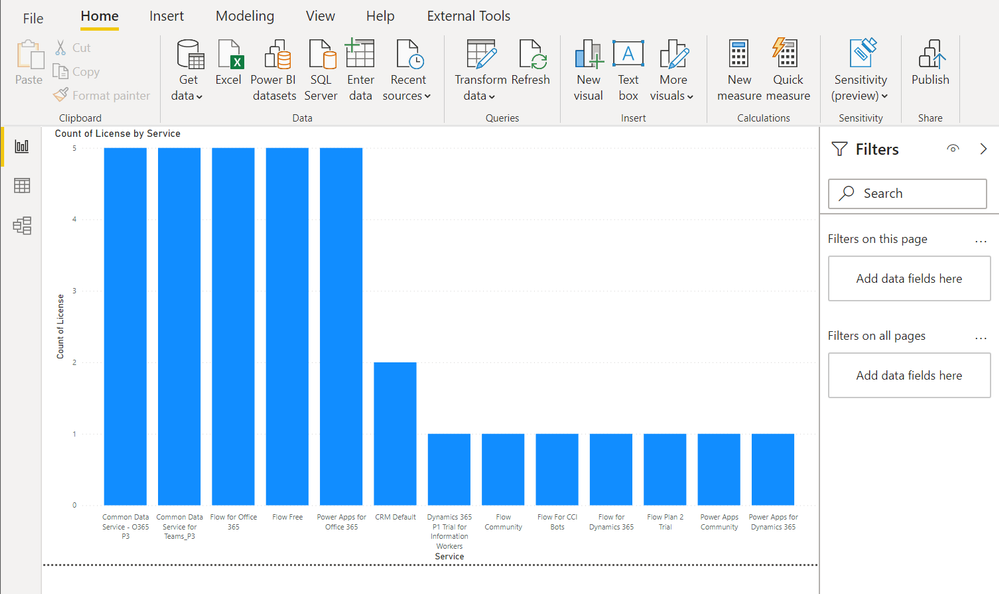
After this, you can easily use the generated CSV file in Power BI Desktop for further data analysis:
Happy reporting everyone!
You can read this article on my blog here.
Resources
https://docs.microsoft.com/en-us/powershell/powerapps/get-started-powerapps-admin
https://docs.microsoft.com/en-us/powershell/module/microsoft.powerapps.administration.powershell/get-adminpowerapplicenses

by Contributed | Apr 23, 2021 | Technology
This article is contributed. See the original author and article here.
The team is excited this week to share what we’ve been working on based on all your input. News to be covered includes Application Gateway URL Rewrite General Availability, End of Support for Ubuntu 16.04, Using Azure Migrate with Private Endpoints, Overview of HoloLens 2 deployment and security-based Microsoft Learn Module of the week.
Application Gateway URL Rewrite General Availability

Azure Application Gateway can now rewrite the host name, path and query string of the request URL. You can now also rewrite the URL of all or some of the client requests based on matching one or more conditions as required. Administrators can also now choose to route the request based on the original URL or the rewritten URL. This feature enables several important scenarios such as allowing path based routing for query string values and support for hosting friendly URLs.
Learn more here: Rewrite HTTP Headers and URL with Application Gateway
Upgrade your Ubuntu server to Ubuntu 18.04 LTS by 30 April 2021
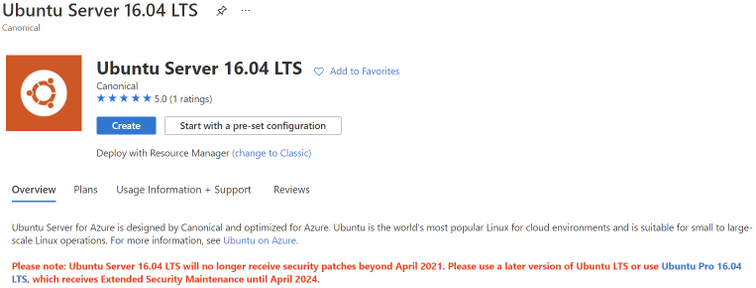
Ubuntu is ending standard support for Ubuntu 16.04 LTS on 30 April 2021. Microsoft will replace the Ubuntu 16.04 LTS image with an Ubuntu 18.04 LTS image for new compute instances and clusters to ensure continued security updates and support from the Ubuntu community. If you have long running compute instances, or non-autoscaling clusters (min nodes > 0), please follow the instructions here for manual migration before 30 April 2021. After 30 April 2021, support for Ubuntu 16.04 ends and no security update will be provided. Please migrate to Ubuntu 18.04 immediately or before 30 April 2021, and please note that Microsoft will not be responsible for any kind of security breaches after the deprecation.
Azure Migrate with private endpoints
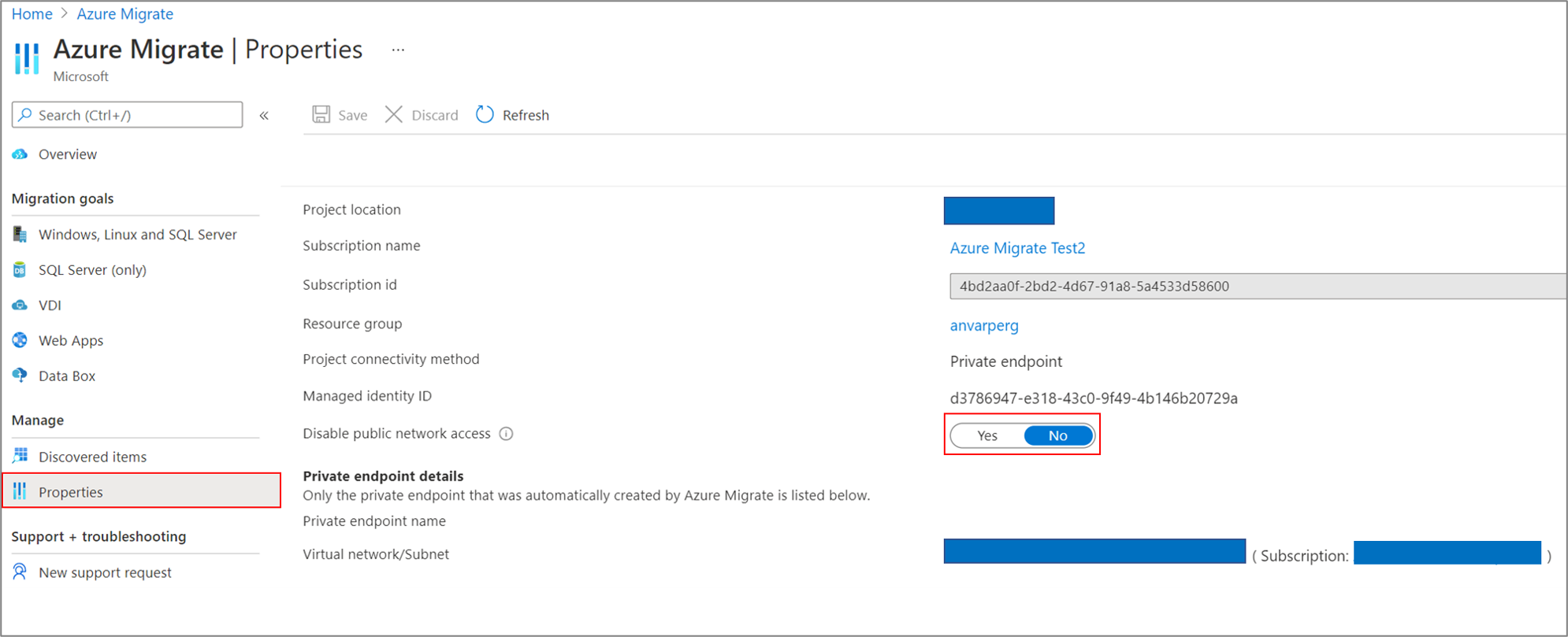
You can now use Azure Migrate: Discovery and Assessment and Azure Migrate: Server Migration tools to privately and securely connect to the Azure Migrate service over an ExpressRoute private peering or a site-to-site VPN connection via an Azure private link. The private endpoint connectivity method is recommended when there is an organizational requirement to not cross public networks to access the Azure Migrate service and other Azure resources. You can also use the private link support to use an existing ExpressRoute private peering circuits for better bandwidth or latency requirements.
Learn more here: Using Azure Migrate with private endpoints
HoloLens 2 Deployment Overview
Our team recently partnered with the HoloLens team to collaborate on and curate documentation surrounding HoloLens 2 deployment. Just like any device that requires access to an organizations network and data, the HoloLens in most cases requires management via that organization’s IT department.
This writeup shares all the necessary services required to get started: An Overview of How to Deploy HoloLens 2
Community Events
MS Learn Module of the Week

AZ-400: Develop a security and compliance plan
Build strategies around security and compliance that enable you to authenticate and authorize your users, handle sensitive information, and enforce proper governance.

Modules include:
- Secure your identities by using Azure Active Directory
- Create Azure users and groups in Azure Active Directory
- Authenticate apps to Azure services by using service principals and managed identities for Azure resources
- Configure and manage secrest in Azure Key Vault
- and more
Learn more here: Develop a security and compliance plan

Let us know in the comments below if there are any news items you would like to see covered in the next show. Be sure to catch the next AzUpdate episode and join us in the live chat.
by Contributed | Apr 23, 2021 | Technology
This article is contributed. See the original author and article here.
I remember running my first commands and building my first automation using Windows PowerShell back in 2006. Since then, PowerShell became one of my daily tools to build, deploy, manage IT environments. With the release of PowerShell version 6 and now PowerShell 7, PowerShell became cross-platform. This means you can now use it on even more systems like Linux and macOS. With PowerShell becoming more and more powerful (you see what I did there ;)), more people are asking me how they can get started and learn PowerShell. Luckily we just released 5 new modules on Microsoft Learn for PowerShell.
Learn PowerShell on Microsoft Learn
Microsoft Learn Introduction to PowerShell
Learn about the basics of PowerShell. This cross-platform command-line shell and scripting language is built for task automation and configuration management. You’ll learn basics like what PowerShell is, what it’s used for, and how to use it.
Learning objectives
- Understand what PowerShell is and what you can use it for.
- Use commands to automate tasks.
- Leverage the core cmdlets to discover commands and learn how they work.
PowerShell learn module: Introduction to PowerShell
Connect commands into a pipeline
In this module, you’ll learn how to connect commands into a pipeline. You’ll also learn about filtering left, formatting right, and other important principles.
Learning objectives
- Explore cmdlets further and construct a sequence of them in a pipeline.
- Apply sound principles to your commands by using filtering and formatting.
PowerShell learn module: Connect commands into a pipeline
Introduction to scripting in PowerShell
This module introduces you to scripting with PowerShell. It introduces various concepts to help you create script files and make them as robust as possible.
Learning objectives
- Understand how to write and run scripts.
- Use variables and parameters to make your scripts flexible.
- Apply flow-control logic to make intelligent decisions.
- Add robustness to your scripts by adding error management.
PowerShell learn module: Introduction to scripting in PowerShell
Write your first PowerShell code
Getting started by writing code examples to learn the basics of programming in PowerShell!
Learning objectives
- Manage PowerShell inputs and outputs
- Diagnose errors when you type code incorrectly
- Identify different PowerShell elements like cmdlets, parameters, inputs, and outputs.
PowerShell learn module: Write your first PowerShell code
Automate Azure tasks using scripts with PowerShell
Install Azure PowerShell locally and use it to manage Azure resources.
Learning objectives
- Decide if Azure PowerShell is the right tool for your Azure administration tasks
- Install Azure PowerShell on Linux, macOS, and/or Windows
- Connect to an Azure subscription using Azure PowerShell
- Create Azure resources using Azure PowerShell
PowerShell learn module: Automate Azure tasks using scripts with PowerShell
Conclusion
I hope this helps you get started and learn PowerShell! If you have any questions feel free to leave a comment!

by Contributed | Apr 23, 2021 | Technology
This article is contributed. See the original author and article here.
SharePoint Framework Special Interest Group (SIG) bi-weekly community call recording from April 22nd is now available from the Microsoft 365 Community YouTube channel at http://aka.ms/m365pnp-videos. You can use SharePoint Framework for building solutions for Microsoft Teams and for SharePoint Online.
Call summary:
Preview the new Microsoft 365 Extensibility look book gallery co-developed by Microsoft Teams and Sharepoint engineering. Download showcase apps, samples, and documentation. Register now for April trainings on Sharing-is-caring. Give us feedback, the Microsoft 365 developer community survey is now open. Announcing public preview of SharePoint Framework 1.12.1.
There were six PnP SPFx web part samples delivered in last 2 weeks. Great work!
Latest project updates include:
PnP Project
|
Current version
|
Release/Status
|
SharePoint Framework (SPFx)
|
v1.12.1 (beta)
|
GA by end-of-April
|
PnPjs Client-Side Libraries
|
v2.4.0
|
April 9th
|
CLI for Microsoft 365
|
v3.9 (beta)
|
Upgrading SPFx projects to v1.12.1-rc.2
|
Reusable SPFx React Controls
|
v2.6.0
|
v3.0.0 when SPFx v1.12.1 GA
|
Reusable SPFx React Property Controls
|
v2.5.0
|
v3.0.0 when SPFx v1.12.1 GA
|
PnP SPFx Generator
|
v1.16.0
|
|
PnP Modern Search
|
v3.19 and v4.1.0
|
April and March 20th
|
The host of this call is Patrick Rodgers (Microsoft) @mediocrebowler. Q&A takes place in chat throughout the call.
Jungle seating in a Pacific Northwest, Washington, US amphitheater! Truly unique like this Community!
Actions:
- Complete the Microsoft 365 Developer Community Survey – https://aka.ms/m365pnp/survey
- Reserve date – SharePoint Monthly community call – 13th of April 8 AM PDT | https://aka.ms/sp-call
- Register for Sharing is Caring Events:
- First Time Contributor Session – April 27th (EMEA, APAC & US friendly times available)
- Community Docs Session – April
- PnP – SPFx Developer Workstation Setup – April 29th
- PnP SPFx Samples – Solving SPFx version differences using Node Version Manager – May TBD
- AMA (Ask Me Anything) – Power Platform Samples – May 5th
- AMA (Ask Me Anything) – Tech Community – May 11th
- First Time Presenter – May TBD
- More than Code with VSCode – April 28th
- Maturity Model Practitioners – May TBD
- PnP Office Hours – 1:1 session – Register
- Download the recurrent invite for this call – https://aka.ms/spdev-spfx-call
Demos:
Running the CLI for Microsoft 365 in Azure Container Instances orchestrated by Logic Apps – or Flow in Power Automate. Step through how the Azure Container Instance is created with the specified managed identity. Docker enables you to bundle a pre-configured version of CLI for Microsoft 365 together with all its required dependencies and also is used to orchestrate containers. Purpose of configuration is to run scripts or reports against your tenant.
Advanced Page Properties web part solution – when the normal page properties web part is not enough, this new Advanced Page Properties web part delivers more. New properties supporting theme variants, capsule format for list options, support for image fields, for links, for currency, and for dates. Tour the code for tracking available properties for drop downs, tracking property selections and parameters for refreshing and rendering the data.
SharePoint Framework 1.12.1 new features – support for Node v12, Gulp 4, Microsoft Teams SDK v1.8 and for creating Microsoft Teams meeting apps. Demos – 1) Increased access to page structure and context to avoid DOM dependency (web part detects DOM structure and selects output size to fit allotted space) and 2) SPFx support for Complex Microsoft Teams solutions (manifest included in Package to synchronize with Teams App catalog).
SPFx web part samples: (https://aka.ms/spfx-webparts)
Thank you for your great work. Samples are often showcased in Demos.
Agenda items:
Demos:
Running the CLI for Microsoft 365 in Azure Container Instances orchestrated by Logic Apps – Albert-Jan Schot (Portiva) | @appieschot | deck – 18:04
Advanced Page Properties web part solution – Mike Homol (ThreeWill) | @homol | deck – 32:00
SharePoint Framework 1.12.1 new features – Vesa Juvonen (Microsoft) | @vesajuvonen
– 45:33
Resources:
Additional resources around the covered topics and links from the slides.
General Resources:
Other mentioned topics:
Upcoming calls | Recurrent invites:
PnP SharePoint Framework Special Interest Group bi-weekly calls are targeted at anyone who is interested in the JavaScript-based development towards Microsoft Teams, SharePoint Online, and also on-premises. SIG calls are used for the following objectives.
- SharePoint Framework engineering update from Microsoft
- Talk about PnP JavaScript Core libraries
- Office 365 CLI Updates
- SPFx reusable controls
- PnP SPFx Yeoman generator
- Share code samples and best practices
- Possible engineering asks for the field – input, feedback, and suggestions
- Cover any open questions on the client-side development
- Demonstrate SharePoint Framework in practice in Microsoft Teams or SharePoint context
- You can download a recurrent invite from https://aka.ms/spdev-spfx-call. Welcome and join the discussion!
“Sharing is caring”


Recent Comments