Exciting news at Microsoft Business Applications Summit, May 4

This article is contributed. See the original author and article here.

Get ready to activate, adapt, and accelerate your business. And learn how training and certification helps to make it happen. With the worldwide community of Microsoft Power Platform and Dynamics 365 customers, partners, power users, evangelists, and implementers at Microsoft Business Applications Summit, you can find out the latest from Microsoft Learn—your destination for free, always-on learning. Join us at the summit today for a digital experience that includes keynotes, technical sessions, Q&A with experts, inspiring videos, and an opportunity to sign up for a fun Cloud Skills Challenge.


Announcing the new Microsoft Certified: Dynamics 365 Commerce Functional Consultant certification


Are you all about creating friction-free shopping experiences and uniting digital and physical commerce? If you’re a functional consultant, developer, information worker, or IT or business professional using Dynamics 365 Commerce in your organization, we have a new certification for you. Now you can validate your skills in configuring, deploying, and maintaining Dynamics 365 Commerce applications.


We’re happy to announce the Dynamics 365 Commerce Functional Associate certification available in beta in June 2021. To earn this certification, you’ll need to pass you’ll need to pass Exam MB-300: Microsoft Dynamics 365: Core Finance and Operations along with Exam MB-340: Dynamics 365 Commerce Functional Consultant. Exam MB-340 measures your ability to configure Dynamics 365 Commerce headquarters; configure and manage Dynamics 365 Commerce call centers; manage Point of Sale (POS) in Dynamics 365 Commerce; configure products, prices, discounts, loyalty, and affiliations; and manage e-commerce.


Now available on Microsoft Learn: Certification renewal features


A few months ago, we shared an update on renewing role-based and specialty certifications on Microsoft Learn. This feature is now available for 19 certifications, with more following in the near future. If your role-based or specialty certification expires within six months, you can take a certification renewal assessment online—at no cost and on your schedule—and extend your certification for a year at a time. Learn more about renewing your Microsoft Certification.


Microsoft Learn at Microsoft Business Apps Summit


Get ready for a day jam-packed with sessions and activities to boost your Business Apps skills. Explore ways to expand your horizons with Microsoft Power Platform and Dynamics 365 certifications, and get the most out of training on Microsoft Learn.


  • Cloud Skills Challenge. Come to the Connection Zone to sign up for a fun and engaging gamified learning experience. We have the challenges you’re looking for, with four Microsoft Power Platform challenges and four Dynamics 365 challenges to choose from. Buckle up, and “May the skills be with you!” Invite your colleagues, teams, and communities to join the challenge. Try for prizes, including free mentoring sessions with well-known product experts.

  • Learn Live sessions. We have a couple of “don’t miss” sessions for you. From 9:45–11 AM PT, drop by our Customer Insights session on the Dynamics 365 Customer Insights customer data platform (CDP), led by John Wiese and Tad Thompson of Microsoft. From 11:45 AM–12:45 PM PT, check out “Create bots with Power Virtual Agents,” led by April Dunnam and Gitika Gupta of Microsoft.

  • Watch cool videos. You won’t want to miss our latest #ProudToBeCertified video, in which learners from around the globe share how certifications have given their career a boost. In addition, check out our videos on energizing your career with certifications in Microsoft Power Platform and Dynamics 365.

  • Ask the Experts. During this Q&A session, 9:45–10:15 AM PT, experts from Microsoft, including Liberty Munson, Matthew Minton, Margo Crandall, and Sudarshan Krishnamurthi, take your questions on Microsoft Power Platform and Dynamics 365 certifications, exams, learning paths, and recently announced changes to certification extension and renewal.

  • Event Desk. Drop by anytime to chat with Dona Sarkar, Microsoft Dev Advocate for Microsoft Power Platform, and Natahri Felton, Principal Program Manager, to learn about interviews, sessions, and keynotes. Catch engaging on-the-spot interviews “From the desk” with Heather Newman, Principal Program Manager, Microsoft Power Platform Engineering. There’s a lot going on, including a trivia game, and the folks in the booth are looking forward to meeting you.

  • Social. To get the latest conference information, follow us on LinkedIn and Twitter (#MBAS, #CloudSkillsChallenge, #ProudToBeCertified, #MicrosoftCertified).

  • Keep on learning. Continue learning with us after the event. Go to Microsoft Learn for more content, training options, communities, and Microsoft Certification details.


Now that you’ve discovered what we have in store for you, join us at the Microsoft Business Applications Summit today, as we explore how you can use Microsoft Learn as your destination for free, always-on learning about Microsoft Power Platform and Dynamics 365.


Megan Lawrence, disability advocate, talks about building a community of support for those with ment

This article is contributed. See the original author and article here.

Claire Bonaci 


You’re watching the Microsoft U.S.health and life sciences, confessions of health geeks podcast, a show that offers Industry Insight from the health geeks and data freaks of the US health and life sciences industry team. I’m your host, Claire Bonaci. May is Mental Health Awareness Month. And I have the pleasure of interviewing Megan Lawrence, our senior accessibility evangelist, Megan describes the fluidity of mental health and the importance of normalizing mental health in the workplace.  Hi, Megan, and welcome to the show. I’m so excited to have you with us for Mental Health Awareness Month.


Megan Lawrence 


It’s incredibly great to be here. Thanks for having me.


Claire Bonaci 


of course. So do you mind introducing yourself and sharing a little bit of why you feel normalizing mental health is so important.


Megan Lawrence 


Yeah, so here at Microsoft, I am the senior accessibility evangelist working for our chief accessibility officer. But I’m also the Co-lead of employees with mental health conditions, and really building the community of support between and among the employees here at our company at Microsoft. You know, normalizing mental health is incredibly important in modern society. Most people don’t realize that, in fact, mental health is the number one disability in the world today. And so many of us are going to experience mental health throughout our life, you may have a permanent mental health disability like me, I have an anxiety disorder, you may see you have a temporary like postpartum depression, or even situational where maybe you worked 16 hours and didn’t get very good sleep and are really feeling like you don’t have that decision making power like you used to. So really, I think normalizing mental health means recognizing it’s just part of being human.


Claire Bonaci 


I love that answer. And I love that Microsoft even has that role. So I’m so happy that you’re here at Microsoft with us. Do you feel that it’s still taboo? Or do you feel like in the workplace, it’s so hard or taboo to talk about mental health?


Megan Lawrence 


So, you know, I think that one of the silver linings of COVID has been that we are more often checking in on one another. And the answer can honestly be today’s not a great day, and mental health and well being have become important topics for every company out there. And so even though I do believe that there’s still bias and stigma associated with mental health, I think we’re breaking down some of those barriers.


Claire Bonaci 


I agree with that. I do think it’s getting better. And you’re right, that is the silver lining of the pandemic, finally, something that was good that came out of it. So do you mind telling us the story of why you created the mental health erg here at Microsoft?


Megan Lawrence 


Yeah, so it’s incredible. I’ve worked with the disability community for 20 years. And really only until the last four did I start opening up about my own mental health disability. And I have to be honest with you, a lot of that came from my own shame and stigma that I felt about having a mental health condition. But I felt so lucky to find a group of people here at Microsoft that I began to talk to, that were supporting me in my journey with mental health. And I began to realize that that support system was critical for my success. And we wanted to extend that you can really create a strong community for over 160,000 people now that we have at this company. So Jen Emira and I, my co lead and I started this mental health community really to let people know, you’re not alone. And we’re here to support one another.


Claire Bonaci 


I think that’s something that we need more of. And do you know, is this happening and other tech companies or other large companies? Are there more mental health ERG’s that are being started?


Megan Lawrence 


You know, I don’t know exactly if there are specific groups around mental health. But I have reached out to many of my colleagues in the disability community. And there definitely is a growing communication among every kind of organization, whether you’re a nonprofit, whether you’re a bank, whether you’re a manufacturing company, that really we’re starting to begin to understand that the future of building a company to modernize to stay relevant during a changing marketplace, you have to support employees mental health and well being it’s critical.


Claire Bonaci 


It is it is I love that you bring up just that in order to stay relevant companies do have to address this, you know, millennials, Gen Z, we’re entering the workforce, and they’re realizing that they want to work for a company that’s going to one support everyone but also be able to have those those ERGs or those resources to support everyone. So I’m, I’m so happy that Microsoft is already ahead of the curve with that. And my last question for you, I’ve heard you talk about nested identities before it Do you mind explaining this and the impact that it’s having right now?


Megan Lawrence 


Yeah, so oftentimes, I think we get caught on you know, I’m a person with a disability. I belong to the blacklife community here at Microsoft But in reality, we are all a collection of, of nested identities. I’m a woman, I’m a dog Mom, I’m a woman with a disability. I’m, I’m a Steelers fan, sorry to all you Seattle people in Seattle here. Right? So it is this collection of my experiences in the communities that I exist in that create who I am and the way that I function in the world. And so again, this is where intersectionality becomes critical, as we begin to talk about mental health and the intersection of multiple identities, and really, ultimately, what that’s going to mean for technology.


Claire Bonaci 


And what do you think that would mean for technology? I know, that’s a wildcard question, but what’s your opinion?


Megan Lawrence 


So I truly believe that AI has the opportunity to be a force multiplier to reduce barriers for people with disabilities. But right now, we live in a disability data desert, we need more data about people with disabilities, we need need more data about people with disabilities, again, at the intersectionality of race, in our bipoc community, in our LGBTQI plus communities to make sure that what we create is culturally competent moving forward.


Claire Bonaci 


I love that. And I actually have one more wildcard question for you. What advice would you give to someone external to Microsoft, but they’re interested in starting a mental health ERG at their company?


Megan Lawrence 


Yeah, so um, ERG’s come in lots of different flavors. And so first of all, just get curious, start learning what kind of affinity groups I’ve heard them called Employee Resource Groups exist already? Is there one for disability? Here in Microsoft, the way we’re set up is we have an umbrella disability ERG. Now, I think we’ve got like, 24 different discussion groups underneath that. Um, so you know, I think it really depends on exploring what you have at your company, what the system looks like, and really just leaning in and recognizing that community pays dividends when it comes to creating a true sense of belonging at an organization. And that’s what true inclusion looks like.


Claire Bonaci 


Perfect, and definitely those ERG’s are what builds connection and what what builds community within companies. So hopefully everyone out there that doesn’t already have a mental health ERG can start looking into how to start one. So thank you, Megan, for being part of the podcast. I’m really looking forward to having you on next time to talk a little bit more about mental health and technology.


Megan Lawrence 


I love it. Okay.


Claire Bonaci 


Thank you all for watching. Please feel free to leave us questions or comments below. And check back soon for more content from the HLS industry team 


Reading Progress in Microsoft Teams – Improve student reading fluency, save time and track progress

Reading Progress in Microsoft Teams – Improve student reading fluency, save time and track progress

This article is contributed. See the original author and article here.

After a year of practicing resiliency, building technology and self-management skills, and navigating  emotional turmoil, students are preparing to return to a rigorous school experience without some of the skills they would have built in a normal year. A recent study from Stanford illustrated the flattened growth of Oral Reading Fluency during the pandemic. In a broad sample of districts, second and third graders performed about 30 percent behind expectations, with the most severe impact concentrated in already struggling schools. In an environment of continued disruption and uncertainty, we are excited to introduce Reading Progress as a resource to help build opportunities for students and educators to get back on track in a non-stigmatizing and highly customizable way.


Reading Progress in Teams supports students in building fluency through independent reading practice, educator review, and educator insights.  Educators can upload a single reading fluency assignment or differentiate for their class’ many levels. Students read their passages out loud, creating an audio/video recording teachers can access and review at their convenience.  Traditionally, tracking students’ fluency is irregular and time consuming because it requires one on one close listening, while somehow still managing the remainder of the class. Creating recordings allows educators to check students’ progress more regularly while also freeing up time for active instruction. By empowering students to complete their reading fluency assignments regularly and independently, Reading Progress keeps the focus on practice and growth, not performing under pressure. Now reading fluency practice can happen anywhere!


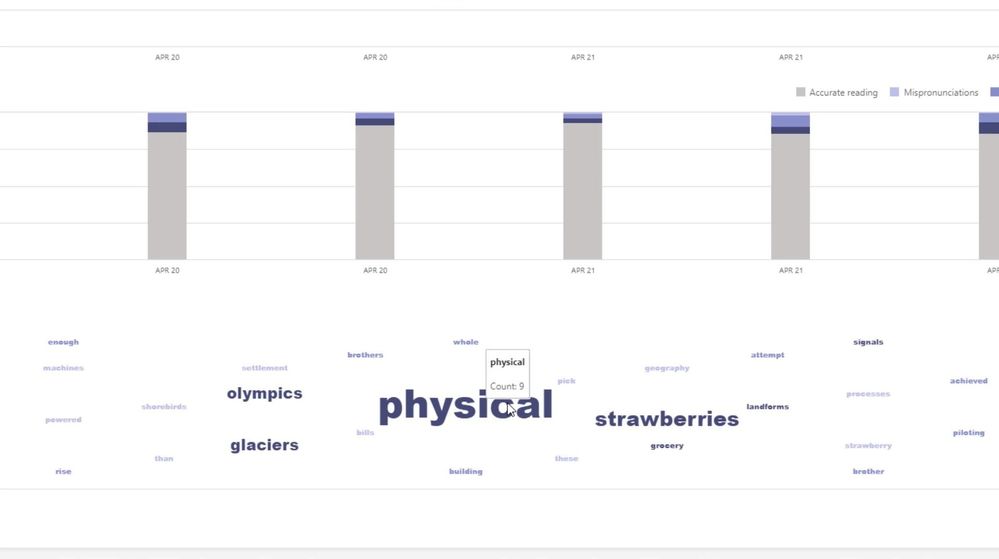
Whether educators used the Auto-detect feature for quick review, or manually code errors, valuable data is collected in Insights. Teams Education Insights dashboards help visualize class and individual progress. Insights provides a holistic view of trends and data including accuracy rate, correct words per minute, mispronunciations, omissions and insertions. Reading Progress also highlights actionable insights for educators including common challenges across the entire class or per student. 


Teacher Review - FINAL.png


During our broad private preview, Reading Progress has been tested in a number of distinct use cases. We’ve seen the expected wide usage for ages 6-11 as well as utilization for middle and high school fluency checks, special education and dyslexia support, and for building English skills for non-native speakers, both in English dominant areas and where it’s taught as world language.  We’ve also seen high interest for adult literacy scenarios. The stigma of reading out loud and lack of educator time has previously made consistent fluency practice in post-elementary education settings minimal.  The implications of a private and regular space for older learners to practice fluency are immense.  Here are two observations from some educators who have been part of the early private preview:


Joe Merrill, an educator from Lake Park Elementary, Florida, has been using Reading Progress in our private preview over the past few months with his class and he has this to say “Reading Progress takes all the nerves out of my student’s fluency checks. They are comfortable with its approach and I am able to collect data quicker and more efficiently than ever before. Now, I can devote more time to differentiated instruction rather than individualized assessments.”


Luis Oliviera, Director of Unified Arts and ELA from Middletown High School in Middletown, RI , has been using Reading Progress with his older English Language Learner students and has this to say: “Reading Progress has been such a time saver for assessing and analyzing my high school ELL students’ reading fluency. I am able to give a passage to the entire class and have them record their responses instead of having to individually assess the students. Cultural selections for the reading passages enhance their knowledge of important topics and current events. This allows more time to work directly with the students in addressing their needs.”


From the beginning, the creation and testing of this tool has been a and has been rooted in the science and literature of reading fluency. Our team has worked with hundreds of educators, literacy specialists and reading scientists. Early on, we had many interviews, brainstorming sessions and “design jams” with experts like Shaelynn Farnsworth, Lauren Taylor, Andrew Fitzgerald, Lauren Pittman, amongst many others.  We’ve consulted with students, iterated on different designs, and have much more in store! 


Four parts to the Reading Progress experience


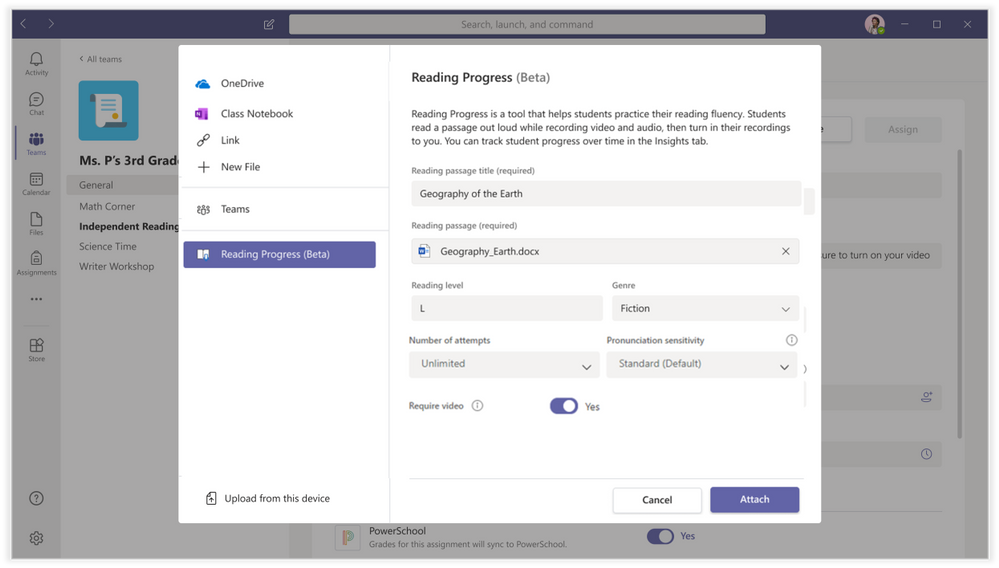
1) Assignment creation – Reading Progress is built directly into the free Teams Assignments experience.  Once an educator selects Create>Assignment, the Add resource button now includes Reading Progress (Beta) for the private beta group. The educator then completes the creation of the assignment, including uploading the Word document of their choice. This summer educators can look forward to the addition of PDF capabilities and a partnership with  ReadWorks  that includes a small library of curated reading passages. The educator can also manually set the Reading Level, Number of attempts, Genre, and Sensitivity. I call this the “picky dial” – how picky would you like the software to be. For example, younger readers may need more relaxed pronunciation expectations, while older readers might be set to higher sensitivity.  Note that this can be changed during the review experience as well.


Assignment.png


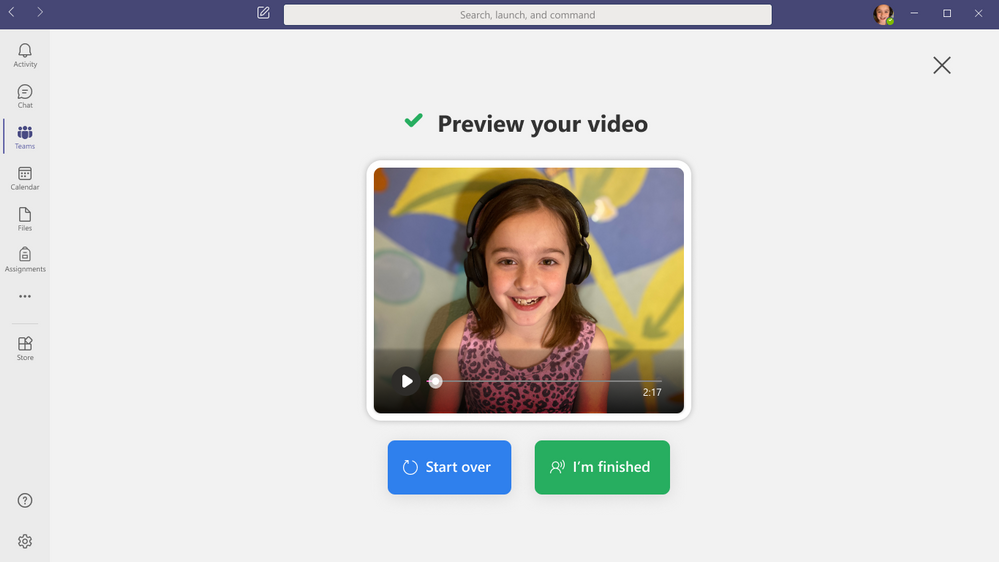
2) Student reading and recording: When students receive the Reading Progress assignment, they open it to see a recording experience. By default, video recording will be enabled, but teachers can approve audio-only if needed.  Similar to Flipgrid, the student will start the recording, get a countdown, and then the reading passage will open for the student to read. 


Student Reading.png


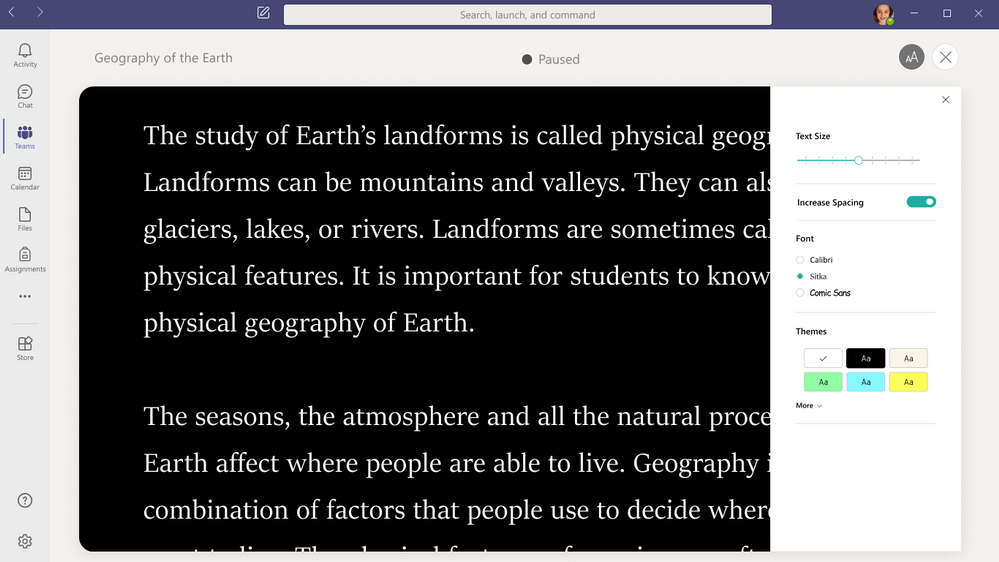
We’ve integrated aspects of the Immersive Reader into this experience to support students in  customizing the way the passage looks before they start reading.


Immersive Reader.png


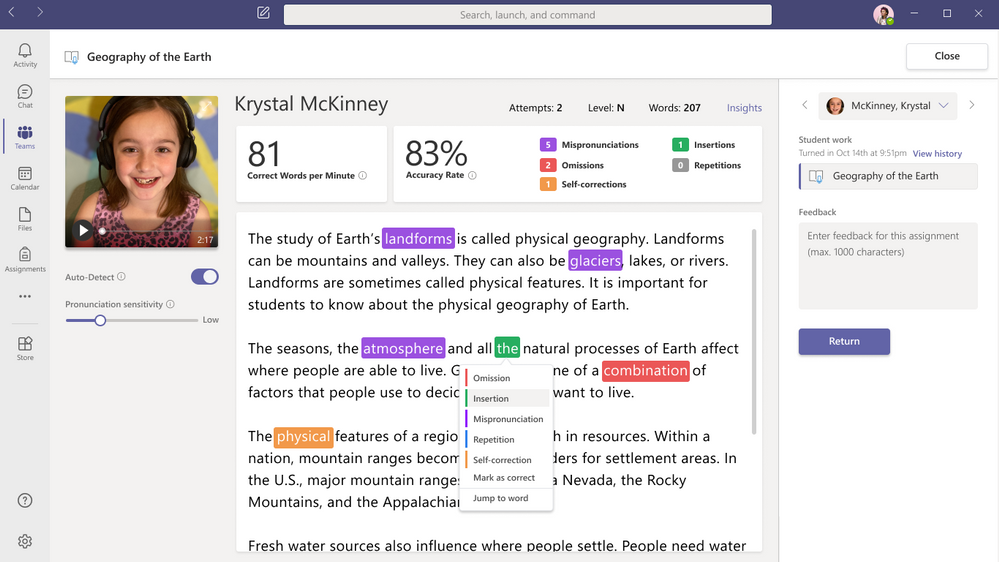
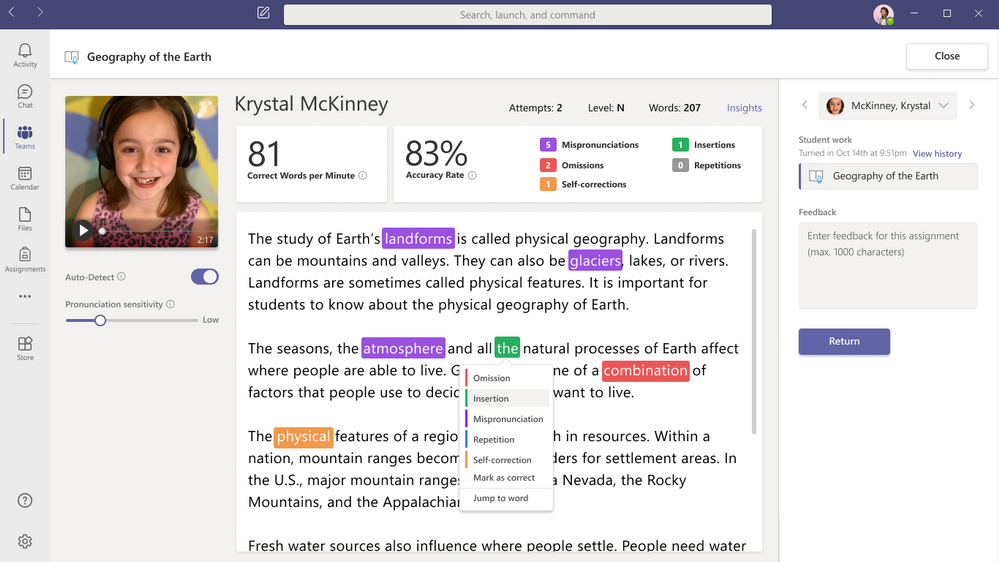
3) Educator review: One of the most powerful aspects for Reading Progress is the quick and easy review process, which simultaneously returns work to students and collects fluency data in Insights. This experience is built-in to the Teams grading and review experience. The review page pulls together the student’s reading recording, words per minute count, accuracy rate, and the ability to fine tune pronunciation sensitivity. 


By default, the Auto-Detect feature is enabled, so you will see predicted mispronunciations, omissions, insertions, self-corrections, and repetitions. The educator can review the Auto-correct data, overriding any inaccuracies, or turn off Auto-detect to mark up the page manually as they listen to the recording, similar to how reading fluency checks are done with paper and pen.  To account for different speech patterns and accents, the educator can change the pronunciation sensitivity analyzes results to make teacher review faster and more accurate. In addition, with a single click the educator can jump to any part of the recording to review detected words or passages.


Teacher Review - FINAL.png


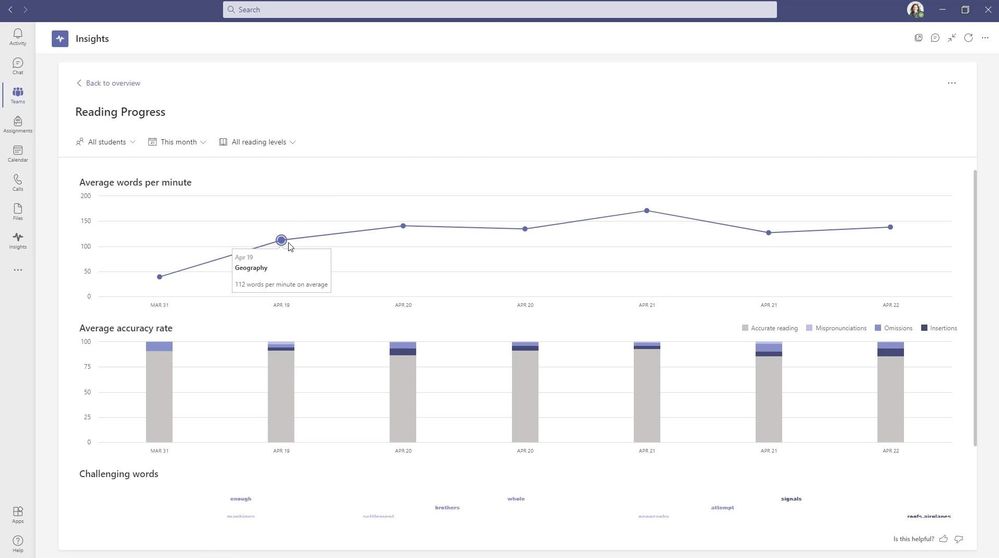
4) Powerful insights to track student progress:  Fluency data from Reading Progress is collected in Insights to support educators in taking evidence-based action for literacy in their classrooms. Insights dashboards help visualize progress and trends such as accuracy rate, correct words per minute, mispronunciations, omissions, and insertions. Reading Progress also highlights actionable insights for educators, synthesizing common challenges across the entire class or per student.  Educators can share Insights dashboard access to collaborate with literacy coaches, speech pathologists, and reading specialists and more to holistically curate student-centered approaches.


Later this summer education leaders will be able to access Reading Progress data by opting into our new Education Insights Premium designed to compile organization-wide data for intentional and impactful leadership. which is designed for school leaders and organization-wide views.  To learn more about this new Insights offering, visit the Education Insights Premium page.


Insights 1.jpg


Average words per minute and accuracy across a class or by student


Insights 2.jpg


Word cloud of most challenging word across a class or by student


A Reading Progress end-to-end demo


We’ve put together a support materials as well as an end-to-end video showing the details of how the entire Reading Progress experience works in Teams for Education:


Kate Griggs, founder of CEO of Made by Dyslexia, has had access to our early versions of Reading Progress and has this to say “Reading Progress is a FANTASTIC resource for teachers of, and children with dyslexia. Reading aloud is something dyslexic students really struggle with and literally dread doing, even in small groups or 1:1 with a teacher. Reading Progress offers a great way for dyslexic students to demonstrate what they can do, without feeling embarrassed or nervous. This will be a game changer”. 


Next Steps:


Reading Progress is currently in wide private testing with thousands of educators and is supported on Desktop, web, Mac, iOS and Android.  We are actively listening to educator and student feedback and updating and improving the tool regularly to meet your needs.  We will continue adding more schools to our private preview, and anticipate having Reading Progress at General Availability by late August of 2021, in time for back to school (Northern Hemisphere).


We have many improvements coming this summer, including support for PDF upload, iOS and Android video, a sample content library from ReadWorks, and the highly requested integration and roll up into Education Insights Premium. This will allow schools and districts to aggregate and roll up Reading Progress data into broader dashboards and analytics through the just-announced Education Insights Premium offering.


We also have a new Reading Progress page on the Microsoft Educator Center, and a MEC course coming later this summer.


A huge THANK YOU to all of the educators, students, and reading experts who have worked with us and given us feedback along this exciting journey. We look forward to collaborating with you as we continue!


Mike Tholfsen


Principal Product Manager


Microsoft Education


30 new features in Minecraft, Forms, Whiteboard, and more to get excited about now through August

30 new features in Minecraft, Forms, Whiteboard, and more to get excited about now through August

This article is contributed. See the original author and article here.

Happy Teacher Appreciation Day to you!


And—we have to say it—May the fourth be with you.


So much has happened the last year, much of it from our own homes or empty-to-partially-empty classrooms, and it hasn’t been easy (to say the least). But thanks to you—your perseverance, persistence, and above-and-beyond-ness to help students—you’ve inspired 30 new features and capabilities across Microsoft Education (including a whole bunch in Microsoft Teams).


No matter what the next year looks like, we’re excited to share new features and updates to help you and your students. Just click on the quick links below to navigate to a section:


  1. Personalize learning for each and every student

  2. Give students new tools to explore and solve Math on their own

  3. Do more with Forms

  4. Minecraft: Education Edition now available for clubs, camps, homeschools, and more!

  5. Improve connection and collaboration with Microsoft and your LMS together

  6. Keep students engaged with Microsoft Whiteboard

  7. Create more with updates to OneNote, PowerPoint, and Word

  8. Make learning more accessible, secure, and customized with video in Microsoft Stream


Let’s dive in! (Click here to jump right into the full list, without extra descriptions)


1) Personalize learning for each and every student


Immersive Reader
Immersive Reader, a free tool that uses proven techniques to support reading regardless of age or level, will be available in even more places later this summer. This spring, the Immersive Reader, across all apps and platforms, crossed 35 million monthly active users!


Teams iOS, Android for mobile
One of the #1 requests of the Education team has been to add Immersive Reader to our mobile apps on iOS and Android. In late June, we’ll be adding the Immersive Reader for channel conversations and Chat, in addition to the already-supported Assignments.


When: July


Excel for the web
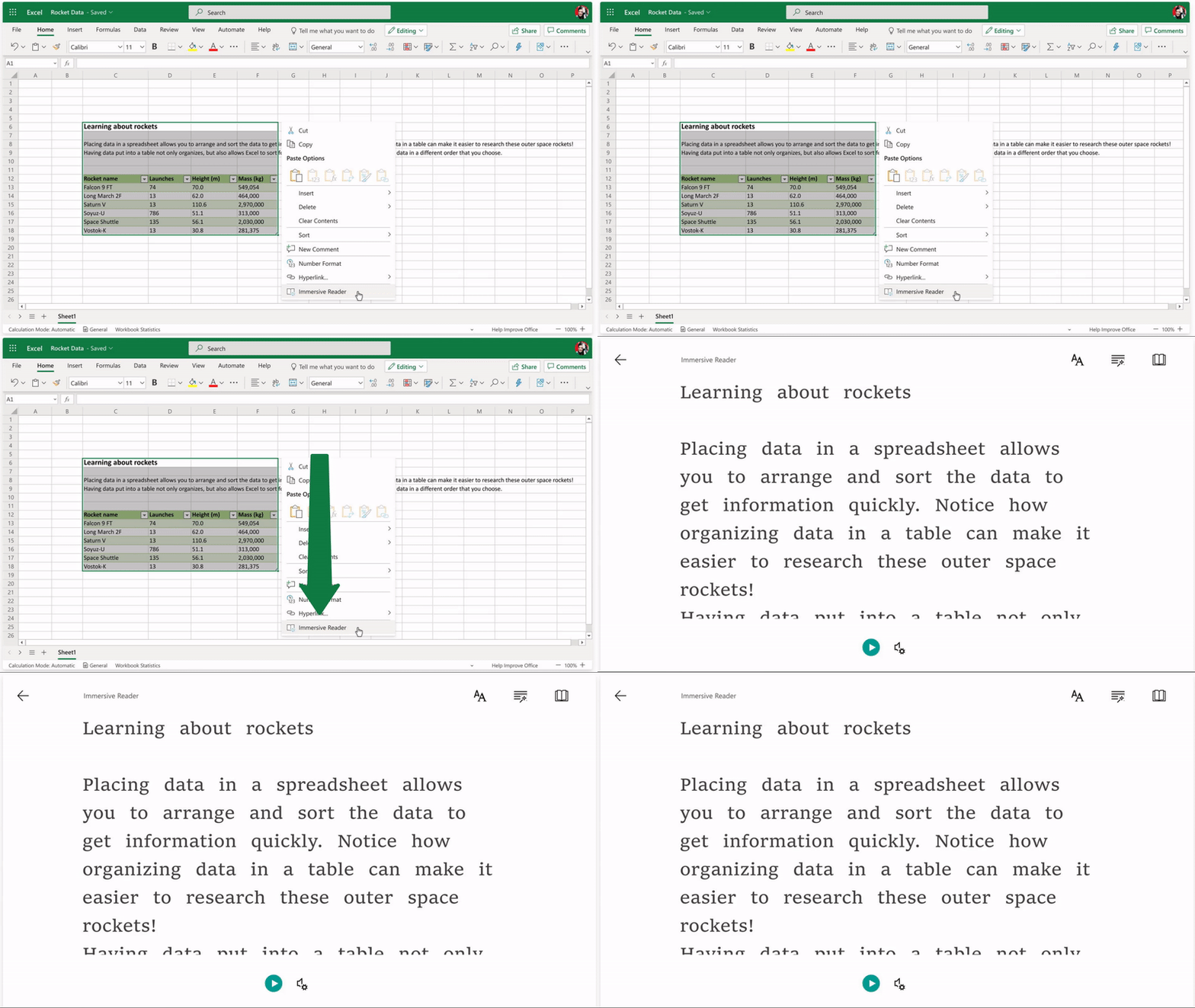
Later this summer, Immersive Reader will be coming to Excel for the web. This has been a top customer request, and we’re excited to make Excel even more inclusive!


When: August


Improvements in PowerPoint for the web
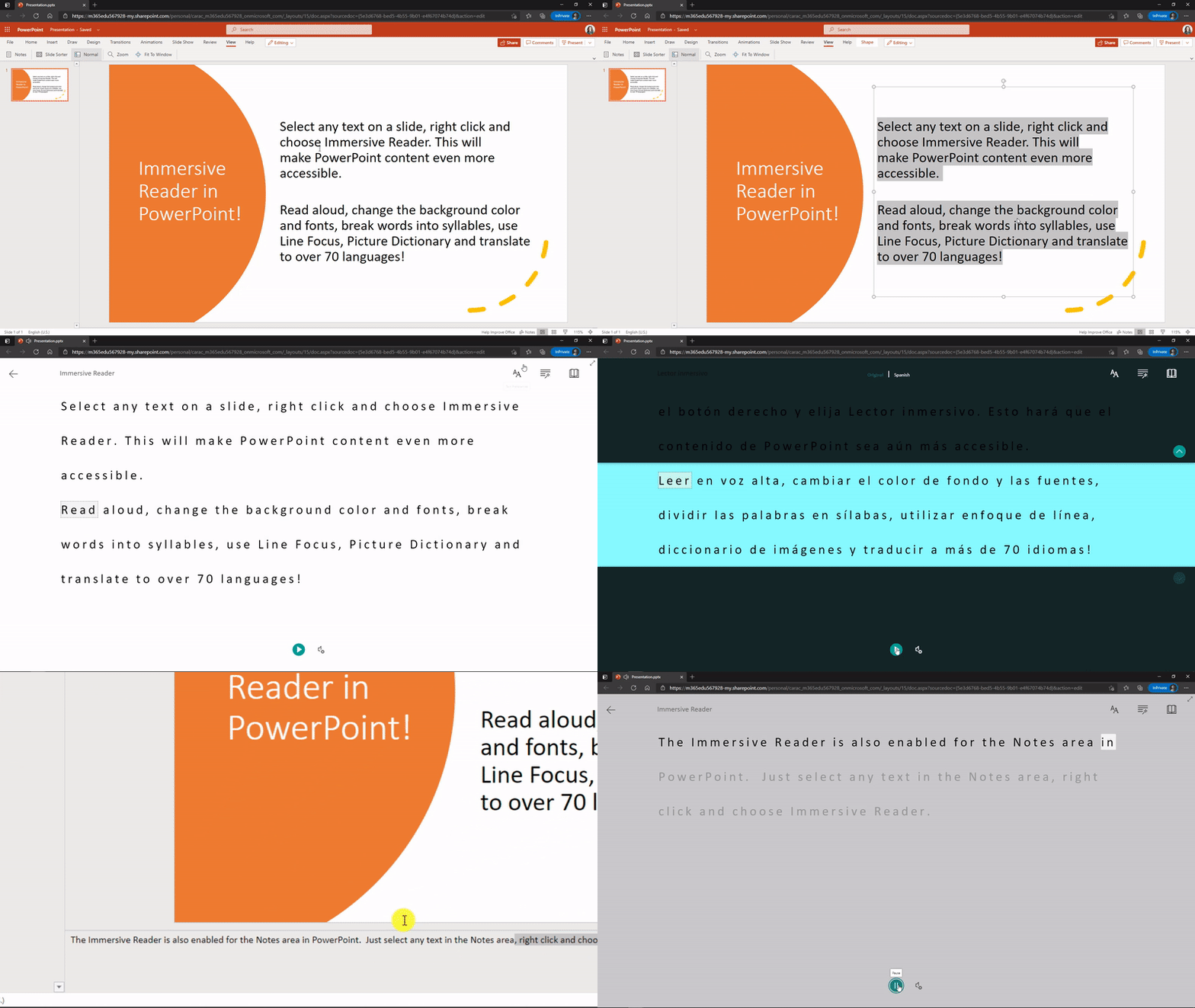
We launched Immersive Reader in PowerPoint for the web in April and we’re making some improvements in May. These include a button on the ribbon and the ability to right-click on the slide to launch Immersive Reader.


More languages for Immersive Reader read-aloud, including Welsh!
In the next few days, we’ll be enabling many new and updated languages for read-aloud in Immersive Reader. These languages will be using our Neural Text-to-speech technology, meaning the quality will be extremely high. The new read-aloud languages for Immersive Reader include Dutch (Belgian), French (Belgian), English (Philippines), Estonian, Irish, Lithuanian, Latvian, Maltese, Ukraniaian, Urdu, and Welsh.


The Welsh language has been a top request for the Immersive Reader read-aloud voice. So we’re sending a virtual “cwtch” to all our educator friends from Wales like Lanny Watkins and Julie Fletcher :hugging_face:!


When: May


And in our quest to make all Education technology more inclusive, we’re working closely with partners to help implement the Immersive Reader in their platforms. Learn more.


2) Give students new tools to explore and solve math on their own


Math skills are one of the key foundations of education, and there’s so much great technology that can support the growth of developing mathematicians―no matter their age or ability. That’s why we’ve built tools like Equation Tools and Ink to Math for creating and editing equations, Math Assistant for doing individual work and practice, and math intelligence in Forms to support educators when doing formative assessment. Today, we’re excited to share new tools across Microsoft Education that will continue to help instill a love of math at any age.


Equation Tools for Word Online
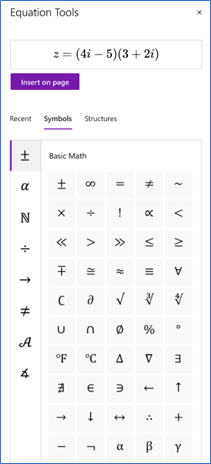
Equation Tools will make it easier for students and educators to create and edit math equations in Word Online by using a set of symbols and structures as building blocks. You can access the feature by tapping the Equation button in the Insert tab.


When: July
Math - OneNote, Word - Equation Tools.png


Math Assistant in OneNote for iPad and OneNote Desktop
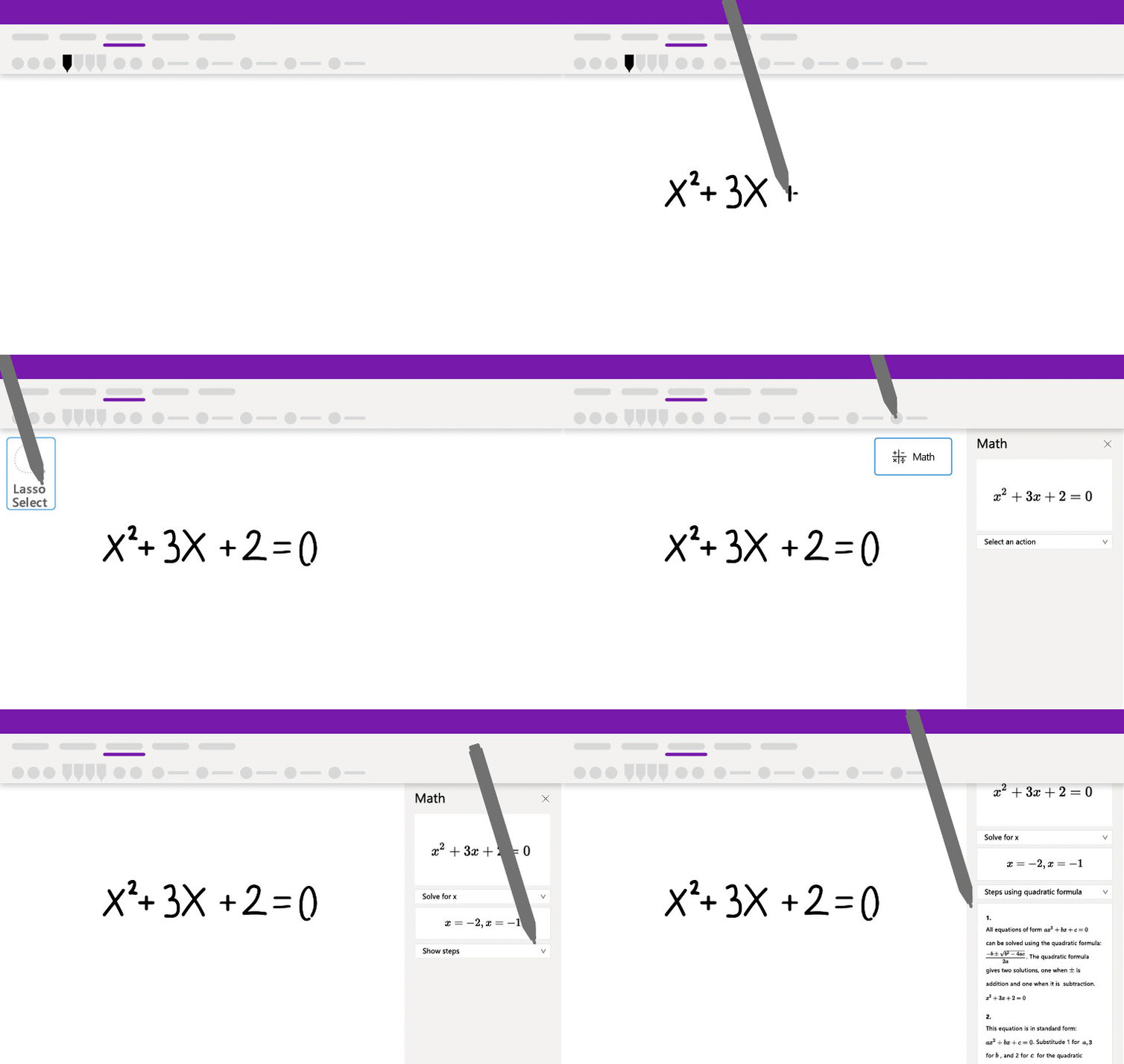
Students can now use the step-by-step math solver to help them with individual math work in OneNote for iPad and OneNote Desktop. In this release, you’ll be able to type or ink equations and have them solved step-by-step. More features, including Graphing, Immersive Reader, and Practice math quizzes will be added in the upcoming months. Note for educators: If you’d like to temporarily disable all or some of this functionality for your students, like during a math quiz or exam, you can do so in OneNote for Windows 10 or OneNote Online by following these steps.


When: July


Math Solver in Microsoft Edge
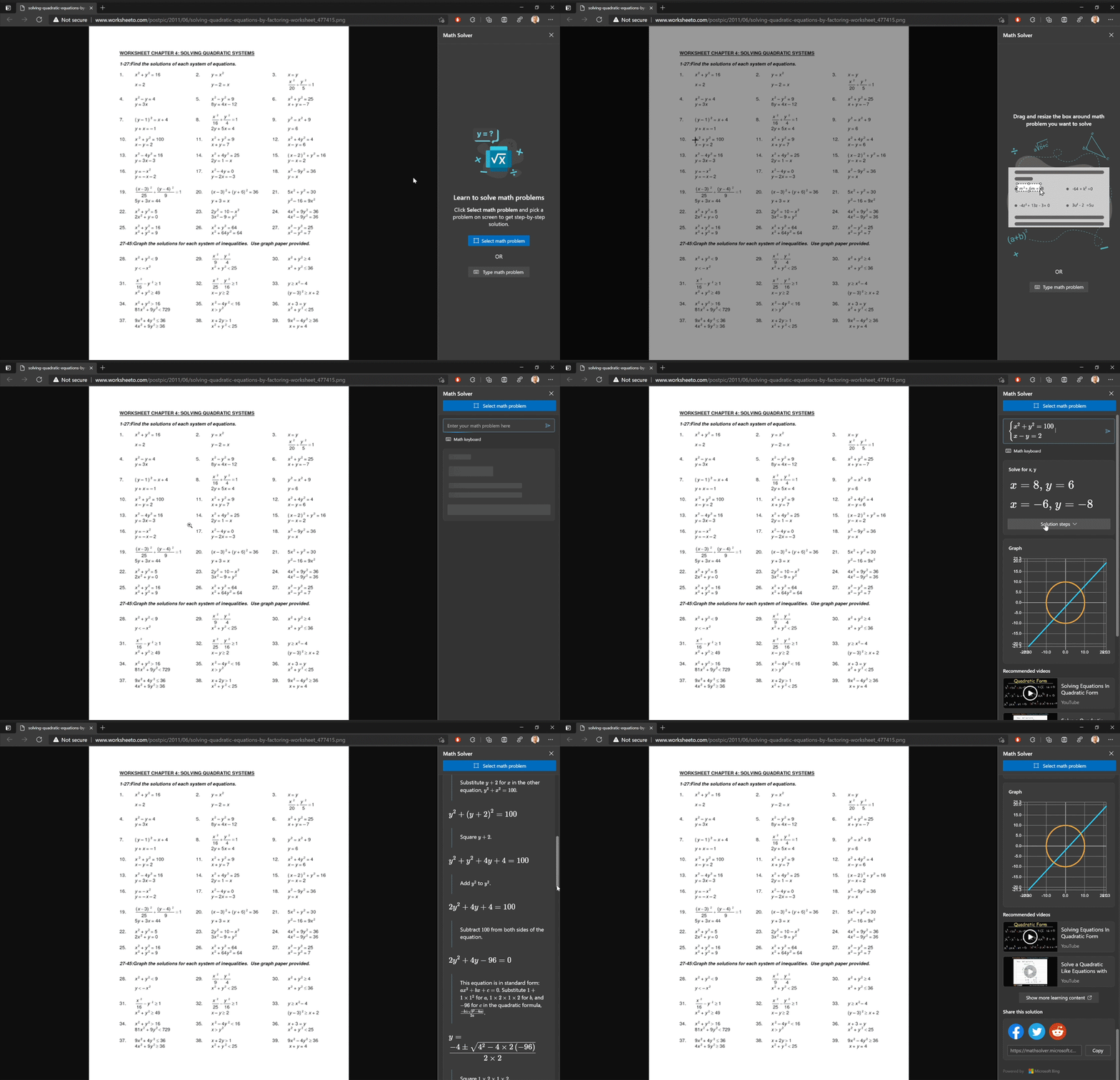
With Math Solver in Microsoft Edge, you can use the selection tool to capture a math problem―be it handwritten or printed–and then see the solution with step-by-step instructions to help you learn the how on your own. It also comes ready with a mathematical keyboard so you can easily type math problems instead of hunting around a traditional keyboard for the characters you need. After solving your problem, Math Solver provides many options to continue learning with additional materials such as quizzes, worksheets, and video tutorials. Learn more about this update here.


When: June (for Edge 91)


3) Do more with Forms


Timed quiz/form
Whether you are using Teams Assignments or not, now you can set a time limit on any of your surveys or quizzes. Simply go to your settings in the form design page, under the “…”. The timer begins right as your student starts the form. Once your student reaches the time limit, they can submit what they’ve completed thus far, but cannot answer any more questions in the form.


When: End of August


Text formatting
Now, you can use bold, italicize, and underline in your surveys and quizzes. You can also change font sizes, colors and use bulleting or numbering, allowing teachers and form/quiz designers to emphasize certain words in your questions, answer choices, titles, descriptions, and comments. You can format the text via the floating tool bar that appears when you highlight the text.


When: June


Shortened URL
Now, you can use a shorter URL when collecting responses to your form. A shortened link looks cleaner and can be easily typed into their web browser by students or parents, especially if they see the link in a poster or presentation.


When: Available now!


Improved sending and sharing
The top corner of your Forms design page has been updated for a clearer experience. Under the Send button, you’ll find the options to send your form via URL, QR code, and more, and define which audiences can respond to your form. Under the people icon next to the “Send” button, you can share edit access to the form with fellow educators or colleagues who are creating or evaluating the form with you.


When: August


4) Minecraft: Education Edition now available for clubs, camps, homeschools, and more!


M365 - Minecraft - New Skins- M365 Blog.png


Taking Minecraft beyond the classroom
The past year has shown us that learning can truly happen everywhere, so we’re making Minecraft: Education Edition available beyond the classroom! The Camps and Clubs Update allows camps, after-school programs, homeschools, non-profits, and other organizations to purchase licenses and trial Minecraft: Education Edition. Join the beta program (available for any user with a Microsoft 365 account) to explore Minecraft: Education edition and try these new features below. Stay tuned for updates later this month!


New Teams and Flipgrid integration with Minecraft
We’re bringing Teams for Education and Flipgrid Topics into Minecraft: Education Edition. With these new features, incorporate Minecraft: Education Edition into your existing lesson planning and assessment strategies. Create a custom button that links to a Flipgrid topic, Forms quiz, or any web tool when assigning a lesson from the Library. You can also add a Resource Link to your Flipgrid topic or other assessment tool in any world you’ve created in the new Classroom tab in the World Settings. Check out these new features in the Camps and Clubs beta.


More Minecraft: Education Edition Updates


  • Launch from digital learning platforms: Add the URL https://education.minecraft.net/open to your digital learning platform or LMS to launch Minecraft: Education Edition from the web.

  • Manage classroom settings from inside a world: Check out the new Classroom tab in Settings to access Minecraft: Education Edition world settings commonly used in the classroom. This tab will remain visible for teachers who join a hosted world, giving teachers easy access to classroom management controls that support student gameplay.

  • Fun new skins: We’ve also added 10 new non-player character (NPC) skins including educators and construction workers!


All of these features and updates are in the Camps and Clubs Update, currently in beta and launching later this month.


5) Improve connection and collaboration with Microsoft and your LMS together

Canvas and Blackboard integrations.png

LMSs
Microsoft is working with leading Learning Management System providers to create easier enablement of Microsoft Teams for collaboration within LMS courses, advanced management of Teams meetings directly within LMS courses, and reimagined OneDrive integration for course content and assignments, extending support beyond traditional Office documents to Whiteboards and more.


Easily create a Team from within your LMS
To facilitate project-based learning and encourage class collaboration, educators will soon be able to create and pair a class team for every course in their LMS. This solution is coming to Canvas and Blackboard in August, and we’ll announce additional LMSs soon.


When: August for Blackboard and Canvas


A new Teams meeting LTI within your LMS
Our new Teams meeting LTI app will enable educators to create meetings, plus access meeting settings, chats, and transcripts without leaving their LMS. Students will be able to access meetings and meeting resources as well. This is coming to Canvas in August and we’ll announce additional LMSs soon.


When: August


Improved OneDrive and Office365 integrations in Canvas and Blackboard
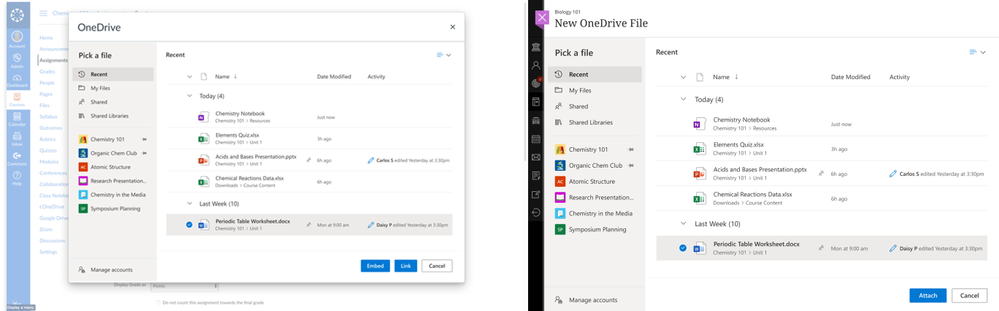
We reimagined and rebuilt the way educators and students access their O365 files from OneDrive from within an LMS. The new experience responds to feedback from both educators and students: you can find files more easily via a most recently-used files list, you can easily switch O365 accounts, and we’re working with LMS companies to integrate the experience more seamlessly in your teaching and learning workflows.


When: August for Canvas and Blackboard


6) Keep students engaged with Microsoft Whiteboard


Microsoft Whiteboard is a visually rich and interactive education tool to support creative teaching and learning. With its infinite canvas and focus on teamwork, Whiteboard provides an open place for teachers and students to develop ideas together. In addition, students and teachers can participate from any platform and any device, whether the class is taught remotely, in hybrid mode, or in person.


Create visually engaging class material
We understand that one of the hardest things for an educator to do is to keep a student’s attention throughout the class. Microsoft Whiteboard gives you tools to create beautiful visually-engaging content for your class. Pull in images, content from other documents, shapes, and stickers to add interactivity to your lessons. Use Whiteboard for informal, ad hoc lessons, or save time by creating the boards ahead of class and simply open the whiteboard during class to get going.


When: July
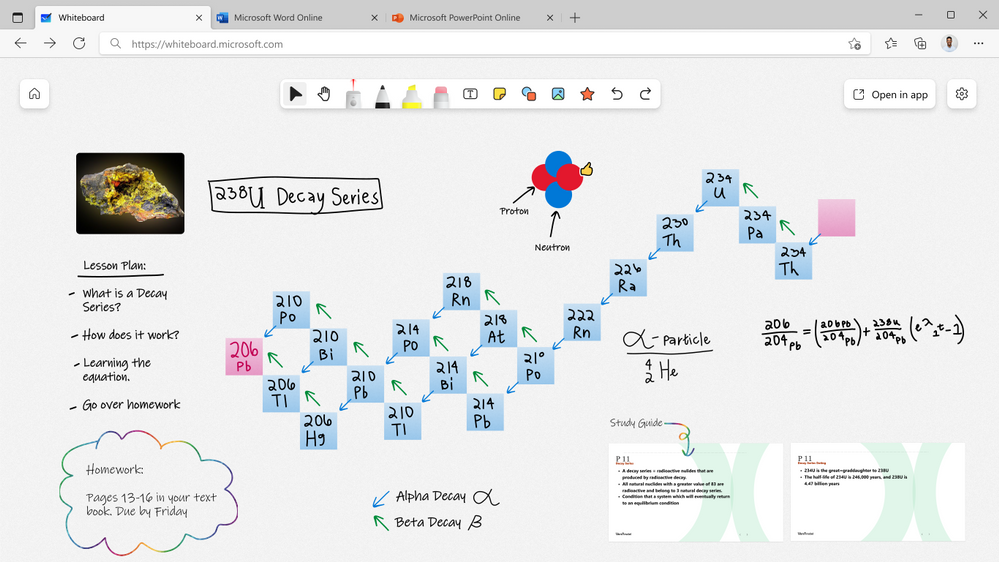
WB - Visually Engaging Class Material.png

Focused, dynamic lessons
Whiteboard can help get your class focused on the right things. Educators have full control over who can edit the whiteboard and when. Annotate over your lesson with digital ink, highlighters, stickers, sticky notes, and text boxes for special emphasis. Use the laser pointer to draw attention to important concepts. As whiteboards are inherently non-linear, you have the flexibility to dynamically change the flow of the lesson depending on the conversations that come up and where those discussions take you. For a more guided experience, you can lock your students’ view so that they see what you see. Run your lessons with a video conferencing application like Microsoft Teams for the best experience.


When: August
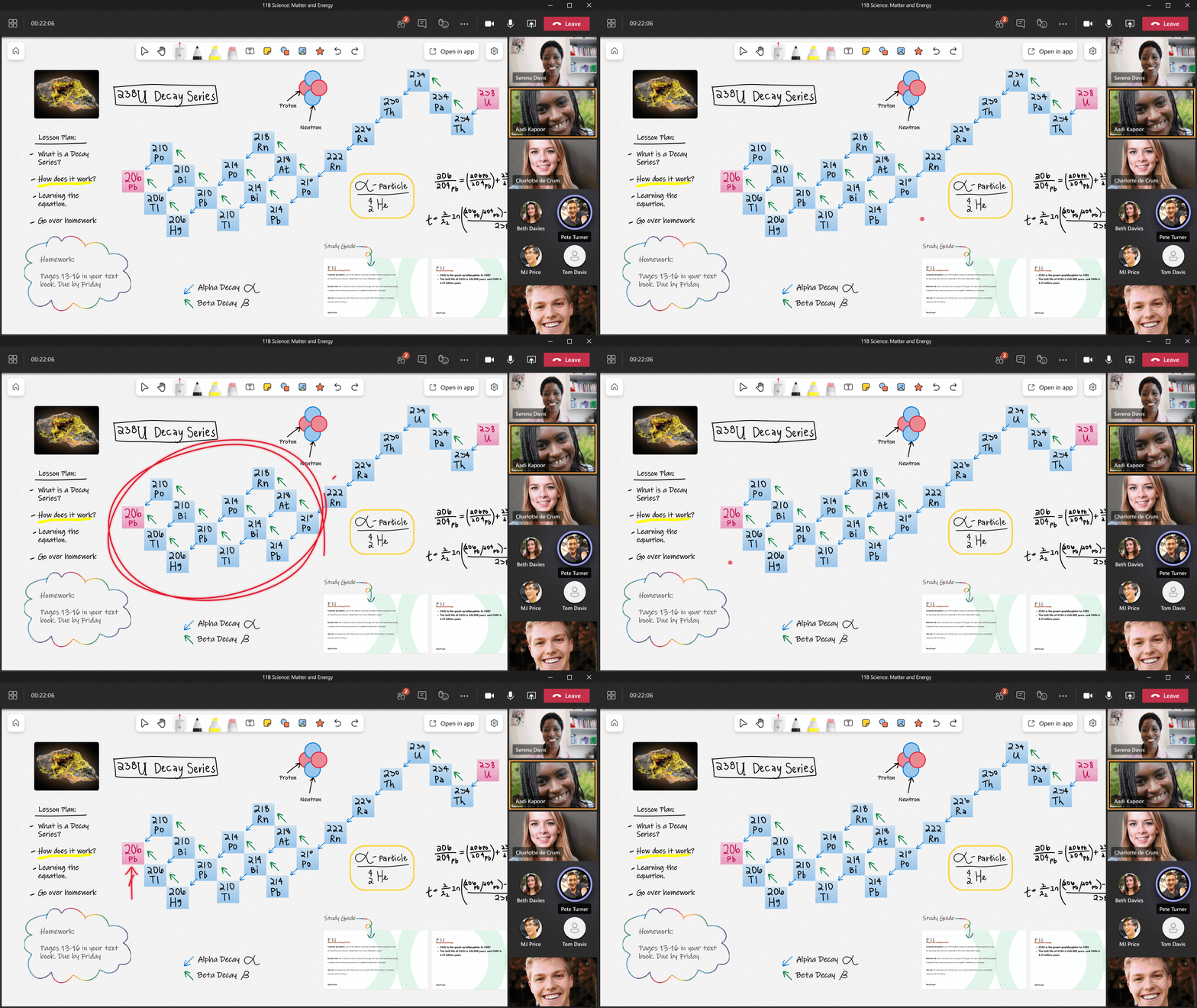


Group projects and interactive lessons
When it comes to group projects and interactive lessons, Whiteboard makes it simple to upload digital worksheets that you already have to the board, or create new ones using more structured content from within the app. Add your content to the board, open it in a Teams meeting, or invite your students to the board and see their creativity blossom. With everyone on the same Whiteboard, live cursor identities allow you to see where students are, who is actively engaged with the work, and which students might need additional help or clarification on the tasks.


In Whiteboard, students can pick up and draw with a pen, touch, a mouse, or select content from the toolbar. The wide range of tools—from adding simple reaction stickers to creating full blown works of art—means that students can choose the level of engagement they’re comfortable with.


When: August
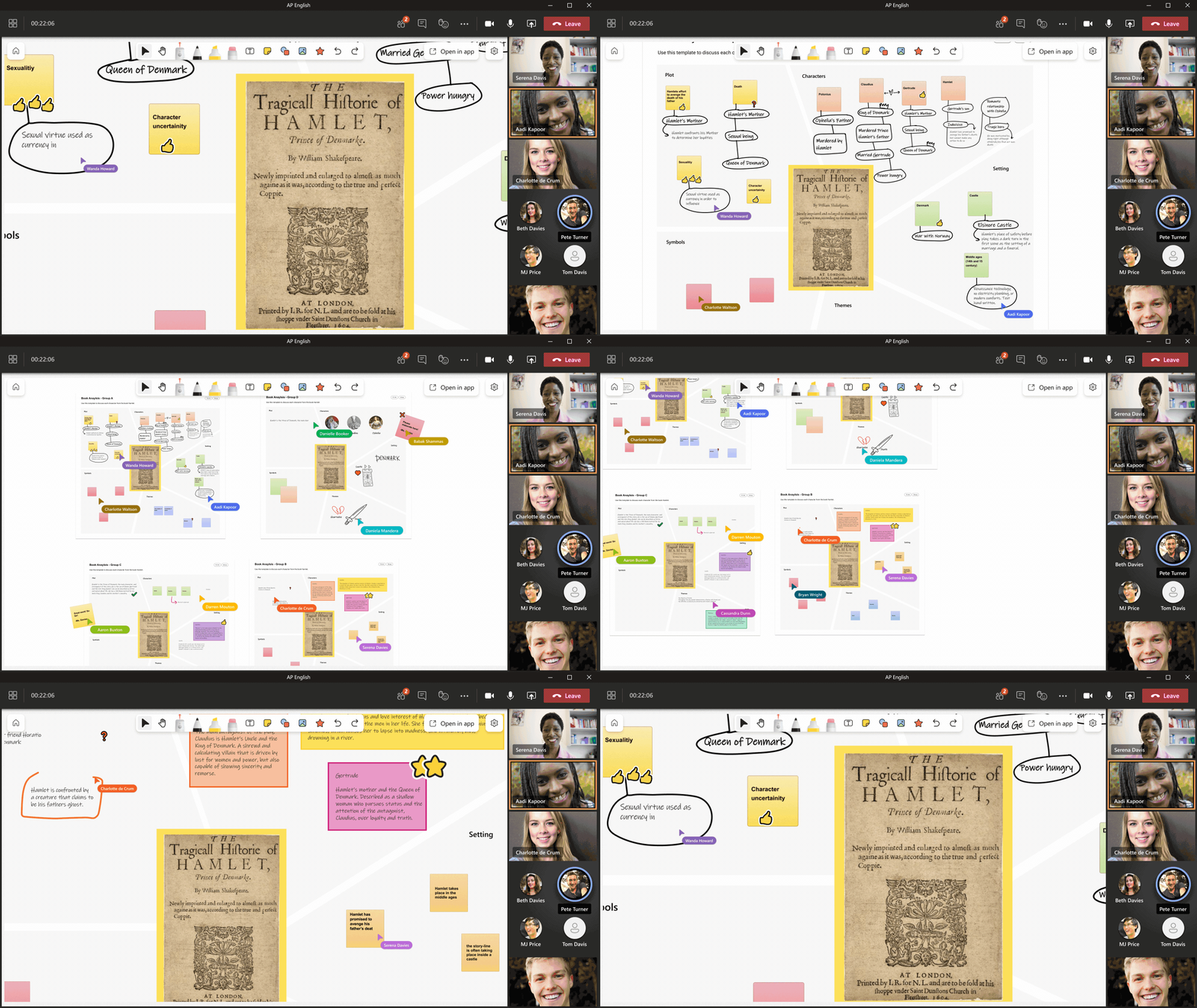


To learn more about Microsoft Whiteboard, check out our Whiteboard for Education Tech Community Blog.


7) Create more with updates to OneNote, PowerPoint, and Word


Record and embed video into OneNote
Later this summer we’ll be adding the ability to record video as well as screencast, directly from the OneNote for web app. This video can also be directly embedded onto the OneNote page. Record video will work for stand-alone OneNote in the web, as well as OneNote Class Notebooks (stand alone or in Teams).


When: August


OneNote live captions
As announced last year, we have integrated Microsoft Translator with OneNote to allow live captions to be streamed directly into OneNote while taking notes. This has been in private beta testing in OneNote for web, and we are opening this more broadly in late summer, bringing it to OneNote for Windows 10, Mac and iPad.


When: August


Improved Multipage Distribution in Class/Staff Notebooks
Class and Staff Notebooks currently support distributing multiple pages at the same time, but the pages are not in order when received by students. Later this summer, with some improvements we’ve made, multiple pages being distributed will come through to students in order. This feature will work on OneNote for Windows 10, Mac, and iPad


When: May


Canva and NoteDex – new partners for OneNote embed
Soon we’ll be adding interactive embed support for Canva and Notedex. Navigate here to see the full list of partners that integrate with OneNote for interactive embed.


When: June


PowerPoint
PowerPoint for the web introduces Auto Fix: A new time-saving feature to clean up your slides!
It takes time and effort to perfectly align and manually position multiple elements on a slide. To help simplify the process, we’re introducing Auto Fix: a new feature that enables easier, precise, and faster editing of slide content alignments. Available in PowerPoint on the web with your Microsoft 365 subscription. Navigate here to learn more.


When: Available now on web


PowerPoint Presenter Coach: New critiques announced
Presenter Coach leverages AI to help anyone—professionals, students, and even those who just want to practice a speech for a wedding or graduation. Especially in this hybrid learning environment, presentation skills are more important than ever, with more meetings and presentations than ever before. Presenter Coach provides users with feedback on their pace, use of monotone pitch, use of filler words, poor grammar, originality, use of sensitive phrases, and more while they rehearse their presentations. At the end of each rehearsal, Presenter Coach users receive a Summary Report highlighting the key pieces of feedback to help them become even better, more confident presenters.


Recently, we announced three new critiques to Presenter Coach and bringing them to preview in PowerPoint for the web. These include feedback on body language, use of repetitive language, and pronunciation. Navigate here to learn more.


When: Available now on web


Kahoot! Add-on for PPT
Are you using PowerPoint in your lessons? With the new Kahoot! Integration in Microsoft PowerPoint, you can now start a live kahoot directly from your presentation without the need to switch between tools. Whether you teach in class, virtually or in a hybrid format, with our new add-in, you can make your lesson truly interactive by bringing your favorite tools together! Once you’ve finished your awesome lesson, you’ll be able to dive into a report with the class results in the Reports section of Kahoot!. This feature is available in the following plans for teachers: Kahoot! Premium, Premium+ and EDU.


When: May

Kahoot 1.png


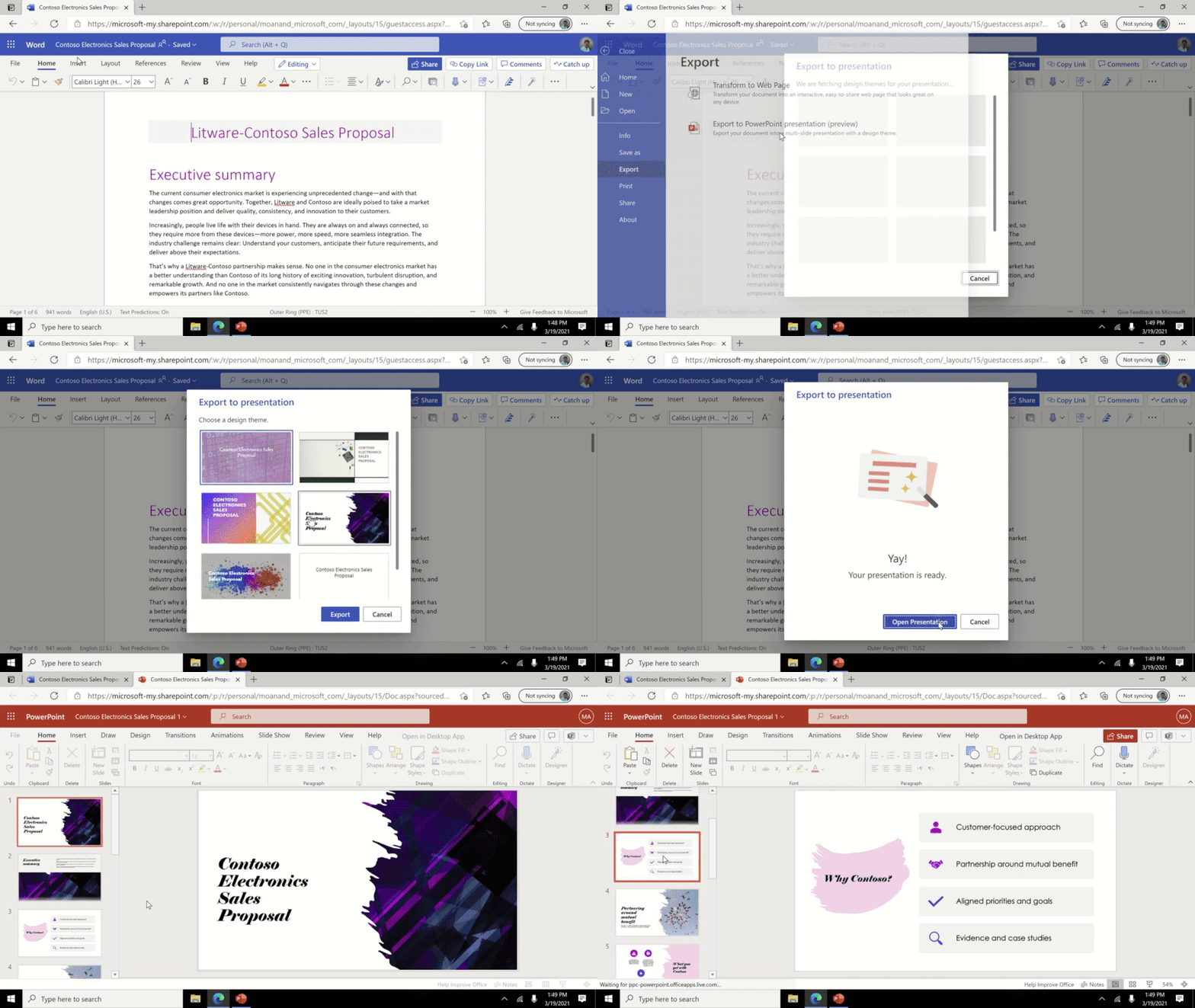
Word for web export to PowerPoint presentation
This feature uses artificial intelligence (AI) capabilities to save you time and provide you with slide suggestions powered by Designer in PowerPoint. The slides are derived from your section headers in the document, so make sure to organize your Word document accordingly for optimal suggestions. Based on key words in your document, Designer in PowerPoint will suggest imagery, icons, videos, themes, and fonts to arrange your content. You can always change the suggested content if needed. Navigate here to learn more.


When: Available now on the web


8) Make learning more accessible, secure, and customized with video in Microsoft Stream


Over the past year, video has become more central to education – enabling the transition to remote and hybrid learning environments.


Microsoft Stream (built on SharePoint) is bringing to production long-awaited features to unlock new value for educators and students in the areas of accessibility, security, and content consumption. This translates into better meeting recordings and learning experiences and provides greater control for video consumption, sharing, and management.
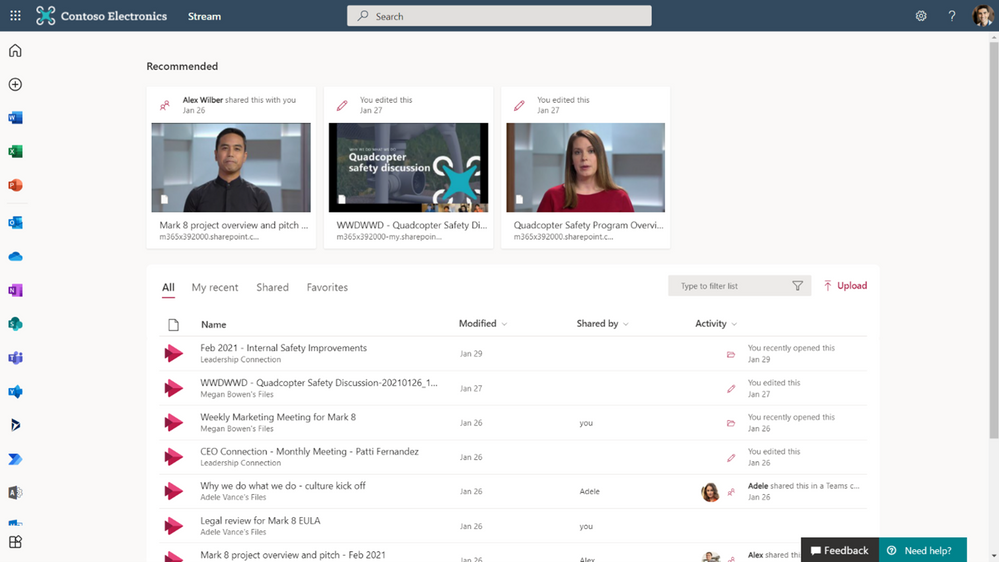

Stream.png


Stream web app
The Stream web app will soon be part of office.com – consolidating videos into a seamless, individualized experience for all stakeholders – and addresses issues related to content discovery, organization, and consumption.


When: August


New video player for OneDrive and SharePoint
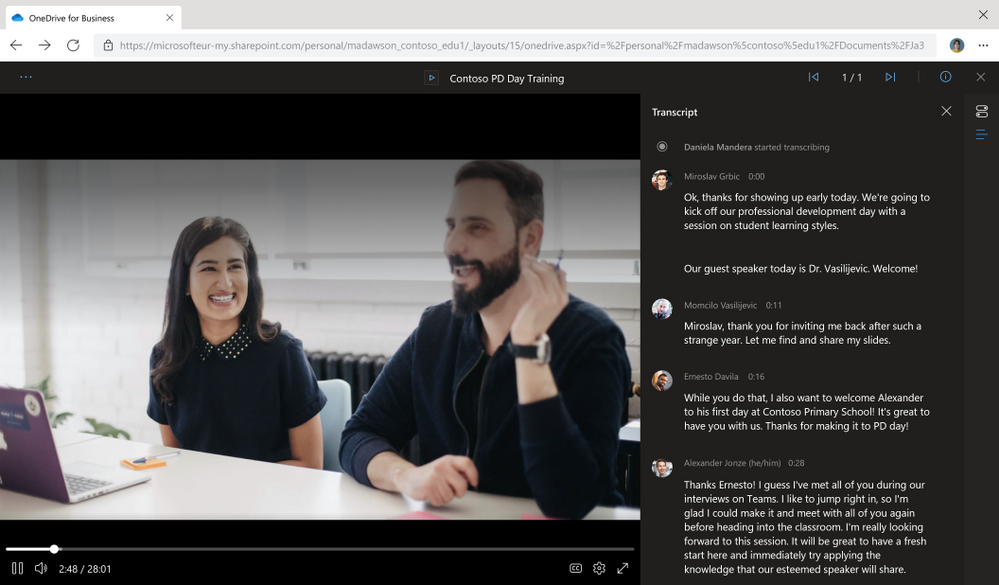
We’ll also release a new player for video files in OneDrive and SharePoint, including several upgrades for playback such as higher quality video, a transcript pane on the right, speaker identification in the transcript (if enabled), and support for switching between transcripts in multiple languages. This gives students and educators flexibility to work across environments in Microsoft 365 – with high-quality video playback and scale for videos they interact with in OneDrive and SharePoint.


When: August


Learn more about these changes and many more features already available to you today.


And for those that love lists, here’s a review of all the features we shared and their expected availability:


1) Personalize learning for each and every student


  • Immersive Reader for Teams iOS, Android for mobile – July

  • Immersive Reader in Excel for the web – August

  • Immersive Reader improvements in PowerPoint for the web – available now

  • More languages for Immersive Reader read-aloud, including Welsh – May


2) Give students new tools to explore and solve Math on their own


  • Equation Tools for Word Online – July

  • Math Assistant in OneNote for iPad and OneNote Desktop – July

  • Math Solver in Microsoft Edge – June


3) Do more with Forms


  • Timed quiz/form – end of August

  • Text formatting – June

  • Shortened URL – available now

  • Improved sending and sharing – August


4) Minecraft: Education Edition now available for clubs, camps, homeschools, and more!


  • Taking Minecraft Beyond the Classroom- May

  • New Teams and Flipgrid Integration with Minecraft- May

  • Launch from digital learning platforms – May

  • Manage classroom settings from inside a world – May

  • Fun new skins – May


5) Improve connection and collaboration with Microsoft and your LMS together


  • Easily create a Team from within your LMS – August for Blackboard and Canvas

  • A new Teams meeting LTI within your LMS – August

  • Improved OneDrive and Office365 integrations – August for Canvas and Blackboard


6) Keep students engaged with Microsoft Whiteboard


  • Create Visually Engaging Class Material – July

  • Focused, Dynamic Lessons – August

  • Group Projects and Interactive Lessons – August


7) Create more with updates to OneNote, PowerPoint, and Word


  • Record and embed video into OneNote – August

  • OneNote Live Captions – August

  • Improved Multipage Distribution in Class/Staff Notebooks – May

  • PowerPoint for the web introduces Auto Fix – available now on web

  • PowerPoint Presenter Coach: New Critiques Announced – available now on web

  • Kahoot! Add-on for PPT – May

  • Word for web export to PowerPoint presentation – available now on web


8) Make learning more accessible, secure, and customized with video in Microsoft Stream


  • Stream web app – August

  • New video player for OneDrive and SharePoint – August


And in case you missed it:


  1. Check out the latest news and updates for Microsoft Teams.

  2. Sign up for the free Microsoft Educator newsletter to get free professional development, time-saving tips, snackable resources, and more.

  3. Get free training on how to use these and other Microsoft Education tools in your classroom (yes, it’s really free)!



Make Learning More Accessible, Secure, and Customized with Microsoft Stream

Make Learning More Accessible, Secure, and Customized with Microsoft Stream

This article is contributed. See the original author and article here.

Over the years, as students and educators have headed back to school, there’s been an ever-constant need for reliable tools that help foster learning and development. As a core enabler of remote and hybrid learning, video has become central to education in the last year, providing an authentic, engaging medium that best captures the in-class experience today.


Microsoft Stream (built on SharePoint) is bringing to production long-awaited features that unlock new value for you in the areas of accessibilitysecurity, and customized content consumption.


Stream-SharePoint-OneDrive-Teams-small.png


   Accessibility


We’re complementing recent Teams meeting accessibility enhancements with improvements to transcripts and captions in Stream on SharePoint. This summer, we’ll show transcripts alongside any meeting recording that came with Teams Live Transcript.  Then we’ll add the ability to upload your own transcript to any other video stored on OneDrive and SharePoint, which is also used to drive captions and subtitles. After that, we’ll be adding the ability to generate a new transcript for a Teams meeting recording or any other video that has already been saved to OneDrive or SharePoint.  This provides on-demand accessibility even for meetings where live transcription was not available or used.


When:  July-September 2021


Security


When it comes to a video reaching its intended audience, there exist many key considerations – from privacy and intellectual property security to preventing unauthorized access to class content. We’ve heard from you how much of a priority this is. To address this, we’re making Teams meeting recordings read-only by default and will add “block download” functionality to Teams meeting recordings that are automatically saved to OneDrive and SharePoint. 


This feature provides greater control over how meeting recordings are accessed and shared and will roll out initially to non-channel Teams meeting recordings – with channel recordings following a few weeks later. 


When: July-August 2021


Contoso-PD-day-Teams-meeting.png


Content consumption


While video has many advantages over its alternatives, its discovery, distribution, and consumption can be challenging for educators and students alike. The Stream web app will soon be part of office.com – consolidating videos into a seamless, individualized experience for all stakeholders. We’ll also release a new player for video files in OneDrive and SharePoint, including several upgrades for playback such as higher quality video, a transcript pane on the right, speaker identification in the transcript (if enabled), and support for switching between transcripts in multiple languages.


When: June-August 2021


Other features


Most of the features mentioned above are arriving by August, but you can use Stream on SharePoint today. All your videos on OneDrive and SharePoint, whether they are Teams meeting recordings or video files you’ve uploaded, are Stream videos, and we’ll continue working to deliver the high-quality playback, features, and scale you expect.


Learn more about existing and new features in Microsoft Stream (on SharePoint).