by Contributed | May 10, 2021 | Technology
This article is contributed. See the original author and article here.
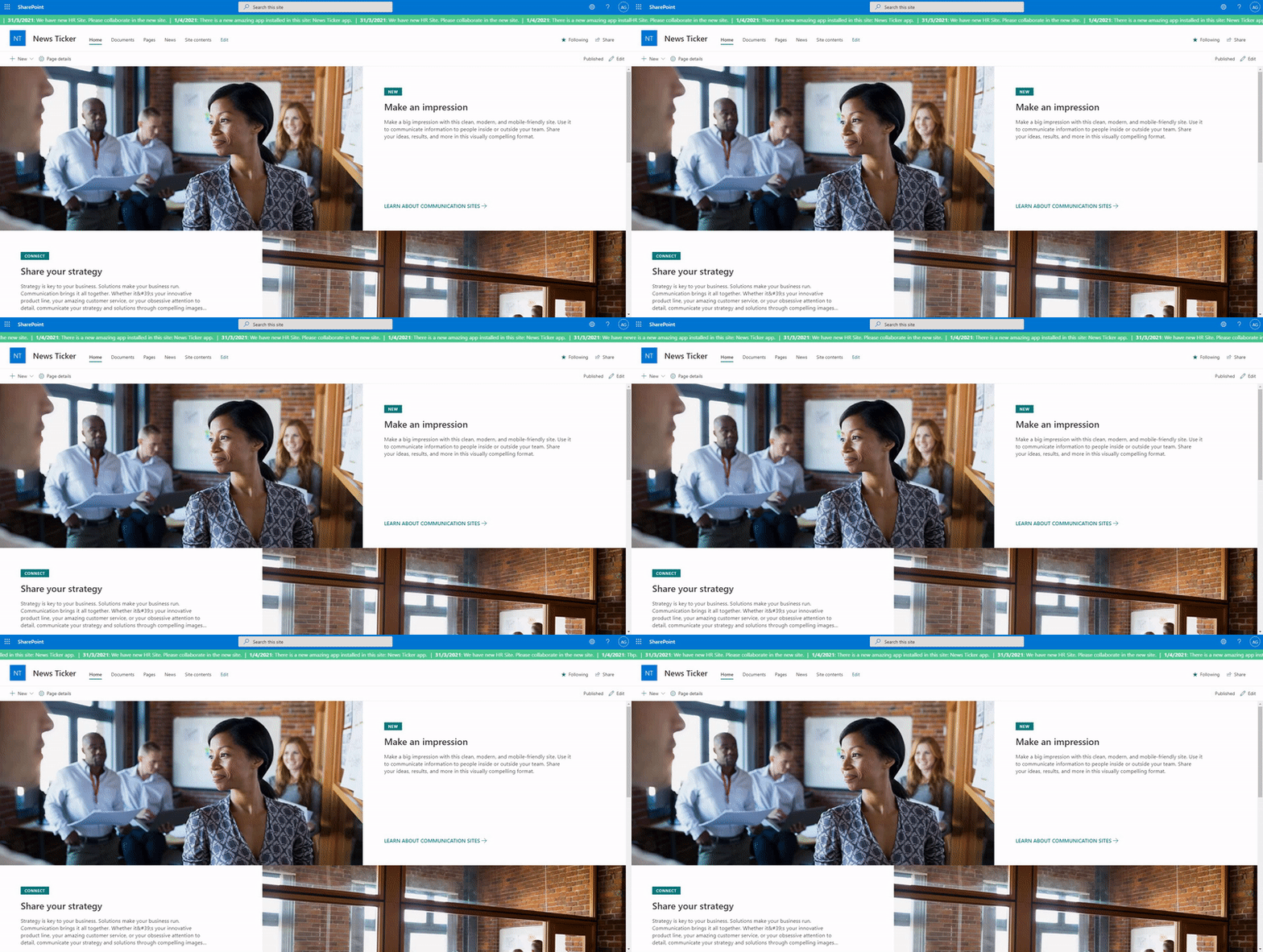
You might be familiar with the running text that shows some breaking news on a news tv channel. I think it would be nice if we have a similar thing on a SharePoint site to show some breaking news to its users so I created the News Ticker app. Basically, the app will show some news from a SharePoint list as a running text at the top of every modern page on the site. Below is how it looks:
News Ticker
Below is the data source:
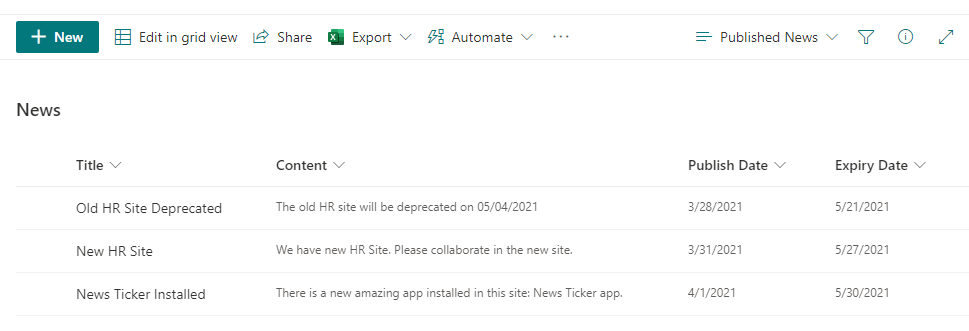 Data Source List
You can find the full source code and how to install it here.
In this article, I will share some key points from the solution code that might be useful for other SPFx projects.
1. Use React component in the SPFx Extension
SPFx extension doesn’t include React component by default but we can easily add it manually.
We just need to render our React component in the placeholder element provided by the SPFx Extension Application Customizer.
You can find my implementation code here.
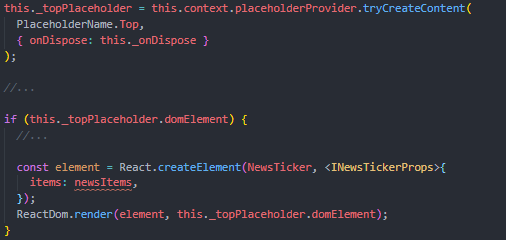 Render React Component
2. Get data from SharePoint list based on View using PnP JS
I’m using SharePoint list as the data source.
In order to make it simple to manage the news, I’m leveraging the list view and getting the data based on the view configuration.
It’s great because we don’t need to build any custom configuration mechanism in our app to configure (sort, filter, top, etc.) the data to be displayed. Just use the OOTB list view configuration.
It’s very easy to get the data based on the list view using the PnP JS. Below is my implementation:
- Get the view information using list.views.getByTitle(…)
- Get list item based on the list view XML using list.getItemsByCAMLQuery(…)
You can find my implementation code here.
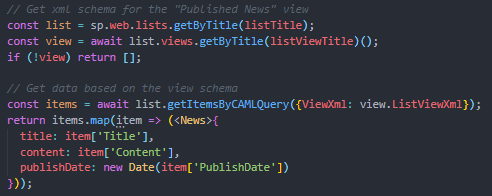 Get Data Based on List View
3. Use React third party component
I’m using an open-source React third party component for the running text component: react-ticker.
It’s easy to add any React third party components to our SPFx project.
You can find my implementation code here.
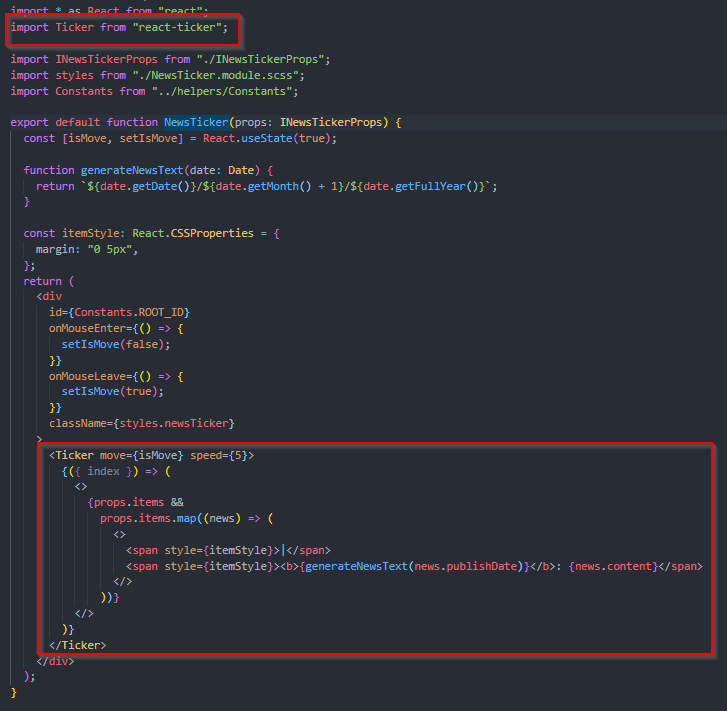 Use Third Party Component
Thanks for reading. Hope you find this article useful 
by Contributed | May 10, 2021 | Technology
This article is contributed. See the original author and article here.
Why?
Let me emphasize that using the Parse JSON action (as explained in this great blog post of Luise Freese: How to use Parse JSON action in Power Automate) is always the way to go when you are starting with Power Automate. Especially if you want to have properties of your JSON ouput to show up as Dynamic Content in the rest of your Flow.
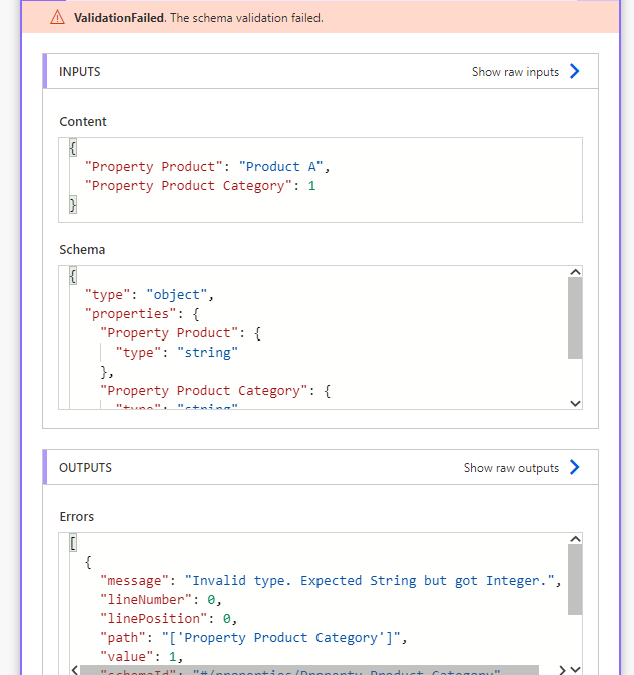
However the Parse JSON action is very picky… The action will fail if a property is missing, a new property is added later on or an existing property is giving back a different type of data. In short: any schema change not being updated in the settings of the action can cause a :cross_mark: “ValidationFailed error” :cross_mark:. Such an error will stop the Flow because the schema validation failed:

As long as you remind to also update the Parse JSON action schema, it will continue working fine.
But in my case, I wanted to know if Power Automate could skip the Parse JSON action :nerd_face:
What?
In this blog post, I can show you a way to skip the Parse JSON action and reference a property of an action with JSON output directly. This way, we can have one action less (#LessUsage #LessAPIcalls) and thus one action less that could fail (#Lean #LessActionsLessRisks).
How?
Let’s first have a look at a simple JSON object:
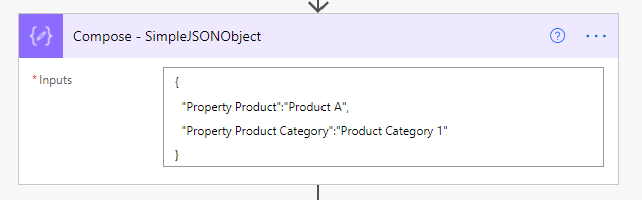
The output of this Compose action will be this JSON output:
{
  “Property Product”: “Product A”,
  “Property Product Category”: “Product Category 1”
}
I am using a Compose action to give JSON output, but in most cases JSON output will come from actions connected to a data source. In some types of actions unfortunately Power Automate does not create Dynamic Content. In these cases, the properties of these action do not show up in the Dynamic Content Panel for the rest of your Flow. When using the Parse JSON action on the output of such an action:
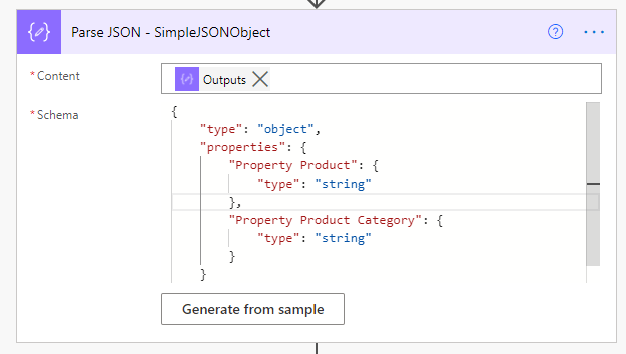
we can force the rest of the Flow to show us these properties in the Dynamic Content Panel. Making it easy for us to reference these properties. The Content input of the Parse JSON action will be the output of the Compose – SimpleJSONObject action:
@{outputs(‘Compose_-_SimpleJSONObject’)}
Thanks to the Parse JSON – SimpleJSONObject action, we can (from this action on) use the properties defined in its Schema as Dynamic Content:
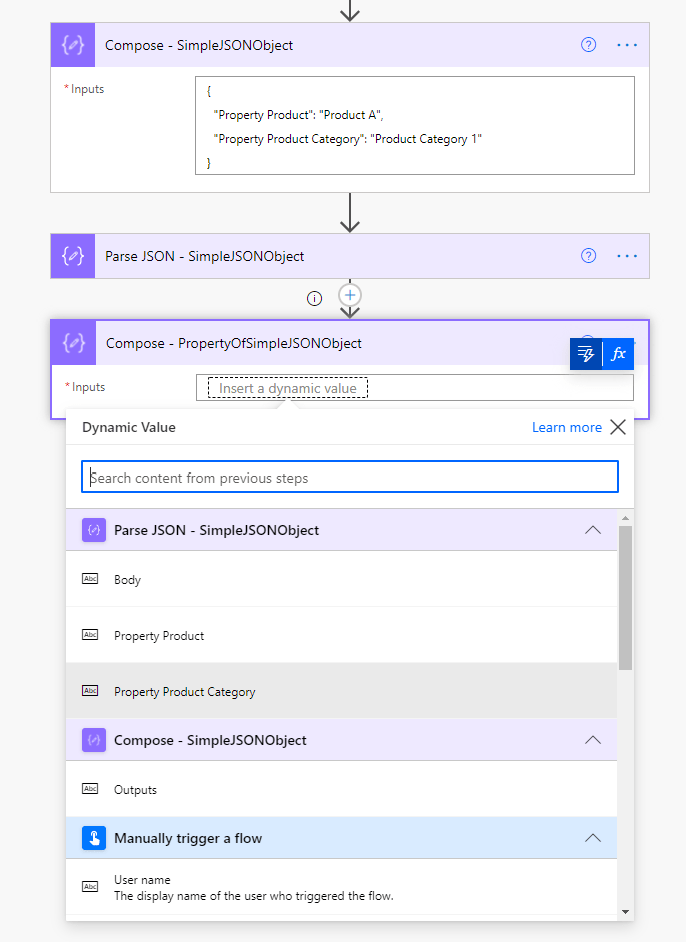
The expression of this reference would look like:
@{body(‘Parse_JSON_-_SimpleJSONObject’)?[‘Property Product Category’]}
In my first screenshot, you can see the action failing. It failed because the schema was expecting a string, while the Content input was giving an integer number. This was because I changed the JSON object temporarily :smiling_face_with_horns: to:
{
  “Property Product”: “Product A”,
  “Property Product Category”: 1
}
1) We can also reference the property of the first action Compose – SimpleJSONObject action directly. We can use an expression like:
@{outputs(‘Compose_-_SimpleJSONObject’)?[‘Property Product Category’]}
Power Automate can thus skip the Parse JSON action. Even without this parsing, we can reference the property of any action with a JSON output:
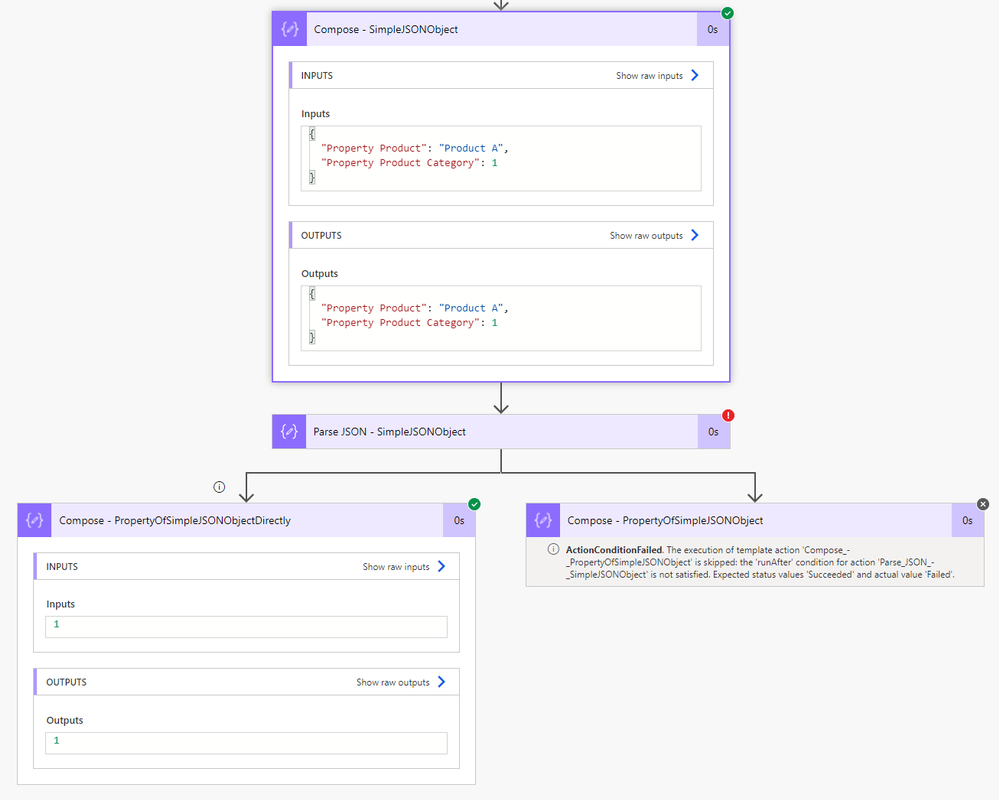
No Parse JSON action needed! 8)
Originally published at https://knowhere365.space/power-automate-skip-the-parse-json-action-to-reference-data/

by Contributed | May 10, 2021 | Technology
This article is contributed. See the original author and article here.

Today, May 10, 2021, we launch the second Project 15 from Microsoft video. The next chapter of a story that started with asking the question, “What if?”
I’m religiously anti-spoiler, so I will pause for you to watch the video.
But if you are asking yourself, “the second video?” let’s back up two years, and I will tell you a short history that brings us to today. Spoiler alert, it involves a first video.
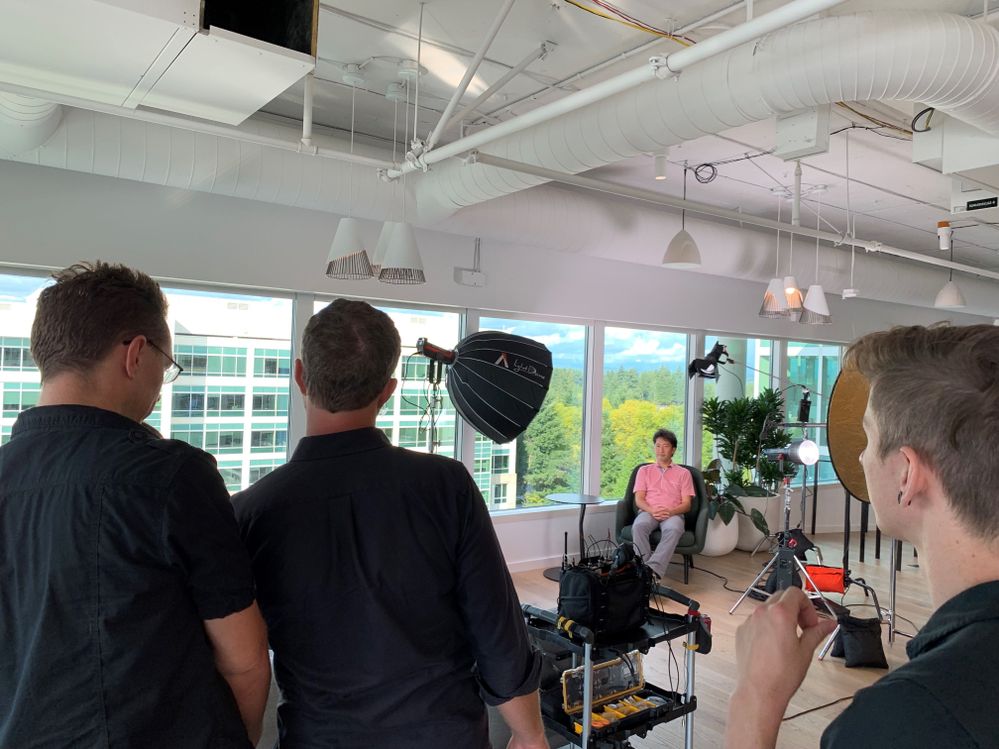 Daisuke Nakahara at the filming of the first Project 15 video – September 2019
Part 1: What is Project 15 from Microsoft?
Project 15 started two years ago on a “what if” that Daisuke and I shared. What if we could figure out a way to connect our commercial IoT solutioning world to the scientific developer community? Could we apply our processes to bring our partner solutions to scale in a new realm, rather than reinventing wheels that were stalling projects and/or wasting grant money? If we connected each other’s worlds, we could share knowledge and accelerate desperately needed solutions for our planet.
We asked others to join us on this adventure in learning and growth mindset. As we started our journey, Daisuke and I were unaware of most use cases in conservation, but we were willing to listen and learn to try to find the places we overlap.
Dr. Eric Dinerstein, Director of Biodiversity and Wildlife Solutions Program at RESOLVE was my first mentor. Eric gave me a crash course on anti-poaching in midnight emails while he was filming an episode of Robert Downey Jr.’s YouTube series, The Age of A.I.: Saving the world one algorithm at a time, in The Mara. Eric has an incredibly rich history in conservation. It’s almost beyond words so I will let this picture tell the story. In the photo below, Eric is collaring the first Rhino in 1986. Eric explained to me, “The rhino was sedated by a trained vet and who was an expert on immobilization of wild animals as being the head vet at the Kathmandu Zoo. When we injected the antidote (antagonist) in the rhino’s ear vein, it was on its feet in 30 seconds!” If you look closely, you can see curious elephants in the background.
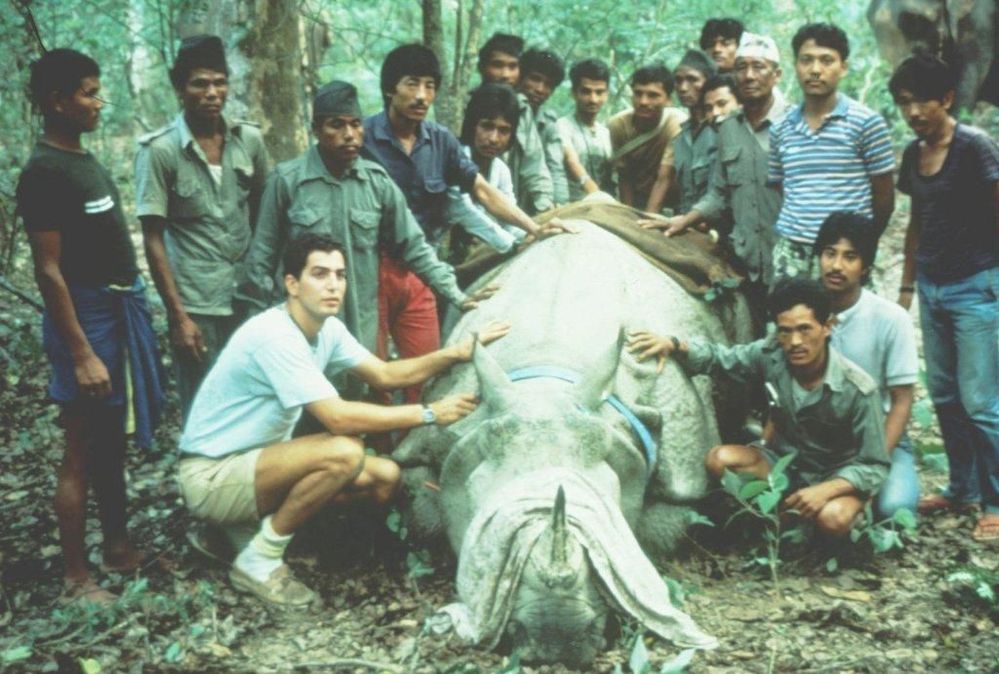 Dr. Eric Dinerstein collaring the first Rhino at Kathmandu Zoo – c. 1986
With Eric’s encouragement, I landed on a promise: that I may not know how to collar a Rhino, but I would gather an army of developers like me who could help him and his friends save the planet. The more I learned, the more I realized that we are out of time for talking about conservation. We all need to get involved in whatever way we can to save endangered animals. Project 15’s name was derived from the statistic that we lose an elephant from the planet every 15 minutes, a fact that Eric taught me.
The first mission of Project 15 was to ring a bell. Not that Daisuke and I had any idea what that meant yet, but we had to try.
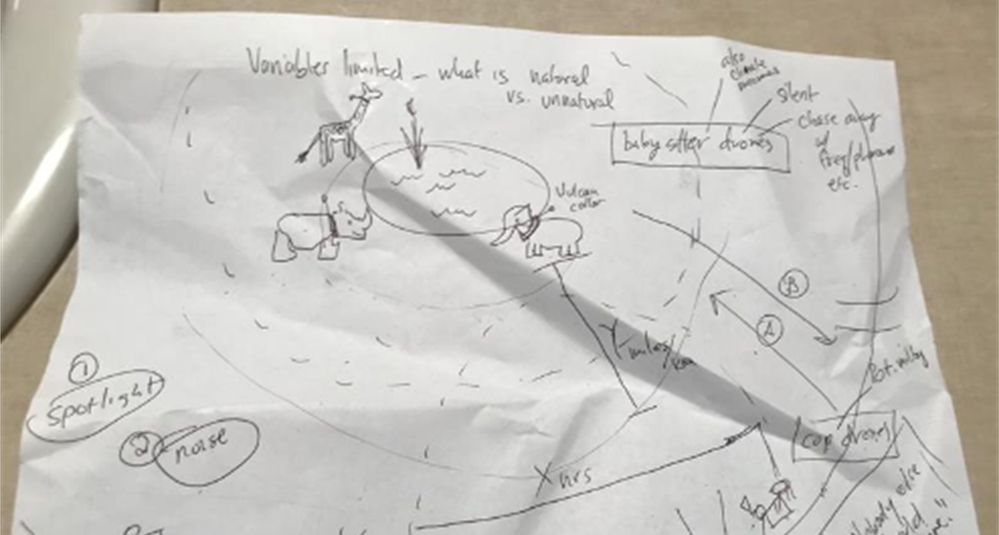 The first Project 15 “napkin drawing” – April 2019
I pitched Lucas Joppa, Chief Environmental Officer at Microsoft by email. He, like Eric, didn’t think it was an outlandish idea either and joined us for our first video.
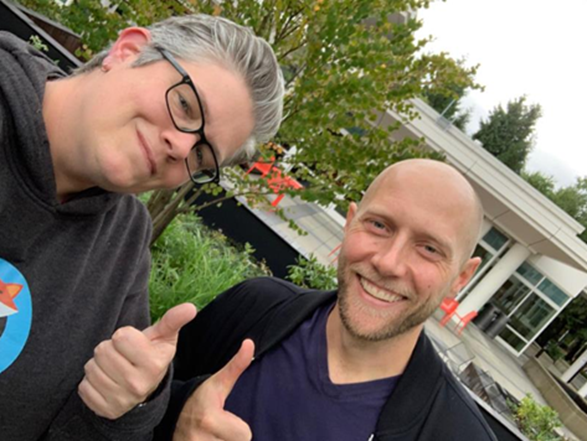 Lucas Joppa, Chief Environmental Officer at Microsoft with Sarah on filming day – September 2019
Eric was the first mentor, and soon, there were many more. We wouldn’t be here today if it weren’t for the space we were given to learn and the grace to be wrong and “try again.”
Part 2: The Phone Rings
The first call.
It took three months before the phone rang. By phone, I mean email. On January 3, 2020, we received an email from Bastiaan den Braber with a company called Zambezi Partners. Bastiaan found the video, our web page, and wrote us. It was a cold pitch from him explaining his business, and I don’t think he thought he would get a direct reply from me.

Zambezi Partners is a start-up focused on conservation with a partner ecosystem. The group wanted to build a platform to grow into a professional services firm that focused on conservation IoT as well as other sustainability use cases.
This was not who we thought would call. We didn’t know there were companies that wanted to focus on building IoT solutions in this area. This was interesting.
The second call.
Call number two came from Sonam Tashi Lama, Program Coordinator of the Red Panda Network. Sonam had been forwarded the Project 15 video and asked if we could help. Did you know that Red Pandas were discovered before Giant Pandas? They aren’t related.

We spent our nights meeting with Sonam, who is located at the base of the Himalayas in Tibet, to create what would be the digital transformation of the Red Panda Network.
The third call was Yoko Watanabe, Global Manager of the GEF Small Grants Programme implemented by the United Nations Development Program.

Yoko heard about Project 15 and asked for me and Daisuke to meet with her team. We knew that our engagement model was working as we were moving right along with our Red Panda Network project and were working with Zambezi Partners on their business model workshop and architectural design session, which is where we create the architecture of solutions on Azure with a partner.
Did I mention we did this on nights and weekends? Which is fine if you have a couple of projects.
The GEF Small Grants Programme has over 3,500 projects currently funded in a range of sustainability areas of focus from conservation of species to urban sustainability. They had 25,000 projects historically.
The goals we established with Yoko and her team were:
- Learn each other’s business language and processes
- Discover the patterns that match commercial solution engagements
- Design the engagement model for scale
Yoko proceeded to identify three projects for us to start with.
Part 3: Getting to Scale, the Project 15 Open Platform is born
So, to level set, by February 2020, Project 15 was just the two of us. A start-up named Zambezi Partners. An NGO saving red pandas. And, the UNDP’s GEF Small Grants Programme with their thousands of projects.
This is a scale problem to solve.
We started with the three projects from Yoko’s team: two in St. Lucia and one in Panama. We realized the developers didn’t need to learn the IoT “plumbing” every time, nor did they want to. Daisuke’s metaphor of not needing to know how to build a piano to write music is spot on.
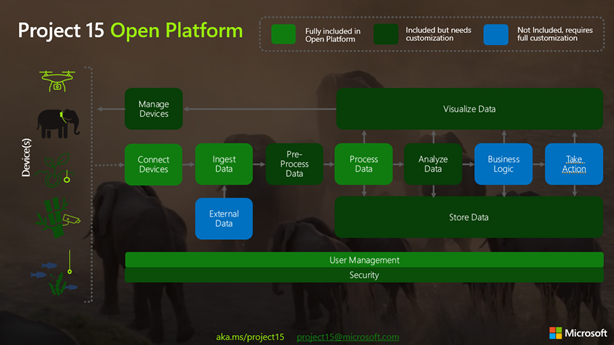
The next “what if” was to build 80% of the IoT infrastructure that these solutions had in common and put it on GitHub. In building the Project 15 Open Platform, we wanted to spin up a solution that enabled scientific developers to push a button and share it with the open-source community and universities to leverage.
Part 4: Elephants, Graphs, and Platform Zero by Zambezi Partners – oh my
Two years ago, when Project 15 began, I started to apply graph theory to sustainability and conservation.
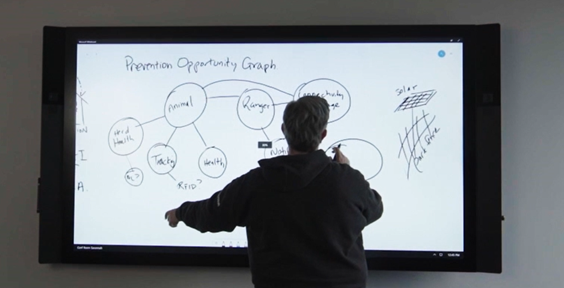 The first “napkin drawing” of the Sustainability Graph – September 2019
About six months ago, Azure Digital Twins (ADT) became graph-based.
Daisuke updated the Project 15 Open Platform with ADT to give developers a choice to spin up the Azure Digital Twins version. It is a simple flag on the template that launches picking “true” for Azure Digital Twins.
Long story, short, Zambezi Partners took the graph version of the Project 15 Open Platform and commercialized it to make Platform Zero. We had already designed their system with them and one of their device partners. It was based on IoT Hub and other PaaS services in Azure. But when I was talking about my graph theory and then Azure Digital Twins became graph enabled, Bastiaan saw the potential immediately.
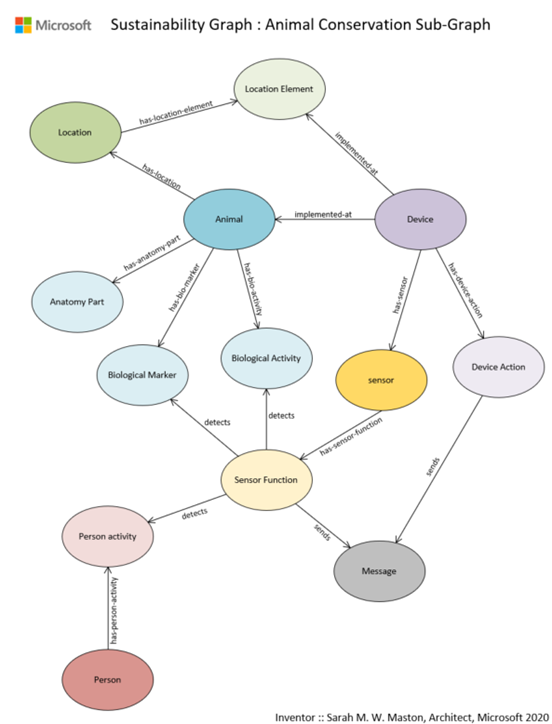 Sustainability Graph : Animal Conservation Sub-Graph v1.0
A Graph model is a more sophisticated way to model systems in conservation. By putting the devices in this graph there is more awareness around the relationship of devices within an environment and the capabilities to model entities like the animals themselves. Recently I wrote a LinkedIn article that walks through the Sustainability Graph using the sub-graph of animal conservation as I describe here in more detail.
What is so exciting about the approach that Platform Zero is taking by putting conservation up on a graph is that it enables the crossing of the gap between park-side and justice-side systems and is prepared to integrate complex processes: the processes of protecting an animal with connected devices and the processes of detecting animal trafficking.
Part 5: Who is Kate Gilman Williams?
Kate is the founder of Kids Can Save Animals. At the age of nine, she co-authored a book, “Let’s Go on Safari,” to raise awareness and advocate for animals bringing attention to issues like poaching and human wildlife conflict.

Kate became aware of Project 15 from Microsoft and reached out to me on Instagram. She had an idea, and it was a good one. Should you meet her, you will hear the urgency in her voice. She will tell you that we are out of time. She will stress to you that there will be no elephants by the time she is out of college at the rate they are disappearing. She will inspire you to act.
Kate said, “What if I could break the timeline? What if I could build an army of kids that can learn to use tools like the Project 15 Open Platform and fight for the planet?”
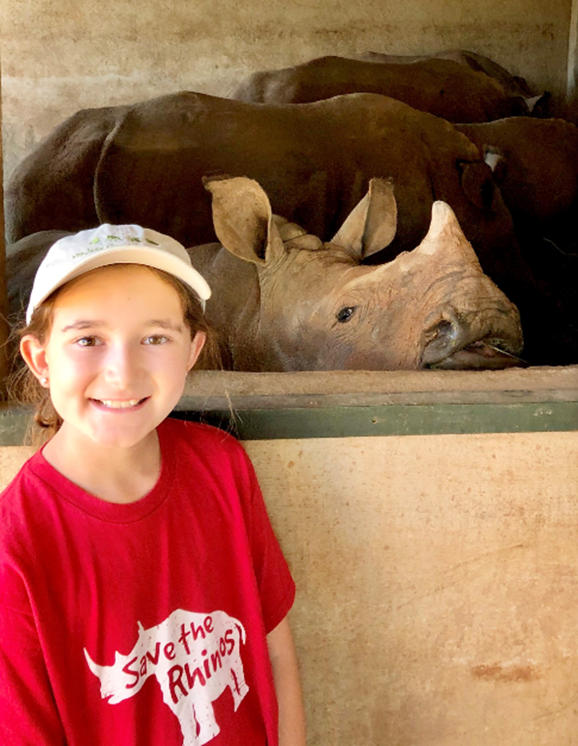 Kate Gilman Williams at the Care For Wild Rhino Sanctuary
She made three very important points in her pitch:
1. It will fall on her generation to fix the Earth.
2. “If you wait until I’m older to teach me, there will be nothing left to save.”
3. Given the opportunity, my generation will be part of the solution.
Her pitch was to make a learning club, called Club 15, that she could use as a platform to teach her generation technology through applied use cases in conservation and sustainability. Could I help her architect such a club?
The challenge was, of course, she wanted to create a club that she, herself, needed to join. It’s a Catch 22. So, I designed a game. I would play a kid in the future that had been a member of Club 15 and built a time machine to go back in time to teach her how to build the club so I could exist.
Kate was “in.” To teach her the concepts of IoT and ML, I started with the IoT Learning Path developed by our IoT Developer Advocacy team. Kate ordered a device and started to code. She then added a new element to her club, GitHub. She asked if we could use something like the Animal Detection System lab from Module 3 of the IoT Learning Path designed by Henk Boelman.
After she was up to speed on the concepts of Azure and IoT, we had an Architectural Design Session for what Club 15 would look like.
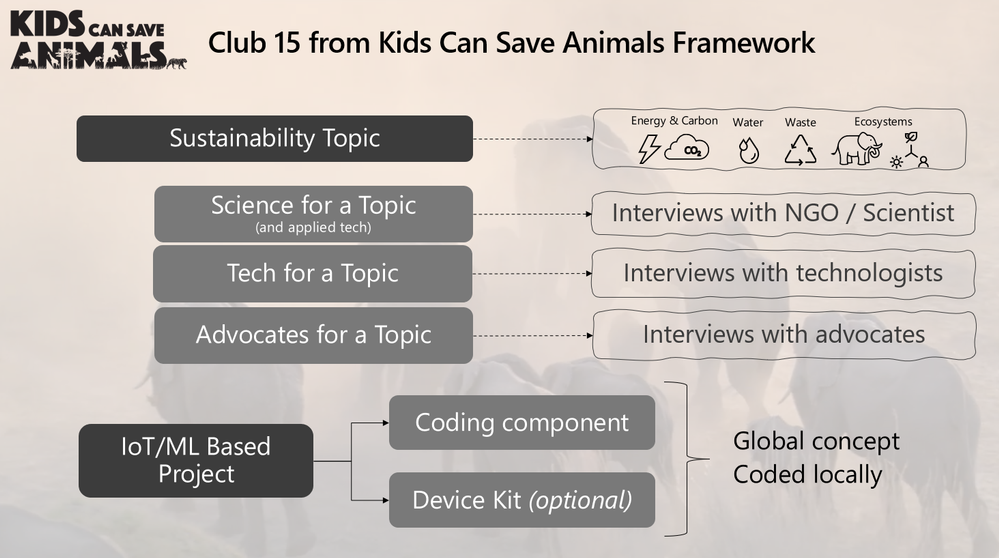 Club 15 from Kids Can Save Animals Framework
Kate uses 15-minute interviews with experts from three categories of professionals to teach concepts: 1) Scientists double-click on a conservation topic and dig into how technology is used within their specialty; 2) Technologists expand on a tech topic; and 3) Advocates that may be working in other non-scientific fields or non-technical fields discuss finding interesting ways to weave advocacy into their lives and work.
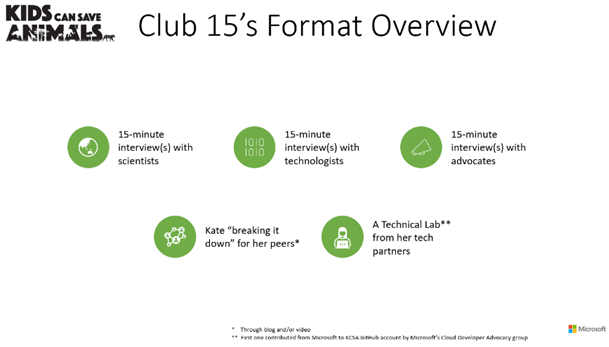
Inspired by the Microsoft focus pillars of sustainability, Kate designed four clubhouses each with a sustainability focus topic: Biodiversity, Water, Waste, and Energy/CO2. The first Club 15 Clubhouse releases today, May 10th, focusing on Biodiversity and Machine Learning with the next one landing in the Fall of 2021 focusing on Water and Sensors.
We worked with Paul DeCarlo and Henk Boelman from our IoT Developer Advocacy group to contribute to Kate’s first lab to teach how to use Custom Vision. As her project grows, other technology partners will follow our example to contribute more learning labs.
Club 15 from Kids Can Save Animals is remarkable in that it is designed to speak to a spectrum of learners: From the tech side, learning the conservation use cases from advocates and scientists; for advocates, learning more about technology concepts and how they are applied to conservation and sustainability. Everyone is welcome.
Joining Kate in her launch of Club 15 are some incredible guests that will share their knowledge.
And the amazing elephants at the Sheldrick Wildlife Trust!
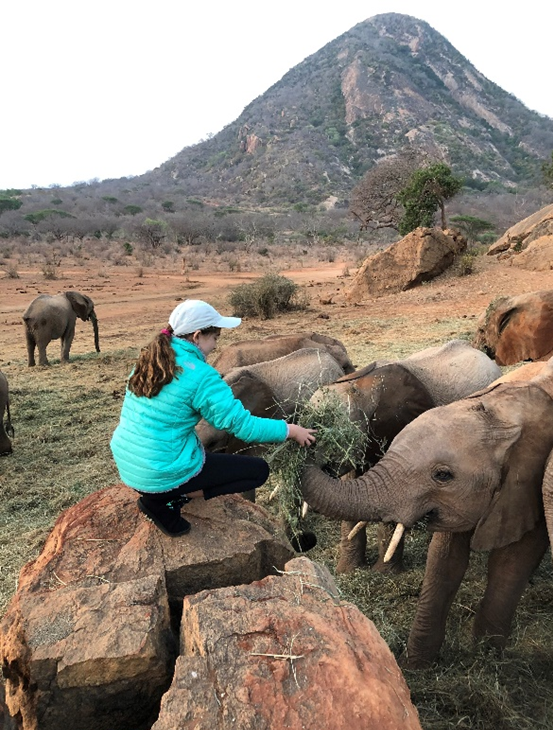 Kate with the orphans at the Sheldrick Wildlife Trust
The Butterfly Effect of Innovation
You never know where an idea will come from. You never know where it will take you. Project 15, if you follow it all the way back, starts with my cat Thomas and me rescuing her from a burning building. That moment in time led to Project Edison, which in turn led to Project 15.
Every moment of our lives is created by countless events. Sometimes the conundrum is that some events may be regretful or painful but without them, you wouldn’t be where you are today. The moment we are in with the Earth was created by countless events. It’s dire and I would be remiss to not say that here.
But I’ll tell you a secret I have learned. With all the bad news and the terrible statistics that we can drown in if we aren’t careful, there is a discovery down the path if you choose to follow it. Hope. There is so much hope in this solutioning community. Together, we can fix this place.
There have been many incredible people who have joined us on the Project 15 journey, the ‘Friends of Project 15.’ Daisuke and I are excited to continue with Yoko and her team at GEF Small Grants Programme implemented by the UNDP as we work to unlock scale. Each day we work with our partners to innovate on IoT solutions for sustainability from smart cities to smart manufacturing to smart farms. “Smart” very often now becoming interchangeable with “Sustainable”.
Today, Daisuke and I pass the “what if” baton that was the original spirit of Project 15 to Kate Gilman Williams and Club 15 from Kids Can Save Animals.
What if you could make a club and asked everyone to join? You never know, kid… It just might work.



Recent Comments